Category: Executive Presentations

04 May 2026
Leadership Communication Training Online: How to Choose a Programme — featured image

Leadership Communication Training Online: How to Choose a Programme

Quick Answer: Most leadership communication training online fails to change behaviour because it compresses a year of habit work into a weekend workshop. The programmes that actually shift how senior executives speak, structure and decide share four traits: self-paced modules you can revisit, behaviour-anchored practice, feedback on real decks and real meetings, and a structure that respects an executive diary.

Beatriz had done three leadership communication programmes in five years. One at a European business school, one with a well-known London consultancy, one run in-house by her fintech’s people team. She is chief operating officer at a 600-person payments business. Each programme filled her performance review as “excellent.” Each gave her a certificate, a set of frameworks and a good week of reflection.

Her direct reports, asked six months after the most recent programme whether her communication had changed, said the same thing her chief of staff said quietly over coffee: not really. The same habit of opening board papers with context rather than the decision. The same tendency in town halls to explain before she committed. The same long email threads where one strong sentence would have closed the matter.

This is the problem with online programmes in this category. The experience is good. The content is often excellent. The behaviour back at the desk, three months later, is almost identical to the behaviour before. The executives who actually change share a different pattern: they worked with material they could return to, practised on their own real decks, and treated the programme as a six-month project rather than a three-day event.

If you are evaluating a programme for yourself or your leadership team

The Maven AI-Enhanced Presentation Mastery programme is built for senior executives who need to apply the work to real meetings, not hypothetical case studies. Eight modules, eighty-three lessons, self-paced, optional live coaching fully recorded.

Explore the Programme →

Why most leadership communication training online doesn’t change behaviour

There is a specific reason senior executives finish a communication programme, give it strong feedback, and present the following Monday in exactly the same way they did the Friday before. The structure of the programme was designed for completion, not for change.

Most online leadership programmes are built around the weekend workshop or the two-week intensive. You block the diary. You absorb a large amount of content in a compressed window. You leave with frameworks, notes and a sense of clarity. Two weeks later, a board paper is due. By the time you use what you learned, the material has half-faded, the habits have not been rehearsed under real pressure, and the new behaviour has not had time to overwrite the old one.

Executives under time pressure revert to the shortest path. The shortest path is the habit you have already built. That is not a failure of discipline. It is how habits work in anyone running a real operating load.

The programmes that do shift behaviour share three architectural features. Material you can return to repeatedly without scheduling. Practice anchored to your real work, not generic scenarios. A time horizon of months, not weeks, with deliberate spacing between exposure and application. For the broader category view, see our guide to executive presentation training online.

MAVEN AI-ENHANCED PRESENTATION MASTERY — £499 PER SEAT

Built for executives who need the programme to fit around real work

Eight modules, eighty-three lessons, self-paced. Two optional live coaching sessions with Mary Beth, both fully recorded. Enrolment is open, new cohorts open monthly. £499 per seat, no subscription. Designed for chief executives, operating officers, finance directors and senior leaders applying the work to current board papers, investor meetings and stakeholder presentations.

Explore the Programme →

Self-paced. Enrolment is open. New cohorts open monthly.

The five things to evaluate before paying for a programme

When a senior executive evaluates a programme, the decision usually collapses to brand and price. That produces predictable outcomes. The five criteria that separate programmes that change behaviour from programmes that feel good are rarely front of mind when the budget conversation happens.

1. Can you apply the work to your own real material? The best programmes let you bring your next board paper, your last town hall, your draft investor update. If the programme only trains on synthetic case studies, the transfer back to real work is almost always weak.

2. Does the structure fit an executive diary? A chief operating officer cannot commit to four consecutive Fridays. Programmes that demand synchronous attendance at fixed times either fail at enrolment or produce high drop-off. Self-paced programmes, with optional live sessions recorded for later viewing, match how senior executives actually consume material.

3. Is the content modular enough to revisit? Behaviour change happens on the third or fourth exposure, not the first. A programme you cannot return to is a programme you will not apply.

4. Is the feedback on your work, not on your theoretical understanding? Quizzes measure recall. Feedback on a real deck measures change. Any programme that does not give structured feedback on your output is training comprehension, not behaviour.

5. Does the price reflect the outcome, not the format? Online programmes range from £99 to £5,000 for equivalent content. The bottom is usually knowledge transfer only. The top often pays for brand and production. The band that works for serious executive programmes sits between £300 and £800 per seat for self-paced formats with optional coaching. The presentation skills course for executives guide applies the same criteria to the presentation-skills subcategory.

Self-paced vs live cohort: which works for senior executives

The debate between self-paced and live-cohort formats is often framed as learning-style preference. For senior executives, it is mostly a diary question with a behaviour-change consequence.

Live cohorts, where all participants attend the same sessions at the same time, work for professionals who can block the calendar. For a director or chief officer running an operating portfolio, fixed-time commitments collide with board dates, investor calls and crisis work. The result is one of two patterns: the executive drops the programme after missing a session, or attends but cannot give it full attention.

Self-paced formats solve the diary problem and the behaviour-change problem together. Material can be returned to when the work comes up — the module on opening a board presentation with the decision becomes useful the week a board paper is due. Executives who apply the material at the point of need show more visible change than those who consumed it all in a block. The best structure keeps a self-paced core and layers optional live sessions on top, recorded so missing one does not break the programme.

The behaviour change problem

Beatriz’s three completed programmes illustrate the central problem: completion is not change. An executive can finish a programme, score well on the end-of-module knowledge checks, receive the certificate and still present on Monday morning exactly the way they did before. This is the defining failure mode of most online leadership programmes, and the reason corporate learning and development teams often see diminishing returns on successive investments.

Behaviour in adults with long-established communication patterns changes under three conditions: repeated exposure to the new pattern across multiple contexts, deliberate practice under conditions that approximate the real environment, and feedback tight enough to correct error before it becomes the new default.

The implication for programme design is specific. A single weekend workshop gives you exposure once, in one context, with no practice and no feedback. A twelve-week structure with short daily work applied to real meetings gives you exposure fifty times, in varied contexts, with the feedback loop running inside your actual work. The second is harder to market and easier to underprice. It is also the one that produces visible change. The executive communication skills guide covers the specific behavioural markers to look for before and after.

AI-enhanced training: what it actually means for executives

“AI-enhanced” is increasingly attached to online training programmes, and the label can mean anything from a chatbot helping you navigate the course menu to a genuine augmentation of how the executive practises and receives feedback. The useful question is narrow: does the AI component reduce the friction between learning and application?

The version that adds value gives the executive a set of AI-enabled workflows they can run on their own material. A structured prompt that analyses a draft board paper for decision clarity. A workflow that rewrites a town hall opening to lead with the commitment. A prompt that generates three alternative closes for an investor pitch. None of these replace judgement. All of them compress the practice loop from hours to minutes.

The version that adds little is branding. A programme that mentions AI in the title but delivers standard webinar content with a single prompt library bolted on does not meaningfully change the learning experience. Useful AI-enhanced executive training ends each module with one or two workflows the executive will actually use in the following week, on real communications.

The Winning Presentations approach

Maven AI-Enhanced Presentation Mastery is built around the criteria laid out above. The structure assumes the executive is busy, senior, and applying the material to work already in flight.

The core is eight modules covering eighty-three lessons, moving from decision-first structure, through executive delivery, to the AI workflows that compress practice. Every module is self-paced. There are no deadlines, no mandatory session attendance, and no penalty for returning to a module six weeks later when the relevant work lands on your desk.

Two optional live coaching sessions are offered with each enrolment, both with Mary Beth, and both fully recorded. Executives who attend live get the discussion. Executives who cannot get the recording and can run the same questions through the AI workflows built into the programme.

The AI workflows are the component most often misunderstood. They are not a prompt pack bolted on at the end. They are embedded in each module and designed to run on the executive’s own material — the draft board paper, the investor update in progress, the town hall script being rewritten. Application, not comprehension, is the centre of the programme.

Enrolment is open, and new cohorts open monthly. “Cohort” describes the enrolment period, not a live structured programme — participants begin at their own pace with the next available cohort.

Cost, time investment and realistic expectations

The honest answer on cost and time matters more than the marketing language. Senior executives committing the money want to understand what the programme will ask of them and what they can reasonably expect to see back in their work.

Cost. Maven AI-Enhanced Presentation Mastery is £499 per seat. That sits at the lower end of the serious executive range and reflects the self-paced format with optional coaching rather than a high-touch bespoke engagement. For enterprise teams of five or more, tailored arrangements are possible.

Time investment. The programme is designed to run across approximately twelve weeks of part-time engagement, at three to four hours per week. Executives who front-load the first two modules and then apply the material to live communications typically report the highest visible change. The self-paced format allows participants to work through in six weeks or six months.

What to expect. Three specific changes. Your openings shift from context-first to decision-first. Your structure on board papers and investor communications becomes more consistent under time pressure. You build a small set of AI-enabled workflows you actually use, not a prompt library you never open. It is designed to move the specific behaviours that boards, investors and senior stakeholders weigh most heavily.

FOR EXECUTIVES SERIOUS ABOUT CHANGING THE BEHAVIOUR, NOT JUST COMPLETING A PROGRAMME

Maven AI-Enhanced Presentation Mastery — £499 per seat

Eight modules, eighty-three lessons. Optional live coaching, fully recorded. Self-paced structure designed for senior executives applying the work to current board papers, investor meetings and stakeholder presentations. Enrolment is open, new cohorts open monthly.

Explore the Programme →

Frequently Asked Questions

How much does a leadership communication programme online cost?

Serious programmes aimed at senior executives typically range from £300 to £800 per seat for self-paced formats with some coaching. Bespoke one-to-one engagements run higher, often £2,000 to £10,000. Programmes under £100 are almost always knowledge-transfer only and rarely change behaviour in a measurable way. Maven AI-Enhanced Presentation Mastery is £499 per seat.

Is online training as effective as in-person?

For senior executives, online training is frequently more effective than in-person, for one structural reason: it can be returned to at the point of need. An in-person workshop happens once. A good online programme can be revisited the week before a board meeting or a town hall. The format that loses out is live-only online training, which combines the inflexibility of in-person with the lower engagement of a screen.

How long should a programme take?

Long enough for behaviour to change under real-world conditions, which means weeks rather than days. A two-day workshop is a knowledge transfer, not a behaviour change intervention. Programmes that produce visible change typically run over eight to sixteen weeks of part-time engagement, with the executive applying the material to real work in between sessions or modules.

What’s the difference between presentation training and leadership communication training?

Presentation training focuses on the specific act of presenting — structure, delivery, slides, handling questions. Leadership communication training is broader and covers written communications, one-to-one conversations, team meetings and public remarks. For most senior executives the two overlap heavily in practice, because the habits that make a board presentation strong also make a town hall and an investor email strong. A good programme in either category should cover the transferable habits, not just the format-specific tactics.

The Winning Edge — weekly

One short note every Thursday on what actually moves boards, investors and senior stakeholders. No filler.

Subscribe to The Winning Edge →

Related reading: The partner guide on executive presentation training online covers the adjacent category. For founders, our pieces on investor pitch deck slide order and pitch rejection recovery cover the tactical layer that sits on top of the communication fundamentals.

Your next step: Before signing up for any programme, including this one, write down the three specific behaviours you want to change. If a programme cannot clearly answer how it will address those three, it is the wrong programme regardless of brand or price.

About the Author

Mary Beth Hazeldine, Owner & Managing Director of Winning Presentations, advises executives across financial services, healthcare, technology and government on structuring presentations for high-stakes funding rounds, board approvals and stakeholder buy-in. With 24 years of corporate banking experience at JPMorgan Chase, PwC, Royal Bank of Scotland and Commerzbank, she works at the intersection of finance, language and decision psychology.

04 May 2026
Investor Pitch Deck Slide Order: The Sequence VCs Read Top-Down — featured image

Investor Pitch Deck Slide Order: The Sequence VCs Read Top-Down

Quick Answer: Investor pitch deck slide order matters because venture capital partners rarely read a deck in the order you built it. They flip ahead, jump to financials, and scan the team slide before they reach the problem. The sequence that survives this pattern puts a single-line company description first, problem and market second, product and traction in the middle, and team, ask and financials as a closing block. Each slide must hold up when read out of order.

Priya had rehearsed her Series A pitch eleven times. Twenty-three minutes, thirteen slides, a clean story arc from customer pain through to unit economics. The VC partner on the other side of the table opened the PDF, looked at slide one for three seconds, then clicked straight to slide seven — the financials. Then slide eleven, the team. Then back to slide four. Priya was still talking about the problem.

She watched the partner read her revenue projections before he knew what her company did. He read the team slide before the product. By the time he worked his way back to the problem slide, his questions were already framed by numbers he had half-interpreted without context. The narrative she had built, carefully, linearly, collapsed inside ninety seconds because the deck had not been designed to be read out of order.

The feedback afterwards was polite and fatal. “Interesting space, not sure we’ve got conviction on the wedge.” Priya rebuilt the deck the following week around a single structural premise: every slide has to make sense on its own, and the order has to survive a partner who reads it top-down and sideways at the same time. The next three pitches landed differently. The fourth became a term sheet.

If your next investor pitch is in the diary

The Executive Slide System includes a scenario playbook for investor pitch decks built around top-down reading patterns — so each slide holds up whether the partner reads the deck front-to-back or jumps straight to the ask.

Explore the System →

Why VCs read pitch decks top-down, not slide-by-slide

The assumption behind most investor decks is that the partner will read from slide one to the end, in the order you built it. That is not how most venture capital partners consume a deck, especially at first pass. A partner with twelve decks in their inbox on a Monday morning will open yours, scan the first slide, and then make a rapid decision about where to look next. Some will flip straight to the team slide. Some will go directly to traction. Some will scroll through all thirteen slides in under a minute, reading only the titles and headline numbers, and form a view before any detailed reading happens at all.

This behaviour is not disrespectful. It is the only way a working VC can triage dealflow. The implication for your investor pitch deck slide order is significant: the deck is not a presentation script. It is a document that will be read non-linearly by someone whose default mental model is “find the reasons to say no quickly.” Every slide has to answer a question on its own, and the sequence has to hold up when the partner flips ahead and circles back.

This matters even more in a live meeting. A partner who has already read the deck before the meeting will skip ahead while you talk. If slide seven surprises them before you have set up slide four, the narrative you rehearsed collapses. The sequence has to be robust to being read out of order, because it will be.

The founders who learn this structural rule early stop writing decks as linear stories and start writing them as indexed documents. Each slide is self-contained. The title earns its place. The headline number at the top answers the question the slide raises. The order still matters, because a VC who does read front-to-back should experience a coherent story. But no slide relies on the previous slide having been read first.

THE EXECUTIVE SLIDE SYSTEM — £39

Build a pitch deck that reads cleanly in any order a VC opens it

The Executive Slide System is 26 presentation templates, 93 AI prompts, 16 scenario playbooks, a master checklist and a framework reference. The investor pitch playbook is built around the non-linear reading patterns venture partners actually use — question-led titles, headline-first financial slides and a team slide that works whether it is read second or last. £39, instant access.

Get the Executive Slide System →

Designed for founders raising seed through Series B rounds in UK and European markets.

The slide order most founders default to (and why it fails)

The default pitch deck sequence most founders end up with looks roughly like this: title slide, team, problem, solution, how it works, market size, traction, business model, competition, financials, ask. It is a sequence assembled from fragments of advice across accelerator programmes, YC templates from 2011, and the decks of whichever founder the speaker happened to reference most recently.

Three structural weaknesses show up again and again.

Team too early. Opening with team implies the team is the core investment case. For most early-stage rounds, the team matters — but it matters in the context of the problem they are uniquely positioned to solve. Leading with team without first framing the wedge asks the partner to evaluate the founders in a vacuum. The better move is to earn the team slide by establishing the problem and the insight first.

For a deeper look at the specific mistakes founders make in deck structure, the investor pitch deck mistakes guide covers the recurring structural errors that show up across hundreds of decks.

Solution before market. Showing the product before establishing the market size means the partner is evaluating the product without a frame for how big the opportunity is. A clever product in a small market reads differently from a clever product in a £40bn market. The market size slide has to anchor the partner’s reading of everything downstream.

Financials and ask at the very end, as an afterthought. The ask is often the slide a partner most wants to see — how much, what valuation range, what runway it buys, what the next set of milestones looks like. Burying it behind competition and team slides means a partner who flips ahead finds it without any of the build-up that would make it land. The financials and ask need to be tight, headline-first, and capable of standing alone.

Side-by-side infographic comparing the default founder pitch deck order with team and ask in the wrong positions against the recommended sequence with company line first, problem and market second, and financials as a closing block

The failure pattern is consistent. The deck is built as a linear story, the VC reads it non-linearly, and the slides do not hold their weight individually. The fix is to rebuild the order around what survives a partner who reads the deck out of sequence.

The sequence that survives a 90-second deck flip

A working sequence for a seed-to-Series-B investor deck runs twelve to thirteen slides in the following order: company in one line, problem, market, product, how it works, traction, business model, competition, team, ask, financials, use of funds, closing milestones. The exact slide count varies, and some founders fold product and how-it-works into a single slide or split financials across two. The order is the load-bearing element.

The sequence is designed so that a partner who reads only the first three slides has a defensible first impression. A partner who skips to slide nine sees the team with context. A partner who jumps to the ask finds financials immediately before or after, so the numbers around the ask are never a separate hunt. Each of these reading paths produces a coherent picture.

The second discipline is that every slide has a question-led or claim-led title, with the answer as the headline beneath. “What problem are we solving?” with a one-sentence answer. “How big is the market?” with the number. “What traction have we built?” with the headline metric. A partner reading only the titles and the headlines should be able to form an investment thesis in ninety seconds.

For the related discipline of how much detail each slide can carry without losing the partner, the partner article on Series A pitch deck length covers the specific word and density limits that hold attention across a live reading.

If you would rather start from a ready-built template that already encodes this sequence, the Executive Slide System includes the investor pitch playbook with the full 12-slide sequence and editable templates for each position.

Slide 1: The company in one line, not the team intro

Slide one is not the place for the team. It is not the place for a mission statement. It is not the place for a logo parade of press coverage or partner institutions. Slide one has a single job: tell the partner what the company does in one line, clearly enough that a partner who reads only this slide knows whether this is in their investment thesis.

The working format is a single sentence with three components: who the customer is, what the product does, and the wedge. “We sell automated compliance monitoring to mid-market UK banks who cannot justify the headcount of a full risk team.” That is a sentence a partner can evaluate in three seconds. It frames everything that follows.

The common failure modes are predictable. A vague aspirational statement (“we are building the future of financial services”). A product description without the customer (“AI-powered compliance monitoring”). A customer description without the product (“we serve mid-market banks”). Each of these leaves the partner doing work the slide should have done.

Under the one-line description, slide one can carry the round stage, the amount being raised, and the headline traction number — one metric, not a dashboard. That is enough to frame the rest of the deck without overloading the opening.

Slides 2 to 3: Problem and market, in that exact order

Problem comes before market, and both come before solution. The sequence matters. Problem first establishes that the issue is real and painful. Market second establishes that solving it is worth capital. Only then does the solution slide carry weight.

The problem slide does its job when it describes a specific, named pain experienced by a specific, named customer segment, ideally with a dimension of cost or frequency that makes the pain quantifiable. “Mid-market UK banks spend an average of £1.8m per year on manual compliance review because existing tooling is built for tier-one institutions.” That is a problem a partner can evaluate. Generic pain statements (“compliance is complex and expensive”) leave the partner unable to judge whether the problem is worth a round.

The market slide is about size and shape, not total addressable market theatre. A partner has seen the “$50bn TAM” slide a thousand times and discounts it heavily. What they want is a bottom-up view: the number of target customers in the primary segment, the average contract value, and the implied serviceable market. A bottom-up £400m SAM reads as more credible than a top-down £50bn TAM.

The order matters because a partner who flips to the market slide before reading the problem slide interprets the market number without knowing what customer segment it covers. Putting problem first forces the partner’s attention through the pain before the numbers, which changes how the numbers read.

Slides 4 to 8: Story, traction, model

The middle block of the deck — product, how it works, traction, business model, competition — is where most decks either demonstrate that the company is working or fail to. The structural discipline is that each of these slides stands alone, and the traction slide in particular has to earn its position.

Vertical card layout infographic showing the five middle slides of an investor pitch deck: product, how it works, traction with a single headline metric, business model with unit economics and competition with a wedge positioning

Product slide. A single screenshot or diagram that shows the core product surface. Not a list of features. Not a roadmap. The partner needs to see what the customer actually uses. If the product is not yet visual, use a two-line description of the primary workflow.

How-it-works slide. Three steps, maximum. This is the slide that converts the product into a workflow a partner can picture a customer completing. Overloading this slide with technical architecture is the most common failure mode.

Traction slide. One headline metric at the top of the slide, large font, impossible to miss. Revenue run rate, number of paying customers, growth rate — whichever number is strongest. Underneath, two or three supporting metrics. A partner who reads only the headline number should be able to judge whether the traction is material for the stage. This is the slide most often read out of order, so it has to stand alone.

Business model slide. Contract size, contract length, gross margin, CAC and LTV if you have them. Partners want to see unit economics that make sense at scale. Vague business model descriptions without numbers read as red flags at Series A and beyond.

Competition slide. Not a two-by-two matrix with your company in the top-right quadrant. That structure is tired and partners discount it. A better format is a short list of named competitors with a one-line description of why your wedge is different, honestly. Claiming no competition is worse than naming three and explaining the gap.

Slides 9 to 12: Team, ask, financials — closing strong

The closing block is where decks either convert interest into a meeting or drift into polite rejection. Team, ask, financials and use of funds need to be the strongest slides in the deck, not the afterthought they often are.

Team slide. Three to five people, maximum. Each person gets a name, a role, and one line that establishes the specific relevance to this problem. Not the full CV. Not every prior company. The relevance to this specific wedge is what the partner needs. A founder who spent eight years inside a bank building compliance tooling is the right person for this round. Say that in one line, not a paragraph.

Ask slide. Amount, valuation range if you are willing to share it, runway the round buys, and the set of milestones the round delivers. The ask is a slide the partner will flip straight to. It should read cleanly on its own. A vague ask (“we are raising a Series A”) without specifics signals a founder who has not thought through the round carefully.

For board-level context on how the structure and close of a strategic presentation land with senior stakeholders, the board presentation skills guide covers the related discipline that carries over into investor meetings.

Financials slide. Three years of projected revenue, gross profit and operating cash flow, with current-year actuals where available. Headline numbers at the top, supporting detail below. This is the slide a partner will scrutinise most. Overly optimistic hockey-stick projections signal founders who do not understand their own market. Conservative, defensible numbers signal founders who have done the work.

Use of funds and milestones. Where the money goes, what it buys, and what the business looks like at the next round. This is the slide that translates the ask into an investment story. A partner who reads the ask slide and the use-of-funds slide should understand exactly what the next eighteen months deliver and what the follow-on round looks like.

Priya rebuilt her deck using this closing block structure. The team slide was ranked second in her rehearsed sequence, but third or fourth in the positions she could not control. The ask slide held up whether read before or after the financials. The use-of-funds slide answered the question the partner asked every time. The term sheet came four weeks after the rebuild.

FOR THE NEXT INVESTOR PITCH ON YOUR CALENDAR

The complete scenario library for high-stakes investor meetings

The Executive Slide System gives you 26 templates, 93 AI prompts and 16 scenario playbooks — including the investor pitch playbook with the 12-slide sequence, question-led title patterns and the closing block structure referenced above. £39, instant access, no subscription.

Get the System →

If you are starting from a blank canvas and want a worked example of this sequence applied end to end, the investor pitch deck template walks through each slide position with a sample company applied.

Frequently Asked Questions

How long should an investor pitch deck be?

For a seed to Series B round, twelve to thirteen slides is the working range. Fewer than ten starts to feel under-developed. More than fifteen signals a founder who has not yet decided what matters. The length discipline is the same as the sequence discipline: each slide has to earn its place, and anything that would not survive a partner reading only the title and the headline should be in an appendix, not the main deck.

Should financials come early or late in the deck?

Late — but not at the very end. The working position is slide ten or eleven, after team and ask, before use of funds. A partner who flips ahead to the financials should find them adjacent to the ask, so the two read together as a single investment case. Putting financials first, before the problem and market, leaves the partner interpreting projections without the context to judge whether they are credible.

Why do VCs flip ahead in a deck instead of reading linearly?

Partners triage twenty to fifty decks per week at the top of the funnel. Non-linear reading is the only way to process that volume. A partner will typically scan the first slide, jump to team or traction, and then decide whether to read the rest. This is not disrespectful — it is the workflow of a busy investor. The response is not to ask partners to read your deck differently. It is to build a deck that holds up under their actual reading pattern.

What about the appendix — where does that sit?

The appendix sits after the main 12-slide sequence and exists for one reason: to answer the three or four questions a partner reliably asks in the meeting itself. Cohort analysis, sensitivity scenarios, detailed competitive breakdowns, technical architecture. Label each appendix slide clearly (A1, A2, A3) so you can jump to it on request without scrolling through thirty backup slides while the partner watches. An appendix that takes more than three seconds to navigate to is an appendix that never gets used.

Presentation playbooks, delivered Thursdays

The Winning Edge newsletter covers the structures real executives use for high-stakes meetings — investor pitches, board approvals and stakeholder buy-in. One issue per week, typically read in four minutes.

Subscribe to The Winning Edge →

Not ready for the full system? Start here instead: download the free Executive Presentation Checklist — a one-page structural review to run over any pitch deck before it goes into a VC inbox.

Partner post: Once the slide order is right, the next structural decision is how much to put on each slide. The Series A pitch deck length guide covers the density rules that decide whether a partner reads through or skims out.

Your next step: Before you send your pitch deck to the next VC, open it in preview mode and read only the slide titles and the headline numbers at the top of each slide. If that reading on its own does not tell an investment story, the deck is not yet ready. Fix the titles and the headlines before you fix anything else.

About the Author

Mary Beth Hazeldine is Owner & Managing Director of Winning Presentations Ltd. With 24 years of corporate banking experience at JPMorgan Chase, PwC, Royal Bank of Scotland, and Commerzbank, she advises executives across financial services, healthcare, technology, and government on structuring presentations for high-stakes funding rounds and approvals.

04 May 2026
Series A Pitch Deck Length: Why 12 Slides Beats 25 Every Time — featured image

Series A Pitch Deck Length: Why 12 Slides Beats 25 Every Time

Quick Answer: The right series A pitch deck length is 12 slides, not 25. A Series A lead partner will skim your deck in under four minutes on the first pass, read four slides closely, and decide whether to take the meeting. A 25-slide deck dilutes the four slides that matter. A 12-slide deck forces you to choose them. Put everything else in a clearly structured appendix.

Priya was three days out from her first Series A partner meeting when she sent me the deck. Twenty-seven slides. Her seed deck had been fourteen, and she had doubled the weight because “there is so much more to show now — traction, cohorts, pipeline, expansion logic, the moat.” All true. None of it was on a single slide she could point to and say: this is the headline.

We ran the rehearsal on the Sunday. I asked her to open the deck, pick the slide her lead investor candidate would stop on, and tell me why that slide made the round. She paused. She clicked forwards. She clicked back. Around slide nine, the lead partner — who in rehearsal I was playing — leaned back and asked: “what’s the headline here?” She could not answer. Not because she did not know the business. Because the deck had no centre of gravity.

That meeting moved from a partner call to a recorded async review. Narrower path, lower chance of conversion. Three weeks later we rebuilt the deck around twelve slides. Not because twelve is magic — because twelve forces you to pick the four slides the partner will actually read, and protect them.

If you are cutting a Series A deck down to its real shape

The Executive Slide System includes scenario playbooks for investor pitches, partner meetings and fundraising reviews — structural templates designed for audiences who decide on four slides.

Explore the System →

Why series A pitch deck length is a signal, not a constraint

Most founders treat deck length as a packaging problem — how much content can I fit without losing the reader. That framing misses what the deck does. The deck is a signal of how the founder thinks. A 25-slide deck signals that the founder cannot prioritise, or has not yet earned the right to because the narrative is not tight enough.

A 12-slide deck signals the opposite. The founder has made the hard editorial calls. The four numbers that matter are on the slides, and the rest is supporting detail. Investors do not read this as a gap. They read it as maturity.

When a founder cannot cut from 25 to 12, it is almost never because the extra 13 slides are essential. The founder is using the deck to hedge — adding slides in case a partner asks a specific question, in case the market framing is weak, in case traction alone will not carry it. Each hedge is a tell. For the related question of slide order rather than count, the partner article on investor pitch deck slide order covers the sequence that holds up under a partner read.

What VCs actually do with a 25-slide deck

Most founders assume the partner will read linearly, absorbing the argument. That is almost never what happens. A partner has 45 to 90 seconds to form an initial judgement, and four to six minutes if the first pass is positive. Inside that window, they do three things.

First, they go to the slide that signals stage. For Series A, that is traction — revenue shape, retention or cohort data, and the curve. If that slide is on page 3 they find it in three seconds. If it is on page 17 inside “our journey so far,” they skim past and decide the deck is not stage-appropriate.

Second, they go to the slide that signals defensibility. Not the product slide — the moat slide. Whatever makes this business hard to replicate by a better-funded incumbent eighteen months from now. Product advantage at Series A is rarely the defensibility.

Third, they read the ask and use of proceeds. How much, against what milestones, over what runway. A £12m raise against vague milestones reads worse than a £6m raise against crisp ones.

Those are the four slides — traction, defensibility, ask, and the narrative setup that connects them. Everything else in a 25-slide deck is noise the partner filters through. A 12-slide deck makes the filter unnecessary.

Infographic comparing a 25-slide Series A pitch deck that dilutes the four decision slides against a 12-slide deck that protects traction, defensibility, ask and narrative setup

THE EXECUTIVE SLIDE SYSTEM — £39

Stop shipping a 25-slide deck that hides the four slides the partner actually reads

The Executive Slide System is 26 presentation templates, 93 AI prompts, 16 scenario playbooks, a master checklist and a framework reference. The investor pitch playbook is built for decision-stage audiences who skim before they read — with the 12-slide structure, title architecture and appendix navigation pattern this article describes. £39, instant access.

Get the Executive Slide System →

Designed for founders preparing Series A, Series B and growth-stage investor presentations.

The 12 slides that survive top-down reading

The twelve-slide structure is not arbitrary. It is the minimum coherent set that answers the questions a Series A partner asks on the first read. Each slide earns its place by being the shortest honest answer to one question the partner cannot skip. The twelve questions, in order:

  • What problem is being solved, and for whom?
  • How big is this market, and why is it ready now?
  • What is the product, in one screen?
  • What traction does that product already have?
  • How does the business make money, and what are the unit economics?
  • Who is the team, and why this team?
  • What is being asked for, and what does it buy?
  • What do the financials project, and against what assumptions?
  • What are the plausible exits, and what shape do they take?
  • Why is this defensible against well-funded incumbents?
  • What is the go-to-market motion that gets you to Series B?
  • What is the close — the one sentence the partner takes to the partnership meeting?

Each is one slide. Not a section. Not a sub-deck. When a founder tells me a topic needs two slides to do justice, the founder has not yet found the sentence that collapses it. That sentence exists. It is the editorial work.

For the complete structural reference including title architecture and layout patterns, the investor pitch deck template walks through the slide-level design.

Slide-by-slide: the 12 you need

1. Problem. Framing from the customer’s perspective, with one quantified cost of the status quo. Not “enterprises struggle with X.” A specific operational cost a specific buyer already pays.

2. Market. Bottom-up sizing. Target buyers, average contract value, addressable revenue. Top-down “it’s a $42bn market” numbers read as lazy at Series A.

3. Product. One screenshot that communicates what the product actually does. Not three. Not a feature grid. The screen the user spends 80% of their time on.

4. Traction. The single most important slide. Revenue curve, retention or cohort shape, and one signal of velocity. This is where the round is won or lost.

5. Business model. How you charge, the contract shape, gross margin and one unit economic ratio (LTV/CAC, payback period, contribution margin). If the economics are not yet clean, say so openly and show the trajectory.

6. Team. Three to five faces maximum. For each, one line: the relevant experience that matters for this company. Investors hire the team that can execute this specific plan.

7. The ask. Round size, valuation range (optional), use of proceeds in three buckets (product, GTM, team), and the runway this buys in months. Specific milestones, not categories.

8. Financials. Three years of projected revenue, gross margin and burn. Flagged as model, not forecast. Include the two or three assumptions the model is most sensitive to.

9. Exit. Plausible acquirers or comparable outcomes, with a rough scale. Not a promise — a demonstration that the founder has thought about what a 10x outcome looks like.

10. Defensibility. The moat. Data network effects, switching costs, regulatory position, distribution lock-in, proprietary data asset — whichever applies. If none apply, the founder needs to know that before the meeting.

11. GTM. The go-to-market motion that gets you from this round to the next. Sales-led, product-led, partnership-led or hybrid — and the specific next hires and channels that make it real.

12. The close. One sentence the partner takes into the Monday partnership meeting. Usually a reframing of the opportunity in the language of the fund’s thesis. Written last, because it is the whole deck compressed into a line.

For founders still shaping the narrative before slide-level choices, the pitch deck storyline guide covers how to sequence the twelve questions into a single argument.

Slides to never include in the 12 (and where they go instead)

Stacked cards infographic showing four types of slide that belong in the Series A appendix rather than the main 12: competitor matrix, roadmap, detailed org chart and press coverage

The slides founders most often over-include are competitive landscape, detailed roadmap, press and logos, and the history-of-the-company slide. Each has a place. None belong in the twelve.

Competitive landscape. A 2×2 matrix with your logo in the top right is almost always weaker than one sentence inside the defensibility slide that names the two real competitors and what you do differently. The matrix goes in the appendix.

Detailed roadmap. A quarter-by-quarter roadmap is either aspirational theatre or premature specificity. The GTM slide covers strategic direction. Detailed roadmap belongs in a data room, not a first-read deck.

Press and logo walls. Customer logos can earn a small line on the traction slide. A full page of press hits reads as marketing, not evidence.

Company history. The founding story, the pivots, the previous names — none of it answers a partner question. If the founding story is strong, it comes out verbally. A slide for it signals the founder has run out of harder material.

The appendix is where these slides live — labelled A1 through A6, navigable in under two seconds. When a partner asks about the competitive set, the roadmap or the regulatory position, you jump straight there. The main twelve stay clean. This is how investor pitch deck mistakes most often get corrected at the structural level.

The discipline of cutting from 25 to 12

The cut from 25 to 12 is not a compression exercise. It is a decision exercise. Print every slide as a thumbnail, lay them on a table, and for each ask two questions — which of the twelve partner questions does this slide answer, and is it the single strongest answer I have?

Any slide that does not answer one of the twelve comes out. Any slide that does but is not the strongest version comes out. The remaining slides are merged, rewritten and reordered until each of the twelve positions has exactly one slide in it.

The work that feels like cutting is actually clarifying. A founder with 25 slides will usually find that two product slides collapse into one better slide, three go-to-market slides compress into one clearer structure, and five team slides become one with the people who matter.

Priya cut her 27-slide deck to 12 in three working days. The round moved from a deferred partner call to a live partner meeting inside two weeks. The meeting opened with the lead asking her to walk him through slide 4 — the traction slide. The slide was already there, already clean, already the strongest version of the answer. The deck had a centre of gravity for the first time.

FOR FOUNDERS PREPARING A SERIES A DECK

The full structural library for investor presentations

The Executive Slide System gives you 26 templates, 93 AI prompts and 16 scenario playbooks — including the Series A investor playbook with the 12-slide structure, question-led titles and the appendix navigation pattern. £39, instant access, no subscription.

Get the System →

Frequently Asked Questions

Is 12 slides too short for Series A?

No. Decks shorter than ten often feel under-argued at Series A; decks longer than fifteen dilute the four slides that matter. The range that reliably holds a partner’s attention is 12 to 15, with 12 as the cleaner target.

Where do unit economics go if they deserve more than one slide?

They do not, in the main twelve. The business model slide carries the headline ratio and contract structure. Cohort analysis, payback curves and sensitivity tables go in the appendix. If the unit economics need three slides to tell the story, the headline number is not yet strong enough — a product or pricing problem, not a slide problem.

Should I have a separate appendix deck or keep it in the same file?

Same file, clearly divided. A separator slide between slide 12 and A1 signals the end of the main argument. Appendix slides are numbered A1 to A6 or A8, with a short index on the separator so founder and partner can navigate instantly. A separate file fragments the meeting.

What about visual density per slide?

One idea per slide, expressed in one headline sentence at the top, with supporting evidence below. Dense slides with six charts read as research dumps. Sparse slides with one chart and one sentence read as conclusions. Partners respond to conclusions.

Presentation playbooks, delivered Thursdays

The Winning Edge newsletter covers the structures real executives and founders use for high-stakes meetings — investor, board and senior stakeholder. One issue per week, typically read in four minutes.

Subscribe to The Winning Edge →

Not ready for the full system? Start here instead: download the free Executive Presentation Checklist — a one-page structural review to run over any deck before you send it to a partner.

Partner post: Once you have the twelve slides chosen, the order you put them in changes how the deck reads. The investor pitch deck slide order guide covers the sequence that holds up under a partner read.

Related reading: If the deck has already gone out and come back with a no, the pitch rejection recovery guide for founders covers the next move. For the partner meeting itself, steel-manning hostile investor questions covers how to handle the pushback that follows a strong deck.

Your next step: Print every slide in your current deck as a thumbnail and lay them on a table. For each slide, write on a sticky note which of the twelve questions it answers. Any slide without a sticky note comes out. Any question without a slide needs one.

About the Author

Mary Beth Hazeldine, Owner & Managing Director of Winning Presentations, advises executives across financial services, healthcare, technology and government on structuring presentations for high-stakes funding rounds, board approvals and stakeholder buy-in. With 24 years of corporate banking experience at JPMorgan Chase, PwC, Royal Bank of Scotland and Commerzbank, she works at the intersection of finance, language and decision psychology.

04 May 2026
Investor Hostile Questions: The Steel Manning Technique That Wins Rooms — featured image

Investor Hostile Questions: The Steel Manning Technique That Wins Rooms

Quick Answer: Investor hostile questions are almost always invitations, not attacks. The technique that wins the room is steel manning — restating the investor’s objection in its strongest form, acknowledging the legitimate concern underneath it, and only then answering. Founders who defend lose credibility. Founders who dismiss lose the term sheet. Founders who steel-man show they have already thought harder about the risk than the investor has.

Mei was eleven minutes into her Series B pitch when the lead partner leaned forward and said, flatly: “Your unit economics don’t work. You’re burning cash to acquire users you’ll never make profitable. Convince me otherwise.” The other two partners stopped typing. One closed her laptop.

Mei’s first instinct was to defend — to walk the partner through the LTV calculation on slide seventeen. Her second, a second later, was to dismiss: “Actually, our contribution margin is positive at month nine.” Both were wrong, and she could feel it as she opened her mouth.

What she said instead: “The concern you’re raising is the one that should scare us most. If I can’t show you a path from today’s blended CAC of £84 to cohort-level payback under fourteen months, this isn’t a Series B business, it’s a bridge round. Let me show you what we think the answer is, then I want to hear where you still don’t believe it.” The partner who closed her laptop reached for it again. Mei had the room for the next thirty-two minutes.

When the hardest question is the one that decides the round

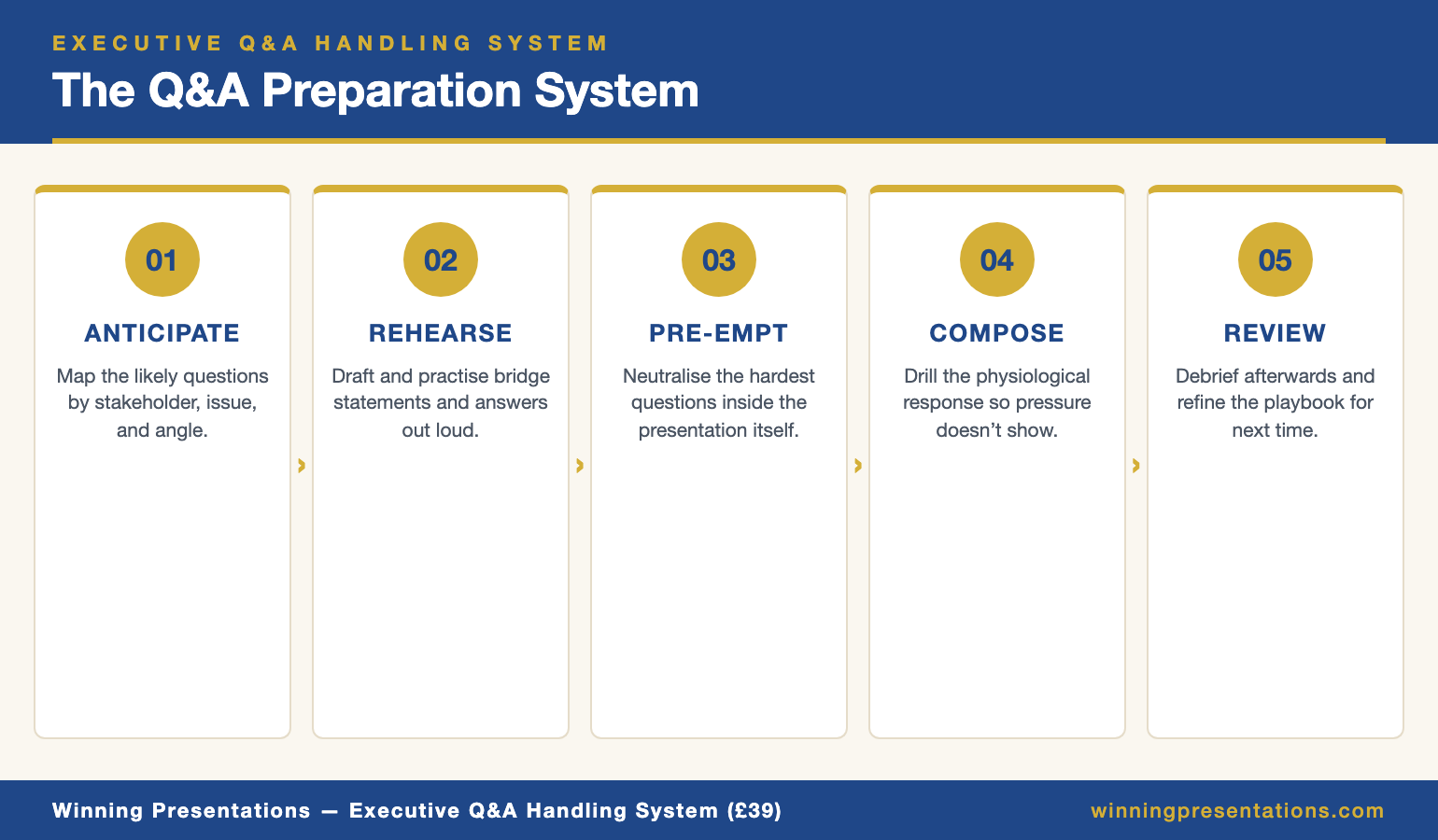
The Executive Q&A Handling System is a framework for handling hostile, unexpected and high-stakes questions in investor, board and executive settings — bridge statements, deflection techniques, composure protocols and the structural habits senior operators use when the room turns adversarial.

Explore the System →

Why investor hostile questions are usually invitations, not attacks

A hostile question in an investor meeting is rarely personal. Partners sit through twenty or thirty pitches a week. The ones that hold attention are where the founder can be pushed hard on the central risk and respond without losing composure. The partner is trying to find out whether you survive the boardroom conversations they will have about you for the next seven years.

This reframe matters because the emotional shape of the question and its strategic intent are almost opposites. The question sounds like “you’re wrong.” The intent is almost always “show me you have thought about this harder than I have.” Founders who hear the first version defend. Founders who hear the second demonstrate judgement.

One kind is genuinely adversarial: the question designed to move the pricing conversation. “I’m not sure this is a £60m post-money business at current metrics” is not an invitation to rebut the metrics — it is an opening move in a valuation negotiation. Confusing the two is how founders lose ground they cannot recover.

The defence reflex: why every founder’s first instinct loses the room

Watch enough investor pitches and you notice that almost every founder, when pushed, does one of two things in the first sentence. They defend the specific number, or they dismiss the premise and pivot to a metric they prefer. Both lose credibility with experienced investors.

The defence reflex — “actually, the CAC is lower if you strip out the paid acquisition test” — signals that the founder has not yet accepted the central risk. Every “if you look at it this way” sounds like optimising the number rather than solving the problem. The partner stops listening to the specifics and starts listening to the posture.

The dismissal reflex is worse. “That’s not how we think about unit economics at our stage” tells the investor that the founder cannot hold two models at once — their own, and the one investors use to evaluate businesses like theirs.

Experienced founders do something slower and more effective. They pause. They restate the question in terms even stronger than the investor used. Then they answer. This is steel manning.

Infographic comparing the defence reflex and dismissal reflex against the steel-manning response, showing how each one lands with investors during a pitch meeting

THE EXECUTIVE Q&A HANDLING SYSTEM — £39

The framework for handling the questions that decide the meeting

The Executive Q&A Handling System is a structural framework for hostile, unexpected and high-stakes Q&A in investor, board and executive settings. Bridge statements, deflection techniques, composure protocols and the steel-manning response pattern referenced throughout this article. £39, instant access.

Get the Q&A Handling System →

For founders, executives and senior leaders who face live Q&A in high-stakes rooms.

Steel manning explained — the technique lawyers and politicians use

Steel manning is the rhetorical practice of stating an opponent’s argument in its strongest form before you respond. It is the opposite of straw manning, which weakens a position so it is easier to knock down. Trial lawyers do this in cross-examination. Senior politicians do it under press scrutiny. Supreme court advocates will often summarise opposing counsel’s case better than opposing counsel did before dismantling it.

It works because it demonstrates two things the audience wants to see: that you understand the argument against you, and that you are confident enough to give it its best hearing first. An investor asking a hostile question listens for those signals before anything else.

There is a second effect. When you restate the objection in its strongest form, you take control of the frame. The investor’s version is now your version. You choose which part to address first. The person who defines the problem shapes the conversation about the solution. For founders who have handled board pushback, the logic that works on hostile board presentation questions carries directly across.

The four-step steel-man response framework

A steel-manned response has four moves. The whole sequence usually takes forty to sixty seconds before you reach the substantive answer — the most valuable sixty seconds in most pitch meetings.

Step 1 — Restate the concern in its strongest form. Not in the investor’s exact words, but in the version that would worry you most if you were in their seat. “If I were sitting on your side of the table, the version of this I’d want answered is…” You are signalling that you have thought about this from the investor’s position.

Step 2 — Name the legitimate risk underneath. Every hostile question contains a real risk. Identify it and say it out loud before the investor has to. “The legitimate risk is that we hit the growth ceiling on our current channel before cohort-level payback confirms the LTV assumption.” This moves the conversation from whether the risk exists to what the response to it is.

Step 3 — Show your actual thinking. Not a slide number. The specific mental model you use to hold the risk. “We think about it in three horizons: current channel saturation, second-channel activation, and pricing power on retained cohorts.”

Step 4 — Offer the investor a role in the remaining uncertainty. Invite them to say where they are still not convinced. “Tell me which of those three looks shakiest to you and let’s go there first.” You have given the partner permission to keep pushing without making it feel hostile.

The general Q&A handling framework covers the composure protocols underneath this — the pause before restatement, the eye-contact rule during step four.

Worked example: handling “your unit economics don’t work”

Take the partner’s opening challenge from Mei’s pitch and run it through the framework.

The question: “Your unit economics don’t work. You’re burning cash to acquire users you’ll never make profitable. Convince me otherwise.”

Step 1 — Restate stronger. “The concern you’re raising should scare us most. The version I find most useful internally: we have not yet proven that the cohorts we’re buying today will look like the 2024 cohorts on month-thirty payback. If they don’t, we’re not a Series B business at this valuation.”

Step 2 — Name the legitimate risk. “The real risk is CAC inflation on channels that haven’t saturated. We’ve seen a 19% CAC increase on paid search in six months. If that continues linearly, month-thirty payback moves from fourteen months to nineteen, and the LTV:CAC ratio drops below the threshold this round is priced on.”

Step 3 — Show actual thinking. “We’re holding that as three layered bets. First, paid search CAC is cyclical rather than structural, and we have cohort evidence. Second, the partnerships channel we launched in Q1 is running at 38% of blended CAC. Third, pricing power on retained 24-month cohorts gives us a lever we haven’t pulled.”

Step 4 — Invite continued pressure. “Of those three, the partnerships channel is the one I’d want to stress-test first. Do you want to go there, or see the 24-month cohort curves?”

This response does not defend the CAC number or dismiss the premise. It treats the question as the most important thing that will be said in the meeting and answers it with the seriousness that implies.

Four-step flow diagram of the steel-manning response framework: restate stronger, name the legitimate risk, show actual thinking, invite continued pressure

When not to steel-man: the two questions where it backfires

Steel manning is not a universal tool. Two categories of question make your position worse.

The factually wrong question. If the investor has misread the slide or is working from an outdated deck, do not steel-man the mistaken premise. Correct it briefly and move on. “Just to clarify — that number on slide nine is gross revenue, not ARR. ARR is on slide eleven at £6.1m.” Steel manning a factual error reinforces the error.

The pricing-negotiation question dressed as a diligence question. “I’m not sure this is a £60m post-money business” is not asking for analytical thinking on valuation. It is testing whether you will negotiate against yourself. The right response is calm and short: “We priced this round based on comparables at this stage. Happy to walk through the comparables set. But I’m not going to re-open the valuation conversation in the meeting — we have a term sheet process for that.” Steel manning a negotiating move concedes ground you cannot get back.

The rule: steel-man questions about the business. Don’t steel-man questions about the deal. Showing your thinking builds trust on the first. It leaks leverage on the second. For the wider taxonomy, the guide on how to handle tough questions in a presentation covers this in more detail.

Practising steel manning so it becomes reflex, not effort

Steel manning fails for most founders not because they do not understand the framework, but because it collapses under pressure if it has not been rehearsed. With a partner leaning forward and three seconds to respond, the first sentence has to arrive without effort.

Three practice habits build the reflex:

The hostile-question inventory. Before any investor meeting, write down the ten hardest questions you could be asked — not the ten most likely, the ten hardest. The ones that make you wince. For each, write the steel-man restatement in full sentences, not bullet points. Sentence structure is what your brain retrieves under pressure.

The cold-read drill. Hand the list to someone who does not know your business well. Ask them to read the questions aloud in a hostile tone, randomly. Pre-scripted rehearsal teaches you to answer the questions you expect. Cold-read drills teach you to handle the tone shift when the question is not the one you prepared for.

Recording and reviewing. Record yourself answering the ten hardest questions. Listen for the first three words of your response. If they are defensive (“actually,” “that’s not quite right”), you have defaulted to the defence reflex. Re-record until the first three words are the restatement. The opening phrase is the muscle memory. Everything else follows.

FOR THE NEXT INVESTOR MEETING ON YOUR CALENDAR

A structural playbook for the questions that decide the round

The Executive Q&A Handling System gives you the bridge statements, composure protocols and response frameworks that hold up in hostile investor, board and executive Q&A. Built for the moment the room turns adversarial and you have three seconds to decide how to respond. £39, instant access, no subscription.

Get the System →

Frequently Asked Questions

Isn’t steel manning just agreeing with the criticism?

No. Steel manning restates the concern in its strongest form and names the real risk underneath — then answers it. Agreeing concedes the point. Steel manning does the opposite: it shows you have considered the strongest version and thought through your response. Concession signals weakness. Steel manning signals that you have internalised the problem and still believe in the business.

What if the investor is wrong on the facts?

Do not steel-man a factual error. Correct it briefly and move on. “That number on slide nine is last-twelve-months gross revenue — ARR is on slide eleven at £6.1m.” Steel manning applies to questions raising a legitimate concern, even when the framing is aggressive. When the premise itself is wrong, clarify quickly so the real conversation can start.

How do I do this under time pressure?

Compress to two sentences. Sentence one is restatement-plus-risk: “The concern underneath is whether our cohort payback holds under CAC inflation — the thing we argue about most internally.” Sentence two is headline plus invitation: “Our honest answer is layered across three bets — happy to go deeper, or give you the short version first.”

Does this work for board Q&A as well?

Yes, often better. Boards are longer-term audiences — they see you every quarter and read defensive responses more harshly than a one-off pitch audience would. Steel manning at board level builds durable credibility with non-executive directors and shows the chair you can hold criticism without fragility.

The Winning Edge — weekly

One short note every Thursday on what actually moves boards, investors and senior stakeholders. No filler.

Subscribe to The Winning Edge →

Partner post: If the meeting ends with a no rather than a yes, the next move matters more than the pitch itself. The guide on pitch rejection recovery for founders covers what to do in the seventy-two hours after a decline.

Related reading: Deck order shapes which hostile questions come up first — see investor pitch deck slide order and Series A pitch deck length.

Your next step: Before your next investor meeting, write down the ten hardest questions you could be asked and draft the steel-man restatement for each in a full sentence. Do it tonight, not the morning of. The reflex is built the day before, not the hour before.

About the Author

Mary Beth Hazeldine, Owner & Managing Director of Winning Presentations, advises executives across financial services, healthcare, technology and government on structuring presentations for high-stakes funding rounds, board approvals and stakeholder buy-in. With 24 years of corporate banking experience at JPMorgan Chase, PwC, Royal Bank of Scotland and Commerzbank, she works at the intersection of finance, language and decision psychology.

03 May 2026
Diverse small group of three senior executives gathered around a polished wooden meeting table in a modern executive learning environment, leaning slightly forward and engaged

Presentation Skills Workshop for Executives: How to Choose One That Works

Quick Answer: A presentation skills workshop for executives is the wrong format if it teaches the basics of slide design or public speaking. The right one starts from the assumption that you can already present and works on the structural patterns that earn senior decisions — deck architecture, decision-first framing, and Q&A under pressure. Self-paced formats with optional live coaching now outperform multi-day in-person workshops for most senior calendars.

Rafaela had been promoted to chief operating officer of a mid-market healthcare company three months earlier. She knew her board was watching her quarterly presentations more closely than her predecessor’s. She was already a competent presenter — she had been doing it for fifteen years. What she needed was a structural step-up. She asked her HR partner to find her “a good presentation skills workshop for executives”.

What came back was a list of seven options. A two-day in-person residential at a well-known leadership institute (£3,500). A six-week live cohort programme delivered by a US-based university (£2,800). A self-paced online programme with optional live coaching (£499). A one-on-one coaching arrangement at £850 per session. Three local UK training providers offering customised in-house workshops at varying price points.

She did not know how to evaluate them. Most of the marketing copy promised the same outcomes. The price range was wide enough that “you get what you pay for” felt unreliable as a heuristic. She wanted to know what an executive at her level should actually look for, not what the brochures said.

If you are evaluating presentation training for an executive role

The Maven AI-Enhanced Presentation Mastery programme is built specifically for senior leaders — self-paced, with optional live coaching, designed around real executive scenarios rather than generic public speaking technique.

Explore the Programme →

Why most presentation workshops fail senior leaders

Most presentation skills workshops are designed for an audience that does not match a senior executive’s situation. The implicit user is a mid-career professional who needs to learn the basics of slide design, vocal projection and structuring a presentation. The content reflects that.

For a senior executive, this is the wrong starting point. You can already structure a presentation. You can already deliver in front of a room. The skill gap is structural and audience-specific: how to architect a deck that earns a decision from a risk-averse CEO, how to handle Q&A from an investment committee, how to land a strategic case in front of a board that is allocating capital. A workshop that spends two hours on body language fundamentals is wasting the time of an executive who needs the next-level material.

Three patterns of workshop that frequently underperform for senior leaders:

The all-purpose corporate training course. Often delivered by HR-procured providers, designed for cohorts that include managers, technical leads and senior leaders together. The content is set at the level of the most junior participant. The senior executive learns nothing new and dis-engages within the first hour.

The motivational keynote speaker. Polished delivery, strong presence, branded methodology. The content is largely about confidence, charisma and personal storytelling. None of it transfers to a Tuesday morning capex committee. Senior leaders who attend these report enjoying them and applying very little.

The residential leadership institute. Multi-day, expensive, designed around peer learning and reflection. Useful for mid-career leaders building their executive identity. Less useful for an executive who needs specific structural fixes for the meetings they have on the calendar this quarter. The cost-to-applicability ratio is poor.

What an executive-grade workshop actually teaches

An executive-grade presentation programme — whether delivered as a workshop, a course, or a coaching engagement — covers a specific set of competencies that the generic workshops skip.

  • Deck architecture by audience type. A board deck, a finance committee deck, an investor pitch and a customer presentation each have different structural rules. A workshop that teaches “how to structure a deck” generically teaches none of them well.
  • Decision-first framing. The opening sentence, opening slide and opening five minutes of any high-stakes executive presentation should anchor the decision being asked for. Most generic workshops still teach “tell them what you’re going to tell them” openings, which actively hurt executive credibility.
  • Risk and downside structure. Senior executives present to senior decision-makers, who are usually risk-aware. The structure for surfacing downside, naming residual risk and proposing mitigation is what earns approval — and it is rarely covered in generic training.
  • Q&A under pressure. The hostile question, the question you cannot answer, the question that reveals a gap in your case — all of these have specific techniques that the generic workshops do not address.
  • Remote, hybrid and in-person variants. The structural rules for each format differ enough that an executive needs to be fluent in all three. A workshop that only addresses one format is incomplete.
  • Slide design at executive standard. Not “use less text”. Specific patterns — the question-led title, the headline-answer slide, the appendix navigation pattern — that experienced executives recognise as senior.

Stacked cards infographic showing the six competencies an executive-grade presentation skills workshop must cover: deck architecture by audience, decision-first framing, risk and downside structure, Q&A under pressure, format variants, executive slide design

If a programme cannot show you specifically how it teaches each of these six competencies, it is not built for an executive audience — regardless of how the marketing positions it.

MAVEN AI-ENHANCED PRESENTATION MASTERY — £499

A self-paced executive programme with optional live coaching

AI-Enhanced Presentation Mastery is the self-paced Maven programme for senior leaders — 8 modules, 83 lessons, optional live coaching sessions with Mary Beth (fully recorded). Built around the executive scenarios listed above, with AI-assisted slide preparation patterns. New cohorts open every month. £499 per seat. Enrolment is open — join at your own pace.

Explore the Programme →

Designed for senior leaders presenting to boards, investment committees and senior stakeholders.

Formats: live, self-paced, hybrid

The format question matters as much as the content question. A two-day in-person residential delivers content that a five-hour self-paced programme can also deliver, often at a fraction of the price. The choice depends on what an executive actually needs.

Live in-person workshop (1–3 days). Best for: leaders whose primary need is peer interaction, role-play and direct feedback in front of others. Cost typically £1,500–£5,000 per seat. Time investment is significant — including travel, this is usually 3–5 days out of the calendar.

Live virtual cohort (multi-week). Best for: leaders who value structured pacing, peer accountability and live discussion but cannot lose multiple days to travel. Cost typically £500–£3,000. Calendar load is 1–2 hours per week over several weeks.

Self-paced online programme. Best for: senior executives whose calendars cannot accommodate fixed live sessions. Cost typically £200–£800. Time investment is fully under the executive’s control. The trade-off is no live peer cohort — though some self-paced programmes now offer optional live coaching to bridge this.

One-on-one coaching. Best for: a specific upcoming high-stakes presentation, or a leader who has identified one or two structural patterns to fix. Cost typically £400–£1,500 per session. Highly targeted; less suited to broader skill development.

Hybrid programmes. A growing number of providers now combine self-paced course material with optional live coaching sessions and an asynchronous cohort. This is the format that has performed best for the senior executives I work with in 2025–2026 — it removes the calendar pain of pure live programmes while preserving access to coaching when it is genuinely useful.

The Maven AI-Enhanced Presentation Mastery programme runs in this hybrid format: self-paced lessons with optional, fully recorded live coaching sessions and a community of peers progressing at their own pace.

For executives whose specific need is the senior-stakeholder presentation skill set, the related senior executive presentation skills guide covers the competency map in more detail.

The questions to ask any provider before committing

Five questions that will quickly tell you whether a presentation skills workshop is built for senior executives or for a broader audience.

Who is the typical participant? The right answer is some version of “senior leaders, executives, partners, directors”. The wrong answer is “professionals at all levels”. A workshop that aims at all levels will land at the level of the most junior participant.

Can you show me the curriculum module by module? A serious provider can. A provider running a generic workshop will offer marketing language (“you’ll discover the secrets of…”) instead of specific module titles. The curriculum tells you what the workshop actually teaches.

What real-world executive scenarios does the programme work through? The right answer names specific scenarios — board presentations, investor pitches, committee approvals, stakeholder briefings. The wrong answer is generic (“you’ll be able to present in any business setting”).

Split comparison infographic showing weak provider answers versus strong provider answers across audience type, curriculum specificity, scenarios covered, format suitability and reference clients

Who delivers it, and what is their executive background? A workshop for executives should be delivered by someone with substantive experience advising executives — not by a trainer who has only delivered training. Ask for the lead instructor’s biography. Look for evidence they have advised at the level you operate at.

Can I speak to a recent senior participant? If the answer is yes — with a specific reference name, not “we’ll send you some testimonials” — that is a strong signal. If the answer is evasive, that is a weak signal regardless of how good the marketing looks.

What to budget

For an individual senior executive choosing for themselves, the practical budget bands are:

  • Under £100: A book, a short course or a single piece of structured material. Useful for a specific narrow skill. Not a substitute for a programme.
  • £100–£500: A self-paced executive programme or a focused short course. The most cost-effective tier for a competent presenter who needs a structural step-up.
  • £500–£1,500: A hybrid programme with live coaching, a multi-week virtual cohort, or one or two coaching sessions. The right tier when you have a specific upcoming presentation challenge.
  • £1,500–£5,000: Live in-person workshops, residential programmes or extended coaching engagements. The right tier when peer learning, immersive practice or in-person feedback is the primary need.
  • £5,000+: Bespoke executive coaching, multi-month engagements, custom in-house workshops for a leadership team. The right tier when the development is part of a broader executive transition.

The pattern most senior executives in 2026 use is to start in the £500–£1,500 band with a hybrid programme, and add one or two targeted coaching sessions only if a specific gap remains afterwards.

Choosing for yourself versus your team

Choosing a workshop for yourself is one decision. Procuring training for a team of senior leaders is a different one. The procurement choice has additional considerations.

For a leadership team, fewer formats work well. In-person residential programmes scale poorly — they impose the same calendar burden on every participant simultaneously. Self-paced programmes scale better — each leader works through the material at their own pace, with optional cohort or coaching elements where useful. Hybrid programmes (self-paced plus live coaching) are now the dominant format for senior team development for this reason.

If you are choosing on behalf of a team, the additional questions to ask: Does the provider offer a team licence model that does not require everyone to be in the same cohort? Can the lead instructor deliver one or two custom sessions specifically for your team’s context? What does the post-programme reinforcement look like — the gap between training delivery and actual on-the-job application is where most workshops fail.

For team members who specifically need the executive-PowerPoint and AI-assisted slide skills, the related executive PowerPoint training online guide covers that specific competency.

FOR SENIOR LEADERS WHO NEED THE STRUCTURAL STEP-UP

A self-paced executive programme designed around real scenarios

Maven AI-Enhanced Presentation Mastery covers the six executive competencies referenced above — deck architecture, decision-first framing, risk structure, Q&A, format variants and slide design — in a self-paced format with optional live coaching. New cohorts open every month. £499 per seat.

Explore the Programme →

Frequently Asked Questions

Are in-person workshops better than online for senior executives?

Not generally. In-person formats deliver more peer interaction and immersive practice, but at a high calendar cost. For most senior executives, the decision criterion is whether peer interaction or live coaching is the primary need. If yes, live formats add value. If the primary need is structural skill development, well-designed self-paced or hybrid programmes deliver equivalent outcomes at a lower cost and time burden.

How long should a presentation skills workshop for executives take to complete?

The realistic time investment is 8–15 hours of focused learning, plus practice on real upcoming presentations. Programmes that promise transformation in two hours usually deliver inspiration without skill change. Programmes that require 40+ hours over multiple months tend to lose senior leaders to calendar pressure. The 8–15 hour band is where most credible executive programmes land.

Is one-on-one coaching better than a workshop for executives?

It depends on the goal. For a specific upcoming high-stakes presentation, targeted coaching is more efficient. For broader skill development, a structured programme covers more ground than coaching for the same investment. Many senior executives use both — a programme for the structural skills, coaching as needed for specific events.

What if my employer pays for training — should I pick something more expensive?

The price tier matters less than the fit. An employer-funded £3,000 in-person workshop that does not address your actual gap is worse value than a self-funded £499 programme that does. Use the budget to pick the right format and content rather than the most expensive option. If the budget is significant, consider combining a structured programme with one or two coaching sessions for the highest impact.

Presentation playbooks, delivered Thursdays

The Winning Edge newsletter covers the structures real executives use for high-stakes meetings — the practical frameworks the workshops do not always teach. One issue per week, typically read in four minutes.

Subscribe to The Winning Edge →

Not ready for a full programme? Start here instead: download the free Executive Presentation Checklist — a one-page structural review for any high-stakes presentation you are preparing.

Partner post: If your immediate need is a virtual board presentation rather than broader skill development, the virtual board meeting presentation guide covers the structural rules for that scenario.

Your next step: Before you compare workshops, write down the three specific presentation scenarios you have on the calendar in the next quarter. Use them as the test for any programme. If the curriculum does not address those scenarios specifically, it is not the right programme — regardless of price.

About the Author

Mary Beth Hazeldine is Owner & Managing Director of Winning Presentations Ltd. With 24 years of corporate banking experience at JPMorgan Chase, PwC, Royal Bank of Scotland, and Commerzbank, she advises executives across financial services, healthcare, technology, and government on structuring presentations for high-stakes funding rounds and approvals.

03 May 2026
Senior female executive presenting from a home office with eye-level laptop camera, front lighting, and the upper third of the frame filled by her face

Virtual Board Meeting Presentation: The Camera Angle That Builds Authority

Quick Answer: A virtual board meeting presentation succeeds or fails in the first thirty seconds, before the deck appears. Lift the camera to eye level, keep your face filling the upper third of the frame, light from the front, and open with the decision being asked for — not the agenda. Remote directors decide whether to lean in or check email by slide three.

Astrid joined the call from her home study seven minutes before her first virtual board meeting as the new chief operating officer. The lighting was a single overhead bulb behind her head. The laptop sat on a desk with the camera angled up at her chin. She knew what she wanted to say. She had rehearsed it twice. What she had not done was look at herself on screen first.

The chair opened the meeting and turned to her. She started speaking. Three of the seven non-executive directors were in their cars. Two had cameras off. The chair, who could see her, gave her a slight wince. She kept going. Eight minutes in, the chair interrupted gently and asked if she could “share the deck and walk us through the headlines.” She had been there for two minutes of meaningful airtime before the conversation moved past her presence entirely.

The decision she needed — approval to consolidate two regional warehouses — got deferred to a sub-committee. Not because the proposal was weak. Because the room could not anchor to her. Three days later we rebuilt how she shows up on a virtual board meeting presentation. The next attempt, six weeks later, she had the room from the first sentence.

If your next board call is on screen, not in the room

The Executive Slide System includes scenario playbooks for virtual board, investment committee and remote stakeholder presentations — the structural templates designed for audiences you cannot read in the room.

Explore the System →

Why a virtual board meeting is not just an in-person meeting on Zoom

Most executives who present well in the boardroom struggle on screen because they apply the wrong rulebook. In person, you have the room itself. Body language across a table. The pause where someone leans forward. Side conversations that signal which directors are converging. The implicit pressure to make a decision rather than carry it forward to the next agenda.

On a virtual board meeting presentation, those signals are gone. What you have instead is a flat grid of faces, some with cameras off, several multitasking, and a chair who is now responsible for both content management and engagement detection. The friction to disengage is one swipe to email. The friction to defer a decision is one sentence: “let’s take this offline and come back next month.”

The virtual format penalises certain habits ruthlessly. Long preamble before the ask. Reading bullet points off slides. A passive opening (“thanks for the time today, I’ll walk you through where we are with the warehouse review”). Each of these works in the room because physical presence holds attention. None of them work through a 15-inch screen.

The format also rewards habits that experienced in-person presenters underuse. Naming the decision in the first sentence. Speaking in 90-second segments rather than seven-minute blocks. Asking specific directors specific questions by name. Leaving deliberate silence for response. Treating the camera as an executive who is already deciding whether you have the seniority for the decision you are asking for.

The camera angle that signals authority

The single highest-leverage change is the camera angle. A laptop on a desk, with the camera looking up at your chin, makes you look smaller, less senior, and physically lower than the people you are presenting to. Even directors who consciously dismiss this read it unconsciously. You are speaking up at them. The room sees a junior posture before they hear the proposal.

The fix is mechanical. Raise the laptop until the camera lens is at eye level or fractionally above. Use a stack of books. Buy a £40 laptop riser. The investment is one evening and the change is permanent.

Three other framing rules carry almost as much weight:

  • Fill the upper third of the frame with your face. Not your whole body. Not a tiny head with a vast room behind. Close enough that your eyes are clearly visible, far enough that the top of your head is not cropped. This is the framing all senior broadcasters use.
  • Light from the front, not from behind. A window behind you turns your face into a silhouette. Move the desk so the window is in front of you, or place a single soft light at eye level pointing at your face.
  • Look at the camera lens, not the faces on screen. Counterintuitive but critical. Your audience reads eye contact through the lens. If you are looking at their faces in the grid, every director on the call experiences you looking somewhere over their shoulder.

Infographic comparing the wrong virtual board meeting setup with low laptop camera, backlit silhouette and full-room framing against the right setup with eye-level camera, front lighting and upper-third face framing

None of this is presentation theatre. It is the minimum bar for being treated as the senior person in a room you cannot physically enter. The directors making the decision should not be working hard to take you seriously.

THE EXECUTIVE SLIDE SYSTEM — £39

Stop building decks that work in the room and fail on the call

The Executive Slide System is 26 presentation templates, 93 AI prompts, 16 scenario playbooks, a master checklist and a framework reference. The virtual board scenario playbook is built for short attention spans, no body-language feedback and decision-stage audiences. £39, instant access.

Get the Executive Slide System →

Designed for executives presenting to remote boards, investment committees and distributed leadership teams.

The first thirty seconds: what to say before the deck loads

The deck is not the presentation. The first thirty seconds, before any slide is shared, decides whether the directors lean in or settle into half-attention. Most virtual board presentations waste this window on housekeeping: thanking people for joining, recapping where they are in the agenda, asking if everyone can see and hear them.

A structure that wins those thirty seconds:

  • Sentence one — the decision. “I’m bringing the consolidation of the Manchester and Birmingham warehouses for board approval today.”
  • Sentence two — the size. “It’s a £4.6m capital decision with an 18-month payback and a 3-year operational saving of £2.1m per year.”
  • Sentence three — what you need from this meeting. “I’m asking for either approval, or the specific information that would let me bring back a revised proposal next month.”
  • Sentence four — the structure. “I’ll spend twelve minutes on the case, three on risks and mitigations, and leave the remaining time for discussion.”

This sequence does the work the room used to do. It anchors the conversation, frames the decision, sets expectations for time, and signals that you are running the meeting rather than walking through your homework. Now the deck appears, and every slide is read against the question already in the directors’ minds.

For the closely related dynamic of when the chair invites you to speak before the deck loads at all, the camera-on, camera-off virtual presentation guide covers how to handle the asymmetry when half the directors have video off.

Deck structure for remote directors

An in-person board deck can run 25 slides. A virtual board meeting presentation should run 12 to 15. Each slide must work as a self-contained answer to a single question, because half the audience will only re-engage at the slide currently on screen.

The structural rules that hold up under remote conditions:

One question per slide, posed in the title. Title slides should be questions or decisions, not topics. “Why are we consolidating now?” beats “Consolidation timing rationale.” Titles do most of the work for the disengaged director who looks back at the screen halfway through your section.

The virtual presentation energy framework expands on how question-led titles maintain attention across longer remote sessions.

The minimum viable headline answer at the top. Below the title question, a single sentence answers it. The slide content underneath is supporting evidence. A director who only reads the top of each slide should still understand the decision.

No more than three numbers per financial slide. In person, you can talk a board through a complex P&L view. On screen, more than three numbers competes with the supporting commentary. Pick the three that anchor the decision and put the rest in an appendix the chair can navigate to if asked.

Decision slide before risks slide. Show what you are asking for first. Then show what you have done about the risks. Reverse this order in person if you want, but on screen the directors who tune out for a section need to land on the decision slide more often than the risks slide.

Appendix that the chair can use. Pre-load the appendix with the three or four likely questions and label them clearly in the navigation: “A1 — sensitivity analysis”, “A2 — alternative options considered”, “A3 — implementation timeline.” When a question comes, you jump straight there. No fumbling through fifty backup slides while the room watches you scroll.

Holding attention when you cannot read the room

The hardest skill in any virtual board meeting presentation is detecting when you are losing the room — and reacting before the chair has to. In person, body language carries this. On screen, you have to engineer the feedback into the structure.

Three techniques that work:

Named questions, not open ones. “Any thoughts?” produces silence on a virtual call. “Henrik — does the consolidation timing work for the German market entry you mentioned last month?” produces an immediate response. Naming a director by name and tying the question to something they have specifically engaged with creates a small obligation to respond. Use this every four to five minutes.

Deliberate silence after a question. The instinct on a virtual call is to fill silence. Resist it. After a named question, count six seconds before saying anything else. The chair will jump in. A director will jump in. The silence does the work.

Stacked cards infographic showing four engagement techniques for remote board directors: named questions, deliberate silence, micro-decisions and the chair re-anchor

Micro-decisions throughout. Rather than presenting for twenty minutes and then asking for the big decision, structure two or three smaller decisions into the body of the presentation. “Before I move on, can I get a sense from the room — does the £4.6m envelope feel like the right scale, or do you want to see a phased option?” These micro-decisions keep the directors in the meeting rather than spectating from the side.

The chair re-anchor. If you sense the room drifting, hand the room briefly to the chair. “Charles, before I get into the risks section — anything you’d like to surface from the audit committee discussion last week?” This breaks your monologue, brings a different voice on screen, and gives directors permission to re-engage when you take the floor back.

If you also need to handle directors joining from different time zones with conflicting context, the cross-cultural virtual presentation guide covers how to adjust pacing and reference points for global boards.

Closing for a decision through a screen

The most common mistake on a virtual board meeting presentation is to finish the content and then leave the close to the chair. The chair will summarise, ask if there are further questions, and almost certainly say “let’s take a few days to consider this and come back at next month’s meeting.” That is not the chair being cautious. That is the natural outcome when no-one in the room actively shapes the close.

Your close should propose a specific decision path. Three versions, in order of strength:

The direct ask. “I’d like to ask the board for approval today, on the conditions we’ve discussed.” Use this when the room has clearly converged through the discussion. Watch the screen for nods and the chair’s body language. If you see them, ask.

The conditional ask. “Subject to the audit committee confirming the integration risk profile within two weeks, I’d like to ask for approval today contingent on that confirmation.” This is the workhorse close for cautious boards. It gets a substantive yes today rather than a vague maybe next month.

For the related dynamic of when the conditional close needs to handle a finance committee specifically, the partner article on remote pitch deck delivery covers how to structure the remote close in front of investors.

The structured deferral. “If the board wants to defer, can we agree the two specific questions I should answer in writing within the next ten days, and target a decision at the next meeting rather than carrying this for two cycles?” This is what you ask for when the discussion has surfaced legitimate gaps. Never leave the meeting without a date and the specific deliverables.

Astrid used the conditional ask at her second attempt. Approval contingent on the audit committee signing off on the integration timeline. The audit committee signed off six days later. The decision was confirmed before the next board meeting, not at it.

FOR THE NEXT VIRTUAL BOARD MEETING ON YOUR CALENDAR

The complete scenario library for remote executive audiences

The Executive Slide System gives you 26 templates, 93 AI prompts and 16 scenario playbooks — including the virtual board playbook with question-led title structure, decision-first slide order and the appendix navigation pattern referenced above. £39, instant access, no subscription.

Get the System →

Frequently Asked Questions

How long should a virtual board meeting presentation be?

Half the length of an in-person equivalent. If your in-person version is forty minutes, the virtual version is twenty. Use the saved time for structured discussion, not more content. Remote attention does not stretch to forty minutes of one voice.

What if half the directors keep their cameras off?

Treat them as present and engaged. Address questions to them by name as if you can see them. The chair sets the cultural norm on cameras — that is not your fight to pick. What you can control is whether camera-off directors feel addressed, which keeps them mentally in the room.

Should I send the deck before the meeting?

Yes — with the cover note framing the decision being asked for, the meeting structure and the time you are requesting. Many virtual boards now expect to read the deck in advance so the meeting itself is discussion. Plan for that pattern. Do not present the deck slide-by-slide if directors have already read it. Walk to the headlines and the decision.

How do I handle technical issues mid-presentation?

Acknowledge briefly, do not apologise excessively, and have a backup plan. If your screen share fails, talk to the deck verbally for sixty seconds while you reconnect — the directors have it in front of them. If your audio fails, drop into the chat with one sentence: “Audio dropped, reconnecting in 30 seconds.” Composure under technical failure is itself a credibility signal.

Presentation playbooks, delivered Thursdays

The Winning Edge newsletter covers the structures real executives use for high-stakes meetings — remote, hybrid and in person. One issue per week, typically read in four minutes.

Subscribe to The Winning Edge →

Not ready for the full system? Start here instead: download the free Executive Presentation Checklist — a one-page structural review to run over any deck before a board call.

Partner post: Once you have the camera and structure right, the close on a remote investor pitch follows different rules. The remote pitch deck delivery guide covers that scenario.

Your next step: Before your next virtual board meeting presentation, sit at your desk in the same setup the directors will see. Open your camera. Look at yourself for thirty seconds. If anything in that frame is below the bar — angle, framing, light, background — fix it before you fix the deck.

About the Author

Mary Beth Hazeldine is Owner & Managing Director of Winning Presentations Ltd. With 24 years of corporate banking experience at JPMorgan Chase, PwC, Royal Bank of Scotland, and Commerzbank, she advises executives across financial services, healthcare, technology, and government on structuring presentations for high-stakes funding rounds and approvals.

03 May 2026
Male founder pitching investors via video call from a modern startup office, eye-level camera, navy and white office decor

Remote Pitch Deck Delivery: Why Your Slides Work But Your Zoom Doesn’t

Quick Answer: Remote pitch deck delivery fails when presenters treat the call like an in-person meeting with a screen attached. The shift is to deliver the deck as the audience reads it, not as you talk over it — shorter segments, named questions, decision-first slides, and presence on camera that reads as senior. The same deck converts up to twice as well with the right delivery shape.

Tomás had pitched the same Series B deck twelve times in person before lockdown made every meeting remote. He kept the slides identical. He kept his script identical. The conversion rate halved. He came to me convinced the market had turned. The deck had not changed. The audience had not changed. The only variable was the delivery medium. He was being measured against founders who had adapted to remote pitching, and he had not.

I asked him to send a recording of his last two pitches. Within ninety seconds I could see the problem on both. He was running the room exactly as he had in person. Long opening. Slow build. Holding the headline number until slide eight. Reading off the slides instead of using them as anchors. Letting investors sit in passive mode until he asked for “any questions” at the end — by which point three of the four were already half-checking other tabs.

The deck was strong. The remote pitch deck delivery was not. Six weeks later he closed the round. Same deck. Different shape of delivery.

If your conversion rate dropped when meetings moved to Zoom

The Executive Slide System includes pitch and investor scenario playbooks built for remote delivery — the segment structure, decision-first slide order and Q&A management for audiences you cannot read in the room.

Explore the System →

Why strong decks fail in remote delivery

A pitch deck has two jobs. The first is to be the document an investor or buyer reads on their own time. The second is the artefact you walk through in the live meeting. In person, those two jobs blend. Your physical presence carries the meeting and the deck supports you. Remote, those two jobs split apart. The deck has to do more, and you have to do it differently.

Three structural reasons strong decks fail in remote pitch deck delivery:

Talk-over delivery. The presenter narrates over each slide as if it is a teleprompter. The investor splits attention between the slide and the voice and ends up half-following both. In person, the room itself anchors attention. On screen, you are competing with email, Slack and the investor’s own to-do list.

Long opening. A pitch in person can spend three minutes on context before the headline. On Zoom, the investor has decided whether to lean in by the end of slide three. If the headline number is on slide eight, you have lost most of the room before they reach it.

No micro-decisions. In person, an investor’s nod or frown across a table tells you to slow down or push forward. On screen, those signals are gone. If you do not engineer micro-decisions into the body of the pitch — small questions that require a response — you arrive at the close with no read on whether the room is converging or drifting.

The fix is not to write a different deck. It is to deliver the same deck differently.

Deliver the deck as a reader, not a talker

The single largest shift is to stop reading the slide and start reading the slide with the audience. In person, presenters can talk and the room follows the voice. Remote, the audience is going to read the slide whether you like it or not. The presenter who fights this is talking over their own document.

The technique:

  • When a new slide appears, stay silent for three to four seconds. Let the room read the title and headline.
  • Then speak to the slide as if explaining what the audience has just read — not as if reading it for them. “What you can see on this slide is the gross retention curve over the last eighteen months. The reason it matters is…”
  • End each slide with a single sentence that bridges to the next, before changing the slide. “And that retention curve is what gives us confidence in the unit economics on the next view.”

This delivery shape mirrors how the audience actually consumes a remote presentation. The first time most investors will see your slide is the moment you share it on screen. They are reading. You are speaking. Aligning these two flows is the foundation of everything else.

Split comparison infographic showing in-person delivery patterns versus remote delivery patterns including talk-over versus read-with, long opening versus headline-first, and no feedback versus engineered micro-decisions

THE EXECUTIVE SLIDE SYSTEM — £39

Stop relying on physical presence to carry weak slide structure

The Executive Slide System is 26 presentation templates, 93 AI prompts, 16 scenario playbooks, a master checklist and a framework reference. The investor pitch and remote sales playbooks are built for delivery shape, not just slide content. £39, instant access.

Get the Executive Slide System →

Designed for executives pitching investors, partners and remote buying committees over video.

The 90-second segment rule

Attention on a remote call is not a continuous resource. It is a series of attention windows that reopen every 60 to 90 seconds. The presenter who recognises this structures the pitch into 90-second segments rather than seven-minute blocks.

A practical pattern that works for a 25-minute remote pitch:

  • 0:00–1:00 — Headline ask, headline number, structure of the meeting (no slides yet).
  • 1:00–5:00 — The opportunity (3 slides, 90 seconds each, micro-question after slide 3).
  • 5:00–10:00 — Traction and proof (3 slides, micro-question after slide 6).
  • 10:00–15:00 — The team and the moat (2 slides, named question to a specific investor).
  • 15:00–18:00 — Financial ask and use of funds (2 slides, decision framing).
  • 18:00–25:00 — Q&A and close (no slide deck on screen during Q&A).

The deliberate beat changes — presenter speaking, presenter pausing, named question, brief discussion — reset attention every few minutes. The pattern matters more than the precise timing.

The virtual presentation energy framework covers in detail how presenters maintain pace and vocal variety across longer remote sessions.

Executive presence through a webcam

An investor or remote buyer is making two decisions during your pitch. The first is whether they believe the business. The second is whether they believe in you running it. The second decision is harder to win on screen because most of the signal humans use to read seniority — physical presence, room command, posture — is reduced to a head-and-shoulders rectangle.

What carries presence through a webcam:

Eye-level camera, front lighting, upper-third framing. The same physical setup rules from the boardroom apply. A laptop on a desk angled up makes you look junior, regardless of the deck content. A backlit silhouette signals that you have not prepared for the medium. Fix the setup once and it carries forever.

Stillness above the shoulders. On a remote call, exaggerated head movement reads as nervous energy and small movements read as authority. Hold your head still while you speak. Move when you make a deliberate point. Stop moving when you finish a sentence. The contrast carries weight.

Slow vocal delivery on the headline numbers. Investors form a numerical impression of your seriousness within seconds of you stating your headline ask. Say the number slowly. Pause after it. “We’re raising six million pounds … to take us to a thirty-six month runway.” A rushed number sounds tentative. A measured number sounds inevitable.

Minimal filler. “Like” and “you know” carry less in person because the body is doing the work. On screen, every filler word is amplified. Record yourself, count the fillers in three minutes, and halve them through deliberate practice. This single change shifts perceived seniority more than any deck redesign.

If you are also running asynchronous parts of the pitch process — sending a recorded walkthrough before or after the live call — the asynchronous presentation recording guide covers the related delivery patterns for pre-recorded video.

Handling Q&A when you cannot see the room

Q&A is the most variable part of remote pitch deck delivery. In person, a presenter can read the room and adjust the depth of an answer in real time. On screen, you have to engineer the read.

Three techniques that work:

Stop sharing the deck during Q&A. When a question comes, share back to your camera, not to a slide. The room reconnects with you as a person. The deck reappears only if a specific question requires a specific slide as reference. Defaulting back to a wide-shot of you signals confidence.

Stacked cards infographic showing four Q&A techniques for remote pitch delivery: stop sharing the deck, the answer-then-anchor structure, the named follow-up question, and the bridge to the close

Answer first, anchor second. The natural instinct under pressure is to set up the answer before delivering it. Resist. Lead with the answer in one sentence. Then anchor it with the relevant detail. “Our gross margin is 71% on the SaaS line. The reason it’s not higher is the embedded onboarding cost — we’ll improve it to 78% by phasing onboarding into a self-serve flow next quarter.” Investors trained on remote pitches expect the answer first; everything before the answer reads as evasion.

The named follow-up. After answering, name the questioner and check the answer landed. “Charles — does that address what you were asking?” This does two things. It confirms whether you need to go deeper, and it pulls Charles into a brief active exchange that signals to the rest of the room that you are listening. Open follow-ups (“any other questions?”) get silence on Zoom. Named follow-ups get conversation.

For investor-specific Q&A patterns where the room includes both lead and supporting investors, the investor update deck structure covers how the Q&A flow shapes follow-on engagement.

The remote close that earns a follow-up meeting

A remote pitch rarely closes a deal in the room. The aim of the call is to earn the next meeting — the partner meeting, the diligence call, the term-sheet conversation. Treat the close as a structured ask for that next step rather than a vague “what are your next steps?”

The remote close that works:

  • Summarise in three sentences. The opportunity, the ask, the milestone you would deliver against capital. No more than fifteen seconds.
  • Name the next meeting you are asking for. “I’d like to propose a 30-minute follow-up next week to walk through the financial model with whoever on your team would do diligence.”
  • Close the loop on documents. “I’ll send the deck and the data room link within the hour. What else would be useful in advance of the next call?”
  • Quiet the room and stop talking. Once you have asked for the next step, stop. Do not fill the silence by re-pitching. The investor’s response — “next Tuesday works” or “let me check with Sarah” — tells you whether they are converging.

Tomás used this exact close pattern on the call that became his lead. The follow-up was scheduled before he hung up the call. Two meetings after that, the term sheet arrived. Same deck. Different remote pitch deck delivery.

FOR THE NEXT REMOTE PITCH ON YOUR CALENDAR

The complete scenario library for remote investor and buyer audiences

The Executive Slide System gives you 26 templates, 93 AI prompts and 16 scenario playbooks — including the investor pitch playbook with the 90-second segment pattern, the answer-first Q&A structure and the named-follow-up close referenced above. £39, instant access, no subscription.

Get the System →

Frequently Asked Questions

Should I send the deck before the call?

Yes — with a short cover note framing the headline ask, the structure of the meeting and what you would like the investor to read in advance. Many funds now expect to read the deck first so the live call is dialogue. Plan for that pattern. If they have read it, do not walk slide-by-slide; walk to the headlines and the decision points.

How do I keep energy up across multiple remote pitches in a day?

Treat each pitch as a discrete event. Stand up between calls. Take a breath, drink water, walk for two minutes. The vocal flatness that creeps into the third pitch of the day is what costs the conversion. Pace yourself like an athlete in a long match, not a meeting marathon runner.

What if the investor turns their camera off during the pitch?

Continue as if they are present and engaged. Address questions to them by name. Speak to the camera. The investor turning off their video may be in a meeting transition, dealing with a child, or simply preferring the format. None of those are signals about your pitch — do not let the absence of their face change yours.

How long should a remote pitch be?

Plan for 60% of the in-person equivalent. A 40-minute in-person pitch becomes a 25-minute remote pitch with extended Q&A. The reduction is not in content density — it is in pacing, transition and the time spent on slides the audience can read for themselves.

Presentation playbooks, delivered Thursdays

The Winning Edge newsletter covers the structures real executives use for high-stakes meetings — remote, hybrid and in person. One issue per week, typically read in four minutes.

Subscribe to The Winning Edge →

Not ready for the full system? Start here instead: download the free Executive Presentation Checklist — a one-page structural review for any deck you are about to deliver remotely.

Partner post: The same delivery shape works for board calls, with one important structural difference. The virtual board meeting presentation guide covers that scenario.

Your next step: Before your next remote pitch, record a five-minute walkthrough of your headline slide and the next two. Watch it back at 1.25x speed. If the pace bores you, it is boring an investor at the same setting they probably listen at.

About the Author

Mary Beth Hazeldine is Owner & Managing Director of Winning Presentations Ltd. With 24 years of corporate banking experience at JPMorgan Chase, PwC, Royal Bank of Scotland, and Commerzbank, she advises executives across financial services, healthcare, technology, and government on structuring presentations for high-stakes funding rounds and approvals.

03 May 2026
Business meeting in a glass-walled conference room; a man presents to a wall-mounted video conference grid of remote participants.

Hybrid Presentation Mistakes: Why Remote Attendees Check Out

Quick Answer: Hybrid presentation mistakes almost always come from optimising for the room and treating the remote audience as an afterthought. The fix is to design every element — camera angle, screen visibility, voice routing, named questions — so a remote attendee experiences the meeting as the primary participant, not an observer. The room then adapts. The reverse never works.

Ines was sitting in her home office in Lisbon, dialled into a senior leadership offsite at her company’s London headquarters. Twelve colleagues were in the room. Three of them were on screen for her, packed into a wide-shot from a webcam at the back of a conference room. The presenter at the front was talking to the people in the room. She could see his back, occasionally his profile when he turned to a slide. The audio cut in and out depending on who spoke and where they sat.

She lasted twenty-three minutes. By minute eight she had her email open. By minute fifteen she had given up trying to follow the discussion. By minute twenty-three, when a question was directed at “anyone on Lisbon”, she had to ask them to repeat it because she had stopped listening. She did not contribute substantively to the rest of the offsite. Not because she had nothing to add. Because the meeting was structurally designed to exclude her.

This pattern is the most common executive complaint I hear in 2026. Hybrid meetings have become routine. Hybrid presentation mistakes have not been fixed. Remote attendees check out, and the in-room presenters do not realise it has happened.

If half your audience joins on screen and half is in the room

The Executive Slide System includes scenario playbooks for hybrid leadership meetings, mixed-audience boardrooms and distributed sales presentations — the structural templates that keep both audiences engaged in the same meeting.

Explore the System →

Why remote attendees check out at slide 3

The pattern is consistent across the hybrid meetings I review. The presenter opens with energy. The remote attendee leans in. Slide one and two run clean — the slides are visible, the presenter is audible. By slide three something happens. The presenter turns to face the in-room audience for an extended exchange. The remote attendee suddenly cannot see them, hears them faintly, and watches the people in the room have a conversation they are not part of.

That moment is the inflection point. Once a remote attendee has been excluded from one substantive exchange, they relax their attention budget. The in-room audience experiences a single dynamic conversation. The remote attendee experiences a fragmented broadcast where the energy drops every time the presenter turns away from the camera.

The structural reasons this happens almost always reduce to four mistakes.

Mistake 1: Designing for the room, not the screen

The presenter writes the deck for the people in the room. Slide density assumes a projector at six metres. Subtle visual gradients work fine on a screen but compress to mush over a video stream. The font that is comfortable in person is too small for someone reading on a laptop with a thumbnail-sized share window.

The fix is to design every slide for the screen first, then verify it works in the room. Larger fonts (28pt minimum for body text). High contrast (avoid pale grey on white). One idea per slide rather than one section per slide. The in-room audience never suffers from these constraints. The remote audience is excluded if you do not apply them.

The same principle applies to the mechanics of screen sharing. The screen sharing presentation guide covers how to verify what the remote audience actually sees before the meeting starts — aspect ratio, resolution, font rendering, navigation visibility.

Stacked cards infographic showing the four most common hybrid presentation mistakes: room-first design, allowing side conversations, room-only questions and a single back-of-room camera

THE EXECUTIVE SLIDE SYSTEM — £39

Stop building decks that read clearly in the room and disappear on screen

The Executive Slide System is 26 presentation templates, 93 AI prompts, 16 scenario playbooks, a master checklist and a framework reference. The hybrid meeting playbook covers screen-first slide design, audio routing patterns and the named-question protocol that keeps both audiences engaged. £39, instant access.

Get the Executive Slide System →

Designed for executives running hybrid leadership meetings, distributed boards and mixed-audience sales presentations.

Mistake 2: Letting side conversations happen in the room

Side conversations between in-room attendees are invisible to the remote audience but corrosive to the meeting. The room laughs at a joke the remote attendees did not hear. Two people in the room exchange a quick comment that the remote audience cannot follow but can sense was substantive. The presenter handles a question from the room without first restating it for the screen.

Each of these moments tells the remote attendee they are not in the same meeting. The cumulative effect is exclusion.

The fix is a single rule, enforced by the meeting chair: every contribution from the room is restated by the chair or presenter before it is responded to. “Henrik just asked — for those joining remotely — whether the timeline accommodates the German market entry. The answer is…” This adds three seconds per exchange. It is the difference between a hybrid meeting and a meeting with some people watching.

The hybrid meeting facilitation guide covers in detail how a chair or presenter can enforce this rule without breaking the flow of the in-room conversation.

Mistake 3: Asking the room for questions but not the screen

The presenter pauses, looks around the room and says “any questions before I move on?” The room responds. The screen does not. The presenter takes the silence from the screen as agreement and moves on. Three slides later, the remote attendees have a backlog of questions they did not feel invited to raise.

The structural fix is to address questions to specific named remote attendees during the body of the presentation, not just at section breaks. “Ines — before I move on, does the timeline as I’ve described it match what you’re seeing in the Iberia market?” This requires preparation. You need to know who is on the call, what they are likely to want to weigh in on, and which two or three named questions you will use through the meeting.

The named question is the single most effective hybrid technique I teach. It surfaces input from the screen that would otherwise stay silent. It signals to other remote attendees that the presenter is paying attention to them. It restores the meeting’s symmetry.

Cycle infographic showing the named-question loop in hybrid presentations: prepare a named question per remote attendee, address by name, allow deliberate silence, restate the answer for the room

Mistake 4: One camera at the back of the room

The default hybrid setup — a wide webcam at the back of the room, capturing the presenter at the front along with the backs of the in-room audience — produces a remote experience that is functionally a security camera feed. The presenter is small. Their face is sometimes visible. The audio favours whoever is closest to the conference microphone.

For meetings of any consequence, this setup is not adequate. The minimum upgrades that change the remote experience:

  • A second camera at the front, facing the presenter at eye level. The remote audience now sees the presenter’s face and reactions, not their back.
  • Multiple omnidirectional microphones distributed across the room. Audio quality is the single biggest determinant of whether a remote attendee can stay engaged. Cheap microphones at the centre of a conference table produce a flat, distant audio signal that requires effort to follow.
  • A second screen in the room showing the remote attendees prominently. When the in-room presenter and audience can see the remote attendees as faces — not as a small thumbnail tucked above the slides — the room treats them as participants.

The investment for a meeting room of any seriousness is modest. The behavioural shift is significant. Remote attendees who feel seen contribute more. In-room attendees who can see remote faces address them directly. The meeting becomes one meeting again.

For meetings where you cannot upgrade the room equipment, the hybrid presentation half-remote guide covers what an individual presenter can still do to compensate for a poor room setup.

Fixing the hybrid meeting before the next one

If you are running a hybrid presentation in the next two weeks and cannot solve the room equipment problem, here is the protocol that works with the setup you already have.

One day before:

  • Confirm who is joining remotely. Identify two or three of them you will name during the meeting.
  • Walk through your deck on a laptop screen at thumbnail size. Anything you cannot read is invisible to the remote audience. Fix it.
  • Test the room camera and microphone with one remote colleague. Listen back. If you sound distant, fix it before the meeting.

At the start of the meeting:

  • Greet the remote attendees first by name, in front of the room. This signals the cultural norm.
  • State the protocol: “I’ll be naming people on the call regularly through the meeting. Please assume you will be asked to weigh in.”
  • Position yourself so you can see the remote attendees on a screen while presenting. Do not present with your back to them.

During the meeting:

  • Restate every in-room contribution for the remote audience before responding.
  • Use named questions every five to seven minutes.
  • Notice when a remote attendee unmutes or leans into the camera. Pause and bring them in.

This protocol does not solve a poor camera and microphone setup, but it materially closes the engagement gap. Ines’s company adopted it after the Lisbon offsite. Her contribution rate to leadership meetings recovered within four sessions.

FOR THE NEXT HYBRID MEETING ON YOUR CALENDAR

The complete scenario library for hybrid executive audiences

The Executive Slide System gives you 26 templates, 93 AI prompts and 16 scenario playbooks — including the hybrid meeting playbook with the screen-first slide design rules, the named question pattern and the contribution restatement protocol referenced above. £39, instant access, no subscription.

Get the System →

Frequently Asked Questions

Should hybrid meetings just be made fully remote?

For meetings where everyone could be remote and the in-person attendance is incidental, yes — the fully remote format is better than a hybrid that excludes some attendees. For meetings where in-person attendance has genuine value (workshop sessions, interpersonal trust-building, sensitive negotiations), the answer is to invest in the hybrid setup rather than retreat to either extreme. The all-remote format is honest. The all-remote format with a few people in a conference room is rarely both.

How do I run a hybrid Q&A so remote attendees actually speak?

Use the chat as a queueing mechanism. Tell remote attendees to drop their question into the chat with their name. The chair reads each one out, names the questioner, and gives them the floor to elaborate if they want. This eliminates the cold-start problem of having to interrupt verbally on a hybrid call. It also gives the chair the ability to manage the order of questions across in-room and remote contributors.

What if my company will not invest in proper hybrid room equipment?

Run as much of the meeting as possible from a personal laptop with a good webcam and microphone, even if you are physically in the conference room. Sit at the meeting table with your laptop in front of you. The remote audience now sees you at a normal eye level with clear audio. The other in-room attendees still join the laptop call from their own laptops in the same room. This produces a higher-quality remote experience than a single back-of-room camera, with no equipment investment.

How long should a hybrid presentation be?

Plan for the same length as the all-remote equivalent (roughly 60% of the in-person length). The constraint is the remote attention span, not the in-person one. The in-room audience can sit through forty minutes; the remote audience cannot. Optimise for the constraint that limits the meeting.

Presentation playbooks, delivered Thursdays

The Winning Edge newsletter covers the structures real executives use for high-stakes meetings — remote, hybrid and in person. One issue per week, typically read in four minutes.

Subscribe to The Winning Edge →

Not ready for the full system? Start here instead: download the free Executive Presentation Checklist — a one-page structural review you can run over any deck the day before a hybrid meeting.

Partner post: When the audience is fully on screen rather than mixed, a different set of rules applies. The virtual board meeting presentation guide covers that scenario.

Your next step: Before your next hybrid meeting, write down the names of the three remote attendees you most want to hear from. Prepare one specific question for each. The meeting itself will be different.

About the Author

Mary Beth Hazeldine is Owner & Managing Director of Winning Presentations Ltd. With 24 years of corporate banking experience at JPMorgan Chase, PwC, Royal Bank of Scotland, and Commerzbank, she advises executives across financial services, healthcare, technology, and government on structuring presentations for high-stakes funding rounds and approvals.

02 May 2026
Executive professional presenting a structured navy and gold strategy slide in a modern glass-walled boardroom, demonstrating executive slide design in a corporate setting

Executive Slide Design Course Online

If you are searching for an executive slide design course online, you are likely looking for something more specific than a general PowerPoint tutorial. The Executive Slide System is a structured, downloadable course-in-a-box that teaches you executive slide design through 26 ready-to-use templates, 93 AI prompt cards, 16 scenario playbooks, a master checklist, and a framework reference. It is designed for senior professionals who need to build board-ready, decision-first presentations — not decorative slide decks. Available for £39 with instant access. This page explains what the system covers, how it differs from traditional slide design training, and whether it fits your situation.

Why Most Slide Design Courses Miss the Executive Context

There is no shortage of online courses that teach slide design. Most of them cover the same ground: visual hierarchy, font pairing, colour theory, how to use whitespace, how to avoid cluttered layouts. These are real skills. They are also insufficient for the specific challenge that senior professionals face when building presentations for executive decision-making audiences.

The gap is structural, not visual. A well-designed slide that delivers information in the wrong sequence will not generate the outcome you need. A board committee reviewing a budget proposal does not want a chronological build-up to a recommendation on slide fourteen. They want the ask in the first three slides, the evidence next, the risk assessment after that, and a clear decision point at the end. That sequencing is not taught in most slide design courses because most courses are designed for general business presentations, not governance or approval contexts.

This is the problem that senior professionals hit repeatedly. They invest time in making their slides look professional — clean fonts, consistent branding, well-spaced layouts — and the committee still defers the decision or asks them to “come back with a clearer recommendation.” The design was fine. The structure was wrong.

An effective executive summary slide is not a design challenge. It is a structural one — what information appears, in what order, and what the audience is expected to do with it. That distinction is what separates an executive slide design course from a general presentation skills tutorial.

What the Executive Slide System Teaches You

The Executive Slide System is a self-paced, downloadable resource that functions as a complete slide design course for executive contexts. Rather than teaching abstract principles and leaving you to apply them, it gives you the finished structures — templates you open, populate with your content, and present. The learning happens through use: you see how each template is sequenced, why each slide appears where it does, and what the framework reference explains about the underlying logic.

The system is built around three components that work together. The 26 templates give you the starting structure for every major executive scenario — from board updates to investment cases. The 93 AI prompt cards give you specific, scenario-matched prompts to use with Microsoft Copilot, ChatGPT, or similar tools to populate each slide section efficiently. And the 16 scenario playbooks walk you through the narrative logic for each context, explaining what the audience expects and how the template addresses it.

This is not a passive learning experience. You are not watching someone else build slides. You are working with the materials directly — opening a template for your next budget proposal, using the prompt cards to draft the content, and referring to the playbook to confirm the structure fits your committee’s expectations. The slide title best practices embedded in each template show you how to write titles that signal decisions rather than topics.

The master checklist ties it together — a structured quality check covering clarity, executive tone, decision readiness, persuasion logic, slide flow, CFO-level questions, and AI-human content balance. You run through it before every presentation to catch the structural errors that visual design alone cannot fix.

What You Get — Full Contents

  • 26 scenario-specific slide templates — structured PowerPoint files for board updates, budget proposals, project sign-offs, strategic initiatives, investment cases, quarterly reviews, and client escalation scenarios. Each follows decision-first narrative logic.
  • 93 AI prompt cards — scenario-matched prompts for Microsoft Copilot, ChatGPT, and similar tools. Each card follows the Instant Draft / Refine / Executive Polish workflow so your AI-generated content matches executive expectations.
  • 16 scenario playbooks — detailed guides for each executive presentation context, covering audience expectations, slide sequencing, narrative structure, and common structural errors to avoid.
  • Master checklist — a quality assurance framework covering clarity, structure, executive tone, decision readiness, persuasion logic, slide flow, CFO-level questions, and AI-human content balance.
  • Framework reference — the structural principles behind each template, including Problem-Solution-Benefit, Pyramid Principle, SCQA, and What-So What-Now What frameworks, explained for executive contexts.

Price: £39 — instant access, no subscription. 3 files. Complete system.

Build Board-Ready Slides Without Starting From Scratch

The Executive Slide System gives you 26 structured templates, 93 AI prompt cards, and 16 scenario playbooks — everything you need to build decision-first executive presentations. No design skills required. No subscription. £39, instant access.

Get the Executive Slide System → £39

Instant download. Works in PowerPoint and Google Slides. No subscription.

Is This Right for You?

This is designed for you if: you regularly build presentations for senior decision-makers — board committees, investment panels, steering groups, or executive leadership teams — and you need a structured starting point that reflects how those audiences actually process information. It is particularly useful if you have been told your presentations “need more clarity” or if committees frequently defer decisions after your presentations.

This is probably not for you if: you are looking for a general slide design course covering visual principles like colour theory, typography, and animation. The Executive Slide System focuses on content structure and narrative sequencing for decision-making audiences, not on visual design fundamentals. If your slides already generate the decisions you need and you want them to look more polished, a visual design course is a better fit.

The distinction matters. Understanding how to build a strong decision slide for executive audiences is a structural skill that complements visual design, but they solve different problems. The Executive Slide System addresses the structural side.

Frequently Asked Questions

Is this a video course or a downloadable resource?

The Executive Slide System is a downloadable resource, not a video course. You receive 26 structured slide templates, 93 AI prompt cards, 16 scenario playbooks, a master checklist, and a framework reference — all delivered as files you can open and use immediately. There are no login requirements after purchase, no scheduled sessions, and no expiry date. You work through the materials at your own pace and apply them directly to your presentations.

Do I need PowerPoint to use the Executive Slide System?

The templates are delivered as PowerPoint files (.pptx), so they work in Microsoft PowerPoint on both Windows and Mac. You can also import them into Google Slides if that is your preferred tool, though formatting renders most reliably in PowerPoint. The AI prompt cards work with any AI tool — Microsoft Copilot, ChatGPT, or similar — regardless of which slide software you use.

What scenarios do the 16 playbooks cover?

The playbooks cover the executive presentation scenarios that senior professionals encounter most frequently — board updates, budget proposals, project sign-off requests, strategic initiative presentations, investment cases, quarterly reviews, and client escalation scenarios. Each playbook includes the narrative structure, slide sequencing, and decision logic specific to that context.

How is this different from a traditional slide design course?

Traditional slide design courses teach visual principles — colour theory, typography, layout composition. Those are useful skills, but they do not address the structural problem that causes most executive presentations to underperform. The Executive Slide System teaches you how to sequence your content for decision-making audiences — where to place the recommendation, how to structure risk information, and what a governance committee expects to see in the first three slides.

Can I use these templates for client presentations?

Yes. Once purchased, you can use the templates for any presentation — internal board meetings, client pitches, investor updates, or team briefings. The templates are designed for individual professional use and are not restricted to internal contexts. They are not for resale or redistribution as standalone products.

The Winning Edge — Weekly Executive Presentation Insights

Practical frameworks, structural techniques, and decision-making strategies for senior professionals. Delivered every Thursday.

Subscribe Free

About the Author

Mary Beth Hazeldine is the Owner & Managing Director of Winning Presentations. With 25 years of corporate banking experience at JPMorgan Chase, PwC, Royal Bank of Scotland, and Commerzbank, she advises executives across financial services, healthcare, technology, and government on structuring presentations for high-stakes board meetings, investor pitches, and approval scenarios.

02 May 2026
Confident male CFO in a charcoal suit presenting at the head of a modern boardroom table to a group of institutional investors

Investor Update Deck Structure: What to Include When the Numbers Are Mixed

Quick Answer: A strong investor update deck has a consistent structure: headline position first, segment performance with variance explanations, forward quarter outlook with named risks, and a decisions-needed slide. The deck’s credibility depends on how you handle the weakest number, not the strongest. Investors learn to trust the reporting rhythm before they trust the forecast.

Astrid had to present her company’s Q2 update to a group of institutional investors who had been in the stock for six years. The quarter was uneven. Core business grew eleven percent. A newer product line — the one investors had been most vocal about — missed target by thirty-four percent. The natural instinct was to structure the deck around the good news and park the disappointing segment near the back.

She resisted that instinct, and it saved her reputation. When we rebuilt the deck together, the mixed segment went on slide four, named clearly, with a specific diagnostic and a revised twelve-month outlook. Her investor call that quarter had the same pushback you would expect. But six months later, when the segment had recovered, one of the largest holders told her on a private call: “The reason we held through that quarter was that you were the only management team who actually named what was broken.”

An investor update deck is a quarterly trust-building exercise. You are not presenting quarterly numbers. You are presenting your reliability as a reporter of those numbers. The deck that handles a bad quarter well is worth more than the deck that handles a good quarter well, because reliability is tested by bad quarters.

If your next investor update is mixed

The Executive Slide System includes structural templates for quarterly reviews and investor updates — including the mixed-quarter slide sequence referenced here.

Explore the System →

Why investor deck structure matters more than content

Institutional investors read many decks every quarter. They look for patterns. A consistent deck structure, repeated quarter after quarter, does something content alone cannot: it establishes reporting rhythm. Investors start to anticipate the deck, and when the structure changes they notice — which is exactly what you want during a difficult quarter.

An inconsistent structure — different slide order each quarter, different segment groupings, different variance explanations — signals that management is reacting to the numbers rather than operating a stable reporting discipline. Even if the quarter’s results are strong, inconsistent structure erodes the underlying trust relationship.

The practical implication: decide your investor deck structure once, document it, and resist the temptation to restructure it when the numbers are uncomfortable. If you have to hide a segment inside a new slide arrangement, the investors have already seen the trick.

The headline slide: position before numbers

The first slide is not a title slide. It is the headline, and it takes a clear position. Three components:

The quarter in one sentence. Not a metric — a position. “Core business accelerated; newer product line underperformed materially and we have taken specific action.” The sentence earns its place by being true under scrutiny.

Three to five headline numbers. Revenue, growth rate, margin, cash position, and one forward indicator. These are always in the same order. Investors can compare at a glance to prior quarters.

The one-line outlook. Not detailed forecasts — a position on whether the forward quarter outlook has changed from the prior update. “Outlook unchanged” or “Outlook revised — details on slide seven.” Either is credible. What is not credible is an outlook that moves materially without explanation.

Stacked cards infographic showing the four-layer structure of an investor update deck: headline slide, segment performance, forward outlook, and decisions needed

THE EXECUTIVE SLIDE SYSTEM — £39

The same deck structure, every quarter, without rebuilding from scratch

26 templates, 93 AI prompts, 16 scenario playbooks. The investor update playbook has the full slide sequence — headline, segments, outlook, decisions — with formatting that works for both in-person board settings and shareholder calls. £39, instant access.

Get the Executive Slide System →

Designed for recurring investor, board, and executive reporting cycles.

Segment performance with honest variance

The segment section is where mixed quarters are won or lost. A single layout applied to every segment — whether the segment performed well or poorly — creates the consistency that investors recognise and reward.

The layout is four blocks per segment:

  • What happened: the actual number versus the prior-quarter forecast, plus trend direction.
  • Why: the specific driver, in operational language, not marketing language. “The largest customer delayed a contracted order from Q2 to Q3” is operational. “Macro headwinds impacted demand” is marketing.
  • What we are doing: the specific action being taken. If the answer is “monitoring closely,” the investors have already stopped listening.
  • What to expect next quarter: the specific, falsifiable expectation. “We expect the contracted order to close in Q3 and margin to normalise.” If that expectation is wrong next quarter, that becomes the next quarter’s opening admission.

The discipline of naming a falsifiable next-quarter expectation is what separates reporting from narrative. Investors track these expectations across quarters. When you meet them, credibility compounds. When you miss them, the miss is already embedded in the reporting structure — it is a known miss against a named commitment, not a surprise.

For the related structure on annual reviews, the quarterly business review framework applies the same discipline to internal reporting cycles.

Forward outlook with named risks

The forward outlook section has a simple rule: no range is credible unless accompanied by the assumptions that would move it. A revenue outlook of £240m to £270m means nothing on its own. A revenue outlook of £240m to £270m, with the lower bound assuming the top-two customer renewals do not close in Q4 and the upper bound assuming they close on historical terms, is a range investors can pressure-test.

Name three to five specific risks that would move the outlook materially. Name them in the deck — not in the appendix, not in the Q&A. The risks investors can see are the risks they trust you are managing. The risks you hide are the risks they will surface themselves, and the surfacing will damage the update.

Specific, named risks also create a useful asymmetry in the Q&A. When an analyst raises a risk you have already named, you answer from your prepared position. When an analyst raises a risk you have not named, you answer from a defensive position. The difference matters. Investors cannot tell whether your analysis is accurate, but they can tell whether you are answering from strength or weakness.

Related: the annual budget presentation framework covers how to structure forward outlook for internal budget approval committees.

The decisions-needed slide

Some investor updates do not require decisions. Most do. Even a routine update typically has one or two items where investor input is genuinely useful: a capital allocation question, a strategic sequencing question, a governance matter. A dedicated decisions-needed slide near the end of the deck is how you surface these items with enough signal for them to get addressed.

The slide has three sections. The question (specific, framed as a choice between named alternatives). The management recommendation (clear, with the reasoning in two sentences). The decision path (who decides, by when, and what the next check-in looks like). Without this slide, decisions drift through Q&A and often do not get resolved. With it, investor input shapes the next ninety days.

If you need a ready-made template for the decisions-needed slide — including the recommended formatting for the recommendation and decision-path sections — the Executive Slide System scenario playbook for investor updates includes it.

Dashboard-style infographic showing the four critical sections of the decisions-needed slide: the question, the management recommendation, the decision path, and the next check-in

How to handle a mixed quarter

A mixed quarter is the quarter that most damages or most reinforces your reporting credibility. The choice between the two outcomes is structural.

Lead with the mixed result, not the strong result. If core business was up and the newer product line missed, the opening headline names both — in that order. Opening with only the strong number and introducing the miss later in the deck signals that the sequence was chosen to manage the message. Investors notice.

Provide an operational diagnostic, not a narrative one. “Demand softened in the segment” is a narrative. “Three of our top-five customers in the segment deferred orders after a procurement change; we have re-engaged with each and expect resolution by end of Q3” is a diagnostic. The diagnostic is harder to write but more credible.

Name what you have changed. Not the corrective action plan — the actual change. If nothing has changed, say so and explain why the segment is expected to recover without intervention. “No structural change required; Q2 delay was transactional, not systemic” is a valid position if you can defend it.

The related risk committee presentation framework uses the same diagnostic discipline for risk-weighted internal decisions.

STOP REBUILDING THE DECK EVERY QUARTER

A consistent investor update framework, scenario-by-scenario

The Executive Slide System includes the investor update playbook — headline slide, segment performance layout, forward outlook structure, decisions-needed slide. £39, instant access.

Get the System →

Frequently Asked Questions

How long should an investor update deck be?

For a quarterly update, fifteen to twenty-five slides is typical. Longer decks signal a lack of editorial discipline. If you cannot cover the quarter in twenty slides, the material has not been edited enough. The appendix is where extended detail lives — it stays available but does not occupy presentation time.

Should I include questions I expect investors to ask?

Yes, but in the Q&A preparation document, not on the slides. The deck is your narrative. The Q&A document is your side preparation. Anticipating the top ten investor questions and rehearsing the answers is one of the highest-value uses of preparation time — arguably more than a final pass on the slides.

What if the CFO and I disagree on how to position a segment?

Resolve it before the meeting. A visible disagreement between the CEO and CFO during an investor update is more damaging than either of your individual positions. Align first, then present. If alignment is genuinely not possible, one of you presents and the other supports without contradicting — and the disagreement goes into a private follow-up session.

How do I handle investor pushback on the forward outlook?

Pushback on the outlook is useful signal. Take it, note it specifically, and commit to a follow-up. Do not defend the outlook in the moment if the pushback has merit. “That is a fair challenge. Let me take it back and come back to you with a revised view by end of next week” is a stronger position than trying to defend a number live. Investors respect the willingness to revise more than the defence of a position.

Structures for the meetings that matter, every Thursday

The Winning Edge is a weekly newsletter on the structural mechanics of high-stakes presentations. Concise, practical, no filler. Typically read in four minutes.

Subscribe to The Winning Edge →

Not ready for the full system? Start here instead: download the free Executive Presentation Checklist — a one-page structural review for any high-stakes executive presentation.

Partner post: For the narrower case of presenting to a single risk-averse decision-maker, the risk-averse CEO presentation framework covers the one-to-one dynamic.

Your next step: Before your next investor update, pull up the deck from two quarters ago. If the structure is different, you have already identified the problem. Fix it once and commit to it.

About the Author

Mary Beth Hazeldine is Owner & Managing Director of Winning Presentations Ltd. With 24 years of corporate banking experience at JPMorgan Chase, PwC, Royal Bank of Scotland, and Commerzbank, she advises executives across financial services, healthcare, technology, and government on structuring presentations for high-stakes funding rounds and approvals.