Category: Executive Presentations

07 May 2026
Three professionals review charts on a conference table in a bright office with city views outside the windows.

The Executive Presentation Credibility Course for Senior Professionals

Quick answer: A credibility-focused course for executive presentations teaches four things: the slide structures that senior audiences read as serious, the language patterns that signal thought rather than fluff, the Q&A responses that hold under pressure, and the preparation routine that separates senior-grade work from intermediate work. It is not a confidence course. It is a structural skills course. Most senior professionals who “do not have a credibility problem” actually have a structure problem — and the fix is teachable.

Credibility in executive presentations is one of those phrases that sounds more specific than it is. Senior professionals know they need it. They know when it is missing. They rarely know what to do when it is. Most turn first to confidence training, which addresses the visible symptoms — the pace, the pitch, the posture — but not the underlying structure that senior audiences are actually reading.

A credibility course worth taking is a course that teaches structure. The way you frame decisions. The way you present evidence. The way you respond when pushed. These are learnable skills with specific techniques. The course should treat credibility as an outcome of those skills, not as a mysterious personal quality that certain people have and certain people do not.

This article is for senior professionals considering that kind of course. What it covers, who it is for, what to look for when choosing one, and how to tell whether you actually need structured training or whether a shorter resource would serve you better.

Looking for a structured system that builds presentation credibility?

The Executive Slide System is a self-paced resource — 26 templates, 93 AI prompts, and 16 scenario playbooks designed for senior professionals presenting to boards, investment committees, and executive sponsors.

Explore the Executive Slide System →

What credibility actually is in an executive setting

Executive audiences make a credibility assessment in the first two to three minutes of a presentation — sometimes in the first thirty seconds. That assessment is not based on whether you look confident. It is based on whether the opening signals serious preparation. The opening sentence, the opening slide, the way you name the decision at stake, the way you describe your own role in the analysis. These are the signals senior audiences read.

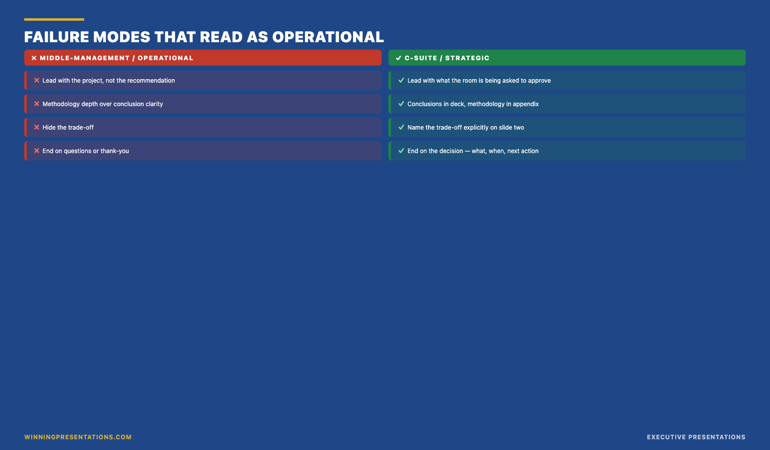
Consider two openings. The first: “Good morning, everyone. Thanks for making time today. I’d like to walk you through where we are on the platform initiative and some options we’ve been exploring.” Polished, pleasant, zero credibility signal. The executives have learned nothing about the work, the decision, or the presenter. The opening has cost thirty seconds of committee time.

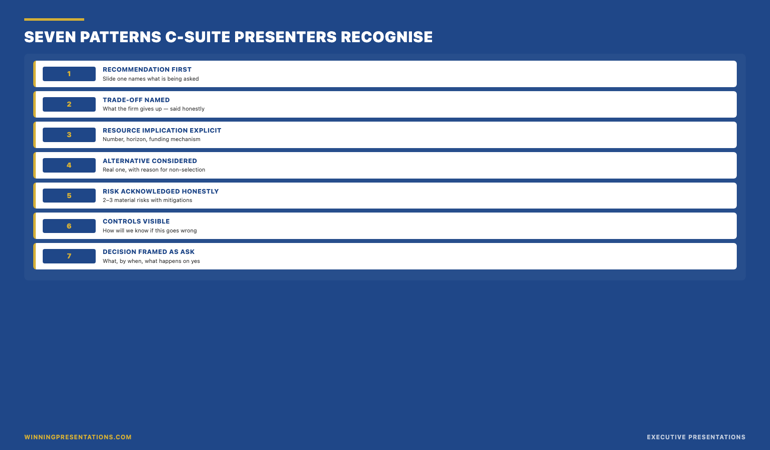
The second: “I am here to ask for approval on £3.2m of phase-one investment for the platform consolidation, with the scope contained to a single vendor and a six-month checkpoint. I am the project owner. The recommendation is mine. I will present for six minutes and then open for questions.” Twenty-five seconds. The room now knows the decision, the scope, the ownership, and the format. Credibility is established — not because the presenter was charismatic but because the structure signalled senior-grade work.

This is the pattern that a credibility course teaches. Openings, framings, transitions, closings, and the structural moves that make the rest of the presentation land as serious. It is less glamorous than confidence training and significantly more effective.

The four things a credibility course covers

A credibility course worth the time covers four areas. Any programme that only covers one or two is incomplete. Any programme that covers six or seven is probably padding.

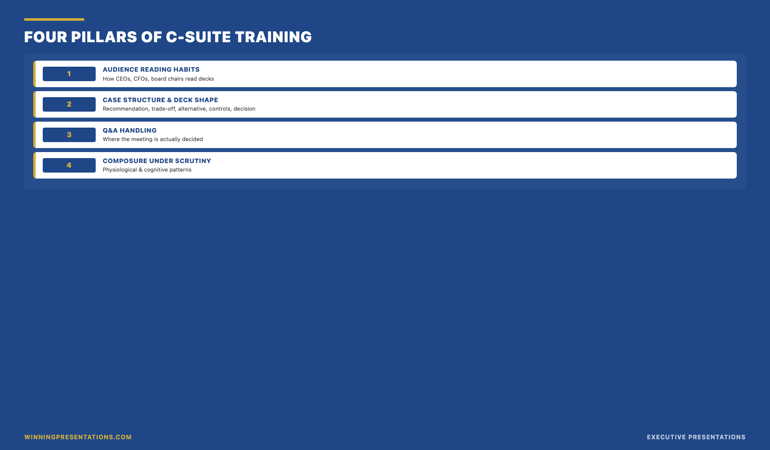
Area one: slide structure for senior audiences. How to build the decision slide, the options slide, the trade-off slide, and the recommendation slide. How to organise an appendix. How to write slide titles that carry meaning rather than label the slide. The structural work that supports credibility before you have said a word.

Area two: language patterns senior audiences read as serious. The specific verbs, sentence structures, and framings that signal thought. Process language over outcome language. Specific nouns over abstract ones. The avoidance of filler words that dilute authority. This is less about vocabulary and more about discipline.

Area three: Q&A response frameworks. How to handle the detailed technical question, the credibility attack, the ambiguous meta-question, and the hostile challenge. Not confidence under fire — composure under fire. These are different skills. Confidence is an internal state. Composure is a visible behaviour, with specific mechanics.

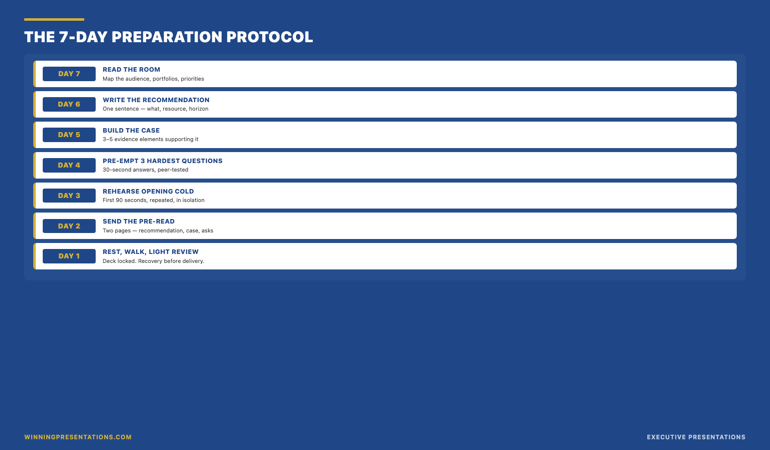
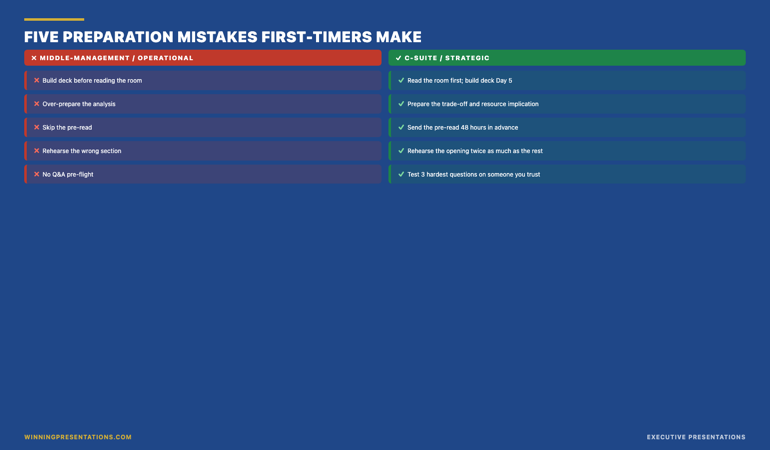
Area four: the preparation routine. What happens before a presentation — the two-page pre-read for sponsors, the objection anticipation exercise, the three-move response preparation, the rehearsal conversation. Senior-grade preparation is the differentiator between presenters who handle pressure and presenters who merely survive it.

A course that covers these four areas with genuine depth — not just a chapter each — is the kind of course that moves a senior professional from intermediate to senior-grade work.

Who actually needs this kind of course

Not every senior professional needs structured credibility training. Some have learned it through apprenticeship — exposure to a strong manager, a coach, a mentor who corrects in real time. For those who have not, three signals suggest the investment is worthwhile.

Signal one: you get interrupted earlier than peers. If you find that committee chairs cut in around slide three or four, while colleagues with similar material present for ten minutes uninterrupted, the interruption pattern is a signal. You are not boring them. You are failing to signal, in the opening, that the presentation is worth listening through.

Signal two: your proposals get parked rather than approved or rejected. Parking is the committee’s polite way of saying “we do not yet have enough to decide, but we do not want to reject this outright.” Repeated parking usually indicates the decision is not being framed cleanly enough for committees to approve on the first pass. This is a structural problem, not a content problem.

Signal three: you receive non-specific feedback after meetings. “Good session, thanks” is not feedback. “The data was useful” is not feedback. When you ask a senior person what you could do differently and they give you a non-specific answer, they often cannot name the problem — they can feel it but not articulate it. The problem is usually credibility-structural rather than content-based, and a structured course can surface what the feedback giver could not.

If one of these signals applies, structured training is likely a good investment. If none of them apply, you probably do not need a course. A shorter resource — a slide template library, a frameworks reference — may be enough.

Self-study vs live programme — the honest comparison

The executive presentation credibility market contains two kinds of offering. Self-study programmes and live cohort programmes. Both have trade-offs.

Self-study programmes are structured resources — written frameworks, video walkthroughs, template libraries — that you work through on your own timeline. The upside is flexibility. You can fit the material around your schedule, revisit it when you have a real upcoming meeting, and work through it in the order that matches your most pressing needs. The downside is that self-study requires personal discipline. Without external scheduling, some professionals never finish the material.

Live cohort programmes pair the same material with scheduled sessions — sometimes group coaching, sometimes Q&A calls, sometimes both. The upside is rhythm. Knowing a cohort convenes at 18:00 on Wednesday creates external accountability. Group sessions also surface questions you would not have asked alone. The downside is rigidity — meetings do not always fit around a senior executive’s calendar, and missing a session can disrupt the learning arc.

A third option combines both. A self-paced course structure with optional live sessions, fully recorded so you can watch them later. This removes the rigidity of fixed live attendance while preserving the rhythm and community benefits of cohort-based learning. For senior professionals whose calendars are unpredictable, this hybrid is often the right match.

The Executive Slide System — self-paced credibility tooling

The Executive Slide System is the self-paced resource for senior professionals who want the structural tooling that underpins credibility. 26 slide templates, 93 AI prompts, 16 scenario playbooks, Master Checklist, and Framework Reference. £39, instant access, lifetime download.

  • 26 slide templates including decision, options, trade-off, and recommendation layouts
  • 93 AI prompts for drafting and refining slide copy
  • 16 scenario playbooks covering common executive meeting types
  • Master Checklist and Framework Reference documents
  • Instant download, lifetime access, no subscription

Get the Executive Slide System →

Designed for senior professionals in financial services, consulting, technology, and regulated industries.

What to avoid in a credibility course

Not every programme that markets itself as a credibility course teaches credibility in the structural sense described in this article. Three signals that a programme will not deliver what a senior professional actually needs.

Signal one: heavy focus on body language and voice. Standing-up-straight and breathing-from-the-diaphragm content has its place — for beginners and for people recovering from presentation anxiety. It is not what senior credibility work looks like. A credibility course that spends more than 10 to 15 percent of its runtime on body language is targeting the wrong audience for senior needs.

Signal two: reliance on generic storytelling templates. The “hero’s journey” framework, motivational opening stories, and inspirational closing anecdotes are mismatched to senior committee settings. Senior audiences read storytelling frameworks as entertainment, not evidence. A credibility course aimed at senior professionals should teach analytical framing, not narrative framing.

Signal three: vague outcome promises. Programmes that promise “board approval,” “executive buy-in,” or “transformed influence” are promising outcomes that depend on factors outside the course — organisational politics, stakeholder dynamics, the specific decisions being presented. A credible course promises process — “the structure for framing decisions that senior audiences read as serious” — not outcome. The outcome comes from the buyer doing the work, in their specific context, with variables the course cannot control.

What to do if you only have two weeks until a major presentation

Full credibility training is a multi-week investment. If your timeline is tighter, prioritise the four highest-leverage moves. Rebuild your opening in the first 30 seconds — name the decision, the scope, your ownership, the format. Reduce your deck to four primary slides with appendix material at the back. Write the three-move response for the three most attackable numbers. Draft a two-page sponsor pre-read and send it 48 hours ahead of the meeting.

These four moves cover the largest portion of the credibility surface area and can be executed without full training. They will not make you a senior-grade presenter on every dimension. They will make the specific meeting go better. The longer skill-building work can continue afterwards.

When the topic is buy-in specifically

If the credibility issue you are trying to solve is specifically about securing approval from reluctant senior stakeholders, the Executive Buy-In Presentation System (£499, Maven) is the self-paced programme designed for that. 7 modules, monthly cohort enrolment, optional recorded Q&A sessions, lifetime access to materials.

Explore the Buy-In System →

FAQ

Is a credibility course really necessary for senior professionals, or should I learn on the job?

Learning on the job works if you have exposure to strong executive presenters, a manager who gives structural feedback, and the time to iterate across many high-stakes meetings. For senior professionals without that exposure — common in organisations that promote from technical backgrounds into executive-facing roles — structured training shortens the learning curve substantially. The on-the-job path takes years. A structured course takes weeks.

How long should a credibility course take to complete?

Serious structured training typically requires between 8 and 15 hours of engagement spread over three to six weeks. Shorter than that and the material is probably surface-level. Longer than that and the programme is probably including content that is not essential to credibility — often confidence training or generic communication skills.

What is the difference between a credibility course and an executive presence course?

Executive presence is a broader category that includes physical presence, voice, body language, and social behaviour. Credibility in presentations is a narrower, more structural category focused on how you frame and deliver content specifically to senior audiences. The two overlap but are not the same. If your concern is structural — “my slides do not land the way I want them to” — you want a credibility course. If your concern is broader — “I do not feel senior enough in executive rooms” — you want an executive presence course.

Do credibility courses work for senior professionals who speak English as a second language?

Yes — and often better than for first-language speakers, because the structural focus translates across languages cleanly. The slide structures, framing disciplines, and Q&A response frameworks work regardless of accent, idiom fluency, or native vocabulary range. What matters is the structural content of what you say, not the accent you say it in. Senior audiences in international firms are used to multilingual presenters. Structural preparation is what they are reading.

The Winning Edge — Thursday newsletter

The Winning Edge delivers one specific technique per Thursday — slide structure, executive language, Q&A handling, and the preparation disciplines that support credibility. Subscribe to The Winning Edge →

Not ready for the full system? Start here instead: download the free Executive Presentation Checklist — a single-page review of what every senior presentation should contain before the meeting.

Next step: identify which of the three signals (early interruption, repeated parking, non-specific feedback) applies to you. If one does, structured training is likely a worthwhile investment. If none do, a shorter resource may be enough.

Related reading: Why honest answers in Q&A build more credibility than clever ones.

About the author. Mary Beth Hazeldine is Owner & Managing Director of Winning Presentations Ltd, founded in 1990. With 24 years of corporate banking experience at JPMorgan Chase, PwC, Royal Bank of Scotland, and Commerzbank, she advises executives across financial services, healthcare, technology, and government on structuring presentations for high-stakes funding rounds, approvals, and board-level decisions.

06 May 2026
Traditional persuasion training teaches tactics. Senior leaders need something different: a structured framework for moving decisions that actually holds up.

Executive Influence and Persuasion Training: How Senior Leaders Move Decisions

QUICK ANSWER

Executive influence and persuasion training for senior leaders is not about charisma, body language, or negotiation tactics. It is about a structured framework for moving decisions among people who have already heard every standard persuasion technique and see through them immediately. The framework has four parts: understanding what your stakeholders actually need to say yes, building a case that addresses their real concerns, presenting it in a way that respects their intelligence, and following up in a way that converts private agreement into public commitment.

The structured framework this article describes

The Executive Buy-In Presentation System is Mary Beth’s self-paced Maven programme covering the complete framework for securing buy-in from senior stakeholders, boards, and executives.

Explore the Programme →

Kenji, a senior director at a global consumer-goods company, walked out of a strategy approval meeting last autumn with a decision he did not expect. His proposal — a £14m restructure of the regional operating model — had been in preparation for six months. Three previous versions had failed. This one passed unanimously. He called me two days later to ask what had actually changed.

The data had not changed. The strategy had not fundamentally shifted. The slides looked similar. What changed was how Kenji had understood the meeting. In the previous three attempts, he had gone in to persuade. This time, he had gone in to address three specific concerns he had privately mapped before the meeting, carried by three specific executives whose support he needed. He had not persuaded anyone. He had made it easy for them to say yes.

Executive influence and persuasion training at senior levels is not about becoming more persuasive. Most senior executives are immune to persuasion tactics because they have seen all of them. What they are not immune to is a well-constructed case that directly addresses the concerns they are already carrying. That is the skill senior leaders need to develop. It looks less like charisma and more like careful, structured preparation.

Why standard persuasion training fails at senior levels

Most persuasion training is designed for sales contexts or early-career leadership, and it teaches tactics: mirroring, framing, storytelling structure, emotional hooks, the use of silence, the “yes ladder”. These tactics work in some contexts. They fail consistently at senior executive level for three reasons.

The first reason is recognition. Senior audiences have seen every tactic. When the tactic is deployed, it registers. A mirrored phrase from a middle manager in an internal meeting reads as coaching. A dramatic storytelling opening in a board update reads as theatrical. The tactics do not land because the audience is fluent in them.

The second reason is asymmetry. Senior stakeholders are evaluating you as much as your proposal. They are asking whether you understand the business well enough to have a defensible view, whether you have anticipated the hard parts, whether your recommendation holds up under pressure. Persuasion tactics signal that you are trying to influence them, which raises their defences rather than lowering them.

The third reason is stakes. Senior decisions are not binary. They carry precedent, political cost, and reputational risk for the people approving them. A persuasive case without a structured answer to those dimensions will not succeed regardless of how well it is delivered. The training needs to address the structure, not just the delivery.

Four-part framework for executive influence and persuasion training covering stakeholder understanding, case construction, presentation, and follow-up

THE STRUCTURED FRAMEWORK FOR EXECUTIVE INFLUENCE

Build the case your stakeholders cannot dismiss

The Executive Buy-In Presentation System is a self-paced Maven programme — 7 modules walking senior professionals through the structure, psychology, and delivery that get executive approval. Bonus Q&A calls (optional, recorded). Monthly cohort enrolment; lifetime access to materials.

  • 7 modules on stakeholder analysis, case construction, and delivery
  • Self-paced — no deadlines, no mandatory live attendance
  • Optional Q&A / coaching calls (fully recorded, watch back anytime)
  • Monthly cohort enrolment — enrol any time
  • Lifetime access to all course materials

£499, lifetime access to all course materials.

Explore the Executive Buy-In Presentation System →

Designed for senior professionals who present decisions to boards, investment committees, and executive sponsors.

Part 1: Understand what stakeholders actually need to say yes

Every senior decision has a set of concerns that live beneath the surface arguments. The surface arguments are the ones people say out loud — budget, timing, strategic fit. The underlying concerns are the ones people do not say out loud because they are political, personal, or uncertain. Senior leaders who influence successfully have learned to map the underlying concerns before the meeting.

The mapping exercise is not complicated. For each stakeholder whose approval you need, write down three things: what the surface argument against your proposal would be if they chose to make one, what the underlying concern probably is (reputation, precedent, control, fear of being seen to change direction), and what specific evidence would make that underlying concern less sharp.

In Kenji’s case, one senior executive had consistently pushed back on previous proposals. On the surface, the pushback was about cost. Underneath, the concern was that the restructure would reduce his remit, which was a status issue rather than a financial one. Kenji spent half a slide on the restructure’s effect on that executive’s remit — not defensively, but transparently. The executive’s objection evaporated because it had been anticipated.

This is the move that standard persuasion training does not teach. It is not about arguing better. It is about understanding what the other person is carrying into the room and addressing it explicitly. For more on the mapping approach, see stakeholder buy-in training.

Part 2: Build a case that addresses real concerns

Once the concerns are mapped, the case has to be built around them, not around the presenter’s own favourite arguments. Most proposals fail because they are organised around what the presenter finds most compelling, which is usually a mixture of the data that supports their view and the strategic logic they have internalised.

A case built around stakeholder concerns is organised differently. It leads with the concern that is most important to the most influential stakeholder, and it addresses that concern with evidence the stakeholder will actually find reassuring — not evidence the presenter finds reassuring. These are often different.

A second move is to surface the strongest counter-argument before the stakeholders do. Naming the strongest argument against your proposal — and then explaining why you have judged it not decisive — is one of the highest-credibility moves in executive communication. It signals that you have thought this through rather than avoiding the hard parts, and it takes the counter-argument off the table in a way a defensive response cannot.

For the slide-structure side of this, the executive presentations buy-in approach maps out how to sequence the case visually so the concerns get addressed in the right order.

Part 3: Present in a way that respects intelligence

Senior audiences do not want to be persuaded. They want to be informed enough to make a good decision. The difference is subtle but it changes every part of delivery.

Presenters who are trying to persuade usually over-explain, over-emphasise, and under-pause. They repeat their key points. They use adjectives like “robust”, “comprehensive”, and “aligned” that signal effort rather than substance. They fill silences. Each of these habits signals anxiety and effort to senior audiences, which reduces credibility.

Presenters who respect the intelligence of the room do the opposite. They explain once, at the right level of detail, and let the point land. They use pauses deliberately. They make their recommendation explicit, defend it in one sentence, and stop. They answer questions directly rather than taking the chance to repeat their case. They let the audience arrive at the conclusion rather than dragging them to it.

This is a delivery style that takes practice to develop because it runs counter to most presentation training. It also requires confidence in the material — if you are uncertain about your own recommendation, the under-explanation will read as evasion rather than authority. The getting executive buy-in presentations framework covers the specific delivery habits that make this tone work.

Cycle diagram showing the four stages of executive influence: map concerns, build case, present, follow up

For the slide structure that carries the case

The Executive Slide System provides 26 templates, 93 AI prompts, and 16 scenario playbooks designed for senior-level presentation work — including buy-in scenarios. £39, instant download.

Get the Executive Slide System →

Part 4: Follow up to convert agreement to commitment

Private agreement in a meeting room is not the same as public commitment. Senior executives will often nod during a presentation and then quietly disengage afterward, especially if the proposal touches something they find politically uncomfortable. The influence work is not finished when the meeting ends.

The follow-up move that converts agreement to commitment is a short, structured recap sent within 24 hours. Not a long document. A three-paragraph note confirming the decision reached, the immediate next step, and the specific commitment you need from each stakeholder to move forward. The note makes the agreement visible to the group, which makes quiet disengagement harder.

A second move is to identify one stakeholder whose support is strongest and ask them to be the visible sponsor of the next step. Sponsorship moves the proposal from the presenter’s proposal to a shared proposal, which changes the politics of any subsequent pushback. This is not manipulative. It is how senior decisions actually move forward in complex organisations.

The influence work is cumulative. Each meeting either strengthens or weakens the overall case, and the follow-up is where most of the cumulative work happens. Senior leaders who treat the meeting as the event and the follow-up as admin usually find their proposals losing momentum between meetings.

Frequently asked questions

How is this different from negotiation training?

Negotiation training assumes an adversarial or bargaining context — you and the other party are trying to reach agreement on terms. Executive influence and persuasion is usually not a negotiation. It is a presentation to decision-makers who have the authority to say yes or no. The skills overlap in some places, but the structure of the conversation is fundamentally different.

Can this be learned through a self-paced course, or do I need in-person coaching?

Most of the structural work — stakeholder mapping, case construction, delivery discipline — can be learned through a self-paced programme and practised in real meetings. The Executive Buy-In Presentation System is designed as a self-paced course with 7 modules, optional recorded Q&A calls, and monthly cohort enrolment. In-person coaching adds value for specific high-stakes moments but is not necessary for building the underlying skill.

How long does it take to see results from this kind of training?

The structural techniques (stakeholder mapping, case building, follow-up) can be applied to the next meeting on your calendar and typically produce a noticeable difference in audience engagement. The delivery discipline takes longer — usually three to four presentations to feel natural. Most senior professionals who work through the full framework see a meaningful shift in their approval rates within two to three months.

Does this work for influencing peers, not just senior stakeholders?

Partly. The stakeholder mapping and case construction translate cleanly to peer influence. The delivery work is slightly different because peer audiences often respond to more conversational framing rather than the formal presentation style that works in board contexts. The core framework still applies.

Is there a risk that this approach comes across as too calculated?

Only if the stakeholder mapping is used manipulatively. Used well, addressing people’s real concerns openly and respectfully reads as thoughtful rather than calculated. The signal you are giving is that you have thought about what they are carrying into the room, which most senior people quietly appreciate. The risk comes from pretending you have not done the work — which reads as false — not from having done it.

The Winning Edge

Weekly thinking for senior professionals on executive influence, stakeholder work, slide structure, and the judgement calls that frameworks do not cover.

Subscribe to The Winning Edge →

Not ready for the full programme? Start here instead: download the free Pyramid Principle Template — the structural scaffold that most persuasive executive cases quietly rely on.

Next step: pick one proposal you have coming up in the next 30 days. Do the stakeholder mapping exercise before you build the deck. Notice how differently the case comes together when the map is done first.

For the AI-assisted side of preparing these cases, see Copilot PowerPoint for board presentations.


About the author

Mary Beth Hazeldine is Owner & Managing Director of Winning Presentations Ltd, a UK company founded in 1990. With 24 years of corporate banking experience at JPMorgan Chase, PwC, Royal Bank of Scotland, and Commerzbank, she advises senior professionals on structuring presentations for board approvals, investment committees, and stakeholder-critical decisions.

06 May 2026
Senior leaders waste hours on generic Copilot output. Three specific prompts turn Copilot into a genuine board-presentation partner. Here is how.

Copilot PowerPoint for Board Presentations: The 3 Prompts That Work

QUICK ANSWER

Most senior leaders use Copilot to ask for a complete board presentation. That is why the output reads generic. Three specific prompts, used in the right order, turn Copilot into a genuine board-presentation partner: a stakeholder-mapped opening, a decision-framed middle, and a predicted-question close. Each prompt assumes the strategic work is yours. Copilot drafts the structure so you can spend your time on judgement, not formatting.

If you want the structured approach behind these prompts

The AI-Enhanced Presentation Mastery course from Maven is a self-paced programme covering the prompt and workflow patterns that take Copilot from drafting tool to presentation partner.

Explore the Programme →

Ngozi, a regional operations director at a biotech company, rebuilt the same board deck four times in one afternoon. She had used Copilot to generate the first draft — a 12-slide update for the quarterly operations review. The output looked polished. The sections were logical. The language was professional. But when she read it back, it could have belonged to any company, in any industry, at any quarter. Her board would read three slides and switch off.

She opened a blank prompt window and tried again. “Build a board deck covering Q1 operations performance.” Same result. Slight variations in headings. Same generic feel. By the third attempt she had realised something that changes how senior leaders should use Copilot for presentations: the AI is not the problem. The prompt is asking the AI to do strategic work that only the presenter can do.

The professionals who get genuinely useful Copilot output for board presentations do something different. They do the strategic thinking first, then use Copilot to draft the structure their thinking requires. Three specific prompts, used in the right order, make this work. Each assumes that the judgement is yours and the drafting is Copilot’s.

Why most Copilot board decks read generic

Copilot is a drafting tool. It is very good at producing coherent text that matches patterns it has seen before. It is not good at knowing which board member will block your proposal, what the finance director is quietly worried about, or why this particular quarter matters differently from the last three. These are strategic inputs only the presenter has.

When senior leaders prompt Copilot with “build a board deck on X” the AI has nothing to work with except pattern-matching. It produces the average of every board deck it has ever seen. Average board decks are unmemorable. They earn polite acknowledgement and no action.

The shift is to stop asking Copilot for decks and start asking Copilot for specific structural work. The three prompts below do that. Each names exactly what structural output is needed. Each supplies the strategic context Copilot cannot guess. Each produces drafts that feel tailored because they are.

Three-prompt framework for using Copilot on board presentations: stakeholder-mapped opening, decision-framed middle, predicted-question close

WHEN COPILOT HAS TO HOLD UP IN A BOARDROOM

Move beyond basic AI usage to executive-grade output

The AI-Enhanced Presentation Mastery course is a self-paced programme with 8 modules and 83 lessons on using AI (including Copilot) to structure, draft, and refine presentations that hold up at senior levels. 2 optional live coaching sessions with Mary Beth, fully recorded — watch back anytime. Monthly cohort enrolment; lifetime access to materials.

  • 8 modules, 83 lessons on AI-assisted executive presentation work
  • Prompt and workflow patterns for Copilot and ChatGPT, board-level output
  • 2 optional live coaching sessions with Mary Beth (recorded)
  • Self-paced, no deadlines, no mandatory live attendance
  • Monthly cohort enrolment — enrol any time

£499, lifetime access to all course materials.

Explore AI-Enhanced Presentation Mastery →

Designed for senior professionals who need AI to produce executive-grade output, not generic drafts.

Prompt 1: The stakeholder-mapped opening

The opening of a board presentation carries more weight than the middle. Board members decide in the first two or three slides whether to lean in or let their attention drift. The opening has to land for the specific people in the room, not for boards in general.

Before you prompt Copilot, write down three facts:

  • Which board member matters most on this topic — who will either support or block the decision?
  • What that person is quietly worried about before the meeting (risk, cost, reputation, precedent)
  • What they need to see in the first two slides for you to have their attention for the rest

Now the prompt:

“I am presenting to a board where the most influential decision-maker on this topic is [role]. Their primary concern before this meeting is [specific worry]. I need a two-slide opening that addresses their concern in the first 60 seconds, without burying the answer. Draft Slide 1 (the one-sentence answer to the implied question they’re bringing into the room) and Slide 2 (three supporting points that map to their concern). No preamble, no company-of-the-future language.”

Copilot produces an opening grounded in a real person’s real concern. That is different from every generic board-opener it would otherwise draft. You will still edit the output. But the draft will have a centre of gravity to edit around.

Prompt 2: The decision-framed middle

The middle of a board deck is where most presentations drift. Slide after slide of context, data, background. By the time the presenter arrives at the ask, the board has spent its attention on material that was the journey, not the answer. Board members rarely say this out loud. They just disengage.

A decision-framed middle does the opposite. Every slide exists because it supports a specific decision the board is about to make. Slides that do not serve that decision get cut or moved to an appendix.

The prompt:

“The decision the board is making is: [specific decision]. Assume they already know [common background you would otherwise over-explain]. Build a 4-slide middle that (1) names the decision in one sentence at the top of Slide 1, (2) shows the two realistic options the board can choose between, (3) gives the supporting evidence for the recommended option, and (4) addresses the strongest argument against. Each slide must directly serve the decision. No context slides, no history, no company-values language.”

The output will be tighter than a generic Copilot draft because the prompt has told Copilot what to leave out, not just what to include. The discipline of naming the decision forces Copilot to cut the padding that would otherwise fill the deck. If you want an overview of where this fits in the broader AI-for-presentations landscape, ChatGPT for PowerPoint presentations covers the parallel approach for non-Microsoft environments.

Before and after comparison of Copilot board deck drafts showing how strategic context in the prompt changes the output quality

Prompt 3: The predicted-question close

The close of a board presentation is the slide you land on before the Q&A begins. Most closes are either a generic “Thank you, questions?” slide or a summary of everything already covered. Both waste the moment. The slide the board is looking at when the first question comes is the slide that shapes the first question.

A predicted-question close shows the board the three questions you are ready to answer. That does two things at once. It frames the Q&A around the questions you want. And it signals preparation — the board member about to ask a harder question will often reframe it because your visible preparedness has raised the bar.

The prompt:

“The three hardest questions the board will ask about [specific proposal] are likely to be [Q1], [Q2], [Q3]. Draft a single closing slide that lists all three as bullet points with a one-sentence direct answer under each. Professional tone, no defensive language, no hedging. The purpose of the slide is to show readiness, not to answer in full — each answer should invite a conversation, not close it down.”

The closing slide produced by this prompt does something unusual. It leaves the board with the impression that you have already thought through the hard parts. That is the impression most senior leaders want and rarely manage to create. It also makes the Q&A shorter and more focused, which every board member quietly appreciates.

Want the prompts ready to use?

The Executive Prompt Pack contains 71 ChatGPT and Copilot prompts for PowerPoint presentations — including board-level prompts, stakeholder-mapped openings, and decision-framed middle sections. £19.99, instant download.

Get the Executive Prompt Pack →

How to sequence the prompts

The three prompts are designed to be used in order. Opening first, because the opening sets what the rest of the deck has to support. Middle second, because the middle adapts to the opening you have committed to. Close third, because the close has to match the questions the opening and middle will provoke.

Running them in any other order usually produces a deck that feels stitched together. Running them in order produces a deck that feels coherent, even when each prompt runs in a separate Copilot session. Senior leaders who use this sequence regularly report that the total time from blank deck to editable first draft drops from two or three hours to around 25 minutes — and the draft is actually worth editing.

One more thing. Copilot’s output still needs an editorial pass. The prompts give you a draft with a real centre of gravity. They do not give you a final deck. The best Copilot PowerPoint prompts and the editing workflow that cleans up the output work together. Neither replaces the other.

The three prompts also apply when you are using Copilot to refine an existing deck, not to build from scratch. Run the opening prompt against the first two slides you already have. The gap between the current opening and the stakeholder-mapped version is usually where the board was losing attention. Fix that first.

Frequently asked questions

Do these prompts work with ChatGPT as well as Copilot?

Yes. The structural logic is the same. ChatGPT and Copilot will produce slightly different drafts because their training and defaults differ, but the prompts give both models the strategic context they need. If you are comparing the two tools for executive slide work, Copilot vs ChatGPT for executive slides covers the differences in detail.

How long should it take to prepare the strategic inputs before prompting?

Around 15 to 20 minutes for most board presentations. That feels slow the first time, but it replaces one to two hours of generic output and rework. The strategic inputs are the same work the presenter would have had to do anyway — the prompts just make the thinking explicit up front.

What if I do not know who the most influential board member on the topic is?

Ask one of your peers or your sponsor. Board influence is rarely what the org chart suggests. The influential member on a cost decision is usually not the one who dominates strategy discussions. If the topic is genuinely novel, the most influential person is whoever has asked the sharpest questions at the last two meetings on adjacent topics.

Should I tell the board I used Copilot to draft the deck?

No, and the question itself points to a worry worth examining. Copilot is a drafting tool, the same way Word is a typing tool. The value you bring is the strategic thinking, the editorial judgement, and the delivery. Leading with “I used AI” tends to shift attention from the decision to the tool, which is not what board time is for.

Do these prompts apply to investor presentations as well as board presentations?

Partially. The stakeholder-mapped opening and the predicted-question close translate cleanly. The decision-framed middle needs adapting because investor presentations often have a different centre of gravity — investment thesis rather than operating decision. The structural discipline still helps.

The Winning Edge

Weekly thinking for senior professionals on executive presentation craft — slide structure, Q&A, delivery, AI, and the judgement calls the frameworks do not cover. Thursday mornings, one considered issue.

Subscribe to The Winning Edge →

Not ready for the full programme? Start here instead: download the free Pyramid Principle Template — the structure most board slides fail to use, in a one-page reference.

Next step: pick one upcoming board presentation. Run the stakeholder-mapped opening prompt this week. See whether the draft lands differently from your usual Copilot output. That one change tends to be the one that reveals the rest.

For the parallel comparison between Copilot and ChatGPT on executive slide work, see Copilot vs ChatGPT for executive slides. For what happens when Copilot’s first draft does not hold up under boardroom scrutiny, see why Copilot’s first draft fails boardroom tests.


About the author

Mary Beth Hazeldine is Owner & Managing Director of Winning Presentations Ltd, a UK company founded in 1990. With 24 years of corporate banking experience at JPMorgan Chase, PwC, Royal Bank of Scotland, and Commerzbank, she advises senior professionals across financial services, healthcare, technology, and government on structuring presentations for high-stakes decisions, board approvals, and executive scrutiny.

06 May 2026
Senior leaders want to know which AI writes boardroom-ready content. The real answer turns on workflow, not output quality. Here is how they differ.

Copilot vs ChatGPT for Executive Slides: What Actually Differs

QUICK ANSWER

For executive slides, neither Copilot nor ChatGPT produces consistently better content. The real difference is workflow. Copilot wins when your deck lives inside Microsoft 365 and you need slide-level editing without context-switching. ChatGPT wins when you want deeper reasoning passes before building slides. Most senior leaders end up using both — ChatGPT for the thinking, Copilot for the drafting — and the decision is about which one carries the most value at your stage of preparation, not which one is smarter.

If you want the framework that makes both tools genuinely useful

The AI-Enhanced Presentation Mastery course is a self-paced Maven programme covering how to use AI (including both Copilot and ChatGPT) for executive-grade presentation work.

Explore the Programme →

Rafaela, a chief of staff at a mid-sized insurance group, told me last month she had run the same executive brief through both Copilot and ChatGPT and could not tell which was which. Her frustration was not that the output was bad. It was that both looked competent and neither felt right. She wanted a clear answer to a clear question — which one is better for executive slides — and she was not getting one.

She is not alone. Senior leaders across financial services, pharma, and tech keep asking the same version of this question. Part of what makes it hard to answer is that the honest response is “it depends on your workflow, not on the model.” That is an unsatisfying answer, so people keep looking for a cleaner one. There is not one. But there is a useful structure for thinking about when each tool earns its place in executive preparation.

The question senior leaders are actually asking

Under the surface question — which tool writes better boardroom-ready content — there is usually a more specific question. Senior leaders are trying to decide whether to pay for a ChatGPT subscription when their company already provides Copilot. They are trying to work out whether switching tools mid-workflow costs them more time than it saves. They are wondering if choosing the “wrong” AI will make their slides worse.

The honest answer to each of those questions is the same. Output quality between Copilot and ChatGPT on executive presentation work, holding the prompt constant, is close enough that it stops being the deciding factor. What differs is the surrounding workflow: where the tool sits, what it connects to, and what friction it removes or adds as you move from strategic thinking to slide drafting.

Once you stop comparing on output quality and start comparing on workflow fit, the choice gets simpler. So does the decision to use both.

Side-by-side comparison of Copilot and ChatGPT workflow strengths for executive slides

BEYOND “WHICH TOOL IS BETTER”

Learn the prompt and workflow framework that turns AI into a presentation partner

AI-Enhanced Presentation Mastery is a self-paced Maven programme — 8 modules, 83 lessons covering prompt design, Copilot and ChatGPT workflows, and the editorial judgement that separates usable output from generic AI drafts. 2 optional live coaching sessions, fully recorded. Monthly cohort enrolment; lifetime access.

  • 8 modules, 83 lessons — self-paced
  • Prompt patterns that work across Copilot and ChatGPT
  • Workflow templates for executive slide preparation
  • 2 optional recorded coaching sessions with Mary Beth
  • Lifetime access to materials

£499, lifetime access to all course materials.

Explore AI-Enhanced Presentation Mastery →

Designed for senior professionals using AI to produce executive-grade presentations.

Where Copilot wins for executive slides

Copilot’s natural advantage is context. It lives inside PowerPoint, reads the slides you are already building, and can operate on them directly. When the question is “rewrite this title slide to be punchier” or “turn these three bullets into a two-sentence summary in the same tone as slide 4”, Copilot does not need the context explained. It has it. ChatGPT would require copy-paste in both directions.

That matters more than it sounds. Senior leaders editing executive decks at the detail level make hundreds of small adjustments. Every context-switch — copy the slide, paste into ChatGPT, edit prompt, copy output, paste back — costs attention. Multiply by thirty adjustments and the workflow friction becomes the dominant cost. Copilot in PowerPoint removes that friction.

Copilot also wins when the deck draws on internal documents or email threads. If your proposal references last quarter’s board minutes, an earlier project brief, and a recent executive memo, Copilot (with tenant-level permissions) can pull from those directly. ChatGPT cannot, unless you paste the relevant content in.

Where Copilot’s natural advantage ends is in deeper reasoning. Copilot is tuned for task completion within Microsoft 365, which means it tends to produce shorter, more tactical responses. For “help me think through the argument structure” work, it is less useful than ChatGPT.

Where ChatGPT wins for executive slides

ChatGPT’s natural advantage is depth of reasoning in a single conversation. For the strategic thinking that has to happen before you start building slides — what is the actual argument, who is the audience, what counter-arguments need addressing, what is the strongest one-sentence answer — ChatGPT is usually the better environment. You can run several iterations of thinking, push back, add new constraints, and work through to a structured answer before you open PowerPoint.

It also wins when you want to explore multiple framings of the same idea. “Give me three different ways to open this proposal” produces more varied output on ChatGPT than on Copilot, which tends to converge quickly on a single patterned response.

For the predicted-question close of a board deck — anticipating the hardest questions and drafting concise answers to each — ChatGPT’s longer reasoning window means it can hold the full context of the argument while generating the Q&A material. Copilot, working slide by slide, loses that context between turns. For the underlying approach see Copilot PowerPoint for board presentations, which covers the three-prompt framework that makes either tool more useful.

Where ChatGPT ends is in operational tasks. “Apply this design change to every slide in the deck” is not ChatGPT’s work. That is Copilot’s.

Dashboard showing executive AI workflow stages: thinking, structuring, drafting, editing, and which tool fits each stage

Is the output quality genuinely different?

This is where most comparison articles fall apart. They run the same prompt through both tools, compare the output, and declare a winner. The test is misleading because it holds the prompt constant but ignores workflow. A prompt that is optimal for Copilot (slide-level, context-aware, short) is not optimal for ChatGPT (multi-turn, reasoning-rich, longer). The reverse is also true.

When you prompt each tool in the way that suits it, the output on executive presentation work is close. There are tonal differences — Copilot tends toward corporate and compact; ChatGPT tends toward considered and longer — and those differences matter for taste more than they matter for quality. Neither produces a finished executive deck from a generic prompt. Both produce useful drafts when prompted with the strategic context the presenter supplies.

The useful question is not “which one is better?” It is “which one removes friction at the stage of preparation I am currently in?” Strategic thinking stage — ChatGPT. Slide-level drafting and editing stage — Copilot. Most executive decks benefit from both.

Ready-made prompts for both tools

The Executive Prompt Pack contains 71 ChatGPT and Copilot prompts for PowerPoint work — including strategic-thinking prompts for ChatGPT and slide-level operational prompts for Copilot. £19.99, instant download.

Get the Executive Prompt Pack →

How to use both without duplicating effort

The senior leaders who get the most from both tools run a simple two-stage workflow. Thinking in ChatGPT first. Drafting and editing in Copilot second. The stages rarely overlap. When they do, the result is usually worse than using one tool cleanly.

Stage one: open ChatGPT. Work out the argument. What is the one-sentence answer? Who is the most influential decision-maker and what is their quiet concern? What are the two realistic options the audience is choosing between? What is the strongest argument against the recommended option? What are the three hardest questions?

Stage two: open PowerPoint with Copilot active. Start building. Feed Copilot the output from stage one as slide-level prompts. Let Copilot draft titles, bullets, and summaries. Edit directly on the slides. Use Copilot for design-level adjustments and cross-slide consistency.

The handoff from stage one to stage two takes about a minute. The total time from blank deck to editable first draft usually drops to 30 to 40 minutes for a 10 to 12 slide board update. That is with both tools doing the work each is suited for. It compares well to the two to three hours most senior leaders spend when using a single tool for everything.

For the full landscape on executive AI presentation work see ChatGPT for PowerPoint presentations. For the editing pass that cleans up AI drafts before they reach a board, see the best Copilot PowerPoint prompts.

Frequently asked questions

Is Copilot included free with Microsoft 365?

Microsoft 365 Copilot is a paid add-on for most business tiers. Your organisation may or may not have provided access. If you already have it, start there — the integration advantages are real and there is no extra cost. If you do not, a ChatGPT subscription is usually the quicker path to improved executive presentation work because it does not require enterprise procurement.

Can I use ChatGPT plugins to edit PowerPoint directly?

Not in the same way Copilot does. Some ChatGPT integrations can generate a draft deck, but they do not read and operate on slides you are already building. For slide-level editing inside an existing deck, Copilot remains the more practical option in the Microsoft environment.

Does it matter which tool I use for the Q&A preparation?

Slightly. ChatGPT tends to produce more considered and varied possible questions because it holds the argument context over a longer conversation. Copilot produces tighter, more operational Q&A material. For hostile or complex board Q&A, ChatGPT is often the better starting point. For straightforward operational updates, either works.

Is it safe to paste confidential board material into ChatGPT?

Check your organisation’s AI policy first. Many organisations have approved Copilot because it runs within their Microsoft 365 tenant and keeps data inside the boundary. The same organisations often prohibit pasting confidential material into consumer ChatGPT. ChatGPT Enterprise or Team tiers address this concern but require an account at the organisational level.

Will this preference change as the models improve?

The integration advantages of Copilot and the reasoning advantages of ChatGPT are structural to where each tool sits. Model improvements will narrow the output-quality gap further, which makes workflow fit the dominant factor rather than the secondary one.

The Winning Edge

Weekly thinking for senior professionals on executive presentation craft — slide structure, Q&A, delivery, AI, and the judgement calls the frameworks do not cover.

Subscribe to The Winning Edge →

Not ready for the full programme? Start here instead: download the free Pyramid Principle Template — the argument structure both Copilot and ChatGPT draft better output against.

Next step: pick the next executive deck on your calendar. Do the first 20 minutes of thinking in ChatGPT. Then open PowerPoint with Copilot and draft from that thinking. Notice whether the handoff felt cleaner than your usual single-tool workflow. The answer is usually yes.

For a related deep-dive on what to do when Copilot’s first draft does not hold up under boardroom scrutiny, see why Copilot’s first draft fails boardroom tests.


About the author

Mary Beth Hazeldine is Owner & Managing Director of Winning Presentations Ltd, a UK company founded in 1990. With 24 years of corporate banking experience at JPMorgan Chase, PwC, Royal Bank of Scotland, and Commerzbank, she advises senior professionals across financial services, healthcare, technology, and government on structuring presentations for high-stakes decisions.

06 May 2026
Copilot's first draft feels polished but falls apart under boardroom scrutiny. Here is exactly what goes wrong and the editing pass that repairs it.

Why Copilot’s First Draft Fails Boardroom Tests (And the Editing Pass That Fixes It)

QUICK ANSWER

Copilot’s first draft of a board deck usually fails on four specific dimensions: the opening buries the answer, the middle over-explains context, the recommendation lacks a defended position, and the close invites vague Q&A instead of framing it. The fix is an editing pass with a specific order — answer first, cut context second, commit to a position third, frame the questions fourth. The editing pass takes around 30 minutes and is usually the difference between a deck that lands and one that earns polite nods.

For the full editing framework

The AI-Enhanced Presentation Mastery programme covers the full editorial pass that turns AI drafts into executive-grade material — from opening structure to Q&A preparation.

Explore the Programme →

Tomás, the commercial director at a European logistics business, sent me a Copilot-generated board deck the evening before his quarterly review. He was nervous. The deck looked professional. The sections were reasonable. The language was competent. But when I read it back from the perspective of a board member at 2pm after four other agenda items, the problem was obvious. The deck answered no specific question, took no defended position, and gave the board nothing to decide. It felt like a very well-dressed placeholder.

We spent 35 minutes editing it together. The deck that arrived at the meeting the next morning was the same length. The data was the same. The design was the same. What changed was the centre of gravity. The opening answered a question the board was actually asking. The middle cut the context that was not serving the decision. The recommendation committed. The close told the board what Tomás was ready to discuss. The decision went his way.

Copilot’s first drafts fail boardroom tests for predictable reasons. They are not bad drafts. They are first drafts that have not yet been edited with boardroom judgement applied. The four failures below are the ones that appear in almost every AI-generated executive deck. Each has a specific repair.

Failure 1: The opening buries the answer

Copilot’s default is to build toward the answer. The draft begins with context, moves through background, arrives at supporting data, and eventually reveals the recommendation three or four slides in. This is how students are taught to write essays. It is not how board presentations work.

Board members are not reading an essay. They are deciding whether to engage. The first two slides are where they decide. If the answer is not in those slides, the board mentally files the presentation as “update” rather than “decision”, and attention shifts elsewhere. The deck can still be delivered successfully — but the board is no longer leaning in.

The repair is to move the answer to Slide 1. One sentence. “We recommend investing £X in initiative Y to achieve Z by Q3.” Slide 2 is the three supporting points that justify the recommendation. Everything else becomes the evidence. This is the Pyramid Principle, and Copilot does not apply it by default because most text in its training data does not follow it. You have to apply it in the edit.

Failure 2: The middle over-explains context

Copilot writes thoroughly. For most uses that is a strength. For board decks it is a liability. The middle of a Copilot draft usually contains two to four slides of context that the board already knows — market overview, business background, historical performance — and that would otherwise be handled in two lines of the opening.

The test for every middle slide is: does this slide directly serve the decision the board is about to make? If not, it goes into the appendix or gets cut. Most Copilot drafts have at least one “journey of the quarter” slide that tells the board what happened in the sequence it happened. The board does not need this. They need to know what the presenter learned and what it means for the decision.

In the edit, read every middle slide and ask one question. “If I cut this slide, does the board’s decision get worse?” If no, cut it. The usual outcome is that a 12-slide Copilot draft becomes an 8-slide deck. The 8-slide version lands harder.

Four boardroom failures of Copilot first drafts: buried answer, over-explained context, undefended recommendation, vague close

TURN AI DRAFTS INTO BOARDROOM MATERIAL

The editing framework senior professionals use to make AI output executive-ready

AI-Enhanced Presentation Mastery is a self-paced Maven programme. 8 modules, 83 lessons covering prompt design, editorial passes, and the workflow that turns AI drafts into decks that hold up under senior scrutiny. 2 optional live coaching sessions with Mary Beth, fully recorded. Monthly cohort enrolment; lifetime access.

  • 8 modules, 83 lessons — self-paced
  • Editing frameworks for AI-generated executive drafts
  • Prompt patterns that reduce rework
  • 2 optional live coaching sessions (recorded)
  • Lifetime access to all materials

£499, lifetime access.

Explore AI-Enhanced Presentation Mastery →

Designed for senior professionals producing AI-assisted executive presentations.

Failure 3: The recommendation lacks a defended position

This is the most common failure and the hardest one to spot. Copilot drafts tend to present options. “Option A, Option B, Option C, each with these tradeoffs.” The board reads this and sees neutrality. Neutrality, in a board setting, gets interpreted as the presenter not having a view — or worse, not being willing to commit to one. Both readings cost credibility.

A defended position names the preferred option and explains why it is preferred — including the strongest argument against it and why that argument is not decisive. This is not the same as removing the other options. The options can still appear, usually in a single slide. But the recommendation slide names one and defends it.

In the edit, find the recommendation slide. Ask: “If a board member asked me ‘which option do you actually want?’ — is the answer unambiguous on this slide?” If not, rewrite until it is. Then add one sentence on the strongest counter-argument and why the recommendation still holds. Board members trust presenters who have already reasoned through the objection, because it signals they have done the work.

Failure 4: The close invites vague Q&A

Most Copilot drafts end with a “Thank you. Questions?” slide or a summary of everything that was said. Both are wasted. The slide on screen at the moment the Q&A opens is the slide that shapes the first question. A blank thank-you slide produces whatever question the board members happen to have first. A summary slide produces questions about what has already been covered.

A close that frames the Q&A does something different. It lists the three questions the presenter is ready to answer — the hardest questions about the proposal. This earns attention for two reasons. It signals that the presenter has anticipated the difficult parts. And it implicitly invites the board to ask one of those questions, which means the conversation stays on the terrain the presenter has prepared.

In the edit, replace the “Questions?” slide with a three-question framing slide. Draft the questions honestly — what are the hardest things the board could ask about this proposal? — and list them with one-sentence direct answers. This is not a script for the Q&A. It is a scaffold.

Ready-made editing prompts for AI drafts

The Executive Prompt Pack contains 71 ChatGPT and Copilot prompts, including editing-pass prompts for cleaning up AI-generated executive drafts. £19.99, instant download.

Get the Executive Prompt Pack →

The editing pass that fixes the draft

Running the four fixes above in the order they appear in the deck takes about 30 minutes for a 10 to 12 slide draft. The order matters. Answer first, because the answer determines what the middle has to support. Context second, because cutting context reveals which supporting evidence is actually load-bearing. Position third, because only a defined recommendation can be defended. Close fourth, because the Q&A framing has to match the position the deck has committed to.

A useful way to run the pass is to read the deck end-to-end first, in one sitting, from the board’s perspective. Not yours. Not the drafter’s. The perspective of a board member who has already sat through three agenda items. What is missing? What would they actually decide on the basis of this? Where does their attention drift? The answers to those three questions tell you where to cut and where to sharpen.

The editing pass is where human judgement meets AI drafting. Copilot produces the draft. The presenter produces the decision-ready deck. The cleaner version of this is covered in Copilot PowerPoint for board presentations, which gives the three prompts that make the first draft closer to decision-ready from the start. And for the parallel view on tool selection, see Copilot vs ChatGPT for executive slides.

One more note. Do not skip the editing pass because the draft looks polished. Polish is the thing Copilot does best. Polish without a defended position is what gets board decks politely acknowledged and quietly shelved. The 30-minute pass is the work that prevents that outcome. The best Copilot PowerPoint prompts make the first draft stronger; the editing pass makes the final deck land.

Frequently asked questions

Can I prompt Copilot to avoid these four failures from the start?

Partially. The three prompts in the stakeholder-mapped, decision-framed, predicted-question sequence produce first drafts that are closer to decision-ready. But even those drafts need an editorial pass. No prompt gets you past the need for human judgement on what to keep, cut, and commit to.

How do I spot “buried answer” when I am close to the deck?

Open Slide 1 and read it aloud. If you cannot tell a colleague “this is what I am asking the board to do” from the text on that slide alone, the answer is buried. The fix is to rewrite Slide 1 as a one-sentence recommendation.

What if my organisation expects long, context-rich decks?

Separate the deck the board sees from the read-ahead pack. The read-ahead can contain all the context Copilot generated. The live deck is the 8-slide version with the answer first, the position defended, and the close framed. Most organisations respect this separation once they see it in action.

Does the editing pass work on ChatGPT drafts too?

Yes. The four failures are shared across both tools because they reflect how generative AI defaults to pattern-matched, essay-style output. The editing pass is the same. The difference is that ChatGPT drafts tend to be longer and may need more cutting; Copilot drafts tend to be shorter and may need more strengthening of position.

How long should I spend on the editing pass for a smaller internal deck?

The same time. A non-board internal deck does not have the same scrutiny, but the four failures still degrade any executive presentation. 30 minutes of editing is rarely the wrong investment for a deck that a senior audience will see.

The Winning Edge

Weekly thinking for senior professionals on executive presentation craft — slide structure, Q&A, delivery, AI, and the judgement calls the frameworks do not cover.

Subscribe to The Winning Edge →

Not ready for the full programme? Start here instead: download the free Pyramid Principle Template — the structure that prevents the buried-answer failure in the first place.

Next step: pick the next AI-drafted deck on your desk. Run the 30-minute editing pass before you send it to anyone. The deck you send will land differently — and you will know why.

For a related deep-dive on the psychological side of AI-assisted executive work, see AI anxiety for executives.


About the author

Mary Beth Hazeldine is Owner & Managing Director of Winning Presentations Ltd, a UK company founded in 1990. With 24 years of corporate banking experience at JPMorgan Chase, PwC, Royal Bank of Scotland, and Commerzbank, she advises senior professionals across financial services, healthcare, technology, and government on structuring presentations for high-stakes decisions.

05 May 2026
Stakeholder Buy-In Training Course Online (£499 Maven Programme)

Stakeholder Buy-In Training Course Online: A Complete System for Senior Professionals

Stakeholder Buy-In Training Course Online: A Complete System for Senior Professionals

If you’re searching for a stakeholder buy-in training course online, you’re likely under pressure to move a proposal, initiative, or business case forward — and you know the hardest part isn’t building the idea. It’s getting the right people to commit to it. The Executive Buy-In Presentation System (£499) is a self-paced online programme built around that exact challenge — mapping stakeholders, structuring the argument, handling objections, and securing the decision. This page explains what the course covers, who it’s designed for, and how to tell whether it’s the right fit for your situation.

Why Stakeholder Buy-In Is the Real Skill Gap at Senior Level

Most professionals reach a point where technical competence stops being the thing that moves their career forward. The work is strong. The analysis is rigorous. The recommendation is sound. And yet proposals stall — not because the idea is wrong, but because the right stakeholders never quite commit.

This is the quiet frustration of senior work: you can be the most capable person in the room and still watch initiatives die in the space between a good idea and a confident yes. Stakeholders hedge. Decisions get deferred to the next meeting, then the one after that. Enthusiasm in a one-to-one conversation turns into vague non-commitment once the group gathers.

The gap isn’t knowledge. It’s a repeatable system for taking a room of senior people — each with different priorities, different risk tolerances, and different political considerations — and moving them toward alignment. That system isn’t intuitive. It’s learnable, but only if the training is built around how decisions actually get made at senior level rather than around generic communication theory.

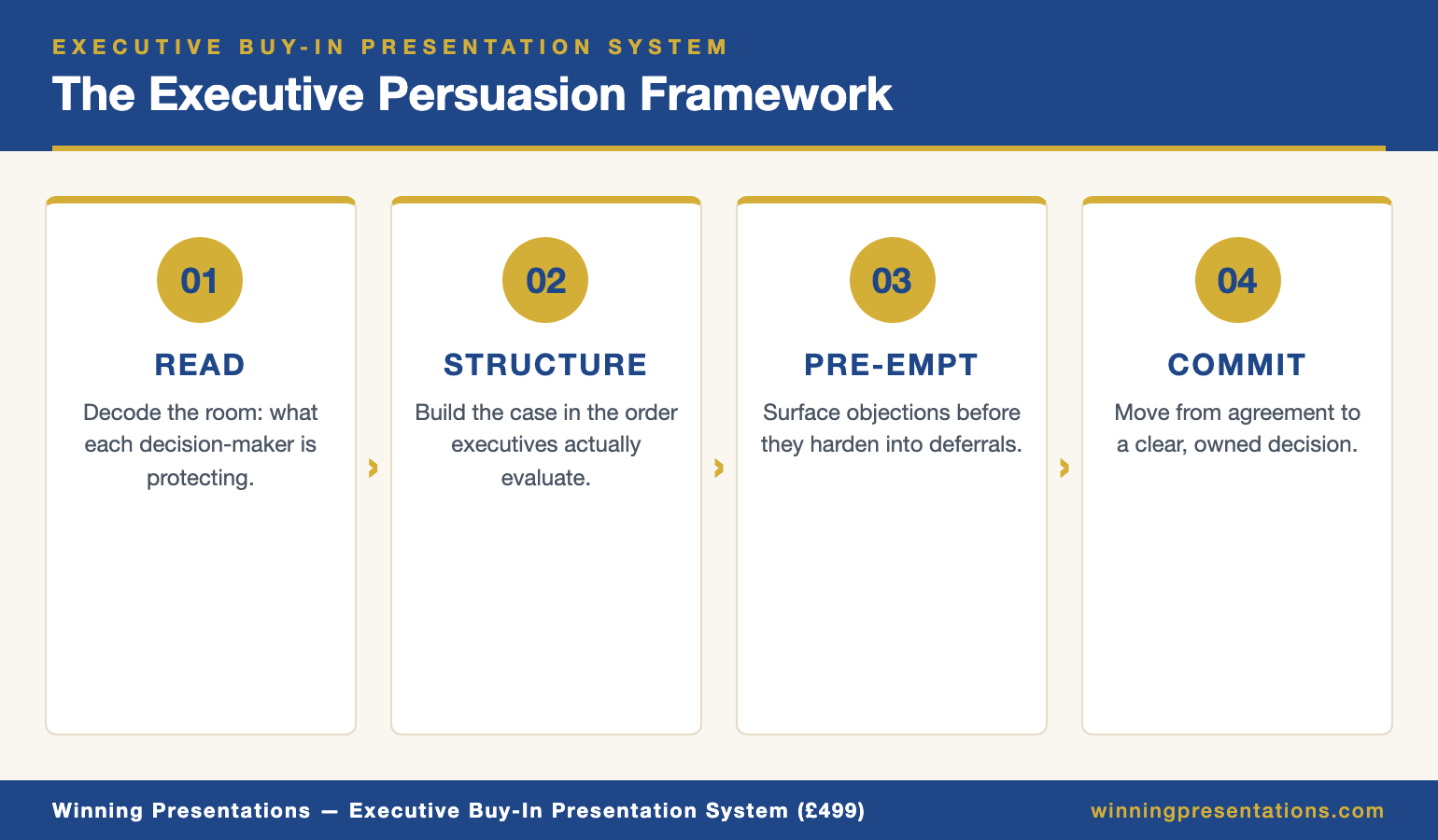
Infographic showing the four-stage stakeholder buy-in framework: map stakeholders, structure the argument, pre-empt objections, close the decision

A Structured Programme for Securing Stakeholder Buy-In

The Executive Buy-In Presentation System is narrowly focused on one outcome: helping professionals move senior stakeholders from consideration to commitment. It’s a self-paced online course, delivered through the Maven platform, with new cohorts opening every month. You enrol, you work through the material at your own pace, and you keep lifetime access to everything.

The programme is built on Mary Beth Hazeldine’s 25 years working with executives across banking, professional services, and corporate leadership — environments where stakeholder dynamics are high-stakes, multi-layered, and rarely forgiving of a poorly handled proposal. The course distils that experience into a step-by-step methodology you can apply to budget approvals, strategic initiatives, organisational change, investment decisions, and any other scenario where buy-in from senior stakeholders is the decisive factor.

Rather than teaching broad influencing skills and asking you to translate them to your context, the programme walks through the specific mechanics of a buy-in presentation: how to map stakeholders before you present, how to structure an argument that matches how senior people evaluate proposals, how to pre-empt objections so they don’t derail the room, and how to close out the conversation in a way that produces commitment rather than polite interest.

Coaching calls with Mary Beth are available throughout — and every session is fully recorded, so you can watch back at any time if you can’t attend live. These sessions are optional. “Cohort” refers only to the enrolment period, not a live structured programme. There are no deadlines and no mandatory sessions.

What You Get

  • Stakeholder mapping methodology — a framework for identifying decision-makers, their priorities, their likely concerns, and the political context surrounding your proposal before you present
  • Buy-in presentation structure — a proven format for building arguments that match how senior stakeholders actually evaluate and approve proposals
  • Objection pre-emption techniques — approaches for surfacing and addressing resistance inside the presentation rather than letting it emerge as a blocker afterwards
  • Decision-closing frameworks — structured ways to move a conversation from interest to commitment before the meeting ends
  • Optional Q&A coaching calls with Mary Beth — live sessions, fully recorded, available to watch back at any time
  • Lifetime access to all materials — revisit modules whenever you face a new stakeholder buy-in challenge

£499 per seat — self-paced, enrol any time.

The Training Built Specifically for Securing Stakeholder Buy-In

Most presentation courses teach you to communicate more clearly. That’s useful, but it’s not the same thing as getting a roomful of senior stakeholders to commit. The Executive Buy-In Presentation System (£499) is the complete online training programme for professionals who need the decision, not just the applause — with stakeholder mapping, objection-handling, and decision-closing methodology you can apply the next time you present. Self-paced, with optional recorded coaching calls.

Explore the Programme → £499/seat

Enrolment is open — join at your own pace.

Is This Right for You?

This programme is designed for mid-to-senior professionals who regularly present proposals, business cases, or strategic recommendations to senior stakeholders — executive teams, boards, investment committees, cross-functional leadership groups — and who need those presentations to end in a decision, not in “let’s discuss this further next time”. It’s well-suited to people in corporate, financial services, consulting, technology, and public sector environments where stakeholder dynamics shape whether proposals move forward.

It is not a course on general presentation skills or public speaking confidence. If your goal is improving delivery style, managing nerves, or building broad communication polish, other programmes serve that better. The Executive Buy-In Presentation System is narrowly focused on one thing: the methodology for moving stakeholders from consideration to commitment. If that is the gap you’re trying to close, it’s built precisely for you.

Frequently Asked Questions

What’s the difference between stakeholder buy-in training and general presentation training?

General presentation training focuses on how you communicate — structure, clarity, delivery, visual design. Stakeholder buy-in training focuses on the decision-making dynamics behind the presentation: who needs to commit, what they’re really evaluating, what will cause them to hesitate, and how to move a group toward alignment. The two overlap, but the buy-in discipline goes beyond what most communication courses cover.

Is £499 worth it for a single online course?

The financial case rests on what a rejected or stalled proposal costs — the delayed project, the revenue that doesn’t materialise, the weeks or months spent re-pitching an initiative that should have been approved the first time. For professionals presenting material decisions regularly, the programme pays for itself the first time you secure commitment on a proposal that would previously have stalled. The methodology is reusable across every buy-in scenario you face from that point on.

How long does the programme take to complete?

The programme is entirely self-paced. Some participants complete it in a focused week, particularly when they have an upcoming presentation to prepare for. Others spread it over several weeks or months alongside their work. There are no deadlines, no set pace, and no mandatory sessions.

Do I have to attend the live coaching calls?

No. Every coaching session is optional and fully recorded. You can watch recordings at any time, and you get the full benefit of the programme whether you attend live or not.

Does the framework work across different industries and proposal types?

Yes. The underlying principles of stakeholder decision-making hold across sectors. Participants have applied the framework to budget approvals, technology investments, strategic initiatives, organisational change, procurement decisions, and investor proposals. The specifics change; the mechanics of moving senior stakeholders toward commitment don’t.

Is this suitable if I already have years of presentation experience?

Experience in presenting isn’t the same as a repeatable system for securing buy-in. Many participants are confident, capable presenters who still find certain proposals consistently stall — typically because they’ve never explicitly studied the dynamics of stakeholder decision-making. The programme is designed to close that specific gap regardless of how senior or experienced you are.

05 May 2026
Senior executive reviewing a professional presentation deck on a large monitor in a modern glass-walled boardroom

Professional Presentation Course Online: A Practical System for Executive-Level Decks

Professional Presentation Course Online: A Practical System for Executive-Level Decks

If you’re searching for a professional presentation course online, you’re likely preparing for real stakes — a board update, a budget ask, a strategic recommendation, a client pitch — and you want structure rather than general theory. The Executive Slide System (£39) is a self-contained online programme that gives you 26 executive-ready slide templates, 93 AI prompts for Copilot and ChatGPT, 16 scenario playbooks covering real corporate situations, a Master Checklist, and a Framework Reference. You get instant access, work through it at your own pace, and keep lifetime use of every file. This page explains exactly what’s inside, who it’s built for, and how to judge whether it’s the right fit for the work you’re doing.

Why Most Online Presentation Courses Miss the Mark for Senior Professionals

Most online presentation courses are built around general communication skills — eye contact, voice modulation, opening hooks, slide aesthetics. Useful early in a career, but a poor match for the problem most senior professionals actually face. By the time you’re presenting to a board, an executive committee, or a client leadership team, the gap isn’t your ability to hold attention. It’s the ability to build a deck quickly, structure a recommendation that survives scrutiny, and walk into the room with materials that look like they came from a senior-level environment.

The trouble is that training on executive-level deck construction is rare, and most of what’s available is either six-figure corporate coaching or generic templates that don’t map to the scenarios senior work actually involves — budget rejections, client escalations, quarterly reviews, board approvals, cross-functional conflict. What’s missing is a structured resource built specifically for the formats and situations that dominate senior professional life, at a price that makes it easy to try.

Infographic showing what's inside the Executive Slide System: 26 templates, 93 AI prompts, 16 scenario playbooks, Master Checklist, Framework Reference

A Complete System for Building Executive-Level Presentations

The Executive Slide System is built around a simple premise: the quickest way to improve as an executive presenter isn’t more theory — it’s a set of templates, frameworks, and AI prompts that let you produce board-ready slides in 30 minutes rather than starting from a blank screen every time. It’s delivered as three downloadable files, accessed online and used on your own machine. There are no live sessions to attend, no cohort schedule to fit around, no drip-feed release of material. Everything is available the moment you enrol, and you keep it indefinitely.

The system is drawn from Mary Beth Hazeldine’s 25 years working with executives across banking, professional services, and corporate leadership — environments where the standard for presentation materials is high and the consequences of a weak deck show up quickly. What’s inside is the distilled version of how senior people actually structure recommendations, handle the scenarios that recur at that level, and use AI tools to accelerate the work without losing executive polish. It’s not a theory course. It’s the toolkit, organised so you can find the right piece for the situation in front of you and use it straight away.

The format suits professionals who prefer to learn by applying the materials to live work rather than sitting through lectures. You open the relevant template or playbook, adapt it to your situation, and move forward. Over time, the patterns become internalised — which is when presentation skill actually compounds.

What You Get

  • 26 executive slide templates — board-ready layouts for the structures that recur at senior level (executive summary, recommendation, decision slide, risk framing, and more)
  • 93 AI prompt cards — Copilot and ChatGPT prompts organised around an Instant Draft / Refine / Executive Polish workflow, so you can produce a first draft of a deck in minutes and sharpen it to executive standard
  • 16 scenario playbooks — real corporate situations including board meetings, budget rejections, quarterly reviews, and client escalations, each with a suggested structure and slide flow
  • Master Checklist — a pre-send audit covering Clarity & Structure, Executive Tone, Decision Readiness, Persuasion Logic, Slide Flow, CFO Questions, and AI-Human Balance
  • Framework Reference — the thinking structures senior presenters rely on (Pyramid Principle, SCQA, Problem-Solution-Benefit, What-So What-Now What, Modular Deck, and others), with examples of when to use each
  • Lifetime access — use the files on any presentation for as long as you need them

£39 — instant access, three files, complete system.

The Online Presentation Course Built for Real Executive Work

Most online presentation courses teach theory. The Executive Slide System (£39) gives you the templates, AI prompts, and scenario playbooks to build board-ready decks in 30 minutes — drawn from 25 years of executive work across banking and corporate leadership. Instant access, three files, lifetime use. No cohort dates. No live sessions to attend. Just the toolkit, organised so you can apply it to the presentation you’re building this week.

Get the Executive Slide System → £39

Instant download. Lifetime access.

Is This Right for You?

The Executive Slide System is designed for mid-to-senior professionals who regularly build presentations for executive audiences — boards, leadership teams, investment committees, client leadership groups, or cross-functional decision-makers. It suits people working in corporate, financial services, consulting, technology, and public sector environments, particularly those who find themselves building decks under time pressure and want a set of proven structures to pull from rather than starting from scratch every time.

It is not a delivery skills course. If your primary goal is improving eye contact, voice, stage presence, or handling presentation nerves, other resources will serve you better. The Executive Slide System is narrowly focused on the structural side of presenting: the slides themselves, the frameworks behind them, and the AI workflow for building them quickly. If that’s the gap you’re closing, it’s built precisely for you.

Frequently Asked Questions

Is this a live course or a self-paced download?

It’s entirely self-paced. You download three files the moment you purchase, and you can use them on any presentation immediately. There are no live sessions, no cohort dates, and no set pace to keep up with. Work through the material in whatever order makes sense for the presentation you’re currently building.

Is £39 realistic for an executive-level presentation course?

The price reflects the format rather than the depth. Because it’s a structured set of templates, prompts, and playbooks rather than coaching or live instruction, the cost stays low. For professionals who build executive presentations regularly, the time saved on a single high-stakes deck typically covers the cost many times over. It’s also considerably less expensive than the corporate training equivalents that cover similar material.

Do the AI prompts work with both Copilot and ChatGPT?

Yes. The 93 prompt cards are written to work with either Microsoft Copilot or ChatGPT, and the Instant Draft / Refine / Executive Polish workflow is designed to help you move from a blank slide to a polished executive version regardless of which AI tool you use.

Do the templates work in PowerPoint, Google Slides, or Keynote?

The templates are designed around structure and logic rather than proprietary formatting, so they translate across PowerPoint, Google Slides, and Keynote. You adapt the structure to whichever tool your organisation uses.

Who is this not suitable for?

The system is built for executive-level deck work. It’s less useful for junior professionals who haven’t yet encountered the scenarios the playbooks cover, or for those whose primary presentation challenge is delivery confidence rather than slide structure. If delivery is your gap, a speaking confidence programme is a better starting point.

Can I use the system on multiple presentations?

Yes. Lifetime access means you can apply the templates, prompts, and playbooks to every presentation you build from the day you download them onward. That’s the value of the system — it keeps earning its place every time you face a new executive-level deck.

05 May 2026
Confident senior male executive calmly responding to a silver-haired non-executive director raising a correction interruption in a bright modern boardroom.

The ‘Actually…’ Question: Handle Correction Attempts Without Losing the Room

Quick answer: The “actually…” question is a correction attempt disguised as a question. The best response is neither to defend nor to fold — it is to acknowledge the point, verify the facts briefly, and return control of the presentation to you. Done well, it adds to your credibility. Done badly, it invites everyone else in the room to attempt their own correction.

A senior risk executive — I’ll call him Osman — was three slides into a board briefing in late 2023 when a non-executive director interrupted. “Actually, the figure you just quoted was the 2022 number, wasn’t it?” It wasn’t. It was the 2023 figure, which Osman had verified twice before the meeting. But the room had heard the correction, the director was highly regarded, and the rest of the presentation was hanging on whether Osman could respond cleanly.

He did. “Let me come back to that — the 2023 figure is the one on screen; happy to share the source after.” Then he moved on. Later in the meeting, during a private moment, the director nodded to him and said, “Good catch, you were right.” The correction attempt had landed, Osman had absorbed it without escalation, and the room’s trust in his material actually increased.

Most presenters mishandle the “actually…” question. They either defend too hard, fold too fast, or try to debate the point and lose twenty minutes of board time. The right response is narrower and more useful than any of those — and it works whether the correction is right, wrong, or somewhere in between.

Want the complete framework for Q&A like this?

The Executive Q&A Handling System covers correction attempts alongside bridge statements, deflection techniques, and composure protocols for the full range of hostile, unexpected, and high-stakes executive Q&A.

Explore the Q&A Handling System →

What an “actually…” correction actually is

The “actually…” question is a specific social move. It is a correction framed as a question, usually delivered at low emotional temperature, which puts the presenter in the position of either accepting the correction or disputing it in public. The word “actually” signals that the questioner believes they know the correct answer; the question form makes it harder for the presenter to simply disagree.

The move does different work depending on who is using it. Sometimes the questioner has genuinely caught an error. Sometimes they remember an older version of a figure and have not realised it was updated. Sometimes they are testing the presenter’s composure. And sometimes — less often than most presenters fear — they are actively trying to undermine.

The tricky part is that the response pattern is almost identical in all four cases. You do not need to diagnose the motive in real time; you need a clean response that handles the correction attempt regardless of intent. Trying to work out whether a questioner is being helpful or hostile usually slows your response enough to make it look defensive.

What makes the “actually…” pattern different from other Q&A challenges is that it is usually about a single specific fact — a number, a date, a source, a name. That narrow scope is both the threat and the opportunity. The threat: getting the fact wrong in front of the room is visible and memorable. The opportunity: if you handle the narrow fact cleanly, you close the exchange quickly and return to your material.

Four types of actually correction attempt dashboard infographic showing genuine correction, stale information, composure test, and undermining attempt as the taxonomy senior presenters encounter.

The four types of correction attempt

Every “actually…” correction fits into one of four categories. Recognising which one you are dealing with lets you calibrate the length of your response without changing the shape of it.

The genuine correction. The questioner is right. The figure was wrong, the date was off, the source was misattributed. This is the easiest case to handle and the hardest to handle badly. Senior presenters acknowledge genuine corrections quickly and clearly, credit the questioner briefly, and move on. The trap is over-apologising — which draws attention to the error far more than the error itself warranted.

The stale information correction. The questioner is working from an older version of the same fact. They remember the number from last quarter, or the structure from before the most recent reorganisation, or the policy from the previous version. They are not wrong — they are looking at the right answer for a previous point in time. The response is to confirm the current position without implying the questioner was careless.

The composure test. The questioner — often someone senior, sometimes a chair or NED — raises a correction they are not entirely sure about, partly to see how the presenter responds under pressure. This is not hostile; it is a calibration exercise. Senior listeners form a view about new presenters partly by watching how they handle small pressures. The response has to be calm, quick, and specific.

The undermining attempt. The questioner is trying to cast doubt on your material, often because your recommendation conflicts with their interests. This is the rarest of the four and the one that most presenters overestimate. Most of the time, a correction attempt that feels hostile is actually a composure test or a genuine correction delivered abruptly. The handling is the same — address the specific fact cleanly, then move on — but the presenter’s internal threat response is higher, which makes the execution harder.

The response pattern that holds the room

The response has four parts, each of them short. The full response should take between ten and twenty seconds. Going longer is almost always a mistake — it draws more attention to the correction attempt than it deserves and can turn a narrow fact exchange into a broader debate.

Pause. Two to three seconds. Long enough to register that you have heard the correction. Short enough that it does not read as uncertainty. Pause-first is almost always better than answer-first here; the pause communicates that you are thinking, not reacting. This is the same mechanism behind the buying-time techniques that senior presenters use in Q&A.

Acknowledge. Two or three words. “Good point.” “Let me check that.” “Thanks — worth clarifying.” Acknowledgement is not concession; it is a signal that you take the correction seriously enough to respond. Refusing to acknowledge feels dismissive, which invites the questioner to escalate.

Clarify or correct. The next sentence is the load-bearing one. If the questioner is right: “You’re right — that should be 2.3, not 2.4. Thanks for catching that.” If they are wrong: “The figure on the slide is the 2023 number — happy to share the source after.” If you are not sure: “I want to check that before I answer — I’ll come back to it at the end of this section.”

Return to your material. The final move is to bring the room back. “Let me continue with the recommendation.” “As I was saying, the second option.” Signalling the return explicitly prevents the questioner from asking a follow-up and tells the rest of the room that the correction has been handled.

This pattern is a specific application of the bridging technique for difficult questions — acknowledge, address, bridge back to your agenda.

Walk into your next Q&A with a framework that holds up

The Executive Q&A Handling System gives you the complete framework for managing hostile, unexpected, and high-stakes Q&A in executive settings — including correction attempts, bridge statements, deflection techniques, and the composure protocols that hold the moment together.

  • Bridge statements for returning control of the exchange
  • Deflection techniques that are professional, not evasive
  • Composure protocols for the seconds before you answer
  • Scenario playbooks for the question types senior presenters get most

Designed for senior professionals presenting to boards, investment committees, and executive sponsors.

Get the Q&A Handling System →

£39, instant access.

What to do when you are actually wrong

Being corrected in a senior setting feels worse than it is. Most audiences are willing to forgive a narrow factual error if it is handled cleanly. What they cannot forgive is a presenter who either denies a real mistake or makes the mistake feel larger by over-apologising. The handling is more important than the error.

When you are wrong, three moves do the work.

Acknowledge quickly and specifically. “You are right — that should be 2.3, not 2.4.” Specific acknowledgement lands better than general acknowledgement. “You are right, sorry about that” is less reassuring than “you are right, the 2.3 figure is the one from the latest report, thanks for catching that”. Specificity demonstrates that you know the material.

Do not over-apologise. One acknowledgement is enough. Repeating the apology two or three times makes the error feel serious enough to warrant multiple apologies, which it usually is not. Senior audiences interpret heavy apology as a signal that the presenter is more concerned about their own standing than about the material.

Signal that the rest holds. “The underlying picture is the same — the direction of travel is consistent whether we use 2.3 or 2.4.” This move reassures the room that the error was narrow, not structural. It is only appropriate when true; inventing structural soundness you cannot demonstrate makes the second error worse than the first.

The broader principle worth remembering: an honest answer nearly always builds more credibility than a defended one. Senior audiences know that presenters occasionally get details wrong; they are primarily watching to see whether the presenter handles the moment like an adult.

Four-step response pattern stacked cards infographic showing pause, acknowledge, clarify or correct, and return to material as the sequence for handling an actually correction attempt.

Prevention: reducing the attack surface

The best response to an “actually…” correction is the one you never have to use, because the correction attempt did not arise in the first place. Reducing the attack surface is part of senior presentation preparation.

Source every number on screen. Either include the source inline in small text on the slide, or know the source by memory before you walk in. “The 2023 figure is the one from the July operating review” is more effective than “yes, that is correct” when a source is queried. This is the cheapest preventive measure available; it costs nothing in slide real estate and takes the wind out of most number-based challenges.

Use the most recent dating consistently. Correction attempts are often about data being out of date rather than being wrong. If the slide shows 2023 data, say “2023” out loud at least twice during the relevant section. If a key figure was updated in Q4, note it explicitly. Consistent dating pre-empts the “wasn’t that the 2022 number?” challenge.

Pre-circulate anything sensitive. If your recommendation hinges on a disputed or sensitive data point, include it in the pre-read rather than introducing it live. Senior audiences who have already seen a figure in a document are far less likely to challenge it in the room. Surprise is what invites correction.

Rehearse with a sceptic. Before a senior presentation, run through the deck once with a colleague whose job is to raise every “actually…” correction they can think of. Some will be right, some will be wrong, some will be composure tests. Treat the rehearsal as a sampling exercise — the goal is to surface the five or six possible challenges, not to anticipate every one.

Partner post: the neutral voice technique for broader authority challenges is the physiological companion to the narrow-fact handling of the “actually…” pattern.

Want the structural complement to Q&A handling?

The Executive Slide System (£39) gives you the slide structures that reduce the attack surface — decks designed so that sources, dates, and sensitivities are handled on the slide rather than exposed to in-room correction.

Explore the Executive Slide System → £39

The composure behind the fact exchange

The “actually…” question is, in the end, less about the fact than about the presenter. Senior audiences are watching to see how narrow factual pressure is handled. Calm, specific, brief. Acknowledge, clarify, return. The presenter who does this reliably earns a kind of trust that content-only presenters do not — the audience starts to feel that if the presenter says the recommendation holds, the recommendation probably holds.

That trust is worth more than most of the slide design, the framework selection, and the rehearsal put together. It does not come from never being corrected. It comes from being corrected occasionally and handling the moment cleanly every time.

Start with the pause. The next time someone starts a sentence with “actually…” in any setting, pause before responding. Notice how the pause changes the shape of the exchange. That single move is the foundation of everything else in this response pattern.

The Q&A framework senior presenters rely on

Bridge statements, deflection techniques, composure protocols. Built for the hostile, unexpected, and high-stakes Q&A that senior presenters face.

Get the Q&A Handling System → £39

Instant access.

Frequently asked questions

What if the correction is technically right but irrelevant to the recommendation?

Acknowledge the correctness of the point, state its relevance to the recommendation in one sentence, and move on. “You are right on the Q3 figure — the point does not change the three-year payback, which is what we are asking you to approve.” This prevents the room from getting stuck on a minor accuracy issue while losing sight of the actual decision. The move respects the questioner without letting the exchange derail the meeting.

How do I handle it when I genuinely don’t know whether I’m right?

Say so, specifically. “I want to check that before I give you a firm answer — let me come back to it at the end of this section.” Commit to the follow-up and do it. Senior audiences prefer honest uncertainty followed by a verified answer to confident bluffing. The trap is saying “I’ll come back to that” and then never returning — make a note on your handout and use it.

What if the questioner keeps insisting they are right when they are not?

Hold your position calmly, once, with the source. “The figure on screen is 2.3 — I can share the source after the meeting.” If they continue to insist, offer to take it offline: “Happy to work through the numbers with you after.” Do not relitigate the point in front of the room. The audience reads a presenter who takes a disputed narrow point offline as senior; the presenter who keeps engaging looks drawn into the dispute.

Does the response differ when the questioner is junior to me?

The response shape is identical — acknowledge, clarify, return — but the tone is slightly warmer. Junior questioners who attempt “actually…” corrections are often learning how to raise challenges in senior forums, and a calm, specific response from a senior presenter is part of how they calibrate. Dismissing the junior correction is worse than handling it with the same neutrality you would offer a peer.

Get The Winning Edge

One email each Thursday. Named techniques from real boardroom work — corrections, composure, framing — that senior professionals can try in the next presentation.

Subscribe to The Winning Edge →

Next step: practise the four-step response on the next low-stakes correction you receive this week, so the shape of the response is familiar before a senior one arrives.

About the author

Mary Beth Hazeldine is Owner & Managing Director of Winning Presentations Ltd. With 24 years of corporate banking experience at JPMorgan Chase, PwC, Royal Bank of Scotland, and Commerzbank, she advises executives across financial services, healthcare, technology, and government on structuring presentations for high-stakes funding rounds and approvals.

05 May 2026
Senior male executive presenting to attentive colleagues in a sunlit modern meeting room, speaking with quiet authority.

Executive Vocabulary Signals: Words That Say Promotable vs Replaceable

Quick answer: Executive vocabulary signals are the small word-level choices that tell senior listeners whether a presenter thinks like a peer or like a subordinate. Words that frame decisions, trade-offs, and ownership read as promotable. Words that frame activity, effort, and caution read as replaceable. The same facts, spoken with different words, produce very different assessments of the speaker.

A director at a specialty insurer — I’ll call him Henrik — was passed over for a second time in 2023. His numbers were strong, his technical judgement was respected, and his two executive sponsors were advocating for him in the promotion discussions. He lost to a peer with weaker numbers but, as Henrik’s manager later put it, “who sounds more senior when you put him in front of the group chief actuary.”

What Henrik’s manager was describing was not confidence, charisma, or executive presence in the abstract. It was the specific words Henrik used in executive presentations — words like “I’ve been working on”, “hopefully we can”, “we tried to”, and “what I was trying to do was”. Words that accurately described his effort but positioned him as a doer rather than a decision-maker.

Six months later, after rebuilding the vocabulary he used in senior forums, Henrik was promoted. The technical content of his presentations did not change. The framing did. Executive listeners started describing him differently — “clear thinker”, “decisive”, “commercially sharp” — words that had never attached to him before.

Want the structured system for executive-level presentations?

The Executive Slide System covers 16 senior scenarios, 26 slide templates, and 93 AI prompts — the structural complement to the vocabulary changes below. When structure and language reinforce each other, senior listeners register the presenter differently.

Explore the Executive Slide System →

Why the words matter more than the content

Senior listeners process presentations at two levels simultaneously. The first is the content — what you are recommending, what the numbers are, what the risks are. The second is the calibration — is this person thinking like a senior executive, or thinking like a mid-level specialist explaining a decision to an audience above them? The second layer is mostly carried by vocabulary.

The calibration happens fast, often in the first two minutes. Once a senior listener has decided that a presenter “doesn’t quite sit at the level”, the rest of the presentation is heard through that filter. Strong analysis gets credited as detail orientation rather than strategic thinking. A good recommendation gets received as information rather than judgement. This is not a fair process — but it is the one operating in most boardrooms, investment committees, and promotion panels.

Vocabulary signals are not about sounding smart. Senior presenters often use shorter words and simpler sentences than mid-career specialists. The signal is in which words do the work — which verbs, which framings, which pronouns — not in how complicated the language is.

A useful frame: words that position the speaker as someone who makes decisions with consequences read as promotable. Words that position the speaker as someone who carries out work under direction read as replaceable. Both can be accurate descriptions of the same role. The difference is in how the presenter chooses to describe what they do.

Executive vocabulary signals comparison infographic showing promotable framings like We recommend, The trade-off is, The decision point is, contrasted with replaceable framings like I've been working on, Hopefully we can, We tried to.

The vocabulary of promotable presenters

Senior-sounding language has a recurring texture. Four patterns do most of the heavy lifting.

Decision language. Promotable presenters name decisions clearly. “The choice is between A and B.” “We recommend X.” “The decision point is September.” This framing positions the speaker as someone who understands what is being decided and by whom. It also makes the room more comfortable, because the presenter has done the cognitive work of isolating the decision.

Trade-off language. Senior listeners think in trade-offs. Presenters who name the trade-off rather than pretending the answer is obvious read as commercially sophisticated. “The trade-off is speed against risk exposure.” “We are accepting higher capex in exchange for shorter payback.” Naming the trade-off also pre-empts the question a skeptical committee member was about to ask.

Ownership language. Promotable presenters take clear ownership of recommendations. “I recommend.” “My view is.” “We are asking for your approval to.” Ownership language does not mean arrogance; it means the presenter is willing to be accountable for the position. Senior listeners read this as confidence; its absence reads as fence-sitting.

Consequence language. Senior presenters consistently frame actions in terms of consequences, not activity. Not “we have been working on a new routing algorithm” but “the new routing algorithm cuts claims handling time by two days”. The consequence is what matters to the executive audience; the activity is what matters inside the team.

The cumulative effect of these four patterns is a presenter who sounds like they have already thought through what senior listeners are about to ask. That perception — of being one step ahead of the room — is the hallmark of executive-level communication.

The vocabulary that reads as replaceable

The vocabulary that reads as replaceable is rarely wrong. It is usually accurate. It describes the work as it was actually done, with appropriate modesty and caution. The problem is not truth; the problem is positioning. Four patterns do most of the damage.

Effort language. “I’ve been working on.” “We have spent the last six weeks.” “The team has been digging into.” These framings emphasise input rather than output. A senior listener does not want to know how much effort was spent; they want to know what was decided or discovered. Effort language is appropriate in a one-to-one with your line manager, where input is part of the conversation. In an executive forum, it reads as a request for credit.

Hedge language. “Hopefully we can.” “We are trying to.” “Possibly this will.” “It could be the case that.” Hedge language protects the speaker from being wrong, but it also makes the recommendation feel provisional. Senior listeners interpret heavy hedging as either uncertainty about the analysis or unwillingness to commit. Either reading caps the presenter’s authority.

This is closely related to the over-explaining pattern that destroys credibility — both are attempts to bullet-proof a statement, and both produce the opposite effect.

Passive-voice attribution. “It was decided that.” “The analysis was conducted.” “Requirements were gathered.” Passive voice removes the speaker from the action. In some technical contexts this is correct; in executive communication it reads as avoidance of ownership. “We decided to” is not the same as “it was decided” — the first carries authority, the second carries distance.

Apology framing. “Sorry, just one more slide.” “I know I’m running over.” “Sorry, let me just go back.” Apologies signal that the speaker believes they are intruding on the audience’s time. Senior presenters rarely apologise for the presentation itself; they apologise only for specific things that actually warrant one, such as a delayed start. Chronic apology framing makes the presenter feel like a guest in their own material.

Stop sounding like the smartest person in the room without the seniority to match

The Executive Slide System gives you the structural scaffolding that makes promotable vocabulary easier to use. When a slide is structured around a decision point, the language that fits the slide is decision language by default. Structure carries the vocabulary.

  • 26 slide templates for board, investment committee, and senior leadership scenarios
  • 93 AI prompt cards with Instant Draft, Refine, and Executive Polish workflow
  • 16 scenario playbooks — real-world situations from budget rejections to quarterly reviews
  • Master Checklist covering Clarity, Executive Tone, Decision Readiness, and Persuasion Logic

Designed for senior professionals in financial services, healthcare, technology, and government.

Get the Executive Slide System →

£39, instant access. 3 files. Complete system.

Ten substitutions that change how you sound

The fastest way to shift executive vocabulary is substitution — learning to spot a replaceable-sounding phrase as it leaves your mouth and replacing it with a promotable equivalent. Ten substitutions cover most of the repeated ground.

  1. “I’ve been working on” → “We’ve resolved” / “We’ve built” / “We’ve identified”. Name the output, not the effort.
  2. “Hopefully” → [delete]. Hope is not a strategy senior listeners want to hear. If the outcome is conditional, state the condition: “subject to the January volumes holding” is better than “hopefully January will hold”.
  3. “We tried to” → “We chose to” or “We decided to”. Tried implies failure; chose implies judgement.
  4. “What I was trying to do was” → “Our objective was”. Trying reads as uncertain; objective reads as intentional.
  5. “It might be worth considering” → “I recommend”. The former is fence-sitting; the latter is a position.
  6. “Sorry, one more thing” → “One final point”. No apology needed. The audience knows they signed up for the presentation.
  7. “A number of” → “Three” / “Four” / the exact number. Vague quantities signal lack of precision. Specific numbers signal command of the material.
  8. “Stuff” / “Things” → name the thing. “Stuff we need to think about” is the language of internal conversation. Executive forums need specificity: “the three risks we need to resolve before November”.
  9. “I think” → “My view is” / “Based on the data”. Both alternatives land harder. “I think” is a verbal tic that dilutes every statement that follows it.
  10. “We should probably” → “We should” or “We need to”. Probably removes the force from the recommendation. Say it or do not say it.

Practising these substitutions in rehearsal trains the substitution reflex. Once the reflex is installed, the swaps happen mid-sentence without conscious effort.

How to install the vocabulary in one week

You do not need a month of coaching to change executive vocabulary. A focused seven-day protocol produces measurable change, provided you are willing to listen to yourself during the change.

Day 1: Audit. Record the next internal meeting where you present something to peers. Listen back with a pen. Note every instance of the eight most common replaceable phrases from the substitution list. Most mid-career presenters find between fifteen and thirty in a thirty-minute recording. The count is the benchmark.

Days 2–3: Single-substitution drill. Pick the single most frequent phrase from your audit and replace only that one for two days. If the phrase is “hopefully”, you simply stop saying “hopefully”. The constraint is narrow and specific, which makes it easier to catch yourself in the moment.

Days 4–5: Two-substitution drill. Add the second most frequent phrase. Continue to monitor the first. This is the stretch phase; expect to miss some, catch yourself mid-sentence, and correct in the next phrase. Self-correction in the moment is part of the installation.

Day 6: Re-audit. Record another internal meeting. Count the occurrences of the two target phrases. The count typically drops by 70–80%. Note what replaced them — in most cases, the alternative vocabulary has started appearing naturally.

Day 7: Add the third substitution and hold. From here, cycle through the remaining substitutions two per week. The full set can be installed in four to six weeks of honest practice.

Related reading worth bookmarking: the executive summary slide structure, which gives vocabulary a framework to sit inside, and the broader pattern of presenting to senior leadership.

Partner post: the boardroom pause is the silence-based equivalent of the vocabulary changes above — what you do not say matters as much as the words you replace.

For the narrative side of executive communication

The Business Storytelling System (£29) covers the structural choices that carry decision language — how to sequence a narrative so the recommendation is earned by the time you land it. A natural companion to vocabulary work.

Explore the Business Storytelling System → £29

The quiet reason vocabulary work accelerates careers

Most mid-career professionals who plateau at senior-manager level are not plateauing on capability. They are plateauing on how they are read. Executive listeners make a judgement about whether someone “sounds right” for the next level, and that judgement is carried by vocabulary far more than by technical knowledge.

Seven day vocabulary installation roadmap infographic: audit, single substitution, two substitution drill, re-audit, and holding, shown as a sequential milestone path.

The uncomfortable implication is that the vocabulary itself is a ceiling mechanism. Two specialists with the same underlying skill can be rated very differently depending only on how they describe what they do. The ceiling is removable, but it does not remove itself — it comes down when the presenter starts consciously installing the language of the level above.

That installation work is one of the highest-leverage investments a senior professional can make. It costs no time beyond what you are already spending in meetings. It uses no additional slides or frameworks. It simply changes which words you use when you are already presenting.

Start with one substitution. Pick the phrase you used most often in your last senior presentation. Commit to not using it for one week. Replace it with the promotable alternative every time you catch yourself about to say the old one. Notice how senior listeners respond.

The complete system senior presenters use to structure decisions

26 templates, 93 AI prompts, 16 scenario playbooks. The slide structure that makes promotable vocabulary the default.

Get the Executive Slide System → £39

£39, instant access. 3 files, complete system.

Frequently asked questions

Isn’t “promotable vocabulary” just corporate jargon?

No. Promotable vocabulary is usually simpler and more direct than what it replaces. “We recommend” is plainer than “it might be worth considering”. The change is towards clarity and ownership, not towards jargon. Jargon often comes from the same instinct that produces hedges — the wish to sound safe rather than clear.

How do I use decision language when the decision isn’t mine to make?

Name whose decision it is. “The decision sits with the investment committee. My recommendation is to proceed with option B, subject to their approval of the risk profile.” This framing preserves the authority of the decision-maker while still making your position clear. Passive framing (“a decision will need to be made”) is what reads as junior, not the acknowledgement that the decision belongs to someone else.

Won’t I sound arrogant if I stop hedging?

Arrogance comes from over-claiming, not from clarity. “We’ve resolved the capacity constraint” is clear, not arrogant. “We’ve resolved every capacity issue the business will ever face” is arrogant. The distinction is between a defined claim and an unbounded one. Senior listeners respond well to clarity; they are wary of unbounded claims whether they are hedged or not.

Does vocabulary work differ by culture?

The specific words vary — British executive language is more understated than American executive language, for example — but the pattern is the same across cultures. Decision-framing, trade-off-framing, ownership-framing, and consequence-framing read as senior in every executive culture I’ve worked in, including UK, US, German, and Hong Kong. The tone calibrates to the culture; the underlying pattern does not.

Get The Winning Edge

One email each Thursday. Named techniques from real boardroom work — vocabulary, pauses, framing moves — that senior professionals can try in the next presentation.

Subscribe to The Winning Edge →

Not ready for the full system? Start here instead: download the free Executive Presentation Checklist — the one-page reference senior presenters use to pressure-test a deck before a senior meeting.

Next step: audit one recording of yourself, pick one substitution, and hold it for a week.

About the author

Mary Beth Hazeldine is Owner & Managing Director of Winning Presentations Ltd. With 24 years of corporate banking experience at JPMorgan Chase, PwC, Royal Bank of Scotland, and Commerzbank, she advises executives across financial services, healthcare, technology, and government on structuring presentations for high-stakes funding rounds and approvals.

05 May 2026
Senior female executive pausing mid-presentation in a modern boardroom at dusk, holding the room's attention through deliberate silence.

The Boardroom Pause: Why 4 Seconds of Silence Beats Any Slide

Quick answer: The boardroom pause is a deliberate four-second silence after a consequential statement. It signals composure, invites reflection, and lets the room absorb the point before the next sentence arrives. Senior presenters use it to hold authority without raising their voice. The skill is knowing where to place it and resisting the urge to fill the gap.

A regional managing director I worked with in 2024 — I’ll call her Ines — walked out of a difficult investment committee meeting with the approval she needed. She had presented a capital allocation shift that nobody on the committee had expected. Two members were openly skeptical for the first ten minutes.

What she did differently that day was not a new framework. It was not a better slide. After her key line — “This reallocation protects the revenue we already have” — she stopped. She did not look away. She did not cough, shuffle notes, or say “so basically”. She held the silence for what she later timed as just over four seconds.

The skeptical committee chair leaned back in his chair. Another member nodded once, slowly. The room shifted. When Ines resumed, she was no longer defending; she was briefing a room that had already decided to listen.

That moment — four seconds of deliberate silence after a consequential sentence — is what senior presenters call the boardroom pause. It is one of the quietest tools in executive delivery, and one of the most misunderstood.

If you want a printable reference for delivery techniques like this

The Public Speaking Cheat Sheets cover pause placement, breath control, and the NLP anchoring techniques senior presenters use in the moments that matter.

Explore the Cheat Sheets →

What the boardroom pause actually is

The boardroom pause is a deliberate silence placed after a single load-bearing sentence. It is not a breath. It is not a transition. It is a choice to stop for long enough that the room is required to hold the statement rather than simply hear it.

Most mid-career presenters do not use silence at all. They move from sentence to sentence at a steady rhythm, partly because silence feels uncomfortable and partly because they have been taught that momentum is the same as confidence. Under pressure, this tendency doubles. The room starts to feel briefed at, not briefed.

Senior presenters behave differently. They speak less, but the pauses between what they say are longer. When they land a sentence that carries weight — a figure, a risk, a decision point — they stop and let the room catch up. The pause is where the sentence lands; without it, most executive-level statements simply wash past the audience.

This is a behaviour, not a trick. Once you see it, you see it everywhere. In a well-run board meeting, the chair often pauses for three to five seconds after raising a difficult point. In investor Q&A, a confident founder will pause before answering a hostile question. The pause does not feel like uncertainty; it feels like command of the material.

The Boardroom Pause Framework infographic: four stages showing Statement, Hold, Absorb, Resume with the four-second silence at the centre.

Why four seconds is the threshold

Audiences process consequential statements more slowly than most presenters think. A senior listener is not just hearing the words — they are running them against their own models, weighing implications for their budget, their risk exposure, their credibility. That internal work takes time. Under two seconds of silence, the processing is still happening when the next sentence arrives. The statement does not land.

Four seconds is the threshold at which two things happen. First, the audience has had enough time to finish the initial internal response to your statement. Second, the silence becomes deliberate rather than accidental — short enough to avoid awkwardness, long enough to communicate that you chose it.

Below three seconds, a pause reads as a breath. Between three and five seconds, it reads as composure. Above six seconds, it starts to read as a stall or a loss of thread, which undermines the effect. The narrow band of three-to-five seconds is where senior presenters operate.

You do not need to count exactly. But you do need to resist the instinct to keep talking. Most mid-career presenters pause for about one second and then fill the gap. The difference between one second and four seconds, repeated three or four times in a twenty-minute presentation, changes how the room reads your authority.

Related reading on this delivery habit: The pause technique for executive presentations covers the mechanical side of building pauses into a delivery script without sounding staged.

Where to place it in a senior presentation

The pause is only useful if it follows a sentence worth pausing on. Placed after filler or connective language, it feels self-important and strange. Placed after a consequential statement, it does the work.

The four placements that earn the pause in senior presentations:

  • After your headline recommendation. The one sentence that summarises what you are asking the room to approve. “We recommend closing the Lyon facility in Q3.” Pause. The room needs time to register what you have just said before you explain why.
  • After a material number. A cost, a loss, a return, a probability. Executive audiences calibrate against numbers; they need a moment to decide whether yours changes their view. “The contract exposure is eighteen million pounds.” Pause. Now explain.
  • After a risk statement. When you name what could go wrong, the room assumes you are about to soften it. Silence disrupts that assumption and makes the risk feel serious. “If we do not act by September, we lose the window.” Pause.
  • Before answering a hostile question. When someone on the committee pushes back, the instinct is to respond fast. Stopping for three or four seconds before answering signals that you are thinking, not defending. It also often produces a better answer.

What the pause does in each case is the same. It separates the statement from whatever follows so that the statement can be received on its own terms. Mid-career presenters connect everything; senior presenters let the important things stand alone.

The cheat sheet every senior presenter wants within reach before a high-stakes meeting

The Public Speaking Cheat Sheets (£14.99) are a set of nine printable guides covering pause placement, vocal control, NLP anchoring, breath protocols, and emergency techniques for the moments where delivery has to carry weight. Designed for senior professionals who deliver under pressure.

  • Nine printable guides covering delivery techniques
  • NLP anchoring and emergency protocols
  • One-page format, designed to keep at arm’s reach

Designed for senior professionals in financial services, healthcare, technology, and government.

Get the Public Speaking Cheat Sheets →

£14.99, instant download. Nine guides, one PDF.

The three mistakes that kill the pause

Knowing where to pause is only half the skill. The other half is what you do during the silence. Most mid-career presenters do one of three things that neutralise the effect.

The first mistake is filling the silence. A four-second pause does not feel like four seconds when you are the one presenting — it feels like twenty. The instinct to bridge the gap is overwhelming. “Um.” “Right.” “So basically.” “What that means is.” Every one of these fillers erases the work the pause was doing. The sentence before no longer stands alone; it becomes a setup for a longer explanation that nobody asked for.

The second mistake is looking away. Dropping your eyes to your notes, glancing at the slide, or scanning the room during the silence tells the audience that you are checking something. The pause has to be held with open posture, eyes on one or two decision-makers, hands still. Looking away turns a deliberate pause into an accidental one.

Dropping the gaze is one of the most common delivery tells. The related habit — filling silence with verbal fillers during presentations — has the same underlying cause: discomfort with the absence of action. Both are solvable with rehearsal.

The third mistake is softening the sentence that preceded the pause. Some presenters land the consequential line, notice the silence hanging, and get nervous about what they said. They then add a hedge. “Well, broadly.” “Obviously this is a first view.” “We could potentially revisit.” The hedge undoes the statement. The pause was supposed to give the sentence weight; the softening takes the weight back off.

The simplest rule: say the sentence, stop, hold your ground, then move to the next point without qualifying what you said. If the room has a question, they will ask. Silence invites engagement. Hedging invites dismissal.

Three mistakes that kill the boardroom pause comparison infographic: filling the silence, looking away, and softening the statement, shown with the corrective behaviour for each.

Practising the pause without looking rehearsed

The boardroom pause has to feel natural in the moment, or it does not work. A pause that reads as theatrical is worse than no pause at all. The preparation work sits in three places.

Mark your script. When you prepare a senior presentation, read through your talk and circle the three or four sentences that carry the most weight — the recommendation, the material numbers, the risk statements. Next to each one, write the word “PAUSE”. This is the only rehearsal instruction you need. Do not try to choreograph the entire talk; just know where the four or five pause points are.

A simple structured approach to not rambling includes this marking practice: you plan where you will stop, and everything between those points is allowed to breathe.

Practise with a clock visible. Most people experience a four-second pause as an eternity. The only way to recalibrate is to hold a pause while a second hand ticks, so you can feel how short four seconds actually is. Doing this twice in rehearsal changes your sense of the duration and stops you truncating the pause under real pressure.

Decide your eye-contact anchor. Before you walk in, pick one decision-maker whose response matters most, and plan to hold your gaze on that person during each pause. You do not have to stare; you just need a default anchor so your eyes do not drift. This removes the instinct to look down during the silence.

Repeat the first two steps twice and the third step once, and the technique becomes reliable. You will not have to think about it in the room — the rehearsal does the work.

Partner post worth reading on a related delivery signal: the vocabulary signals C-suite listeners associate with promotability.

Need openings and closings that earn the pause?

The Presentation Openers & Closers Swipe File (£9.99) is a copy-paste collection of 50 opening lines and 30 closing techniques — the sentences most worth pausing after. Designed for senior presenters who need their first and last words to do heavier work.

Explore the Openers & Closers Swipe File → £9.99

Why this one technique matters more than you expect

There is nothing dramatic about four seconds of silence. But the compound effect of using it well across a twenty-minute senior presentation is substantial. The room reads you as more senior. Your statements carry weight. Your answers feel considered. You come across as someone who has the authority to allow the room to react, rather than someone who has to keep pushing to stay in control.

The inverse is also true. A presenter who fills every gap — with words, hedges, or glances — reads as junior regardless of title. The pause is one of the clearest delivery signals for executive presence, and it costs nothing to install.

Start with one pause. Pick the single most consequential sentence in your next senior presentation and commit to holding silence for four seconds after it. Mark it on your notes. Choose your eye-contact anchor. When you get to the sentence, stop. Do not fill. Do not look away. Do not soften.

Then watch what the room does.

The cheat sheet you want within reach before the meeting starts

Nine printable delivery guides, one PDF, at-a-glance format. Covers pauses, breath control, NLP anchoring, and in-the-moment recovery.

Get the Cheat Sheets → £14.99

Instant download. One PDF, nine guides.

Frequently asked questions

Isn’t four seconds of silence awkward in a meeting?

It feels awkward to the presenter, not to the room. Audiences experience a four-second pause as about one to two seconds — because they are using the time to process what you said. The awkwardness is a sensation of the speaker, not the listener. Practising with a visible second hand calibrates this quickly.

Does the boardroom pause work in virtual presentations?

Yes, with one adjustment. Hold eye contact on the camera rather than on a specific participant, and keep your posture still. Lag and audio compression on video calls can stretch silences slightly, so a three-second pause often reads as four. The placement rules are the same.

How do I pause without it looking rehearsed?

Limit yourself to three or four pause points in a twenty-minute presentation, and place them after sentences that would earn a reaction anyway — the recommendation, the headline number, the risk statement. Natural pauses follow natural emphasis. Trying to pause everywhere is what makes it look rehearsed.

What if someone interrupts during the pause?

That is a good outcome. An interruption during the pause means the statement landed and the room wants to engage with it. Let them. The pause has already done its job by that point — it created room for the response. Answer the interruption, then resume.

Get The Winning Edge

One email each Thursday. Named techniques from real boardroom work — pauses, vocabulary, framing moves — that senior professionals can try in the next presentation.

Subscribe to The Winning Edge →

Not ready for the full system? Start here instead: download the free Executive Presentation Checklist — the one-page reference senior presenters use to pressure-test a deck before a senior meeting.

Next step: pick one sentence in your next senior presentation that deserves to stand alone, mark it with a pause, and walk into the room knowing you will hold it.

About the author

Mary Beth Hazeldine is Owner & Managing Director of Winning Presentations Ltd. With 24 years of corporate banking experience at JPMorgan Chase, PwC, Royal Bank of Scotland, and Commerzbank, she advises executives across financial services, healthcare, technology, and government on structuring presentations for high-stakes funding rounds and approvals.