Category: Executive Presentations

09 May 2026
Close-up of a man in a blue suit typing on a laptop at a boardroom table with colleagues blurred in the background.

The Executive Appendix: When and How to Use Backup Slides in a Board Deck

Quick answer: Executive appendix slides are most useful when they answer specific, predictable questions a board member is likely to ask — and most damaging when they look like material the presenter could not bring themselves to cut from the main deck. The rule is functional, not stylistic: every appendix slide must map to a named anticipated question, must be retrievable in under fifteen seconds, and must be designed to be read silently while the presenter speaks. Anything that fails those three tests does not belong in the appendix. It belongs in a working file the presenter never opens.

Declan Ostrowski is a deputy CIO at a mid-cap UK asset manager. Last September he presented a quarterly portfolio review to the investment committee. Slide 18 carried a chart of rolling three-year tracking error, broken down by sector. The CFO read it for nine seconds, looked up, and asked: “What was the tracking error in industrials in the second half of 2024, after the methodology change, and how does it compare to the figure before the change?” Declan had not built an appendix slide for it. He answered from memory, was approximately right, and was politely corrected by the head of risk eleven minutes later when the actual number turned up in a different report.

The committee decision did not change. Declan’s standing in the room did. The damage was not the wrong answer. The damage was the visible absence of a defended position.

Six months later he presented again with twenty-three appendix slides, each mapped to a specific anticipated question from a specific committee member. The CFO asked about a sector breakdown. Declan said: “Appendix slide A4 has the rolling figures with the methodology change isolated.” Eight seconds of clicking. The slide appeared. The CFO read it. The conversation moved on. That is what an executive appendix is for — not for material the presenter could not bring themselves to cut, but for material the presenter expects to need under direct questioning, designed to be retrievable in seconds and readable while someone is talking.

Looking for a structured framework for building executive decks — including the appendix?

The Executive Slide System gives senior professionals 26 templates, 93 AI prompts, 16 scenario playbooks, a master checklist, and a framework reference for building board-grade decks. Appendix design is built into the structural patterns.

Explore the Executive Slide System →

Why most executive appendices fail

The most common failure mode is that the appendix is built as a dumping ground rather than a defensive structure. The presenter pushes detail to the back of the deck without designing for retrieval. By the time a question lands, the presenter is scrolling through forty-seven untitled slides. The authority of the answer is gone before it arrives.

The second failure mode is the inverse: the appendix is meticulously curated but never used, because the presenter built it without modelling the questions the room would actually ask. They built the appendix that was easy — the data they had — rather than the appendix that would be useful — the data the committee would press on.

The third failure mode is psychological. The presenter uses the appendix as a security blanket, does not internalise the material, and reaches for slides instead of answering directly. The act of reaching tells the room they did not know the number cold. A useful appendix complements direct command of the material. A misused appendix substitutes for it.

Comparison infographic of three failure modes of executive appendix slides — dumping ground, irrelevant curation, and security blanket — versus a functional appendix designed for predicted questions, fast retrieval, and silent readability

What actually belongs in an executive appendix

First, anticipated detail behind a main-deck claim. If the main deck carries a finding — “three regions account for sixty per cent of the addressable market” — the appendix should carry the regional breakdown, the methodology, and the data source. Senior decision-makers read main-deck slides for findings, not methods, but they will press on methods the moment a finding surprises them.

Second, sensitivity analysis on key numbers. If your case rests on a forecast, the committee will want to know what happens if the forecast is wrong. An appendix slide showing the case under three scenarios — base, downside, severe downside — pre-empts the question and signals that the analysis was done.

Third, competitor or comparison data. If your proposal involves benchmarking — pricing, performance, valuation — the appendix is the right place for the underlying comparison table. The main deck states the conclusion. The appendix carries the workings.

Fourth, regulatory or compliance reference. For boards in financial services, healthcare, or regulated infrastructure, every material claim has a regulatory framing. Carry the relevant regulation and the dates of any policy change in a single appendix slide per topic. Never read it aloud. Have it ready for the procedural question the chief risk officer or general counsel always asks.

Fifth, decision history. For any decision being revisited, the appendix should carry the timeline of prior decisions, the reasons given at the time, and what has changed since. This is the category that protects you when a committee member says “I thought we already decided this.”

What does not belong, no matter how tempting

Material that did not earn its place in the main deck does not earn a place in the appendix as consolation. If a slide was cut because the argument was redundant or the data thin, putting it in the appendix does not rehabilitate it. The appendix is not a cemetery for slides you liked.

Source-document screenshots without commentary do not belong. A screenshot of an analyst report is not an answer — it is evidence that you did not build one. If the report contains material the committee needs, summarise it on a structured slide that names the source.

Anything you would not read silently to the room while you talk does not belong. If the slide is a wall of dense numbers with no visual hierarchy, you have inflicted reading work on the people you are trying to persuade. Data presentations to executives need a structured visual logic in every slide that lands on screen, including appendix slides.

Detailed organisational charts not relevant to the decision do not belong. Detailed Gantt charts, unless implementation timing is the question. Detailed budget lines, unless the budget itself is what is being approved. Every appendix slide must trace to a question someone will plausibly ask. If you cannot name the asker and the phrasing, the slide is not earning its space.

Decision matrix infographic showing the five categories of content that belong in an executive appendix — anticipated detail, sensitivity analysis, comparison data, regulatory reference, decision history — against the four categories that do not belong

Build the structural patterns once, use them on every executive deck

The Executive Slide System is the framework senior professionals use to construct board-grade decks — main deck and appendix. £39, instant access. 26 templates, 93 AI prompts, 16 scenario playbooks (board approval, investment committee, steering committee, audit committee and more), a master checklist, and a framework reference. Three files. Complete system.

  • 26 executive slide templates covering recurring board scenarios
  • 93 AI prompts for slide drafting, editing, and headline sharpening
  • 16 scenario playbooks for high-stakes presentation contexts
  • Master checklist for pre-meeting deck review
  • Framework reference document for structural decisions

Get the Executive Slide System →

Designed for senior professionals presenting to boards, investment committees, and senior stakeholders.

Design rules for appendix slides that work under pressure

An appendix slide has a different design brief. It will be pulled up under time pressure, often after a question that has unsettled the presenter. Five design rules separate appendix slides that work from those that embarrass.

First, name every slide with a question, not a topic. “What is the rolling tracking error in industrials before and after the methodology change?” — not “Industrials tracking error.” When you scroll under pressure, the question-as-title is what your eye catches.

Second, number the appendix sequentially with a clear prefix — A1, A2, A3 — and reference those numbers in the speaker notes of the corresponding main-deck slide. When a question lands, you do not search. You know it is A4, you go to A4, you display A4.

Third, design every slide to be readable in fifteen seconds. One headline finding at the top. One chart or one table. One source line at the bottom. If the slide cannot be absorbed in fifteen seconds of silent reading, the design has failed.

Fourth, never put more than one piece of analysis on a single slide. The cost of combining is that when the committee asks one specific question, the slide answers three at once and the relevant answer is buried. One slide, one answer.

Fifth, build the appendix index slide that nobody else builds. A single slide listing every appendix slide as a question with its number — A1 through A23. This slide is for you, not for them. It is your live retrieval map.

Using the appendix live without breaking your authority

The way you reach for an appendix slide tells the room as much as the slide itself. Three rules govern the moment of retrieval.

First, answer first, then bring up the slide. When a question lands, give your direct answer in one sentence — the number, the position, the conclusion — and only then say “let me show you the breakdown — appendix slide A4”. Reaching before answering tells the room you do not know the answer until the slide gives it to you. When you have to cut a board deck under time pressure, the retrieval discipline matters even more, because every second of fumbling reads as panic.

Second, bring up the slide once and do not return to it. Display, hold for the committee to read, and move on. Toggling between A4 and the main deck confirms that you are using slides as a substitute for thinking.

Third, know which appendix slides you will not bring up no matter what. Some appendix material is there for protection, not as the first answer offered. If a sensitive number is in A12 and the question can be answered without it, answer without it. The appendix is your reserve, not your front line.

For the structural patterns behind each of these, the Executive Slide System includes scenario playbooks for investment committee, board approval, and audit committee contexts where appendix design carries real weight.

Strengthen the Q&A side of the appendix as well

The Executive Q&A Handling System — £39, instant access — is the structural framework for handling difficult board questions in real time. It complements appendix design with the verbal patterns that turn a hard question into a defended answer, whether or not you reach for an appendix slide.

Get the Executive Q&A Handling System →

The cost of getting the appendix wrong

An executive committee remembers two things: whether the conclusion landed, and whether the presenter could defend it under pressure. The main deck addresses the first. The appendix addresses the second. A weak appendix tells the room the defensive work has not been done. A strong appendix, used sparingly and visibly, tells the room the opposite.

Building a strong appendix is largely the work of modelling the room. Who will ask first. What they will ask. What evidence they will press for. The slides are easy. The thinking that earns each slide its place distinguishes senior preparation from junior preparation.

Stop losing rooms over questions you should have anticipated

The Executive Slide System gives you the structural patterns for main deck and appendix together — £39, instant access. 26 templates, 93 AI prompts, 16 scenario playbooks, master checklist, framework reference.

Get the Executive Slide System →

FAQ

How many appendix slides should an executive board deck have?

There is no fixed number, but a useful working range is one appendix slide per anticipated material question, typically eight to twenty-five for a substantive board or investment committee paper. The discipline is functional rather than numerical: every appendix slide must map to a specific anticipated question with a named likely asker. If you cannot name the question for a given slide, the slide does not belong in the deck.

Should the appendix be sent in advance or only used live?

This depends on board protocol. Many UK boards expect pre-reads and the appendix forms part of that pack. In that case, design it to read well silently, with question-style titles and a clear index. Other settings — particularly investment committees in private capital — keep the appendix as a live-only retrieval tool. Confirm the convention with the company secretary or committee chair, and never assume.

Is a separate appendix document better than appendix slides at the back of the main deck?

For most executive contexts, appendix slides at the back of the same deck are more practical. They share the file, design system, and numbering. A separate document introduces friction during retrieval. The exception is when the appendix is genuinely large and dense — full financial models, regulatory technical documents — in which case a separate annex is appropriate, and the main deck appendix carries summary slides that reference it.

The Winning Edge — Thursday newsletter

Every Thursday, The Winning Edge delivers one structural insight for executives presenting to boards, investment committees, and senior stakeholders. No general tips. No motivational framing. One specific technique, one executive scenario, one action. Subscribe to The Winning Edge →

Not ready for the full system? Start here instead: download the free Executive Presentation Checklist — a single-page review you can run on any board deck, including its appendix, before sending it for distribution.

Next step: take the next board deck on your calendar and audit its appendix against three functional tests. Does every slide map to a named anticipated question? Is each retrievable in under fifteen seconds? Is each readable silently while you stay quiet? Cut anything that fails. Build what is missing.

Related reading: what executives actually read on a slide and how to design for that pattern, and how to cut a board deck when you are running over time without losing the case.

About the author. Mary Beth Hazeldine is Owner & Managing Director of Winning Presentations Ltd, founded in 1990. With 24 years of corporate banking experience at JPMorgan Chase, PwC, Royal Bank of Scotland, and Commerzbank, she advises executives across financial services, healthcare, technology, and government on structuring presentations for high-stakes funding rounds, approvals, and board-level decisions.

09 May 2026
Woman in a navy suit presents at a conference table as colleagues listen in a bright glass-walled office with a city skyline outside.

How to Answer “What’s Your Recommendation?” When You Don’t Have One Yet

Quick answer: When a senior executive cuts in with “what’s your recommendation?” and you were briefed only to present options, do not invent one and do not apologise for not having one. Use a four-part response: acknowledge the question directly, name the decision criteria you would use, indicate the option that scores highest against those criteria as a working view, and offer the timeframe in which you can return with a fully-formed recommendation. This holds authority without inventing certainty you do not have, and gives the executive committee something concrete to work with in the room.

Saoirse Blackwood runs corporate strategy at a UK-listed industrial group. Last autumn she presented three market-entry options to the executive committee — Germany, Poland, the Netherlands — comparing cost, timeline, regulatory complexity, and commercial yield. Her brief from the CEO had been explicit: present the options, walk through the trade-offs, do not pre-empt the committee’s decision. Three slides per option. A clean comparison matrix. No recommendation slide.

She got through option one. She got through option two. As she opened option three, the CEO leaned forward and cut across her: “Saoirse, yes, but what’s YOUR recommendation?” She froze. The brief had told her not to recommend. The CEO was now asking her to. She heard herself say, “I, ah, I think — well, the brief was to present the options, so I haven’t formally —” and watched the CFO’s face shift. The room cooled. She recovered in the second half of Q&A, but the hesitation cost her credibility she spent the next two committee cycles rebuilding.

The lesson Saoirse took from that meeting was not “always have a recommendation ready.” It was that the question is not really about the recommendation — it is about whether you can hold authority when the brief and the room have diverged. There is a structured response that works in this exact situation.

The structured framework for handling hard executive Q&A — including the “what’s your recommendation?” trap.

The Executive Q&A Handling System is the self-paced framework for senior professionals who need to answer tough committee questions with calm authority and decision-safe responses, in 45 seconds or less. Self-study, instant access. Built around the structured patterns presenters use to recover from exactly this kind of mid-presentation pivot.

Explore the Q&A Handling System →

Why this question is the one senior leaders dread

“What’s your recommendation?” is not a hostile question. From the executive’s seat, it is the most natural question in the world: you have spent twenty minutes presenting analysis, you have clearly thought about it more than anyone else in the room, and the committee’s job is to make decisions. Asking for your view is efficient.

What makes it dreaded is the gap between brief and room. Your brief — often from the same CEO who is now asking — was to present options, not lead the committee toward a conclusion. So you arrive with a balanced presentation, and partway through the same person who briefed you for balance asks for the unbalanced view. The question collides with the instruction. The presenter is left holding both, and the room watches to see which way they fall. The question almost always comes from the most senior person present, often mid-flow. The freeze is rational — the cognitive load of reconciling brief, audience, and personal credibility in three seconds is genuinely high. It is also recoverable, with structure.

The two traps: inventing and indecision

Two responses to the executive recommendation question consistently damage credibility, and both feel reasonable in the moment.

The first trap is inventing a recommendation. Under pressure, the presenter blurts a preference — usually the option they personally find most interesting, or the one the CEO seemed to lean toward in an earlier conversation. The recommendation is not grounded in the analysis the committee just heard, because that analysis was structured for comparison, not for a single conclusion. Senior listeners notice immediately. The CFO probes a number the presenter has not stress-tested. The COO surfaces an operational risk the presenter has not weighed. Within ninety seconds, the invented recommendation is being dismantled. The presenter is now defending a view they invented under pressure, with material prepared for a different argument. This is the worst place a senior presenter can be.

The second trap is the appearance of indecision. The presenter, knowing the recommendation is not yet rigorous, retreats into deferral language. “Well, that’s really for the committee to decide.” “I’d want to do more analysis before I committed.” “There are arguments both ways.” Each individual sentence is defensible. The cumulative effect is fatal. The committee does not hear humility. They hear a senior person who has spent twenty minutes on this material and still cannot tell them what they think. The judgement that follows is rarely about the analysis — it is about whether this presenter is ready for the next level of responsibility.

Both traps come from the same source: trying to answer the question as asked, when the question itself is the wrong frame. The structured response reframes it into one you can answer with authority — without faking certainty and without appearing unable to form a view.

Comparison infographic showing the two failure responses to the executive recommendation question — inventing a fake recommendation and retreating into indecision — versus the structured four-part response that holds authority

The four-part response that holds authority

The structured response has four parts. Each part takes ten to fifteen seconds. The whole answer fits inside forty-five to sixty seconds, which is the upper limit of executive attention for a single Q&A response.

Part one: acknowledge directly. One sentence, no apology. “That is the right question to ask, and I want to give you a useful answer rather than a polished one.” This validates the executive’s intervention, signals you are about to answer rather than deflect, and telegraphs the kind of answer that is coming — substantive rather than rehearsed. The room is now expecting candour, not certainty.

Part two: name the decision criteria. “If I were to make a recommendation today, the criteria I would weight most heavily are X, Y, and Z.” Three criteria, no more. This is the single most credibility-protective move in the response. By naming the criteria explicitly, you demonstrate that you have thought about the decision structurally, even if you have not landed on a single answer. The committee sees your reasoning architecture. Senior listeners are far more reassured by a presenter who can articulate the framework than by one who states a conclusion without one.

Part three: state a working view. “On those criteria, the option that scores highest is option two — the Polish market entry — primarily because of the regulatory tailwind in 2027 and the lower capital requirement in year one. That is a working view, not a final recommendation, because I have not yet stress-tested the operational ramp-up assumptions with the regional team.” You are giving them a view. The view is bounded — you have specified what makes it provisional — but it is a view. The committee has something concrete to work with, and you have not invented a position you cannot defend.

Part four: offer a timeframe. “I can return to the committee within ten working days with a formal recommendation that includes the operational stress-test.” A specific date, scope, and deliverable. This closes the loop and re-establishes you as the person driving the decision. It also gives the committee a productive next step, which is what executive committees prefer over open questions.

The four parts work together. Acknowledgement lowers the temperature. Criteria demonstrate structure. Working view shows judgement. Timeframe restores ownership. The broader patterns for handling tough questions sit on the same structural foundation.

Roadmap infographic of the four-part executive recommendation response: acknowledge directly, name decision criteria, state working view, offer formal recommendation timeframe — with seconds-per-part timings

The complete framework for handling hard executive Q&A under pressure

The Executive Q&A Handling System is the self-paced framework for senior professionals who need to answer tough committee questions with calm authority and decision-safe responses in 45 seconds — including the recommendation question, the credibility challenge, the hostile probe, and the question you genuinely do not yet have a full answer to. £39, instant access.

  • Structured response patterns for the questions senior presenters dread most
  • The 45-second framework for calm, decision-safe answers under pressure
  • Self-study, work through it at your own pace
  • Instant download — start using it in your next committee meeting
  • Designed for executive, board, and investment committee Q&A

Explore the Q&A Handling System →

Built around the structured patterns presenters use to recover authority when the brief and the room diverge mid-presentation.

A worked example: the market-entry committee

Take Saoirse’s situation, run forward as if she had used the structured response. The CEO has just cut in: “Saoirse, yes, but what’s YOUR recommendation?”

Part one — acknowledge: “That is the right question to ask, and I want to give you a useful answer rather than a polished one.” Eight seconds. The CEO leans back. The CFO’s pen pauses. The room is now waiting for substance.

Part two — criteria: “If I were to make a recommendation today, I would weight three criteria most heavily — capital efficiency in year one, regulatory tailwind from 2027 onwards, and our existing operational footprint within four hundred kilometres of the target market.” Twelve seconds. The CFO recognises capital efficiency as her language. The COO recognises operational footprint as his. The CEO recognises regulatory tailwind from the strategy review last quarter. Three criteria, three nods.

Part three — working view: “On those criteria, the option that scores highest is option two — the Polish market entry — primarily because of the lower capital requirement in year one and the regulatory tailwind we already track. That is a working view, not a final recommendation, because I have not yet stress-tested the operational ramp-up with the regional team in Frankfurt.” Eighteen seconds. She has named an option, stated her reasoning, and bounded the certainty by specifying what is missing.

Part four — timeframe: “I can return to the committee within ten working days with a formal recommendation that includes the operational stress-test.” Six seconds. The CEO checks his diary, says “good, put it on the agenda for the twentieth”, and Q&A moves on. Saoirse has held the room. Total time from cut-in to resolution: forty-four seconds.

The same structural pattern works in procurement reviews, succession decisions, capital allocation, and strategic hiring. The criteria change; the architecture does not. Senior presenters who have worked through the structured Q&A framework are markedly less likely to freeze when the recommendation question lands, because the architecture has already been internalised before the meeting starts.

What not to say in the moment

Three sentences in particular do disproportionate damage when the recommendation question lands. They feel safe to say. They are not.

“I haven’t been asked to recommend.” The CEO has just asked you. Saying you have not been asked is a contradiction with the room, and it positions you as someone whose understanding of the meeting is out of date.

“There are arguments both ways.” The indecision trap in seven words. The committee can see there are arguments both ways from your slides; they are asking which way you lean. Refusing to lean is the failure mode the question is testing for.

“I’d need to do more analysis.” Sounds rigorous, lands as dismissive. The committee is not asking for a final position; they are asking how you currently see it. If you genuinely need more analysis, the structured response builds that into part four — without leading with it.

The instinct to use any of these comes from wanting to protect the analysis. The structured response protects the analysis better, by giving the committee a working view and a timeline rather than a refusal. The same care for tone shows up in how presenters reset when the body’s stress response interrupts the voice — both situations need a structural recovery, not a content recovery.

Want the full framework before your next committee meeting?

The Executive Q&A Handling System gives you the complete library of structured response patterns for the questions senior presenters dread — calm authority, decision-safe answers, in 45 seconds. Instant download, full system, no waiting.

Get the Q&A Handling System →

The preparation discipline that prevents the freeze

The four-part response works in the moment. The discipline that prevents the freeze in the first place sits in the preparation, and it is short enough to fit into any executive deck rehearsal.

Before any presentation where you are showing options rather than recommending, write three sentences for yourself in your speaker notes. One: “If I were forced to recommend right now, I would lean toward [option] because [criterion one] and [criterion two].” Two: “The single thing I have not yet stress-tested is [the missing analysis].” Three: “The realistic timeline to a formal recommendation is [number] working days, including [specific next step].”

Three sentences. Five minutes of work. If the question lands — which on any cross-option presentation to a senior committee, it usually does — your answer is already drafted. You are not improvising. You are reading from a position you thought through when you were not stressed. The structured response becomes a delivery mechanism for thinking you have already done.

This is also the discipline that handles the secondary versions — “what would you do if it were your money?”, “if you had to pick one tomorrow, which would it be?”, “what’s your gut here?”. All three are the recommendation question wearing different clothes. The same four-part response works for all of them. The presenter who has done the preparation walks into the room with a quiet confidence the committee can feel — the same confidence that lets them handle the credibility-of-numbers question without flinching when it arrives.

Stop dreading the questions you cannot predict.

If the recommendation question is the one you dread, it is rarely the only one. Most senior presenters carry three or four committee questions that consistently knock them off-balance — the credibility probe, the cost challenge, the timeline squeeze, the “what could go wrong?” pivot. The Executive Q&A Handling System gives you the structured patterns for all of them, so you stop walking into committee meetings rehearsing answers in your head on the way in. £39, instant access, self-study.

Get the Q&A Handling System →

FAQ

What if the CEO genuinely wanted me NOT to recommend, and I have now given a working view?

The structured response is designed for this tension. By framing your answer as “a working view, not a final recommendation, because I have not yet stress-tested X”, you preserve the boundary the original brief set. You have given the committee enough to engage with without pre-empting the formal recommendation process. If the CEO afterwards says “I asked you not to recommend”, the reply is straightforward: “You asked me not to pre-empt the formal recommendation. I did not — I gave a working view, named it as such, and confirmed the timeline for the formal piece.” Most CEOs are content with this.

How long should the whole response actually take?

Forty-five to sixty seconds is the target. Senior listeners switch off after about a minute on a single Q&A response. The four parts are deliberately short — eight, twelve, eighteen, six seconds in the worked example — to fit inside that attention window. If you run over, the part that usually needs trimming is part three. Limit yourself to one option, two reasons, one boundary.

What if I genuinely have no view yet because the analysis is too early?

Then parts one, two, and four stay the same; part three becomes “I do not yet have a working view, because the analysis on [specific criterion] is the one that will most likely move the answer, and that work is in progress.” This is different from indecision because it names the specific piece of analysis that is missing. The committee learns that you have a structure for forming the view, you just have not arrived at it yet — a defensible position, provided part four still gives them a date.

The Winning Edge — Thursday newsletter

Every Thursday, The Winning Edge delivers one structural insight for executives presenting to boards, investment committees, and senior stakeholders. No general tips. No motivational framing. One specific technique, one executive scenario, one action. Subscribe to The Winning Edge →

Not ready for the full system? Start here instead: download the free 7 Presentation Frameworks Quick Reference Card — a single-page reference to the structural patterns most senior presenters return to most often.

Next step: pull up the next options-style presentation on your calendar — procurement review, market analysis, hiring panel, capital allocation — and write the three sentences of preparation in your speaker notes before you next rehearse it. If the recommendation question lands, you have an answer drafted. If it does not, the work has cost you five minutes.

Related reading: how to handle tough questions in presentations — the structural patterns that hold authority, and why should we believe your numbers? — handling the credibility challenge from a senior committee.

About the author. Mary Beth Hazeldine is Owner & Managing Director of Winning Presentations Ltd, founded in 1990. With 24 years of corporate banking experience at JPMorgan Chase, PwC, Royal Bank of Scotland, and Commerzbank, she advises executives across financial services, healthcare, technology, and government on structuring presentations for high-stakes funding rounds, approvals, and board-level decisions.

08 May 2026
Professional woman with glasses analyzes data charts on a large monitor in an office, highlighting graphs and analytics.

Microsoft Copilot for Presentations Training: What Senior Professionals Should Look For

Quick answer: Most Microsoft Copilot presentations training teaches button clicks — what menu to use, where the prompt box is, how to generate slides from a Word document. Senior professionals do not need that. They need workflow training: how to structure source documents for compression, how to draft executive narratives, how to do the editorial pass that turns generic AI output into board-ready material. The right course teaches the workflows. The wrong course teaches the interface.

Tomás is a programme director at a global engineering consultancy. His company rolled out enterprise Copilot in January and ran the standard onboarding training — a two-hour live session covering the interface, the basic prompts, and the integration with Outlook, Word, and PowerPoint. Tomás finished the session, opened PowerPoint, generated his first AI-assisted deck for an upcoming client review, and produced thirty slides in eleven minutes. The slides looked polished. They were also generic in a way that would have been embarrassing to send to the client. He spent the next three hours fixing them by hand.

The fix took longer than building the deck from scratch would have. Not because Copilot was unhelpful, but because the training had taught him the buttons and not the workflow. He knew how to generate slides; he did not know how to direct Copilot toward executive-grade output, how to compress source documents into a structured input, how to instruct the model on headline syntax, or what the editorial pass on AI output should actually look like. The training had been useful for an administrative assistant doing meeting notes. It had been the wrong training for a senior professional building a client-facing deck.

This pattern is the most common reason senior professionals abandon Copilot after the initial novelty fades. The mainstream training market is built around what is easy to teach in a short live session — interface tours and basic prompts. The training that would make Copilot genuinely useful at executive level — workflow design, prompt engineering for narrative work, editorial discipline on AI output — requires more time, deeper material, and a different teaching shape than most enterprise training provides. Knowing what to look for, and what to avoid, makes the difference between a course that pays back its cost in the first week and one that wastes a quarter of your training budget.

Looking for a structured Copilot training programme designed for senior professionals?

The AI-Enhanced Presentation Mastery course is the self-paced programme for senior professionals using AI (including Copilot) to build executive-grade presentations. Eight modules, eighty-three lessons, monthly cohort enrolment.

Explore the Programme →

Why most Copilot presentations training fails senior professionals

The standard Copilot training market is shaped by who pays for it. Enterprise IT departments fund Copilot rollouts. The training that gets bought tends to optimise for “broad adoption across the workforce” rather than “deep capability for the senior cohort.” The two goals require different curricula, but the second one is harder to design and harder to sell, so the first one wins by default.

Broad-adoption training is appropriate for the eighty per cent of users who will use Copilot for routine tasks — drafting emails, summarising meetings, generating starter documents. For those tasks, knowing the interface and a handful of basic prompts is enough. The training pays back quickly because the use cases are simple.

Senior professionals are in the other twenty per cent. Their use cases are not routine. They need Copilot to participate in executive presentation work, board paper drafting, strategic briefing compression, complex Q&A preparation. None of those use cases are taught in a two-hour broad-adoption session. The interface knowledge transfers; the workflow knowledge does not. Senior professionals leave broad-adoption training with the false impression that they have been trained on Copilot, when what they have actually been trained on is the interface. The mismatch shows up the first time they try to use Copilot for senior-level work and find that their training does not equip them for the task.

Split comparison infographic showing button-click Copilot training versus workflow Copilot training across three dimensions: what gets taught, what the user can do afterwards, and what stays useful three months later

Workflow training versus button-click training

The clearest way to evaluate a Copilot presentations course is to look at the time allocation. Button-click training spends most of its time on the interface — where the prompt box is, how to invoke Copilot in PowerPoint, what each menu option does. Workflow training spends most of its time on the structures of work the tool enables — how to compress source documents for input, how to specify executive-grade output, how to verify and edit AI-generated material before it reaches a senior audience.

The two types of training produce different outcomes. After button-click training, the participant can generate AI output. After workflow training, the participant can produce work product that is genuinely better than what they would have produced without the tool. The first is a feature demonstration. The second is a capability shift. For senior professionals whose output is judged on quality and credibility rather than throughput, the second is the only one that matters.

Workflow training tends to be longer because the workflows themselves take time to teach properly. A single executive deck-building workflow — source compression, narrative drafting, editorial pass, Q&A pre-mortem — typically requires two to three hours of structured learning, with worked examples and practice. A two-hour session that promises to cover “Copilot for presentations” cannot, by arithmetic, teach more than the surface of one workflow. If the marketing copy implies otherwise, the course is selling the interface and calling it the workflow.

What to evaluate before enrolling

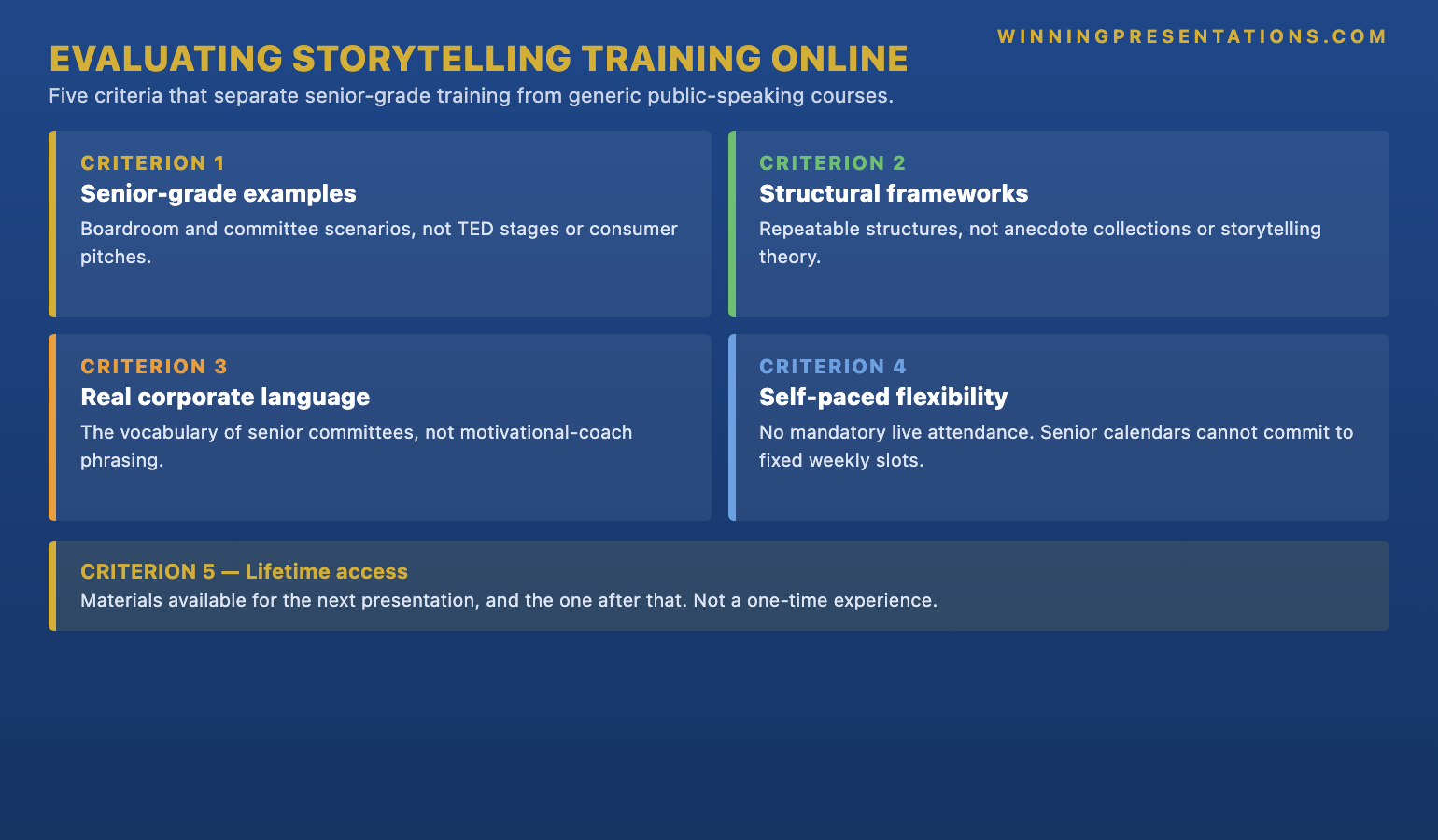
Five evaluation criteria separate workflow-focused Copilot training from button-click training dressed up as professional development. Apply them to any course you are considering, including the one your IT department is offering for free.

One: who is the explicit target audience? Look for courses that name “senior professionals”, “executive presenters”, or “board-level work” specifically. Avoid courses that target “everyone using Copilot” — they are by definition designed for the broadest audience, which means the depth required for senior work has been removed in favour of breadth.

Two: what is the time allocation? A serious workflow course spends at least eighty per cent of its time on workflow and editorial work. The interface should be covered in the first hour and not returned to. If the syllabus shows multiple sessions on “Getting started with Copilot in PowerPoint”, “Setting up your prompt library”, “Customising the Copilot pane” — that is the wrong training. The interface is not the work.

Three: does the curriculum cover the editorial pass? AI output requires editorial work before it reaches senior audiences. A course that does not teach the editorial pass is teaching you to produce drafts, not finished work. Look for explicit modules on “editing AI output”, “rewriting AI-generated headlines”, “verifying AI-generated claims”, or “the editorial pass on Copilot drafts”. The editorial pass is what separates board-approved decks from generic AI output.

Four: are worked examples at the right seniority level? A course that teaches Copilot for presentations using examples like “draft an internal team update” or “create a marketing pitch” is not teaching to your context. Look for worked examples involving board papers, investment committee briefings, executive summary documents, regulatory presentations, or strategic recommendations. The complexity of the worked examples is the most reliable signal of the course’s actual depth.

Five: who is the instructor? Copilot training instructors split into two types. Microsoft-certified trainers know the product features in detail; they often do not know what executive presentation work looks like. Senior practitioners with presentation experience know the workflows; they may have less depth on niche product features. For senior-level training, the second profile is materially more valuable. Product features change every quarter; presentation craft does not.

Stacked cards infographic showing the five evaluation criteria for Copilot presentations training: target audience, time allocation, editorial pass coverage, worked example seniority, and instructor profile

A workflow-first Copilot training programme for senior professionals

Move beyond basic AI usage. The AI-Enhanced Presentation Mastery course gives you eight self-paced modules and eighty-three lessons on using AI (including Copilot) to structure, draft, and refine presentations that work at senior levels. Two optional recorded coaching sessions. £499, lifetime access to materials.

  • 8 modules, 83 lessons of self-paced course content
  • 2 optional live coaching sessions, fully recorded — watch back anytime
  • No deadlines, no mandatory session attendance
  • New cohort opens every month — enrol whenever suits you
  • Lifetime access to all course materials

Explore the AI-Enhanced Programme →

Designed for senior professionals using AI to produce executive-grade output, not generic drafts.

The five workflows a senior-level course should cover

If a Copilot presentations course is going to be useful at executive level, it needs to cover at least these five workflows in depth. Most courses cover one or two and present them as the whole curriculum. The senior cohort needs all five.

Source-document compression. How to feed the agent a pile of mixed-format inputs (memos, reports, models, briefings) and produce a structured executive narrative outline. This is the workflow most often skipped. Without it, every AI-assisted deck starts from a blank prompt rather than from synthesised source material — which is the same workflow you would use for a generic deck and produces the same generic output.

Strategic narrative drafting. How to specify the narrative arc, headline syntax, and slide format precisely enough that the AI draft is a usable starting point rather than a structurally generic placeholder. This workflow is where prompt engineering for executive work actually matters. The course should teach the prompt patterns, not just provide examples.

The editorial pass. The six-move pass — rewrite headlines as findings, anchor every claim to evidence, replace generic language with insider phrasing, cut completeness slides, install the decision sentence, read aloud against the audience’s likely reaction. This is the highest-value workflow because it is the one that reliably converts AI drafts into approved decks.

Q&A pre-mortem. How to use AI to model the audience’s likely objections to a draft deck, with named-stakeholder context that makes the modelling specific to your committee rather than generic. This workflow surfaces holes in the underlying argument before the room does.

Live-meeting recovery. How to use AI between meetings to debrief, refine, and prepare for the next iteration. This is the workflow most courses skip entirely because it does not produce a tangible output people can show. It is also the workflow that compounds the value of AI use across multiple presentations rather than treating each deck as a one-off. The structured prompts that anchor each of these workflows are what move Copilot from feature demonstration to capability shift.

Self-paced versus live programmes — which fits senior schedules

The format question matters as much as the content question. Senior professionals’ calendars do not support fixed weekly two-hour live sessions. The diary collisions are unavoidable, the make-up sessions are awkward, and the cognitive load of “live training I cannot miss” adds friction that compounds across the programme. Most senior cohorts who enrol in fixed-schedule live training drop out within three weeks not because the content is bad, but because the format is incompatible with their actual working life.

Self-paced programmes solve the format problem. The participant moves through the material on the cadence that fits their week, returns to specific lessons before specific upcoming presentations, and can use the structured material as an in-the-moment reference rather than a one-time training event. Self-paced does not mean unsupported — well-designed self-paced programmes include optional live elements (coaching calls, Q&A sessions) that are recorded so missing one is not a setback. The recording is what matters: a live element you cannot rewatch is a single-attempt resource; a recorded one becomes part of the permanent material.

Two structural features distinguish a well-designed self-paced programme from one that is just a video library. The first is module structure that maps to specific use cases — “preparing the next board paper”, “compressing source documents for an investment committee” — rather than abstract topic categories. Use-case structure makes the material findable when you need it. The second is the editorial discipline of the worked examples. A self-paced programme lives or dies on the quality of its examples; if the worked decks in the lessons are themselves generic, the participant has no model to edit toward. Look for worked examples that match your seniority and your industry context, and that demonstrate the editorial pass explicitly.

Need the prompt library to start the workflows tomorrow?

The Executive Prompt Pack — £19.99, instant access — gives you 71 ChatGPT and Copilot prompts designed for PowerPoint presentation work. Includes prompt patterns for source compression, slide drafting, and headline sharpening that work in both chat and Agent Mode.

Get the Executive Prompt Pack →

FAQ

Is Microsoft’s own Copilot training enough for senior presentation work?

Microsoft’s training is excellent for what it is — interface familiarisation and basic prompt patterns aimed at broad workforce adoption. It is not sufficient for senior presentation work because it does not cover the workflow design, prompt engineering, and editorial discipline that turn generic AI output into board-ready material. Treat Microsoft’s training as a prerequisite, not a complete programme. Add workflow-focused training on top.

How long does serious Copilot presentations training take?

For a senior professional who already uses PowerPoint daily, learning the workflows that genuinely change executive presentation output usually takes between fifteen and twenty-five hours of structured material spread over several weeks. Compressed into a single weekend, the material does not absorb properly because it requires application between lessons. Spread too thin, momentum is lost. The right pace is two to three hours per week for two to three months, with deliberate application to live work between sessions.

Can I get the same outcome from free YouTube tutorials?

Free tutorials cover the interface and basic prompts well. They do not cover the editorial pass, the prompt engineering for executive narrative work, or the workflow integration across multiple presentation tasks. The free material is a useful supplement; it is rarely sufficient as a standalone training plan for senior presentation work because it lacks the structured progression that builds capability rather than feature familiarity.

Should I do live or self-paced Copilot training?

For most senior professionals, self-paced programmes with optional recorded live elements fit the diary better than fixed-schedule live training. Live training has a higher completion rate when the schedule is genuinely respected, but most senior calendars cannot guarantee weekly attendance. Self-paced removes the diary collision problem and makes the material available as a reference long after the initial learning period. The optional live elements — when recorded — provide the discussion benefit without the attendance constraint. Self-paced programmes designed specifically for the senior cohort tend to handle this trade-off better than enterprise training built for broad audiences.

The Winning Edge — Thursday newsletter

Every Thursday, The Winning Edge delivers one structural insight for executives presenting to boards, investment committees, and senior stakeholders. No general tips. No motivational framing. One specific technique, one executive scenario, one action. Subscribe to The Winning Edge →

Not ready for a full programme? Start here instead: download the free Executive Presentation Checklist — a single-page review you can run on any AI-assisted draft to flag the editorial gaps before sending it to a senior audience.

Next step: open whichever Copilot training your organisation has provided and check it against the five evaluation criteria above. If it fails three or more, treat it as the prerequisite it actually is and add a workflow-focused programme on top.

Related reading: The Copilot Agent Mode workflow that produces editable executive drafts.

About the author. Mary Beth Hazeldine is Owner & Managing Director of Winning Presentations Ltd, founded in 1990. With 24 years of corporate banking experience at JPMorgan Chase, PwC, Royal Bank of Scotland, and Commerzbank, she advises executives across financial services, healthcare, technology, and government on structuring presentations for high-stakes funding rounds, approvals, and board-level decisions.

08 May 2026
Businesswoman presenting at a conference table with city skyline behind her; colleagues listen and take notes from laptops and documents.

Board Buy-In Presentation Skills Training: What Senior Professionals Need to Learn

Quick answer: Board buy-in presentation skills training varies enormously in depth. Generic presentation training teaches slide design and delivery. Buy-in training is different — it teaches stakeholder analysis, case construction under scrutiny, the structures that survive board-level interrogation, and the recovery moves when a decision starts to wobble. The right programme covers all four. Most cover only the first or rebrand a generic presentation course as buy-in training without the substantive difference.

Ngozi runs commercial strategy at a UK insurance group. Last year she enrolled in a presentation skills training programme her HR team had recommended, hoping it would help with the board papers she had been struggling to get approved. The programme was well-run. The instructor was experienced. By the end of the three-day course she could open a presentation more confidently, design cleaner slides, and deliver with better pacing. Three months later she was still losing the same board votes. The training had taught her presentation skills. The board votes were not a presentation skills problem.

Buy-in is a structurally different challenge. Presentation skills get you through a delivery; buy-in gets you to a decision. The two require overlapping but materially different capabilities. A presenter with strong delivery and weak buy-in skills will look polished and walk out without the approval they came for. A presenter with weak delivery and strong buy-in skills will look more nervous than they should and walk out with the decision in hand. The board is voting on the substance, not the polish — and most generic presentation training does not teach the substance work that buy-in requires.

Knowing what genuine buy-in training covers, and what generic presentation training relabelled as “executive buy-in” leaves out, is the difference between a programme that changes your board approval rate and one that improves your stage presence while leaving the underlying problem untouched. Four capability areas distinguish serious buy-in training from everything else.

Looking for a structured programme on board-level buy-in?

The Executive Buy-In Presentation System is a self-paced programme designed for senior professionals who need to secure approval from boards, executive committees, and senior stakeholders. Seven modules, monthly cohort enrolment, optional recorded Q&A calls.

Explore the Buy-In System →

Why buy-in training is different from presentation skills training

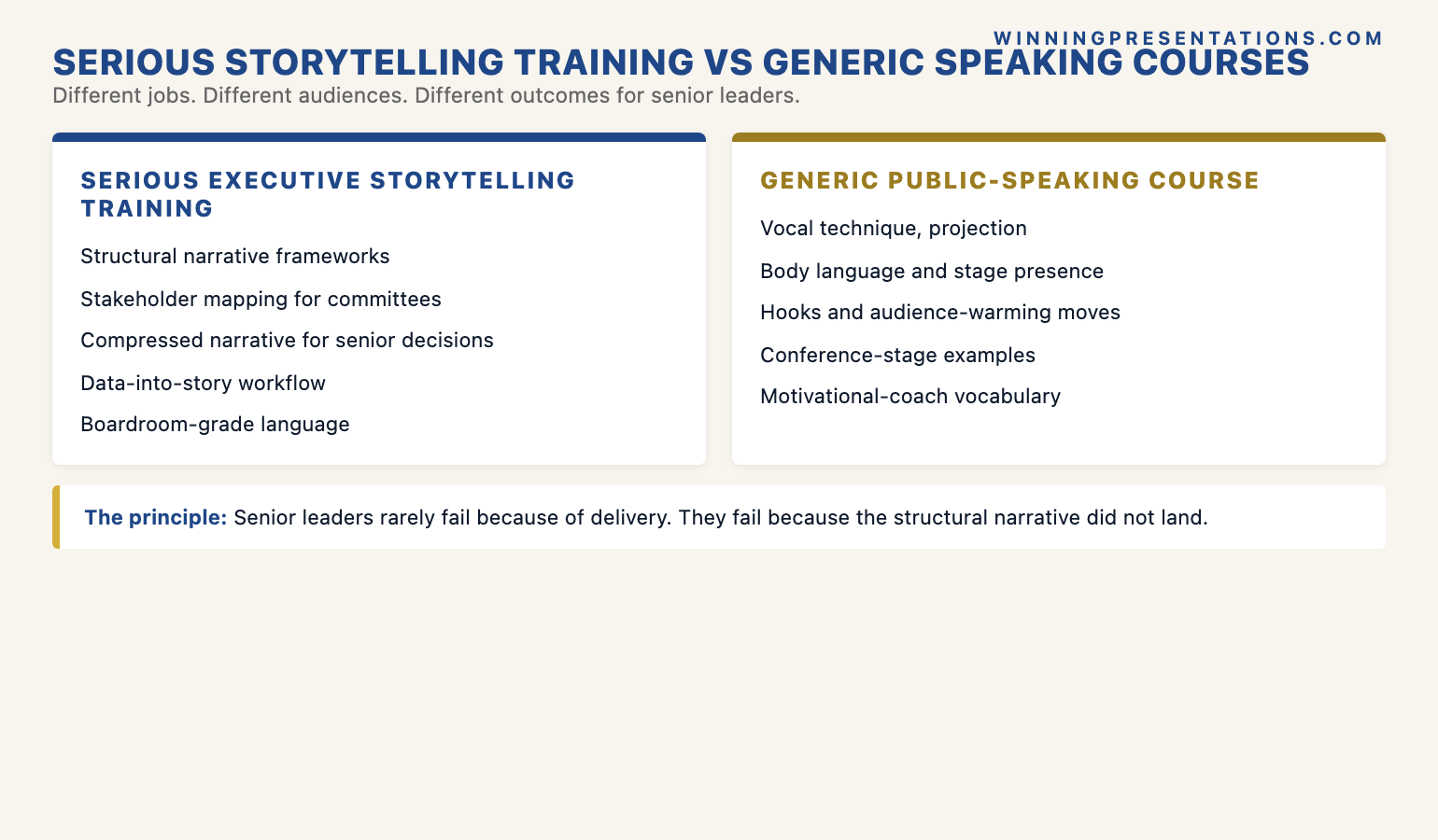
Presentation skills training and buy-in training share some surface elements — both involve speaking, slides, and audience engagement — but they target different parts of the same problem. Presentation skills training focuses on the presenter’s performance: how to open, how to structure a talk, how to manage nerves, how to handle questions. Buy-in training focuses on the decision the audience is being asked to make: who needs to support it, what they will object to, what evidence will move them, what structure will keep the decision intact under scrutiny.

The two skill sets are complementary, but they are not interchangeable. A senior professional who has strong presentation skills but weak buy-in skills will deliver an articulate, confident presentation that fails to secure approval because the underlying case has not been built for the room it is being made to. A senior professional who has strong buy-in skills but weak presentation skills will look less polished but will more often walk out with the decision they came for, because the substance under the delivery is doing the work.

Most “executive presentation training” courses teach presentation skills almost exclusively. They use words like “buy-in”, “stakeholder management”, and “executive influence” in their marketing because those words generate searches. The actual curriculum is presentation skills with a board-themed wrapper. This is fine training if presentation skills are what you actually need. It is the wrong training if you are losing decisions because the case you are presenting cannot survive the board’s scrutiny — which is what most senior professionals who feel they need buy-in training are actually facing.

Split comparison infographic showing the difference between presentation skills training and board buy-in training across four capability areas: focus, what gets taught, what success looks like, and what changes after the programme

Capability one: stakeholder analysis

The first capability is stakeholder analysis — and not the version that produces a generic two-by-two matrix on a workshop flipchart. Real stakeholder analysis for board work is granular, named, and political. It identifies who in the room has informal authority that exceeds their position; who has historical baggage with the topic; who tends to set the chair’s view in the pre-meeting; who is likely to swing on the basis of evidence and who has already made up their mind for non-evidential reasons.

A serious programme teaches you to map the room in three layers. The first layer is the formal seating chart and decision rights. The second layer is the informal influence network — who defers to whom, who blocks whom, where the historical alliances and tensions sit. The third layer is the agenda layer — what each member is currently being measured on, what their next twelve months look like, what they need this proposal to give them in order to support it. Without the third layer, you are presenting to titles. With it, you are presenting to people whose support you can structure your case to earn.

Generic presentation training does not cover any of this. The closest most courses get is a sentence telling you to “know your audience”. Buy-in training operationalises that sentence into a structured analytical exercise you do for every significant board paper, often with a stakeholder map you actively maintain across multiple meetings. The sponsor analysis specifically is a sub-discipline of stakeholder analysis that most generic training omits entirely.

Capability two: case construction under scrutiny

The second capability is case construction. Generic presentation training teaches structure — opening, body, close. Buy-in training teaches case construction — the deeper work of building an argument that holds together under directed pressure. The two are not the same. A well-structured presentation can have a weak case underneath. A strong case can be carried by even imperfect presentation skills.

Case construction has its own internal disciplines. The proposition has to be expressible in a single sentence that the board can vote on. The evidence base has to be visibly connected to the proposition rather than sitting alongside it as decorative content. The alternatives considered and rejected have to be named explicitly, because boards probe for “what about” alternatives by reflex and a case that has not pre-empted them looks underbaked. The risks have to be addressed in the same voice as the benefits — symmetric treatment signals that the analysis is honest, not partisan.

None of these disciplines are taught in standard presentation skills courses. They sit in a different intellectual tradition — closer to legal argumentation, consulting analysis, or investment committee preparation than to public speaking. A board buy-in programme that does not teach case construction is teaching delivery, not approval. The deck looks better. The vote does not change.

Stacked cards infographic showing the four buy-in capability areas: stakeholder analysis, case construction under scrutiny, structures that survive interrogation, and recovery moves when the decision wobbles

Capability three: structures that survive interrogation

The third capability is the slide and document structure designed for boards specifically. Most presentation training teaches general-purpose slide design. Board-paper structure is a more specific discipline because boards read in particular ways, under particular time pressures, and with particular instincts for where to push back.

Three structural conventions matter for board-level work. First, the executive summary needs to carry the full decision in a form the board could vote on without reading the rest of the deck — because some members will. Second, the body of the deck needs to be navigable in any order — board members read non-sequentially, jumping to the section that interests them and skipping the build-up. Third, every claim needs to be locatable to its source within the deck or its appendices, because the verification reflex is automatic at board level and a claim that cannot be sourced is treated as unsupported.

A workflow programme for board-level approval work

Build the case your stakeholders cannot dismiss. The Executive Buy-In Presentation System is a self-paced framework — 7 modules walking you through the structure, psychology, and delivery that get senior approval. Monthly cohort enrolment, optional recorded Q&A calls. £499, lifetime access to materials.

  • 7 modules of self-paced course content
  • Optional live Q&A sessions, fully recorded — watch back anytime
  • No deadlines, no mandatory session attendance
  • New cohort opens every month — enrol whenever suits you
  • Lifetime access to all course materials

Explore the Executive Buy-In System →

Designed for senior professionals who present decisions to boards, investment committees, and executive sponsors.

These conventions sound technical, but they shape the substantive outcome. A board paper that cannot be navigated non-sequentially loses the members who skim. A board paper without a sourceable evidence base loses the members who probe. A board paper without a vote-ready summary loses the members who only read the front page. Each lost member is a vote at risk. Structure is not cosmetic; it is the architecture that protects the case from common failure modes. A serious buy-in programme teaches the structures explicitly and provides templates for the most common board-paper formats.

Capability four: recovery moves when the decision wobbles

The fourth capability is the live-meeting one. Most presentation training stops at “deliver well and answer questions calmly”. Buy-in training goes further into the specific moves that recover a meeting when the decision starts to wobble — when an objection lands harder than expected, when the chair starts steering toward “let us think about this”, when a senior member who was supposed to support you goes quiet at the wrong moment.

The recovery moves are situational and structured. The bridging move that reframes a hostile objection as a refinement rather than a rejection. The committee-redirect move that surfaces the silent supporter without singling them out. The decision-pivot move that converts an indecisive room into a smaller bounded decision they can take today. The follow-up move that turns a parked decision into a tighter agenda for the next meeting rather than a fade-out. Anticipating the most common objection patterns is a prerequisite for all of these moves; the moves themselves are the live execution of the preparation.

None of this is generic presentation skills. It is closer to negotiation training, mediation training, or live deal-making — fields with their own discipline of in-the-moment recovery. A buy-in programme that does not teach the recovery moves leaves the presenter armed for the easy meeting and unarmed for the hard one. Most board votes that change in the room change because the presenter executed a recovery move well, not because the underlying case got stronger during the meeting. The case gets approved or parked in the recovery, not in the opening pitch.

Why format matters as much as curriculum

The curriculum question is half of the evaluation. The other half is format. Senior professionals do not have stable weekly schedules. The board paper you need to apply the training to is rarely the one you happen to be working on during the week the relevant module is taught. The cohorts that complete fixed-schedule live training tend to be the ones whose calendars permit attendance — which often correlates with seniority levels below the audience the training claims to serve.

The format that actually fits senior schedules is self-paced with optional live elements that are recorded. Self-paced removes the diary collision problem. Optional live elements (coaching calls, peer Q&A) provide the discussion benefit without the attendance constraint. Recording the live elements means a missed call is not a missed opportunity — the participant can watch the recording at the right moment, which is often the week before a specific board paper rather than the week the call happens.

Two questions to ask any programme that markets itself as “live cohort” or “four-week programme”: is attendance mandatory, and are the live sessions recorded? If attendance is mandatory and live sessions are not recorded, the format is built around the trainer’s convenience, not the participant’s reality. If attendance is optional and sessions are recorded, the format is built for the way senior professionals actually work, even if the marketing language uses “cohort”. Self-paced does not mean unsupported. Mandatory live does not mean intensive. The labels matter less than the underlying access pattern.

Need the slide structures and templates that buy-in training is editing toward?

The Executive Slide System — £39, instant access — includes 26 slide templates, 93 AI prompts, and 16 scenario playbooks for senior presentations. The board-paper structures, decision-framing slides, and objection-handling templates are part of the system.

Get the Executive Slide System →

FAQ

Is generic presentation skills training useful at all for senior professionals?

Yes — for the parts of presentation work that are genuinely about delivery (opening, pacing, vocal control, slide design fundamentals). The error is treating presentation skills training as a substitute for buy-in training. The two address different problems and require different curricula. A senior professional who is losing board votes because of weak case construction will not solve that problem with better delivery training, no matter how good the trainer is.

How long does serious buy-in training take?

For a senior professional already comfortable with the basics of presentation work, buy-in capability tends to develop over twelve to twenty hours of structured learning, with deliberate application to live board papers between sessions. Compressed into a single weekend it does not absorb properly because the application is what builds the capability. The right pace is two to three hours per week for two months, applied to a real board paper you have on the calendar.

Can I get the same training in-house from a senior leader who is good at buy-in?

Sometimes — if that senior leader has the time and the inclination to teach you, and if their buy-in approach is structured enough to be transferable rather than implicit. The barrier is usually that senior leaders who are good at buy-in have absorbed the discipline so deeply that they cannot articulate it as a teachable framework. Structured training fills the gap by making the framework explicit. Combine the two if you can: structured training to learn the framework, mentoring from a senior practitioner to apply it inside your specific organisational context.

What is the difference between board buy-in training and executive influence training?

Significant overlap, but a different emphasis. Buy-in training centres on the structured presentation work that gets a specific decision approved at a specific meeting. Executive influence training is broader — it covers ongoing relationship management, informal channels, and the build-up to board moments rather than the moments themselves. For senior professionals who own specific approval-seeking presentations as part of their role, buy-in training is the more direct fit. For senior professionals whose challenge is broader executive positioning, influence training may be more relevant. A structured buy-in programme covers the presentation moments end to end; influence work happens in the gaps between them.

The Winning Edge — Thursday newsletter

Every Thursday, The Winning Edge delivers one structural insight for executives presenting to boards, investment committees, and senior stakeholders. No general tips. No motivational framing. One specific technique, one executive scenario, one action. Subscribe to The Winning Edge →

Not ready for the full programme? Start here instead: download the free Executive Presentation Checklist — a single-page review of the structural basics any board paper should pass before it goes to the room.

Next step: pick the next board paper on your calendar and check the case against the four capability areas above — stakeholder analysis, case construction, board-paper structure, and recovery moves. The areas that feel weakest are the parts of training that will pay back fastest.

Related reading: Why your executive sponsor goes quiet in the steering committee — and how to give them the lines they need.

About the author. Mary Beth Hazeldine is Owner & Managing Director of Winning Presentations Ltd, founded in 1990. With 24 years of corporate banking experience at JPMorgan Chase, PwC, Royal Bank of Scotland, and Commerzbank, she advises executives across financial services, healthcare, technology, and government on structuring presentations for high-stakes funding rounds, approvals, and board-level decisions.

08 May 2026
Professional woman in a navy blazer typing on a laptop at a glass-walled office.

Copilot Agent Mode for Executive Presentations: Three Workflows That Save Senior Leaders Four Hours

Quick answer: Copilot Agent Mode is most useful to senior leaders when it runs multi-step jobs end to end — not single-prompt slide generation. The three workflows that consistently move a four-hour executive deck job to twenty minutes are the source-document compression workflow, the strategic narrative draft workflow, and the objection-mapped Q&A pre-mortem. Each one chains research, structuring, and drafting into a single instruction set the agent executes while you do other work.

Henrik runs strategy at a mid-cap European insurer. Last quarter he was asked to present a market-entry analysis to the executive committee with three days’ notice. The full input pile was eighty-four pages — a McKinsey scoping memo, an internal pricing model, two regulatory briefings, and the previous quarter’s competitive review. He spent the first day reading. He spent the second day building outline drafts in Word. He spent the third evening assembling slides at home, having already missed a parents’ evening for his daughter. The deck went well. The process broke him.

Three months later he was asked for a similar piece on a different market. This time he opened Copilot Agent Mode at 09:00, fed it the source documents, gave it a single multi-step instruction, and stepped away for forty minutes. By the time he came back, the agent had produced a structured narrative outline, a draft of the headline slide for each section, and a Q&A preparation document anticipating the eight most likely committee objections. The full deck still required Henrik’s editorial judgement. But the four hours of preparation work that used to crush his evenings was now a twenty-minute review of agent output before lunch.

The difference between the two experiences was not better prompting. It was a different mode of using AI. Single-prompt Copilot — the chat box approach — produces one output for one input. Agent Mode chains research, structuring, drafting, and review into a single autonomous run. For senior leaders who are time-poor and judgement-rich, this is a structurally different tool, and the workflows that suit it are not the workflows you would use in chat.

Looking for the structured framework for using AI in executive presentation work?

The AI-Enhanced Presentation Mastery course is the self-paced framework for senior professionals using AI to build executive-grade presentations. Eight modules, eighty-three lessons, monthly cohort enrolment, two optional recorded coaching sessions.

Explore the AI-Enhanced Programme →

Agent Mode versus single-prompt Copilot

The mental model most senior leaders carry from earlier ChatGPT use is single-prompt: you ask, the model answers, you adjust, you ask again. That mental model is what makes Copilot feel like a slow assistant. You spend more time prompting than you save in output. The work is choppy. Context evaporates between turns. By prompt twelve you are repeating yourself.

Agent Mode reverses the structure. Instead of one prompt at a time, you give the agent an instruction with multiple sub-steps, a defined output, and access to source documents or tools. The agent then runs the steps in sequence, calling tools as needed, and returns the completed work product. You review and edit. You do not iterate prompt by prompt.

The shift is from “AI as conversation partner” to “AI as task-running junior analyst”. For executive presentation work — where the inputs are messy, the structure is established, and the output needs to look like senior thinking — the second model is materially more useful. Three workflows in particular consistently take a four-hour preparation job to twenty minutes of editorial review.

Comparison infographic showing single-prompt Copilot versus Agent Mode for executive presentations across four dimensions: input type, output style, presenter time required, and best-use scenario

Workflow one: source-document compression

The first workflow exists because senior leaders are routinely asked to present material they did not write themselves. A scoping memo from the strategy team. Two analyst reports. A regulatory briefing. A pricing model. The job is not to summarise — it is to produce a ten-minute executive narrative from eighty pages of mixed-format source material.

The agent instruction has four parts. First, the document set: attach or reference all source files in one batch. Second, the output specification: a structured outline with no more than seven top-level sections, each section limited to forty words, each section flagged for the source it draws from. Third, the constraint set: highlight contradictions between sources rather than papering over them; flag any claim where the underlying evidence is one analyst’s opinion rather than a verifiable data point. Fourth, the audience frame: write the outline for an executive committee whose first question will be “what is the decision you want from us, and what could go wrong?”

What the agent returns is not a finished deck. It is a working outline that has done the synthesis work — the part that costs the most time and the least intellectual originality. You read the outline. You disagree with two sections. You rewrite one and reorder another. The total editorial pass takes fifteen to twenty minutes. The synthesis work that would have taken three hours of reading and outlining is already done.

The reason this workflow saves so much time is that the agent reads at machine speed and synthesises across documents simultaneously. A human presenter reads sequentially, holds context in working memory, and synthesises last. The agent does the reverse. Neither is “better thinking” — they are different cognitive shapes. For source-heavy executive briefs where the synthesis is mechanical and the judgement is editorial, the agent’s shape is faster.

Workflow two: strategic narrative draft

The second workflow takes the compressed outline and produces a slide-by-slide narrative draft. This is the step where most single-prompt Copilot use falls apart, because slide generation in chat tends to produce either generic structures (problem-solution-benefit, repeated indefinitely) or slides that look polished but say nothing.

The agent instruction is more directive. Specify the narrative arc: situation, complication, resolution, decision, risk. Specify the section count and the exact role of each section. Specify the slide format: one headline statement per slide, no more than three supporting bullets, no jargon that has not been defined in the preceding section. Most importantly, specify the headline syntax explicitly — “the headline of every slide must be a complete sentence that states a finding, not a topic. ‘Three regions account for sixty per cent of the addressable market’ is a finding. ‘Market analysis’ is a topic.”

The agent will then produce a draft that respects the narrative architecture. The draft will not be final-quality. The headlines will need sharpening. Some slides will read as if the agent did not fully understand a niche term. But the structural work — sequencing the argument, allocating points to slides, drafting the supporting bullets — is done. Your job becomes editorial: tightening twelve headlines and reorganising two sections, instead of building thirty slides from a blank page.

Two specific instructions tend to lift output quality dramatically. The first is “include a ‘so what’ line at the bottom of every slide that states the implication for the executive committee in one sentence.” The second is “after each section, draft a transition sentence that links the closing point of the previous section to the opening point of the next.” Both are simple to specify. Both are work the agent does well. Both are work that human presenters routinely skip when time-pressed, leaving decks with strong individual slides and weak overall flow. Senior professionals using AI well are getting more value from structured prompt patterns like these than from any single dramatic prompt.

Roadmap infographic of the three Copilot Agent Mode workflows for executive presentations: source-document compression, strategic narrative draft, and Q&A pre-mortem, with the editorial pass that ties them together

The complete framework for AI-assisted executive presentations

Move beyond basic AI usage. The AI-Enhanced Presentation Mastery course gives you eight self-paced modules and eighty-three lessons on using AI (including Copilot) to structure, draft, and refine presentations that work at senior levels. Two optional recorded coaching sessions. £499, lifetime access to materials.

  • 8 modules, 83 lessons of self-paced course content
  • 2 optional live coaching sessions, fully recorded — watch back anytime
  • No deadlines, no mandatory session attendance
  • New cohort opens every month — enrol whenever suits you
  • Lifetime access to all course materials

Explore the AI-Enhanced Programme →

Designed for senior professionals using AI to produce executive-grade output, not generic drafts.

Workflow three: objection-mapped Q&A pre-mortem

The third workflow is the one most presenters have never tried, and the one that produces the highest leverage when the deck reaches the room. The agent’s job here is to read the draft deck, model the executive committee’s likely concerns, and produce a structured Q&A preparation document that anticipates the eight most likely objections with draft responses.

The agent instruction names the audience explicitly: not “executives” but the actual committee. “The committee includes a CFO whose previous term included a major write-down on a similar acquisition; a CEO whose stated priority for the year is operational simplification; a Chief Risk Officer who has flagged regulatory complexity in three of the last four committee meetings.” That degree of specificity changes what the agent flags. Generic objections give generic responses. Named-stakeholder objections give responses you can actually rehearse.

The output specification asks for three things per objection. The likely phrasing — how the objection will actually be stated in the room. The structural weakness it exposes — what the proposal genuinely does not yet answer. The draft response — a two-sentence reply that acknowledges the concern, names the specific evidence in the deck that addresses it, and offers a follow-up commitment if the evidence is incomplete. This is not the same as an FAQ section in the appendix. It is preparation work for live performance.

What you get back is a document that surfaces holes in the proposal you would not otherwise have noticed before the meeting. Nine times out of ten, at least one of the agent’s anticipated objections turns out to be a real gap that needs addressing in the deck before presenting. The agent does not have committee context the way you do. But it does notice gaps with a different cognitive bias than your own — and that complementary bias is where the value lies.

The editorial pass that turns agent output into executive output

None of these workflows produce final-quality executive material on their own. The agent produces structured first drafts. The editorial pass — the human judgement applied to that draft — is what produces senior output. This is the part that nervous AI users skip and that experienced AI users obsess over.

Five things matter in the editorial pass. First, the headlines. Re-read every slide headline aloud and rewrite any that state a topic rather than a finding. The agent will get this right perhaps seventy per cent of the time. The other thirty per cent are where decks lose authority. Second, the numbers. Verify every quantitative claim against the source document. Agents hallucinate numbers, especially in compression workflows. Third, the section flow. Does the argument land harder by the end, or does it dissipate? If it dissipates, reorder. Fourth, the language register. Replace any phrasing that sounds like a generic AI tone — “leveraging synergies”, “in today’s dynamic landscape” — with the language your committee actually uses. Fifth, the omissions. What does the deck not say that you, as the human in the room, know matters? The agent does not have your situational awareness. You do.

If you want the structured patterns for each of these editorial moves — the headline rewrite framework, the number-verification checklist, the language-register adjustments — the AI-Enhanced Presentation Mastery course walks through them across eight modules, with worked examples for board, investment committee, and steering committee scenarios.

Need the prompt library to run these workflows tomorrow?

The Executive Prompt Pack — £19.99, instant access — gives you 71 ChatGPT and Copilot prompts designed for PowerPoint presentation work. Includes prompt patterns for source compression, slide drafting, and headline sharpening that work in both chat and Agent Mode.

Get the Executive Prompt Pack →

FAQ

Is Copilot Agent Mode different from regular Copilot in PowerPoint?

Yes. Regular Copilot in PowerPoint generates slides one prompt at a time within the application. Agent Mode runs multi-step tasks autonomously — reading source documents, structuring an outline, drafting headlines, anticipating objections — in a single instruction set, and returns the work product after a sequence of steps it has chosen and executed. For executive presentation work where the inputs are large and the steps are predictable, Agent Mode saves materially more time than chat-style prompting.

How long does an Agent Mode workflow actually take?

Each of the three workflows in this article takes between fifteen and forty minutes of agent runtime, depending on the size of the source documents. The presenter is not active during that time — the agent runs while you do other work. The presenter’s active time is the editorial pass at the end, which usually takes fifteen to twenty-five minutes per workflow. Total senior-leader time per workflow tends to be twenty to thirty minutes, replacing what was often two to four hours of manual preparation.

Will Agent Mode hallucinate numbers from my source documents?

It can, particularly in compression workflows where the agent restates figures from longer source material. Treat every quantitative claim in agent output as a flag for verification, not a finished statement. Build the verification step into your editorial pass: open the source, locate the figure, confirm the agent’s restatement is accurate. The time cost is small. The credibility cost of presenting a hallucinated number to an executive committee is large.

Can Agent Mode replace a junior analyst?

For specific tasks within the presentation workflow, it can replicate the work an analyst would have done in synthesis and first-draft slide generation. It cannot replace judgement, situational awareness, stakeholder knowledge, or the editorial decisions that turn a draft into a senior-level deck. The most useful framing is that Agent Mode is a tireless drafting partner whose work always needs senior review — not a substitute for the senior thinking that makes the deck land.

The Winning Edge — Thursday newsletter

Every Thursday, The Winning Edge delivers one structural insight for executives presenting to boards, investment committees, and senior stakeholders. No general tips. No motivational framing. One specific technique, one executive scenario, one action. Subscribe to The Winning Edge →

Not ready for the full programme? Start here instead: download the free Executive Presentation Checklist — a single-page review you can run on any AI-assisted draft before sending it to a senior audience.

Next step: pick the next executive deck on your calendar that has source material attached, and run the source-document compression workflow on it before you do anything else. Allow yourself thirty minutes for the agent to work and twenty minutes for editorial review. Compare that to your usual preparation time. The gap is the value of switching from chat-style prompting to Agent Mode for this kind of work.

Related reading: Copilot Agent Mode executive deck workflow — the five-step structure, and why AI-generated slides look generic and how to fix the editorial pass.

About the author. Mary Beth Hazeldine is Owner & Managing Director of Winning Presentations Ltd, founded in 1990. With 24 years of corporate banking experience at JPMorgan Chase, PwC, Royal Bank of Scotland, and Commerzbank, she advises executives across financial services, healthcare, technology, and government on structuring presentations for high-stakes funding rounds, approvals, and board-level decisions.

08 May 2026
Presenter in a suit explains data charts on a screen to colleagues in a glass-walled conference room.

AI-Generated Slides That Get Approved: The Human Editing Pass Board Members Cannot See

Quick answer: AI-generated slides that get board approval share one feature: a structured editorial pass on top of the AI draft. Boards reject AI output that has been left raw because it reads as anonymous, generic, and unanchored to the company’s specific situation. The editorial pass — six moves, applied in order — converts a generic draft into a deck that sounds like it came from a senior insider. The board never sees the AI underneath. They see a presenter who knows the business.

Rafaela had used Copilot to draft the strategy refresh deck. Twenty-eight slides, generated in eleven minutes, looking polished and structured. She sent it to her chief of staff for a sanity check the day before the board meeting. The chief of staff replied with a single sentence: “This reads like it could have come from any of our competitors.” Rafaela read the deck again with that comment in mind. The chief of staff was right. Every slide was technically correct. Every slide was anonymous. There was nothing in it that said this was their company, their numbers, their situation.

She had two choices. Present the deck as-is and trust that the board would forgive the generic feel because the underlying logic was sound. Or stay up that night doing the editorial pass that would convert the deck from a Copilot draft into something that sounded like senior thinking from inside the business. She chose the second. She also resented the third hour of editing, because the whole point of using AI had been to save time. But by midnight she had a deck that was unmistakably hers — and the board approved the strategy refresh the next morning without the kind of friction that usually attaches to AI-flavoured material.

The editorial pass she applied that night is not difficult. It is six specific moves, applied in a fixed order. Most senior presenters who use AI for deck drafting either skip the pass entirely (and present generic decks that get probed harder than they should be) or do parts of it ad hoc (and miss the moves that matter most). The pass is what turns AI-generated slides into board-approved slides. The board does not see the AI underneath. They see a presenter who knows the business cold.

Looking for the structured framework for executive-grade AI-assisted presentations?

The AI-Enhanced Presentation Mastery course is the self-paced framework for senior professionals using AI to build presentations that work at board level. Eight modules, eighty-three lessons, monthly cohort enrolment, two optional recorded coaching sessions.

Explore the AI-Enhanced Programme →

Why boards reject raw AI-generated decks

Boards do not reject AI output because they detect AI specifically. They reject it because the same patterns AI produces — generic phrasing, evenly weighted bullets, no anchored evidence, no clear decision ask — are the patterns of presentations that historically came from junior staff or external consultants who did not understand the business. Boards have learned to push back hard on those patterns, regardless of who produced them. AI just makes those patterns appear more often, and faster, in decks that should be sharper.

Three signals trigger board scepticism almost immediately. The first is anonymous language. “Leveraging operational efficiencies to drive sustainable growth” could describe any company in any sector. The second is unanchored claims. A bullet that says “the market is shifting toward platform-based solutions” without a citation, an internal data point, or a named competitor reads as filler. The third is structural symmetry that is too clean. Three points per slide, three sub-bullets per point, three slides per section — the architecture itself signals that no human did the messy work of weighting what matters.

The editorial pass exists to remove all three signals. It does not require rewriting from scratch. It requires applying six moves in sequence. Each move targets one of the patterns boards reject. Done in order, the pass takes about ninety minutes for a thirty-slide deck. Done out of order, or partially, it takes longer and produces inconsistent results.

Stacked cards infographic showing the six moves of the editorial pass for AI-generated executive slides: rewrite headlines as findings, anchor claims to evidence, replace generic language with insider phrasing, cut completeness slides, install the decision sentence, and read aloud against board reaction

Move one: rewrite the headlines as findings

The first move targets the highest-leverage element on every slide: the headline. AI-generated decks tend to produce topic headlines — “Market Analysis”, “Competitive Landscape”, “Financial Performance” — because the prompt history that trained the underlying models contained mostly topic-style headlines from corporate templates. Topic headlines tell the audience what the slide is about. They do not tell the audience what to conclude. Board members do not read decks for topics. They read for findings.

Rewrite every headline as a complete sentence that states the conclusion of the slide. “Market Analysis” becomes “Three of our six target markets show declining willingness to pay for premium service tiers”. “Competitive Landscape” becomes “Two new entrants in the last quarter have undercut our pricing by twenty per cent without matching our service standard”. “Financial Performance” becomes “Revenue is on plan; gross margin is below plan by three points, driven by raw material cost inflation”.

The discipline is to make every headline answer the implicit question “what should I take away from this slide?” If the headline does not answer that question, the slide will not land. This single move usually accounts for more than half of the perceived improvement in a deck. Boards lean forward when headlines are findings. They glaze when headlines are topics.

Move two: anchor every claim to specific evidence

AI drafts will routinely produce claims without supporting evidence. “The market is consolidating.” “Customer expectations are evolving.” “Regulatory pressure is increasing.” None of these are wrong. All of them are unactionable without evidence. The second move is to read every bullet and ask one question: “What is the specific evidence behind this claim?” Then add the evidence to the bullet.

“The market is consolidating” becomes “Two of our top five competitors merged in Q3, reducing the active competitive set from twelve players to ten”. “Customer expectations are evolving” becomes “Our latest customer survey shows seventy per cent now expect same-day issue resolution, up from forty-five per cent two years ago”. “Regulatory pressure is increasing” becomes “The FCA’s new operational resilience framework, effective March, requires evidence of quarterly stress testing — currently we run annually”.

Boards trust specific evidence. They do not trust general claims. When you anchor every claim, the deck reads as if the presenter has done the work. When you leave claims unanchored, the deck reads as if the presenter has skimmed. AI cannot do this move for you, because the agent does not know which evidence is true for your specific company. This is editorial work that must be human. The most common reason AI-generated slides feel generic is precisely this absence of anchored evidence.

Move three: replace generic language with insider phrasing

Every organisation has its own vocabulary. The way your company refers to its customers, its competitors, its operating model, its strategic priorities — these are linguistic markers that signal “the person who wrote this works here”. AI does not have access to your internal language. It uses the generic corporate vocabulary present in its training data, which is the vocabulary of consulting reports, annual statements, and strategy textbooks.

The third move is to read every slide and replace generic phrases with the language your board actually uses. If your CEO consistently calls the market “the addressable opportunity” rather than “the TAM”, change every instance. If your operations team refers to incidents as “events” rather than “issues”, change them. If your customers are “members” or “clients” or “partners” — never “users” — change them. These edits are small. The cumulative effect is large. A deck written in your company’s language reads as insider. A deck written in generic corporate language reads as outsider, regardless of whether the author is the CEO.

Split comparison infographic showing AI-generated raw output versus AI-edited board-ready output across three dimensions: headline style, claim evidence, and language register

Move four: cut the slides that exist to “sound complete”

AI-generated decks tend to produce more slides than the argument needs, because the underlying prompt usually asks for completeness. “Build a strategy refresh deck for the board” produces a deck that covers everything a strategy refresh deck might cover, including sections that are not relevant to your specific situation. The fourth move is to read every section and ask “would this section’s removal weaken the argument?” If the answer is no, remove the section.

The complete framework for AI-assisted executive presentations

Build executive-grade presentations with AI assistance. The AI-Enhanced Presentation Mastery course is a self-paced programme with eight modules, eighty-three lessons. Enrol with this month’s cohort, work through at your own pace — two optional live coaching sessions are fully recorded. £499, lifetime access to materials.

  • 8 modules, 83 lessons of self-paced course content
  • 2 optional live coaching sessions, fully recorded — watch back anytime
  • No deadlines, no mandatory session attendance
  • New cohort opens every month — enrol whenever suits you
  • Lifetime access to all course materials

Explore the AI-Enhanced Programme →

Designed for senior professionals who need AI to produce executive-grade output.

Common candidates for cutting include macro-environment scene-setting that the board already lives inside; competitor profiles for competitors the board does not consider strategically relevant; appendices that exist because the AI defaulted to producing them; and “principles” or “values” slides that signal a strategy team’s thinking process rather than the board’s decision criteria. A twenty-eight-slide deck rarely needs to be twenty-eight slides. Eighteen well-edited slides almost always read sharper than the same content stretched across twenty-eight.

Cutting is harder than adding. AI tends to over-include. Senior judgement is what subtracts. The board will not miss the slides you cut. They will notice the cleaner argument that results.

Move five: install the decision sentence

The fifth move is to identify what the board needs to take away from the deck — the actual decision, recommendation, or judgement you want them to land on — and to install that sentence in three places: the closing line of the executive summary slide, the headline of the strategic recommendation slide, and the closing slide before any appendix. The same sentence, in the same words, in three places.

AI drafts almost never do this. They produce closing slides that summarise key themes (“In summary, the strategy refresh focuses on three priorities…”), which is not the same as installing a decision the board can act on. The decision sentence has a specific shape: a verb, a quantified action, a timeframe, and a qualifier. “Approve a phased twelve-month investment of £4.2m to consolidate the European platform, contingent on the operational checkpoint at month six.” That sentence can be voted on. “Focus on European platform consolidation” cannot.

Installing the decision sentence in three places is deliberate redundancy. The board reads slowly. Some members read only the executive summary. Some read only the strategic recommendation slide. Some read only the closing. Repeating the decision sentence guarantees that every reader sees it, regardless of where their attention lands. If you want to see how to structure these decision sentences across an entire deck, the AI-Enhanced Presentation Mastery course covers the decision-sentence pattern in module four with worked examples for board, investment committee, and executive committee scenarios.

Move six: read it aloud against the board’s likely reaction

The final move is the cheapest and the most consistently skipped. Read the deck aloud, slide by slide, and after each slide ask “what would each of the board members say to this?” Name them in your head. The CFO who probes assumptions. The chair who asks for the unintended consequences. The non-executive director who challenges the timing. The CEO who tests whether the recommendation is too cautious or too bold. For each likely reaction, ask: does the slide already address it, or do I need to add a line?

Some slides will need additional context. Some will need a caveat the AI omitted. Some will need an explicit “what we considered and rejected” line that pre-empts the board’s natural alternative-generation. These additions are small. They turn a deck that looks complete on paper into a deck that holds up live. The aloud-read also reveals language that looks acceptable on screen but sounds awkward when spoken — almost always a sign of phrasing the AI inserted that needs replacement.

This sixth move is what separates decks that get approved from decks that get parked for a follow-up meeting. The first five moves clean the deck up. The sixth move makes it land in the room.

Need the slide structures and templates the editorial pass refines?

The Executive Slide System — £39, instant access — includes 26 slide templates, 93 AI prompts, and 16 scenario playbooks for senior presentations. Use the templates as the structural target your AI draft is editing toward.

Get the Executive Slide System →

FAQ

How long does the editorial pass take for a thirty-slide AI-generated deck?

Done in order, the six moves typically take seventy-five to ninety minutes for a thirty-slide deck. Done out of order or partially, the same work usually takes two to three hours and produces inconsistent results. The order matters because each move targets a specific failure pattern, and earlier moves clear ground for later ones to land more easily. The headline rewrite, in particular, exposes weaknesses in the underlying argument that the next moves can then address.

Can I use AI to do the editorial pass too?

Partially. AI can flag bullets that lack evidence and suggest replacements where the evidence exists in your source documents. AI cannot replace generic language with your company’s insider vocabulary, because it does not have access to your internal language. AI cannot decide which slides to cut, because the cutting decision rests on judgement about what the board actually cares about. The fastest workflow is human-led editorial pass with AI used to flag candidate fixes — not the other way round.

Will the board notice that AI was used?

Boards rarely care about the tooling. They care about whether the deck reads as senior thinking from inside the business. A well-edited AI-assisted deck will not draw any specific reaction beyond the normal probing the deck content invites. A poorly-edited AI-assisted deck will draw the same reaction as a poorly-prepared deck of any origin: probing questions about why the argument is generic. The disclosure question is a non-issue if the editorial pass has done its work. If you want the framework for handling direct AI-disclosure questions when they do arise, the three-step response structure handles them in under thirty seconds.

Does this editorial pass apply to other AI tools, not just Copilot?

Yes. The six moves are tool-agnostic. They target the failure patterns of generic AI output regardless of whether the underlying model is Copilot, ChatGPT, Claude, or Gemini. The patterns are the same because the training data overlaps. The pass works on any AI-generated executive deck.

The Winning Edge — Thursday newsletter

Every Thursday, The Winning Edge delivers one structural insight for executives presenting to boards, investment committees, and senior stakeholders. No general tips. No motivational framing. One specific technique, one executive scenario, one action. Subscribe to The Winning Edge →

Not ready for the full programme? Start here instead: download the free Executive Presentation Checklist — a single-page review you can run on any AI-assisted draft before the editorial pass.

Next step: take the next AI-generated deck on your calendar and run the six moves on it in order. Track the time it takes. Note which moves expose the weakest parts of the underlying argument. Those are the moves you will get faster at — and the ones that will most consistently produce approved decks.

Related reading: The Copilot Agent Mode workflow that produces editable executive drafts.

About the author. Mary Beth Hazeldine is Owner & Managing Director of Winning Presentations Ltd, founded in 1990. With 24 years of corporate banking experience at JPMorgan Chase, PwC, Royal Bank of Scotland, and Commerzbank, she advises executives across financial services, healthcare, technology, and government on structuring presentations for high-stakes funding rounds, approvals, and board-level decisions.

08 May 2026
Middle-aged man in a navy suit sits at a conference table during a business meeting with others nearby.

“Did You Use AI for This?” — How to Answer When a Board Member Asks

Quick answer: When a board member asks if you used AI to build the deck, the answer is yes (if you did). The deflection that ruins careers is the hesitation, not the truth. Use the three-part response: confirm tool use plainly, name the part you owned, name the verification you applied. The whole reply takes under thirty seconds. Done well, the question dissolves and the room moves on. Done badly — with hedging, irritation, or evasion — the question becomes the meeting.

Kenji was eight minutes into a quarterly results presentation when the non-executive director on his right tilted her head and said, gently but clearly, “Just a quick one — did you use AI for any of this?” The room went quiet in the way rooms do when an unscripted question lands. Kenji’s first instinct was to say “no, of course not” — even though he had used Copilot to draft the structure and roughly half the headlines. The lie would have been easy. It also would have been a career-shaping mistake.

He took a beat. He said: “Yes — I used Copilot to draft the structure, and I rewrote the analysis and the recommendation myself. The numbers in slide six and slide nine I personally verified against the source data.” Total response time: seventeen seconds. The non-executive director nodded once, said “thanks”, and the room moved on. By the end of the meeting nobody mentioned the AI question again, and Kenji’s recommendation was approved.

What saved Kenji was not the truthfulness alone, although the truthfulness mattered. It was the structure of the answer. The three-part response — confirm, own, verify — handles the question cleanly because it gives the room everything it needs to assess your credibility in one short reply. Most presenters who fumble this question do so because they have not pre-built the structure. They are composing under pressure, and what comes out is hedging, defensiveness, or over-explanation. All three escalate the question instead of resolving it.

Looking for a structured way to handle tough questions in executive Q&A?

The Executive Q&A Handling System is designed for senior professionals who need to handle tough questions, calm authority, and decision-safe answers under board-level pressure.

Explore the Q&A System →

Why the question gets asked

“Did you use AI for this?” is rarely the literal question. It is a proxy for one of three underlying concerns the board member has not stated explicitly. Understanding which concern is in play tells you what your response actually needs to address.

The first underlying concern is verification. The board member has spotted a phrasing, a claim, or a piece of language that does not feel like it came from someone who knows the business. They are checking whether what they are looking at has been verified by a human who understands the context. The right response anchors the verification work — the parts you personally checked against source data, the editorial decisions you made on top of any AI draft.

The second underlying concern is governance. Some board members are tracking AI use as a corporate risk topic — data privacy, intellectual property, model bias, regulatory exposure. The question is partly about you and partly about the organisation’s broader AI posture. The right response acknowledges the tool use without minimising it and signals that the work was done within whatever AI guidelines are in place.

The third underlying concern is competence. The board member wants to know whether you, the presenter, can answer questions beyond what is on the slides — or whether the AI has produced material you could not defend if pressed. The right response demonstrates ownership of the analysis and recommendation: not “the AI thinks”, but “I think”. The competence concern is the most common driver of the question and the one that most rewards a confident, structured reply.

Dashboard infographic showing the three underlying concerns behind the AI use question — verification, governance, and competence — with the response element each concern requires

The three-part response structure

The structure has three parts, in this order. Reordering or skipping any of them weakens the response. Each part is a short sentence. The whole reply takes between fifteen and thirty seconds.

Part one: confirm tool use plainly. “Yes — I used Copilot to draft the structure.” Or: “Yes — I used ChatGPT to summarise the source documents.” Or: “No, this was written by hand.” The plain confirmation does two things. It removes any sense that you are hesitating to admit something. And it answers the literal question, which clears the way for the parts that actually address the underlying concern.

The most common error here is qualifying the confirmation with a defensive softener. “Yes, but only for the structure.” “Yes, but I also rewrote everything.” “Yes, although obviously the analysis is mine.” The “but” and “although” signal that you think the AI use is something to apologise for, which contradicts the calm authority the room is reading you for. Confirm cleanly. The qualifying work belongs in part two, not part one.

Part two: name the part you owned. “The analysis and recommendation are mine.” Or: “The conclusion in slide twelve is my judgement; the model surfaced the framing question.” Or: “The structural sequence reflects my view of how the committee thinks; I used the AI to draft the headlines and then rewrote the ones that did not land.”

This part is where the competence concern gets resolved. You are explicitly naming what you contributed, in a sentence that demonstrates you can articulate the boundary between AI output and human judgement. Board members trust presenters who can name their contribution precisely. They distrust presenters who claim everything as their own (which is implausible after admitting AI use) or who minimise their own contribution (which suggests they did not really do the work).

Part three: name the verification you applied. “The numbers in slide six and slide nine I personally verified against the source data.” Or: “I cross-checked the regulatory citation in slide eight with our compliance team.” Or: “The competitive comparison was reviewed by our strategy lead before this meeting.”

This part addresses both the verification concern and the governance concern in one move. It signals that you did not simply pass through the AI output — you treated it as a draft that required senior verification. Specific verification details are more credible than general assurances. “I checked the numbers” is weaker than “the numbers in slide six and slide nine I verified against the source data”. Specificity buys credibility.

Five failure modes that escalate the question

The same question lands very differently depending on how it is handled. Five specific failure modes consistently escalate “did you use AI” from a passing query into a meeting-derailing exchange.

The hedge. “Well, I used some AI to help with parts of it…” This signals discomfort and invites follow-up. The board reads the hedge as evasion, not honesty. The fix is the plain confirmation in part one of the structure.

The denial. “No, I wrote the whole thing myself.” If this is true, say it. If this is false, do not say it. The risk-reward maths is stark: the upside of a successful denial is small; the downside of a denial that gets exposed (a chief of staff who knows you used Copilot, an artefact in the file metadata, a bullet that obviously came from a model) is career-defining. Never lie about AI use. The question is not worth the risk.

The over-explanation. “Yes, I used Copilot, but you have to understand that the way I use it is more like a research assistant than a writer, and obviously the conclusions are mine because the model couldn’t possibly know our specific situation, and I always verify everything…” Over-explanation reads as guilt. The board reads the length of your reply as a measure of your discomfort. Keep the answer to thirty seconds maximum. Anything longer triggers the suspicion the short answer would have prevented.

Stacked cards infographic showing five failure modes when answering 'did you use AI' — the hedge, the denial, the over-explanation, the irritation, and the technical lecture — with the corrected response for each

The complete framework for executive Q&A under pressure

The Executive Q&A Handling System is the structured framework for senior professionals presenting to boards and executive committees. Tough questions, calm authority, decision-safe answers in 45 seconds. £39, instant access.

  • Structured response patterns for the most common executive question types
  • Recovery techniques for when a question lands harder than expected
  • Frameworks for hostile questions, multi-part questions, and trap questions
  • Designed for board, investment committee, and executive committee scenarios

Get the Executive Q&A Handling System →

Designed for senior professionals managing high-stakes Q&A in executive presentation contexts.

The irritation. “Does it really matter how I built the slides?” Or: “I’m not sure why that’s relevant.” Both responses cast the question as inappropriate, which puts the questioner on the defensive and turns the exchange into a status confrontation. Even when you privately think the question is petty, do not signal that thought. Treat the question as legitimate, answer it cleanly, move on.

The technical lecture. “Well, the way Copilot Agent Mode works is that it chains multiple sub-tasks, and I gave it instructions to…” Board members did not ask for a tutorial on AI capabilities. They asked whether you used the tool. Stay at the level the question was asked. If they want technical detail, they will follow up.

Likely follow-up questions and how to handle them

If the three-part response is delivered well, follow-up questions are uncommon. When they do come, they tend to fall into a small number of patterns. Knowing the patterns lets you respond without composing under pressure.

“How do you know the AI didn’t make something up?” Address the verification process specifically. “Every quantitative claim in the deck I verified against the source documents — the model has a tendency to restate numbers in ways that are close but not exact, so I treat every figure as a flag for verification. The claims in slides four, six, and twelve I cross-checked with [name of the source / colleague / function].”

“Are we comfortable with this from a data privacy perspective?” This is a governance question and it deserves a governance answer. “I used the enterprise version of Copilot, which keeps data within our tenancy and does not train external models on our inputs. This complies with our current AI use guidelines.” If you do not know the answer to this question definitively, do not improvise. Say: “I followed the AI guidelines our IT team published in [month]. If you want a more detailed assessment, [name of CIO / DPO / equivalent] can give you the full picture.”

“Could you have produced this without AI?” Almost always yes, and you should say so. “Yes — it would have taken me about three additional hours of structuring and drafting time, which is the time AI saved on this deck. The analysis itself was the same work either way.” This handles the implicit doubt about competence by making clear that AI affected your speed, not your capability.

“What else have you used AI for?” Be honest, be brief, and be specific. “For executive presentation work, I use Copilot for first-draft structure, source-document compression, and Q&A pre-mortems. For [other categories of work], I follow the same pattern of AI draft plus human verification.” Avoid sweeping statements like “I use it for everything” or “almost nothing” — both invite follow-up. Naming specific workflows is more credible than describing your AI use in general terms.

The prevention move: pre-empting the question entirely

The cleanest handling of the AI question is the version where the question never gets asked, because the deck does not telegraph AI use. The board member who asked Kenji’s question did so because something in the deck — a slightly generic phrasing, a too-symmetrical structure — pinged her ear. If the editorial pass on the AI draft had removed those signals, the question might not have surfaced.

The prevention move is the editorial pass itself. Rewrite generic headlines as findings. Anchor every claim to specific evidence the audience recognises as internal. Replace AI-flavoured phrasing with your organisation’s actual vocabulary. Cut the slides the AI added because they “completed” a section. The same editorial moves that produce a deck that gets approved also produce a deck that does not invite the AI-use question. The editorial pass is the prevention.

None of this means concealment. If you are asked, you answer truthfully using the three-part structure. But the editorial pass means the question gets asked less often, because the deck reads as senior thinking from inside the business — which is what board members are looking for in the first place. The AI underneath becomes irrelevant. The deck is yours either way.

FAQ

What if I used AI but I genuinely cannot remember what was AI-drafted versus what I wrote?

This happens, particularly when the editorial pass has been thorough. The honest answer is “I used Copilot for the first draft and then heavily edited the result; the final version reflects my analysis, but I would not be able to point to a specific bullet and tell you whether the original wording came from the model or from me.” That answer is credible because it acknowledges the merged nature of the work without trying to claim authorship of every word. Most board members will accept it without follow-up.

Should I disclose AI use proactively even if not asked?

Usually no, unless your organisation has an explicit disclosure requirement or unless the deck includes a specific element (a quoted figure, a regulatory citation) that you want to flag for additional verification. Proactive disclosure tends to draw attention to AI use rather than normalise it, and it can read as defensive. The exception is environments where disclosure is genuinely expected — academic settings, some regulated industries, and any organisation with a stated AI-use disclosure policy.

What if a board member follows up with “I do not approve of AI use for board material”?

This is a values disagreement, not a competence question. Acknowledge the position without abandoning the work: “I understand. The decision in slide twelve is mine and I would land on the same recommendation regardless of how the deck was drafted. I am open to discussing the organisation’s broader AI use policy in a separate forum.” That response respects the disagreement, retains your ownership of the substance, and moves the discussion of AI policy off the meeting agenda.

Can a deck reveal AI use in ways I might not have noticed?

Yes — file metadata can sometimes show which application generated which content, and certain phrasings are recognisable as AI-typical to readers familiar with the patterns. The editorial pass is the safest way to remove the most common signals, but assume that any deck you send to a board could be analysed for AI use if a board member chose to. The honest-when-asked approach removes the risk of being caught in a denial and keeps your credibility intact regardless of what the metadata or phrasing might reveal.

The Winning Edge — Thursday newsletter

Every Thursday, The Winning Edge delivers one structural insight for executives presenting to boards, investment committees, and senior stakeholders. No general tips. No motivational framing. One specific technique, one executive scenario, one action. Subscribe to The Winning Edge →

Next step: write down your three-part response now, before the question is ever asked. Confirm sentence. Ownership sentence. Verification sentence. Read it aloud. Adjust until it sounds like you. The pre-built response is what holds when the live moment arrives.

Related reading: Why AI-generated slides look generic — and the editorial pass that prevents the AI-use question.

About the author. Mary Beth Hazeldine is Owner & Managing Director of Winning Presentations Ltd, founded in 1990. With 24 years of corporate banking experience at JPMorgan Chase, PwC, Royal Bank of Scotland, and Commerzbank, she advises executives across financial services, healthcare, technology, and government on structuring presentations for high-stakes funding rounds, approvals, and board-level decisions.

07 May 2026
Businesswoman presenting data on a screen to colleagues in a modern conference room.

The Decision Meeting Slide Framework Executives Actually Read

Quick answer: Decision meetings stall when the slides describe the situation instead of framing the decision. The fix is a four-slide structure — the Decision slide, the Options slide, the Trade-off slide, and the Recommendation slide. Everything else in the deck is appendix. Executives read the four. The committee approves the four. Anything more is material for a different meeting.

Kenji walked into the quarterly capital allocation meeting with a 34-slide deck. He had spent three weeks on it. The slides were beautiful: brand-consistent, charts formatted properly, every number sourced. He opened with the market context. He walked through the competitive landscape. By slide nine, the committee chair interrupted. “Kenji, I am going to stop you. What are we actually deciding today?”

Kenji looked at his notes. The answer was on slide 27. He said so. The chair laughed, not unkindly. “Bring that one forward.” Kenji jumped to slide 27. It contained three options and an argument for option two. The committee debated for twelve minutes. They chose option two. Twenty-six slides never got used.

The meeting was a success. The deck was a failure. Every slide before 27 was preparation material — a story Kenji had told himself as he built up the argument. None of it belonged in the room. The committee needed four slides. Kenji gave them 34. That gap, multiplied across every decision meeting, is why decks keep growing and decisions keep slipping.

Looking for structured slide templates that frame decisions clearly?

The Executive Slide System includes 26 slide templates, 93 AI prompts, and 16 scenario playbooks designed for senior presentations. The decision-framing layouts are part of the standard set.

Explore the Executive Slide System →

Why most decision meetings use the wrong slides

The slides that fail in decision meetings are the slides that would succeed in an education meeting. That is the whole problem. Presenters build decks the way consultants build reports — background, analysis, findings, recommendations. The structure teaches. It does not decide.

Executive committees are not there to learn. They have done the learning in pre-reads, side conversations, and months of operational briefings. By the time the meeting starts, the committee members know roughly what is at stake. They arrive to do one thing: convert that knowledge into a decision. A deck that teaches them material they already know is a deck that wastes their time. Worse, it trains them to believe your proposal is not ready.

This is the subtle mechanism by which long decks damage credibility. When a committee chair interrupts on slide nine to ask what is being decided, they are not curious. They are signalling a concern about the presenter. “This person is not senior enough to frame the decision for us” is the unsaid message. Every slide that delays the decision extends that perception.

The inversion is counterintuitive. Short decks look underprepared. In fact, short decks reveal deeper preparation, because the work of compression is harder than the work of expansion. A 34-slide deck takes three weeks. A four-slide deck takes four weeks — because you have to know what to cut. Executives can feel the difference. They trust the four-slide deck more.

The four slides every decision meeting needs

The framework is deliberately small. Four slides, each doing one job, each designed so that a committee member who missed the pre-read can still follow the conversation. Every other slide you have built goes in the appendix. The appendix is there to answer questions. The four slides are there to move the decision.

Slide one: the Decision. What is being decided, by whom, today. Slide two: the Options. The real alternatives, not the strawmen. Slide three: the Trade-offs. What each option costs, in dimensions that matter to the committee. Slide four: the Recommendation. Your recommended option, the reasoning in three bullets, and the specific ask.

That is it. You can run a 90-minute decision meeting on four slides. You can run a 20-minute one on four slides. Length is controlled by how long you spend on each, not by the quantity of material. Committees that need more detail drill into the appendix on the question-and-answer moment. They do not need it live.

The four decision meeting slides in a 2x2 grid infographic: Decision, Options, Trade-offs, Recommendation, with each slide's single purpose labelled

The Decision slide (the one that changes the room)

This slide contains one sentence and a deadline. The sentence begins with a verb. “Approve £3.2m capital expenditure for the platform consolidation, running from July 2026 to June 2027, with a six-month checkpoint review.” No more than 25 words. No adjectives that are not load-bearing. No “strategic” or “transformational” — those are filler words that signal the presenter is hedging.

Beneath the sentence, the context that the sentence needs and nothing more. Who holds the decision right — “Capital Committee, with concurrence from the Board Risk Committee.” What happens if no decision is taken today — “Phase one slips from July to October; vendor pricing expires August 15.” The meeting cadence — “Next review checkpoint: November 2026 steering committee.”

The Decision slide re-orients the room instantly. Committee members who were drifting re-engage. Chairs who were uncertain about the meeting’s purpose stop redirecting it. The quality of the questions shifts from “what is this?” to “should we?” — which is the conversation you actually want.

One practical note on formatting: the decision sentence should be in the largest type on the slide, and positioned in the upper third. Not centred. Not as a footer. Not as a subtitle under a banner about “strategic platform transformation.” The sentence is the slide. Everything else is supporting metadata.

Options and Trade-offs: the two slides that do the real work

Slide two lists the options. Most decks fail here by listing either too many or too few. Two options is rarely enough — it looks like a forced choice. Five is too many — committees cannot hold that many alternatives in working memory. Three is the sweet spot. Occasionally four.

Each option gets a one-line name and a two-line description. “Option A: Single-vendor phased migration. Eighteen-month timeline, £3.2m capex, single procurement process, concentrated vendor risk.” The language is neutral — you are not yet arguing for the recommendation. If the option description reads like a sales pitch, the committee discounts everything else you say.

Watch for the strawman trap. Committee members can spot an option that was only included to make another one look good. The tell is usually a description that includes obvious disqualifiers: “Option C: Build in-house. Requires hiring 40 engineers within six months.” Everyone in the room knows Option C is window dressing. It makes the real options less credible, not more. Either include it as a genuine alternative with real trade-offs, or leave it out.

Slide three does the analysis. Trade-offs, not a recommendation yet. Three to five dimensions that the committee cares about — typically cost, timeline, risk, organisational readiness, optionality. For each dimension, how each option performs. Use a simple visual — coloured dots or a light heat map — rather than dense numbers. Committees read the pattern first and the numbers second. A three-by-four grid shows the pattern in under ten seconds.

The trade-off slide is where experienced presenters differentiate themselves. Junior presenters make the trade-off slide look like a score card, with one option clearly winning. Senior presenters make it honest — each option strong on some dimensions, weak on others. The honest trade-off slide is what gives the committee confidence to approve the recommendation on the next slide. If the trade-off slide says “everything favours option B,” the committee suspects you have been selective.

For a deeper treatment of how these layouts work inside a full deck, the Executive Slide System includes the decision-framing templates as part of the core 26 templates.

The Recommendation slide (why the usual one fails)

Most recommendation slides fail by being too long. They list six reasons, four caveats, three implementation notes, and a timeline. The committee stops reading at reason three.

The recommendation slide needs four elements. The recommended option — stated as one sentence that echoes the decision sentence from slide one. Three reasons — exactly three, not four, and definitely not five. Each reason in one short sentence. The specific ask — what you need from the committee, today, in this meeting. And the nearest-term risk — the thing that could go wrong first, with the mitigation already in place.

The three reasons are where presenters most often drift. Strong reasons tie back to the trade-off dimensions. Weak reasons restate benefits that every option shares. “It will improve customer experience” is weak because every option probably claims that. “It reaches phase one delivery four months earlier than alternatives” is strong because it is comparative and specific.

Anatomy of the Recommendation slide shown as a labelled diagram with the four required elements: recommended option sentence, three reasons, specific ask, and nearest-term risk with mitigation

The nearest-term risk is the step most presenters skip. They treat risk as something that might undermine the recommendation, and therefore something to avoid raising. In fact, naming the most immediate risk openly — with the mitigation already designed — is what makes committees comfortable approving. An unnamed risk makes the committee wonder what else you have not thought about. A named risk with a named mitigation gives them something concrete to approve alongside the recommendation itself.

The full framework for executive-ready slides

The Executive Slide System — £39, instant access — gives you 26 slide templates including the Decision, Options, Trade-offs, and Recommendation layouts, plus 93 AI prompts and 16 scenario playbooks for board, committee, and senior stakeholder presentations.

  • 26 templates including decision-framing layouts
  • 93 AI prompts for drafting and refining slide copy
  • 16 scenario playbooks covering common executive meeting types
  • Master Checklist and Framework Reference documents
  • Instant download, lifetime access, no subscription

Get the Executive Slide System →

Designed for senior presenters in financial services, consulting, technology, and regulated industries.

What goes in the appendix — and why

The four decision slides cannot carry everything, and they should not try to. The appendix is where every other piece of preparation lives. A good appendix has two properties: it is organised so that any question can be answered by jumping to a single slide, and it is visible to the committee as a reassurance, even if no one opens it during the live meeting.

Typical appendix slides: the underlying financial model summary, vendor evaluation detail, risk register, organisational readiness assessment, implementation timeline, benchmark comparisons, regulatory considerations. Each titled so the index at the front of the appendix tells the committee chair where to look if a question arises. The appendix is navigated, not presented.

Visibility matters because it shifts the committee’s perception of preparation. A four-slide deck with no appendix suggests you have oversimplified. A four-slide deck with a 40-slide appendix — indexed, titled, ready — suggests you have done the full analysis and chosen, with discipline, which four slides to present live. The second suggestion is the one that earns trust.

The mid-meeting pivot — when the room wants a different decision

Sometimes the committee does not want to approve the recommendation. They want a variant. “Approve £3.2m but with a quarterly review, not six-monthly.” “Approve, but move the vendor selection to a different procurement lead.” These are not rejections; they are edits.

Presenters with four-slide decks can handle these pivots gracefully. Presenters with 34-slide decks cannot, because the variant usually requires rethinking the trade-off analysis and the recommendation — work the 34-slide structure has already baked in and cannot easily unpick. The four-slide structure is more flexible precisely because less is already committed.

When a pivot emerges, return to the decision slide. Ask the committee to restate the amended decision in a single sentence. Write it down. Then confirm whether the three reasons still hold for the amended decision. Usually two do and one needs reframing. Reframing one reason takes 90 seconds. That is the entire pivot, handled in the room.

When the decision requires board-level buy-in

If the decision involves securing stakeholder alignment across multiple senior leaders, the Executive Buy-In Presentation System is a self-paced programme (7 modules, £499, lifetime access) covering the psychology and structure that gets senior approval. Optional recorded Q&A sessions.

Explore the Buy-In System →

FAQ

Is a four-slide deck always right for decision meetings?

For a pure decision meeting — yes. For a discovery meeting, a strategy session, or an information update, the structure is different. The test is simple: if the committee is expected to leave the room with a specific decision made, use the four-slide framework. If the committee is expected to build understanding, add questions, or direct further work, use a longer structure with appendix material moved into the main deck.

What if the decision is too complex for four slides?

Usually the decision is not too complex — the preparation is not finished. If the options cannot be described in one line each, they have not been refined enough. If the trade-offs need more than five dimensions, some dimensions are not load-bearing. The discipline of the four-slide structure forces the work that most presenters skip. It is uncomfortable. It also produces better decisions.

Should I send the four slides as the pre-read or include the appendix?

Send both, with the four slides in a short document at the front and the appendix as a linked reference. Committee members who have time read the full appendix. Those who do not read only the four. Both groups arrive prepared to make the decision. A pre-read that is only the appendix forces everyone to assemble the decision themselves, which is unreliable.

How long should I spend on each of the four slides in the meeting?

Decision slide: 60 seconds. Options slide: 2 minutes. Trade-off slide: 3 minutes. Recommendation slide: 2 minutes. That is 8 minutes of presentation, leaving the rest for questions and debate. If you need longer to present, the slides have too much on them. The four-slide framework assumes short, deliberate delivery of each slide. The committee does the work from there.

The Winning Edge — Thursday newsletter

Every Thursday, The Winning Edge covers one specific executive presentation technique. Structural decisions, language choices, and the small moves that change how senior committees respond. Subscribe to The Winning Edge →

Not ready for the full system? Start here instead: download the free Executive Presentation Checklist — a page-by-page review of what every executive slide should contain before the meeting.

Next step: take your next decision deck, identify which four slides would carry the full meeting, and move the rest to an appendix. That is the whole exercise. The committee will notice the difference in the first meeting.

Related reading: How to prepare executive sponsors to advocate in steering committees.

About the author. Mary Beth Hazeldine is Owner & Managing Director of Winning Presentations Ltd, founded in 1990. With 24 years of corporate banking experience at JPMorgan Chase, PwC, Royal Bank of Scotland, and Commerzbank, she advises executives across financial services, healthcare, technology, and government on structuring presentations for high-stakes funding rounds, approvals, and board-level decisions.

07 May 2026
Professional woman in a navy blazer sits at a table with papers, speaking to colleagues during a business meeting margins.

“Why Should I Believe Your Numbers?” — Answering the Hardest Q&A Challenge

Quick answer: The credibility-attack question — “why should I believe your numbers?” — is not a request for data. It is a test of composure and source transparency. The response that works has three moves in 30 seconds: name the specific source, surface the one limitation the questioner has not yet seen, and invite them to a deeper follow-up. Attempting to defend the numbers on their merits loses the moment. Attempting to counter-challenge the questioner loses the room.

Ines was presenting a market analysis to the investment committee at a mid-size asset manager. She had been at the firm eight months. Her analysis recommended reducing exposure to a specific sector by four percent. The work was careful. The sources were solid. The conclusion was defensible.

Partway through, the senior partner — who had championed the sector for twenty years — put down his pen. “Ines. Why should I believe your numbers?” Not “where did you get that figure” or “how did you account for the recent regulatory change.” The broader challenge. To her analysis, her judgement, and by implication her presence on the committee.

She had thirty seconds. What she did in those thirty seconds decided not just whether the recommendation got approved that day but whether she would be invited to present to the committee again. She chose the response that held. The sector reduction was not approved, but Ines was asked to lead the follow-on analysis the same afternoon. The senior partner later told her manager, “She handled the challenge well.”

Want a structured approach to handling tough executive questions?

The Executive Q&A Handling System covers the frameworks for predicting, preparing, and delivering composed responses to executive challenges — including the credibility-attack pattern described in this article.

Explore the Executive Q&A Handling System →

Why this question is never really about the numbers

Senior executives who ask “why should I believe your numbers?” are almost never asking you to walk them through the data. They have been in rooms with data their whole career. They know what careful analysis looks like. The question is a different kind of probe.

It is a composure test. The question is deliberately broader than it needs to be. It forces the presenter to choose between defending the data in detail — which reads as not quite understanding the question — and responding at a higher level, which reads as confident. Most presenters reach for the detail, because the detail is comfortable ground. Reaching for the detail is exactly what the questioner is watching for.

It is also a source transparency check. Part of what the executive wants to see is whether you know, at a speaking-level fluency, where your numbers came from. Not the page number. The underlying dataset, the methodology, and the known limitations. If you have to pause to look these up, the executive has their answer — your ownership of the analysis is not as deep as it needs to be.

And it is sometimes a signalling move to the rest of the room. A senior executive who questions a junior presenter’s numbers in front of the committee is reminding everyone who holds the final judgement on analysis. This is not malicious. It is an organisational norm in many firms. The presenter’s job is not to resent it. The presenter’s job is to pass the test cleanly.

The three-move response that holds

The response needs to happen inside 30 seconds. Not because speed is impressive, but because a longer response extends the zone in which the presenter can make a mistake. The shorter, cleaner response closes the moment and returns control to the meeting.

Move one: name the source precisely. Not “the data came from our market team.” Specific. “The underlying data is from the MSCI sector attribution series, February 2026 release, cross-referenced against the Bloomberg consensus forecast for the same period. I pulled the cuts myself on the 28th.” That sentence does three things. It signals specific source knowledge. It signals recency. It signals personal ownership of the analysis. A presenter who says “I pulled the cuts myself” is not outsourcing the defence.

Move two: name the limitation before they do. “The piece I would flag is that the MSCI series does not yet reflect the March regulatory change. For the sector we are discussing, that adjustment would move the estimate by roughly 1 to 1.5 percentage points in the same direction.” This is the move that separates strong presenters from everyone else. Surfacing your own analytical limitation, unprompted, is the fastest way to restore credibility under a credibility attack. It tells the executive you have thought about what could be wrong, not just what is right.

Move three: invite the deeper follow-up. “I can walk through the full source methodology and sensitivity analysis in a separate 30-minute session if that would be useful, or I can return with a written note by end of day.” Now the decision of how much further to probe sits with the executive. You have offered both a rapid deliverable and a deeper one. Most executives will accept one or the other, or ask one tightened follow-up question. The credibility-attack pattern has ended.

The three-move response framework shown as a 30-second timeline infographic: name the source precisely, name the limitation before they do, invite the deeper follow-up, with each move's function annotated

Four failure modes (and why each one loses the room)

The credibility attack generates predictable failure modes. Knowing them by name helps you catch yourself in the moment.

Failure mode 1: the data defence. The presenter reaches for specific numbers and starts walking through methodology. “Well, the four percent comes from taking the MSCI data on slide 14 and adjusting for…” This extends the moment and signals that the presenter has not understood the question. The room reads defensiveness. The executive’s concern is confirmed rather than answered.

Failure mode 2: the appeal to authority. The presenter cites who approved the analysis — “this was reviewed by the quant team and signed off by head of research last week.” This deflects responsibility away from the presenter and onto an absent third party. Executives read this as unwillingness to own the analysis. The sign-off may have happened. The presenter’s name is still on the work.

Failure mode 3: the counter-challenge. The presenter pushes back — “what specifically are you concerned about?” — or worse, questions the questioner’s assumptions. In some rooms this works. In most executive settings it reads as lack of composure. The credibility attack is social, not analytical, and responding with a social counter-attack escalates rather than de-escalates.

Failure mode 4: the apology. The presenter says some variant of “I understand if the analysis is not where you want it to be.” This concedes the attack on the presenter’s behalf. Executives rarely expect the presenter to concede. They expect a composed defence. The apology forfeits the ground the presenter was standing on.

The three-move response is designed to avoid all four failure modes. It does not defend the data, appeal to authority, counter-challenge, or apologise. It owns the source, names the known limitation, and offers a deeper session. That is the exit the room is looking for.

Preparing the response before the meeting

You cannot compose the three-move response live, under pressure, in front of a senior executive. The response has to be drafted before the meeting, for the two or three pieces of analysis most likely to be challenged.

Step one is to identify the attackable numbers. Usually three or four in any deck. They tend to cluster around one of three things: a central recommendation figure (the percentage change, the revenue estimate, the risk-adjusted return), a comparative benchmark (how the proposed option stacks up against the status quo), or a forward-looking projection (any number with a future date attached). For each attackable number, assume a credibility attack will come. If no attack comes, you have wasted thirty minutes of preparation. If an attack comes and you have not prepared, you have lost thirty minutes of meeting time and an unknowable amount of credibility.

Step two is to write the three moves for each attackable number. Specifically. With the exact phrasing you will use. “The underlying data is from the MSCI sector attribution series…” is a line you rehearse, not improvise. Read it aloud three times. Make sure the sentence is delivered as a single unit — if you have to pause mid-sentence to remember the next word, the pause itself reads as hesitation. Keep the sentences short enough to survive being spoken under pressure.

Step three is the limitation. Most presenters find this step uncomfortable. They are trained to present strength, and surfacing limitations feels like conceding ground. In the credibility-attack context, the opposite is true. The limitation is the strongest move you have. For each attackable number, identify one real, material, currently unresolved limitation. Not a trivial caveat. A real one. Write the limitation in the form you will say it. Practise saying it without apologising. “The piece I would flag…” is the opener that works. “I have to be honest with you…” is the opener that does not.

The Executive Q&A Handling System covers the structured preparation process for these responses in more detail, including the scenario playbooks for different executive meeting types.

Harder variants and how they shift the response

The pure “why should I believe your numbers?” is the standard form. Several variants are harder and require response adjustments.

Variant 1: “I have seen this analysis before, and I did not believe it then either.” This adds a historical layer. The response has to acknowledge the earlier context without litigating it. “That is useful context — I was not involved in the earlier piece, and my version uses the February MSCI release rather than the previous year’s. The piece I would flag…” Then continue into the three-move structure. Do not ask about the earlier work. Do not defend the earlier work. Acknowledge and redirect.

Four Q&A failure modes shown as a grid infographic: the data defence, the appeal to authority, the counter-challenge, and the apology — each with the reason it loses the room

Variant 2: “Your analysis assumes something I do not think is true.” This is sharper because it names a specific assumption. The response is adjusted. Move one becomes the assumption you used, specifically, and the reason you chose it. Move two becomes what happens to the conclusion if the assumption is wrong — you have already done the sensitivity analysis, haven’t you? Move three stays the same: offer the deeper session.

Variant 3: “What would change your mind about this?” This is actually the most respectful variant, and the easiest to underestimate. It sounds like an attack but it is an invitation. The response is direct. Name two or three specific pieces of evidence that would update your analysis. “Three things would move me. A regulatory development in the opposite direction. A change in the baseline rate assumption above 250 basis points. Or confirmation that the MSCI methodology revision, expected in Q3, materially changes the sector attribution.” Presenters who cannot answer this question usually have not done the full analysis.

The full system for handling executive Q&A

The Executive Q&A Handling System — £39, instant access — gives you the frameworks for predicting, preparing, and delivering composed responses to executive challenges. Covers the credibility-attack pattern, the detailed technical question, the hostile challenge, and the ambiguous meta-question. Designed for senior professionals presenting to boards, investment committees, and executive sponsors.

  • Response frameworks for the most common executive challenge patterns
  • Preparation protocols for predictable question types
  • Scenario playbooks covering boardroom, investment committee, and executive sponsor settings
  • Master checklist and framework reference materials
  • Instant download, lifetime access, no subscription

Get the Executive Q&A Handling System →

Designed for senior professionals facing structured executive questioning.

When the follow-up session matters more than the original meeting

If you offer the deeper 30-minute follow-up session and the executive accepts, the follow-up matters more than the original meeting. It is the moment you demonstrate, on your own terms, that the credibility concern was unfounded.

Prepare the follow-up differently from the original presentation. Strip the slides to two or three, at most. Bring the source files, the sensitivity analysis, and the specific methodology documentation. Open the session by naming the question that triggered the follow-up. “We are here because you raised a credibility question on the sector attribution. I want to address that directly.” Then walk through the three elements: exact source, specific methodology steps, complete sensitivity analysis.

The executive’s behaviour in this session tells you which of two things is happening. If they engage deeply with the detail, they were genuinely interested in the analysis and will likely update their view. If they engage lightly and move quickly to other topics, the original question was primarily a composure test and you have now passed it. Either outcome is good. Both require the same preparation.

Need the slide layouts that support defensible analysis?

The Executive Slide System — £39 — includes 26 templates, 93 AI prompts, and 16 scenario playbooks, including layouts for source-transparent analysis slides that make the three-move response easier to execute.

Get the Executive Slide System →

FAQ

What if I genuinely do not know the exact source of a number in my deck?

Do not guess. Do not improvise a source. Say so, honestly: “I can confirm the exact source and methodology within the next two hours — let me come back with a precise answer rather than approximate it now.” This preserves credibility. Approximating a source that turns out to be wrong loses it permanently. Executives do not expect presenters to know every detail live. They expect presenters to know what they do and do not know.

Is it ever correct to push back on the question itself?

Occasionally, and only with a specific form. If the question contains a factual error — for example, the executive has misremembered which dataset you used — a brief, neutral correction is appropriate. “Just to clarify, the data is from MSCI not FactSet — and the February release, not the December one.” Delivered flat, without defensiveness. This is a correction, not a counter-challenge. It protects the accuracy of the exchange without escalating the social dynamic.

How do I prepare if I do not know which numbers will be attacked?

Attackable numbers cluster predictably around the recommendation, comparative benchmarks, and forward-looking projections. For a deck of any length, there are usually three to five such numbers. Prepare the three-move response for each. Yes, you will not use most of them. That is the point. Having the response ready for numbers you were not attacked on is the price of being ready for the one that matters.

What if the credibility attack comes from someone other than the most senior person in the room?

The three-move response is the same. What changes is whether the senior person interjects. Sometimes a chair will step in to redirect after a junior committee member has pushed a credibility attack too hard. If that happens, accept the redirect and continue. Do not return to the earlier question unless directly invited. The chair has already signalled that the moment is over.

The Winning Edge — Thursday newsletter

The Winning Edge covers one specific technique per Thursday — Q&A handling, slide structure, executive communication, and delivery under pressure. Subscribe to The Winning Edge →

Want a simpler place to start? Download the free 7 Presentation Frameworks Quick Reference Card — useful for matching the right structure to the right kind of executive meeting before the Q&A preparation begins.

Next step: take the next deck you are preparing, identify the three most attackable numbers, and draft the three-move response for each one. Thirty minutes of preparation you may not use. The one time you do use it is the one time it matters.

Related reading: How to preempt objections in executive Q&A before they are raised.

About the author. Mary Beth Hazeldine is Owner & Managing Director of Winning Presentations Ltd, founded in 1990. With 24 years of corporate banking experience at JPMorgan Chase, PwC, Royal Bank of Scotland, and Commerzbank, she advises executives across financial services, healthcare, technology, and government on structuring presentations for high-stakes funding rounds, approvals, and board-level decisions.

07 May 2026
Three professionals review charts on a conference table in a bright office with city views outside the windows.

The Executive Presentation Credibility Course for Senior Professionals

Quick answer: A credibility-focused course for executive presentations teaches four things: the slide structures that senior audiences read as serious, the language patterns that signal thought rather than fluff, the Q&A responses that hold under pressure, and the preparation routine that separates senior-grade work from intermediate work. It is not a confidence course. It is a structural skills course. Most senior professionals who “do not have a credibility problem” actually have a structure problem — and the fix is teachable.

Credibility in executive presentations is one of those phrases that sounds more specific than it is. Senior professionals know they need it. They know when it is missing. They rarely know what to do when it is. Most turn first to confidence training, which addresses the visible symptoms — the pace, the pitch, the posture — but not the underlying structure that senior audiences are actually reading.

A credibility course worth taking is a course that teaches structure. The way you frame decisions. The way you present evidence. The way you respond when pushed. These are learnable skills with specific techniques. The course should treat credibility as an outcome of those skills, not as a mysterious personal quality that certain people have and certain people do not.

This article is for senior professionals considering that kind of course. What it covers, who it is for, what to look for when choosing one, and how to tell whether you actually need structured training or whether a shorter resource would serve you better.

Looking for a structured system that builds presentation credibility?

The Executive Slide System is a self-paced resource — 26 templates, 93 AI prompts, and 16 scenario playbooks designed for senior professionals presenting to boards, investment committees, and executive sponsors.

Explore the Executive Slide System →

What credibility actually is in an executive setting

Executive audiences make a credibility assessment in the first two to three minutes of a presentation — sometimes in the first thirty seconds. That assessment is not based on whether you look confident. It is based on whether the opening signals serious preparation. The opening sentence, the opening slide, the way you name the decision at stake, the way you describe your own role in the analysis. These are the signals senior audiences read.

Consider two openings. The first: “Good morning, everyone. Thanks for making time today. I’d like to walk you through where we are on the platform initiative and some options we’ve been exploring.” Polished, pleasant, zero credibility signal. The executives have learned nothing about the work, the decision, or the presenter. The opening has cost thirty seconds of committee time.

The second: “I am here to ask for approval on £3.2m of phase-one investment for the platform consolidation, with the scope contained to a single vendor and a six-month checkpoint. I am the project owner. The recommendation is mine. I will present for six minutes and then open for questions.” Twenty-five seconds. The room now knows the decision, the scope, the ownership, and the format. Credibility is established — not because the presenter was charismatic but because the structure signalled senior-grade work.

This is the pattern that a credibility course teaches. Openings, framings, transitions, closings, and the structural moves that make the rest of the presentation land as serious. It is less glamorous than confidence training and significantly more effective.

The four things a credibility course covers

A credibility course worth the time covers four areas. Any programme that only covers one or two is incomplete. Any programme that covers six or seven is probably padding.

Area one: slide structure for senior audiences. How to build the decision slide, the options slide, the trade-off slide, and the recommendation slide. How to organise an appendix. How to write slide titles that carry meaning rather than label the slide. The structural work that supports credibility before you have said a word.

Area two: language patterns senior audiences read as serious. The specific verbs, sentence structures, and framings that signal thought. Process language over outcome language. Specific nouns over abstract ones. The avoidance of filler words that dilute authority. This is less about vocabulary and more about discipline.

Area three: Q&A response frameworks. How to handle the detailed technical question, the credibility attack, the ambiguous meta-question, and the hostile challenge. Not confidence under fire — composure under fire. These are different skills. Confidence is an internal state. Composure is a visible behaviour, with specific mechanics.

Area four: the preparation routine. What happens before a presentation — the two-page pre-read for sponsors, the objection anticipation exercise, the three-move response preparation, the rehearsal conversation. Senior-grade preparation is the differentiator between presenters who handle pressure and presenters who merely survive it.

A course that covers these four areas with genuine depth — not just a chapter each — is the kind of course that moves a senior professional from intermediate to senior-grade work.

Who actually needs this kind of course

Not every senior professional needs structured credibility training. Some have learned it through apprenticeship — exposure to a strong manager, a coach, a mentor who corrects in real time. For those who have not, three signals suggest the investment is worthwhile.

Signal one: you get interrupted earlier than peers. If you find that committee chairs cut in around slide three or four, while colleagues with similar material present for ten minutes uninterrupted, the interruption pattern is a signal. You are not boring them. You are failing to signal, in the opening, that the presentation is worth listening through.

Signal two: your proposals get parked rather than approved or rejected. Parking is the committee’s polite way of saying “we do not yet have enough to decide, but we do not want to reject this outright.” Repeated parking usually indicates the decision is not being framed cleanly enough for committees to approve on the first pass. This is a structural problem, not a content problem.

Signal three: you receive non-specific feedback after meetings. “Good session, thanks” is not feedback. “The data was useful” is not feedback. When you ask a senior person what you could do differently and they give you a non-specific answer, they often cannot name the problem — they can feel it but not articulate it. The problem is usually credibility-structural rather than content-based, and a structured course can surface what the feedback giver could not.

If one of these signals applies, structured training is likely a good investment. If none of them apply, you probably do not need a course. A shorter resource — a slide template library, a frameworks reference — may be enough.

Self-study vs live programme — the honest comparison

The executive presentation credibility market contains two kinds of offering. Self-study programmes and live cohort programmes. Both have trade-offs.

Self-study programmes are structured resources — written frameworks, video walkthroughs, template libraries — that you work through on your own timeline. The upside is flexibility. You can fit the material around your schedule, revisit it when you have a real upcoming meeting, and work through it in the order that matches your most pressing needs. The downside is that self-study requires personal discipline. Without external scheduling, some professionals never finish the material.

Live cohort programmes pair the same material with scheduled sessions — sometimes group coaching, sometimes Q&A calls, sometimes both. The upside is rhythm. Knowing a cohort convenes at 18:00 on Wednesday creates external accountability. Group sessions also surface questions you would not have asked alone. The downside is rigidity — meetings do not always fit around a senior executive’s calendar, and missing a session can disrupt the learning arc.

A third option combines both. A self-paced course structure with optional live sessions, fully recorded so you can watch them later. This removes the rigidity of fixed live attendance while preserving the rhythm and community benefits of cohort-based learning. For senior professionals whose calendars are unpredictable, this hybrid is often the right match.

The Executive Slide System — self-paced credibility tooling

The Executive Slide System is the self-paced resource for senior professionals who want the structural tooling that underpins credibility. 26 slide templates, 93 AI prompts, 16 scenario playbooks, Master Checklist, and Framework Reference. £39, instant access, lifetime download.

  • 26 slide templates including decision, options, trade-off, and recommendation layouts
  • 93 AI prompts for drafting and refining slide copy
  • 16 scenario playbooks covering common executive meeting types
  • Master Checklist and Framework Reference documents
  • Instant download, lifetime access, no subscription

Get the Executive Slide System →

Designed for senior professionals in financial services, consulting, technology, and regulated industries.

What to avoid in a credibility course

Not every programme that markets itself as a credibility course teaches credibility in the structural sense described in this article. Three signals that a programme will not deliver what a senior professional actually needs.

Signal one: heavy focus on body language and voice. Standing-up-straight and breathing-from-the-diaphragm content has its place — for beginners and for people recovering from presentation anxiety. It is not what senior credibility work looks like. A credibility course that spends more than 10 to 15 percent of its runtime on body language is targeting the wrong audience for senior needs.

Signal two: reliance on generic storytelling templates. The “hero’s journey” framework, motivational opening stories, and inspirational closing anecdotes are mismatched to senior committee settings. Senior audiences read storytelling frameworks as entertainment, not evidence. A credibility course aimed at senior professionals should teach analytical framing, not narrative framing.

Signal three: vague outcome promises. Programmes that promise “board approval,” “executive buy-in,” or “transformed influence” are promising outcomes that depend on factors outside the course — organisational politics, stakeholder dynamics, the specific decisions being presented. A credible course promises process — “the structure for framing decisions that senior audiences read as serious” — not outcome. The outcome comes from the buyer doing the work, in their specific context, with variables the course cannot control.

What to do if you only have two weeks until a major presentation

Full credibility training is a multi-week investment. If your timeline is tighter, prioritise the four highest-leverage moves. Rebuild your opening in the first 30 seconds — name the decision, the scope, your ownership, the format. Reduce your deck to four primary slides with appendix material at the back. Write the three-move response for the three most attackable numbers. Draft a two-page sponsor pre-read and send it 48 hours ahead of the meeting.

These four moves cover the largest portion of the credibility surface area and can be executed without full training. They will not make you a senior-grade presenter on every dimension. They will make the specific meeting go better. The longer skill-building work can continue afterwards.

When the topic is buy-in specifically

If the credibility issue you are trying to solve is specifically about securing approval from reluctant senior stakeholders, the Executive Buy-In Presentation System (£499, Maven) is the self-paced programme designed for that. 7 modules, monthly cohort enrolment, optional recorded Q&A sessions, lifetime access to materials.

Explore the Buy-In System →

FAQ

Is a credibility course really necessary for senior professionals, or should I learn on the job?

Learning on the job works if you have exposure to strong executive presenters, a manager who gives structural feedback, and the time to iterate across many high-stakes meetings. For senior professionals without that exposure — common in organisations that promote from technical backgrounds into executive-facing roles — structured training shortens the learning curve substantially. The on-the-job path takes years. A structured course takes weeks.

How long should a credibility course take to complete?

Serious structured training typically requires between 8 and 15 hours of engagement spread over three to six weeks. Shorter than that and the material is probably surface-level. Longer than that and the programme is probably including content that is not essential to credibility — often confidence training or generic communication skills.

What is the difference between a credibility course and an executive presence course?

Executive presence is a broader category that includes physical presence, voice, body language, and social behaviour. Credibility in presentations is a narrower, more structural category focused on how you frame and deliver content specifically to senior audiences. The two overlap but are not the same. If your concern is structural — “my slides do not land the way I want them to” — you want a credibility course. If your concern is broader — “I do not feel senior enough in executive rooms” — you want an executive presence course.

Do credibility courses work for senior professionals who speak English as a second language?

Yes — and often better than for first-language speakers, because the structural focus translates across languages cleanly. The slide structures, framing disciplines, and Q&A response frameworks work regardless of accent, idiom fluency, or native vocabulary range. What matters is the structural content of what you say, not the accent you say it in. Senior audiences in international firms are used to multilingual presenters. Structural preparation is what they are reading.

The Winning Edge — Thursday newsletter

The Winning Edge delivers one specific technique per Thursday — slide structure, executive language, Q&A handling, and the preparation disciplines that support credibility. Subscribe to The Winning Edge →

Not ready for the full system? Start here instead: download the free Executive Presentation Checklist — a single-page review of what every senior presentation should contain before the meeting.

Next step: identify which of the three signals (early interruption, repeated parking, non-specific feedback) applies to you. If one does, structured training is likely a worthwhile investment. If none do, a shorter resource may be enough.

Related reading: Why honest answers in Q&A build more credibility than clever ones.

About the author. Mary Beth Hazeldine is Owner & Managing Director of Winning Presentations Ltd, founded in 1990. With 24 years of corporate banking experience at JPMorgan Chase, PwC, Royal Bank of Scotland, and Commerzbank, she advises executives across financial services, healthcare, technology, and government on structuring presentations for high-stakes funding rounds, approvals, and board-level decisions.