28 Dec 2025
How to build confidence in public speaking - 5 stage progressive framework for lasting confidence

How to Speak Confidently in Public: 10 Techniques From a Hypnotherapist

Already know the problem? Jump to the 10 techniques →

Yes — speaking confidence is buildable. But the sequence matters.

The techniques work best in the right order, applied at the physiological level. Conquer Speaking Fear uses clinical NLP to build the internal state that makes these techniques stick — not just something you try before a big meeting.

Get it now — £39 →

Last updated: December 28, 2025 · 14 minute read

You know that moment when your mouth goes dry, your heart pounds, and your brain empties itself of every intelligent thought you’ve ever had?

I lived in that moment for five years.

As a junior banker at one of the world’s largest investment banks, I spent every credit committee meeting praying nobody would ask me a question. I’d prepare obsessively, rehearse my points until 2am, then sit in the meeting unable to speak. When I did manage to say something, my voice would shake so badly that senior colleagues would look away in second-hand embarrassment.

If you want to know how to speak confidently in public, you’re probably not looking for the generic advice that fills most articles on this topic. “Just breathe” and “picture the audience in their underwear” doesn’t cut it when your career depends on commanding a room.

What I’m about to share comes from both sides of this problem. I spent five years as the terrified presenter. Then I learned techniques that transformed me so completely that I spent the next 19 years training others — including qualifying as a clinical hypnotherapist where I helped hundreds of clients overcome the exact same fear.

These aren’t tips. They’re the techniques that actually work when you’re genuinely terrified.

⚡ Key Takeaways

  • Public speaking anxiety is a nervous system problem, not a knowledge problem — you can’t think your way out of it
  • The 4-7-8 breathing technique activates your calm-down system in 60 seconds
  • Anxiety and excitement feel identical — reframe “I’m nervous” to “I’m excited”
  • Script your first 30 seconds word-for-word — muscle memory works when your brain freezes
  • Create a consistent pre-performance ritual to train your brain for confident performance

📥 FREE DOWNLOAD: 7 Presentation Frameworks

The exact structures I use for every presentation — from team updates to board meetings. No fluff, just frameworks that work.

Why Most “Speak Confidently in Public” Advice Fails

Before I share what does work, let me tell you what doesn’t — because you’ve probably tried all of it.

“Practice more” — I practised until I could recite presentations in my sleep. Still shook like a leaf in the actual meeting.

“Fake it till you make it” — Tried that for three years. The gap between my fake confidence and my internal terror just made the anxiety worse.

“Visualise success” — Lovely idea. Completely useless when your nervous system is in full fight-or-flight mode.

The reason this advice fails is because public speaking anxiety isn’t a knowledge problem. It’s a nervous system problem. Your brain has learned to treat presentations as threats, and no amount of positive thinking overrides millions of years of survival programming.

What actually works is retraining your nervous system’s response. That’s what these ten techniques do.

How to Speak Confidently in Public: 10 Techniques That Actually Work

Infographic showing 10 techniques to speak confidently in public including breathing exercises, anchoring, and pre-performance rituals

1. The 4-7-8 Pattern Interrupt

This is the single most effective technique I know for acute presentation anxiety and stage fright, and it comes directly from my clinical hypnotherapy training.

Here’s what happens when you’re anxious: your breathing becomes shallow and fast, which triggers more anxiety, which makes your breathing worse. It’s a feedback loop that escalates until you’re in full panic mode.

The 4-7-8 technique breaks this loop by activating your parasympathetic nervous system — the “rest and digest” system that counteracts fight-or-flight.

How to do it:

  • Breathe in through your nose for 4 seconds
  • Hold for 7 seconds
  • Exhale through your mouth for 8 seconds
  • Repeat 3-4 times

The 4-7-8 breathing pattern for presentation anxiety - breathe in 4 seconds, hold 7 seconds, exhale 8 seconds

Do this in the bathroom before your presentation, in your car, or even at your desk with your eyes closed. Within 60 seconds, your heart rate will drop and your thinking will clear.

I used this before every major presentation for years. Now it’s automatic — my body knows the signal means “we’re safe, calm down.”

For more techniques on managing pre-presentation nerves, see my guide on how to calm nerves before a presentation.

2. Reframe the Physical Symptoms

Here’s something that changed everything for me: the physical symptoms of anxiety and excitement are identical.

Racing heart. Sweaty palms. Butterflies in your stomach. Heightened alertness.

Your body doesn’t know if you’re terrified or thrilled — it just knows something important is happening and it’s preparing you to perform.

Elite athletes experience these exact same symptoms before competition. The difference is they interpret them as “I’m ready” rather than “I’m dying.”

The technique: When you notice anxiety symptoms, say to yourself (out loud if possible): “I’m excited. My body is getting ready to perform.”

This isn’t positive thinking nonsense. Research from Harvard Business School shows that people who reframe anxiety as excitement perform measurably better than those who try to calm down.

I remember the first time I tried this before a client pitch. Instead of fighting the racing heart, I thought “Good — I care about this. My body knows it matters.” The presentation was the best I’d given in months.

3. The First 30 Seconds Script

The most terrifying part of any presentation is the beginning. Once you’re flowing, it gets easier. But those first moments? Brutal.

Here’s what I learned from bombing dozens of openings: script your first 30 seconds word-for-word.

Not bullet points. Not a rough idea. Exact words, memorised until you could say them in your sleep.

Why? Because when anxiety peaks, your working memory crashes. You can’t think creatively or adapt on the fly. But you can execute something you’ve drilled into muscle memory.

My first 30 seconds always follows this structure:

  1. Hook — A question, statistic, or statement that captures attention
  2. Relevance — Why this matters to the audience
  3. Roadmap — What I’ll cover (3 points maximum)

By the time I’ve delivered those 30 seconds, my nervous system has realised we’re not dying and I can think clearly again.

For 15 specific opening structures you can use, see my guide on how to start a presentation.

4. The Power Position Reset

Amy Cuddy’s “power pose” research has been debated, but here’s what I know from 25 years in corporate environments: how you hold your body affects how you feel.

When we’re anxious, we collapse inward. Shoulders hunch. Arms cross. We make ourselves small. This protective posture signals to your brain that there’s a threat — which increases anxiety.

The technique: Two minutes before you present, find a private space and stand like this:

  • Feet shoulder-width apart
  • Shoulders back and down
  • Hands on hips or arms slightly extended
  • Chin parallel to the floor
  • Take up space

Hold this for two minutes while doing the 4-7-8 breathing.

I used to do this in the bathroom stall before board presentations at Royal Bank of Scotland. Felt ridiculous. Worked brilliantly.

When you walk into the room, maintain an open posture. Don’t grip the podium. Don’t cross your arms. Keep your hands visible and your chest open. Your body will tell your brain “we’re confident” and your brain will start to believe it.

5. Anchor Your Confidence

This is an NLP technique I’ve used with clients across financial services, consulting, and senior leadership, and it’s one of the most powerful tools for building lasting presentation confidence.

An “anchor” is a physical trigger that you associate with a specific emotional state. You probably have negative anchors already — maybe a certain meeting room that makes you anxious, or a particular colleague whose presence makes you tense.

We’re going to create a positive anchor.

How to do it:

  1. Think of a time you felt genuinely confident. Could be anything — a conversation, an achievement, a moment when you knew you were good at something.
  2. Close your eyes and relive that moment. See what you saw, hear what you heard, feel what you felt. Make it vivid.
  3. As the confident feeling peaks, make a specific physical gesture — press your thumb and forefinger together, touch your wrist, make a fist. Something subtle you can do in public.
  4. Hold the gesture for 10-15 seconds while the feeling is strong.
  5. Release and shake it off.
  6. Repeat 5-10 times with different confident memories, always using the same gesture.

After enough repetition, the gesture becomes linked to the confident state. Before a presentation, you can fire the anchor and access that confidence on demand.

This isn’t magic — it’s classical conditioning. The same principle that makes your mouth water when you smell your favourite food.

Use the Clinical Framework Behind These Techniques — Not Just the Tips

The 10 techniques in this article work because they target the nervous system, not just thinking. Conquer Speaking Fear is the complete 2-hour self-paced programme that takes you through the clinical NLP sequence behind them — so you install them at depth, not just apply them one at a time.

Immediate access. Built by a clinical hypnotherapist with 20+ years of anxiety practice.

Get Conquer Speaking Fear — £39 →

How to Speak Confidently in Public: Techniques 6-10

6. The Audience Ally Technique

When I was at my most anxious, I’d scan the room looking for threats. The person frowning. The one checking their phone. The senior executive with the intimidating reputation.

This is exactly backwards.

The technique: Before you start, identify 2-3 friendly faces in the room. People who are smiling, nodding, or simply look approachable. These are your “allies.”

As you present, direct your attention primarily to these allies. Not exclusively — you’ll rotate through the room — but return to them regularly.

Why this works: Friendly faces activate your social engagement system, which counteracts the threat response. Your brain thinks “we’re among friends” rather than “we’re being evaluated by predators.”

I remember a particularly hostile credit committee at Commerzbank where the CFO was clearly determined to tear my proposal apart. Instead of fixating on him (my instinct), I focused on the two supportive colleagues I’d identified beforehand. It let me stay calm enough to handle his tough questions without falling apart.

7. The Pause Power Move

Anxious speakers rush. We talk fast, skip transitions, and barrel through to the end like we’re trying to escape a burning building.

This makes everything worse. Fast speech signals anxiety to the audience, which makes them uncomfortable, which we sense, which increases our anxiety. Another feedback loop.

The technique: Deliberately insert pauses at key moments:

  • After your opening hook — let it land
  • Before each major point — signals importance
  • After asking a question — even rhetorical ones
  • When you lose your place — take a breath, consult your notes, no apology needed

Here’s the counterintuitive truth: pauses make you look more confident, not less. Confident speakers aren’t afraid of silence. They own the room enough to let moments breathe.

The first time I forced myself to pause for a full three seconds after my opening line, it felt like an eternity. The audience leaned in. They thought I was being deliberately dramatic. It worked.

8. The Recovery Protocol

You’re going to make mistakes. Lose your train of thought. Say something that doesn’t land. Maybe even freeze completely.

What separates confident speakers from anxious ones isn’t the absence of mistakes — it’s how they recover.

My recovery protocol:

For losing your train of thought: Pause, take a breath, glance at your notes, and say “Let me come back to that point” or simply continue from where you are. No apology. No explanation. The audience rarely notices what you’ve skipped.

For saying something wrong: Correct it simply: “Actually, let me rephrase that” and continue. Don’t dwell. Don’t apologise profusely. One correction, move on.

For a complete freeze: This happened to me once in front of 200 people at a PwC conference. I took a breath, smiled, said “Give me a moment to check my notes,” looked down for five seconds, and continued. Several people came up afterward and said they hadn’t noticed anything wrong.

The key insight: your internal experience of mistakes is about 10x more dramatic than what the audience perceives. They’re not tracking your internal state. They’re following your content. Small hiccups barely register.

9. The Pre-Performance Ritual

Elite performers in every field have pre-performance rituals. Athletes, musicians, surgeons — anyone who needs to perform under pressure has a consistent routine that signals to their brain “it’s time to focus.”

You need one too.

My pre-presentation ritual (30 minutes before):

  1. Review my first 30 seconds (5 minutes)
  2. 4-7-8 breathing (2 minutes)
  3. Power position in private (2 minutes)
  4. Fire my confidence anchor (30 seconds)
  5. Reframe: “I’m excited, my body is ready to perform”
  6. Identify my allies in the room
  7. Begin

Pre-presentation ritual checklist - 7 step confidence routine to complete 30 minutes before presenting

The specific elements matter less than the consistency. Your brain learns that this sequence precedes confident performance, and it starts preparing automatically.

Board and investor presentations carry their own set of confidence pressures — the guide for first board presentations covers the specific dynamics that make those rooms feel different.

The Winning Edge — Weekly for Executives Who Present

Want all 10 in sequence with clinical depth? Conquer Speaking Fear (£39) takes you through the complete framework in 2 hours.

Practical presentation strategy in under 5 minutes. No fluff.

Subscribe Free →

After six months of using the same ritual, I found I could enter a calm, focused state within minutes. My body knew what was coming.

10. The Post-Presentation Debrief

Most anxious speakers do something destructive after presentations: they replay every mistake on a loop, catastrophising about how badly it went and what everyone must think of them.

This trains your brain to associate presentations with negative outcomes, making the next one even harder.

The technique: Immediately after presenting, do a structured debrief:

Three things that went well. Find them. Even if the presentation was rough, something worked. Maybe your opening landed. Maybe you recovered from a stumble smoothly. Maybe you simply got through it without fleeing.

One thing to improve. Just one. Make it specific and actionable. Not “be more confident” but “pause for two seconds after the opening question.”

Then stop. No more analysis. No rumination. You’ve extracted the learning. The rest is self-torture that makes future presentations harder.

I keep a simple note on my phone where I jot these down after every significant presentation. Over time, you build evidence of your competence. The “things that went well” list grows. The anxious voice in your head has less ammunition.

For the five highest-leverage areas to focus on, see my guide on how to improve public speaking skills.

Can You Really Learn How to Speak Confidently in Public?

Here’s what I wish someone had told me during those five miserable years as an anxious presenter:

Confidence isn’t the absence of fear. It’s having fear and presenting anyway.

Even now, after two decades of presenting and 19 years of training others, I still feel nervous before big moments. The difference is I know how to work with that nervous energy instead of being overwhelmed by it.

The techniques in this article aren’t about eliminating anxiety — that’s not realistic for most people. They’re about managing your nervous system well enough to let your competence shine through.

Because here’s what I discovered: underneath my anxiety was someone who actually had valuable things to say. Underneath yours is too.

The anxiety was never about lacking ability. It was about a nervous system that had learned the wrong response. These techniques teach it a new one.

Not because I gave them confidence they didn’t have — but because I helped them access the confidence that was already there, buried under years of anxiety and bad experiences.

🎓 Ready for Complete Transformation?

If you’re serious about becoming a confident, compelling presenter, AI-Enhanced Presentation Mastery is my comprehensive 8-module course covering:

  • Confidence and anxiety elimination (everything in this article, plus advanced techniques)
  • Presentation structure and storytelling
  • Delivery and executive presence
  • AI tools to create presentations 10x faster

Self-paced. Immediate access.

Learn More About the Course — £499 →

How to Speak Confidently in Public: Your Next Steps

Learning how to speak confidently in public isn’t something that happens overnight. But it also doesn’t take the five years of suffering I went through.

Start with technique #1 (the 4-7-8 breathing) and #3 (scripting your first 30 seconds). Use them for your next presentation and notice what shifts.

Then gradually add the others. Build your pre-performance ritual. Create your confidence anchor. Train your nervous system to respond differently.

If you want to accelerate the process, here are your options:

If this pattern sounds familiar

You are not alone in this — and it is not a willpower problem. When preparation and practice have not been enough on their own, a structured approach that works at the nervous system level can make the difference. Conquer Speaking Fear was designed for exactly this situation.

Speaking Confidence Isn’t About Willpower — It’s About Rewiring Your Response

Conquer Your Fear of Public Speaking gives you neuroscience-based protocols for nervous system regulation, cognitive reframing, and physical symptom management — £39, instant access.

Get the Programme →

Designed for executives who want to stop dreading presentations

Frequently Asked Questions About Speaking Confidently in Public

How long does it take to become confident at public speaking?

Most people notice significant improvement within 4-6 presentations if they’re consistently applying the right techniques. The nervous system can learn new responses relatively quickly when given consistent signals. I’ve seen clients go from paralysing anxiety to genuine confidence in 8-12 weeks of focused practice.

What if I still feel nervous even after using these techniques?

That’s normal and expected. The goal isn’t to eliminate nervousness — it’s to manage it well enough that you can still perform. Many confident speakers feel nervous before every presentation. The difference is they’ve learned to channel that energy productively rather than being overwhelmed by it. For a deeper dive into managing nerves, see my guide on how to overcome fear of public speaking.

Do these techniques work for virtual presentations too?

Yes, all of these techniques apply to virtual presentations. In some ways, virtual is easier — you can have notes visible, do breathing exercises with your camera off, and use your confidence anchor without anyone seeing. The main adaptation is for the Audience Ally technique: on Zoom, pick people whose video is on and who tend to nod or react positively.

What’s the most important technique to start with if I want to speak confidently in public?

Start with the 4-7-8 breathing technique. It’s the fastest way to interrupt the anxiety response and it works immediately. Combine it with scripting your first 30 seconds, and you’ve addressed the two biggest challenges: the physical anxiety symptoms and the terrifying opening moments.

Can I overcome public speaking anxiety without professional help?

Many people do. The techniques in this article are the same ones I use with private clients who pay £500+ for coaching sessions. The main value of professional help is accountability, personalisation, and having someone identify blind spots you can’t see yourself. But consistent application of these techniques will produce results for most people.

Why do I freeze up when speaking in public even though I know my material?

Because public speaking anxiety isn’t about knowledge — it’s about your nervous system’s threat response. When your brain perceives danger (and it’s been trained to see presentations as dangerous), it triggers fight-or-flight mode. This floods your body with stress hormones that actually impair the parts of your brain responsible for language and memory. That’s why you can know your material cold and still go blank. The techniques in this article work by retraining that automatic threat response.


Mary Beth Hazeldine is the Owner & Managing Director of Winning Presentations and a Microsoft Copilot PowerPoint specialist. She’s a qualified clinical hypnotherapist who has helped clients across financial services, consulting, and senior leadership overcome presentation anxiety, drawing on 25 years of corporate experience at JPMorgan Chase, PwC, Royal Bank of Scotland, and Commerzbank. She works with executives across financial services, consulting, and senior leadership preparing for high-stakes presentations.

Get Weekly Presentation Insights

Practical presentation strategy in under 5 minutes every week. No fluff, no spam — just techniques that work.

Subscribe to The Winning Edge →

27 Dec 2025
Presentation skills for promotion - what actually gets you ahead in corporate environments

Presentation Skills for Promotion: What Actually Gets You Ahead

What I learned from watching 24 years of promotions (and non-promotions) in corporate banking

Presentation skills for promotion matter more than most professionals realize. I’ve sat in hundreds of promotion discussions. Not as the candidate — as the observer. First as a junior banker watching who got tapped for senior roles, then as a trainer noticing which clients advanced and which plateaued.

The link between presentation skills and promotion became undeniable. The conversation is never “Who has the best technical skills?” It’s “Who can we put in front of the board? Who will represent us well?”

Those questions all have the same answer: the person with presentation skills that drive promotion.

Why Presentation Skills for Promotion Matter So Much

This isn’t about corporate politics or style over substance. It’s about what leadership roles actually require.

The higher you go, the less you do the work yourself. Your job shifts from execution to influence — getting others to act on your recommendations. That requires communication skills that most technical training never develops.

When a senior leader evaluates you for promotion, they’re running a mental simulation: “Can I picture this person presenting to the executive committee? Will they hold their own when challenged? Can they explain complex issues simply?”

Your spreadsheet skills don’t answer those questions. Your presentation skills do — and that’s why presentation skills drive promotion decisions.

Related: Professional Presentation Skills: What Sets Top Performers Apart

Infographic for: presentation skills for promotion (image 1)

The 3 Presentation Skills for Promotion That Matter Most

Not all presentation skills matter equally for advancement. These three consistently separate people who get promoted from people who don’t:

1. Leading With Conviction

Promoted professionals don’t just present information — they take positions. They tell the room what they think in the first 60 seconds, then defend it.

This signals ownership. It shows you’ve processed the information and formed a judgment. Executives don’t promote people who wait for others to interpret their data.

The difference:

  • Analyst: “Here’s the data. What do you think we should do?”
  • Leader: “I’m recommending Option B. Here’s why.”

2. Composure Under Challenge

Every promotion decision includes an unspoken evaluation: “How will this person handle pressure from the board? From difficult clients? From hostile stakeholders?”

The answer shows up in how you respond when challenged. If you get defensive, justify immediately, or repeat yourself more forcefully — that’s noticed. If you acknowledge the concern, stay calm, and respond substantively — that’s noticed too.

One graceful response under fire is worth ten smooth presentations. It’s the moment senior leaders remember when your name comes up for promotion.

3. Strategic Brevity

The ability to explain complex issues simply is rare — and highly valued. When you can communicate in 10 minutes what others take 40 minutes to say, you demonstrate two things executives prize: deep understanding and respect for their time.

Brevity isn’t about dumbing down. It’s about ruthless prioritisation — knowing what must be said versus what could be said. That judgment is a leadership skill in itself.

Related: How to Create Executive Presentations That Get Results

Quick Reference for Promotion-Ready Presentations

The Public Speaking Cheat Sheets (£14.99) give you pocket-sized reminders for all three skills — plus frameworks for openings, closings, and handling tough questions.

Get the Cheat Sheets →

Why Most Professionals Never Develop Presentation Skills for Promotion

If these presentation skills drive promotion so reliably, why don’t more people develop them?

No one teaches them explicitly. Business schools teach analysis, not communication. Corporate training focuses on slide design, not strategic presence. Most professionals are left to figure it out through trial and error — in high-stakes situations where errors are costly.

Practice happens under pressure. You don’t get 20 rehearsals before a board presentation. You get one shot, with your reputation on the line. That’s a terrible environment for skill development.

Feedback is vague or absent. “Good presentation” tells you nothing. “You got defensive when the CFO pushed back and it created doubt about your recommendation” — that’s actionable. But most professionals never receive feedback that specific.

This is why deliberate training matters. You need to develop these skills in low-stakes environments with specific feedback before deploying them when it counts.

Related: Business Presentation Skills: What Actually Matters in Corporate Environments

Develop Presentation Skills for Promotion Systematically

AI-Enhanced Presentation Mastery is designed specifically to build the presentation skills that drive promotion — with frameworks, practice, and personalised feedback.

8 self-paced modules (January–April 2026):

  • The AVP Framework: Action-Value-Proof structure that forces conviction upfront
  • The 132 Rule: How to cut ruthlessly without losing impact
  • Q&A Handling: Frameworks for staying composed under hostile questioning
  • The S.E.E. Formula: Story-Evidence-Emotion for persuasive messaging
  • NLP Delivery Techniques: Composure and presence under pressure
  • AI-Powered Preparation: Build presentations faster so you can rehearse more

Plus: 2 live coaching sessions (April 2026) with personalised feedback on your real presentations. This is where the skill becomes permanent — practicing under observation with specific, actionable feedback.

Presale price: £249 (increases to £299 early bird, then £499 full price)

60 seats total. Lifetime access to all materials.

See the full curriculum and reserve your seat →

Infographic for: presentation skills for promotion (image 2)

The Career ROI of Presentation Skills for Promotion

Let’s be direct about what’s at stake.

A promotion typically comes with a 15-25% salary increase. For a professional earning £80,000, that’s £12,000-£20,000 annually. Over a career, the compound effect of earlier promotions is measured in hundreds of thousands of pounds.

The professionals who develop these presentation skills don’t just get promoted once. They get promoted repeatedly — because the same skills that got them the first advancement continue working at each level.

The investment in developing presentation skills for promotion isn’t an expense. It’s a multiplier on your entire career trajectory.


Your Next Step: Build Presentation Skills for Promotion

You can continue developing presentation skills through trial and error in high-stakes situations. Most people do.

Or you can build them systematically — with frameworks, practice, and feedback — so they’re ready when the moment matters.

📖 Read the complete guide: Professional Presentation Skills: What Sets Top Performers Apart — all 7 skills that distinguish those who advance.

📋 Get the quick reference (£14.99): Public Speaking Cheat Sheets — pocket-sized reminders for high-stakes moments.

🎓 Build the skills systematically (£249): AI-Enhanced Presentation Mastery — 8 modules + 2 live coaching sessions. January–April 2026, 60 seats.


Mary Beth Hazeldine spent 24 years in corporate banking at JPMorgan, PwC, Royal Bank of Scotland, and Commerzbank — watching which professionals advanced and which plateaued. She now trains executives in the presentation skills that drive promotion and career growth.

27 Dec 2025
Presentation mistakes that stall careers - what to avoid and what to do instead

Presentation Mistakes That Stall Careers (And What to Do Instead)

The habits that keep talented professionals stuck — even when their work is excellent

Some of the most talented professionals I’ve worked with never got promoted. Not because they lacked skills. Because they made presentation mistakes that made leadership question their readiness.

These aren’t obvious errors like reading from slides or going over time. They’re subtle habits that create doubt — often without the presenter realising it.

Here are the career-stalling mistakes I’ve seen most often, and what to do instead.

🎁 Free Download: 7 Presentation Frameworks — structures that prevent these mistakes automatically.

5 Presentation Mistakes That Make Leadership Question Your Readiness

Infographic for: presentation mistakes career (image 1)

1. Building to Your Conclusion

The mistake: Walking through all your analysis before revealing your recommendation. “First, let me show you the data… then the methodology… and here’s what I think we should do.”

Why it stalls careers: Executives assume you’re not confident enough to lead with your position. It signals “analyst” not “leader.”

Do this instead: State your recommendation in the first 60 seconds. “I’m recommending Option B. Here’s why.” Then provide supporting evidence.

2. Answering Questions You Weren’t Asked

The mistake: Someone asks “What’s the risk?” and you explain your entire methodology. Someone asks “Can we afford this?” and you discuss technical requirements.

Why it stalls careers: Leaders conclude you can’t listen, can’t prioritise, or you’re avoiding the real question. None of those perceptions help you.

Do this instead: Answer the actual question directly — even if briefly — before adding context. “The main risk is timeline. Here’s why…”

3. Including Everything You Know

The mistake: 40 slides when 15 would do. Covering every angle because “they might ask.” Confusing thoroughness with effectiveness.

Why it stalls careers: It signals you can’t distinguish what matters from what doesn’t — a critical leadership skill. Executives don’t promote people who waste their time.

Do this instead: Cut ruthlessly. For each slide, ask: “If I remove this, does my recommendation change?” If no, cut it.

Related: Professional Presentation Skills: What Sets Top Performers Apart

4. Getting Defensive When Challenged

The mistake: A senior leader pushes back and you immediately justify, explain why they don’t understand, or repeat your point more forcefully.

Why it stalls careers: This is the biggest one. Defensiveness signals insecurity. Leadership roles require handling challenge gracefully — in board meetings, with clients, with stakeholders. If you can’t do it internally, why would they put you in front of external audiences?

Do this instead: Acknowledge first: “That’s a fair concern.” Clarify if needed: “Can I ask what’s driving that question?” Then respond substantively, not emotionally.

5. Ending With “Any Questions?”

The mistake: Trailing off at the end. “So, um, that’s the analysis. Any questions?” Then sitting down without a clear ask.

Why it stalls careers: You had the room’s attention and you gave it away. Leaders notice when you don’t close. It suggests you’re uncomfortable asking for what you want — not a trait they’re looking for in senior roles.

Do this instead: End with your recommendation, the specific ask, and a request for decision. “Based on this, I’m recommending Option B, starting Q1. I need approval today to begin. Can I get that?”

Related: Professional Presentation Skills: What Sets Top Performers Apart — the complete 7-skill framework.

Avoid These Mistakes Under Pressure

The Public Speaking Cheat Sheets (£14.99) give you pocket-sized reminders for high-stakes moments — openings, closings, handling tough questions, and recovering when things go wrong.

Get the Cheat Sheets →

Why These Mistakes Are So Damaging

The frustrating part: you can do excellent work and still make these mistakes. They’re not about competence — they’re about perception.

When leadership evaluates you for promotion, they’re not reviewing your spreadsheets. They’re recalling how you showed up in presentations. Did you seem ready for the next level? Could they picture you in front of the board?

These five mistakes all create the same doubt: “Not quite ready yet.”

The good news: they’re all fixable. They’re habits, not personality traits. With awareness and practice, you can replace them with behaviours that signal leadership readiness instead.

Related: Business Presentation Skills: What Actually Matters in Corporate Environments


Your Next Step

Pick the mistake you recognise most in yourself. Focus on fixing that one first — it will make the biggest difference fastest.

📖 Go deeper: Professional Presentation Skills: What Sets Top Performers Apart — the 7 skills that replace these mistakes.

🎁 Get the frameworks: 7 Presentation Frameworks — free, structures that prevent these errors automatically.

📋 Get the quick reference: Public Speaking Cheat Sheets (£14.99) — reminders for high-stakes moments.


Mary Beth Hazeldine spent 24 years in corporate banking watching talented professionals stall — and others accelerate past them. The difference was rarely about skill.

27 Dec 2025
Professional presentation skills - what sets top performers apart in corporate environments

Professional Presentation Skills: What Sets Top Performers Apart

After 24 years in corporate banking, here’s what actually separates those who get promoted from those who don’t

In 24 years at JPMorgan, PwC, Royal Bank of Scotland, and Commerzbank, I watched hundreds of talented professionals present. Most were competent. Some were forgettable. A handful were exceptional — and they’re the ones who got promoted.

The difference wasn’t intelligence or even presentation “talent.” It was a specific set of professional presentation skills that most people never develop because no one teaches them explicitly.

I’m going to teach them to you now.

🎁 Free Download: 7 Presentation Frameworks — the structures top performers use consistently. Print-ready PDF.

What Professional Presentation Skills Actually Look Like

First, let’s define what we’re talking about. Professional presentation skills aren’t about being charismatic or having a “stage presence” personality. They’re about:

  • Clarity under pressure — delivering complex information simply, even when stakes are high
  • Executive alignment — structuring content for how senior leaders actually think
  • Credibility without arrogance — demonstrating expertise while remaining approachable
  • Decisive recommendations — telling the room what you think, not just presenting options
  • Composure during challenge — handling tough questions without defensiveness

These skills are observable, teachable, and learnable. They’re not personality traits. They’re behaviours you can practise until they become automatic.

Related: Business Presentation Skills: What Actually Matters in Corporate Environments

The 7 Professional Presentation Skills That Get You Promoted

I’ve distilled 24 years of observation into seven specific skills. Master these, and you’ll stand out in any corporate environment.

1. Lead With the Recommendation

Junior presenters build to their conclusion. Senior presenters start with it.

The executives I watched get promoted fastest all did this: they told the room what they wanted in the first 60 seconds. “I’m recommending we proceed with Option B. Here’s why.”

This isn’t arrogance — it’s respect for the audience’s time. It also forces clarity in your own thinking. If you can’t state your recommendation in one sentence, you haven’t thought hard enough.

What this looks like:

  • “I’m recommending we invest £2M in customer retention. Let me show you why.”
  • “My conclusion: we should proceed with the acquisition. Here’s the analysis.”
  • “Bottom line: this project is at risk unless we add resources. Here’s the evidence.”

2. Answer the Question Actually Being Asked

I’ve watched brilliant analysts torpedo their careers by answering the wrong question. A board member asks “What’s the risk?” and they launch into methodology. A CFO asks “Can we afford this?” and they explain the technical requirements.

Top performers listen to the actual question, pause, and answer it directly — even if briefly — before providing context.

The pattern:

  1. Answer the question in one sentence
  2. Provide essential context
  3. Check if that’s sufficient: “Does that address your concern?”

This sounds simple. In practice, it’s remarkable how few people do it.

3. Cut Your Content in Half (Then Cut Again)

Every presenter thinks they need more slides. Every executive wishes they had fewer.

The people who got promoted in my observation consistently presented with fewer slides than their peers. A 30-page deck became 10 pages. A 60-minute presentation became 20 minutes with 40 minutes for discussion.

This requires ruthless prioritisation: what absolutely must be said, versus what would be nice to say?

The test: For each slide, ask “If I cut this, would the recommendation change?” If no, cut it.

Related: How to Create Executive Presentations That Get Results

4. Own the Room Physically

Professional presentation skills include how you use space. Top performers:

  • Stand (when possible) rather than sit — it commands more attention
  • Use purposeful movement, not nervous pacing
  • Make eye contact with decision-makers during key points
  • Pause before important statements, rather than rushing through
  • Keep hands visible and gestures controlled

None of this requires natural confidence. It requires practice until the behaviours feel automatic.

5. Handle Challenge Without Defensiveness

This is where careers are made or broken. When a senior leader challenges your recommendation, how do you respond?

Defensive presenters:

  • Justify immediately
  • Explain why the challenger doesn’t understand
  • Get visibly flustered
  • Repeat their original point, louder

Professional presenters:

  • Acknowledge the challenge: “That’s a fair concern.”
  • Clarify if needed: “Can I ask what’s driving that question?”
  • Respond substantively, not emotionally
  • Concede when appropriate: “You’re right — I hadn’t considered that angle.”

The ability to receive challenge gracefully signals confidence more than any power pose ever will.

Presentation mistakes that stall careers - what to avoid and what to do instead

6. Show Your Thinking, Not Just Your Conclusion

This seems to contradict “lead with the recommendation” — but it doesn’t. You state your conclusion first, then briefly show how you got there.

The key word is “briefly.” You’re not walking through every step of your analysis. You’re highlighting the 2-3 key considerations that shaped your thinking.

Example: “I’m recommending Option B. The three factors that drove this: cost efficiency, implementation timeline, and team capacity. Let me show you each briefly.”

This builds credibility. It shows you’ve done rigorous work without subjecting the audience to all of it.

7. Close With Clarity

The final professional presentation skill: ending decisively. Too many presenters trail off: “So, um, that’s the analysis. Any questions?”

Top performers end like this:

“Based on what we’ve discussed, I’m recommending we proceed with Option B, starting in Q1. I need your approval today to begin procurement. Can I get that?”

Note what this does: restates the recommendation, specifies timing, names the ask, requests a decision. No ambiguity.

Related: Public Speaking Tips That Actually Work in Corporate Settings

Quick Reference for Your Next Presentation

The Public Speaking Cheat Sheets (£14.99) give you pocket-sized reminders for all seven skills — plus 15 more techniques for handling nerves, structuring content, and commanding attention.

What’s included:

  • 7-skill checklist from this article
  • Opening and closing templates
  • Body language quick reference
  • Tough question response frameworks

Get the Cheat Sheets →

Why Most Professionals Don’t Develop These Skills

If these professional presentation skills are so valuable, why don’t more people have them?

1. No one teaches them explicitly. Business schools teach case analysis, not presentation skills. Most corporate training focuses on slide design, not strategic communication.

2. Practice happens in high-stakes moments. You don’t get to rehearse a board presentation 20 times. You get one shot, under pressure, with your reputation on the line. That’s a terrible learning environment.

3. Feedback is rare and vague. “Good presentation” tells you nothing. “You answered the CFO’s question indirectly and it created doubt” — that’s actionable. But most professionals never receive feedback that specific.

4. The wrong things get rewarded. In many organisations, comprehensive decks are praised over concise ones. Being “thorough” is valued over being decisive. The incentives work against developing professional presentation skills.

This is why deliberate training matters. You need to practise these skills in a low-stakes environment with specific feedback before you deploy them in high-stakes situations.

Professional Presentation Skills vs. Natural Talent

I’ve trained thousands of professionals. The ones who improve fastest aren’t the naturally confident ones — they’re the ones who practise systematically.

Professional presentation skills are like any other skill: they improve with deliberate practice and specific feedback. The “natural” presenters often plateau because they’ve never had to work at it. The “nervous” presenters often surpass them because they’ve built robust systems.

Some of the best presenters I know still get nervous. The difference is they have frameworks that work regardless of how they feel.

Related: How to Present Like a CEO: Executive Presentation Skills for Leadership

Develop Professional Presentation Skills Systematically

AI-Enhanced Presentation Mastery teaches all seven skills from this article — plus AI-powered workflows that help you prepare faster and practise more effectively.

8 self-paced modules (January–April 2026):

  • The AVP Framework: Action-Value-Proof for executive-level structure
  • The 132 Rule: How to cut content ruthlessly without losing impact
  • Q&A handling frameworks for hostile and challenging questions
  • NLP delivery techniques for composure under pressure
  • AI prompts that accelerate preparation and practice

Plus: 2 live coaching sessions with personalised feedback on your real presentations.

Presale price: £249 (increases to £299, then £499)

60 seats total. Lifetime access.

See the full curriculum →

Frequently Asked Questions About Professional Presentation Skills

How long does it take to develop professional presentation skills?

You can see noticeable improvement in 2-4 weeks with deliberate practice. Mastery takes longer — typically 6-12 months of consistent application. The key is getting specific feedback on real presentations, not just reading about techniques.

Can introverts develop strong presentation skills?

Absolutely. Some of the best presenters I’ve trained are introverts. Professional presentation skills are about clarity and structure, not extroversion. Introverts often excel because they prepare more thoroughly and listen more carefully to questions.

What’s the single most important skill to develop first?

Lead with your recommendation. It forces clarity in your thinking and immediately differentiates you from presenters who build to their conclusion. Practice stating your recommendation in one sentence before you do anything else.

How do I practise when I don’t have many presentation opportunities?

Create opportunities. Present in team meetings, even briefly. Record yourself presenting to your laptop. Join groups like Toastmasters. The skills transfer — a 5-minute team update uses the same fundamentals as a board presentation.

Are professional presentation skills different in virtual settings?

The core skills are identical: lead with recommendation, answer questions directly, cut ruthlessly. What changes is execution: eye contact means looking at the camera, energy must be 20% higher to read through the screen, and visuals matter more when you’re competing with distractions.


Your Next Step: Pick One Skill and Master It

Don’t try to develop all seven professional presentation skills simultaneously. Pick the one that would make the biggest difference for you right now, and focus on it for your next 3-5 presentations.

For most people, I recommend starting with “Lead with the recommendation.” It’s the highest-leverage change and it forces improvement in everything else.

🎁 START FREE: Download 7 Presentation Frameworks — including the structures top performers use consistently.

📋 GET THE QUICK REFERENCE (£14.99): Public Speaking Cheat Sheets — pocket-sized reminders for all seven skills plus body language, openings, closings, and Q&A handling.

🎓 MASTER IT ALL (£249): AI-Enhanced Presentation Mastery — 8 modules covering professional presentation skills, AI tools, and delivery. January–April 2026, 60 seats.

The professionals who get promoted aren’t more talented. They’ve developed skills that most people never bother to learn. You can be one of them.


Mary Beth Hazeldine spent 24 years in corporate banking at JPMorgan, PwC, Royal Bank of Scotland, and Commerzbank, observing which professionals advanced and which plateaued. She now trains executives in the professional presentation skills that drive career growth.

26 Dec 2025
AI workflow for creating data slides and presentations in 10 minutes

How I Use AI to Create Data Slides in 10 Minutes (Instead of 2 Hours)

The prompts and workflow that transformed how I build data presentations

I used to spend hours on data slides. Exporting from Excel. Formatting charts. Tweaking layouts. Rewriting headlines until they made sense.

Now I do it in 10 minutes.

The difference isn’t working faster. It’s working with AI as a thinking partner — using it for the parts it’s good at while I focus on what it can’t do: the insight.

Here’s my actual workflow.

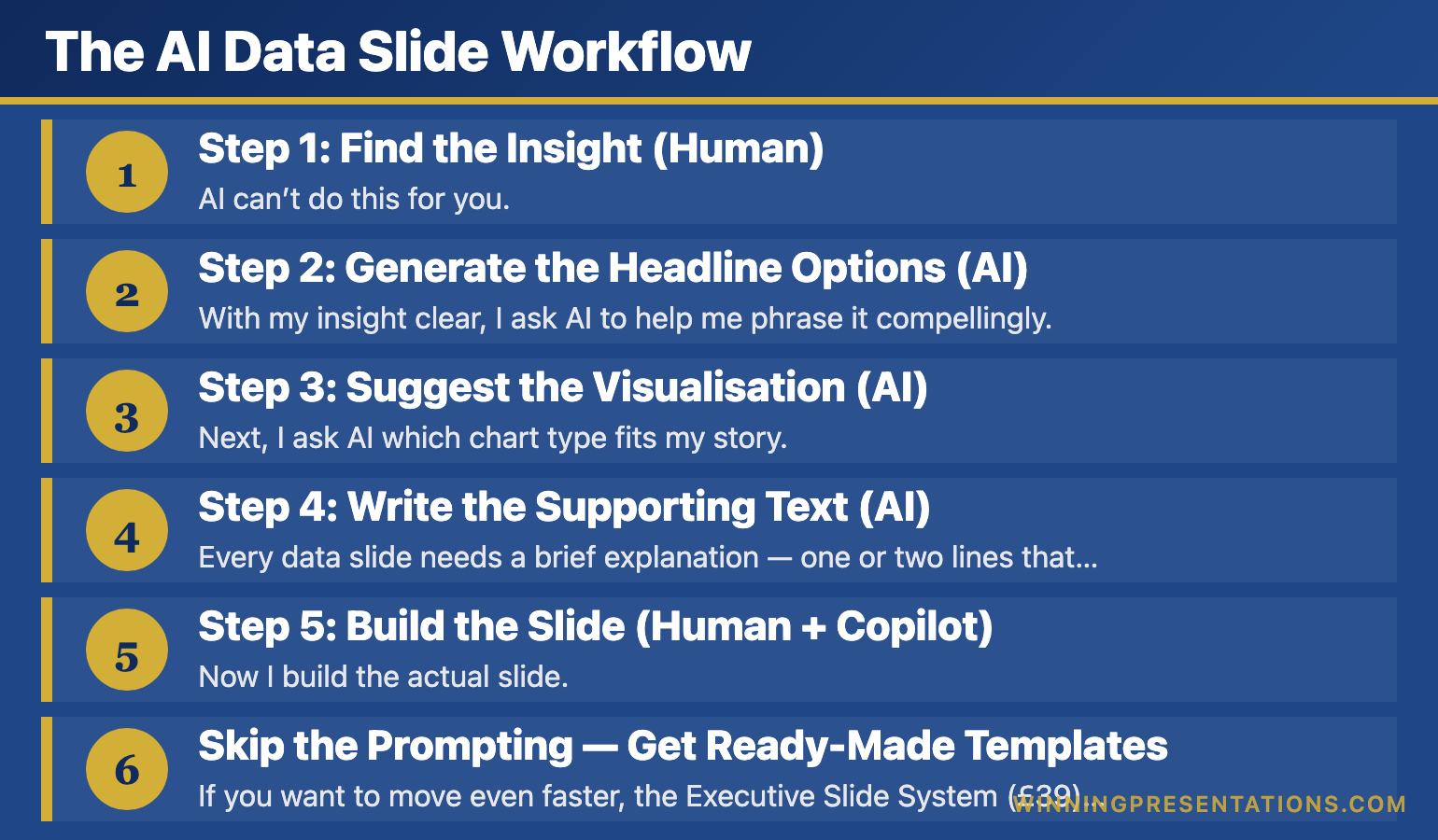
The AI Data Slide Workflow

Most people use AI wrong for data presentations. They dump numbers into ChatGPT and ask it to “create a presentation.” The result is generic, insight-free, and usually wrong.

The trick is breaking the process into steps — using AI for some, doing others yourself.

Infographic for: ai data slides workflow (image 1)

Step 1: Find the Insight (Human)

AI can’t do this for you. Before touching any tool, I look at my data and ask: “What’s the one thing that matters here?”

This takes 5 minutes of thinking. It’s the most important part.

Once I have my insight — “EMEA is growing 3x faster than Americas” or “Churn dropped 40% after the intervention” — everything else becomes easier.

Step 2: Generate the Headline Options (AI)

With my insight clear, I ask AI to help me phrase it compellingly.

My prompt:

“I need a slide headline for this insight: [INSIGHT]. The audience is [AUDIENCE]. Give me 5 options — punchy, clear, no jargon. The headline should state the insight, not label the data.”

AI gives me 5 options. I pick the best one or combine elements from multiple.

This takes 1 minute instead of 15 minutes staring at a blank slide.

Step 3: Suggest the Visualisation (AI)

Next, I ask AI which chart type fits my story.

My prompt:

“I want to show [INSIGHT] using this data: [PASTE KEY DATA POINTS]. What’s the best chart type? Options: bar chart, line chart, pie chart, single big number, comparison table. Explain why.”

AI doesn’t just give me an answer — it explains the logic. “A line chart works because you’re showing change over time, and the inflection point in March is your story.”

Sometimes I disagree with its recommendation. That’s fine. The value is in the reasoning, not the answer.

Related: Data Storytelling: How to Make Numbers Compelling (Not Boring)

Step 4: Write the Supporting Text (AI)

Every data slide needs a brief explanation — one or two lines that reinforce the insight. AI drafts this fast.

My prompt:

“Write 1-2 sentences explaining this data insight to a busy executive: [INSIGHT + KEY NUMBERS]. Be direct. No filler words. End with the implication or recommended action.”

I usually edit what it gives me — cutting words, adding specifics — but it’s faster than writing from scratch.

Step 5: Build the Slide (Human + Copilot)

Now I build the actual slide. If you have Copilot in PowerPoint, you can prompt it directly:

My Copilot prompt:

“Create a slide with headline ‘[YOUR HEADLINE]’. Include a [CHART TYPE] showing [DATA DESCRIPTION]. Add a text box below with: ‘[YOUR SUPPORTING TEXT]’. Keep the design clean and professional.”

Copilot gets me 70% of the way there. I spend another 2-3 minutes adjusting formatting, colours, and emphasis.

Total time: 10 minutes for a data slide that used to take 2 hours.

Related: Best PowerPoint Copilot Prompts That Actually Work

Skip the Prompting — Get Ready-Made Templates

If you want to move even faster, the Executive Slide System (£39) includes data slide templates with the insight-first structure already built in.

What’s included:

  • Data slide templates you can populate directly
  • Dashboard layouts designed for executive audiences
  • The headline framework built into every slide
  • Before/after examples showing transformations

Get the Executive Slide System →

The Prompts I Use Most Often

Here are three more prompts from my data presentation workflow:

For simplifying complex data:

“I have this data table: [PASTE TABLE]. What are the 3 most important insights an executive would care about? Rank them by business impact.”

For anticipating questions:

“I’m presenting this data to a CFO: [INSIGHT + DATA]. What 3 questions will they likely ask? And how should I prepare to answer them?”

For creating the narrative:

“I have 4 data slides with these insights: [LIST INSIGHTS]. Help me create a narrative flow — what order should I present them, and what’s the connecting thread?”

These prompts save me hours every week. Not because AI is doing my thinking — but because it’s accelerating the parts that used to be slow.

Related: AI Presentation Workflow: How I Cut Creation Time from 6 Hours to 90 Minutes

📬 Get More AI + Presentation Tips

Every week, I share prompts, workflows, and techniques for better presentations. No fluff.

Subscribe to The Winning Edge →

What AI Can’t Do (And Shouldn’t Try)

AI accelerates data presentations. It doesn’t replace your judgment.

AI can’t find your insight. It can summarise data, but it doesn’t know what matters to your specific audience. That’s your job.

AI can’t know your politics. It doesn’t know that your CEO hates pie charts or that the board has seen this data before. Context is human.

AI can’t guarantee accuracy. Always verify numbers. I’ve seen AI confidently miscalculate percentages. Trust but verify.

Use AI for speed. Use your brain for strategy.


Learn the Complete AI Presentation System

This article shows one workflow. AI-Enhanced Presentation Mastery teaches the complete system — from data storytelling to AI-assisted delivery prep.

What you’ll learn:

  • AI prompts for every presentation type (not just data slides)
  • The 90-minute deck creation workflow
  • How to use AI for Q&A preparation
  • Data storytelling and the insight-first framework
  • Delivery techniques that technology can’t replace

8 self-paced modules (January–April 2026) plus 2 live coaching sessions.

Presale price: £249 (increases to £499)

See the full curriculum →

Try This Today

Next time you have data to present, try Step 2 from my workflow:

Write down your insight in one sentence. Then ask AI: “Give me 5 headline options for this insight. Punchy, clear, no jargon.”

See how much faster it makes you.

📖 Learn the framework: Data Storytelling: How to Make Numbers Compelling — the complete insight-first system.

📘 Get the templates (£39): Executive Slide System — data slide templates ready to use.

🎓 Master the AI workflow (£249): AI-Enhanced Presentation Mastery — prompts, workflows, and systems for every presentation type.


Mary Beth Hazeldine combines 24 years of corporate banking experience with expertise in AI-enhanced workflows. She helps professionals create better presentations in less time.

26 Dec 2025
Data presentation tips - turn spreadsheets into stories that drive decisions

Data Presentation Tips: Turn Spreadsheets Into Stories in 5 Steps

A quick framework for transforming raw data into slides that actually get decisions

You have a spreadsheet full of numbers. You need a presentation by tomorrow. How do you turn rows and columns into something that actually moves people to action?

Here are 5 data presentation tips that transform raw data into compelling slides — without losing the rigour your audience expects.

🎁 Free Download: Executive Presentation Checklist — includes the data slide framework.

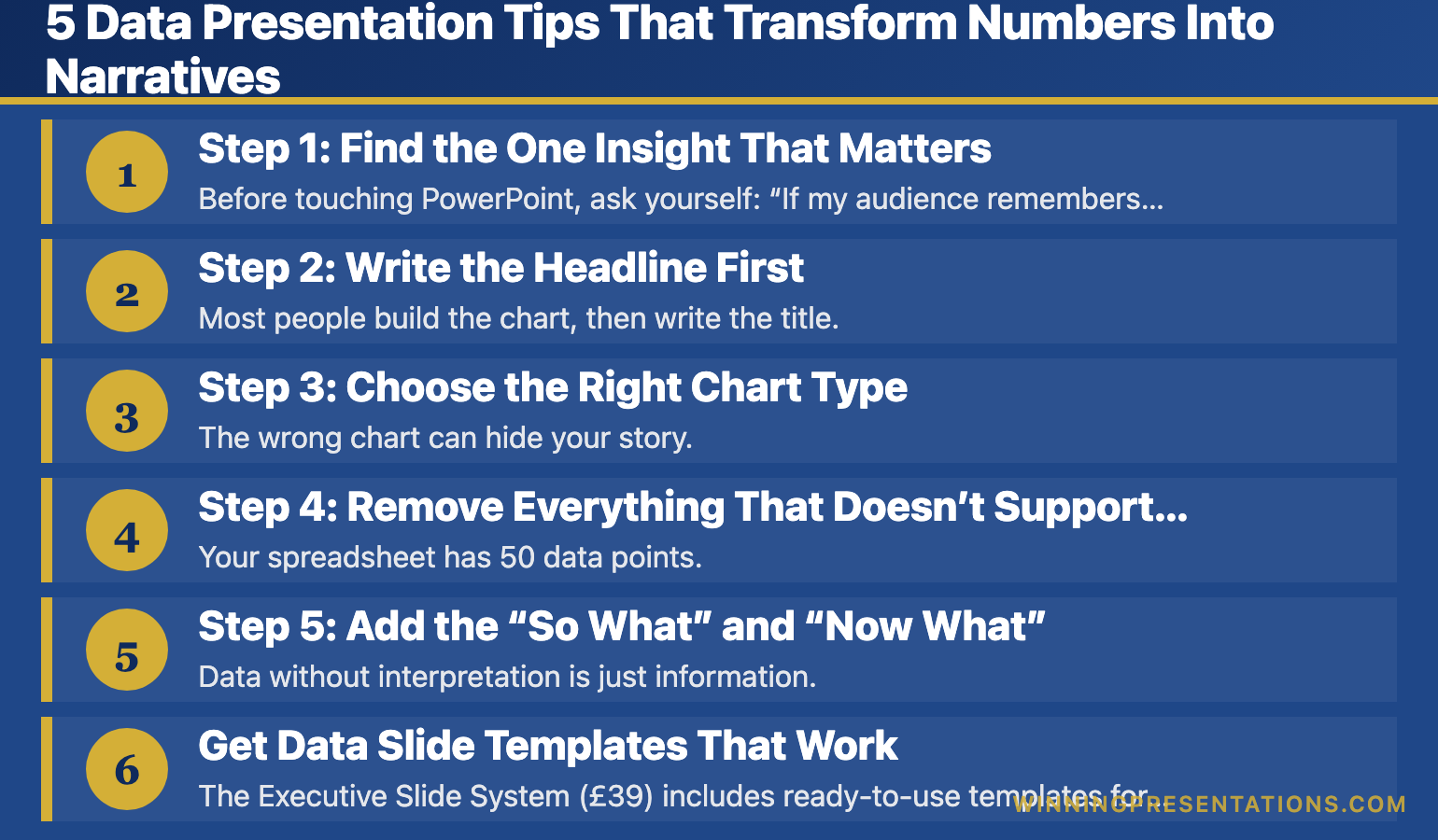
5 Data Presentation Tips That Transform Numbers Into Narratives

Infographic for: data presentation tips (image 1)

Step 1: Find the One Insight That Matters

Before touching PowerPoint, ask yourself: “If my audience remembers only one thing from this data, what should it be?”

That’s your headline. Everything else supports it.

Look for:

  • The biggest change (up or down)
  • The surprising finding
  • The number that triggers a decision
  • The trend that demands action

Example: A spreadsheet shows 12 months of regional sales. The insight isn’t “here’s our sales data.” It’s “EMEA grew 34% while Americas flatlined — we need to shift Q1 focus.”

Step 2: Write the Headline First

Most people build the chart, then write the title. Flip it.

Write your insight as a headline before you create any visualisation. This forces clarity. If you can’t write a clear headline, you haven’t found your story yet.

Weak headline: “Q3 Revenue by Region”
Strong headline: “EMEA Drives 70% of Q3 Growth”

The weak version labels the data. The strong version tells the audience what to think.

Related: Data Storytelling: How to Make Numbers Compelling (Not Boring)

Step 3: Choose the Right Chart Type

The wrong chart can hide your story. Match the visualisation to what you’re showing:

  • Trends over time → Line chart
  • Comparing categories → Bar chart (horizontal for many items)
  • Part of a whole → Pie chart (max 5 segments) or stacked bar
  • Showing correlation → Scatter plot
  • Single important number → Big number with context

When in doubt, use a bar chart. They’re the easiest to read quickly.

Step 4: Remove Everything That Doesn’t Support the Insight

Your spreadsheet has 50 data points. Your slide needs 5.

Delete ruthlessly:

  • Gridlines (usually unnecessary)
  • Data labels on every point (highlight key ones only)
  • Legends that duplicate axis labels
  • 3D effects (they distort perception)
  • Decimal places beyond what matters

Every element on your slide should earn its place. If it doesn’t support the insight, it’s noise.

Related: The Executive Summary Slide: How to Write the Only Slide That Matters

Step 5: Add the “So What” and “Now What”

Data without interpretation is just information. Add two things:

The “So What”: Why does this data matter? What does it mean for the business?

The “Now What”: What action should the audience take based on this data?

These can be a single line of text below your chart, or your verbal narrative as you present. Either way, never leave your audience to interpret the implications themselves.

Related: Team Dashboards That Tell a Story (Not Just Show Numbers)

Get Data Slide Templates That Work

The Executive Slide System (£39) includes ready-to-use templates for data presentations — with the insight-first structure already built in.

What’s included:

  • Data slide templates with headline frameworks
  • Dashboard layouts that tell stories
  • Before/after examples

Get the Executive Slide System →

Quick Data Presentation Checklist

Before you present any data slide, run through this:

  • ☐ Is there ONE clear insight? (Not three competing points)
  • ☐ Does the headline state the insight? (Not just label the data)
  • ☐ Is the chart type appropriate for the story?
  • ☐ Have I removed unnecessary clutter?
  • ☐ Is the “so what” clear?
  • ☐ Do I know what action I want from the audience?

If you can check all six, your data slide is ready.


Your Next Step

Take your next data-heavy slide and apply step 2 first: write the headline as an insight, not a label. That single change transforms how your audience receives the information.

📖 Go deeper: Data Storytelling: How to Make Numbers Compelling — the complete guide with 5 techniques, common mistakes, and real examples.

🎁 Get the checklist: Executive Presentation Checklist — free, includes data slide framework.

📘 Get the templates: Executive Slide System (£39) — data slide templates with insight-first structure.


Mary Beth Hazeldine spent 24 years presenting data to boards and credit committees in corporate banking. She now helps professionals turn spreadsheets into stories that drive decisions.

26 Dec 2025
Data storytelling - how to make numbers compelling and drive decisions

Data Storytelling: How to Make Numbers Compelling (Not Boring)

Turn spreadsheets into stories that drive decisions — techniques from 24 years of presenting to boards, credit committees, and investors

I once watched a colleague present 47 slides of flawless analysis to a credit committee. Every number was accurate. Every chart was properly labelled. The recommendation was sound.

They said no.

The problem wasn’t the data. It was the delivery. He presented numbers. He should have told a story with numbers. That’s the difference between data presentation and data storytelling — and it’s the difference between getting polite nods and getting decisions.

After 24 years in banking — presenting to boards at JPMorgan, credit committees at RBS, investors at Commerzbank — I’ve learned that the analysts who get promoted aren’t the ones with the best spreadsheets. They’re the ones who make data mean something.

🎁 Free Download: Executive Presentation Checklist — includes the data slide framework from this article. Print-ready PDF.

What Is Data Storytelling (And Why It Matters)

Data storytelling is the practice of building a narrative around data to help your audience understand and act on insights. It combines three elements: the data itself, the visualisation, and the narrative that connects them.

Here’s why it matters:

Data alone doesn’t persuade. Stanford research found that statistics presented with stories are 22 times more memorable than statistics alone. Numbers tell people what. Stories tell people why it matters.

Decisions are made emotionally. Neuroscientist Antonio Damasio’s research shows that people with damage to emotional brain centres can’t make decisions — even with perfect logic. Your CFO may think they’re purely analytical, but they’re not. Nobody is.

Attention is limited. The average executive spends 2-4 minutes reviewing a slide before moving on. If your data doesn’t land immediately, it doesn’t land at all.

Data storytelling isn’t about dumbing down your analysis. It’s about making your analysis accessible to people who don’t have time to interpret it themselves.

Related: How to Present to a CFO: The Finance-First Framework

The Data Storytelling Framework: Lead With Insight

Most presenters structure data slides like this:

Here’s the data → Here’s what it shows → Here’s what we should do

That’s backwards. By the time you reach your point, you’ve lost them.

Effective data storytelling reverses the order:

Here’s the insight → Here’s the data that proves it → Here’s what we should do

This is the “lead with the headline” approach. Your audience knows immediately what they’re looking at and why it matters. The data becomes evidence, not a puzzle to solve.

Example: Before and After

Before (Data-First):

“Q3 revenue was £4.2M. Q2 was £3.8M. Q1 was £3.5M. Year-over-year we’re up 12%. The EMEA region grew 18% while Americas grew 6%…”

The audience is doing mental maths, trying to figure out the point.

After (Insight-First):

“EMEA is now our growth engine — up 18% while Americas stalls at 6%. If we shift Q4 marketing budget accordingly, we can capture another £400K.”

Same data. Completely different impact.

Related: The Executive Summary Slide: How to Write the Only Slide That Matters

Data storytelling framework - lead with insight, support with data, end with action

5 Data Storytelling Techniques That Work in Business

These are the techniques I use with clients — from biotech fundraising decks to banking board presentations.

1. The Comparison Anchor

Numbers mean nothing without context. “£2.3 million” is abstract. “£2.3 million — that’s 3x what we spent last year for half the results” creates meaning.

Always anchor your data to something your audience already understands:

  • Compare to last year / last quarter
  • Compare to competitors or industry benchmarks
  • Compare to targets or forecasts
  • Compare to a familiar reference point

Example: “Our customer acquisition cost is £47. The industry average is £62. We’re 24% more efficient — and here’s why that matters for our Q1 targets…”

2. The Single Number Focus

When everything is important, nothing is important. Pick the one number that matters most and build your slide around it.

I learned this the hard way. Early in my career, I’d cram every relevant metric onto a slide. The result? Decision-makers couldn’t see the forest for the trees.

Now I ask: “If they remember only one number from this slide, what should it be?” That number gets visual prominence. Everything else supports it.

3. The Trend Line Story

A single data point is a fact. Multiple data points are a trend. Trends tell stories.

Weak: “Churn rate is 4.2%”

Strong: “Churn has dropped from 6.1% to 4.2% over eight months — the interventions are working”

When presenting trends, always explain the inflection points. What happened in March that changed the trajectory? That’s where the story lives.

4. The “So What” Test

For every data point, ask yourself: “So what?”

“Revenue grew 12%” — So what?
“Revenue grew 12%, which means we’ve hit our trigger for the expansion budget” — Now I understand why this matters.

If you can’t answer “so what” for a piece of data, it probably doesn’t belong in your presentation.

5. The Contrast Frame

Show what the data could have been — or what it will be if nothing changes.

Example: “At current trajectory, we’ll miss target by £800K. With this intervention, we close the gap entirely.”

Contrast creates stakes. Stakes create attention.

Related: Team Dashboards That Tell a Story (Not Just Show Numbers)

Turn Your Data Into Stories That Drive Decisions

The Executive Slide System (£39) includes templates specifically designed for data-heavy presentations.

What’s included:

  • The “Insight-First” data slide template
  • Before/after examples from real executive presentations
  • The single-number-focus framework
  • Dashboard templates that tell stories

Get the Executive Slide System →

Common Data Storytelling Mistakes (And How to Avoid Them)

After reviewing hundreds of data presentations, I see the same mistakes repeatedly.

Mistake 1: Showing all the data. Your analysis might require 50 data points. Your presentation needs 5. The rest belongs in the appendix. Include only what’s necessary to support your narrative.

Mistake 2: Letting the chart speak for itself. No chart is self-explanatory to a busy executive. Always add a headline that states the insight, not just a label that states the topic. “Q3 Revenue by Region” is a label. “EMEA Drives 70% of Q3 Growth” is an insight.

Mistake 3: Choosing the wrong chart type. Pie charts for trends. Bar charts for composition. Line charts for 15 data points. Match the visualisation to the story you’re telling:

  • Trends over time → Line chart
  • Comparison between categories → Bar chart
  • Part-to-whole relationships → Pie or stacked bar (with few segments)
  • Correlation → Scatter plot

Mistake 4: Burying the lead. The most important insight should be visible within 3 seconds. If your audience has to hunt for the point, they won’t.

Mistake 5: No clear action. Data without a recommendation is just information. Always end data slides with what you want the audience to do with this information.

Data Storytelling in Practice: A Real Example

A biotech client came to me with a fundraising deck. Their data slide looked like this:

Title: “Clinical Trial Results”
Content: A table with 12 rows of efficacy data, p-values, confidence intervals, and patient subgroup breakdowns.

Scientifically rigorous. Completely ineffective for investors who see 20 decks a week.

We restructured it:

Title: “87% Response Rate — 2x the Standard of Care”
Content: One large number (87%), one comparison bar showing vs. standard of care (43%), and a single line of supporting text about statistical significance.

The detailed data moved to the appendix. The story stayed on the slide.

They raised £18 million.

Related: Storytelling in Presentations: The NLP Techniques That Captivate Any Audience

📬 Get Weekly Presentation Tips

Every week, I share one actionable tip for presenting data, handling tough audiences, and getting decisions. No fluff, no spam — just techniques that work.

Subscribe to The Winning Edge →

Frequently Asked Questions About Data Storytelling

How do I tell a story with data without oversimplifying?

Simplifying isn’t dumbing down — it’s respecting your audience’s time. Keep the full analysis available (in appendix or backup slides) but lead with the insight. If someone wants to drill into methodology, they’ll ask. Most won’t.

What if my audience wants to see all the numbers?

Some audiences do — especially technical or financial reviewers. In these cases, structure your presentation in layers: executive summary with key insights first, then supporting detail, then full data appendix. Let them choose their depth.

How do I present data that tells a negative story?

Lead with the insight anyway — but frame it constructively. “We’re 15% behind target” is a problem. “We’re 15% behind target, and here’s the recovery plan that closes the gap by Q4” is a story with a path forward. Never hide bad data; contextualise it.

How many data points should one slide have?

As few as possible to make your point. For most business presentations, that’s 1-3 key metrics per slide. If you need more, ask yourself if you’re actually making multiple points that deserve multiple slides.

Should I use AI tools for data visualisation?

AI can help generate initial visualisations, but always review and refine. Tools like Copilot are good at creating charts quickly but often miss the storytelling elements — the headlines, the annotations, the “so what.” Use AI for speed, then add the human insight layer.


Master Data Storytelling + Persuasion + AI Tools

AI-Enhanced Presentation Mastery includes a dedicated module on data storytelling — how to structure data slides, choose visualisations, and build narratives that drive decisions.

8 self-paced modules (January–April 2026):

  • Module 4: Data Storytelling — turn numbers into narratives
  • The S.E.E. Formula for persuasive messaging
  • The 132 Rule for executive presentations
  • AI workflows for faster deck creation
  • Handling tough Q&A and hostile audiences

Plus: 2 live coaching sessions (April 2026) with personalised feedback.

Presale price: £249 (increases to £299, then £499)

60 seats total. Lifetime access.

See the full curriculum →

Your Next Step: Apply the Insight-First Framework

Data storytelling isn’t a talent — it’s a technique. Start with one change: on your next data slide, write the insight as your headline, not the topic.

Instead of “Q3 Sales Performance,” write “Q3 Sales Exceeded Target by 12% — Here’s What Drove It.”

That single shift transforms how your audience receives the information.

🎁 START FREE: Download the Executive Presentation Checklist — includes the data slide framework from this article.

📘 GET THE TEMPLATES (£39): The Executive Slide System gives you ready-to-use data slide templates with the insight-first structure built in.

🎓 MASTER IT ALL (£249): AI-Enhanced Presentation Mastery — includes a full data storytelling module plus 7 more modules on structure, persuasion, and delivery. January–April 2026.


Mary Beth Hazeldine spent 24 years in corporate banking at JPMorgan, PwC, Royal Bank of Scotland, and Commerzbank — where she learned that the analysts who get promoted aren’t the ones with the best spreadsheets, but the ones who make data mean something.

25 Dec 2025
Free presentation resources - checklists, templates, and frameworks for executives and professionals

Free Presentation Resources: Everything I Give Away (And Why)

10 free downloads, zero catch — checklists, templates, and frameworks from 35 years of presentation work

People sometimes ask why I give so much away for free.

The honest answer: because free presentation resources changed my career.

Early in my banking days, I was drowning in presentations — building decks from scratch, guessing at structure, hoping my slides wouldn’t embarrass me in front of senior leadership. Then I found a simple checklist from someone who’d been doing this for decades. It saved me hours. It made me look competent. It gave me confidence I hadn’t earned yet.

I’ve never forgotten that feeling.

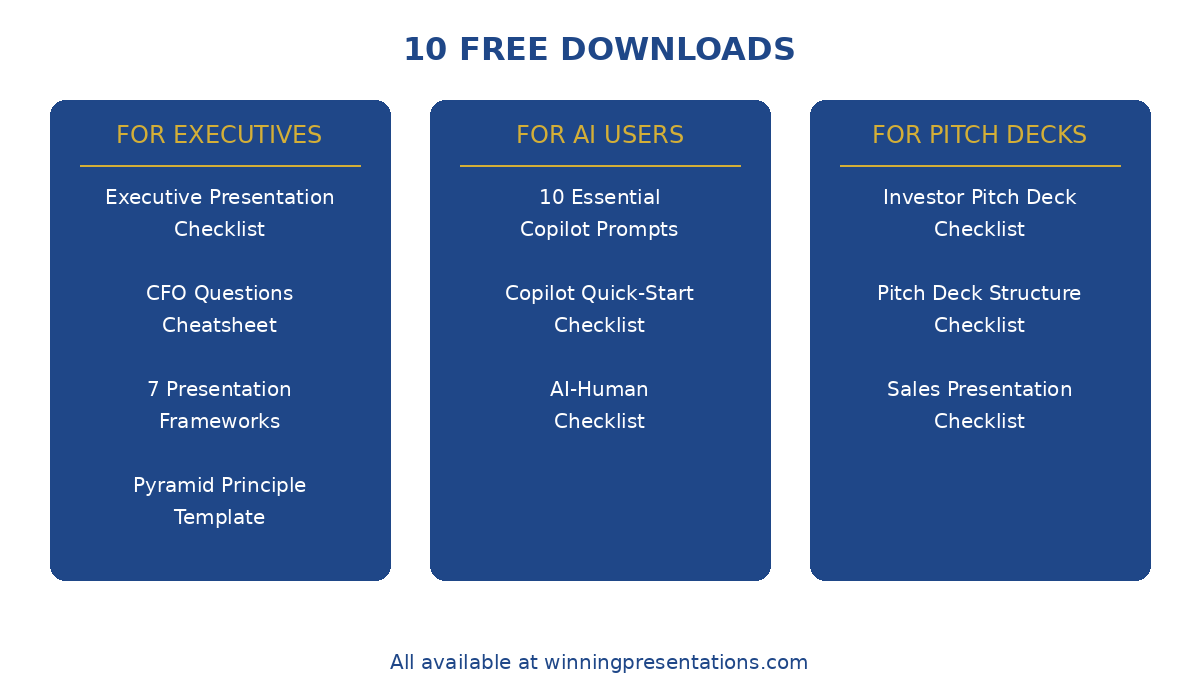
So here’s everything I give away — 10 free presentation resources covering executive presentations, AI tools, pitch decks, and public speaking. No email required for some, just a signup for others. Take what you need.

🎯 Not Sure Where to Start?

The most popular download is the 7 Presentation Frameworks — it gives you reliable structures for any presentation type, so you never start from a blank slide again.

Updated 27 March 2026 — Revised for the latest Microsoft Copilot and ChatGPT capabilities.

Download 7 Presentation Frameworks (Free) →

Free Presentation Resources for Executives

These are designed for anyone presenting to senior leadership, boards, or C-suite audiences.

1. Executive Presentation Checklist

What it is: A pre-presentation checklist covering structure, messaging, and delivery. The same framework I use before any high-stakes presentation.

Best for: Anyone presenting recommendations, budgets, or strategic updates to executives.

What’s inside:

  • The 5-point structure check (does your deck pass the “so what” test?)
  • Messaging clarity questions
  • Delivery preparation reminders
  • The 60-second executive summary framework

👉 Download the Executive Presentation Checklist (Free)

Related reading: How to Create Executive Presentations That Get Results


2. CFO Questions Cheatsheet

What it is: The 10 questions finance leaders almost always ask — and how to prepare for them before they’re asked.

Best for: Anyone presenting budget requests, business cases, or investment proposals to finance teams.

What’s inside:

  • The ROI question (and how to frame your answer)
  • The “what if it fails” question
  • The timeline and resource questions
  • How to handle “can we do this cheaper?”

👉 Download the CFO Questions Cheatsheet (Free)

Related reading: How to Present to a CFO: The Finance-First Framework


3. 7 Presentation Frameworks

What it is: Seven proven structures for different presentation types — from executive updates to persuasive pitches to storytelling formats.

Best for: Anyone who wants a reliable starting structure instead of staring at a blank slide.

What’s inside:

  • The Pyramid Principle structure (McKinsey’s favourite)
  • The S.E.E. Formula (Story-Evidence-Emotion)
  • The Problem-Solution-Proof framework
  • The 132 Rule for executive presentations
  • Four more structures with fill-in templates

👉 Download 7 Presentation Frameworks (Free)

Related reading: Presentation Structure: 7 Frameworks That Actually Work


4. Pyramid Principle Template

What it is: A fill-in template for structuring any presentation using Barbara Minto’s Pyramid Principle — the framework used by McKinsey, BCG, and top consulting firms.

Best for: Complex recommendations, strategic proposals, and any presentation where you need to lead with the conclusion.

What’s inside:

  • The SCQA framework (Situation-Complication-Question-Answer)
  • How to structure supporting arguments
  • Fill-in boxes for your content
  • Before/after examples

👉 Download the Pyramid Principle Template (Free)

Related reading: The Pyramid Principle for Presentations: McKinsey’s Secret Weapon

💌 Want weekly tips? The Winning Edge newsletter delivers one actionable presentation tip every week — free, no spam.

Free presentation templates and checklists - executive, pitch deck, and AI resources

Free AI & Copilot Presentation Resources

These help you use AI tools effectively — without getting generic, robotic output.

5. 10 Essential Copilot Prompts

What it is: The 10 PowerPoint Copilot prompts I use most often — tested across hundreds of presentations.

Best for: Anyone using Microsoft Copilot for PowerPoint who wants better results than “Create a presentation about…”

What’s inside:

  • Prompts for slide generation, refinement, and formatting
  • The “context sandwich” technique for better output
  • Prompts for executive summaries and data slides
  • What to say instead of “make this better”

👉 Download 10 Essential Copilot Prompts (Free)

Related reading: Best PowerPoint Copilot Prompts That Actually Work


6. PowerPoint Copilot Quick-Start Checklist

What it is: A step-by-step checklist for getting started with Copilot in PowerPoint — from setup to your first AI-assisted deck.

Best for: Copilot beginners who want to avoid the common mistakes that waste the first few weeks.

What’s inside:

  • Setup and licensing checklist
  • Your first prompt sequence
  • What Copilot does well (and what it doesn’t)
  • The 5-minute workflow to test it

👉 Download the Copilot Quick-Start Checklist (Free)

Related reading: How to Use Copilot in PowerPoint: Complete Tutorial


7. AI-Human Checklist

What it is: A quality control checklist for AI-generated presentations — ensuring your deck doesn’t look (or sound) like a robot made it.

Best for: Anyone using ChatGPT, Copilot, or other AI tools who wants output that feels human and credible.

What’s inside:

  • The “AI smell test” — 7 signs your deck looks AI-generated
  • Human touch points to add
  • Language patterns to fix
  • The final polish checklist

👉 Download the AI-Human Checklist (Free)

Related reading: Why AI Presentations Fail (And How to Fix Them)

Stop Guessing What to Type. Start Building in 25 Minutes.

The Executive Prompt Pack gives you 71 tested prompts for ChatGPT and Copilot — structured by scenario so you know exactly what to type:

  • Build from scratch — scenario prompts for board reviews, budget requests, and investor decks
  • Rescue and rewrite — audit an existing deck, condense it, or fix one slide at a time
  • Industry-specific prompts for financial services, banking, consulting, and executive audiences
  • Power modifiers that transform any prompt into board-ready output
  • The 25-minute deck workflow that replaces 3–4 hours of manual building

Works with ChatGPT, Microsoft Copilot, and Edit with Copilot (formerly Agent Mode). Updated March 2026.

Get the Executive Prompt Pack → £19.99

Free Pitch Deck & Fundraising Resources

For founders, salespeople, and anyone building decks to raise money or close deals.

8. Investor Pitch Deck Checklist

What it is: A slide-by-slide checklist based on what actually gets investor meetings — not theory, but patterns from decks that raised funding.

Best for: Founders preparing seed, Series A, or growth-stage pitch decks.

What’s inside:

  • The 12 slides investors expect (and the 3 they skip)
  • What to include on each slide
  • Red flags that kill decks early
  • The “first 3 slides” test

👉 Download the Investor Pitch Deck Checklist (Free)

Related reading: Investor Pitch Deck Template: The Sequoia Format That Raised Billions


9. Pitch Deck Structure Checklist

What it is: A structural checklist for any pitch deck — ensuring your narrative flows and your ask is clear.

Best for: Anyone building a pitch deck for investors, partners, or internal stakeholders.

What’s inside:

  • The narrative arc checklist
  • Slide order logic
  • The “ask” positioning framework
  • Common structural mistakes to avoid

👉 Download the Pitch Deck Structure Checklist (Free)

Related reading: Pitch Deck Examples: 7 Real Decks That Raised Millions


10. Sales Presentation Checklist

What it is: A checklist for sales presentations and demos — focused on conversion, not just information delivery.

Best for: Sales teams, account executives, and anyone presenting to close deals.

What’s inside:

  • The discovery-to-demo flow
  • Objection handling preparation
  • The “next steps” close
  • Follow-up deck essentials

👉 Download the Sales Presentation Checklist (Free)

Related reading: Sales Presentation Template: The Structure Top Performers Use


For 71 tested prompts covering every scenario — build from scratch, rescue an existing deck, or fix individual slides — the Executive Prompt Pack gives you exactly what to type, updated for the latest Copilot and ChatGPT capabilities.

Why I Give Free Presentation Resources Away

Two reasons:

1. They work better when more people use them. Every checklist and framework here has been refined by feedback from people who actually used them. The more people download them, the more I learn about what needs improving.

2. Because I remember what it was like to need help and not have budget. I spent years early in my career guessing at things that should have been obvious. If a free checklist saves you from one embarrassing presentation, that’s worth more to me than the email address.

Take what you need. Share them with colleagues if they help.


Free Presentation Tips: The Winning Edge Newsletter

Every week, I share one actionable presentation tip — no fluff, no pitches, just something you can use in your next deck.

It’s the newsletter I wish existed when I was building presentations at 11pm wondering why nothing looked right.

👉 Subscribe to The Winning Edge (Free)


Beyond Free: Presentation Resources That Go Deeper

The free resources above will get you far. But if you want structured training with feedback, here’s what else I offer:

But honestly? Start with the free stuff. See if my approach resonates with how you think about presentations. If it does, the paid options are there when you’re ready.


71 Prompts. Every Scenario Covered.

Build from scratch, rescue an existing deck, or perfect individual slides — the Executive Prompt Pack covers every scenario. Works with ChatGPT, Copilot, and Edit with Copilot. Updated March 2026.

Get the Prompts → £19.99

Frequently Asked Questions About These Free Presentation Resources

Do I need to give my email for all of these?

Most require an email signup through Gumroad — it’s how I deliver the PDF and (occasionally) let you know about updates. I don’t spam. You can unsubscribe anytime.

Can I share these with my team?

Yes. Share the links freely. If your whole company wants copies, just have each person download their own — it helps me understand what’s most useful.

Are these really free? What’s the catch?

No catch. Some people who find value in the free resources later buy a guide or course. Most don’t, and that’s fine. The free stuff stands on its own.

Which one should I start with?

If you’re presenting to executives: Executive Presentation Checklist.
If you’re using AI tools: 10 Essential Copilot Prompts.
If you’re building pitch decks: Investor Pitch Deck Checklist.
If you want structure: 7 Presentation Frameworks.

Will you add more free resources?

Yes. Subscribe to The Winning Edge newsletter to hear about new releases.


Mary Beth Hazeldine spent 24 years in corporate banking at JPMorgan, PwC, Royal Bank of Scotland, and Commerzbank before founding Winning Presentations. She now helps executives and professionals communicate with clarity and confidence — one presentation at a time.

24 Dec 2025
Persuasive presentation techniques - 7 methods backed by psychology

Persuasive Presentation Techniques: 7 Methods Backed by Psychology

The science behind why some presentations get instant agreement

The most persuasive presentation techniques aren’t tricks. They’re applications of how the human brain actually makes decisions.

Psychologist Robert Cialdini spent decades studying influence. His research — plus work from behavioural economics — reveals why some presentations get instant buy-in while others stall in “let me think about it.”

Here are seven psychology-backed methods you can use ethically in any business presentation.

🎁 Free Download: Executive Presentation Checklist — includes a persuasion framework you can apply immediately.

7 Persuasive Presentation Techniques That Actually Work

1. Social Proof

The psychology: People look to others’ behaviour to determine their own. We assume if others are doing something, it must be right.

In presentations: “Three of our five regional teams have already adopted this approach. Here’s what they’re seeing…”

Social proof is especially powerful when the “others” are similar to your audience — same industry, same role, same challenges.

2. Scarcity

The psychology: We value things more when they’re limited. Loss aversion means we’re more motivated to avoid losing something than to gain something equivalent.

In presentations: “This pricing is only available through Q1” or “We have a 6-week window before the competitor launches.”

Scarcity works best when it’s genuine. Manufactured urgency backfires.

3. Authority

The psychology: We defer to experts. Credentials, experience, and endorsements create trust before you’ve said anything substantive.

In presentations: Lead with relevant credentials. “In 15 years of working with biotech fundraising…” establishes why you’re worth listening to.

Authority can also be borrowed: “McKinsey’s research shows…” or “The CFO at [respected company] told me…”

4. Reciprocity

The psychology: When someone gives us something, we feel obligated to give back. This is deeply wired — across every culture studied.

In presentations: Give value before asking. Share an insight, a framework, or useful data early in your presentation. The audience feels subtly obligated to hear you out.

This is why the best sales presentations teach something valuable, even if the prospect doesn’t buy.

5. Consistency

The psychology: Once we commit to something — even a small thing — we want to stay consistent with that commitment. This is the “yes ladder” principle.

In presentations: Get small agreements before your big ask. “Would you agree that customer retention is our priority right now?” (Yes) “And that our current approach isn’t working?” (Yes) “So we need to try something different?” (Yes) “Here’s what I’m proposing…”

Each yes makes the next one more likely.

Related: Persuasive Presentations: How to Change Minds Without Manipulation

6. Liking

The psychology: We say yes to people we like. Similarity, compliments, and cooperation all increase liking.

In presentations: Find common ground early. Reference shared experiences, mutual connections, or common challenges. “Like many of you, I’ve sat through budget reviews wondering if anyone was actually listening…”

Liking isn’t about being charming — it’s about being relatable.

7. Contrast

The psychology: We judge things relative to what we’ve just seen. A £10,000 expense seems small after discussing a £500,000 problem.

In presentations: Present the cost of inaction before the cost of action. “We’re losing £200,000 annually to this problem. The solution costs £30,000.”

Contrast reframes your ask from “expensive” to “obviously worth it.”

Related: How to Create Executive Presentations That Get Results

Structure Persuasive Presentations Faster

The Executive Slide System (£39) gives you templates that build these psychology principles into your slide structure.

What’s included:

  • The 3-slide decision framework
  • Before/after examples from real presentations
  • Templates for budget requests and strategic recommendations

Get the Executive Slide System →

Using Persuasive Presentation Techniques Ethically

These techniques are powerful — which means they can be misused. The ethical line is simple:

Ethical: Using psychology to help people make decisions that serve their interests.

Unethical: Using psychology to manipulate people into decisions that harm them.

If your recommendation genuinely helps your audience, advocating for it persuasively isn’t manipulation. It’s service.

Related: Storytelling in Presentations: The NLP Techniques That Captivate Any Audience


Your Next Step

Pick one technique from this list and apply it to your next presentation. Start with social proof or contrast — they’re the easiest to implement immediately.

📖 Go deeper: Persuasive Presentations: How to Change Minds Without Manipulation — the complete guide with NLP frameworks and specific techniques.

🎁 Get the checklist: Executive Presentation Checklist — free, includes persuasion framework.

📘 Get the system: Executive Slide System — £39, templates with persuasion principles built in.


Mary Beth Hazeldine spent 24 years in corporate banking where she learned which persuasion techniques actually work in high-stakes business environments.

24 Dec 2025
Persuasive presentations - how to change minds without manipulation using ethical influence

Persuasive Presentations: How to Change Minds Without Manipulation

NLP-based influence techniques that get decisions — without tricks or pressure tactics

Early in my banking career, I watched a senior director get a £12 million budget approved in under 15 minutes. No hard sell. No pressure. No clever tricks. The room simply… agreed.

I’d spent weeks on a similar request and been rejected twice. What was he doing differently?

It took me years to understand: persuasive presentations aren’t about convincing people you’re right. They’re about helping people convince themselves. The difference is everything.

As a qualified NLP practitioner and clinical hypnotherapist, I’ve spent decades studying ethical influence — how to change minds without manipulation. Here’s what actually works in business contexts.

🎁 Free Download: Executive Presentation Checklist — includes the persuasion framework from this article. Print-ready PDF.

What Makes a Presentation Persuasive (It’s Not What You Think)

Most people think persuasion means stronger arguments. Better data. More compelling logic.

It doesn’t.

Neuroscientist Antonio Damasio studied patients with damage to emotional brain centres. They could analyse options perfectly — but couldn’t make decisions. His conclusion: emotion isn’t the enemy of reason. It’s the engine.

A persuasive presentation doesn’t overwhelm with logic. It creates the emotional conditions for agreement. The logic provides justification after the decision is already made.

This is why:

  • A CFO approves a budget wrapped in a client story but rejects the same numbers in a spreadsheet
  • A board says yes to a recommendation framed as risk mitigation but no to the same recommendation framed as opportunity
  • An investor funds a founder who tells a compelling origin story over one with better metrics

The information is identical. The emotional frame is different.

Related: Storytelling in Presentations: The NLP Techniques That Captivate Any Audience

Persuasive Presentation Techniques: The Ethical Approach

There’s a line between influence and manipulation. Manipulation exploits. Influence aligns.

Ethical persuasion helps people see how your recommendation serves their interests. It removes friction, addresses concerns, and makes the right decision feel obvious. It never tricks, pressures, or exploits cognitive biases against someone’s own interests.

Here are the techniques that work:

1. Lead With Their Problem, Not Your Solution

Most presenters start with what they want: “I’m recommending we invest £2 million in…”

Persuasive presenters start with what the audience wants to solve: “We’re losing 15% of deals in the final stage. Here’s why — and how to fix it.”

When you articulate someone’s problem better than they can, you earn the right to propose solutions. They lean in because you understand them.

2. Use the “Yes Ladder”

Before your main ask, get a series of small agreements. Each “yes” makes the next one more likely — this is called “commitment consistency” in psychology.

Example:

  • “Would you agree that customer retention is our biggest growth lever right now?” (Yes)
  • “And that our current churn rate is higher than the industry benchmark?” (Yes)
  • “So addressing this should be a priority for Q1?” (Yes)
  • “Here’s the investment that would make that happen…”

By the time you reach your recommendation, they’ve already agreed with the logic that leads there.

3. Name the Objection Before They Do

If you know people will worry about cost, timeline, or risk — say it first.

“You’re probably thinking this sounds expensive. Let me show you the numbers…”

This does two things: it builds trust (you’re not hiding concerns) and it lets you frame the objection on your terms. An objection you raise is half-answered. An objection they raise feels like a discovery.

4. Give Them the “Out”

Counterintuitively, acknowledging alternatives strengthens your position.

“We could do nothing and accept the current results. We could try a smaller pilot first. Or we could commit fully and capture the market window. Here’s why I’m recommending option three…”

When you present options fairly, people trust your judgment more. You’re not selling — you’re advising.

5. End With the Decision, Not the Data

Weak closings: “So that’s the analysis. Any questions?”

Strong closings: “Based on what we’ve seen, I’m recommending we proceed with Option A, starting in Q1. Can I get your approval to move forward?”

A persuasive presentation always ends with a clear ask. If you don’t ask, you don’t get.

Related: How to Create Executive Presentations That Get Results

Persuasive presentation techniques - 5 ethical influence methods: lead with problem, yes ladder, name objections, give the out, end with decision

The NLP Framework for Persuasive Presentations

In NLP, we talk about “pacing and leading.” Pacing means matching someone’s current state — their concerns, their language, their worldview. Leading means guiding them toward a new perspective.

You can’t lead someone you haven’t paced first. This is why jumping straight to your recommendation fails.

The sequence:

1. Pace their current reality. Show that you understand where they are. Use their language. Acknowledge their constraints. Reference their priorities.

“I know Q4 budget is already stretched. I know we’ve had implementation challenges before. And I know the board is focused on profitability over growth right now.”

2. Bridge with shared goals. Connect their current concerns to the outcome you’re proposing.

“Which is exactly why this matters. This isn’t about spending more — it’s about spending smarter. It directly addresses the profitability mandate.”

3. Lead to your recommendation. Now that you’re aligned, introduce your solution as the logical next step.

“Here’s what I’m proposing, and how it gets us to the outcome we both want…”

This isn’t manipulation. It’s communication that works with human psychology instead of against it.

Related: How to Present to Your CFO: The Financial Language That Gets Buy-In

Structure Your Persuasive Presentations

The Executive Slide System (£39) gives you the frameworks to structure presentations that get decisions.

What’s included:

  • The 3-slide decision framework
  • Before/after examples from real client work
  • Templates for budget requests, strategic recommendations, and board presentations
  • The “yes ladder” structure built into slide flow

Get the Executive Slide System →

What Persuasive Presentations Avoid

Knowing what not to do matters as much as knowing what works.

Don’t overwhelm with options. Three choices maximum. More than that creates decision paralysis, not persuasion.

Don’t hide weaknesses. If your recommendation has risks or limitations, acknowledge them. Audiences aren’t stupid — they’ll find the holes anyway. Better to address them on your terms.

Don’t mistake length for thoroughness. A 60-slide deck isn’t more persuasive than 15 slides. It’s less persuasive. Every slide that doesn’t advance your argument dilutes it.

Don’t end with Q&A. Q&A should happen, but it shouldn’t be your closing. After Q&A, return to your recommendation and ask for the decision. The last thing they hear should be your ask, not their own objections.

Don’t confuse agreement with action. “That makes sense” isn’t a yes. “Let me think about it” isn’t a yes. Push gently for a concrete next step: “Can I schedule the kickoff meeting for next week?”

Related: The Board Presentation Structure Nobody Teaches You

Frequently Asked Questions About Persuasive Presentations

How do I make a presentation persuasive without being pushy?

Focus on their interests, not yours. A persuasive presentation shows how your recommendation solves their problem. If you’ve done that clearly, you don’t need to push — the logic carries itself. The “pushy” feeling comes from asking for something without establishing why it matters to them.

What’s the most important element of a persuasive presentation?

Starting with their problem, not your solution. When you articulate someone’s challenge better than they can, you earn credibility. Everything else builds on that foundation. If you skip this step, no technique will save you.

How do I handle a hostile or sceptical audience?

Name it directly: “I know there’s scepticism about this approach — and I understand why. Let me address that head-on.” Then acknowledge the valid concerns before making your case. Fighting resistance amplifies it. Acknowledging resistance dissolves it.

Can I be persuasive with data-heavy content?

Absolutely — but lead with the insight, not the data. “We’re leaving £2 million on the table annually. Here’s the analysis that shows why.” The number creates interest. The analysis provides proof. Most presenters reverse this and lose the audience before they reach the point.

What’s the difference between persuasion and manipulation?

Intent and alignment. Persuasion helps people make decisions that serve their interests. Manipulation exploits cognitive biases against their interests. If your recommendation genuinely helps them, advocating for it strongly isn’t manipulation — it’s service.


Master Persuasive Presentations + AI + Structure

AI-Enhanced Presentation Mastery teaches the complete persuasion system — from frameworks to delivery to handling resistance.

8 self-paced modules (January–April 2026):

  • The S.E.E. Formula: Story-Evidence-Emotion for persuasive messaging
  • The AVP Framework: Action-Value-Proof structure for recommendations
  • The 132 Rule: Structure that executives prefer
  • Handling tough Q&A and hostile audiences
  • NLP delivery techniques for influence
  • AI prompts that build persuasive narratives

Plus: 2 live coaching sessions (April 2026) with personalised feedback.

Presale price: £249 (increases to £299, then £499)

60 seats total. Lifetime access.

See the full curriculum →

Your Next Step: Build Your Persuasion Toolkit

Persuasive presentations aren’t about being slick or clever. They’re about understanding how decisions actually get made — and structuring your communication to work with that process.

The techniques here are ethical, effective, and learnable. Start with one: lead with their problem, not your solution. Master that, and the rest follows.

🎁 START FREE: Download the Executive Presentation Checklist — includes the persuasion framework from this article.

📘 GET THE STRUCTURE (£39): The Executive Slide System gives you templates and frameworks for presentations that get decisions.

🎓 MASTER IT ALL (£249): AI-Enhanced Presentation Mastery — 8 modules covering persuasion, structure, AI tools, and delivery. January–April 2026, 60 seats.


Mary Beth Hazeldine is a qualified NLP practitioner and clinical hypnotherapist who spent 24 years in corporate banking at JPMorgan, PwC, Royal Bank of Scotland, and Commerzbank. She now trains executives in the ethical influence techniques that drive decisions — combining boardroom experience with the psychology of persuasion.