11 Apr 2026
Senior executive presenting a workforce planning business case to a finance panel — boardroom setting, data-led discussion, confident composed presenter, navy and gold tones

Workforce Planning Presentation: How to Build the Business Case for Headcount and Talent Investment

Quick Answer

A workforce planning presentation wins approval when it frames people investment as a business continuity and performance risk issue, not a staffing preference. Connect each headcount request to a revenue, delivery, or compliance outcome. Boards approve people investment when they can see the cost of the gap, not just the cost of filling it.

Henrik had been waiting for the right moment to bring the workforce planning case to the ExCo for over a year. His organisation was running three critical programmes with teams at 60 per cent of required capacity. Two delivery leads had resigned in eight weeks. Three client contracts had slipped past their committed milestones. He had the data. He had the analysis. He had a clear investment request.

What he did not have was a presentation that made the financial consequence of the talent gap visible to people who were looking at a cost line, not a delivery problem. His first attempt opened with a slide titled “Our People Strategy 2026–2028.” The CFO asked, at the first opportunity, whether the request could wait until the September budget cycle. It was March.

Henrik restructured over one weekend. He replaced the people strategy title with “Revenue and Delivery Risk: Talent Gap Impact Analysis Q1–Q3 2026.” The first content slide showed three specific contracts at risk, with the combined value at risk and the direct cause — under-resourced delivery teams. He was approved within the week.

The data had not changed. The risks had not changed. Only the frame had changed — and the frame made the difference between a deferral and a decision.

Preparing a headcount or people investment case right now?

The Executive Slide System includes slide templates and scenario guides for investment approvals, resource cases, and strategic reviews. It may save you a full deck rebuild.

Explore the System →

Why Workforce Planning Presentations Lose in the Boardroom

People investment cases face a structural disadvantage in executive presentations. Unlike capital expenditure on equipment or technology, headcount investment is perceived as open-ended. Once approved, it establishes a baseline. It grows. It is politically difficult to reverse. These perceptions — whether or not they are accurate in a specific case — shape the scepticism that your presentation must overcome before it reaches the financial analysis.

The second disadvantage is that workforce planning presentations are typically prepared by HR directors or talent leads who are closer to the people complexity than the financial risk. The language of these presentations — capability frameworks, succession pipelines, development investment, engagement scores — is specialist language that does not map directly to the financial and operational language that ExCo and board members use to evaluate investment decisions.

This is not a criticism of HR expertise. It is a diagnosis of a communication gap that recurs across industries and organisation sizes. The fix is not to pretend the people complexity does not exist — it is to translate that complexity into the financial and operational frame your audience uses to make decisions. That translation work is what separates workforce planning presentations that are approved from those that are deferred.

The third failure mode is the absence of urgency. Workforce planning is inherently forward-looking — it deals with risks that will materialise over months or years rather than in the next quarter. Presentations that present this as a planning exercise rather than an immediate risk management decision give executives permission to defer. Your presentation must establish a compelling reason to decide now, or the default answer will always be “not yet.”

Framing Headcount as a Financial Risk, Not a Resource Request

The most effective workforce planning presentations begin not with the headcount number, but with the business risk that the headcount gap is creating. This is a deliberate inversion of the usual approach — most HR-led presentations start with the current state of the workforce and build toward the investment request. Starting with the risk creates a different conversation from the first slide.

The financial risks associated with talent gaps typically fall into four categories. Revenue risk occurs when under-resourced sales, delivery, or client-facing teams cannot execute on committed pipeline or contracted obligations. Delivery risk occurs when project and programme teams cannot meet milestones, creating penalties, reputational damage, or client attrition. Compliance and regulatory risk occurs when specialist functions — legal, risk, finance, data protection — are running below the headcount required to discharge their obligations. Operational resilience risk occurs when single points of dependency create vulnerability to resignation, illness, or unexpected demand.

Map each element of your workforce investment request to one of these risk categories, and quantify the exposure wherever possible. The approach to building a CFO-ready investment case is the same whether the investment is in capital equipment or in people — see the framework in this analysis of getting the CFO on side before the investment presentation. The same pre-meeting alignment principles apply directly to workforce cases.

One technique that consistently strengthens financial framing is the cost-of-vacancy analysis. Rather than presenting the cost of hiring, present the fully loaded cost of the vacancy — the revenue not captured, the work absorbed by over-stretched team members, the quality degradation in delivery, and the increased attrition risk as remaining team members carry unsustainable loads. In most organisations this analysis, when done rigorously, shows that a vacancy costs significantly more than the salary of the role it represents. This reframes the investment from a cost add to a cost reduction.

Four workforce risk categories for executive presentations: revenue risk, delivery risk, compliance risk, and operational resilience

Presenting the Talent Gap Analysis Executives Respond To

A talent gap analysis in an executive presentation is not a comprehensive workforce audit. It is a focused assessment of the specific capability shortfalls that are creating — or will create — the business risks you identified in the previous section. The distinction matters because comprehensive analyses generate questions and debate that divert attention from the investment decision you need.

Structure your gap analysis around three questions. First: what capabilities are required to deliver the business plan in the next twelve to eighteen months? This is a forward-looking question — not what you have, but what you need. Second: what is the gap between current capability and required capability, expressed in specific roles, skills, or capacities? Third: what is the timeline of that gap — which elements are already creating business impact, which will create impact within six months, and which are longer-term strategic considerations?

This three-question structure keeps the gap analysis anchored to the business plan rather than to the workforce in isolation, and it creates a natural urgency gradient — decision-makers can see immediately which elements of the gap require an immediate decision and which can be addressed through a phased approach.

The Executive Slide System includes framework guides for presenting capability and resource analysis in a board-ready format — specifically the challenge of making complex talent data readable at a senior level without losing the analytical rigour that gives the case credibility. If you are building this section of your workforce presentation, those frameworks provide a starting structure that connects capability analysis to business outcome without requiring a page of HR commentary to explain.

Build Your Workforce Investment Case on Slides Executives Approve

The Executive Slide System — £39, instant access — includes slide templates for investment approvals, resource cases, and strategic reviews, with AI prompt cards to structure your financial risk argument and framework guides that organise complex workforce data the way decision-makers read it.

  • Slide templates for executive scenarios including investment approvals
  • AI prompt cards to build financial risk and gap analysis arguments
  • Framework guides for resource and capacity presentations
  • Scenario playbooks for strategic people investment decisions

Get the Executive Slide System →

Designed for executives who present investment cases, resource requests, and strategic proposals to boards and senior leadership teams.

Structuring Your Investment Ask in Tiers

One of the most effective structural choices in a workforce planning presentation is to present the investment request in tiers rather than as a single aggregate number. A single large headcount or salary cost number invites the question “can we do this for less?” — and puts the presenter in a defensive position. A tiered request invites the question “which tier do we approve?” — a more productive conversation that often results in a faster and larger decision.

Tier one should contain the investment required to address immediate, high-impact gaps — the roles or capabilities that are creating current revenue, delivery, or compliance risk. This tier should be sized conservatively and presented with specific risk mitigation as its output. Frame it as the minimum required investment, not the preferred scenario.

Tier two should contain the investment required to fully close the capability gap against the current business plan — to move from risk mitigation to planned capacity. This is your preferred scenario, and it should be linked explicitly to the financial plan: “With tier two approved, we project delivery against the three contracts currently at risk, and we restore the capacity margin required for the Q3 pipeline.”

Tier three, if applicable, should contain the investment required for strategic capability building — roles or capabilities needed for the business plan beyond the current period. This tier is discretionary and should be presented as such. Including it demonstrates that you have thought beyond the immediate requirement, without making the strategic ambition a condition of the immediate approval.

This tiering approach works for the same reason that tiered investment requests work in capital expenditure cases — see the analysis of getting headcount requests approved for the specific framing techniques. It respects the decision-maker’s need to calibrate investment to risk, rather than presenting a take-it-or-leave-it number that creates unnecessary friction.

Handling Common Executive Objections to People Investment

Workforce planning presentations attract a predictable set of objections. Anticipating and structuring responses to these objections before they are raised — either through pre-meeting alignment or through dedicated slides — dramatically improves approval rates.

“Can we develop internally rather than hiring?” This objection reflects a legitimate cost management instinct, but it often underestimates the timeline and capacity constraints of internal development. Your response should acknowledge internal development as part of the long-term strategy while being specific about which elements of the current gap require external hiring: the skills that take twelve to eighteen months to develop internally, the capacity shortfall that cannot be absorbed by development timelines, and the immediate delivery risk that cannot wait for a development programme to complete.

“Can we use contractors or interim resource rather than permanent headcount?” This is sometimes the right answer, and your presentation should address it explicitly rather than waiting for the question. Where the capability gap is temporary or project-specific, interim resource may be the appropriate recommendation. Where the gap is structural — driven by business plan growth, regulatory requirement, or permanent capability shortfall — permanent headcount is the appropriate answer, and you should be prepared to make that case on the basis of total cost of ownership rather than salary line.

“Is this the right time, given the current budget environment?” This is the timing objection — the most common and the hardest to overcome without clear urgency framing. Your response should return to the cost-of-vacancy and delivery risk analysis: the question is not whether the budget environment is challenging, but whether the cost of deferring is greater than the cost of the investment. In most cases where a genuine gap exists, the answer is yes — and your analysis should have made that quantification before this question arises.

Handling objections in executive presentations requires both preparation and a specific structural approach that keeps the conversation on the decision rather than on the objection. The framework in this analysis of managing objections in presentations applies directly to the challenges outlined above.

People also ask: How do I make a workforce planning presentation to the board? A board-level workforce planning presentation should be no more than eight to ten slides and should open with the business risk, not the people strategy. The first two slides should establish what is at risk financially and operationally if the gap is not addressed. The investment request should be tiered. Governance and accountability should be explicit. Avoid HR-specific language — use the financial and operational vocabulary your board uses to evaluate all investment decisions.

People also ask: What data should I include in a workforce planning presentation? Include only the data that is directly relevant to the investment decision. The most effective data points are: the specific roles or capability gaps creating current or near-term business risk, the quantified financial impact of those gaps, the timeline of impact, and the cost comparison between the investment and the ongoing cost of the gap. Avoid presenting comprehensive workforce analytics — they generate questions that dilute the investment conversation.

The Slide Structure That Gets Workforce Investment Approved

The structure below is designed for an ExCo or board-level workforce planning presentation where the primary objective is investment approval. It follows the same logic as any high-stakes investment case: establish the risk, quantify the consequence, define the solution, tier the ask, demonstrate accountability.

Slide 1 — The decision framing: State the investment request and the risk it addresses in one sentence. “We are requesting approval of [headcount/budget] to address a capability gap that is currently placing [three contracts / £X revenue / regulatory compliance in Y] at risk.”

Slide 2 — Current state risk summary: Three to four specific business risks — with financial quantification — created by the current gap. Not a workforce analysis. A business risk analysis.

Slide 3 — Gap analysis: What capability is missing, at what scale, and on what timeline. Anchored to the business plan, not to the workforce structure.

Slide 4 — Tiered investment request: Three tiers — minimum risk mitigation, full gap closure, strategic development — with costs and outputs for each tier clearly stated.

Slide 5 — Cost-of-vacancy analysis: The ongoing cost of the gap per quarter or per year, compared to the investment required to close it. This slide makes the financial case for acting now rather than deferring.

Slide 6 — Governance and accountability: The executive owner, the hiring and onboarding plan, and the four to six milestones by which progress will be measured in the next twelve months.

Slide 7 — The recommendation: The specific tier you are recommending for approval, with a clear statement of the risk it addresses and the outcome it delivers. End with the ask. Companion articles on ESG board presentations and the principles of strategic investment approval apply equally here — both cases require the same risk-first framing discipline.

Seven-slide workforce planning presentation structure from decision framing through investment tiers to governance and recommendation

Structure Your Investment Case the Way Boards Approve It

The Executive Slide System — £39 — includes scenario playbooks and framework guides structured for strategic investment approvals, resource cases, and board-level risk presentations. Get the slide templates that connect your people investment to financial outcomes.

Get the Executive Slide System →

Designed for executives who present investment cases, resource requests, and strategic proposals to boards and senior leadership teams.

Frequently Asked Questions

How long should a workforce planning presentation be?

For an ExCo or board-level investment approval, a workforce planning presentation should be between seven and ten slides, presented in fifteen to twenty-five minutes with time for questions. Longer presentations signal that the business risk has not been distilled clearly — and they increase the likelihood of the conversation drifting into workforce complexity rather than focusing on the investment decision. If you have more detailed analysis, place it in an appendix that can be referenced during questions.

Should I involve the CFO before the formal workforce planning presentation?

Yes — pre-meeting alignment with the CFO is one of the most reliable ways to improve the outcome of a workforce planning presentation. The CFO’s primary concern will be the financial analysis: the cost-of-vacancy calculation, the investment sizing, and the basis for the financial risk estimates. If the CFO has reviewed and is comfortable with the financial analysis before the formal presentation, they become an implicit endorser rather than an objector. A brief thirty-minute meeting before the ExCo session, where you walk the CFO through the financial logic, removes the single most common source of challenge in the room.

What is the best way to present headcount numbers to a cost-conscious executive team?

Present headcount numbers as a ratio of investment to risk mitigation, not as a salary cost in isolation. “We are requesting four additional roles at a total annual cost of £320,000. The current gap in these capabilities is creating a revenue risk of £1.2 million in the next two quarters and a delivery penalty exposure of £180,000.” This framing makes the investment decision legible as a financial calculation rather than a headcount preference. If you present the salary cost alone, cost-management instincts dominate. If you present it as a risk-adjusted investment, the conversation moves to evaluation rather than resistance.

Get weekly presentation strategy in your inbox

Every Thursday, The Winning Edge delivers one actionable insight for executives who present investment cases, strategic proposals, and resource requests to boards and senior leadership teams.

Subscribe to The Winning Edge →

Free resource: Download the Executive Presentation Checklist — a one-page pre-presentation audit for executives preparing high-stakes investment and strategic approval presentations.

About the Author

Mary Beth Hazeldine is Owner & Managing Director of Winning Presentations. With 25 years of corporate banking experience at JPMorgan Chase, PwC, Royal Bank of Scotland, and Commerzbank, she advises executives across financial services, healthcare, technology, and government on structuring presentations for high-stakes investment cases, resource approvals, and board decisions.

11 Apr 2026

ESG Board Presentation: How to Build the Business Case for Sustainability Investment

Quick Answer

An ESG board presentation succeeds when it reframes sustainability as a financial risk management and regulatory compliance issue — not a values exercise. Boards respond to evidence of material financial exposure, regulatory timeline, and competitive positioning. Structure your case around the cost of inaction, not the benefit of good intentions.

Valentina had prepared for six months. The ESG strategy she was about to present to the board represented 14 months of internal analysis, three rounds of stakeholder consultation, and a £2.3 million programme of work already in flight. She opened her deck with a slide titled “Our Commitment to a Sustainable Future” and a photograph of a wind turbine.

The chairman interrupted within four minutes. “Valentina, what is the financial exposure if we don’t act on the regulatory timeline?” She hadn’t budgeted a slide for that question. She had budgeted three slides for the environmental impact section.

The board deferred. Not because they disagreed with the strategy — but because the presentation hadn’t addressed the question they were there to answer: what does this cost us if we get it wrong, and what does it cost us to get it right? Valentina came back three weeks later with a restructured case. The second presentation was approved in forty minutes.

The difference wasn’t the data. The data was the same. The difference was the frame — and for an ESG board presentation, the frame is everything.

Already preparing an ESG or strategic investment presentation?

The Executive Slide System includes slide frameworks and scenario guides designed for board-level investment cases, regulatory updates, and strategic reviews. It may save you several hours of deck-building.

Explore the System →

Why ESG Presentations Fail at Board Level

Most ESG presentations are built by people who are deeply invested in the agenda — and that investment shows in the wrong way. The deck prioritises conviction over clarity, commitment metrics over financial consequence, and ambition over accountability. The result is a presentation that reads well internally and falls flat in the boardroom.

Board members are not opposed to ESG. Most non-executive directors have seen the regulatory direction of travel, the investor pressure, and the reputational risk clearly enough. What they are resistant to is an ESG presentation that does not speak their language. And their language is risk-adjusted return, regulatory liability, and strategic positioning — not carbon neutrality targets expressed as a percentage against a 2019 baseline.

The structural problem is one of audience mismatch. Sustainability teams build presentations for people who share their expertise and their concern. Boards need presentations built for people who are accountable for everything the organisation does — and who need to allocate capital, manage risk, and respond to regulators. These are different cognitive frames, and they require different slide structures.

There is a second, more subtle failure: the absence of a clear decision request. Many ESG board presentations are structured as updates rather than approval requests. They inform rather than ask. Boards, as a strong board presentation always demonstrates, are decision-making bodies — not audiences. When a presentation has no decision at its centre, the board has no reason to engage with it as a business matter.

The Three Questions Your Board Is Actually Asking

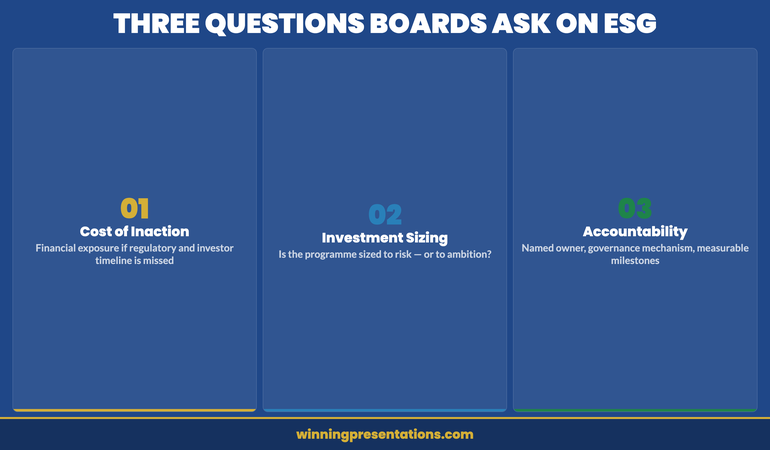
Before structuring a single slide, it is worth knowing what question your board is sitting with when you stand up to present. In twenty-five years of working with boards across financial services, technology, and regulated industries, I have observed that ESG presentations face three questions that are rarely stated explicitly but are always present.

Question one: What is the cost of inaction? Board members want to understand what happens to the organisation if it does nothing — or does less than the regulatory and investor environment now requires. This includes regulatory fines, loss of institutional investor support, reputational damage in key markets, and exclusion from certain procurement frameworks. This question should be answered on your second or third slide, not buried at the back.

Question two: Is the investment sized correctly? Boards are sceptical of ESG programmes that appear to have been sized to the ambition rather than to the risk. They want to see a clear relationship between the investment proposed, the regulatory requirement it addresses, and the timeline it operates within. Vague programme costs presented alongside aspirational targets trigger concern, not confidence.

Question three: Who is accountable, and how will we know if it is working? ESG programmes that lack clear governance, named accountable executives, and measurable near-term milestones read as activity plans rather than business strategies. Boards approve strategies, not activity plans. Accountability and measurement must be explicit in the presentation, not relegated to an appendix.

Three questions boards ask during ESG presentations: cost of inaction, investment sizing, and accountability structures

Building the Financial Materiality Argument

Financial materiality is the concept that determines whether an ESG issue is significant enough to affect the organisation’s financial performance, position, or prospects. It is also the concept that most ESG presentations skip — presenting sustainability as important in principle, rather than important to the numbers.

Your first task is to map each major ESG risk to a financial line. Carbon regulation exposure maps to operating cost and potential liability. Supply chain sustainability gaps map to procurement risk and contract continuity. Water and resource intensity maps to input cost and operational resilience in stressed conditions. Governance failures map to regulatory sanction, director liability, and the cost of remediation. Each of these connections should be quantified where possible — even a directional range is more useful to a board than a qualitative description.

The second task is to separate the investment request from the broader ESG ambition. Boards can find it difficult to approve a programme when they cannot distinguish the regulatory minimum from the aspirational target. Structure your investment request into clear tiers: what is required for regulatory compliance, what is required for investor and disclosure standards, and what is discretionary for competitive positioning. This tiering approach gives the board a decision framework rather than a binary yes or no to a single large number.

Building a robust capital expenditure business case follows the same logic: the financial case must stand independently of the strategic rationale. See this analysis of structuring a capital expenditure presentation for the principles that apply equally to ESG investment requests.

Build Your ESG Business Case on Slides Boards Can Approve

The Executive Slide System — £39, instant access — gives you slide templates for executive scenarios including investment approvals, regulatory updates, and strategic reviews. Each template comes with AI prompt cards to structure your financial materiality argument, and framework guides that organise complex data the way board-level decision-makers read it.

  • Slide templates for executive scenarios including board investment approvals
  • AI prompt cards to build financial materiality and risk arguments
  • Framework guides for regulatory and governance presentations
  • Scenario playbooks for strategic board-level decisions

Get the Executive Slide System →

Designed for executives who present investment cases, strategic proposals, and regulatory updates to boards and senior leadership teams.

Connecting Regulatory Risk to Business Continuity

Regulatory risk is the argument that boards respond to most reliably, because it is the argument they cannot defer. ESG regulation has moved from voluntary disclosure frameworks to mandatory reporting requirements across most major economies. In the UK, TCFD-aligned reporting is mandatory for listed companies and large private businesses. In the EU, the Corporate Sustainability Reporting Directive extends equivalent obligations across a broad range of organisations. US SEC climate disclosure rules are advancing. The regulatory window is closing.

In your ESG board presentation, the regulatory timeline should appear early — ideally as a visual timeline slide that shows which obligations are already active, which are incoming within twelve months, and which are on the horizon within three years. This is not an exercise in alarm; it is an exercise in planning. Boards respond to clarity about the regulatory environment because it transforms ESG from an aspiration into an operating requirement.

The connection to business continuity is made by demonstrating what non-compliance or inadequate disclosure costs the organisation specifically. This means identifying your major investors and understanding their stewardship codes and voting policies. It means identifying key clients and procurement frameworks that now require ESG disclosure as a condition of contract. It means naming the jurisdictions in which you operate and the specific regulatory obligations that apply. The more specific this analysis, the more persuasive it is.

Where organisations face genuine uncertainty — about regulatory interpretation or the pace of enforcement — it is better to acknowledge this explicitly and present a range of scenarios than to present a false precision that erodes board confidence when the position shifts. Handling this kind of pre-emptive objection management is covered in the approach outlined for managing objections in executive presentations.

The Executive Slide System includes framework guides specifically designed for regulatory and compliance presentations, where the challenge is translating legal complexity into a decision-ready executive summary. If you are building a regulatory exposure slide, those templates give you a starting structure that connects obligation to operational impact without requiring a legal degree to read.

The Slide Structure That Moves ESG from Discussion to Decision

A board-ready ESG presentation follows a structure that is closer to an investment memorandum than a sustainability report. The purpose of each slide is to advance a specific part of the argument, not to demonstrate the depth of your team’s work.

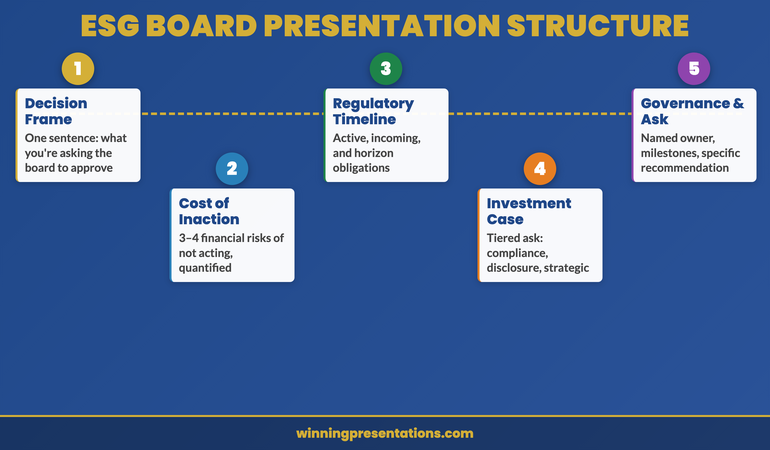
Slide 1 — The decision framing: State what you are asking the board to approve, in one sentence. Not a title slide, not a contents page — an immediate framing of the decision. “We are requesting approval of a three-year ESG programme at a total investment of £X, to address our TCFD reporting obligations, manage our material ESG risk exposure, and maintain institutional investor alignment.”

Slide 2 — The cost of inaction: A clean summary of the three to four material financial risks of not acting, with approximate financial ranges where quantifiable. This slide should be sober and specific — not alarming, not vague.

Slides 3–4 — The regulatory and investor context: A timeline of obligations and a summary of investor expectations relevant to your top fifteen shareholders. Facts, not advocacy.

Slides 5–6 — The investment case: Your tiered investment request broken down by regulatory requirement, disclosure standard compliance, and strategic positioning. Include a clear statement of what is not included in this request and why.

Slide 7 — Governance and accountability: Named executive owner, board oversight mechanism, and the four to six milestones by which progress will be measured in the next twelve months.

Slide 8 — The recommendation: A one-slide summary of what you are asking the board to approve, with the specific motion or resolution if relevant. End with the ask, clearly stated.

Eight-slide ESG board presentation structure from decision framing through to governance and recommendation

Handling Sceptical Questions on ESG ROI

Scepticism about ESG ROI is legitimate, and your response to it should treat it as such. The most common challenge takes the form of: “Where is the financial return on this investment?” The honest answer, in most cases, is that the primary return is risk mitigation rather than revenue generation — and that is a valid financial argument if you make it clearly.

Frame ESG investment the same way you would frame insurance or compliance cost: the return is not a revenue line, it is the avoidance of a larger cost. Regulatory fines, exclusion from institutional investor portfolios, reputational damage in key markets, and supply chain disruption are all quantifiable avoided costs. A board that approves a £500,000 ESG programme to avoid a potential £4 million regulatory exposure and loss of a major institutional investor position is making a straightforward financial decision.

Where genuine revenue opportunity exists — in ESG-linked procurement contracts, in access to green financing instruments, or in the opening of sustainability-conscious consumer segments — quantify it conservatively and present it as upside, not as the primary case. Boards that see ESG ROI presented as primarily a revenue opportunity become sceptical. Boards that see it presented as primarily risk management become engaged.

A second common challenge is the “not our problem” response — a version of competitive risk assessment where the board questions whether inaction puts the organisation at a disadvantage compared to peers who are also moving slowly. Your response here is competitor benchmarking data. If two of your three main competitors have already committed to TCFD-aligned reporting, you can present your current position as a laggard position rather than a conservative one. Board members who see their organisation behind peers on a regulatory and investor expectations curve are motivated to close the gap. For a related approach to building the strategic case for difficult investments, the workforce planning framework in our companion article on workforce planning presentations applies many of the same risk-frame principles.

People also ask: How long should an ESG board presentation be? A board ESG presentation should be between eight and twelve slides, presented in twenty to thirty minutes with time allocated for questions. Longer presentations signal that the presenter has not been able to prioritise the decision-relevant information. Brevity is not about limiting the content — it is about demonstrating that you understand what the board needs to decide and have structured your case accordingly.

People also ask: Should I include ESG metrics and targets in the board presentation? Include only the metrics that are directly relevant to the investment decision, the regulatory obligation, or the investor expectation you are addressing. Three to five key metrics with clear baselines and milestones are more useful to a board than a comprehensive ESG scorecard. Full metric reporting belongs in the ESG or sustainability report, not the board approval presentation.

People also ask: How do I get board buy-in for ESG when there is scepticism? Lead with the regulatory and investor obligation, not the ethical case. Sceptical board members rarely resist ESG investment when it is framed as a compliance and risk management requirement. They resist it when it is framed as a values commitment. Present the regulatory timeline, identify the specific investors who have flagged ESG as a stewardship priority, and make the cost of inaction specific. This converts a values debate into a business decision.

Structure Your ESG Slides the Way Boards Read Investment Cases

The Executive Slide System — £39 — includes scenario playbooks and framework guides structured for strategic investment approvals, regulatory compliance cases, and board-level risk presentations. Stop rebuilding your deck from scratch each time a board deadline approaches.

Get the Executive Slide System →

Designed for executives who present to boards, audit committees, and senior leadership teams.

Frequently Asked Questions

What is the difference between an ESG report and an ESG board presentation?

An ESG report is a disclosure document — comprehensive, structured for external audiences, and designed to demonstrate performance against a range of metrics and standards. An ESG board presentation is a decision-support document — focused, structured around a specific investment request or strategic choice, and designed to enable a board to make or ratify a specific decision. The two documents have different purposes, different audiences, and different formats. Conflating them — by presenting the board with a summary of the ESG report — is a common source of board frustration.

How do I make an ESG presentation credible to financially focused board members?

Credibility with financially focused board members comes from three things: quantification, source attribution, and specificity. Quantify the financial exposure wherever possible — even directional ranges (“£1–3 million in potential regulatory exposure over five years”) are more useful than qualitative descriptions. Attribute your data to named sources: specific regulations, named investor stewardship codes, named competitor positions. And be specific about your organisation’s situation — avoid sector generalisations when you have company-specific data. Generic ESG arguments are easy to defer. Specific, quantified, sourced arguments are much harder to dismiss.

Should the CEO or the sustainability director lead the ESG board presentation?

The most effective ESG board presentations involve the CEO as sponsor and the sustainability director as the expert presenter — with the CFO present to field financial questions. When the CEO opens the presentation by framing ESG as a strategic business priority rather than a specialist programme, it changes the conversation before the first data slide appears. When the sustainability director presents the detailed case, they do so with executive sponsorship already visible. And when the CFO can confirm the financial analysis independently, board confidence in the numbers increases significantly. If this structure is not available, the presenter should at minimum have explicit CEO endorsement recorded in the board papers.

Get weekly presentation strategy in your inbox

Every Thursday, The Winning Edge delivers one actionable insight for executives who present to boards, committees, and senior leadership teams.

Subscribe to The Winning Edge →

Free resource: Download the Executive Presentation Checklist — a one-page pre-presentation audit used by executives before high-stakes board and investment meetings.

About the Author

Mary Beth Hazeldine is Owner & Managing Director of Winning Presentations. With 25 years of corporate banking experience at JPMorgan Chase, PwC, Royal Bank of Scotland, and Commerzbank, she advises executives across financial services, healthcare, technology, and government on structuring presentations for high-stakes funding rounds, regulatory approvals, and board decisions.

10 Apr 2026
Executive reviewing polished presentation slides in a boardroom

Executive Slide Templates Download

If you are looking to download executive slide templates built for real high-stakes scenarios — budget proposals, board updates, project sign-off requests, and investment cases — the Executive Slide System is the most direct answer to that search. It is a downloadable set of scenario-specific slide templates designed for senior professionals who need a decision-ready structure, not a generic design theme. Available for instant download at £39. The templates are structured around the narrative logic that executive audiences actually need — conclusion first, evidence second, specific ask third — so you are not starting from a blank slide or adapting a corporate template that was never designed for a board context.

The Problem With Standard Slide Templates in Executive Contexts

Most slide templates — including the built-in options in PowerPoint and the free downloads available across the web — are designed for one thing: visual variety. They provide layouts, colour schemes, and placeholder boxes. They say nothing about what content goes on each slide, in what order, or why.

For a general business presentation, that is adequate. You can work out the structure from first principles, fill in the slides, and deliver something coherent. But for executive approval presentations — where a board committee, an investment panel, or a senior leadership team is deciding whether to allocate significant budget, approve a strategic initiative, or sign off a project — a generic template actively works against you.

Here is why. Executive decision-making audiences process information differently from general presentation audiences. They are time-constrained, they are evaluating multiple competing proposals, and they are looking for the decision signal — what are we being asked to approve, why does it make sense, what are the risks, and what happens if we say yes — within the first few minutes. A template that gives you a title slide, an agenda slide, and a series of content placeholders does not help you answer those questions in the right order.

The result is a presentation that covers all the right material but loses the committee before the recommendation slide. Executives who have experienced this — a well-prepared deck that somehow does not generate the approval they expected — are often told they need to “work on their communication.” What they actually need is a different starting structure. The architecture of a board agenda presentation is specific, and a template that reflects that architecture changes the starting point entirely.

The Executive Slide System: Templates Built for Decision-Making Contexts

The Executive Slide System is a downloadable resource designed specifically for the executive presentation scenarios that matter most. It is not a general slide theme. It is a structured toolkit built around the narrative logic that works for senior decision-making audiences — and it includes the specific slide types, sequencing guidance, and preparation tools that a generic template library does not provide.

The system covers the executive presentation scenarios that senior professionals return to repeatedly: budget proposals (including resubmissions), board updates and governance reporting, project sign-off requests, strategic initiative presentations, and investment cases. Each scenario has its own template set, because the structure that works for a budget proposal is not the same as the structure that works for a board update — and using the wrong starting point for the wrong context is a common and correctable error.

The templates are built on a decision-first principle: the committee sees what they are being asked to decide within the opening slides, not at the end of a long build-up. This reflects how senior audiences actually process approval requests — they want the conclusion before the evidence, the ask before the justification, and the risk before the recommendation. Templates that follow this logic create a materially different experience for the reader than templates that follow a standard chronological or effort-based sequence.

Each template also includes AI prompt cards — structured prompts designed for tools like Microsoft Copilot and ChatGPT — that help you populate the slides efficiently. Rather than generating generic output from an open-ended prompt, the cards give you scenario-specific instructions that align with the template’s narrative structure. The specific structure required for a budget resubmission is different from an initial proposal, and the prompt cards reflect that difference.

What You Get — Executive Slide System Contents

  • Scenario-specific slide templates — structured PowerPoint files for budget proposals, board updates, project sign-offs, strategic initiatives, and investment cases. Each template follows decision-first narrative logic, not a generic slide sequence.
  • AI prompt cards — scenario-matched prompts for Microsoft Copilot, ChatGPT, and similar tools. Each card is tied to a specific template section and designed to generate draft content that fits the slide’s narrative purpose.
  • Framework guides — written explanations of the structural logic behind each template, so you understand why each slide appears in a particular position and what the committee expects to find there.
  • Narrative structure guides — the sequencing principles that underpin decision-first executive presentations, applicable across scenario types and adaptable to your specific organisational context.
  • Instant download — available immediately after purchase, no subscription, no login required after the initial download.

Price: £39 — instant access, no subscription.

Stop Rebuilding Executive Slides From Scratch Every Time

The Executive Slide System gives you a decision-ready starting point for every high-stakes scenario — budget proposals, board updates, project sign-offs, and investment cases. Templates, AI prompt cards, and framework guides in one download. £39, instant access.

Get the Executive Slide System → £39

Instant download. Works in PowerPoint and Google Slides. No subscription.

Is This Right for You?

The Executive Slide System is built for senior professionals who prepare their own presentations — or who oversee the preparation of presentations that go to board, committee, or executive leadership audiences.

It is well-suited to you if: you regularly prepare budget proposals, board updates, project sign-off requests, or investment cases and find yourself rebuilding the structure from scratch each time; you are a director, head of department, or senior manager whose presentations are scrutinised by decision-makers with limited time and high expectations; or you are a chief of staff, executive assistant, or business analyst who builds executive-facing decks on behalf of senior leaders.

It is less suited to you if: you are primarily preparing internal team updates, training materials, or client-facing sales presentations without a specific approval decision at stake. The templates are optimised for decision-making contexts where narrative structure and clear framing of the ask are the primary success factors — not for general communication or visual storytelling. Understanding what makes a high-stakes decision slide work is the underlying logic the system is built on — if that is the context you are preparing for, this is designed for you.

If you are unsure whether the system fits your specific scenario, the FAQ section below covers the most common questions about use cases, format compatibility, and what is included.

Frequently Asked Questions

Are these PowerPoint or Google Slides templates?

The Executive Slide System templates are delivered as PowerPoint files (.pptx), which work in Microsoft PowerPoint on both Windows and Mac. They can also be imported into Google Slides if you prefer working in that environment, though formatting is optimised for PowerPoint. All templates are fully editable — you can adjust colours, fonts, and content to match your organisation’s branding.

What executive scenarios do the templates cover?

The system includes scenario-specific templates for the presentation types senior professionals use most: budget proposals, board updates, project sign-off requests, strategic initiative presentations, and investment cases. Each template is structured around the narrative logic that decision-making audiences expect — conclusion first, evidence second, decision required third — rather than a generic slide sequence.

How is this different from free PowerPoint templates?

Free PowerPoint templates provide empty slide layouts with no guidance on what content goes where or why. The Executive Slide System templates are built around the specific narrative structure that works for board-level and committee audiences — including slide sequencing, decision-summary structure, and the placement of risk and recommendation content. They also include AI prompt cards and framework guides that explain the structural logic and help you populate each slide efficiently. A free template gives you a canvas. This gives you a starting structure designed for the specific context you are presenting in.

Do I need design skills to use these templates?

No. The templates are fully formatted and ready to use — you fill in the content, not the design. Each template includes guidance on what goes on each slide and why. The AI prompt cards take this further, giving you specific prompts to use with tools like Microsoft Copilot or ChatGPT to generate draft content for each section. Design experience is not required; the structure and visual logic are already built in.

Can I use these templates for presentations to my own clients?

Yes. Once purchased, you can use the templates for your own presentations — internal and external — without restriction. They are designed for individual professional use. The templates are not for resale or redistribution as standalone products, but using them to build client-facing executive presentations is within the intended use.

The Winning Edge

Weekly insights on executive presentations, slide strategy, and boardroom communication — direct to your inbox.

Subscribe Free

About the author

Mary Beth Hazeldine, Owner & Managing Director, Winning Presentations. With 25 years of corporate banking experience at JPMorgan Chase, PwC, Royal Bank of Scotland, and Commerzbank, she now trains executives across financial services, healthcare, technology, and government on structuring presentations for high-stakes approval, investment, and board-level contexts.

10 Apr 2026
Female CFO responding with composed authority to a hostile question from a board member during a high-stakes presentation, investment committee setting, navy and gold tones, editorial photography style

Personal Attack Disguised as a Question: How to Identify and Defuse It

Quick Answer: A personal attack disguised as a question is a challenge framed as a request for information — but its actual purpose is to undermine your credibility, expose a weakness, or shift the power dynamic in the room. Recognising one when it arrives is the first skill. The second is responding in a way that addresses the surface question without rewarding the attack underneath it. Treating it as a genuine information request is the most common mistake; so is becoming visibly defensive.

Priya was presenting the Q3 financial results to the investment committee when a non-executive director she had never met before raised his hand. “Forgive me,” he said, with a smile that suggested he required no forgiveness, “but I’m curious — has someone with your background actually managed a portfolio this size before?” The room went quiet. The question was framed as curiosity. It was not curiosity.

Priya had two seconds to decide how to respond. She had seen this before — the surface question was about experience, but the actual message was a challenge to her authority in the room, delivered publicly, at the moment of maximum exposure. She took a breath and paused before answering. “That’s a fair question to raise. I’ve managed portfolios at a comparable scale in two previous roles, and I’m happy to share the specifics afterwards if that’s useful. What I’d like to focus on here is the Q3 performance and the Q4 outlook — which is what the committee has the data to assess today.”

She moved on. She didn’t apologise. She didn’t over-explain. She didn’t take the bait of defending herself at length in response to an ambush question. The NED asked one more question — a genuine one this time — and the dynamic shifted back to her. The recognition of the attack, and the calibrated response, were the entire difference between a presentation that regained its footing and one that didn’t.

Preparing for a high-stakes Q&A session?

The Executive Q&A Handling System gives you a framework for predicting difficult questions, structuring responses, and handling hostile or loaded challenges in real time — designed for board meetings, investment committees, and senior leadership forums.

Explore the System →

How to Recognise a Personal Attack Disguised as a Question

The defining characteristic of a personal attack disguised as a question is the gap between its grammatical form and its actual function. Grammatically, it asks for information. Functionally, it delivers a challenge to your credibility, experience, authority, or judgement. Recognising this gap in real time — before you begin formulating a response — is the foundational skill.

Several signals help identify an attack question quickly. The first is the framing device: attack questions often open with disarming language — “forgive me,” “I’m just curious,” “perhaps I’ve missed something” — that creates a veneer of reasonableness while signalling something less reasonable underneath. The disarming opener is frequently the giveaway. Genuine questions from engaged participants rarely begin with pre-emptive apologies for asking.

The second signal is the specificity mismatch. A genuine clarifying question is specific to something in the presentation — a data point, an assumption, a recommendation. An attack question is often specific to you rather than to the content: your experience, your credentials, your previous decisions, your organisation’s track record on something unrelated to the current matter. The target is you, not the presentation.

The third signal is the timing. Attack questions frequently arrive at moments of maximum exposure — immediately after a difficult number, during a complex section where you’re already managing complexity, or in the first few minutes before the room has had time to form a view. The timing is strategic, not coincidental.

Understanding how these questions differ structurally from loaded questions is useful — a loaded question embeds a false assumption; a personal attack question uses the question form as a vehicle for a challenge. The response frameworks differ accordingly.

The Four Most Common Forms of Attack Question

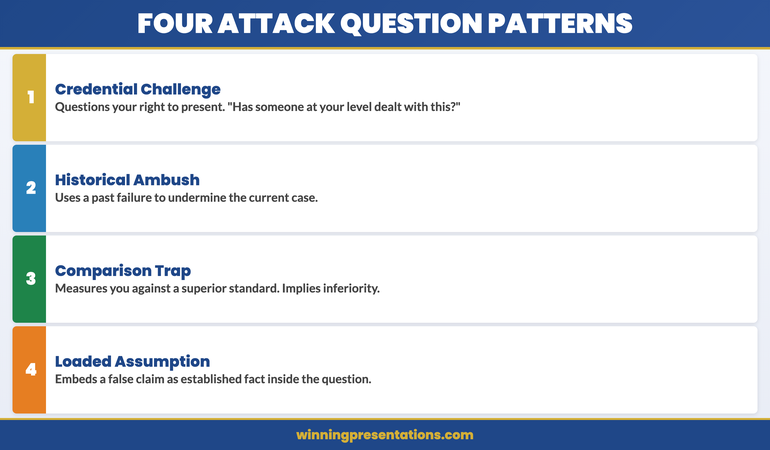
Personal attacks disguised as questions tend to cluster into recognisable patterns. Identifying the pattern before you respond helps you choose the right response structure rather than improvising under pressure.

Recognising Attack Questions infographic showing four patterns: The Credential Challenge (questioning your authority), The Historical Ambush (citing past failures), The Comparison Trap (measuring against a superior standard), and The Loaded Assumption (embedding a criticism in the question)

The Credential Challenge. This questions your authority or experience directly: “Has someone at your level actually dealt with this before?” or “I’m wondering whether the team has the expertise to handle something of this complexity.” The grammatical form is a question. The actual content is a challenge to your right to be presenting at all. Responding to the literal question (by listing your credentials at length) is the most common mistake. The correct response acknowledges the question briefly and redirects to the substantive matter.

The Historical Ambush. This introduces a past failure — yours or your organisation’s — as a question: “Given what happened with the X project last year, I’m curious how you’d address the same risk here?” The question has legitimate surface content, but it is deployed in a way designed to establish a damaging narrative before the room has heard your current case. The correct response separates the historical reference from the current matter clearly, without becoming defensive about the history.

The Comparison Trap. This measures you against a superior standard in the form of a question: “Organisation Y manages to do this at half the cost — can you explain the gap?” The implied message is that your approach is inferior. The correct response examines whether the comparison is valid before engaging with it, rather than accepting the premise of the question and attempting to justify a gap that may not exist as framed.

The Loaded Assumption. This embeds a criticism in the question structure: “Given that this approach has already failed once, what makes you think it will work this time?” The word “failed” is doing significant work here — it is presented as established fact when it may be contested or misrepresented. The correct response surfaces and challenges the embedded assumption before addressing the question itself. Related technique: handling hostile questions in board meetings covers the broader category of adversarial Q&A in governance contexts.

Build a System for Handling Executive Q&A

The Executive Q&A Handling System gives you a structured approach to predicting the difficult questions that arise in board meetings, investment committees, and senior leadership forums — including hostile, loaded, and attack-style questions — and responding in a way that protects your credibility and controls the room.

  • Framework for predicting and categorising difficult questions in advance
  • Response structures for hostile, loaded, and personal attack questions
  • Bridge and redirect techniques for maintaining control of Q&A
  • Preparation system for high-stakes Q&A sessions

Get the Executive Q&A Handling System — £39

Designed for executives presenting to boards, investment committees, and senior leadership forums where challenging Q&A is expected.

What Drives Them: Motivation, Not Malice

Understanding the motivation behind a personal attack question changes how you respond to it — and, more usefully, how you feel about it in the moment. Most attack questions are not expressions of personal malice. They are expressions of something else: anxiety about a decision, a political position being asserted, a desire to demonstrate analytical rigour to others in the room, or a test of whether you can hold your ground under pressure.

The board member who challenges your credentials in front of the investment committee is often doing so because they are managing their own accountability — they want the record to show that they asked tough questions before approving a decision. The NED who deploys a historical ambush may be genuinely concerned about a pattern they believe they’ve identified, but expressing it through a challenge rather than a direct statement because that is the conversational norm in their context.

This matters practically because it changes your framing. A personal attack question is not evidence that the room is hostile to you. It is evidence that one person in the room is either managing their own agenda or testing your composure — and often both. Responding as though the whole room shares the sentiment of the questioner is the error that compounds the damage. In most cases, the rest of the room is watching to see how you handle it. How you handle it is the presentation.

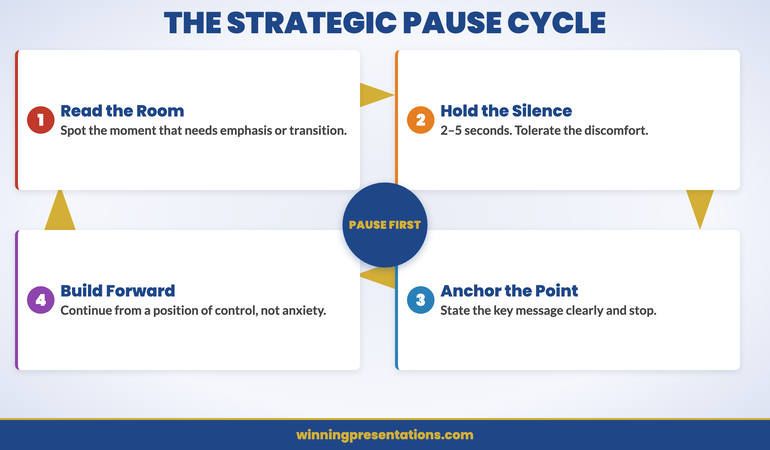
The strategic pause technique is your most reliable first tool in this moment — a pause of three to five seconds before responding signals composure and creates the space for a considered response rather than a reactive one.

For a complete system for predicting and handling the full range of difficult Q&A scenarios — including attack questions, hostile challenges, and loaded assumptions — the Executive Q&A Handling System provides the preparation framework and response structures in one place.

The Response Framework: Defuse Without Surrendering Ground

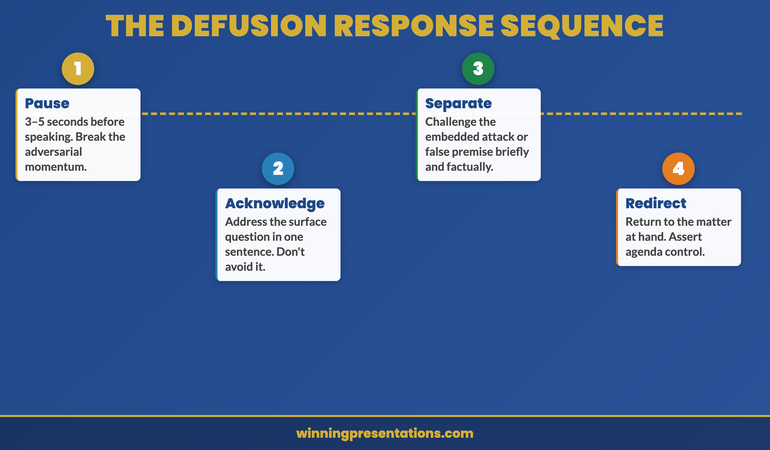
The response to a personal attack disguised as a question needs to do several things simultaneously: acknowledge the surface question without accepting the attack embedded in it, respond with enough substance to be credible, and redirect to the matter at hand without appearing to flee from the challenge. This is a specific sequence, not a general principle of being calm or confident.

The Defusion Response Sequence roadmap infographic showing four steps: Pause (3–5 seconds, break adversarial momentum), Acknowledge (address the surface question in one sentence), Separate (challenge the embedded attack briefly and factually), Redirect (return to the substantive matter and assert agenda control)

Step 1 — Pause. Take three to five seconds before speaking. This breaks the adversarial momentum the question is designed to create and signals that you are choosing your response rather than reacting to provocation. It also gives the room a moment to register that you are not rattled.

Step 2 — Acknowledge the surface question briefly. Address what was literally asked in one sentence. For a credential challenge: “That’s a fair question to raise.” For a historical ambush: “The X project is worth addressing.” This prevents the questioner from repeating the challenge with the accusation that you avoided it.

Step 3 — Separate yourself from the embedded attack. This is the key move. Provide a short, factual response to the substance of the challenge — not a defensive monologue, but enough to remove the premise of the attack without inviting further discussion on that ground. For a credential challenge: one sentence on relevant experience, then stop. For a loaded assumption: name the assumption explicitly — “the premise of your question is that X has already been established; my reading of the situation is different” — then state your reading once.

Step 4 — Redirect. Return immediately to the matter the presentation is actually about. “What I’d like to bring the committee back to is…” This is not an avoidance move — it is an assertion of agenda control. The presenter who redirects cleanly after handling an attack question is demonstrating exactly the composure and authority that the question was designed to test.

See also the bridging technique for difficult questions — the bridge move in Step 4 is a specific skill that benefits from preparation in advance of the presentation.

Prepare for High-Stakes Q&A With a Structured System

The Executive Q&A Handling System gives you the preparation framework and response structures to handle the full range of difficult questions — from genuine challenges to hostile attacks — in board meetings and senior leadership forums.

Explore the Q&A Handling System

Designed for executives who present to boards, investors, and senior leadership forums where Q&A can be adversarial.

What Not to Do: The Three Most Common Mistakes

Understanding the correct response to a personal attack question is only half the preparation. Equally important is knowing the three response patterns that consistently make the situation worse — because under pressure, all three feel instinctively appropriate in the moment.

Mistake 1: Treating it as a genuine information request. The most common response to an attack question is to answer it as though it were a sincere request for information. This typically produces a lengthy, detailed response to the surface question — a full recitation of credentials, a complete account of the historical project, an exhaustive explanation of the methodology. The length of the response signals defensiveness even when the content is accurate. It also rewards the questioner by allowing them to occupy significant airtime with a move that was designed to destabilise rather than inform. A short, factual response followed by a redirect is the correct alternative.

Mistake 2: Becoming visibly defensive. A sharp change in posture, a faster speaking pace, or an audible increase in the emotional register of your voice — all of these signal to the room that the attack found its target. The questioner’s objective in most cases is to demonstrate that you can be destabilised under pressure. Visible defensiveness confirms the hypothesis they were testing. The correct response is composed, measured, and neither warm nor cold — factual in tone without being wooden.

Mistake 3: Inviting the questioner to elaborate. “That’s an interesting point — could you say more about what you mean?” This is a perfectly appropriate response to a genuine question. It is a damaging one in response to an attack question, because it hands the floor back to the person who has just challenged your authority and invites them to expand on the challenge at greater length. If clarification is genuinely needed, ask a very specific question: “When you say ‘someone at my level,’ what specific aspect of this presentation are you referring to?” This forces precision and often reveals the lack of a substantive underlying concern.

Frequently Asked Questions

Is it appropriate to address a personal attack question directly in front of the room?

Yes — briefly, and without displaying emotion. Attempting to avoid the question or deflect immediately signals discomfort. A short, factual acknowledgement followed by a redirect is the correct approach. The goal is to demonstrate that you noticed the nature of the question and chose how to respond to it — not that you were rattled by it or were unaware of what it was. The room notices the distinction and forms judgements accordingly.

What if the personal attack question contains a legitimate point?

Acknowledge the legitimate point directly and briefly. “There is a real question in there about X, and I’m happy to address it.” Then address X, and stop. The error is either to use the legitimate point as cover for ignoring the attack element entirely, or to become so focused on the attack element that you fail to address a genuine underlying concern. Separating the two — “the substantive question here is X; the framing of the question is a different matter” — is the cleanest approach.

How do you handle a personal attack question when it comes from the most senior person in the room?

The response framework is the same, but the tone calibrates upward. You are not adjusting the substance of your response based on seniority — you are still acknowledging briefly, providing a factual short answer, and redirecting to the substantive matter. What changes is the formality of the language and the explicit deference in tone. “That’s a fair challenge to raise, and I want to address it directly” works in any hierarchy. The key principle is that seniority of the questioner does not change your right to maintain the agenda of the presentation and the substance of your case.

The Winning Edge Newsletter

Weekly strategies for executive Q&A, difficult question handling, and high-stakes presentation preparation. Practical frameworks you can apply before your next board meeting.

Subscribe Free →

About Mary Beth Hazeldine

With 25 years of corporate banking experience at JPMorgan Chase, PwC, Royal Bank of Scotland, and Commerzbank, Mary Beth Hazeldine is Owner and Managing Director of Winning Presentations. She advises executives across financial services, healthcare, technology, and government on handling high-stakes Q&A and structuring responses to difficult and adversarial questions in board and investment committee contexts. View services | Book a discovery call

10 Apr 2026
Executive presenter holding a deliberate pause mid-presentation, commanding the room with composed silence, boardroom setting, navy and gold tones, editorial photography style

Presentation Pause Technique: Why Most Executives Rush Past Their Most Powerful Moment

Quick Answer: The presentation pause technique is the deliberate use of silence at key moments in a presentation — after a major point, before a slide transition, or when a question is asked — to control pacing, emphasise meaning, and project authority. Most executives rush through these moments. Learning to hold a pause is one of the fastest delivery improvements available to senior presenters, and it costs nothing except the willingness to tolerate temporary silence.

Ngozi had been a partner at a management consultancy for six years when a colleague watching her present for the first time pulled her aside afterwards. “You know what your problem is?” he said. “You don’t let anything land.” She had delivered a forty-minute session to a senior client team, hit every point on her notes, and received polite but muted engagement. The content was strong. The delivery was relentless.

Her colleague pointed out what she hadn’t noticed: she was filling every gap between her sentences. When she moved from one point to the next, she was speaking before the previous thought had settled. When she clicked to a new slide, she was already halfway through the first sentence before anyone in the room had read the title. When she made her key recommendation, she immediately started qualifying it rather than allowing it to sit.

The fix was simple but uncomfortable. He asked her to pause for a full three seconds after every major point before continuing. “It’s going to feel like thirty seconds,” he said. “It’s three. Do it anyway.” In her next presentation two weeks later, Ngozi did it. The room was noticeably different. People leaned forward. The same content landed with an authority she hadn’t experienced before. The only thing that had changed was the silence.

Working on your presentation delivery?

Conquer Speaking Fear is a structured 30-day programme addressing the nervous system patterns that make confident delivery difficult — including the anxiety that drives rushing, over-talking, and avoidance of the pause.

Explore the Programme →

Why Executives Rush — and What It Costs Them

The most common delivery failure among experienced executives is not losing their thread, forgetting their content, or stumbling over words. It is pace. Specifically: speaking faster than the room can absorb, and filling every available silence before it has any chance to work.

This pattern almost always has the same origin: discomfort with silence. When a presenter is anxious — even mildly, in the way that almost everyone is before a high-stakes presentation — the nervous system interprets silence as danger. The urge is to fill it, because filling it creates the sensation of forward momentum. The problem is that this sensation is a private experience. What the audience experiences is a stream of content delivered at a pace that prevents any individual point from registering before the next one arrives.

The cost of this pattern is considerable and largely invisible. Presenters who rush consistently report feedback like “it was a lot to take in” or “you covered a lot of ground” — diplomatic ways of saying the content didn’t land. They also tend to receive lower ratings on questions like “was the presenter authoritative?” and “did the presentation feel controlled?” Authority and control are not content qualities. They are delivery qualities, and they depend substantially on pace — specifically on the willingness to slow down and hold silence at the right moments.

The relationship between anxiety and rushing is worth understanding clearly, because for many presenters the solution isn’t simply to slow down — it’s to address the underlying discomfort that creates the rush in the first place. See the morning presentation protocol for a practical pre-presentation routine that reduces baseline anxiety before you step in front of the room.

Four Types of Strategic Pause and When to Use Each

Not all pauses serve the same function. Experienced presenters use different types of silence at different moments, each with a distinct purpose. Understanding the four main types gives you a practical toolkit rather than a single technique applied indiscriminately.

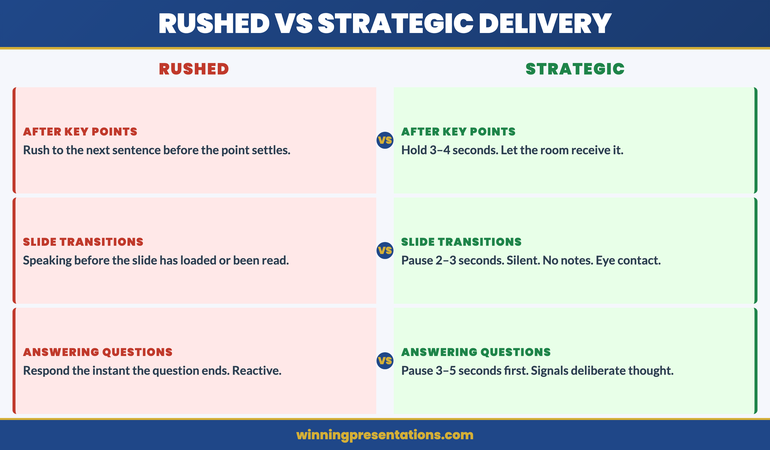
Presentation Pause Technique contrast panels infographic comparing Rushed Delivery (filling every silence, speaking over slide transitions, qualifying immediately) against Strategic Delivery (pause after key points, transition silence, hold the recommendation)

The Emphasis Pause. This is the pause that comes immediately after a significant statement — a key recommendation, a critical data point, a decision you’re asking the room to make. Its function is to separate the point from everything that follows it. Without this pause, the most important sentence in your presentation dissolves into the subsequent explanation. With it, the sentence stands alone long enough for the room to receive it. Duration: two to four seconds.

The Transition Pause. This is the pause between sections or when moving from one slide to the next. Its function is to signal to the audience that the context is changing. When presenters eliminate transition pauses, the audience has no sensory signal that one section has ended and another has begun — the structure of the presentation becomes invisible. The transition pause gives the room a moment to process the previous section before absorbing the next one. Duration: two to three seconds. During this pause, make no sound and do not look at your notes.

The Question Pause. This is the pause that follows a question from the audience, before you respond. Its function is twofold: it signals that you are thinking before speaking (a marker of deliberate rather than reactive engagement), and it gives you time to formulate a more considered answer. Most presenters who struggle with audience questions are responding before they’ve finished listening. The question pause creates a physical intervention in that pattern. Duration: three to five seconds. It will feel like ten. Do it anyway.

The Holding Pause. This is the pause you use when you need the room to settle — when people are talking amongst themselves, when a comment has created a reaction you want to allow before continuing, or when you’ve asked a rhetorical question and genuinely want the room to consider it. Its function is control. The presenter who can stand in silence without anxiety is the presenter who commands the room. Duration: as long as it takes. This is the hardest pause to execute and the most powerful when done well.

Address the Anxiety That Drives Rushing

Conquer Speaking Fear is a structured 30-day programme that works with the nervous system patterns underlying difficult presentation delivery. It covers the clinical hypnotherapy and nervous system regulation techniques that address the discomfort driving rushed pacing, over-talking, and avoidance of silence.

  • 30-day structured programme with daily practice sessions
  • Nervous system regulation techniques for pre-presentation anxiety
  • Clinical hypnotherapy approaches for deep pattern change
  • Specific protocols for delivery-related anxiety triggers

Get Conquer Speaking Fear — £39

Designed for professionals whose presentation anxiety is affecting their delivery, career progression, or confidence in high-stakes contexts.

The Physiology of the Pause: Why Silence Feels Longer Than It Is

One of the most consistent obstacles to developing the presentation pause technique is the experience of time distortion. When a presenter pauses for three seconds, it feels to them like eight to ten seconds. This is not an exaggeration or a subjective impression — it is a well-documented effect of heightened nervous system arousal. When adrenaline is present, time perception accelerates for the individual experiencing it. The three-second pause that feels interminable to the presenter is registering as a natural, comfortable beat to the audience.

This knowledge is practically useful because it allows you to recalibrate your internal pause timer. If you are holding a two-second pause and it feels like five seconds, the correct response is to hold it for two more seconds — not to end it because it has already felt “too long.” The felt sense of time during a presentation is reliably inaccurate on the short end. Trust the clock, not your nervous system’s report of the clock.

There is also a social effect at work. Audiences perceive silence from a presenter as a signal of comfort and control, not as a signal of confusion or forgetting. The presenter who pauses after a significant point reads as deliberate and confident. The presenter who rushes on immediately after reads as nervous, even if the content is strong. Silence, in a presentation context, functions as a display of authority rather than a gap in performance. This reframe is useful to hold when the urge to fill silence becomes strong.

The relationship between pace and the nervous system is explored in the pre-presentation ritual framework — the same principles that high-performance athletes use to manage activation levels before competition apply directly to the physiological experience of presenting under pressure. The voice command in presentations article covers the related skill of controlling pace through breath and vocal register.

How to Practise the Pause Until It Feels Natural

The presentation pause technique is a physical skill as much as a mental one. It requires practice to make it automatic, and that practice needs to be deliberate rather than aspirational. Deciding to pause more in your next presentation without rehearsing the pause beforehand is unlikely to produce a different result from what you’ve always done. The nervous system reverts to its default pattern under pressure, and the default pattern, for most presenters, is to fill silence.

The most effective practice method is to record yourself presenting. Not with an audience — alone, with a laptop or phone, running through five to ten minutes of material you know well. After the recording, watch it back specifically looking for the moments where you rushed a transition, spoke over a key point, or began qualifying a recommendation before it had settled. These are your practice targets.

Then run the same section again, this time building in deliberate pauses at each of those moments. A practical technique is to set physical markers — a hand on the table, a breath — that trigger the pause before you continue. The physical anchor interrupts the automated rush pattern more reliably than a mental instruction alone.

Running this practice cycle four to five times before a significant presentation is typically enough to shift the habit noticeably. The first time you hold a three-second pause in front of a live audience and feel the room settle, the discomfort of the technique disappears almost entirely. It is the anticipation of silence, not the silence itself, that creates the avoidance.

If the anxiety driving rushed delivery feels like more than a habit — if it’s affecting your preparation, your confidence, or your willingness to take on visible presenting opportunities — Conquer Speaking Fear addresses the underlying nervous system patterns directly.

Using the Pause Under Pressure: Questions and Challenges

The presentation pause technique is most difficult to execute — and most valuable — during the question and answer phase of a presentation. This is the moment when anxiety peaks for most presenters, and the moment when the urge to fill silence is strongest. It is also the moment when a well-timed pause communicates the most about your credibility.

Mastering the Strategic Pause cycle infographic showing four stages: Read the Room (identify the moment), Hold (three to five seconds of silence), Anchor (state the point clearly), Build (continue from a position of control)

The question pause serves a specific function in the Q&A context: it signals that you are choosing your response rather than producing a reflexive one. When a board member or senior executive asks a challenging question and the presenter pauses before responding, the room reads that pause as considered judgment. When the presenter responds immediately, the room often reads the speed as either defensiveness or insufficient depth of thinking. Neither is the impression you want to create.

A common variation is the clarifying pause — used when a question is ambiguous or when you suspect the questioner means something different from what they’ve asked. Rather than answering a question that may not have been the actual question, pause, and then ask for a brief clarification: “Before I respond — can you tell me what’s driving the question?” This is a form of executive confidence that most presenters never develop because it requires the willingness to slow the interaction down rather than rush to demonstrate competence.

The pause also functions as a defensive tool during hostile or loaded questions. A presenter who pauses before responding to a challenge creates the impression of composure regardless of their internal state. The pause breaks the adversarial rhythm that hostile questions are often designed to create. It returns control of the pace to the presenter. For a more structured approach to handling the specific types of difficult questions that arise in executive presentations, the personal attack disguised as a question framework covers the response structure in detail.

A Structured Programme for Presentation Anxiety

Conquer Speaking Fear uses clinical hypnotherapy and nervous system regulation techniques to address the anxiety patterns that make delivery skills — including the pause — difficult to execute under pressure.

Explore Conquer Speaking Fear

Designed for professionals experiencing presentation anxiety that affects delivery, confidence, or career opportunities.

Frequently Asked Questions

How long should a presentation pause be?

For most strategic pauses — after a key point, at a slide transition — two to four seconds is the right duration. For the question pause before responding to an audience question, three to five seconds. For the holding pause used to settle a room or allow a rhetorical question to land, as long as necessary. The reliable guide is that whatever duration feels comfortable to you in practice is probably too short. Add two seconds to your instinct and see how the room responds.

Will the audience think I’ve forgotten what I’m saying if I pause?

No — provided your body language is composed during the pause. A presenter who pauses while looking at the ceiling or shuffling notes reads as having lost their thread. A presenter who pauses while looking calmly at the audience, or glancing briefly down before looking back up, reads as deliberate. The difference is in what you do during the pause, not the pause itself. Practise holding a pause while maintaining eye contact and relaxed posture — it changes the audience’s read entirely.

Why do I rush even when I know I shouldn’t?

Rushing under pressure is primarily a nervous system response rather than a conscious choice. When adrenaline is present, the urge to fill silence is automatic — it is the same fight-or-flight activation that drives other anxiety responses. Knowing you shouldn’t rush doesn’t override the physiological drive to do so. What does override it is practice that specifically targets the pause — making it a rehearsed behaviour rather than a deliberate in-the-moment decision. For persistent rushing that doesn’t respond to practice alone, the underlying anxiety pattern may benefit from a more structured approach.

The Winning Edge Newsletter

Weekly insights on executive presentation delivery, anxiety management, and the psychological skills behind confident presenting. No generic advice — just what actually works.

Subscribe Free →

About Mary Beth Hazeldine

With 25 years of corporate banking experience at JPMorgan Chase, PwC, Royal Bank of Scotland, and Commerzbank, Mary Beth Hazeldine is Owner and Managing Director of Winning Presentations. She advises executives across financial services, healthcare, technology, and government on the delivery skills and anxiety management strategies that support high-stakes presenting. View services | Book a discovery call

10 Apr 2026
Finance director presenting mid-year business review results on a large screen to a board of directors, confident stance, data charts visible, navy and gold tones, editorial photography style

Mid-Year Business Review Presentation: How to Structure the Second Half

Quick Answer: A mid-year business review presentation must do more than report what happened in the first half. It needs to explain why performance landed where it did, what that means for the second half, and what decisions the board or leadership team needs to make now. The structure that works puts honest assessment first, resets the forward view second, and closes with a clear ask — not a summary of slides already shown.

Henrik had been Finance Director at a professional services group for four years when he presented his first mid-year business review to the full board. He had prepared what he considered a thorough deck — twenty-two slides covering every line of H1 performance against budget, with detailed commentary on each variance. He had spent three evenings getting the numbers right.

Forty minutes into the meeting, the Chair stopped him at slide sixteen. “Henrik, I appreciate the detail. But I need to ask: are we on track, are we off track, and if we’re off track, what are you asking us to do about it?” Henrik realised he had prepared a report when the board needed a presentation. The data was all there. The judgement — and the ask — was entirely absent.

He asked for a brief recess, came back, and spent ten minutes giving the board the two-slide version of what he had just presented: H1 summary in plain language, three decisions required for H2. The Chair thanked him. The remaining board members engaged immediately. The revised deck he prepared for the next mid-year review was eight slides total. It covered everything that mattered.

Preparing for a board or leadership review?

The Executive Slide System includes slide templates designed for financial review, performance reporting, and strategic update contexts — structured for senior leadership audiences.

Explore the System →

What Most Mid-Year Reviews Get Wrong

The most common structural failure in a mid-year business review presentation is the same one Henrik made: conflating a management report with a board presentation. These are fundamentally different artefacts. A management report is a record of what happened. A board presentation is a judgement on what it means and a request for a decision. Presenting the former when the audience expects the latter creates the most common type of mid-year meeting failure — a technically thorough session that leaves leadership without the clarity they came for.

The second most common mistake is the false balance between backward-looking and forward-looking content. Mid-year reviews typically spend sixty to seventy per cent of their time on H1 performance and the remainder on H2 direction. This distribution is usually the wrong way around. Board members and senior leadership have already seen monthly management information during the first half. They are not coming to the mid-year review to hear the same numbers aggregated over a longer period. They are coming to understand the forward implications of what happened and to make decisions about the second half.

A third failure pattern is variance explanation without variance significance. Presenters often explain why revenue was down 12 per cent in March — the sales cycle lengthened, a key deal slipped — without addressing what that means for the full year, what the response is, and whether the structural assumption behind the original target is still valid. The explanation answers the question “what happened?” The board’s question is “what does it mean?” These require different slide structures.

The Structure That Works: Four Sections

The mid-year business review presentation that serves a board or senior leadership team effectively typically contains four sections, not twenty-two slides. The discipline of the structure comes from being ruthless about what each section must do — and removing anything that doesn’t serve that function.

Mid-Year Business Review presentation structure infographic showing four dimensions: H1 Performance Summary (honest assessment of results vs plan), Variance Significance (what the gaps mean for full year), H2 Direction Reset (revised targets and priorities), and Decisions Required (specific asks from leadership)

Section 1 — H1 Performance Summary. Three to five slides covering the most important performance dimensions: revenue versus plan, margin versus plan, key operating metrics, and any strategic milestones that were or were not achieved. The principle here is selectivity, not completeness. If you present twelve revenue lines when the board needs to understand two, you are making comprehension harder, not easier. Choose the metrics that tell the most important story.

Section 2 — What the H1 Results Mean. This section is the one most consistently missing from mid-year review decks. It takes the performance data from Section 1 and applies judgement: are the gaps structural or transient? Is the full-year target still achievable? Have any of the original strategic assumptions been invalidated by H1 performance? One to two slides. Direct language. This is the section where the presenter’s credibility is established or lost.

Section 3 — H2 Direction. What changes, and why. Revised targets if applicable, reprioritised initiatives, resource allocation decisions, any strategic pivots that H1 performance makes necessary. This section is also where the Q2 planning presentation framework overlaps — if the mid-year review triggers a formal Q3 planning cycle, the structure of that conversation follows naturally from this section.

Section 4 — Decisions Required. The most underused section in mid-year review presentations. A clear, numbered list of the specific decisions you are asking the board or leadership team to make. Not “feedback is welcome” — that is a non-ask. Specific decisions: approve revised budget, authorise additional headcount, endorse strategic pivot, confirm risk appetite. One decision per slide if they’re complex; a single decisions list if they’re straightforward. This section transforms the review from a briefing into a governance meeting.

Structure Your Review Deck for Decision-Quality Clarity

The Executive Slide System gives you slide templates and framework guides designed for the financial review and strategic update presentations that senior leadership teams require — structured for board-level comprehension, not management reporting.

  • Slide templates for board review and performance reporting contexts
  • Framework guides for structuring H1/H2 comparative narratives
  • AI prompt cards to build strategic review decks faster
  • Scenario playbooks for presenting difficult performance results

Get the Executive Slide System — £39

Designed for Finance Directors, Strategy leads, and business unit heads preparing senior leadership review presentations.

How to Report H1 Performance Without Losing the Room

The mechanics of how you present H1 performance data matter as much as the data itself. Two principles govern this section more than any others: narrative before numbers, and significance before detail.

Narrative before numbers means that every set of financial figures needs a one-sentence interpretive statement before the data appears. “Revenue for H1 came in at 94 per cent of plan. The shortfall is concentrated in one business line and reflects a single deal that slipped into H2.” That one sentence tells the board what they’re looking at before they look at it. Without it, every person in the room constructs their own interpretation of the same data simultaneously — and you spend the next eight minutes responding to four different reads of the same chart.

Significance before detail means leading with the implications rather than the components. For a variance that matters, present the significance first (“this puts the full-year target at risk if the trend continues”) and the detailed breakdown second. Audiences who understand why a number matters are far better equipped to process the detail than audiences who are still constructing their own significance judgements while you’re explaining line-item variances.

This approach aligns with the principles behind effective quarterly forecast presentations — the same narrative-first logic applies whether you’re presenting one quarter or six months of data. See also the team performance review presentation framework for how to apply the same structure to operational rather than financial metrics.

Resetting Strategic Direction for H2

The H2 direction section of a mid-year business review presentation is where most presenters underestimate the audience’s tolerance for directness. Boards and senior leadership teams do not need protecting from difficult strategic realities. What they cannot tolerate is ambiguity about what the presenter actually thinks.

If H1 performance has invalidated one of the strategic assumptions behind the annual plan, the H2 direction section is the place to say so clearly. “Our original assumption was that the enterprise segment would accelerate in H2 following the product launch. The H1 data suggests that assumption was optimistic. We are recommending a revised focus on the mid-market segment where conversion times are shorter and our H1 win rate was stronger.” That is a strategic pivot. Name it as such. Don’t bury it in hedging language.

The H2 direction section should also address resource implications directly. A strategic reset without resource implications is a strategic statement, not a plan. If the H2 pivot requires reallocating budget, deferring a project, or hiring in a specific area, those decisions need to appear in the deck — not be left as questions for a follow-up conversation. Leaving resource implications unresolved is the most common reason mid-year reviews generate a second meeting rather than decisions.

If you’re building the deck for a board or C-suite review, the Executive Slide System includes templates specifically structured for performance reporting and strategic review contexts.

The Ask: What Decisions Does the Board Need to Make?

The decisions-required section is the most structurally important part of a mid-year business review presentation, and the most commonly omitted. Its absence turns a governance meeting into a briefing session — the board receives information but doesn’t exercise judgement, which defeats the purpose of convening them.

Mid-Year Presentation Sequence roadmap infographic showing four milestones: Open With Judgement (state on-track or off-track in the first slide), Report H1 Honestly (narrative before numbers, significance before detail), Reset H2 Direction (name strategic pivots clearly with resource implications), and State the Decisions (numbered specific asks the board can action today)

A well-constructed decisions list is specific, bounded, and actionable within the meeting. It does not contain questions that require further investigation before a decision can be made — those belong in a pre-read or a follow-up. It contains decisions that the board has enough information to make based on what they’ve just seen in the preceding sections of the review.

The format that works most consistently is a numbered list, one decision per item, with a brief rationale attached to each. “Decision 1: Approve a revised full-year revenue target of £X, reflecting the H1 shortfall and revised H2 conversion assumptions. Rationale: the original target is no longer achievable without material upside on the deal that slipped; the revised target reflects the most credible H2 outlook.” The board can approve, reject, or request modification. That is a governance action. A vague “discussion of performance challenges” is not.

The competitive win-back presentation uses a similar bounded-ask principle — in both contexts, the precision of the ask determines whether the meeting produces a decision or a deferral.

From Performance Data to Board-Ready Presentation

The Executive Slide System gives you framework guides and scenario playbooks for translating complex performance data into the structured, decision-focused format senior leadership teams require.

Explore the Executive Slide System

Designed for senior professionals presenting to boards, executive committees, and investment committees.

Common Structural Mistakes and How to Avoid Them

Several structural patterns in mid-year business review presentations consistently undermine otherwise solid content. Recognising them in advance is more effective than diagnosing them after a difficult meeting.

Too many slides on context that the board already has. A mid-year review is not an onboarding session. Slides covering business model, market overview, and strategic objectives that the board approved in January are filler in a mid-year review. They signal that the presenter is either filling time or lacks the confidence to start directly with performance. Cut context to a single orientation slide if the board composition has changed, or omit it entirely if the audience is consistent.

Variance explanation without variance judgement. “Revenue was down 8 per cent because of a softer market environment in Q2” is an explanation. “Revenue was down 8 per cent, and based on our current pipeline we expect H2 to recover approximately half that gap, which means the full-year target is at risk by approximately 4 per cent” is a judgement with a forward implication. Boards need both; most mid-year decks only provide the former.

Ending on a summary rather than an ask. The final slide should not be “Key Takeaways from H1.” It should be “Decisions Required.” A summary restates what the audience just heard. A decisions slide asks them to act on it. If the meeting ends on a summary, the board leaves feeling informed but not empowered. If it ends on a decisions slide, they leave with clarity about what they did and what happens next.

Frequently Asked Questions

How many slides should a mid-year business review presentation contain?

For a board or senior leadership audience, eight to twelve slides is typically the right range. More than fifteen slides suggests the presenter hasn’t done the work of deciding what matters most. The discipline of reducing a full H1 performance record to twelve focused slides is itself a demonstration of strategic judgement. If supporting detail is essential, it belongs in an appendix that the board can reference rather than in the main deck.

What should go in the appendix of a mid-year review deck?

The appendix of a mid-year business review presentation is for detailed breakdowns that board members may want to reference during discussion — divisional P&Ls, segment-level variance tables, pipeline analysis — but that would slow the main narrative if included in the body of the deck. The rule is: if you need it to make the decision, it belongs in the main deck. If you might need it to answer a question, it belongs in the appendix.

How do you handle a mid-year review when performance is significantly below plan?

Present it directly. The most damaging presentation approach when performance is below plan is to soften, contextualise, or defer the difficult news. Boards have seen every version of that approach and it erodes credibility faster than the performance gap itself. Lead with the honest assessment, explain the root cause analysis, and come prepared with a specific H2 recovery plan and the decisions needed to execute it. Credibility in difficult performance conversations comes from candour and preparedness, not from minimising.

The Winning Edge Newsletter

Weekly presentation strategies, frameworks, and analysis for senior executives and finance professionals. Practical — not theoretical.

Subscribe Free →

Free resource: Download the Executive Presentation Checklist — a pre-presentation reference for board and leadership review contexts.

About Mary Beth Hazeldine

With 25 years of corporate banking experience at JPMorgan Chase, PwC, Royal Bank of Scotland, and Commerzbank, Mary Beth Hazeldine is Owner and Managing Director of Winning Presentations. She advises executives across financial services, healthcare, technology, and government on structuring presentations for high-stakes funding rounds, board approvals, and strategic review cycles. View services | Book a discovery call

09 Apr 2026
Senior executive using AI tools to build executive PowerPoint presentations

ChatGPT Prompts for PowerPoint Presentations

Quick Answer

ChatGPT can help you build PowerPoint presentations — but only if you give it the right prompts. Generic prompts produce generic slides: text-heavy, structurally weak, and unsuited to executive audiences. The Executive Prompt Pack gives you 71 prompts written specifically for executive PowerPoint presentations — covering slide structure, narrative flow, exec-level language, Q&A preparation, and board-ready outputs. At £19.99 with instant access, it is the fastest way to stop getting mediocre slides from good AI tools. This page explains what makes executive PowerPoint prompts different, who the pack is built for, and what you get inside.

The Problem With Generic ChatGPT Prompts for Presentations

Most professionals who use ChatGPT for PowerPoint presentations start in the same place: they describe the presentation topic and ask the tool to help. Sometimes they paste in existing content and ask for it to be rewritten. The result is usually competent — grammatically clean, logically organised, clearly expressed. And almost entirely wrong for an executive audience.

The problem is not the tool. It is the prompt. ChatGPT does not know that your board expects the recommendation on slide one, not slide eight. It does not know that the CFO in the room reads the deck in advance and will arrive with prepared objections, not an open mind. It does not know that executive slide content needs to work without narration — that every slide must be self-explanatory for the committee member who is reading it rather than listening to it. Without that context, ChatGPT defaults to the conventions of a general presentation: build the case, then give the conclusion. Executive audiences expect the reverse.

The result is a presentation that looks polished but performs poorly. The chair skips to the end. The CFO asks a question your second slide would have answered. The committee defers rather than decides, because the recommendation was buried too deep in the logic chain to feel actionable. These are not problems with your ideas. They are problems with the structure — and they are problems that better prompts solve.

Writing executive-quality prompts from scratch requires knowing what boards need, how committee members read decks, and how to instruct AI in the specific vocabulary of decision-focused slide architecture. Most professionals do not have that vocabulary — and spending time developing it defeats the purpose of using AI in the first place.

The Solution: Prompts Built for Executive Presentations

The Executive Prompt Pack is a collection of 71 prompts written specifically for executives building PowerPoint presentations for boards, committees, and C-suite audiences. They are not generic AI prompts with “executive” added to the title. They are structured around the specific challenges of senior-level communication: recommendation-first structure, decision-focused slide architecture, exec-level language, and preparation for expert scrutiny.

Each prompt is ready to use — paste it into ChatGPT or Microsoft Copilot, add your specific content details, and receive output calibrated for an executive audience. The prompts cover every stage of the presentation preparation workflow: structuring your narrative, building individual slides, sharpening the language for a senior audience, preparing your opening, anticipating board questions, and refining your close.

The pack is built on 16 years of advising senior professionals on high-stakes presentations across financial services, healthcare, technology, and government. The prompts encode the structural and linguistic conventions that board-level presentations require — conventions that take years to develop through experience, and that most professionals only begin to understand after a presentation has already fallen short.

The distinction between a prompt that produces a useful slide and one that produces a board-ready slide is specific and learnable. The Executive Prompt Pack makes that distinction available immediately, without requiring any prior knowledge of prompt engineering or AI tool configuration. You bring your content and your audience; the prompts bring the structure.

What You Get Inside the Executive Prompt Pack

  • 71 ready-to-use prompts — covering the full executive presentation workflow, from first draft to final rehearsal
  • Narrative structure prompts — build recommendation-first decks for boards, committees, and C-suite audiences
  • Slide content prompts — generate board-ready slide text that works without narration, built for asynchronous reading
  • Executive language prompts — sharpen your language to match the register and precision that senior audiences expect
  • Q&A preparation prompts — anticipate the questions a sceptical board will ask, and structure clear, defensible answers
  • Opening and close prompts — craft a recommendation that lands in the first thirty seconds, and a close that invites a decision
  • Copilot and ChatGPT compatible — prompts tested on both tools, with guidance on which works better for each task
  • Instant access, £19.99 — no subscription, no expiry, downloadable immediately from Gumroad

Stop Wasting Time on Prompts That Don’t Understand Executive Presentations

The Executive Prompt Pack gives you 71 prompts built specifically for board-level PowerPoint presentations. Use them in ChatGPT or Microsoft Copilot to produce executive-quality slide content — structured, precise, and decision-focused — without starting from scratch every time.

  • ✓ 71 prompts — covering every stage of executive presentation preparation
  • ✓ Works with ChatGPT and Microsoft Copilot
  • ✓ Built for board, committee, and C-suite presentations
  • ✓ Instant access — no subscription, no expiry

Get the Executive Prompt Pack → £19.99

Instant access · No subscription · Works with ChatGPT and Copilot

Is This Right for You?

The Executive Prompt Pack is for you if: you present to boards, committees, investors, or C-suite leadership and use ChatGPT or Microsoft Copilot in your preparation workflow. It is particularly useful if you find that AI outputs require significant manual editing before they reach executive quality, or if you spend time rewriting prompts from scratch each time you start a new presentation. It is also the right fit if you are building your first board presentation and want a structured approach from the start, rather than learning through trial and error with an unfamiliar audience.

The Executive Prompt Pack is not for you if: you primarily present to internal teams or external clients rather than senior governance audiences, or if you do not currently use ChatGPT or Microsoft Copilot in your work. The prompts are calibrated for executive-level presentations in formal contexts — they are not general-purpose business writing tools. If your primary challenge is building confidence as a presenter rather than structuring and drafting content, a different resource will serve you better.

Frequently Asked Questions

Does ChatGPT actually work for PowerPoint presentations?

Yes — but the quality of the output depends entirely on the quality of the prompt. ChatGPT can generate slide content, restructure arguments, sharpen language, and help you anticipate questions. What it cannot do on its own is understand the specific conventions of executive presentation — recommendation-first structure, decision-focused slide architecture, the register of board-level language. Prompts that encode these conventions produce executive-quality output. Generic prompts do not. The Executive Prompt Pack gives you 71 prompts that encode those conventions, ready to use immediately.

What are the best prompts for executive presentation slides?

The most effective prompts for executive slides are specific about three things: the audience (who is in the room and what they need to decide), the structure (recommendation first, evidence second, risk third), and the language register (precise, neutral, decision-focused — not promotional or narrative). A prompt that specifies all three produces slides that function in a board environment without heavy manual editing. The Executive Prompt Pack is built entirely on this approach, covering every presentation type from capital investment cases to Q3 results to governance updates.

How many prompts do you need for a PowerPoint presentation?

A complete executive presentation typically requires prompts for four to six distinct tasks: structuring the narrative, drafting the opening recommendation, writing individual slide content, sharpening the language for a senior audience, preparing for likely questions, and refining the close. Having ready-made prompts for each stage removes the friction of starting from scratch and keeps the output at executive level throughout the preparation process. The Executive Prompt Pack covers all of these stages across 71 prompts, so you have the right prompt for each task without searching or improvising.

ChatGPT vs Copilot for presentations — which should I use?

Both tools are useful at different stages of the presentation workflow. Microsoft Copilot integrates directly into PowerPoint and works well for generating slide content within an existing deck structure. ChatGPT works better for the upstream work — structuring the narrative, testing the argument logic, sharpening the language before you build the slides. Many executives use both: ChatGPT for the thinking and structure, Copilot for the in-deck drafting. The Executive Prompt Pack includes prompts optimised for both tools, with guidance on which to use at each stage.

Is the Executive Prompt Pack worth it for a one-off board presentation?

At £19.99 with instant access, the pack pays for itself if it saves two to three hours of prompt rewriting on a single presentation — which it typically does. For a one-off board presentation, the most immediately useful sections are the narrative structure prompts, the slide content prompts, and the Q&A preparation prompts. These three sections alone cover the most time-intensive parts of executive presentation preparation. The full pack remains available for any future presentations, with no additional cost or subscription required.

The Winning Edge

Weekly insights on executive presentations, AI tools, and boardroom communication — for senior professionals preparing high-stakes presentations.

Subscribe Free

About the author

Mary Beth Hazeldine, Owner & Managing Director, Winning Presentations. With 25 years of corporate banking experience at JPMorgan Chase, PwC, Royal Bank of Scotland, and Commerzbank, and 16 years training senior professionals, she advises executives across financial services, healthcare, technology, and government on structuring presentations for high-stakes funding rounds, board approvals, and regulatory hearings.

09 Apr 2026
Senior male executive in a one-to-one coaching session with a presentation trainer, focused and engaged, navy and gold tones

Presentation Skills Course for Executives

If you are an executive looking for a presentation skills course, the central question is not which course is the most popular. It is which course is actually designed for what you do. Generic public speaking training addresses nervousness and structure at a basic level. Senior professionals presenting to boards, investment committees, and executive leadership teams need something more specific — and the gap between the two is consequential.

This guide covers what separates a strong executive presentation skills programme from a standard course, what to look for when evaluating options, and how a structured cohort programme like AI-Enhanced Presentation Mastery addresses the specific challenges senior professionals actually face.

Tomás had been a divisional director for eleven years. He had presented at dozens of board meetings, led investor briefings, and chaired regional leadership sessions. When his company promoted him to the executive committee, he assumed his presentation skills would simply scale with the new role. Three months in, the feedback from his sponsor was direct: “Your content is strong, but the committee can’t find the decision in your slides.” He had been trained, early in his career, on the principles of clear communication and effective structure — but that training was designed for internal team updates, not for C-suite approval presentations. The frameworks were different. The audience psychology was different. The stakes were different. He enrolled in a structured executive presentation programme not because he lacked confidence, but because he needed the right architecture for a context his original training had never addressed.

Looking for a structured presentation skills course built for senior professionals? AI-Enhanced Presentation Mastery is a four-week live online cohort designed specifically for executives preparing board-level and high-stakes presentations. April cohort closes 26 April 2026. Explore the programme →

What a Presentation Skills Course for Executives Actually Covers

The skills required for effective executive presentations are not simply advanced versions of general presentation competencies. They are structurally different. An executive presenting to a board or investment committee is not trying to inform — they are trying to generate a specific decision from an audience with competing priorities, partial information, and significant scepticism about any proposal that asks for resources or approval.

A well-designed presentation skills course for executives will address at least four distinct areas that standard training typically skips entirely.

Strategic narrative structure. This is not the same as “clear communication.” It is the specific architecture that allows a senior audience to find the logic, locate the ask, and assess the risk within the first five minutes of a presentation. Most executives build their slides in a way that reflects how they think through the problem — chronologically, or in order of effort. A board audience needs to receive the conclusion first, the evidence second, and the decision required third. The sequencing is counterintuitive, and it requires deliberate practice.

High-stakes Q&A management. The question session after an executive presentation often determines the outcome more than the presentation itself. Hostile questions, loaded assumptions, and challenging committee members require a specific response framework — not improvisation, and not the generic “acknowledge and pivot” advice that appears in standard presentation coaching. Executive presentation training addresses the specific question types that appear in board rooms and investment panels, and gives presenters a structured approach to each.

Presenting to sceptical audiences. This is a distinct psychological context. A sceptical committee is not the same as a disengaged audience. Understanding how to present confidently to people in positions of power is a skill in itself — and it requires different preparation, different slide architecture, and different delivery calibration than presenting to a supportive internal team.

AI-assisted preparation. The most current executive presentation programmes now integrate AI tools into the preparation workflow — using structured prompts to stress-test arguments, anticipate objections, and identify narrative gaps before the room does. This is a genuine capability shift, not a technology trend, and executives who learn to use AI well in preparation have a material advantage over those who do not.

AI-Enhanced Presentation Mastery — April Cohort

A structured online cohort programme for senior professionals preparing board-level, investment, and high-stakes executive presentations. 8 self-paced modules, optional live coaching sessions, and lifetime access — combines strategic narrative structure with practical AI tools. £499 per seat.

  • ✓ 8 self-paced modules with 83 lessons — work at your own pace
  • ✓ Strategic narrative frameworks for board and committee contexts
  • ✓ AI prompt library for preparation, stress-testing, and Q&A anticipation
  • ✓ Optional live coaching sessions with Mary Beth — fully recorded, lifetime access

Explore the April Cohort → £499/seat

April cohort closes 26 April 2026. Places are limited.

What to Look for When Evaluating a Programme

The market for executive presentation training varies considerably in depth, rigour, and relevance. A course that reviews basic slide design and reminds you to make eye contact is not the same as a programme that teaches you to build a compelling case for £5M of capital investment in forty-five minutes with a hostile CFO in the room.

When evaluating a presentation skills course for senior managers and executives, look for the following indicators of genuine depth.

Specificity of scenario coverage. Does the course address the exact types of presentation you deliver — board updates, budget proposals, investor presentations, crisis briefings? Generic public speaking curricula do not map onto these contexts. A strong programme names the specific scenarios it was built for.

Practitioner credibility. Who is facilitating, and what is their direct experience with executive presentations? A facilitator who has spent years as a presentation skills trainer for general audiences is not the same as one who has worked at board level in banking, consulting, or financial services, and has coached senior professionals through high-stakes approval presentations specifically.

Live feedback component. Skill development in presentation requires iteration on real material, not just theoretical frameworks. A programme that includes live delivery practice with structured feedback on actual presentations you are working on is qualitatively different from a video series you watch independently.

Audience psychology, not just slide technique. The most frequently neglected dimension in executive presentation training is the psychology of the decision-making audience. Understanding how a board committee processes information differently from a line management team, and how to structure a presentation accordingly, is the skill that produces measurable improvement in approval rates and stakeholder alignment.

Live Cohort vs Recorded Course: What Works for Senior Presenters

The format of a presentation skills programme matters as much as its content, and this is particularly true for senior professionals. Pre-recorded video courses offer flexibility, but they have a structural limitation: they cannot respond to your specific situation, challenge the way you frame an argument, or give you live feedback on the presentation you are actually preparing.

Executive presentation is a contextual skill. The principles are learnable from reading or watching. The application requires practice in conditions that simulate the real context — which means live interaction, real-time challenge, and structured feedback from someone who understands the context you are presenting in.

A live cohort format — where a small group of senior professionals work through the same programme together over four weeks — adds a dimension that pre-recorded content cannot replicate: peer perspective. Hearing how a fellow executive director from a different sector approaches a board update, or how a finance director from a FTSE-250 company structures a budget proposal, surfaces insights that a facilitator working with you alone would not generate.

For executives preparing for a specific high-stakes presentation — a board sign-off, an investor roadshow, a major restructuring announcement — a live programme that lets you bring your actual material into the sessions and receive specific, expert feedback on it is considerably more valuable than any pre-recorded alternative.

The AI-Enhanced Presentation Mastery programme is a structured online cohort designed for exactly this — executives who need both the framework and the coaching on real presentations they are already working on.

How AI Tools Are Changing Executive Presentation Training

AI tools are now a practical part of executive presentation preparation, and training programmes that ignore this are already behind the pace of how senior professionals actually work. The question is not whether to use AI in preparation — it is how to use it in a way that improves the quality of the argument rather than just accelerating the production of slides.

The most effective use of AI in executive presentation preparation is not slide generation. It is structured challenge. Using well-designed prompts to interrogate your own argument — to identify the weakest link in the logic, anticipate the most likely objection from the finance director, or test whether your opening slide positions the decision clearly for a sceptical reader — is a preparation advantage that was not available to senior professionals five years ago.

The key word is “structured.” Generic AI prompts produce generic output. Presentation-specific prompts — designed for board context, investment committee dynamics, and high-stakes approval scenarios — produce output that is actually useful in the preparation process. The difference between asking “What are the weaknesses in my argument?” and asking a specific prompt framed for board psychology is the difference between vague feedback and actionable preparation insight.

A training programme that integrates AI preparation methods alongside structural frameworks gives executives both the architecture and the tools — which is why the combination is increasingly the standard for senior-level presentation training rather than a niche addition.

Build Board-Level Presentation Skills in Four Weeks

AI-Enhanced Presentation Mastery combines strategic structure, Q&A frameworks, and AI-assisted preparation in a structured cohort programme built for senior professionals. 8 self-paced modules, optional live coaching, lifetime access. April enrolment closes 26 April 2026 — £499 per seat.

View the April Cohort → £499/seat

The Gaps Standard Training Leaves — and Why They Matter at Senior Level

Most executives who go through standard presentation training in the earlier stages of their careers learn a set of principles that serve them adequately until the stakes change. The moment you are presenting for budget approval, board sign-off, or significant organisational change, the standard framework stops being sufficient — and the gap usually appears not in confidence, but in structure.

The most common structural gap is the absence of a clear decision signal early in the presentation. Executives who were trained to build towards a conclusion — to present the evidence and then reveal the recommendation — are applying a logic that works for educational contexts and fails in executive approval contexts. A board committee with twelve agenda items and forty-five minutes for your slot does not wait for the conclusion. If they cannot find the decision in the first three slides, they will start asking questions that derail your structure before you have had a chance to make your case.

The second common gap is Q&A preparation. Most presentation training addresses nerves around questions, and offers techniques for handling difficult moments — the pause, the reframe, the acknowledge-and-pivot. What it rarely addresses is the specific taxonomy of questions that appear in executive settings: the loaded assumption, the false dichotomy, the technical challenge designed to expose preparation gaps, and the political question that is actually about territory rather than substance. Understanding how a board agenda presentation is structured is one dimension; knowing how to handle the Q&A that follows is an equally critical skill that standard training rarely addresses at the right level of specificity.

The third gap is the transition from solo presenter to executive-level communicator. At more senior levels, how you occupy the room, how you respond under challenge, and how you calibrate your language for a committee audience become as important as the content of your slides. These are learnable skills — but they require a specific training context to develop, not just feedback on whether your slides are clean and your voice is clear.

Frequently Asked Questions

What is the best presentation skills course for executives?

The best presentation skills course for executives focuses on strategic structure, high-stakes Q&A, and board-level communication — not generic public speaking techniques. Look for a programme that works with real executive scenarios, teaches narrative logic for senior decision-makers, and includes specific guidance on presenting to boards, committees, and investment panels. Live cohort programmes with practitioner-led feedback typically outperform pre-recorded courses for executives who present in high-stakes contexts.

Is there an executive presentation course online in the UK?

Yes. Several executive presentation programmes run as live online cohorts, meaning you can participate from anywhere in the UK without travel. The most effective online formats combine live instruction, breakout practice sessions, and direct feedback from a facilitator with board-level presentation experience. Ensure any online course includes live interaction — asynchronous video courses rarely produce the behavioural change that senior presenters need.

How is presentation training for senior managers different from standard public speaking courses?

Senior managers and executives face different challenges from general audiences. Standard public speaking courses address nervousness and basic structure. Executive presentation training focuses on strategic narrative, committee psychology, how to handle adversarial questioning, and how to build a compelling case for resources or change at board level. The stakes are higher, the audiences are more sceptical, and the skills required are more specific.

How long does it take to improve executive presentation skills?

Most executives see measurable improvement within four to six weeks when working through a structured programme with regular practice and feedback. Skills like narrative architecture and Q&A handling require repetition — reading a framework is not the same as internalising it. A live cohort programme that spans four weeks gives executives enough time to apply what they learn between sessions and bring real cases to the group for structured review.

The Winning Edge

Weekly insights on executive presentations, slide strategy, and boardroom communication — direct to your inbox.

Subscribe Free

If you are preparing a specific board or approval presentation alongside developing your skills, the guide to structuring a budget resubmission presentation covers the specific architecture that works when you are making the case again after an initial rejection. And if you are preparing for a situation where speaking to figures in positions of authority feels particularly challenging, our guide on presenting confidently to people in power addresses the specific dynamics that make those situations different.

About the author

Mary Beth Hazeldine, Owner & Managing Director, Winning Presentations. With 25 years of corporate banking experience at JPMorgan Chase, PwC, Royal Bank of Scotland, and Commerzbank, she now trains executives across financial services, healthcare, technology, and government on structuring presentations for high-stakes approval, investment, and board-level contexts.

09 Apr 2026
Senior professional woman presenting to a board committee in a corporate boardroom, authoritative and composed, navy and gold tones

Executive Presentation Training Online

Quick Answer

Executive presentation training online takes several forms — self-study courses, pre-recorded video programmes, and live cohort-based training. For senior professionals presenting to boards and committees, live cohort training with expert feedback produces the most transferable results. The AI-Enhanced Presentation Mastery programme is a structured online cohort programme covering strategic structure, AI-assisted preparation, and high-stakes delivery for executives presenting at board level — 8 self-paced modules, optional live coaching sessions, and lifetime access to all content. This page explains what to look for in any executive presentation training programme, and why live structured cohorts outperform self-paced alternatives for the specific demands of senior-level communication.

When Valentina was promoted to Managing Director at a mid-sized infrastructure firm, she had fifteen years of experience presenting to clients. What she was not prepared for was the board. The pace was different. The questions came before she had finished her second slide. The CFO wanted the conclusion first; the chair wanted the risk mitigation before she had even explained the proposal. In her third board presentation, she watched the chair check his phone while she was three minutes into her opening. She had a reputation as an engaging speaker. None of that counted for anything in that room.

She did not need a public speaking course. She needed to understand how boards receive information, how to structure a recommendation so it survives the first thirty seconds, and how to use her preparation time in a way that produced documents — not just rehearsed scripts. What she needed was executive presentation training that understood the specific demands of senior leadership communication. She found a live cohort programme. Six weeks later, she presented to the same board and received approval for a £4.2M capital programme before reaching slide four.

Looking for structured guidance on presenting to senior stakeholders? The AI-Enhanced Presentation Mastery cohort is built for exactly that. A self-paced programme with optional live coaching for executives presenting at board level. Explore the programme →

What Executive Presentation Training Online Actually Covers

Executive presentation training at the senior level addresses a different set of challenges than standard presentation skills training. Most professionals can manage a client update or a team briefing without formal support. The difficulty emerges when the audience is a board, a committee, a C-suite, or a room where decisions are made by people who are simultaneously sceptical, time-pressed, and expert in scrutiny.

Quality executive presentation training covers four interconnected areas. The first is strategic structure — how to organise a complex business case so that the most important information reaches the decision-maker before their attention narrows. This is fundamentally different from how most presentations are taught. The instinct is to build context before the recommendation, to earn the conclusion through exposition. Executive audiences reverse this. They want the recommendation first, and they want to know whether to engage with the rest of the presentation at all.

The second area is slide architecture. A slide that works in a client meeting — text-heavy, sequential, narrative — often fails in a board presentation. Executive presentation training teaches the logic of decision-focused slides: what belongs on a slide, what belongs in the spoken presentation, and what belongs in an appendix. Getting this wrong does not just make a deck look cluttered; it signals to the board that the presenter does not understand what the board needs.

The third area is delivery under pressure. Not public speaking confidence in the general sense — but the specific skills required when a board member interrupts before slide two, when a hostile question reframes the entire premise of your proposal, or when the chair calls for a vote and you need to close clearly. These are not scenarios that general presentation training addresses. They require practice in conditions that mirror the real environment.

The fourth area is AI-assisted preparation. Senior professionals increasingly use tools such as Microsoft Copilot and ChatGPT to build first drafts of presentations, sharpen language, and test arguments. Executive presentation training that integrates these tools — and that teaches how to prompt them for board-level outputs rather than generic slide content — closes a gap that most self-study programmes do not address.

Self-Paced vs Live Cohort: Which Format Works for Executives

Online executive presentation training exists across a spectrum of formats: self-paced video courses, cohort-based live programmes, and one-to-one coaching delivered remotely. Each format suits a different situation. Understanding the differences prevents a significant investment of time and money in the wrong approach.

Self-paced video courses are the most widely available and lowest-cost option. Their advantage is flexibility — they can be accessed around a busy diary and paused when work demands spike. Their limitation is feedback. A video module can explain how to structure a recommendation slide; it cannot tell you whether your specific slide achieves that goal, or why the CFO in your organisation might respond differently to a particular framing. For executives who already have a strong foundation and need to refine specific techniques, self-paced courses can be valuable. For executives preparing for a significant step up in presentation context — a first board appearance, a funding round, a new organisation — they frequently fall short.

Live cohort programmes offer a structured learning environment with expert input and, critically, feedback on real work. Participants bring their own presentations and receive coaching on their specific decks rather than working through generic exercises. The cohort element also provides a form of peer learning that is often underestimated: seeing how others from different industries and functions approach the same structural challenges accelerates the transfer of new skills into practice.

One-to-one coaching delivers the most personalised attention but at a significantly higher time and financial investment. For executives with a specific high-stakes event on the near horizon — a board appearance, an investor presentation, a merger announcement — one-to-one coaching is often the appropriate choice. For building durable skills over time, cohort-based learning is typically more effective because it sustains practice beyond a single event.

The AI-Enhanced Presentation Mastery cohort sits at the intersection of live expert coaching and cohort-based peer learning — self-paced modules with optional live coaching and feedback on real executive presentations.

New Cohorts Open Every Month

AI-Enhanced Presentation Mastery is a structured online cohort programme for executives presenting at board level. 8 self-paced modules, optional live coaching sessions, and lifetime access — covering strategic structure, AI-assisted preparation, and high-stakes delivery for senior professionals.

  • ✓ 8 self-paced modules with 83 lessons — work at your own pace
  • ✓ Strategic structure framework for board and C-suite audiences
  • ✓ AI tools (Copilot + ChatGPT) integrated throughout — built for executive outputs
  • ✓ Optional live coaching sessions, fully recorded — lifetime access to all content

Explore the Programme → £499/seat

New cohorts open monthly — enrol and begin with the next available start date

How AI Tools Are Changing Executive Presentation Preparation

The executive presentation workflow has changed materially in the past two years. Microsoft Copilot, embedded in the Office suite used by most large organisations, can now generate slide drafts from written briefs. ChatGPT can restructure an argument, sharpen language, and flag logical gaps in a business case. These tools are increasingly present in the preparation stage of senior presentations — whether or not the organisation has formally adopted them.

The gap that has emerged is not access to the tools; it is knowing how to direct them. Generic prompts produce generic outputs. A Copilot prompt that asks for “a board presentation on the Q3 results” will produce a competent but structurally weak document — one that follows the instincts of a general presentation rather than the logic of board communication. The executives who get the most value from AI preparation tools are those who understand what a board needs and can translate that into specific, targeted prompts.

This is one reason that executive presentation training and AI tool proficiency have converged. Learning to structure a board presentation and learning to prompt AI to assist with that structure are now related skills. Training that addresses only the structural framework — without integrating the AI tools that executives are already using — leaves a meaningful gap in the preparation workflow.

The AI-Enhanced Presentation Mastery cohort integrates Copilot and ChatGPT throughout — not as an add-on module, but as a thread running through how participants build, refine, and finalise their presentations. The goal is not to replace judgment with automation; it is to use automation to handle the mechanical work while executive judgment focuses on the strategic decisions that AI cannot make.

What Board-Level Presentation Training Actually Looks Like

Board-level presentation training is distinct from general executive communication training in the specificity of its scenarios. A boardroom is not simply a bigger meeting room with more senior people in it. It operates according to governance conventions, information hierarchies, and decision-making dynamics that are specific to the context. Training that does not address these specifics will improve general presentation skills without improving board communication.

Quality board presentation training covers the pre-meeting phase — understanding the paper trail your presentation sits within, knowing which committee members have already formed views, and identifying the one question that will determine whether your proposal advances. It covers the structure of a board paper versus a live presentation, and how the two need to work together rather than duplicate each other. It covers the decision architecture of the presentation itself — the specific sequence of information that gives a busy, expert, sceptical audience the fastest possible path to a clear decision.

It also covers the post-meeting phase: what happens after the presentation ends, how to manage a decision that was deferred rather than declined, and how to structure follow-up communication that maintains the momentum built in the room. Executives who focus exclusively on the live presentation and treat everything before and after as administrative work consistently underperform relative to those who manage the entire decision cycle.

The live cohort format allows participants to work through real presentations — their own current decks — rather than hypothetical cases. Feedback is applied to material that will actually be delivered in the near term, which means the learning transfers immediately rather than waiting for a future opportunity.

The AI-Enhanced Presentation Mastery cohort applies this approach across eight self-paced modules — building from strategic structure through slide architecture, delivery under pressure, and AI-assisted preparation.

Choosing the Right Programme: Questions to Ask Before You Enrol

Executive presentation training represents a real investment of time, money, and professional attention. Before committing to any programme, it is worth asking a small number of questions that quickly distinguish programmes built for senior professionals from those that have simply repositioned general training materials.

The first question is: does the programme address board and committee presentation specifically, or does it cover presentations in general? General presentation skills training will help with pace, clarity, and slide design. It will not help with the specific dynamics of a board room — the interruptions, the paper-reading environment, the governance conventions that determine how information is received. Ask the programme provider to describe a specific module on board or committee presentations and what it covers.

The second question is: does the programme include feedback on real presentations, or only on exercises? The transfer from learning to performance happens at the point where a participant receives specific feedback on their own material. A programme that delivers frameworks but never responds to actual presentations will produce participants who understand the theory but struggle to apply it to their specific organisation, audience, and subject matter.

The third question is: who delivers the training, and what is their background in executive communication? Presentation skills trainers often come from theatre, media, or coaching backgrounds. These backgrounds produce excellent insights on delivery. They do not always produce reliable insights on the strategic and structural dimensions of senior executive communication. Look for trainers with direct experience advising executives on high-stakes presentations — board appearances, funding rounds, regulatory hearings — rather than those whose expertise is primarily performance-based.

The fourth question is: does the programme integrate AI preparation tools in a way that reflects how executives actually work, or does it treat them as an optional extra? AI tools are now embedded in most senior professionals’ preparation workflows. Training that ignores this leaves participants to figure out the integration on their own — which often means reverting to manual methods when under pressure.

Build the Skills That Board Presentations Actually Require

The AI-Enhanced Presentation Mastery programme is built around the structure, tools, and guidance every board-level presenter needs. 8 self-paced modules, optional live coaching, and lifetime access. New cohorts open every month — join the next available start date.

Explore the Programme → £499/seat

Frequently Asked Questions

What is the best executive presentation training online?

The best online training for executive presentations combines live expert coaching with a structured framework designed for high-stakes scenarios — board presentations, funding rounds, and C-suite approval processes. The AI-Enhanced Presentation Mastery cohort on Maven provides exactly this: a self-paced programme with optional live coaching covering strategic structure, AI-assisted preparation, and delivery under pressure, designed specifically for senior professionals who present to boards and committees. New cohorts open every month. Enrol and begin with the next available start date.

Is there an online presentation course specifically for executives and directors?

Yes. The AI-Enhanced Presentation Mastery cohort is designed specifically for executives, directors, and senior managers who present to boards, committees, or senior leadership teams. It is not a general public speaking course. Every module is built around the real dynamics of senior executive communication — including how boards receive information, how to structure a recommendation that survives interruption, and how to use AI tools to build board-level presentations efficiently.

How long does online presentation training for executives take?

The AI-Enhanced Presentation Mastery cohort is self-paced with 8 modules and 83 lessons. Optional live coaching sessions are available and fully recorded. The programme is designed around the reality of senior professional schedules — not student timetables. Most participants find they can integrate the weekly sessions without disrupting existing commitments, and the practical exercises use real work they are preparing anyway rather than adding separate workload.

What does executive presentation training for directors cover that standard courses do not?

Director-level presentation training addresses the specific governance and decision-making dynamics of board and committee contexts. This means understanding how board papers relate to live presentations, how to manage expert sceptical audiences who read while you speak, how to close clearly when a decision has been deferred rather than declined, and how to structure a presentation so that the recommendation survives the first ninety seconds of scrutiny. These are not skills that general presentation training develops — they require a framework built explicitly for high-stakes executive communication.

The Winning Edge

Weekly insights on executive presentations, slide strategy, and boardroom communication — for senior professionals who need to communicate at the highest level.

Subscribe Free

About the author

Mary Beth Hazeldine, Owner & Managing Director, Winning Presentations. With 25 years of corporate banking experience at JPMorgan Chase, PwC, Royal Bank of Scotland, and Commerzbank, and 16 years training senior professionals, she advises executives across financial services, healthcare, technology, and government on structuring presentations for high-stakes funding rounds, board approvals, and regulatory hearings.