09 Apr 2026

Regulatory Review Q&A: What Compliance Officers Need to Hear

Quick Answer

In a regulatory review Q&A, compliance officers are not primarily testing your knowledge — they are assessing whether you have adequate controls, whether you understand the gaps, and whether your organisation takes its obligations seriously. Answers that demonstrate awareness of risk, ownership of remediation, and a clear audit trail are received very differently from answers that are technically correct but defensively framed.

Marcus had been Head of Regulatory Affairs at a mid-size insurance group for four years when the firm received notice of a thematic review by the regulator. The review focused on claims handling practices — an area where Marcus knew the firm had strengthened its processes significantly over the previous 18 months, following an internal audit that had identified several procedural gaps.

His instinct was to prepare a comprehensive presentation: documented evidence of every improvement made, metrics showing the reduction in complaints, an appendix with the remediation plan timeline. When he sat down with the compliance officer who would lead the preparation, she offered a different perspective. “They are not coming to see your improvements,” she said. “They are coming to test whether you understood why the gaps existed. The improvements are supporting evidence. They are not the answer.”

Marcus restructured his preparation entirely — from a catalogue of what had been fixed to a clear account of what had been wrong, why it had persisted, what the root causes were, and what structural changes meant it was now genuinely controlled. The review took place two months later. The regulatory team noted the quality of the organisation’s self-awareness as a positive finding. The fact of the prior gaps was not used against the firm because the firm could demonstrate it had understood them.

Preparing for a regulatory review or compliance Q&A?

The preparation approach for regulatory Q&A is different from standard presentation practice. The Executive Q&A Handling System includes frameworks specifically for high-stakes question sessions where the asker has authority over outcomes. Explore the System →

What Compliance Officers Are Actually Listening For

Regulatory reviewers and compliance officers operate with a specific assessment framework, whether or not that framework is made explicit. Understanding what they are assessing — as distinct from what questions they are asking — changes the preparation entirely.

The first thing they are assessing is organisational awareness: does the firm know what its obligations are, and does it have a clear view of where it is meeting them and where it is not? Organisations that present a picture of complete compliance across every area are typically treated with more scrutiny, not less, because no organisation with adequate self-assessment finds itself fully compliant across every dimension. The ability to identify and articulate gaps is evidence of a functioning compliance culture, not a liability.

The second thing they are assessing is ownership: when problems are identified, does responsibility sit with a specific, accountable person or team, or is it diffuse and institutional? Answers that reference “the organisation” or “the process” without identifying a named owner typically invite follow-up questions about accountability. Answers that reference a specific role and a documented remediation plan signal that the problem is being managed, not just acknowledged.

The third thing they are assessing is proportionality: is the firm’s response to identified risks proportionate to those risks? Over-engineered controls for minor risks and under-engineered controls for material risks both attract scrutiny. A firm that has deployed extensive resources to manage a low-probability, low-impact risk while a material risk sits with a single point of failure has demonstrated poor risk governance, regardless of the quality of the documentation.

For the preparation of formal compliance presentations that precede a regulatory Q&A, the structural approach in compliance presentations for regulatory boards covers the format and language conventions that regulators expect to see — and the ones that tend to produce friction.
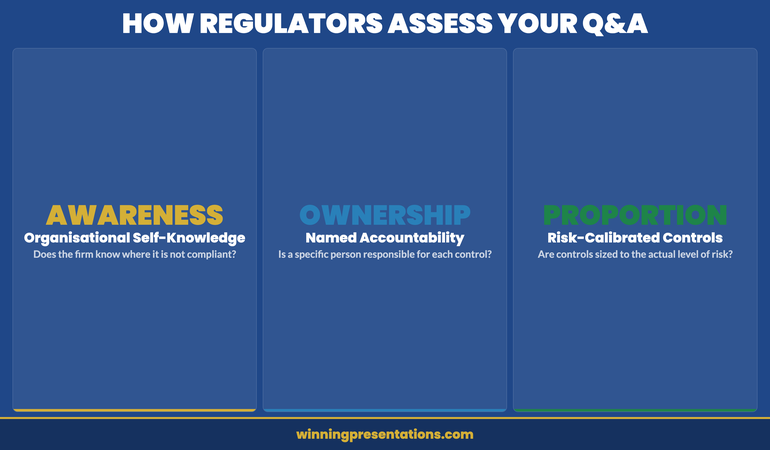
Three assessment dimensions in regulatory Q&A: organisational awareness, ownership, and proportionality

Six Question Patterns in Regulatory Reviews

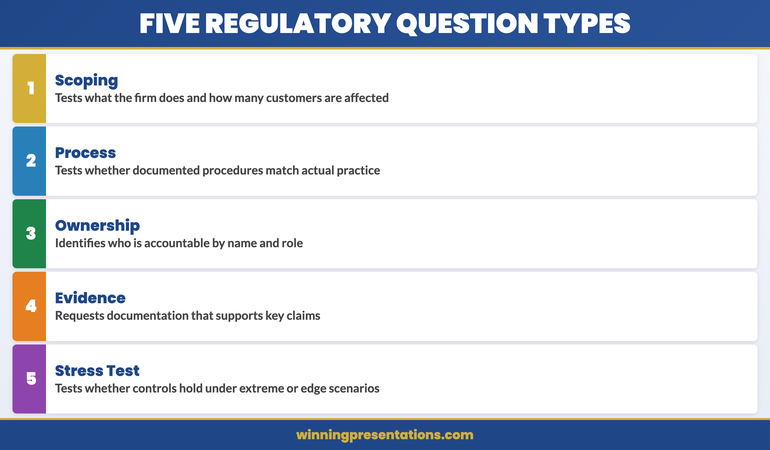
Regulatory Q&A sessions tend to follow recognisable question patterns. Identifying the pattern quickly — before forming the answer — significantly improves the quality of the response and reduces the risk of inadvertently providing information that creates new lines of inquiry.

The scoping question is designed to understand the boundaries of the firm’s activity in a particular area. “How many of your customers fall within this category?” or “What proportion of your portfolio is subject to this requirement?” These questions are factual, and the answer should be factual, specific, and unambiguous. If the exact figure is not available, state the best available estimate, the source, and when a more precise figure will be available. Do not approximate without flagging that you are approximating.

The process question tests whether the firm has a documented, repeatable procedure. “Walk me through how you handle this situation” or “What is the process when a customer makes this type of request?” The answer should describe the actual process in practice, not the documented ideal. If the documented process and the actual practice diverge — which regulators often know before asking — acknowledging the divergence and explaining why it exists is far more useful than presenting the documented version as the operational reality.

The ownership question identifies accountability. “Who is responsible for ensuring this is done?” These questions should be answered with a specific name or specific role, not a committee, team, or department. If ownership is genuinely shared or unclear, say so — and describe what is being done to clarify it. Vague ownership is a finding; acknowledging vague ownership and having a plan is a mitigant.

The evidence question asks for documentation. “What records do you keep of this?” or “Can you show me an example?” Have specific examples prepared before the session. Asking for time to locate evidence during a regulatory Q&A creates an impression of inadequate preparation that is difficult to recover from within the same session.

The remediation question tests the quality of the firm’s response to identified issues. “What have you done since this was identified?” Answers should include: what changed, when it changed, who made the change, and how the firm knows the change has been effective. Remediation without a verification mechanism is not complete remediation.

The stress question tests the boundaries of the firm’s position. “What would happen if [extreme scenario]?” or “How would this control hold if [assumption was wrong]?” These questions are not designed to find a fault — they are designed to understand whether the firm’s risk thinking extends beyond the baseline scenario. Acknowledging the limits of a control and describing the compensating measures for those limits is the response that demonstrates mature risk governance.

Executive Q&A Handling System

A System for Preparing and Handling High-Stakes Q&A Sessions

The Executive Q&A Handling System is a structured approach for professionals who face high-stakes question sessions — including regulatory reviews, board Q&A, and scrutiny committee appearances. It covers how to predict the questions that matter, how to structure answers that hold up under follow-up, and how to manage the dynamics of an adversarial or high-pressure Q&A.

  • System for predicting and preparing for the questions that carry most risk
  • Answer frameworks for the six question patterns in regulatory and board Q&A
  • Preparation guides for compliance reviews, scrutiny hearings, and executive Q&A
  • Scenario playbooks for hostile, ambiguous, and stress-test questions

Get the Executive Q&A Handling System — £39

Designed for regulatory, board, and high-stakes executive Q&A sessions.

The Preparation Framework for Regulatory Q&A

Effective preparation for regulatory Q&A is not the same as rehearsing answers to anticipated questions. Rehearsed answers are often recognisable as such — they tend to be slightly too smooth, slightly too complete, and slightly disconnected from the specific question asked. Regulatory reviewers who ask the same questions in multiple firms become adept at distinguishing rehearsed responses from genuine understanding.

The preparation framework that produces better outcomes has three layers.

The first layer is factual verification. Before the session, verify the key facts — current figures, process descriptions, ownership assignments — rather than relying on memory. Know the numbers. Know the last audit date. Know the name of the person responsible for the control that is most likely to be questioned. Factual accuracy under follow-up questions is a significant trust signal; errors under follow-up — particularly errors that contradict something said earlier in the session — are recorded.

The second layer is gap mapping. Identify the areas where the firm’s position is least strong — where the documentation is incomplete, where the control is relatively recent, where there is a known remediation in progress. These are the areas where questions will be most difficult, and where the answer needs the most careful construction. The goal is not to conceal gaps; it is to be able to describe them clearly, with evidence of awareness and a credible remediation plan, rather than appearing to discover them in the room.

The third layer is scenario rehearsal. For each gap area, rehearse the answer to the worst version of the question — not the soft version that confirms your current position, but the version that directly challenges it. “Why did this take eighteen months to fix?” or “How do you know the control is working?” Rehearsing the difficult version means the actual question, which is rarely as sharp as the worst case, arrives as a manageable version of something already prepared for.

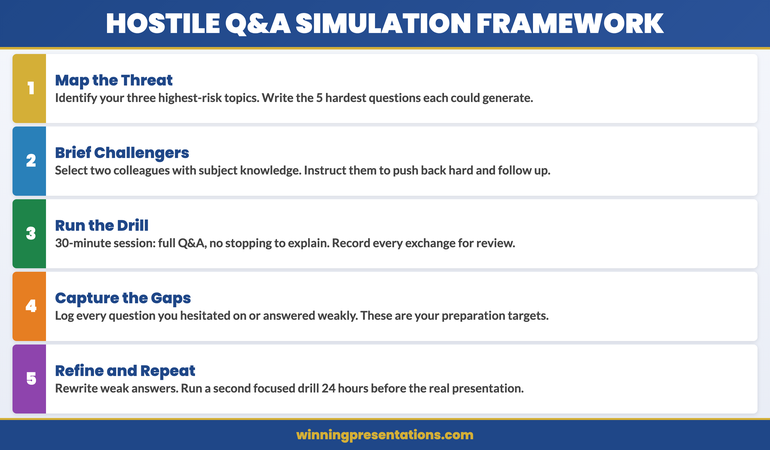
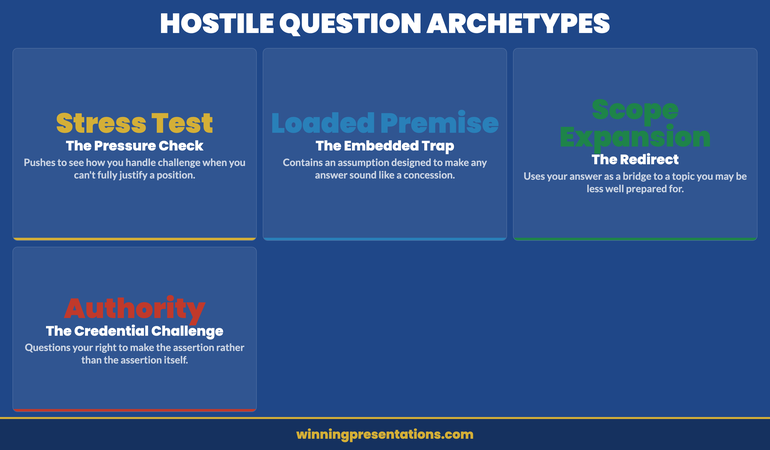
For the specific preparation techniques that apply when the Q&A is likely to include hostile or adversarial questions — common in enforcement-adjacent regulatory reviews — the approach in risk committee Q&A preparation covers how to identify the questions that expose the most significant vulnerabilities before the regulator does.

How to Handle Challenge Without Becoming Defensive

The most common error in regulatory Q&A is defensiveness. It manifests in several ways: excessive qualification of every answer, visible discomfort when a question implies criticism, or an impulse to explain away a finding before the reviewer has finished describing it. None of these responses are dishonest. All of them create the impression that the firm is managing a perception problem rather than a compliance problem — which is, from a regulatory perspective, a significantly more serious concern.

The discipline required is to receive challenge as information rather than attack. When a compliance officer says “We have seen in other firms that this type of control tends to break down under [condition] — how would yours hold up?”, the most useful response is genuine engagement with the hypothetical rather than immediate reassurance. “That is a fair stress to apply. Our current control would hold because [specific reason]. The area where we would be more exposed is [honest assessment], and we manage that through [compensating measure].” This kind of answer builds regulatory confidence; a smooth assurance that the control would hold under all conditions does not.

When a question reveals a gap that was not previously acknowledged — something the reviewer has found that the firm did not identify — the handling of that moment matters enormously. Immediate acknowledgement, followed by genuine engagement with the implications, is invariably received better than a search for an explanation that frames the gap as less significant than it appears. Regulators are experienced readers of defensive framing; the attempt to minimise rarely succeeds and always signals something.
Response framework for regulatory challenge questions: acknowledge, engage, and describe compensating measures

Building the Document Trail That Supports Your Answers

In regulatory Q&A, the answer in the room and the document trail that supports it are both assessed. An answer that cannot be corroborated by documentation — however accurate it may be — is substantially weaker than an answer accompanied by a clear reference to the relevant record. The preparation for a regulatory Q&A session should include identification of the specific documents that support the key answers, not just rehearsal of those answers.

This does not mean arriving with a trolley of paper. It means knowing where each material claim is documented, being able to reference that document specifically when asked, and having a process for providing it promptly if requested. “That is documented in our Q3 internal audit report, section 4.2 — I can provide that directly after this session” is a materially stronger answer than an oral description of the same content without a reference.

For areas where documentation is in progress — where a remediation plan exists but is not yet complete, or where a control has been strengthened but the updated procedure has not yet been formally signed off — the honest answer is to describe the current state accurately, including what is and is not yet complete. Representing in-progress documentation as finalised creates a specific type of regulatory exposure that is worse than the underlying gap it was meant to conceal.

If you are preparing for a regulatory review, compliance committee appearance, or board Q&A session, the Executive Q&A Handling System provides a structured preparation approach for high-stakes question sessions where the questioner has authority over outcomes.

Common Mistakes That Invite Further Scrutiny

Several answering behaviours consistently generate additional regulatory questions rather than resolving the line of inquiry. Awareness of these patterns allows for a deliberate correction in real time.

Answering a narrower question than the one asked. When a compliance officer asks a broad question and receives a specific, narrow answer, they typically note that the broader question was not addressed and return to it. The pattern signals either that the presenter is managing the scope of the answer to avoid uncomfortable territory, or that they did not listen to the full question. Neither reading is helpful. If the scope of a question is genuinely unclear, ask for clarification before answering, rather than answering the narrowest reasonable interpretation.

Using passive constructions to avoid ownership. “Errors were made” and “the process was not followed” are passive constructions that obscure who is responsible. Regulators notice this, and it tends to extend the Q&A rather than conclude it, because the ownership question will be asked again more directly. Name the role and the accountability clearly.

Answering the follow-up question before it is asked. When a presenter anticipates a follow-up and answers it preemptively — “and I should also mention that we are aware of [related issue]…” — it often opens a new line of inquiry rather than closing the original one. Answer the question asked. Wait for the follow-up. This is not evasion; it is discipline. The information will come out, but in a controlled sequence rather than as a cascade of preemptive disclosures.

For guidance on handling the most challenging variant of regulatory questions — the kind that appear in board meetings after a significant incident — the analysis of hostile questions in board meetings covers the specific techniques that prevent a difficult question from becoming a damaging exchange.

Executive Q&A Handling System

Prepare for Regulatory and High-Stakes Q&A Sessions

A system for predicting and handling the questions that carry the most risk — designed for regulatory reviews, board Q&A, and scrutiny committee appearances.

Get the Executive Q&A Handling System — £39

Designed for compliance, legal, and senior executive roles in regulated industries.

Frequently Asked Questions

How should you handle a question in a regulatory review when you do not know the answer?

State clearly that you do not have the specific figure or detail to hand, commit to providing it after the session with a specific timeline, and do not estimate unless you explicitly flag that you are estimating. “I do not have that figure with me today. I will confirm the exact number and send it to you by [specific date].” Then follow through precisely. Regulatory reviewers track commitments made in sessions; a failure to deliver on a stated commitment is a finding in itself. What you must not do is guess without flagging that you are guessing — an incorrect figure presented as fact, later contradicted by documentation, creates a significantly worse impression than the original admission of uncertainty.

Should you disclose problems proactively in a regulatory Q&A, or wait to be asked?

Issues that are material to the scope of the review should be disclosed proactively, not withheld in the hope they will not be raised. Regulators who discover in the course of a review that the firm was aware of a material issue but did not volunteer it treat that as a culture and conduct concern — separate from, and additional to, the underlying compliance issue. For issues that are immaterial or tangential to the specific review scope, the discipline is to answer the questions asked fully and accurately, without volunteering additional lines of inquiry. The distinction between proactive transparency and preemptive disclosure of everything is one of materiality to the current review.

How long should answers be in a regulatory Q&A session?

Shorter than most presenters instinctively provide. A direct answer to a scoping question should be one to two sentences — the figure, the source, and a brief qualifier if needed. A process description should describe the actual process in three to five steps, not provide a comprehensive account of every exception and variation. Longer answers in regulatory Q&A tend to introduce new threads that generate follow-up questions, and they sometimes suggest that the presenter is using volume to manage the impression created by the answer. The regulators who ask short questions and receive long answers are typically more attentive to the qualifications and caveats woven into those answers than to the headline claim.

The Winning Edge — Weekly Newsletter

Each Thursday: one executive presentation insight, one practical technique, one tool. Read by executives across financial services, healthcare, technology, and government.

Subscribe to The Winning Edge

About the Author

Mary Beth Hazeldine is Owner and Managing Director of Winning Presentations. With 25 years of corporate banking experience at JPMorgan Chase, PwC, Royal Bank of Scotland, and Commerzbank, she advises executives across financial services, healthcare, technology, and government on structuring presentations and Q&A responses for regulatory reviews, board appearances, and high-stakes approval meetings. View services | Book a discovery call

09 Apr 2026

Fear of Authority: Presenting Confidently to People in Power

Quick Answer

Fear of authority in presentations is a specific anxiety pattern triggered by perceived power differentials — not just general public speaking nerves. It activates differently depending on seniority, organisational culture, and the presenter’s own relationship with authority figures. Understanding what is actually being triggered — and why — is the first step toward presenting confidently to people in power.

Astrid had presented to hundreds of people. She ran all-hands meetings for her team, delivered client briefings, and chaired cross-functional reviews without difficulty. By any external measure, she was a confident presenter. Until the day she was asked to present her division’s Q3 performance directly to the Group CEO and the Chief Operating Officer.

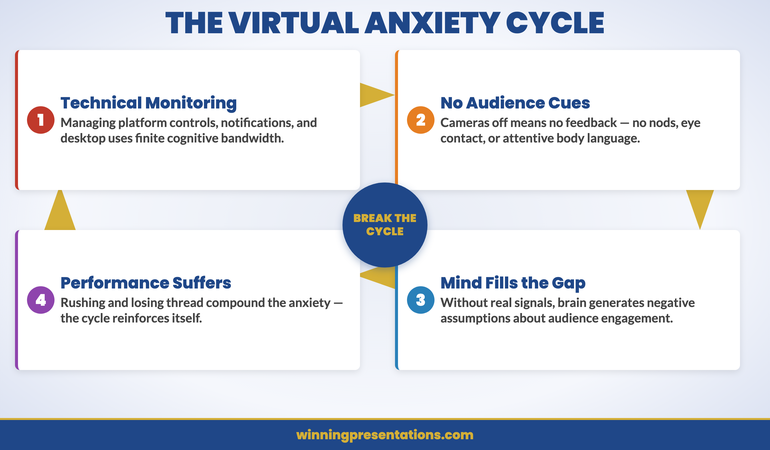
She described the experience afterwards: “I knew the numbers better than anyone in that room. I had run these presentations dozens of times. And the moment I walked in and saw them sitting at the table, something shifted completely. My voice went quieter. My hands were cold. I kept checking whether they were engaged rather than watching the room as a whole. I finished early because I rushed, and then I couldn’t remember exactly what I had said.”

Nothing about the content had changed. The audience had. Specifically, the perceived consequence of failure had — or felt as though it had. That shift is what fear of authority in presentations actually is: a recalibration of stakes based on who is in the room, not on whether the material is different or the risk is genuinely higher.

Presenting to senior leadership and finding that anxiety activates differently when authority figures are in the room?

This is a specific pattern — and it responds to specific approaches. Conquer Speaking Fear includes a structured programme for authority-specific anxiety, covering nervous system regulation and the cognitive patterns that maintain fear of presenting to people in power. Explore the programme →

Why Presenting to Authority Figures Triggers a Different Response

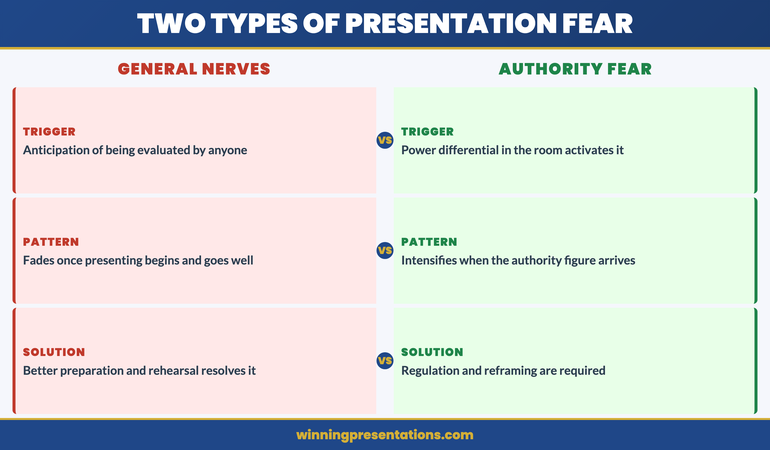
General presentation anxiety is a fear of being evaluated — of being seen, judged, and found wanting in front of others. Fear of authority in presentations is a more specific variant: it is the fear of being evaluated by someone whose judgment has direct consequences for your career, your standing, or your sense of competence. The audience has power over you in a way that a general audience does not. That changes the threat calculation entirely.

Most people who present confidently to peers and clients are still susceptible to this particular variant of anxiety. The shift happens not because the material is more difficult or the audience is more hostile, but because the evaluation carries different stakes. A poor presentation to peers is mildly uncomfortable. A poor presentation to the CEO, the board, or a regulator can feel — at the level of the nervous system — like a genuinely existential threat to professional survival.

The fact that this threat is usually disproportionate does not reduce its physiological force. The anxiety is real even when the danger is not. Understanding this distinction — that the fear is a real emotional and physiological event triggered by a perception rather than by an objective threat — is the prerequisite for working with it rather than being controlled by it.

As explored in the analysis of presentation anxiety with specific audiences, the same presenter can experience dramatically different anxiety levels depending purely on who is in the room. The content is identical. The fear is not triggered by the material — it is triggered by the relationship.

Diagram showing the difference between general presentation anxiety and authority-specific fear — stakes perception versus objective risk

The Hierarchy Threat: What Your Nervous System Is Reacting To

The physiological response to presenting to authority figures draws on the same neural architecture as social threat detection more broadly. When you stand in front of someone who has power over your career outcomes, your nervous system is processing a threat signal — not because there is immediate physical danger, but because social hierarchies are genuinely consequential for wellbeing, and the threat of losing standing within them activates threat-detection systems that evolved to manage real risks.

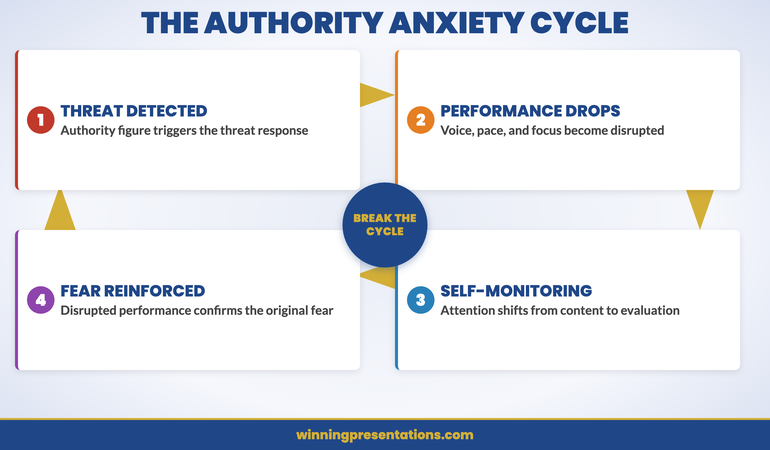
This is why standard presentation preparation techniques — practising more, knowing the material better, arriving early — do not consistently resolve authority-specific anxiety. They address the cognitive preparation problem, not the threat-detection response. You can know your material fluently and still find that your voice constricts when the CFO walks in late and sits directly opposite you.

The nervous system’s response to hierarchy is not, however, fixed. It is shaped by experience, by interpretation, and by the physiological regulation skills available to you. The distinguishing feature between presenters who perform well in front of authority figures and those who do not is rarely confidence in the abstract — it is the ability to down-regulate the threat response quickly enough that it does not interfere with performance.

For those whose anxiety predates the corporate context — where patterns around authority figures were formed in childhood or earlier career experiences — the work described in resources on glossophobia in the C-suite is directly relevant. Authority-specific anxiety often has deeper roots than professional development programmes address.

Conquer Speaking Fear

A Structured Programme for Presentation Anxiety That Activates With Authority Figures

Conquer Speaking Fear is a 30-day programme for professionals whose presentation anxiety is persistent and specific — including anxiety that activates differently in front of senior leaders, boards, and authority figures. It uses nervous system regulation techniques and clinical hypnotherapy approaches to address the patterns that standard practice and preparation do not resolve.

  • 30-day programme structured for working professionals
  • Nervous system regulation techniques for the moments anxiety activates
  • Clinical hypnotherapy approaches for deeper-rooted fear patterns
  • Designed for anxiety that persists despite knowledge, preparation, and experience

Get Conquer Speaking Fear — £39

Designed for executives and senior professionals with persistent presentation anxiety.

The Imposter–Authority Paradox

There is a pattern that appears consistently among senior professionals who experience authority-specific anxiety: the more accomplished they are, the more acute the fear often becomes — particularly when presenting upward. This seems counterintuitive. Surely more experience should mean less anxiety? The paradox is that as seniority increases, the stakes attached to each presentation also increase, and the gap between self-perception and external reputation becomes more pronounced.

A mid-level manager who makes an error in a board presentation has room for recovery. A director or VP who makes the same error in front of the group CEO is in a different position — their reputation has been built on a certain standard of performance, and a visible failure carries proportionally more weight. The fear is not irrational; it reflects a real calculation about professional consequences. It becomes irrational only when it operates at the same intensity for a routine update as it does for a high-stakes decision meeting.

The imposter component adds a further layer. Many senior professionals who experience authority-specific anxiety carry a background sense that their competence has not been fully earned — that they are one poor performance away from being exposed. Presenting to someone with the power to confirm or challenge that fear activates both the hierarchy threat and the competence threat simultaneously. The combination is significantly more disruptive than either alone.

The distinction between this pattern and more general presentation anxiety is explored in the analysis of stage fright versus social anxiety — worth reading if you find that your anxiety is specific to certain audiences rather than present across all presentation contexts.

Techniques to Apply Before the Presentation

The preparation phase for an authority-specific presentation is different from standard presentation preparation. Knowing the material better rarely reduces this variant of anxiety — the anxiety is not about the material. The preparation work that is actually useful focuses on regulating the physiological state you bring into the room.

Reframe the stakes accurately. The nervous system is responding to a perceived threat. Before the presentation, spend time explicitly examining whether the threat is proportionate. In most cases, the realistic consequence of a less-than-perfect presentation to the CEO is that you have a learning experience. The catastrophic outcome your nervous system is preparing for — career damage, public humiliation, permanent loss of standing — is rarely the actual likely outcome. Making this calculation consciously, rather than allowing the unchallenged threat perception to drive your physiological state, is not a trivial exercise. It requires repeated, specific examination of the evidence, not a general reminder to calm down.

Regulate before you arrive. The two most reliable physiological regulation tools for pre-presentation anxiety are controlled breathing and physical movement. Extended exhale breathing — where the out-breath is longer than the in-breath — activates the parasympathetic nervous system and measurably reduces the physiological arousal associated with threat responses. Physical movement prior to the presentation — a brisk walk, not sitting at a desk scrolling through slides — changes the physiological state more reliably than any cognitive technique.

Prepare for the relationship, not just the content. If the authority figure who triggers your anxiety is someone you interact with regularly, the presentation anxiety is partly about that specific relationship. Consider whether there is an opportunity for a brief, non-presentation interaction with that person before the formal setting — a corridor conversation, a brief check-in. Reducing the social distance before the formal moment changes the dynamic in the room.

Three-stage preparation approach for authority-specific presentation anxiety: reframe stakes, regulate physiology, reduce social distance

What to Do When the Fear Activates in the Room

The moment the authority figure walks in, or the moment you stand to present and register who is in the room, the physiological response may activate regardless of how well you prepared. The ability to manage in-the-moment activation is a separate skill from pre-presentation regulation, and it is the skill that matters most for performance.

The first technique is to slow down deliberately. When anxiety activates, speaking pace tends to increase — partly because the body is in a state of arousal, and partly because there is an unconscious desire to finish the exposure quickly. A faster pace signals anxiety to the audience and removes the pauses that give the presenter time to regulate. The antidote is a conscious, deliberate reduction in pace — even if it feels uncomfortable. Slowing down when you are anxious feels wrong from the inside; it reads as composed from the outside.

The second technique is to anchor in the task rather than the evaluation. When fear of authority is active, attention tends to split between the content and the question “what do they think of me right now?” This split attention is visible — it is what produced Astrid’s experience of checking whether the executives were engaged rather than reading the room as a whole. Deliberately returning attention to the specific task — the next slide, the next sentence, the specific question being answered — redirects the nervous system’s monitoring from the social evaluation back to the work.

The third technique is to use questions as regulation points. When a senior leader asks a question, take a visible pause before responding — ideally two to three full seconds. This serves three purposes: it gives you time to regulate before speaking, it signals that you are considering the question seriously rather than deflecting, and it gives the authority figure the impression of measured confidence rather than reactive speed.

If authority-specific anxiety is persistent — activating reliably when certain senior figures are in the room, regardless of preparation or experience — Conquer Speaking Fear addresses the specific patterns that standard presentation coaching does not reach.

Why Some Senior Leaders Remain Afraid of Presenting Upward

One of the least-discussed aspects of authority-specific presentation anxiety is that it does not disappear with seniority. Directors who present confidently to their own teams, their peers, and external audiences can still find that presenting upward — to the board, to investors, to a regulatory committee — activates anxiety at the same intensity it did in their early careers. The authority hierarchy simply moves upward with them.

There is also an organisational culture dimension. Some organisations have leadership cultures in which senior leaders use presentations as opportunities to demonstrate intellectual dominance — to ask difficult questions publicly, to visibly challenge assumptions, to create an atmosphere in which the presenter must defend every claim. Presenters who have experienced this kind of culture may carry a threat-vigilance pattern that activates whenever they present upward, even in organisations where the culture is entirely different.

What changes the pattern, for senior leaders as much as for early-career professionals, is not more rehearsal or better slides. It is the development of a relationship with the physical and cognitive state that authority-figure presentations create — the ability to recognise the activation, to respond to it with regulation rather than suppression, and to return attention to the task without the emotional spiral that performance anxiety typically produces when it is treated as evidence that something is wrong.

Conquer Speaking Fear

30-Day Programme for Persistent Presentation Anxiety

For professionals whose anxiety activates reliably with authority figures — and who have not found a lasting solution through preparation, practice, or conventional coaching.

Get Conquer Speaking Fear — £39

Designed for executives and senior professionals with persistent authority-specific presentation anxiety.

Frequently Asked Questions

Is fear of presenting to authority figures a form of social anxiety?

It overlaps with social anxiety in some individuals, but it is not the same thing. Social anxiety is a broader pattern that affects a range of social interactions. Authority-specific presentation anxiety is context-specific — it activates primarily or exclusively when the audience includes people with evaluative power over the presenter. Many people with authority-specific anxiety have no social anxiety in other contexts. They socialise easily, present confidently to peers, and function without difficulty in most professional settings. The anxiety is specifically about the hierarchical power relationship in the room, not about social interaction generally.

What makes fear of authority in presentations different from ordinary nerves?

Ordinary pre-presentation nerves tend to diminish once the presentation begins and the presenter’s competence becomes apparent — the nerves are anticipatory. Authority-specific fear often intensifies once in the room, because the presence of the authority figure continues to activate the threat response throughout the presentation. It also tends to be highly selective: the same presenter may be entirely comfortable in front of 200 people at a conference and acutely uncomfortable in front of three people if those three people have significant power over their career.

Can this type of anxiety be resolved, or is it something to manage indefinitely?

For most people it can be substantially reduced — not by eliminating the physiological response, but by changing the relationship with it. The goal is not to feel nothing when presenting to the CEO. The goal is to be able to present at full cognitive and communicative capacity despite feeling something. With the right approach — nervous system regulation, accurate threat assessment, and structured exposure — most people find that the anxiety becomes significantly less disruptive and, over time, less intense. Some find that it resolves almost entirely. Others find a stable baseline that no longer interferes with performance. Indefinite management at the same intensity is rarely the outcome when the problem is addressed directly.

The Winning Edge — Weekly Newsletter

Each Thursday: one executive presentation insight, one practical technique, one tool. Read by executives across financial services, healthcare, technology, and government.

Subscribe to The Winning Edge

About the Author

Mary Beth Hazeldine is Owner and Managing Director of Winning Presentations. With 25 years of corporate banking experience at JPMorgan Chase, PwC, Royal Bank of Scotland, and Commerzbank, she advises executives across financial services, healthcare, technology, and government on managing presentation anxiety and building confidence for high-stakes settings. View services | Book a discovery call
09 Apr 2026

Budget Resubmission Presentation: What to Change After the First Rejection

Quick Answer

A budget resubmission presentation should not simply re-present the original proposal with adjusted numbers. Finance committees that rejected your initial submission are looking for evidence that you understood why it was rejected, that you have addressed the underlying concerns, and that you can defend the revised case under scrutiny. The structure of the resubmission matters as much as the revised figures.

Kenji had been Head of Technology at a retail banking group for two years when his infrastructure modernisation budget was rejected at the April finance committee. The committee’s feedback was brief: the proposal lacked sufficient evidence of ROI, and the timeline was considered optimistic given the organisation’s recent delivery record on technology projects.

His initial response was to rebuild the financial model. He spent three weeks tightening the numbers, adding sensitivity analyses, and extending the timeline by six months. When he presented the revised proposal in June, the committee rejected it again. This time the feedback was different: the committee was not confident the business case addressed the fundamental question of why this investment was necessary now rather than in the next financial year.

The financial model had never been the problem. The problem was that Kenji’s original presentation had led with capability and features — what the infrastructure would be able to do — rather than with risk and consequence — what would happen if the current infrastructure was not replaced. The committee had rejected the framing of the proposal, not just the numbers. Until the resubmission addressed that framing, no amount of revised modelling would produce a different outcome.

Preparing a budget resubmission?

Before you rebuild the model, check whether your slide structure addresses what the committee actually rejected. The Executive Slide System includes financial presentation frameworks designed for approval meetings, including resubmissions after rejection. Explore the System →

Why Budgets Are Rejected and What Finance Actually Needs

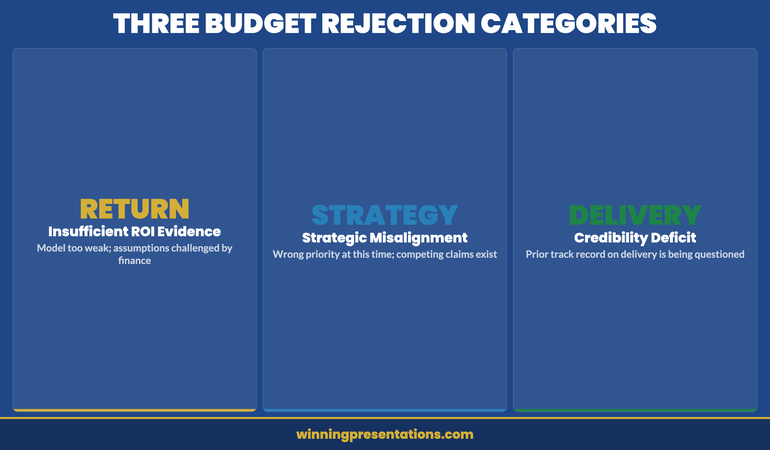
Budget rejections fall into three categories, and only one of them is actually about the numbers. Understanding which category your rejection belongs to determines what the resubmission needs to address.

The first category is insufficient evidence of return. The committee cannot see a credible path from the investment to a measurable outcome. This is a modelling and assumptions problem — and it is the only category where revising the financial model alone will resolve the issue. If you can provide tighter assumptions, stronger benchmarks, or a clearer articulation of how return will be measured and when, the resubmission has a direct path to approval.

The second category is strategic misalignment. The committee does not believe this investment is the right priority at this time, relative to other competing claims on the budget. No amount of modelling resolves this. The resubmission needs to demonstrate how this investment connects to the organisation’s current strategic priorities, and specifically why deferring it creates a worse outcome than approving it now.

The third category — the most common and the hardest to diagnose — is a credibility deficit. The committee is not confident that the presenter or their team can deliver what is being proposed. This is particularly acute when the organisation has a history of late or over-budget technology or infrastructure projects, which is a reason Kenji’s second submission failed. A resubmission that does not directly address the delivery confidence problem will not succeed, regardless of the quality of the financial model.

Most rejected budgets contain elements of all three. The task before the resubmission is to identify which is the dominant concern, because that determines the entire structure of the revised presentation.

Three categories of budget rejection: return evidence, strategic alignment, and delivery credibility

The First Move After Rejection

The first thing to do after a budget rejection is not to revise the proposal. It is to understand precisely what was rejected and why. This sounds obvious, but most post-rejection conversations focus on what the presenter thinks the committee meant, rather than on getting the committee’s actual concerns on record.

Request a debrief, ideally with the finance director or the committee chair, within a week of the decision. The question to ask is not “what would it take to get this approved?” — which puts the committee in the position of designing your resubmission — but rather “what specific concerns were unresolved at the point of decision?” This frames the conversation as a diagnostic rather than a negotiation, and experienced finance directors will give you considerably more useful feedback if they feel they are being asked to help you understand rather than being pressured to change their minds.

Document the feedback carefully. When the resubmission is eventually presented, the committee will compare what they said to what you addressed. If the resubmission does not map directly to the documented concerns, it signals that you either did not understand the feedback or chose to work around it — neither of which builds confidence.

What to Change — and What Not to Touch

There is a common instinct to make the resubmission significantly different from the original — to demonstrate responsiveness and effort. This instinct is partially right and partially dangerous. Substantial changes that address the committee’s documented concerns signal that you listened and acted. Substantial changes that go beyond what was asked signal either that you had doubts about the original proposal that you did not disclose, or that you are making changes to appear responsive rather than because they are substantively right.

Change the structure of the case if the rejection was about framing. If the committee rejected the proposal because the rationale was wrong — capability-led rather than risk-led, for example — restructure the argument, not just the slides. The committee will recognise a slide reshuffle; they will not recognise a genuinely different argument unless it is genuinely different.

Change the financial assumptions if they were specifically challenged. If the committee requested more conservative growth projections or questioned the cost assumptions, revise them with explicit references to what changed and why. Do not quietly update figures without acknowledging the change — the committee will notice the difference and will want to know why the original numbers were presented if these more cautious assumptions were available.

Do not change anything that was not the subject of feedback. Altering elements of the proposal that the committee did not question suggests uncertainty about the original position, and invites new questions about material that was previously settled.

For guidance on structuring the financial argument itself, the approach in zero-based budget presentations is directly applicable to resubmissions where the original proposal was rejected on return-evidence grounds — the discipline of justifying each line from first principles removes the assumption problem that often underlies the “insufficient ROI” rejection.

Executive Slide System

Build Financial Presentations That Get Budget Approval

The Executive Slide System provides structured frameworks for financial and budget presentations, including resubmissions after rejection. It includes slide templates for finance committee meetings, AI prompt cards to build the case quickly, and scenario guides for challenging approval environments.

  • Slide templates for budget and financial approval presentations
  • AI prompt cards to structure the resubmission argument
  • Framework guides for risk-led and return-led financial cases
  • Scenario playbooks for budget, capex, and resource allocation items

Get the Executive Slide System — £39

Designed for budget and financial presentations in regulated and corporate environments.

Structuring the Resubmission Presentation

A budget resubmission presentation has a structural requirement that the original proposal does not: it must acknowledge the previous rejection before making the case. Presenting a revised budget as if the original was never rejected — simply updating the figures and re-presenting the slides — is the single most common structural error in resubmissions, and it consistently produces a worse reception than the original.

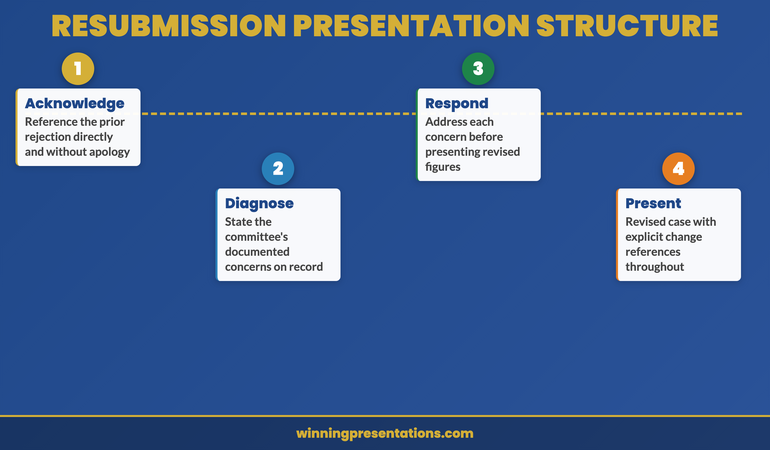
The committee knows this is a resubmission. Pretending otherwise reads as either oblivious or evasive. The structure that works is: acknowledgement, diagnosis, response, revised case.

Acknowledgement: Open with a brief, direct reference to the previous submission and its outcome. “This is a revised proposal for [project], following the committee’s decision in April. The original submission was rejected on two grounds, which I will address directly.” This signals that you are aware of the history, you are not defensive about it, and the resubmission is designed to resolve the specific concerns raised.

Diagnosis: State what you understood the committee’s concerns to be. If you had a debrief conversation, reference it. “Based on the feedback received from [name/role], the committee’s primary concerns were: [specific concerns].” This gives the committee the opportunity to confirm or correct your understanding before the revised case is presented, and it demonstrates that you conducted a genuine post-rejection diagnostic rather than simply revising the slides.

Response: Address each concern directly, in the order it was raised. Not buried in the appendix, not woven into the financial model — directly, as a standalone section that the committee can evaluate before the revised figures are presented. This is the part of the resubmission that most commonly gets cut for time, which is almost always a mistake. The committee’s concerns are the test the resubmission must pass; address them before asking for approval.

Revised case: Present the updated financial proposal, incorporating the changes made in response to the committee’s feedback, with explicit references to what changed and why.

For reference on how resource and financial proposals are typically structured for contested approval environments, the resource allocation presentation framework covers the argumentation approach that works when budgets are under direct competitive pressure.

The Three Objections to Address Before They Raise Them

In a resubmission, there are typically three objections that the committee will raise regardless of how comprehensively the original concerns were addressed. Addressing these proactively — before they are raised as questions — materially reduces the risk of a second rejection.

The first is: “Why should we approve this now rather than defer it to next year’s cycle?” This objection is almost always present when a budget was rejected once already. The committee may have approved an alternative proposal in the interim, making this one appear less urgent than it did six months ago. The resubmission needs a current-state argument: what has changed since the original submission, and how does that change affect the cost or risk of waiting a further twelve months?

The second is: “What gives us confidence the delivery will be successful?” This is particularly acute when the organisation has a track record of project overruns, or when the project scope has changed between the original and revised submissions. A resubmission that does not include a delivery confidence section — covering governance arrangements, milestone structure, and how delivery risk will be managed — will encounter this objection in the room.

The third is: “Is this the right amount?” After a rejection, committees are sensitive to whether the revised budget is genuinely right-sized or has simply been reduced to secure approval, with the expectation that a supplementary request will follow. If the budget has been reduced from the original, explain specifically what scope was removed to achieve the reduction, not just that the figure is lower.

Three pre-emptive objections for a budget resubmission: timing, delivery confidence, and budget sizing

Presenting the Revision Without Looking Defensive

The psychological challenge of a resubmission is presenting a revised case with full conviction when you know the committee has already said no once. The temptation is to over-qualify — to hedge the revised figures, acknowledge every uncertainty, and soften the recommendation. This reads as lack of confidence in the revised case, which is the last impression a resubmission needs to create.

The discipline is to hold the distinction between acknowledging the rejection and diminishing the recommendation. You can acknowledge the previous decision with directness and without apology, and then present the revised case with exactly the same conviction you would bring to a first submission. The rejection was of the previous case; this is a different case. It deserves to be presented as such.

Avoid two common tone errors. The first is apologetic framing — “I know you have concerns about this, and I hope this revised version addresses them” — which positions the presenter as petitioner rather than professional making a considered case. The second is over-confident dismissal — “I believe we have now resolved all the concerns raised” — which can read as arrogant and tends to provoke the committee into finding new concerns. The right tone is direct and measured: “The revised proposal addresses the specific concerns raised in April. Here is how.”

If the capital expenditure case involves significant infrastructure investment, the guidance in capital expenditure presentations covers how to frame large investment proposals in a way that holds up under scrutiny — including how to address delivery risk in the financial narrative itself rather than in a separate risk register that committees rarely read.

If your budget proposal has been rejected once and you are preparing the resubmission, the Executive Slide System includes financial presentation frameworks that address the structural requirements of a second-attempt approval, including how to lead with the committee’s previous concerns.

Executive Slide System

Slide Templates for Budget and Financial Approval Meetings

Structure your resubmission using frameworks designed for contested financial approvals — from the opening acknowledgement to the revised recommendation and delivery confidence section.

Get the Executive Slide System — £39

Designed for financial and budget presentations in corporate and regulated environments.

Frequently Asked Questions

How long should a budget resubmission presentation be?

A resubmission should typically be shorter than the original proposal, not longer. If the original was rejected because the case was unclear, adding more slides rarely resolves the problem — it usually compounds it. The acknowledgement-diagnosis-response-revised case structure can typically be delivered in eight to twelve slides, with supporting detail in the appendix. The committee has already read a version of this proposal; they do not need the full context again. They need to see that their specific concerns have been addressed and that the revised figures are sound.

Should you request a meeting with the finance director before the formal resubmission?

Yes, where possible. A pre-meeting with the finance director or a relevant committee member before the formal resubmission gives you the opportunity to test whether your revised case addresses their concerns before the formal meeting, and it signals engagement with the feedback process rather than a determination to push the proposal through regardless. It is not appropriate to use this meeting to lobby for approval — it is a diagnostic conversation, not a pre-vote. The question to ask is whether your diagnosis of the rejection matches their recollection of the discussion.

What should you do if the budget is rejected a second time?

Request a direct conversation with the committee chair or finance director to understand whether the objection is to this proposal specifically or to the priority of the investment in the current environment. If the committee has a fundamental view that the investment should not happen now — regardless of the quality of the case — no amount of revised modelling will change the outcome. The more productive path is to understand what conditions would need to change for the proposal to succeed, and to determine whether those conditions are likely to be met within a timeframe that makes the investment still relevant.

The Winning Edge — Weekly Newsletter

Each Thursday: one executive presentation insight, one structure, one practical tool. Read by executives across financial services, healthcare, technology, and infrastructure.

Subscribe to The Winning Edge

Preparing a budget or financial approval presentation? The Executive Presentation Checklist is a free download covering structure, language, and approval-readiness for finance committee and board presentations.

About the Author

Mary Beth Hazeldine is Owner and Managing Director of Winning Presentations. With 25 years of corporate banking experience at JPMorgan Chase, PwC, Royal Bank of Scotland, and Commerzbank, she advises executives across financial services, healthcare, technology, and government on structuring presentations for high-stakes funding rounds, board approvals, and governance reviews. View services | Book a discovery call

09 Apr 2026

Board Agenda Presentation: Structure for Faster Board Decisions

Quick Answer

A board agenda presentation should open with the decision required, provide the briefest possible context, and lead directly to the recommendation — before any supporting analysis. When the structure mirrors how board directors actually process information, meetings run faster, questions become more focused, and approvals happen at the table rather than being deferred to a follow-up email.

Ngozi had been Board Secretariat Director at a major infrastructure company for six years. She had seen every version of a badly presented board agenda — the 58-slide decks that covered everything except what the board actually needed to vote on, the presenters who spent 40 minutes on context before arriving at the recommendation with four minutes left on the clock, and the agenda items that required three follow-up emails because the decision criteria were never made clear in the room.

When she began coaching the executive team on how to present to the board, she started with one rule: the board is not a classroom. Directors arrive having read the papers — or having had them summarised by their assistants. They are not there to receive information. They are there to test it, challenge it, and reach a decision. Any presentation that treats them as an audience receiving new content for the first time has misread the room entirely.

The executives who restructured their agenda presentations to lead with the decision, not the discovery, found that their items consistently ran to time. The ones who persisted with the context-first approach were the ones whose agenda items got bumped, or who received a polite letter asking for more information before a decision could be reached.

Presenting to the board in the next few weeks?

Before you finalise your slides, check whether your agenda presentation structure matches how board directors actually process information. The Executive Slide System includes board-specific slide frameworks designed for the decision-first format. Explore the System →

What a Board Agenda Presentation Must Achieve

A board agenda presentation has one purpose that is different from almost every other type of executive presentation: it must compress weeks or months of work into the time allocation on the agenda and arrive at a clear, recordable decision. This is not a presentation that is trying to educate or persuade in a general sense. It is a presentation with a defined outcome — a vote, an approval, a ratified recommendation — that must happen within a specific window.

Most presenters underestimate how different this purpose is from their regular internal presentations. In an internal meeting, the presenter controls the pace and can extend time if needed. In a board meeting, the agenda is set, the secretary is tracking time, and other agenda items are waiting. Running over is not a minor inconvenience — it compresses every subsequent discussion or forces items to be deferred entirely.

Understanding this changes what the presentation needs to contain. Every slide must serve the decision, not the education. If a slide does not bring the board closer to a clear yes, no, or not yet, it may not belong in the presentation at all. This is a hard test for presenters who have invested significant effort in research and analysis, because it means most of that work does not appear on the slides. It appears in the appendix, available if questioned, but not presented in the room.

The presentations that achieve their purpose at the board table are the ones that answer three questions before the first substantive slide: What is being decided? Why does it matter now? What is the recommendation? When those three answers are visible within the first two minutes, the rest of the presentation becomes a structured test of that recommendation rather than a journey of discovery.

Four-slide board agenda presentation structure showing decision, context, recommendation, and supporting evidence

The Difference Between the Agenda and the Presentation

There is a distinction that many presenters collapse, and it costs them time in the room. The board agenda is the list of items to be covered in the meeting. The board agenda presentation is the structured argument for a specific item on that agenda. Treating them as the same thing leads to presentations that try to be both — covering the agenda format, the context, the process, the data, and the recommendation — instead of focusing exclusively on the decision the board needs to make.

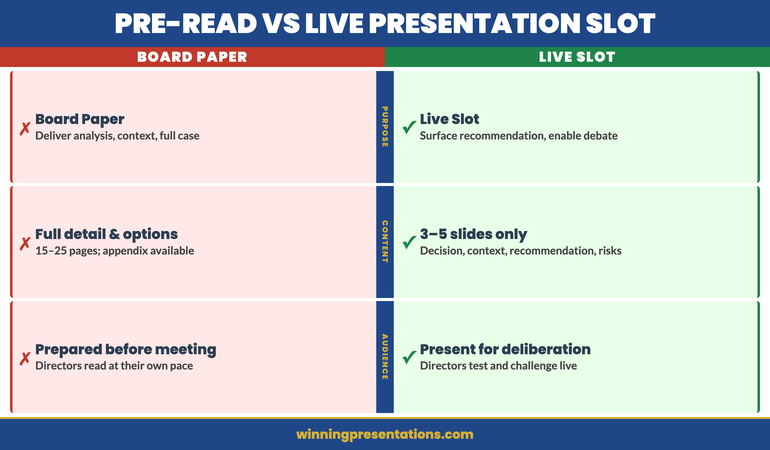
When you are presenting an agenda item, your only job is to make that decision easier. Everything before the meeting — the board paper, the pre-read, the executive summary — is where context, background, and detailed analysis belong. The presentation slot is for the three things directors cannot get from reading alone: the live recommendation, the presenter’s judgement, and the opportunity to interrogate both in real time.

This means the presentation should be considerably shorter than the supporting paper. If your board paper runs to 15 pages and your agenda presentation runs to 20 slides, something has gone wrong. The paper contains the substance. The presentation surfaces the recommendation and provides the structure for a focused discussion.

For guidance on how the paper and the presentation should relate to each other, the analysis in board paper vs board presentation covers the structural differences in detail. The short version: the paper argues the case; the presentation asks for the decision.

Executive Slide System

Build Board Presentations That Get Decisions at the Table

The Executive Slide System is a structured toolkit for executives who present to boards and senior leadership. It includes slide templates for governance and decision meetings, AI prompt cards to build your deck fast, and scenario-specific frameworks for the moments when the standard approach does not work.

  • Slide templates designed for board-level decision items
  • AI prompt cards to structure your recommendation quickly
  • Framework guides for high-stakes governance presentations
  • Scenario playbooks for budget, crisis, and performance items

Get the Executive Slide System — £39

Designed for board and executive presentations across regulated industries.

The Four-Slide Structure That Supports Fast Board Decisions

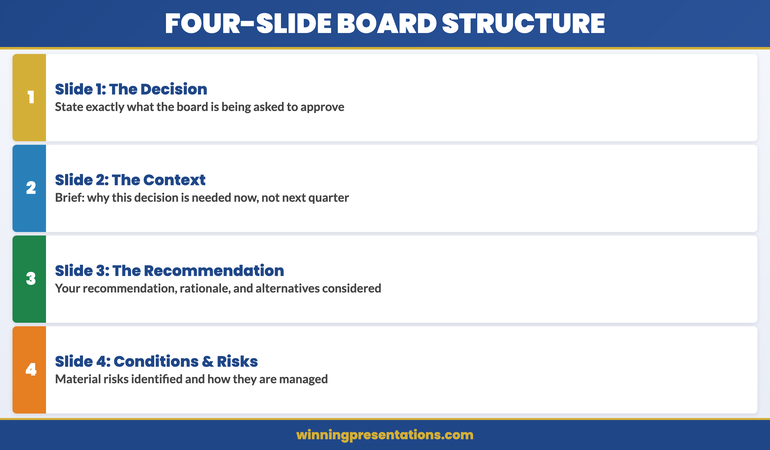
The most effective board agenda presentations — regardless of the subject matter — tend to follow a consistent four-part structure. Not four topics. Not four chapters. Four slides, or four sections, each doing a specific job.

Slide 1: The decision. State what the board is being asked to approve, ratify, or reject. This is not a title slide. It is a statement: “The board is asked to approve the acquisition of [asset] at a maximum consideration of [figure], subject to [conditions].” That sentence belongs on slide one. Everything that follows is in service of it.

Slide 2: The context. This is the briefest possible explanation of why this decision is on the agenda now. Not the full history. Not the market analysis. The one or two facts that explain why this cannot wait for next quarter and why this board, at this meeting, is the appropriate decision-making body. Two minutes of speaking time is enough. If you need more, the context belongs in the paper.

Slide 3: The recommendation. Your recommendation, your rationale, and the criteria you used to arrive at it. This is where your professional judgement is on the table. The board is testing whether your reasoning process is sound, not just whether the conclusion is commercially reasonable. State how you reached the recommendation, what alternatives you considered, and why you discarded them.

Slide 4: The conditions and risks. What conditions must hold for this recommendation to remain valid? What are the two or three risks the board should be aware of, and how are they being managed? This slide completes the picture without burying the recommendation in caveats. The board can ask questions before a vote, but they need to know the material risks have been identified.

Everything else — the detailed financial model, the stakeholder analysis, the regulatory review — goes into the appendix. Present it only if asked. This structure works because it mirrors how experienced board directors read a board paper: recommendation first, rationale second, detail if needed.

Pre-Read Versus Presenting Live

One of the most common errors in board agenda presentations is treating the live slot as the moment to deliver information that should have been in the pre-read. This typically happens because the presenter is not confident the board has read the paper, and so they attempt to cover it in the presentation just in case.

This is understandable, but it creates two problems. First, for directors who have read the paper, it is a waste of their time — and experienced board members notice when their preparation is being ignored. Second, it compresses the time available for discussion, which is the only thing the live slot can do that the paper cannot.

The discipline required is to trust the pre-read process and design the presentation for board members who have read the paper. If some directors have not read it — which will happen — that is a governance process issue, not a presentation design problem. Redesigning the presentation to accommodate unprepared directors penalises the ones who did prepare.

Where live presentation genuinely adds value is in three areas: demonstrating personal conviction in the recommendation, answering questions that the paper could not anticipate, and providing a structured moment for discussion before the vote. A well-designed agenda presentation creates space for all three without re-presenting the paper.

A common error is treating the follow-up after the meeting as the primary channel for this kind of engagement. The board presentation follow-up protocol outlines what belongs after the meeting — but the live slot is where the recommendation is tested and approved, not merely noted.

Comparison showing pre-read versus live board presentation content — what belongs in the paper and what belongs in the room

Building Timing Discipline Into the Agenda

Time allocation in a board meeting is not a suggestion. When the agenda assigns 15 minutes to an item, that includes the presentation, discussion, and decision. A presentation that runs to 14 minutes leaves one minute for discussion and forces the chair to cut off debate or extend the meeting at the expense of later items.

The practical rule is that presentation speaking time should not exceed one-third of the allocated agenda time. A 15-minute item allows five minutes of presentation. A 30-minute item allows ten. This feels impossibly short until you have designed a presentation using the four-slide structure — at which point it becomes entirely workable, because the structure removes everything that does not serve the decision.

Build in two explicit pauses. One after the context slide, to invite clarifying questions on the situation before you present the recommendation. One after the recommendation and risks slide, to open structured discussion. These pauses are not weaknesses in the presentation — they are part of the design, and experienced board chairs appreciate presenters who manage the conversation structure as well as their own material.

For the board’s broader governance expectations around presentation structure, the guidance in board presentation best practices covers how to align timing, format, and decision language with what different types of boards expect. The one consistent finding across organisations and sectors is that boards reward brevity more reliably than they reward comprehensiveness.

If you present regularly to boards or governance committees and find that your items are frequently deferred or lead to follow-up requests rather than decisions, the Executive Slide System includes decision-first slide templates specifically designed for board and governance contexts.

Common Mistakes That Stall Board Decisions

The most consistent reason board decisions are deferred is not lack of information — it is lack of clarity about what is being decided. When the decision itself is ambiguous, board members cannot vote on it. They ask for more information as a proxy for needing more clarity, which triggers a research cycle that could have been avoided if the decision statement had been made precise before the meeting.

The second most common reason for deferral is insufficient visibility of the recommendation before the discussion. If directors do not know what the presenter is recommending until slide 15 of 22, they spend the preceding slides forming their own conclusions from the partial information available. By the time the recommendation appears, some directors have already decided to push back — not because the recommendation is wrong, but because it does not match the conclusion they formed from the incomplete earlier slides. Present the recommendation early, and the subsequent discussion becomes a test of that recommendation rather than a competition of conclusions.

A third pattern worth noting: presentations that address every possible objection in the main slides tend to produce longer discussions, not shorter ones. When a presenter anticipates every conceivable challenge and answers it before it is raised, it signals that they know the recommendation is vulnerable and have tried to pre-empt resistance. This tends to make board members more sceptical, not less. Address the two or three material risks clearly and honestly, and let the board raise other questions in discussion. The confidence to allow questions is itself part of the recommendation.

Executive Slide System

Slide Templates Built for Board-Level Decision Items

Structure your board agenda presentation using decision-first templates designed for governance meetings, approvals, and high-stakes budget items.

Get the Executive Slide System — £39

Designed for board presentations across financial services, infrastructure, and regulated sectors.

Frequently Asked Questions

How many slides should a board agenda presentation have?

For a 15-minute agenda item, three to five slides is typically the right range. The structure is: decision, context, recommendation, risks and conditions — with an appendix available for detailed supporting material. More slides rarely improve the quality of board discussion; they usually extend presentation time at the expense of the debate that leads to a decision. If you find yourself needing more than five slides to make the case, the issue is usually that the recommendation is not clear enough yet.

What is the difference between a board paper and a board agenda presentation?

The board paper is the written document circulated in advance — it contains the full analysis, background, options considered, and recommendation. The board agenda presentation is the live slot: typically much shorter, designed to surface the recommendation and structure the discussion, not to repeat the paper. Experienced presenters treat the paper as the argument and the presentation as the moment to test and ratify that argument in the room. Repeating the paper content in the live slot frustrates directors who have prepared and wastes the only time available for genuine deliberation.

How do you handle board directors who ask questions mid-presentation before you have reached the recommendation?

Take the question seriously, answer it briefly, and signal where in the structure the fuller answer appears. “That is exactly the right question — I will address the financial conditions directly when we reach the recommendation slide, which is next. The short answer is [brief answer].” This acknowledges the director’s point without disrupting the structure. If the question is about something in the paper rather than the presentation, it is appropriate to say so: “That detail is on page four of the supporting paper — I can walk you through it now or we can cover it in the discussion section.”

The Winning Edge — Weekly Newsletter

Each Thursday: one executive presentation insight, one structure, one practical tool. No filler. Read by executives across financial services, healthcare, and technology.

Subscribe to The Winning Edge

Preparing your first board presentation or refining an existing one? The Executive Presentation Checklist is a free download covering structure, language, and timing for board and senior leadership settings.

About the Author

Mary Beth Hazeldine is Owner and Managing Director of Winning Presentations. With 25 years of corporate banking experience at JPMorgan Chase, PwC, Royal Bank of Scotland, and Commerzbank, she advises executives across financial services, healthcare, technology, and government on structuring presentations for high-stakes funding rounds, board approvals, and governance reviews. View services | Book a discovery call
08 Apr 2026
Senior executive presenting confidently to a boardroom of stakeholders

Executive Presentation Masterclass Online

If you’re searching for an executive presentation masterclass online, you’re probably past the “tips and tricks” stage. You’ve read the articles. You’ve sat through the generic workshops. What you need is structured coaching that works at the level of complexity you’re actually operating at — where the stakes are a board sign-off, a regulatory review, or a budget decision that shapes your team’s next 18 months.

The AI-Enhanced Presentation Mastery programme from Winning Presentations is built for exactly that. It’s a self-paced online programme for senior professionals, combining AI-powered presentation tools with the strategic structure and delivery skills that get sign-offs in high-stakes rooms. New cohorts open every month — you can enrol and begin working through the material at any point during the month.

Why Senior Presentations Fail — and It’s Not What You Think

You know how to present. You’ve been doing it for years. The issue isn’t nerves, or slides that look unprofessional — it’s that senior presentations fail for structural reasons that most courses never address.

The CFO interrupts before you reach slide four. The committee asks questions that suggest they’ve entirely misunderstood your framing. The decision gets pushed to “next quarter” with no clear reason given. These aren’t delivery problems. They’re architecture problems — and no amount of practising in front of a mirror will fix them.

Most online presentation courses are built for people who are new to presenting. They teach you to stand still, slow down, and make eye contact. If you’re a director, VP, or senior manager presenting to executive boards, those skills are not your gap.

What’s missing is the ability to build a presentation that does the heavy lifting before you open your mouth: a structure that pre-empts objections, positions your recommendation at the right moment, and gives decision-makers the cognitive shortcut they need to say yes. That’s not something you pick up from a YouTube tutorial or a one-day seminar. It requires deliberate practice on real-world scenarios, with guidance from someone who understands the political and commercial pressures of the room you’re actually presenting in.

AI-Enhanced Presentation Mastery: A Programme Built for Senior Professionals

AI-Enhanced Presentation Mastery is a self-paced online programme designed specifically for senior professionals who present to boards, executives, and senior stakeholders. Cohorts open monthly — enrol at the start of any month and work through the 8 modules and 83 lessons entirely at your own pace, with no deadlines and no mandatory attendance requirements.

It was built by Mary Beth Hazeldine, who spent 25 years in investment banking at JPMorgan Chase, PwC, RBS, and Commerzbank — presenting regularly to boards, regulators, and executive committees — and has spent the past 16 years training senior professionals to do the same.

The programme works on two interlocking levels. The first is strategic presentation structure: how to build the framing, narrative arc, and recommendation logic that gets decisions made in rooms where people are pressed for time and highly sceptical. The second is AI-powered execution: how to use tools like ChatGPT and Microsoft Copilot to cut the time you spend building slides, while producing presentations that look sharper and more coherent — not more templated.

Two optional live coaching sessions with Mary Beth are included in the programme and fully recorded, so you can watch them back at any point during your access period. These are supplementary to the self-paced content — you are not required to attend live to progress through the programme.

What’s Included in the Programme

  • 8 self-paced modules with 83 lessons — work through the content entirely at your own pace, no deadline pressure
  • Strategic presentation frameworks designed for board-level and executive-facing presentations
  • AI toolkit: ChatGPT and Copilot prompts built specifically for senior, complex presentations — not generic tutorials
  • Slide architecture templates for structuring complex recommendations and data-heavy content
  • 2 optional live coaching sessions with Mary Beth — fully recorded, watch back at any time
  • Lifetime access to all module content, recordings, and future updates
  • Templates, checklists, and AI prompt packs included with the programme

Investment: £499 per seat. New cohorts open every month — enrol now and begin immediately.

Present at Board Level with the Structure and Tools Senior Executives Use

A self-paced programme designed for senior professionals who need to raise the quality and consistency of their high-stakes presentations — and use AI tools to do it faster. 8 modules, 83 lessons, 2 optional live coaching sessions with Mary Beth, and lifetime access to all content.

New cohorts open monthly. Join at any time. £499, full access from day one.

Enrol in AI-Enhanced Presentation Mastery → £499

Self-paced. Start any month. Lifetime access to all content and recordings.

Is This Programme Right for You?

This masterclass is designed for senior professionals who present regularly to boards, C-suite executives, or senior stakeholders — and who know that their presentations could be landing better than they currently do.

This is a good fit if:

  • You’re a director, VP, senior manager, or specialist presenting to decision-makers
  • Your presentations need to generate buy-in, approval, or resource commitment
  • You want to use AI tools to work faster without producing generic-looking output
  • You need a self-paced programme that fits around a full senior schedule — no fixed class times, no attendance obligations
  • You’re open to a structured approach and willing to apply new frameworks to your own work

This isn’t the right programme if:

  • You’re new to presenting and need foundational public speaking confidence first
  • You’re looking for a short one-day workshop rather than a structured programme with depth
  • You want individual one-to-one coaching rather than a self-directed learning programme

Frequently Asked Questions

What does an executive presentation masterclass online actually cover?

This programme covers the two areas that determine whether a senior presentation succeeds or stalls: structure (how you build the logic and narrative that gets decisions made) and AI-powered execution (how to use Copilot and ChatGPT to produce that structure faster, without your slides looking machine-generated). It’s designed specifically for board-level and executive-facing presentations — not general public speaking or entry-level presenting skills.

How does the cohort model work if the programme is self-paced?

New cohorts open every month, which means a new group of participants enrols together at the start of each calendar month. However, the programme itself is entirely self-paced — you work through the 8 modules and 83 lessons on your own schedule, with no deadlines or mandatory session attendance. The two optional live coaching sessions with Mary Beth run during the cohort month and are fully recorded, so you won’t miss anything if you can’t attend live.

Is this suitable if I already present regularly at board level?

Yes — this programme is specifically designed for people who already present in senior settings and want to raise the quality and reliability of those presentations. It is not a beginner programme. If you’ve been presenting to boards and committees for years and still feel something isn’t quite landing, that’s exactly the gap this masterclass addresses.

How is this different from a standard presentation skills course?

Most presentation skills courses are built for people who are new to presenting. This programme is built for senior professionals who are past the basics and need to sharpen the strategic architecture of their presentations. The AI component is also specific to executive presentations — not general Copilot tutorials you could find on YouTube, but prompt frameworks and workflows designed for high-stakes business contexts.

When can I start, and how long do I have access?

New cohorts open at the start of each month, so you can enrol at any point and begin with the next available cohort — typically within days. Once you’re enrolled, you have lifetime access to all 8 modules, 83 lessons, all templates, AI prompt resources, and any future updates to the programme. There is no expiry on your access.

What is the investment for the programme?

£499 per seat. This covers all 8 modules and 83 lessons, 2 optional live coaching sessions with Mary Beth (fully recorded), all templates and AI prompt resources, and lifetime access to all content and future updates. There are no recurring fees or subscriptions.

The Winning Edge — Weekly Insights for Senior Presenters

Each Thursday, Mary Beth shares one insight on executive presentation strategy, AI tools, and the structural decisions that separate presentations that get approved from those that get deferred.

Subscribe to The Winning Edge →

About Mary Beth Hazeldine — Owner & Managing Director of Winning Presentations. With 25 years of corporate banking experience at JPMorgan Chase, PwC, Royal Bank of Scotland, and Commerzbank, she advises executives across financial services, healthcare, technology, and government on structuring presentations for high-stakes funding rounds, board approvals, and regulatory reviews. She has been training senior professionals in presentation strategy for 16 years.

08 Apr 2026

Screen Sharing Presentation: How to Present Online Without Losing the Room

Quick Answer

Screen sharing presentations create a distinct anxiety profile because you are simultaneously managing your slides, your camera presence, the technical environment, and an audience you largely cannot see — while knowing that any technical failure is immediately visible to everyone. The most effective way to manage this is through a structured pre-call setup routine that removes as many variables as possible before you start, combined with a clear protocol for handling the two most common disruptions: notification pop-ups and accidental tab-switching. Preparation reduces the cognitive load during the presentation and frees mental capacity for the actual content.

Marcus had presented to this group four times before — all in person, all fine. He knew the material. He knew the audience. The Teams call was a formality.

He started sharing his screen. The presentation loaded. He was halfway through slide three when a notification banner appeared across the top of his screen: a message from his manager asking about an unrelated project, visible to the entire call. He minimised it. Then a second notification. He tried to close it. His cursor moved to the wrong window. For seven seconds, everyone on the call watched him navigate his desktop while his presentation sat frozen on slide three.

He recovered. He made a brief, light acknowledgement and moved on. But the disruption broke his concentration, and the remaining twelve minutes felt fragmented. He left the call certain the presentation had not landed the way the in-person version always did.

The problem was not his nerves. It was his setup. He had prepared the content and not the environment. Those are two different preparation tasks — and in a screen sharing presentation, the second matters as much as the first.

Presenting via Teams, Zoom, or Google Meet this week?

Run through this quick check before you share your screen:

  • Have you enabled Do Not Disturb and closed every non-presentation window?
  • Do you have a clear protocol for what to say if a technical problem occurs?
  • Have you practised your recovery sentence for unexpected disruptions?

If virtual presenting still produces anxiety that preparation alone doesn’t resolve, Conquer Speaking Fear includes techniques for managing the specific anxiety patterns that online presenting triggers. Explore the programme →

Why Screen Sharing Creates a Different Kind of Anxiety

Presentation anxiety in general has a well-understood profile: fear of judgement, fear of blanking, fear of physical symptoms being visible to an audience. Virtual presentations share all of these triggers — and add several that are specific to the online environment.

In an in-person presentation, the slides are on a screen behind you. You turn to them occasionally but you are the focal point. Your face, your body language, and your voice carry the presentation. The slides are supporting material.

In a screen sharing presentation, your slides and your camera feed share the visual field simultaneously — or in some layouts, your camera is a small thumbnail while your slides dominate the screen. The audience is watching both you and your desktop environment in parallel. Any mistake on your desktop is as visible as any verbal stumble. This creates a second layer of performance anxiety that most in-person presenters have never experienced: the awareness that your entire digital workspace is on display.

There is also the absence of the audience’s visual feedback. In a room, you can see faces. You can tell, in real time, whether people are following you, whether they are confused, whether they are engaged or distracted. On a call where twelve cameras are off, you are presenting into a void. This absence of feedback activates the brain’s threat detection system in a way that in-person presenting does not. Without the reassuring signals of nodding, eye contact, or attentive posture, the mind fills the gap with its own narrative — which is rarely a positive one.

For the broader anxiety landscape of remote presentations, see presentation anxiety and the remote camera: why online presenting feels different — and what to do about it.

The Visibility Problem: Why Camera and Screen Together Make Anxiety Worse

Diagram showing the dual attention split in screen sharing presentations: managing slides, camera, technical environment, and invisible audience simultaneously

The cognitive load of a screen sharing presentation is structurally higher than an in-person presentation, and understanding this is the first step to managing the anxiety it produces.

In an in-person presentation, your cognitive attention is split between: the content you’re delivering, your audience’s reactions, and your own physical state. Three streams.

In a screen sharing presentation, the streams multiply: the content you’re delivering, your camera appearance, your desktop environment, the platform controls (mute, camera, screen share), the chat window, your audience’s reactions (limited, mostly invisible), your own physical state, and the ongoing monitoring for technical problems. Seven or eight streams, many of which require active monitoring rather than passive awareness.

This cognitive overload is why experienced, confident in-person presenters sometimes find virtual presentations more anxiety-provoking, not less. They are not less skilled. They are managing a genuinely more complex environment with the same finite cognitive resources.

The solution is not to try harder to manage all the streams simultaneously — it is to reduce the number of streams that require active attention. Pre-call setup does this by eliminating the desktop and platform variables before the presentation begins. When your notifications are off, your non-presentation windows are closed, and your platform settings are confirmed, the number of streams requiring active monitoring during the presentation drops back towards the in-person baseline.

Present Online Without the Adrenaline Hijack

If preparation alone isn’t enough — if the anxiety about screen sharing presentations persists even when the setup is right — the root cause is usually nervous system dysregulation, not a skills gap. Conquer Speaking Fear addresses this directly.

  • 30-day programme using nervous system regulation techniques drawn from clinical hypnotherapy
  • Specific module on virtual and remote presentation anxiety — the cognitive patterns that online presenting triggers
  • In-the-moment reset techniques for managing anxiety when technical disruptions occur mid-presentation
  • Tools for rebuilding confidence after a difficult virtual presentation experience

Get Conquer Speaking Fear → £39

Designed for executives and senior professionals whose virtual presentation anxiety is affecting performance, preparation time, or willingness to present.

Pre-Call Setup That Reduces Presentation Anxiety

The most effective anxiety-reduction strategy for screen sharing presentations is environmental preparation — completing a systematic pre-call setup routine that removes the variables most likely to disrupt you. This is not the same as rehearsing the content. It is a separate preparation task that takes 10 minutes and pays disproportionate dividends during the call.

Notifications and distractions. Enable Do Not Disturb on your operating system before sharing your screen. On macOS this is in the menu bar; on Windows it is in the notification settings. Close every application that is not directly involved in the presentation: email, messaging apps, browser tabs unrelated to the presentation, and any background applications that generate notifications. This is the single most impactful preparation step, and the one most frequently skipped.

Browser and application organisation. If your presentation involves a browser or external applications, open only the tabs and windows you will need — in the order you will need them. Close everything else. If you need to switch between your slides and a live demonstration, practise the switch before the call so you know exactly which keyboard shortcut or window arrangement you’ll use.

Platform rehearsal. Know which screen you will share before the call begins. If you’re sharing a specific window rather than your full desktop, test that the window is the correct size and that the content is visible at the resolution your audience will see. Test your camera angle and lighting. Confirm your audio is working. Check that the mute and camera controls are where you expect them to be. Do this at least five minutes before the call starts — not as the call is beginning.

The recovery sentence. Prepare one sentence for technical disruptions that is calm, specific, and brief. “Bear with me one moment — I just need to re-share my screen.” Not an apology, not an explanation. One calm sentence, said with the same tone you’d use for any other transition. Knowing this sentence exists before you need it removes the cognitive burden of having to improvise it under stress.

For breathing and physical techniques to use in the minutes before any high-stakes presentation, see box breathing for executives: the 90-second technique for managing pre-presentation adrenaline.

If virtual presentation anxiety runs deeper than technical preparation can address — if it follows you from call to call regardless of how well you’ve set up — the Conquer Speaking Fear programme works at the nervous system level, not just the skills level.

Keeping Your Audience Engaged When You Can’t See Their Faces

Four audience engagement techniques for screen sharing presentations: verbal check-ins, structured questions, deliberate pausing, and explicit transitions

One of the most disorienting aspects of presenting to cameras-off audiences is the complete absence of the visual feedback signals that regulate a presenter’s confidence in the room. In person, a nodding head tells you the point has landed. A furrowed brow tells you to pause and clarify. Stillness tells you the audience is processing. None of these signals are available on a screen sharing call where the audience has turned their cameras off.

The adaptation is to build explicit verbal check-ins into the presentation structure — moments where you actively invite a signal from the audience rather than waiting for one to emerge organically. These are not interruptions to the flow. They are designed pauses that serve two purposes: they give the audience a moment to engage, and they give you a moment of feedback that helps regulate your own presentation state.

Structured questions. Build one or two specific questions into your presentation that invite a brief, typed response in the chat. “Before I move to the financial case — any questions on the scope so far? Drop them in the chat and I’ll address them as we go.” This creates a micro-interaction that activates the audience’s attention and gives you visible evidence that they are present and engaged.

Deliberate pacing. Without visual cues, it is easy to rush. The absence of feedback activates anxiety, and anxiety accelerates speech. Build deliberate pauses — three to five seconds — after key points. These feel long to you and natural to the audience. They create emphasis and give the audience time to process before you move to the next point.

Explicit transitions. In person, a physical movement — turning to the screen, stepping forward, picking up a marker — signals a transition. In a screen sharing presentation, these physical cues are invisible or reduced. Compensate with verbal transitions that are slightly more explicit than they would be in person: “I’m moving to the financial case now — this is the section where I’ll need your input.” Explicit transitions keep the audience oriented when the visual cues are absent.

What to Do When Technical Problems Strike Mid-Presentation

Technical failures during screen sharing presentations are common enough that they should be treated as an expected event rather than an emergency. The anxiety they produce is disproportionate to their actual impact — audiences are generally understanding about technology problems, and a calm, practised response to a disruption frequently enhances rather than damages credibility.

The key insight is that how you respond to a technical problem tells the audience something about how you handle pressure generally. An executive presenter who says “bear with me” calmly and resolves the issue within 30 seconds demonstrates composure. An executive presenter who apologises extensively, explains the technical details of what went wrong, and visibly flusters demonstrates the opposite.

Have a clear mental protocol in advance. If your screen share drops: say your recovery sentence, stop sharing, close any unnecessary applications, and restart the share from the specific window you need. If your audio drops: unmute and repeat the last sentence as if the interruption hadn’t happened. If you accidentally switch to the wrong window: name it briefly and navigate back without commentary. In all cases, the goal is to return to the presentation content as quickly as possible with minimal disruption to the audience’s attention.

What you should not do: laugh nervously for an extended period, explain the technical problem in detail, apologise more than once, or let the disruption change your pace or register for the remainder of the call. The audience’s anxiety about the disruption mirrors yours. Calm behaviour from you produces calm in the room.

For the cognitive patterns that amplify anxiety after disruptions — the mental replaying and self-criticism that follows a difficult virtual presentation — see cognitive restructuring for presentation anxiety: the technique that breaks the self-critical loop.

The Mental Reset for Virtual Presentations

The anxiety that virtual presentations produce often has a specific character: it is anticipatory rather than in-the-moment. The most intense anxiety tends to occur in the minutes before the call begins — while setting up, waiting for participants to join, and managing the technical environment. Once the presentation is actually underway, many presenters find the anxiety reduces significantly.

This pattern has a practical implication. The most productive use of the minutes before a screen sharing presentation is not additional rehearsal of the content — it is a deliberate physical and mental transition from setup mode to presentation mode.

A simple three-step reset: complete your technical setup at least five minutes before the call starts so you are not still managing the environment when participants begin to arrive. Take two or three slow, deliberate breaths — not as an anxiety management technique, but as a physical signal to your nervous system that the preparation phase is over and the performance phase has begun. Say your opening sentence aloud once, at the pace you intend to deliver it. This is not rehearsal. It is calibration — resetting your pace, your register, and your focus to the presentation rather than the environment.

The virtual presentation environment is genuinely more challenging than in-person, and the anxiety it produces is a rational response to that complexity — not a sign of weakness or inexperience. The most effective mindset is one of practical problem-solving: identify what specifically about virtual presenting triggers your anxiety, and address each element systematically. Some of those elements respond to preparation. Some of them — particularly the deeply embedded nervous system responses — require a different kind of work.

Today’s companion article on resource allocation presentations: structuring the case when budgets are contested covers the executive presentation skills that underpin strong virtual business case delivery.

Stop Dreading Every Virtual Presentation on Your Calendar

When anxiety about screen sharing presentations follows you regardless of preparation, the nervous system is the issue — not the setup. Conquer Speaking Fear addresses the root cause with clinical techniques adapted for executive settings.

Get Conquer Speaking Fear → £39

A 30-day programme using nervous system regulation from clinical hypnotherapy — structured for executives who cannot afford to keep dreading the next call.

Frequently Asked Questions

Should I ask the audience to turn their cameras on during a screen sharing presentation?

It depends on the meeting culture and the level of formality. In a smaller group where camera-on is the norm, a brief, non-pressuring invitation at the start of the call is reasonable: “Feel free to have your cameras on if you’re set up for it — it helps me gauge the room.” In a larger meeting or where camera-off is the established norm, asking audiences to turn cameras on can create friction that outweighs the benefit. The more productive adaptation is to build explicit verbal check-ins into the presentation structure so you are generating feedback signals regardless of camera status.

How do I manage the anxiety of not knowing whether my audience is paying attention?

The absence of visual feedback is one of the most specifically anxiety-provoking aspects of virtual presenting, and it activates a particular mental pattern: filling the silence with negative assumptions about the audience’s engagement. The most practical response is to create explicit feedback moments — questions in the chat, brief check-ins, or direct invitations to signal understanding — rather than waiting for organic feedback that may not come. This gives you real data to replace the assumptions your anxiety is generating.

What’s the best way to handle a technical failure during a screen sharing presentation?

Prepare one calm, specific recovery sentence before the call starts: “Bear with me — I just need to re-share my screen” or “Audio issue — give me a moment.” Deliver it at the same pace and register as the rest of your presentation. Resolve the issue as quickly as possible. Return to the content without commentary on what went wrong. Do not apologise more than once. The audience’s response to a technical failure mirrors your own — calm handling from you produces a calm response from them.

Why do I feel more anxious presenting virtually than in person, even though I’m more experienced now?

Virtual presentations create a genuinely higher cognitive load than in-person presentations — you are managing more simultaneous streams of information and doing so without the visual feedback signals that regulate confidence in a room. Many experienced presenters find virtual formats more anxiety-provoking precisely because they are competent enough in-person to notice the difference. If the anxiety is persistent and affecting your performance or willingness to take on virtual presenting opportunities, it is worth addressing at the nervous system level rather than through additional technical preparation alone.

The Winning Edge — Weekly Insights for Executive Presenters

Practical techniques for managing presentation anxiety, building confidence in virtual settings, and presenting at your best when it counts most. Delivered every Thursday.

Join The Winning Edge →

About the Author

Mary Beth Hazeldine is the Owner & Managing Director of Winning Presentations. With 24 years of corporate banking experience at JPMorgan Chase, PwC, Royal Bank of Scotland, and Commerzbank, she has delivered high-stakes presentations in boardrooms across three continents.

A qualified clinical hypnotherapist and NLP practitioner, Mary Beth advises executives across financial services, healthcare, technology, and government on managing presentation anxiety and building confidence for high-stakes speaking situations.

Book a discovery call | View services
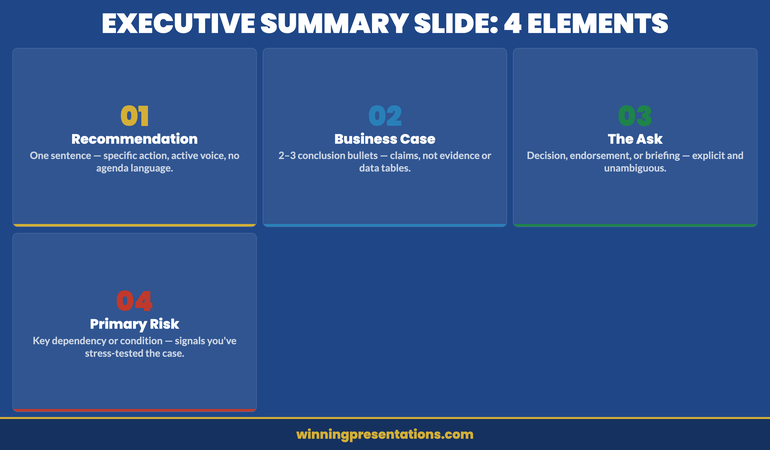
08 Apr 2026

Resource Allocation Presentation: Structuring the Case When Budgets Are Contested

Quick Answer

A resource allocation presentation succeeds when it reframes the request from “we need resources” to “here is the cost the organisation is currently bearing by not having them.” Lead with the business impact of the current resourcing gap, quantify where possible, and present headcount or budget as the solution to a named problem — not as a departmental ask. The decision-makers approving your request are evaluating whether the business case justifies the investment, not whether you deserve support.

Priya had been waiting six months for approval to hire four additional analysts in her operations team. The backlog was growing. Her existing team were working consistent twelve-hour days. The quality issues were escalating. She had a presentation slot at the quarterly resource review and she was confident the case was obvious.

She opened with: “We need four additional FTEs in operations to manage the current workload and address the backlog that’s been building since Q3.”

The CFO responded: “We’re in a constrained environment. Can you look at prioritising internally and coming back to us with a revised request?” Meeting closed. No decision. Priya left without the headcount.

Three months later, a different team in the same organisation made an almost identical request using a different framing. They opened with the cost of the quality failures, not the size of the headcount gap. They quantified the revenue at risk from the backlog. They got approval the same day.

The two presentations had the same underlying business case. The difference was structural. One asked for resources. The other made the cost of not resourcing impossible to ignore.

Presenting a headcount or budget request this quarter?

Check whether your resource case is framed to get a decision:

  • Does your opening slide describe the business cost of the gap — not the size of the gap?
  • Have you quantified the impact in terms the CFO uses (revenue, cost, risk)?
  • Have you pre-empted the “prioritise internally” objection with a clear slide?

The Executive Slide System includes business case slide frameworks for resource requests, headcount justifications, and budget approvals. Explore the System →

Why Resource Requests Fail at the First Slide

The structural failure in most resource allocation presentations happens before the first supporting slide. It happens in the way the request is framed — and the framing sets the entire tone of the decision-making conversation that follows.

When you open a resource request with “my team needs X headcount” or “we need an additional £Y to deliver this programme,” you have inadvertently positioned yourself as a department competing for a limited pool of organisational resource. The CFO’s mental model shifts to rationing mode: who else is asking, what is the priority order, can this be deferred?

By contrast, when you open with the business impact of the resourcing gap — the revenue at risk, the regulatory exposure, the client attrition rate, the project delay costs — you have positioned the resourcing decision as an organisational investment decision with a clear return. The CFO’s mental model shifts to investment mode: what is the cost of acting, what is the cost of not acting, which is higher?

This is not a rhetorical trick. It is a structural accuracy. In most cases where resource requests are genuinely justified, the business cost of underresourcing is real and quantifiable. The problem is that presenters know this cost intuitively but rarely make it explicit in the presentation. They present the solution (more headcount) without first establishing the problem (the current cost of the gap) in terms that decision-makers recognise.

The fix is to invert the sequence. Present the problem in business cost terms first. Present the solution — the resource request — second. The business case then feels inevitable rather than aspirational.

The Reframe: From “We Need” to “Here Is the Cost”

Two-column comparison showing weak resource request framing versus business-cost reframe approach for executive presentations

The reframe requires identifying, before the presentation, what the organisation is currently paying — in cost, risk, or lost revenue — because the resource gap exists. This is the cost-of-inaction analysis, and it is the most important preparation step in building a resource allocation presentation.

For an operations team with a backlog, the cost-of-inaction might include: delay costs from client contracts with service level agreements, overtime costs already being incurred by existing staff, quality failure costs from rushed delivery, staff turnover risk from sustained overwork, and revenue at risk from clients considering alternative providers.

Not all of these will be fully quantifiable. Some will be directional estimates. That is acceptable — you are not building an actuarial model, you are building a business case. The standard is whether the aggregate cost picture is credible and directionally accurate. Executives making resource decisions are accustomed to working with estimates. They are not accustomed to presenters who have not attempted to quantify the cost at all.

Once you have the cost-of-inaction picture, the structure of your opening changes entirely. Instead of “we need four analysts,” you can open with: “The operations backlog is currently running at eight weeks, which is creating three types of business cost I’d like to walk you through — and I’m proposing a resourcing solution that addresses all three at a total cost significantly below what we’re currently absorbing.”

That opening does not ask for anything. It announces a cost problem and a solution. The ask comes later, after the problem has been established on its own terms.

For the financial slide structures that support this approach, see capital expenditure presentations: building the approval case for board-level investment decisions.

The Business Case Framework That Gets Resource Requests Approved

Stop presenting headcount and budget requests as departmental asks. The Executive Slide System gives you the slide structure to reframe resource allocation as a business investment decision — with the sequence that gets CFO approval.

  • Business case slide templates for headcount requests, budget approvals, and programme investment decisions
  • Cost-of-inaction slide frameworks that quantify the business impact of the current resource gap
  • AI prompt cards to build the five-slide resource case in under 15 minutes
  • Objection-handling slide structures for the “prioritise internally” and “revisit next quarter” responses

Get the Executive Slide System → £39

Designed for operations, finance, and programme leaders presenting resource cases to CFOs, board committees, and senior leadership teams.

The Five-Slide Resource Allocation Framework

Most resource allocation presentations contain too many slides. The information needed to make a resource decision is focused: what is the problem, what does it cost, what is the proposed solution, what will it cost, and what is the expected return? Five slides cover this sequence. Every additional slide is generally context the decision-makers do not need in order to make the decision.

Slide 1 — The problem framed in business cost terms. A clear statement of the current resourcing gap and its business consequences. Not “we are understaffed” but “current resourcing is producing three identifiable cost outcomes for the business.” Name the outcomes. Quantify where you can.

Slide 2 — The cost-of-inaction analysis. This is often the most important slide in the deck, and the one most presenters skip. Show what the business is currently absorbing because the resourcing gap exists: delayed delivery, quality failures, staff overtime, client risk, regulatory exposure. Present this as an ongoing cost, not a one-off event. “We are currently absorbing an estimated £[X]K per month in [specific cost categories].”

Slide 3 — The proposed resource solution. Now — and only now — introduce the headcount or budget ask. “We are requesting approval for [specific resource] at a total cost of [£X] per annum, beginning [date].” Keep this slide clean and specific. Include the full cost — salary, benefits, onboarding, equipment — so there are no surprises in the financial review.

Slide 4 — The return on the investment. What will change if the request is approved? Be specific about which of the costs identified in slide 2 will be reduced or eliminated, and on what timeline. “Full resolution of the quality issue within 90 days of hire. Backlog reduction to four weeks by end of Q3. Overtime cost eliminated within six weeks.” Specificity here is credibility.

Slide 5 — The ask and the timeline. What do you need from this meeting, and by when? “We need a decision today to begin recruitment in April and have resource in place before Q3 deliverables begin.” Include the consequence of delay: “Each month of delay extends the backlog by approximately [X] weeks and incurs an estimated [£Y] in additional overtime.”

Five slides. Tight, evidence-based, decision-ready. For financial presentation structures supporting this framework, see zero-based budget presentations: building the case from a clean baseline.

How to Quantify the Business Case

The most common objection to the cost-of-inaction approach is: “I can’t quantify the cost precisely enough to put it in front of a CFO.” This objection is worth addressing directly, because it stops many managers from making the attempt.

A CFO reviewing a resource request does not expect a fully audited, actuarially precise cost model. They expect a credible, directionally accurate estimate of what the business is absorbing. The standard is whether the numbers are defensible under reasonable questioning — not whether they are exact.

A workable approach: identify two or three cost categories that are genuinely attributable to the resourcing gap and where you have enough data to produce a directional estimate. For a backlogged operations team: overtime hours worked per month multiplied by blended hourly rate; client SLA penalty clauses at risk; project delay costs from postponed deliverables. You do not need all three. Even one well-evidenced cost category is more persuasive than a verbal claim that “the team is at capacity.”

When presenting estimated figures, be transparent about the methodology: “Based on current overtime hours, we estimate this is costing approximately £15K per month in premium labour costs — and that figure excludes the quality failure costs, which are harder to quantify but have been flagged three times in client reviews this quarter.” Transparency about limitations increases, rather than decreases, credibility with financially sophisticated audiences.

If you’re building the financial case for a resource request this quarter, the Executive Slide System includes slide templates and AI prompt cards specifically designed for cost-of-inaction analysis — the structure that reframes headcount requests as investment decisions for CFO review.

Handling “Prioritise Internally” Objections

Resource allocation presentation objection-handling roadmap: four steps from objection to decision-ready response

“Have you considered whether this could be addressed through internal prioritisation?” is one of the most common responses to resource requests, and one of the most difficult to handle in a presentation setting if you haven’t prepared for it.

The question is not inherently adversarial. It is a legitimate governance question — the CFO’s job is to ensure that resource allocation reflects genuine need rather than departmental preference. The best response addresses it on those exact terms.

The preparation involves completing a credible internal prioritisation analysis before the presentation. What could the team stop doing, reduce in scope, or defer in order to absorb the additional demand? What is the business consequence of each trade-off? Present this analysis proactively — ideally as a dedicated slide in your five-slide framework — rather than waiting to be asked.

A slide that says “We have reviewed internal prioritisation options. Scenario A: defer [specific deliverable] to H2, with [specific business consequence]. Scenario B: reduce [specific workstream] to minimum viable scope, with [specific quality or risk consequence]. Neither scenario resolves the backlog within the Q3 timeline. The most cost-effective resolution remains the resource investment proposed.” This slide pre-empts the objection and demonstrates organisational rigour.

When the objection arises anyway — as it often does — you can respond: “We’ve actually modelled that, and it’s on slide 4. The short version is that the two realistic internal options both carry business costs that exceed the cost of the resource investment over a 12-month horizon. I’d be happy to walk through the detail.” You cannot be sent away to do work you’ve already done.

When to Present and When to Pre-Sell

The formal resource allocation presentation is not where decisions are made. In most organisations, significant resource decisions are made — or at minimum, strongly influenced — in the conversations that happen before the formal meeting. Understanding this changes how you should manage the process.

The most effective resource requesters approach formal presentations as confirmation meetings rather than persuasion meetings. By the time they walk into the room, the CFO or relevant budget holder has already seen the cost-of-inaction analysis in a one-to-one conversation, has had their primary concerns addressed, and has indicated — at minimum — that the case is credible. The formal presentation is where the decision is formalised, not where it is won.

This means the most important step in a resource allocation process often happens two weeks before the presentation: a brief, direct conversation with the decision-maker where you share the headline cost-of-inaction figure and ask whether they want to see the full analysis. “I wanted to give you a heads-up before the resource review — we’ve done some analysis on the backlog cost and I think the number will be higher than expected. Would it be helpful to walk you through it before the formal committee session?” Most CFOs say yes.

This pre-sell approach does not compromise the formal process. It ensures that the formal meeting is productive, focused, and conclusive — rather than an exploratory conversation where the CFO is encountering the case for the first time and needs time to process it before committing to a decision.

Today’s companion article on screen sharing presentations: keeping your audience engaged in virtual approval meetings covers the additional considerations for resource cases presented in remote or hybrid settings.

For revenue-related business cases, see revenue forecast presentations: structuring the financial narrative for senior review.

Stop Leaving Resource Decisions to “We’ll Revisit Next Quarter”

When resource requests are deferred, it’s usually because the business cost wasn’t clear enough to create urgency. The Executive Slide System includes the cost-of-inaction slide framework that makes deferral the more expensive option — and gets the decision at the meeting you’re in.

Get the Executive Slide System → £39

Built from business cases presented to CFOs and board committees across financial services, technology, and professional services.

Frequently Asked Questions

How many slides should a resource allocation presentation have?

Five slides is generally sufficient for a resource request presented to a CFO or senior committee: the problem framed in business cost terms, the cost-of-inaction analysis, the proposed resource solution, the expected return, and the ask with timeline. Additional slides may be appropriate for complex programme investments or multi-phase requests, but the core decision case should be completable in five. Appendices can carry supporting data for questions without adding to the main deck length.

What if I can’t quantify the business cost precisely?

Present a directional estimate with a transparent methodology, and acknowledge the limitations. A credible estimate — “we believe this is costing approximately £X per month, based on overtime hours and delayed delivery costs, though we acknowledge the quality failure component is harder to quantify” — is significantly more persuasive than a purely qualitative claim. CFOs are experienced at making decisions with imperfect data. They are not experienced at approving requests with no financial framing at all.

What’s the best time to submit a resource request?

Align resource requests with your organisation’s planning and budget cycle wherever possible — ideally the quarter before the cycle in which you need the resource in place. Outside of formal cycles, the right time is when the business cost of the gap has become quantifiable and significant. Presenting a resource request in a budget cycle is procedurally easier; presenting it mid-cycle requires a stronger business case. Both are possible — the strength of the cost-of-inaction analysis determines which will succeed.

How do I handle the response “headcount freeze is in place”?

A headcount freeze is a default policy response, not an absolute ceiling on resource decisions. The right response is to present the cost-of-inaction analysis as the reason the freeze should not apply to this request — or to explore whether the resource can be secured through alternative mechanisms: contract, consultancy, temporary cover, or internal reallocation with backfill. Presenting these alternatives proactively signals rigour and significantly increases the likelihood of a favourable decision even within a constrained environment.

The Winning Edge — Weekly Insights for Executive Presenters

Practical frameworks for structuring high-stakes presentations, managing executive audiences, and building decks that get decisions. Delivered every Thursday.

Join The Winning Edge →

Free resource: Executive Presentation Checklist — the pre-presentation checklist for business cases, resource requests, and approval presentations at board and senior leadership level.

About the Author

Mary Beth Hazeldine is the Owner & Managing Director of Winning Presentations. With 24 years of corporate banking experience at JPMorgan Chase, PwC, Royal Bank of Scotland, and Commerzbank, she has delivered high-stakes presentations in boardrooms across three continents.

A qualified clinical hypnotherapist and NLP practitioner, Mary Beth advises executives across financial services, healthcare, technology, and government on structuring presentations for high-stakes funding rounds and approvals.

Book a discovery call | View services
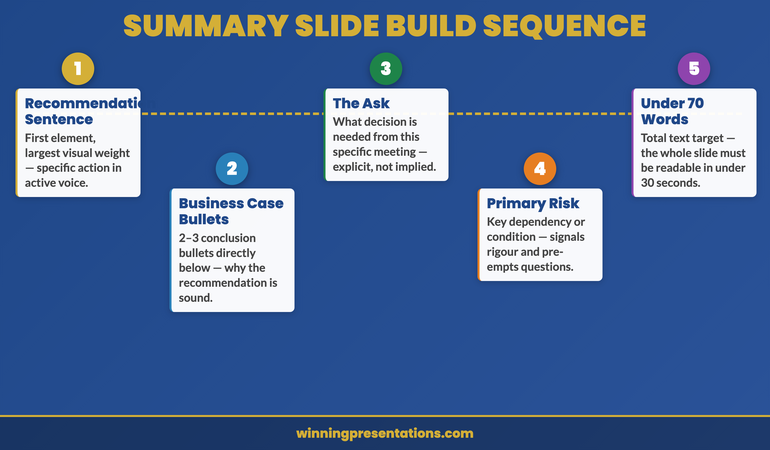
08 Apr 2026

The Executive Summary Slide: The One Slide That Decides Whether Your Deck Gets Approved

Quick Answer

An effective executive summary slide contains four elements in this order: the recommendation or key message (one sentence), the business case in brief (two to three bullets), the ask or next step, and the risk or dependency most likely to generate a question. It is not a table of contents and it is not a highlights reel. It is a decision-enabling summary — everything an executive needs to approve, reject, or redirect before reading the rest of the deck.

Henrik spent eleven days building the deck. Forty-six slides, a complete financial model, a three-scenario analysis, and an appendix that ran to another twenty pages. He had answers to every question he could anticipate. The CFO review was scheduled for 45 minutes.

The CFO arrived eight minutes late. She opened Henrik’s deck, went directly to slide three — the one he’d titled “Financial Summary” — spent approximately ten seconds on it, and said: “I can’t tell from this whether you’re asking for approval or flagging a problem. Can you summarise what you need from me in one sentence?”

Henrik had written a financial summary. He had not written an executive summary slide. The difference cost him the meeting. He left without a decision and was asked to return the following month.

The executive summary slide is the most consequential slide in any deck. It is not where you prove your analysis. It is where you tell your most senior audience member what to do with your analysis — before they’ve read a word of it.

Presenting a business case or approval request this month?

Check whether your executive summary slide is decision-ready:

  • Does it contain your recommendation in the first sentence — not your agenda?
  • Can a CFO glancing at it for 10 seconds know what you’re asking for?
  • Have you included the ask and the single most likely objection?

The Executive Slide System includes executive summary slide templates for budget approvals, project sign-offs, and board presentations. Explore the System →

What Makes an Executive Summary Slide Different

Most professionals confuse three very different things: an executive summary slide, an executive summary section (first few slides), and an executive summary document (a written brief). All three serve different audiences at different points in the decision-making process. Getting them mixed up is one of the most common structural errors in executive presentations.

An executive summary slide is a single slide — typically slide two or three in a deck — that contains all the information a senior decision-maker needs to orient themselves before reading the rest of the deck. It is not a summary of the whole deck. It is a frame for reading the whole deck.

The distinction matters because the purpose is different. A highlights reel says “here are the most interesting things in my presentation.” An executive summary slide says “here is what you need to know to process everything that follows.” The first is presenter-centric. The second is audience-centric.

In practice, a well-constructed executive summary slide means that an executive who only reads one slide — because they are late, called away early, or reviewing the deck asynchronously — can still reach an informed view. That is the test: could this slide stand alone as a briefing document for a decision? If the answer is yes, it is working. If the answer is no, it is a highlight reel or a table of contents, not an executive summary.

For the slide structure that supports this summary, see governance update presentations: structure and sequencing for board-level briefings.

The Four Elements of an Effective Executive Summary Slide

Four elements of an executive summary slide: recommendation, business case, ask, and risk — shown in a structured framework

Effective executive summary slides across financial services, professional services, and corporate settings share four consistent elements. Not always in the same visual format, but always with the same four types of content.

Element 1: The recommendation or key message. One sentence, active voice, containing the specific action or finding. “We recommend acquiring Hargreaves Digital at a consideration of £14M, funded through the existing capital programme.” Not “this presentation explores the potential acquisition of Hargreaves Digital.” The first is a recommendation. The second is an agenda item.

Element 2: The business case in brief. Two to three bullets — no more — summarising the primary reasons the recommendation is sound. These are not evidence bullets. They are conclusion bullets. “Acquisition price represents a 23% discount to comparable market transactions. Technology integration is achievable within existing Q3 timeline. Target customer base addresses the strategic gap identified in the January board review.” Each bullet is a claim that the rest of the deck will substantiate.

Element 3: The ask or next step. What does the audience need to do? “Board approval required today to maintain exclusivity period.” “Committee endorsement needed before proceeding to stage two.” “No decision required — this is a briefing ahead of next month’s formal approval.” Be explicit about whether this is a decision meeting, an advisory meeting, or a briefing. Ambiguity here creates the most friction in executive meetings.

Element 4: The primary risk or dependency. The single most significant risk or condition that could affect the recommendation. “Subject to legal due diligence completing by April 14.” “Assumes board approval of the supporting capital budget at today’s meeting.” This element signals to the audience that you have stress-tested the case and are presenting a considered recommendation, not a one-sided pitch. Executives distrust recommendations that contain no caveats.

Four elements. The slide should be readable in under 30 seconds. If it takes longer, it contains too much.

Executive Summary Slides Built for CFO and Board Review

Stop building your executive summary slide from scratch. The Executive Slide System includes decision-ready summary slide templates for 12 executive scenarios — each structured around the recommendation-first format that works at board level.

  • Executive summary slide templates for budget approvals, acquisitions, project sign-offs, and board updates
  • Slide-by-slide frameworks showing the exact sequence that gets CFO and board decisions
  • AI prompt cards to draft your recommendation sentence and business case bullets in under 10 minutes
  • Scenario playbooks covering the most common objections and how to surface them on the summary slide

Get the Executive Slide System → £39

Designed for executives presenting business cases, acquisitions, and strategic decisions at board and senior leadership level.

Common Executive Summary Slide Mistakes

The most common mistake is treating the executive summary slide as a table of contents. “This presentation covers: 1. Market context; 2. Options considered; 3. Financial analysis; 4. Recommendation.” This format tells the audience the structure of the deck, not the substance. An executive looking at this slide knows nothing more after reading it than they did before.

A related mistake is writing an agenda that masquerades as a summary by including more detail. “Section 1 — Market Context: We will review the competitive landscape and regulatory changes in Q1 2026. Section 2 — Options: We will present three acquisition targets with financial profiles…” This is still an agenda. The length has increased but the information content has not. There is still no recommendation, no ask, no risk.

A third common error is the data dump summary — listing key metrics from the financial model as a proxy for a recommendation. “Revenue: £24M (+12% YoY). EBITDA: £6.2M. Capex: £1.8M. Headcount: 142.” These are facts. They are not, on their own, a recommendation or a business case. An executive reading this slide knows the numbers but not what they mean or what the presenter wants them to do with them.

Perhaps the most damaging mistake is including everything. An executive summary slide that runs to eight bullets across four sections, or spans two slides, or contains a mini-chart and a risk table and a timeline, is trying to summarise the whole deck rather than frame it. The result is a slide that takes as long to process as the first five slides combined — and still leaves the reader uncertain about what they are being asked to decide.

The One-Sentence Rule: How to Write Your Recommendation

The recommendation sentence on the executive summary slide is the most load-bearing sentence in your entire presentation. It needs to do four things at once: state the conclusion, identify the decision being sought, name the business rationale, and set the scope. Most presenters write three or four sentences to do this. The discipline of the one-sentence rule forces a clarity that multiple sentences obscure.

A workable structure: “[Subject] is recommending [specific action] in order to [primary business rationale], subject to [key condition or approval].”

For example: “The strategy team is recommending accelerating the APAC expansion timeline from 18 to 12 months in order to capture the regulatory window before Q4, subject to board approval of the additional £2.1M capex.” Everything the CFO needs is in that sentence. The who, the what, the why, the condition, and the ask.

If you cannot write a one-sentence recommendation, you either do not yet have a recommendation (you have an analysis), or you have a recommendation that is not yet well-formed enough to defend. Both are signals to revisit the preparation before the presentation, not problems to solve with more slides.

The recommendation sentence should be the first text element on the executive summary slide — above the bullets, above the business case, above everything else. Some presenters prefer to use a large-font text treatment for this sentence so it reads at a glance. Whether you use a text treatment or standard slide formatting is a stylistic choice; what is not optional is the sentence itself being the first thing the reader’s eye reaches.

For applications to financial presentations specifically, see capital expenditure presentations: structuring the case for board-level approval.

If you’re presenting a business case, acquisition proposal, or capital request this quarter, the Executive Slide System includes recommendation-sentence frameworks and AI prompt cards specifically designed to help you draft the one-sentence summary your CFO will act on.

How to Structure Supporting Data on One Slide

Executive summary slide layout showing recommendation, three business case bullets, ask, and risk element — annotated structure

The visual structure of an executive summary slide should reinforce the hierarchy of information: the recommendation is the most important element, the business case bullets are second, the ask and risk are third. The visual layout should make this hierarchy legible at a glance.

A simple and effective layout: recommendation sentence at the top in bold or slightly larger text, occupying its own visual zone. Business case bullets directly below, with clear visual separation. Ask and risk in a smaller zone at the bottom — sometimes formatted as a single sentence, sometimes as two distinct labelled lines (“Decision required:” and “Key dependency:”).

Colour should reinforce hierarchy, not add decoration. Navy for the recommendation sentence. Standard weight for the business case bullets. Grey or muted text for the ask and risk if you want the recommendation to dominate visually. Avoid using multiple accent colours within the executive summary slide — it fractures attention.

Charts and data visualisations generally do not belong on an executive summary slide. They add processing time without adding clarity. If your business case depends on a specific data point, include it as a number in a bullet (“Acquisition at £14M represents a 23% discount to comparables”) rather than as a chart. Charts belong in the supporting slides, where the audience can give them the attention they need.

The executive summary slide should have no more than 70 words of text in total. This is a constraint that forces the right choices. If you are running over 70 words, you are still editing. Keep cutting until you reach only what a CFO needs at a glance to know what to do with the rest of the deck.

For revenue and financial presentation structures, see revenue forecast presentations: structuring a CFO-ready financial narrative.

Executive Summary Slide Versus Executive Summary Document

A frequent source of confusion in executive communication is the relationship between the executive summary slide and the executive summary document (sometimes called the one-pager or board paper executive summary). They serve different purposes at different moments in the decision process.

The executive summary document is typically circulated before the presentation. It is read in advance by committee members who want to be prepared. It can be 300 to 600 words. It can include more context, more nuance, and a fuller version of the business case. It is a reading document, not a viewing document.

The executive summary slide is seen during the presentation — often for the first time by at least some attendees. It is a viewing document. Processing time is seconds, not minutes. It must work visually and contextually in a room where the presenter is simultaneously speaking. It cannot carry the full weight of the written summary.

The mistake is treating one as a substitute for the other. Presenters who skip the pre-read document sometimes try to pack the executive summary slide with the detail that should have been in the written brief. The result is a slide that is too long to read during the presentation but not complete enough to stand alone as a document. It fails at both jobs.

If your organisation has a strong pre-read culture, your executive summary slide can be leaner — the audience already has the detail. If pre-reads are rarely read in practice, the slide needs to carry slightly more of the contextual weight. Know which environment you’re presenting in and design the slide accordingly. But in either case, the recommendation sentence, the ask, and the primary risk are non-negotiable elements. They belong on the slide regardless of what has been circulated in advance.

Today’s companion article on how to start a presentation with executives covers the spoken opening that accompanies this slide — the verbal equivalent of the recommendation-first structure.

Stop Getting “Can You Send Me a Summary?” After Every Presentation

When executives ask for a follow-up summary after a presentation, it usually means the executive summary slide didn’t do its job. The Executive Slide System includes slide templates that give CFOs and board members what they need at a glance — before the questions start.

Get the Executive Slide System → £39

Built from board-level banking and corporate finance presentations across financial services, healthcare, and technology.

Frequently Asked Questions

Where does the executive summary slide go in a deck?

Typically slide two or three — immediately after any title slide. It should appear before any context or background sections, before any options analysis, and well before the conclusion. If your executive summary slide is appearing near the end of your deck, it is not functioning as a summary — it is functioning as a conclusion. The purpose of the executive summary slide is to frame everything that follows, which means it must precede everything that follows.

How long should an executive summary slide be?

Aim for no more than 70 words of body text on the slide itself, excluding headings. The slide should be readable in under 30 seconds. If it requires more reading time than that, it contains too much information for a summary and needs to be edited further. The constraint is not arbitrary — it reflects the actual time an executive in a busy review meeting will give to a single slide before moving forward.

Should the executive summary slide include financials or data?

Include specific data only when a single number is central to the recommendation — and then only as an inline figure within a bullet, not as a chart or table. The executive summary slide is a narrative summary, not a data exhibit. Charts, tables, and financial models belong in the supporting slides. If you find yourself putting a data table on the executive summary slide, you are building a highlights reel rather than a decision-enabling summary.

What’s the difference between an executive summary and a BLUF?

BLUF (Bottom Line Up Front) refers specifically to the structural principle of stating the conclusion before the evidence — a writing and speaking discipline originating in military communication. An executive summary slide applies the BLUF principle visually to a presentation. The recommendation sentence is the BLUF; the rest of the executive summary slide is the minimal context needed to make that bottom line actionable for an executive audience.

The Winning Edge — Weekly Insights for Executive Presenters

Practical frameworks for structuring high-stakes presentations, managing executive audiences, and building decks that get decisions. Delivered every Thursday.

Join The Winning Edge →

Free resource: Executive Presentation Checklist — the pre-presentation checklist for building board-ready executive summary slides in financial services and corporate settings.

About the Author

Mary Beth Hazeldine is the Owner & Managing Director of Winning Presentations. With 24 years of corporate banking experience at JPMorgan Chase, PwC, Royal Bank of Scotland, and Commerzbank, she has delivered high-stakes presentations in boardrooms across three continents.

A qualified clinical hypnotherapist and NLP practitioner, Mary Beth advises executives across financial services, healthcare, technology, and government on structuring presentations for high-stakes funding rounds and approvals.

Book a discovery call | View services

08 Apr 2026

How to Start a Presentation: The Opening That Gets Executives to Listen

Quick Answer

To start a presentation effectively with executives, lead with your recommendation or key finding in the first sentence — not your agenda, not your name, not context. State what you need them to decide, approve, or know before you say anything else. Then follow with your supporting rationale. This approach respects their time, signals confidence, and keeps them engaged from word one.

Valentina had prepared for three weeks. The strategy review was the most important presentation of her year — a proposed restructuring of the European operations division that needed sign-off from the CEO and two board members. She had a strong recommendation, solid data, and a 22-slide deck she’d rebuilt from scratch.

She opened with: “Good morning, everyone. I’m Valentina, Director of Strategy, and today I’m going to walk you through our European operations review, covering the current landscape, our three-year trajectory, and the options we’ve identified.”

The CEO glanced at his phone after eight seconds. One board member poured water. The third opened a different document. Valentina was still on slide one.

It wasn’t the strategy that failed. It was the opening. Three weeks of preparation, and the audience had mentally checked out before the first substantive word.

Presenting to the board or senior leadership this week?

Before you rehearse the deck, check whether your opening passes this test:

  • Does your first sentence contain your recommendation or key finding?
  • Can someone who arrives 30 seconds late still understand what you’re asking for?
  • Have you removed every word of context that comes before the point?

If your opening doesn’t pass all three, the Executive Slide System includes opening slide frameworks built specifically for board and executive settings. Explore the System →

Why the First 30 Seconds Determine Everything

Executive time is genuinely scarce. A CFO chairing a governance committee review may sit through six or seven presentations in a single day. By the time yours begins, their cognitive bandwidth is already stretched. They are not waiting, fresh and curious, to be guided through your thinking. They are looking — consciously or not — for a reason to stop paying close attention.

Your opening either gives them a reason to lean in or confirms it’s safe to disengage. Within 30 seconds, they have formed a working hypothesis about whether this presentation will be worth their full attention. If your opening contains nothing that answers the questions “what does this mean for me?” or “what am I being asked to decide?” — they will drift.

This is not laziness or rudeness. It is rational prioritisation. Understanding that changes everything about how you should structure those first moments.

The presentations that hold executive attention from the first word share one feature: the audience knows what they’re there to do before the presenter moves to slide two. That clarity — delivered in the opening — is the single most powerful structural choice available to you.

It also works for the presenter. When you know that your first sentence contains the recommendation, you eliminate the low-level panic of “are they following this?” because you’ve already given them everything they need to follow it. The rest of the presentation is evidence for something they already know you’re arguing.

The Three Opening Mistakes That Lose Executive Rooms

Three common executive presentation opening mistakes shown in a comparison infographic

Most presenters make one of three structural errors at the start. Each one has the same effect: it delays the executive’s understanding of why they are in the room.

Mistake 1: The autobiography opening. “Good morning, I’m [name], and I’m the Head of [function], and today I’m going to walk you through…” The audience already knows who you are. They approved your invitation to present. Opening with your own name signals that you’re organising the presentation around your own comfort, not their time.

Mistake 2: The context avalanche. Beginning with market background, regulatory landscape, historical performance, or “where we’ve come from” before stating what you’re recommending. Executives live inside this context. They don’t need to be reminded of the environment before they hear your view of it. Start with your view; let context emerge as justification.

Mistake 3: The agenda slide. “Today I’ll cover three areas: the current situation, the options we considered, and our recommendation.” This opening tells executives they will need to wait — often 10 to 15 minutes — before they learn what you think. Most will fill that wait by multitasking. The agenda format is deeply embedded in corporate culture, but it is structurally wrong for executive audiences.

All three mistakes share a root cause: the presenter is building up to the point rather than starting with it. This is natural — it mirrors the way we think through problems. But executives are not there to watch you think. They are there to evaluate your conclusion.

The fix is to invert the structure. Put the conclusion first. Let the thinking follow. See how to structure this in board presentation versus board paper: what executives actually want.

The Opening Framework That Gets Executives to Listen

Stop building up to your point. The Executive Slide System gives you the slide-by-slide structure that places your recommendation first — and keeps executive attention through to the close.

  • Opening slide templates for decisions, updates, and approval requests — built for the recommendation-first format
  • AI prompt cards to draft your opening sentence and executive summary in under 10 minutes
  • Scenario playbooks for board presentations, steering committees, CFO reviews, and project approvals
  • Slide-by-slide frameworks showing exact sequence for 12 executive presentation types

Get the Executive Slide System → £39

Designed for executives who need a board-ready opening structure — not generic presentation tips.

The Recommendation-First Opening Structure

The recommendation-first opening is sometimes called the Pyramid Principle or BLUF (Bottom Line Up Front). The terminology varies, but the principle is consistent: state your conclusion before you build the case for it.

In practice, this means your first spoken sentence — and your first slide — contains the most important thing you need your audience to know or do. Not the most important thing chronologically. The most important thing strategically.

For a decision-seeking presentation, that sentence might be: “We are recommending a consolidation of the Frankfurt and Amsterdam operations, with a target completion date of Q3, and I’m here today to ask for board approval.” For a financial update, it might be: “Revenue is tracking 7% below plan for the quarter, primarily driven by two enterprise contract delays, and I want to walk you through how we’re addressing both.” For a project update, it might be: “Phase one is complete and on budget; phase two has a risk I need to flag before we proceed.”

Notice what each of these openings does: it tells the audience what kind of presentation this is going to be. Decision? Briefing? Risk escalation? They know what role they’re playing — evaluator, recipient of information, risk adjudicator — from the first sentence. That clarity dramatically increases engagement because it gives them a cognitive frame to hang everything else on.

It also demonstrates confidence. Executives who bury their recommendation until the final third of a presentation are often doing so unconsciously out of anxiety — if I build the case first, they’ll have to accept the conclusion. But the effect is the opposite. Executives who can see where a presentation is going are far more patient with the journey. Executives who cannot see where it’s going lose patience with the journey entirely.

For in-depth guidance on structuring the full slide deck around this approach, see presentation pacing and rhythm for executive attention spans.

How to Write Your Opening Sentence

The opening sentence is the hardest sentence in the presentation to write, and the most important one to get right. Most presenters never actually write it down — they just start talking. That is why most presentations begin poorly.

A strong opening sentence for an executive audience needs to contain three elements:

1. What the situation is (one clause). Not a detailed description — a single phrase that locates the audience in the context. “Following the Q1 review…” or “With the procurement timeline now confirmed…” The situation clause should be no longer than the time it takes to say aloud comfortably.

2. What you are recommending or reporting (the main clause). This is the substance of the sentence. “…we are recommending an 18-month partnership with Hargreaves Digital…” or “…the project is tracking to plan with one exception I want to walk you through.” This clause must contain the actual point.

3. What you need from them (the action clause). For decision presentations: “…and I need a decision today to keep the procurement window open.” For updates: “…and I’d welcome your input on the risk-mitigation approach.” For briefings, this clause may be implicit. But for any presentation where a decision or endorsement is being sought, it must be explicit.

Three clauses, one sentence. Write it out before the presentation. Read it aloud. If it runs beyond 25 words, it’s too long. Cut until the point is clear at normal speaking pace. If it sounds awkward, practise it until it doesn’t — the awkwardness is almost always familiarity, not structure.

Crucially: do not start the sentence with “I” or “Today.” Starting with the situation or the recommendation (“Following the strategic review…” or “We are recommending…”) immediately signals to the audience that this is about them and their decision, not about the presenter’s performance.

If you’re building several executive presentations across different scenarios this quarter, the Executive Slide System includes opening slide templates for 12 different executive scenarios — from budget approvals to board strategy reviews — with AI prompt cards to draft the opening sentence for each.

The 60-Second Opening Framework

60-second presentation opening framework: four steps from opening sentence to first supporting point

Once you have your opening sentence, the next 60 seconds of your presentation should follow a consistent structure. This is not a script — it is a sequencing principle.

Seconds 0–15: The opening sentence. State your recommendation, finding, or key message as described above. Pause after you finish. Resist the urge to immediately move forward. That pause — even if it feels long — creates emphasis. It gives the audience a moment to register what you’ve said before you continue.

Seconds 15–30: One sentence of calibration. Immediately after the opening, give the audience a single sentence that tells them what kind of evidence you’re going to share. “I’m going to walk you through the commercial case and the three risks we’ve stress-tested.” Or: “I have five slides — I’d like 12 minutes and then we can open for questions.” This sentence does two things: it sets the audience’s expectations and it signals that you have control of the time. Both reduce resistance.

Seconds 30–50: One sentence of context (if needed). If there is any background the audience genuinely needs to understand the recommendation — and cannot reasonably be assumed to know — this is where it goes. One sentence only. “The context you need: the procurement window closes at end of April, which is why we need a decision today rather than at the May committee.” If no contextual sentence is genuinely necessary, skip this step. Most experienced executives do not need it.

Seconds 50–60: Transition to first evidence point. “So let me start with the commercial case.” “The first thing I want to show you is the risk assessment.” This sentence bridges the opening to the body of the presentation and gives the audience permission to follow you into the detail.

Sixty seconds. Four moves. Opening sentence, calibration, context (optional), transition. If you have delivered those four elements clearly, you have given your executive audience everything they need to engage with everything that follows. The rest of the presentation — however complex — is now being processed through a clear frame.

For board-specific applications of this framework, see presenting to non-executive directors: what changes and what doesn’t.

When You’re Presenting Data or Analysis, Not a Decision

The recommendation-first approach is straightforward when you’re asking for approval. But many executive presentations are informational — quarterly updates, risk briefings, market analysis, performance dashboards. There is no single recommendation to lead with. So how does the same principle apply?

The answer: replace “recommendation” with “implication.” Every data presentation has a headline — the most important thing the data says. Your opening sentence should carry that headline, not the data itself.

A performance update that begins with “Revenue is down 3%, operating costs are tracking to plan, and the pipeline is recovering faster than anticipated in two of our four regions” is an executive summary. It has a headline. By contrast, “Today I’m going to walk you through the Q1 performance dashboard” is an agenda. It has no headline.

The discipline here is the same: identify, before you walk into the room, the single most important thing the data is saying. Not the most interesting finding. Not the most surprising outlier. The most important thing from an executive decision-making perspective. Write it down. Lead with it.

This approach also changes what questions you receive. When you open with an agenda, executives often start asking questions before you’ve reached the relevant slide — because they are trying to determine the point. When you open with the headline, questions tend to come at the end, when they have the full picture. This produces better discussion and saves time.

If the data has no clear headline — no dominant implication — that is a signal to revisit the analysis before the presentation, not something to surface in the opening. Arriving in front of an executive team with a data set that doesn’t have a central message is a structural problem in the preparation, not the presentation.

Stop Rebuilding Your Opening from Scratch Every Time

The Executive Slide System includes scenario-specific opening slide templates — for decisions, updates, risk escalations, and financial reviews — so you’re not rewriting the structure for every presentation.

Get the Executive Slide System → £39

Designed for executives presenting at board and senior leadership level across financial services, technology, and professional services.

Frequently Asked Questions

What should the first slide of a presentation to executives look like?

The first slide should contain your recommendation, key finding, or the decision you’re asking for — not your agenda, not a title slide, and not a list of context bullets. The most effective first slide is one where an executive who glances at it for five seconds knows exactly why the presentation is happening and what they are being asked to do. A title plus one sentence is often sufficient.

Is it unprofessional to skip an agenda slide when presenting to senior executives?

Not only is it not unprofessional — for executive audiences, skipping the agenda slide is often the more credible choice. Agenda slides delay the substance of your presentation and signal that you’re structuring around your own comfort rather than the audience’s time. A brief verbal calibration sentence (“I have five slides and I’ll need 12 minutes”) serves the same navigational purpose without slowing the opening. For presentations of fewer than 30 minutes, an agenda slide adds no practical value for an executive audience.

What if I need to give background context before I can state my recommendation?

The question to ask is whether the context is genuinely necessary for the audience to understand the recommendation — or whether it is context you are providing to reassure yourself that you’ve done the groundwork. Most of the time, executives either already know the context or can infer it from the recommendation itself. If specific contextual facts are essential, include one brief calibration sentence before the first evidence slide. Do not spend the first five minutes building context the audience already has.

How long should my presentation opening last?

For executive presentations, the opening — from the first word to the first evidence slide — should take no longer than 60 to 90 seconds. This includes your opening sentence, a calibration phrase, optional context, and a transition to your first point. If your opening is running longer than this, you are building up to your recommendation rather than leading with it. Identify what you’re saving for the end and move it to the start.

The Winning Edge — Weekly Insights for Executive Presenters

Practical frameworks for structuring high-stakes presentations, managing executive audiences, and building decks that get decisions. Delivered every Thursday.

Join The Winning Edge →

Free resource: Executive Presentation Checklist — the pre-presentation checklist used to prepare board-level presentations across financial services and corporate finance.

About the Author

Mary Beth Hazeldine is the Owner & Managing Director of Winning Presentations. With 24 years of corporate banking experience at JPMorgan Chase, PwC, Royal Bank of Scotland, and Commerzbank, she has delivered high-stakes presentations in boardrooms across three continents.

A qualified clinical hypnotherapist and NLP practitioner, Mary Beth advises executives across financial services, healthcare, technology, and government on structuring presentations for high-stakes funding rounds and approvals.

Book a discovery call | View services
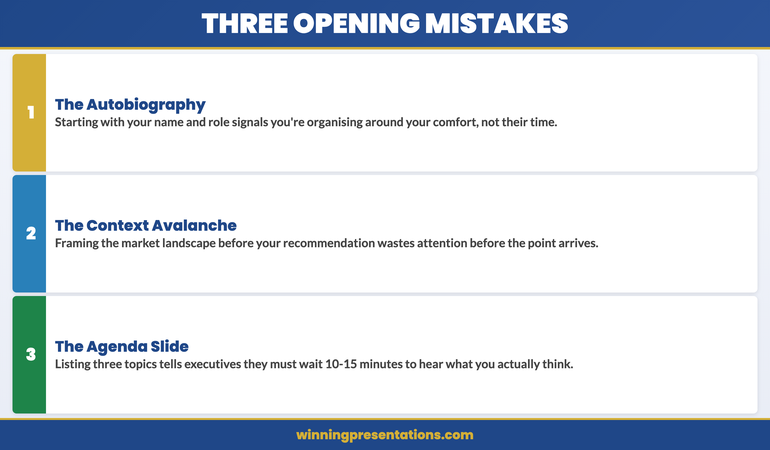
07 Apr 2026

The Hostile Questioner Simulation: Stress-Test Your Answers Before the Room Does

Quick answer: A hostile questioner simulation is a structured rehearsal exercise in which colleagues challenge your answers under conditions that mimic the pressure of the real executive meeting. It is the most reliable way to identify the gaps in your Q&A preparation before those gaps become visible in the room. The simulation works because it compresses the emotional and cognitive conditions of real Q&A into a controlled environment where you can practise and adjust without consequences.

Kenji had prepared more thoroughly for this board presentation than for any other in his career. He had rehearsed the deck twice, reviewed the financial model, pre-read the board papers, and anticipated six questions he thought were likely. When the Non-Executive Director challenged him on a specific assumption in the revenue model — an assumption that was methodologically sound but superficially easy to attack — Kenji answered competently. But he felt his voice tighten. He heard himself become slightly defensive. He watched the NED’s expression shift from interrogative to satisfied.

After the meeting, his CFO told him the presentation had gone well overall, but flagged the moment with the NED. “You answered correctly,” she said. “But you looked rattled. That matters in a room like this.” Kenji asked what he should have done differently. “You needed to have been in that moment before,” she said. “The answer wasn’t the problem. The unexpectedness was the problem.”

The CFO’s observation points to something that conventional Q&A preparation almost always misses. Preparing answers to likely questions is necessary but not sufficient. What determines performance under hostile Q&A is not primarily whether you know the answer — it is whether you have experienced the emotional and physiological conditions of challenge before you walk into the room. That experience is what the simulation creates.

The hostile questioner simulation is, at its core, an inoculation exercise. It does not eliminate the discomfort of challenge — it reduces its novelty, which reduces its power to destabilise.

Preparing for high-stakes Q&A?

The Executive Q&A Handling System is a structured approach to predicting and preparing for executive Q&A — including frameworks for anticipating hostile question patterns and building answers that hold up under scrutiny.

Explore the System →

The Problem With Traditional Q&A Preparation

The standard approach to Q&A preparation involves compiling a list of likely questions and drafting answers to each. This is useful — and should remain part of any preparation process — but it has two significant limitations that become visible only under real conditions.

It optimises for content, not for performance under pressure. A well-drafted answer in a preparation document is produced in conditions of low stress, unlimited time, and no social consequence for a weak response. The same answer, delivered under challenge from a sceptical Non-Executive Director, is produced under entirely different conditions. The cognitive load is higher. The emotional stakes are visible. The time pressure is real. The answer that looked clean on paper often sounds hesitant, over-hedged, or defensive in the room.

It cannot anticipate the follow-up. Hostile questioners rarely accept a first answer and move on. They push — often with a follow-up that accepts the substance of your answer while attacking the framing, or that redirects to a related vulnerability. A preparation document can anticipate the first question. It cannot anticipate the third exchange in a sequence, because that exchange depends on the specific choices made in the first two. Only a live simulation can generate the genuine unpredictability of an experienced interrogator.

These limitations do not mean that written preparation is unhelpful — they mean that it is incomplete. The simulation fills the gap between preparation and performance.

Why Hostility in Q&A Follows Predictable Patterns

Hostile Q&A in executive settings is not random. It follows a small number of recurring patterns that can be anticipated and prepared for specifically. Understanding these patterns transforms the simulation from a general stress-exposure exercise into a targeted preparation tool.

The stress test. The questioner pushes on a position not because they necessarily disagree with it, but to assess how you handle pressure. The question is often framed as a challenge to your methodology, your assumptions, or your confidence in the conclusion. The intent is less about the content and more about observing how you respond when challenged. The indicator is the quality of your second answer — the one you give after you have been pushed.

The loaded premise. The question contains an embedded assumption that, if accepted, positions any answer as a concession. “Given that your team has consistently missed this metric for the past three quarters…” is a loaded premise — it accepts as given something that may be contested. Accepting the premise before answering it transfers control of the narrative to the questioner. The correct response is to address the premise explicitly before answering the question.

Scope expansion. The questioner uses your answer to a specific question as a bridge to a broader topic that you may be less well prepared for. “You’ve addressed the operational impact — can you also speak to the regulatory exposure?” moves from a territory you anticipated to one you may not have. The effective response is to acknowledge the legitimacy of the broader question while clearly framing what you can answer now and what requires further analysis. For related patterns, see this guide on handling hostile questions in board meetings.

The authority challenge. The questioner questions your credentials to make the assertion rather than questioning the assertion itself. This is particularly common in cross-functional presentations where the presenter is speaking on topics that touch another executive’s domain. The authority challenge is a social manoeuvre as much as an intellectual one — and responding to it as if it were purely intellectual often misses the dynamic.

The Three-Layer Simulation Framework

The most effective hostile questioner simulations are structured in three layers of escalating intensity. Each layer serves a different function in the preparation process, and all three should be completed in the sequence below for maximum benefit.

Five-step framework for running an effective hostile questioner simulation before executive presentations

Layer one — Question mapping. Before any live simulation, conduct a systematic mapping of the questions most likely to arise and the questions you most hope will not. These are different lists and both are necessary. The first list drives the content of your written preparation. The second list drives the focus of your simulation — because the questions you hope will not arise are almost certainly the ones a hostile questioner will reach for. A useful exercise at this stage is to brief a colleague on your presentation content and ask them to identify the three points they would push on if they were seeking to challenge your credibility. Their perspective as an intelligent insider is often more accurate than your own assessment of where you are vulnerable.

Layer two — Structured challenge session. With one or two colleagues briefed on your material and given explicit instructions to challenge hard, run a full Q&A session lasting 20 to 30 minutes. The challengers should cover all four hostile question archetypes — stress test, loaded premise, scope expansion, and authority challenge — and should push back on first answers rather than accepting them. You should respond as you would in the real room: under time pressure, without notes, and without stopping to explain yourself mid-answer. The session should feel uncomfortable — that discomfort is the point.

Layer three — Gap analysis and refinement. Immediately after the simulation, while the experience is fresh, identify every question where you hesitated, gave a weak answer, or felt rattled. These are your priority preparation targets. For each one, write a revised answer — clear, specific, and no longer than 60 seconds when spoken aloud. Then return to your challengers for a focused second session covering only the gap questions. This second session is typically shorter (10 to 15 minutes) and produces the most significant improvement in both content quality and delivery confidence.

The Executive Q&A Handling System

A structured system for predicting and handling executive Q&A — designed for high-stakes presentations where the questions are as consequential as the content.

  • Framework for predicting the questions most likely to arise in any executive meeting
  • Structured approaches for handling the four main hostile question archetypes
  • Answer frameworks that hold up under follow-up pressure
  • System for building and maintaining an executive Q&A preparation habit

Get the Executive Q&A Handling System — £39

Designed for executives preparing for Q&A in high-scrutiny board and leadership meetings.

How to Recruit Your Internal Challengers

The quality of the simulation depends almost entirely on the quality of the challengers. A colleague who softens their challenge to avoid causing discomfort defeats the purpose of the exercise. Recruiting the right people — and briefing them correctly — is as important as the simulation itself.

Select challengers with genuine subject knowledge. The most effective challengers are people who know your subject well enough to identify real weaknesses — not people who will ask generic difficult questions. A colleague from finance, risk, or a directly adjacent function is usually a better challenger than a generalist, because they can probe the same dimensions a real hostile questioner would. Their challenge will land closer to the actual vulnerability than the challenge of someone working purely from the question list you have given them.

Brief them to be genuinely uncomfortable to answer. The default social behaviour of a colleague asked to challenge you is to be challenging-but-supportive — to push but pull back before causing real discomfort. This instinct is natural and must be explicitly overridden. Your brief to your challengers should include a clear instruction: “I need this to feel like the worst version of the real meeting. Don’t ease up. If I look rattled, that’s useful information.” Without this explicit permission, most colleagues will moderate their challenge.

Brief them on the four hostile archetypes. Give each challenger a written brief that includes the four main hostile question types — stress test, loaded premise, scope expansion, authority challenge — and ask them to use each at least once across the session. This ensures that your simulation covers the full range of challenge you might face, rather than focusing on the most obvious lines of questioning. For related preparation strategies, see the companion article on addressing objections before they are raised in Q&A.

The Executive Q&A Handling System includes a structured framework for predicting and preparing for the specific question archetypes most likely to arise in your meeting context.

Running the Simulation: Rules and Format

The following rules make the simulation as useful as possible. Each rule addresses a common shortcut that reduces the exercise’s effectiveness.

Four hostile question archetypes that executives should prepare for in Q&A simulation exercises

No stopping to explain. In the real meeting, you will not be able to pause, step out of your presenter role, and explain what you meant to say. The simulation should replicate this condition exactly. If you give a weak answer, it stands — you do not get to revise it mid-session. The discipline of living with imperfect answers in the simulation is what makes the experience useful. Stopping to explain converts the simulation into a seminar, which has no preparation value.

No notes for your answers. Your challengers may have notes. You should not. If you answer from notes in the simulation, you will not develop the cognitive pathways that allow you to construct clean answers under real pressure. The simulation is specifically designed to build those pathways through repetition under stress. Notes short-circuit the process.

Record the session. The most valuable data from a simulation is the difference between how you thought you performed and how you actually performed. These two assessments are almost never identical. Recording the session — even audio only — allows you and your challengers to review specific moments with precision rather than relying on impressions. Pay particular attention to pace, to hedging language, and to the quality of your second answers after a follow-up challenge.

Do not debrief immediately. The instinct after a difficult simulation is to debrief in the same room, immediately. Resist this. Allow 30 minutes before reviewing the recording or discussing the session. The initial emotional response to being challenged — even in a safe environment — can distort the analytical assessment. A brief gap allows you to separate the experience of the challenge from the evaluation of your performance, and produces more accurate identification of genuine gaps. For the parallel challenge of managing risk committee scrutiny, see this guide on identifying Q&A blind spots before risk committee meetings.

Processing the Feedback Without Defensiveness

The feedback from a simulation is inherently personal — it reveals gaps in your preparation, weaknesses in your argumentation, and moments where your composure broke down. Receiving this feedback without defensiveness requires a specific mindset that is worth establishing explicitly before the session begins.

Treat gaps as information, not as judgements. A gap identified in a simulation is a gap you can address before the meeting. A gap that surfaces for the first time in the real room cannot be addressed — it simply becomes part of the record of that meeting. The simulation’s purpose is to surface gaps in a context where they are correctable. Receiving that information with gratitude rather than defensiveness accelerates the preparation cycle.

Distinguish between content gaps and performance gaps. Some weaknesses revealed in a simulation are content gaps — the answer is genuinely incomplete or the analysis has a real hole. Others are performance gaps — the content is sound but the delivery under pressure was unclear, defensive, or hesitant. These require different responses. Content gaps require further analysis and a revised answer. Performance gaps require repetition — giving the same answer again, more cleanly, until the delivery matches the quality of the content.

Focus debrief time on the follow-up questions. The most revealing moments in any simulation are typically the third or fourth exchange in a sequence — when the initial answer has been challenged and the follow-up challenges have been layered on top. These late-sequence exchanges are where real preparation is tested, and where most presenters discover they run out of both content and composure simultaneously. The debrief should spend proportionally more time on these multi-exchange sequences than on standalone questions that were answered well.

The Day-Before Refresh That Consolidates Gains

The gap between the simulation and the real meeting is where most of the preparation gains are consolidated or lost. A structured day-before refresh — distinct from the full simulation and shorter in duration — ensures that the improvements made during the simulation are accessible under real conditions.

Review the gap question list, not the full question list. The day before the meeting is not the time to rehearse answers to every possible question. It is the time to run through the specific questions where you identified gaps in the simulation — testing whether the revised answers are now clean and confident. Limiting the review to these priority questions prevents the cognitive overload that comes from attempting to rehearse everything.

Speak the answers aloud. Reading a preparation document silently is qualitatively different from speaking the answer aloud under conditions that approximate the real room. The day-before refresh should involve speaking — ideally in a physical posture similar to how you will present (standing if you will be standing, at a table if you will be seated). This physical rehearsal activates the motor memory of the delivery, not just the cognitive memory of the content.

Close with a confidence anchor. After the content review, spend five minutes reviewing the questions from the simulation that you answered well — cleanly, confidently, without hesitation. This is not indulgence; it is calibration. Entering a high-stakes Q&A with your recent mental reference points skewed toward difficulty produces a different physiological state than entering with a balanced recent reference — and that physiological state affects your first answer. The day-before refresh should end with evidence of your own competence, not with a catalogue of everything that could go wrong. For techniques specifically related to vocal control in the Q&A context, see the companion piece on using your voice to command the room during Q&A.

Build a System for Predicting Executive Q&A

The Executive Q&A Handling System gives you a structured approach to anticipating the questions most likely to arise in any executive meeting — so your simulation starts from the right question list.

View the Executive Q&A Handling System — £39

Designed for executives preparing for high-scrutiny board and leadership Q&A.

Frequently Asked Questions

How far in advance of the presentation should I run the simulation?

The ideal timeline is to run the main simulation two to three days before the presentation, leaving sufficient time to address the gaps identified and conduct a shorter second session. Running the simulation the evening before leaves insufficient time for meaningful gap-closing. Running it more than a week before allows too much time for the specific emotional and cognitive experience of being challenged to fade, reducing its inoculation effect. If you can only conduct one session, two days before is the optimal timing.

What if I don’t have access to knowledgeable colleagues who can challenge me effectively?

There are two alternatives. The first is to brief a generalist colleague on the question archetypes and give them a written list of challenging questions drawn from your question mapping exercise. While a generalist challenger cannot probe the content as deeply as a subject-matter colleague, they can still generate the social and emotional experience of challenge — and that experience has preparation value even without deep content knowledge. The second alternative is self-simulation: recording yourself presenting, then reviewing the recording as a hostile questioner would, identifying every point where a challenge could be mounted and drafting answers. This is less effective than live simulation but more effective than written preparation alone.

How do I handle a question in the real meeting that I genuinely cannot answer?

Acknowledge it clearly and commit to a specific follow-up. “I don’t have the precise data in front of me — I’ll send it to you by end of day tomorrow” is a credible response that maintains trust. What undermines trust is either bluffing — attempting an answer you are not confident in — or over-hedging, which signals that you are uncertain about a wide range of things rather than one specific data point. The simulation is the safest place to practise saying “I don’t know” cleanly — to build the habit of using it precisely and without apology when the situation genuinely requires it.

The Winning Edge — Weekly Newsletter

Executive presentation strategy, delivered every Thursday. Frameworks for Q&A preparation, difficult questions, and high-stakes executive communication.

Subscribe to The Winning Edge

About the Author

Mary Beth Hazeldine is Owner & Managing Director of Winning Presentations. With 24 years of corporate banking experience at JPMorgan Chase, PwC, Royal Bank of Scotland, and Commerzbank, she advises executives across financial services, healthcare, technology, and government on structuring presentations for high-stakes funding rounds and approvals. Connect at winningpresentations.com.