

Copilot Presentation Outline to Final Deck: The 4-Pass Workflow That Saves 6 Hours
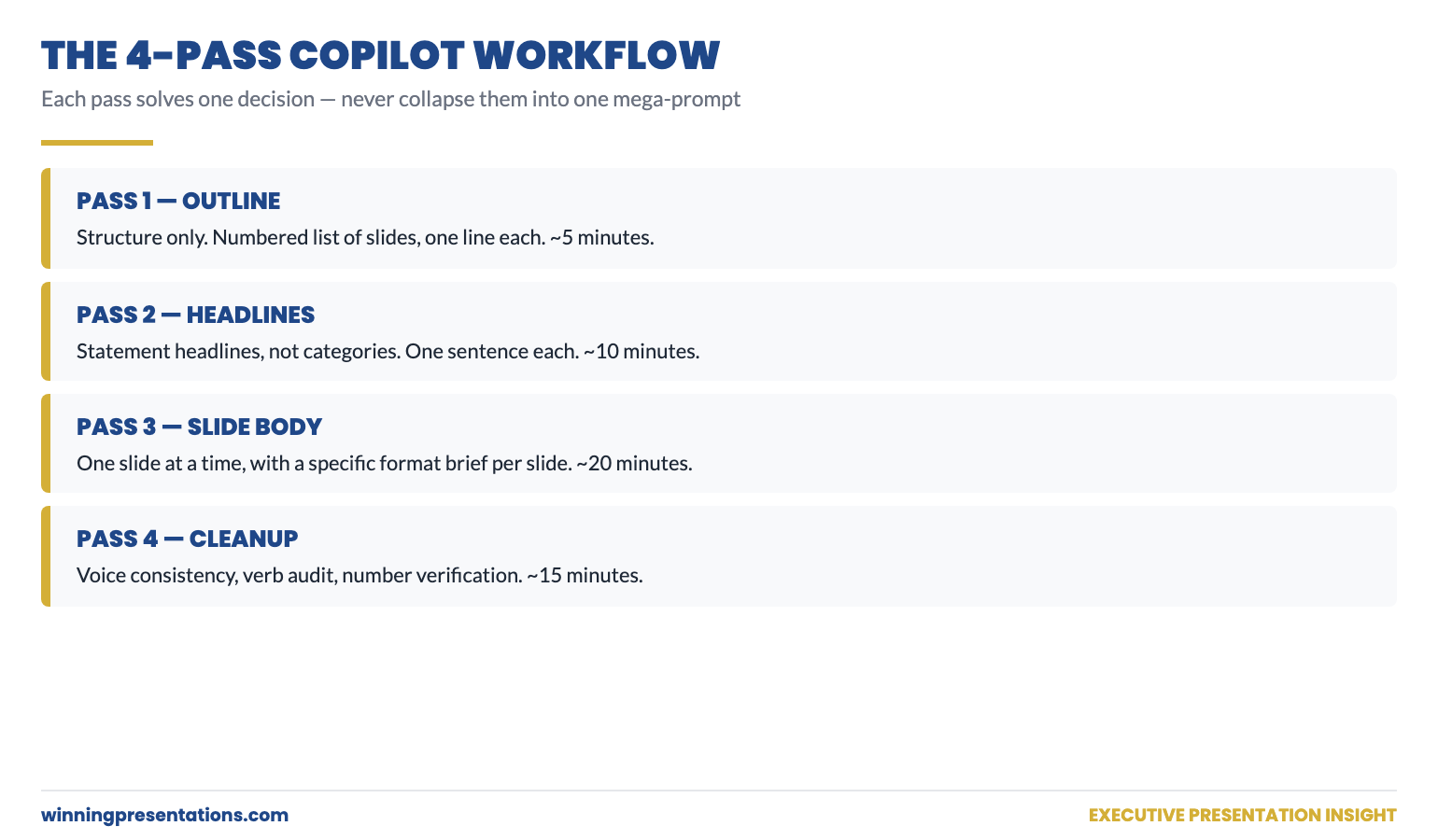
Quick answer: Most senior professionals use Copilot inefficiently for presentation work — they ask for a full deck in one prompt, then rewrite the output four or five times until something is usable. The 4-pass workflow flips this. Pass 1: outline only. Pass 2: headlines for every slide. Pass 3: body content for one slide at a time. Pass 4: editorial cleanup. Each pass takes one focused prompt, and the total time from outline to final deck drops from a half-day to roughly an hour.
In this article
- Why “give me a full deck” is the wrong first prompt
- Pass 1: outline-only — getting structure before words
- Pass 2: slide headlines — pinning the assertion before the evidence
- Pass 3: slide body — one slide at a time, with constraints
- Pass 4: editorial cleanup — the surgical fixes that take the deck over the line
- When to skip a pass (and when never to)
- FAQ
Tomás runs investor relations for a UK-listed industrial. Last quarter he had to build a results presentation in two days — full board-level review of trading performance, segment commentary, and the outlook. He fed Copilot one big prompt: full deck, twelve slides, the works. Copilot produced something. He spent the rest of the day rewriting it. By the end, almost no Copilot text survived. The deck was his work, finished late, with a substantial detour through AI that had not actually saved him time.
The next quarter, he tried a different approach. He broke the work into four short Copilot conversations, each with a single, narrow purpose. Outline. Headlines. Body. Cleanup. The total Copilot time was about 35 minutes. The total deck time, including his own thinking and editing, was just under three hours — for a deck of similar quality to one that had previously taken him close to ten hours. That was when he stopped writing single mega-prompts and started using AI in passes.
If you want a structured starting point
The Executive Prompt Pack contains 71 ChatGPT and Copilot prompts written specifically for senior-level presentation work — including pass-by-pass prompts for the workflow described in this article.
Why “give me a full deck” is the wrong first prompt
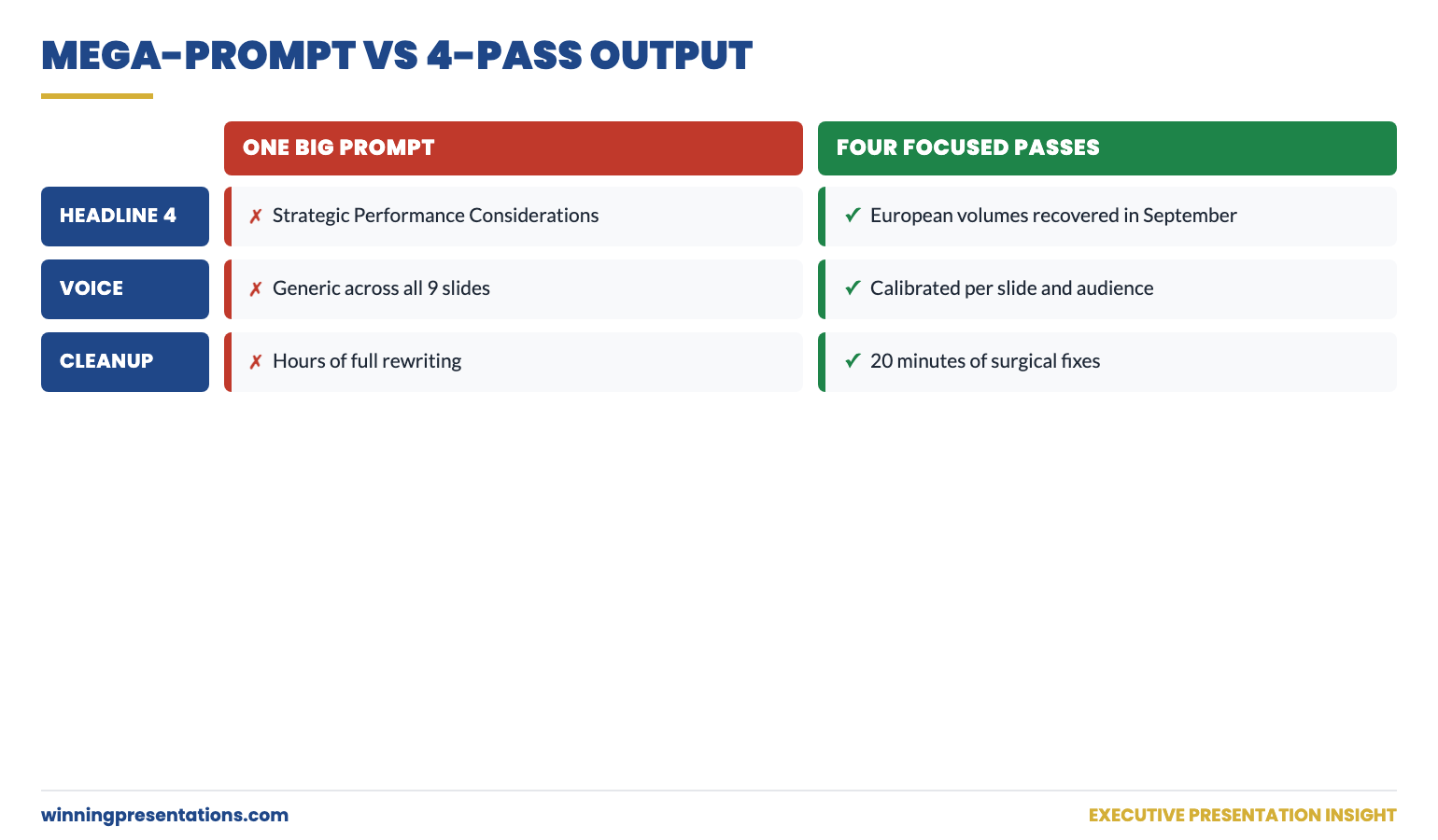
Asking Copilot for a full deck in one prompt sounds efficient. It is not. It collapses three different decisions — what to cover, how to assert each point, and how to write the body — into a single guess. Copilot has to make all three decisions simultaneously, with no opportunity for you to redirect when one of them is going wrong. By the time you see the output, the deck is built around an outline you would not have approved, with headlines you would not have written, in a voice you would not have used.
The fix is to make the same decisions in the same order you would make them if you were writing the deck yourself — first structure, then assertions, then evidence, then voice. Each pass uses Copilot to amplify your judgement on one decision at a time. You correct course at every step rather than rebuilding at the end.
Pass 1: outline-only — getting structure before words
The first prompt asks for an outline only. No body content. No headlines. Just the structure. The output should be a numbered list of slides with one-line descriptions of what each slide covers.
Sample prompt: “Give me an outline only — numbered list of 9 slides — for a 25-minute board presentation on Q3 trading results for our European industrial business. Audience: 12-person board, sceptical of strategic context, want financial impact early. Decision: confirm full-year guidance and approve £6m additional CapEx for the German plant. One line per slide describing what it covers. Do not write headlines or body content. Do not include speaker notes. The first slide must contain the headline financial result; the last must contain the decision asked of the board.”
The output of pass 1 is read for one thing only: does the structure work? Are the right slides in the right order? Is anything missing? Anything redundant? Is the recommendation in the right place? If the outline is wrong, no amount of polish on later passes will save the deck. If the outline is right, the next three passes get progressively easier.
Edit the outline directly in the chat. Add or remove slides. Move things around. Then ask Copilot to confirm the revised outline before pass 2.
Pass 2: slide headlines — pinning the assertion before the evidence
The second prompt asks Copilot for headlines — and only headlines — for each slide in the agreed outline. The constraint that matters here is “statement, not category.” A category headline is “Q3 Results”; a statement headline is “Q3 EBIT delivered £42m, ahead of guidance by £4m on lower-than-expected raw material costs.” The statement asserts the point the slide makes. The reader knows the conclusion before they read the body.
Sample prompt: “Using the agreed 9-slide outline, write the headline for each slide as a complete declarative statement — not a category. Each headline should make the point of the slide; the body content will support it. Headlines should be one sentence, maximum 15 words. Do not write body content yet. Use the actual financial numbers I gave you in pass 1 — do not insert placeholders.”
The output of pass 2 is read against your business judgement. Do the headlines actually assert what you want each slide to say? If a headline is hedged, sharpen it. If a headline buries the point, rewrite it. If a headline picks the wrong angle, change the angle. The headlines, once locked, become the spine of the deck — every body decision in pass 3 has to support its slide’s headline.
Pass 3: slide body — one slide at a time, with constraints
This is the pass most senior users get wrong. They ask Copilot to write all the body content in one prompt. Copilot then writes nine slides in roughly the same voice, with similar paragraph lengths, hitting similar emotional notes — and the deck reads as monotone. Each slide should have its own structure dictated by what the slide is doing.
The fix is to write body content one slide at a time, with a specific format brief for each. A summary slide gets a different structure from a chart slide; a recommendation slide gets a different structure from a risk slide.
Sample prompt for one slide: “Slide 4 headline: ‘European volumes recovered in September after the August softness.’ Body content for this slide: three short sentences, no bullet points, total 60 words maximum. Sentence 1 — name the September volume number and the year-on-year comparison. Sentence 2 — name the underlying cause (price normalisation in steel). Sentence 3 — name the read-across to Q4 (volumes expected to hold). Do not hedge — assert the read-across.”
Repeat this for every slide. It feels slower than it is. Each slide-body prompt takes 60–90 seconds to write and Copilot returns output in 5–10 seconds. The total pass-3 time for a 9-slide deck is typically 15–20 minutes — and the body content arrives already calibrated to your voice and the slide’s purpose.
Stop building each pass-prompt from scratch
The Executive Prompt Pack contains pre-written pass-by-pass prompts for the most common executive presentation scenarios — outline prompts, headline prompts, body-content prompts, and cleanup prompts, all designed to chain together as a workflow.
- 71 prompts covering board updates, capital cases, change proposals, Q&A prep, pitch decks
- Pass-by-pass prompts that chain together for the full workflow described above
- Headline prompts calibrated for declarative-statement output, not generic categories
- Instant download, lifetime access, £19.99
Get the Executive Prompt Pack — £19.99 →
Built for senior professionals across financial services, technology, and consulting.
Pass 4: editorial cleanup — the surgical fixes that take the deck over the line
The fourth pass is what most users skip. The deck looks finished — headlines, body content, structure all in place. But it is not yet a deck a senior reader will accept. Three specific cleanups separate “looks done” from “actually done.”
Cleanup 1 — voice consistency. Read the headlines aloud, top to bottom. Do they sound like the same person wrote them? If headline 3 hedges and headline 7 asserts, fix headline 3. If headline 5 uses different vocabulary from the rest of the deck, fix headline 5. The voice should be one voice throughout — usually achieved by sharpening the weakest two or three headlines to match the strongest.
Cleanup 2 — verb audit. Search the deck for filler verbs (“leverage”, “drive”, “unlock”, “enable”, “facilitate”). Replace each one with the specific verb that describes what is actually happening. “Leverage AI for productivity” becomes “use Copilot to draft proposals in 25 minutes.” Verbs are where AI output most reliably reverts to mush; the verb audit is the highest-yield 10 minutes you will spend on the deck.
Cleanup 3 — number check. Every number in the deck should be traceable to a source you trust. Copilot does not always invent numbers, but it does sometimes round, paraphrase, or transpose. The cleanup pass is when you verify each number against the original — a board pre-read with a wrong number is not recoverable from in the meeting.
When to skip a pass (and when never to)
Not every deck needs all four passes. For an internal team update or a working draft, you can compress passes 1 and 2 into a single prompt and skip the editorial cleanup. The risk profile is lower; the audience is more forgiving.
For board, investor, or executive committee work — never skip pass 4. The numbers must be verified, the verbs must be audited, the voice must be consistent. The hour you save by skipping cleanup is the hour you spend in the meeting watching the chair underline a number and ask where it came from.
For a 5-minute internal stand-up update — yes, skip everything except pass 3. One prompt, one slide, done.
The 4-pass workflow scales. You apply more passes for higher-stakes decks; you compress for lower-stakes ones. The discipline is in not collapsing all four passes into one prompt simply because it feels faster — because the time you save up front is paid back twice over in editing.
The prompt-side fix in this article works best when paired with the settings-side fix. For a deeper look at how to configure Copilot once so that every prompt inherits the right voice and audience, see the partner article on Copilot custom instructions for executives. Both fixes together produce dramatically better first drafts.
If you want the four passes already pre-built as paste-ready prompts, the Executive Prompt Pack (£19.99) contains pass-by-pass prompts that chain together for the workflow above — outline, headlines, body, cleanup.
The structural side of executive deck building — what each slide should actually contain, regardless of how it gets drafted — is worth reviewing alongside any AI workflow. The conventions of strong board presentation structure hold whether the body text was written by you, an analyst, or Copilot.
Cut your AI-deck time in half on the next presentation
71 ready-to-use prompts spanning every major executive presentation scenario, structured for the 4-pass workflow. £19.99, instant download, lifetime access.
Get the Executive Prompt Pack →
Designed for board updates, capital cases, change proposals, and pitch decks.
FAQ
Does the 4-pass workflow only work in Copilot, or also in ChatGPT?
It works in any conversational AI that holds context across a session — ChatGPT, Copilot, Gemini. The discipline of separating outline / headlines / body / cleanup is independent of the tool. The prompts in the Executive Prompt Pack are written for both ChatGPT and Copilot.
How long does the full 4-pass workflow take for a 10-slide deck?
Roughly 35–55 minutes of focused Copilot time, plus your own editorial judgement layered on top. Pass 1 is 5 minutes, pass 2 is 10 minutes, pass 3 is 15–25 minutes, pass 4 is 10–15 minutes. The total deck time end-to-end depends on how much thinking the underlying content needs from you — but the AI portion is dramatically faster than single-prompt iteration.
What do I do if pass 1 produces a structure I do not like?
Edit the outline directly in the conversation — tell Copilot which slides to add, remove, or reorder. Then ask it to confirm the revised outline back to you before moving to pass 2. This guarantees passes 2 onwards build on the structure you actually want, not the one Copilot proposed.
Can I run the 4 passes across multiple sessions or do they all have to be one conversation?
Same conversation is strongly preferred — Copilot’s context window holds the prior passes, so pass 3 can refer to “the headlines from pass 2.” If you do split across sessions, paste the prior output into the new session as a context block at the start. Continuity matters; without it, the deck loses voice consistency.
Get The Winning Edge — weekly
One sharp, story-led idea every Thursday on executive presentation craft, AI workflows, and the small habits that change how senior audiences receive you.
Not ready for the full system? Start here instead: download the free Executive Presentation Checklist — a one-page reference covering the structural moves that hold any executive deck together.
The next time you sit down to draft a deck with Copilot, resist the temptation to ask for everything in one prompt. Outline first. Headlines second. Body third. Cleanup last. Four passes, four focused decisions, one deck you can take into the room.
About the author. Mary Beth Hazeldine is Owner & Managing Director of Winning Presentations Ltd, founded 1990. With 24 years of corporate banking experience at JPMorgan Chase, PwC, Royal Bank of Scotland, and Commerzbank, she advises executives across financial services, healthcare, technology, and government on structuring presentations for high-stakes funding rounds and approvals.