

Annual Budget Presentation: The CFO-Approved Format That Secures Sign-Off Before Year End
Quick Answer
Annual budgets that secure CFO approval open with business outcomes, not financial figures. CFOs reject budget requests because they cannot see what the organisation gains—not because the numbers are wrong. A structured format reorders the presentation to lead with strategy, then moves to financial detail, risk mitigation, and alternatives considered. This structure is designed to give CFOs the information they need in the order they need it to evaluate the request.
Preparing your annual budget presentation now:
The 7-slide outcomes-first structure addresses how CFOs evaluate financial requests. If your budget has been rejected or required revision, the issue is likely structural, not financial.
Jump to:
Diane, VP of Operations at a UK logistics firm with 2,800 employees, had her annual budget request rejected twice. The first year, the CFO said the ask was “too high and not justified.” The second year, after she adjusted the figures downward by 12%, the response was the same: “Revise and resubmit.” Neither rejection was about the numbers. Her 31-slide presentation buried the strategic rationale—why the investment mattered to the organisation—in slide 22. The spreadsheets came first. The CFO couldn’t see what £6.8 million would do for the business.
In year three, Diane restructured to 7 slides. Slide 1: what the investment would enable for the supply chain network. Slide 2: how it aligned to the three-year strategic plan. Slide 3: the £6.8M ask and its breakdown. Slide 4: the assumptions behind the numbers. Slide 5: what would be at risk if the budget was cut. Slide 6: two alternatives she’d considered and rejected. Slide 7: the specific approval decision she needed. The CFO approved in the first review meeting. No revision requested. “You’ve done the hard thinking for me,” he said. Diane’s budget moved from year-long paralysis to execution within weeks.
Why Most Annual Budget Requests Get Rejected (Or Trapped in Revision Loops)
The conventional annual budget presentation is built backwards. It opens with financial summary tables, bar charts showing year-on-year growth, and category breakdowns. The logic seems sound: show the totals, show the detail, show the comparison, and the CFO will approve.
But that’s not how decision-makers process budget requests. A CFO who receives a 25-slide presentation opening with spreadsheet data doesn’t know whether you’re asking for £2 million or £20 million—or what the organisation gets in return—until slide 18. By then, they’re already thinking of questions, objections, and alternative scenarios. They loop back, ask for revisions, and the cycle repeats.
The core problem isn’t the budget amount. It’s the mental model. CFOs approve budgets when they understand three things in this order:
1. What does this money enable? Not what it costs. What does the organisation gain? What becomes possible? How does it move the needle on strategic priorities?
2. How does this connect to our stated strategy? Does it support the three-year plan? Does it address a known gap or bottleneck? Is it aligned to what we said we’d prioritise this year?
3. What assumptions underpin the request? CFOs approve confident asks, not uncertain ones. They need to see that you’ve pressure-tested the numbers, thought through the risks, and considered alternatives. That rigour signals competence and reduces their approval risk.
When a budget presentation skips these steps and leads with financial tables, the CFO is forced to work backwards—inferring the outcomes, checking alignment, and guessing at your assumptions. That creates friction, revision requests, and delays.
⭐ Maven Flagship — Executive Buy-In
Learn the structured approach senior professionals use to secure approval for high-stakes decisions
The Executive Buy-In Presentation System — 7 modules, self-paced, with monthly cohort enrolment and optional recorded Q&A.
£499, lifetime access to materials.
The 7-Slide Annual Budget Format: Outcomes First, Numbers Second
The framework that secures approvals follows a strict logic: establish outcomes and alignment before introducing financial asks. Each slide serves a specific decision-making purpose.
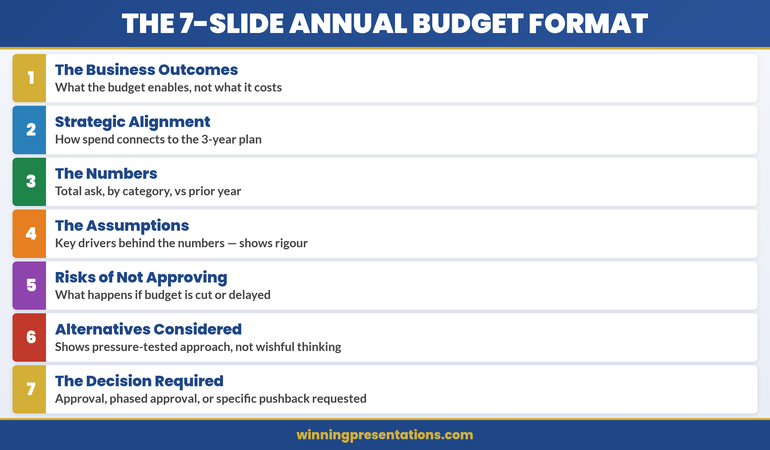
Notice the architecture: the first three slides build a narrative (outcomes → alignment → numbers). Slides 4–7 provide evidence and reduce decision risk. The CFO can now move through your logic without guesswork.
Slide 1: The Business Outcomes (Not the Cost)
Open with one clear statement of what the budget enables. Not what it costs. What becomes possible.
Wrong: “Annual Budget Request: £6.8M (Operations) + £2.3M (IT) + £1.4M (HR)”
Right: “This budget expands our logistics network capacity to process 40% more throughput without adding headcount, reducing per-unit delivery costs by 18% and unlocking the enterprise customer tier we’ve targeted in the three-year plan.”
The right version answers the CFO’s unconscious question: “What does this organisation gain?” Add one visual—a simple outcomes graphic, a network diagram, or a throughput chart—to reinforce the outcome. Then move on. This slide should take 90 seconds to present.
CFOs who see outcomes first are already mentally committed to exploring your ask. They know what they’re evaluating.
Slide 2: Strategic Alignment (Why Now? Why This?)
Now that the CFO knows what you’re asking for, connect it to the strategy. Show how the budget supports the published three-year plan, addresses a known strategic gap, or enables a stated corporate priority.
This slide removes guesswork. It says: “I’ve been paying attention to the organisation’s stated direction, and this budget is not a nice-to-have—it’s how we execute the strategy you’ve already approved.”
Use a simple visual: perhaps a 2×2 matrix showing the three strategic pillars and where your ask aligns, or a timeline showing when this investment is needed to hit strategic milestones. The text should be sparse—one or two sentences explaining the connection.
Alignment is a permission structure. It signals that your ask isn’t surprising or opportunistic; it’s the inevitable next step in executing a plan the board already endorsed.
Slide 3: The Numbers (Total Ask, Breakdown, Year-on-Year)
Now introduce the financial detail. By this point in your presentation, the CFO understands what you’re asking for and why it matters. The numbers are no longer a surprise; they’re the cost of delivering the outcomes you’ve already sold.
Keep this slide visual and simple. Use:
- Total request at the top in large type. Don’t bury the number.
- Category breakdown below (3–5 categories max). Operations, IT, People, Risk Mitigation, Innovation—whatever makes sense for your organisation.
- Year-on-year comparison. Show variance as a percentage of total budget. If you’re asking for a 7% increase, say so explicitly. If this is a flat budget with reallocation, show that clearly.
Never lead with the numbers. Position them as supporting evidence for an already-established case.
Slides 4–7: The Proof (Assumptions, Risks, Alternatives, Decision)
Slide 4: The Assumptions Behind the Numbers
CFOs approve confident budgets. They want to see that you’ve thought through the drivers behind your ask. What labour market conditions underpin your hiring forecast? What supplier contract renegotiations support your savings projection? What customer growth assumptions justify the IT investment?
List 3–5 key assumptions. For each, show one piece of supporting data: a market report, an internal trend, a contract timeline. This isn’t a deep dive—it’s proof that you’ve done rigorous thinking, not guesswork.
Slide 5: What’s at Risk If We Don’t Approve (Or Cut) This Budget
This is perhaps the most important slide after outcomes. It answers: “What happens if we say no?” Spell it out clearly and specifically.
Don’t be vague (“We’ll fall behind competitors”). Be concrete: “If we don’t invest in supply chain automation this year, our order-to-delivery time will remain at 6 days while competitors move to 3. We’ll lose the high-volume enterprise contracts where margins are 40% higher. Estimated impact: £2.1M in forgone revenue over 18 months.”
Risk clarity is a stronger motivator than outcomes for many CFOs. It frames the budget not as optional spending but as necessary defence.
Slide 6: Alternatives You Considered (And Why You Rejected Them)
This signals that you haven’t just asked for one thing. You’ve pressure-tested your approach and chosen the best option. Show two alternative strategies and explain why they don’t work as well as your ask.
Example: “Alternative 1: Outsource logistics to a third party. This would be £200K cheaper but would reduce our network control and make enterprise customers nervous about data security. Rejected.” Or: “Alternative 2: Phase the investment over three years. This costs £800K more in eventual implementation but delays our competitive positioning. Rejected.”
Alternatives show maturity. They signal that your ask is the result of thoughtful analysis, not wishful thinking.
Slide 7: The Decision You’re Requesting
End with absolute clarity about what you need. Are you asking for full approval? Phased approval with specific milestones? Conditional approval pending board sign-off? A specific discussion topic or decision date?
Don’t end vaguely with “Please consider this and get back to me.” End with: “I’m seeking your approval to proceed with Phase 1 implementation (£2.1M) in Q2, with a review checkpoint before Phase 2 commitment in Q3.” Clarity removes friction. It tells the CFO exactly what decision is in front of them.
Budget Presentations Structured for CFO Review
The Executive Slide System provides outcome frameworks, assumption templates, and risk visualisation slides. Each is designed around the 7-slide format that addresses how CFOs evaluate financial requests.
The Confidence Gap: Why This Format Wins
Numbers-first presentations create uncertainty. A CFO sees a list of costs and asks: “Is this enough to solve the problem? What am I missing? Why should I trust these estimates?” These are revision triggers.
Outcomes-first presentations create confidence. The CFO sees your complete thinking: what you’re trying to accomplish, why it matters, what you’ve considered, and what’s at risk if you don’t proceed. Your rigour becomes visible. Your competence is proven by your assumptions, your risk awareness, and your realistic alternatives.
The 7-slide format compresses decision time from weeks to hours. Budget approvals that typically require 3–4 revisions move to single-meeting sign-off. CFOs who use this structure consistently report that it removes the guesswork from capital allocation.
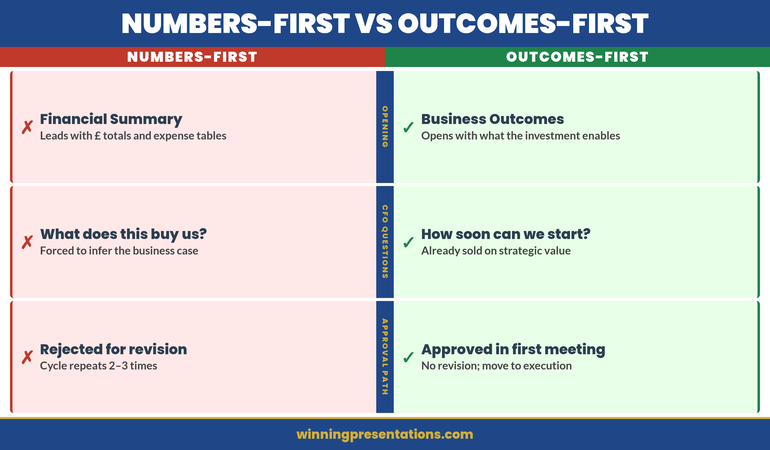
Notice the difference: outcomes-first doesn’t just change the order of your slides. It changes how the CFO engages with your ask from the moment you begin.
Is This Approach Right For You?
Yes, if:
- Your budget request has been rejected or asked for revision before
- You’re asking for approval from a CFO or finance committee, not a single manager
- Your ask is material enough that approval takes more than one meeting
Not as critical, if:
- You’re requesting a routine departmental budget increase under 5% with no strategic change
- Your CFO has already communicated approval in principle pending formal sign-off