Tag: CFO presentations

29 Mar 2026
CFO reviewing revenue forecast presentation slides with financial projections and scenario analysis

The Revenue Forecast Presentation: The Slide Structure CFOs Trust

A revenue forecast presentation that performs demands three essentials: transparent methodological grounding, scenario-based branching that accounts for variability, and monthly-to-quarterly reconciliation showing your assumptions hold. This structure is what CFOs and board finance committees examine first before approving budget allocations.

Last quarter, Rajesh—Finance Director at a mid-cap tech firm—presented his revenue forecast to a sceptical board. His first three slides covered product mix assumptions, but the CFO stopped him: “Where’s your monthly waterfall? How do these line-item projections reconcile with quarterly targets?” Rajesh hadn’t considered that CFOs don’t just want the number; they need the audit trail. By restructuring his deck around transparent methodology first, then scenario branching, and finishing with month-by-month reconciliation, his next forecast earned board approval on first pass. The difference? He’d moved from presenting outcomes to presenting the thinking behind them.

Struggling to articulate your forecast assumptions clearly?

Too many finance decks fail because the methodology slides are either missing or buried. This creates credibility gaps and stalls decision-making. The Executive Slide System teaches you how to structure methodology and scenario analysis so CFOs see your work, not just your conclusions. No vague assertions. No hand-waving on key drivers. Pure transparency.

Opening with Executive Context

Your revenue forecast presentation must begin where CFOs naturally ask: “What are we forecasting and why now?” An executive context slide—often your second slide—sets the frame. It answers: What is the forecast period? Which business segments are in scope? What external or internal triggers prompted this update? Are we forecasting organic growth, post-acquisition integration, or market recovery?

This slide is not the entire forecast. It’s the boundary condition. CFOs use it to establish expectations. If your context slide is vague—”We’re forecasting next quarter’s revenue”—you lose the first vote of confidence. If it’s precise—”Q2 revenue forecast, organic growth only, excludes pending acquisition synergies, incorporates January pricing increase and February market headwinds”—CFOs immediately understand what you’re measuring and why assumptions matter.

The best context slides use a three-column table: Period (Q2 2026), Scope (Segments A, B, C), Drivers (Pricing +3%, Volume ±2%, FX headwind -1%). This format makes assumptions transparent before you justify them.

Revenue forecasting demands structure—and structure demands the right toolkit.

The Executive Slide System (Track A) gives you the exact slide sequence, layout templates, and annotation guidance that builds CFO confidence. Learn how to layer methodology, scenario analysis, and reconciliation into a coherent narrative. Move from defending outcomes to demonstrating rigorous thinking.

Plus: Scenario templates. Reconciliation walkthroughs. CFO credibility checklist.

Anchoring with Methodology & Transparency

After context, CFOs expect methodology. This is the slide that separates forecasts driven by rigorous analysis from those built on rough estimates. A methodology slide answers: How did we model revenue? Did we use trend extrapolation, driver-based bottom-up builds, or hybrid approaches? Were historical volatility bands considered? How sensitive is the forecast to key assumptions?

Many teams skip this slide, assuming CFOs want speed. Wrong. CFOs want confidence, and confidence comes from transparency about method. A three-minute walk through your methodology—”We built this from segment-level volume and price assumptions, validated against 18-month trend analysis, and stress-tested against ±15% demand variance”—creates immediate credibility. It signals rigour.

The strongest methodology slides use visual hierarchy: (1) Primary model type (bottom-up by product line), (2) Data inputs (actual volumes, pricing schedules, churn rates), (3) Validation checks (trend variance, peer benchmarking, sensitivity analysis). This structure shows you haven’t just guessed; you’ve measured, validated, and pressure-tested your work.

Contrast panel comparing forecast approaches CFOs distrust versus trust across numbers, narrative, and credibility dimensions

Scenario Analysis: Base, Upside, Downside

The revenue forecast presentation that performs moves beyond a single “best estimate.” CFOs and boards expect scenario branching—base case, upside case, and downside case—because certainty is a fiction. Real forecasts acknowledge variability and prepare contingencies.

Your base case should reflect realistic assumptions: achieved pricing, historical volume trends, known market conditions. Upside cases (representing perhaps 20% probability) might assume stronger-than-expected customer adoption or higher average transaction value. Downside cases (also ~20% probability) account for market headwinds, competitive pressure, or slower sales cycles.

The critical insight: Don’t present three separate forecasts as though they’re equally likely. Present them as branches from shared assumptions, with clearly stated probability weightings or sensitivity ranges. A CFO-grade scenario slide might show: Base revenue £2.4M (55% probability), Upside £2.7M (+12%, strong customer demand), Downside £2.1M (-12%, market delays). This format demonstrates you’ve thought through variability and prepared the organisation for multiple outcomes.

Too many forecasts fail because teams present only the optimistic case. Boards see this as amateur risk assessment. Scenario branching signals maturity and builds trust in your numbers, because you’re not hiding downside.

Explicit Assumptions & Key Drivers

Every revenue forecast rests on assumptions. The strongest presentations surface these explicitly and defend them with evidence. Your assumptions might include: customer retention rate (92%, derived from 12-month historical data), average contract value (£8,500, based on current mix and pipeline), sales cycle length (45 days, from recent closures), or market growth rate (7%, per analyst forecasts).

The presentation architecture should dedicate one or more slides to assumptions. For each key assumption, show: the assumption itself, the source (historical data, market research, management judgement), the sensitivity (how much does forecast move if this assumption shifts by ±10%?), and mitigation (what flags would trigger an assumption revision?). This level of transparency transforms a forecast from “here’s our guess” to “here’s our educated forecast, and here’s how we’ll know if it’s wrong.”

Key drivers often fall into three categories: Volume drivers (customer acquisition, retention, churn), Price drivers (average contract value, pricing power, discounting trends), and Mix drivers (product/segment composition, geography distribution). For each, show the historical trend, current setting, and forecast assumption. If forecast assumes 5% volume growth but historical trend was flat, flag the difference and justify it.

Different angle: Assumptions aren’t liabilities—they’re your credibility foundation.

When CFOs see explicitly stated, evidenced assumptions, they see an organisation that understands its own business. Learn how to surface, defend, and monitor key drivers so your forecast earns board approval and builds confidence for future updates.

Monthly-to-Quarterly Reconciliation

This is where many revenue forecast presentations collapse. Teams present quarterly totals without showing the monthly waterfall underneath. CFOs immediately ask: “How does Q2 total of £2.4M decompose month by month? If May drives £900K but June drops to £600K, why? What’s the underlying pattern?” Without this reconciliation, your forecast appears disconnected from operational reality.

The strongest presentations include a monthly waterfall or bridge showing: Opening balance (revenue recognised year-to-date), add new customer revenue, add expansion from existing accounts, subtract churn or downgrades, equals closing balance (quarterly forecast). This format shows CFOs that your quarterly number isn’t a guess; it’s the sum of understood monthly flows.

For revenue forecasts, this might also include a run-rate analysis: “If March closes at £850K and April achieves our target of £880K, then May and June momentum at 3% growth each would deliver the £2.4M quarterly total.” This level of granularity transforms the forecast from abstract projection to operational roadmap.

When CFOs see monthly reconciliation, they see an organisation that has thought through seasonal patterns, sales cycles, and operational flow. They’re more likely to trust the quarterly estimate because it’s grounded in a credible monthly narrative.

Quarterly forecast cycle showing four stages: collect, model, present, and calibrate

Variance Monitoring & Contingency Planning

The final critical component of a revenue forecast presentation is your contingency architecture. This answers: How will we monitor whether the forecast is tracking? What variance thresholds would trigger a revised forecast? What contingency actions would we execute if downside scenarios begin materialising?

A variance monitoring slide might specify: “We will review actual revenue versus forecast weekly. If cumulative variance exceeds ±5% by end of month 1, we will conduct deep-dive analysis and communicate revised outlook. If variance exceeds ±10%, we will trigger contingency pricing review or sales acceleration programme.” This signals to CFOs that you’re not hoping your forecast is correct; you’re actively managing toward it.

Contingency planning builds trust because it demonstrates you’ve considered failure modes. “If customer acquisition lags by 15%, we have three contingencies: (1) accelerate existing customer expansion, (2) implement promotional pricing, (3) defer non-critical investment.” This isn’t pessimism; it’s operational maturity. CFOs respect forecasters who’ve prepared for multiple scenarios.

When you close a revenue forecast presentation with clear variance metrics and articulated contingencies, you signal that this isn’t a one-off presentation—it’s the beginning of an ongoing dialogue between finance and operations. That’s exactly the confidence CFOs need to approve budgets and commit resources.

Additionally, consider how to present to a CFO more broadly. Understanding your audience’s information priorities ensures your forecast structure aligns with their decision-making requirements. Similarly, reviewing a quarterly forecast presentation simplified can help you strip away non-essential detail and focus CFO attention on what matters most.

Ready to upgrade your forecast presentation architecture? The Executive Slide System (£39) teaches you the exact slide sequence, annotation methods, and confidence-building frameworks that CFOs expect. You’ll learn how to layer transparency into every slide—from methodology to monthly reconciliation—so your forecast earns approval on first pass.

FAQ: Revenue Forecast Presentations

How many scenarios should I present—base, upside, downside, or more?

Three primary scenarios (base, upside, downside) are the standard. More than three introduces complexity and dilutes focus. Probability-weight your cases: base case typically 50–60%, upside and downside each 20–25%. If you present a wide range (e.g., base £2.4M, upside £3.2M, downside £1.6M), CFOs may question whether you truly understand your business. Narrow the range and defend the bounds with evidence.

Should I present forecast variance (versus prior quarter) on the same slide or separately?

Variance from prior forecast should be a separate section, ideally with a reconciliation bridge. This answers: “Why did you change your forecast from last quarter?” If you gloss over variance, CFOs will stop you. A good bridge shows what assumptions changed (new data, market shift, operational performance) and quantifies the impact of each change. This transparency prevents the perception that you’re guessing differently.

What’s the difference between a revenue forecast presentation and a budget presentation?

A revenue forecast is your projection of likely outcomes given current market conditions and operational capacity. A budget is your plan for how to allocate resources to achieve (or exceed) that forecast. Forecasts are data-driven and revised frequently. Budgets are commitments and typically set annually. A strong revenue forecast presentation builds credibility for the budget conversation that follows. CFOs use forecast credibility to validate budget requests: “If revenue will be £2.4M, then a 22% operating expense budget is reasonable.”

Stay ahead with weekly insight on executive communication.

Finance leaders and operators trust The Winning Edge for actionable guidance on presenting to boards, CFOs, and investors. Structured, direct, no fluff.

Join The Winning Edge

Free download: Executive Presentation Checklist (Track A). Ensure every forecast slides hits CFO credibility standards.

You may also be interested in: The Governance Update Presentation, Data Breach Presentation to Your Board, or Presentation Anxiety: Speaking to Specific Audiences.

Revenue forecasts win approvals when they’re transparent, scenario-grounded, and operationally grounded. Build that structure into every slide, and CFOs will trust your numbers.

Mary Beth Hazeldine is Owner & Managing Director of Winning Presentations. With 24 years of corporate banking experience at JPMorgan Chase, PwC, Royal Bank of Scotland, and Commerzbank, she advises executives across financial services, healthcare, technology, and government on structuring presentations for high-stakes funding rounds and approvals.

23 Mar 2026
Executive VP presenting annual budget to a leadership team in a modern boardroom, CFO visible as key listener, clean financial slide on screen behind them showing outcome-linked figures, confident and prepared demeanour

Annual Budget Presentation: The CFO-Approved Format That Secures Sign-Off Before Year End

Quick Answer

Annual budgets that secure CFO approval open with business outcomes, not financial figures. CFOs reject budget requests because they cannot see what the organisation gains—not because the numbers are wrong. A structured format reorders the presentation to lead with strategy, then moves to financial detail, risk mitigation, and alternatives considered. This structure is designed to give CFOs the information they need in the order they need it to evaluate the request.

Preparing your annual budget presentation now:

The 7-slide outcomes-first structure addresses how CFOs evaluate financial requests. If your budget has been rejected or required revision, the issue is likely structural, not financial.

Diane, VP of Operations at a UK logistics firm with 2,800 employees, had her annual budget request rejected twice. The first year, the CFO said the ask was “too high and not justified.” The second year, after she adjusted the figures downward by 12%, the response was the same: “Revise and resubmit.” Neither rejection was about the numbers. Her 31-slide presentation buried the strategic rationale—why the investment mattered to the organisation—in slide 22. The spreadsheets came first. The CFO couldn’t see what £6.8 million would do for the business.

In year three, Diane restructured to 7 slides. Slide 1: what the investment would enable for the supply chain network. Slide 2: how it aligned to the three-year strategic plan. Slide 3: the £6.8M ask and its breakdown. Slide 4: the assumptions behind the numbers. Slide 5: what would be at risk if the budget was cut. Slide 6: two alternatives she’d considered and rejected. Slide 7: the specific approval decision she needed. The CFO approved in the first review meeting. No revision requested. “You’ve done the hard thinking for me,” he said. Diane’s budget moved from year-long paralysis to execution within weeks.

Why Most Annual Budget Requests Get Rejected (Or Trapped in Revision Loops)

The conventional annual budget presentation is built backwards. It opens with financial summary tables, bar charts showing year-on-year growth, and category breakdowns. The logic seems sound: show the totals, show the detail, show the comparison, and the CFO will approve.

But that’s not how decision-makers process budget requests. A CFO who receives a 25-slide presentation opening with spreadsheet data doesn’t know whether you’re asking for £2 million or £20 million—or what the organisation gets in return—until slide 18. By then, they’re already thinking of questions, objections, and alternative scenarios. They loop back, ask for revisions, and the cycle repeats.

The core problem isn’t the budget amount. It’s the mental model. CFOs approve budgets when they understand three things in this order:

1. What does this money enable? Not what it costs. What does the organisation gain? What becomes possible? How does it move the needle on strategic priorities?

2. How does this connect to our stated strategy? Does it support the three-year plan? Does it address a known gap or bottleneck? Is it aligned to what we said we’d prioritise this year?

3. What assumptions underpin the request? CFOs approve confident asks, not uncertain ones. They need to see that you’ve pressure-tested the numbers, thought through the risks, and considered alternatives. That rigour signals competence and reduces their approval risk.

When a budget presentation skips these steps and leads with financial tables, the CFO is forced to work backwards—inferring the outcomes, checking alignment, and guessing at your assumptions. That creates friction, revision requests, and delays.

⭐ Maven Flagship — Executive Buy-In

Learn the structured approach senior professionals use to secure approval for high-stakes decisions

The Executive Buy-In Presentation System — 7 modules, self-paced, with monthly cohort enrolment and optional recorded Q&A.

£499, lifetime access to materials.

Enrol in the Executive Buy-In System →

The 7-Slide Annual Budget Format: Outcomes First, Numbers Second

The framework that secures approvals follows a strict logic: establish outcomes and alignment before introducing financial asks. Each slide serves a specific decision-making purpose.

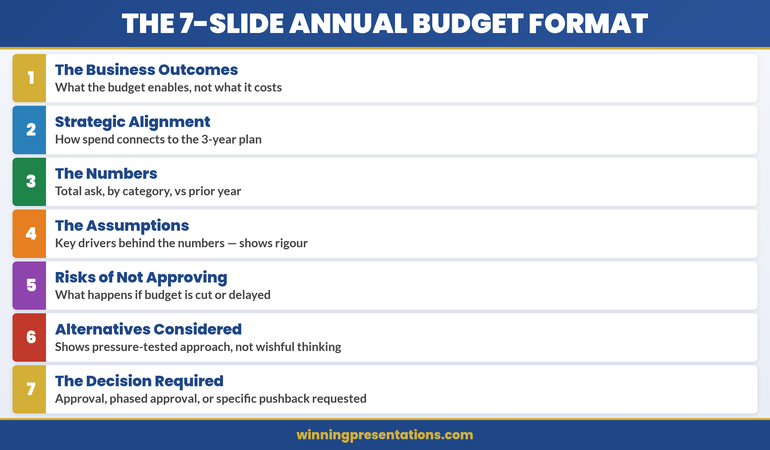
The 7-Slide Annual Budget Format: Card 1 Business Outcomes, Card 2 Strategic Alignment, Card 3 Numbers, Card 4 Assumptions, Card 5 Risks of Not Approving, Card 6 Alternatives Considered, Card 7 Decision Required

Notice the architecture: the first three slides build a narrative (outcomes → alignment → numbers). Slides 4–7 provide evidence and reduce decision risk. The CFO can now move through your logic without guesswork.

Slide 1: The Business Outcomes (Not the Cost)

Open with one clear statement of what the budget enables. Not what it costs. What becomes possible.

Wrong: “Annual Budget Request: £6.8M (Operations) + £2.3M (IT) + £1.4M (HR)”

Right: “This budget expands our logistics network capacity to process 40% more throughput without adding headcount, reducing per-unit delivery costs by 18% and unlocking the enterprise customer tier we’ve targeted in the three-year plan.”

The right version answers the CFO’s unconscious question: “What does this organisation gain?” Add one visual—a simple outcomes graphic, a network diagram, or a throughput chart—to reinforce the outcome. Then move on. This slide should take 90 seconds to present.

CFOs who see outcomes first are already mentally committed to exploring your ask. They know what they’re evaluating.

Slide 2: Strategic Alignment (Why Now? Why This?)

Now that the CFO knows what you’re asking for, connect it to the strategy. Show how the budget supports the published three-year plan, addresses a known strategic gap, or enables a stated corporate priority.

This slide removes guesswork. It says: “I’ve been paying attention to the organisation’s stated direction, and this budget is not a nice-to-have—it’s how we execute the strategy you’ve already approved.”

Use a simple visual: perhaps a 2×2 matrix showing the three strategic pillars and where your ask aligns, or a timeline showing when this investment is needed to hit strategic milestones. The text should be sparse—one or two sentences explaining the connection.

Alignment is a permission structure. It signals that your ask isn’t surprising or opportunistic; it’s the inevitable next step in executing a plan the board already endorsed.

Slide 3: The Numbers (Total Ask, Breakdown, Year-on-Year)

Now introduce the financial detail. By this point in your presentation, the CFO understands what you’re asking for and why it matters. The numbers are no longer a surprise; they’re the cost of delivering the outcomes you’ve already sold.

Keep this slide visual and simple. Use:

  • Total request at the top in large type. Don’t bury the number.
  • Category breakdown below (3–5 categories max). Operations, IT, People, Risk Mitigation, Innovation—whatever makes sense for your organisation.
  • Year-on-year comparison. Show variance as a percentage of total budget. If you’re asking for a 7% increase, say so explicitly. If this is a flat budget with reallocation, show that clearly.

Never lead with the numbers. Position them as supporting evidence for an already-established case.

Slides 4–7: The Proof (Assumptions, Risks, Alternatives, Decision)

Slide 4: The Assumptions Behind the Numbers

CFOs approve confident budgets. They want to see that you’ve thought through the drivers behind your ask. What labour market conditions underpin your hiring forecast? What supplier contract renegotiations support your savings projection? What customer growth assumptions justify the IT investment?

List 3–5 key assumptions. For each, show one piece of supporting data: a market report, an internal trend, a contract timeline. This isn’t a deep dive—it’s proof that you’ve done rigorous thinking, not guesswork.

Slide 5: What’s at Risk If We Don’t Approve (Or Cut) This Budget

This is perhaps the most important slide after outcomes. It answers: “What happens if we say no?” Spell it out clearly and specifically.

Don’t be vague (“We’ll fall behind competitors”). Be concrete: “If we don’t invest in supply chain automation this year, our order-to-delivery time will remain at 6 days while competitors move to 3. We’ll lose the high-volume enterprise contracts where margins are 40% higher. Estimated impact: £2.1M in forgone revenue over 18 months.”

Risk clarity is a stronger motivator than outcomes for many CFOs. It frames the budget not as optional spending but as necessary defence.

Slide 6: Alternatives You Considered (And Why You Rejected Them)

This signals that you haven’t just asked for one thing. You’ve pressure-tested your approach and chosen the best option. Show two alternative strategies and explain why they don’t work as well as your ask.

Example: “Alternative 1: Outsource logistics to a third party. This would be £200K cheaper but would reduce our network control and make enterprise customers nervous about data security. Rejected.” Or: “Alternative 2: Phase the investment over three years. This costs £800K more in eventual implementation but delays our competitive positioning. Rejected.”

Alternatives show maturity. They signal that your ask is the result of thoughtful analysis, not wishful thinking.

Slide 7: The Decision You’re Requesting

End with absolute clarity about what you need. Are you asking for full approval? Phased approval with specific milestones? Conditional approval pending board sign-off? A specific discussion topic or decision date?

Don’t end vaguely with “Please consider this and get back to me.” End with: “I’m seeking your approval to proceed with Phase 1 implementation (£2.1M) in Q2, with a review checkpoint before Phase 2 commitment in Q3.” Clarity removes friction. It tells the CFO exactly what decision is in front of them.

Budget Presentations Structured for CFO Review

The Executive Slide System provides outcome frameworks, assumption templates, and risk visualisation slides. Each is designed around the 7-slide format that addresses how CFOs evaluate financial requests.

See the Templates

The Confidence Gap: Why This Format Wins

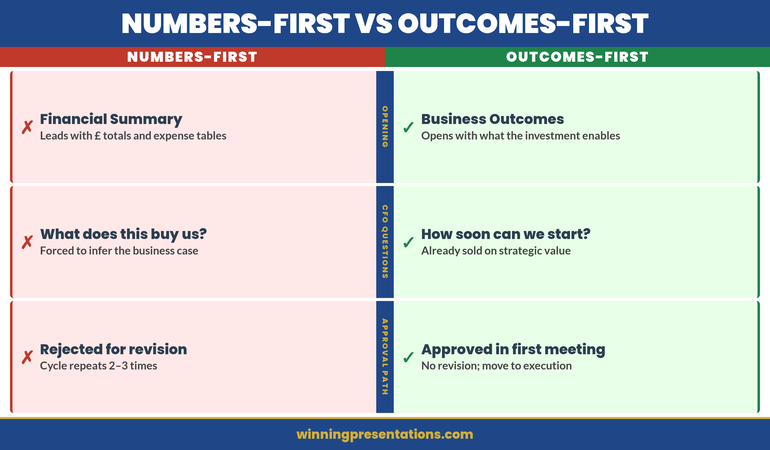
Numbers-first presentations create uncertainty. A CFO sees a list of costs and asks: “Is this enough to solve the problem? What am I missing? Why should I trust these estimates?” These are revision triggers.

Outcomes-first presentations create confidence. The CFO sees your complete thinking: what you’re trying to accomplish, why it matters, what you’ve considered, and what’s at risk if you don’t proceed. Your rigour becomes visible. Your competence is proven by your assumptions, your risk awareness, and your realistic alternatives.

The 7-slide format compresses decision time from weeks to hours. Budget approvals that typically require 3–4 revisions move to single-meeting sign-off. CFOs who use this structure consistently report that it removes the guesswork from capital allocation.

Numbers-First vs Outcomes-First Budget Presentation Comparison: Numbers-First opens with totals, CFO asks what this buys, rejected for revision; Outcomes-First opens with business outcomes, CFO asks how soon can you start, approved in first meeting

Notice the difference: outcomes-first doesn’t just change the order of your slides. It changes how the CFO engages with your ask from the moment you begin.

Is This Approach Right For You?

Yes, if:

  • Your budget request has been rejected or asked for revision before
  • You’re asking for approval from a CFO or finance committee, not a single manager
  • Your ask is material enough that approval takes more than one meeting

Not as critical, if:

  • You’re requesting a routine departmental budget increase under 5% with no strategic change
  • Your CFO has already communicated approval in principle pending formal sign-off
19 Jan 2026
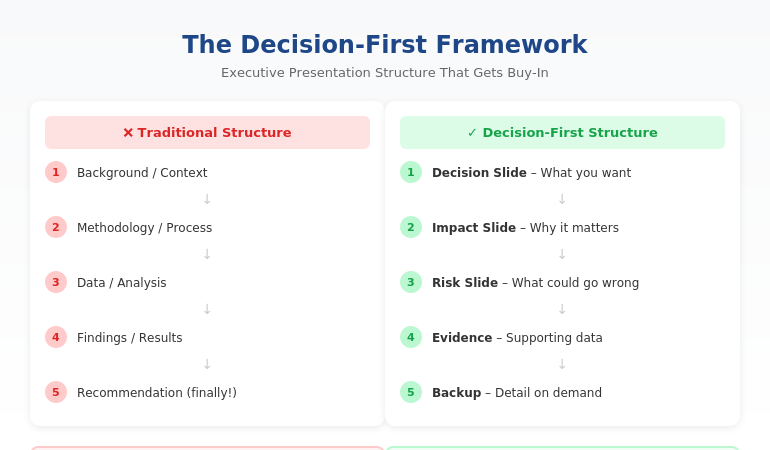
Executive presentation structure diagram showing the Decision-First Framework for C-suite buy-in

Executive Presentation Structure: The Format That Gets Instant Buy-In

Quick answer: The best executive presentation structure leads with the decision, not the data. Put your recommendation on slide one, follow with business impact and risk, then provide supporting detail only if asked. This “decision-first” structure matches how executives actually process information—and it’s why some presenters get instant buy-in while others get “let’s circle back.”

⚡ Presenting to executives in the next 48 hours? Here’s your structure:

Slide 1: Decision — what you want + expected outcome

Slide 2: Impact — why it matters (revenue, cost, risk)

Slide 3: Risk — what could go wrong + mitigation

Slides 4–6: Evidence — only data that supports your ask

Backup: Detail on demand (methodology, deep analysis)

The 11-Word Slide That Rescued a £4M Budget Request

The right executive presentation structure can change everything. I learned this watching a client named Sarah lose—then win—the same £4 million budget request.

The first time, Sarah presented 47 slides. Background, methodology, analysis, findings, recommendations. Textbook structure. The CFO flipped through seven slides, said “I don’t see what you’re asking for,” and moved to the next agenda item. Fourteen hours of preparation, dismissed in 60 seconds.

Six weeks later, Sarah presented again. Same request. Same CFO. But this time, her opening slide contained exactly 11 words: “Request: £4M to reduce customer churn by 23% within 18 months.”

The CFO leaned forward. “Now we’re talking. Walk me through the numbers.”

She got her budget approved in that meeting.

The data hadn’t changed. The structure had. After 24 years in corporate banking at JPMorgan Chase, PwC, and Commerzbank, I’ve seen this pattern hundreds of times. The executives who get buy-in aren’t better at analysis. They’re better at structure.

⭐ Maven Flagship — Executive Buy-In

Build the case your stakeholders can’t dismiss

The Executive Buy-In Presentation System is a self-paced framework — 7 modules walking you through the structure, psychology, and delivery that get senior approval. Monthly cohort enrolment, optional recorded Q&A calls.

£499, lifetime access.

Enrol in the Executive Buy-In System →

Why the Structure You Learned Is Wrong for Executives

Most professionals structure presentations the way they were taught: background → methodology → analysis → findings → recommendation. This is logical. It’s how you think through problems. And it’s exactly why executives stop listening by slide three.

Here’s the disconnect: you build presentations chronologically, but executives don’t consume them that way.

When a CFO opens your deck, they’re not thinking “I can’t wait to understand your methodology.” They’re thinking: “What do you need? Why should I care? Can I say yes and move on?”

If those questions aren’t answered immediately, you’ve lost them. Not because they’re impatient—because they’re triaging. A typical C-suite executive makes 35+ decisions per day. Every slide that doesn’t answer “so what?” gets mentally filed under “I’ll review later.” (They won’t.)

The executives who command attention flip the traditional structure entirely. They lead with the end. They put the decision first and the supporting detail last.

The Decision-First Structure Executives Actually Want

The most effective executive presentation structure follows what I call the Decision-First Framework. It’s the opposite of how most presentations are built—and that’s exactly why it works.

Traditional structure (what you learned):

Background → Process → Data → Analysis → Recommendation

Decision-first structure (what executives want):

Recommendation → Impact → Risk → Supporting Data (if needed)

This structure works because it matches how executives actually think. They don’t need to understand your journey to make a decision. They need to understand the decision itself, what happens if they say yes, and what could go wrong.

When you lead with your recommendation, something remarkable happens: executives engage differently. Instead of waiting to find out what you want, they’re immediately evaluating whether to approve it. You’ve shifted from “presenter explaining things” to “advisor proposing solutions.”

This is exactly how top-tier consulting firms structure client presentations. It’s how I structured every pitch at JPMorgan Chase. And it’s how my clients consistently get faster decisions than their peers.

Want the complete framework with templates for different scenarios? The Executive Slide System includes everything you need to restructure your next presentation. Get instant access →

The Exact Slide Order for Executive Presentations

Here’s the executive presentation structure I teach to banking professionals and FTSE 100 leaders. This works for budget requests, strategic recommendations, project updates, and board presentations:

Slide 1: The Decision Slide

State exactly what you’re asking for and the expected outcome. No background. No preamble. Example: “Recommendation: Approve £2.1M for CRM upgrade. Expected ROI: 340% over 3 years.”

Slide 2: The Impact Slide

Show what happens if they say yes. Revenue impact, cost savings, risk reduction—whatever matters most to this audience. Make the benefit concrete and quantified.

Slide 3: The Risk Slide

Address what could go wrong and how you’ll mitigate it. Executives always think about downside. If you don’t address it, they’ll ask—and you’ll look unprepared.

Slides 4-6: Supporting Evidence

Only include data that directly supports your recommendation. If a slide doesn’t help them say yes, cut it.

Backup Slides: Detail on Demand

Put methodology, detailed analysis, and additional data in backup. You’ll rarely need it—but when an executive asks, you look thorough, not disorganised.

This structure typically reduces a 30-slide presentation to 8-12 slides. More importantly, it reduces decision time from “let’s reconvene” to “approved.”


Decision slide, Impact slide, Risk slide, Supporting evidence, then Backup slides

⭐ Stop Building Slides That Get Ignored

Get the complete Decision-First Framework with plug-and-play templates for every executive scenario.

Includes:

  • The exact slide order for budget requests, board updates, and strategic recommendations
  • Action-title formulas that eliminate “Overview” and “Background” slides
  • Before/after transformations from real presentations

Transform Your Presentation Structure → £39

Instant download. Apply to your next presentation immediately.

How to Apply This Structure to Your Next Presentation

You don’t need to rebuild your entire deck. Start with these three changes:

1. Rewrite your first slide as a decision.

Take whatever’s on your current slide 1 and replace it with: “[Action verb]: [What you want] to [achieve outcome].” If your current first slide says “Q3 Project Update,” change it to “Recommendation: Extend Q3 timeline by 2 weeks to protect £400K deliverable.”

2. Move your recommendation forward.

Find wherever your current recommendation lives (usually slide 15 or later). Move it to slide 1. Yes, it feels uncomfortable. Do it anyway. The supporting detail still exists—it’s just in the right place now.

3. Apply the “so what?” test to every slide.

For each slide, ask: “Does this directly support my recommendation?” If the answer is no, move it to backup. Most presentations lose 30-40% of their slides this way—and become dramatically more effective.

This is exactly how successful CFO presentations are structured. The content isn’t simpler—it’s organised for how finance leaders actually make decisions.

Want a step-by-step system for restructuring your slides? The Executive Slide System walks you through the entire process with templates and real examples. See what’s included →

Related: Great structure is only half the equation. If nerves undermine your delivery, read How to Stop Saying “Um” (Without Sounding Robotic).

Common Questions About Executive Presentation Structure

What is the best structure for an executive presentation?

The best executive presentation structure leads with your recommendation, followed by business impact, risks, and supporting evidence. This “decision-first” approach matches how executives process information. They want to know what you’re asking for before they evaluate whether to approve it. Traditional structures that build to a conclusion waste executive attention.

How do you structure a presentation for senior leadership?

Structure presentations for senior leadership around decisions, not information. Open with your recommendation and expected outcome. Follow with the business case (why it matters), risk assessment (what could go wrong), and supporting data. Keep the main presentation to 8-12 slides and put additional detail in backup slides for reference.

How many slides should an executive presentation have?

Most effective executive presentations have 8-12 slides, plus backup. The goal isn’t a specific number—it’s ensuring every slide directly supports your recommendation. If a slide doesn’t help executives make a decision, it belongs in backup or should be cut entirely. Your executive summary slide alone should convey the core message.

⭐ Present Like Someone Who Understands Executives

Get the complete system for structuring presentations that get immediate buy-in—not polite nods and forgotten follow-ups.

What’s included:

  • The Decision-First Framework with exact slide order
  • 12 executive slide templates (budget, board, strategy, updates)
  • Before/after examples from real presentations
  • Action-title formulas that eliminate weak slide titles

Get Instant Access → £39

The same framework used in FTSE 100 boardrooms, investment banking pitches, and C-suite budget approvals.

FAQ

How long does it take to restructure my existing slides?

Most people can restructure a 20-slide presentation in 60-90 minutes once they understand the Decision-First Framework. The first time takes longest because you’re learning the approach. After that, you’ll naturally build presentations this way from the start—which actually saves time because you’re not second-guessing your structure.

What if my executive actually prefers detailed presentations?

Executives who “prefer detail” actually prefer having detail available when they want it. Lead with your recommendation and keep supporting detail in backup slides. When they ask for more information, you’ll look prepared. In my experience, once executives see a well-structured presentation, they rarely ask for the backup—but they appreciate knowing it exists.

Does this structure work for technical presentations?

Especially for technical presentations. Technical experts often bury their conclusions under methodology because that’s how they solve problems. But executives don’t need to understand your process—they need to understand your conclusion and its business implications. The Decision-First structure forces you to separate “what I did” from “what it means.”

Should I use the same structure for board meetings?

Yes, with one adjustment: boards have even less time and need even clearer decisions. For board presentations, I recommend putting your recommendation AND the expected vote on slide one. Example: “Recommendation: Approve acquisition of XYZ Corp for £12M. Board action requested: Approval vote.” This immediately frames the entire discussion.

📧 The Winning Edge Newsletter

Weekly insights on executive communication, presentation structure, and career-building skills. No fluff—just actionable frameworks from 24 years in corporate banking.

Subscribe Free →

Your Next Step

The right executive presentation structure isn’t about simplifying your message—it’s about sequencing it for how leaders actually make decisions. Lead with the decision. Follow with impact and risk. Put supporting detail where it belongs: available but not in the way.

Try this with your next presentation: write your recommendation as slide one before you create anything else. Build the rest of your deck to support that single slide. You’ll be surprised how much easier the whole process becomes—and how differently executives respond.

If you want the complete framework with templates, examples, and step-by-step guidance, get the Executive Slide System.

📋 Free Resource: Executive Presentation Checklist

Not ready for the full system? Start with this free checklist covering the 10 structural elements every executive presentation needs.

Download Free Checklist →

About the Author

Mary Beth Hazeldine is the Owner & Managing Director of Winning Presentations and a former corporate banker with 24 years of experience at JPMorgan Chase, PwC, Royal Bank of Scotland, and Commerzbank. She has trained over 5,000 executives on high-stakes presentation skills and helped clients secure more than £250 million in funding and budget approvals.

Mary Beth is also a qualified clinical hypnotherapist and NLP practitioner, specialising in helping professionals overcome presentation anxiety. After spending five years battling her own fear of presenting at JPMorgan, she developed the techniques she now teaches to executives worldwide.

Book a discovery call | View services