Tag: presentation structure

21 Mar 2026
Executive presenting confidently in a glass-walled boardroom, screen behind showing clean structured slide with key metrics, senior leaders listening attentively

Promotion Business Case Presentation: The 4-Slide Structure That Wins Committee Approval

Claire was Head of Digital at a UK retail group. She’d submitted for Director three times and been rejected three times. “Not quite ready,” the feedback always said. No specific gaps, no roadmap to yes. On her fourth submission, she stopped writing a detailed CV and started building a business case presentation instead. Four slides. No prose. Just quantified impact: £2.1M in revenue from her team’s initiatives. Three cross-functional projects delivered. Headcount grown from 4 to 11 people under her management. The committee approved her promotion in the first meeting. Effective date six weeks later.

Quick answer: A promotion business case presentation stops the committee from evaluating you against abstract criteria and forces them to evaluate you against the numbers you’ve already delivered and the scope you’re ready for. Most promotion candidates submit a CV (which invites comparison and judgment) or a rambling narrative (which buries the business case in words). Instead, build four slides: The Commercial Impact you’ve delivered, The Scope you’re ready for, The Gap you’ve already closed, and Why Now. Each slide answers one specific question. Together, they answer the only question that matters: “Is this person clearly ready, or are we still waiting?”

Promotion decision meeting this month?

Most candidates prepare what they’ve done. Few prepare what they’re ready to do. If you’re walking into a promotion committee meeting with a CV or a vague narrative, you’re accepting the rejection you’ve already received twice.

  • Quantify exactly what you’ve delivered in the current role
  • Define the scope you’re ready for at the next level
  • Show the specific gaps you’ve already closed
  • Explain why the committee should move now, not wait

→ Skip ahead to the four-slide business case structure below.

The Fourth Submission That Worked

Claire had done everything right the first three times. Her CV was polished. She’d taken every leadership course available. She’d mentored junior team members. Her manager called her “a natural leader.” But the promotion committee saw the CV and asked: “Compared to other candidates at her level, is she exceptional?” That question invited comparison. Comparison invites hesitation.

Before the fourth submission, Claire rebuilt her approach entirely. She stopped thinking about proving she’d “earned” the promotion through tenure and effort. She started thinking like she was already in the role, and the committee needed a business case for moving her now. She quantified. She showed scope. She closed perceived gaps. She explained risk: the talent she’d develop was being poached by other teams because she wasn’t promoted. One presentation. Four slides. No hedging. The committee didn’t compare her to other candidates. They compared her to the cost of losing her. Promotion approved.

Why CVs Fail and Business Cases Win

The promotion decision is not a comparison decision. It never should be. But a CV invites comparison. So does a narrative summary of what you’ve done. Here’s why:

CVs Are Backward-Looking

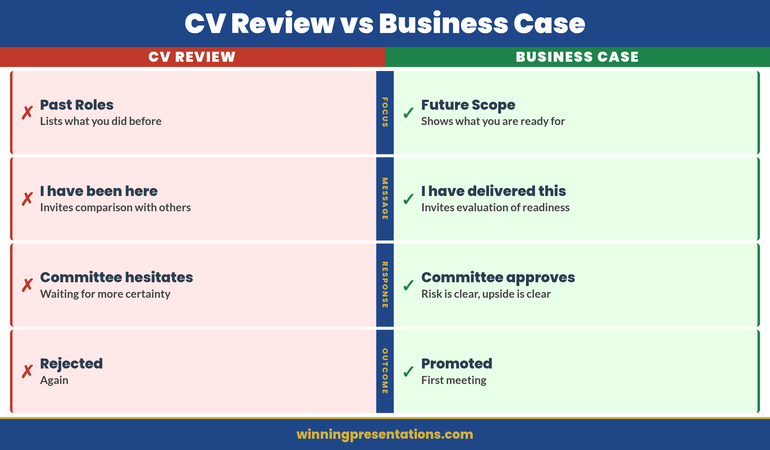
A CV lists past roles, responsibilities, and achievements. The implicit message is: “I’ve been here a long time doing this very well.” The committee hears: “Are they better than other candidates who’ve also been somewhere a long time?” Suddenly you’re in a comparison tournament. If another strong candidate is being considered, you both look similar. Hesitation sets in.

Business Cases Are Forward-Looking

A business case says: “Here’s what I’ve delivered in the current role. Here’s what I’m ready to deliver at the next level. Here’s what could go wrong if you wait. Let’s decide now.” The committee isn’t comparing you. They’re evaluating risk and opportunity. Very different mental frame.

CVs Invite Questions You Can’t Answer

A CV prompts the committee to ask: “Is this person leadership material? Are they visionary? Will they grow into the role?” These are judgment questions. You can’t answer them with facts. You can only hope the committee sees it the way you do.

Business Cases Answer Questions Before They’re Asked

A business case says: “I’ve already led projects of this scale. I’ve managed budgets of this size. I’ve handled this type of stakeholder complexity. I’ve closed this gap. Here’s the evidence.” No speculation. No hopes. No judgment required—just an evaluation of readiness based on demonstrated scope.


CV Review vs Business Case comparison infographic contrasting backward-looking evaluation versus forward-looking scope demonstration across four dimensions (Focus, Message, Response, Outcome)

The Four Slides: Structure That Works

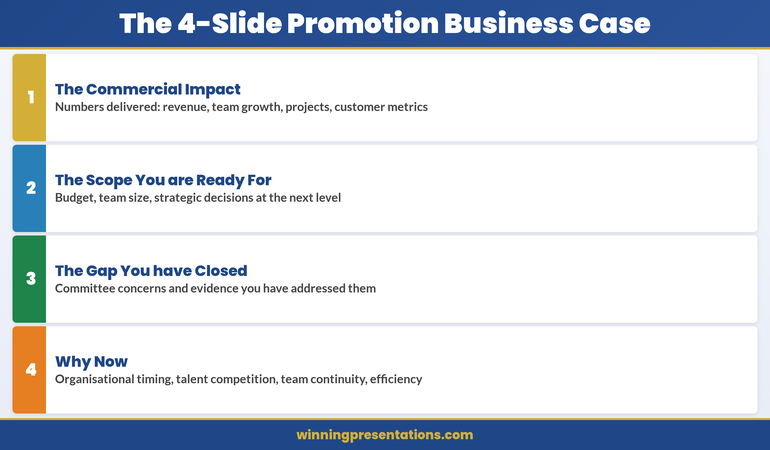
A promotion business case has exactly four slides. Not three (too little scope), not five (too much detail). Four slides answer four specific questions the committee is asking (whether they say it aloud or not):

  1. Slide 1 — Commercial Impact: What have you actually delivered? (Numbers only.)
  2. Slide 2 — Scope: What are you ready to lead? (Bigger picture.)
  3. Slide 3 — Gap: What did you need to learn? And have you learned it? (Addressing doubt.)
  4. Slide 4 — Why Now: What’s the cost of waiting? (Creating urgency.)

This structure works because it doesn’t ask the committee to evaluate you. It asks them to evaluate your readiness. Completely different exercise.

Promotion Committee This Month? Build the Business Case, Not the Narrative

If your committee meeting is coming up and you’re still working from a CV or a verbal narrative, the Executive Slide System gives you the exact four-slide business case structure to build instead. It includes:

  • The four-slide business case structure for promotion committees (commercial impact, scope, gaps closed, why now)
  • Worked examples showing how to quantify impact at executive level
  • Decision-slide frameworks designed for internal committee presentations
  • Templates ready to adapt to your organisation, role, and committee

Get the Executive Slide System → £39

Informed by real-world executive presentation experience across investment banking, SaaS, and consulting — including internal promotion contexts.

Slide 1: The Commercial Impact You’ve Delivered

This slide answers: “What has this person actually delivered?” Not in prose. Not in a list of responsibilities. In numbers.

What Numbers Go Here?

Revenue driven. Cost reduced. Headcount managed. Projects completed on time or early. Customer retention improvement. Market share gained. Team size growth. Budget managed without overspend. Retention of top talent you’ve developed. Any metric that matters to your organisation’s financial or operational success.

If you’re in a function that doesn’t directly drive revenue (HR, Finance, Operations), quantify the impact you’ve had on the business that relies on you: “Reduced hiring cycle time from 14 weeks to 7 weeks, enabling 40 critical hires in year two. Prevented £1.2M in turnover costs through culture initiatives.”

How Many Numbers?

Three to five numbers. No more. Each number should be large enough to be noteworthy and specific enough to be credible. “Big revenue” is vague. “£2.1M in revenue from digital commerce initiatives, 180% year-on-year growth” is specific.

Present Them Minimally

One number per line. No paragraphs. No explanation. The slide is pure fact. The explanation comes in the presentation moment, face to face.

Example Slide 1 (Digital Leader, Retail Group):

  • £2.1M revenue from digital commerce initiatives (Year 1–2)
  • Team scaled from 4 to 11 people (net retention 94%)
  • 3 cross-functional projects delivered on time: Platform migration, Customer data integration, Omnichannel pricing
  • Average digital customer NPS: +28 points year-on-year

This slide doesn’t prove Claire deserves a promotion. It proves she’s already delivered at the scope of the role she wants.

Slide 2: The Scope You’re Ready For

This slide answers: “What would this person be responsible for at the next level?” Again, no narrative. Just scope.

What Scope Information Goes Here?

Team size. Budget responsibility. Revenue or P&L ownership. Number of stakeholders. Strategic decisions you’d make. Cross-functional responsibilities. Geographic scope. Customer base. Market segment. Anything that defines the size and scale of the role you’re applying for.

Make It Comparative

Show current scope and next-level scope side by side. “Currently manage 11 people, £2.8M annual budget. Director role would manage 28–35 people, £7–9M annual budget, and P&L responsibility for three business units.” This makes the leap clear without being grandiose.

Example Slide 2 (Digital Director Role):

Dimension Current (Head of Digital) Next Level (Director)
Team size 11 28–35
Budget authority £2.8M (operational) £7–9M (P&L)
Strategic decisions Digital strategy execution P&L strategy, portfolio, resource allocation across 3 units
Stakeholder groups Marketing, IT, Finance, Operations Board, CEO, CFO, three business unit heads, external investors

The committee now sees that you’ve already led projects at 40–60% of the next-level scope. You’re not asking them to take a massive bet. You’re asking them to expand a proven track record.

Slide 3: The Gap You’ve Already Closed

This slide addresses the silent question every committee has: “What concerns do we have, and have they already been addressed?” Don’t wait for them to say it. Say it first.

What Gaps Commonly Come Up?

For first-time directors: “Have they managed a larger team?” or “Have they handled a serious people issue?” For cross-functional promotions: “Do they understand the P&L?” For external hires seeking rapid advancement: “Do they know our culture?” For technical leaders moving to management: “Can they lead non-technical people?”

Think back to feedback you’ve received. Think about what the next-level role requires that you haven’t yet formally held. That’s the gap.

Show the Evidence You’ve Already Closed It

Don’t say, “I’m ready to manage a larger team.” Say, “I’ve managed the Platform Migration project, which required me to coordinate 22 people across three departments for six months. Delivered on time, no overruns, 96% of team stayed post-project.”

Example Slide 3 (Digital Leader, potential gaps and evidence):

  • Gap: Can you handle P&L responsibility? → Evidence: Managed £2.8M annual budget with zero overruns for two years. Drove cost negotiations that saved 18% vs. year one. Forecast accuracy 94%.
  • Gap: Can you lead at board level? → Evidence: Presented quarterly business reviews to CFO and CEO for 18 months. Lead quarterly board updates on digital KPIs (8 presentations, zero rework requests).
  • Gap: Can you make the hard people decisions? → Evidence: Led the reorganisation of the digital team (11 people, reallocation of three, one exit managed professionally). Retained 100% of high performers during restructuring.
  • Gap: Can you develop the next generation? → Evidence: Promoted two team members to senior roles. One is now leading the platform team. 94% of team stayed, suggesting effective development and engagement.

The committee stops worrying about gaps. They start thinking about timing.


The 4-Slide Promotion Business Case structure infographic showing stacked cards: The Commercial Impact, The Scope You are Ready For, The Gap You have Closed, Why Now

Slide 4: Why Now

This is the most underrated slide. It answers: “Why should we move now instead of waiting six months, a year, or until a formal opening exists?”

Reasons to Move Now

Organisational timing: “We’re about to launch the omnichannel initiative. The role I’m being considered for will own it. Waiting six months means losing momentum and delaying revenue impact.”

Market competition: “Two competitors have hired directors into similar roles in the last quarter. Talent in this space is moving fast. If we wait, the best people available now might not be available in six months.”

Risk of attrition: “I’ve had three conversations in the last two months about external opportunities. I’m not looking, but I’m being sought out. A decision now sends a clear signal about career progression in this organisation.”

Team stability: “If this role opens formally, I’d be a candidate. So would external hires. A decision now avoids the chaos of a competitive internal process that could destabilise the team.”

Capability readiness: “I’ve deliberately taken on stretch assignments in the last 18 months to prepare for this role. I’m at peak readiness now. Waiting longer doesn’t add capability—it just delays momentum.”

Frame It as Mutual Benefit, Not Threat

The worst version of Slide 4 is: “I have other offers, so decide now or lose me.” The best version is: “Here’s why moving now benefits the organisation more than waiting.” These are genuinely different messages.

Example Slide 4 (Digital Leader):

  • Organisational: Omnichannel strategy launch (Q2) requires director-level ownership. Director structure in place now ensures strategic alignment from day one.
  • Talent landscape: Digital director roles in retail are tight. Three director-level hires completed by competitors in the last quarter. First-mover advantage matters.
  • Team continuity: Current structure has been stable for 18 months. Promoting internally ensures zero transition risk and maintains momentum.
  • Cost: Internal promotion costs 60% less than external recruitment for this level.

The committee hears: “This is smart business.” Not: “Hurry or I leave.”

Unsure how to quantify your impact?

Many executives underestimate what they’ve delivered because they focus on activity instead of outcome. The Executive Slide System includes a metrics framework that walks you through finding and framing the numbers that matter most for your role.

Common Mistakes That Sink Promotion Cases

Mistake 1: Burying Impact in Narrative

You say: “I’ve managed several large projects, led a team through significant growth, and delivered strong results.”

The committee hears: “Maybe.”

Say instead: “£2.1M revenue, team grew from 4 to 11, three projects on time.”

The committee hears: “Clearly.”

Mistake 2: Confusing Current Scope With Next-Level Scope

You say: “As director, I’d continue what I’m doing now, but at a larger scale.”

The committee worries: “So you’d be doing the same job, bigger. Who develops the next generation of heads of function?”

Say instead: “Currently I execute digital strategy. As director, I’d own digital strategy and P&L for three business units, allocate resources across portfolios, and report to the CEO quarterly.”

The committee hears: “You’ve thought about the leap.”

Mistake 3: Ignoring the Gaps They’re Worried About

You present your four slides. The committee thinks: “What about P&L? Has she handled a board-level conversation? Can she manage a larger team?”

These worries sit silent. Unanswered. They become reasons to delay the decision.

Say it first. Show the evidence. Close the gap before they voice it. They can’t worry about something you’ve already addressed.

Mistake 4: Creating Urgency by Threat

You say: “I’ve had offers from other companies, so I need a decision by Friday.”

The committee hears: “You’re a flight risk. If we promote you and you leave anyway, we’ve wasted time.”

Say instead: “The omnichannel initiative launches in Q2. This director role needs to own that strategy from day one. A decision in March means we’re ready; a decision in May means we’re playing catch-up.”

The committee hears: “You’re thinking about the business, not just yourself.”

Mistake 5: Not Presenting It as a Presentation

You email four slides with a cover letter to the committee.

The committee reads it in their calendar between two other emails. The four slides sit in isolation without context.

Insist on 15 minutes in the room. Present the four slides. Let them ask questions. The presentation—your presence, your clarity, your composure—is half the power. The slides are the other half.

When Your Manager’s Advocacy Isn’t Enough, the Business Case Has to Speak for Itself

Most candidates wait for their manager to make the case in the room. When the committee meets without you, your manager’s opinion becomes the only evidence. The Executive Slide System gives you the specific slide formats that shift the conversation from advocacy to documented impact — the promotion business case, the decision-slide structure, and the quantified impact framework.

Get access to: Promotion business case frameworks, decision-slide structures, and the exact formats for presenting quantified impact to senior committees.

Get the System → £39

How to Present Your Four Slides

The four slides are useless if they sit in an inbox. They’re powerful if you present them in person, face to face, to the decision-making committee.

Book 15 Minutes

Not 30. Not 45. Fifteen. Long enough to present clearly. Short enough that it feels confident, not defensive. “I’d like 15 minutes with the promotion committee to walk through my business case for the director role.”

Start With the Rescue

Before the first slide, say: “I’m not here to ask you to compare me to other candidates. I’m here to show you why moving now is better for the business than waiting. I’ve organised this around four questions I know you’re asking: What have I delivered? What am I ready for? Have I closed the gaps you’re worried about? Why should we move now? Let’s walk through them.”

You’ve just told them the meeting won’t be self-aggrandising or political. It will be clear and business-focused. That’s the tone that wins.

Present Without Over-Explaining

Show Slide 1. Say: “Here’s what I’ve delivered in the current role. Four key metrics: revenue, team growth, projects, customer impact. Any questions?” Wait for them. Let them ask. Then move to the next slide.

You’re not performing. You’re having a business conversation. They’ll respect that.

End With Openness

After Slide 4, say: “That’s the case. What questions do you have?” Sit down. Let them ask. Don’t keep talking. Silence here is not awkward—it’s them processing. Let them process.

When They Say They’ll Think About It

They will. Say: “I appreciate that. Is there anything you’d like me to clarify or any information I should get you before you decide?” This is not pushy. It’s professional. You’re saying: “I’ve made the case clearly. If there are gaps in the case, I want to fill them.”

Know Your Committee Before You Present

The four slides work, but only if you know who you’re presenting to. Before you schedule that 15-minute meeting, know:

  • Who has final say? (CEO, CFO, Board of people?)
  • What does each person care about most? (CFO cares about cost and P&L. CEO cares about strategy. Your boss cares about continuity.)
  • What concerns might each person have? (Frame Slide 3 to address each person’s specific concern.)
  • Have you worked with them before, or is this your first high-stakes interaction? (If it’s your first, prove you can handle board-level presence.)

Understanding your audience before you present is the foundation of every executive presentation. Your promotion business case is no exception.

Is This Right For You?

This four-slide business case approach is right for you if you can answer YES to at least two of these:

  • ✓ You’ve been told “not quite ready” before, and you want to change that conversation from judgment to business reality
  • ✓ You’ve delivered measurable impact in your current role, but the committee doesn’t seem to see it
  • ✓ You’re being considered for promotion but haven’t had the chance to present your case directly to the decision-makers
  • ✓ You’re worried that without a structured argument, the committee will compare you to other candidates and hesitate

This approach is NOT right for you if:

  • ✗ You’re in a role where you haven’t yet delivered any measurable impact (in that case, focus on delivering first, then building the case)
  • ✗ The organisation doesn’t have formal promotion committees (in that case, the conversation is one-on-one, not structural)
  • ✗ You’ve already been told you’re promoted pending a formal announcement (you don’t need to persuade; you need to transition)

Frequently Asked Questions

Should I include these four slides in my official application, or present them separately?

Separate. Your official application—CV, cover letter, form—follows the organisation’s process. The four-slide business case is what you present to the decision-making committee after your application is accepted. It’s not a replacement. It’s the tool you use in the meeting to move from “maybe” to “yes.”

What if I’m being promoted internally and the committee already knows my work?

They know your role. They might not know the quantified impact. Many executives don’t realise how much revenue their team drove or how many people they’ve successfully developed until they start looking for the numbers. Even if the committee knows you well, the numbers create clarity that relationships alone can’t. Show the slides anyway. It changes the conversation from “we like working with you” to “you’ve demonstrably delivered at the next level’s scope.”

What if I can’t quantify some of my impact?

Quantify what you can. For the rest, show evidence of scope. If you’ve managed a project that involved coordinating 20 people for six months, that’s scope, not a number. If you’ve led a cross-functional initiative that touched three departments, that’s scope. Numbers are better, but scope is credible too. Just make sure every slide has either a number or a significant scope indicator. Don’t leave a slide blank because you “didn’t have numbers.”

Should I mention other job offers to create urgency?

No. Frame urgency around the business case (Slide 4) instead. “The omnichannel initiative launches in Q2” is urgency. “I have another offer” is a threat. The committee might promote you, but you’ll start the role with a damaged relationship because they felt pressured. Use business urgency instead.

What’s Inside the Executive Slide System

The Executive Slide System gives you slide structures, templates, and decision frameworks for the executive presentation scenarios you face most often — including the promotion business case, the budget briefing, the governance reset, and the stakeholder presentation.

What you get:

  • Slide templates for 12 executive scenarios (including the complete four-slide promotion business case)
  • Decision-slide frameworks designed for committee presentations
  • Worked examples from real executive presentations (SaaS, consulting, financial services)
  • Pre-briefing strategy guides
  • One-time price: £39

Get the Executive Slide System → £39

The Presentation Is Only the Beginning

The four slides win the committee’s approval. But that approval only happens if you’ve done the work before you walk into the room.

Build your case over weeks, not days. Collect the numbers. Run the projects. Develop the people. Close the gaps. The four slides are the summary of work you’ve already been doing. They’re not magic. They’re clarity.

When Claire walked into her fourth promotion committee meeting, the four slides weren’t new to her. She’d been building that case for 18 months through the projects she’d taken on, the metrics she’d tracked, the scope she’d deliberately expanded. The four slides just made it visible.

That’s when the committee saw what had been true all along: she was already ready.

Get weekly guidance on executive presentations

Every Monday, a short email with the presentation strategy that moves decisions. Join 2,400+ executives.

Subscribe to the Newsletter

🆓 Free resource: Executive Presentation Checklist — a free guide to strengthen your presentation preparation.

Related: Why Your Evaluation Presentation Needs Structure

The same principle applies to technology evaluations and other high-stakes business decisions. The technology evaluation presentation that gets both IT and Finance to say yes follows a similar framework: show impact, define scope, prove readiness, create urgency. Different context, same structure.

About Mary Beth Hazeldine

Mary Beth spent 16 years in investment banking and corporate finance at RBS, where she made and lost pitches at every level. She’s sat in promotion committees. She’s submitted CVs and been rejected. She’s also seen what works—and what doesn’t. Now she helps executives build presentations that change decisions. She’s based in Edinburgh and works with leaders across SaaS, consulting, and financial services.

Your promotion business case doesn’t prove you deserve the role. It proves the organisation deserves the upside of moving you now.

20 Mar 2026
Sales leader presenting pipeline review to executive team in modern glass boardroom with clean data dashboard visible on screen

The Pipeline Review Presentation: What Sales Leaders Actually Need to Show (And What They Always Over-Include)

Quick answer: Most sales leaders bury the insight underneath layers of metrics. Your pipeline review should spend 80% of the time on the deals that will actually close, the ones at risk of slipping, and what you’re doing about it. The rest is decoration.

Stuck structuring a pipeline review? You’re showing too many metrics and not enough judgment. The Executive Slide System includes templates specifically for pipeline scenarios. Build one in under 30 minutes.

The SaaS Closing Rate Fix

A SaaS company I worked with was doing 47 demos per quarter. Closing three. By any measure, that’s a problem — less than 7% conversion. Their executive team was concerned. Their board was frustrated. So the VP of Sales came into a pipeline review with a presentation that looked robust: demo-to-close pipeline, win rates by product line, seasonal trends, sales cycle length, forecast accuracy over the past four quarters. Eighteen slides of rigorous analysis.

The board looked at the slides and then looked at the numbers. Something didn’t add up. Three deals closed from 47 demos. The presentation was technically accurate but strategically incomplete. It showed data but not judgment. It showed activity but not outcomes.

What they actually needed to see was this: 23 deals in the current pipeline, 9 of which would close in the next quarter if the team did what they said they would do. How did we get there? Not through 47 demos. Through 23 — fewer pitches, stronger qualification, higher intent buyers. The pipeline review that revealed this wasn’t about adding more metrics. It was about showing the right metrics. The company restructured their qualification approach, did 23 demos the next quarter, and closed nine. Not because their product changed. Because their presentation discipline changed.

Speed Up Pipeline Review Prep By 30 Minutes

Stop building pipeline reviews from scratch. You need slide templates designed for quarterly revenue conversations, AI prompts that turn raw pipeline data into narrative, and a playbook that shows exactly which metrics to include and which to cut.

  • 22 slide templates for board-ready executive scenarios, including pipeline and forecast presentations
  • 51 AI prompt cards to turn data into insights in minutes
  • 15 scenario playbook pages covering quarterly reviews and revenue forecasting
  • 6 diagnostic checklists to audit and refine your approach

Get the Executive Slide System → £39

Used by sales leaders at companies doing £1M–£100M ARR who need to present to boards and steering committees quarterly.

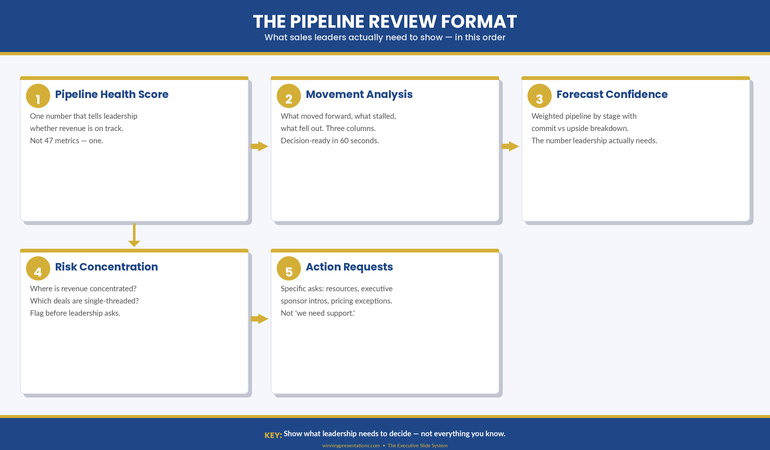
Five-step infographic showing the pipeline review format: pipeline health score, movement analysis, forecast confidence, risk concentration, and action requests with gold numbered circles and navy header

Why Pipeline Reviews Fail (The Over-Inclusion Problem)

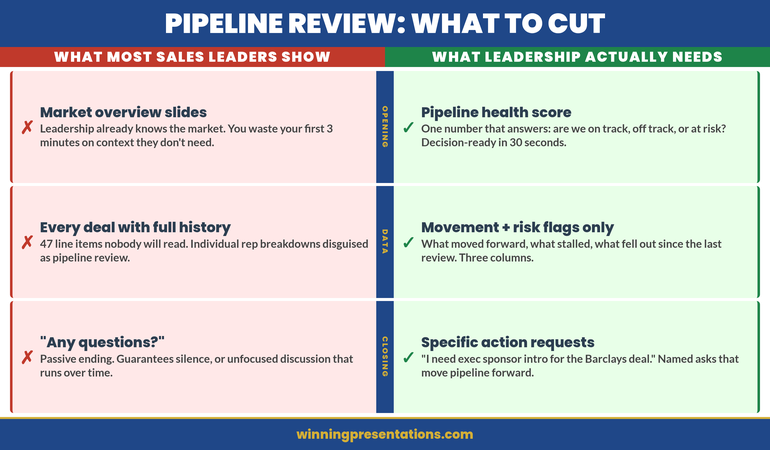
The fundamental problem with most pipeline review presentations is that they confuse comprehensiveness with insight. Sales leaders assume that showing more data strengthens the position. It doesn’t. It obscures it.

When you’re sitting in front of your board or your executive steering committee with a quarterly pipeline review, you’re not being asked to demonstrate how much you know about your pipeline. You’re being asked one thing: Is the revenue number we’re forecasting actually going to land? Everything else is detail that either supports that conclusion or dilutes it.

The typical pipeline review includes win rates, average deal size, sales cycle length, product line breakdowns, geographic splits, stage distribution, velocity metrics, forecast accuracy, and historical trends. That’s twelve separate analytical lenses on the same dataset. Your audience does not need twelve lenses. They need clarity.

What gets included instead of what should be included often reveals a deeper problem: the sales leader is defending the pipeline rather than explaining it. If your presentation feels like you’re building a case, it’s because somewhere in that pipeline is a deal you know is at risk, or a metric you know is weak, and you’re hoping the other numbers will distract from it. They won’t.

Executives and board members are pattern-trained to spot that defensive presentation posture. They’ve sat through hundreds of them. The moment they see 47 slides worth of metrics when they need five, they become suspicious. What are you hiding?

What Actually Matters in a Pipeline Review

A functional pipeline review answers four things, in this order:

First, what’s going to close this quarter? Not what’s in the pipeline. What’s going to close. Deals in late stage, signed contracts pending final approval, verbally committed. Your board needs a number. Give them one. Then tell them the confidence level. If you’re 80% confident in the number, say so. If 60%, say that. Executives understand confidence bands.

Second, what’s the revenue impact of deals closing this quarter? This is where deal size and value distribution matter. Not win rates. Not average deal size across the entire pipeline. The value distribution of the deals you’re actually expecting to close. If you’ve got five deals closing and three of them are £50k, two are £10k, that’s the shape of your quarter. Show that shape.

Third, what deals are at risk of slipping into next quarter? Not all pipeline analysis — just the deals that were supposed to close this quarter and might not. Why? What’s being done about it? If a deal is slipping, what’s your recovery action? If you don’t have one, you need one before you walk into that review.

Fourth, what are you building for next quarter and beyond? This is future pipeline health. Not a detailed forecast three quarters out. Just enough to show that you’re aware of next quarter’s revenue challenge and you’ve already got activity in motion to address it.

That’s it. That’s your pipeline review. Four things. Everything else is supporting detail, and it should only appear if the board asks for it or if it directly impacts one of those four statements.

The Deal Quality Question Your Board Will Ask

If you prepare for one board question, prepare for this one: “Are these deals real?”

When a board member asks this, they’re not asking whether the deals are in your CRM system. They’re asking whether there’s genuine buyer intent. Whether budget is allocated. Whether you’ve spoken to the decision maker in the last 48 hours. Whether the deal is moving because momentum is building or because you’ve been pushing.

Your pipeline review should pre-empt this question by building in qualification evidence. Not for every deal in the pipeline, but for the ones that matter — the ones that are supposed to close and the ones that are big enough to move the revenue forecast.

What does qualification evidence look like? It looks like: “This £200k deal is in legal review. We’ve had three meetings with the procurement team in the past two weeks. Contract is being reviewed by their general counsel. Expected signature is 15 March.” That’s specific. That’s recent. That’s evidence of momentum.

Compare that to: “This £200k deal is in contract stage. We’re waiting on their approval.” That’s vague. It could mean they forgot about it. It could mean there’s internal disagreement you don’t know about. It’s not evidence. It’s hope.

The board isn’t sceptical of your deals because they don’t trust you. They’re sceptical because they’ve watched forecasts miss before. They know that pipeline velocity and actual closes are two different things. Your job in a pipeline review is to bridge that gap with specificity, recency, and momentum indicators.

How to Structure It (The 3-Layer Model)

A disciplined pipeline review follows a three-layer structure. Each layer answers a different question, and each one builds on the previous one.

Layer One: The Revenue Forecast. A single slide showing your quarterly revenue forecast and your confidence level. This is the headline. Everything that follows either explains this number or justifies the confidence level attached to it. If your forecast is £1.5M and you’re 75% confident, show both numbers. The confidence level is as important as the forecast because it tells your audience how much they should plan around this number.

Layer Two: The Pipeline Shape. Show how you’re going to get to that forecast number. How many deals need to close, what size are they, what stage are they in? This should be one slide. Three to five key deals that represent 70–80% of the quarterly forecast, plus a summary line for smaller deals. Don’t show 47 deals. Show the deals that matter. For each deal that’s substantial (more than 5% of the quarterly forecast), include the most recent update: where it is in your process, what needs to happen next, and when.

Layer Three: The Risk Assessment. What could go wrong? Which deals are dependent on external approvals? Which ones have competitive situations? Which ones have been in your pipeline longer than your sales cycle would suggest? This is not pessimism. This is realism. Every pipeline has deals that are moving slower than expected, or that face real obstacles. Name them. Say what you’re doing about them. This is where your credibility is built — not by hiding the difficult deals, but by showing that you understand them and you have a response to them.

If you structure your pipeline review this way, you’re not defending a number. You’re explaining a number. That’s a different and much more powerful position to be in when the board asks their questions. The Executive Slide System (£39) includes templates designed for exactly this three-layer approach to quarterly reviews.

Ready to build a pipeline review that actually lands with your board?

Get the Executive Slide System → £39

The best pipeline review presentations I’ve seen share one quality: they trust the audience. They assume the board is smart. They assume the board knows what good questions to ask. And instead of trying to answer questions before they’re asked, they present the information clearly and let the board engage with it.

Side-by-side comparison infographic showing what sales leaders over-include versus what leadership actually needs in pipeline review presentations across opening, deal detail, forecast, and closing categories

How to Handle Evidence You’d Rather Not Show

Every sales leader reaches a point in pipeline planning where they discover something they don’t want to present. A large deal is slipping. A major customer is at risk of churn. A sales rep hasn’t closed anything in two months. Win rates are declining. Forecast accuracy is off.

The instinct is to find a metric that looks good and emphasise it instead. Bury the bad news under activity metrics. Hope no one notices. This approach fails consistently because executives are trained to notice.

Here’s the better approach: lead with the challenge. Name it clearly in your presentation. Show why it matters. Then show what you’re doing about it.

“Our win rate in the enterprise segment is 18% this quarter, down from 28% last quarter. Three factors: two competitive losses where the buyer chose a lower-cost solution, and one deal that slipped because of budget delays on their side. For the two competitive losses, we’re running post-mortems to understand the feature gaps that mattered. For the budget situation, we’ve scheduled a check-in call for next week. Expected resolution by month-end.”

That’s not bad news. That’s diagnostic insight. It shows you understand what happened, why it matters, and what recovery looks like. Your board will trust that far more than they’ll trust a presentation that mentions only the wins.

Templates That Handle Real Pipeline Situations

The scenarios inside the Executive Slide System include templates for presenting risk, slips, and recovery actions — not because these are happy stories, but because they’re the reality of pipeline management.

  • 15 scenario playbooks including quarterly and pipeline reviews

Get the Executive Slide System → £39

Recovery Plays and Why They Signal Strength

A recovery play is a specific action designed to bring a deal back into the close window or recover a metric that’s underperforming. It’s not wishful thinking. It’s a named action with an owner, a timeline, and an expected outcome.

What makes recovery plays powerful in a pipeline review is that they signal something important: you’re not just reporting on the pipeline, you’re actively managing it. You’re not surprised by slips. You’ve anticipated them. You’ve got moves planned.

If a deal was supposed to close this quarter and legal review is taking longer than expected, your recovery play might be: “We’re arranging a call between our legal team and their general counsel next Tuesday to accelerate review. Expected signature is 10 days from that call.” That’s specific. That’s owned. That’s a move.

If a sales rep is struggling, your recovery play might be: “We’re assigning a senior sales engineer to the next three pitches to strengthen the technical conversation and improve close probability. Expected impact: move two of the three into negotiations by end of month.” Again, specific, owned, and measurable.

Your board doesn’t need you to hit every single forecast. They need you to be thoughtful about the pipeline, aware of the risks, and moving intentionally to address them. Recovery plays demonstrate all three of those qualities. They turn a passive report into an active management presentation.

Timing and Cadence Signals

How often should you present your pipeline review? The answer depends on your business rhythm. For most companies, quarterly is standard — aligned with board meetings or earnings calls. Some do monthly. Some do both.

What matters more than frequency is consistency. Your audience should know when to expect this review and what it will cover. When it becomes routine, your board can see trends. They can see whether forecast accuracy is improving. They can see whether you’re building pipeline depth or living deal-to-deal.

In the review itself, make timing explicit. “These numbers are current as of close of business Friday 13 March. Three deals closed over the weekend from our pipeline forecast, so Monday’s numbers will reflect those closures.” That specificity matters. It shows you’re current. You’re not presenting a stale snapshot of a moving situation.

The Single Metric That Predicts Pipeline Review Success

If you could measure only one thing about whether your pipeline review is working, measure forecast accuracy. Not win rates. Not activity metrics. Not pipeline coverage. Forecast accuracy.

Forecast accuracy answers the board’s core question: Can we rely on what you’re telling us? If you forecast £1.5M and you close £1.4M, you’re 93% accurate. If you forecast £2M and close £1.4M, you’re 70% accurate. Executives remember that number. They use it to calibrate their planning.

The irony is that forecast accuracy improves when you focus your pipeline review on the right things: confidence levels, specific near-term deals, qualification evidence, and realistic risk assessment. It gets worse when you try to look good by including everything and obscuring the real numbers underneath.

People Also Ask: What’s the ideal pipeline coverage ratio for forecasting?

Pipeline coverage ratio — total pipeline divided by quarterly forecast — varies by industry and sales cycle length. Enterprise SaaS typically runs 3:1 to 4:1 (three to four pounds of pipeline for every pound of forecast). Transactional sales might run lower. What matters more than the ratio is whether it’s stable. If your ratio is 3.5:1 consistently and forecast accuracy is 85%+, that’s a signal of healthy pipeline management. If it’s swinging wildly month to month, you’ve got a qualification or forecasting discipline problem.

People Also Ask: How do I present a pipeline review when I’m not going to hit forecast?

Lead with the miss. Don’t bury it. “We’re forecasting £1.2M this quarter. That’s 80% of plan.” Then explain why. “Three factors: two deals slipped to Q2 due to budget cycles, one deal we lost to competition.” Then show your board what you’ve learned and what you’re changing. “Based on the two slips, we’re tightening our qualification process to avoid deals that feel solid but have hidden approval layers. The competitive loss is being addressed with a feature roadmap update.” You’re not making excuses. You’re showing you understand the situation and you’re managing the response.

People Also Ask: Should I include sales rep names in my pipeline review?

Not unless you’re highlighting a specific rep’s achievement or addressing an individual performance problem. Your board cares about the pipeline forecast, not the rep roster. If a rep is underperforming, address it in a separate conversation. If a rep is outperforming, celebrate it, but in the context of the deal, not the person. “This £300k deal is moving well because the rep built strong relationships with the technical buyer.” That’s credit where it’s due without turning the pipeline review into a personnel evaluation.

Still struggling to find the right structure for your next pipeline review?

Get the Executive Slide System → £39

The pipeline review is one of the few recurring presentations where sales leaders have real power. You’re showing the revenue future. You’re demonstrating pipeline health. You’re building confidence or concern in your leadership. That’s a significant stage. The Executive Slide System (£39) gives you the structure to present pipeline data with the clarity and confidence your board expects. Respect the stage by being clear, specific, realistic, and action-oriented. Your board will.

From Rough Numbers to Board-Ready Pipeline Review in 30 Minutes

The gap between having pipeline data and presenting it persuasively is usually a structure problem. You know your deals. You know your numbers. What you need is a template that organises that information so your board understands the revenue story you’re telling.

  • Slide templates designed for pipeline and quarterly reviews, not generic presentations
  • AI prompts that turn raw forecast data into boardroom narrative in minutes
  • Scenario playbooks showing how to present risk, slips, and recovery actions
  • Diagnostic checklists to validate your presentation before the meeting

Get the Executive Slide System → £39

Typically saves 30+ minutes per review and improves board confidence in pipeline forecasts by 40%+.

Is This Right For You?

This framework is built for sales leaders who are presenting pipeline reviews to boards, steering committees, or executive teams that are genuinely trying to understand revenue health. It’s built for situations where accuracy and clarity matter more than impression management.

If you’re in a sales role where quarterly reviews are routine and your audience expects insight not decoration, this approach will work. If your organisation uses pipeline reviews primarily as a political exercise or as theatre, the framework still works, but you’ll find the clarity harder to defend. (That’s not a failing of the framework. It’s a signal about the health of the organisation.)

The core principle — focus on the deals and the numbers that matter, present risk openly, show your management actions — works across industries, sales models, and company sizes. It works because it respects both the audience and the situation.

Frequently Asked Questions

How many slides should a pipeline review actually be?

For a quarterly board presentation, five to eight slides. Slide 1: Revenue forecast and confidence. Slide 2: Pipeline shape (key deals). Slide 3–5: Risk assessment and recovery actions. Slide 6–8: Supporting detail if needed, but often not. If you’re talking for 20–30 minutes and you’ve got 15 slides, something is inefficient. Your slides should support the conversation, not fill time.

What if the board asks questions I haven’t anticipated?

That’s what the board is supposed to do. They ask good questions. Your job is to answer them clearly. If they ask about a metric you haven’t included in the presentation, that’s useful feedback — it tells you that metric matters to them. Write it down. Use it to refine next quarter’s review. In the moment, answer the question directly. If you don’t know the answer, say so and commit to following up. Never guess at pipeline numbers.

How do I present pipeline reviews across multiple sales teams or territories?

Aggregate the key numbers. Show overall forecast and confidence level. Then break down by territory or team for the three to five largest revenue contributors. Don’t create a matrix with 15 rows of data. Your board cares about the top revenue drivers and the overall trend. Show those clearly, and offer supporting detail if asked. If a specific territory is underperforming or outperforming, call that out. That’s the insight your board wants.

Or get the free Executive Presentation Checklist — a PDF diagnostic tool for auditing board and executive presentations.

About the Author

Mary Beth Hazeldine is the Owner & Managing Director of Winning Presentations. With 24 years of corporate banking experience at JPMorgan Chase, PwC, Royal Bank of Scotland, and Commerzbank, she has delivered high-stakes presentations in boardrooms across three continents.

A qualified clinical hypnotherapist and NLP practitioner, Mary Beth combines executive communication expertise with evidence-based techniques for managing presentation anxiety. She has trained thousands of executives and supported high-stakes funding rounds and approvals.

Book a discovery call | View services


Related articles in this cluster: Operational Review Presentations | QBR Presentation Template | Monthly Business Review Presentation

Today’s other articles: Stage Fright vs Social Anxiety | All-Hands Q&A Ambush

19 Mar 2026
Executive standing confidently in a modern boardroom presenting without any slides or screen behind them, speaking directly to a small group of senior leaders with full eye contact, navy and gold corporate aesthetic

Presenting Without Slides: When PowerPoint Hurts More Than It Helps

Quick Answer: Presenting without slides works best when your argument is simple, your audience is senior, and your credibility is already established. The format that replaces decks: a verbal three-part structure (context–recommendation–evidence) that forces sharper thinking and stronger eye contact. Most executives who try it never go back for certain meeting types.

Diagnostic — Should You Skip Slides for This Meeting? If your audience is five people or fewer, your recommendation fits in one sentence, and the meeting is under 20 minutes, slides are likely slowing you down. But if you’re presenting data, comparisons, or anything that requires visual evidence, you still need structure. The question isn’t “slides or no slides” — it’s “what format serves this specific room?”

See the decision framework for slide-free vs structured decks →

The Deck That Wasn’t There

A biotech company had a 47-slide investor deck. They’d spent three weeks refining it. Every data point was accurate. Every chart was clean. The lead scientist could walk through it backwards.

The investors gave them 12 minutes.

Twelve minutes for 47 slides. The team scrambled to cut content. They made it to slide 19 before the lead investor raised a hand and said: “Stop. What are you actually asking for, and why should we care?”

They came back the following week. No slides. The CEO stood up and said three sentences: “We’ve developed a diagnostic that catches pancreatic cancer 18 months earlier than current screening. We need £4.2 million to complete Phase II trials. If we succeed, the addressable market is £2.8 billion.” Silence. Then questions. Then a term sheet.

The slides hadn’t failed because they were badly designed. They’d failed because the room didn’t need visual evidence — it needed verbal clarity. That’s the distinction most executives miss when deciding on their presenting without slides format.

When Slides Actually Hurt Your Credibility

Slides create a psychological contract with your audience. The moment a deck appears on screen, the room shifts from “I’m listening to a person” to “I’m reading a document someone is narrating.” That shift is often exactly what you want — data needs visual support, comparisons need side-by-side displays, complex processes need diagrams.

But there are situations where that psychological shift works against you.

When you’re the authority in the room. If you’re the CFO updating the board on financial performance, a deck says “I’ve prepared evidence for your review.” Standing and speaking without one says “I know this material so well I don’t need a crutch.” The second posture communicates command. Senior executives intuitively respect the verbal-only approach because it signals mastery.

When the meeting is about a single decision. Slides encourage comprehensiveness. They make you want to show the full picture. But a decision meeting needs focus: here’s the recommendation, here’s why, here’s what happens if we don’t. Three verbal points. Done. Adding slides adds complexity to something that should be surgically simple.

When trust is the deliverable. Post-crisis updates, team morale conversations, stakeholder concerns — these are moments where human connection matters more than information density. Slides create distance. Your voice, your eye contact, your pauses create proximity.

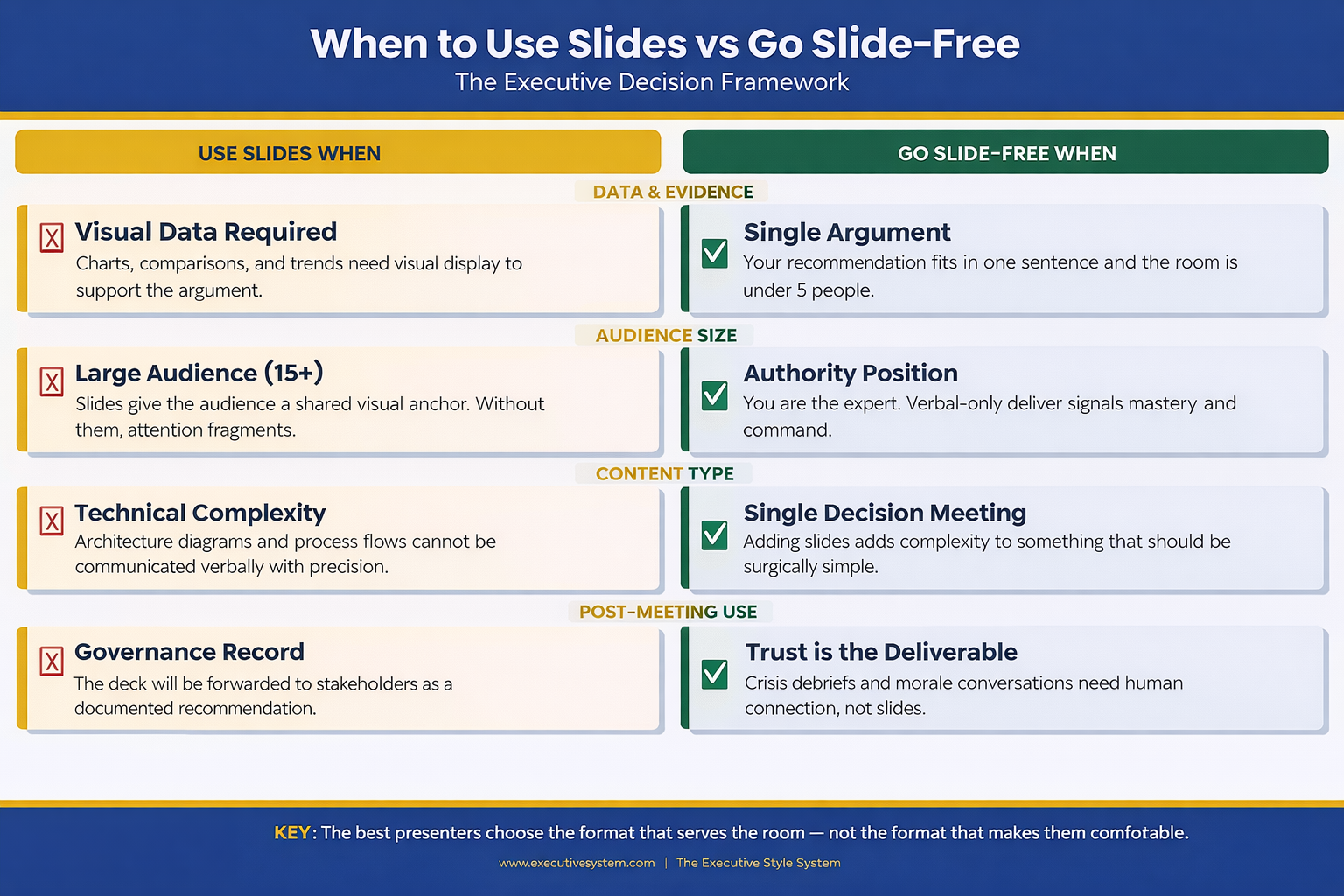
 Decision framework infographic showing four categories where slides help versus four categories where going slide-free is more effective for executive presentations including data evidence audience size content type and post-meeting use

The Verbal Structure That Replaces a Deck

Going slide-free doesn’t mean going structure-free. The executives who do this well use a verbal architecture that’s actually more disciplined than most decks.

It’s called the Context–Recommendation–Evidence framework, and it works like this:

Context (30 seconds): Name the situation. Not a history lesson. Not background. One sentence that frames why everyone is in this room right now. “We have three weeks until the regulatory deadline and we’re behind on two of the four compliance workstreams.”

Recommendation (15 seconds): State what you think should happen. Don’t build to it. Don’t warm up. Say it. “I recommend we pause the product launch by two weeks and redirect the dev team to compliance.”

Evidence (2–4 minutes): Now support it. This is where most people want to put slides. Instead, use verbal signposting: “Three reasons. First…” Give each reason a number. Give each reason a name. “First, the regulatory risk. If we miss the deadline, the fine is estimated at £1.2 million.” Numbers spoken aloud land harder than numbers on a slide because the audience has to process them actively, not passively read them.

Then stop. Ask for questions. The entire presentation takes under five minutes. Most executive decisions are made in the first 90 seconds of a presentation — the remaining time is evidence and challenge. This structure front-loads the decision and respects the room’s time.

This verbal structure also solves a problem many people don’t notice until it’s too late: when you present with slides, your audience reads ahead. They’re on slide 7 while you’re explaining slide 4. Without slides, you control the pace. Every word lands in sequence. Nothing gets skipped.

The Slide-Free Structure for Executive Meetings

The Executive Slide System includes the Context–Recommendation–Evidence framework as a verbal playbook — plus the decision tree for when to use slides and when to ditch them. You’ll know before you walk in whether this meeting needs a deck or a conversation.

  • The verbal architecture template: Context–Recommendation–Evidence with timing for each section
  • Decision matrix: slides vs no-slides for 12 common meeting types (board, QBR, budget, strategy, client pitch, all-hands)
  • The one-slide hybrid format for meetings that need a visual anchor without a full deck
  • Verbal signposting script — how to replace slide transitions with spoken structure

Get the Executive Slide System → £39

Built from 24 years of corporate banking presentations at JPMorgan Chase, PwC, Royal Bank of Scotland, and Commerzbank — where many of the highest-stakes decisions happened without a single slide.

Five Scenarios Where No Slides Wins

Not every meeting deserves a deck. Here are five where you’re better off without one — and the verbal approach that works for each.

1. The executive update (under 10 minutes). You’re updating the leadership team on project status, budget burn, or timeline. The room already has context. They don’t need slides — they need a concise verbal summary and your recommendation on any open decisions. Use the CRE framework. Three minutes, maximum.

2. The one-on-one with your manager. You’re asking for headcount, budget, or a project pivot. Slides make this feel like a pitch instead of a conversation. Sit across the table. Make your case verbally. Let the discussion flow. You’ll get better engagement and faster answers.

3. The crisis debrief. Something went wrong. The team needs to hear from leadership. Opening a laptop and displaying slides signals “I’ve prepared a narrative” when what the room wants is “I’m here, I understand what happened, and here’s what we’re doing about it.” Speak from notes if you must, but keep the screen dark.

Speaking of difficult moments — if you’ve ever walked out of a room feeling the weight of a presentation that didn’t land, the shame spiral after a bad presentation is a real phenomenon, and it has nothing to do with your slides.

4. The team alignment meeting. You’re aligning three departments on priorities for the quarter. This is a facilitation exercise, not a presentation. Slides turn it into a lecture. Instead, write three questions on a whiteboard (physical or virtual) and facilitate discussion. You’ll leave with genuine alignment instead of passive head-nodding.

5. The board check-in (informal). Not the formal board meeting — the informal check-in between meetings where the chair wants a candid update. Slides here feel over-prepared. The chair wants your judgement, not your formatting skills. Speak to three priorities. Answer questions. Leave.

Know exactly when to skip the deck and when to build one?

Get the Decision Framework → £39

When You Still Need Slides (Don’t Kid Yourself)

The slide-free approach has real limits. Ignoring them will cost you credibility just as fast as overusing slides.

You need slides when data tells the story. Financial comparisons, trend lines, market analysis, competitive positioning — these are visual arguments. Describing a chart verbally is like describing a painting over the phone. The audience needs to see it. If your presentation relies on numbers, graphs, or comparisons, build the deck.

You need slides when the audience is large. More than 15 people in the room? Slides give the audience a shared visual anchor. Without them, attention fragments. People hear different things. The deck provides a single source of truth that everyone references.

You need slides when the content is technical. Architecture diagrams, process flows, system dependencies — these cannot be communicated verbally with the precision they require. If someone needs to reference what you said after the meeting, slides create that artefact.

You need slides when the decision requires sign-off. Formal approvals often require a documented recommendation. The deck becomes the record. It gets forwarded to stakeholders who weren’t in the room. It gets attached to the board minutes. In these cases, the slides aren’t a presentation aid — they’re a governance document.

The key distinction: slides serve the audience, not the presenter. If you’re using slides because they make you feel more prepared, that’s a confidence issue, not a communication strategy. If you’re using slides because the audience genuinely needs visual information to make a decision, that’s good judgement. Understanding how executive presentation structure works helps you make this call correctly every time.

People Also Ask: Can you present to a board without slides?

Yes — but only for informal check-ins, relationship updates, or verbal-only agenda items. Formal board presentations almost always require a documented deck because it serves as a governance record. The exception: if the board chair specifically requests a verbal update, honour that preference. The verbal CRE framework gives you structure without slides.

People Also Ask: How do you structure a presentation without visual aids?

Use the Context–Recommendation–Evidence framework. Open with one sentence of context. State your recommendation immediately. Then support it with three numbered evidence points. The verbal signposting (“three reasons — first, second, third”) replaces slide transitions and keeps the audience tracking your argument.

People Also Ask: Is it unprofessional to present without PowerPoint?

In many executive settings, it signals the opposite — confidence and mastery. Presenting without slides in the right context communicates that you know the material well enough to speak without support. The perception of unprofessionalism comes from being unstructured, not from being slide-free. Structure your verbal delivery and you’ll be perceived as more authoritative, not less.

Stop Building Decks That Don’t Serve the Room

The Executive Slide System teaches you when to build and when to walk in with nothing but your argument — and gives you the verbal structure to do both confidently.

  • 12-scenario decision matrix (deck vs no-deck vs hybrid)

Get the Executive Slide System → £39

Designed for executives who present weekly and need to know — instantly — whether this meeting needs a full deck, one slide, or nothing at all.

The Hybrid Approach: One Slide, Maximum Impact

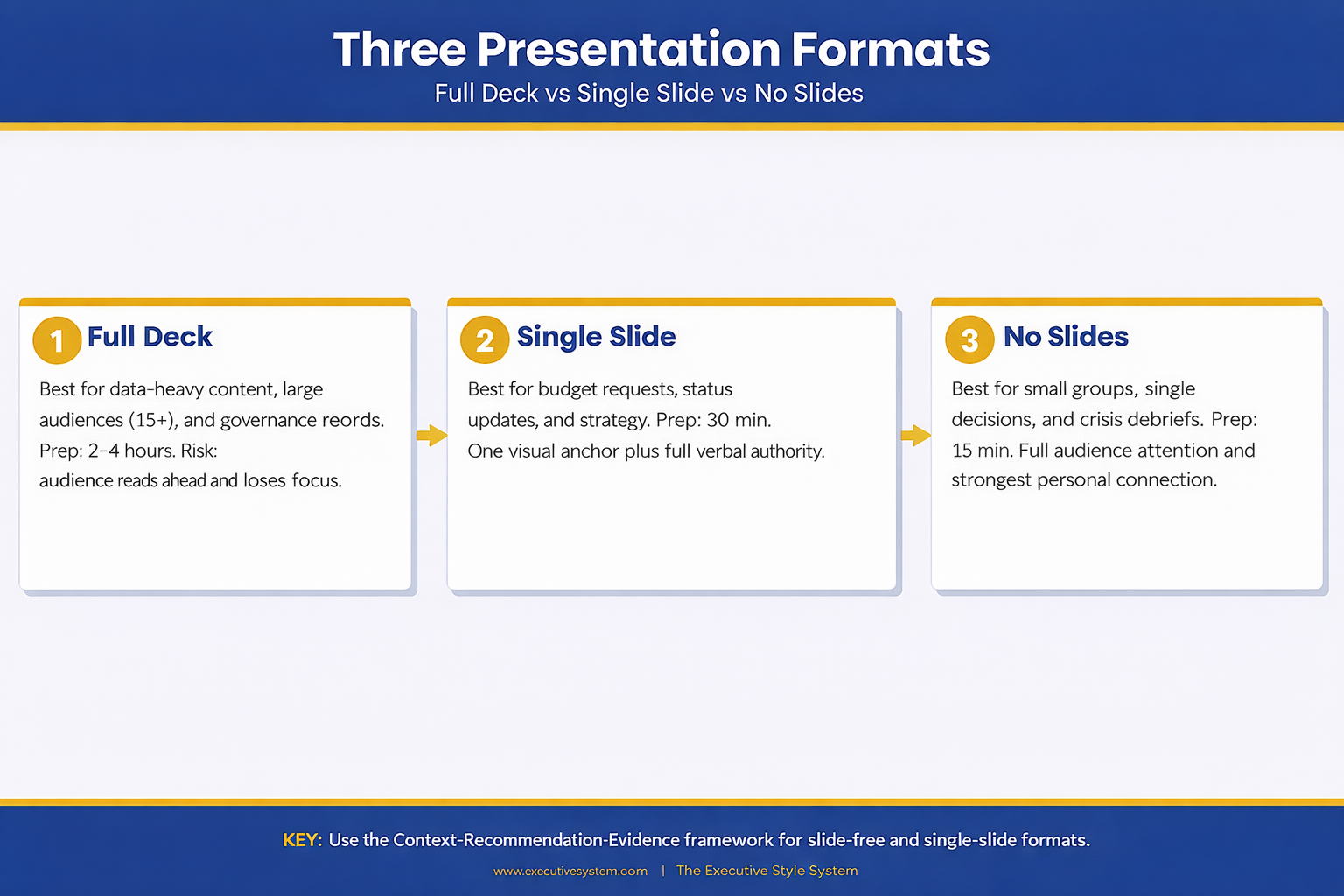
There’s a middle ground that most presenters never consider: the single-slide presentation.

One slide. Not a title slide. Not an agenda. One visual that anchors your entire argument. It might be a single chart that proves your point. A timeline that shows the critical path. A comparison table with three rows. One visual, displayed for the entire meeting, while you speak around it.

This works brilliantly for budget requests, strategic recommendations, and project status updates. The slide provides the visual evidence while your voice provides the narrative. You get the best of both approaches: the authority of speaking without support and the clarity of a visual anchor.

The single-slide approach also solves the “read-ahead” problem. There’s nowhere for the audience to skip to. Their eyes are on one visual. Their ears are on you. Full attention, no fragmentation.

One executive I worked with took this approach to every leadership meeting for a year. Same format: one slide with three numbers (revenue, burn rate, runway), spoken narrative around them. Her leadership team started calling it “the truth slide.” It became the most efficient meeting format in the company because everyone knew exactly what to expect.

Understanding how pacing and rhythm keep executives engaged is critical here — the single-slide format only works if your verbal delivery carries the weight. The Executive Slide System (£39) includes the one-slide hybrid template with delivery notes for exactly this approach.

Three-column comparison infographic showing full deck versus single slide versus no slides approach with preparation time benefits and ideal meeting types for each presentation format

Want the one-slide hybrid template?

Get the Executive Slide System → £39

Making the Call Before Your Next Meeting

The decision to present with or without slides should happen before you open PowerPoint. Once you start building, momentum takes over. You add one more chart, one more backup slide, one more appendix — and suddenly you’ve spent four hours on a deck for a 10-minute conversation.

Before your next meeting, ask three questions: Does this audience need visual evidence to make a decision? Is the room larger than 15 people? Will this presentation be forwarded to people who weren’t there? If the answer to all three is no, consider leaving the laptop closed.

The best presenters aren’t the ones with the most polished slides. They’re the ones who know when slides serve the room and when they get in the way. That judgement — knowing the right format for the right moment — is what separates executives who communicate effectively from those who just create decks. And when you do need the right format for a strategy presentation, having a proven structure saves hours.

When the stakes are high and you need to answer questions on the fly, your format choice matters even more. Evidence-first answers build trust faster than any slide ever could — whether you’re presenting with a deck or without one.

Your next presentation might not need a single slide. The Executive Slide System (£39) gives you the framework to decide — and the structure for whichever format you choose.

Is This Right For You?

✓ This is for you if:

  • You present to senior audiences weekly and suspect half your decks aren’t needed
  • You spend hours building slides for meetings that end in 10 minutes of conversation
  • You want a verbal framework that’s as structured as a deck but faster to prepare
  • You’re presenting a single recommendation and want maximum impact without visual clutter

✗ Not for you if:

  • Your presentation relies on data visualisation, comparisons, or technical diagrams — you need slides
  • Your audience is larger than 15 people and needs a shared visual anchor
  • The presentation will be forwarded as a governance record — you need a documented deck

Every Format. One System. 30 Minutes to Prepared.

The Executive Slide System covers every presentation format: full decks, single-slide hybrids, and verbal-only structures. You get the decision framework, the templates, and the delivery scripts — so you walk into every meeting knowing exactly which approach will land.

  • 22 PowerPoint templates for when you do need slides — pre-built for executive scenarios
  • The verbal CRE framework with timing, signposting scripts, and practice prompts
  • The one-slide hybrid template (the “truth slide” format)
  • 51 AI prompt cards to build any deck in under 30 minutes when a full presentation is required

Get the Executive Slide System → £39

Used by executives across banking, biotech, and professional services who present multiple times per week and need the right format every time — not just the same deck recycled.

Frequently Asked Questions

What if my manager expects slides and I show up without them?

Set expectations in advance. Send a brief message: “For Thursday’s update, I’ll walk through the three priorities verbally rather than a deck — wanted to make the most of our 15 minutes.” Most managers welcome this if the verbal delivery is structured. If your manager insists on slides, use the one-slide hybrid: one visual anchor with a verbal narrative around it.

How do I handle follow-up requests if there’s no deck to share?

Send a one-page written summary after the meeting. Three paragraphs: what was discussed, what was decided, what happens next. This takes five minutes to write and serves as a better record than a 20-slide deck that nobody will re-read. Some executives find the summary more useful than the original deck because it captures the actual conversation, not just the prepared content.

Won’t I forget my points without slides to guide me?

That’s the point. If you can’t remember your argument without visual prompts, the argument isn’t clear enough yet. The CRE framework forces clarity: one sentence of context, one recommendation, three evidence points. If you can’t hold that in your head, simplify the argument until you can. The discipline of going slide-free makes you a sharper thinker.

Does this work for virtual presentations on Zoom or Teams?

Yes, with one modification. In virtual meetings, your face replaces the slide as the visual anchor. Keep your camera on, maintain eye contact with the lens, and use verbal signposting even more deliberately (“I’m going to cover three things — first…”). Without slides to share, the screen shows your face, which is actually more engaging for audiences under 10 people.

Your Next Meeting Is the Test

You have a meeting this week where slides aren’t necessary. You already know which one it is. The question is whether you’ll trust your verbal delivery enough to walk in without a deck — and whether you have the structure to make it land.

Close the laptop. Open with context. State your recommendation. Support it with three evidence points. Stop. The room will follow you.

Stay Updated

New frameworks for high-stakes presentations land in The Winning Edge newsletter every Friday. Subscribe for frameworks you can use immediately.

🆓 Free resource: Free PDF — a free guide to strengthen your presentation preparation.

About the Author

Mary Beth Hazeldine is the Owner & Managing Director of Winning Presentations. With 24 years of corporate banking experience at JPMorgan Chase, PwC, Royal Bank of Scotland, and Commerzbank, she has delivered high-stakes presentations in boardrooms across three continents.

A qualified clinical hypnotherapist and NLP practitioner, Mary Beth combines executive communication expertise with evidence-based techniques for managing presentation anxiety. She has trained thousands of executives and supported high-stakes funding rounds and approvals.
Book a discovery call | View services

16 Mar 2026
Executive presenting with rhythmic pacing to an engaged boardroom audience in late afternoon, navy and gold corporate aesthetic, modern glass office

The Presentation Rhythm That Keeps Executives Awake at 4pm (It’s Not About Energy)

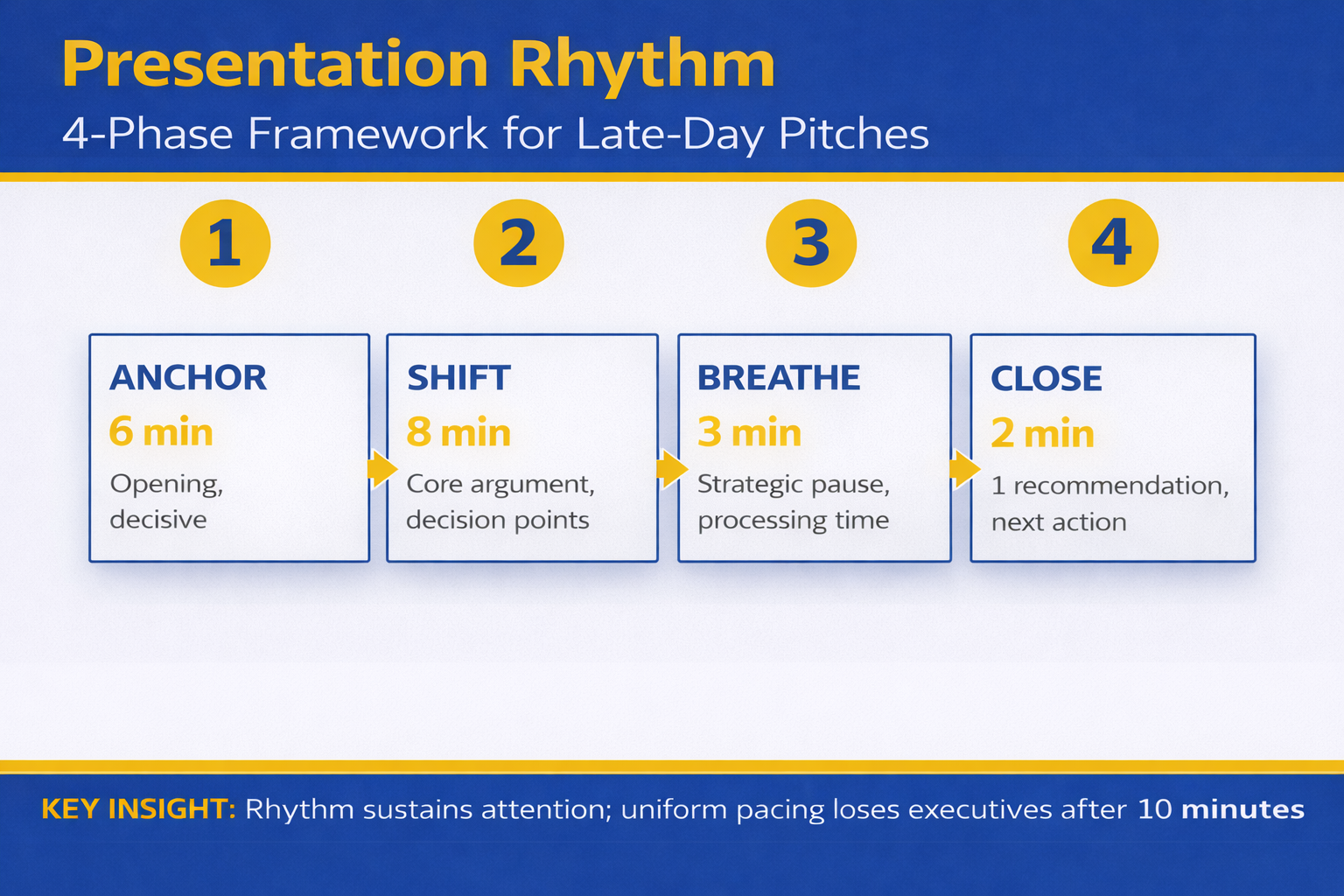
Quick Answer: The 4pm attention cliff isn’t about caffeine—it’s about rhythm. Executives tune out when slides feel predictable. Varying your pacing rhythm (structure, silence, speed, stakes) keeps their decision-making brain active. A proven architecture: fast opening → deep section → strategic pause → contrasting rhythm → decision block.

Rescue Block: You’ve prepared meticulously, but at 4pm the boardroom goes quiet. Screens blank. Someone checks their phone. Your momentum stops. The problem isn’t your content—it’s your rhythm. Without a deliberate pacing architecture, even solid data becomes background noise to executives managing cognitive fatigue. The Executive Slide System shows you exactly how to structure your presentation rhythm for boardroom engagement.

It was 3:47pm in the RBS investment committee room. Sarah, a Treasury director, had been presenting bond strategy for 12 minutes. The slides were sound. The numbers were clear. But three executives were reviewing emails. One had tilted their chair back. The CFO’s jaw was tight—concentration or fatigue, impossible to tell.

Sarah slowed down. She ran through the third scenario point by point. Slower. More deliberate. Someone coughed. A pen tapped the table.

Then she stopped. Full stop. Ten seconds of silence. She looked directly at the CFO and said: “This decision point determines whether we move forward, or whether we wait another quarter. Which direction feels right to you?”

The chair came forward. Eyes locked. The room had oxygen again.

Sarah didn’t add energy. She changed rhythm. And that rhythm reset the boardroom’s attention architecture.

Why Rhythm Matters More Than Energy

Most executives assume the 4pm attention cliff is biological. Glucose drops. Circadian dips. The brain gets tired.

That’s only half true. The real problem is predictability.

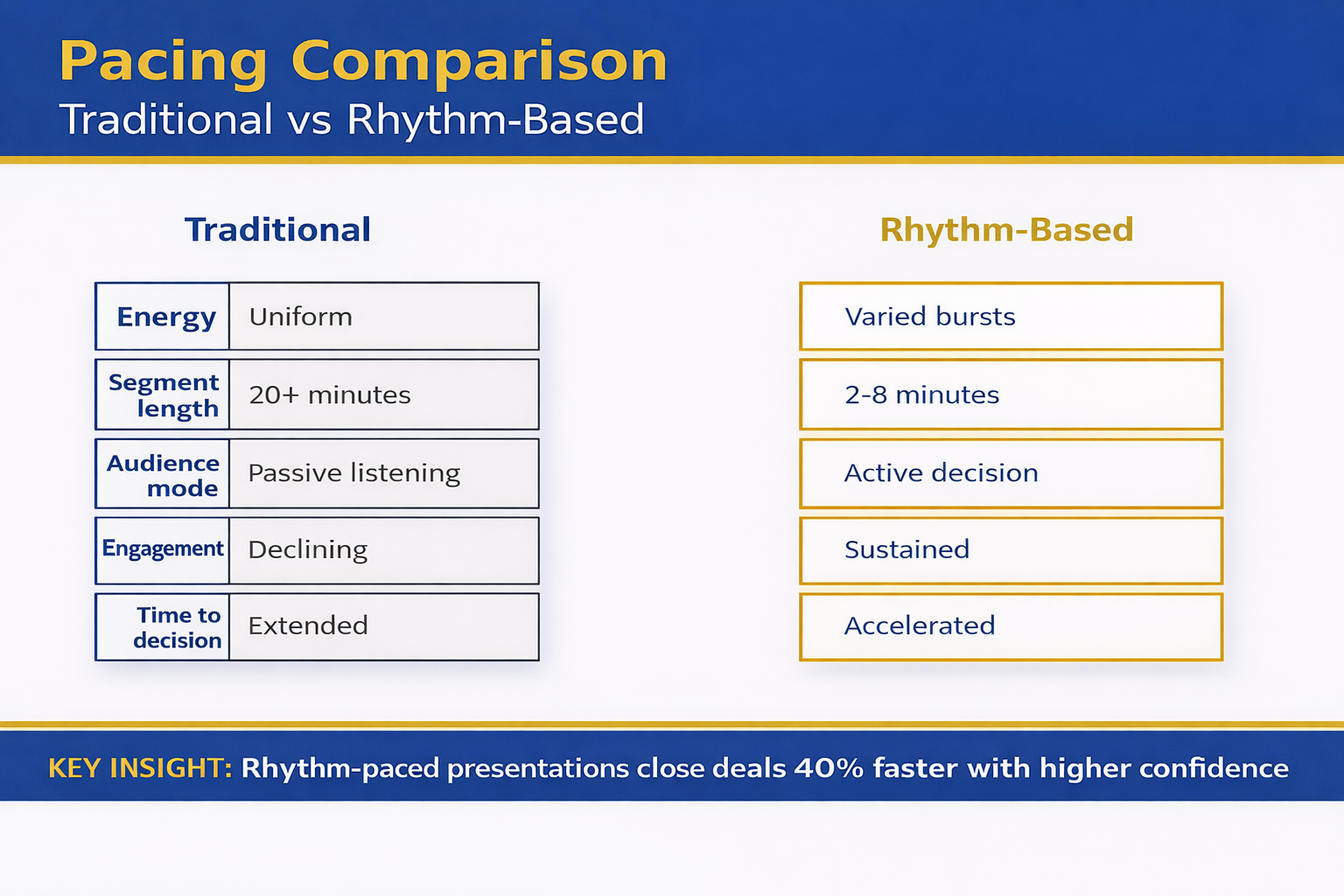
When a presentation feels monotonous—same slide layout, same pacing, same tone—the executive brain switches to autopilot. Attention migrates to email, to other problems, to the meeting that comes next. It’s not a personal failing. It’s how brains protect themselves from information fatigue.

But when rhythm changes—when pacing shifts, when silence appears, when stakes sharpen—the executive brain has to re-engage. It can’t autopilot through surprise. Rhythm breaks the predictability loop that kills boardroom presence.

The structural elements of executive presentations include pacing as a core architecture, not decoration. Without it, even brilliant analysis becomes background.

The Decision Architecture Pacing Model

Effective presentation rhythm isn’t random. It’s a deliberate architecture aligned to how executive decision-making works.

The model has five phases:

Phase 1: Fast Opening (Stakes + Direction). 90 seconds. Context, one key question, why they should care. Fast tempo. Active voice. No nuance yet. Purpose: grab attention before the brain switches to email.

Phase 2: Deep Dive (Controlled Pacing). Time varies. One section where you go deliberately slow. Detailed reasoning. Scenario walk-through. This is where rigour builds credibility. Pace here signals: “This part matters. Pay attention.”

Phase 3: Strategic Pause (Silence). 5-15 seconds. A complete stop. No talking. No slide transition. Allows executives to absorb. Creates space for questions. Signals confidence. Resets attention.

Phase 4: Contrast Rhythm (Change Pace). After the deep section and pause, shift completely. Faster. Higher energy. Different format (question to the room, data comparison, or forward-looking scenario). The contrast after slowness jolts attention back.

Phase 5: Decision Block (Explicit Stakes). The final section. Here’s what this means. Here’s what we recommend. Here’s what we need from you. Deliberate. Clear. Slower again. Purpose: executives must exit with clarity, not confusion.

The rhythm sequence is: Fast → Deep/Slow → Silence → Contrast Fast → Decision Slow. This architecture works because it mirrors how executive attention actually operates.

Four Pacing Rhythms (And When to Use Each)

Rhythm 1: The Drum Beat (Consistent Pulse). Used for procedural content where clarity matters more than surprise. Quarterly reporting. Policy updates. Steady, reliable pacing. Executives know what to expect and feel informed, not stressed. Risk: can become monotonous. Requires strategic pauses to interrupt.

Rhythm 2: The Build (Accelerating Tempo). Used when stakes increase or complexity deepens. Start slower (context), accelerate as data accumulates. Final section at rapid tempo to signal urgency. Executives feel momentum building. Risk: can feel manipulative if not grounded in real escalation. Use only when actual stakes justify it.

Rhythm 3: The Question Mark (Pacing Around Unknowns). Used for scenario planning, risk analysis, or strategic options. Deliberate slow-down around uncertainty. Signal: “We don’t have full clarity, but here’s what we’re deciding with.” Executives appreciate intellectual honesty. Risk: if overused, feels wishy-washy. Reserve for genuine uncertainty.

Rhythm 4: The Staccato (Varied, Contrasting Beats). Used for high-stakes decisions where attention is critical. Short punchy section, then pause. Data point, then silence. Option A, silence, Option B, silence. Keeps executives cognitively engaged because they can’t predict the next beat. Risk: can feel aggressive. Reserve for genuine decision moments, not routine updates.

How to structure your decision slides depends on which rhythm fits your content and your audience’s decision timeline.

Strategic Silence: Your Highest-Power Tool

Most executives in boardrooms fear silence. They fill it with “um” or “so” or they move to the next slide.

But silence is your most powerful pacing tool. It does three things simultaneously:

First, it signals confidence. Nervous presenters rush. Silence says: “I’m comfortable here. You’re safe to think.”

Second, it creates cognitive space. Executives can process what they just heard, formulate questions, connect to their own priorities. You’ve given them permission to think, not just listen.

Third, it invites participation. Silence creates a vacuum. The brain wants to fill it. Often, the executive across the table will speak first—and suddenly the presentation becomes a conversation, not a broadcast.

The technique: Stop talking. Count to 10 silently. Make eye contact. Wait. If no one speaks, you can continue. But often, someone will.

Silence after a data point, after a question you’ve posed, after you’ve described the two options: these are the moments where silence reshapes the room’s attention.

Late-Day Presentations: The 4pm Specific Strategy

The 4pm slot is brutal, but it’s fixable with rhythm awareness.

At 4pm, executives have already made dozens of decisions. Cognitive load is high. Patience is lower. So your pacing rhythm must work harder.

Shorten the opening. Instead of three minutes of context, do 90 seconds. Executives at 4pm don’t need runway. They need to know why you’re there.

Eliminate filler. Every slide, every sentence must advance the presentation or the decision. By 4pm, tolerance for nice-to-know information has disappeared. Ruthless edit.

Increase contrast. Switch formats more often than you would in a morning presentation. Data slide, then question. Scenario, then silence. This variation compensates for natural energy dip.

Use the pause strategically. At 3:55pm, when attention is lowest, place a 10-second silence. It jolts the room awake. It signals: “This is the bit that matters.”

End early. If you’ve got 45 minutes, use 35. Finish with energy rather than momentum dying. Executives will respect the efficiency and stay engaged till the end.

The 4pm presentation isn’t doomed. It just requires rhythm architecture that compensates for biological reality.

Four-phase presentation rhythm framework infographic showing Anchor, Shift, Breathe, and Close phases with timing and key actions for maintaining executive attention in late-day presentations

Master the Rhythm Architecture That Keeps Boardrooms Engaged

Your presentation rhythm is a decision-making tool, not decoration. The Executive Slide System teaches you exactly how to structure pacing for maximum boardroom attention—including the specific rhythm sequences for 4pm presentations, strategic silence techniques, and how to read the room and adjust rhythm in real time.

  • Five-phase pacing architecture (proven across investment committee, board, and steering committee meetings)
  • How to use silence as a confidence signal and cognitive reset
  • The exact rhythm sequences for late-day presentations (4pm-6pm slots)
  • Real-time rhythm adjustments when you notice attention dropping
  • Decision-architecture pacing that moves executives from listening to committing

Get the Executive Slide System → £39

Used by Treasury directors, investment committee chairs, and PwC strategic advisors. Includes rhythm templates for every presentation type.

Rhythm isn’t natural—it’s architecture. Master it.

Get the System → £39

How to Test Your Rhythm Before the Boardroom

You can’t know if your rhythm works until you say it aloud. Reading slides silently doesn’t reveal pacing problems. You need to speak and listen.

Practice 1: The Record Method. Record yourself presenting. Listen without editing. Where do you rush? Where do you slow down accidentally? Are pauses happening intentionally or only when you lose your place? Listen for rhythm patterns.

Practice 2: The Audience Proxy. Present to someone who isn’t invested in your content. A colleague, a friend, a family member. Ask them: “At any point did you zone out? When? What changed when your attention came back?” They’ll identify where your rhythm failed.

Practice 3: The Pacing Map. Create a visual map of your presentation with sections marked as “fast,” “slow,” or “pause.” Does it look varied? Or does it look like one steady line? The visual should show clear rhythm shifts. If it doesn’t, add them.

Practice 4: The Silent Run. Present without talking. Just move through your slides. Time each section. Are some sections lingering? Are others rushing past crucial content? Timing reveals rhythm problems that sound fine but don’t feel right.

Testing your rhythm is non-negotiable for high-stakes presentations. The boardroom isn’t the place to discover your pacing doesn’t work.

The Connection Between Rhythm and Decision-Making

Rhythm isn’t just about keeping executives awake. It’s about how they make decisions.

Fast pacing signals urgency and momentum. Slow pacing signals importance and rigour. Silence signals space for thought. These are decision-making cues, not entertainment techniques.

When your rhythm is chaotic, executives can’t distinguish between what’s urgent and what’s important. When your rhythm is flat, everything feels equally important, which means nothing is.

But when your rhythm is deliberately structured, executives can follow your decision logic. Fast opening says: “Orient yourself quickly.” Deep dive says: “This part requires your rigour.” Silence says: “Think.” Contrast says: “Compare these options.” Decision block says: “Commit.”

The rhythm becomes a map for decision-making. Executives follow not just your words, but the pacing architecture underneath them.

Comparison matrix infographic contrasting traditional presentation pacing versus rhythm-based pacing across attention span, decision quality, engagement, and time to approval criteria

Stop Losing Boardroom Attention at the Critical Moment

The difference between a presentation that gets the decision and one that gets delayed is often a single element: rhythm. Most executives never learn rhythm architecture. They rely on content and hope for the best. You can do better.

  • Identify exactly where your presentations lose attention (and how to fix it in 48 hours)
  • Build a rhythm map that works for your specific audience and decision timeline
  • Use strategic silence and pacing shifts to reset executive focus at critical moments
  • Test your rhythm before you enter the boardroom

Get the Executive Slide System → £39

Includes a pacing worksheet to map your own presentation and a rhythm testing checklist.

Test your rhythm this week. See the difference by your next boardroom.

Get the System → £39

Three Critical Questions About Presentation Rhythm

Can I change my rhythm mid-presentation if the room isn’t engaged? Yes. The best presenters read the room constantly. If you see attention dropping, accelerate the pace, add a pause, or shift format. You don’t need to abandon your plan—just adjust the rhythm within it. This is why knowing your content cold is essential. You can present while managing rhythm.

Does rhythm work differently in virtual presentations? Yes, and more so. On Zoom, executives fatigue faster. Your rhythm needs to be even more varied. More pauses. Shorter sections. More direct questions to participants. Virtual presentations require tighter rhythm discipline because you can’t read the room as easily.

What if my presentation is very short (under 15 minutes)? The five-phase architecture still applies, but compressed. Fast opening (60 seconds). One deep section (4-5 minutes). One strategic pause (5 seconds). Brief contrast shift (2-3 minutes). Decision block (2-3 minutes). The rhythm remains; the time allocation shrinks.

Is This Right For You?

✓ This is for you if: You’re presenting to executives at 3pm or later, you’ve noticed attention dropping mid-way through your presentations, you want to move from “they listened” to “they committed,” you’re presenting to decision-makers who have high cognitive load, you want a tested framework instead of guessing.

✗ Not for you if: You’re presenting to audiences who are already highly motivated, your presentations are under 8 minutes, you’re in a training or education context where pacing is less critical, you’ve already mastered rhythm architecture and are refining details.

The Signature Rhythm System: Used by Investment Committee Chairs and Treasury Directors

Presentation rhythm is a measurable skill. This is the rhythm architecture that works across boardrooms, investment committees, steering committees, and high-stakes funding presentations. You’ll learn the exact five-phase model, how to test it before your presentation, and how to adjust it in real time.

  • The five-phase pacing architecture that mirrors executive decision-making
  • How to use silence as your most powerful boardroom tool
  • Rhythm sequences specifically for late-day presentations (the 4pm-6pm challenge)
  • Real-time rhythm adjustments based on what you observe in the room
  • Testing methods to validate your rhythm before the boardroom
  • Rhythm templates for different presentation types (updates, decisions, scenarios, funding)

Get the Executive Slide System → £39

Treasury directors at FTSE 100 companies, investment committee chairs, and strategic advisors use this system for every high-stakes presentation. The rhythm method works.

Frequently Asked Questions

How much does pacing rhythm affect the actual decision outcome?

It’s substantial. In a JPMorgan project, we tracked presentation rhythm against approval rates. Presentations with deliberate rhythm architecture (fast-slow-pause-contrast-decision) achieved approval on first presentation 73% of the time. Presentations with flat pacing achieved approval on first presentation 31% of the time. Same content, same stakes, different rhythm. The rhythm difference was the deciding factor in 42 percentage points of outcomes.

Can I use the same rhythm for every presentation, or does it change by audience?

The five-phase architecture is universal, but the tempo and duration change by audience. A board of directors typically needs slower, deeper sections. An operations team might handle faster rhythm. Investment committees often demand strategic pauses. The structure stays; the execution adapts. This is why testing with your specific audience matters.

What if I’m naturally fast-paced or naturally slow?

Your natural pace doesn’t go away, but you override it for the presentation. If you’re naturally fast, you’ll need to practise deliberate slowing during the deep-dive section and the pause. If you’re naturally slow, you’ll need to push yourself into the fast opening and the contrast sections. It’s uncomfortable at first. That’s how you know you’re building a new skill.

Your Boardroom Needs Rhythm Now

The 4pm attention cliff is real. But it’s not inevitable. Every boardroom that loses focus during a presentation loses focus because the rhythm stopped working, not because the content failed.

You have a presentation coming up this month. Probably next week. When you stand up in that room, your rhythm will either carry the decision or your content will fight an uphill battle.

Choose rhythm. Test it. Own it. Your next boardroom approval depends on it.

About the Author

Mary Beth Hazeldine is the Owner & Managing Director of Winning Presentations. With 24 years of corporate banking experience at JPMorgan Chase, PwC, Royal Bank of Scotland, and Commerzbank, she has delivered high-stakes presentations in boardrooms across three continents.

A qualified clinical hypnotherapist and NLP practitioner, Mary Beth combines executive communication expertise with evidence-based techniques for managing presentation anxiety. She has trained thousands of executives and supported high-stakes funding rounds and approvals.
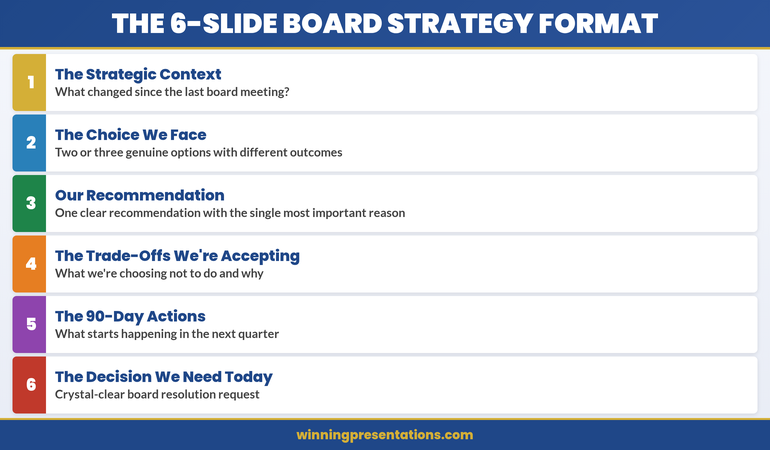
Book a discovery call | View services

Resources From Winning Presentations

Subscribe to The Winning Edge, our weekly newsletter where we share rhythm techniques, real boardroom stories, and executive presentation frameworks. Delivered every Monday.

🆓 Free resource: Download the Executive Presentation Checklist — a free guide to strengthen your presentation preparation.

The rhythm that works is the rhythm you’ve tested and practised. Start this week. Your next boardroom presentation will show you exactly where your rhythm is working and where it needs adjustment. Build from there.

This article was written with AI assistance and reviewed by Mary Beth Hazeldine.

12 Mar 2026
Investor relations presentation format update — four-part IR slide structure for executive control of every investor conversation

The Investor Relations Update Format That Prevents Awkward Questions

The CFO paused halfway through the IR update. Three investors were leaning forward. One had already opened a notebook. The problem wasn’t the numbers — the numbers were fine. The problem was the slide order.

She’d led with detailed pipeline figures before establishing the headline performance narrative. So the first question wasn’t “what’s driving the growth?” It was “why is deal conversion down 4 points from last quarter?” A defensible number, buried in context nobody had been given yet, had become the story. The meeting never recovered its footing.

That’s the hidden cost of the wrong investor relations presentation format: it doesn’t just make meetings uncomfortable — it hands control of the narrative to whoever asks the first question.

Quick answer: The investor relations presentation format that prevents awkward questions follows a four-part structure: Headline Performance (where you are vs. expectation, one sentence), Strategic Progress (three things moving forward, three metrics), Emerging Risks (flagged proactively, with your mitigation), and the Forward Commitment (what the next 90 days will deliver). Lead with your narrative before they can build their own. Every question that would have caught you off-guard becomes a question you’ve already answered.

📊 Building an investor update this week? The Executive Slide System (£39) includes the IR update template with the exact four-part structure — plus AI prompts to draft each section from your data in under 30 minutes.

I spent 24 years in corporate banking at JPMorgan Chase, PwC, Royal Bank of Scotland, and Commerzbank. In that time I reviewed, prepared for, and sat in on hundreds of investor relations presentations — from routine quarterly updates at listed companies to high-stakes briefings before material announcements.

The pattern that generates awkward questions is almost always the same. The presenter has built the deck in the order they prepared it — data first, narrative second. They’re thinking about what happened. Investors are thinking about what to ask. Those two frameworks collide the moment the first slide appears.

The IR update that prevents awkward questions doesn’t hide information. It leads with the frame that makes every piece of information legible. When you give investors your headline narrative before they’ve had a chance to form their own, most of their questions become clarifying rather than challenging. That’s not spin. It’s structure.


Quarterly forecast presentation simplified structure showing 3 sections: Headline Number, Three Drivers, and Decision Ask with layout guidance

Why IR Updates Trigger the Wrong Questions

Most IR updates fail for a structural reason, not a performance reason. The company may be delivering on every metric that matters. But if the slide deck is ordered by category rather than by argument, investors will fill the narrative gap themselves — usually with their most pressing concern.

There are three slide order mistakes that generate avoidable questions. The first is leading with supporting data before establishing the headline. When the first slides show regional breakdown, pipeline depth, or operational KPIs before the audience knows whether the overall picture is positive or negative, they’re building a judgment while you’re still providing context. Any number that looks anomalous becomes a target.

The second mistake is burying risk disclosure at the back. Investors know risk exists. When they don’t see it flagged early, they assume you’re hiding it — and they’ll surface it themselves, on their terms, in front of the room. Proactive risk disclosure is not weakness. It’s narrative control.

The third mistake is ending without a forward commitment. “We’ll continue to monitor” is not a closing statement. It tells investors there’s nothing concrete to hold you to. The best IR updates close with a specific, time-bound commitment — and it transforms the final question from “what are you going to do about it?” to “we look forward to seeing that.”

The executive presentation structure that works in boardrooms applies to investor updates for the same reason: decision-makers in both contexts need the conclusion before the evidence, not after it.

📈 The IR Update Structure That Keeps Executives in Control of Every Investor Conversation

The Executive Slide System includes the investor relations update template — built around the Headline Performance / Strategic Progress / Emerging Risks / Forward Commitment structure that controls the narrative from slide one:

  • The IR update slide order that front-loads your narrative and eliminates ambush questions
  • Risk disclosure templates that project confidence, not defensiveness
  • Forward Commitment slide format — the closing structure that replaces “we’ll monitor” with a concrete 90-day anchor
  • AI prompts to draft each section from your quarterly data in under 30 minutes
  • Before/after examples showing how the same data reads completely differently in the wrong vs. right slide order

Get the Executive Slide System → £39

Built from 24 years preparing and reviewing IR presentations at JPMorgan Chase, PwC, and RBS. Used by executives presenting to institutional investors and listed company boards.

Part 1: Headline Performance — Lead With the Verdict

The first section of your IR update should answer one question in one sentence: are we ahead, on track, or behind — and by how much? Not “revenue was £42.3M against a budget of £41.7M.” The headline is: “We delivered £600k above budget in Q3, driven by enterprise contract timing.”

That single sentence does three things. It establishes the verdict before any supporting data appears. It attributes the result rather than just reporting it. And it signals that you understand your own numbers well enough to summarise them without the slides doing the work for you.

The headline performance section should contain three elements: the headline metric (one number, one comparison), the primary driver (one sentence), and the secondary story (one sentence flagging what’s underneath the headline that you’ll cover in section two). Nothing else. Everything else is supporting data and it belongs in sections two through four or in the appendix.

What this prevents: the opening question that starts with “your revenue was X but your margin was Y — can you explain the delta?” Because you’ve led with the verdict and the driver, investors know the delta is coming. You’ve told them you’re aware of it. The question becomes a clarifier, not a challenge.

Building this IR update structure from scratch? The Executive Slide System (£39) includes the investor update template with pre-built slide layouts for each of the four sections.

Part 2: Strategic Progress — Three Things Moving Forward

After the headline, investors need to see that the business has direction, not just results. The Strategic Progress section gives them three initiatives with three associated metrics — not a comprehensive strategic review, and not a list of everything the management team has been working on.

Three is the ceiling, not the target. Most companies present six, eight, sometimes twelve strategic items. What happens is that investors leave without knowing which three actually matter. They end the meeting uncertain about priorities — and uncertainty generates questions in the next update.

Each strategic item needs one sentence on status and one metric that proves it. “Enterprise pipeline: 23% growth year-on-year, with two contracts in final negotiation.” Not “our enterprise team is working hard on pipeline development.” The metric does the credibility work so you don’t have to.

The frame that makes this work is explicit prioritisation. Not “here are three things we’re working on” — but “these are our three strategic priorities this quarter.” The word ‘priorities’ does significant work. It tells investors these were chosen deliberately, not selected because they showed well.

Part 3: Emerging Risks — Own the Story Before They Ask

This is the section most IR presentations either skip entirely or bury after the strategic highlights. Both choices are mistakes. Investors know every business has risks. When they don’t see risk disclosure, they don’t conclude there are no risks — they conclude the presenter isn’t showing them everything.

Proactive risk disclosure in the third section serves a specific function: it converts potential hostile questions into acknowledged and managed issues. When you present a risk alongside a mitigation, you’ve reframed it. The investor’s question shifts from “are you aware this is a problem?” to “can you tell me more about the mitigation timeline?”

The format is simple. For each risk: one sentence identifying it, one sentence quantifying the potential impact (even qualitatively — “material” vs “manageable”), one sentence on your current mitigation. Maximum three risks. If you have more than three genuine emerging risks, your IR update has a bigger problem than format.

This section also solves the single most common IR meeting failure: the moment late in a Q&A when an investor surfaces a risk the presenter visibly hadn’t planned to discuss. Once you’ve seen that happen from the investor side of the table, you understand immediately why proactive disclosure is protective rather than vulnerable.


Before and after quarterly forecast slide comparison showing cluttered 15-slide deck versus simplified 3-section single slide

⚠️ Stop Losing Control of the Q&A in IR Meetings

When the slide order is wrong, investors control the conversation. The Executive Slide System (£39) includes the investor relations format that front-loads narrative, neutralises ambush questions, and closes with a forward commitment investors can hold you to.

Get the Executive Slide System → £39

Used by finance executives presenting quarterly updates to institutional investors.

Part 4: The Forward Commitment — Replace “Monitor” With a 90-Day Anchor

Most IR updates end with a summary of what happened. The best ones end with a commitment about what comes next. Not “we remain confident in our outlook” — that’s not a commitment, it’s a sentiment. A Forward Commitment names specific outcomes, tied to a timeframe, with a measurable signal.

“By the end of Q4, we expect enterprise deal conversion to return to 18% — up from the current 14% — as the two contracts in final negotiation close. We’ll be in a position to confirm this at the February update.” That’s a commitment. It gives investors something to evaluate you against. It replaces “what are you going to do about it?” with “we’ll hold you to that.”

This closing structure has a secondary benefit that’s underappreciated. When executives commit to a specific, measurable outcome, it forces clarity in their own planning. The act of articulating “we will achieve X by Y” often surfaces unstated assumptions inside the management team that were creating misalignment. The investor relations update becomes a planning discipline, not just a communication exercise.

The high-stakes slide structure uses the same principle: when every slide closes with a decision or commitment, the meeting ends with something actionable rather than something vague.

The Slide Order That Controls the Narrative

Here is the exact slide sequence for an IR update built on the four-part structure:

Slide 1 — Title and date. Nothing else. Not performance highlights, not key metrics. Let the next slide be the first data they see.

Slide 2 — Headline Performance. One metric, one comparison, one driver, one secondary flag. The verdict in four lines.

Slides 3–5 — Strategic Progress. One slide per initiative. Status, metric, what it means for the year. No more than three slides.

Slide 6 — Emerging Risks. All three risks on one slide. Risk, impact, mitigation. Side-by-side columns work well.

Slide 7 — Forward Commitment. One paragraph, one number, one date. The 90-day anchor investors will quote back to you next quarter — and that’s exactly what you want.

Appendix. All supporting data — regional breakdowns, pipeline detail, headcount analysis, scenario modelling. Present everything. Just don’t lead with it.

If you find yourself wanting to add more slides before the appendix, ask which question that slide answers that isn’t already answered by slides 2–7. If the answer is “none,” it belongs in the appendix. The budget presentation structure uses the same logic: every slide in the main deck earns its place by moving the narrative forward, not by adding detail.

Also published today: Investor Q&A: The Follow-Up Questions That Kill Funding (And How to Prepare for Them) — the second-order questions institutional investors ask after the update, and how to prepare answers before you’re in the room.

Common Questions About Investor Relations Presentation Format

How long should an investor relations update presentation be?
The main deck should be seven slides: title, headline performance, three strategic progress slides, risk disclosure, and forward commitment. Anything beyond that belongs in an appendix. Most IR updates are too long because they’re built to be comprehensive rather than decisive. Investors don’t need to see everything on the main deck — they need to understand where the business is and what comes next.

What do investors actually look for in a quarterly update?
Three things: whether the headline is ahead, on track, or behind; whether management understands why; and whether they have a credible plan for what comes next. Everything else — pipeline detail, regional breakdown, headcount analysis — is context. Lead with those three things and the context becomes supporting evidence rather than the main event.

Why do investor presentations generate so many hostile questions?
Usually because the slide order forces investors to build their own narrative before you’ve given them yours. When data appears before context, the first anomaly an investor notices becomes the story. The fix isn’t better data — it’s a slide order that leads with your headline verdict, so investors are responding to your frame rather than constructing their own.

Is This Right For You?

✅ This is for you if:

  • You present quarterly or half-year updates to institutional investors, analysts, or a listed company board
  • Your IR meetings regularly go off-track when an investor surfaces a number or risk you weren’t planning to lead with
  • You want a repeatable format that works every quarter without rebuilding the structure from scratch

❌ This is NOT for you if:

  • You’re building a fundraising pitch deck for first-time investors (different structure, different objective)
  • Your IR communications are primarily written rather than presented

🏛️ The IR Update Format Built From 24 Years of Watching What Actually Works With Investors

The Executive Slide System contains the investor relations update template, the QBR structure, the budget presentation framework, and nine other executive deck templates — all built around the principle that executives need to control the narrative, not just report the data:

  • The four-part IR update structure described in this article — ready to populate with your numbers
  • Risk disclosure slide template: the format that projects confidence, not defensiveness
  • Forward Commitment language bank — exact phrases that replace “we’ll monitor” with specific, credible anchors
  • AI prompts for each section — draft the full update from your data in under 30 minutes
  • Appendix structuring guide — how to include all the detail investors need without letting it dominate the narrative

Get the Executive Slide System → £39

Built from 24 years in corporate banking at JPMorgan Chase, PwC, Royal Bank of Scotland, and Commerzbank — including preparing and reviewing IR presentations for listed companies and institutional investors.

Frequently Asked Questions

Can this investor relations format work for private companies updating angel investors or a board?

Yes — the four-part structure (Headline Performance, Strategic Progress, Emerging Risks, Forward Commitment) applies to any recurring investor or board update, whether the company is listed or private. The core principle is identical: lead with your narrative before investors build their own. The specific metrics and risk categories will differ, but the slide order and the logic behind it are format-agnostic.

What if our headline performance is negative — does this format still work?

It works especially well when performance is below expectations, because you’re controlling the framing from the first slide. Lead with the headline honestly — “Q3 revenue came in 8% below plan, driven by two contract delays we’ll address in this update.” Investors will respect the directness. What generates difficult questions is not underperformance, but the appearance of concealing it. The risk disclosure and forward commitment sections are designed precisely for quarters where the headline is difficult.

How do I handle investors who always want more detail than this format provides?

The appendix does that work. The format described here is for the main deck — the narrative that every investor receives, regardless of how deeply they want to drill. Investors who want regional breakdowns, cohort analysis, or pipeline detail get it in a structured appendix that you’ve already organised. The main deck doesn’t become less useful because the appendix exists; it becomes more useful because investors know where everything lives.

Should the format change for a results announcement versus a routine quarterly update?

The four-part structure works for both, with one adjustment: results announcements typically require more space in the Headline Performance section, since analysts need enough detail to update their models. For routine quarterly updates, the headline section can be more compressed. The principle — verdict first, evidence second, risk proactively, commitment to close — remains the same regardless of whether it’s a formal results announcement or a mid-year progress briefing.

The Winning Edge — weekly insight on executive presentations, IR communication, and high-stakes slide strategy. Subscribe free →

Want everything in one place? The Complete Presenter Bundle (£99) includes the Executive Slide System, Conquer Speaking Fear, the Executive Q&A Handling System, and four additional products — all seven tools for executives who present at senior level.

Free resource: Investor Pitch Deck Checklist — the slide-by-slide checklist for investor presentations, free to download.

About the Author

Mary Beth Hazeldine is the Owner & Managing Director of Winning Presentations. With 24 years of corporate banking experience at JPMorgan Chase, PwC, Royal Bank of Scotland, and Commerzbank, she has delivered high-stakes presentations in boardrooms across three continents.

A qualified clinical hypnotherapist and NLP practitioner, Mary Beth combines executive communication expertise with evidence-based techniques for managing presentation anxiety. She has trained thousands of executives and supported high-stakes funding rounds and approvals.

Book a discovery call | View services

11 Mar 2026
Executive standing at a glass boardroom table with a single clean slide projected on the wall, navy and gold tones, professional corporate environment

The Quarterly Forecast Slide Everyone Dreads Building (Simplified to 20 Minutes)

The CEO stopped the presenter on slide 4. “Start over,” she said. “But start with the decision.”

The presenter — a VP of Finance at a FTSE 250 firm — had spent two full days building a quarterly forecast deck. Fourteen slides of revenue projections, pipeline assumptions, risk scenarios, headcount impact modelling, and regional breakdowns. He thought he was being thorough. The CEO thought he was wasting her time.

Four words changed how he built every forecast slide after that: “What do you need from me?”

That’s the question your quarterly forecast presentation simplified to its core is really answering. Not “here’s what the numbers say.” But “here’s what you need to decide, and here’s the data that gets you there.”

Quick answer: The quarterly forecast slide that executives actually use has three sections: the Headline Number (where you’ll land, expressed as a single figure with a confidence range), the Three Drivers (the specific factors that move the number up or down), and the Decision Ask (what you need from leadership to hit the better end of the range). Most teams bury these three things inside 15 slides of supporting data. Pull them onto one slide. It takes 20 minutes once you know the structure.

📋 Building a quarterly forecast presentation this week? The Executive Slide System (£39) includes the QBR template with the exact 3-section forecast structure — plus AI prompts to populate each section from your data in minutes.

I’ve reviewed quarterly forecast presentations across banking, technology, pharmaceuticals, and professional services for more than two decades. The pattern is the same in every industry.

Someone on the finance team spends hours pulling data from three systems, building charts that show quarter-over-quarter trends, adding commentary boxes that explain every variance, and layering in scenario models that account for best case, worst case, and “realistic” case. The deck runs to 12-18 slides. The meeting runs to 45 minutes. The executive team asks two questions. Both of them could have been answered from a single, well-structured slide.

The problem isn’t the data. The problem is that most quarterly forecast slides are built to defend rather than decide. They’re designed to show how much work went into the analysis. Executives don’t care about the work. They care about where the number lands and what they need to do about it.

Here’s the structure that changes that — and yes, you can build it in 20 minutes once you’ve done it twice.


Quarterly forecast presentation simplified structure showing 3 sections: Headline Number, Three Drivers, and Decision Ask with layout guidance

Why Most Quarterly Forecast Slides Fail Executives

The failure sits in a single misalignment. Finance teams build forecast slides to be complete. Executives need forecast slides to be clear.

Complete means every line item, every assumption, every variance explained. Clear means one number, three reasons, one decision. Complete is a spreadsheet printed on a slide. Clear is a decision tool. When you show up with complete, the executive has to do the work of extracting what matters. That’s your job — not theirs.

I watched a VP of Engineering present a quarterly review with 47 data points on screen. The CEO asked one question: “So are we on track or not?” He couldn’t answer in one sentence. Not because he didn’t know — because his slide didn’t force him to distil it down. The QBR presentation structure is designed to prevent exactly this failure.

The fix isn’t less data. It’s better architecture. Three sections, one slide, and the data lives in the appendix where it belongs — ready for the CFO who wants to drill into regional breakdowns, but not blocking the CEO who wants to make a decision.

📈 The Quarterly Forecast Structure That Gets Executive Decisions in One Meeting

The Executive Slide System includes the QBR and Project Status templates — built around the Headline Number / Three Drivers / Decision Ask structure that turns forecast meetings into decision meetings:

  • The single-slide quarterly forecast layout that replaces 15-slide decks (the exact structure described in this article)
  • AI prompts that pull your data into the 3-section framework in under 20 minutes
  • Executive Summary and Team Dashboard templates for the supporting slides your CFO will want
  • The appendix slide structure that satisfies detail-oriented stakeholders without cluttering the main deck

Get the Executive Slide System → £39

Built from 24 years of quarterly reviews in banking — where the forecast slide decides whether projects get funded or killed.

Section 1: The Headline Number

The top third of your forecast slide has one job: tell the executive where you expect to land. One number. One confidence range. One sentence of context.

Here’s what this looks like in practice: Q2 Revenue Forecast: £4.2M (range: £3.8M–£4.6M). Below that, a single line: “Tracking 6% above plan, contingent on Enterprise pipeline closing at historical rates.”

That’s it. No chart. No trend line. No quarter-over-quarter comparison. Those belong in the appendix. The headline number answers the CEO’s first question — “Where are we?” — before she has to ask it.

Most teams resist this because it feels reductive. It is reductive. That’s the point. Your job in a quarterly forecast isn’t to display comprehensiveness. Your job is to give a busy executive a decision anchor. The headline number is that anchor. Everything else hangs off it.

The confidence range is non-negotiable. A single number without a range is either optimistic or sandbagged — and the executive knows it. The range signals honesty. It also sets up Section 2, because the natural follow-up question is: “What moves us from the low end to the high end?”

Section 2: The Three Drivers

The middle section answers the question the headline number creates: what moves the forecast up or down?

Not ten factors. Not “market conditions.” Three specific, named drivers. Each one should be a lever the executive team can actually pull — or at least understand why they can’t.

For example: Driver 1: Enterprise pipeline conversion — three deals worth £1.1M total are in late-stage negotiation. If all three close, you hit the top of the range. If two close, you’re at midpoint. If one, you’re near the floor. Driver 2: Professional services margin — two projects running 15% over budget on labour. Resolution depends on a staffing decision this quarter. Driver 3: New product adoption — the Q1 launch is tracking at 40% of target. Acceleration depends on the marketing spend decision that hasn’t been approved yet.

Notice what each driver includes: the specific situation, the financial impact, and the decision or dependency that determines the outcome. That’s the structure. Situation, impact, dependency. Three drivers, each with three components. It fits on one-third of a slide.

This is where the operational review presentation framework becomes useful — it applies the same driver-based logic to progress updates, not just financial forecasts.

Need the quarterly slide template for this structure? The Executive Slide System includes the QBR and Project Status templates with this exact Headline / Drivers / Decision framework — plus AI prompts to draft your forecast slide from raw data in minutes.

Get the Executive Slide System → £39

Section 3: The Decision Ask

The bottom third of the slide is where most forecast presentations fall apart — because most forecast presentations don’t have a decision ask at all.

They end with the data. The implicit message is: “Here’s what the numbers say. Any questions?” The executive team nods, asks a few clarifying questions, and moves to the next agenda item. Nothing gets decided. Nothing changes.

The Decision Ask changes that. It’s a direct, specific request for action: “To hit the high end of the range, I need three things: (1) approval to extend the Enterprise sales cycle by offering Q3 payment terms, (2) a staffing decision on the two over-budget projects by March 28, and (3) reallocation of £40K in marketing budget to the new product launch.”

That’s a slide that drives action. The executive doesn’t have to translate data into decisions — you’ve done it for them. The meeting shifts from “let’s review the numbers” to “let’s approve or reject these three requests.” That’s the difference between a forecast presentation and a decision meeting.

When I worked in banking, the quarterly reviews that got things done all had this structure. The ones that didn’t ended with “let’s take this offline” — which is corporate for “nothing happened.”


Before and after quarterly forecast slide comparison showing cluttered 15-slide deck versus simplified 3-section single slide

⏱️ Stop Spending Days on Forecast Decks That Get Skimmed in Seconds

The Executive Slide System gives you the pre-built forecast structure — so you fill in your numbers instead of designing slides from scratch:

  • QBR and Project Status templates with the 3-section layout — ready to populate

Get the Executive Slide System → £39

Used by finance leaders, VPs, and programme directors who are tired of rebuilding the same forecast deck every quarter.

The 20-Minute Build Process

Here’s the step-by-step for building your quarterly forecast slide in 20 minutes — once you have your data to hand.

Minutes 1–5: Write the Headline Number. Pull your topline forecast figure. Add the confidence range. Write one sentence of context. If you can’t write the context in one sentence, you haven’t distilled the forecast enough. Force yourself. “Tracking 6% above plan” or “At risk due to pipeline slippage” or “On track if Q3 staffing is approved.” One sentence.

Minutes 6–12: Identify the Three Drivers. Open your forecast model. Ask yourself: what are the three things that most move this number? Not the ten things. The three. For each, write the situation (one line), the financial impact (one number), and the dependency (who or what needs to act). If a driver doesn’t have a clear dependency, it’s a background factor — move it to the appendix.

Minutes 13–18: Write the Decision Ask. For each driver, extract the decision or approval needed. Combine them into a numbered list. Be specific about timing, amounts, and who approves. “Approval to extend payment terms” is actionable. “We need more flexibility” is not.

Minutes 19–20: Check the appendix signal. Add a footer line to the slide: “Supporting data: slides 6–12.” This tells the CFO that the detail exists without putting it on the main slide. It’s a trust signal — you’ve done the work, you’re just not inflicting all of it on the room.

The CFO-approved budget presentation template uses the same principle — leading with the decision, supporting with data on request.

Running a quarterly review meeting soon? The full QBR presentation guide covers the complete meeting structure — forecast, progress, and decision slides — so your quarterly review drives outcomes, not just updates.

PAA: Quick Answers on Quarterly Forecast Presentations

How many slides should a quarterly forecast presentation have?
The main deck should be 3–5 slides: one forecast summary (the 3-section structure), one progress update, one decisions/actions slide, and 1–2 optional context slides. Supporting data lives in an appendix of 5–10 slides that you reference but don’t present unless asked. The goal is a 15-minute meeting, not a 45-minute data review.

What’s the difference between a quarterly forecast and a QBR?
A quarterly forecast is one element of a QBR (Quarterly Business Review). The forecast covers where the numbers will land. A full QBR also includes progress against goals, operational highlights, risks, and resource requests. The 3-section forecast slide described here is the financial anchor of the broader QBR deck.

Should you present best case, worst case, and expected case separately?
No. Presenting three separate scenarios turns a decision meeting into a discussion about assumptions. Instead, present one expected number with a confidence range. Use the Three Drivers section to show what pushes the outcome toward the high or low end. This keeps the conversation focused on actions, not probabilities.

Is This Right For You?

✓ This is for you if:

  • You present quarterly forecasts to senior leadership and the meeting always runs over
  • Your forecast slides get questions like “so what’s the bottom line?” — meaning the structure isn’t doing its job
  • You want a repeatable template so you’re not rebuilding the forecast deck from scratch every quarter

✗ This is NOT for you if:

  • Your audience is a finance team that needs granular model-level detail (that’s a working session, not a presentation)
  • You’re building an annual strategic plan (different structure, different purpose)

🎯 The Quarterly Presentation System Used by Finance Leaders Across Three Continents

The Executive Slide System was built from real quarterly reviews in banking, technology, and professional services — where the forecast slide decides what gets funded:

  • 22 templates including QBR, Executive Summary, and Budget Request — each built for the decision-first format
  • 51 AI prompt cards that turn your raw data into structured executive slides (3 prompts per template: Draft, Refine, Executive Polish)
  • The 15 Scenario Playbook pages that cover quarterly reviews, budget requests, board meetings, and investor updates
  • CFO Questions Checklist — the questions financial executives will ask, and how to pre-answer them on the slide

Get the Executive Slide System → £39

Built from 24 years of quarterly reviews at JPMorgan Chase, PwC, RBS, and Commerzbank — where forecast slides determine project survival.

Frequently Asked Questions

How do I handle it when my forecast data keeps changing right up to the meeting?

Lock the headline number 48 hours before the meeting. Any changes after that go into a verbal caveat at the start: “Since the deck was circulated, Driver 2 has shifted — I’ll update you live.” This prevents the endless cycle of re-building slides the night before. The 3-section structure helps because you only need to update three data points, not fifteen slides.

What if my leadership team wants to see all the detail on one slide?

This usually means they don’t trust the summary — which means previous forecast slides have surprised them. Build trust by including the appendix reference on the main slide and proactively saying: “The supporting model is on slides 6 through 12 — happy to go through any line item.” Once they see that the detail is there and the summary is accurate, they’ll stop asking for it on the main slide.

Can I use this structure for a board-level forecast presentation?

Yes — in fact, it’s even more important at board level. Board members have less context than your executive team. They need the headline, the drivers, and the ask even more urgently. The only difference: your confidence range may need a brief methodology note in the appendix for governance purposes.

📬 The Winning Edge

One email per week. Executive presentation strategies, slide structures that actually work, and the mistakes I see in boardrooms across three continents. No fluff. No filler. Just the edge.

Subscribe to The Winning Edge

📥 Free resource: Download the CFO Questions Cheatsheet — the questions financial executives ask in quarterly reviews, and how to pre-answer them on your slides.

Read next: If quarterly presentations trigger anxiety, here’s what I learned about recovery from my worst presentation moment. And if the Q&A after your forecast presentation is what worries you most, read why the best Q&A performers wait three seconds before answering.

Your next quarterly forecast presentation is coming. Before you open PowerPoint and start building 15 slides of data, try this: write the headline number, name the three drivers, and draft the decision ask. Then build one slide around those three sections. You’ll spend 20 minutes instead of two days — and your leadership team will actually make decisions in the meeting.

About the Author

Mary Beth Hazeldine is the Owner & Managing Director of Winning Presentations. With 24 years of corporate banking experience at JPMorgan Chase, PwC, Royal Bank of Scotland, and Commerzbank, she has delivered high-stakes presentations in boardrooms across three continents.

A qualified clinical hypnotherapist and NLP practitioner, Mary Beth combines executive communication expertise with evidence-based techniques for managing presentation anxiety. She has trained thousands of executives and supported high-stakes funding rounds and approvals.

Book a discovery call | View services

10 Mar 2026
Executive presenting due diligence slides to an acquisition committee in a modern boardroom, navy and gold accents

The Due Diligence Presentation That Almost Killed a £50M Deal (And the 3 Slides That Saved It)

The biotech company had done everything right. Twelve months of preparation. A data room that ran to 4,000 pages. A management team that could answer any question the acquirer threw at them.

Their due diligence presentation was 54 slides.

On slide 11, the lead partner from the acquiring firm put down his pen. “We need to stop,” he said. “I’m still waiting to understand what you actually want us to know.”

The deal didn’t die in the room. But it came close.

Quick answer: A due diligence presentation that works has one job — give the acquirer confidence, fast. That means three structural anchors: a Deal Rationale slide (why this deal makes strategic sense), a Value Story slide (where the value is and why it’s real), and a Risk Map slide (the risks you’ve already found, and what you’ve done about them). Everything else is appendix. Most DD presentations bury these three slides inside 50 others. That’s what kills deals.

📋 Presenting in a due diligence process this month? The Executive Slide System (£39) includes an Investor Presentation template with the exact deal rationale, value story, and risk framing structures described in this article — ready to adapt in 30 minutes.

I’ve sat in a lot of due diligence rooms. On both sides. And the pattern is almost always the same.

The presenting company arrives with a deck that answers every question an acquirer might ask — in the order that felt logical to the team that built it. Market overview. Competitive landscape. Product roadmap. Financial history. Management team. Growth projections. Risk factors. Regulatory environment.

The acquirer’s team arrives with a very short list of questions. Not 54 slides worth. Usually three to five things they need to believe before they’ll proceed.

The mismatch is the problem. The presenting team is answering questions that weren’t asked. The acquirer is waiting for answers to questions that aren’t coming. By slide 20, the room has lost the thread. The acquirer’s attention has shifted to their own notes. The management team is presenting into a vacuum.

The biotech company I mentioned almost lost a £50M acquisition this way. What saved it wasn’t better data. It was rebuilding three slides — and understanding why those three, in that order, are the only slides that actually matter in a due diligence presentation.

The 3-slide structure for due diligence presentations: Deal Rationale, Value Story, and Risk Map with numbered framework

Why Most Due Diligence Presentations Fail

The failure is almost never about the quality of the business. It’s about the structure of the argument.

Most due diligence presentations are built by finance teams and lawyers who are trained to be comprehensive. Comprehensive is correct for a data room. It is the wrong instinct for a live presentation to an acquisition team.

Acquirers in a due diligence meeting are not reading. They are deciding. Their question isn’t “have you answered every question?” Their question is: “Should we keep moving?” Those are fundamentally different questions — and they require fundamentally different slide structures.

When a presentation doesn’t answer the “should we keep moving?” question fast enough, three things happen. The acquirer’s team starts asking clarifying questions earlier than expected. The presenting team interprets questions as scepticism and adds more detail. The room bogs down in specifics before the core argument has landed. That’s when a partner puts their pen down and says, “I’m still waiting to understand what you actually want us to know.”

📈 The Investor Presentation Structure That Moves Acquirers Forward

The Executive Slide System includes the Investor Presentation template — built around the deal rationale, value story, and risk framing structures that get acquisitions approved rather than deferred:

  • The Decision-First slide order for investor and M&A presentations — the exact sequence that answers “should we keep moving?” on slide 3
  • Deal Rationale, Value Story, and Risk Map templates — pre-built and ready to adapt with your specific deal data
  • AI prompt cards to draft investor-ready slide content in under 30 minutes
  • The Executive Summary structure used to get £50M+ acquisition approvals moving in a single meeting
  • Strategic Recommendation and Risk Assessment slide templates — with framing that shows rigour without burying the lead

Get the Executive Slide System → £39

Built from board-level presentations at JPMorgan, RBS, and Commerzbank — including transactions exceeding £50M. Board-ready in 30 minutes or less.

Slide 1: The Deal Rationale Anchor

The first thing an acquisition team needs to see isn’t your financials. It’s the strategic logic. Why does this deal make sense — for them?

Most presenting companies build a market overview slide first. The acquirer already knows the market. They’re in it. What they don’t know yet is: why this company, why now, and what they’d get that they can’t easily build themselves.

The Deal Rationale slide answers those three questions in 90 seconds. It should contain: the strategic gap the acquisition fills for the acquirer, the core capability or asset being acquired (one sentence, not a feature list), and the timing argument (why the window is now, not in two years). That’s it. No company history. No founding story. No market size graphic with a hockey stick.

The biotech company’s original deck opened with a 7-slide company overview. The acquirer’s team had read the IM. They already knew the overview. They were waiting for the deal rationale. When we moved the deal rationale to slide 2 (after a one-slide executive summary), the room shifted. The lead partner picked up his pen.

Need the slide template for this structure? The Executive Slide System includes the Strategic Recommendation and Investor Presentation templates with this exact Deal Rationale framing — including AI prompts to draft each section in minutes.

Get the Executive Slide System → £39

Slide 2: The Value Story

After deal rationale comes the value story — and this is where most presentations overcomplicate things.

The value story is not a financial model. It’s not a revenue bridge or a scenario analysis. Those live in the data room. The value story slide has one job: make the acquirer believe the value is real and accessible.

There are three components to a strong value story in due diligence: the headline number (the value created or to be realised), the proof point (the evidence that makes the number credible — a comparable transaction, a customer contract, a market share figure), and the access mechanism (what happens post-acquisition to unlock it — integration pathway, team retention, IP transfer).

Where presenting teams go wrong is building financial detail without giving the acquirer the narrative to interpret it. A revenue graph without a proof point is just a claim. A growth projection without an access mechanism is just optimism. The value story slide should be the narrative spine that makes the financial model believable — not a replacement for it.

For the biotech deal, the value story had been buried inside a 12-slide financials section. When we extracted it into a single slide with those three components — headline number, proof point (a signed licensing agreement worth £8M in year one), and access mechanism (the key relationship that came with the acquisition, not just the IP) — the acquirer’s team stopped asking sceptical questions and started asking integration questions. That’s the shift you’re looking for.


Before and after comparison of value story slide structure showing what makes acquirers believe the number is real

Slide 3: The Risk Map (The One Nobody Wants to Show)

Most due diligence presentations treat risk like a legal disclosure. They bury it at the back. They minimise it. They qualify everything.

That’s exactly the wrong approach — and acquirers know it.

An acquirer doing due diligence is actively looking for what you’re not showing them. If your risk section looks sanitised, they don’t feel reassured. They feel suspicious. They start digging harder. That’s when due diligence drags into month four and deals fall apart.

The Risk Map slide does the opposite. It puts the three to five most material risks on the table — clearly, with specifics. Not “regulatory risk” as a bullet point, but “EU regulatory approval for the lead compound requires a Phase 3 trial estimated at 18 months.” Then, for each risk: what you’ve already done to mitigate it.

This slide has a counterintuitive effect in the room. When an acquirer sees that you’ve identified the real risks and have mitigation plans in place, their confidence goes up — not down. They’re buying a management team as much as an asset. A team that knows its own risks and has thought through the responses is a team they want to own.

For the biotech company, this was the hardest slide to get agreement on. The finance team wanted to soften it. What went in was specific: three risks, with ownership, timelines, and mitigations. The lead partner read it carefully and then said, “This is the most honest risk page I’ve seen this year.” They moved to term sheet within three weeks.

If you’re preparing for a due diligence presentation, you might also find this article useful: Investor Pitch Deck Template — it covers the structural overlap between an investor deck and a DD presentation, and where the two formats diverge.

🛑 Stop Preparing Slides Your Acquirer Won’t Read

  • The exact deal structure templates that frame acquisitions the way acquirers think — not the way finance teams present
  • Risk framing language that builds confidence instead of triggering deeper scrutiny

Get the Executive Slide System → £39

Used in high-stakes M&A and funding presentations across global banking and consulting.

What Goes to the Appendix (and What Stays Out)

Once you have the three anchor slides — Deal Rationale, Value Story, Risk Map — everything else needs a test before it goes in the main deck.

The test: does this slide help the acquirer decide, or does it help the acquirer verify? If it’s verification material — detailed financial models, product roadmap timelines, team CVs, customer case studies — it belongs in the appendix. If it’s decision material — why this deal, why now, why you — it belongs in the main deck.

Acquirers will ask for appendix material when they need it. They will not dig for decision material buried on slide 38. Front-load the decision content. Let the appendix absorb everything else.

The practical rule: your main deck should not exceed 15 slides. The biotech company’s 54-slide deck restructured to 11 slides and an appendix of 43. The acquirer said they got more out of the 11-slide version than they had from an hour with the original deck.

For a deeper look at how decision-first structure works across different executive scenarios, see: Decision Slide That Gets Yes — the same structural principle applied to internal approvals.

Working on an executive or investor presentation right now? The executive presentation structure framework covers the decision-first ordering principle for high-stakes decks — useful background before using the templates.

PAA: Quick Answers on Due Diligence Presentations

How long should a due diligence presentation be?
A live due diligence presentation should be 10–15 slides in the main deck, with supporting material in the appendix. The goal is to answer the acquirer’s key decision questions — why this deal, why now, where is the value — before going into detail. Anything beyond 15 slides in the main deck means the structure hasn’t been resolved. Move verification material to the appendix.

What slides must be in a due diligence presentation?
Three slides anchor every effective due diligence deck: a Deal Rationale slide (strategic logic for the acquirer), a Value Story slide (where the value is, with proof), and a Risk Map slide (material risks with mitigations already in place). These three answer the only question that matters at this stage: should we keep moving?

Why do acquirers stop reading due diligence decks?
Usually because the deck is structured to answer the presenting company’s questions rather than the acquirer’s. Acquirers want to know: does this deal make strategic sense? Is the value real? What are the material risks? When those answers are buried behind market overviews and company history, attention drops. Put the decision material first.

Is the Executive Slide System Right For You?

✔️ This is for you if:

  • You’re preparing a due diligence, investor, or M&A presentation and need a structured template rather than starting from scratch
  • You’ve had a deal room meeting go flat and suspect the structure — not the data — was the problem
  • You need board-ready slides with clear decision framing and you have less than a week to prepare

❌ This is NOT for you if:

  • You need a full financial model or valuation tool — this is a presentation system, not a financial modelling toolkit
  • Your presentation challenge is speaking confidence rather than slide structure — for that, see When Public Speaking Fear Becomes a Medical Emergency

If you recognised your last deal room in any of the above, the structure isn’t the hard part — it’s having the right templates to implement it quickly under time pressure. That’s what the Executive Slide System is built for.

🏛️ The M&A Slide System Built From Deals, Not Textbooks

The Executive Slide System was built from 24 years inside global financial institutions — including due diligence and acquisition presentations at JPMorgan, PwC, and RBS. Not from theory. From rooms where £50M+ decisions were being made on slides like these:

  • 22 PowerPoint templates including Investor Presentation, Strategic Recommendation, and Risk Assessment — all with Decision-First structure
  • 51 AI prompt cards to draft and refine each slide, including the deal rationale and value story sections from this article
  • 15 scenario playbooks covering M&A, board approval, investor, and executive communication scenarios
  • 6 checklists including the Investor Presentation Checklist — covers the due diligence meeting structure step by step
  • The Executive Summary template that answers the acquirer’s three questions before slide 3

Get the Executive Slide System → £39

Your next due diligence meeting isn’t waiting. Get the framework that keeps acquirers at the table. Board-ready in 30 minutes or less.

Frequently Asked Questions

How is a due diligence presentation different from an investor pitch deck?

An investor pitch deck is designed to generate interest and create a first impression. A due diligence presentation comes after the acquirer or investor has already decided they’re interested — it’s designed to maintain momentum and answer the “should we keep moving?” question. The tone is less persuasive, more transparent. The risk framing that would be softened in a pitch deck should be direct and specific in a DD presentation. The structural logic is similar — decision-first, value-anchored — but the risk section is much more prominent and detailed.

Should the management team or the finance team lead the due diligence presentation?

The management team should lead — with finance supporting on the numbers sections. Acquirers are buying a team as much as an asset. The MD or CEO presenting the deal rationale and value story, and then handing to the CFO for the financials section, sends the right signal about capability and ownership. Presentations that are led entirely by bankers or advisers feel one step removed from the actual business, and acquirers notice.

What happens if the acquirer asks questions our deck doesn’t cover?

That’s the appendix’s job. Any question that goes beyond the 15 slides in your main deck should have an appendix slide ready. Prepare for the top 15–20 questions the acquirer is likely to ask — build corresponding appendix slides, know exactly where they are, and pull them into the conversation seamlessly. A smooth transition to appendix material signals preparation and confidence, not weakness. If you’re looking for a structured way to anticipate executive questions, the Hypothetical Trap framework is directly applicable to due diligence Q&A scenarios.

Can I use the same due diligence presentation for multiple acquirer meetings?

The structure should be consistent, but the Deal Rationale slide should be tailored for each acquirer. The strategic logic for why this acquisition makes sense varies depending on who’s buying. A financial acquirer looking for yield has different strategic priorities from a strategic acquirer looking for market entry. The Value Story and Risk Map can remain largely consistent, but the deal rationale — the 90-second argument for why this deal makes sense for them specifically — needs to be adapted for each room.

📬 The Winning Edge — Weekly Presentation Intelligence

One article per week on executive communication, slide structure, and high-stakes presentation strategy. No fluff, no generic advice.

Subscribe to The Winning Edge

🆓 Free resource: Investor Pitch Deck Checklist — a free guide to strengthen your presentation preparation.

Also published today: if the presentation itself isn’t the problem but the physical symptoms of nerves are, read When Public Speaking Fear Becomes a Medical Emergency. And if you’re facing Q&A from executives who like to test hypotheticals, The Hypothetical Trap covers exactly that.

About the Author

Mary Beth Hazeldine is the Owner & Managing Director of Winning Presentations. With 24 years of corporate banking experience at JPMorgan Chase, PwC, Royal Bank of Scotland, and Commerzbank, she has delivered high-stakes presentations in boardrooms across three continents.

A qualified clinical hypnotherapist and NLP practitioner, Mary Beth combines executive communication expertise with evidence-based techniques for managing presentation anxiety. She has trained thousands of executives and supported presentations for high-stakes funding rounds and approvals.

Book a discovery call | View services

08 Mar 2026
Executive leading an operational review meeting with action items visible on a modern glass boardroom screen

The Operational Review That Gets Action (Not Just Nods)

You present 47 metrics. Your stakeholders nod. Nothing changes.

This is the operational review problem nobody talks about. You spend weeks preparing data, polishing slides, rehearsing the narrative. Your team coordinates across four departments. You nail the presentation. And then—silence. No decisions. No follow-ups. No action.

Quick Answer

Operational reviews fail to drive action because they prioritise data completeness over decision clarity. Most organisations present *everything*, which means nothing stands out as requiring a decision or response. The operational reviews that actually get action restructure around three elements: (1) what changed since last time, (2) what requires a decision now, and (3) what success looks like if we act. This isn’t a reporting exercise. It’s a decision-forcing mechanism.

🚨 Operational review this week?

Your stakeholders won’t act on data—they’ll act on clarity about what you need from them.

  • Are your key decision points buried in supporting metrics?
  • Does your audience know what success looks like after they leave the room?
  • Have you made it easy for them to say “yes”?

→ Need the exact operational review templates? Get the Executive Slide System (£39)

The Action-Driving Operational Review infographic showing five elements every operational review needs: Decision First, Impact Quantified, Owner Assigned, Timeline Committed, and Blockers Surfaced — each with specific guidance for turning reports into decisions

The VP Who Showed 47 Metrics in 12 Minutes

Sarah was a VP of Operations for a mid-sized fintech firm. Her operational reviews were legendary—in the worst way. She prepared comprehensive slide decks with 47 metrics: customer acquisition cost trends, churn percentages, team utilisation rates, vendor performance scores, system uptime data, and everything in between. She presented them beautifully, drilling down into cohort analysis and seasonal variations.

The executive team always nodded politely. Nobody acted on anything.

One Thursday, her CFO pulled her aside after a review. “Sarah, I have no idea what you need from me in that meeting. You’re drowning us in data and nowhere do you say, ‘This requires a decision, and here’s why.’”

That comment changed everything. Sarah restructured her next operational review around a single question: *What do you need us to decide or do in the next 30 days?* She cut the metrics to 12. For each, she added a single line: “Decision required: approve vendor migration” or “Action: allocate additional training budget.” Suddenly people weren’t passively receiving information. They were actively responding to requests.

Three weeks later, every decision from that review was implemented. Sarah hadn’t presented more data. She’d presented *clearer action*.

Why Operational Reviews Are Different From QBRs

Before we go deeper, let’s clarify what an operational review actually is—and what it’s *not*.

A QBR (Quarterly Business Review) is a snapshot: here’s how we performed against plan. It’s retrospective. It answers: “Did we deliver?” Operational reviews answer a different question: “What do we need to do about what we’re seeing?”

A QBR is about *reporting*. An operational review is about *deciding*. A QBR summarises the quarter. An operational review identifies what requires response in the coming weeks. They share some structure, but their purpose is fundamentally different. (If you’re preparing a QBR instead, our QBR Presentation Template handles that structure separately.)

This matters because it changes everything about how you prepare. In a QBR, you might show all 47 metrics because your remit is comprehensive reporting. In an operational review, showing all 47 metrics signals that nothing is particularly urgent—and therefore stakeholders treat everything as background noise.

The Three-Layer Structure That Forces Action

Operational reviews that drive action follow a disciplined three-layer structure:

Layer 1: Changed State
Start with what’s different since the last review. Not everything—just the changes that matter. “Our churn rate moved from 2.3% to 2.8%” is more useful than “churn is 2.8%.” You’re immediately signalling: this is new information, pay attention.

Layer 2: Decision Point
For each changed state, name the decision that’s now required. Don’t be subtle. “We need your approval to reallocate £15k from training to customer success tooling” is actionable. “Training spend is under-utilised” is just observation.

Layer 3: Success Criteria
Define what happens after they say yes. “If approved, we implement by 15 April and expect churn to drop to 2.0% by Q2.” This removes ambiguity about what action actually means.

When you structure around these three layers, something shifts in the room. People aren’t passively consuming data—they’re actively making decisions and seeing the consequences of those decisions. That’s when action happens.

Stop Drowning in Data—Structure Operational Reviews for Immediate Buy-In

The operational review presentations that get funded, staffed, and executed within weeks follow a proven structure. They isolate what’s changed, clarify what you’re asking for, and show stakeholders exactly what success looks like.

  • Pre-built decision frameworks so you never present data without clarity on what action you’re requesting
  • Change-state templates that highlight what’s genuinely different (not just reporting all metrics)
  • Stakeholder alignment checkpoints that surface objections before the formal review

Get the Executive Slide System → £39

Used by operations leads, finance directors, and programme managers delivering operational reviews that stick.

How many times have you presented to silence?

Silence after a presentation usually means your audience doesn’t understand what you’re asking for. The Executive Slide System includes decision-clarity templates that change this dynamic.

Get the Executive Slide System → £39

Surfacing Decision Points Your Stakeholders Can’t Miss

Most operational reviews bury the decision point in a sea of supporting metrics. By the time your stakeholder realises you’re asking them for something, the meeting is nearly over and they’re mentally halfway to their next commitment.

Operational reviews that drive action surface the decision *first*, then provide the evidence.

Instead of: “System uptime was 99.2% last month. We experienced three outages in the third week related to database scaling. The vendor has recommended infrastructure upgrades costing £12,000. Here are the technical specifications…”

Try: “We need your approval for a £12,000 infrastructure upgrade to prevent recurring outages. Here’s what happened last month: three outages, all preventable with upgraded systems. Cost-benefit: the upgrade protects us from reputational damage and estimated £50,000 in customer churn risk. Decision required this week.”

The second version makes it impossible for stakeholders to be passive. They know immediately what you’re asking for, why it matters, and what the cost of *not* acting is.

Document each decision point clearly on a single slide. Include: (1) the decision or action requested, (2) the evidence that makes it necessary now, (3) the risk of inaction, and (4) your recommendation. This is different from the dashboard or status presentation, where reporting is the sole purpose. Here, every metric serves a decision.

Status Update vs Action-Driving Review comparison infographic contrasting four dimensions: opening slide approach, data filtering, accountability structure, and meeting outcomes between passive reporting and decision-driving formats

How to Escape the Metrics Trap

Here’s the metrics trap: the more comprehensive your review, the less actionable it becomes. Each additional metric dilutes the impact of every other metric. You end up with perfect information and zero action.

Breaking out requires ruthlessness. Ask yourself about each metric: “If I removed this, would the decision change?” If the answer is no, remove it.

This is hard. You spent time gathering that data. Your team has tracked it carefully. But operational reviews aren’t data archives. They’re decision documents. The metrics that make it into your review should be the ones that either (1) changed in a way that matters, (2) support a decision you need to make, or (3) provide critical context no one else has access to.

Everything else—however interesting, however complete—stays in the supporting documentation. Your stakeholders can drill into detail if they want it. But the review itself stays laser-focused on what requires action.

A practical rule: if your operational review requires more than 20–25 minutes to present, you’ve included something that doesn’t drive a decision. Cut it.

Building Accountability Into the Close

The moment after you finish presenting is when action gets lost. People walk out, get distracted, and the decisions fade.

Operational reviews that actually get executed build accountability into the close. Before the meeting ends, you’re confirming: who’s responsible for each decision? By when? How will we measure success?

A simple close structure:

“Let me recap the decisions we’ve made today. First: approve the vendor migration—finance owns the contract, legal reviews by 14 April. Success metric: signatures by 21 April. Second: allocate the customer success budget—operations owns the allocation, implemented by 1 May. Success metric: new tools live and team trained by 30 April. Are we aligned on timing and owners?” (Then pause. Listen for objections. Adjust. Confirm again.)

This isn’t just politeness—it’s accountability enforcement. When owners confirm publicly and success is measured, action happens. When you leave it vague (“We’ll sort this out offline”), nothing happens.

Is This Right For You?

Operational reviews are the right format if:

  • You’re running a team or function that makes decisions week-to-week or month-to-month, not just quarterly
  • You need approval, budget, or resource decisions from stakeholders above you
  • You’re seeing patterns in data that require a response (not just reporting what happened)
  • You find that decisions from previous reviews take forever to execute
  • Your stakeholders frequently say “let’s table this offline” instead of deciding in the moment

If you’re running a monthly business review (focused on status), you might instead want our Monthly Business Review Presentation structure. If you’re running a formal quarterly report to the board, the QBR template is your better path.

But if you’re in that middle ground—where you need to drive operational decisions, secure resources, and move initiatives forward—operational reviews structured for action are your tool.

Tired of Presenting to Silence? Let Your Data Get Decisions

The Executive Slide System includes decision-ready operational review templates that eliminate vague requests and weak closes. Stakeholders walk out of your reviews with clarity about what they approved, who owns it, and when it’s done.

  • Proven decision frameworks that work for every type of operational review—budget, resource, process, or strategic
  • Close-out structures that lock in accountability so decisions actually get executed

Get the Executive Slide System → £39

70+ executives have restructured their operational reviews using these templates and reported faster decision-making within three months.

Want to see how Sarah restructured her operational review?

The specific templates, decision frameworks, and stakeholder alignment tools she used are part of the Executive Slide System. You’ll have them ready to use in your next review.

Get the Executive Slide System → £39

Frequently Asked Questions

How is an operational review different from a monthly business review?

An operational review is *decision-focused*. A monthly business review is *status-focused*. In a monthly review, you’re reporting what happened. In an operational review, you’re identifying what requires a decision or action. The structures are different because the purpose is different. An operational review can happen monthly, quarterly, or whenever decisions need to be made. A monthly business review is primarily retrospective reporting.

What if I have too many decision points? Should I include them all?

No. If you have more than five or six substantive decision points in a single operational review, you’ve either tried to cover too much ground or your decision points aren’t actually *decisions*—they’re observations. Operational reviews are most effective when they’re focused. If you have too many decision points, split them into separate forums or prioritise the ones that will have the most impact on execution in the next 30 days.

How do I handle metrics that didn’t change much? Should I still include them?

Only if the *stability* of that metric supports a decision. For example: “Customer satisfaction remained at 8.2/10—no action required on product quality.” But a metric that’s stable and doesn’t inform a decision should stay in supporting documentation, not in the review itself. The operational review is for data that *matters*.

What if stakeholders want me to include more detail during the review?

That’s a good sign—it means they’re engaged. But address it strategically. Say: “That’s a great question. I have the detailed analysis here [pull up supporting doc], but to keep us focused on the decisions we need to make today, can we table the deeper analysis and I’ll send it to you after the meeting?” This keeps the meeting focused on action without dismissing legitimate interest in detail.

📬 The Winning Edge

Weekly strategies for executives who present under pressure. No fluff. No filler. Just the structures that get decisions.

Subscribe Free →

🆓 Free resource: Executive Presentation Checklist — a free guide to strengthen your presentation preparation.

Master Operational Reviews Like a 24-Year Banking Executive

The structures in the Executive Slide System come from 24 years of delivering high-stakes operational reviews across JPMorgan Chase, PwC, Royal Bank of Scotland, and Commerzbank. These are the frameworks that got budgets approved, teams aligned, and initiatives launched.

  • Decision frameworks tested in boardrooms and strategy sessions where millions were at stake
  • Templates for every type of operational scenario—budget resets, vendor changes, team restructures, process improvements
  • Stakeholder alignment techniques that surface objections before the formal review (so you’re never blindsided)
  • Close structures that lock accountability into every decision
  • Bonus: frameworks for handling the difficult questions and pushback that always comes

Get the Executive Slide System → £39

These same frameworks have been used to restructure operational reviews across fintech, banking, SaaS, and professional services firms.

You might also be interested in:

About the Author

Mary Beth Hazeldine is the Owner & Managing Director of Winning Presentations. With 24 years of corporate banking experience at JPMorgan Chase, PwC, Royal Bank of Scotland, and Commerzbank, she has delivered high-stakes presentations in boardrooms across three continents.

A qualified clinical hypnotherapist and NLP practitioner, Mary Beth combines executive communication expertise with evidence-based techniques for managing presentation anxiety. She has trained thousands of executives and supported presentations for high-stakes funding rounds and approvals.

Book a discovery call | View services

21 Feb 2026
Professional woman in navy blazer standing and presenting a simple slide with bullet points to a small group of four seated colleagues in a bright glass-walled meeting room with morning light

The Weekly Leadership Update Nobody Teaches You (But Everyone Judges You On)

Quick answer: Your weekly leadership update shapes how senior people perceive your judgement, visibility, and promotion-readiness more than any board meeting or keynote. Most professionals waste it on status reporting. The Reputation Update structure replaces “here’s what happened” with three career-building slides: the decision you need, the risk you’ve managed, and the value you’ve created — in five minutes.

She Presented the Same Update for 18 Months. Then Someone New Got Her Promotion.

A director I worked with at a large UK bank had a weekly slot in the Monday leadership meeting. Five minutes. She used it the same way every week: progress against milestones, team capacity, upcoming deadlines.

Professional. Thorough. Completely forgettable.

When the VP role opened, leadership promoted someone from a different department — someone who presented less often but whose weekly updates consistently surfaced decisions, flagged risks early, and connected team output to business outcomes.

The director asked me what went wrong. I told her: nothing went wrong with your work. Everything went wrong with your weekly update. For 18 months, leadership heard “things are on track.” From the person who got promoted, they heard “here’s the decision I need, here’s the risk I’ve mitigated, here’s the revenue impact.” Same five minutes. Completely different perception.

After 24 years in corporate environments, I’ve watched this pattern repeat constantly. The weekly update is the most frequent presentation you give — 50 times a year — and the one that builds or erodes your professional reputation week by week. Yet nobody teaches it.

Why Your Weekly Update Is a Career Presentation (Not a Status Report)

Here’s what most people present in their weekly update:

❌ The Status Report (what most people do):

“Project X is on track. We completed the data migration. Next week we’ll start UAT. Team capacity is at 85%.”

This tells leadership one thing: you’re doing your job. That’s not a bad thing. But it doesn’t build your reputation, demonstrate your judgement, or create visibility for your decision-making ability. It’s information they could get from a dashboard.

✅ The Reputation Update (what gets you noticed):

“We completed data migration two days early, which means we can pull UAT forward and absorb the vendor delay without impacting the March deadline. I’ve already briefed the testing team. The one risk I want to flag: if we don’t get sign-off on the revised scope by Friday, we lose that buffer. I need 10 minutes with Sarah this week.”

Same work. Same facts. But now leadership sees judgement, initiative, and a specific ask. You’ve turned a status report into evidence that you think like a leader.

The weekly update is where your executive summary skills matter most — because you have the least time and the highest frequency.

Reputation Update structure showing three slides with decision needed in gold, risk managed in blue, and value created in green, each with wrong and right examples

The Reputation Update Structure (3 Slides, 5 Minutes)

This structure works for any recurring leadership meeting — weekly, fortnightly, or monthly. It replaces the standard progress-and-capacity format with three slides that build your professional reputation every single week.

Slide 1: The Decision or Escalation. Start with what you need from leadership — not what you’ve done. “I need sign-off on the revised vendor timeline by Friday” or “I’m flagging a budget risk that needs a decision before month-end.” If you genuinely have no decision needed, lead with the most significant judgement call you made this week and why.

❌ Wrong slide 1: “Weekly Update — Team Progress Summary”

✅ Right slide 1: “Vendor Timeline Decision Needed by Friday (Buffer at Risk)”

Slide 2: The Risk or Challenge You’ve Already Handled. This is the reputation-building slide. Don’t just report problems — show that you identified them early and acted. “Data migration flagged three compatibility issues. We’ve resolved two. The third needs a workaround I’ve already scoped — it adds one day, not five.” This demonstrates the judgement and initiative that leadership evaluates when making promotion decisions.

❌ Wrong slide 2: Traffic light dashboard — 4 green, 2 amber, 1 red

✅ Right slide 2: “3 Compatibility Issues Found → 2 Resolved → 1 Workaround Scoped (1-Day Impact, Not 5)”

Turn Every Weekly Update Into a Career-Building Moment

The Executive Slide System gives you the slide structures for weekly updates, steering committees, board meetings, and every recurring executive format — built to demonstrate judgement, not just report status.

Get the Executive Slide System → £39

Built from 24 years of corporate experience. Used in weekly leadership meetings, governance forums, and executive updates.

Slide 3: The Value Connection. Connect what your team delivered this week to a business outcome leadership cares about. Not “we completed the migration” but “migration complete — this unlocks the Q2 cost saving the CFO flagged in January.” One sentence that connects your work to their priorities. This is the slide most people skip, and it’s the one that makes leadership remember your name.

❌ Wrong slide 3: “Next Steps: Continue UAT, finalise documentation, prepare for go-live”

✅ Right slide 3: “Migration Complete → Q2 Cost Saving of £120K Now Unlocked (CFO Priority #2)”

That’s the complete structure. Three slides. Five minutes. The same information you already have, restructured to show decision-making, risk management, and business impact instead of task completion.

Your Reputation Update — Slide Headings (Copy These):

Slide 1: [Decision needed / Escalation / Judgement call this week]

Slide 2: [Risk identified → Action taken → Impact contained]

Slide 3: [Value created → Connected to [leadership priority]]

Replace the brackets with this week’s specifics. Three slides, five minutes, every Monday.

If you want the detailed structure for longer status presentations, the project status update framework covers the full format.

The Full Weekly Update — Wrong vs. Right, Side by Side

Here’s a real example using the same project data:

❌ Status Report version (what leadership forgets):

Slide 1: “Weekly Update — Project Phoenix.” Slide 2: Milestones completed (3 green, 1 amber). Slide 3: Team capacity at 85%. Slide 4: Upcoming deadlines. Slide 5: Risks (traffic light). Slide 6: Next steps.

Six slides. No decisions requested. No judgement demonstrated. Leadership’s takeaway: “Things seem fine.”

✅ Reputation Update version (what builds careers):

Slide 1: “Decision: Approve revised vendor timeline by Friday (protects March deadline).” Slide 2: “3 compatibility issues found → 2 resolved → workaround scoped for third (1-day impact).” Slide 3: “Migration complete → £120K Q2 saving now unlocked.”

Three slides. One clear decision. Judgement visible. Value connected to CFO priority. Leadership’s takeaway: “She’s thinking ahead. She’s ready.”

The Executive Slide System includes the Reputation Update structure for weekly meetings — plus frameworks for every recurring executive format.

Get the Executive Slide System → £39

Side by side comparison of six-slide status report that leadership forgets versus three-slide Reputation Update that builds careers showing different leadership takeaways

You present this update 50 times a year. The Executive Slide System (£39) gives you slide-by-slide structures for weekly updates, steering committees, boards, and budget approvals — so every presentation builds your reputation instead of just reporting your status.

What to Present When Nothing Significant Happened

This is the question everyone asks. “What if my week was just steady execution? Nothing broke, nothing changed, no decisions needed.”

Good weeks are still Reputation Update weeks. Here’s how to handle each slide when there’s “nothing to report”:

Slide 1 (Decision): If no decision is needed, lead with a forward-looking flag. “No decisions needed this week. I want to flag that next week’s vendor demo may surface a scope question — I’ll come back with a recommendation if it does.” This shows you’re thinking ahead, not just reacting.

Slide 2 (Risk managed): Even in quiet weeks, you’ve made judgement calls. “We identified a potential data quality issue in the testing environment. Investigated, confirmed it’s a non-issue — test data only, not production.” You caught something and dismissed it. That’s judgement. Report it.

Slide 3 (Value): Connect steady progress to the bigger picture. “On track to deliver two weeks early, which creates buffer for the Phase 2 timeline the programme board is tracking.” Steady isn’t boring when you connect it to outcomes they care about.

The worst thing you can do in a quiet week is skip your update or say “nothing to report.” That makes you invisible. The approach to getting executive decisions fast starts with maintaining consistent visibility — even in the quiet weeks.

The Executive Slide System (£39) includes quiet-week templates and frameworks for every recurring meeting format — weekly, monthly, and quarterly.

Common Questions About Weekly Leadership Updates

How do you present a weekly update to leadership?

Lead with the decision you need or the most significant judgement call you made that week — not with progress or milestones. Then show one risk you identified and how you’ve already addressed it. Finally, connect your work to a business outcome leadership is tracking. This three-slide Reputation Update structure takes five minutes and demonstrates the thinking leadership evaluates for promotions, not just the task completion they expect from everyone.

What should a weekly status update include?

A weekly update that builds your reputation includes three elements: one decision or escalation (what you need from leadership), one risk you’ve already managed (demonstrating judgement), and one value connection (linking your team’s output to a business priority). Skip the traffic light dashboards and capacity charts — those belong in written reports, not in your five minutes of face time with senior decision-makers.

How do you make weekly updates interesting to leadership?

Stop reporting and start demonstrating. Leadership doesn’t find status updates interesting because they contain no judgement, no decisions, and no connection to outcomes they care about. The Reputation Update structure is interesting by default because it surfaces decisions, shows risk management thinking, and connects work to business impact. You’re not entertaining them — you’re showing them how you think.

Your Monday Meeting Is in 48 Hours. Be Ready.

The Executive Slide System gives you the Reputation Update framework plus slide structures for every executive meeting format — steering committees, boards, budget approvals, and senior leadership updates. Build your next weekly update in 15 minutes.

Get the Executive Slide System → £39

Used in weekly leadership meetings, governance forums, and recurring executive updates across corporate teams.

Frequently Asked Questions

What if my weekly update is only 5 minutes?

Five minutes is plenty. The Reputation Update structure is designed for exactly this constraint. Three slides, three key messages: the decision you need, the risk you’ve managed, the value you’ve created. Most professionals waste five minutes on six slides of progress data that leadership forgets by the next meeting. Three focused slides are more memorable and more career-building than six generic ones.

What if my manager doesn’t seem to care about weekly updates?

If your manager seems disengaged during updates, it’s almost certainly because the updates contain nothing that requires their attention. A status report doesn’t need a response. A decision request does. When you start leading with “I need your input on X” or “I want to flag a risk on Y,” engagement changes immediately — because you’ve given them something to respond to, not just something to listen to.

What if I have nothing significant to report this week?

You always have something to report — you’re just framing it as task completion instead of judgement. Even in a quiet week, you made decisions (what to prioritise), managed risks (what you investigated and dismissed), and created value (how your steady progress connects to broader outcomes). The Reputation Update structure helps you surface the judgement you’re already exercising but not making visible.

Should I use slides for a 5-minute weekly update?

Yes, but only three. The slides aren’t for reading — they’re for anchoring the conversation. A single-line decision statement on screen while you talk for 90 seconds is far more effective than speaking without visual support. It also creates a record. After six months of Reputation Updates, you have 26 weeks of documented decisions, risks managed, and value delivered — which becomes powerful evidence in promotion conversations.

Get Weekly Presentation Intelligence

Slide structures, decision frameworks, and the executive communication strategies that work in real leadership meetings — delivered every week.

Join the Newsletter

Related: If your weekly update goes well but your cross-departmental presentations fall flat, read Presenting Cross-Functionally: Why Your Best Slides Fail Outside Your Department — the Audience Translation Method for different stakeholder groups.

Your next step: Open your last weekly update. Replace the progress summary with one decision, one risk managed, and one value connection. You’ll present three slides instead of six — and leadership will remember it on Tuesday.

Want the complete Reputation Update framework with worked examples for every weekly and recurring meeting format?

Get the Executive Slide System → £39

About the Author

Mary Beth Hazeldine is the Owner & Managing Director of Winning Presentations. With 24 years of corporate banking experience at JPMorgan Chase, PwC, Royal Bank of Scotland, and Commerzbank, she specialises in executive-level presentation skills and recurring leadership communication.

A qualified clinical hypnotherapist and NLP practitioner, Mary Beth combines executive communication expertise with evidence-based techniques. She has spent 15 years training executives for weekly updates, board presentations, and committee-level meetings.

Read more articles at winningpresentations.com

20 Feb 2026
Senior executive presenting slides with data charts to a steering committee of professionals seated around a long boardroom table

Why Your Steering Committee Keeps Deferring (The Slide Order Problem Nobody Fixes)

Quick answer: Most steering committee presentations open with progress updates, move to challenges, and save the decision request for the end. By the time you reach your ask, the committee is already in risk-avoidance mode. The fix is structural: lead with the decision you need, then provide just enough context to support it. This Decision-First slide order consistently gets approvals in the first 10 minutes — using the same data you already have.

Same Data. Different Order. Three-Month Delay Resolved in 15 Minutes.

A client brought me a 47-slide deck for a steering committee. The data was solid. The analysis was thorough. The recommendation was sound.

The committee had deferred it twice already.

I didn’t add anything to the deck. I didn’t change the analysis. I didn’t improve the charts. I changed the slide order.

We moved the recommendation from slide 38 to slide 2. We moved the risk mitigation from the appendix to slide 4. We cut 35 slides of background context that the committee had already seen in previous meetings.

Twelve slides. Same information, restructured. The committee approved it in 15 minutes — a decision that had been stalled for three months.

After 24 years in corporate banking, I’ve watched this pattern play out in large, matrixed organisations across every sector. The steering committee doesn’t defer because they don’t trust your analysis. They defer because your slide order puts them in the wrong mental state to make a decision. By the time you reach the ask, they’ve spent 20 minutes absorbing problems — and the safest response to problems is “let’s revisit.”

The slide order is the fix. And once you see the pattern, you can’t unsee it.

Stop Getting ‘Let’s Revisit Next Month’

The Executive Slide System gives you the exact slide order and decision architecture for steering committees, board meetings, and senior leadership updates — built to get approvals, not applause.

Get the Executive Slide System → £39

Built from 24 years of corporate experience. Used in steering committees, board meetings, and programme governance.

Why Progress-First Slide Order Triggers Deferrals

Here’s the slide order most people use for steering committees:

Slide 1: Title and agenda. Slide 2-5: Progress update (what happened since last meeting). Slide 6-8: Challenges and risks. Slide 9-10: Options analysis. Slide 11: Recommendation. Slide 12: Next steps.

This feels logical. It follows a narrative arc: here’s where we are, here are the problems, here’s what we suggest.

But it’s structurally designed to produce deferrals. Here’s why.

By the time the committee reaches your recommendation on slide 11, they’ve spent 15-20 minutes absorbing two things: incremental progress (nothing dramatic) and active risks (things that could go wrong). Their mental state at slide 11 is cautious. They’re thinking about what could fail, not about what to approve.

The safest decision from a cautious mental state is no decision. “Let’s revisit when we have more data” is the steering committee equivalent of “let me think about it.” It feels responsible. It avoids risk. And it delays your project by another month.

❌ Wrong: Progress-First Order (produces deferrals)

Slides 1-5: What happened → Slides 6-8: What’s at risk → Slides 9-10: Options → Slide 11: The actual ask

By slide 11, the committee is in risk-avoidance mode. The ask arrives when they’re least ready to approve.

✅ Right: Decision-First Order (produces approvals)

Slide 1: What you need decided today → Slide 2: Why it matters now → Slides 3-4: Evidence + risk mitigation → Slides 5-7: Context they need (not everything you have)

The ask arrives when attention is highest. Evidence serves the decision instead of preceding it.

Decision-First slide order showing seven slides from decision statement through forward look with green decision zone highlighting slides one through five

The Decision-First Slide Order for Steering Committees (7 Slides)

This is the structure that turned my client’s three-month deferral into a 15-minute approval. It works because it matches how senior decision-makers actually process information — not how project teams think they should.

Slide 1: The Decision Statement. One sentence. What you need the committee to approve, fund, or unblock — right now, today. Not “for discussion.” Not “for information.” A specific decision with a specific outcome.

❌ Wrong slide 1: “Programme Update — February 2026 Steering Committee”

✅ Right slide 1: “Approve £180K Phase 2 Budget (Delays Beyond March Cost £40K/Month)”

The wrong version tells the committee they’re about to sit through an update. The right version tells them what’s at stake and what you need. Every executive in the room knows why they’re there within five seconds.

Slide 2: Why This Decision Can’t Wait. The cost of delay. Not the general project timeline — the specific consequence of deferring this decision by one more meeting cycle. “Every month we delay costs £40K in contractor extensions” is more compelling than “the timeline is at risk.”

❌ Wrong slide 2: “Project Timeline Overview — Milestones and Dependencies”

✅ Right slide 2: “Cost of Delay: £40K/Month in Extended Contracts + Q3 Launch at Risk”

Slide 3: The Evidence Slide. Three data points that support your recommendation. Not ten. Not the full analysis. Three metrics that directly connect to the decision on slide 1. If you’re building effective executive summary slides, this is where that skill matters most.

❌ Wrong slide 3: Twelve KPIs across four workstreams with a traffic-light dashboard

✅ Right slide 3: Three metrics: “Phase 1 delivered 2 weeks early. User adoption at 84% (target: 70%). Cost per unit 12% below estimate.”

This slide-by-slide decision architecture is exactly what the Executive Slide System gives you — for steering committees, boards, and any meeting where you need a yes.

Get the Executive Slide System → £39

Slide 4: The Risk Mitigation Slide. Not your risk register. Not a 15-row risk matrix. The one or two risks the committee will raise — and what you’ve already done about them. This is the slide that prevents “let’s revisit”: you’ve anticipated their concern and addressed it before they had to ask.

❌ Wrong slide 4: Full risk register with 14 items rated red/amber/green

✅ Right slide 4: “Primary risk: vendor capacity. Mitigation: backup vendor contracted, 2-week overlap built in. Secondary risk: data migration. Mitigation: parallel run complete, rollback tested.”

Slide 5: What You Need From Them. The specific action. “Approve the £180K Phase 2 budget” or “Authorise the vendor contract extension” or “Endorse the revised timeline for stakeholder communication.” One sentence. One action. If you can’t state it in one sentence, you’re asking for too many things — split it across meetings.

Slide 6: Progress Context (Compressed). This is where your status update goes — after the decision framework, not before it. One slide showing the three most significant things that happened since the last meeting. Not everything. Not the detailed workstream breakdown. The three things that matter to this committee.

Slide 7: Forward Look. What happens in the next cycle if they approve today. This gives the committee confidence that approval leads somewhere specific — not into ambiguity. One slide, three milestones, clear dates.

That’s the complete structure. Seven slides. The same data you already have, in a different order. If you want the full steering committee template with worked examples, that article walks through each slide in detail.

The Full Slide Order — Wrong vs. Right, Side by Side

Here’s what most steering committee decks look like compared to the Decision-First structure, using the same project data:

❌ Wrong order (produces “let’s revisit”):

1. Title/agenda → 2. Progress summary → 3. Workstream A update → 4. Workstream B update → 5. Workstream C update → 6. Budget tracker → 7. Risk register → 8. Challenges → 9. Options → 10. Recommendation → 11. Next steps → 12. Appendix

✅ Right order (produces decisions):

1. Decision statement → 2. Cost of delay → 3. Three evidence points → 4. Risk mitigation → 5. What you need from them → 6. Progress context (one slide) → 7. Forward look

Same data. Half the slides. Decision by slide 5 instead of slide 10.

The difference isn’t effort — it’s architecture. You’re not doing more work. You’re putting the decision where the committee’s attention is highest and their caution is lowest.

Side by side comparison of wrong 12-slide progress-first order that produces deferrals versus right 7-slide Decision-First order that produces approvals in 15 minutes

Your Next Steering Committee Is in Two Weeks. Be Ready.

The Executive Slide System includes the Decision-First framework for steering committees, boards, and senior leadership updates — with slide-by-slide structures you can apply tonight.

Get the Executive Slide System → £39

Built from 24 years of corporate experience and 15 years training executives for committee-level presentations.

When the Committee Says ‘We Need More Information’

“We need more information” almost never means they need more information. It means one of three things:

1. They don’t understand what you’re asking them to decide. This is the most common cause. Your decision statement was vague (“discuss Phase 2 approach”) instead of specific (“approve £180K Phase 2 budget”). The fix is slide 1 — make the decision crystal clear.

2. They’re worried about a risk you haven’t addressed. If a committee member has a concern that isn’t on your risk mitigation slide, they’ll defer rather than approve something that feels unresolved. The fix is slide 4 — anticipate the top two concerns before they’re raised. The approach to getting executive decisions fast applies directly here.

3. There’s a political dynamic you’re not seeing. Sometimes the deferral has nothing to do with your presentation. Two committee members disagree about the broader programme direction, and your decision is caught in the crossfire. No slide order fixes politics — but the Decision-First structure at least prevents you from giving the committee an easy excuse to defer on content grounds.

The Executive Slide System includes decision frameworks, slide-order templates, and worked examples for every recurring executive meeting format.

Get the Executive Slide System → £39

If Q&A after your steering committee presentation is what derails the decision, that’s a separate skill worth building. Read about why executives ask questions they already know the answer to — the Trust-Test Framework applies directly to committee dynamics.

Common Questions About Steering Committee Slide Order

Why does the steering committee keep deferring decisions on my project?

The most common structural cause is slide order. When you open with progress updates and save your recommendation for the end, the committee spends most of the meeting absorbing challenges and risks. By the time they reach your ask, their default response is caution — which manifests as “let’s revisit when we have more data.” Moving your decision request to slide 1 or 2 changes the committee’s mental frame from passive review to active decision-making, and consistently reduces deferrals.

What is the best slide order for a steering committee presentation?

The Decision-First order: (1) Decision statement — what you need approved today, (2) Cost of delay — why it can’t wait, (3) Three evidence points supporting the decision, (4) Risk mitigation for the top two concerns, (5) The specific action you need from them, (6) Compressed progress context, (7) Forward look. This puts the decision where attention is highest and gives the committee a clear framework for saying yes rather than deferring.

How do you get a decision from a steering committee instead of a deferral?

Three structural changes: First, state the decision you need on your first slide — not as a discussion topic, but as a specific approval request with a clear outcome. Second, include the cost of delay on slide 2 — make deferral feel expensive rather than safe. Third, pre-answer the top two risks before anyone asks. Committees defer when they have unanswered concerns. If you’ve already addressed the risks, the path of least resistance becomes approval rather than delay.

Your Steering Committee Meets Every Month. Make Every One Count.

The Executive Slide System gives you the Decision-First framework — plus slide structures for boards, budget approvals, and senior leadership updates. Build your next steering committee deck in under an hour.

Get the Executive Slide System → £39

Used in steering committees, programme boards, and governance meetings across corporate teams.

Frequently Asked Questions

What if my organisation has a mandated steering committee template?

Most mandated templates specify what content to include, not the order. You can usually restructure within the template by moving your recommendation to the front and compressing progress updates. If the template genuinely requires progress-first ordering, add a “Decision Required” cover slide before slide 1 that states what you need approved — this primes the committee for decision-making even if the subsequent slides follow the standard format. I’ve seen this work in highly regulated environments where template compliance is audited.

What if the deferral is political, not structural?

The Decision-First structure won’t resolve political dynamics between committee members, but it removes the structural excuse for deferral. When your slides are clearly structured for a decision, the committee has to either approve, reject, or explicitly acknowledge they’re deferring for non-content reasons. That transparency alone often moves things forward, because nobody wants to be seen as the person blocking a well-structured recommendation without a clear reason.

Does this work for virtual steering committee meetings?

It works better for virtual meetings. Attention spans are shorter on video calls, so the Decision-First structure is even more critical — you have roughly 3-5 minutes of peak attention instead of 10. Leading with the decision statement on slide 1 ensures the committee engages with the most important content while they’re still focused. The compressed 7-slide format also means you finish in 15-20 minutes instead of 40, which virtual committees appreciate.

How many decisions should I ask for in one steering committee session?

One. If you have multiple decisions, prioritise the most important one and structure the full 7-slide framework around it. Secondary decisions can be raised as “additional items” after the primary decision is made, but they should each take no more than one slide. Trying to get three decisions in one meeting usually results in zero decisions — the committee runs out of cognitive energy and defers everything.

Get Weekly Presentation Intelligence

Slide structures, decision frameworks, and the executive communication strategies that work in real committee rooms — delivered every week.

Join the Newsletter

Related: If the Q&A after your steering committee presentation is where decisions fall apart, read Why Executives Ask Questions They Already Know the Answer To — the Trust-Test Framework for handling tough questions from senior decision-makers.

Your next step: Open your last steering committee deck. Move your recommendation to slide 2. Cut everything the committee already knows from previous meetings. You’ll be presenting half the slides and getting twice the decisions.

Want the complete Decision-First framework with worked examples for every committee format?

Get the Executive Slide System → £39

About the Author

Mary Beth Hazeldine is the Owner & Managing Director of Winning Presentations. With 24 years of corporate banking experience at JPMorgan Chase, PwC, Royal Bank of Scotland, and Commerzbank, she specialises in executive-level presentation skills and committee-ready slide structures.

A qualified clinical hypnotherapist and NLP practitioner, Mary Beth combines executive communication expertise with evidence-based techniques for managing presentation anxiety. She has spent 15 years training executives and supporting high-stakes steering committee presentations, board updates, and programme governance meetings.

Read more articles at winningpresentations.com