Tag: presentation structure

17 Dec 2025
The Pyramid Principle for Presentations - McKinsey's secret weapon for executive communication

The Pyramid Principle for Presentations: McKinsey’s Secret Weapon (Used Wrong by Most)

📅 Updated: January 2026

Quick Answer

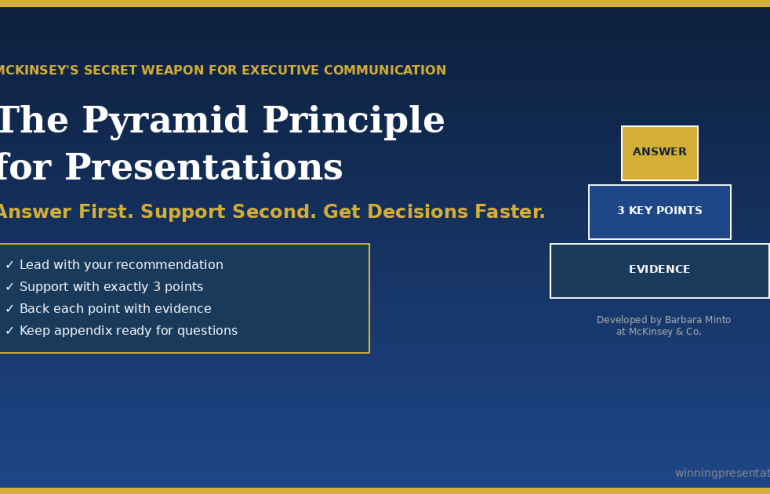
The Pyramid Principle is a communication framework developed by Barbara Minto at McKinsey that structures presentations top-down: lead with your answer first, then support it with 3 key points, each backed by evidence. It’s the opposite of how most people present (building to a conclusion) and dramatically more effective for executive audiences who want your recommendation, not your thought process.

Contents


“Win the room. Every time.” — weekly tactics on executive presentations, Copilot for PowerPoint, and the psychology of persuasion. Free, from Mary Beth Hazeldine.

Send me the free newsletter →

What Is the Pyramid Principle?

The Pyramid Principle was developed by Barbara Minto at McKinsey in the 1960s and has since become the standard for executive communication at consulting firms, investment banks, and Fortune 500 companies worldwide.

The core idea is simple: start with the answer.

Most people present bottom-up — they walk through their analysis, build the case piece by piece, and finally reveal their conclusion. This feels logical to the presenter. It mirrors how they did the work.

But it’s torture for the audience.

Executives don’t want to follow your journey. They want your destination. They want to know what you recommend, then decide whether they need the supporting detail.

The Pyramid Principle flips the structure:

  1. Start with the answer — your main recommendation or finding
  2. Group supporting arguments — 3 key points that prove your answer
  3. Order logically — each point supported by evidence

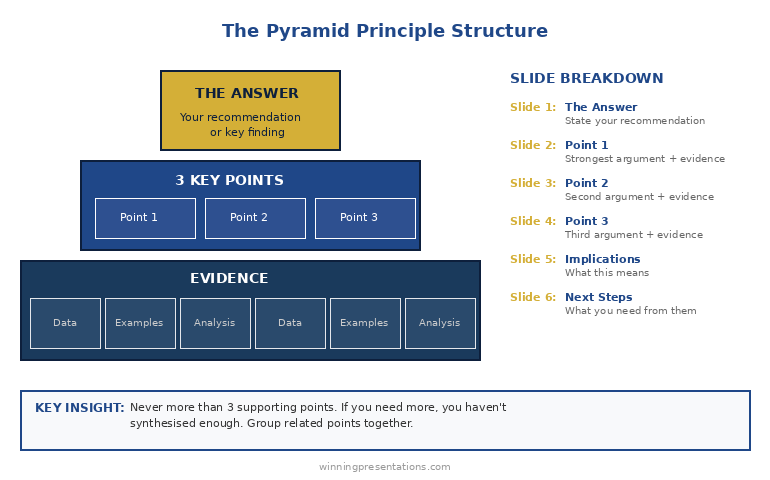
It’s called a “pyramid” because the structure looks like one: single point at the top, broader supporting base below.

Related: Presentation Structure: 7 Frameworks That Actually Work

Why It Works for Executive Presentations

I’ve trained executives at JPMorgan, PwC, and dozens of other firms. The Pyramid Principle works because it aligns with how senior leaders actually process information.

Executives are time-poor. A CEO might have 15 minutes between meetings. If your conclusion is on slide 12, they’ll never see it. If it’s on slide 1, they can engage immediately — and choose whether to dig deeper.

Executives are decision-makers. They don’t need to understand every detail of your analysis. They need to know: What do you recommend? Why? What do you need from me? The Pyramid answers all three in the first 2 minutes.

Executives will interrupt. If you’re building to a conclusion, every question derails you. If you’ve already stated your answer, questions become productive exploration of supporting points.

A client of mine — a director at a major consulting firm — used to get interrupted constantly in partner meetings. His presentations were thorough but bottom-up. We restructured using the Pyramid Principle. The interruptions didn’t stop, but they changed: instead of “get to the point,” partners started asking “tell me more about point 2.” He made partner 8 months later.

Got the framework — but your next deck is still bottom-up?

Executive Slide System has the Pyramid Principle built into 26 templates and 93 AI prompts, so you can apply Minto’s structure to a real deck without rebuilding from scratch. £39, instant download, 30-day refund.

Explore the System →

The Pyramid Structure (Slide by Slide)

Here’s how to apply the Pyramid Principle to a typical executive presentation:

Slide 1: The Answer

State your recommendation or key finding in one sentence. Be direct. Be specific.

  • ❌ “We’ve been analysing the market opportunity…”
  • ✅ “We should acquire Company X for £15M — it will generate £4M annual savings within 18 months.”

Slide 2: Supporting Point 1

Your strongest argument. Lead with the point, then provide evidence.

  • Point: “The acquisition eliminates our largest cost centre”
  • Evidence: Current outsourcing costs, projected in-house costs, timeline to realise savings

Slide 3: Supporting Point 2

Second strongest argument, same structure.

  • Point: “Company X has technology we’d need 2 years to build”
  • Evidence: Capability comparison, build vs. buy analysis

Slide 4: Supporting Point 3

Third argument. Never more than 3 — if you need more, you haven’t synthesised enough.

  • Point: “The asking price is below market value”
  • Evidence: Comparable transactions, valuation methodology

Slide 5: Implications

What this means for the business. Risks, dependencies, timeline.

Slide 6: Next Steps

What you need from the audience. One clear ask.

Pyramid Principle structure diagram - answer at top, 3 supporting points below, evidence at base

The Rule of Three: Why exactly 3 supporting points? Because humans can hold 3-4 items in working memory. More than 3 points and your audience starts forgetting the first one. Fewer than 3 and your argument feels thin. Three is the magic number.

The consulting director I mentioned earlier? He’d known the Pyramid Principle for years — but still struggled to execute it. The Executive Slide System gave him ready-to-use templates that forced him to structure properly. Eight months later, he made partner.

The MECE Rule: Mutually Exclusive, Collectively Exhaustive

The Pyramid Principle has a companion concept: MECE (pronounced “me-see”). Your supporting points should be:

Mutually Exclusive: No overlap between points. Each argument is distinct.

  • ❌ “It saves money” and “It reduces costs” (these overlap)
  • ✅ “It saves money” and “It saves time” and “It reduces risk” (distinct)

Collectively Exhaustive: Together, they cover all the important ground. No major gaps.

MECE matters because overlap confuses your audience (“wait, didn’t you already say that?”) and gaps invite objections (“but what about…?”).

Before you finalise your 3 supporting points, ask:

  1. Is there any overlap between these points?
  2. If someone accepted all 3 points, would they accept my answer?
  3. What’s the strongest objection — and is it addressed?

Apply the Pyramid Principle in under 30 minutes

26 templates + 93 AI prompts that fill slides in pyramid order. £39, instant access.

Get the System →

Before and After: A Real Example

Here’s how the Pyramid Principle transforms an actual presentation:

BEFORE (Bottom-Up):

  1. Slide 1: Agenda
  2. Slide 2: Background on the project
  3. Slide 3: Methodology we used
  4. Slide 4: Data we collected
  5. Slide 5: Analysis of Option A
  6. Slide 6: Analysis of Option B
  7. Slide 7: Analysis of Option C
  8. Slide 8: Comparison matrix
  9. Slide 9: Risks and considerations
  10. Slide 10: Our recommendation

Problem: The CEO checked out by slide 4. The recommendation never landed.

AFTER (Pyramid Principle):

  1. Slide 1: “We recommend Option B — it delivers 40% higher ROI with acceptable risk”
  2. Slide 2: Point 1 — ROI comparison (Option B wins on financial returns)
  3. Slide 3: Point 2 — Implementation timeline (Option B is fastest)
  4. Slide 4: Point 3 — Risk profile (Option B risks are manageable)
  5. Slide 5: What we need to proceed
  6. Appendix: Methodology, detailed analysis, data (available if asked)

Result: CEO approved in the meeting. Total presentation time: 8 minutes.

Want ready-made before/after examples for your own presentations? The Executive Slide System includes real transformation examples you can use as models.

3 Common Mistakes (And How to Fix Them)

Mistake 1: Burying the answer in context

❌ “Given the market conditions and our strategic priorities and the competitive landscape… we recommend X.”

✅ “We recommend X.” Full stop. Context comes after, if needed.

Mistake 2: More than 3 supporting points

If you have 5 points, you haven’t synthesised. Group related points together. “Financial benefits” can cover cost savings, revenue increase, and working capital improvement — that’s one point, not three.

Mistake 3: Supporting points that don’t actually support

Every point must directly answer “why should I accept your recommendation?” If a point is interesting but doesn’t support your answer, cut it or move it to the appendix.

Related: Executive Presentation Template: 12 Slides That Command the Room

From Framework to Finished Presentation

The Pyramid Principle tells you how to structure your thinking. But there’s a gap between knowing the structure and having slides ready for Monday’s board meeting.

That’s where most people struggle. They understand “answer first, 3 supporting points” — but what exactly goes on each slide? How do you phrase the opening? What evidence is compelling vs. overwhelming?

I’ve spent 24 years closing that gap.

The Executive Slide System gives you the complete Pyramid Principle deck — not just a framework, but ready-to-use slides with placeholders you fill in. Plus AI prompts to generate content for each section and scripts for what to say when you present.

What’s Included: Free vs. Paid

What You Get Free Checklist Executive Slide System (£39)
Pyramid Principle overview
7 frameworks reference card
Ready-to-use PowerPoint templates ✓ 17 templates
Pyramid Principle slide deck ✓ 6-slide template
AI prompts for each slide ✓ 51 prompts
Before/after examples ✓ Real transformations
Result Understand the principle Present like McKinsey

Walk into the boardroom with slides that lead with the answer first

Executive Slide System — 26 templates including Strategic Recommendation, Board Meeting Opener, and Executive Summary. Built-in frameworks: Pyramid Principle, SCQA, AVP. £39.

Get the Slide System →

Want the complete toolkit?

The Pyramid Principle is one of seven frameworks senior presenters need. The Complete Presenter Bundle pulls all seven products together — slides, Q&A, anxiety, storytelling, delivery, openers, cheat sheets — for £99 (save £91.97 vs buying separately). Lifetime access.

Get the Complete Presenter Bundle — £99 →

Frequently Asked Questions

What is the Pyramid Principle in simple terms?

The Pyramid Principle means starting with your answer or recommendation first, then supporting it with 3 key points, each backed by evidence. It’s the opposite of building to a conclusion — you state the conclusion immediately and let your audience decide how much supporting detail they need.

Who invented the Pyramid Principle?

Barbara Minto developed the Pyramid Principle while working at McKinsey & Company in the 1960s. She later wrote “The Pyramid Principle: Logic in Writing and Thinking,” which became the standard text for business communication at consulting firms worldwide.

When should you NOT use the Pyramid Principle?

Avoid the Pyramid Principle when your audience needs to be emotionally engaged before hearing your conclusion (use the Hero’s Journey instead), when you’re delivering bad news that requires context first, or when you genuinely don’t have a recommendation yet. It’s designed for situations where you have a clear answer and a decision-making audience.

What is MECE and how does it relate to the Pyramid Principle?

MECE stands for Mutually Exclusive, Collectively Exhaustive. It’s a test for your supporting points: they should have no overlap (mutually exclusive) and together cover all the important ground (collectively exhaustive). MECE ensures your argument is logically airtight.

How many supporting points should I have?

Exactly 3. Human working memory can hold 3-4 items comfortably. More than 3 points and your audience starts forgetting earlier ones. If you have 5 points, you haven’t synthesised enough — group related points together.

📧 The Winning Edge Newsletter

Weekly insights on presentations that close deals, win budgets, and advance careers. Join 2,000+ executives.

Subscribe Free →

🎁 Not Ready to Buy? Start Here.

Get the free checklist with the Pyramid Principle template and 6 other frameworks. You can upgrade to full templates later.

Download Free Checklist →

Related Resources

Struggling with nerves when presenting to executives? The Pyramid Principle helps you sound confident because you lead with your answer. But if physical anxiety is holding you back, see: Stage Fright Before Presentations: The First 60 Seconds Protocol


About the Author

Mary Beth Hazeldine has trained executives on high-stakes presentations for over 15 years. With 24 years in corporate banking at JPMorgan Chase, PwC, Royal Bank of Scotland, and Commerzbank, she’s used the Pyramid Principle in hundreds of board presentations and client pitches. Her clients have closed over £250 million using her presentation frameworks.

17 Dec 2025
Presentation Structure: 7 Frameworks That Actually Work - proven structures from McKinsey, TED, and top executives

Presentation Structure: 7 Frameworks That Actually Work [2026]

📅 Updated: December 2025

Want the complete toolkit?

Structure is one piece of presenting at executive level. The Complete Presenter Bundle pulls all seven products together — slides, Q&A, anxiety, storytelling, delivery, openers, cheat sheets — for £99 (save £91.97 vs buying separately). Lifetime access.

Get the Complete Presenter Bundle — £99 →

Quick Answer

The best presentation structure depends on your goal: use the Problem-Solution-Benefit framework for sales, the Pyramid Principle for executive briefings, or the What-So What-Now What structure for data presentations. This guide covers 7 proven frameworks with slide-by-slide breakdowns, so you can choose the right structure for any situation.

📦 USED BY 250+ EXECUTIVES

Executive Slide System — £39

All 7 frameworks as ready-to-use PowerPoint templates. 51 AI prompts. Slide-by-slide scripts. Stop starting from blank slides.

Get the Templates — £39 →

Instant download. Lifetime access. 30-day money-back guarantee.

“Win the room. Every time.” — weekly tactics on executive presentations, Copilot for PowerPoint, and the psychology of persuasion. Free, from Mary Beth Hazeldine.

Send me the free newsletter →


Why Structure Matters More Than Content

I’ve watched brilliant people give terrible presentations. PhDs who can’t explain their research. CFOs who lose the board in slide three. Salespeople who know the product cold but can’t close.

The problem is never knowledge. It’s structure.

A client came to me last year with a 47-slide deck for a £2M deal. Every slide was accurate. Every data point was relevant. And the prospect said: “This is really comprehensive. We’ll get back to you.”

They didn’t.

We restructured the same content into 12 slides using Framework 1 below. Same information, different architecture. The next prospect signed in the room.

Structure is the difference between information and persuasion.

Here are 7 frameworks that work — each designed for a specific situation. Use the wrong one and you’ll confuse your audience. Use the right one and you’ll guide them exactly where you want them to go.

Framework 1: Problem-Solution-Benefit (Sales Presentations)

Best for: Sales pitches, proposals, any presentation where you’re asking for a decision

Why it works: Humans are wired to solve problems. When you start with a problem your audience recognises, they lean in. When you present the solution, they’re already primed to say yes.

The structure (7 slides):

  1. The Problem — State the pain your audience feels. Be specific. “Most sales teams spend 40% of their time on admin instead of selling.”
  2. The Cost — Quantify what the problem costs them. Time, money, opportunity. “That’s £180K per year in lost productivity for a team of 10.”
  3. The Cause — Explain why the problem exists. This positions you as someone who understands.
  4. The Solution — Introduce your answer. High-level, not features.
  5. How It Works — 3 steps maximum. Keep it simple.
  6. Proof — One case study with specific numbers. “Acme reduced admin time by 60% in 90 days.”
  7. Next Step — One clear action. Not “any questions?” but “I recommend we start a pilot next week.”

Pro tip: Spend 70% of your time on slides 1-3. If your audience doesn’t feel the problem, they won’t care about your solution.

Related: Sales Presentation Template: The Structure Top Performers Use

Framework 2: The Pyramid Principle (Executive Briefings)

Best for: Board presentations, executive updates, any audience with limited time and high authority

Why it works: Executives don’t want to follow your thinking process — they want your conclusion. The Pyramid Principle, developed at McKinsey, puts your answer first and lets the audience drill down only if needed.

The structure:

  1. The Answer — Lead with your recommendation or key finding. “We should acquire Company X for £15M.”
  2. Supporting Point 1 — First reason with evidence
  3. Supporting Point 2 — Second reason with evidence
  4. Supporting Point 3 — Third reason with evidence
  5. Implications — What this means for the business
  6. Next Steps — What you need from them

The rule of three: Never more than 3 supporting points. If you need more, you haven’t synthesised enough.

Pro tip: Prepare 10 slides of backup detail you may never show. Executives will ask questions — have the data ready, but don’t put it in the main flow.

Related: The Pyramid Principle for Presentations: McKinsey’s Secret Weapon


Stop Reinventing the Wheel

The Executive Slide System includes the Pyramid Principle, Problem-Solution-Benefit, and all 15 other frameworks as ready-to-use templates. Just fill in your content.

Get All 7 Templates — £39 →

Framework 3: What-So What-Now What (Data Presentations)

Best for: Quarterly reviews, analytics presentations, any data-heavy content

Why it works: Data alone is meaningless. Your audience needs to know what it means and what to do about it. This framework forces you to interpret, not just report.

The structure:

  1. What — The facts. “Revenue is up 12% but margin is down 3 points.”
  2. So What — The interpretation. “We’re winning more deals but at lower prices — likely due to competitor pressure in the mid-market.”
  3. Now What — The action. “I recommend we raise prices 5% on enterprise while holding mid-market rates.”

Apply it to every chart: Before you show any data visualisation, prepare your “So What” statement. If you can’t explain why the data matters, don’t include it.

Pro tip: Most data presentations fail because they’re all “What” and no “So What.” Force yourself to have one insight per slide.

Related: QBR Presentation Template: Quarterly Reviews That Retain Clients

Framework 4: The Hero’s Journey (Keynotes & Vision Presentations)

Best for: Conference talks, company all-hands, any presentation meant to inspire

Why it works: Stories are how humans make sense of the world. The Hero’s Journey — the structure behind every great film — works because it’s hardwired into how we process information.

The structure:

  1. The Ordinary World — Where we are today. Establish the status quo.
  2. The Challenge — The disruption that demands change.
  3. The Journey — The obstacles overcome, lessons learned.
  4. The Transformation — What changed. The new capability or insight.
  5. The New World — The better future now possible.
  6. The Call to Action — What the audience should do to join this journey.

Pro tip: The hero isn’t you — it’s your audience. Position them as the protagonist who can achieve the transformation.

Framework 5: SCQA (Consulting-Style Presentations)

Best for: Strategy presentations, recommendations, complex problem-solving

Why it works: SCQA (Situation-Complication-Question-Answer) creates narrative tension. By the time you reach the Answer, your audience is desperate to hear it.

The structure:

  1. Situation — The context everyone agrees on. “We’re the market leader in the UK with 34% share.”
  2. Complication — The problem or change that disrupts the situation. “But a new competitor entered last quarter and is winning on price.”
  3. Question — The strategic question that must be answered. “How do we defend our position without destroying margin?”
  4. Answer — Your recommendation, followed by supporting analysis.

Pro tip: The Complication is where you create urgency. Make it specific and quantified — “They’ve taken 8 points of share in 6 months” hits harder than “competition is increasing.”

Framework 6: The 10-20-30 Rule (Pitch Decks)

Best for: Investor pitches, startup presentations, any high-stakes pitch with time pressure

Why it works: Guy Kawasaki’s rule forces discipline: 10 slides, 20 minutes, 30-point minimum font. It prevents the most common pitch mistake — death by PowerPoint.

The 10 slides:

  1. Title — Company, name, contact
  2. Problem — The pain you solve
  3. Solution — Your unique approach
  4. Business Model — How you make money
  5. Secret Sauce — Why you win (technology, team, timing)
  6. Marketing Plan — How you reach customers
  7. Competition — Landscape and your differentiation
  8. Team — Why you’re the right people
  9. Financials — Projections and key metrics
  10. Ask — What you want and what you’ll do with it

Pro tip: 30-point font isn’t just about readability — it forces you to cut words and focus on what matters.

Related: Investor Pitch Deck Template: The Sequoia Format That Raised Billions

Framework 7: The Modular Deck (Flexible Meetings)

Best for: Client meetings, consultations, any presentation where the conversation might go in different directions

Why it works: Not every presentation is linear. The Modular Deck gives you building blocks you can rearrange in real-time based on audience interest.

The structure:

  1. Opening Module — 3-5 slides that always come first (context, agenda, key question)
  2. Core Modules — 4-6 self-contained sections of 3-5 slides each, any of which can be skipped or reordered
  3. Closing Module — 3-5 slides that always come last (summary, next steps, call to action)

Pro tip: Number your core modules clearly (Section 1, Section 2) so you can say “Let’s skip to Section 4” without fumbling. Use PowerPoint’s Zoom feature to navigate non-linearly.

Comparison chart showing which presentation framework to use for different situations - sales, executive, data, keynote, consulting, pitch, flexible

How to Choose the Right Framework

Use this decision tree:

Are you asking for money or a decision?

  • Investor pitch → 10-20-30 Rule
  • Sales presentation → Problem-Solution-Benefit

Are you presenting to executives?

  • Board or C-suite → Pyramid Principle
  • Strategy recommendation → SCQA

Are you presenting data?

  • Quarterly review → What-So What-Now What

Are you trying to inspire?

  • Keynote or all-hands → Hero’s Journey

Is the conversation unpredictable?

  • Client meeting → Modular Deck

Why Frameworks Alone Aren’t Enough

Here’s what I’ve learned training executives for 35 years: knowing the framework is 20% of the battle. Executing it is the other 80%.

I’ve seen people use the Pyramid Principle and still bury the lead. I’ve watched sales presentations with perfect Problem-Solution-Benefit structure fail because the proof wasn’t credible. I’ve reviewed decks that followed every rule but still felt flat.

The difference between good and great is in the details: how you phrase the opening line, which proof points you choose, how you handle the “so what,” what you put on each slide.

That’s why I built the Executive Slide System.

It’s not just frameworks — it’s ready-to-use templates with every slide designed for maximum impact. You get the exact structure, the placeholder text, the AI prompts to generate content, and the scripts for what to say.

My clients have used these templates to close over £250 million in deals. Not because the frameworks are secret — you just read them above. Because the execution is dialled in.

What’s Included: Free vs. Paid

What You Get Free Checklist Executive Slide System (£39)
7 framework summaries
One-page reference card
Ready-to-use PowerPoint templates ✓ 17 templates
Before/after examples ✓ Real transformations
AI prompts for each framework ✓ 51 prompts
Slide-by-slide scripts ✓ What to say per slide
Result Know the theory Present like a pro

🎯 MOST POPULAR

Executive Slide System

17 PowerPoint templates. 30 AI prompts. Slide-by-slide scripts.
Built from frameworks that have closed £250M+ in deals.

Get Instant Access — £39 →

✓ Instant download   ✓ Lifetime access   ✓ 30-day guarantee

Frequently Asked Questions

What is the best structure for a presentation?

The best presentation structure depends on your goal. For sales presentations, use Problem-Solution-Benefit. For executive briefings, use the Pyramid Principle (answer first, then supporting points). For data presentations, use What-So What-Now What. The key is matching structure to audience expectations — executives want conclusions upfront, while sales prospects need to feel the problem first.

How do you structure a 10-minute presentation?

For a 10-minute presentation, use 5-7 slides maximum: opening hook (1 slide, 1 minute), main point with 3 supporting arguments (3-4 slides, 7 minutes), and closing call to action (1 slide, 2 minutes). The most common mistake is trying to cover too much — focus on one core message and make it memorable.

What is the 5-5-5 rule in PowerPoint?

The 5-5-5 rule suggests no more than 5 words per line, 5 lines per slide, and 5 text-heavy slides in a row. It’s a useful guideline for preventing death by PowerPoint, but I prefer the “one idea per slide” principle — each slide should make exactly one point that your audience can grasp in 3 seconds.

How do you structure a presentation for executives?

Use the Pyramid Principle: lead with your recommendation or conclusion, then provide 3 supporting points with evidence, then implications and next steps. Executives have limited time and want your answer, not your thought process. Prepare backup slides for detailed questions but keep the main flow to 6-8 slides.

What is the SCQA framework?

SCQA stands for Situation-Complication-Question-Answer. It’s a consulting-style framework that creates narrative tension: start with agreed context (Situation), introduce the problem (Complication), frame the strategic question, then deliver your recommendation (Answer). It works because by the time you reach the Answer, your audience is primed to hear it.

Not Ready to Buy? Start Here.

Get the free checklist with all 7 frameworks as a one-page reference. You can upgrade to templates later.

Download Free Checklist →

📧
The Winning Edge Newsletter

Weekly insights on presentations that close deals, win budgets, and advance careers.

Subscribe Free →

Related Resources

About the Author

Mary Beth Hazeldine has trained executives on high-stakes presentations for 35 years. With 24 years in corporate banking at JPMorgan Chase, PwC, Royal Bank of Scotland, and Commerzbank, she’s seen what separates presentations that close from those that stall. Her clients have closed over £250 million using her presentation frameworks. She teaches at Winning Presentations.

04 Dec 2025
Board presentation opening slide template - board action requested structure for governance meetings

The Board Presentation Structure Nobody Teaches You

📅 Updated: January 2026 | The framework that gets board approvals in 15 minutes

Quick Answer

The ideal board presentation structure follows a 10-slide framework: Executive Summary, Strategic Context, The Proposal, Business Case, Implementation Approach, Resource Requirements, Risk Assessment, Governance, Timeline, and The Ask. Lead with your recommendation. Board members decide quickly — most form their view within the first 3 minutes. Give them what they need upfront.

The first time I presented to a bank’s Board of Directors, I made every mistake possible.

I’d prepared a 45-slide deck. Comprehensive market analysis. Detailed financial models. Thorough competitive assessment. I was ready to walk them through every assumption.

The Chairman interrupted at slide 6: “What’s your recommendation?”

I fumbled to slide 38. By then, two board members were checking their phones. Another had stepped out. The Chairman said: “Send us a one-pager and we’ll discuss at the next meeting.”

That was a £12M decision, delayed by three months. Because I didn’t understand how boards actually work.

After 25 years presenting to boards at JPMorgan, PwC, Royal Bank of Scotland, and Commerzbank — and coaching hundreds of executives through their own board presentations — I’ve learned what the business schools don’t teach you.

Board presentations follow different rules. This is the structure that works.

⭐ Get the Board Presentation Templates That Actually Work

Stop guessing what boards want to see. Get the exact structures used for + in approved funding.

The Executive Slide System includes:

  • Board presentation template with 10-slide structure
  • Executive summary templates — the slide boards read first
  • 30 AI prompts to customise every template in minutes

Download the Templates →

Used by CFOs, CEOs, and division heads leading organisations. Instant download.

How Board Presentations Differ From Executive Presentations

Board presentations aren’t just executive presentations for a bigger audience. They follow fundamentally different rules.

Boards Think in Quarters and Years, Not Weeks

Executive committees focus on execution. Boards focus on strategy and governance. Your detailed implementation timeline matters less than your strategic rationale and risk assessment.

Boards Have Limited Context

Unlike your executive team, board members aren’t living your business daily. They see you 4-6 times per year. Don’t assume they remember details from last quarter — provide enough context to orient them quickly.

Boards Care About Governance

Who’s accountable? How will progress be reported? What are the escalation triggers? Executive committees often skip these questions. Boards never do.

Boards Read the Pack in Advance

Most board members will have reviewed your materials before the meeting. They’re not seeing this for the first time — they’re validating their initial impressions and getting answers to questions they’ve already formed.

Boards Value Brevity

A typical board meeting covers 8-12 agenda items in 3-4 hours. Your slot might be 15-20 minutes. Respect their time by getting to the point immediately.

10-slide board presentation structure from executive summary to the ask

The 10-Slide Board Presentation Structure

This framework works for strategic proposals, major investments, policy changes, and significant operational decisions that require board approval.

Slide 1: Executive Summary

Purpose: Everything they need to know in 60 seconds.

Board members often make their initial decision based on this slide alone. Everything after either confirms or challenges their first impression.

Include:

  • One-sentence situation statement
  • Your specific recommendation
  • Three supporting points (maximum)
  • What you need from them

Example: “Recommendation: Approve £8M acquisition of TechCo to accelerate our digital capability. ROI: 180% over 5 years. Strategic fit: Fills gap in our product roadmap. Risk: Manageable integration complexity. Ask: Approval to proceed to due diligence.”

Related: The Executive Summary Slide: How to Write the Only Slide That Matters

Slide 2: Strategic Context

Purpose: Connect this proposal to the bigger picture.

Boards approve things that advance strategy. Show how your proposal fits.

Include:

  • Relevant strategic priorities (reference the board-approved strategy)
  • Market context that makes this timely
  • Why now — what’s changed or what opportunity exists

Don’t: Repeat the entire corporate strategy. One slide. Three points maximum.

Slide 3: The Proposal

Purpose: State exactly what you’re asking them to approve.

Be specific enough that the board could vote “yes” based on this slide alone.

Include:

  • Precise description of what’s being proposed
  • Scope boundaries (what’s included, what’s not)
  • Key terms or conditions

Example: “Approve acquisition of TechCo Ltd for up to £8M, subject to satisfactory due diligence, with completion targeted for Q2 2026.”

Slide 4: Business Case

Purpose: Prove this is a good use of capital.

Boards are stewards of shareholder value. Show them the numbers.

Include:

  • Investment required
  • Expected returns (ROI, NPV, payback period)
  • Key assumptions
  • Sensitivity analysis (what if assumptions are wrong?)

Boards are sophisticated — don’t oversimplify. But don’t drown them in spreadsheets either. Summary on the slide, detail in the appendix.

Want ready-made board presentation templates with this structure built in? The Executive Slide System includes the complete 10-slide board framework with guidance on each slide.

Slide 5: Implementation Approach

Purpose: Demonstrate you can execute.

Boards approve ideas they believe will actually happen. Show you’ve thought through how.

Include:

  • High-level phases (not detailed project plans)
  • Key milestones
  • Critical dependencies
  • What needs to be true for this to succeed

Keep this strategic, not tactical. Boards don’t need your Gantt chart.

Slide 6: Resource Requirements

Purpose: Be transparent about what you need.

Include:

  • Capital expenditure
  • Operating expenditure impact
  • People (new hires, redeployment, external resources)
  • Technology or infrastructure

Boards respect honesty. Understate requirements and you’ll damage credibility when you come back for more. Overstate and you won’t get approval.

Slide 7: Risk Assessment

Purpose: Show you’ve thought about what could go wrong.

This is where board credibility is won or lost. Boards expect rigorous risk thinking.

Include:

  • Top 3-5 risks (no more — prioritise)
  • Likelihood and impact for each
  • Mitigation strategies
  • Residual risk after mitigation

At RBS, I watched a divisional CEO present a £50M initiative with “risks are manageable” as his only risk commentary. The Chairman’s response: “Unacceptable. Come back when you’ve done proper risk analysis.”

Three weeks later, same proposal, proper risk slide. Approved in 10 minutes.

Slide 8: Governance

Purpose: Show how you’ll stay accountable.

Boards care deeply about governance — it’s their primary responsibility.

Include:

  • Executive sponsor and accountable owner
  • Steering committee composition
  • Reporting cadence to the board
  • Escalation triggers (what would bring this back to the board?)
  • Decision rights at each level

Related: How to Present to a Board of Directors: 7 Mistakes to Avoid

Slide 9: Timeline

Purpose: Make progress measurable.

Include:

  • Key milestones with dates
  • Decision points requiring board input
  • When you’ll report back to the board
  • Expected completion

Keep this high-level. Quarterly milestones, not weekly tasks.

Slide 10: The Ask

Purpose: Make the decision easy.

End with exactly what you need them to do.

Include:

  • Specific resolution language (what they’re voting on)
  • Any conditions or caveats
  • What happens after approval
  • Next board touchpoint

Example: “Resolution: The Board approves the acquisition of TechCo Ltd for up to £8M, subject to satisfactory completion of due diligence, and delegates authority to the CEO to finalise terms within these parameters. Next update: Q2 board meeting.”

Then stop. Let them respond.

What Board Members Actually Read

After years of presenting to boards — and debriefing with board members afterward — here’s what I’ve learned about how they actually consume board papers.

Before the Meeting

Most board members spend 15-30 minutes reviewing each agenda item in advance. They read:

  • Executive summary — Almost always read in full
  • The ask — They want to know what decision is needed
  • Risk assessment — They scan for red flags
  • Financial summary — They check the numbers make sense

They skim or skip:

  • Detailed implementation plans
  • Lengthy market analysis
  • Comprehensive appendices

During the Meeting

Board members aren’t reading your slides — they’re validating their pre-formed impressions and getting answers to questions they’ve already thought of.

This means your verbal presentation should:

  • Reinforce the executive summary (don’t repeat it word-for-word)
  • Address the likely concerns head-on
  • Add insight not visible in the written materials
  • Demonstrate confidence and conviction

After the Meeting

Board members may revisit your materials when:

  • Writing up their own notes
  • Discussing with fellow board members
  • Preparing for follow-up meetings

Make sure your slides stand alone — they need to make sense without your narration.

Related: Board Presentation Template: The Executive’s Complete Guide

Board Presentation Mistakes to Avoid

Mistake #1: Too Much Detail

Boards don’t need your project plan. They need to understand the strategic rationale, the business case, and the risks. Put operational detail in the appendix.

Mistake #2: Burying the Recommendation

Your recommendation should be on slide 1, visible within 60 seconds. Don’t make board members hunt for what you want them to do.

Mistake #3: Weak Risk Analysis

“Risks are manageable” is not a risk assessment. Boards expect rigorous thinking about what could go wrong and how you’ll address it.

Mistake #4: Ignoring Governance

Boards are responsible for oversight. If you don’t explain how you’ll be accountable, they’ll either ask (wasting time) or worry (reducing confidence).

Mistake #5: Reading the Slides

Board members can read faster than you can speak. Your job is to add insight, demonstrate conviction, and handle questions — not to narrate the obvious.

Mistake #6: Defensive Body Language

Board questions aren’t attacks — they’re due diligence. If you get defensive or evasive, you destroy credibility. Address concerns directly and confidently.

The executives who consistently get board approvals follow a clear structure. The Executive Slide System gives you that structure with before/after examples for every board scenario.

How to Present to a Board: Delivery Tips

Arrive With a Point of View

Boards want recommendations, not options. Have a clear view on what should happen. Be prepared to defend it, but don’t waffle.

Manage Your Time Ruthlessly

If you have 15 minutes, plan to present for 8. Leave time for questions. Going over time is disrespectful and signals poor judgment.

Answer Questions Directly

When a board member asks a question, answer it. Don’t deflect, don’t hedge, don’t launch into a five-minute preamble. Answer first, then provide context if needed.

Know When to Take It Offline

If a board member has a detailed technical question that would derail the discussion, offer to follow up afterward. “That’s a great question — I don’t have that specific data here, but I’ll send it to you by end of day.”

Close Strong

End with your ask, clearly stated. “I’m requesting board approval for the £8M acquisition, subject to due diligence. Happy to answer any final questions before you deliberate.”

Then stop talking. Let them decide.

Board Presentation Checklist

Before you present to the board, verify:

  • ☐ Executive summary contains situation, recommendation, 3 supporting points, and ask
  • ☐ Strategic context links proposal to board-approved strategy
  • ☐ Proposal is specific enough to vote on
  • ☐ Business case includes ROI, key assumptions, and sensitivity analysis
  • ☐ Risk assessment covers top 3-5 risks with mitigation strategies
  • ☐ Governance slide shows accountability structure and reporting cadence
  • ☐ Final slide has clear resolution language
  • ☐ Total presentation is 10 slides or fewer (excluding appendix)
  • ☐ Appendix ready for detailed questions
  • ☐ Presentation rehearsed and timed (under 10 minutes of talking)

⭐ Your Next Board Presentation Deserves Better

Join the executives who’ve mastered the structure boards expect.

The Executive Slide System gives you:

  • Board presentation template with 10-slide structure
  • Executive summary templates — the slide boards read first
  • Risk assessment frameworks boards respect
  • 30 AI prompts that generate first drafts in minutes

Get Instant Access →

Clients have used these templates to secure Instant download.

Frequently Asked Questions

How long should a board presentation be?

10 slides maximum for the core presentation. Plan to speak for 8-10 minutes, leaving ample time for questions. Board meetings are packed — respect their time by being concise.

Should I send the board pack in advance?

Yes — standard practice is 5-7 days before the meeting. This gives board members time to review and formulate questions. Never surprise a board with new information in the meeting itself.

How do I handle tough board questions?

Answer directly, without defensiveness. If you don’t know something, say so: “I don’t have that figure to hand, but I’ll follow up by end of day.” Never bluff a board member — they usually know more than you think.

What if the board disagrees with my recommendation?

Listen to their concerns. Ask clarifying questions. If they raise valid points you hadn’t considered, acknowledge it: “That’s a fair challenge — I’d like to revisit that aspect and bring a revised proposal to the next meeting.” Don’t dig in defensively.

How much financial detail should I include?

Summary on the slide, detail in the appendix. Board members are sophisticated — they want to see ROI, payback, NPV. But they don’t need your full financial model in the main deck.

What’s the biggest board presentation mistake?

Weak risk analysis. Boards are responsible for oversight — they need to know you’ve thought rigorously about what could go wrong. “Risks are manageable” is never acceptable.

📧 The Winning Edge Newsletter

Weekly insights on board presentations, executive communication, and what’s actually working in boardrooms right now.

Subscribe Free →

One More Thing — Before You Go

If you have a board presentation coming up, the Executive Slide System gives you a clear structure that boards respond to — so you walk in confident your slides will land the way you need them to.

Explore the System

Related Resources

🎁 Free: Executive Presentation Checklist

The 12-point checklist I use before every board presentation. One page. Covers structure, timing, and the mistakes that get proposals rejected.

Download Free Checklist →

No email required. Instant download.

About the Author

Mary Beth Hazeldine spent 25 years in corporate banking at JPMorgan Chase, PwC, Royal Bank of Scotland, and Commerzbank — presenting to boards on deals worth billions. She’s trained senior executives on high-stakes presentations and She now runs Winning Presentations, training senior professionals to communicate with impact at the highest levels.