Tag: presentation structure

19 Feb 2026
Close-up of an executive reviewing a two-page pre-read document with pen annotations on a dark wood desk, laptop and coffee cup in warm golden light

The Executive Presentation Pre-Read That Gets Decisions Before You Walk In

They approved my client’s £4M budget before she presented a single slide. The presentation was a fifteen-minute formality.

Quick answer: The executive presentation pre-read is the most strategically important document most professionals never learn to write. It’s not your slides emailed early. It’s not a summary of what you’ll say. It’s a separate, purpose-built document with three parts — the Decision Frame, the Evidence Stack, and the Ask — designed to get senior executives aligned on your recommendation before you enter the room. When done right, the meeting itself becomes a confirmation, not a persuasion exercise. Built from 24 years in banking and consulting environments, this is the structure I’ve taught to executives preparing for board meetings, steering committees, and investment approvals. The difference between presenting to an aligned room versus an uninformed room is the difference between getting a decision and getting a “let me think about it.”

The Budget That Got Approved Before She Opened Her Mouth

At Commerzbank, I watched a VP prepare for weeks on a £4M technology modernisation budget. Her slides were immaculate. Forty-two slides covering everything from vendor comparison to implementation timeline. She’d rehearsed the delivery. She’d prepared for questions.

But the week before, she did something most people skip entirely. She sent a two-page pre-read document to the five decision-makers who’d be in the room. Not her slides — a separate document. It laid out the business case in three sections: why now, what the evidence showed, and what she needed them to decide.

By the time she walked into that boardroom, three of the five had already emailed back with variations of “this looks solid.” The CFO had flagged one line item he wanted to discuss. The CTO had already circulated it to his team for technical validation. The meeting itself lasted fifteen minutes. Twelve of those were spent on the CFO’s one concern. The decision was unanimous.

That’s when I understood: the presentation isn’t where decisions get made. The pre-read is. The presentation is where decisions get confirmed.

📊 Your Pre-Read Needs a Deck That Matches

The Executive Slide System gives you the slide frameworks and sequencing templates that align with your pre-read structure — so when executives arrive having read your document, the deck confirms exactly what they expected. Built from real board presentations where the pre-read and the deck worked as a single system.

Get the Executive Slide System — £39

Built from 24 years of banking presentations and 15+ years training executives for board updates, steering committees, and investment approvals.

The Mistake 90% of Presenters Make With Pre-Reads

Most professionals do one of two things with pre-reads: they skip them entirely, or they email their slide deck the night before and call it a pre-read. Both are career-limiting mistakes.

Sending your slides as the pre-read creates two problems at once. First, executives try to read a document that was designed to be presented — and it either has too little text to make sense alone, or too much text because you tried to make it self-explanatory. Second, when you stand up to present those same slides, the room has already seen everything. You’re narrating a document they’ve already skimmed. The energy dies. The questions start on slide two instead of after your recommendation.

Skipping the pre-read is worse. You walk into a room where five executives are hearing your business case for the first time. They’re processing information, forming opinions, and identifying objections simultaneously. No human brain handles that well. The result is almost always “interesting — let me think about it,” which is executive language for “I’m not comfortable deciding without time to process.”

The pre-read solves both problems. It gives executives the thinking time they need so the meeting becomes the decision time you need.

PAA: Should you send your presentation slides before the meeting?
No. Your slides and your pre-read are two different documents serving two different purposes. Slides are visual support for a live presenter — they’re designed to be incomplete without your narration. A pre-read is a self-standing document designed to be complete without you in the room. Sending slides as a pre-read weakens both the document and the presentation. Create a separate two-to-three-page pre-read document using the Decision Frame, Evidence Stack, and Ask structure below.

The 3-Part Board Pre-Read Structure

In twenty-four years of banking, I’ve seen dozens of pre-read formats. The one that consistently produces pre-meeting alignment has three sections — never more. Each section answers a single question that’s running through every executive’s mind before they commit time to your meeting.

Executive pre-read structure showing three sections: Decision Frame half page, Evidence Stack one to two pages, and The Ask three sentences, with purpose and length for each section

The entire document should fit on two pages. Three at the absolute maximum. Anything longer and executives won’t read it — which defeats the entire purpose. I’ve written about the executive summary slide before. The pre-read follows the same principle: compression creates clarity.

Part 1: The Decision Frame (Half a Page)

The Decision Frame answers the question every executive asks before reading anything: “Why am I looking at this, and what do you need from me?”

It has four elements, each one sentence:

The Context: One sentence on why this is on the agenda now. Not the history of the project. Not the background. Just: why now? Example: “Q1 infrastructure costs exceeded forecast by 23%, driven by three unplanned outages in February.”

The Impact: One sentence on what happens if nothing changes. Example: “Without intervention, we project £1.2M in additional unplanned costs by year-end, plus reputational risk from client-facing service disruption.”

The Recommendation: One sentence on what you’re proposing. Lead with the answer, not the analysis. Example: “We recommend a £4M investment in platform modernisation, delivered in two phases over 18 months, with breakeven at month 14.”

The Decision Required: One sentence on exactly what you need from this group. Example: “We are seeking approval to proceed with Phase 1 (£1.8M) and authorisation to begin vendor negotiations by March 15.”

That’s it. Four sentences. Half a page. Every executive in the room now knows what this is about, what the stakes are, and what you’re asking for — before they read another word.

This kind of structural clarity — knowing exactly what goes where and in what order — is what the Executive Slide System was built for. The frameworks apply to both your pre-read and the deck that follows it.

Get the Executive Slide System — £39

Part 2: The Evidence Stack (1–2 Pages)

The Evidence Stack answers the second question: “Why should I believe this recommendation?”

This is where most people go wrong. They dump every data point they’ve gathered into the pre-read. Executives don’t want to see your working. They want to see the three to five strongest pieces of evidence that support your recommendation — and they want to see them in descending order of weight.

PAA: How long should a board pre-read be?
Two pages is ideal. Three is the maximum. Research on executive reading behaviour consistently shows that documents over three pages see completion rates drop below 40%. Your pre-read should take no more than five minutes to read. If an executive needs more detail, put it in appendices or reference it in your presentation deck — but the core pre-read must be scannable in under five minutes.

Structure the Evidence Stack as three to five numbered points, each with a headline and two to three sentences of support. Example:

1. Cost trajectory is accelerating. Infrastructure maintenance costs have grown 18% year-over-year for three consecutive years. The current platform requires 340 engineering hours per month in reactive maintenance alone.

2. Client impact is measurable. Three client-facing outages in Q1 resulted in two formal complaints and one at-risk account review. The NPS score for affected clients dropped 12 points.

3. Comparable investment shows 2.1x return. The Singapore office completed a similar modernisation in 2024, reducing maintenance costs by 62% and eliminating client-facing outages for 14 consecutive months.

Each point is verifiable. Each point supports the recommendation. Each point can be challenged in the meeting — and you should want that, because you’ll be prepared for exactly those challenges.

📋 Structure Your Deck to Mirror Your Pre-Read

The Executive Slide System includes slide sequencing frameworks that align with the Decision Frame → Evidence Stack → Ask flow. When your pre-read and your deck tell the same story in the same order, executives experience coherence — and coherence builds confidence in your recommendation.

Get the Executive Slide System — £39

Includes pre-read-to-deck alignment frameworks for board presentations, steering committees, and investment approvals.

Part 3: The Ask (3 Sentences)

The Ask closes the pre-read with surgical precision. Three sentences, no more.

Sentence 1 — The specific decision: “We are requesting approval for £1.8M Phase 1 investment.”

Sentence 2 — The timeline: “Vendor selection begins March 15 if approved; Phase 1 delivery completes by September 30.”

Sentence 3 — The meeting purpose: “Thursday’s session is scheduled for 30 minutes to address questions and confirm the go/no-go decision.”

That third sentence is the one most people miss — and it’s the most important. It tells every executive in advance that they’re expected to make a decision in the meeting. No “let me think about it.” No “circle back next quarter.” The pre-read has given them the thinking time. The meeting is for deciding.

I’ve written about pre-meeting executive alignment — the conversations that happen alongside the pre-read. The document and the conversations work together. The pre-read gives executives the substance. The pre-meeting conversations give you the intelligence on where resistance lives.

Building both a pre-read and a presentation deck for the same meeting? The Executive Slide System gives you the structural frameworks so both documents work as a single persuasion system — not two disconnected files.

Get the Executive Slide System — £39

When to Send It (And to Whom)

Timing matters more than most people realise. Send the pre-read too early and it gets buried. Send it too late and executives don’t read it.

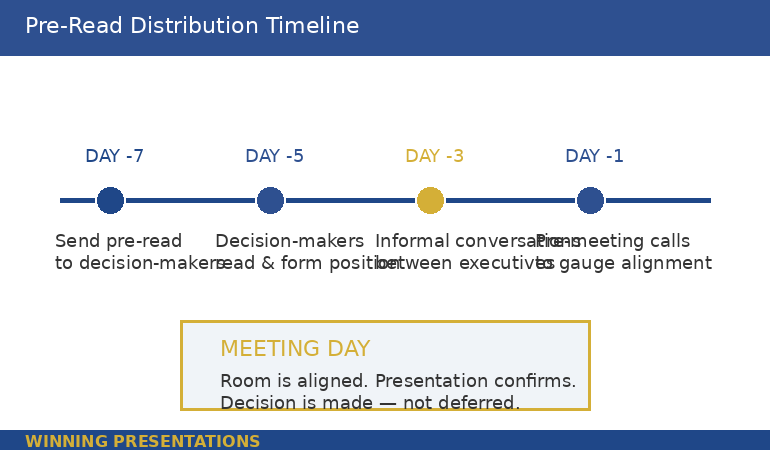
The optimal window is five to seven business days before the meeting. This gives executives enough time to read it during one of their review blocks, form an initial position, and — critically — have informal conversations with other attendees about it before the meeting.

Those informal conversations are where alignment actually happens. When the CFO reads your pre-read on Monday and mentions it to the COO over coffee on Wednesday, they’ve already begun forming a collective view. By Thursday’s meeting, the room has a shared baseline. Your job in the presentation shifts from “convince five individuals” to “confirm what the group has already been discussing.”

Who receives the pre-read: Every decision-maker who’ll be in the room, plus their chiefs of staff or executive assistants (who control what gets read). Do not send it to observers, note-takers, or people attending for information only. The pre-read is for decision-makers. Everyone else gets context from the presentation itself.

Pre-read distribution timeline showing optimal schedule from seven days before meeting to meeting day, with key actions at each stage including send, read, informal conversations, and pre-meeting calls

PAA: What goes in an executive pre-read?
Three sections only: a Decision Frame (why this is on the agenda, what you recommend, and what decision you need), an Evidence Stack (three to five numbered pieces of evidence supporting the recommendation), and the Ask (the specific decision, timeline, and meeting purpose). The total document should be two pages maximum. Detailed data, appendices, and supporting analysis belong in the presentation deck or in supplementary documents — not in the pre-read.

Why Your Slides Are Not a Pre-Read

This is the hill I will die on. I watched a managing director at PwC send a 38-slide deck as a pre-read before a partner meeting. The partners received it on Monday. By Wednesday, two had emailed back with detailed objections to slides 14 and 27. By Thursday’s meeting, the first twenty minutes were spent relitigating points that should have been addressed in the pre-read’s Evidence Stack — not discovered by scrolling through presentation slides.

Slides are designed for visual support during live narration. They use headlines, not paragraphs. They show charts, not arguments. They make no sense without a presenter standing next to them. When you send slides as a pre-read, you’re asking executives to guess what you’re going to say about each slide — and their guesses will be wrong.

A pre-read is a narrative document. Full sentences. Complete arguments. No visual dependencies. An executive should be able to read it at their desk, understand your recommendation, evaluate your evidence, and know what you need from them — without ever seeing a slide.

The slides and the pre-read work together, but they are not the same document. The pre-read builds alignment. The slides confirm it visually. I’ve written about board presentation best practices — the pre-read is what makes those best practices actually work, because the room arrives aligned.

🎯 The Pre-Read Gets Alignment. The Deck Confirms It.

The Executive Slide System gives you the deck frameworks that work in tandem with a strong pre-read. Decision slides, evidence sequences, and recommendation structures — all built from real board presentations where the pre-read did the heavy lifting and the deck sealed the decision.

Get the Executive Slide System — £39

Trusted by executives who understand that the best presentations start with what happens before the meeting, not during it.

Frequently Asked Questions

What format should an executive pre-read be in?

A Word document or PDF — never a slide deck. The pre-read should be a narrative document with full sentences and complete arguments. Two pages is optimal, three is the maximum. Use the Decision Frame (half a page), Evidence Stack (one to two pages), and Ask (three sentences) structure. Number your evidence points for easy reference in the meeting. Include your name, date, and “PRE-READ: [Meeting Name]” in the header so it’s immediately identifiable in an executive’s inbox.

How far in advance should you send a board pre-read?

Five to seven business days before the meeting. This gives decision-makers time to read it, form an initial position, and have informal conversations with other attendees. Sending it less than three days before risks executives arriving without having read it. Sending it more than ten days before risks it getting buried under newer priorities. If your organisation uses a formal “board book” process, align your pre-read submission with that timeline.

What should you NOT include in an executive pre-read?

Do not include background information the audience already knows, detailed methodology or technical workings, more than five evidence points, caveats or hedge language that weakens your recommendation, or anything that requires visual explanation (charts, graphs, diagrams). Those belong in the presentation deck or supplementary appendices. The pre-read’s job is clarity and alignment — not comprehensiveness. If it takes more than five minutes to read, it’s too long.

Get weekly executive presentation strategies

Frameworks, structures, and real examples from corporate boardrooms — delivered every week.

Subscribe to the Newsletter

Related: If the thought of presenting to a senior audience triggers more anxiety the more experienced you become, that’s common — and it’s a different problem from structure. Read Why Your Presentation Anxiety Gets Worse With Experience for the psychological side of high-stakes presenting.

About the Author

Mary Beth Hazeldine is the Owner & Managing Director of Winning Presentations. With 24 years of corporate banking experience at JPMorgan Chase, PwC, Royal Bank of Scotland, and Commerzbank, she has delivered high-stakes presentations in boardrooms across three continents.

A qualified clinical hypnotherapist and NLP practitioner, Mary Beth combines executive communication expertise with evidence-based techniques for managing presentation anxiety. She has supported presentations for high-stakes funding rounds and approvals across 15+ years of executive training.

Book a discovery call | View services

Your next step: Before your next high-stakes presentation, open a blank document and write the four sentences of your Decision Frame. Context, Impact, Recommendation, Decision Required. Send that half-page to your key decision-maker five days before the meeting and ask: “Does this capture the right framing?” Their response will tell you exactly where the resistance lives — before you build a single slide.

16 Feb 2026
Executive focused at laptop building a presentation under time pressure, navy blazer, warm office lighting, coffee on desk

The Last Minute Presentation Framework That Saved My Career (Twice)

Forty minutes. That’s how long I had between “Mary Beth, the CFO needs an update on the integration programme — you’re presenting at 3pm” and walking into the boardroom.

Quick answer: A last minute presentation doesn’t fail because you had no time. It fails because you tried to build a full deck in a fraction of the time. The emergency framework is five slides, built in a specific order: decision needed, current situation, options, recommendation, next steps. You write the headlines first, add one supporting point per slide, and rehearse the transitions once. This takes 25–30 minutes and produces a clearer deck than most people create in three days.

The first time it happened, I was at Royal Bank of Scotland. A VP had called in sick twenty minutes before a steering committee meeting. My manager appeared at my desk: “You know the project. You’re presenting.” I had no slides, no notes, and no choice.

I spent the first ten minutes panicking. Then I wrote five headlines on a notepad, opened PowerPoint, typed them as slide titles, and added one sentence under each. I walked in with a five-slide deck that looked intentional.

The steering committee approved the budget. Afterwards, a director I barely knew said: “That was the clearest update we’ve had on this project.” He didn’t know it was built in thirty minutes. And that’s when I realised: the emergency framework wasn’t a compromise. It was better than most planned decks.

Why Last Minute Presentations Fail (It’s Not the Time)

The natural response to a last minute presentation is compression: take everything you’d normally include and cram it into whatever time you have. This is the single biggest mistake you can make under time pressure.

Compression produces a bloated deck delivered at speed. Your audience gets more information than they can process, delivered by a presenter who hasn’t rehearsed, with slides that don’t connect because they were assembled rather than structured. The result feels frantic — and frantic signals incompetence, even when the content is sound.

The executives I’ve trained across JPMorgan Chase, PwC, Royal Bank of Scotland, and Commerzbank over 24 years all share the same discovery: the best last minute presentations aren’t compressed versions of full presentations. They’re structured differently from the start. Five slides with clear headlines will outperform twenty rushed slides every single time — because clarity signals competence more than volume does.

The real problem isn’t time. It’s the instinct to build the deck you wish you had time for, instead of the deck your audience actually needs. If you understand how executives evaluate presentations — and what executives actually read on your slides — you’ll realise that five slides is often the right number even when you have three weeks to prepare.

PAA: How do you prepare a presentation with very little time?
Start with the decision, not the background. Write five slide headlines before opening PowerPoint: what decision is needed, what the current situation is, what the options are, what you recommend, and what the next steps are. Type those headlines as slide titles, add one supporting sentence or data point per slide, and rehearse the transitions between slides once out loud. This takes 25–30 minutes and produces a more focused deck than starting with a blank canvas.

The Emergency Framework Lives Inside This System

The Executive Slide System gives you a pre-built structure, slide sequencing framework, and executive messaging templates — so you never start from a blank screen again. When you have 30 minutes, you need a system, not inspiration.

Get the Executive Slide System → £39

Built from 24 years in corporate banking. Used in boardrooms, steering committees, and approval meetings across every industry.

The 5-Slide Emergency Framework (30 Minutes)

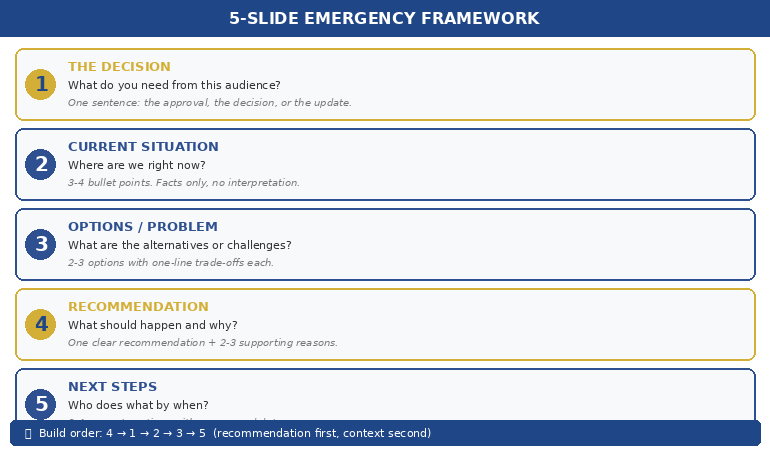
This is the framework I’ve used personally and taught to executives for fifteen years. Five slides, each with a single job. Build them in the order below — not in presentation order — and you’ll have a structured, focused deck in under thirty minutes.

Slide 1: The Decision (or The Ask). What do you need from this audience? Start here because everything else flows from it. “We need approval to extend the pilot by 60 days” or “I’m recommending we proceed with Option B” or “The committee needs to decide between three vendor options.” If there’s no decision, the frame is: “Here’s what you need to know and what it means.” One sentence headline. One supporting line. Done.

Slide 2: Current Situation. Where are we right now? Three to four bullet points maximum — facts only, no interpretation. Revenue, timeline status, key metrics, blockers. This slide answers: “What’s actually happening?” Your audience needs context before they can evaluate your recommendation. Keep it to data they can verify, not opinions they’ll debate.

Slide 3: The Options (or The Problem). If it’s a decision meeting: lay out 2–3 options with one-line trade-offs for each. If it’s an update: describe the core challenge or what’s changed since the last meeting. This slide creates the frame for your recommendation. Without it, your recommendation feels like an assertion. With it, your recommendation feels like the logical conclusion of the evidence.

Slide 4: Your Recommendation. What do you think should happen, and why? One recommendation, supported by 2–3 reasons. Don’t hedge. The biggest mistake in last minute presentations is presenting options without a recommendation because you “didn’t have time to think it through.” You did. You just need to trust your judgement. If you genuinely don’t have a recommendation, say so — and explain what you’d need to form one.

Slide 5: Next Steps. Who does what by when? Three to four concrete actions with owners and dates. This slide does two things: it signals that you’ve thought beyond the meeting, and it gives the audience something to approve rather than something to debate. “Approve Option B and I’ll have the implementation plan by Friday” moves faster than “Let me know what you think.”


Five-slide emergency presentation framework showing Decision, Situation, Options, Recommendation, and Next Steps cards

The reason this works under pressure is that each slide has exactly one job. You’re not deciding what to include — the framework decides for you. Your only task is filling in the specifics. That’s the difference between building a deck and filling in a structure.

📊 Want this framework pre-built in a reusable template?

The Executive Slide System includes the emergency 5-slide structure, sequencing rules, and messaging templates for every executive scenario.

Get the Executive Slide System → £39

The Order You Build It (Not the Order You Present It)

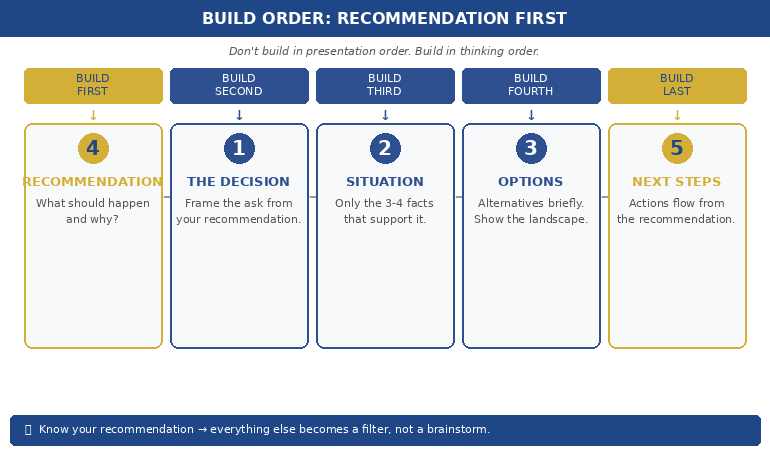
Here’s a counter-intuitive rule: don’t build the deck in the order you present it. Build it in the order that’s fastest to think through.

Build first: Slide 4 (Recommendation). You probably already know what you think should happen. Write it down. One sentence. This anchors everything else — because once you know what you’re recommending, you know what context and evidence to include (and what to leave out).

Build second: Slide 1 (The Decision). Now frame the ask. “I’m recommending X. The committee needs to approve / reject / modify.” This takes thirty seconds because you’ve already written the recommendation.

Build third: Slide 2 (Current Situation). What facts support your recommendation? Don’t include everything you know — include only the 3–4 data points that make your recommendation feel inevitable. This is where most people go wrong under pressure: they include everything because they’re afraid of getting caught without an answer. But including everything actually weakens your recommendation by burying the signal in noise.

Build fourth: Slide 3 (Options/Problem). If there are alternatives, list them briefly. If not, describe what’s changed. This slide exists to show you’ve considered the landscape — not to present a balanced analysis.

Build last: Slide 5 (Next Steps). By now, the next steps are obvious because they flow directly from your recommendation. Write three actions with names and dates.

This sequence — recommendation first, context second, evidence third — is the same principle behind the preparation order that doubles approval rates. It works under pressure because it eliminates the hardest part of building a deck: deciding what to include. When you know your recommendation, the filter is automatic.


Counter-intuitive build order for emergency presentations showing Recommendation first then Decision, Situation, Options, Next Steps

PAA: What is the best structure for a quick presentation?
The 5-slide structure: Decision/Ask, Current Situation, Options/Problem, Recommendation, Next Steps. Each slide has a single clear headline and one supporting point. This structure works because it mirrors how executives process information — they want to know the ask, the context, the options, your view, and what happens next. Anything else is optional. Build the recommendation slide first, then work backwards to the supporting slides.

30 Minutes Is Enough — If You Have the Right Structure

The Executive Slide System eliminates the blank-screen problem permanently. Pre-built frameworks for emergency presentations, steering committees, board updates, and approval decks. Open the template. Fill in the structure. Present with confidence.

Get the Executive Slide System → £39

Used in high-stakes approvals and funding pitches. Built from 24 years in corporate banking + 15 years training executives.

What to Cut When You Have 15 Minutes (Not 30)

Sometimes you don’t have thirty minutes. You have fifteen. Or ten. Here’s what to cut — in order.

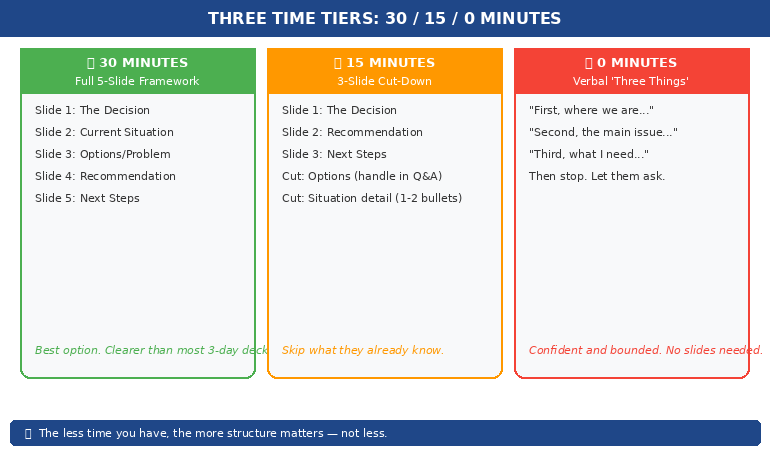
Cut first: Slide 3 (Options). If time is critical, go straight from situation to recommendation. Your audience can ask about alternatives in Q&A. The options slide is the most expendable because its job — showing you’ve considered the landscape — can be done verbally.

Cut second: Slide 2 detail. Reduce the current situation from 3–4 bullets to 1–2. Keep only the data points that directly support your recommendation. “Revenue is at 87% of target with two months remaining” is enough if your recommendation is about closing the gap.

Never cut: Slides 1, 4, and 5. The ask, the recommendation, and the next steps are non-negotiable. Even if you’re presenting verbally with zero slides, these three elements must be present. “Here’s what I need from you. Here’s what I recommend. Here’s what happens next.” That’s a complete presentation in three sentences.

The extreme version: 3 slides in 10 minutes. Decision + Recommendation + Next Steps. This works when your audience already has context (they’ve been in the meetings, they’ve read the reports, they know the situation). Don’t repeat what they already know. Just cut to the decision.

📊 Need a system you can deploy in minutes, not hours?

Pre-built frameworks for 5-slide emergency, 8-slide steering committee, and 12-slide board update — all ready to fill.

Get the Executive Slide System → £39

When You Have Zero Minutes: Presenting Without Slides

Sometimes there’s no time for slides at all. Your boss pulls you into a meeting already in progress: “Can you update us on the project?” Here’s how to structure a verbal-only last minute presentation.

The 60-Second Structure:

“Let me give you three things.” (This signals structure — your audience relaxes because they know it’s bounded.)

“First, where we are: [one sentence on current status].”
“Second, the main issue we’re navigating: [one sentence on the challenge].”
“Third, what I need from this group: [one sentence on the ask or decision].”

Then stop talking. Let them ask questions. The questions will tell you what they actually need to know — which is almost never the twenty points you would have included in a full deck.

This verbal structure works because it follows the same logic as the 5-slide framework: situation, problem, ask. It just strips out the options and recommendation slides because in a verbal context, those emerge naturally through discussion.


Three time tiers for last minute presentations showing 30-minute, 15-minute, and zero-minute frameworks

The principles behind this approach are the same ones that define effective executive presentation structure — lead with what matters, cut everything that doesn’t, and trust your audience to ask for what they need.

PAA: How do you present without preparation or slides?
Use the “three things” verbal framework: state where you are, what the main issue is, and what you need from the audience. Signal structure at the start (“Let me give you three things”) so your audience knows it’s bounded. Then stop and let questions guide the rest. Verbal presentations without slides are often more effective than rushed slide decks because they feel confident and conversational rather than frantic and over-packed.

Stop Starting From Scratch. Start From Structure.

The Executive Slide System is the presentation framework executives use when the stakes are high and the time is short. Pre-built structures for emergency presentations, board updates, steering committees, and approval decks — so you never face a blank screen again.

Get the Executive Slide System → £39

Used in board updates, steering committees, and approval meetings across every industry. Built from 24 years in corporate banking + 15 years training executives.

Frequently Asked Questions

Should I apologise for having a short deck?

Never. The moment you say “Sorry, I only had thirty minutes to prepare this,” you’ve given your audience permission to lower their expectations. Present the five slides as if they’re exactly what you intended. Executives respect brevity — a focused five-slide deck signals confidence and prioritisation, not lack of preparation. The most senior people in the room will assume you’re concise by design.

What if I’m asked about something not in my five slides?

Say: “That’s a great question — I don’t have the data in front of me, but I’ll follow up by end of day.” This is a perfectly acceptable response at every level of corporate life. It’s far better than guessing or including unverified information in rushed slides. The follow-up email after the meeting is often where the real decision gets finalised anyway.

How do I handle last minute presentations when I’m not the subject expert?

Focus on the structure, not the depth. The 5-slide framework works even with surface-level knowledge because it’s asking: what’s the situation, what are the options, what do you recommend? You don’t need to be the deepest expert — you need to be the clearest communicator. If there are technical questions you can’t answer, name the person who can: “James has the detail on the migration timeline — I’ll connect you directly.”

Is the 5-slide framework only for emergency presentations?

No. Most of the executives I work with use it as their default structure for every presentation, then add slides only when the context demands it. The emergency version is the minimum viable deck. The planned version adds depth to each section. But the bones — Decision, Situation, Options, Recommendation, Next Steps — work whether you have thirty minutes or three weeks.

📬 The Winning Edge Newsletter

Weekly strategies for executive presentations, leadership communication, and career-critical stakeholder conversations. No fluff.

Subscribe free →

🎯 Free: Executive Presentation Checklist

The pre-presentation checklist I give every executive before a high-stakes meeting — including the emergency 5-slide framework, slide headline formulas, and the three questions every executive audience silently asks.

Download free →

Related: Last minute presentations don’t just test your slide skills — they trigger imposter syndrome. If the panic is less about the slides and more about the voice in your head saying “they’re going to find out I’m not ready,” read the imposter syndrome pre-presentation reset — it’s a 4-minute protocol designed for exactly this moment.

A last minute presentation isn’t a crisis. It’s a clarity test. Five slides. Build the recommendation first. Add only the context that supports it. Rehearse the transitions once. And walk in like you planned the whole thing.

🎯 Next time you get the tap on the shoulder, be ready in minutes — not hours.

Get the Executive Slide System → £39 — the pre-built framework for every executive presentation, including the emergency 5-slide structure.

About the Author

Mary Beth Hazeldine is the Owner & Managing Director of Winning Presentations. With 24 years of corporate banking experience at JPMorgan Chase, PwC, Royal Bank of Scotland, and Commerzbank, she has trained executives through high-stakes approvals and funding pitches — including more last minute presentations than she can count.

A qualified clinical hypnotherapist and NLP practitioner, Mary Beth combines executive communication expertise with the psychology of performance under pressure. She helps leaders communicate with clarity and confidence — especially when there’s no time to prepare.

Book a discovery call | View services

14 Feb 2026
Executive presenting to engaged boardroom audience during first leadership presentation after promotion

The Presentation You Give After Getting Promoted (Most Get It Wrong)

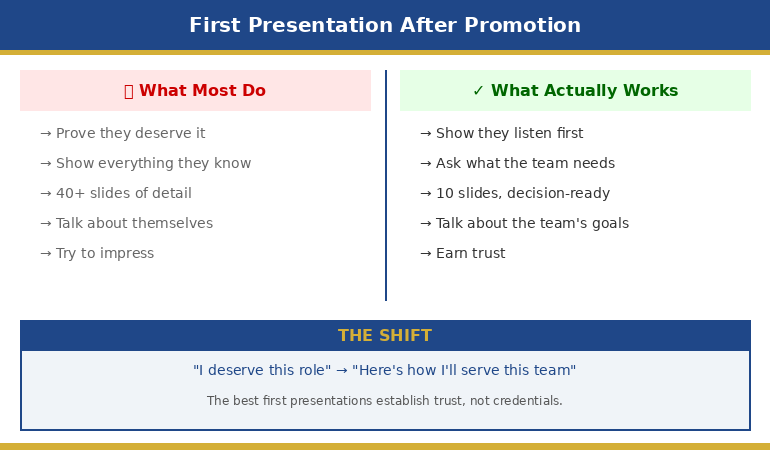
Quick answer: Your first presentation after a promotion isn’t about proving you deserve the role — it’s about showing your team you understand what they need. The leaders who earn trust fastest open with listening, not credentials. Structure your first deck around three things: what you’ve heard, what you’ll prioritise, and what you need from them.

Three weeks after getting promoted to Managing Director at a global bank, a client of mine — let’s call him David — stood up in front of his new team and delivered what he thought was the perfect first presentation.

Forty-two slides. Every restructuring initiative mapped. Every metric benchmarked. Every strategic pillar colour-coded. He’d worked on it for three weekends straight.

The room was silent when he finished. Not impressed-silent. Uncomfortable-silent.

Afterwards, a trusted colleague pulled him aside: “David, nobody in that room wanted your strategic vision. They wanted to know if you’re going to fire them.”

He’d answered questions nobody was asking, and ignored the only question that mattered: What does this change mean for me?

I’ve watched this pattern repeat across dozens of newly promoted executives. The instinct after a promotion is to prove you belong. But your audience already knows you got the role. What they don’t know is whether you’ll listen, whether you understand their reality, and whether working for you will be better or worse than what came before.

That’s what your first presentation needs to answer.

Your First Deck Sets the Tone for Everything That Follows

The Executive Slide System gives you the exact structure, slide order, and decision frameworks that earn trust in your first presentation — not your fifteenth.

Get the Executive Slide System → £39

Built from 24 years in corporate banking + executive training work — designed for senior-stakeholder audiences.

The Mistake Almost Every New Leader Makes

The promotion presentation trap works like this: you’ve just been told you’re good enough. Your brain immediately begins building a case to confirm that judgment. So your first instinct is to demonstrate competence.

That instinct creates presentations that:

Lead with your strategic vision (before anyone’s asked for it). Showcase deep analysis (proving you’ve done your homework). Reference your previous successes (establishing credentials). Cover everything (because you don’t know what matters yet).

The problem isn’t that any of this is wrong. It’s that it’s premature.

PAA: What should I present in my first meeting as a new leader?
Your first presentation should focus on three things: what you’ve heard from the team so far, what you plan to prioritise in the short term, and what you need from them to succeed together. Save strategy for later — trust comes first.

Your new team isn’t evaluating your intellect. They already know you’re capable — the promotion proved that. They’re evaluating your character. Specifically: do you listen? Do you understand what it’s actually like in the trenches? Will you protect them or throw them under the bus when things go wrong?

A 42-slide strategic masterpiece answers none of those questions. A 10-slide trust-building presentation answers all of them.


Before and after comparison showing common first presentation after promotion mistakes versus trust-building approach

If you’re preparing your first presentation in a new role, the Executive Slide System (£39) includes the exact slide frameworks that establish credibility without the 40-slide trap.

The Trust-First Presentation Structure

In 24 years of corporate banking — across JPMorgan Chase, PwC, Royal Bank of Scotland, and Commerzbank — I’ve observed that the leaders who earn trust fastest after a promotion share one trait: they present what they’ve learned, not what they already know.

The trust-first structure flips the typical presentation on its head:

Traditional post-promotion deck: Here’s my vision → Here’s my plan → Here’s what I need from you → Questions?

Trust-first deck: Here’s what I’ve heard from you → Here’s what I think matters most → Here’s what I need help understanding → What am I missing?

The shift is subtle but powerful. The traditional structure positions you as the expert arriving with answers. The listening-led structure positions you as a leader who arrived with questions — and actually listened to the answers.

PAA: How do I make a good first impression after being promoted?
The strongest first impression comes from demonstrating that you’ve spent your first days listening, not planning. Reference specific things team members told you. Acknowledge the challenges they face. Show that your priorities reflect their reality, not just your ambitions.

David — the MD from my opening story — rebuilt his presentation using this structure. The second version was 10 slides. He opened with direct quotes from one-on-one meetings he’d had with every team member in his first two weeks. The energy in the room was completely different. People leaned forward. They felt seen.

Stop Building Decks That Impress. Start Building Decks That Earn Trust.

The Executive Slide System includes the Leadership Transition Trust Deck (10 slides), recommendation-first formats, and decision frameworks designed for high-scrutiny senior audiences. Customise in 30 minutes.

Get the Executive Slide System → £39

Designed for senior stakeholders in high-scrutiny environments where clarity earns trust.

The 10-Slide Order That Works

Here’s the slide structure I recommend to every newly promoted executive. Notice what’s not here: no org chart, no biographical slide, no “About Me” section.

Slide 1 — The Listening Slide: “In my first [X] days, I’ve had conversations with [number] of you. Here’s what I heard.” Three to five direct themes, paraphrased from actual conversations. This slide alone earns more trust than 20 slides of strategy.

Slide 2 — The Acknowledgement: Name the elephant. If there was a difficult departure, restructuring, or period of uncertainty before your arrival — acknowledge it. Don’t paper over it. Your team will respect the honesty.

Slide 3 — The Three Priorities: Not twelve priorities. Not seven strategic pillars. Three things you’ll focus on in the next 90 days. Fewer priorities signal confidence. More priorities signal anxiety.

Slides 4-6 — One Slide Per Priority: Each slide answers: What’s the problem? What’s the first step? Who’s involved? Keep these tight. You’re not presenting solutions — you’re presenting direction.

Slide 7 — What I Won’t Change: This is the slide most new leaders forget. Your team is terrified you’ll break what’s working. Tell them explicitly what stays the same. It costs you nothing and earns enormous goodwill.

Slide 8 — What I Need From You: Specific, concrete asks. Not “I need your best effort.” More like: “I need honest feedback in our one-on-ones, even when it’s uncomfortable.”

Slide 9 — How to Reach Me: Your actual communication preferences. When to email, when to walk in, when to escalate. This practical slide signals you’re approachable, not just saying you are.

Slide 10 — The Question Slide: Not “Any questions?” but a specific prompt: “What’s the one thing I should know that nobody will tell me unprompted?” Then be quiet. Let the silence work.

The entire thing should take 15 minutes to deliver — maximum. The remaining 45 minutes should be conversation. That ratio — 25% presenting, 75% listening — is exactly what a team-first leader looks like.

Want this exact 10-slide deck as a ready-to-customise template? It’s inside the Executive Slide System (£39) — look for the Leadership Transition Trust Deck.

What to Say in Your Opening (3 Scripts You Can Use Today)

The number-one search behind “first presentation after promotion” is simply: what do I actually say? Here are three opening scripts I’ve used with clients, each suited to a different situation.

Script 1 — The Listening-Led Opening (best for most situations):
“Over the past [two weeks / ten days], I’ve had one-on-one conversations with [number] of you. I asked everyone the same question: what’s the one thing that frustrates you most about how things work right now? Three themes came up consistently. I want to walk through all three today — and I want your honest reaction to what I’m proposing we do about them.”

Script 2 — The Steady Confidence Opening (best when the team needs reassurance):
“I know transitions create uncertainty, so let me be direct about three things: what’s not changing, what I’m planning to look at first, and how I want us to work together. I’ll take about 15 minutes to walk through that, and then I want the rest of this hour to be your questions — the harder, the better.”

Script 3 — The Reset Opening (best when you were promoted over internal candidates):
“Before I get into any slides, I want to acknowledge something. I know this transition isn’t straightforward for everyone in this room, and I respect the contributions that got this team to where it is. I’m not here to overhaul what’s working. I’m here to build on it — and I need your help to do that well. Here’s what I’ve heard so far.”

The Best Closing Question (Pick One)

How you close matters almost as much as how you open. Don’t end with “Any questions?” — it invites silence. Try one of these instead:

Option A: “What’s the one thing I should know about this team that nobody will tell me unprompted?”

Option B: “If you could change one thing about how we operate — starting tomorrow — what would it be?”

Option C: “What am I missing? What haven’t I asked about yet?”

Then be quiet. Count to ten in your head if you have to. The silence is where the real answers live.

What to Cut (Even If It Feels Important)

The hardest part of your first presentation after promotion isn’t what to include — it’s what to leave out. Everything you cut will feel important. Cut it anyway.

Cut your background slide. They already know your CV. They read the announcement email. If you spend three minutes on your career history, you’ve just told the room that your credentials matter more than their concerns.

Cut the 90-day plan. I know this feels counterintuitive. But a detailed 90-day plan in week two tells people you’ve already decided what matters — before you’ve listened long enough to know. Share priorities, not plans. The plan can come at day 30.

Cut the vision statement. “Our vision is to become the premier…” Stop. Nobody remembers vision statements. They remember whether you asked about their workload and whether you followed through.

Cut the benchmarking data. Your team doesn’t care how your new division compares to your old one. Comparisons feel like judgment.

PAA: How many slides should my first presentation as a new manager have?
Aim for 10 slides maximum, delivered in 15 minutes or less. Your first presentation should prioritise listening over presenting. The shorter your deck, the more time for the conversation that actually builds trust.

If you’re struggling to cut, ask yourself this: “Am I including this because my team needs to hear it, or because I need to say it?” That question eliminates half the slides in every post-promotion deck I’ve ever reviewed.

The First Five Minutes That Set Your Tenure

How you open your first presentation becomes the story people tell about you. Not what you said on slide 7. Not the Q&A. The first five minutes.

One client of mine — newly promoted VP at a tech company — opened with: “I’ve spent the last two weeks asking every person in this room what frustrates them most. Three themes kept coming up. I want to talk about all three today.”

That single opening accomplished more than any strategy presentation could: it demonstrated humility, preparation, and commitment to action.

Compare that with the typical opening: “I’m thrilled to be in this role. Let me share my background and then walk you through my strategic vision for the next twelve months.”

The first opening says: I’m here for you. The second opening says: I’m here for me.

Your team will decide in those first five minutes whether you’re a leader who listens or a leader who lectures. Every promotion presentation I’ve helped executives build starts with what they heard, not what they think.

If you’re also managing the anxiety that comes with presenting in a new role — especially at a higher level where the scrutiny feels sharper — you’re not alone. I’ve written about why introverted executives often present more effectively than their extroverted peers, and the reasons might surprise you.

Your Promotion Was the Hard Part. Don’t Let Your First Deck Undo It.

The Executive Slide System includes the Leadership Transition Trust Deck, decision frameworks, and the exact slide order covered in this article. Built from 24 years in corporate banking — designed for high-scrutiny audiences where trust is the currency.

Get the Executive Slide System → £39

Includes the 10-slide trust deck template. Customise and present in under an hour.

Frequently Asked Questions

Should I present my strategic vision in my first week?

No. Presenting a strategic vision before you’ve spent meaningful time listening signals that you’ve already made up your mind. The most effective newly promoted leaders present priorities (not plans) in the first two weeks, then share a more developed strategy at the 30-day mark after genuine consultation.

What if my boss expects a detailed strategic presentation right away?

Have a direct conversation with your manager about timing. Most senior leaders will respect the argument that a well-informed 30-day strategy will outperform a rushed week-two vision. If they insist, deliver the strategic overview but frame it explicitly as preliminary and subject to revision after team consultation.

How do I handle the team if I was promoted over internal candidates?

Acknowledge the situation directly in your opening remarks. Something like: “I know this transition isn’t easy for everyone, and I respect the contributions every person in this room has made.” Then prove through your presentation structure — by featuring what you’ve heard from the team, not what you’ve planned alone — that you’re not here to override, but to build on what exists.

What’s the biggest mistake in a post-promotion presentation?

Talking about yourself. The moment you spend more than 60 seconds on your background, experience, or credentials, you’ve made the presentation about validation rather than trust. Your team already knows you were chosen. What they need to hear is that you understand their reality and that your priorities reflect what they care about.

📬 The Winning Edge Newsletter

Weekly executive presentation strategies, slide structures, and career-critical communication insights. No fluff.

Subscribe free →

🎯 Free: Executive Presentation Checklist

The pre-presentation checklist I give every executive before a high-stakes meeting. Covers structure, messaging, and audience preparation.

Download free →

Related: If the promotion has made presenting feel more high-stakes than ever, read Why Introverted Executives Present Better Than Extroverts — the research on this is counterintuitive and worth understanding before your next big moment.

Your first presentation after a promotion isn’t a performance. It’s a conversation with a few slides. Keep it short. Keep it human. Keep it about them. The strategic brilliance can come later. Right now, trust is the only currency that matters.

The Executive Slide System (£39) gives you the exact structure to make that first deck your strongest.

About the Author

Mary Beth Hazeldine is the Owner & Managing Director of Winning Presentations. With 24 years of corporate banking experience at JPMorgan Chase, PwC, Royal Bank of Scotland, and Commerzbank, she spent over a decade delivering high-stakes presentations before training others to do the same.

A qualified clinical hypnotherapist and NLP practitioner, Mary Beth combines executive communication expertise with evidence-based techniques for managing presentation anxiety. She has trained thousands of professionals and helps leaders structure decision-focused decks that earn trust quickly.

Book a discovery call | View services

12 Feb 2026
Professional executive woman presenting with restraint to boardroom, holding notes with simple chart visible, corporate glass office setting

Why Over-Explaining Destroys Your Credibility (The Slide Audit That Changes Everything)

Quick answer: Over-explaining in presentations isn’t thoroughness — it’s a stress response that signals doubt. Executives interpret excessive detail as a lack of confidence in your own recommendation. The fix: audit every slide as either “safety content” (makes you feel prepared) or “decision content” (helps them decide) — then cut ruthlessly. In my experience, most decks are majority safety content that actively undermines your credibility.

A Client Had 65 Slides. I Asked One Question. She Went Quiet for 30 Seconds.

She’d spent three weeks building it. Every slide was polished. Every chart sourced and footnoted. Every possible objection anticipated with backup data.

I asked her: “Which of these slides does the audience need to make a decision — and which exist because they make you feel safe presenting?”

She went quiet. Then: “…most of these are for me, aren’t they?”

Thirty-eight slides were there to manage her anxiety. Not to help the CFO decide. Once she saw it, she couldn’t unsee it — and neither will you.

This is the pattern I’ve watched play out across 24 years in banking boardrooms at JPMorgan Chase, PwC, Royal Bank of Scotland, and Commerzbank. The highest-performing professionals sabotaging their own credibility not by saying the wrong thing, but by saying too much. Over-explaining isn’t a communication problem. It’s a stress response disguised as professionalism.

And the fix isn’t “be more concise.” The fix is understanding why you included each slide in the first place — then having a system to separate what serves you from what serves them.

That system is what I call the Credibility Audit. And once you run it on your own deck, your presentations — and how executives respond to you — will never be the same.

🎯 Stop Over-Explaining. Start Getting Decisions.

The Executive Buy-In Presentation System is a 7-module self-study programme that teaches you how decisions actually get made — and how to structure your presentation so “yes” feels safe. Includes the Credibility Release framework, Decision Definition Canvas, Pressure Response playbook, and AI-assisted workflow. Study at your own pace, with live Q&A calls for support.

Built on 24 years in banking boardrooms. Not theory — pattern recognition from thousands of high-stakes presentations.

Get the Executive Buy-In System → £199

Self-study modules + live Q&A sessions. Join anytime — all released modules available immediately.

First-cohort pricing: £199 is the launch price for this intake only. From next month, pricing moves to £499 (self-study) and £850 (live cohort).

Why Over-Explaining Feels Right But Reads Wrong

Here’s what makes this problem so persistent: the impulse to over-explain comes from a good place. You want to be thorough. You want to show you’ve done the work. You want to anticipate every question so nobody catches you off guard.

These are reasonable instincts. They also signal the opposite of what you intend.

When you present 47 slides of context, methodology, and evidence before reaching your recommendation, the audience isn’t thinking “how thorough.” They’re thinking: “If they need to explain this much, are they sure about it?”

There’s neuroscience behind this. When we’re anxious, we talk more. It’s a measurable stress response — the same mechanism that makes people over-justify when they feel insecure about a decision. Audiences detect this subconsciously. They can’t always name what feels off, but they register it as uncertainty.

The result: you’ve accidentally signalled doubt about the very recommendation you’re trying to get approved.

I watched this happen to a brilliant colleague at Commerzbank. She presented a €50M deal structure for 45 minutes. Flawless analysis. Perfect charts. The Chair’s response: “That was thorough. What did you want us to do?” Her recommendation was on slide 38. By the time she reached it, the room had already decided she wasn’t confident in it.

The seniority paradox makes this worse. Watch any boardroom carefully. The most senior person usually says the least. The CEO speaks last, and briefly. This isn’t laziness — it’s how authority is communicated. But most professionals, as they prepare for senior audiences, add more explanation. They’re signalling junior-ness to the exact people they want to see them as senior.

If your executives keep stopping you mid-presentation, the problem isn’t your content. It’s your ratio of explanation to judgement.

📋 Want the complete Credibility Release framework?

Module 3 of the Executive Buy-In System gives you the full audit tool, Apology Scan reference sheet, and restraint-as-authority techniques.

Get the Executive Buy-In System → £199

Launch pricing — moves to £499/£850 next month.

Safety Content vs Decision Content: The Distinction That Changes Everything

Every slide in your presentation falls into one of two categories. Once you learn to see this, you can never unsee it.

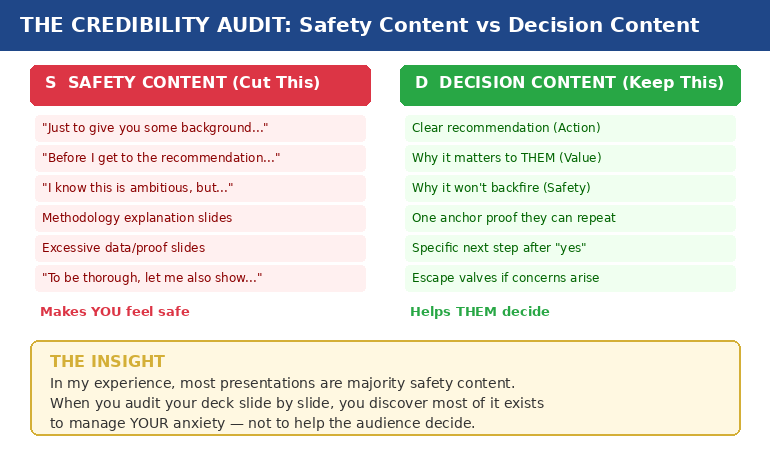
Safety content exists to make you feel prepared. It’s the background context, the methodology walkthrough, the 14 case studies, the comprehensive data analysis. It feels essential when you’re building the deck at 11pm. In the room, it signals that you’re not sure what matters.

Decision content exists to help them decide. It’s your clear recommendation, the specific value to them, the reason it won’t backfire, one piece of proof they can repeat to their peers, and a concrete next step.

In my experience, most presentations are majority safety content.

Credibility audit diagram showing safety content versus decision content with examples of each type

A consultant I worked with showed a client 14 case studies to prove their methodology worked. The client said: “But none of these are in our industry.” One relevant example would have closed the deal. Instead, fourteen irrelevant ones created doubt.

That’s safety content in action. The consultant wasn’t trying to help the client decide. She was trying to protect herself from the question “how do we know this works?” — a question the client never asked.

The three questions every decision-maker silently asks are:

  1. What happens if I say yes and it goes wrong?
  2. What happens if I say no and miss out?
  3. Can I defend this decision to my peers?

Everything that answers those three questions is decision content. Everything else — no matter how impressive — is safety content. And safety content doesn’t just waste time. It actively undermines your credibility by making you look unsure about which information actually matters.

If you’ve ever wondered why your executive presentation structure isn’t landing, start here. The structure probably isn’t wrong. The ratio is.

📊 The Credibility Release Framework: Module 3 of the Buy-In System

Five lessons that transform how you build presentations: why over-explaining destroys credibility (the neuroscience), the Credibility Audit tool for existing decks, the Apology Scan reference sheet, and the “restraint as authority” framework. Plus the Permission to Be Brief audio for cultures that expect “comprehensive” presentations.

Get the Executive Buy-In System → £199

7 modules, 36 lessons, 8 downloadable tools. Designed for busy executives who can’t commit to fixed schedules.

£199 is the first-cohort launch price. From next month: £499 self-study / £850 live cohort.

The Credibility Audit: How to Run It on Your Own Deck

This takes fifteen minutes and will change how you see every presentation you build.

Step 1: Print your deck (or open it in slide sorter view). You need to see every slide at once.

Step 2: Mark each slide with one letter. S for safety content — content that exists because it makes you feel prepared. D for decision content — content that directly helps the audience make their decision.

Be honest. The methodology slide that took you four hours to build? If removing it wouldn’t change whether they say yes or no, it’s an S.

Step 3: Count the ratio. If you’re like most professionals I work with, you’ll find the majority of your slides are S.

Step 4: For every S slide, ask one question: “If the CEO asked me to present this in half the time, would I keep this slide?” If the answer is no, it was never decision content. It was your anxiety asking for an insurance policy.

Step 5: Move the S slides to an appendix. Don’t delete them — that triggers its own anxiety. Put them in backup. If someone asks a question that one of those slides answers, you’ll have it. But you won’t volunteer information that nobody asked for.

A client brought me a 47-slide deck for a steering committee. We reduced it to 12 slides using this exact process. Same information, different structure. The committee approved in 15 minutes — a decision that had been delayed for three months.

The content wasn’t the problem. The ratio was.

🔍 Make this audit repeatable for every presentation.

The Credibility Release Checklist inside the Executive Buy-In System turns this into a systematic, page-by-page diagnostic you can run in minutes.

Get the Executive Buy-In System → £199

Launch pricing — moves to £499/£850 next month.

The Apology Scan: Hidden Phrases That Signal Doubt

Over-explaining isn’t just about slide count. It’s also about language. There are phrases that feel polite and professional but actually function as apologies for your own recommendation.

I call this the Apology Scan. Run through your presenter notes or script and look for these patterns:

“Just to give you some background…” — Translation: I’m not confident you’ll accept my recommendation without extensive justification.

“I know this is ambitious, but…” — Translation: I’m pre-apologising for what I’m about to recommend.

“You might be wondering why…” — Translation: I’m anticipating your objection and defending before you’ve attacked.

“To be thorough, let me also show…” — Translation: I’m padding my case because I’m not sure the core argument is strong enough.

“Before I get to the recommendation…” — Translation: I need you to see how much work I’ve done before you’ll trust my judgement.

Every one of these phrases feels reasonable when you write them. In the room, each one is an unintentional admission of doubt. They tell the audience: “I’m not sure you’ll trust me, so let me earn it first.”

Senior leaders don’t do this. They state what they recommend, why it matters, and what happens next. The absence of hedging is the credibility signal.

I learned this watching a partner at PwC give a 20-minute presentation to a CFO. After five minutes, the CFO interrupted: “I trust you. What do you need?” The partner said: “I need 15 more minutes.” The CFO laughed, approved everything, and left. That partner understood something it took me years to learn: the CFO wasn’t evaluating the content. She was evaluating the confidence.

Why Restraint Communicates Authority (And How to Get There)

Executives judge three things in the first two minutes — before they’ve evaluated a single slide:

  1. Do you know what you want? (Clear recommendation, not buried on slide 38)
  2. Do you believe in it? (Restrained delivery, not defensive over-explanation)
  3. Are you making this easy for me? (Decision-ready structure, not a data tour)

Restraint answers all three. Verbosity answers none.

This doesn’t mean being unprepared. It means being prepared enough to know what to leave out. Cutting content is an act of judgement — and judgement is exactly what executives are evaluating.

The “appendix strategy” solves the cultural challenge. In organisations that expect “comprehensive” presentations, you can be brief in the room while having depth available if asked. Your main deck shows 12 slides of decision content. Your appendix holds 35 slides of safety content. If someone asks “what about the methodology?” — you have it. But you didn’t volunteer it, which signals you know what matters.

This is the difference between a presenter and a decision-maker. Presenters show everything they know. Decision-makers show only what’s needed. Which one do you want to be perceived as?

There’s a reason “great presentation” is the worst feedback you can get. It means they were impressed by your delivery but didn’t feel moved to act. Restraint moves people to act.

How many slides should an executive presentation have?

There’s no magic number. The question is: how many of your slides are “decision content” (helps them decide) versus “safety content” (makes you feel prepared)? A 12-slide deck of pure decision content outperforms a 47-slide deck that’s 70% safety content. Run the Credibility Audit and let the ratio guide you.

How do you present confidently to senior executives?

Confidence in executive presentations is communicated through restraint, not through proving you’ve done the work. Lead with your recommendation, not your research. Cut safety content to an appendix. Remove apology phrases from your script. The absence of hedging is the credibility signal.

Why do executives stop presentations early?

Usually because the recommendation is buried under context. Executives scan for direction in the first 90 seconds. If they find context instead of a clear recommendation, they interrupt — not because they’re impatient, but because they can’t evaluate a proposal they haven’t heard yet.

🏆 The Complete System for Getting Executive Decisions

The Executive Buy-In Presentation System covers everything in this article and far more — from clarifying the decision before you build a single slide, to structuring your message so “yes” feels safe, to handling pressure when executives push back. Seven modules:

  • Module 1: Clarify the Decision (eliminate the ambiguity that causes over-explaining)
  • Module 2: The Executive Buy-In Structure (Action → Value → Safety → Proof → Next Step)
  • Module 3: The Credibility Release (the audit and apology scan from this article)
  • Module 4: Reassurance-First Proof (one anchor proof vs ten weak ones)
  • Module 5: AI as Execution Engine (90-minute deck creation workflow)
  • Module 6: Pressure Response (reframe pushback as risk-testing, not rejection)
  • Module 7: Your Personal Executive Playbook (custom rules for your stress patterns)

36 lessons, 8 downloadable tools, live Q&A sessions. Self-study format designed for busy executives.

Get the Executive Buy-In System → £199

Join anytime — all released modules available immediately. Study at your own pace.

⚡ £199 is the first-cohort launch price only. From next month, the self-study programme moves to £499 and the live cohort to £850. This intake locks in the launch rate.

Frequently Asked Questions

How do I know if I’m over-explaining versus being appropriately thorough?

Run the Credibility Audit: mark each slide as S (safety — makes you feel prepared) or D (decision — helps them decide). If more than 40% of your slides are S, you’re over-explaining. The acid test: if the CEO asked you to present in half the time, which slides would you cut first? Those were never decision content — they were anxiety management disguised as thoroughness.

What if my organisation expects long, comprehensive presentations?

Use the appendix strategy. Keep your main deck to decision content only (typically 10-15 slides). Move all safety content to an appendix. You’re not being unprepared — you’re being strategic about what you volunteer versus what you hold in reserve. If someone asks a detailed question, you have the slide. But you didn’t dilute your credibility by volunteering information nobody asked for. Over time, your brevity will be noticed — and rewarded.

Doesn’t cutting slides risk looking unprepared or under-researched?

The opposite is true. Knowing what to cut requires more judgement than knowing what to include. Executives recognise this instantly. A 12-slide deck that leads with a clear recommendation signals: “I know exactly what matters.” A 47-slide deck that buries the recommendation on slide 38 signals: “I’m not sure which of this information is important, so I’m showing you all of it.” The first is the presentation of someone ready for the next level. The second is the presentation of someone still proving they belong at this one.

Can the Credibility Audit work for non-slide presentations — like verbal updates or meeting contributions?

Absolutely. The same principle applies to any communication. Before your next verbal update, write down what you plan to say. Mark each point as S (makes you feel covered) or D (helps them decide or act). You’ll likely find you planned to give three minutes of context before reaching the actual point. Cut the context. Lead with the point. Watch how differently the room responds.

📬 The Winning Edge Newsletter

Weekly insights on executive presentations, decision psychology, and high-stakes communication — from 24 years in banking boardrooms. No fluff. No “10 tips” lists. Just the patterns that actually get decisions.

Subscribe Free →

📋 Free: Executive Presentation Checklist

A quick-reference checklist for structuring any executive presentation — including the safety vs decision content check. Download it before your next high-stakes meeting.

Download the Free Checklist →

Related reading: The Headcount Request That Got Yes When Everyone Said No · Why Your Nervous System Remembers That Awful Presentation From 2019

Your next step: Open your most recent presentation. Mark every slide S or D. Count the ratio. Then move every S slide to an appendix and see what’s left. That’s your real presentation — the one that communicates confidence instead of anxiety. And if you want the complete system for structuring presentations that get decisions instead of “let’s discuss further,” the Executive Buy-In Presentation System gives you the frameworks, tools, and playbooks to make it repeatable. It’s £199 at the current first-cohort launch price (moving to £499/£850 next month).

About the Author

Mary Beth Hazeldine is the Owner & Managing Director of Winning Presentations. With 24 years of corporate banking experience at JPMorgan Chase, PwC, Royal Bank of Scotland, and Commerzbank, she has delivered high-stakes presentations in boardrooms across three continents.

A qualified clinical hypnotherapist and NLP practitioner, Mary Beth combines executive communication expertise with evidence-based techniques for managing presentation anxiety. She has trained senior professionals and executive audiences over many years, and supported high-stakes funding and approval presentations across industries.

Book a discovery call | View services

08 Feb 2026
Executive mid-answer during boardroom Q&A with presentation screen visible behind

Appendix Slides: The 5 Backup Slides That Win Executive Q&A

The CFO asked a question I wasn’t expecting. I froze — then said, “I actually have a slide on that.”

As I flipped to my appendix, I watched her expression shift from skepticism to something like respect. The question was about our methodology assumptions — the kind of challenge that derails presenters who haven’t thought three steps ahead.

But I had thought three steps ahead. Not because I’m smarter than anyone else in the room. Because I’d learned something most presenters never figure out: appendix slides (also called backup slides) aren’t for “extra information.” They’re pre-built answers to the questions you’ll be asked.

After 25 years in corporate banking and consulting, I’ve noticed a pattern. The people who look most prepared in boardrooms aren’t the ones who memorised every data point. They’re the ones who anticipated the questions — and had slides ready.

Here’s how to build appendix slides that transform Q&A from a threat into an opportunity.

Quick answer: Effective appendix slides (backup slides) aren’t repositories for leftover data — they’re strategically prepared answers to anticipated questions. Build five types: (1) methodology backup for “how did you calculate that?”, (2) deeper data cuts for “what about segment X?”, (3) scenario alternatives for “what if we did Y instead?”, (4) historical context for “how does this compare to last time?”, and (5) risk mitigation for “what could go wrong?” Having these ready transforms Q&A from a threat into an opportunity to demonstrate thorough preparation.

⚡ Presenting to leadership this week?

Build these 3 appendix slides before anything else:

  1. The “How We Got This Number” slide. Whatever your key recommendation relies on — have the calculation visible and ready.
  2. The “What About [Their Pet Topic]” slide. Every senior leader has something they always ask about. Prepare for it.
  3. The “Plan B” slide. If they say no to your first recommendation, what’s the alternative? Have it ready.

These three slides cover 80% of the questions that catch presenters off guard.

If you don’t have the “How we got this number” slide ready, you’re not presenting — you’re negotiating credibility.

Looking for a structured way to build appendix slides? The Executive Slide System walks through the 5 categories, scenario playbooks, and Q&A-ready templates covered in this article — useful if you’d rather work from a system than build one from scratch.

Why Most Appendix Advice Is Useless

Search “appendix slides” and you’ll find the same advice everywhere: “Put extra information at the end of your presentation.” “Include detailed data that doesn’t fit in your main slides.” “Add references and sources.”

This advice is technically correct and practically useless.

It treats appendix slides as a dumping ground — a place to put things you couldn’t fit elsewhere. That’s backwards. It’s like saying “put a fire extinguisher somewhere in the building” without teaching people where fires actually start.

The real purpose of appendix slides is strategic anticipation.

Every presentation to senior leaders follows a predictable pattern. You present. They listen. Then they ask questions designed to test whether you’ve actually thought this through — or whether you’re just presenting someone else’s analysis.

The questions they ask fall into recognisable categories. And if you’ve prepared slides that answer those categories, something interesting happens: you stop dreading Q&A. You start looking forward to it. Because every question becomes an opportunity to demonstrate that you’re not just a messenger — you’re someone who thinks at their level.

For more on how senior leaders process presentations, see my guide on what executives actually read on your slides.

The 5 Types of Appendix Slides That Actually Matter

After observing thousands of executive presentations — and noting which questions consistently surface — I’ve identified five categories of backup slides that cover nearly every challenging question you’ll face.

Five categories of appendix slides with example questions for each type

Type 1: Methodology Backup (“How did you calculate that?”)

This is the most common challenge in data-heavy presentations. Someone questions your numbers — not because they think you’re wrong, but because they need to understand the foundation before they’ll trust the conclusion.

Your methodology backup slide should include:

  • Data sources (where the numbers came from)
  • Key assumptions (what you held constant)
  • Calculation logic (the formula or approach, simplified)
  • Sensitivity notes (what changes if assumptions shift)

When someone asks “How did you get to that 15% figure?”, you flip to this slide and walk them through it in 60 seconds. Their next response is almost always a nod, not a follow-up challenge.

Type 2: Deeper Data Cuts (“What about segment X?”)

Senior leaders often want to see how aggregate numbers break down. If you’re showing total revenue, someone will ask about revenue by region. If you’re showing overall customer satisfaction, someone will ask about enterprise vs. SMB.

Anticipate the two or three most likely segmentation questions and prepare slides that show:

  • The breakdown they’re likely to ask about
  • Whether the segment trend matches or diverges from the aggregate
  • Any notable outliers worth flagging

The magic phrase: “Great question — let me show you the breakdown.” Then flip to the slide you already prepared.

Type 3: Scenario Alternatives (“What if we did Y instead?”)

Decision-makers rarely accept the first option without exploring alternatives. If you’re recommending Option A, someone will ask what happens with Option B or C.

Your scenario alternative slides should show:

  • The alternative approach (briefly described)
  • Key differences in outcome (cost, timeline, risk, impact)
  • Why you’re not recommending it (the trade-off that makes it inferior)

This demonstrates that you didn’t just fall in love with your recommendation — you evaluated alternatives and made a reasoned choice.

Type 4: Historical Context (“How does this compare to last time?”)

Institutional memory runs deep in senior leadership. They remember the last time someone proposed something similar. They remember how it turned out.

Your historical context slide should address:

  • Previous similar initiatives (briefly)
  • What happened (outcome)
  • What’s different this time (why history won’t repeat)

If you don’t prepare this slide, someone will bring up the past anyway — and you’ll be caught defending against a comparison you didn’t anticipate.

Type 5: Risk Mitigation (“What could go wrong?”)

Every approval involves accepting risk. Leaders want to know you’ve thought about what could fail — and that you have a plan if it does.

Your risk mitigation slide should include:

  • Top 2-3 risks (the realistic ones, not the theoretical)
  • Likelihood and impact (brief assessment)
  • Mitigation approach (what you’ll do if each risk materialises)

This slide transforms “What could go wrong?” from a trap into an opportunity to show thorough thinking.

Build Your Main Deck and Appendix Fast — Without Starting From Blank

The Executive Slide System — £39, instant access — gives you the complete framework to structure your recommendation deck and prepare for Q&A: 26 templates, 93 AI prompt cards, and 16 scenario playbooks. Build presentations that anticipate challenges before they’re asked.

Get the Executive Slide System → £39

Instant download. 30-day guarantee.

What’s inside:

  • 26 executive slide templates (recommendation, decision, update, and Q&A-ready structures)
  • 93 AI prompt cards for ChatGPT and Copilot (draft → refine → executive polish)
  • 16 scenario playbooks (board meetings, budget decisions, quarterly reviews, client escalations)
  • Master checklist + framework reference + 30-day money-back guarantee

Use it today: Download → pick the recommendation template → drop in your key numbers → add 3 appendix slides using the framework above → present with confidence.

How to Predict Which Questions You’ll Be Asked

Building the right appendix slides requires knowing which questions are coming. Here’s how to predict them.

Step 1: Know Your Audience’s Patterns

Every senior leader has favourite questions. The CFO always asks about ROI assumptions. The COO always asks about implementation timeline. The CEO always asks about competitive response.

Before any presentation, ask yourself: What does each person in this room always want to know? Build an appendix slide for each pattern.

Step 2: Identify Your Weakest Points

You know where your argument is strongest — and where it’s vulnerable. The vulnerable spots are where questions will land.

Be honest with yourself: Which part of my recommendation would I challenge if I were in their seat? Build an appendix slide that addresses that challenge head-on.

Step 3: Anticipate the “Yes, But” Reactions

When you make your recommendation, imagine someone saying “Yes, but…” and completing the sentence. Common completions:

  • “Yes, but we tried something similar before…”
  • “Yes, but what about the risk of…”
  • “Yes, but how does this affect department X…”
  • “Yes, but the timeline seems aggressive…”

Each “yes, but” is an appendix slide waiting to be built.

Step 4: Ask Someone Who’s Been in the Room

If you haven’t presented to this group before, find someone who has. Ask them: “What questions did they ask you?” and “What caught you off guard?”

Their experience becomes your preparation advantage.

For more on handling difficult questions, see my guide on handling difficult questions in presentations.

Don’t want to predict and build appendix slides from scratch?

The Executive Slide System gives you 26 templates, 93 AI prompt cards, and 16 scenario playbooks — structured for boardroom Q&A and built around the appendix categories covered above. £39, instant download.

Get the Executive Slide System →

The “Flip-Back” Technique for Q&A Confidence

Having appendix slides is only half the battle. Using them smoothly is the other half.

Here’s the technique I teach:

Step 1: Acknowledge the Question

“That’s a great question” or “I’m glad you asked that” — something brief that shows you’re not thrown off.

Step 2: Signal That You’re Prepared

“I actually have some data on that” or “Let me show you what we found when we looked at that specifically.”

This moment — before you’ve even shown the slide — is when perception shifts. You’re not scrambling. You anticipated this.

Step 3: Navigate Smoothly

Know your appendix slide numbers. Practice the navigation so you don’t fumble. In PowerPoint, you can type the slide number and press Enter to jump directly there.

Step 4: Answer Concisely

Don’t over-explain. Show the slide, make your point in 30-60 seconds, and ask if that addresses their question. Less is more.

Step 5: Return to Your Flow

After answering, return to where you were in your main presentation — or to your recommendation slide if you were near the end. Don’t let one question derail your entire narrative.

The Psychological Effect

When you flip to a prepared slide during Q&A, something subtle happens in the room. The questioner feels heard (you took their concern seriously enough to prepare for it). The rest of the room sees competence (you thought ahead). And you feel confident (you’re not improvising — you’re executing).

This is why appendix slides change the entire dynamic of executive presentations.

Why Building Appendix Slides First Changes Everything

Here’s a counterintuitive practice that transformed how I prepare presentations: build your appendix slides before your main deck.

Most people do the opposite. They build their main presentation, then throw some extra slides at the end as an afterthought. But this order is backwards.

When you build appendix slides first, you’re forced to think about:

  • What questions will this presentation raise?
  • What challenges will my recommendation face?
  • What context does my audience need that I might forget to include?

This thinking improves your main presentation. You realise which points need more support. You identify gaps in your logic before someone else points them out. You build a stronger argument because you’ve already stress-tested it.

The practical workflow:

  1. Draft your recommendation (one sentence)
  2. List every question or challenge you can imagine
  3. Build appendix slides for the top 5-8 challenges
  4. Now build your main presentation, informed by that thinking
  5. Review: did any appendix content belong in the main deck after all?

This approach takes slightly longer upfront but dramatically reduces revision cycles and — more importantly — transforms your Q&A performance.

For more on executive presentation structure, see my guide on executive presentation structure.

The pattern is consistent — the executives who handle Q&A best almost always built appendix slides ahead of time, anticipating the harder questions before the meeting.

Stop Dreading Q&A. Start Looking Forward to It.

The Executive Slide System (£39, instant access) gives you the complete framework — 26 deck templates plus 16 scenario playbooks with structure for building appendix slides in every question category. Build presentations that anticipate challenges before they’re asked.

Get the Executive Slide System → £39

Instant download. 30-day guarantee.

Frequently Asked Questions

How many appendix slides should I have?

Quality matters more than quantity. Aim for 5-10 well-prepared appendix slides that cover the most likely questions. Having 30 appendix slides you can’t navigate quickly is worse than having 5 you know inside out. Focus on the five types described above and you’ll cover most scenarios.

Should I mention my appendix slides during the presentation?

Generally, no. Let them discover your preparation during Q&A — that’s when the “I have a slide on that” moment creates the strongest impression. The exception: if you’re presenting something controversial and want to pre-empt objections, you might say “I have backup data on our methodology in the appendix if anyone wants to dig deeper.”

What if someone asks a question I don’t have an appendix slide for?

It happens. Acknowledge the question, answer as best you can verbally, and offer to follow up with more detail. The goal isn’t to have every possible answer prepared — it’s to have the most likely answers ready. Even covering 70% of questions with prepared slides dramatically improves your Q&A performance.

How do I quickly navigate to appendix slides during a live presentation?

In PowerPoint, type the slide number and press Enter to jump directly there. Know your appendix slide numbers before you present. Some presenters add a small index on their final main slide (visible only to them in presenter view) showing which appendix slides cover which topics. Practice the navigation until it’s smooth.

Your Next Step

Before your next executive presentation, try this: after you’ve drafted your recommendation, spend 30 minutes building appendix slides for the three most likely challenges. Just three.

Then notice how your confidence shifts. You’re no longer hoping they don’t ask hard questions. You’re ready for them. And that readiness shows — in your body language, your voice, and your willingness to engage with whatever comes.

The best-prepared person in the room isn’t the one who knows everything. It’s the one who anticipated what would matter — and prepared accordingly.

📧 Get the Winning Edge Newsletter

Weekly insights on executive communication, presentation structure, and high-stakes delivery — from someone who’s spent 25 years in boardroom-style decision meetings.

Subscribe free →

Related reading: Once you’ve built your appendix slides, make sure your main deck is structured for how senior leaders actually scan. Read What Executives Actually Read on Your Slides (In the First 5 Seconds) to ensure your key content lands in the high-attention zones.

About the Author

Mary Beth Hazeldine is the Owner & Managing Director of Winning Presentations. With 25 years in corporate banking and consulting — plus years training senior professionals — she has seen exactly what gets challenged in executive Q&A and what separates presenters who look brilliant from those who look blindsided.

She now helps professionals build presentations that anticipate questions before they’re asked.

08 Feb 2026
Senior executive woman reviewing presentation slides on laptop with focused analytical expression in modern office

What Executives Actually Read on Your Slides (In the First 5 Seconds)

I watched a CFO flip through 47 slides in under two minutes. She stopped on three of them.

This was during my banking career, sitting in on a budget approval meeting. The presenter had spent weeks building what he thought was a comprehensive deck. Beautiful charts. Detailed analysis. Supporting data for every claim.

The CFO’s eyes landed on the slide titles. Then the recommendation boxes. Then the numbers in bold. Everything else — the carefully crafted explanations, the background context, the methodology sections — might as well have been invisible.

After 24 years in corporate banking and consulting, I can tell you: most slides are built for the wrong reader.

They’re built for someone who will read every word. Senior leaders don’t.

Here’s what they actually look at — and what they skip entirely.

Quick answer: Senior leaders read in a predictable pattern: slide title first (to decide if the slide is relevant), then any boxed recommendation or conclusion, then bolded numbers or outcomes, then the first bullet only. They skip methodology, background context, detailed explanations, and anything that looks like “supporting information.” Structure every slide so the most important content appears in those four high-attention zones.

⚡ Presenting to executives this week?

Quick fixes that take 15 minutes:

  1. Rewrite your slide titles as conclusions. Not “Q3 Sales Analysis” but “Q3 Sales Exceeded Target by 12%”
  2. Add a recommendation box to every decision slide. Bold border, 2 sentences maximum, top-right position.
  3. Bold the numbers that matter. Revenue, headcount, timeline, cost — the figures they’ll be asked about later.

These three changes put your key content where executive eyes actually land.

If your slide title doesn’t contain the decision or outcome, senior leaders assume you don’t have one.
Fix your titles first — then drop your content into templates built for executive scanning.

Get the Executive Slide System → £39

The Executive Reading Pattern

Senior leaders don’t read slides. They scan them.

This isn’t because they’re lazy or don’t care. It’s because they’re making decisions all day, and reading every word of every presentation would be impossible. They’ve developed a filtering system — a rapid triage that separates “need to know” from “nice to know.”

Understanding this pattern changes how you build slides.

The scan takes about 3-5 seconds per slide. In that window, a decision-maker determines: Is this slide relevant to me? Is there a decision required? What’s the key number or outcome? Do I need to dig deeper or can I move on?

If your most important content isn’t visible in those 3-5 seconds, it doesn’t exist.

The Executive Reading Pattern showing what executives look at first second and skip on slides

Here’s the scanning sequence I’ve observed across hundreds of boardroom presentations:

First: Slide title (0.5 seconds)
This is the gatekeeper. The title tells them whether to invest attention or flip to the next slide. Titles that describe content (“Market Analysis”) get skipped. Titles that state conclusions (“Market Share Dropped 8% — Action Required”) get attention.

Second: Boxes and call-outs (1 second)
Anything visually separated — recommendation boxes, key takeaway sections, highlighted conclusions — draws the eye next. Decision-makers have learned that presenters put important things in boxes.

Third: Bold numbers (1 second)
Revenue figures. Headcount. Timelines. Percentages. Costs. Leaders are trained to find numbers because numbers are what they’ll be asked about in the next meeting.

Fourth: First bullet point (1-2 seconds)
If they’re still on the slide, they’ll read the first bullet. Maybe the second. Rarely the third. Almost never the fourth or fifth.

Then: Decision to engage or move on
Based on those 3-5 seconds, they either ask a question, request you to slow down, or mentally move to the next topic.

For more on structuring presentations for senior audiences, see my guide on executive presentation structure.

Build Slides That Get Read in the First 5 Seconds

The Executive Slide System includes templates pre-structured for how senior leaders actually scan — with recommendation boxes, conclusion-first titles, and visual hierarchy that puts key content where eyes land first.

Get the Executive Slide System → £39

Built from 24 years of presenting in boardroom-style decision meetings.

What They Actually Read (In Order)

Let’s break down each high-attention zone and how to use it.

1. Slide Titles: Your 8-Word Headline

Most presenters write titles that describe what’s on the slide. “Revenue Overview.” “Project Timeline.” “Risk Assessment.”

These titles are useless to someone scanning quickly. They don’t answer the only question that matters: “What do I need to know?”

Better approach: Write titles that state the conclusion.

Descriptive Title (Skip) Conclusion Title (Read)
Q3 Sales Performance Q3 Sales Beat Target by £2.4M
Project Status Update Project On Track for March Launch
Budget Analysis Budget Request: £450K for Q2
Risk Factors Three Risks Require Board Decision

Notice the pattern: conclusion titles tell the reader what to think about the slide before they’ve read anything else. They can decide instantly whether to engage deeply or move on.

For more examples of this transformation, see my guide on slide titles before and after.

2. Recommendation Boxes: The Decision Zone

Decision-makers are trained to look for recommendations. Put your “ask” in a visually distinct box — border, background colour, positioned top-right or bottom of slide.

A good recommendation box contains:

  • What you’re recommending (one sentence)
  • What it costs or requires (one sentence)
  • Nothing else

Example: “Recommendation: Approve £200K for pilot programme. Decision required by March 15.”

That’s it. The supporting argument is in the rest of the slide — but the recommendation stands alone in its box, scannable in under two seconds.

3. Bold Numbers: The Facts They’ll Quote Later

When leaders leave your presentation, they’ll be asked: “What was the number?” Make sure the important numbers are visually unmissable.

Bold these categories consistently:

  • Revenue/cost figures
  • Headcount impacts
  • Timeline milestones
  • Percentage changes
  • Decision thresholds

Don’t bold for emphasis. Bold for memorability. If the audience can’t recall the key figure 30 minutes later, it wasn’t bold enough.

4. First Bullets: Your One Chance at Detail

If you have supporting points, the first bullet is prime real estate. The second bullet is acceptable. The third is rarely read. The fourth and fifth are essentially invisible.

This means: front-load your bullet lists. Put the most important point first, not last. Don’t build to a conclusion — start with it.

For more on what senior leaders look for, see my guide on the executive summary slide.

What They Skip Entirely

Equally important: knowing what decision-makers don’t read. This is where most presenters waste time and slide space.

Background and context sections

You know that “Background” slide at the beginning? The one that sets up why this topic matters? It gets skipped. The audience already knows why they’re in the meeting. Context that seems essential to you is old news to them.

Methodology explanations

“How we arrived at this recommendation” is rarely read unless someone challenges the conclusion. Lead with the answer; keep methodology in the appendix for questions.

Detailed timelines

Gantt charts with 47 task lines? Skipped. They want three things: when does it start, when does it end, what are the major milestones in between. Everything else is operational detail they’ll delegate.

Supporting data tables

Raw data is for analysts. Senior audiences want the interpretation. “Sales grew 12%” is readable. A table with 24 monthly figures that demonstrates 12% growth is not.

Paragraphs of any kind

If your slide has a paragraph on it, that paragraph is invisible. They don’t read paragraphs in presentations. They read headlines, bullets, and numbers. Paragraphs signal “this isn’t important enough to summarize” — so they skip them.

Anything below the fold

Content that requires scrolling or appears at the very bottom of a dense slide is effectively hidden. If it matters, it should be visible without effort.

How to Structure Slides for Executive Eyes

Here’s the slide structure that works for senior-level scanning:

Top of slide: Conclusion title
State what the slide proves in 8 words or fewer.

Top-right: Recommendation box (if decision slide)
What you want them to approve, and what it requires.

Middle: Visual or key data
One chart, one table, or 3-4 bullets maximum. Bold the numbers that matter.

Bottom: Source line (tiny) or next steps
If there’s a “so what” action, put it here. Otherwise, just the data source in small font.

What’s missing from this structure? Background. Methodology. Explanation. Context. All of that lives in your speaker notes or the appendix — not on the slide itself.

The 10-Second Test

Before finalising any slide, show it to someone for exactly 10 seconds, then hide it. Ask them: “What was that slide about? What’s the key number? What’s the recommendation?”

If they can answer all three questions, your slide is structured correctly. If they can’t, the important content isn’t in the high-attention zones.

For more on board-level presentations, see my guide on board presentation best practices.

Stop Building Slides That Get Skipped

The Executive Slide System gives you templates that put your content where senior eyes actually land — conclusion titles, recommendation boxes, and visual hierarchy built for 3-second scanning. Stop guessing. Start structuring for how decisions actually get made.

Get the Executive Slide System → £39

Instant download. Built from 24 years of boardroom experience.

Frequently Asked Questions

What if my executive audience wants detail?

Some do — but they want detail on demand, not upfront. Structure your slides for scanning, then have detailed appendix slides ready for questions. When someone asks “How did you calculate that?”, you can flip to the methodology. But don’t put methodology on the main slide where it will be skipped by the three people who don’t ask.

How many bullets are too many?

Three is ideal. Four is acceptable. Five is pushing it. Beyond five, you’re writing a document, not a slide. If you have more than five points, you either need multiple slides or you need to group points into categories.

Should I read my slides aloud during the presentation?

Never read content they can scan faster than you can speak. Instead, use your speaking time to add context, tell stories, and address the “so what” — the things that don’t fit in a scannable format. Your slides and your speaking should complement each other, not duplicate.

What about technical presentations with complex data?

The same principles apply, but with one addition: a “headline chart” that summarises the complex data before you show the detail. The audience wants to understand what the data means before they see the data itself. Give them the interpretation first, then offer to go deeper if they want.

Your Next Step

The next time you build a presentation, imagine your most senior audience member scanning each slide for 3-5 seconds. Ask yourself: In that window, can they see the conclusion? The recommendation? The key number?

If not, move that content to where their eyes actually land.

Your deck might look different — fewer words, more conclusion titles, bolder numbers. But it will work better. Because it’s built for how decision-makers actually read.

Ready to build slides that get read in the first 5 seconds?

Get the Executive Slide System → £39

📧 Get the Winning Edge Newsletter

Weekly insights on executive communication, presentation structure, and high-stakes delivery — from someone who’s spent 24 years in boardroom-style decision meetings.

Subscribe free →

Related reading: If the thought of Monday’s presentation is already keeping you up tonight, read The Night Before the Biggest Presentation of Your Career for the protocol that actually helps you rest before high-stakes moments.

About the Author

Mary Beth Hazeldine is the Owner & Managing Director of Winning Presentations. With 24 years of corporate banking experience at JPMorgan Chase, PwC, Royal Bank of Scotland, and Commerzbank, she has sat through thousands of executive presentations — and learned exactly where senior leaders look and what they skip.

She now helps professionals build slides that work for how decisions actually get made, not how presenters wish they were made.

04 Feb 2026
Executive looking frustrated after presentation with green checkmark on screen behind him — vague praise instead of actionable feedback

Why ‘Great Presentation’ Is the Worst Feedback You Can Get

“Great presentation, really liked it.” The CFO shook my client’s hand, smiled, and walked out. Three weeks later, the £1.8 million budget request was quietly shelved.

The quick answer: When executives tell you “great presentation,” it almost always means your deck failed to force a decision. Actionable presentation feedback sounds uncomfortable — “slide 3 needs the ROI number,” “cut sections 4 through 7,” “lead with the ask next time.” Vague praise is a polite exit. If you’re consistently hearing “good job” but not getting approvals, the problem isn’t your delivery. It’s your slide structure.

⚡ Presenting tomorrow and need actionable feedback fast?

Before you walk into the room, ask one person — your manager, a peer, a trusted stakeholder — these three slide-specific questions:

  1. “Which slide would you cut first if I had to lose three?”
  2. “Is my recommendation on the first substantive slide, or buried at the end?”
  3. “What’s the one question the CFO will ask that I haven’t answered?”

Those three answers will give you more useful feedback in ten minutes than a dozen “great job” responses after the meeting. If you want the slide structure that forces this kind of feedback automatically, the Executive Slide System (£39) builds decision points into every section.

The Night I Realised Praise Was a Warning Sign

Early in my banking career at JPMorgan Chase, I presented a credit restructuring proposal to a room of seven senior directors. Twelve slides. Thirty-five minutes. When I finished, the most senior director nodded and said, “Really well put together. Thanks for that.”

I walked out feeling brilliant. Told my manager it went well. Two days later, she pulled me aside: “They’ve gone with another approach. Apparently, the deck didn’t address the regulatory risk.”

Nobody in that room told me what was missing. They told me it was “well put together.” That phrase now sets off alarm bells whenever I hear a client use it. Because in 24 years of corporate banking — across JPMorgan, PwC, Royal Bank of Scotland, and Commerzbank — I’ve learned that the executives who give you a compliment and nothing else are the ones who’ve already mentally moved on.

The executives who interrogate your slides? They’re the ones about to approve something.

Vague vs Actionable: What Real Presentation Feedback Sounds Like

After 24 years of coaching executives through high-stakes presentations — from board-level budget approvals to investor pitches — I’ve noticed a pattern that separates the presenters who get promoted from those who plateau. It has nothing to do with charisma or slide design. It’s about the type of feedback they receive — and what they do with it.

Vague feedback sounds warm. “Great presentation.” “Really interesting.” “Good job, thanks.” It feels good in the moment, but it gives you nothing to improve. You walk out not knowing what worked, what didn’t, or what to change for next time.

Comparison chart showing vague presentation feedback versus actionable feedback with specific examples

Actionable presentation feedback sounds different — and often less comfortable. “Slide 3 needs a clearer decision point.” “The finance section is twice as long as it needs to be.” “Your recommendation should be on the first slide, not the last.” These responses tell you exactly what to change. They mean the listener engaged deeply enough with your content to form a specific opinion.

Here’s the uncomfortable truth: if every stakeholder tells you “great job” and nobody challenges a single slide, your deck didn’t provoke enough thought to drive a decision. You entertained the room. You didn’t move it.

What does ‘actionable feedback’ mean for a presentation? Actionable presentation feedback identifies a specific element — a slide, a data point, a structural choice, an argument — and tells you what to change, add, or remove. It’s feedback you can act on before your next presentation without guessing what the person meant.

Your Slides Should Force Decisions — Not Compliments

The Executive Slide System gives you the exact 12-slide structure that makes executive audiences engage, challenge, and approve — instead of politely nodding and moving on. Built from frameworks I’ve used across JPMorgan Chase, PwC, and RBS.

Get the Executive Slide System → £39

Includes 12-slide executive structure, decision slide templates, and the recommendation-first framework refined across 24 years of high-stakes corporate presentations.

Why Executives Default to ‘Great Presentation’ (It’s Not About You)

Before you blame yourself for getting vague praise, understand why it happens. Senior leaders default to “great presentation” for three reasons — and none of them mean your content was actually great.

Reason 1: Your deck didn’t demand a response. Most presentation structures end with a summary slide or a “thank you.” Neither forces a decision. When you don’t build a decision point into your slides, the only polite response is a compliment. Executives aren’t going to volunteer constructive criticism you didn’t ask for.

Reason 2: They’re being politically careful. In senior leadership, vague praise is often code for “I don’t want to commit to a position in this room.” If your presentation doesn’t make it easy for them to say yes or no, they’ll say “great job” because it’s the safest non-answer. I saw this constantly at Commerzbank — the more political the room, the vaguer the feedback.

Reason 3: They’ve already decided — and it’s not in your favour. This is the hardest one to accept. When a senior leader has already made up their mind against your recommendation, “great presentation” is a kindness. It lets them reject your proposal without rejecting you personally. My client with the £1.8 million budget request? The CFO had already allocated those funds elsewhere. The compliment was a consolation prize.

In every case, the problem isn’t the executive. It’s the structure of the presentation itself. A well-structured executive deck makes it nearly impossible for a room to respond with vague praise — because it forces specific questions, specific objections, and specific decisions.

📊 This is exactly why the Executive Slide System builds a decision slide into position 3 — before the supporting evidence — so executives engage with your ask immediately instead of passively consuming your content. Get the Executive Slide System → £39

How do you ask for feedback after an executive presentation? Never ask “how was it?” or “any feedback?” — these invite vague praise. Instead, ask a specific, slide-level question: “Was the risk section on slide 7 strong enough to address your concerns?” or “Would you restructure the recommendation on slide 3?” Specificity invites specificity.

The Feedback Extraction Framework (Stop Hoping — Start Structuring)

After watching hundreds of executives present at board level, I developed a four-step framework that consistently turns vague “nice job” responses into genuinely useful, actionable presentation feedback. The key insight: you have to build feedback extraction into the presentation itself — not bolt it on afterwards.

Four-step feedback extraction framework showing before, during, after, and apply stages for improving executive presentations

Step 1 — Before: Build a feedback scaffolding slide. Add a penultimate slide that asks the room a specific question. Not “any questions?” but “Which of these three options would you recommend, and why?” This forces the room to respond with substance. One of my clients at RBS started using a “decision criteria” slide that listed three options with trade-offs. The room couldn’t leave without picking one — and their feedback immediately became specific, because they had to justify a choice.

Step 2 — During: Watch for the lean-in moment. Every presentation has a moment where the audience shifts posture — they lean forward, pick up a pen, or furrow their brow. That’s the slide that landed. Note which slide triggered it. That’s your strongest content, and everything else should be restructured to match its impact. I teach executives to build their executive summary slide using the same approach that triggered that lean-in.

Step 3 — After: Ask slide-specific questions. Immediately after presenting (or within 24 hours), ask one targeted question: “If you could change one thing about slide 5, what would it be?” Not “how was the presentation?” — that invites “great job.” Make your question so specific that the only possible answer is actionable. If they respond with “it was fine,” that slide didn’t register. Move your attention to the slides that provoked an actual reaction.

Step 4 — Apply: One change per cycle. Don’t overhaul your entire deck based on one round of feedback. Change one thing — the opening, one data visualisation, the recommendation placement — and present again. Measure whether the feedback changes. This creates a compounding improvement loop that, over time, transforms a deck that gets polite nods into one that gets challenged, questioned, and approved.

Stop Getting Compliments. Start Getting Approvals.

The Executive Slide System includes the exact decision slide format, feedback-forcing structure, and recommendation-first framework I’ve refined across hundreds of executive presentations. Your deck shouldn’t generate praise — it should generate action.

Get the Executive Slide System → £39

Built from frameworks refined across JPMorgan Chase, PwC, Royal Bank of Scotland, and Commerzbank — where vague praise meant lost deals.

Why is vague feedback harmful for presentations? Vague feedback creates a dangerous illusion of success. When you’re told “great job” repeatedly, you stop improving. You keep using the same structure, the same slides, the same approach — and you can’t understand why budgets get delayed, projects stall, and decisions don’t happen. Vague praise doesn’t just fail to help you. It actively holds you back by convincing you nothing needs to change.

Why Your Slide Structure Determines Your Feedback Quality

This is the part most presentation advice gets backwards. They tell you to “ask better questions” or “request feedback proactively.” That helps — but it treats the symptom, not the cause.

The cause is your slide structure.

A deck that follows a narrative arc — context, evidence, analysis, recommendation — naturally builds to a decision point. When the last substantive slide presents a clear recommendation with trade-offs, the room has no choice but to respond with specific feedback. They have to say “I agree with option A because…” or “I disagree because slide 7 doesn’t address…” Either response gives you something concrete to work with.

Compare that to a deck that ends with a summary slide restating what you already said. The room has nothing to decide. No recommendation to accept or reject. No trade-offs to weigh. So they default to the only available response: “nice job.”

Every presentation I’ve restructured for clients — whether it was a £4 million budget proposal at JPMorgan or a quarterly business review at PwC — the single biggest change was moving the recommendation to the front and building decision points into every section. The result? Feedback went from “looks good” to “I need you to strengthen the compliance section before I can approve this.” That’s a completely different conversation. That’s a conversation that leads somewhere.

📊 The Executive Slide System builds this recommendation-first, decision-forcing structure into every slide — so your deck naturally generates the kind of actionable feedback that drives approvals. Get the Executive Slide System → £39

Related: If the feedback you’re receiving is “great job” but you feel physically ill before every presentation, the problem might be deeper than slide structure. Read: The Medication Question: What Executives Actually Do Before Big Presentations

Common Questions About Presentation Feedback

How do you give actionable feedback on a presentation? Reference specific slides by number, identify what’s missing rather than what’s wrong, and suggest a concrete change. “Slide 4 needs the ROI calculation” is actionable. “The middle section felt slow” is not. If you’re the one giving feedback, the most useful gift you can offer is a specific slide number paired with a specific recommendation.

What should I do if I only get positive feedback on my presentations? Positive-only feedback is a red flag, not a green light. It usually means your deck didn’t create enough tension to provoke a real response. Try adding a decision slide that forces the room to choose between options. Ask one person before you leave: “If you could only keep three slides from this deck, which three?” Their answer will tell you which slides actually mattered — and which were filler.

How do you improve a presentation when nobody gives you specific feedback? Stop waiting for others to tell you what’s wrong. Instead, audit your own deck using one metric: which slides generated questions or comments, and which generated silence? The silent slides are the ones to cut or restructure first. Build a decision point into every presentation — even a simple “do you agree with this recommendation?” — and the room will be forced to respond with specifics.

The Structure That Turns ‘Great Job’ Into ‘Approved’

I built the Executive Slide System after 24 years of watching presentations succeed and fail at the highest levels of corporate banking. It contains the exact slide order, decision frameworks, and recommendation-first structure that forces executive audiences to engage — not just applaud. If your presentations keep generating compliments but not commitments, your structure is the problem. This fixes it.

Get the Executive Slide System → £39

Includes 12-slide executive structure, decision slide templates, and the recommendation-first framework used in high-stakes approvals and funding rounds.

Frequently Asked Questions

Is ‘great presentation’ always negative feedback?

Not always — but it should trigger scrutiny. If “great presentation” comes with a specific follow-up action (approval, next meeting scheduled, budget allocated), the praise is genuine. If it comes with nothing else — no questions, no next steps, no decision — it’s a polite way of ending the conversation without committing. The tell is what happens in the 48 hours after: silence means it wasn’t great.

How do I get my boss to give me more specific feedback on my presentations?

Ask before you present, not after. Send your boss the deck in advance with one question: “Can you flag the slide that’s weakest before I present to the group?” This gives them permission to be critical in private (where it’s safe) rather than in public (where they’ll default to “looks good”). After the presentation, ask about a specific slide: “Did slide 6 make the case strongly enough?” The more specific your question, the more specific their answer.

What’s the fastest way to tell if my presentation actually worked?

Count the questions. A presentation that generated zero questions either answered everything perfectly (rare) or failed to engage the room (common). A deck that triggered three to five specific, content-level questions — “How did you calculate the ROI?” or “What’s the timeline risk?” — drove genuine engagement. The type of question matters too: questions about your data mean they’re evaluating your proposal. Questions about your background mean they’re evaluating you. One leads to approval. The other leads to “great presentation.”

📬 The Winning Edge Newsletter

Weekly insights on executive presentations, slide structure, and the psychology of getting buy-in — from 24 years inside corporate boardrooms. No fluff. No generic tips. Just the frameworks that actually work.

Subscribe to The Winning Edge → Free

🆓 Free Download: Executive Presentation Checklist

The pre-presentation checklist I give every client before high-stakes meetings. Covers slide structure, decision points, and the three things to verify before you present to senior leadership.

Download the Executive Presentation Checklist → Free

Your Next Step

If you walked out of your last presentation hearing “great job” and nothing else, your structure needs work. Not your delivery. Not your confidence. Your structure. A recommendation-first slide order with built-in decision points makes it nearly impossible for a room to respond with vague praise — because your deck demands a specific response.

Restructure one deck. Present it. Notice the difference: fewer compliments, more questions, better decisions. Get the Executive Slide System → £39

About the Author

Mary Beth Hazeldine is the Owner & Managing Director of Winning Presentations. With 24 years of corporate banking experience at JPMorgan Chase, PwC, Royal Bank of Scotland, and Commerzbank, she has delivered high-stakes presentations in boardrooms across three continents.

A qualified clinical hypnotherapist and NLP practitioner, Mary Beth combines executive communication expertise with evidence-based techniques for managing presentation anxiety. She works with executives preparing for high-stakes funding rounds and approvals across banking, consulting, and corporate leadership.

Book a discovery call | View services

31 Jan 2026
Executive processing presentation rejection feedback at laptop in modern office

Why Your Best Presentation Got Rejected (The Real Reason Nobody Tells You)

The presentation was perfect. The rejection took eleven words.

“This is great work. Let’s revisit it next quarter when we have bandwidth.”

Translation: No.

I’ve watched this scene play out repeatedly across 24 years in corporate banking. A senior professional delivers a polished, well-researched, beautifully designed presentation. The executives nod along. They ask a few questions. Then they defer, delay, or decline—with compliments that feel like consolation prizes.

The presenter leaves confused. The deck was solid. The data was compelling. The delivery was confident. What went wrong?

Here’s what nobody tells you: the presentation wasn’t rejected because it was bad. It was rejected because it was structured wrong.

Quick answer: Most presentation rejections aren’t about content quality—they’re about cognitive load. Executives reject presentations that make them work too hard to find what matters. If your recommendation is on slide 15 of 20, you’ve already lost. If your executive summary requires reading to understand, it’s not executive. The fix isn’t better slides or more data. It’s restructuring so the decision point is unmissable in the first 60 seconds. This article shows you exactly why good presentations get rejected and the structural changes that get them approved.

The Real Reason Presentations Get Rejected

After 24 years in corporate banking—JPMorgan Chase, PwC, Royal Bank of Scotland, Commerzbank—I’ve seen the pattern clearly. The presentations that get rejected usually aren’t worse than the ones that get approved. They’re structured differently.

Here’s what’s actually happening when executives say “let’s revisit this later”:

They couldn’t find the decision point fast enough.

Executives don’t read presentations the way you build them. You build sequentially: context, then analysis, then options, then recommendation. They scan for one thing: What do you want me to decide, and why should I decide it now?

If they can’t answer that question in 60 seconds, they mentally categorise your presentation as “not ready for decision”—regardless of how polished it is.

The feedback you receive won’t tell you this directly. Executives rarely say “your structure made me work too hard.” Instead, they say:

  • “Great work—let’s discuss timing”
  • “I’d like to see more analysis on X”
  • “Can you socialise this with the team first?”
  • “Let’s table this until Q2”

These sound like legitimate concerns. Sometimes they are. But often, they’re polite ways of saying: “I couldn’t figure out what you wanted me to do, so I’m deferring rather than deciding.”

If you’re also dealing with the anxiety that comes after rejection, the techniques in my article on managing presentation fear can help you recover and approach the next one with confidence.

The Cognitive Load Problem

Here’s the uncomfortable truth: your audience’s attention is not a renewable resource.

The average executive sits through 6-8 presentations per week. Each one competes for limited mental bandwidth. By the time they reach yours, they’re not evaluating your content fresh—they’re triaging it against everything else demanding their attention.

When your presentation requires them to:

  • Read through 10 slides of context before understanding the ask
  • Mentally piece together scattered data points
  • Figure out which of three options you actually recommend
  • Calculate the implications themselves

…you’re asking them to do work. And executives don’t do work during presentations. They make decisions.

The presentations that get approved do the cognitive work FOR the executive. The recommendation is obvious. The supporting logic is clear. The ask is unmissable. The decision is easy.

This isn’t about dumbing things down. It’s about respecting how busy decision-makers actually process information.

Comparison of rejected vs approved presentation structures showing decision point placement

The 60-Second Structure Test

Before your next high-stakes presentation, run this test:

Give your deck to someone unfamiliar with the project. Set a timer for 60 seconds. Ask them to review only the first three slides, then answer:

  1. What decision is being requested?
  2. What’s the recommendation?
  3. Why does this matter now?

If they can’t answer all three confidently, your structure is working against you.

Most rejected presentations fail this test. The decision is buried in slide 12. The recommendation is hedged across multiple options. The urgency is implied rather than stated.

Contrast this with presentations that consistently get approved. Within 60 seconds, any viewer can articulate: “They’re asking for £X to do Y because Z is happening. They recommend Option A because of these three reasons.”

That clarity doesn’t happen by accident. It happens through deliberate structure.

⭐ Stop Getting Rejected for the Wrong Reasons

The Executive Slide System includes decision-first templates that pass the 60-second test every time. No more polite deferrals. No more “let’s revisit next quarter.”

What’s inside:

  • 12 executive-ready slide templates built for instant clarity
  • The Recommendation-First Framework that gets decisions
  • Before/after examples showing exactly what to change
  • The Executive Summary format that actually summarises

Get the Executive Slide System → £39

Built from corporate banking experience + executive presentation coaching.

3 Common Structures That Get Rejected

After reviewing thousands of presentations, I’ve identified three structural patterns that consistently lead to rejection—even when the content is excellent.

1. The Academic Structure

Pattern: Background → Methodology → Findings → Analysis → Conclusion → Recommendation

This structure works beautifully for research papers and academic presentations. It builds logically from foundation to conclusion. It shows your work.

Why it fails: Executives don’t care about your methodology. They care about what you’re recommending and why. By the time you reach your conclusion, they’ve mentally checked out or already formed opinions based on incomplete information.

I watched a brilliant analyst present market research this way at Commerzbank. Eighteen slides of rigorous analysis, building to a clear recommendation on slide 19. The managing director interrupted on slide 7: “What’s your point?” The analyst had to skip ahead, losing all the carefully constructed logic.

2. The Menu Structure

Pattern: Option A (pros/cons) → Option B (pros/cons) → Option C (pros/cons) → “Thoughts?”

This structure feels collaborative and thorough. You’re presenting all the options fairly and letting the executives decide.

Why it fails: Executives don’t want menus. They want recommendations. When you present three options without a clear recommendation, you’re asking them to do your job. They defer not because the options are bad, but because making the choice requires work they weren’t prepared to do. For more on what executives actually want to see, read my guide on what executives want in presentations.

3. The Narrative Structure

Pattern: Story of the problem → Journey of discovery → Revelation of solution → Call to action

This structure is engaging and memorable. It works well for keynotes, sales presentations, and all-hands meetings.

Why it fails for executive decisions: The dramatic tension that makes narratives compelling also delays the decision point. Executives in decision-making mode want the ending first. They’ll engage with the story after they know where it’s going.

The Structure That Gets Approved

The presentations that consistently get approved follow what I call the Recommendation-First structure. It’s counterintuitive if you’re used to building arguments sequentially, but it aligns perfectly with how executives actually process information.

The Recommendation-First Framework:

  1. Decision Requested (Slide 1): What you’re asking them to decide, stated in one sentence
  2. Recommendation (Slide 2): What you recommend and why, in three bullets maximum
  3. Implications (Slide 3): What happens if they approve, what happens if they don’t
  4. Supporting Logic (Slides 4-8): The analysis that supports your recommendation
  5. Risks and Mitigation (Slide 9): Anticipated concerns, already addressed
  6. Ask and Timeline (Slide 10): Specific approval needed, specific next steps

Notice what this structure does: it frontloads the decision. By slide 3, the executive knows exactly what you want and why. Everything after that is supporting evidence they can engage with or skip, depending on their questions.

This is fundamentally different from “saving the best for last.” You’re not building to a crescendo—you’re establishing the destination immediately, then providing the map for anyone who wants it.

For a deep dive on the opening slide specifically, see my article on how to write an executive summary slide.

📊 Want plug-and-play templates for this framework? The Executive Slide System includes ready-to-use slides for each position—so you’re not starting from scratch.

⭐ The Recommendation-First Templates

Stop restructuring from scratch. Get the exact framework that gets presentations approved—with templates for every slide in the decision-first sequence.

Get the Executive Slide System → £39

Used in executive decision meetings and board-style updates.

How to Fix a Rejected Presentation

If your presentation was recently rejected (or politely deferred), here’s how to restructure it for a better outcome:

Step 1: Identify the Buried Decision

Find the slide where you actually state what you want them to decide. In most rejected presentations, this is somewhere between slide 10 and slide 20. Note the slide number.

Step 2: Move It to Position 1

Create a new slide 1 that states the decision in one sentence: “I’m requesting approval for [X] by [date] to [achieve Y].” No context. No buildup. Just the ask.

Step 3: Create a Recommendation Slide

Slide 2 should answer: “What do you recommend and why?” Use three bullets maximum. If you can’t summarise your recommendation in three bullets, you don’t yet have a clear recommendation.

Step 4: Add Implications

Slide 3 shows two paths: “If approved, here’s what happens. If not approved, here’s what happens.” This creates appropriate urgency without artificial pressure.

Step 5: Restructure Supporting Content

Everything else becomes supporting material. Reorganise it to answer the questions executives are most likely to ask, in the order they’re likely to ask them. Delete anything that doesn’t directly support the recommendation.

Step 6: Run the 60-Second Test Again

Show someone your restructured deck. Can they identify the decision, recommendation, and urgency within 60 seconds? If yes, you’re ready to re-present. If no, keep simplifying.

⚡ Prefer templates over restructuring from scratch? The Executive Slide System includes before/after examples and decision-first templates that make restructuring straightforward.

Why do good presentations get rejected?

Good presentations get rejected when the structure makes executives work too hard to find the decision point. If your recommendation is buried in slide 15, your “executive summary” requires reading, or you’re presenting options without a clear recommendation, executives will defer rather than decide. The rejection isn’t about content quality—it’s about cognitive load. Restructure to put the decision and recommendation in the first 60 seconds, and the same content often gets approved.

How do you respond to presentation rejection?

First, get specific feedback if possible: “What would need to be different for this to get approved?” Second, run the 60-second structure test—have someone review your first three slides and see if they can identify the decision, recommendation, and urgency. Third, restructure using the Recommendation-First framework before re-presenting. Often the same content, restructured for decision-first clarity, gets approved on the second attempt.

What do executives actually want in presentations?

Executives want three things within 60 seconds: what decision you’re requesting, what you recommend, and why it matters now. Everything else is supporting material. They don’t want to hunt for the point, piece together scattered data, or choose between options you should have already evaluated. Do the cognitive work for them, and they can focus on deciding rather than deciphering.

⭐ Never Get Rejected for Structure Again

The Executive Slide System gives you the proven framework that gets presentations approved—not because you have better content, but because executives can actually find your point.

You’ll get:

  • 12 decision-first slide templates
  • The Recommendation-First Framework
  • Before/after restructuring examples
  • The 60-second clarity checklist

Get the Executive Slide System → £39

Built from 24 years of corporate banking presentations.

Frequently Asked Questions

How do I know if my presentation structure is the problem?

Run the 60-second test: show your first three slides to someone unfamiliar with the project and ask them to identify the decision requested, your recommendation, and why it matters now. If they struggle with any of these, structure is likely your issue. Also review where your actual recommendation appears—if it’s past slide 10, you’re burying the lead. Common signs of structural problems include feedback like “great work, let’s revisit later” or requests for “more analysis” when you’ve already provided extensive data.

Can I fix a rejected presentation or should I start over?

Most rejected presentations can be fixed without starting over. The content is usually fine—it’s the structure that needs work. Move your decision request to slide 1, your recommendation to slide 2, and reorganise everything else as supporting material. This restructuring typically takes 1-2 hours and dramatically improves approval rates. Only start over if the fundamental analysis or recommendation was flawed, which feedback usually makes clear.

What’s the fastest way to restructure for executive approval?

Use the Recommendation-First framework: Decision (slide 1) → Recommendation (slide 2) → Implications (slide 3) → Supporting logic (slides 4-8) → Risks (slide 9) → Ask and timeline (slide 10). Copy your existing content into this structure, delete anything that doesn’t directly support the recommendation, and run the 60-second test before re-presenting. The Executive Slide System includes templates that make this restructuring straightforward.

How do I get honest feedback after a presentation rejection?

Ask specific questions rather than general ones. Instead of “what did you think?”, try: “What would need to be different for this to get approved?” or “Was the recommendation clear in the first few slides?” or “Were there questions I didn’t anticipate?” Executives are more likely to give actionable feedback when you make it easy for them. Also ask trusted colleagues who were in the room—they often notice reactions you missed while presenting.

📧 The Winning Edge Newsletter

Weekly insights on executive presentations, stakeholder strategy, and the structural patterns that get approvals.

Subscribe Free →

📋 Free: Executive Presentation Checklist

Run through this checklist before your next presentation to catch the structural issues that lead to rejection.

Download Free Checklist →

⚡ Want a quick win? The Presentation Openers & Closers Swipe File → £9.99 gives you 15 proven opening lines that grab executive attention in the first 10 seconds—perfect for nailing that critical first impression.

About the Author

Mary Beth Hazeldine is the Owner & Managing Director of Winning Presentations. With 24 years of corporate banking experience at JPMorgan Chase, PwC, Royal Bank of Scotland, and Commerzbank, she has delivered high-stakes presentations in boardrooms across three continents.

A qualified clinical hypnotherapist and NLP practitioner, Mary Beth combines executive communication expertise with evidence-based techniques for managing presentation anxiety. She has trained thousands of executives and supported high-stakes funding rounds and executive approvals.

Book a discovery call | View services

Your Next Step

That presentation you’re still thinking about—the one that should have been approved but wasn’t—probably didn’t fail because of the content. It failed because the structure made executives work too hard to find your point.

The good news: structure is fixable. Often in an afternoon.

Run the 60-second test on your next presentation. If someone can’t immediately identify your decision, recommendation, and urgency from the first three slides, restructure before you present. The Recommendation-First framework isn’t complicated—it just requires putting the ending at the beginning.

Executives don’t reject good ideas. They reject good ideas that are hard to find.

Make yours impossible to miss.

Related: If presentation anxiety is affecting your delivery alongside structural issues, see my article on overcoming glossophobia for techniques that address the fear component.

27 Jan 2026
Professional man smiling confidently at whiteboard while explaining a framework to colleagues in modern office

The 3-Part Presentation System Executives Trust: Structure → Story → Slides

I once spent 14 hours on a single board presentation. Fourteen hours. And it still wasn’t right.

After 24 years in corporate banking — at JPMorgan Chase, PwC, Royal Bank of Scotland, Commerzbank — I’d built hundreds of presentations. But I had no system. Every deck was a fresh struggle: staring at a blank screen, rearranging slides endlessly, second-guessing every choice.

Then I developed what I now call the 3-part presentation system executives actually trust. It cut my prep time by 75%. More importantly, it consistently delivered results — budget approvals, project sign-offs, client wins.

Here’s the system I wish someone had given me two decades ago.

Quick Answer: The presentation system executives trust follows three phases in strict order: (1) Structure — nail your recommendation and logic flow before touching slides, (2) Story — add the human element that makes data memorable, (3) Slides — build visuals that support your structure, not the other way around. This sequence prevents the #1 time-waster: building slides before you know what you’re actually saying.

📋 Creating a Presentation This Week? Start Here:

Before you open PowerPoint, answer these 3 questions:

  1. What’s your ONE recommendation? (If you can’t say it in one sentence, you’re not ready)
  2. What are the 3 proof points? (Data, example, or logic that supports it)
  3. What decision do you need? (Approval, funding, alignment, action)

Only after you can answer all three should you start building slides.

Why Most Presentation “Systems” Fail

Early in my banking career, I watched a colleague present to the executive committee. He had 47 beautifully designed slides. Animations. Charts. The works.

The CFO stopped him on slide 3. “What are you actually recommending?”

My colleague couldn’t answer clearly. He’d spent days on slides without first nailing his structure. The meeting ended early. The project stalled for months.

I’ve seen this pattern hundreds of times since. Professionals jump straight to PowerPoint, build slides that look impressive, then wonder why executives lose interest or decisions don’t happen.

The problem isn’t the slides. It’s the sequence.

Most presentation advice focuses on delivery tips or design tricks. But without a solid underlying system, you’re just decorating a house with no foundation.

Phase 1: Structure (The Foundation)

Structure is 70% of whether your presentation succeeds or fails. Yet most people spend 70% of their time on slides.

The structure phase happens entirely OFF the screen. Whiteboard, paper, or just thinking — but not in PowerPoint.

The Executive Structure Formula:

  1. Lead with your recommendation. Not background. Not context. The answer first.
  2. Identify 3 supporting points. Data, logic, or examples that prove your recommendation is sound.
  3. Define the decision needed. What exactly do you want them to approve, fund, or do?
  4. Anticipate 2-3 objections. What will they push back on? Have your responses ready.

This follows the Pyramid Principle that McKinsey made famous: conclusion first, then supporting evidence. It’s the opposite of how most people naturally think (building up to the conclusion), but it’s how executives prefer to receive information.

For a deeper dive into the exact format, see our guide to executive presentation structure.

What system do executives use for presentations?

Senior executives typically use a top-down structure: recommendation first, supporting evidence second, decision request third. This is often called the Pyramid Principle or BLUF (Bottom Line Up Front). The best executive presenters also have a consistent personal methodology — a repeatable process they follow for every presentation, regardless of topic or audience.

The 3-part presentation system: Structure leads to Story leads to Slides, shown as a sequential process"

⭐ Master the Complete System in 4 Weeks

AI-Enhanced Presentation Mastery is a live cohort course that teaches the full Structure → Story → Slides methodology — plus how to use AI tools to accelerate (not replace) each phase.

What you’ll learn:

  • The complete 3-part framework in depth
  • How to apply it to board decks, client pitches, and internal updates
  • AI prompts that enhance each phase (without making slides generic)
  • Live feedback on your real presentations

Learn More About the Course →

Live cohort format with direct instructor access. Built from 24 years of corporate banking experience.

Phase 2: Story (The Connection)

Once your structure is solid, you add the human element. Data convinces the rational mind. Story convinces the whole person.

This doesn’t mean turning your board presentation into a TED Talk. It means strategic use of narrative to make your points memorable and your recommendations compelling.

Three Story Techniques for Executive Presentations:

1. The Stakes Story (60 seconds)

Before presenting your recommendation, briefly establish what’s at risk. “If we don’t address this now, here’s what happens…” This creates urgency without being dramatic.

2. The Proof Story (90 seconds)

Instead of just citing data, briefly tell the story behind one data point. “When we piloted this with the Manchester team, here’s what happened…” Specific examples stick better than aggregate statistics.

3. The Future Story (60 seconds)

Paint a brief picture of what success looks like. “Six months from now, if we do this, here’s where we’ll be…” This helps executives visualise the outcome they’re approving.

Notice the time limits. Executive presentations aren’t the place for long narratives. These are strategic micro-stories embedded within a structured argument.

How do you structure an executive presentation?

The most effective structure for executive presentations is: (1) Recommendation/conclusion first, (2) Three supporting points with evidence, (3) Clear decision or action request, (4) Appendix for detail. This “top-down” approach respects executives’ time and mirrors how they make decisions. Avoid building up to your conclusion — executives want to know your answer immediately, then decide if they need the supporting detail.

Ready to master the complete system?

Explore AI-Enhanced Presentation Mastery →

Phase 3: Slides (The Delivery)

Only now — after structure and story are locked — do you open PowerPoint.

This is where most people START, which is why they waste so much time. When you build slides before your structure is solid, you end up rearranging endlessly, adding slides you don’t need, and second-guessing every design choice.

When structure comes first, slides become almost mechanical. You know exactly what each slide needs to say. You’re just visualising decisions you’ve already made.

The Slide Phase Checklist:

  • One message per slide. If a slide makes two points, split it.
  • Headlines that state conclusions. Not “Q3 Results” but “Q3 Revenue Exceeded Target by 12%”
  • Visuals that prove the headline. The chart or image should make the headline obvious.
  • Appendix for detail. Anything they might ask about but don’t need upfront.

For the detailed workflow I use, including how AI can accelerate this phase, see our guide to AI presentation workflow.

Time allocation comparison: amateur vs professional presenters showing where time should be spent

What makes a presentation system effective?

An effective presentation system is: (1) Repeatable — works for any presentation type, (2) Sequenced — forces you to do the right things in the right order, (3) Efficient — eliminates wasted time and rework, (4) Results-focused — optimised for getting decisions, not just delivering information. The best systems separate thinking (structure) from building (slides), ensuring you don’t waste time on visuals before your logic is sound.

⭐ Stop Reinventing Every Presentation

The AI-Enhanced Presentation Mastery course gives you a complete, repeatable system — so you never face a blank screen wondering where to start again.

Course includes:

  • 4 weeks of live instruction + Q&A
  • Templates for board, client, and internal presentations
  • AI prompt library for each phase of the system
  • Peer cohort for feedback and accountability

Learn More About the Course →

Framework-first, AI-enhanced. Next cohort starting soon.

Where AI Fits (And Where It Doesn’t)

AI tools like ChatGPT, Claude, and Copilot can dramatically accelerate presentation creation. But only if you use them at the right points in the system.

Where AI helps:

  • Phase 1 (Structure): Brainstorming counter-arguments, stress-testing your logic, identifying gaps
  • Phase 2 (Story): Drafting story options, finding analogies, refining language
  • Phase 3 (Slides): Generating first-draft slide content, reformatting data, creating visual options

Where AI fails:

  • Knowing your specific audience and what they care about
  • Understanding the political dynamics in your organisation
  • Making the judgment call on what to include vs. leave out
  • Replacing the strategic thinking that makes presentations persuasive

The professionals who get the most from AI use it as an accelerator within a proven framework — not as a replacement for having a system in the first place.

Want to learn how to combine framework + AI effectively?

Explore AI-Enhanced Presentation Mastery →

Is This System Right For You?

The 3-part system works for anyone who creates presentations for business audiences. But the full course is designed for a specific professional:

Qualification chart showing who the AI-Enhanced Presentation Mastery course is designed for

If you recognised yourself in the left column, the system will transform how you approach presentations — whether you learn it from this article or go deeper in the course.

⭐ The Complete System + Live Instruction

AI-Enhanced Presentation Mastery is a 4-week live cohort course that teaches the full Structure → Story → Slides methodology — plus the AI techniques that accelerate each phase without making your presentations generic.

What’s included:

  • 4 weeks of live sessions with Q&A
  • The complete 3-part framework with templates
  • AI prompt library for each phase
  • Feedback on your real presentations
  • Cohort of peers for ongoing accountability

Learn More About the Course →

Built from 24 years of corporate banking experience. Framework-first, AI-enhanced.

Frequently Asked Questions

How is this different from using AI tools alone?

AI tools are powerful but they don’t give you a system. They can generate content, but they can’t tell you what content you actually need. Without a framework, AI often produces generic slides that look impressive but don’t persuade. The 3-part system gives you the strategic foundation — AI then accelerates execution within that framework. It’s the difference between having a GPS (system) versus just having a fast car (AI).

Does this work for different presentation types (board, client, internal)?

Yes — that’s the point of having a system. The Structure → Story → Slides sequence works whether you’re presenting to a board, pitching a client, updating your team, or requesting budget. The specific content changes, but the methodology stays the same. In the course, we apply the system to multiple presentation types so you can see how it adapts.

How much time does the system actually save?

In my experience, the system cuts presentation prep time by 50-75% once you’ve internalised it. The savings come from eliminating the two biggest time-wasters: (1) building slides before your structure is clear, and (2) endless rearranging and second-guessing. When you know exactly what each slide needs to say before you open PowerPoint, the building phase becomes almost mechanical.

What if I’m already experienced at presentations?

Most experienced presenters are “unconsciously competent” — they do things that work but can’t articulate why. The system makes your process conscious and repeatable, which means you can improve it deliberately and teach it to others. It also fills gaps you might not know you have. Many experienced professionals find the Story phase (Phase 2) particularly eye-opening.

Get Weekly Presentation System Insights

Frameworks, templates, and techniques for executive presentations — from 24 years in corporate banking.

Subscribe to The Winning Edge →

Your Next Step

The 3-part presentation system — Structure → Story → Slides — isn’t complicated. But it does require discipline to follow the sequence, especially when you’re tempted to jump straight into PowerPoint.

Start with your next presentation. Before you open any software, answer the three questions from the rescue block above. Get your structure right first. Everything else becomes easier.

P.S. If you’re making a presentation this week, check out the presentation habit that’s quietly killing careers — it’s about the structural mistake most professionals make without realising it.

P.P.S. If nerves are part of your presentation challenge, I wrote about how to speak confidently in meetings — including the 30-second reset that helps even when anxiety hits.

About Mary Beth Hazeldine
Owner & Managing Director of Winning Presentations. 24 years in corporate banking at JPMorgan Chase, PwC, RBS, and Commerzbank. I’ve built hundreds of executive presentations and now teach the system I wish I’d had from the start.

27 Jan 2026
Professional woman having moment of realization at boardroom table while reviewing presentation on laptop

The Presentation Habit That’s Quietly Killing Your Career

She got the promotion. He had the better slides.

I watched this play out at JPMorgan Chase more times than I can count. The analyst with the comprehensive 40-slide deck passed over. The one with 12 slides and a clear recommendation? Fast-tracked to VP.

The difference wasn’t talent. It wasn’t data quality. It wasn’t even presentation confidence.

It was a single presentation career mistake that most professionals don’t even know they’re making — one that quietly signals to leadership: “This person isn’t ready.”

Quick Answer: The presentation habit killing most careers is building slides bottom-up (data → analysis → conclusion) instead of top-down (recommendation → supporting evidence → details if needed). Bottom-up signals you haven’t done the executive thinking. Top-down signals you’re ready for leadership.

📅 Presenting This Week? Use This 6-Slide Structure:

  1. Slide 1: Your recommendation + the ask
  2. Slide 2: Stakes — why this matters now
  3. Slides 3–5: Three proof points (one per slide)
  4. Slide 6: Decision needed + next steps
  5. Appendix: All supporting detail (only if asked)

This structure works for board updates, steering committees, budget requests, and any decision-seeking presentation.

Want the complete structure with copy/paste templates?

Get the Executive Slide System → £39

The Invisible Mistake Nobody Tells You About

In my 24 years in corporate banking — at JPMorgan Chase, PwC, Royal Bank of Scotland, and Commerzbank — I sat through thousands of presentations. And I noticed something that changed how I coach executives today.

The people who got promoted didn’t have better data. They didn’t have fancier slides. They didn’t even have more confidence.

They structured their presentations differently.

Specifically: they led with their recommendation. Not their process. Not their analysis. Not their methodology. Their conclusion — slide one.

Meanwhile, talented professionals with years of expertise were building decks the “logical” way: background, then analysis, then findings, then finally — on slide 37 — what they actually recommended.

And leadership tuned out long before they got there.

This is the presentation habit that’s quietly killing careers. It’s invisible because everyone does it. It feels right because it mirrors how we think. And nobody tells you it’s wrong because they’re doing it too.

Why This Happens (And Why It’s Not Your Fault)

You were trained to present bottom-up.

School taught you to show your work. University rewarded methodological rigour. Your first job praised thorough analysis.

So you build presentations the same way you build reports:

  • Start with context
  • Walk through the data
  • Explain your analysis
  • Finally, share your conclusion

This is bottom-up thinking. And it’s career poison in executive settings.

Here’s why: executives don’t have time to follow your journey. They need your destination — then they’ll decide if they want the map.

When you present bottom-up, you’re asking leadership to hold 15 minutes of context in their heads before they understand why it matters. Most won’t. They’ll check email, interrupt with questions, or mentally check out.

Then they’ll remember you as “the one who couldn’t get to the point.”

What presentation mistakes hurt your career?

The most damaging presentation mistake is structural, not cosmetic. Building presentations bottom-up (data first, conclusion last) signals to leadership that you haven’t done the executive thinking. It suggests you’re presenting your process rather than your judgement — which is exactly what leaders are evaluating when considering promotions.

What Executives Actually See When You Present

When you present bottom-up, executives don’t see thorough analysis.

They see someone who:

  • Can’t prioritise. If everything gets equal airtime, nothing is important.
  • Hasn’t formed a judgement. Walking through data without a clear recommendation suggests you want them to decide for you.
  • Doesn’t understand their time. Executives operate in 15-minute windows. Burying your point on slide 30 signals you don’t get that.
  • Isn’t ready for leadership. Leaders make recommendations. Analysts present data.

This is brutal, but it’s real.

I’ve sat in rooms where promotion decisions were made, and I’ve heard the exact words: “Great analyst, but not strategic enough yet.” What that often means: “Their presentations don’t lead with insight.”

Comparison showing bottom-up versus top-down presentation structure and how executives perceive each approach

Why do some presenters never get promoted?

Many talented professionals plateau because their presentation structure signals “analyst” rather than “leader.” They present their thinking process (how they got to the answer) instead of their strategic judgement (what should happen and why). This structural choice — often unconscious — shapes how leadership perceives their readiness for senior roles.

The Shift That Changes Everything

Top-down presentation structure is the opposite of how most people present — and exactly how executives think.

Bottom-up (what most people do):

  1. Background and context
  2. Methodology and approach
  3. Data and analysis
  4. Findings and insights
  5. Recommendation (finally)

Top-down (what gets you promoted):

  1. Recommendation and ask
  2. Key supporting points (3 maximum)
  3. Evidence for each point
  4. Appendix for details (if asked)

The shift feels uncomfortable at first. You’ll worry you’re not being thorough. You’ll feel exposed leading with your conclusion before you’ve “earned” it.

That discomfort? It’s the feeling of presenting like a leader.

If you’re finding that speaking confidently in meetings is also a challenge, the structure shift actually helps — when you know exactly what you’re arguing for, confidence follows.

⭐ Stop Signalling “Not Ready” — Start Presenting Like a Leader

The Executive Slide System gives you the exact structure that signals strategic thinking — built from 24 years in corporate banking and 15+ years coaching executives.

Includes:

  • Top-down slide structure template
  • Executive summary framework
  • Before/after transformation examples
  • Decision-slide formula

Get the Executive Slide System → £39

Built for board updates, steering committees, and CFO decision meetings.

How to Fix This (Starting With Your Next Deck)

You don’t need to overhaul everything. You need to change your starting point.

Step 1: Write your recommendation before you open PowerPoint

One sentence. What do you want them to decide, approve, or do? If you can’t articulate this clearly, you’re not ready to build the deck.

Step 2: Identify your 3 supporting points

Not 7. Not 12. Three. If you have more, you haven’t prioritised. Executives remember threes.

Step 3: Build the deck backwards

Start with your recommendation slide. Then your three supporting points. Then evidence for each. Everything else goes in the appendix — where it belongs.

Step 4: Apply the “slide 1 test”

If an executive only saw your first slide and nothing else, would they understand what you’re asking for and why? If not, restructure.

This approach mirrors the Pyramid Principle that consulting firms like McKinsey have used for decades. It’s not new — but it’s rarely taught outside elite environments.

Want the exact templates to make this shift immediate?

Get the Executive Slide System → £39

How do executives structure presentations differently?

Executives use top-down structure: recommendation first, supporting points second, evidence third, details in appendix. This approach respects the audience’s time, demonstrates strategic judgement, and signals leadership readiness. It’s the opposite of the bottom-up academic approach most professionals default to.

The 4-step process to fix presentation structure showing write recommendation first then identify 3 supporting points then build deck backwards then apply slide 1 test

⭐ Your Next Presentation Could Change How Leadership Sees You

One presentation with the right structure can shift perception faster than a year of good work. The Executive Slide System shows you exactly how.

What you’ll implement immediately:

  • The “recommendation-first” opening template
  • The 3-point evidence structure
  • The appendix strategy that shows depth without burying your point

Get the Executive Slide System → £39

Based on real boardroom experience — not theory.

Is This Right For You?

This structural shift isn’t for everyone. Here’s how to know if it applies to you:

Qualification chart showing who the Executive Slide System is for and who it is not for

Recognised yourself in the “yes” column?

Get the Executive Slide System → £39

The uncomfortable truth: if you’ve been presenting the same way for years without the career progress you expected, the structure is likely the issue. Not your data. Not your confidence. Your structure.

For more on building executive-grade presentation structure, see our complete guide to executive presentation structure.

⭐ Transform How Leadership Perceives You — Starting This Week

The Executive Slide System is the complete structure transformation I wish I’d had in my first decade in banking. It would have saved years of invisible career damage.

Inside:

  • The top-down structure template (copy/paste ready)
  • Real before/after examples from client transformations
  • The decision-slide formula that gets “yes”
  • Executive summary framework for any presentation type

Get the Executive Slide System → £39

Built from 24 years in corporate banking + 15 years coaching executives on high-stakes presentations.

Frequently Asked Questions

Can one presentation habit really affect promotion decisions?

Yes. Promotion decisions often hinge on perceived “executive presence” and “strategic thinking” — both of which are heavily influenced by how you structure presentations. When you present bottom-up, you signal analyst-level thinking even if your content is brilliant. When you present top-down, you signal leadership readiness. I’ve seen this pattern repeatedly across 24 years in corporate banking.

How do I know if I’m making this mistake?

Open your last presentation. Look at slide 1. Does it state your recommendation and ask? Or does it say “Agenda,” “Background,” or “Overview”? If your conclusion appears after slide 10, you’re presenting bottom-up. If executives regularly interrupt you mid-presentation asking “what’s the bottom line?” — that’s another clear signal.

What if my company culture expects detailed, thorough slides?

You can still be thorough — just restructure the order. Lead with your recommendation, provide your three key supporting points, then include all the detail in an appendix. This approach gives executives what they need immediately while proving you’ve done the deep work. It’s not less thorough; it’s better organised.

How long does it take to change this habit?

The structural shift can happen with your very next presentation — it’s a framework change, not a skill that takes months to develop. The discomfort of leading with your recommendation typically fades after 2-3 presentations. Most professionals I’ve coached report noticeable changes in how leadership responds within their first month of using top-down structure.

Get Weekly Executive Presentation Insights

Actionable presentation strategies delivered every Tuesday — from someone who’s been in the room where decisions are made.

Subscribe to The Winning Edge →

Your Next Step

The presentation habit that’s killing careers is structural, not cosmetic. It’s invisible because it feels logical. And it’s fixable — starting with your next deck.

Write your recommendation before you open PowerPoint. Lead with your ask. Structure top-down.

One presentation built this way can shift how leadership perceives you more than a year of good work presented the wrong way.

For more on crafting the critical first slide, see our guide to the executive summary slide.

P.S. If anxiety is also affecting your presentations, I wrote about how to speak confidently in meetings even when anxious — the structure shift actually helps with confidence too.

About Mary Beth Hazeldine
Owner & Managing Director of Winning Presentations. 24 years in corporate banking at JPMorgan Chase, PwC, RBS, and Commerzbank. Qualified clinical hypnotherapist. I help executives transform their presentations from forgettable to career-defining.