Tag: presentation preparation

07 Feb 2026
Professional woman lying awake at night unable to sleep before a big presentation with alarm clock visible

Night Before Presentation Anxiety: The Protocol That Actually Works

It’s 2:47am. You have to present to the board in six hours. And you’re staring at the ceiling.

Your mind won’t stop rehearsing. Not the presentation itself — the disaster scenarios. The CFO’s sceptical face. The question you can’t answer. The moment your voice cracks and everyone notices.

I know this ceiling. I stared at it for five years.

Before I learned what actually helps the night before a big presentation — and what makes things worse — I tried everything. Warm milk. Meditation apps. Reviewing my slides one more time (always a mistake). Alcohol (definitely a mistake).

Now, as a clinical hypnotherapist who specialises in presentation anxiety, I understand why nothing worked. And I’ve developed a protocol that does.

This isn’t about eliminating nerves. It’s about getting enough rest that you can function tomorrow — and managing the anxiety spiral that keeps you awake.

Quick answer: The night before a big presentation, your nervous system is in threat-detection mode — which is why you can’t sleep no matter how tired you are. The solution isn’t forcing sleep; it’s calming your nervous system enough that sleep becomes possible. Stop rehearsing by 8pm, write your fears on paper to externalize them, use physiological sighs (double inhale, long exhale) to activate your parasympathetic system, and accept that imperfect sleep won’t ruin your presentation.

⚡ Presenting in a few hours and can’t sleep?

Do these three things right now:

  1. Stop trying to sleep. The pressure to sleep makes it impossible. Get up, sit somewhere comfortable, and accept you might not sleep much tonight.
  2. Do 5 physiological sighs. Double inhale through nose (short, then long), slow exhale through mouth. This is the fastest way to calm your nervous system.
  3. Write down your three worst fears. On paper, not a screen. Getting them out of your head and onto paper reduces their power.

You can deliver a strong presentation on imperfect sleep. I’ve done it dozens of times. Your body has reserves you don’t know about.

📋 Tomorrow Morning Script (copy this now)

Three lines to keep in your pocket:

Opener: “Before I begin, I want to acknowledge that this topic matters — which is why I’m here to give you the full picture.”

If you blank: “Let me pause for a moment to make sure I’m giving you the most important point here…”

Reset line: “The key thing I want you to take away is this…”

Screenshot this. Having these lines ready reduces anxiety more than any amount of rehearsal.

Why You Can’t Sleep (It’s Not What You Think)

When you can’t sleep before a big presentation, the problem isn’t your mind — it’s your nervous system.

Your brain has identified tomorrow’s presentation as a threat. Not a physical threat, but your amygdala doesn’t know the difference between a predator and a CFO. As far as your nervous system is concerned, something dangerous is coming, and sleeping would be a very bad survival strategy.

This is why telling yourself to “just relax” doesn’t work. You’re fighting millions of years of evolution designed to keep you awake when danger is near.

The anxiety loop works like this:

You think about the presentation → Your body produces stress hormones → You feel more alert → You notice you’re not sleeping → You worry about being tired tomorrow → You think more about the presentation → More stress hormones

Each cycle makes sleep less likely. And the clock keeps ticking.

Here’s what’s actually happening in your body:

  • Cortisol stays elevated. Normally it drops at night. Before a big presentation, it doesn’t.
  • Your heart rate stays up. Even lying still, your cardiovascular system is ready for action.
  • Your mind scans for threats. This is why you keep imagining worst-case scenarios — your brain is trying to prepare you for danger.
  • Temperature regulation shifts. You might feel too hot or too cold. This is stress response, not your bedroom temperature.

Understanding this is step one. You’re not broken. You’re not uniquely anxious. Your nervous system is doing exactly what it evolved to do.

The question is: how do you convince it that you’re safe enough to sleep?

For more on the physiological symptoms of presentation anxiety, see my guide on presentation breathing techniques.

Break the Anxiety Cycle Before Your Next Presentation

Conquer Speaking Fear (£39, instant access) combines clinical hypnotherapy techniques with practical exercises you can use the night before — and the morning of — any high-stakes presentation. Stop the spiral before it starts.

Get Conquer Speaking Fear → £39

From a clinical hypnotherapist who spent 5 years staring at that ceiling.

The Night-Before Protocol

This is the exact sequence I use with clients — and used on myself during my banking career. It’s not about forcing sleep. It’s about creating the conditions where sleep becomes possible.
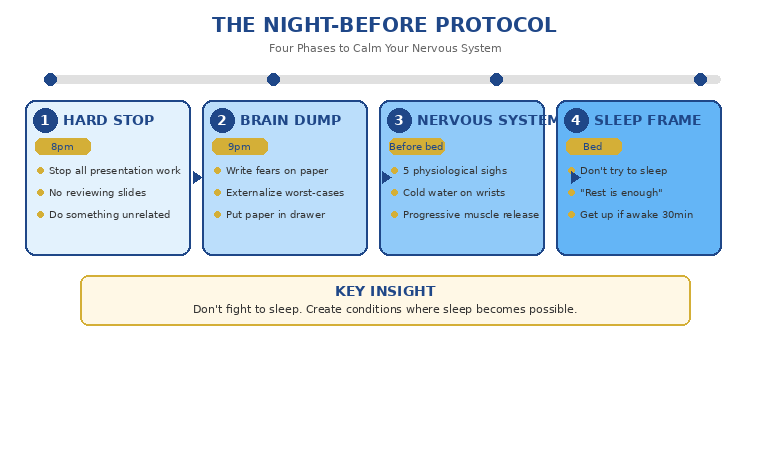
The Night-Before Protocol showing four phases to calm your nervous system before a presentation

Phase 1: The Hard Stop (8pm)

Stop all presentation work by 8pm. No reviewing slides. No rehearsing. No “just one more look.”

Here’s why this matters: every time you review your presentation, you’re telling your nervous system “this is important and potentially dangerous.” Your brain doesn’t distinguish between preparation and worry. To your amygdala, thinking about the presentation IS the threat.

If you’re not ready by 8pm, you’re not going to become ready between 8pm and midnight. You’ll just make yourself more anxious.

Instead, do something completely unrelated. Watch something light (not the news). Read fiction. Take a bath. The goal is to give your brain something else to process.

Phase 2: The Brain Dump (9pm)

Before you try to sleep, externalize your anxiety. Get a piece of paper — not your phone, paper — and write down:

  • Every fear you have about tomorrow
  • Every worst-case scenario your mind keeps generating
  • Every “what if” question that won’t leave you alone

Don’t censor yourself. Don’t try to be rational. Just dump it all onto the page.

This works because anxiety lives in loops. Your brain keeps cycling through fears because it’s trying to “solve” them. Writing them down tells your brain “I’ve captured this — you don’t need to keep reminding me.”

Then put the paper in a drawer. Physically separating from it matters.

Phase 3: The Nervous System Reset (Before Bed)

Now you need to shift your body from sympathetic (fight/flight) to parasympathetic (rest/digest) activation. These techniques work directly on your vagus nerve:

Physiological sighs (5 repetitions):

  • Double inhale through your nose: one short breath, then one longer breath on top of it (filling your lungs completely)
  • Long, slow exhale through your mouth
  • The extended exhale is what activates the parasympathetic response

Cold water on wrists and face:

  • Run cold water over the insides of your wrists for 30 seconds
  • Splash cold water on your face
  • This triggers the “dive reflex” which slows heart rate

Progressive muscle release:

  • Lying down, tense your feet for 5 seconds, then release
  • Move up through calves, thighs, stomach, chest, arms, face
  • Tension followed by release teaches your body what relaxation feels like

Phase 4: The Sleep Frame

When you get into bed, do not try to sleep. Instead, tell yourself: “I’m going to rest my body. Sleep would be nice, but rest is enough.”

This removes the pressure that makes sleep impossible. The irony of insomnia is that trying to sleep prevents sleep. Accepting rest — even wakeful rest — allows sleep to happen.

If you’re still awake after 30 minutes, get up. Sit somewhere comfortable. Do another round of physiological sighs. Don’t check your phone. Don’t review your slides. Just sit until you feel drowsy, then return to bed.

For more techniques on calming nerves, see my guide on how to calm nerves before a presentation.

What NOT to Do (Common Mistakes)

Some things that feel like good ideas actually make night-before anxiety worse:

Don’t review your slides “one more time.”

This is the most common mistake. It feels productive but does two harmful things: it signals to your brain that you’re not prepared (or why would you need to review again?), and it keeps the presentation front-of-mind when you need to let it go.

Don’t drink alcohol to help you sleep.

Alcohol might help you fall asleep, but it destroys sleep quality. You’ll wake up more often, spend less time in restorative sleep phases, and feel worse in the morning than if you’d slept less but alcohol-free.

Don’t use your phone in bed.

Blue light suppresses melatonin. But more importantly, your phone is a portal to email, to your slides, to everything that triggers anxiety. Keep it in another room.

Don’t catastrophize about not sleeping.

Here’s the truth: you can deliver a solid presentation on four hours of sleep. You can deliver one on two hours. Your body has adrenaline reserves that will kick in when you need them. Worrying about the effects of no sleep causes more damage than the actual sleep loss.

Don’t rehearse in bed.

Running through your presentation in bed feels like preparation, but it’s actually rumination in disguise. Your brain can’t distinguish between helpful rehearsal and anxious repetition when you’re trying to sleep.

Don’t take sleeping pills for the first time.

If you don’t know how a medication affects you, the night before a big presentation is not the time to find out. Some people feel groggy for hours after sleeping pills. Others have strange dreams that are worse than the insomnia.

The Morning Of: First 30 Minutes

How you spend the first 30 minutes after waking sets the tone for your entire presentation day.

Don’t check email first.

Email is other people’s priorities. On presentation day, you need to protect your mental state. Email can wait until after you’ve centred yourself.

Do move your body.

Even 10 minutes of movement — walking, stretching, light exercise — metabolizes the stress hormones that built up overnight. You’ll feel physically lighter and mentally clearer.

Do eat protein.

Skip the sugary breakfast. You need stable blood sugar for the next few hours. Eggs, yogurt, nuts — something that will sustain you without a crash.

Do one final physiological reset.

Five physiological sighs, plus cold water on face and wrists. This pre-sets your nervous system to a calmer baseline before you even leave for the presentation.

Don’t over-caffeinate.

If you slept poorly, the temptation is to drink extra coffee. Resist it. Caffeine amplifies anxiety symptoms — racing heart, jittery hands, rapid thoughts. One normal coffee is fine. Three espressos will make you worse.

If you’re worried about a panic attack, see my guide on what to do if you have a panic attack before a presentation.

Stop Dreading the Night Before

Conquer Speaking Fear (£39, instant access) gives you the complete system for managing presentation anxiety — not just coping techniques, but the deep reprogramming that changes how your nervous system responds to high-stakes moments. Clinical hypnotherapy meets practical business reality.

Get Conquer Speaking Fear → £39

Developed from 5 years of personal struggle and clinical hypnotherapy training.

Frequently Asked Questions

What if I literally can’t sleep at all?

It happens. And here’s the counterintuitive truth: lying in a dark room with your eyes closed, even without sleeping, provides about 70% of the restorative benefit of actual sleep. Your body is still resting, even if your mind isn’t. You will have enough fuel to get through tomorrow. I’ve delivered major presentations on zero sleep. It wasn’t fun, but it was fine.

Should I take melatonin the night before a presentation?

If you’ve used melatonin before and know how it affects you, a low dose (0.5-1mg) an hour before bed can help. But if you’ve never tried it, don’t experiment the night before something important. Some people feel groggy in the morning; others get vivid dreams. Know your response before using it strategically.

What if I wake up at 3am and can’t get back to sleep?

Don’t fight it. Get up, go somewhere comfortable (not your presentation space), and do a brain dump of whatever woke you up. Do five physiological sighs. Read something light for 20 minutes. Then return to bed without any expectation of sleep. Paradoxically, removing the pressure often allows sleep to return.

Is it better to wake up early or sleep as long as possible?

Wake at your normal time, or slightly earlier. Sleeping in disrupts your circadian rhythm and often leaves you feeling groggier than less sleep at the right time. Give yourself at least 90 minutes between waking and presenting to let your brain fully come online.

Your Next Step

The night before a big presentation is never going to be comfortable. Your nervous system is doing its job — preparing you for something that matters.

But you can work with your biology instead of against it. Stop rehearsing by 8pm. Dump your fears onto paper. Reset your nervous system with physiological sighs. And accept that imperfect sleep doesn’t mean a failed presentation.

If you want the complete nervous-system protocol — not just for tomorrow night, but for every future presentation — Conquer Speaking Fear covers the full programme.

Tomorrow, you’ll have reserves you don’t know about. Trust them.

📧 Get the Winning Edge Newsletter

Weekly insights on presentation confidence, anxiety management, and high-stakes communication — from a clinical hypnotherapist and former banking executive.

Subscribe free →

Related reading: If you’re facing one of the most difficult presentation types tomorrow — a restructuring announcement — read Restructuring Announcement Presentation: What HR Won’t Tell You for the structure that preserves trust when delivering hard news.

About the Author

Mary Beth Hazeldine is the Owner & Managing Director of Winning Presentations. A qualified clinical hypnotherapist and NLP practitioner, she spent five years struggling with severe presentation anxiety during her corporate banking career at JPMorgan Chase, PwC, Royal Bank of Scotland, and Commerzbank.

That personal experience — combined with her clinical training — now helps executives across financial services, healthcare, technology, and government transform their relationship with high-stakes communication. She combines evidence-based anxiety management techniques with practical business reality.

02 Feb 2026
Executive professional in thoughtful planning pose with pen before opening laptop, demonstrating strategic presentation preparation order

I Stopped Preparing Slides First. My Approval Rate Doubled.

I used to spend six hours on a presentation and still get rejected.

Beautiful slides. Careful animations. Colour-coordinated charts. The CFO would look at it for three minutes and say, “This isn’t what we need. Can you redo it?”

I thought I had a slides problem. I didn’t. I had a preparation order problem.

The moment I stopped opening PowerPoint first, everything changed. Same amount of time. Same audiences. Dramatically different results.

Here’s what I learned: the order you prepare a presentation determines whether it succeeds or fails. Most professionals get it backwards—and wonder why their approval rates are so low.

Quick answer: The optimal presentation preparation order is: (1) Decision—what do you need from this audience? (2) Audience—what do they care about and what’s blocking them? (3) Structure—what’s the logical flow that leads to your ask? (4) Slides—only now do you open PowerPoint. Most people start at step 4 and wonder why they keep getting sent back to the drawing board. This article explains each step and why the order matters more than the time you spend.

⚡ Presenting Tomorrow? The 12-Minute Reset

If you’re presenting soon and don’t have time for the full process, do this now:

  1. Write one sentence: “I need [audience] to approve [specific thing].” (2 min)
  2. List their top concern: What’s the #1 reason they might say no? (3 min)
  3. Check slide 1: Does it state your recommendation? If not, rewrite it. (5 min)
  4. Delete 20%: Cut any slide that doesn’t address their concern or your ask. (2 min)

This won’t fix everything, but it will dramatically improve your odds. For the complete framework, keep reading.

Why Most Preparation Is Backwards

Watch how most professionals prepare a presentation:

  1. Open PowerPoint
  2. Pick a template
  3. Start typing content onto slides
  4. Rearrange slides until it “flows”
  5. Add charts and formatting
  6. Hope it works

This approach feels productive. You can see progress—slides appearing, content filling in, a deck taking shape. But it’s an illusion.

Here’s the problem: you’re making structural decisions while distracted by visual decisions. You’re asking “what should slide 7 say?” before you’ve answered “what does my audience actually need to hear?”

The result is predictable: a presentation that looks complete but doesn’t accomplish anything. You’ve built a house without a blueprint—and now you’re surprised when the client says it’s not what they wanted.

I made this mistake for years. I’d spend hours perfecting slides, then watch executives flip through them in 90 seconds and ask questions my deck didn’t answer. The slides were fine. The thinking behind them was absent.

For more on why structurally sound presentations still get rejected, see my article on why good presentations get rejected.

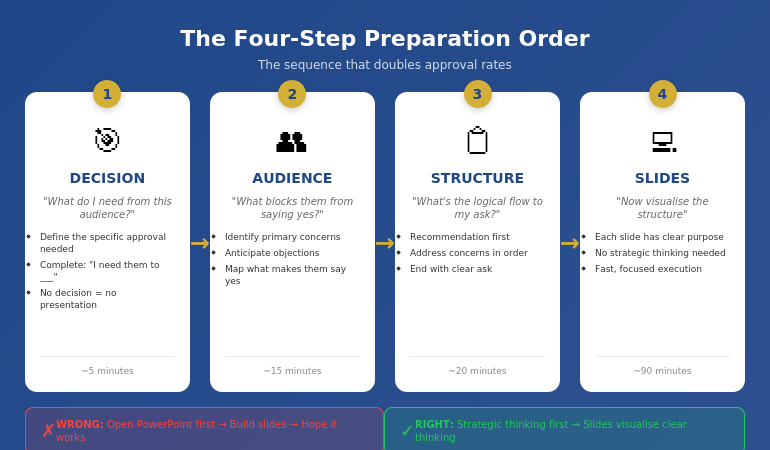
The Four-Step Preparation Order

After years of trial and error—and training thousands of executives—I’ve identified the preparation order that consistently gets results:

  1. Decision — What do you need from this audience?
  2. Audience — What do they care about? What’s blocking them?
  3. Structure — What’s the logical flow that leads to your ask?
  4. Slides — Only now do you open PowerPoint

Notice what’s missing from steps 1-3: any mention of slides, templates, or visuals. That’s intentional. The first 60-70% of effective preparation happens before you touch presentation software.

This feels counterintuitive. Slides are the deliverable, so shouldn’t you start there? No—for the same reason architects don’t start by choosing paint colours. The visible output is the last step, not the first.

The four-step presentation preparation order: Decision, Audience, Structure, then Slides

Step 1: Decision First

Before anything else, answer one question: What decision do I need from this audience?

Not “what do I want to tell them?” Not “what information should I share?” What decision do you need?

Examples:

  • “I need approval to hire two additional engineers”
  • “I need the board to greenlight the expansion budget”
  • “I need the client to sign the contract today”
  • “I need leadership to prioritise this project over Project X”

If you can’t complete the sentence “I need them to _____,” you’re not ready to prepare a presentation. You’re ready to prepare a document—which is a different thing entirely.

Why this matters: Every element of your presentation should move toward this decision. If a slide doesn’t advance the decision, it doesn’t belong. But you can’t make that judgment until you know what you’re deciding.

Most presentations fail because the presenter never clarified what they wanted. They shared information. They presented data. They “updated” stakeholders. But they never asked for anything—so they didn’t get anything.

📊 Structure Your Presentation for Decisions

The Executive Slide System gives you decision-first templates built around the preparation order that actually works. Stop guessing what goes where—use structures proven to get executive approval.

Inside:

  • The 10-slide decision framework
  • Recommendation-first templates
  • Executive summary formats that work
  • Before/after examples from real approvals

Get the Executive Slide System → £39

Used by professionals who need approvals, not just presentations.

Step 2: Audience Second

With your decision clear, the next question is: What does this specific audience care about, and what might block them from saying yes?

This isn’t general audience analysis. It’s decision-focused analysis. You’re not asking “who are they?” You’re asking “what stands between them and approving this?”

For each key stakeholder, consider:

  • What’s their primary concern? (Risk? Cost? Timeline? Reputation?)
  • What would make them say no? (Insufficient data? Wrong timing? Political issues?)
  • What would make them say yes? (ROI proof? Risk mitigation? Alignment with their goals?)
  • What questions will they definitely ask?

If you’re presenting to a CFO, the blocking concern is probably financial risk or unclear ROI. If you’re presenting to a board, it might be strategic alignment or competitive positioning. If you’re presenting to a client, it might be trust or implementation complexity.

The key insight: your presentation should answer their concerns, not your talking points. Most presenters build decks around what they want to say. Effective presenters build decks around what the audience needs to hear to say yes.

This step typically takes 10-15 minutes but saves hours of revision later. When you understand the audience’s blocking concerns, you build a presentation that addresses them. When you don’t, you build a presentation that gets sent back with “good start, but can you add…”

📋 Want templates built around executive concerns? The Executive Slide System (£39) includes decision-first structures that anticipate what leadership actually wants to see.

Step 3: Structure Third

Now—and only now—do you think about structure. But not slide structure. Argument structure.

The question is: What’s the logical flow that leads from where my audience is now to the decision I need?

For most executive presentations, the structure is simpler than people think:

  1. Recommendation — Here’s what I’m asking for
  2. Why it matters — Here’s the problem/opportunity this addresses
  3. How it works — Here’s the approach (briefly)
  4. What could go wrong — Here are the risks and how we’ll mitigate them
  5. What it costs — Here’s the investment required
  6. The ask — Here’s specifically what I need you to approve

Notice this structure is recommendation-first, not background-first. You don’t build up to your point—you start with it. Executives have limited time and attention. Respect that by leading with the answer.

At this stage, I write the structure as bullet points on paper or in a notes app. No slides. No formatting. Just the logical flow.

For example:

  • Recommendation: Approve £200K for customer portal upgrade
  • Why: Current portal causing 23% support ticket increase, costing £15K/month
  • Approach: Phase 1 (self-service), Phase 2 (AI chat), Phase 3 (integration)
  • Risks: Integration complexity—mitigated by phased approach
  • Cost: £200K over 6 months, ROI positive by month 9
  • Ask: Approve budget and project start date of March 1

That’s the entire presentation in six bullet points. Everything else is supporting detail.

For more on executive-ready structures, see my guide to executive presentation structure.

📊 Structures That Get Yes

The Executive Slide System includes proven structures for board presentations, budget requests, project approvals, and strategic recommendations. Each template follows the decision-first order that executives actually respond to.

Get the Executive Slide System → £39

Templates + examples + the exact slide order that works.

Step 4: Slides Last

Only now do you open PowerPoint.

But here’s the difference: you’re not figuring out what to say anymore. You already know what to say. You’re just visualising it.

This changes everything about slide creation:

  • Each slide has a clear purpose (it maps to your structure)
  • You know what belongs and what doesn’t (does it advance the decision?)
  • You can work faster (no strategic thinking mixed with visual thinking)
  • You make better visual choices (because you understand the point each slide needs to make)

The slide creation process becomes almost mechanical. Structure point 1 becomes slides 1-2. Structure point 2 becomes slides 3-4. And so on.

For the example above, the slide deck might be:

  1. Executive Summary: Approve £200K portal upgrade (ROI positive month 9)
  2. The Problem: Support tickets up 23%, costing £15K/month
  3. Root Cause: Current portal lacks self-service capabilities
  4. Solution Overview: Three-phase portal modernisation
  5. Phase Details: Timeline and deliverables
  6. Risk Mitigation: Phased approach reduces integration risk
  7. Investment: £200K over 6 months
  8. ROI Analysis: Break-even month 9, £180K annual savings
  9. Ask: Approve budget and March 1 start date
  10. Appendix: Technical details (if asked)

Ten slides. Clear logic. Decision-focused. And it took less time than the “start with slides” approach because there was no backtracking, no restructuring, no “wait, what’s my point again?”

For guidance on what makes an effective executive summary slide, see how to write the executive summary slide.

How This Actually Saves Time

The objection I hear most often: “I don’t have time for a four-step process. I just need to get the deck done.”

I understand. But consider the true time cost of the “just start with slides” approach:

  • Hours building slides → Presentation rejected → Hours rebuilding
  • Deck looks done → Stakeholder asks unexpected question → Scramble to add slides
  • Send for review → “This doesn’t address the real issue” → Start over

The four-step process typically takes the same total time—or less—because you eliminate rework. Thirty minutes of strategic thinking before slides prevents three hours of revision after slides.

Typical time breakdown:

  • Step 1 (Decision): 5 minutes
  • Step 2 (Audience): 15 minutes
  • Step 3 (Structure): 20 minutes
  • Step 4 (Slides): 60-90 minutes

Total: About 2 hours for a solid executive presentation. Compare that to 4-6 hours of meandering slide creation followed by revision cycles.

The professionals who “don’t have time” for strategic preparation are the same ones working weekends to fix presentations that should have been right the first time.

What order should you prepare a presentation?

The optimal order is: Decision (what do you need?), Audience (what blocks them?), Structure (what’s the logical flow?), then Slides (visualise the structure). Most people start with slides and work backwards, which is why most presentations get rejected or require extensive revision. Starting with the decision ensures every element of your presentation serves a purpose.

Should you write your presentation before making slides?

Yes—but not word-for-word scripts. You should clarify your decision, understand your audience’s concerns, and outline your logical structure before touching slide software. This typically means 30-45 minutes of thinking and notes before opening PowerPoint. The slides then become a visualisation of clear thinking rather than a substitute for it.

Why do most presentations fail to get approval?

Most presentations fail because they’re built around what the presenter wants to say rather than what the audience needs to hear to say yes. When you start with slides, you naturally focus on your content. When you start with the decision, you naturally focus on what moves the audience toward that decision. The preparation order determines the outcome.

📊 Skip the Guesswork

The Executive Slide System gives you decision-first templates so you never start from a blank screen. Each structure is built around the preparation order that gets approvals—not just presentations.

You’ll get:

  • 10-slide decision frameworks for every scenario
  • Executive summary templates that lead with the ask
  • Before/after examples showing the transformation
  • The exact slide order executives expect

Get the Executive Slide System → £39

For professionals who need approvals, not just slide decks.

Frequently Asked Questions

How long should presentation preparation take?

For a standard executive presentation (10-15 slides), allow 2-3 hours total: 30-45 minutes for strategic thinking (steps 1-3) and 90-120 minutes for slide creation (step 4). This assumes you’re working from templates rather than starting from scratch. Complex presentations or unfamiliar topics may require more time, but the ratio should stay similar—about 30% strategy, 70% execution.

Should I use a presentation template or start from scratch?

Use a template—but choose one that matches your strategic structure, not just your visual preferences. A template saves time only if it’s built around decision-first logic. A beautiful template with the wrong structure will still get rejected. The best approach is using templates designed for your specific presentation type (board update, budget request, project approval) rather than generic “professional” templates.

What if I’m given a slide deck to present that someone else created?

Run through steps 1-3 anyway. Clarify the decision you need, identify audience concerns, and check whether the existing structure addresses them. Often, inherited decks need restructuring—they contain good content in the wrong order. Taking 20 minutes to validate (or adjust) the structure before presenting will dramatically improve your results compared to just “learning the slides.”

Does this process work for short presentations too?

Yes—and it’s arguably more important. When you only have 5 minutes or 5 slides, every element must earn its place. The four-step process ensures you’re putting the right content in limited space. For very short presentations, steps 1-3 might take just 10 minutes total, but skipping them is how people end up with 5 slides that don’t accomplish anything.

📧 The Winning Edge Newsletter

Weekly insights on executive presentations, approval strategies, and what actually works in corporate boardrooms.

Subscribe Free →

📋 Free: Executive Presentation Checklist

A one-page checklist covering all four preparation steps. Use it before your next presentation to ensure you’re not skipping the strategic work.

Download Free Checklist →

About the Author

Mary Beth Hazeldine is the Owner & Managing Director of Winning Presentations. With 24 years of corporate banking experience at JPMorgan Chase, PwC, Royal Bank of Scotland, and Commerzbank, she has delivered high-stakes presentations in boardrooms across three continents.

A qualified clinical hypnotherapist and NLP practitioner, Mary Beth combines executive communication expertise with evidence-based techniques for managing presentation anxiety. She has trained thousands of executives and supported high-stakes funding rounds and executive approvals.

Book a discovery call | View services

Your Next Step

The next time you need to create a presentation, resist the urge to open PowerPoint immediately. Instead, take 30 minutes to work through steps 1-3:

  1. What decision do I need?
  2. What concerns might block my audience?
  3. What’s the logical flow that addresses those concerns and leads to my ask?

Then—and only then—build your slides.

It feels slower. It isn’t. And the results will show you why preparation order matters more than preparation time.

If presentation anxiety is part of what’s holding you back, see today’s companion article on why therapy doesn’t always fix presentation fear.

15 Jan 2026
Should you memorize presentations word-for-word - why it backfires

Should You Memorize Presentations? Why Word-for-Word Is the Worst Strategy

Quick Answer: Don’t memorize presentations word-for-word—it creates a false sense of security that collapses under pressure. When you forget one sentence, you lose the thread entirely. The better approach: memorize your framework and key transitions, then speak naturally from each slide. This gives you flexibility to recover from interruptions while maintaining your core message.


In This Article:

The VP of Strategy at RBS had memorized every word of her board presentation. Three weeks of practice. 47 slides. Perfectly scripted.

Twelve minutes in, a director interrupted with a question. She answered it. Then froze.

She couldn’t find her place in the script. The next 20 minutes were painful—fumbling through slides, apologizing repeatedly, reading directly from the screen. A presentation she knew backwards fell apart because one interruption broke the chain.

I’ve seen this happen dozens of times in my 25 years at JPMorgan, PwC, RBS, and Commerzbank. The executives who memorize word-for-word are actually the most vulnerable when things go off-script. And things always go off-script.

⭐ Want a Structured Framework Instead?

If you want ready-made slide structures that guide your delivery — so you can present confidently from any slide without memorising a script — the Executive Slide System gives you exactly that.

Explore the Executive Slide System →

Stop Memorizing Scripts. Start Using Frameworks.

The Executive Slide System gives you pre-built structures that let you present confidently from any slide—without memorizing a single script. When your slides guide you naturally, you never lose your place.

Get the Executive Slide System → £39

Should you memorize presentations word-for-word - why it backfires

Why Word-for-Word Memorizing Backfires

When you memorize a presentation word-for-word, you’re creating a chain. Each sentence depends on the previous one to trigger the next. This works perfectly in practice—and catastrophically in reality.

Here’s what breaks the chain:

  • A question from the audience
  • A technical glitch that skips slides
  • Running short on time
  • An executive who asks you to “jump to the recommendation”
  • Your own mind blanking on one word

Any of these—and they happen in nearly every business presentation—leaves you stranded. You know the material, but you can’t access it because the retrieval system (your memorized sequence) is broken.

For more on why over-rehearsing creates this vulnerability, see my full guide on presentation rehearsal and the diminishing returns of practice.

The Framework Approach That Actually Works

Instead of memorizing words, memorize structures. Here’s the difference:

Word-for-word memorization: “In Q3, we achieved 127% of our revenue target, driven primarily by expansion in the EMEA region, which contributed 43% of new bookings…”

Framework memorization: “Q3 results → what drove them → EMEA specifics → next steps”

With the framework approach, you know what each section covers and how it connects to the next. The exact words come naturally because you understand the flow, not because you’ve rehearsed a script.

This is why executives who present frequently rarely memorize—they’re too busy to rehearse scripts. Instead, they internalize the story arc and speak from knowledge.

How to memorize a presentation - what to memorize vs what to speak naturally

What You SHOULD Memorize (Only These Four Things)

1. Your opening line. The first 10 seconds set your confidence. Have it locked.

2. Your transitions. Know exactly how you’ll move from section to section. “That’s the problem. Here’s what we’re proposing…” These bridges keep you flowing.

3. Your closing call to action. End strong with a clear ask. Don’t fumble the landing.

4. Your story arc/framework. Know the general framework/story arc of your presentation.

Everything in between? Speak from your slides, your expertise, and your framework. That’s where authentic confidence comes from.

🏆 PREMIUM TRAINING

Master Executive Presentations Without Scripts

The Executive Buy-In System teaches you to present with authority—even when interrupted, challenged, or thrown off-script. Learn the same frameworks I’ve taught to 5,000+ executives at JPMorgan, PwC, and Commerzbank.

Learn More About Executive Buy-In → £199

📧 Join 2,000+ professionals getting weekly presentation insights—frameworks, not scripts. Subscribe to The Winning Edge →

FAQs

Should I memorize my presentation word-for-word?

No. Word-for-word memorization creates vulnerability—one interruption or forgotten word breaks your entire flow. Instead, memorize your framework (the structure and key transitions) and speak naturally from your expertise. This gives you flexibility to handle questions and still deliver your core message.

How do I remember my presentation without memorizing it?

Focus on the story arc, not the script. Know your opening line, your section transitions, and your closing call to action. Let your slides serve as visual prompts for the content in between. Practice talking through your framework rather than reciting words.

What if I forget what to say during a presentation?

With framework-based preparation, forgetting a word doesn’t derail you—you simply continue with the next point in your structure. If you do lose your place, glance at your current slide, take a breath, and state the main point of that slide. Your audience won’t know you skipped anything.

📥 Free Download: 7 Presentation Frameworks

Get the exact structures executives use to present without scripts—including the PREP method mentioned above.

Download Free Frameworks →

Related: Presentation Rehearsal: Why 3 Hours of Practice Makes You Worse


Mary Beth Hazeldine spent 25 years at JPMorgan, PwC, RBS, and Commerzbank. She’s a clinical hypnotherapist and MD of Winning Presentations.

15 Jan 2026
Man in a dark blazer typing on a laptop at a modern office desk with a city skyline in the background.

Presentation Rehearsal: Why 3 Hours of Practice Makes You Worse

Quick Answer: More rehearsal doesn’t mean better delivery. Over-practice creates robotic speakers who’ve memorised words but lost connection. Effective presentation rehearsal is distributed (spread across days), varied (different conditions), and focused (specific goals per session). Three 20-minute focused sessions beat one 3-hour marathon every time.

I watched an executive destroy her presentation by rehearsing too much.

Sarah was presenting to the PwC leadership team—a career-defining moment. She’d spent 14 hours over three days grinding through her slides. By presentation day, she could recite every word perfectly.

And that was the problem.

Her delivery was flawless but lifeless. Every sentence sounded scripted. When a director asked a question mid-presentation, she froze—the interruption shattered the mental track she’d memorised. She stumbled through the rest, visibly rattled.

Afterward, she asked me what went wrong. “I prepared more than I’ve ever prepared for anything.”

“That’s exactly what went wrong,” I told her. “You didn’t rehearse. You memorised. There’s a difference.”

This pattern repeats constantly. Executives prepare for important presentations by rehearsing until they can recite their content word-for-word. Then they deliver those words like robots, without the flexibility to adapt, engage, or recover from interruptions.

Over my 25 years at JPMorgan, PwC, RBS, and Commerzbank, I’ve seen brilliant professionals undermine themselves through over-rehearsal more often than under-preparation. The instinct to practice more feels responsible. But past a certain point, more practice makes you worse.

What follows is the rehearsal method I teach executives who need to sound prepared but present—not scripted but confident.

⭐ Want a Structured Framework Instead?

If you want ready-made slide structures that guide your delivery — so you spend less time rehearsing and more time connecting — the Executive Slide System gives you exactly that.

Explore the Executive Slide System →

⭐ Rehearsal Gets Easier When Slides Guide You

The Executive Slide System gives you frameworks that let you present from any slide without memorising a script. When your slides follow clear logic, rehearsal becomes about delivery—not desperately trying to remember what comes next.

Structure that works with you, not against you.

Get the Executive Slide System → £39

Why More Practice Often Makes You Worse

Over-rehearsal creates three distinct problems:

1. Robotic Delivery

When you’ve rehearsed the same words fifty times, you stop thinking about meaning and start reciting sounds. Your brain shifts from “communicating ideas” to “reproducing a recording.” Audiences feel the difference instantly—you’re present in body but absent in mind.

2. Brittleness

Memorised presentations are fragile. Skip one word and your brain panics, searching for the exact phrase it memorised. Interruptions become disasters because you’ve created one rigid path through your content with no alternative routes.

This is why executives who “know their material perfectly” sometimes fall apart when asked a question mid-presentation. Their rehearsal didn’t prepare them for flexibility—it trained them for one specific performance that no longer exists once disrupted.

3. Lost Connection

The first time you run through a presentation, you’re engaged with the ideas. By the twentieth time, you’re bored with content you’ve heard yourself say repeatedly. That boredom transmits to the audience. You’ve rehearsed the meaning out of your own words.

For more on building authentic confidence rather than scripted performance, see our guide to presentation confidence.

[IMAGE: presentation-rehearsal-over-practice-curve.png]

Alt text: The over-rehearsal curve showing how presentation quality improves then declines with excessive practice

Dimensions: 770 × 450px

The Three-Pass Rehearsal Method

Effective presentation rehearsal isn’t about grinding through slides repeatedly. It’s about focused practice with specific objectives. I teach the Three-Pass Method:

Pass 1: Structure (Can You Navigate Without Notes?)

First rehearsal focuses purely on structure. Can you move through your presentation hitting every key point without reading from notes or slides?

Don’t worry about exact wording. Focus on:

  • Do you know what comes next at every transition?
  • Can you state the main point of each section in one sentence?
  • If someone interrupted you, could you find your place again?

If you can’t pass the structure test, more rehearsal won’t help—you need better presentation structure before practicing delivery.

Pass 2: Transitions (Do Sections Flow Naturally?)

Second rehearsal focuses on the bridges between sections. Transitions are where most presentations stumble—the awkward pause while you figure out what comes next.

For each transition, develop a “bridge phrase”—a sentence that connects one section to the next:

  • “That’s the problem. Here’s what we’re proposing…”
  • “So we know what’s happening. The question is why…”
  • “Those are the risks. Now let’s look at mitigation…”

Bridge phrases are worth memorising exactly. They’re your guardrails between sections.

Pass 3: Delivery (Presence, Pace, Emphasis)

Only after structure and transitions are solid do you focus on delivery—how you’ll actually present.

This pass addresses:

  • Where will you pause for emphasis?
  • Which phrases need to land with impact?
  • Where’s your pace too fast or too slow?
  • How will you open with impact and close with clarity?

Record this pass. Watch it later—not during practice—to identify delivery issues without splitting your attention.

The Three-Pass Method for presentation rehearsal - structure, transitions, delivery

Distributed Practice: The Science of Retention

Cognitive science is clear: distributed practice beats massed practice for retention and performance.

Massed practice: 3 hours of rehearsal the night before.

Distributed practice: Three 20-minute sessions across three days.

Same total time. Dramatically different results.

Here’s why distributed practice works:

Sleep Consolidates Learning

Your brain processes and strengthens memories during sleep. When you rehearse, sleep, then rehearse again, each session builds on consolidated learning. Marathon rehearsal the night before gives your brain no time to process.

Retrieval Strengthens Memory

Each time you retrieve information after a gap, you strengthen the neural pathway. Coming back to your presentation after a day away forces active retrieval—much more powerful than continuous repetition where content never leaves short-term memory.

Fresh Eyes Catch Problems

Rehearsing in one long session creates tunnel vision. You stop hearing what’s confusing because you’ve heard it twenty times. Coming back fresh, you notice where transitions are weak or points are unclear.

For an important presentation, spread rehearsal across at least three days:

  • Day 1: Structure pass (20-30 minutes)
  • Day 2: Transitions pass (20-30 minutes)
  • Day 3: Delivery pass + one complete run-through (30-40 minutes)

This approach is part of comprehensive presentation skills training that actually changes behaviour.

What to Memorize (And What to Leave Flexible)

The goal isn’t zero memorisation—it’s strategic memorisation. Some elements benefit from exact preparation; others need flexibility.

Memorize Exactly:

  • Your opening line. The first 10 seconds set the tone. Know exactly how you’ll begin. For techniques, see how to start a presentation.
  • Your closing line. End with intention, not awkward trailing off. See how to end a presentation.
  • Bridge phrases. The transitions between sections.
  • Key statistics. Numbers you’ll cite should be precise.
  • Your ask. If you’re requesting action, know exactly what you’re requesting.

Leave Flexible:

  • Explanations. You know the concepts—explain them conversationally, not from script.
  • Examples. Have several ready so you can choose based on audience reaction.
  • Supporting details. Hit the main points; let details flow naturally.
  • Stories. Know the beats of your stories, but tell them fresh each time.

This balance—memorised anchors with flexible content—creates presentations that sound prepared but present. You know where you’re going but you’re actually communicating, not performing.

For handling moments when things go wrong despite preparation, see what to do when your mind goes blank.

What to memorize vs keep flexible in presentation rehearsal - strategic preparation approach

Rehearsing in Varied Conditions

One of the biggest rehearsal mistakes: practicing only in ideal conditions.

You rehearse alone, in silence, sitting at your desk, reading from your screen. Then you present standing, in a conference room, with twelve people watching and side conversations happening.

The gap between practice conditions and performance conditions undermines your preparation.

Vary Your Physical Position

If you’ll present standing, rehearse standing. If you’ll be at a podium, practice with something in front of you. If you’ll be walking, practice while moving. Your body needs to rehearse, not just your voice.

Vary Your Environment

Rehearse in different rooms. Practice with background noise. Run through while someone else is in the room. Building adaptability requires varied conditions.

Practice With Interruptions

Have someone interrupt you mid-sentence with a question. Practice recovering gracefully. This builds the flexibility that over-rehearsal destroys.

For handling Q&A with confidence, see our guide to presentation Q&A.

Rehearse Worst-Case Scenarios

What if the projector fails? Practice delivering key points without slides. What if you only get half your time? Know which sections to cut. What if you’re asked something you can’t answer? Practice saying “I don’t have that data, but I’ll follow up.”

Varied condition rehearsal doesn’t take more time—it makes the same time more valuable.

🏆 Master High-Stakes Presentation Preparation

The Executive Buy-In Presentation System includes complete preparation frameworks for board meetings, investor pitches, and career-defining presentations—where rehearsal strategy can make or break your outcome.

Learn More About the Programme → £199

Case Study: From 6 Hours to 90 Minutes

James was a finance director who came to me before a critical board presentation. His preparation pattern: marathon rehearsal sessions that left him exhausted and robotic.

“I rehearse for six hours the day before any important presentation,” he told me. “I run through it at least fifteen times. By the end, I know every word.”

“And how do those presentations go?” I asked.

He paused. “Fine. But somehow… flat. People tell me I seem scripted.”

We restructured his preparation entirely:

Monday (Day 1): 30 minutes. Structure pass only. Could he hit every key point from memory? We found two transitions where he consistently stumbled. We fixed the structure, not the rehearsal.

Wednesday (Day 2): 30 minutes. Transitions pass. He developed specific bridge phrases for each section change. We also identified his opening line and closing line—memorised exactly.

Thursday (Day 3): 30 minutes. Delivery pass with recording. He watched the recording that evening and noted two pacing issues.

Friday morning (Presentation day): One 20-minute run-through focusing on the pacing adjustments. Then he stopped rehearsing completely.

Total rehearsal time: 110 minutes across four days.

His previous approach: 6+ hours in one day.

The board presentation was his best ever. His CEO mentioned afterward: “That was different. You seemed actually engaged, not just reciting.”

James’s feedback: “I felt less prepared going in—which scared me. But during the presentation, I felt more present. I was actually thinking about what I was saying instead of trying to remember what came next.”

That’s the difference between effective rehearsal and over-practice.

📧 Join 2,000+ professionals getting weekly presentation insights. Subscribe to The Winning Edge →

Frequently Asked Questions

How long should I rehearse a presentation?

Quality beats quantity. Three focused 20-minute sessions spread across days works better than one 3-hour marathon. Each session should have a specific focus: structure, transitions, or delivery. Rehearsing past the point of diminishing returns creates robotic delivery and actually undermines presentation confidence.

Should I memorize my presentation word-for-word?

No. Memorisation creates brittleness—one forgotten word and your brain panics. Instead, memorise your structure (the flow of ideas) and your anchor phrases (key sentences that trigger the next section). This gives you flexibility while maintaining confidence.

Why do I feel worse after rehearsing more?

Over-rehearsal creates three problems: robotic delivery (you sound scripted), brittleness (any deviation causes panic), and boredom (you’ve lost connection to your own content). The solution is distributed practice with varied conditions, not grinding through the same script repeatedly.

What’s the best way to rehearse a presentation?

Use the Three-Pass Method: First pass focuses on structure (can you hit every point without notes?), second pass on transitions (do sections flow naturally?), third pass on delivery (presence, pace, emphasis). Rehearse in varied conditions—standing, sitting, different rooms—to build adaptability. See also our public speaking tips for delivery techniques.

Should I rehearse in front of a mirror?

Occasionally, but not primarily. Mirror rehearsal splits your attention between delivering and watching, which isn’t how you’ll present. Better: record yourself on video, then watch separately. This gives you feedback without the cognitive split during practice.

How do I know when I’ve rehearsed enough?

You’ve rehearsed enough when you can deliver from any starting point, handle an interruption without losing your place, and feel engaged with your content rather than reciting it. If you feel bored or robotic, you’ve over-rehearsed. Build adaptability through impromptu speaking practice as well.

📥 Free Download: 7 Presentation Frameworks

When your presentation follows a clear framework, rehearsal becomes about delivery—not desperately trying to remember structure. Get seven structured frameworks that make preparation easier.

Download Free →

Related Resources

Continue building your presentation preparation skills:

The Paradox of Preparation

Here’s the paradox that transformed how I think about rehearsal: the goal isn’t to prepare until you’re perfect. It’s to prepare until you’re adaptable.

Perfectly rehearsed presenters are fragile. They’ve optimised for one specific performance that rarely survives contact with reality. Adaptable presenters have built flexibility into their preparation—they can navigate interruptions, adjust to audience reactions, and recover from mistakes without losing their thread.

Sarah, the executive from my opening story, eventually learned this. Her next major presentation used distributed practice, focused passes, and strategic memorisation. She rehearsed less than half the time but performed twice as well.

“The difference,” she told me afterward, “is that I was actually present. I wasn’t trying to reproduce a recording in my head. I was communicating with people in the room.”

That’s the goal of effective rehearsal: not word-perfect delivery, but confident presence. Not memorisation, but mastery. Not robotic performance, but genuine communication.

Three hours of grinding practice won’t get you there. Ninety minutes of strategic rehearsal will.


Mary Beth Hazeldine is a qualified clinical hypnotherapist, NLP practitioner, and Managing Director of Winning Presentations. After 5 years terrified of presenting, she built a 25-year banking career at JPMorgan Chase, PwC, RBS, and Commerzbank. She has treated hundreds of anxiety clients and trained over 5,000 executives.

02 Jan 2026
Businesswoman in a blazer typing on a laptop at a sunny office with city skyscrapers outside the window

How to Make a Presentation Outline: The Planning Step Most People Skip [2026]

The secret to making presentations faster isn’t better software or fancier templates. It’s making a presentation outline before you open PowerPoint.I’ve watched hundreds of professionals waste hours staring at blank slides, moving bullet points around, deleting entire sections and starting over. The problem is never the slides. It’s that they skipped the outline.

A solid presentation outline takes 10-15 minutes to create. It saves 2-3 hours of confused slide-shuffling later.

In this guide, I’ll show you exactly how to make a presentation outline — with templates you can use for any situation and any time limit.

This is a deep dive on the planning phase. For the complete presentation process, see: How to Make a Presentation: The Complete Guide.

🎁 Free Download: Get my 7 Presentation Outline Templates — ready-to-use frameworks for pitches, updates, proposals, and more.

The outline is the first step in any working executive presentation toolkit — without it, the rest of the deck fights its own structure.

Why a Presentation Outline Changes Everything

Here’s what happens when you skip the presentation outline and go straight to slides:

  • You create 15 slides, then realise slide 3 should come after slide 9
  • You spend 20 minutes formatting a slide you later delete
  • You finish the deck and realise you forgot your main point
  • You run out of time and rush the ending
  • Your audience leaves confused about what you wanted

A presentation outline prevents all of this. It’s your thinking made visible — before you commit to slides.

The rule: If you can’t explain your presentation in 60 seconds using just your outline, your audience won’t follow it in 30 minutes with slides.

How to Make a Presentation Outline in 4 Steps

Creating a presentation outline takes 10-15 minutes. Here’s the process:

Step 1: Write Your Destination (2 minutes)

Before you outline anything, answer this question in one sentence:

“What do I want my audience to think, feel, or do after this presentation?”

This isn’t your topic. It’s your destination.

Examples:

Topic Destination
“Q3 results” “Approve increased marketing spend for Q4”
“New software system” “Commit to the migration timeline”
“Project update” “Continue funding without scope changes”
“Team restructure” “Support the new reporting lines”

Write your destination at the top of your outline. Everything else serves this.

Step 2: Choose Your Framework (2 minutes)

Every presentation outline needs a framework — the logical structure that moves your audience from where they are to your destination.

Three frameworks work for 90% of presentations:

Framework 1: Problem → Solution → Action

Best for: Pitches, proposals, requesting approval

Framework 2: What → So What → Now What

Best for: Updates, reports, presenting data

Framework 3: Context → Options → Recommendation

Best for: Complex decisions, strategy presentations

Pick one. Write it under your destination. Your presentation outline now has a spine.

Step 3: Fill in the Sections (5-8 minutes)

Now expand each section of your framework with 2-4 bullet points. Each bullet point = one slide.

Example presentation outline using Problem → Solution → Action:

DESTINATION: Get board approval for £50K marketing investment

PROBLEM (3 slides)

  • Lead generation down 23% vs last quarter
  • Competitor X launched aggressive campaign in September
  • Current pipeline won’t hit Q4 targets

SOLUTION (4 slides)

  • Proposed campaign: targeted LinkedIn + retargeting
  • Why this approach vs alternatives
  • Expected results: 150 qualified leads in 8 weeks
  • Investment required: £50K (breakdown)

ACTION (2 slides)

  • Timeline: launch in 2 weeks if approved today
  • The ask: approve £50K and campaign brief

That’s 9 slides. The presentation outline took 10 minutes. The slides will practically make themselves.

Step 4: Test Your Outline (2 minutes)

Before you create a single slide, test your presentation outline:

  1. The 60-second test: Can you explain your presentation using only the outline? Time yourself.
  2. The “so what” test: After each bullet, ask “so what?” If there’s no clear answer, cut it or clarify.
  3. The destination test: Does every section move toward your destination? Remove anything that doesn’t.

If your outline passes all three tests, you’re ready to build slides.

How to make a presentation outline - template showing structure before slides

Use this template for any presentation — fill in your destination and framework first

How Many Points for Your Presentation Outline? The Time Guide

A common mistake: creating a presentation outline with too many points for your time slot.

Here’s the formula:

1 main point = 2-3 minutes of speaking = 1 slide

Use this guide to size your presentation outline:

Presentation outline time guide - how many slides and points for 5, 10, 15, 30 and 60 minute presentations

Match your outline to your time slot — fewer points, more impact
Time Slot Main Points Slides Outline Sections
5 minutes 2-3 3-5 Opening + 2 points + Close
10 minutes 3-4 5-7 Opening + 3 points + Close
15 minutes 4-6 7-10 Full 3-section framework
30 minutes 8-12 12-18 Full framework + depth
60 minutes 15-20 20-30 Full framework + examples

The mistake: Trying to fit a 30-minute presentation outline into a 10-minute slot. You’ll rush, your audience will struggle, and your message won’t land.

The fix: Cut ruthlessly. Every point you remove makes the remaining points stronger.

Presentation Outline Examples for Common Situations

Here are ready-to-use presentation outlines for situations you’ll face:

Project Update Outline (10-15 minutes)

Framework: What → So What → Now What

WHAT (Status)

  • Progress since last update (metrics)
  • What’s on track
  • What’s behind (if anything)

SO WHAT (Implications)

  • Impact on timeline/budget/scope
  • Risks and mitigation

NOW WHAT (Next steps)

  • Key activities next period
  • Decisions or support needed

Proposal/Pitch Outline (15-20 minutes)

Framework: Problem → Solution → Action

PROBLEM

  • The situation today (pain point)
  • Cost of the status quo
  • Why now (urgency)

SOLUTION

  • What I’m proposing
  • How it works
  • Why this approach (vs alternatives)
  • Expected results
  • Investment required

ACTION

  • Timeline
  • The specific ask

Strategy/Decision Outline (20-30 minutes)

Framework: Context → Options → Recommendation

CONTEXT

  • Background/history
  • Current situation
  • Constraints and requirements
  • Criteria for success

OPTIONS

  • Option A: Description, pros, cons
  • Option B: Description, pros, cons
  • Option C: Description, pros, cons

RECOMMENDATION

  • Recommended option and why
  • Implementation approach
  • Risk mitigation
  • Request for decision

📋 Need More Outline Templates?

The Presentation Openers & Closers Swipe File (£9.99) includes outline templates for 12 common presentation types — plus 50+ scripts for starting strong and ending memorably.

The One-Idea-Per-Slide Rule

When converting your presentation outline to slides, follow this rule:

Each bullet point in your outline = exactly one slide.

If a bullet point contains two ideas, split it into two bullets (and two slides).

This rule prevents the most common presentation mistake: cramming multiple points onto one slide.

Bad outline bullet: “Our sales increased and customer satisfaction improved”

Good outline bullets:

  • “Sales increased 23% YoY”
  • “Customer satisfaction up from 72 to 89 NPS”

That’s two slides, not one. Your audience will understand and remember both points.

Common Presentation Outline Mistakes

Mistake 1: Starting with slides, not outline.

Fix: Force yourself to write 5 bullet points on paper before opening any software.

Mistake 2: Too many points for the time slot.

Fix: Use the time guide above. Cut until it hurts, then cut one more.

Mistake 3: No clear destination.

Fix: Write “After this presentation, my audience will…” and complete the sentence before anything else.

Mistake 4: Presenter-first structure.

Fix: Organise by what your audience needs to hear, not what you want to say.

Mistake 5: Outline is too detailed.

Fix: Keep bullets to 5-7 words max. Detail comes when you build slides.

How to Make a Presentation Outline: FAQs

Should I write my presentation outline on paper or digitally?

Paper is often better for initial outlining. It prevents you from jumping into slide design too early. Once your outline is solid, transfer it to your presentation software as slide titles.

How detailed should a presentation outline be?

Each bullet should be 5-7 words maximum — just enough to capture the point. If you’re writing full sentences, you’re being too detailed. Save the detail for your slides and speaker notes.

Can I change my presentation outline once I start making slides?

Yes, but be cautious. Small adjustments are normal. Major restructuring usually means your outline wasn’t solid. If you find yourself reorganising significantly, stop and return to the outline.

What if I have more content than fits my time slot?

Cut it. Ruthlessly. A focused presentation that lands 3 points is better than a rushed one that skims 8. Put extra content in backup slides or a follow-up document.

How long should it take to make a presentation outline?

10-15 minutes for most presentations. If it’s taking longer, you either don’t know your content well enough, or you’re being too detailed too early.

Your Presentation Outline Toolkit

Start with these resources:

🎁 FREE: 7 Presentation Outline Templates
Ready-to-use frameworks for pitches, updates, proposals, and more. Print and fill in.


📋 SCRIPTS + TEMPLATES (£9.99): Presentation Openers & Closers
12 outline templates + 50 scripts for openings and closings that work.


🎯 BEST VALUE — The Presentation Confidence Bundle (£29.99)

Outline templates + delivery cheat sheets + anxiety guide:

  • Public Speaking Cheat Sheets (£14.99 value)
  • Presentation Openers & Closers (£9.99 value)
  • Calm Under Pressure Guide (£19.99 value)

Total value: £44.97 → Bundle price: £29.99


🏆 COMPLETE SYSTEM: The Executive Slide System (£39)
17 templates + 51 AI prompts + video training. For presentations to executives, boards, and investors.

🎓 Master Executive Presentations

A presentation outline is just the start. The Executive Buy-In Presentation System teaches you how to structure for approval, handle tough questions, and deliver with confidence.

  • The Decision Definition Canvas (advanced outlining)
  • 7 modules of video training
  • Executive-ready templates
  • Live Q&A sessions

Learn More About the Course →


Related Articles:

📧 Get The Winning Edge

Weekly presentation tips, templates, and frameworks from 24 years in corporate boardrooms.

Subscribe Free →


Mary Beth Hazeldine spent 24 years in corporate banking at JPMorgan Chase, PwC, Royal Bank of Scotland, and Commerzbank. She now trains professionals on high-stakes presentations through Winning Presentations. Her clients have raised over £250 million using her frameworks.