
Tag: presentation mastery

15 Feb 2026
Professional at desk comparing presentation layouts on screen, actively building slides in a bright modern office with natural lighting

Teach AI Your Presentation Style (So It Stops Sounding Generic)

Quick answer: AI makes presentations faster but also makes them generic β€” because most people prompt AI with what they want to say, not how they say it. To teach AI your presentation style, you need three things: a style brief (your tone, sentence patterns, and vocabulary), a structure framework (your preferred message architecture), and a critique loop (prompts that make AI edit its own output against your standards). This turns AI from a content generator into a strategic co-creator that sounds like you, not like everyone else.

Presenting this week? Do this in 15 minutes:

1. Write a 200-word style brief (your tone + vocabulary + 2 sample paragraphs)
2. Pick one structure rule: AVP for persuasion slides, 132 Rule for overall flow
3. Paste both into your AI tool before your content brief
4. Generate your first draft
5. Run the critique loop: “Does this follow my structure? Remove any phrase I wouldn’t use.”

That’s the free version. The AI-Enhanced Presentation Mastery course (Β£249) gives you the complete system β€” style brief template, all four frameworks, 30+ critique prompts, and a reusable AI playbook.

A marketing director showed me two versions of the same quarterly business review.

Version A was the one she’d written herself: sharp, direct, slightly dry. Her signature move was opening every section with a one-line insight before the data. The CFO loved it because he could scan the headlines and get the story in sixty seconds.

Version B was the one she’d asked ChatGPT to create from the same data. It was technically correct. Every point was there. But it read like it had been written by a committee β€” smooth, cautious, with phrases like “leveraging synergies” and “driving alignment across stakeholders” that she would never use in real life.

She said: “It’s faster but it’s not mine. The CFO would read this and think someone else wrote it. Which defeats the entire purpose.”

That conversation crystallised something I’d been seeing across every executive I work with: AI doesn’t have a quality problem. It has a voice problem. And the voice problem exists because nobody teaches you how to train AI on your style β€” your frameworks, your vocabulary, your preferred message structure. They just teach you how to write prompts. Which is like teaching someone how to use a steering wheel without explaining where they’re driving.

Why Every AI Presentation Sounds the Same

AI language models are trained on billions of words of internet text. When you ask one to “write a slide about Q3 performance,” it draws on the average of everything it’s ever seen about quarterly performance slides. The result is competent, generic, and indistinguishable from what everyone else is getting.

This is the fundamental problem with how most people use AI for presentations. They prompt for content β€” “write me five bullet points about customer retention” β€” and get content that could have come from anyone in any company in any industry. The content is accurate. It’s also forgettable.

The professionals who actually benefit from AI do something different. They don’t ask AI to generate content. They ask AI to execute their thinking β€” using their frameworks, their vocabulary, their preferred structure. The AI does the heavy lifting, but the output carries their signature.

The difference shows up immediately. When you give AI a bare prompt, you get generic corporate language. When you give AI your style brief and your message framework, you get output that sounds like a faster, more productive version of you.

This is exactly the approach taught in AI-enhanced presentation creation β€” structure first, AI second. The structure is what makes the output yours. The AI is what makes it fast.

PAA: Why do AI-generated presentations sound so generic?
Because most people prompt AI with what to say, not how to say it. AI defaults to the statistical average of everything it’s been trained on β€” which means smooth, corporate, committee-style language. To get output that sounds like you, you need to provide your style brief (tone, vocabulary, sentence patterns), your preferred message architecture (frameworks like AVP or the 132 Rule), and a critique prompt that makes AI edit its own output against your standards.

Stop Getting Generic Output. Start Getting Output That Sounds Like You.

AI-Enhanced Presentation Mastery teaches you how to build AI workflows that preserve your voice, your frameworks, and your communication style. 8 modules covering structure, messaging, slide design, data storytelling, and a complete personal AI playbook you’ll reuse for every presentation.

Get AI-Enhanced Presentation Mastery β†’ Β£249

Currently Β£249 β€” launch pricing ends March 1st (Β£399 self-study / Β£750 live cohort).

Self-paced modules + live support + lifetime access.

The Style Brief: Teaching AI Your Voice in 5 Minutes

A style brief is a short document β€” 200 words maximum β€” that tells AI how you communicate. Not what you want to say. How you say things.

Here’s what goes into an effective presentation style brief:

Tone descriptors. Three to five words that describe your communication style. Examples: “direct, evidence-led, slightly dry humour” or “warm, structured, practical” or “analytical, precise, minimal adjectives.” AI language models respond dramatically to tone descriptors β€” they shift the entire register of the output.

Vocabulary preferences. Words you use and words you don’t. If you say “stakeholders” but never say “key stakeholders,” that matters. If you write “clients” instead of “customers,” specify it. If you avoid phrases like “leverage,” “synergise,” or “circle back” β€” tell the AI. This alone eliminates 80% of the generic feel.

Sentence pattern. Short sentences? Long analytical sentences? A mix? Do you open sections with a question or a statement? Do you use first person or third person? AI copies these patterns surprisingly well when you provide examples.

Two sample paragraphs. The most effective style brief includes two paragraphs you’ve actually written β€” presentation notes, an email to your boss, a section from a report. Not “ideal” writing. Your actual writing. AI learns more from your real voice than from your aspirational voice.

Once you have your style brief, you include it at the start of every AI conversation about presentations. The difference is immediate and, frankly, startling. Output goes from “could be anyone’s” to “sounds like mine” in a single prompt.
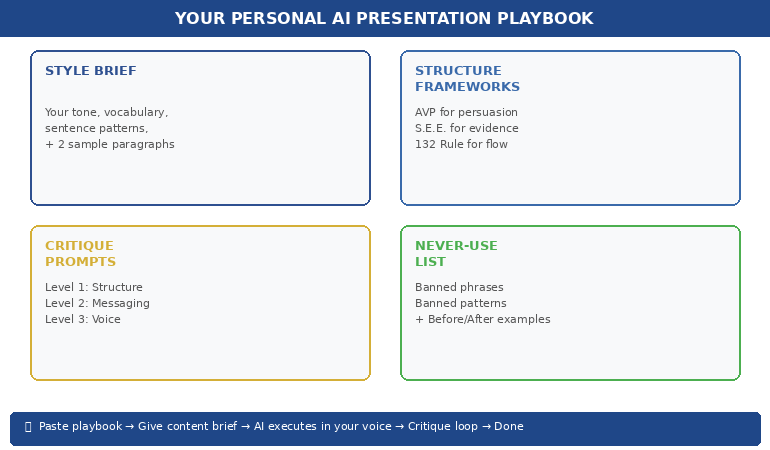

Personal AI presentation playbook showing four components: style brief, structure frameworks, critique prompts, and never-use list

πŸ“Š Want the complete style brief template? AI-Enhanced Presentation Mastery (Β£249) includes the full style brief builder, sample briefs for different professional styles, and the prompt architecture that makes AI output match your voice consistently.

Structure-First AI: Why Frameworks Beat Freeform Prompts

The second reason AI presentations sound generic: people ask AI to create structure and content simultaneously. This is like asking a builder to design the house and construct it at the same time β€” you get something functional but unremarkable.

The professionals who get the best results from AI use a structure-first approach: they define the message architecture before AI writes a single word.

In the AI-Enhanced Presentation Mastery course, we teach three frameworks that work exceptionally well as AI instructions:

AVP (Action-Value-Proof). Every slide follows a three-part structure: what you want the audience to do (Action), why it matters to them (Value), and the evidence that supports it (Proof). When you give AI the AVP framework as an instruction β€” “Structure every slide using Action-Value-Proof” β€” the output immediately becomes more persuasive and more structured than freeform prompting.

The S.E.E. Formula (Statement-Evidence-Example). For slides that need to present data or make a case: lead with the insight statement, follow with the evidence that supports it, then provide a concrete example that makes it real. This stops AI from producing the generic “here are five data points” output and forces it to tell a story with every slide.

The 132 Rule. For overall presentation flow: one opening message (the 1), three supporting sections (the 3), two closing elements β€” a summary and a call to action (the 2). This gives AI a macro-structure that prevents the wandering, unfocused presentations that AI tends to produce when given open-ended briefs.

When you combine your style brief with a structure framework, AI stops guessing and starts executing. The output isn’t generic because it was never given the chance to be β€” you’ve constrained it with your thinking, your architecture, and your standards.

If you’re currently using ChatGPT prompts for presentations, adding structure frameworks to those prompts will transform the quality of what you get back.

PAA: How do you get better results from AI for presentations?
Provide structure before content. Instead of asking AI to “create a presentation about X,” give it your message framework (like AVP or the 132 Rule), your style brief (tone, vocabulary, sentence patterns), and the specific decision you want the audience to make. AI excels at executing within constraints β€” the tighter the framework, the better the output. Freeform prompts produce freeform results.

Frameworks First. AI Second. Your Voice Always.

AI-Enhanced Presentation Mastery gives you the AVP formula, S.E.E. wording framework, 132 Rule, and Insight-Implication-Action structure β€” then shows you exactly how to feed them to AI so every presentation sounds like you wrote it. Includes prompt packs, before/after transformations, and the complete AI workflow.

Get AI-Enhanced Presentation Mastery β†’ Β£249

Β£249 launch pricing β€” ends March 1st (Β£399 self-study / Β£750 live cohort). Self-paced modules + templates + prompt packs + live support + lifetime access.

The Critique Loop: Making AI Edit Against Your Standards

Here’s what most people miss entirely: the first output AI gives you should never be the final version. AI is a first-draft machine. The magic is in the critique loop β€” using AI to edit its own output against your specific standards.

A critique prompt works like this. After AI generates your presentation content, you say: “Now review this output against these criteria: (1) Does every slide follow AVP structure? (2) Are there any phrases I wouldn’t use? Remove ‘leverage,’ ‘synergise,’ and ‘key stakeholders.’ (3) Is any slide trying to make more than one point? Split it. (4) Does the opening grab attention in the first sentence?”

This is essentially turning AI into your personal presentation coach β€” one that knows your standards because you’ve defined them explicitly.

The most effective critique prompts we’ve developed in the course follow three levels:

Level 1: Structure critique. “Does this presentation follow the 132 Rule? Is the opening message clear? Do the three middle sections support different aspects of the argument? Does the closing include both a summary and a specific call to action?”

Level 2: Messaging critique. “Review each slide against the S.E.E. formula. Does every claim have evidence? Does every evidence point have a concrete example? Flag any slide where the message is vague or abstract.”

Level 3: Voice critique. “Compare this output against my style brief. Flag any sentences that use passive voice (I use active). Remove any corporate jargon that isn’t in my vocabulary list. Shorten any sentence longer than 25 words.”

Running all three levels takes about 5 minutes. The result is output that’s been through a more rigorous editorial process than most people apply manually β€” and it sounds like you, not like an AI.

If you’re already using PowerPoint Copilot, layering a critique loop on top of its output is the single fastest way to improve quality.

πŸ“Š Want all three critique prompt levels? AI-Enhanced Presentation Mastery (Β£249) includes the complete critique prompt pack β€” structure, messaging, and voice β€” plus the Master Prompt Pack with 30+ prompts for every stage of presentation creation.

Building Your Personal AI Presentation Playbook

The goal isn’t to use AI better for one presentation. It’s to build a reusable system that makes every future presentation faster and more consistently excellent.

Your personal AI playbook is a single document β€” we provide the template in the course β€” that contains everything AI needs to produce your-quality output every time:

Your style brief (200 words β€” tone, vocabulary, patterns, samples).

Your preferred frameworks (AVP for persuasion slides, S.E.E. for evidence slides, Insight-Implication-Action for data slides, 132 Rule for overall structure).

Your critique prompts (three levels β€” structure, messaging, voice).

Your “never use” list (phrases, words, and structural patterns that aren’t your style).

Your before/after examples (two or three examples showing generic AI output transformed into your-style output β€” so AI can learn from the patterns).

When you start a new presentation, you paste the playbook into your AI conversation first, then give your content brief. The AI has everything it needs to produce first-draft output that’s already 80% there. The critique loop handles the final 20%.

This is the difference between using AI as a random content generator and using AI as a strategic co-creator. One saves you time. The other saves you time and makes your work better.

PAA: Can AI really match your personal presentation style?
Yes β€” if you train it properly. AI is exceptionally good at mimicking communication patterns when given explicit examples. The key is providing a style brief (tone, vocabulary, sentence patterns, sample paragraphs), structure frameworks (so AI doesn’t default to generic architecture), and critique prompts (so AI self-corrects against your standards). The AI Playbook approach means you set this up once and reuse it for every presentation, with improving results over time.

Building presentations this month?

The AI-Enhanced Presentation Mastery course includes the complete playbook template, the style brief builder, all four structure frameworks (AVP, S.E.E., 132 Rule, Insight-Implication-Action), and the full critique prompt pack. Start building your personal AI system this week β€” and notice the difference in your next deck.

⏰ Launch pricing ends March 1st. Currently Β£249 β€” planned increase after launch period (Β£399 self-study / Β£750 live cohort). Lock in launch pricing before it changes β†’

AI Should Sound Like You β€” Not Like Everyone Else

AI-Enhanced Presentation Mastery is the course that treats AI as your execution engine β€” not your replacement. 8 modules covering structure frameworks, messaging formulas, data storytelling, slide design, critique prompts, and the personal AI playbook that makes every future presentation faster and unmistakably yours.

Get AI-Enhanced Presentation Mastery β†’ Β£249

⏰ Β£249 launch pricing β€” ends March 1st (Β£399 self-study / Β£750 live cohort). Self-paced modules + live support + templates + prompt packs + lifetime access.

Frequently Asked Questions

Do I need to be technical or know how to code to teach AI my style?

No. Everything in this approach uses plain language β€” the same language you’d use to brief a colleague. You write your style brief in natural English. You describe your frameworks in normal sentences. The AI does the technical translation. If you can write an email explaining how you like things done, you can build an AI playbook.

Does this work with ChatGPT, Copilot, and other AI tools?

Yes. The style brief and structure framework approach works with any AI language model β€” ChatGPT, Claude, Copilot, Gemini, or whatever comes next. The principles are about how you communicate with AI, not which AI you use. The course provides prompts formatted for the most popular tools, and the playbook is tool-agnostic.

How long does it take to build a personal AI playbook?

The initial playbook takes about 45 minutes to build using the course template. The style brief takes 15 minutes, the framework selection takes 10 minutes, the critique prompts take 10 minutes, and assembling your before/after examples takes 10 minutes. After that, you reuse the playbook for every presentation β€” updating it only when your style evolves or you discover new patterns.

What if I’m not sure what my communication style actually is?

This is more common than you’d think β€” and it’s one of the most valuable outcomes of the playbook-building process. Module 2 of the course includes a “style discovery” exercise where you analyse three pieces of your own writing to identify your natural patterns. Most people are surprised by how consistent their style is once they look for it. The exercise takes 20 minutes and gives you the foundation for everything else.

πŸ“¬ The Winning Edge Newsletter

Weekly strategies for executive presentations, AI workflows, and career-critical communication. No fluff.

Subscribe free β†’

Related: Once your AI workflow is producing personalised output, you need the right slide structure to put it in. If you’re presenting pilot results, the 8-slide pilot-to-rollout structure gives you the decision deck framework. And if presenting triggers nerves despite strong preparation, the imposter syndrome pre-presentation reset addresses the nervous system patterns that override your confidence.

AI doesn’t have a quality problem. It has a voice problem. And the voice problem is yours to solve β€” by teaching AI your frameworks, your vocabulary, your standards, and your style.

Build the playbook. Use the critique loop. Start with your next presentation.

🎯 Want the complete system β€” frameworks, prompts, templates, and live support?

Get AI-Enhanced Presentation Mastery β†’ Β£249 (launch pricing)

About the Author

Mary Beth Hazeldine is the Owner & Managing Director of Winning Presentations. With 24 years of corporate banking experience at JPMorgan Chase, PwC, Royal Bank of Scotland, and Commerzbank, she combines presentation psychology with AI workflow design to help professionals create faster, clearer, and more persuasive presentations.

A qualified clinical hypnotherapist and NLP practitioner, Mary Beth has spent 15 years training executives in communication strategy. AI-Enhanced Presentation Mastery is her flagship course for professionals who want to use AI as a strategic co-creator β€” not a replacement for their thinking.
Book a discovery call | View services

11 Feb 2026
Professional thinking strategically with AI interface, not just generating slides

AI Slides vs. AI Thinking: The Distinction That Changes Everything

“Make me a 10-slide presentation on Q3 results.”

That’s the prompt. And that’s the problem.

I watched a senior director spend 45 minutes “fixing” what AI had generated β€” adjusting layouts, rewriting headlines, deleting clip art nobody asked for. By the time he finished, he’d saved maybe 20 minutes compared to building it himself. And the result still felt… generic.

“AI presentations don’t work for executive content,” he told me afterwards. “They’re fine for internal updates, but anything important? I still have to do it myself.”

He was wrong. But not in the way he thought.

In 2026, the professionals pulling ahead aren’t the ones who’ve mastered AI slide generation. They’re the ones who’ve discovered that slides are the last thing AI should touch. The real leverage is upstream β€” in thinking, structure, and messaging. That’s the distinction nobody’s teaching.

Quick answer: “AI Slides” means using AI to generate visual outputs β€” layouts, formatting, design. “AI Thinking” means using AI as a strategic partner to clarify your message, structure your argument, and pressure-test your logic before you ever open PowerPoint. The distinction matters because AI is mediocre at slides but exceptional at thinking. Professionals who flip their workflow β€” thinking first, slides last β€” create presentations in half the time with dramatically better results.

Three years ago, I was skeptical of AI for presentations. I’d seen too many executives embarrassed by obviously AI-generated decks β€” the telltale signs, the generic phrasing, the “this could be about any company” feel.

Then I started experimenting with a different approach. Instead of asking AI to make slides, I asked it to help me think. To challenge my structure. To find holes in my argument. To translate my jargon into language my audience would actually understand. I was using AI as a thinking partner for presentations β€” not a production tool.

The presentations got better. Not because the slides looked fancier β€” they didn’t. But because the thinking was sharper. The message was clearer. The structure was tighter.

That’s when I realised: we’ve been using the most powerful thinking tool in history to do graphic design. It’s like using a Formula 1 engine to power a lawnmower. The real AI presentation strategy? Think first, slides last.

Why Most People Start at the Wrong End

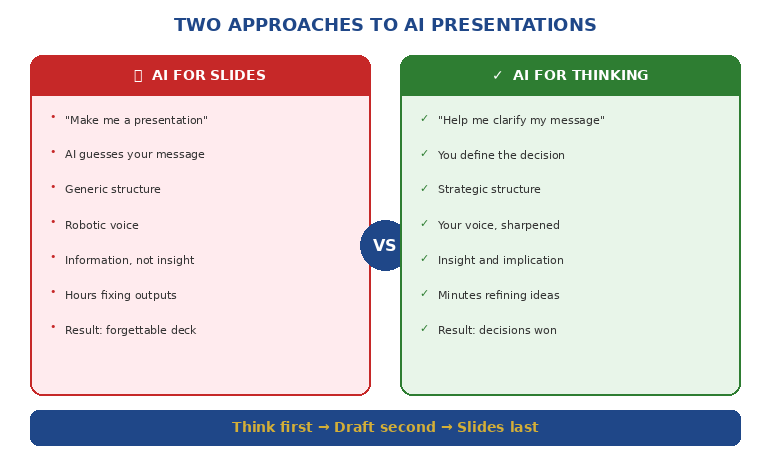
The typical AI presentation workflow looks like this:

Step 1: Open AI tool
Step 2: “Create a presentation about [topic]”
Step 3: Review generated slides
Step 4: Fix everything that’s wrong
Step 5: Add what’s missing
Step 6: Rewrite what sounds robotic
Step 7: Wonder why this took so long

The problem isn’t the AI. The problem is the sequence.

When you ask AI to generate slides first, you’re asking it to make decisions it has no business making: What’s the core message? What does this audience care about? What’s the one thing you need them to remember? What action do you want them to take?

AI doesn’t know these things. So it guesses. And its guesses are generic because they have to be β€” it’s optimising for “probably relevant to most presentations about this topic” rather than “exactly right for your specific situation.”

The Upstream Problem

Great presentations aren’t great because of their slides. They’re great because of the thinking behind them.

Before you ever touch a slide, you need clarity on:

  • The decision you’re driving: What do you want your audience to do, approve, or believe?
  • The single message: If they remember one thing, what is it?
  • The structure: What sequence will move them from where they are to where you need them?
  • The proof: What evidence will make your argument undeniable?

These are thinking problems, not design problems. And this is exactly where AI excels β€” if you use it correctly.

πŸŽ“ AI-Enhanced Presentation Mastery

Learn to use AI as a strategic thinking partner, not just a slide generator. This self-paced programme teaches the frameworks, workflows, and prompts that transform how you create executive presentations β€” cutting creation time in half while dramatically improving impact.

Includes the AVP framework (Action-Value-Proof), the 132 Rule for structure, and a complete AI presentation workflow you can use immediately.

Join AI-Enhanced Presentation Mastery β†’ Β£249

8 self-paced modules + 2 live coaching sessions + lifetime access. Study at your own pace.

What “AI Slides” Actually Produces

Let’s be honest about what happens when you ask AI to generate presentation slides:

The Generic Structure

AI defaults to safe, forgettable structures: Agenda β†’ Background β†’ Key Points β†’ Summary β†’ Next Steps. This structure works for everything, which means it’s optimised for nothing.

Your quarterly business review looks like every other QBR. Your investment pitch looks like every other pitch. Your strategic recommendation looks like a Wikipedia article with bullet points.

The Clip Art Problem

AI tools love adding visuals. Icons. Stock imagery. Decorative elements that fill space but add nothing. You spend half your editing time removing things nobody asked for.

The Voice Mismatch

AI-generated text has a tell. It’s slightly too formal, too hedged, too… diplomatic. “It is recommended that consideration be given to…” instead of “We should do X because Y.”

Executive audiences notice. They may not consciously identify it, but they feel it. The presentation lacks conviction. It sounds like it was written by a committee β€” because in a way, it was.

The Missing Insight

Most damning of all: AI-generated slides contain information, not insight. They tell you what happened, not what it means. They present data, not implications. They describe the situation, not the decision.

That’s the gap that kills executive presentations. And no amount of better prompting will fix it β€” because the problem isn’t the slides. It’s the thinking that should have happened first.


Comparison diagram showing AI for slides versus AI for thinking approaches

What “AI Thinking” Unlocks

Now consider a different approach. Before you generate a single slide, you use AI as a thinking partner:

Clarifying Your Message

“I need to present our Q3 results to the board. Our revenue is up 12% but margins are down. Help me identify the single message that positions this honestly while maintaining confidence in our strategy.”

AI won’t write your message for you. But it will help you find it β€” by asking questions, offering framings, and pressure-testing your logic.

Structuring Your Argument

“My audience is skeptical of this budget request. What objections will they have? In what sequence should I address them to build agreement before I ask for the money?”

This is strategic work. AI can help you map objections, sequence arguments, and identify proof points you might have missed.

Testing Your Logic

“Here’s my recommendation. Play devil’s advocate. What are the strongest counterarguments? Where is my reasoning weakest?”

Most presenters don’t stress-test their logic until they’re in the room, facing hostile questions. AI lets you do that work beforehand β€” privately, iteratively, without ego.

Translating Your Expertise

“I’m a technical expert presenting to non-technical executives. Here’s my explanation of the problem. Rewrite it so someone without engineering background understands why this matters.”

This is where AI shines β€” taking your expertise and making it accessible without dumbing it down.

Want the exact prompts and workflows? AI-Enhanced Presentation Mastery teaches you to use AI as a thinking partner β€” including the S.E.E. formula for making proof memorable.

Get the Course β†’ Β£249

The Flipped Workflow

Here’s the workflow that actually works:

Phase 1: Think With AI (60% of your time)

Define the decision: What do you need your audience to do, approve, or believe?

Clarify the message: What’s the single idea that makes your case?

Map the audience: What do they already believe? What concerns will they have? What do they need to hear?

Structure the argument: What sequence moves them from skepticism to agreement?

Identify the proof: What evidence makes your case undeniable?

All of this happens before you open PowerPoint. AI helps you think through each step β€” challenging, refining, sharpening.

Phase 2: Draft With AI (25% of your time)

Only now do you create content β€” but not slides yet. You’re creating:

Headlines: One clear sentence per section that could stand alone

Key points: The 2-3 supporting facts for each headline

Transitions: How each section connects to the next

AI can help you draft these β€” but you’re editing and approving, not accepting wholesale.

Phase 3: Build Slides (15% of your time)

Now β€” finally β€” you build slides. But notice: the hard work is done. You know your message. You know your structure. You know your proof.

The slides are just containers for thinking you’ve already completed. They almost build themselves.

And if you want AI to help with layout at this point? Fine. But you’re giving it clear inputs, not asking it to guess.

πŸ“š The Complete AI Presentation System

AI-Enhanced Presentation Mastery includes:

  • 8 self-paced modules on structure, messaging, and AI workflows
  • AVP Framework: Action-Value-Proof for executive-ready presentations
  • 132 Rule: The sequence your audience’s brain processes and remembers
  • Master Prompt Pack: Ready-to-use prompts for every stage of creation
  • 2 live coaching sessions for Q&A and feedback

Join AI-Enhanced Presentation Mastery β†’ Β£249

Lifetime access. Study at your own pace. Join live sessions when convenient.

Frameworks That Make AI Useful

The difference between “AI Slides” and “AI Thinking” often comes down to having frameworks that guide the conversation. Here are three that transform how you work with AI:

The AVP Framework (Action-Value-Proof)

Every presentation should answer three questions in this order:

Action: What do you want the audience to do?
Value: Why should they care? What’s in it for them?
Proof: Why should they believe you?

When you structure your AI conversation around AVP, the outputs become dramatically more focused. Instead of “create a presentation about X,” you’re saying “help me articulate the specific action I’m asking for, the value proposition for this audience, and the proof points that support my case.”

The 132 Rule

Audiences process information in a specific sequence: one main message, supported by three pillars, each backed by two proof points.

This isn’t arbitrary β€” it’s how memory works. One thing is memorable. Three things are manageable. Two supports each point without overwhelming.

When you tell AI “structure this using the 132 Rule,” you get outputs that match how your audience’s brain actually works.

The S.E.E. Formula (Story-Evidence-Emotion)

For any proof point to land, it needs:

Story: A concrete example or scenario
Evidence: Data or facts that support the story
Emotion: Connection to what the audience cares about

Most AI-generated content has evidence without story or emotion. When you explicitly ask for S.E.E., you get proof that’s memorable and persuasive, not just accurate.

Learn these frameworks in depth. AI-Enhanced Presentation Mastery includes ready-to-use prompts that apply AVP, 132, and S.E.E. to any presentation challenge.

Get the Course β†’ Β£249

The Real Difference

A colleague recently showed me two presentations on the same topic β€” a budget request for a new initiative.

Presentation A was AI-generated. Polished slides. Professional layouts. Comprehensive information. It took 30 minutes to create. The executive committee said “interesting” and asked to revisit it next quarter.

Presentation B was AI-enhanced. Simpler slides. Less polish. But the message was razor-sharp, the structure anticipated every objection, and the proof points were undeniable. It took 90 minutes to create. The executive committee approved it on the spot.

Presentation B wasn’t better because it had better slides. It was better because the presenter had used AI to think, not just to make.

That’s the distinction that changes everything.

🎯 Transform How You Create Presentations

AI-Enhanced Presentation Mastery teaches you to use AI as a strategic thinking partner β€” not just a slide generator. You’ll learn:

  • The flipped workflow that cuts creation time in half
  • Frameworks (AVP, 132 Rule, S.E.E.) that make AI outputs executive-ready
  • Prompts for every stage β€” from clarifying your message to stress-testing your logic
  • How to transform data into stories people actually understand

Join AI-Enhanced Presentation Mastery β†’ Β£249

8 self-paced modules releasing through April 2026. Join anytime β€” get immediate access to all released content. Lifetime access included.

πŸ“¬ PS: Weekly strategies for AI-enhanced presentations and executive communication. Subscribe to The Winning Edge β€” practical techniques from 24 years in corporate boardrooms.

Frequently Asked Questions

Does this mean I should never use AI to generate slides?

Not at all. AI can be helpful for initial layouts, especially for routine presentations. But for anything high-stakes β€” board presentations, investment pitches, strategic recommendations β€” the thinking work should come first. Use AI for slides last, not first.

Which AI tools work best for the “thinking” approach?

Any conversational AI works β€” ChatGPT, Claude, Gemini. The tool matters less than how you use it. The key is treating it as a thinking partner (asking questions, getting feedback, refining ideas) rather than a production tool (generate this output for me).

How long does the “flipped workflow” actually take?

For a typical executive presentation, the thinking phase might take 30-45 minutes. Drafting another 15-20. Slides 15-20. Total: about 60-90 minutes for a presentation that would otherwise take 3-4 hours β€” and the quality is dramatically higher because the thinking is sharper.

What if I’m not good at giving AI instructions?

That’s exactly what frameworks solve. When you know to ask for AVP structure or S.E.E. proof points, you don’t need to be a “prompt engineer.” The framework does the heavy lifting. AI-Enhanced Presentation Mastery includes ready-to-use prompts for every scenario.

Related: The thinking-first approach is especially powerful for recurring executive presentations. See Transformation Program Updates That Make Executives Want to Fund You for how to structure updates that build champions.

And if presentation anxiety is holding you back from presenting your AI-enhanced work confidently, read When Your Voice Cracks Mid-Sentence for recovery techniques that work.

That senior director who told me “AI presentations don’t work for executive content” was right about the symptom but wrong about the cause.

AI presentations don’t fail because AI is bad at presentations. They fail because most people use AI to skip the thinking β€” when thinking is exactly what AI does best.

Flip the workflow. Think first. Slides last.

Use AI as a strategic partner, not a production tool.

That’s the distinction that changes everything.

About the Author

Mary Beth Hazeldine is the Owner & Managing Director of Winning Presentations. With 24 years in corporate banking at JPMorgan Chase, PwC, Royal Bank of Scotland, and Commerzbank, she has delivered high-stakes presentations in boardrooms across three continents.

A certified hypnotherapist and NLP practitioner, Mary Beth now pioneers AI-enhanced presentation mastery β€” combining strategic thinking with AI efficiency. She developed the AVP framework and 3Ps methodology, refined through years of executive presentation work in high-stakes banking and consulting environments.

Book a discovery call | View services

30 Jan 2026
Senior executive looking bored during generic presentation training course that doesn't match her level

Why Most Presentation Courses Fail Senior Professionals (And What Actually Works)

I sat through a full-day presentation skills course last year. By lunch, I’d learned how to make eye contact and use hand gestures.

I’ve been presenting to boards and C-suites for 24 years. I didn’t need tips on eye contact. I needed to know how to restructure a 47-slide deck for a CFO who gives me 10 minutes. I needed frameworks for handling hostile questions from stakeholders who’ve already decided to say no. I needed strategies for presenting when I’m the most junior person in the room and everyone else has an agenda.

The course taught none of that. It taught what every presentation course teaches: basics that senior professionals mastered a decade ago.

Quick answer: Most presentation courses fail senior professionals because they’re designed for beginners. They focus on foundational skillsβ€”eye contact, body language, slide design basicsβ€”that executives already have. What senior professionals actually need is strategic-level training: how to structure for executive audiences, how to navigate organisational politics in presentations, how to handle high-stakes situations where the content is complex and the stakes are real. A presentation course for executives should spend 70% of its time on frameworks and strategy, not performance basics.

Why Standard Presentation Courses Fail Executives

After 24 years in corporate bankingβ€”JPMorgan Chase, PwC, Royal Bank of Scotland, Commerzbankβ€”and now running a presentation training business, I’ve seen both sides of this problem. I’ve been the frustrated executive in generic courses, and I’ve trained enough senior professionals to know exactly where most programmes go wrong.

The fundamental issue is mismatch. Most presentation courses are built for a general audienceβ€”people who present occasionally, who need foundational skills, who haven’t yet developed their own style. These courses cover:

β€’ How to stand and move on stage
β€’ Making eye contact with the audience
β€’ Using hand gestures effectively
β€’ Creating visually appealing slides
β€’ Overcoming basic nervousness

For someone giving their first all-hands presentation, this is valuable. For a VP who presents to the board quarterly, it’s remedial. And sitting through remedial training when you have strategic problems to solve isn’t just boringβ€”it’s actively demotivating.

The second problem is context. Generic courses assume a generic presenting situation: you have time to prepare, your audience is receptive, and your goal is simply to inform or persuade. But senior professional presentations rarely look like that. You’re often:

β€’ Presenting to people more senior than you who have limited time
β€’ Navigating political dynamics where some stakeholders want you to fail
β€’ Handling complex information that can’t be simplified into “three key points”
β€’ Responding to unexpected questions that challenge your credibility
β€’ Presenting bad news without damaging relationships

No amount of eye contact advice helps with these challenges. They require strategic frameworks, not performance tips.

Comparison of generic presentation courses versus executive-level training showing different focus areas and strategy ratios

What Senior Professionals Actually Need

When I work with executives on their presentations, we rarely discuss body language. We discuss structure, strategy, and stakeholder management. Here’s what senior professionals actually need from presentation training:

Executive-specific frameworks

How do you structure a presentation when your CFO gives you 10 minutes but you have 30 minutes of content? How do you open when everyone in the room already knows the background? How do you present a recommendation when you know the CEO has a different preference? These situations require specific frameworksβ€”not general principles.

Stakeholder psychology

Senior presentations are rarely about information transfer. They’re about alignment, buy-in, and political navigation. Understanding what different stakeholders actually want (which is rarely what they say they want), how to handle blockers, and how to build champions before you presentβ€”this is the real skill of executive presenting.

High-stakes scenario handling

What do you do when a board member interrupts you on slide 2 with a hostile question? How do you recover when your technology fails in front of the leadership team? How do you present when you’re nervous specifically because the stakes are high and the audience is intimidating? These scenarios need dedicated practice, not a mention in passing. If you struggle with the physical symptoms of high-stakes pressure, techniques like stopping nervous rambling are more useful than generic confidence advice.

Efficiency and leverage

Senior professionals don’t have time to spend hours building a presentation. They need systems for creating executive-quality decks efficientlyβ€”often in a fraction of the time traditional approaches require. They need to know which parts of preparation actually matter and which are wasted effort. This is where AI-enhanced workflows become criticalβ€”not as a gimmick, but as a genuine time multiplier.

⭐ Presentation Training Built for Senior Professionals

AI-Enhanced Presentation Mastery is a cohort-based course designed specifically for executives and senior professionalsβ€”70% strategic frameworks, 30% AI-powered efficiency.

What makes it different:

  • Executive-specific frameworks for board presentations, budget requests, and stakeholder buy-in
  • AI workflows that significantly reduce presentation build time (many participants see 50–75% savings once embedded)
  • Live cohort sessions with peer feedback from other senior professionals
  • No basicsβ€”we assume you already know how to present

See Dates & Curriculum on Maven β†’

Cohort dates and availability listed on Maven. Limited to 20 participants for quality interaction.

The Framework Gap: Strategy vs. Performance

The biggest gap in most presentation courses is the ratio of strategy to performance. Generic courses spend 80% of time on performance (delivery, slides, presence) and 20% on strategy (structure, audience, objectives). For senior professionals, that ratio should be inverted.

Here’s what I mean:

Performance skills are how you deliver: your voice, your movement, your slides, your eye contact. These are important, but they’re also skills that executives have already developed through years of practice. Diminishing returns set in quickly.

Strategic skills are how you think about presenting: how you structure for a specific audience, how you anticipate objections, how you sequence information for decision-makers, how you handle the political context of any given presentation. These skills compoundβ€”every improvement makes every future presentation better.

A presentation course for executives should focus on strategic skills because that’s where the leverage is. Teaching a VP to gesture more confidently might marginally improve one presentation. Teaching that same VP how to structure a board update for maximum impact improves every board presentation for the rest of their career.

For more on why most training programmes miss this distinction, see my analysis of why presentation training fails.

How to Evaluate a Presentation Course (Before You Waste Time)

Before investing time in any presentation course, senior professionals should ask these questions:

1. Who is the target audience?

If the course description mentions “overcome fear of public speaking” or “learn the basics of slide design” prominently, it’s not designed for you. Look for language about “executive presentations,” “stakeholder communication,” or “high-stakes scenarios.”

2. What’s the framework-to-tips ratio?

Review the curriculum. Count the modules on strategic frameworks versus the modules on delivery skills. If delivery dominates, the course is built for beginners. You want at least 60% of content focused on structure, audience analysis, and scenario handling.

3. Does it address executive-specific scenarios?

Look for coverage of: board presentations, budget requests, presenting to senior leadership, handling difficult questions, presenting bad news, and navigating organisational politics. If the scenarios are generic (“presenting to a team,” “giving a conference talk”), the course won’t address your real challenges.

4. Is there peer interaction with other senior professionals?

One of the most valuable parts of executive-level training is learning from peers. A cohort of other senior professionals provides context, feedback, and shared experience that solo courses can’t match. Self-paced video courses miss this entirely.

5. Does it incorporate modern tools and efficiency?

In 2026, any presentation course that ignores AI-enhanced workflows is already outdated. Senior professionals need to know how to leverage tools that save time without sacrificing quality. Courses that treat presentation creation as a purely manual process are teaching yesterday’s skills.

For more on the skills gap most training misses, see the presentation skills gap.

⭐ A Course Designed for How Executives Actually Present

AI-Enhanced Presentation Mastery passes every evaluation criteria aboveβ€”because it was built specifically for senior professionals who are already good at presenting but want to be exceptional.

The curriculum includes:

  • The Executive Presentation Framework (structure for any high-stakes situation)
  • Stakeholder Mapping and Pre-Meeting Alignment strategies
  • AI workflows for 90-minute deck creation
  • Live practice with feedback from instructor and senior peers

See Dates & Curriculum on Maven β†’

Cohort-based on Maven. See current dates and investment details.

The AI Factor: Why 2026 Changes Everything

There’s a reason I emphasise AI-enhanced presentation skills specifically for senior professionals: time leverage.

Executives don’t have hours to build a presentation. They have limited windows between meetings. The old approachβ€”start from scratch, build slides manually, iterate through multiple draftsβ€”doesn’t fit executive schedules. AI changes this equation fundamentally.

But here’s what most people get wrong about AI and presentations: they think it’s about generating slides. That’s the least valuable application. The real power of AI for executives is in:

Rapid structure iteration β€” Testing three different presentation structures in 20 minutes instead of building one structure in 3 hours.

Audience analysis at scale β€” Understanding what matters to different stakeholders before you present, not after.

Content transformation β€” Taking a 50-page report and extracting the 12 slides that actually matter for an executive audience.

Rehearsal and refinement β€” Using AI to identify weak points in your argument before a hostile questioner finds them.

The executives who master these workflows don’t just save timeβ€”they produce better presentations because they can iterate more. They can test more structures, anticipate more objections, and refine more thoroughly in the same time it used to take to build a first draft.

This is why any presentation course for executives in 2026 must include AI-enhanced workflows. Not as an add-on or a gimmick, but as a core component of how modern executive presenting works.

What should executives look for in a presentation course?

Executives should look for courses that spend at least 60% of time on strategic frameworks rather than delivery basics. Key indicators include: executive-specific scenarios (board presentations, budget requests, stakeholder buy-in), peer interaction with other senior professionals, coverage of AI-enhanced workflows, and explicit acknowledgment that participants already have foundational skills. Avoid courses that prominently feature “overcome fear of public speaking” or “slide design basics” in their marketing.

Why don’t generic presentation courses work for senior professionals?

Generic courses are designed for beginners who need foundational skills like eye contact, body language, and basic slide design. Senior professionals mastered these years ago. What executives need is strategic-level training: how to structure for time-pressed decision-makers, how to navigate organisational politics, how to handle high-stakes scenarios with complex information. The mismatch between what’s taught and what’s needed makes generic courses frustrating and low-value for experienced presenters.

Is AI-enhanced presentation training worth it for executives?

Yesβ€”if the course treats AI as a time multiplier rather than a slide generator. The value for executives isn’t having AI create presentations; it’s using AI to iterate faster, test more structures, transform complex content, and identify weaknesses before presenting. Executives who master these workflows often see significant time savings while producing higher-quality outputs. That time leverage alone makes AI-enhanced training worth the investment.

⭐ Ready for Presentation Training That Matches Your Level?

AI-Enhanced Presentation Mastery is the course I wish existed when I was navigating executive presentations in banking. No basics. No remedial content. Just frameworks and workflows for senior professionals.

What you’ll master:

  • Executive presentation frameworks for any high-stakes situation
  • Stakeholder psychology and pre-meeting alignment
  • AI-powered workflows that significantly reduce creation time
  • Live practice with feedback from peers at your level

See Dates & Curriculum on Maven β†’

Cohort-based learning with senior professionals. See Maven for dates.

Frequently Asked Questions

How much should executives expect to pay for quality presentation training?

Quality executive presentation training typically costs Β£500-Β£2,000 for cohort-based programmes with live instruction and peer interaction. Self-paced video courses are cheaper but miss the peer learning and live feedback that makes executive training valuable. The cost should reflect the level of content, the quality of interaction, and the instructor’s relevant experience. Beware of programmes that charge executive prices but deliver generic content.

Can I improve executive presentation skills on my own?

Partially. You can read frameworks, study examples, and practice independently. But the highest-leverage improvements come from structured feedback and peer interactionβ€”seeing how other senior professionals handle similar challenges, and getting real-time input on your specific presentation problems. Self-study builds knowledge; cohort-based training builds skill. For senior professionals, the combination is most effective.

What’s the time commitment for executive presentation training?

Quality programmes typically require 8-15 hours total, spread across several weeks to allow for practice between sessions. This is significantly less than generic multi-day courses because executive training skips the basics and focuses on high-leverage skills. The time investment should feel efficientβ€”if a course requires days of your time on content you already know, it’s not designed for senior professionals.

How do I know if I’m ready for executive-level presentation training?

You’re ready if: you present regularly to senior audiences, you’ve already developed a personal presentation style, and your challenges are strategic (structure, stakeholder management, high-stakes scenarios) rather than foundational (basic nervousness, slide design, body language). If you’re still working on foundational confidence, start there firstβ€”executive presentation skills training builds on basics rather than teaching them.

πŸ“§ The Winning Edge Newsletter

Weekly insights on executive presentations, strategic communication, and AI-enhanced workflows for senior professionals.

Subscribe Free β†’

Your Next Step

If you’ve sat through presentation training that felt too basic, the problem wasn’t youβ€”it was the course. Senior professionals need different content, different frameworks, and different peer interaction than general-audience training provides.

Before investing in any presentation course, evaluate it against the criteria above. Ask specifically about executive scenarios, strategic frameworks, and AI-enhanced workflows. If the provider can’t speak to these directly, the course isn’t designed for your level.

The presentations you give in the next year will shape your reputation, your influence, and your career trajectory. They deserve training that matches the stakes.

Related: If unclear structure is causing you to ramble in presentations, see how to stop rambling when nervousβ€”a structuralised approach helps both your slides and your delivery.

29 Jan 2026
Confident business leader reviewing presentation on laptop with focused expression and minimal workspace

I Had 4 Hours a Week to Improve My Presentations. Here’s What Actually Moved the Needle

My calendar was a disaster. Back-to-back meetings. Endless email. Two direct reports who needed constant coaching.

And somewhere in that chaos, I was supposed to “work on my presentation skills.”

Every article I found assumed I had hours to practice. Record yourself! Watch it back! Do it again! Join Toastmasters! Find a speaking buddy!

I had maybe four hours a weekβ€”totalβ€”that weren’t already claimed. And most of those were fragmented: 30 minutes here, 45 minutes there.

So I stopped trying to follow the standard advice. Instead, I reverse-engineered what actually moves the needle for busy leaders. The answer wasn’t more practice time. It was smarter practiceβ€”focused on the three levers that create 80% of the impact.

Quick Answer: Presentation skills development for busy leaders requires ruthless prioritisation. Focus on three levers: structure (how you organise information), delivery (how you use voice and pacing), and presence (how you command attention). Most leaders only need 2-4 hours per week of focused practiceβ€”but it must target the right skills in the right order. Framework first, then refinement.

⏱️ Presenting This Week? Your 25-Minute Head Start

Before diving into the full roadmap, here are three things you can do right now:

  1. Rewrite your opening (10 min) β€” Start with your recommendation or key message, not background. What do you want them to do?
  2. Cut 30% of your slides (10 min) β€” Move anything that’s “nice to have” to an appendix. Keep only what directly supports your ask.
  3. Script your close (5 min) β€” Write the exact words you’ll use to ask for the decision. “I’d like your approval to [specific action] by [date].”

These three changes will improve your next presentation more than hours of slide polishing. Now read on for the complete system.

🎯 Is This Your Situation?

  • You’re senior enough that presentations matterβ€”but too busy to spend hours practicing
  • You’ve plateaued at “good enough” and can’t seem to break through
  • Generic advice (“just practice more!”) doesn’t fit your reality
  • You want a roadmap, not a random collection of tips
  • You need results in weeks, not years

If this sounds familiar, keep reading. This roadmap was built for exactly your constraints.

The Realisation That Changed Everything

I spent years believing I needed more time to improve. More practice sessions. More feedback. More reps.

Then I noticed something odd: the best presenters in my organisation weren’t the ones with the most free time. They were often the busiestβ€”running divisions, managing crises, juggling impossible demands.

What they had wasn’t more time. It was a system. A framework they could apply to any presentation, regardless of how little prep time they had.

When I finally asked one of them directlyβ€”a CFO who could command any room despite preparing most presentations on the trainβ€”she said something I’ve never forgotten:

“I don’t practice presentations. I practice principles. The presentation just follows.”

That’s when I understood: improving your presentations isn’t about finding more hours. It’s about knowing exactly which skills to develop, in which order, with which exercises. Everything else is noise.

Why Generic Presentation Advice Fails Busy Leaders

Most presentation advice is written for people with unlimited time and no constraints. It assumes you can:

β€” Record every presentation and review it
β€” Attend weekly practice groups
β€” Rehearse the same deck five times before delivery
β€” Hire a coach for ongoing feedback

If you’re a senior leader, none of that is realistic. You’re preparing presentations in the gaps between other work. Sometimes you get the deck 30 minutes before you present it. Sometimes you’re presenting someone else’s material entirely.

The real question isn’t “how do I practice more?”

It’s “what’s the minimum effective dose that actually improves my presentations?”

After 24 years of presenting in banking environmentsβ€”and training executives who face the same constraintsβ€”I’ve identified three levers that create the vast majority of impact. Everything else is optimisation at the margins.

For more on how frameworks beat generic tips, see my guide on the executive presentation framework that AI can’t replace.

The Three Levers That Create 80% of Impact

Presentation skills development isn’t one skillβ€”it’s a cluster of skills that interact. But not all skills are equal. Three levers drive most of the results:

Lever 1: Structure

How you organise information determines whether audiences follow you or lose you. Structure is invisible when done wellβ€”the presentation just “flows.” But when structure is weak, no amount of charisma saves you.

Structure is also the highest-leverage skill because it transfers. Learn to structure once, and every presentation improves automatically.

Lever 2: Delivery

Voice, pacing, pauses, emphasis. Delivery is how you bring structure to life. The same content delivered with poor pacing feels boring; delivered with good pacing, it feels compelling.

Delivery is trainable but requires deliberate practice. Most people never improve because they never isolate the specific delivery skills that need work.

Lever 3: Presence

How you occupy space. How you handle silence. How you respond when challenged. Presence is what separates good presenters from people who command rooms.

Presence is partly psychological (confidence, calm under pressure) and partly physical (posture, eye contact, movement). Both can be developed.

Presentation skills development roadmap showing three phases structure delivery and presence with timeline

The order matters. Structure first, because it’s foundational. Delivery second, because it activates structure. Presence third, because it multiplies everything else.

Trying to develop presence before you have solid structure is like polishing a car with a broken engine. It might look good, but it won’t get you anywhere.

⭐ The Complete Development System for Busy Leaders

AI-Enhanced Presentation Mastery is a structured cohort programme that develops all three leversβ€”in the right order, with the right exercises, in a time-efficient format designed for senior professionals.

What you’ll develop:

  • The executive structure framework (70% of the programme)
  • AI-enhanced preparation workflows that often cut creation time significantly
  • Delivery and presence techniques for high-stakes environments

Learn More About the Programme β†’

Live cohort programme on Maven. Limited to 20 participants for hands-on feedback.

Phase 1: Structure (Weeks 1-4)

Structure is where most presentation improvement should beginβ€”and where most busy leaders skip ahead too quickly.

Week 1-2: The Core Framework

Learn one structural framework deeply. Not five frameworks superficially. One framework you can apply to any presentation type: board updates, client pitches, team meetings, all-hands presentations.

The framework I teach has three components: Context (why this matters now), Content (what you need to know), and Call-to-action (what happens next). Every presentation maps to this structure.

Week 3-4: Application Practice

Take three real presentations from your calendar. Restructure each using the framework. You don’t need to deliver them differentlyβ€”just reorganise the information.

This is where the skill becomes automatic. By the end of Week 4, you should be able to look at any presentation and immediately see where the structure is weak.

Time investment: 2-3 hours per week. Can be done in fragments.

For more on why structure is foundational, see my guide on presentation skills training that actually works.

Phase 2: Delivery (Weeks 5-8)

With structure solid, delivery becomes the multiplier. The same well-structured content can land with impact or fall flatβ€”delivery makes the difference.

Week 5-6: Voice and Pacing

Most leaders speak too fast when presenting. Not because they’re nervous (though that’s part of it) but because they’ve never practised deliberate pacing.

Exercise: Take one section of an upcoming presentation. Deliver it three times: first at normal speed, then deliberately 30% slower, then finding the pace that feels right. Record the third version.

Week 7-8: Strategic Pauses

Pauses are the most underused tool in presentation delivery. A pause before a key point creates anticipation. A pause after creates absorption time. Most presenters fill every silence with “um” or “so.”

Exercise: Identify three moments in your next presentation where a 2-second pause would add impact. Mark them in your notes. Deliver them deliberately.

Time investment: 2-3 hours per week. Requires some uninterrupted practice time.

Want Delivery Exercises Designed for Senior Professionals?

AI-Enhanced Presentation Mastery includes specific delivery drills calibrated for busy leaders, plus live feedback on your actual presentations.

Learn More About the Programme β†’

Phase 3: Presence (Weeks 9-12)

Presence is what remains when structure and delivery are handled. It’s the quality that makes some presenters magneticβ€”and it’s more trainable than most people believe.

Week 9-10: Physical Presence

Posture, eye contact, use of space. These aren’t soft skillsβ€”they’re signals that audiences read unconsciously.

Exercise: Before your next presentation, stand for 2 minutes in an expansive posture (feet shoulder-width, arms uncrossed, chest open). Many leaders find this helps shift their physiological state before high-stakes moments. Then carry that posture into the room.

Week 11-12: Psychological Presence

The ability to stay calm when challenged. To handle silence without rushing to fill it. To respond to hostile questions without becoming defensive.

This is partly technique (specific frameworks for handling Q&A) and partly mindset (understanding that presence comes from internal state, not external validation).

Time investment: 2-4 hours per week. Includes real presentation opportunities.

How long does it take to improve presentation skills?

With focused practice on the right skills, most leaders notice meaningful improvement within 4-6 weeks. Significant transformation typically takes 90 days of consistent work. The key is deliberate practice on specific skillsβ€”not generic “presenting more often.”

Can you improve presentation skills without a coach?

Yes, but progress is typically slower without feedback. Self-study works for structure and some delivery skills. Presence and advanced delivery usually benefit from external perspectiveβ€”whether a coach, peer group, or structured programme with feedback built in.

What’s the fastest way to get better at presentations?

Focus on structure first. It’s the highest-leverage skill and transfers to every presentation. Most leaders who feel stuck are actually stuck on structureβ€”they’ve been trying to improve delivery and presence without the foundation. Fix structure, and everything else becomes easier.

⭐ Accelerate Your Development With Expert Guidance

The roadmap above works. But working through it with expert feedback and a cohort of peers accelerates results dramatically.

AI-Enhanced Presentation Mastery includes:

  • Live sessions covering structure, delivery, and presence
  • AI workflows that often cut preparation time significantly
  • Direct feedback on your actual presentations

Learn More About the Programme β†’

Next cohort starts soon. 70% framework, 30% AI enhancement.

The 4-Hour Weekly Rhythm

Here’s how to structure your limited time for maximum impact:

Hour 1: Learning (can be fragmented)

Read, watch, or listen to material on your current focus area. This can happen in 15-minute blocks: commute time, lunch, waiting for meetings to start.

Hour 2: Application (needs focus)

Take what you learned and apply it to a real upcoming presentation. Restructure. Rewrite. Mark delivery points. This works best in a single focused block.

Hour 3: Practice (needs privacy)

Actually deliver a section out loud. Not in your headβ€”out loud. Record if possible. This requires uninterrupted time, but even 30 minutes twice per week compounds.

Hour 4: Reflection (can be fragmented)

After each real presentation, spend 15 minutes noting what worked and what didn’t. This is where learning consolidates. Most people skip thisβ€”and lose 80% of the development value.

Four hours. Sixteen weeks. The three levers. That’s the roadmap.

Want to Compress This Timeline?

AI-Enhanced Presentation Mastery covers the complete framework in a structured cohort formatβ€”with expert guidance and peer feedback built in.

Learn More About the Programme β†’

For more on how AI can enhance (not replace) your presentation workflow, see my guide on AI presentation workflows that actually work.

⭐ Ready to Accelerate Your Presentation Development?

AI-Enhanced Presentation Mastery is a live cohort programme for senior professionals who want to develop executive-level presentation skills in a time-efficient format.

What makes it different:

  • 70% framework development, 30% AI enhancement (not an AI gimmick)
  • Limited to 20 participants for meaningful feedback
  • Designed for busy leaders with real time constraints

Learn More About the Programme β†’

Live on Maven. Built from 24 years of executive presentation experience.

Frequently Asked Questions

How much time per week do I really need to improve my presentations?

Four hours per week is the minimum effective dose for meaningful improvement. Less than that and progress is too slow to maintain momentum. More than that isn’t necessary for most leadersβ€”it’s about quality of practice, not quantity. The key is consistency over 12-16 weeks rather than intensity over a few weeks.

Should I focus on one skill at a time or work on everything?

Focus on one skill at a time, in sequence. Structure first (weeks 1-4), then delivery (weeks 5-8), then presence (weeks 9-12). Trying to improve everything simultaneously dilutes focus and slows progress. Each skill builds on the previous one.

What if I don’t have time to practice before presentations?

That’s actually the point of framework-based development. Once you’ve internalised the structure framework, you don’t need hours of prepβ€”you can apply it quickly to any content. The 90-day development period is an investment that pays dividends in every future presentation.

Is presentation development different for senior leaders?

Yes. Senior leaders face unique constraints (less prep time, higher stakes, more diverse audiences) and unique opportunities (more real presentation reps, more authority in the room). Generic presentation advice doesn’t account for these differences. Development programmes designed for executives focus on high-leverage skills that work under real-world constraints.

Get Weekly Presentation Insights

Actionable advice for busy leadersβ€”no fluff, just what works.

Subscribe to The Winning Edge β†’

Related: Structure starts with understanding what your audience actually needs. Read What Executives Actually Want From Your Presentation to see how decision-first structure works in practice.

The Bottom Line

Presentation skills development doesn’t require endless hours. It requires focus on the right skills, in the right order, with deliberate practice.

Structure first. Delivery second. Presence third. Four hours per week. Twelve to sixteen weeks.

That’s the roadmap. The question is whether you’ll actually follow itβ€”or keep waiting for more time that never comes.

Your next step: Identify your next presentation. Before you build any slides, write out the structure: Context (why this matters now), Content (what they need to know), Call-to-action (what happens next). That single exercise will improve your presentation more than hours of slide polishing.

Mary Beth Hazeldine is the Owner of Winning Presentations, with 24 years of experience presenting in high-stakes banking environments at JPMorgan Chase, PwC, Royal Bank of Scotland, and Commerzbank. She has trained thousands of executives on presentation capability that works within real-world time constraints.

24 Jan 2026
The Presentation Mastery Curve: Where Most Professionals Get Stuck (I Was Stuck for 8 Years)

The Presentation Mastery Curve: Where Most Professionals Get Stuck (I Was Stuck for 8 Years)

I gave presentations for eight years without getting meaningfully better. I wasn’t bad. I was stuck at “competent”β€”and I had no idea why I couldn’t break through.

Quick answer: The presentation mastery curve is a predictable progression with four stages: Survival (just getting through it), Competence (adequate but forgettable), Confidence (good but plateaued), and Mastery (commanding and persuasive). Most professionals get stuck between Competence and Confidenceβ€”where presentations are “fine” but not remarkable. The breakthrough requires deliberate structure work, not more practice of the same approach.

In practice, moving from “competent presenter” to “master presenter” requires recognising which stage you’re actually at, understanding why you’re stuck there, and applying the specific intervention that unlocks the next level.

When you break through to the next stage:

  • People stop saying “let me think about it”
  • Your ask becomes easier to say yes to
  • You stop needing 30 slides to feel credible

Written by Mary Beth Hazeldine β€” executive presentation coach, 24 years corporate banking, trained 5,000+ executives. I’ve coached executives inside global banks, consulting teams, and high-stakes leadership environmentsβ€”where one presentation can change funding, strategy, or careers. Last updated: January 2026 with new stage diagnostic + “presenting this week” reset.

🚨 Presenting THIS WEEK? Here’s how to break through immediately:

  1. Identify your stage using the diagnostic below (be honestβ€”most overestimate)
  2. Apply the ONE intervention for your stage (don’t skip ahead)
  3. Focus on structure for this presentation, not delivery polish
  4. Get one piece of feedback on whether your argument was clear (not on your style)

One presentation with deliberate structure work beats ten presentations on autopilot.

πŸ“… Want to systematically move through the mastery curve?

The difference between professionals who stay stuck and those who break through is structured progression with the right interventions at each stage. This article maps the curveβ€”and shows you exactly where you are.

When I finally understood the mastery curve, I realised I’d been applying Confidence-stage interventions while stuck at the Competence stage. I was polishing delivery when my structure was broken. No wonder nothing changed.

The executives I train often have the same realisation. They’ve been working on the wrong thingsβ€”not because they’re not trying, but because they didn’t know which stage they were actually at.

If you’ve ever felt like your presentations should be better than they areβ€”despite years of experienceβ€”this article explains exactly why, and what to do about it.

The Four Stages of Presentation Mastery

After training 5,000+ executives, I’ve observed that the presentation mastery curve follows a remarkably consistent pattern. Almost everyone moves through the same four stagesβ€”the difference is how long they stay stuck at each one.

Stage 1: Survival (0-2 years presenting)

At this stage, your primary goal is getting through the presentation without disaster. You’re focused on not forgetting your words, not visibly shaking, not running out of things to say.

Markers: Heavy reliance on notes or slides as a script. Significant anxiety before and during. Relief when it’s over. Little memory of what actually happened.

The trap: Some people stay here for years because avoidance feels safer than exposure. They present as little as possible, which prevents them from ever building the reps needed to advance.

Stage 2: Competence (2-5 years presenting)

You can deliver a presentation that’s “fine.” The audience doesn’t notice anything wrong. You hit your points, stay on time, answer questions adequately. But you’re forgettable.

Markers: Lower anxiety, but not excitement. Presentations feel like tasks to complete, not opportunities to influence. You get polite feedback but rarely enthusiastic response.

The trap: This is where most professionals get permanently stuck. “Fine” doesn’t trigger a need for improvement. The pain isn’t acute enough to drive change.

Stage 3: Confidence (5-10+ years… or never)

You’re comfortable presenting. You might even enjoy it. Your delivery is polished. But something’s still missingβ€”you’re not commanding rooms or driving decisions the way you know is possible.

Markers: Good style, but structure might still be weak. You can present well, but can’t necessarily teach others why. Inconsistent results depending on the topic or audience.

The trap: At this stage, the problem is invisible. You look and feel competent. Others might even compliment you. But you’ve hit a ceiling you can’t identify, let alone break through.

Stage 4: Mastery (Rare)

You don’t just present informationβ€”you shape how people think. Your presentations create clarity where there was confusion, momentum where there was stagnation, decisions where there was paralysis.

Markers: Presentations feel like conversations, not performances. You adapt in real-time based on the room. The structure serves the argument so seamlessly that it’s invisible. People act differently after hearing you speak.

The truth: Most professionals never reach this stageβ€”not because they can’t, but because they don’t know the specific interventions required to break through from Stage 3.

The four stages of presentation mastery development showing where most professionals get stuck between Competence and Confidence

⭐ A Structured Path Through the Mastery Curve

AI-Enhanced Presentation Mastery is designed for professionals stuck between Competence and Masteryβ€”with the specific interventions that unlock each stage.

What makes it different:

  • Stage-appropriate frameworks (not one-size-fits-all advice)
  • Structure interventions first (the actual breakthrough), delivery polish second
  • Live cohort sessions for real-time feedback on your actual presentations

See the Full Curriculum β†’

Next cohort starts soon. Limited to 20 participants for hands-on progression.

πŸ“¦ What You Get (Specifically):

  • 4 executive presentation frameworks β€” the structure interventions that create breakthrough
  • AI-enhanced creation workflow β€” cut creation time by 70% so you can focus on mastery, not mechanics
  • Live cohort sessions β€” practice with feedback at your actual stage
  • Stage-specific exercises β€” interventions matched to where you are, not generic advice
  • Real presentation application β€” apply everything to presentations you’re actually building

πŸ“Œ What this course gives you that experience alone can’t:

  • Diagnosis β€” honest assessment of your actual stage (most overestimate by one level)
  • Stage-appropriate intervention β€” the specific work that unlocks YOUR next level
  • Acceleration β€” compress years of trial-and-error into focused, structured progression

Experience gives you reps. Structure gives you breakthrough.

Where Most Professionals Get Stuck (And Why)

The most common sticking point is between Stage 2 (Competence) and Stage 3 (Confidence). Here’s why:

The “Good Enough” Trap

At Stage 2, presentations work. They’re not embarrassing. They don’t cause problems. This eliminates the urgent need for improvement.

A marketing VP named David described it perfectly: “I’d been presenting for seven years. My presentations were fine. Nobody complained. But I noticed that when I asked for resources or decisions, I’d get ‘let me think about it’ instead of ‘yes.’ I didn’t connect those two things until much later.”

The absence of failure isn’t the same as the presence of success. But it feels like it.

The Wrong Intervention Problem

When professionals at Stage 2 try to improve, they often apply Stage 3 or 4 interventions: vocal variety, body language, storytelling polish, slide design aesthetics.

These are the wrong tools. The breakthrough from Stage 2 to Stage 3 isn’t about deliveryβ€”it’s about structure. Your argument needs to be clearer, your ask needs to be sharper, your logic needs to be tighter.

A product director named Jennifer spent a year working with a speaking coach on her delivery. “My voice got better, my posture improved, but my presentations still weren’t landing. Then someone pointed out that my structure was a messβ€”I was burying my point on slide 15. All that delivery work was polishing a broken argument.”

The Experience Illusion

There’s a dangerous assumption that more presenting automatically means better presenting. It doesn’t.

If you’ve been driving the same way for 20 years, you have 20 years of experience. But you’re not a better driver than you were at year 5. Presentation skills work the same wayβ€”repetition without deliberate intervention just reinforces your current level.

I see this constantly: executives with 15+ years of presenting experience who are still firmly at Stage 2. They’ve never been forced to confront the structural weaknesses that are holding them back.

For more on why traditional approaches fail, see why most presentation training fails.

Ready for the structure intervention that creates breakthrough? AI-Enhanced Presentation Mastery focuses on the actual bottleneckβ€”argument structureβ€”not the symptoms. See the Curriculum β†’

The Honest Diagnostic: Which Stage Are You Really At?

Most professionals overestimate their stage by at least one level. Here’s an honest diagnostic:

You’re at Stage 1 (Survival) if:

  • You avoid presenting when possible
  • You rely heavily on notes or reading from slides
  • Your primary emotion before presenting is dread
  • You can’t remember much of what happened during presentations
  • You measure success by “getting through it”

You’re at Stage 2 (Competence) if:

  • You can present without disaster, but it feels like a task
  • Audience feedback is polite but not enthusiastic
  • You often hear “that was good” but rarely see action result from your presentations
  • You struggle to articulate why some presentations land better than others
  • Your structure varies significantly from presentation to presentation

You’re at Stage 3 (Confidence) if:

  • You’re comfortable presenting, even to senior audiences
  • Your delivery is polished and consistent
  • But you still have presentations that inexplicably fall flat
  • You can’t reliably replicate your best performances
  • You feel like there’s another level you can’t quite reach

You’re at Stage 4 (Mastery) if:

  • You can adapt your presentation in real-time based on the room
  • People consistently act differently after hearing you speak
  • You could teach others exactly why your approach works
  • Your structure is so clear that the audience never feels lost
  • Presenting feels like a conversation, not a performance

Be honest with yourself. The intervention that works depends entirely on an accurate diagnosis.

Related: See the presentation skills gap most professionals don’t see.

Diagnostic checklist for identifying your current stage of presentation mastery development

⭐ If You’ve Been Stuck at “Good Enough” for Years

That’s not a failure of effortβ€”it’s a misdiagnosis of stage. AI-Enhanced Presentation Mastery includes honest assessment and stage-appropriate interventions that actually create movement.

Why it works when experience hasn’t:

  • Diagnoses your actual stage (not the one you think you’re at)
  • Applies the intervention that matches YOUR bottleneck
  • Structure-first approach (the real breakthrough, not delivery polish)

See the Full Curriculum β†’

Limited to 20 participants β€’ Hands-on feedback β€’ Next cohort starting soon.

The Intervention That Unlocks Each Stage

Each stage has a specific intervention that creates breakthrough. Applying the wrong intervention is why most people stay stuck.

Stage 1 β†’ Stage 2: Exposure + Simple Structure

The intervention: More reps with a basic framework. You need to present enough times that the survival fear diminishes. But you also need a simple structure to follow so each presentation has a foundation.

Specifically: Use the Problem-Solution-Action framework for every presentation. Don’t worry about polishβ€”just hit the structure every time. Volume matters at this stage.

Stage 2 β†’ Stage 3: Structure Mastery

The intervention: Deep work on argument structure. This is where most improvement efforts failβ€”they focus on delivery when structure is the actual bottleneck.

Specifically: Master the Pyramid Principle (conclusion first, then evidence). Learn to identify and eliminate structural weaknesses: buried leads, unclear asks, logic gaps. Record yourself and analyse structure, not delivery.

A finance director named Marcus described his breakthrough: “I’d been working on my ‘presence’ for years. Then I rewatched a presentation and ignored how I lookedβ€”I just mapped the structure. It was a mess. My conclusion came on slide 18. Once I fixed that, everything changed.”

Stage 3 β†’ Stage 4: Adaptive Mastery

The intervention: Real-time adaptation and invisible structure. At this stage, you need to internalise frameworks so deeply that you can deploy them without thinkingβ€”and adjust based on audience response.

Specifically: Practice presenting the same content with different structures. Learn to read the room and pivot. Develop the ability to explain your framework choicesβ€”if you can teach it, you’ve mastered it.

For more on effective training approaches, see what to look for in presentation skills training.

Want the specific frameworks for each stage transition? AI-Enhanced Presentation Mastery maps the interventions to your actual levelβ€”not generic advice for everyone. Learn More β†’

The Realistic Timeline for Mastery

Here’s what progression along the presentation mastery curve actually looks like with deliberate practice:

Stage 1 β†’ Stage 2: 3-6 months

With consistent exposure (presenting at least weekly) and a simple framework, most professionals can move past survival mode within a few months. The key is volumeβ€”you need enough reps for the fear to subside.

Stage 2 β†’ Stage 3: 6-18 months

This is the hardest transition because it requires recognising invisible structural weaknesses. With deliberate structure work, feedback, and focused practice, most professionals can break through within a year. Without intervention, many stay stuck here forever.

Stage 3 β†’ Stage 4: 12-24+ months

Mastery requires deep internalisation of frameworks and real-time adaptation skills. This stage is about refinement, not revolution. Consistent practice with increasingly challenging audiences and situations builds the adaptive capacity that defines mastery.

The Acceleration Factor

These timelines assume deliberate practice with appropriate interventions. With structured guidanceβ€”a coach, a programme, a systematic approachβ€”each transition can be compressed significantly. Without it, most professionals never complete the journey.

A senior VP named Robert shared his experience: “I was stuck at Stage 2 for probably ten years. Once I understood the structure intervention, I moved to Stage 3 within four months. Ten years of being stuck, four months to break throughβ€”because I finally had the right diagnosis.”

Frequently Asked Questions

Can you skip stages on the presentation mastery curve?

Not really. Each stage builds capabilities that the next stage requires. Trying to work on Stage 4 skills (adaptive mastery) while still struggling with Stage 2 issues (structural clarity) will frustrate you and produce inconsistent results. The progression is sequential for a reasonβ€”foundations matter.

How do I know if I’m stuck or just progressing slowly?

If your presentations have felt roughly the same for more than two years, you’re stuck. Normal progressionβ€”even slow progressionβ€”shows visible improvement over that timeframe. Stuckness feels like running in place: lots of effort, no movement. If colleagues would describe your presentations the same way they would have described them two years ago, that’s stuckness.

Why does focusing on delivery not work at Stage 2?

Because delivery polish can’t compensate for structural weakness. A beautifully delivered presentation with a buried conclusion still fails. The audience might enjoy watching you, but they won’t act on your message because they can’t follow your argument. Structure is the foundationβ€”delivery is the finish. You can’t finish what isn’t built.

Is Stage 4 mastery actually achievable for most people?

Yes, but it requires sustained deliberate practiceβ€”and most people don’t maintain that commitment. Stage 4 is rare not because the skills are impossibly difficult, but because the path requires consistent work over years. Most professionals find Stage 3 “good enough” and stop pushing. That’s a valid choiceβ€”but it’s a choice, not a limitation.

What’s the biggest mistake people make when trying to improve?

Applying interventions from the wrong stage. Stage 2 presenters working on “executive presence.” Stage 3 presenters taking basic courses designed for Stage 1. The intervention must match the diagnosis. Most improvement efforts fail because they skip honest assessment and jump to generic advice.

How important is feedback in moving through the stages?

Critical at every stage, but the type of feedback changes. Stage 1 needs encouragement and basic correction. Stage 2 needs structural feedback (not style feedback). Stage 3 needs feedback on argument effectiveness and audience impact. Stage 4 needs feedback on adaptation and invisible framework choices. Generic “that was good” feedback doesn’t help at any stage.

Can I diagnose myself accurately?

Somewhat, but most people overestimate by one level. We judge ourselves on intent; audiences judge us on impact. Recording yourself and analysing structure (not watching how you look) helps. But external assessment from someone who understands the stages is more reliable. That’s one reason coaching and structured programmes accelerate progressβ€”they provide accurate diagnosis.

Is This Course Right For You?

βœ“ This is for you if:

  • You’ve been presenting for years but feel stuck at “good enough”
  • You want stage-appropriate interventions, not generic tips
  • You’re ready for honest assessment of where you actually are
  • You’re willing to do structure work before delivery polish

βœ— This is NOT for you if:

  • You’re at Stage 1 and need basic exposure first
  • You want quick fixes rather than systematic progression
  • You’re not currently presenting at work
  • You prefer to work on delivery polish only

⭐ I Was Stuck for 8 Years. Here’s What Finally Worked.

The mastery curve explained everything. I’d been applying wrong-stage interventions for nearly a decade. AI-Enhanced Presentation Mastery is what I wish existed when I was stuckβ€”stage-appropriate frameworks that actually create movement.

What you’ll actually get:

  • Honest stage diagnosis (most overestimate)
  • The specific intervention for YOUR transition
  • Structure frameworks that create breakthrough

See the Full Curriculum β†’

Next cohort starting soon. Limited to 20 participants.

πŸ“§ Optional: Get weekly presentation frameworks in The Winning Edge newsletter (free).

Your Next Step

If you’ve been working on your presentations for years without meaningful improvement, you now understand why: you’ve likely been applying wrong-stage interventions, or not applying any intervention at all.

Presentation mastery development isn’t mysterious. It follows a predictable curve with specific transitions. The breakthrough comes when you accurately diagnose your stage and apply the matching intervention.

Use the diagnostic above. Be honest about where you are. Then focus on the one intervention that unlocks your next levelβ€”structure work for most professionals.

For structured progression with expert guidance, see the AI-Enhanced Presentation Mastery curriculum.

P.S. If you’re presenting this week and want to understand what your slides communicate beyond your words, see what your slides actually say about you.

About the Author

Mary Beth Hazeldine is the Owner & Managing Director of Winning Presentations and creator of AI-Enhanced Presentation Mastery. The “8 years stuck” admission that opened this article is realβ€”and understanding the mastery curve was the breakthrough that finally created movement.

With 24 years of corporate experience at JPMorgan Chase, PwC, Royal Bank of Scotland, and Commerzbank, plus having trained 5,000+ executives through the mastery curve, she now teaches the stage-appropriate approach that actually creates progression.

Book a discovery call | View services

22 Jan 2026
Corporate executive preparing for a presentation.

Presentation Skills Training That Actually Sticks? I Found It After 3 Failures.

I spent Β£4,200 on presentation training over five years. Two weeks after each course, I was back to my old habits.

Quick answer: Most presentation skills training fails because it fights how your brain actually learns. The forgetting curve erases 70% of new information within 24 hoursβ€”and traditional one-day workshops ignore this completely. Training that sticks uses spaced repetition, immediate application, and framework-based learning that anchors to situations you already face. The difference isn’t motivation; it’s methodology.

In practice, effective presentation skills training should build automatic habits for structure, delivery, and composureβ€”so you can perform under pressure without consciously “remembering tips.”

Last updated: January 2026 β€” with current research on adult learning and skill retention.

πŸ“… Presenting in the next 7 days? Do this now:

  1. Pick one framework (LEAD: Lead with decision, Evidence, Anticipate objections, Define next steps)
  2. Rewrite your slide order to match it (30 minutes)
  3. Practice transitions once out loud
  4. Use the same structure again next week to reinforce it

This won’t replace proper trainingβ€”but it’s the fastest way to improve your next presentation while you decide on a longer-term approach.

After my third failed course, I started asking different questions. Not “which training is best?” but “why doesn’t any of it stick?”

The answer changed how I approach skill development entirelyβ€”and eventually led me to design training that works the opposite way from everything I’d tried before.

If you’ve invested in presentation training and watched the skills fade within weeks, you’re not the problem. The methodology is.

Why Most Presentation Training Doesn’t Stick

Here’s what typically happens with presentation skills training:

You attend a workshop. You learn techniques. You feel energised. You tell yourself “I’m going to use this.” Two weeks later, you’re presenting exactly the way you did beforeβ€”maybe with one or two small changes that eventually fade too.

I watch this pattern repeat constantly: executives invest in training, see temporary improvement, then gradually return to baseline. It’s not lack of effort. It’s a fundamental mismatch between how training is delivered and how adults actually retain skills.

A client of mineβ€”a technology director named Rachelβ€”had done four different presentation courses before we worked together. “I have binders full of notes,” she told me. “Tip sheets, frameworks, checklists. I pull them out before big presentations, skim them, and then forget everything the moment I start speaking.”

She wasn’t lacking information. She was drowning in itβ€”with none of it anchored deeply enough to access under pressure.

The problem isn’t the content of most training. It’s the delivery model: compressed timeframes, generic examples, no structured practice, and zero connection to the specific situations you actually face.

⭐ Training Designed to Actually Stick

AI-Enhanced Presentation Mastery uses spaced learning, framework-based methodology, and immediate applicationβ€”the three elements that make skills permanent, not temporary.

What makes it different:

  • Spaced modules (not a single overwhelming day)
  • Frameworks you apply to your actual presentations
  • Live cohort for accountability and practice

See the Course Methodology β†’

Built from 24 years in corporate banking + hypnotherapy training in how adults actually learn and change.

πŸ“¦ What You Get (Specifically):

  • 4 executive presentation frameworks β€” decision slides, board updates, stakeholder buy-in, high-stakes pitches
  • AI-enhanced creation workflow β€” cut slide creation time by 70% while increasing quality
  • Live cohort sessions β€” practice with peers, get real-time feedback, build accountability
  • Framework application exercises β€” apply each framework to presentations you’re actually giving
  • Spaced learning structure β€” modules across weeks, not crammed into one overwhelming day

The Forgetting Curve Nobody Mentions

In 1885, psychologist Hermann Ebbinghaus discovered something that should have changed training forever: we forget approximately 70% of new information within 24 hours, and 90% within a weekβ€”unless we actively reinforce it.

This is called the forgetting curve. And almost every presentation training programme ignores it completely.

Think about the typical format: an intensive one-day or two-day workshop. You’re hit with dozens of techniques, tips, and frameworks in a compressed timeframe. Your brain is overwhelmed. You leave feeling like you learned a lotβ€”but the forgetting curve is already erasing most of it before you reach your car.

⏱️ Quick test: Think about the last presentation training you did. Can you name three specific techniques you learned? Can you describe exactly when and how to use each one? If you’re struggling, you’ve experienced the forgetting curve firsthand.

I experienced this myself after a two-day executive communication workshop. I filled an entire notebook. I was convinced I’d transformed. Six weeks later, a colleague watched me present and asked if I’d ever had any training. The techniques were goneβ€”not because I didn’t value them, but because my brain had no structure for retaining them.

The solution isn’t more training. It’s differently structured training that works with how memory actually functions.

For more on why traditional approaches fail, see why most presentation training fails.

The forgetting curve showing how presentation skills training fades without spaced repetition and structured reinforcement

The 3 Elements That Make Training Permanent

After researching adult learning, cognitive psychology, and behaviour change, I identified three elements that separate training that sticks from training that fades:

1. Spaced Repetition (Not Compressed Delivery)

Your brain consolidates learning during sleep and through repeated exposure over time. A single intensive day fights this process. Spaced learningβ€”where you encounter concepts multiple times across days or weeksβ€”works with it.

A VP of marketing named David had done three intensive workshops. When he joined a spaced programme instead, he noticed something different: “I kept coming back to the same frameworks in new contexts. By the third week, I wasn’t thinking about the techniques anymoreβ€”I was just using them.”

That’s the difference between information you’ve heard and skills you’ve internalised.

2. Framework-Based Learning (Not Tips)

Tips are easy to teach but hard to remember. “Make eye contact.” “Start with a hook.” “Use the rule of three.” These float in your mind as disconnected fragments that you can’t access under pressure.

Frameworks are different. A framework is a mental structure that organises multiple techniques into a coherent system. When you learn a framework, you’re not memorising tipsβ€”you’re building a mental architecture that guides decisions automatically.

I’ll explain this more in the next section, but here’s the key: presentation skills training that relies on tips will always fade. Training built on frameworks becomes permanent because the framework itself is the memory structure.

3. Immediate Application (Not Future Promise)

Most training operates on delayed application: learn now, use later. But “later” rarely comes in a structured way, so the skills atrophy before you need them.

Effective training builds application into the learning itself. You don’t just learn a framework for structuring executive presentationsβ€”you immediately apply it to a presentation you’re actually giving next week.

A finance director named James told me this was the turning point for him: “In previous courses, the examples were hypothetical. In this one, I was restructuring my actual board presentation while learning. The framework stuck because it was already attached to something real.”

Want training built on these three elements? AI-Enhanced Presentation Mastery uses spaced learning, framework-based methodology, and immediate application to your real presentations. See How It Works β†’

Framework-Based vs. Tips-Based Learning

Let me show you the difference between tips and frameworks with a concrete example.

Tips-based approach:

  • “Start with a compelling hook”
  • “State your key message early”
  • “Use data to support your points”
  • “End with a clear call to action”

These are all true. They’re also almost useless under pressure because they’re disconnected fragments you have to consciously remember and sequence.

Framework-based approach:

The LEAD framework: Lead with the decision, Evidence that supports it, Anticipate objections, Define next steps.

One mental structure. Four components that flow logically. You don’t have to remember tipsβ€”you just move through the framework.

A client named Sarah switched from tips-based thinking to framework-based thinking after years of struggling. “I used to stand up and think ‘okay, hook, message, data, action…’ and I’d freeze trying to remember the sequence,” she told me. “Now I just think ‘LEAD’ and the structure unfolds. It’s not something I’m rememberingβ€”it’s something I’m using.”

This is why presentation skills training built on frameworks creates lasting change while tips-based training fades. The framework becomes the memory architecture itself.

Related: See how the presentation skills gap affects career progressionβ€”and why framework-based learning closes it faster.

Framework-based learning versus tips-based learning showing how frameworks create lasting presentation skills

⭐ Framework-First Presentation Mastery

AI-Enhanced Presentation Mastery teaches frameworksβ€”not tipsβ€”so your skills become permanent mental architecture, not forgettable fragments.

Core frameworks you’ll master:

  • Executive decision frameworks (for board-level buy-in)
  • Story architecture (for memorable delivery)
  • AI-enhanced creation workflow (70% faster, higher quality)

Explore the Frameworks β†’

Live cohort learning with fellow senior professionals. Next cohort starting soon.

Why Immediate Application Changes Everything

Here’s something I learned from my hypnotherapy training that most presentation trainers miss: knowledge becomes skill only through contextual application.

Reading about how to structure an executive presentation is knowledge. Structuring your actual Q1 board update using that framework is skill development. The difference isn’t semanticβ€”it’s neurological. Applied learning creates different, stronger neural pathways than theoretical learning.

This is why the “learn now, apply later” model fails. By the time “later” arrives, the neural pathways have weakened. You’re essentially starting over.

Effective presentation skills training eliminates the gap between learning and application. You don’t learn frameworks in the abstractβ€”you learn them while applying them to presentations you’re already scheduled to give.

A product director named Michael described the shift: “In my previous training, I learned how to structure a stakeholder update. Then I went back to work and… kept doing what I’d always done because the moment had passed. This time, I restructured my actual stakeholder update during the session. I presented it two days later. The framework was already attached to a real outcome.”

That’s not just better retention. It’s a fundamentally different relationship between learning and doing.

If you’re building your slides alongside learning, see the common slide mistake executives makeβ€”one of the patterns we fix in the framework application exercises.

Ready for training that applies immediately? Every module in AI-Enhanced Presentation Mastery connects to presentations you’re actually givingβ€”so skills stick from day one. See the Application Model β†’

Presentation Skills Training: Common Questions

Why doesn’t presentation skills training stick?

Most presentation skills training fails because it’s delivered in compressed timeframes (fighting the forgetting curve), relies on disconnected tips (instead of integrated frameworks), and separates learning from application (so skills atrophy before use). Training that sticks uses spaced repetition, framework-based learning, and immediate application to real presentations you’re already giving.

What makes presentation skills training effective?

Effective presentation training has three elements: spaced learning (concepts revisited over days/weeks, not crammed into one day), framework-based methodology (mental structures that organise multiple techniques), and immediate application (learning attached to presentations you’re actually giving). When all three are present, skills become permanent rather than temporary.

How long does it take to improve presentation skills?

With the right methodology, you can see meaningful improvement within 2-3 weeksβ€”not because you’re learning faster, but because you’re retaining more. Traditional training shows initial improvement that fades within weeks. Spaced, framework-based training shows gradual improvement that compounds over time. Most professionals report feeling “transformed” within 6-8 weeks of consistent framework application.

Is This Training Right For You?

βœ“ This is for you if:

  • You’ve tried presentation training before and it didn’t stick
  • You’re a senior professional who presents to executives, boards, or clients
  • You want frameworks that become automatic, not tips you forget
  • You’re willing to apply what you learn to real presentations (not just theory)

βœ— This is NOT for you if:

  • You’re looking for a quick fix or overnight transformation
  • You want generic tips without doing the application work
  • You’re not currently giving presentations at work
  • You’re at the start of your career (this is designed for senior professionals)

⭐ Presentation Training That Finally Works

AI-Enhanced Presentation Mastery is built on the three elements that make skills permanent: spaced learning, framework methodology, and immediate application to your real presentations.

What you’ll walk away with:

  • Frameworks that become automatic (not tips you forget)
  • Skills applied to your actual presentations (not hypotheticals)
  • AI-enhanced workflow that cuts creation time by 70%

Join the Next Cohort β†’

Live cohort format with senior professionals. Built from 24 years of corporate presentation experience.

FAQ

How is this different from other presentation training?

Most training compresses everything into 1-2 intensive days, teaches disconnected tips, and uses generic examples. This programme uses spaced learning (modules over weeks), framework-based methodology (integrated mental structures, not fragments), and immediate application (you work on your actual presentations, not hypotheticals). The result is skills that stick rather than skills that fade.

Will this work if I’ve tried training before?

Previous training likely failed because of the delivery methodology, not the content or your ability to learn. If you’ve experienced the “temporary improvement that fades” pattern, this approach addresses exactly that problem. The three-element methodology (spaced, framework-based, immediately applied) creates different outcomes than traditional compressed workshops.

How much time does this require?

The programme is designed for busy senior professionals. Modules are spaced across weeks rather than compressed into exhausting full days. You’ll spend roughly 2-3 hours per weekβ€”but because you’re applying frameworks to presentations you’re already giving, much of this time replaces (rather than adds to) your existing preparation work.

When will I see results?

Most participants report noticeable improvement within the first 2-3 weeks, as they apply frameworks to real presentations. The deeper transformationβ€”where frameworks become automatic and you stop consciously thinking about techniqueβ€”typically occurs around weeks 6-8. Unlike traditional training, these results don’t fade because the methodology addresses retention from the start.

πŸ“§ The Winning Edge Newsletter

Weekly insights on presentation mastery, executive communication frameworks, and the psychology of skill development. For senior professionals who want training that actually sticks.

Subscribe Free β†’

Your Next Step

If you’ve invested in presentation skills training before and watched the skills fade, you now understand why: the forgetting curve, tips-based content, and delayed application work against how your brain actually learns.

The question isn’t whether to invest in trainingβ€”it’s whether to invest in training designed to stick.

Spaced learning. Framework-based methodology. Immediate application to presentations you’re already giving.

That’s what separates temporary improvement from permanent transformation.

To see how this methodology works in practice, explore AI-Enhanced Presentation Mastery.

About the Author

Mary Beth Hazeldine is the Owner & Managing Director of Winning Presentations and creator of AI-Enhanced Presentation Mastery. After spending Β£4,200 on presentation training that didn’t stick, she studied cognitive psychology and adult learning to understand whyβ€”then designed a methodology that actually works.

With 24 years of corporate experience at JPMorgan Chase, PwC, Royal Bank of Scotland, and Commerzbank, plus training as a clinical hypnotherapist, she brings a unique perspective on how professionals actually learn and retain presentation skills.

Book a discovery call | View services

30 Dec 2025
Advanced presentation skills - what senior leaders do differently

Advanced Presentation Skills: What Senior Leaders Do Differently

Last updated: December 30, 2025 Β· 10 minute read

Most presentation advice teaches you how to be competent. This article teaches you how to be exceptional.

After 24 years in corporate environments β€” at JPMorgan Chase, PwC, Royal Bank of Scotland, and Commerzbank β€” I’ve watched hundreds of senior leaders present. Managing Directors. C-suite executives. Board members.

What I noticed: the techniques that make someone a “good” presenter are completely different from the advanced presentation skills that make someone commanding, memorable, and persuasive at the senior level.

The basics matter. But if you’ve mastered the basics and want to present like a senior leader, you need to develop these advanced presentation skills. At Winning Presentations, these are the techniques I teach to executives who want to move from competent to compelling.

⚑ Key Takeaways

  • Senior leaders speak in headlines β€” they lead with conclusions, not build-ups
  • They use strategic silence β€” pauses signal confidence and create emphasis
  • They make one point, not many β€” clarity beats comprehensiveness
  • They read the room constantly β€” and adapt in real-time
  • They own the space physically β€” presence comes from stillness and intention

πŸ“₯ FREE DOWNLOAD: 7 Presentation Frameworks

The structures senior leaders use for every presentation type β€” from team updates to board meetings.

Download Free β†’

The Gap Between Basic and Advanced Presentation Skills

Basic presentation skills get you through. Advanced presentation skills get you promoted.

Here’s what I mean:

Basic skills: Clear slides. Steady voice. Eye contact. Logical structure. Not reading from notes. Finishing on time.

These are table stakes. They’re necessary but not sufficient. Every competent professional eventually develops these.

Advanced presentation skills: Commanding attention without demanding it. Making complex ideas feel simple. Reading and adapting to room dynamics. Creating moments that people remember days later. Influencing decisions through presence, not just content.

Harvard Business Review research shows that executive presence β€” the way senior leaders carry themselves β€” accounts for a significant portion of leadership advancement. Presentation skills are the most visible expression of that presence.

For the foundational techniques, see my guide on professional presentation skills. What follows are the advanced techniques that build on that foundation.

7 Advanced Presentation Skills Senior Leaders Use

These are the patterns I’ve observed in the most effective senior presenters β€” and the techniques I now teach to executives at Winning Presentations.

Advanced presentation skills framework - 7 techniques senior leaders use

1. They Speak in Headlines First

Average presenters build up to their conclusion. Senior leaders start with it.

Average approach: “We analysed the market, reviewed three options, considered the risks, and concluded that…”

Senior leader approach: “We should acquire Company X. Here’s why.”

This isn’t just more efficient β€” it’s a completely different communication philosophy. Senior leaders assume their audience is intelligent and time-pressed. They give the conclusion first, then provide supporting evidence for those who need it.

I call this “newspaper structure” β€” headline first, details second. Practice leading with your recommendation or key message, then backing it up.

For a complete framework on structuring executive-level presentations, see my guide on creating executive presentations.

2. They Use Strategic Silence

Most presenters fill every moment with words. Senior leaders use silence as a tool.

Strategic silence works in three ways:

  • Before key points: A 2-3 second pause signals “what comes next is important” β€” audiences lean in
  • After questions: Pausing before answering shows you’re thinking, not reacting β€” it signals confidence
  • After your conclusion: Ending with silence rather than filler (“so, yeah…”) makes your ending land

Watch any effective CEO speak. They’re comfortable with silence in ways that junior presenters aren’t. This is a learnable advanced presentation skill.

At PwC, I noticed that partners who commanded the most respect in client meetings were also the ones who spoke least β€” but when they spoke, everyone listened. The silence between their statements created weight.

3. They Make One Point, Not Many

Average presenters try to be comprehensive. Senior leaders try to be memorable.

If you make ten points, your audience remembers zero. If you make one point with three supporting arguments, your audience remembers one.

The discipline: Before any presentation, ask yourself: “What is the ONE thing I need this audience to remember?” Then structure everything around that single point.

This is harder than it sounds. It requires killing your darlings β€” cutting good content that doesn’t serve your core message. But it’s what separates forgettable presentations from influential ones.

πŸ’‘ Want Executive-Level Frameworks?

The Executive Slide System gives you 7 proven structures used by senior leaders for any business presentation β€” from team updates to board meetings.

  • The “Headline First” framework
  • Board recommendation structure
  • Strategic update template
  • Video walkthroughs for each

Get the Executive Slide System β€” Β£39 β†’

4. They Read the Room and Adapt

Average presenters deliver their prepared content regardless of audience response. Senior leaders treat presentations as dynamic conversations.

What they’re watching for:

  • Body language shifts (leaning in = interest, arms crossed = resistance, checking phones = lost attention)
  • The senior person’s reaction (often the decision-maker)
  • Confusion or skepticism on faces
  • Moments of strong agreement (to emphasise) or disagreement (to address)

How they adapt:

  • If attention is waning: “Let me cut to what matters most for this decision…”
  • If someone looks skeptical: “I can see some concern β€” let me address that directly…”
  • If running long and losing the room: “I’ll move to the recommendation and we can discuss details as needed…”

This advanced presentation skill requires preparation β€” you need to know your content well enough to restructure it on the fly.

5. They Own the Physical Space

Senior leaders don’t just stand in a room β€” they own it.

What this looks like:

  • Stillness when speaking: No swaying, fidgeting, or pacing. Movement is intentional.
  • Expansive posture: Taking up space rather than shrinking into it
  • Deliberate movement: Walking to a different position to signal a transition, then planting again
  • Eye contact that lingers: Completing a thought while looking at one person, not darting around

At Royal Bank of Scotland, I watched executives command rooms of 50+ people simply through how they positioned themselves. They arrived early, stood where they intended to present, and “claimed” the space before anyone else arrived.

For more on developing this kind of presence, see my guide on how to speak confidently in public.

Executive presence model for advanced presentation skills

6. They Tell Stories With Purpose

Everyone knows stories are powerful. Senior leaders use them strategically, not decoratively.

The difference:

  • Decorative story: A relevant anecdote that entertains
  • Strategic story: A specific narrative that makes your key point unforgettable and emotionally resonant

The senior leader approach:

  1. Identify the ONE point you need to land
  2. Find a story that embodies that point (ideally from your own experience)
  3. Tell it briefly β€” 60-90 seconds maximum
  4. Connect it explicitly to your business message

I once watched a Managing Director turn a room’s opinion on a Β£10 million investment with a two-minute story about a similar decision made five years earlier. The data hadn’t changed. The story changed how they felt about the data.

7. They Project Certainty (Even When They’re Not)

Senior leaders rarely sound uncertain, even when discussing uncertain topics.

This isn’t about being arrogant or closed-minded. It’s about how you frame uncertainty.

Average presenter: “I’m not sure, but maybe we should consider…”

Senior leader: “Based on current evidence, my recommendation is X. There are risks, which I’ll address.”

Both might have the same level of internal confidence. The difference is in the framing. Senior leaders:

  • State positions clearly, then acknowledge limitations
  • Use “I recommend” rather than “I think maybe”
  • Address uncertainty as risk to be managed, not as lack of conviction

This advanced presentation skill requires practice β€” it’s a language pattern, not just a mindset.

πŸŽ“ Ready to Develop Advanced Presentation Skills?

AI-Enhanced Presentation Mastery is designed for senior professionals who want to move beyond competent to commanding. It includes modules specifically on executive presence, strategic storytelling, and reading room dynamics.

8 modules. 2 live coaching sessions. Direct feedback on your actual presentations.

Learn More β€” Β£249 β†’

How to Develop Advanced Presentation Skills

These skills don’t develop from reading about them. They develop from deliberate practice with feedback.

Step 1: Record Yourself

Video yourself presenting. Watch it with the sound off first β€” you’ll see habits you never knew you had. Then watch with sound. Most people do this once, cringe, and never do it again. Senior leaders do it repeatedly.

Step 2: Focus on One Advanced Presentation Skill at a Time

Don’t try to develop all seven skills simultaneously. Pick the one that would make the biggest difference for you:

  • If you’re too detailed β†’ Practice “headline first”
  • If you’re too rushed β†’ Practice strategic silence
  • If people forget your points β†’ Practice the “one point” discipline
  • If you feel rigid β†’ Practice reading the room
  • If you feel nervous β†’ Practice owning the space

Work on one skill for 4-6 weeks before adding another.

Step 3: Get Feedback From Senior People

Peers can tell you if you were clear. Senior leaders can tell you if you were compelling. Seek feedback specifically from people above your level who present well.

For more on the CEO-level techniques, see my guide on how to present like a CEO.

The Real Difference Advanced Presentation Skills Make

Early in my banking career, I was technically competent but forgettable. I delivered information clearly. I finished on time. I answered questions adequately.

But I wasn’t advancing.

What changed wasn’t my content β€” it was how I delivered it. I learned to lead with conclusions, use silence, make single points land, and command physical space. Within two years, I was presenting to boards.

Advanced presentation skills aren’t about being flashy or charismatic. They’re about being strategic with every element of your communication β€” words, pauses, movement, and presence.

My clients have collectively raised over Β£250 million using these techniques. Not because they’re naturally gifted β€” but because they developed these advanced presentation skills deliberately.

For the executive summary techniques specifically, see my guide on how to write an executive summary slide.

Your Next Step

Pick one advanced presentation skill from this list. Practice it in your next three presentations. Notice what changes.

That’s how senior leaders got to where they are β€” one deliberate improvement at a time.

Resources for Advanced Presentation Skills

πŸ“– FREE: 7 Presentation Frameworks
The structures senior leaders use for every presentation type.
Download Free β†’

πŸ’‘ QUICK WIN: Executive Slide System β€” Β£39
7 board-ready frameworks + templates + video walkthroughs.
Get Instant Access β†’

πŸŽ“ COMPLETE SYSTEM: AI-Enhanced Presentation Mastery β€” Β£249
8-module course with live coaching. Develop advanced presentation skills with direct expert feedback.
Learn More β†’

FAQs About Advanced Presentation Skills

What’s the difference between basic and advanced presentation skills?

Basic presentation skills are about competence: clear slides, steady voice, logical structure, finishing on time. Advanced presentation skills are about influence: commanding attention, making ideas memorable, reading and adapting to room dynamics, and creating moments that drive decisions. Basic skills get you through. Advanced skills get you promoted.

How long does it take to develop advanced presentation skills?

Expect 6-12 months of deliberate practice to see significant advancement. The key is focusing on one skill at a time for 4-6 weeks, getting feedback, and presenting regularly. Most people try to improve everything at once and improve nothing. Senior leaders who present well have usually been refining these skills for years.

Can you develop advanced presentation skills without natural charisma?

Absolutely. Most senior leaders I’ve trained weren’t naturally charismatic β€” they were deliberate. The techniques in this guide are learnable skills, not personality traits. Strategic silence, headline-first structure, and physical presence are all patterns you can practice and develop regardless of your natural style.

What’s the most important advanced presentation skill to develop first?

Start with “headline first” β€” leading with your conclusion rather than building up to it. This single change shifts how audiences perceive you from “informer” to “leader.” It’s also the fastest to implement. You can start using it in your very next presentation.

How do senior leaders handle nerves differently?

Senior leaders still feel nervous β€” they’ve just learned to channel it differently. They use pre-presentation rituals, reframe anxiety as excitement, and focus on serving the audience rather than performing for them. The visible difference is that their nervous energy goes into preparation, not into visible fidgeting or rushed delivery.


Mary Beth Hazeldine is the Owner & Managing Director of Winning Presentations and a Microsoft Copilot PowerPoint specialist. A qualified clinical hypnotherapist, she has trained over 300 executives on advanced presentation skills, drawing on 24 years of corporate experience at JPMorgan Chase, PwC, Royal Bank of Scotland, and Commerzbank. Her clients have collectively raised over Β£250 million using her presentation techniques.

Get Weekly Presentation Insights

Join 2,000+ professionals getting practical presentation tips every Tuesday.

Subscribe to The Winning Edge β†’

12 Dec 2025
Why AI won't replace presentation skills - what AI handles vs what you master

Why AI Won’t Replace Presentation Skills (But Will Amplify Them) [2026]

πŸ“… Updated: March 2026

Why AI won't replace presentation skills - what AI handles vs what you master

Why AI Won’t Replace Presentation Skills (But Will Amplify Them)

Quick Answer

AI presentation tools like Copilot and ChatGPT can generate slides in seconds β€” but they can’t read the room, handle tough questions, or build the trust that closes deals. The executives winning in 2026 aren’t choosing between AI and presentation skills. They’re using AI to handle the mechanics so they can focus on what matters: persuasion, presence, and human connection.

🎁 FREE DOWNLOAD

The AI + Human Presentation Checklist

What to delegate to AI vs. what only you can do. One page. No fluff.

Download Free Checklist β†’

No spam. Unsubscribe anytime.


Last month, I watched a biotech executive lose a Β£3 million funding round.

His slides were flawless. Copilot had generated a beautiful deck β€” clean layouts, smart charts, professional transitions. He’d spent maybe two hours on a presentation that would have taken me two days five years ago.

But when the lead investor asked, “What happens if your Phase 2 trials are delayed six months?” β€” he froze.

Not because he didn’t know the answer. Because he’d spent so much time perfecting slides that he’d forgotten to prepare for the conversation.

The AI did exactly what it was supposed to do. He didn’t.

Using Copilot or ChatGPT for presentations?

The executives pulling ahead aren’t using AI less β€” they’re using it with the right frameworks. The Executive Prompt Pack gives you 71 pre-structured prompts so AI executes your strategy, not a generic template.

Explore the Executive Prompt Pack β†’

The Dangerous Assumption

Here’s what I’m seeing across boardrooms, pitch meetings, and executive presentations: a dangerous assumption that better slides mean better outcomes.

They don’t.

I’ve trained executives for 16+ years. I’ve watched presentation technology evolve from overhead projectors to PowerPoint to Prezi to AI. And every single time, the same pattern repeats:

New technology makes average presenters slightly faster at being average.

The executives who were already good? They use the new tools to become exceptional. The gap widens, not narrows.

Copilot doesn’t change this equation. It accelerates it.

What AI Actually Does Well

Let me be clear: I’m not anti-AI. I use PowerPoint Copilot every day. I teach my clients to use it. It’s genuinely transformative for certain tasks.

AI excels at:

  • First drafts. Getting from blank page to working structure in minutes instead of hours.
  • Visual consistency. Layouts, formatting, brand alignment β€” all the mechanical work.
  • Content transformation. Turning documents into slides, data into charts, notes into talking points.
  • Iteration speed. “Make this more concise.” “Add a comparison.” “Simplify this chart.” Instant.
  • Agent Mode autonomy. Copilot’s Agent Mode (launched late 2025) can research, structure, and build complete presentations end-to-end β€” handling multi-step tasks without you prompting each step manually.

I used to spend 40% of my preparation time on slide mechanics. Now it’s maybe 10%. That’s a genuine productivity gain.

But here’s what I do with the time I save: I prepare for the parts AI can’t help with.

What AI Cannot Do (And Never Will)

No matter how sophisticated the technology gets, AI will never be able to:

1. Read the room in real-time

The CFO just glanced at her phone. The CEO’s arms are crossed. The technical lead is nodding enthusiastically while everyone else looks confused.

These signals tell you whether to speed up, slow down, skip ahead, or stop and ask a question. AI generates slides. You navigate the humans.

2. Handle the question that matters

The most important moment in any executive presentation isn’t on your slides. It’s the question that comes after.

“What’s your contingency if this fails?”

“Why should we fund this instead of the other three proposals?”

“What aren’t you telling us?”

Your answer β€” delivered with confidence, specificity, and composure β€” is what gets the yes or no. No AI can prepare you for that.

3. Build trust through presence

When I worked at JPMorgan, we had a saying: “People fund people, not PowerPoints.”

Trust is built through eye contact, conviction, how you handle pressure, whether you admit what you don’t know. It’s built in the pauses between slides, not on them.

A deck generated by AI is a deck that could have been generated by anyone. Your presence in the room is the differentiator.

4. Create genuine emotional connection

The most persuasive moment I ever witnessed wasn’t a clever chart or a well-designed slide.

It was a founder showing a photo of her grandmother β€” the person whose medical condition inspired her biotech startup β€” while explaining why she’d spent seven years on this problem.

AI can’t feel. It can’t share your conviction. It can’t make the room feel what’s at stake.

Related: How to Create Executive Presentations That Get Results

πŸ“„
The AI + Human Checklist

A one-page guide to what you should delegate to AI vs. what only you can do. Stop wasting time on the wrong things.

Download Free Checklist β†’

The Executive Who Got It Right

Compare that biotech executive with someone I worked with last quarter β€” a Head of Strategy at a FTSE 250 company presenting a Β£12 million transformation programme to the board.

She used Copilot to build her initial deck in 45 minutes. Solid structure, clean visuals, data-driven charts. Same AI tools as everyone else.

Then she spent the next two weeks on what AI couldn’t help with:

  • Anticipating the 15 most likely questions and rehearsing her answers
  • Understanding each board member’s priorities and concerns
  • Preparing three different versions of her “walk them through the numbers” section based on how much detail they wanted
  • Practicing her opening until she could deliver it while making eye contact with every person in the room
  • Building relationships with key stakeholders before the meeting so she had allies in the room

The presentation took 20 minutes. The Q&A went 40 minutes. She got full approval.

“The slides were table stakes,” she told me afterward. “The real work was everything else.”

The Prompts That Make AI Think Like an Executive

The Executive Prompt Pack (Β£19.99, instant access) gives you 71 tested Copilot and ChatGPT prompts designed for executive-level presentations β€” board updates, budget requests, investor briefs, and Q&A preparation. Each prompt embeds the strategic thinking AI skips, so the output is presentation-ready, not just formatted text.

  • 71 prompts structured around executive communication frameworks
  • Covers PowerPoint Copilot and ChatGPT for high-stakes decks
  • Instant download β€” use before your next board presentation

Get the Executive Prompt Pack β†’

Designed for executives across banking, consulting, and technology who present at board and leadership level.

The New Presentation Skills Stack

The new presentation skills stack - Layer 1 AI Fluency, Layer 2 Strategic Clarity, Layer 3 Human Performance

Here’s what I’m teaching executives in 2026. It’s not “ignore AI” or “embrace AI.” It’s a new stack of skills:

Layer 1: AI Fluency (Delegate This)

Know which tools to use for what. Master the prompts that generate useful output. Understand the limitations so you’re not surprised when AI produces garbage. Build your first draft fast.

This layer is now table stakes. Everyone will have it within two years.

Layer 2: Strategic Clarity (Own This)

What’s the one thing your audience needs to understand? What decision are you asking them to make? What’s the narrative arc that takes them from where they are to where you need them to be?

AI can’t answer these questions because they require understanding context, politics, relationships, and stakes that exist outside the presentation itself.

Layer 3: Human Performance (Master This)

How you show up in the room. Handling pressure. Building trust. Reading signals. Adapting on the fly. Answering the question behind the question.

This is where the gap between good and great has always been. AI just made it more visible.

Related: Why Presentation Templates Aren’t Enough

What 16+ Years of Presentation Training Taught Me About Technology

I started Winning Presentations in 1989. Since then, I’ve watched:

  • Overhead projectors replaced by slides
  • Slides replaced by PowerPoint
  • PowerPoint enhanced by animation, then Prezi, then beautiful templates
  • Templates supplemented by AI

Every single time, the technology got easier. Every single time, my clients asked: “Do we still need presentation training?”

And every single time, the answer was the same: The technology changes what you need to learn. It doesn’t eliminate the need to learn.

In 1995, you needed to learn how to not read from your slides. (Most people still need this.)

In 2005, you needed to learn how to not overwhelm with animation. (Death by bullet point became death by fly-in.)

In 2015, you needed to learn how to not hide behind beautiful design. (Prezi made terrible presenters look temporarily interesting.)

In 2026, you need to learn how to not let AI do the thinking for you.

The pattern is consistent: each wave of technology handles the mechanical work better, which raises the bar on the human work.

Stop Writing AI Prompts From Scratch

The Executive Prompt Pack (Β£19.99, instant access) β€” 71 prompts for every executive presentation scenario, structured so AI executes your thinking rather than replacing it.

For executives building a structured AI-powered presentation practice, the Executive Prompt Pack gives you 71 prompts designed for every executive presentation scenario β€” the practical complement to the skills covered in this article.

Get the Executive Prompt Pack β†’

Instant digital download. Works with PowerPoint Copilot and ChatGPT.

The Widening Gap

The widening gap between great and average presenters as AI tools are introduced

Here’s what concerns me about AI in presentations:

The executives who were already investing in their presentation skills are using AI to save time on mechanics and double down on mastery. They’re getting better faster.

The executives who thought “good enough” slides would carry them are now producing “good enough” slides in one-tenth the time β€” and they’re not investing the saved time in getting better. They’re just moving on to the next thing.

The gap is widening.

I see it in client work. The best presenters I train are light-years ahead of where they were five years ago. The mediocre ones are exactly where they were β€” just faster at being mediocre.

Which side of that gap do you want to be on?

Why Reading About Presentation Skills Doesn’t Work

You’ve made it this far, which tells me you understand the stakes. AI is changing the game, and the winners will be the people who master both the technology and the human skills.

But here’s what I’ve learned in 16+ years: you can’t read your way to presentation mastery.

I’ve written hundreds of articles like this one. They’re useful for awareness β€” understanding what matters and why. But presentation skills are performance skills. You don’t get better by reading. You get better by doing, getting feedback, and iterating.

That’s why I created a different approach.

πŸŽ“ ENROL NOW β€” MONTHLY COHORTS

AI-Enhanced Presentation Mastery: Persuade Faster, Influence More

A hybrid course combining 8 self-paced modules with 2 live coaching sessions β€” master AI-powered presentations that save time and win decisions.

What you’ll master:

  • The AVP Framework (Action-Value-Proof) β€” Create compelling outlines in minutes that guide audiences to yes
  • The 132 Rule β€” Organize information in the exact sequence your audience’s brain processes it
  • The S.E.E. Formula (Story-Evidence-Emotion) β€” Make your proof memorable and recommendations impossible to dismiss
  • Your Personal AI Playbook β€” Customised prompts that reflect your expertise and communication style

What’s included:

  • 8 self-paced modules (released January–April 2026)
  • 2 live 60-minute coaching sessions in April 2026
  • Lifetime access to all recordings and materials
  • Templates, checklists, prompt packs, and before/after examples
  • Access to next cohort at no additional cost if you can’t attend live

Investment: Β£499

Reserve Your Spot β€” Β£499 β†’

Dec 31, 2025 – May 1, 2026 β€’ Hybrid format β€’ All sessions recorded

Reading vs. Doing

What You Get Free Articles AI-Enhanced Mastery (Β£499)
Awareness of what matters βœ“ βœ“
structured frameworks (AVP, 132 Rule, S.E.E.) Mentioned βœ“ Deep training
8 structured learning modules ❌ βœ“ Self-paced
Live coaching sessions ❌ βœ“ 2 sessions in April
Templates & prompt packs Examples only βœ“ Full library
Before/after transformations ❌ βœ“ Real examples
Outcome Know what to do Actually do it

Not Ready for the Course?

Start with the free AI + Human Presentation Checklist β€” know exactly what to delegate vs. what to master.

Download Free Checklist β†’

The Bottom Line

AI is the most significant change to presentations since PowerPoint. But it doesn’t change the fundamental truth:

Presentations are human performance. AI is just the instrument.

A great musician with a mediocre instrument will outperform a mediocre musician with a Stradivarius. Every time.

The executives who thrive in 2026 won’t be the ones with the best AI tools. They’ll be the ones who use AI to handle the mechanics β€” and invest the time saved in becoming genuinely persuasive humans.

That’s the skill set that can’t be automated. That’s what I teach.

The question is: which side of the widening gap will you be on?

FAQ

Will AI eventually be able to deliver presentations for us?

AI can generate video avatars and synthetic voices, but trust is built through human presence. Even if AI could deliver slides, the Q&A, relationship-building, and real-time adaptation will remain human skills. The “delivery” is the smallest part of executive presentations.

How much time should I spend on AI vs. human skills?

For most executives, AI fluency takes 2-4 weeks to develop. Human performance skills take months to years. Invest accordingly β€” get competent with AI quickly, then focus your ongoing development on the human elements.

What if my company mandates AI use?

Great β€” use it for what it’s good at (drafts, formatting, iteration) and free up time for what matters (strategy, practice, relationship-building). Mandated AI adoption is an opportunity if you’re strategic about where you invest your saved time.

Is this relevant if I don’t use Copilot?

Yes. The principles apply regardless of which AI tools you use β€” ChatGPT, Gamma, Beautiful.ai, or any future tools. The human skills remain constant even as the technology evolves.

πŸ“§
The Winning Edge Newsletter

Weekly insights on AI-enhanced presentations, executive communication, and what’s actually working in boardrooms right now.

Subscribe Free β†’

Related Resources

About the Author

Mary Beth Hazeldine has trained executives on presentations for 16+ years. With 25 years of corporate banking experience at JPMorgan Chase, PwC, Royal Bank of Scotland, and Commerzbank, she’s helped clients enhanced presentation mastery at Winning Presentations.