Tag: finance presentation

09 Apr 2026

Budget Resubmission Presentation: What to Change After the First Rejection

Quick Answer

A budget resubmission presentation should not simply re-present the original proposal with adjusted numbers. Finance committees that rejected your initial submission are looking for evidence that you understood why it was rejected, that you have addressed the underlying concerns, and that you can defend the revised case under scrutiny. The structure of the resubmission matters as much as the revised figures.

Kenji had been Head of Technology at a retail banking group for two years when his infrastructure modernisation budget was rejected at the April finance committee. The committee’s feedback was brief: the proposal lacked sufficient evidence of ROI, and the timeline was considered optimistic given the organisation’s recent delivery record on technology projects.

His initial response was to rebuild the financial model. He spent three weeks tightening the numbers, adding sensitivity analyses, and extending the timeline by six months. When he presented the revised proposal in June, the committee rejected it again. This time the feedback was different: the committee was not confident the business case addressed the fundamental question of why this investment was necessary now rather than in the next financial year.

The financial model had never been the problem. The problem was that Kenji’s original presentation had led with capability and features — what the infrastructure would be able to do — rather than with risk and consequence — what would happen if the current infrastructure was not replaced. The committee had rejected the framing of the proposal, not just the numbers. Until the resubmission addressed that framing, no amount of revised modelling would produce a different outcome.

Preparing a budget resubmission?

Before you rebuild the model, check whether your slide structure addresses what the committee actually rejected. The Executive Slide System includes financial presentation frameworks designed for approval meetings, including resubmissions after rejection. Explore the System →

Why Budgets Are Rejected and What Finance Actually Needs

Budget rejections fall into three categories, and only one of them is actually about the numbers. Understanding which category your rejection belongs to determines what the resubmission needs to address.

The first category is insufficient evidence of return. The committee cannot see a credible path from the investment to a measurable outcome. This is a modelling and assumptions problem — and it is the only category where revising the financial model alone will resolve the issue. If you can provide tighter assumptions, stronger benchmarks, or a clearer articulation of how return will be measured and when, the resubmission has a direct path to approval.

The second category is strategic misalignment. The committee does not believe this investment is the right priority at this time, relative to other competing claims on the budget. No amount of modelling resolves this. The resubmission needs to demonstrate how this investment connects to the organisation’s current strategic priorities, and specifically why deferring it creates a worse outcome than approving it now.

The third category — the most common and the hardest to diagnose — is a credibility deficit. The committee is not confident that the presenter or their team can deliver what is being proposed. This is particularly acute when the organisation has a history of late or over-budget technology or infrastructure projects, which is a reason Kenji’s second submission failed. A resubmission that does not directly address the delivery confidence problem will not succeed, regardless of the quality of the financial model.

Most rejected budgets contain elements of all three. The task before the resubmission is to identify which is the dominant concern, because that determines the entire structure of the revised presentation.
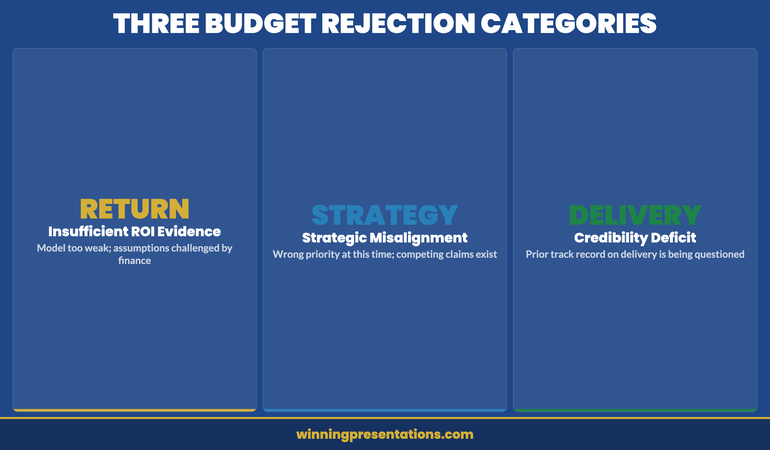
Three categories of budget rejection: return evidence, strategic alignment, and delivery credibility

The First Move After Rejection

The first thing to do after a budget rejection is not to revise the proposal. It is to understand precisely what was rejected and why. This sounds obvious, but most post-rejection conversations focus on what the presenter thinks the committee meant, rather than on getting the committee’s actual concerns on record.

Request a debrief, ideally with the finance director or the committee chair, within a week of the decision. The question to ask is not “what would it take to get this approved?” — which puts the committee in the position of designing your resubmission — but rather “what specific concerns were unresolved at the point of decision?” This frames the conversation as a diagnostic rather than a negotiation, and experienced finance directors will give you considerably more useful feedback if they feel they are being asked to help you understand rather than being pressured to change their minds.

Document the feedback carefully. When the resubmission is eventually presented, the committee will compare what they said to what you addressed. If the resubmission does not map directly to the documented concerns, it signals that you either did not understand the feedback or chose to work around it — neither of which builds confidence.

What to Change — and What Not to Touch

There is a common instinct to make the resubmission significantly different from the original — to demonstrate responsiveness and effort. This instinct is partially right and partially dangerous. Substantial changes that address the committee’s documented concerns signal that you listened and acted. Substantial changes that go beyond what was asked signal either that you had doubts about the original proposal that you did not disclose, or that you are making changes to appear responsive rather than because they are substantively right.

Change the structure of the case if the rejection was about framing. If the committee rejected the proposal because the rationale was wrong — capability-led rather than risk-led, for example — restructure the argument, not just the slides. The committee will recognise a slide reshuffle; they will not recognise a genuinely different argument unless it is genuinely different.

Change the financial assumptions if they were specifically challenged. If the committee requested more conservative growth projections or questioned the cost assumptions, revise them with explicit references to what changed and why. Do not quietly update figures without acknowledging the change — the committee will notice the difference and will want to know why the original numbers were presented if these more cautious assumptions were available.

Do not change anything that was not the subject of feedback. Altering elements of the proposal that the committee did not question suggests uncertainty about the original position, and invites new questions about material that was previously settled.

For guidance on structuring the financial argument itself, the approach in zero-based budget presentations is directly applicable to resubmissions where the original proposal was rejected on return-evidence grounds — the discipline of justifying each line from first principles removes the assumption problem that often underlies the “insufficient ROI” rejection.

Executive Slide System

Build Financial Presentations That Get Budget Approval

The Executive Slide System provides structured frameworks for financial and budget presentations, including resubmissions after rejection. It includes slide templates for finance committee meetings, AI prompt cards to build the case quickly, and scenario guides for challenging approval environments.

  • Slide templates for budget and financial approval presentations
  • AI prompt cards to structure the resubmission argument
  • Framework guides for risk-led and return-led financial cases
  • Scenario playbooks for budget, capex, and resource allocation items

Get the Executive Slide System — £39

Designed for budget and financial presentations in regulated and corporate environments.

Structuring the Resubmission Presentation

A budget resubmission presentation has a structural requirement that the original proposal does not: it must acknowledge the previous rejection before making the case. Presenting a revised budget as if the original was never rejected — simply updating the figures and re-presenting the slides — is the single most common structural error in resubmissions, and it consistently produces a worse reception than the original.

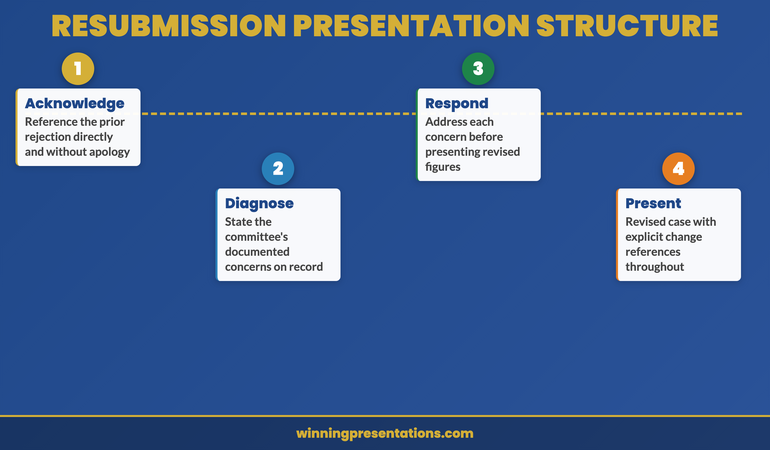
The committee knows this is a resubmission. Pretending otherwise reads as either oblivious or evasive. The structure that works is: acknowledgement, diagnosis, response, revised case.

Acknowledgement: Open with a brief, direct reference to the previous submission and its outcome. “This is a revised proposal for [project], following the committee’s decision in April. The original submission was rejected on two grounds, which I will address directly.” This signals that you are aware of the history, you are not defensive about it, and the resubmission is designed to resolve the specific concerns raised.

Diagnosis: State what you understood the committee’s concerns to be. If you had a debrief conversation, reference it. “Based on the feedback received from [name/role], the committee’s primary concerns were: [specific concerns].” This gives the committee the opportunity to confirm or correct your understanding before the revised case is presented, and it demonstrates that you conducted a genuine post-rejection diagnostic rather than simply revising the slides.

Response: Address each concern directly, in the order it was raised. Not buried in the appendix, not woven into the financial model — directly, as a standalone section that the committee can evaluate before the revised figures are presented. This is the part of the resubmission that most commonly gets cut for time, which is almost always a mistake. The committee’s concerns are the test the resubmission must pass; address them before asking for approval.

Revised case: Present the updated financial proposal, incorporating the changes made in response to the committee’s feedback, with explicit references to what changed and why.

For reference on how resource and financial proposals are typically structured for contested approval environments, the resource allocation presentation framework covers the argumentation approach that works when budgets are under direct competitive pressure.

The Three Objections to Address Before They Raise Them

In a resubmission, there are typically three objections that the committee will raise regardless of how comprehensively the original concerns were addressed. Addressing these proactively — before they are raised as questions — materially reduces the risk of a second rejection.

The first is: “Why should we approve this now rather than defer it to next year’s cycle?” This objection is almost always present when a budget was rejected once already. The committee may have approved an alternative proposal in the interim, making this one appear less urgent than it did six months ago. The resubmission needs a current-state argument: what has changed since the original submission, and how does that change affect the cost or risk of waiting a further twelve months?

The second is: “What gives us confidence the delivery will be successful?” This is particularly acute when the organisation has a track record of project overruns, or when the project scope has changed between the original and revised submissions. A resubmission that does not include a delivery confidence section — covering governance arrangements, milestone structure, and how delivery risk will be managed — will encounter this objection in the room.

The third is: “Is this the right amount?” After a rejection, committees are sensitive to whether the revised budget is genuinely right-sized or has simply been reduced to secure approval, with the expectation that a supplementary request will follow. If the budget has been reduced from the original, explain specifically what scope was removed to achieve the reduction, not just that the figure is lower.
Three pre-emptive objections for a budget resubmission: timing, delivery confidence, and budget sizing

Presenting the Revision Without Looking Defensive

The psychological challenge of a resubmission is presenting a revised case with full conviction when you know the committee has already said no once. The temptation is to over-qualify — to hedge the revised figures, acknowledge every uncertainty, and soften the recommendation. This reads as lack of confidence in the revised case, which is the last impression a resubmission needs to create.

The discipline is to hold the distinction between acknowledging the rejection and diminishing the recommendation. You can acknowledge the previous decision with directness and without apology, and then present the revised case with exactly the same conviction you would bring to a first submission. The rejection was of the previous case; this is a different case. It deserves to be presented as such.

Avoid two common tone errors. The first is apologetic framing — “I know you have concerns about this, and I hope this revised version addresses them” — which positions the presenter as petitioner rather than professional making a considered case. The second is over-confident dismissal — “I believe we have now resolved all the concerns raised” — which can read as arrogant and tends to provoke the committee into finding new concerns. The right tone is direct and measured: “The revised proposal addresses the specific concerns raised in April. Here is how.”

If the capital expenditure case involves significant infrastructure investment, the guidance in capital expenditure presentations covers how to frame large investment proposals in a way that holds up under scrutiny — including how to address delivery risk in the financial narrative itself rather than in a separate risk register that committees rarely read.

If your budget proposal has been rejected once and you are preparing the resubmission, the Executive Slide System includes financial presentation frameworks that address the structural requirements of a second-attempt approval, including how to lead with the committee’s previous concerns.

Executive Slide System

Slide Templates for Budget and Financial Approval Meetings

Structure your resubmission using frameworks designed for contested financial approvals — from the opening acknowledgement to the revised recommendation and delivery confidence section.

Get the Executive Slide System — £39

Designed for financial and budget presentations in corporate and regulated environments.

Frequently Asked Questions

How long should a budget resubmission presentation be?

A resubmission should typically be shorter than the original proposal, not longer. If the original was rejected because the case was unclear, adding more slides rarely resolves the problem — it usually compounds it. The acknowledgement-diagnosis-response-revised case structure can typically be delivered in eight to twelve slides, with supporting detail in the appendix. The committee has already read a version of this proposal; they do not need the full context again. They need to see that their specific concerns have been addressed and that the revised figures are sound.

Should you request a meeting with the finance director before the formal resubmission?

Yes, where possible. A pre-meeting with the finance director or a relevant committee member before the formal resubmission gives you the opportunity to test whether your revised case addresses their concerns before the formal meeting, and it signals engagement with the feedback process rather than a determination to push the proposal through regardless. It is not appropriate to use this meeting to lobby for approval — it is a diagnostic conversation, not a pre-vote. The question to ask is whether your diagnosis of the rejection matches their recollection of the discussion.

What should you do if the budget is rejected a second time?

Request a direct conversation with the committee chair or finance director to understand whether the objection is to this proposal specifically or to the priority of the investment in the current environment. If the committee has a fundamental view that the investment should not happen now — regardless of the quality of the case — no amount of revised modelling will change the outcome. The more productive path is to understand what conditions would need to change for the proposal to succeed, and to determine whether those conditions are likely to be met within a timeframe that makes the investment still relevant.

The Winning Edge — Weekly Newsletter

Each Thursday: one executive presentation insight, one structure, one practical tool. Read by executives across financial services, healthcare, technology, and infrastructure.

Subscribe to The Winning Edge

Preparing a budget or financial approval presentation? The Executive Presentation Checklist is a free download covering structure, language, and approval-readiness for finance committee and board presentations.

About the Author

Mary Beth Hazeldine is Owner and Managing Director of Winning Presentations. With 25 years of corporate banking experience at JPMorgan Chase, PwC, Royal Bank of Scotland, and Commerzbank, she advises executives across financial services, healthcare, technology, and government on structuring presentations for high-stakes funding rounds, board approvals, and governance reviews. View services | Book a discovery call

04 Apr 2026
Finance executive presenting a strategic cost reduction plan to the executive committee in a corporate setting, professional editorial photography

Cost Reduction Presentation: How to Frame Budget Cuts as Strategic Investment

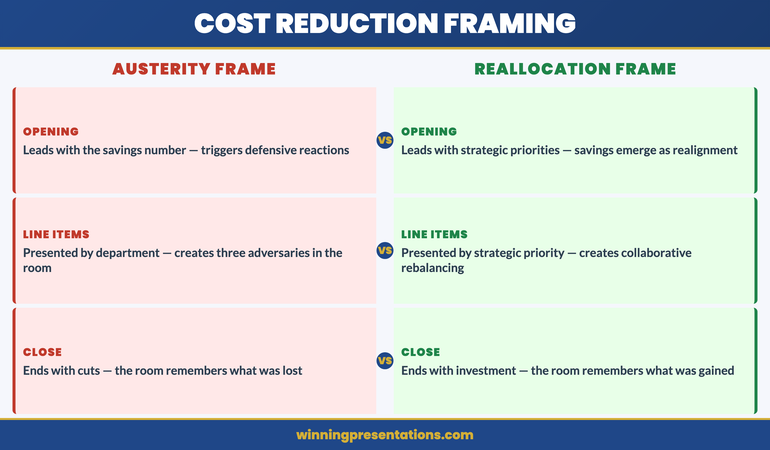
A cost reduction presentation fails the moment the audience hears it as bad news. The executive who frames budget cuts as strategic reallocation—redirecting resources from diminishing returns to higher-yield investments—earns approval. The one who frames them as austerity earns resistance. Here is how to structure the slides that make savings feel like strategy.

Kwadwo had been asked to present a £3.2 million reduction to the operations budget at the quarterly executive committee meeting. His first draft opened with a waterfall chart showing where every pound would be removed—headcount, travel, external consultants, software licences. He rehearsed it on a Tuesday evening, and his wife—a former operations director herself—listened from the kitchen doorway. “You’ve just told twelve senior people that everything they built last year was wasteful. They’ll spend the entire meeting defending their budgets instead of approving yours.” He rewrote the presentation overnight. The new version opened with a single slide showing the three strategic priorities the CEO had announced in January, followed by a comparison: current spend allocation versus the allocation required to fund those priorities. The £3.2 million wasn’t a cut—it was a reallocation from activities that no longer served the stated strategy to investments that would accelerate it. The executive committee approved the plan in forty minutes. The original version would have triggered forty minutes of arguments.

Building a cost reduction deck for the executive committee? The Executive Slide System includes strategic reframing templates and decision frameworks for high-stakes finance presentations.

The Reallocation Frame: Why Language Determines Approval

The difference between a cost reduction presentation that earns swift approval and one that triggers prolonged debate is almost entirely a matter of framing. When you present cuts, every line item has a defender in the room. When you present reallocations, every line item has a strategic justification that the audience has already endorsed.

The reallocation frame works because it borrows authority from decisions the executive team has already made. If the CEO announced three strategic priorities at the start of the year, your savings plan should map directly to those priorities. The question shifts from “Why are you cutting my budget?” to “How does our current spend support the strategy we all agreed to?” The first question is personal and adversarial. The second is structural and collaborative.

Build your opening slide around a simple visual: two columns. The left column shows current spend by category. The right column shows the spend allocation required to fund the stated strategic priorities. The gap between the two is your savings target. This single slide does more persuasive work than any waterfall chart because it makes the cuts feel inevitable rather than arbitrary. The audience sees the misalignment and reaches the conclusion before you state it.

Avoid the trap of opening with the savings number. Leading with “We need to find £3.2 million in savings” puts the audience on the defensive immediately. Leading with “The board approved three strategic priorities in January—here’s what it costs to fund them, and here’s where we’re currently spending that money on activities that predate the strategy” creates alignment before the number appears. The savings figure should arrive as a logical consequence of strategic alignment, not as an opening demand.

Frame Your Cost Reduction as Strategic Reallocation

The Executive Slide System gives you reframing templates and decision frameworks—so your savings presentation earns approval instead of resistance.

  • ✓ Presentation templates for executive finance scenarios
  • ✓ AI prompt cards to build structured decks fast
  • ✓ Framework guides for high-stakes decision presentations

Get the Executive Slide System → £39

Designed for executives preparing high-stakes presentations

Connecting Every Saving to a Strategic Priority

The most common failure in cost reduction presentations is presenting savings by department or cost category. When you show a slide that reads “Marketing: -£400K / IT: -£600K / Operations: -£1.2M,” you’ve created three adversaries in the room. The marketing director, the CTO, and the COO are now calculating what they’ll lose, not what the organisation will gain.

The structural fix is to present savings by strategic priority, not by cost centre. Instead of “IT reduction: £600K,” present it as “Digital transformation acceleration: £600K redirected from legacy infrastructure maintenance to cloud migration.” The number is identical. The emotional response is entirely different. The CTO is no longer defending a cut—they’re participating in an investment.

For each savings line, build a three-column structure: the current spend being redirected, the strategic priority it now funds, and the expected return. This converts every line from a loss into an investment thesis. The executive committee is no longer approving cuts. They’re approving a portfolio rebalance. And portfolio rebalancing is the language of strategy, not austerity.

This approach also provides natural defence against the inevitable question: “Why this line item and not another?” When every saving is connected to a strategic priority, the answer is structural rather than political: “We redirected this spend because it was the clearest misalignment with the priorities the board approved in January.” This is a far stronger answer than “We chose this because it had the least operational impact,” which implies the decision was arbitrary and could have been made differently. For more on structuring restructuring presentations that maintain team trust, that guide covers the communication architecture for organisational change.

Strategic reallocation framework for cost reduction presentations showing current spend versus strategic priority alignment

Addressing the People Impact Without Losing the Room

If your cost reduction includes headcount changes, the room will be thinking about it from the moment you start speaking—regardless of which slide you put it on. Acknowledging the people impact early, directly, and with a clear plan is essential. Burying it in the appendix or saving it for Q&A signals avoidance, and avoidance destroys credibility in executive meetings.

The approach that works is to dedicate one slide—not more—to the people impact framework. State three things: the scope (how many roles are affected), the support plan (redeployment, retraining, enhanced severance), and the timeline (when affected individuals will be informed, by whom, and through what process). This slide should be factual, respectful, and brief. It is not the place for emotional language or corporate euphemisms. “We are reducing thirty-two roles across three departments” is direct and honest. “We are right-sizing our organisation to unlock strategic agility” is evasive and will irritate everyone in the room.

Position this slide after the strategic alignment section and before the implementation timeline. This placement matters. By the time the audience reaches the people impact slide, they’ve already accepted the strategic logic for the reallocation. The question is no longer “should we do this?” but “how do we do this responsibly?” That’s a much more constructive conversation.

If the cost reduction does not involve headcount changes, say so explicitly. A single line—“This reallocation programme does not affect any current roles”—removes the concern that has been lurking in every audience member’s mind since the meeting invitation landed. For guidance on the specific communication challenges when reductions do involve job losses, our guide to redundancy announcement presentations covers the full communication sequence from board approval to individual notifications.

The Implementation Timeline That Builds Confidence

Executive committees approve cost reductions more readily when they can see exactly how and when the savings will materialise. An implementation timeline that shows quarterly milestones—with specific savings targets at each stage—converts an abstract number into a credible delivery plan.

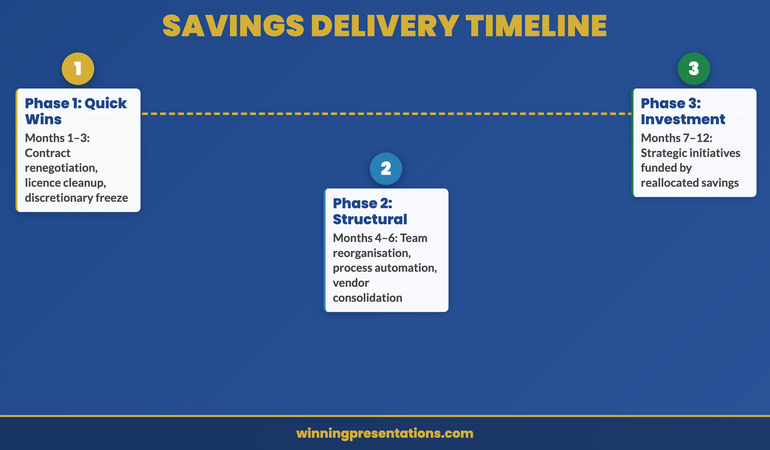
Structure the timeline in three phases. Phase one (months one to three): quick wins that demonstrate momentum. These are savings that require no structural change—contract renegotiations, discretionary spend freezes, duplicate licence elimination. Showing early results builds organisational confidence that the plan is achievable. Phase two (months four to six): structural changes that require planning and coordination—team reorganisations, process automation, vendor consolidation. Phase three (months seven to twelve): strategic investments that the savings fund—the initiatives that connect the cost reduction to the organisation’s growth agenda.

The three-phase structure is important because it tells a story of progression: from discipline to transformation to growth. The committee sees not just where money is being saved, but where it is going. This is the final piece of the reallocation frame. The cost reduction presentation doesn’t end with savings—it ends with investment. And investment is the language of leadership.

If you’re preparing a finance presentation that requires this kind of strategic reframing, the Executive Slide System includes the structural templates that ensure every slide advances the decision, not just the data.

Three-phase implementation timeline for cost reduction presentations showing quick wins, structural changes, and strategic investments

The Governance Slide: Tracking Savings Delivery

The final slide before Q&A should address the question every executive committee member is silently asking: “How will we know this is working?” Present a governance framework that specifies four elements: what will be measured, how often it will be reported, who owns the delivery, and what triggers escalation.

A simple tracking structure works best. Monthly reporting on savings realisation versus target, with a RAG status for each savings line. Quarterly reviews at the executive committee to assess whether the reallocation is achieving its strategic objectives—not just whether the number has been met. An escalation protocol that defines the threshold at which a shortfall triggers a revised plan rather than a request for more time.

This governance slide achieves two things. First, it demonstrates that you’ve thought beyond the approval—you’ve planned the delivery. Second, it gives the committee a reason to approve today rather than requesting further analysis. The governance framework provides the safety net that allows the committee to say yes without feeling they’ve relinquished oversight. In crisis communication contexts where the financial situation demands urgent board-level transparency, our guide to presenting a data breach to the board demonstrates similar governance framing under pressure.

Build a Cost Reduction Deck the Committee Approves Fast

Stop presenting cuts. Start presenting strategic reallocation. The Executive Slide System gives you the templates and frameworks to build savings presentations that earn approval—for £39.

Get the System Now → £39

Frequently Asked Questions

Should I present the total savings number on the first slide?

No. Leading with the savings number triggers defensive responses before you’ve established the strategic logic. Open instead with the strategic priorities the organisation has already approved, then show the misalignment between current spend and those priorities. The savings number should arrive as a natural consequence of strategic realignment—typically on the third or fourth slide. By that point, the audience has already accepted the rationale, and the number feels like a logical outcome rather than an arbitrary target.

How do I handle pushback from department heads whose budgets are being cut?

Anticipate it by engaging department heads individually before the presentation. Share the strategic framing privately and ask for their input on implementation—not on whether the cuts should happen. This converts potential adversaries into collaborators. In the meeting itself, if pushback occurs, redirect to the strategic alignment frame: “The question isn’t whether marketing should keep this budget. The question is whether this spend serves the priorities we all committed to in January.” This makes the challenge about strategy, not territory.

What if the cost reduction was mandated from above with no strategic framing?

Create the strategic frame yourself. Even a top-down directive to “reduce costs by fifteen percent” can be connected to organisational priorities. The CEO didn’t mandate the cut in a vacuum—there’s a revenue shortfall, a margin pressure, or a board directive driving it. Find that connection and build your presentation around it. If you can’t identify a strategic link, frame the savings as funding a specific initiative: “This reallocation creates the capacity to invest in [initiative] without requesting additional budget.” The committee will respond better to “we’re funding growth” than “we’re following orders.”

The Winning Edge

Weekly insights on executive presentations, slide strategy, and boardroom communication.

Subscribe Free

Preparing a savings proposal for the board? Download the Executive Slide System checklist for a quick framework to structure your cost reduction presentation.

If your cost reduction programme also involves presenting to external stakeholders or pitching for new vendor contracts, our guide to vendor selection presentations covers the deck architecture that wins final shortlist meetings.

About the author

Mary Beth Hazeldine, Owner & Managing Director, Winning Presentations. With 24 years of corporate banking experience at JPMorgan Chase, PwC, Royal Bank of Scotland, and Commerzbank, she advises executives across financial services, healthcare, technology, and government on structuring presentations for high-stakes funding rounds and approvals.

21 Mar 2026
Executive technology evaluation meeting with IT and Finance leaders reviewing structured presentation slides in modern glass boardroom

The Technology Evaluation Presentation: How to Get IT and Finance to Say Yes in the Same Meeting

Your CTO wants security and scalability. Your CFO wants ROI and risk mitigation. You need both departments signing off on the same technology purchase—and they’re speaking completely different languages.

Quick Answer: The most common reason technology evaluation presentations fail is that they’re built for one audience and hope the other one agrees. A strong technology evaluation presentation structure addresses both IT performance criteria and financial impact simultaneously, using parallel evidence that speaks to each department’s priorities without requiring translation.

⚠️ Diagnosis: Is Your Tech Evaluation Presentation Missing Something?

Your presentation is not failing because you lack technical detail or financial analysis. It’s failing because IT and Finance hear different stories from the same slides. You need a structure that lets both departments recognise their priorities instantly.

Get the presentation diagnostic checklist

The Platform Migration That Shipped on Schedule

A senior infrastructure engineer named Sven was tasked with moving his organisation from a monolithic payment system to a cloud-native platform. The IT team had strong architectural preferences. Finance needed cost certainty. Instead of building separate business cases, Sven structured a single evaluation that showed how IT’s chosen architecture eliminated the specific cost categories Finance worried about most: manual reconciliation work (£240k annually), vendor overage fees during migration (another £120k), and post-launch infrastructure optimisation delays (£90k). He sent this pre-read to both teams structured as three parallel columns: Technical Requirements Met, Financial Impact, Timeline Risk. The CFO approved funding before the steering committee met. The CTO approved the approach before Finance gave it a second review. When the full group convened, the decision was simply confirmed.

Why Separating IT and Finance Approval Costs You a Month

  • Deploy structured slide templates designed for dual-audience technology evaluations—IT criteria on the left, financial impact on the right
  • Use prompts that help you position technical decisions as financial decisions (not just risk mitigation)
  • Build vendor comparison frameworks that show both architecture fit and cost justification simultaneously
  • Create business case slides that integrate technical requirements with budget approval criteria
  • Include pre-meeting diagnostic slides that signal to both stakeholders that their priorities are already understood

Get the Executive Slide System → £39

The Executive Slide System includes slide templates specifically for technology evaluation scenarios with AI prompt cards, scenario playbook guides, and diagnostic checklists for dual-audience alignment.

The Three Slides That Align IT and Finance Instantly

Technology evaluation presentations typically fail because they are built sequentially: here’s the problem, here’s the technical solution, here’s the cost. IT nods at slide two. Finance wakes up at slide three. Neither sees how their priorities connect.

The three slides that change this are:

Slide 1: The Business Impact Statement
This is not a financial summary. It’s a statement of what becomes possible (or what risk gets eliminated) after this technology is in place. Frame it as capability, not cost: “With [solution], we can deliver customer onboarding in 48 hours instead of 2 weeks” or “This integration removes our single point of failure in payments processing.” IT sees the technical outcome they’re responsible for. Finance sees the business consequence they’re accountable for.

Slide 2: The Architecture Approach (Stripped of Jargon)
Your CTO needs this detail. Your CFO does not. But your CFO needs to see that a real approach exists. Show the architectural approach in three boxes: what you’re replacing, how the new system sits between current tools, what integrations matter. Include one line of financial context per box: “This eliminates manual reconciliation (currently £180k annually in labour)” or “Migration follows this sequence to prevent revenue system downtime.”

Slide 3: The Approval Criteria Met
Create a two-column comparison. Left side: “Technical Requirements” (security rating, uptime percentage, API maturity, team capacity required). Right side: “Financial Requirements” (cost per user, implementation timeline impact, payback period, risk exposure reduction). Show how the selected solution meets both columns. This is the slide where IT and Finance finally see they’re evaluating the same thing.

IT-Finance Alignment Framework infographic showing five steps: Map Stakeholder Criteria, Build the Bridge Slide, Lead With Business Impact, Show the Decision Framework, and Close With the Recommendation

Building Credible Evidence for Both Audiences

IT teams trust technical proof points: architecture diagrams, security certifications, API documentation, case studies from similar technical environments. Finance teams trust financial proof points: contract terms, reference customers of similar size, implementation cost breakdowns, risk-adjusted ROI models.

Your evidence strategy needs both. But don’t duplicate your slide space—integrate them. On your vendor comparison slide, for example:

  • Show security certifications (ISO, SOC 2, etc.) alongside average cost of a data breach in your industry
  • Display API maturity levels alongside integration velocity impact (faster integration = lower implementation cost)
  • List team certification requirements alongside fully-loaded cost per developer month
  • Reference customer case studies that include both similar organisation size AND similar implementation budget

This evidence structure does something important: it stops IT and Finance from dismissing each other’s concerns. When IT sees that a “secure but slower” vendor choice increases implementation cost by £300k, they’re more willing to compromise on a “less certified but faster” option that Finance prefers. When Finance sees that a “cheaper” vendor requires 40% more server infrastructure than their sizing assumed, they understand IT’s resistance.

The Technology Evaluation Presentation Mistakes That Delay Approval

Most technology evaluation presentations fail not because they lack information, but because they ask IT and Finance to do translation work. Here are the mistakes that add three weeks to your approval timeline:

Mistake 1: Assuming “Total Cost of Ownership” is Self-Evident
You calculate TCO. Your Finance team recalculates it. They discover they counted hidden costs differently. Everyone redoes the analysis. Instead: show your TCO calculation methodology in the presentation itself. Let Finance validate the numbers before the meeting, not during it.

Mistake 2: Treating Risk as a Technical Issue Only
Your IT team worries about vendor lock-in, uptime guarantees, and data security. Your Finance team worries about vendor financial stability, contract exit terms, and liability limits. A strong technology evaluation presentation addresses both. Show the vendor’s financial health (not just their technical health). Show how contract terms protect the organisation if the vendor fails.

Mistake 3: Presenting Vendor Comparisons That Privilege IT Priorities
Your comparison might show “Vendor A has better API maturity” and “Vendor B has lower cost.” IT gravitates to A. Finance to B. You’ve created a false choice. Instead, show what IT gets for Finance’s chosen option (faster integration reduces cost) and what Finance gets for IT’s chosen option (better architecture prevents costly maintenance).

Technology Evaluation Presentations comparison infographic contrasting wrong approaches like starting with product features versus right approaches like starting with the business problem across four categories

Are Both Departments Making the Same Decision?

The difference between approval in one meeting versus three is whether IT and Finance can see the same solution from their different angles. Get the slide templates designed for dual-audience alignment.

Explore the Templates → £39

The Business Case Slide Nobody Expects

Most technology evaluation presentations include a financial business case. Few include the business case for deciding now versus deciding later.

This matters because IT and Finance have different timelines. IT worries about technical debt—the longer you wait, the more complex the migration. Finance worries about cost escalation—the longer you wait, the more expensive the solution. A strong presentation quantifies both.

Your business case slide should show:

  • Cost of current system in year 1, year 2, year 3 (licence escalation, maintenance burden, team capacity spent on workarounds)
  • Implementation cost if you decide now versus if you decide in 12 months (vendors raise prices, migration gets more complex with accumulated data, team turnover changes execution capability)
  • Risk cost if the current system fails before you migrate (revenue impact, recovery time, customer impact)
  • Opportunity cost: what the team could build instead of maintaining workarounds

This slide works because it frames the decision as “which timeline makes financial sense?” rather than “do we agree this technology is good?” IT and Finance can disagree on technology and still agree on timeline logic.

Stop Building Separate Presentations for IT and Finance

  • Dual-audience slide templates that let both departments recognise their priorities in one deck
  • Vendor evaluation frameworks designed to address both technical and financial approval criteria simultaneously

Get the Executive Slide System → £39

Designed for presentations where technology evaluations need IT procurement sign-off and CFO budget approval in the same meeting.

Is This Approach Right for You?

This structure works when:

  • You need approval from both IT and Finance in the same decision cycle
  • IT and Finance have measured you before and disagreed (one wanted to move fast, one wanted to move carefully)
  • The technology decision affects both infrastructure and budget planning
  • You want to avoid sequential presentations that create delays and re-analysis cycles
  • Your organisation has a history of technology projects where IT and Finance blamed each other for overruns or delays

If you’re presenting to IT only, or Finance only, you need a different emphasis. But if you need both departments saying yes in one meeting, this structure is the difference between approval and delay.

Master Dual-Audience Technology Presentations

  • PowerPoint slide templates for technology evaluation scenarios (vendor comparison, build vs. buy, migration business case, infrastructure investment)
  • AI-powered prompt cards that help you articulate technical decisions in financial language (and vice versa)
  • Scenario playbook guides including the exact slides IT and Finance need to see in technology vendor evaluations
  • Diagnostic checklists including approval criteria mapping (what each stakeholder needs to see to say yes)
  • The alignment framework used in presentations where both IT and Finance approved in a single meeting

Get the Executive Slide System → £39

Used in technology vendor evaluation presentations where IT and Finance stakeholders approved in the same meeting because both departments recognised their priorities in the slide structure.

People Also Ask

What’s the difference between a technology evaluation presentation and a vendor pitch?

A vendor pitch is the vendor selling to you. A technology evaluation presentation is you selling the decision to your stakeholders. The structure is completely different. Vendor pitches emphasise product capabilities. Technology evaluation presentations emphasise how the product solves your specific problem and meets your approval criteria. This is why vendors often can’t deliver the slides you actually need—they don’t know what your IT and Finance departments require to say yes.

Should I show multiple vendors or commit to one in the presentation?

Show multiple vendors if your organisation requires vendor comparison before approval. Show one vendor if you’ve already done the evaluation and you’re presenting the recommended choice. The mistake most people make is showing multiple vendors but letting different stakeholders prefer different ones. Use your vendor comparison slide to show why the recommended vendor is the right choice for both IT and Finance criteria, not just for one audience.

What if IT and Finance genuinely disagree on the best choice?

That’s not a presentation problem—that’s a decision problem. Your presentation can’t solve disagreement, but it can clarify what each department is optimising for. Often IT and Finance aren’t actually disagreeing on the technology; they’re disagreeing on which risk matters more. A strong presentation surfaces that disagreement so the business decision-maker can decide: is this a technical risk organisation or a financial risk organisation? Then everyone commits to the same choice based on that business logic.

Frequently Asked Questions

How long should a technology evaluation presentation be?

For IT and Finance together: 12-15 slides. You need enough detail that both departments see their concerns addressed, but not so much that you create confusion. Pre-read documents can contain additional technical or financial detail. The presentation itself should move decision-makers from “we need more information” to “we’re ready to decide.”

Should I include the vendor’s materials in my presentation?

No. Use the vendor’s materials for research and detail validation, but build your presentation from your stakeholders’ perspective. Vendor materials sell product features. Your presentation sells the decision to buy. The structure, evidence hierarchy, and audience focus are completely different. If you copy slides from vendor pitch decks, you’re inheriting their priority sequencing, not yours.

What’s the biggest mistake in technology vendor evaluation presentations?

Treating evaluation as a technical exercise and expecting Finance to simply rubber-stamp the IT decision. The biggest mistake is the reverse: treating it as a financial exercise and expecting IT to accept whatever Finance chooses. Both perspectives matter. Both approval criteria matter. Your presentation’s job is to show that the recommended choice wins on both dimensions, or explicitly show which dimension your organisation is prioritising if it doesn’t.

Every week, just the essentials

Advanced presentation strategy and stakeholder communication insights for the people who lead decisions. No sales messages. Only insights you can use Monday morning.

Join The Winning Edge

Get the slide checklist: executive presentation diagnostic checklist (free)

About the Author

Mary Beth Hazeldine helps executive teams and technical leaders build presentations that actually get decisions approved. She works with CIOs, CTOs, CFOs, and business leaders on technology investment presentations where multiple stakeholders need to agree. Her framework for dual-audience presentations has been used in vendor evaluations, infrastructure investments, and technology transformation initiatives across financial services, healthcare, and professional services.

27 Feb 2026
An executive standing in a corporate boardroom defending a budget presentation with financial charts on screen while sceptical finance leaders seated on both sides evaluate the proposal

Budget Defence Presentation: How to Protect Your Funding When Finance Wants Cuts

A budget defence presentation when your team faces cuts is structurally different from a budget request. When finance has already decided to cut, presenting your original business case again won’t save your funding. You need to reframe the conversation from “justify this spend” to “here’s the cost of cutting it.” This article gives you the 4-slide defence framework that shifts the burden of proof from you to the person holding the axe.

The email arrived on a Tuesday afternoon: “We need to review your team’s Q3 operating budget. Please prepare a presentation for Thursday’s finance review.”

In corporate banking, I learned to decode that sentence. “Review” meant cuts. “Please prepare” meant justify your existence. And “Thursday” meant you have 48 hours to save six months of planned work.

At Royal Bank of Scotland, I watched a divisional head respond to exactly this scenario by re-presenting his original budget request — the same slides, the same business case, the same ROI projections. He spent 25 minutes explaining why the budget was needed. Finance spent 3 minutes cutting it by 30%.

The following quarter, a different director faced the same situation. She didn’t re-justify the spend. She opened with a single slide: “If you cut this budget, here’s exactly what stops.” Three revenue streams. Two client deliverables. One regulatory deadline. The conversation shifted from “convince us this is worth it” to “which of these consequences are we prepared to accept?”

Her budget survived intact. The difference wasn’t the quality of the data. It was the structure of the argument.

Here’s the truth nobody tells you about budget cuts: they aren’t decided by spreadsheets. They’re decided by dependency stories. The budget holders who survive aren’t the ones who fight hardest — they’re the ones who make cutting feel more dangerous than funding.

🚨 Facing a budget review this quarter? Quick check: does your first slide explain what you need the money for — or what happens if it’s taken away? If it’s the former, you’re presenting a budget request, not a budget defence. That’s a critical structural mistake. → Need the exact budget defence slide structure? Get the Executive Slide System → £39

Why Your First Instinct Is Wrong

When you’re told your budget is under review, the instinct is to defend it the same way you requested it — by making the positive case. Here’s why the spend is valuable. Here’s the ROI. Here’s what we’ll achieve.

That’s exactly backwards.

A budget request and a budget defence are fundamentally different presentations with different psychological dynamics. In a budget request, you’re selling an opportunity. The audience is evaluating potential gain. In a budget defence, someone has already decided to cut. They’re not evaluating opportunity — they’re looking for the least painful place to reduce spend.

If you present your opportunity case to an audience in cutting mode, you’re speaking a language they’re not listening in. They’ve already discounted the upside. What they haven’t calculated is the downside of cutting.

This is where most budget defence presentations fail. They try to re-sell value instead of quantifying consequences. And in 24 years of corporate banking — across JPMorgan Chase, PwC, Royal Bank of Scotland, and Commerzbank — I’ve never seen a re-sell win against a finance team that’s already in reduction mode.

How do you present a budget defence when finance wants to cut?

The most effective budget defence doesn’t argue for the value of your spend — it quantifies the cost of cutting it. Lead with consequences: what specifically stops, breaks, or gets delayed if this budget is reduced. Frame the conversation so that the finance team is evaluating the risk of cutting rather than the justification for spending. Include a dependency map showing which revenue streams, client deliverables, or compliance requirements are directly connected to the budget line under review. This shifts the burden of proof from you to the person proposing the cut.

Understanding how CFOs actually evaluate presentations is essential here — they’re trained to discount optimistic projections and focus on risk. Your defence needs to speak their language.

The 4-Slide Budget Defence Framework (When Cuts Are Already Planned)

This framework is built on a simple principle: don’t justify the spend, quantify the cut. It works because it aligns with how finance teams actually make reduction decisions — they’re looking for cuts with the lowest consequences, not the weakest business case.

Every slide in this framework moves the conversation away from “is this spend worth it?” toward “can we afford to cut this?” That’s a fundamentally different conversation — and one you’re much more likely to win.


Diagram showing the 4-Slide Budget Defence Framework: Cost of Cutting, Dependency Map, Alternative Cuts, and Protection Ask, with arrows showing the strategic flow from consequence to decision

Slide 1: The Cost of Cutting

Your opening slide is the most important slide in any budget defence. It sets the frame for the entire conversation. Get it wrong and you’re defending. Get it right and finance is evaluating risk.

The cost-of-cutting slide answers one question: “If this budget is reduced by [X]%, here’s exactly what stops.”

Not “here’s what might be affected.” Not “here’s what could be impacted.” Specifics. Revenue at risk. Client deliverables that will miss deadlines. Regulatory compliance that becomes uncertain. Headcount that gets cut — with names if appropriate, because numbers are abstract and people are real.

Here’s the structure:

  • Line 1: The specific budget amount under review
  • Line 2: The three most consequential things that stop if it’s cut
  • Line 3: The revenue or client relationship directly at risk
  • Line 4: The timeline — when consequences begin (usually sooner than finance expects)

When I helped a technology division at Commerzbank defend their infrastructure budget, we opened with: “Cutting this £1.2M reduces our transaction processing capacity by 15%. That affects 340 institutional client accounts. The first service degradation begins in 8 weeks.” The conversation changed immediately.

The key principle: consequences must be specific, quantified, and tied to things finance cares about — revenue, clients, compliance, and reputation. “Our team will be stretched” is not a consequence. “Three client deliverables miss their contractual deadline in Q4” is.

The Budget Defence Slides That Protect Your Team’s Funding

The Executive Slide System includes the Budget Request template — adaptable for defence presentations — plus 51 AI prompts that help you draft consequence-led slides in 25 minutes. Including the CFO Questions checklist that pre-answers every challenge finance will raise.

  • The budget slide structure that frames consequences, not justifications — the format CFOs respond to
  • AI prompts that role-play as a sceptical CFO, stress-testing your defence before the real meeting
  • The cost-of-inaction framework that shifts the burden of proof to the person proposing cuts
  • The 15-minute resubmission workflow for when your original budget was already rejected

What you get: Budget Request template → Dependency Map framework → CFO Questions checklist → ‘Sceptical CFO’ AI stress-test → Scenario Playbook with budget rejection recovery → Instant download, use it tonight.

Get the Executive Slide System → £39

The same budget structure that secured £4M+ in a single meeting — now available as a template with AI-powered drafting prompts.

Slide 2: The Dependency Map

The dependency map is the slide that makes finance pause. It shows — visually — every business function, revenue stream, and client commitment that connects to the budget line under review.

Most budget holders present their budget in isolation: “Here’s what my team does. Here’s what it costs.” That makes it easy to cut because the connections are invisible. A dependency map makes them visible — and suddenly cutting your budget means accepting consequences across multiple departments.

How to build a dependency map:

  • Place the budget line item in the centre
  • Draw direct connections to every revenue stream it supports (with specific £/$ amounts)
  • Draw connections to every client deliverable that depends on it (with names and deadlines)
  • Draw connections to any regulatory or compliance requirements it fulfils
  • Draw connections to other departments that rely on your team’s output

The visual is powerful because it transforms an abstract line item into a web of consequences. Finance can cut a number on a spreadsheet. It’s much harder to cut a node that connects to £2.3M in client revenue and a regulatory filing deadline.

If you’re already familiar with CFO-approved budget formats, the dependency map is the element that converts a budget request into a budget defence. The format stays similar. The framing changes everything.

The Executive Slide System includes frameworks for exactly this kind of visual argument — including the Problem-Solution-Benefit structure that works particularly well when framing budget consequences for finance audiences.

What should you include in a budget defence presentation?

An effective budget defence presentation should include four elements: the quantified cost of cutting (revenue at risk, client impact, timeline to consequences), a dependency map showing which business functions and revenue streams connect to the budget line, at least two alternative reduction options that are less damaging than the proposed cut, and a specific protection ask — the exact amount you need preserved and the conditions under which you’d accept a partial reduction. Avoid re-presenting your original business case or ROI projections. Finance has already discounted these. Focus entirely on what happens if the cut goes through.

Slide 3: The Alternative Cuts

This is the slide most budget defenders forget — and it’s the one that demonstrates strategic maturity.

When you present alternatives, you’re signalling three things to finance: you understand the organisation needs to reduce costs, you’re willing to participate in that process, and you’ve already done the analysis to find the least damaging path forward.

This is critical because finance teams rarely have the operational knowledge to know which cuts are truly damaging and which are manageable. They’re working from spreadsheets. You’re working from reality. If you don’t give them better options, they’ll default to the blunt instrument — which is usually an across-the-board percentage cut that treats discretionary and essential spend identically.

How to structure alternative cuts:

  • Option A: Defer [specific initiative] from Q3 to Q4. Saves £[X]. Impact: [specific but manageable consequence].
  • Option B: Reduce [specific budget line] by [%]. Saves £[X]. Impact: [specific but lower-risk consequence].
  • Option C: The proposed cut as-is. Saves £[X]. Impact: [the severe consequences from Slide 1].

Notice the structure. You’re presenting the proposed cut as Option C — the most damaging option — alongside two alternatives you can actually live with. Finance gets their saving. You control where the reduction lands.

A VP at PwC once told me: “The budget holders who survive cuts aren’t the ones who fight hardest. They’re the ones who give me better options.” That insight has informed every budget defence I’ve helped clients build since.

Stop Watching Your Budget Die in ‘Further Review’

The Executive Slide System includes budget-specific templates, the CFO Questions checklist, and AI prompts that stress-test your defence before the meeting. Build a consequence-led budget defence in 30 minutes.

  • The Budget Request template — adaptable for defence, resubmission, and annual review
  • The sensitivity analysis prompt: “What’s the impact if results are 20% below projection?”
  • The ‘sceptical CFO’ AI role-play that pressure-tests every number before you present
  • 6 checklists including the CFO Questions section that pre-answers finance challenges

Get the Executive Slide System → £39

Used by executives defending budgets at programme boards, finance reviews, and senior leadership — where the wrong structure means an automatic 20-30% cut.

Slide 4: The Protection Ask

Your final slide must do one thing: tell finance exactly what you need preserved and the conditions under which you’d accept a partial reduction.

This matters because budget review meetings often end without clear decisions. “We’ll take this away and come back to you” is the budget defence equivalent of silence after a presentation — it sounds neutral but usually means you lose.

The protection ask prevents that drift by forcing a specific conversation. Instead of “please don’t cut our budget,” you’re saying: “I need £[specific amount] protected to maintain [specific deliverables]. I can accept a £[specific amount] reduction if it’s applied to [specific budget line] rather than [essential budget line].”

The formula:

  • Protected amount: The non-negotiable number, tied to specific consequences from Slide 1
  • Acceptable reduction: The amount you can absorb, tied to the alternatives from Slide 3
  • Conditions: Where the reduction applies and what it means for deliverables
  • Decision request: Ask for the decision in this meeting — not “further review”

The specificity is the power. “Please protect our budget” is weak. “I need £840K of this £1.2M preserved to maintain our three largest client accounts. I can absorb £360K by deferring the platform migration to Q1 and reducing the contractor allocation by two FTEs” is a sentence finance can actually work with.

If you’ve used the CFO-approved budget request format before, the protection ask follows the same specificity principle — but inverted. Instead of asking for approval to spend, you’re asking for confirmation to protect.

How do you stop your budget from being cut?

You can’t always prevent cuts entirely — but you can control where they land. The most effective approach is to quantify the consequences of the proposed cut (making the risk visible), provide alternative reduction options that are less damaging (giving finance a better path), and make a specific protection ask that preserves your essential spend while conceding on discretionary items. The budget holders who consistently protect their funding aren’t the ones who argue loudest — they’re the ones who present the clearest analysis of what happens when cuts go wrong. Frame every number as a consequence, not a justification.

When to Deploy This (And When It’s Too Late)

The budget defence framework works best when deployed at the first signal of review — not after the decision has been made. If you receive an email about a “budget review” or “cost optimisation exercise,” start building your defence immediately. Don’t wait for the formal meeting invitation.

There’s also a pre-defence strategy that’s even more effective: the corridor conversation. Before the formal review meeting, find 15 minutes with the finance lead and walk them through your dependency map informally. This isn’t lobbying — it’s giving them the operational context they need to make a better decision. In my experience, 70% of budget defence outcomes are determined before the formal meeting.

When is it too late? If finance has already communicated the cut as a decision rather than a review, the framework shifts. You’re no longer defending — you’re negotiating the terms. At that point, Slides 3 and 4 (Alternative Cuts and Protection Ask) become your entire presentation. Skip the consequence framing — they’ve already accepted the consequences. Focus on where the reduction lands.

The Executive Slide System includes a Scenario Playbook with a specific “Budget Request Was Rejected” workflow — the 15-minute resubmission path for when your first attempt didn’t land.

Is This Right For You?

The Executive Slide System is built for you if:

  • You’re facing a budget review and need to defend your team’s funding against proposed cuts
  • You present to finance leaders, CFOs, or budget committees where slide structure determines outcomes
  • You’ve had a budget request rejected and need to resubmit with a stronger structure
  • You want AI prompts that role-play as a sceptical CFO to stress-test your defence before the real meeting

It’s probably not right if your budget is already approved and you’re looking for general presentation skills. In that case, the budget request template walkthrough may be more relevant.

24 Years Defending Budgets at JPMorgan, RBS, and Commerzbank. Every Lesson in One System.

I’ve sat on both sides of the budget table — presenting to finance committees and sitting on them. The Executive Slide System gives you the same structures, AI prompts, and checklists that senior executives use to protect their teams’ funding.

  • 22 templates (15 executive + 7 framework) including the Budget Request template
  • 51 AI prompts — including the ‘sceptical CFO’ stress-test and sensitivity analysis
  • The Scenario Playbook with the “Budget Was Rejected” 15-minute resubmission workflow
  • 6 checklists and guides including the CFO Questions section

Get the Executive Slide System → £39

Trained thousands of executives to present to finance leaders — including the presentations where your team’s survival depends on four slides.

Frequently Asked Questions

What if finance has already decided and the review is just a formality?

If the cut has already been communicated as a decision, shift your approach. Skip the consequence framing (they’ve accepted the consequences) and focus entirely on Slides 3 and 4: Alternative Cuts and the Protection Ask. Your goal is no longer to prevent the reduction — it’s to control where it lands. Present two or three specific alternatives that achieve the required saving while protecting your most essential deliverables. Finance teams generally prefer budget holders who engage constructively with the process over those who simply resist.

How specific should the consequences be on Slide 1?

As specific as possible. “Client service may be affected” is invisible to finance. “Three named client deliverables miss their contractual deadline in Q4, putting £2.3M in annual recurring revenue at risk” is a consequence that gets attention. Finance teams work in specifics — give them specifics. If you can attach a revenue number, a client name, a regulatory deadline, or a headcount impact to every consequence, your defence is dramatically stronger than an abstract case for value.

Should I present the dependency map as a visual or a table?

A visual — always. The power of the dependency map is that it makes hidden connections visible. A table lists items sequentially, which allows finance to evaluate each line individually and cut selectively. A visual shows the interconnections, making it clear that cutting one element affects three others. Use a simple node-and-connection layout with the budget line in the centre and consequences radiating outward. The messier it looks (within reason), the better — complexity is your ally when defending against simplistic across-the-board cuts.

📬 Get weekly executive presentation strategies that protect your decisions, your budget, and your team.

Every week: one framework, one real example, zero theory. Join thousands of professionals who present to senior leadership and finance.

Subscribe to the Winning Presentations newsletter →

🎯 Presenting to a committee and worried about the Q&A? If nobody asks questions after your budget defence, that’s not agreement — it’s disengagement. Read: No Questions After Your Presentation? That Silence Isn’t Approval

Your next step: Open your current budget slides. If the first slide explains what you need the money for rather than what happens if it’s taken away, rewrite it using the cost-of-cutting structure before your next finance review. That single change will shift the entire conversation from defence to decision.

If your budget review is in the next 7–10 days, the Executive Slide System (£39) gives you the budget defence slide structure, AI prompts, and CFO stress-test checklist you need — ready to use tonight. Instant download. Build your defence deck in 30 minutes.

About the Author

Mary Beth Hazeldine is the Owner & Managing Director of Winning Presentations. With 24 years in corporate banking — including roles at JPMorgan Chase, PwC, Royal Bank of Scotland, and Commerzbank — she has trained thousands of executives in high-stakes presentations and supported high-stakes funding rounds and approvals. A qualified clinical hypnotherapist and NLP practitioner, Mary Beth combines boardroom experience with evidence-based psychology to help professionals present with authority and close with confidence.

12 Dec 2025
CFO Presentation Checklist - 10 questions finance leaders always ask about the ask, the return, the risk, and execution

CFO Presentation Checklist: 10 Questions Finance Leaders Always Ask

📅 Updated: December 2025

Quick Answer

Before any CFO presentation, prepare for these 10 questions: What exactly are you asking for? Why this amount? Why now? What’s the ROI? What assumptions are you making? How does this compare to alternatives? What could go wrong? What’s the exit strategy? Who else has done this? Can you actually deliver? Answer these confidently, and you’ll handle 90% of what comes your way.

CFO Presentation Checklist: 10 Questions Finance Leaders Always Ask

🎁 FREE DOWNLOAD

CFO Questions Cheat Sheet

All 10 questions with word-for-word scripts. One page. Print it before your meeting.

Download Free Checklist →

No spam. Unsubscribe anytime.


I’ve sat in hundreds of CFO presentations — on both sides of the table. The pattern is remarkably consistent: CFOs ask variations of the same 10 questions.

I once watched a marketing director nail every slide. Beautiful deck. Solid data. Clear ROI. Then the CFO asked, “What’s our exit strategy if this fails?”

She froze. Hadn’t prepared for it. The proposal got delayed three months.

Meanwhile, a junior analyst I coached the following week got his £180K request approved in one meeting. The difference? He’d rehearsed answers to all 10 questions the night before. When the CFO pushed back on assumptions, he had sensitivity analysis ready. When she asked about risks, he had mitigation plans.

Miss one question, and you look unprepared. Nail them all, and you’ll often walk out with approval.

Here’s your pre-meeting checklist.

The 10-Question CFO Presentation Checklist

Questions About the Ask

☐ 1. “What exactly are you asking for?”

Be specific: amount, timing, and what it funds. Not “around £400K” — say “£412,000, split between £285,000 software and £127,000 implementation.”

☐ 2. “Why this amount?”

Show your working. Break down the components. Have vendor quotes ready. Round numbers signal you haven’t done the homework.

☐ 3. “Why now?”

Quantify the cost of delay. “Each month we wait costs £38,000 in manual processing” is better than “We need to move quickly.”

Questions About the Return

☐ 4. “What’s the ROI?”

State your return and your confidence level. “200% ROI on conservative assumptions. Even at 50% of projected benefit, we break even in 14 months.”

☐ 5. “What assumptions are you making?”

List them explicitly. Better they challenge an assumption than dismiss the whole proposal as “not thought through.”

☐ 6. “How does this compare to other uses of this money?”

Know what else is competing for budget. Position your proposal against alternatives.

Questions About Risk

☐ 7. “What could go wrong?”

Have 3-4 risks ready with mitigation plans for each. CFOs trust people who’ve thought about failure.

☐ 8. “What’s our exit strategy?”

Define your kill switch. “If we’re not seeing 10% improvement by Month 4, we stop. Maximum downside is £95,000.”

☐ 9. “Who else has done this?”

Benchmarks and case studies. CFOs trust external validation over internal optimism.

Questions About Execution

☐ 10. “Can you actually deliver this?”

Show operational readiness: who owns it, timeline, dependencies, and what you need from other teams.

For the complete framework on structuring your CFO presentation, see: How to Present to a CFO: The Finance-First Framework

📄
Print This Before Your Meeting

Get all 10 questions with word-for-word scripts for how to answer each one. One page PDF.

Download Free Cheat Sheet →

The Question That Saves Stalled Proposals

When a CFO says “Let’s revisit next quarter,” most people accept the delay.

Instead, ask: “What would you need to see to make a decision today?”

Often there’s a specific concern you can address on the spot. Maybe they want sensitivity analysis. Maybe they need sign-off from another stakeholder. Maybe they just want you to acknowledge a risk you glossed over.

Ask the question. You might save yourself three months of waiting.

How to Use This Checklist

Before your presentation: Review each question. Write out your answer. Practice saying it out loud — not reading it, saying it.

During your presentation: You probably won’t get all 10 questions. But being prepared for all 10 means you’ll handle whatever comes with confidence.

After your presentation: Note which questions came up. Update your answers for next time.

Related: Budget Presentation Template: How to Get Your Budget Approved First Time

Beyond the Checklist

This checklist prepares you for the Q&A. But what about the presentation itself?

The structure, the opening, the ROI slide, the risk section — getting these right is what earns you the chance to answer questions in the first place.

That’s where templates help.

⭐ RECOMMENDED

The Executive Slide System (£39)

Ready-to-use templates for CFO presentations, budget requests, and executive updates — with the Finance-First structure built in.

  • CFO presentation template with pre-built ROI calculator
  • Budget request structure matching what finance leaders expect
  • 10 executive templates for board meetings, QBRs, strategy presentations
  • 30 AI prompts to customise each template fast

Get the Executive Slide System — £39 →

Got a CFO Meeting This Week?

Download the checklist now. Print it. Review it before you walk in.

Download Free Cheat Sheet →

Related Resources

About the Author

Mary Beth Hazeldine spent 24 years in corporate banking at JPMorgan Chase, PwC, Royal Bank of Scotland, and Commerzbank — presenting to CFOs and finance leaders on deals worth billions. She now trains executives at Winning Presentations.


12 Dec 2025
How to present to a CFO - the finance-first framework for getting budget approval

How to Present to a CFO: The Finance-First Framework [2026]

📅 Updated: December 2025 — Includes CFO presentation templates and AI prompts

Quick Answer: How Do You Present to a CFO?

To present to a CFO successfully, lead with the financial ask and expected ROI in your first 30 seconds. CFOs don’t want context first — they want to know: what do you need, how much, and what’s the return? Structure your presentation as: (1) The Ask, (2) The ROI, (3) The Risk, (4) The Timeline, then supporting detail. This “finance-first” approach respects their time and speaks their language.

🎁 FREE DOWNLOAD

Presenting to a CFO is a specialist application of senior executive presentation training — finance audiences read decks differently from operating committees, and the four-part structure above only lands when the underlying method is right.

CFO Presentation Cheat Sheet

The 10 questions every CFO asks — with scripts for how to answer each one.

Download Free Cheat Sheet →

No spam. Unsubscribe anytime.


I’ll never forget the silence in that JPMorgan conference room.

I was three years into my banking career, presenting a £2 million technology investment to our divisional CFO. I’d spent two weeks preparing. Every slide polished. Every data point triple-checked. I walked in confident.

Twelve minutes in, he held up his hand.

“Mary Beth, I’m sure this is all very interesting. But what do you actually want, and what’s the return?”

I’d buried my ask on slide 14. He’d stopped listening by slide 6.

That moment changed how I present forever. Over the next 21 years — through JPMorgan, PwC, Royal Bank of Scotland, and Commerzbank — I watched hundreds of brilliant people make the same mistake I’d made. Smart proposals. Strong business cases. No approval.

The problem was never the idea. It was the presentation.

They were presenting like marketers. CFOs think like investors.

Since then, I’ve helped clients secure over £250 million in funding by fixing this one fundamental shift. This guide shows you exactly how to present to a CFO in a way that gets decisions, not deferrals.

How to present to a CFO - the finance-first framework for getting budget approval

Why Most CFO Presentations Fail

CFOs reject good ideas every day. Not because the ideas are bad — because the presentations don’t answer the questions CFOs actually care about.

Here’s what’s frustrating: the advice you’ve probably heard is making things worse.

The 3 Fatal Mistakes (That “Best Practice” Taught You)

Mistake 1: “Set the context first”

Every presentation course tells you to establish context before making your ask. Build the narrative. Take them on a journey. Create understanding.

CFOs hate this.

They’re thinking about 47 other budget requests, a board meeting on Thursday, and why IT costs are up 12%. They don’t have mental bandwidth for your journey. They want to know: what do you need, and what do I get?

When you bury your ask on slide 18, you’ve lost them by slide 6.

Mistake 2: “Focus on benefits”

Marketing taught us to sell benefits, not features. “This will improve efficiency.” “This will enhance collaboration.” “This will drive innovation.”

CFOs don’t buy benefits. They buy returns.

“Improve efficiency” is meaningless. “Reduce processing costs by £180,000 annually against a £50,000 investment” is a decision. CFOs think in payback periods, IRR, and opportunity costs. If you can’t quantify it, they can’t justify it.

Mistake 3: “Keep it positive”

You’ve been told to project confidence. Don’t dwell on risks — it makes you look uncertain. Sell the upside.

This destroys your credibility.

CFOs have seen projects fail. They’ve inherited budget disasters from optimistic predecessors. They’re paid to be skeptical. When you downplay risks, they assume either you haven’t thought them through — or there are risks you don’t even know about.

The CFO who approved my first major proposal told me why: “You were the first person all week who told me what could go wrong. Everyone else was selling. You were thinking.”

Related: Budget Presentation Template: How to Get Your Budget Approved First Time

The Finance-First Framework

This framework flips the traditional presentation structure. Instead of building to your ask, you lead with it — then provide the supporting evidence CFOs need to say yes.

The Finance-First Framework: Ask, ROI, Risk, Timeline, Detail

Step 1: The Ask (First 30 Seconds)

State your request immediately. In your first sentence if possible.

“I’m requesting £400,000 for marketing automation. Expected return is £1.2 million over 24 months. That’s 3x ROI with a 6-month payback. I need a decision by January 15th to hit our Q1 implementation window.”

That’s 42 words. The CFO now knows exactly what’s at stake before you’ve shown a single slide.

Compare that to: “Thank you for making time today. I wanted to walk you through some exciting developments in our marketing technology landscape and share some research we’ve been doing on automation platforms…”

The first version respects the CFO’s time. The second wastes it.

Step 2: The ROI (Make It Scannable)

After your opening ask, show the financial case in a format CFOs can evaluate in seconds:

Metric Value
Investment Required £400,000
Expected Return (24 months) £1,200,000
ROI 200%
Payback Period 6 months
Break-Even Point Month 8

Critical: Show your assumptions.

CFOs don’t trust black-box numbers. Add a line under your ROI table: “Based on 15% conversion improvement (industry benchmark: 12-18%) and current lead volume of 2,400/month.”

This shows you’ve done the work. It also gives them something to test — if they disagree with an assumption, you can discuss it rather than having the whole proposal dismissed.

Step 3: The Risk (Address It Before They Ask)

Every CFO is thinking: “What happens if this fails?”

Answer that question proactively:

Key risks and mitigation:

Implementation delay: Vendor has guaranteed 90-day deployment with penalty clause

Adoption risk: Phased rollout with 3 pilot teams before full deployment

ROI underperformance: Kill switch at Month 4 if we’re not seeing 10% improvement

That last point — the kill switch — is powerful. It tells the CFO: “I’ve thought about failure, and I have a plan to limit downside.”

Suddenly your £400,000 request feels much less risky. It’s not “give me £400,000 and hope for the best.” It’s “give me £400,000 with built-in checkpoints.”

Step 4: The Timeline (Show You’re Ready)

CFOs want to know you can execute. A clear timeline demonstrates operational readiness:

  • January: Vendor selection finalised, contracts signed
  • February-March: Implementation and integration
  • April: Pilot with 3 teams (50 users)
  • May: Checkpoint — evaluate results, go/no-go decision
  • June: Full rollout (200 users)
  • July: First ROI measurement

Note the checkpoint in May. This reinforces the kill switch and shows you’re not asking for blind faith.

Step 5: Supporting Detail (Only If Asked)

Everything else — market research, competitive analysis, vendor comparisons, implementation details — goes in an appendix or backup slides.

Don’t present it unless the CFO asks. If they want to dive deeper, you’re prepared. If they don’t, you haven’t wasted their time.

📄
Get the CFO Question Scripts

Download the 10 questions every CFO asks — with word-for-word scripts for how to answer each one confidently.

Download Free Cheat Sheet →

The 10 Questions Every CFO Asks

After hundreds of CFO presentations, I’ve found they ask variations of the same 10 questions. Prepare for these, and you’ll handle 90% of what comes your way.

Questions About the Ask

1. “What exactly are you asking for?”

Be specific: amount, timing, and what it funds. “£400,000 in Q1, split between £280,000 for software licensing and £120,000 for implementation services.”

2. “Why this amount? How did you arrive at it?”

Show your work. Break down the components. CFOs respect rigorous cost estimation.

3. “Why now? What happens if we wait?”

Quantify the cost of delay. “Each month we delay costs £45,000 in manual processing. Q1 pricing expires March 31st.”

Questions About the Return

4. “What’s the ROI, and how confident are you in these numbers?”

State your ROI and your confidence level honestly. “200% ROI based on conservative assumptions. Even at 50% of projected benefit, we break even in 14 months.”

5. “What assumptions are you making?”

List them explicitly. Better they challenge an assumption than dismiss the whole proposal.

6. “How does this compare to other uses of this money?”

This is the opportunity cost question. Know what else is competing for budget and why your proposal ranks higher.

Questions About the Risk

7. “What could go wrong?”

Have 3-4 risks ready with mitigation plans for each. Don’t minimize — demonstrate you’ve thought it through.

8. “What’s our exit strategy if this doesn’t work?”

The kill switch. Define checkpoints, success criteria, and what happens if you don’t hit them.

9. “Who else has done this? What were their results?”

Benchmarks and case studies. CFOs trust external validation over internal optimism.

Questions About Execution

10. “Can you actually deliver this?”

Show operational readiness: team, timeline, dependencies, and what you need from other departments.

Related: How to Create Executive Presentations That Get Results

What I Learned Sitting Next to a CFO for Six Months

At RBS, I spent six months on a project that put me in every CFO review meeting for our division. I wasn’t presenting — I was supporting the presenters with financial analysis. But I had a front-row seat to what happened after they left the room.

Three things I never forgot:

First, CFOs talk to each other. After one presenter left, the CFO turned to the Finance Director and said, “That’s the third request this month where nobody could tell me the payback period.” They keep mental scorecards of who wastes their time.

Second, they decide faster than you think. Most CFOs told me they knew within 90 seconds whether they’d approve something. The rest of the meeting was either confirming that instinct or looking for reasons to say no. If you haven’t landed your ask by then, you’re playing defence.

Third, they want to say yes. This surprised me most. CFOs aren’t trying to block good investments. They’re trying to make good capital allocation decisions. When someone brings a clear ask, solid ROI, and honest risk assessment, the CFO relaxes. You’ve done the work. They can trust the numbers.

The presenters who got approved weren’t better speakers. They were better prepared.

Real Example: How One Request Went from “No” to “Yes”

A marketing director I worked with had her £400,000 automation request rejected twice. Same CFO, same request, same underlying business case.

The third time, we restructured everything using the Finance-First Framework.

Original approach (rejected):

  • 22 slides building up to the ask
  • 10 minutes of market context before any numbers
  • ROI buried on slide 18
  • Risks mentioned briefly, no mitigation
  • “We need this” energy instead of “Here’s the return” evidence

Revised approach (approved):

  • 6 slides total
  • Ask and ROI in first 30 seconds
  • Clear assumptions, visible for challenge
  • 3 risks with specific mitigation plans
  • Kill switch at Month 4
  • Backup slides ready but not presented

The result? Not only approved — she got £500,000. The CFO added budget for training because he trusted she’d thought it through.

“The kill switch is what did it,” she told me later. “He said it was the first time someone had shown him they were prepared to fail fast.”

CFO Presentation Slide Structure

If you’re presenting to a CFO, use this 6-slide structure:

6-slide CFO presentation structure: Ask, ROI, Problem, Solution, Timeline, Risk

Slide 1: The Ask
Amount, expected return, payback period, decision deadline. All in the first 30 seconds.

Slide 2: The ROI
Investment table with assumptions visible. Make it scannable in 5 seconds.

Slide 3: The Problem (Cost of Inaction)
What is the current situation costing? Quantify the pain.

Slide 4: The Solution
What you’re proposing and why this option. Keep it tight.

Slide 5: The Timeline
Key milestones with checkpoints. Show operational readiness.

Slide 6: The Risk
Top 3 risks, mitigation for each, kill switch criteria.

Everything else? Appendix. Don’t present unless asked.

Related: Budget Presentation Template: The Complete 6-Slide Structure

How to Use AI to Prepare Your CFO Presentation

Tools like PowerPoint Copilot can help you build CFO presentations faster — but only with the right prompts.

Try this prompt:

"Create a 6-slide CFO presentation requesting [amount] for [project]. 

Slide 1: Executive ask with specific amount, expected ROI, payback period, and decision deadline.
Slide 2: ROI table showing investment, return, and key assumptions.
Slide 3: Cost of current problem (quantified).
Slide 4: Proposed solution (one slide, focused).
Slide 5: Implementation timeline with checkpoints.
Slide 6: Top 3 risks with mitigation and kill switch criteria.

Audience: CFO who values brevity, data, and risk awareness.
Tone: Confident but realistic. Show you've done the work."

This gives Copilot the structure and audience context to generate something useful — not generic corporate slides.

Related: Best Copilot PowerPoint Prompts That Actually Work

Why This Framework Gets Approvals

The Finance-First Framework works because it aligns with how CFOs actually think:

CFOs are portfolio managers. They’re constantly comparing your request against every other demand on capital. You need to make the comparison easy — ROI, payback, risk-adjusted return.

CFOs are skeptics by training. They’ve seen optimistic projections fail. They’ve inherited messes from approved projects that went sideways. When you acknowledge risks upfront, you build credibility.

CFOs are time-poor. They have dozens of decisions to make. Respecting their time by leading with the ask — instead of burying it — signals that you understand their world.

CFOs want to say yes. Contrary to popular belief, CFOs don’t enjoy rejecting good ideas. They reject presentations that don’t give them what they need to justify the spend. Give them the ammunition, and they’ll often become your advocate.

Why a Framework Isn’t Enough

The Finance-First Framework will help you structure better CFO presentations. But if you’re presenting to executives regularly, you’ve probably noticed:

Every presentation type needs a different structure.

A CFO presentation is different from a board update. A budget request is different from a QBR. A strategy presentation is different from a project status update.

You could spend hours adapting frameworks for each situation. Or you could use templates that have already done the work — with the right structure, the right prompts, and the right flow built in.

That’s why I created the Executive Slide System.

⭐ RECOMMENDED FOR CFO PRESENTATIONS

The Executive Slide System (£39)

Ready-to-use templates for every executive presentation type — including CFO-ready budget requests with ROI calculators built in.

What’s inside:

  • Budget request template with pre-built ROI calculator slide
  • CFO presentation structure matching the Finance-First Framework
  • Board update, QBR, and strategy templates — 10 templates total
  • 30 AI prompts mapped to each template for quick customisation
  • Executive slide checklists to verify your deck before presenting

Get the Executive Slide System — £39 →

Used by professionals at investment banks, consultancies, and Fortune 500 companies.

Free Framework vs. Executive Slide System

What You Get This Article Executive Slide System (£39)
Finance-First Framework
Ready-to-use CFO presentation template ✓ Pre-built structure
ROI calculator slide ✓ Plug in your numbers
AI prompts for customisation 1 example 30 mapped prompts
Board, QBR, and strategy templates ✓ 10 template types
Best for Learning the approach Getting CFO approval fast

“Got my £180K budget approved in the first meeting. The ROI calculator slide made the CFO’s decision easy.”

— James T., Head of Operations, Manchester

Before Your Next CFO Meeting

Download the 10 Questions Every CFO Asks — with scripts for how to answer each one.

Download Free Cheat Sheet →

FAQ: How to Present to a CFO

How long should a CFO presentation be?

6 slides maximum for the core presentation. Have backup slides ready, but don’t present them unless asked. CFOs value brevity — 15 minutes is usually plenty.

Should I send materials in advance?

Yes. Send a 1-page executive summary 24-48 hours before. This lets the CFO come prepared with questions, which actually speeds up approval.

What if the CFO challenges my assumptions?

Good — that means they’re engaged. Have sensitivity analysis ready: “If we only achieve 50% of projected benefit, we still break even in 14 months.” Show you’ve stress-tested the numbers.

How do I handle “Let’s revisit next quarter”?

Ask directly: “What would you need to see to make a decision today?” Often there’s a specific concern you can address on the spot. If they genuinely need time, ask for a specific follow-up date.

What’s the biggest mistake people make?

Burying the ask. CFOs spend the first 5 minutes wondering “What do they want?” Instead of listening to your brilliant context. Lead with the number.

📧
Get Weekly Executive Presentation Tips

Join executives getting my best frameworks, templates, and presentation strategies every Thursday.

Subscribe to The Winning Edge →

Related Resources

About the Author

Mary Beth Hazeldine spent 24 years in corporate banking at JPMorgan Chase, PwC, Royal Bank of Scotland, and Commerzbank — presenting to CFOs, boards, and investors on deals worth billions. Her clients have raised over £250 million in funding using her proprietary “3Ps” methodology. She now trains executives at Winning Presentations.