Tag: executive slides

05 Apr 2026
Chief Communications Officer presenting to a board of directors in a crisis briefing room, calm and authoritative expression, slides on screen showing incident timeline

Data Breach Communication: How to Present to Your Board in the First 48 Hours

Quick Answer

In the first 48 hours after a data breach is discovered, your board presentation must do four things: confirm what is known, be honest about what is not yet known, set out the immediate containment steps, and give the board a clear timeline for the next update. Structure and calm matter as much as content — your board will judge your organisation’s competence partly by how well you present under pressure.

Priya had been Chief Communications Officer for six years. She had handled product recalls, leadership transitions, and a difficult regulatory inquiry. None of it prepared her for what happened on the Tuesday morning when the IT security lead called her at 5:47 AM.

Thirty-six hours later, she was standing in front of the full board of a mid-size financial services firm. In her hand was a single printed page — a holding statement drafted by Legal, cautious to the point of saying almost nothing. The board chair’s first question was blunt: “How many customer records were accessed?” Priya didn’t know. The forensic team hadn’t finished. The incident was still live.

What she did next — and how she structured that conversation without a single prepared slide — shaped how the board perceived her firm’s response for months afterwards. She had one chance to demonstrate that the organisation was in control, even when the situation was not. The problem was not a lack of information. It was the absence of a framework for presenting with incomplete information under acute pressure.

Presenting in a crisis requires structure — especially when everything feels uncertain

The Executive Slide System gives you a clear framework for structuring high-stakes presentations — including the kind where you’re expected to project calm authority before you have all the answers. It’s built for executives who need to communicate credibly under pressure.

Explore the System →

Why the First Communication Is the Most Important Presentation You’ll Ever Give

When a data breach becomes known inside an organisation, a clock starts running. It is not just the regulatory clock — though that matters enormously, particularly under UK GDPR, which requires notification to the Information Commissioner’s Office within 72 hours of becoming aware of a breach that poses a risk to individuals. There is also a credibility clock.

Your board, your leadership team, your regulators, and eventually your customers will form their initial judgement of your organisation’s competence based heavily on how you communicate in the first two days. The quality of your actual response matters, of course. But the perception of that response — shaped almost entirely by how you present it — can either reinforce or undermine confidence in everything that follows.

This is not a comfortable truth. Most organisations invest heavily in incident response plans, cyber insurance, and forensic retainers. Very few invest equivalent effort in preparing their senior communicators to stand in front of a board and speak clearly and credibly when the information is fragmentary and the pressure is extreme.

The first board communication after a breach does several things simultaneously. It establishes the facts as currently understood. It demonstrates that the organisation has a response structure and is following it. It sets expectations for what will be known, and when. And — critically — it positions the leadership team as the source of authoritative information, rather than allowing rumour, speculation, or press reports to fill the vacuum.

Boards that lose confidence in their leadership during a crisis often point not to the breach itself — breaches happen, and most directors understand this — but to the communication. Evasiveness, over-qualification, contradictory information given at different meetings, and a failure to give the board a clear picture of what is being done: these are the things that damage trust. A structured, honest, well-presented briefing — even when it contains significant gaps — is almost always received better than one that appears to be withholding.

Understanding board presentation best practices in non-crisis contexts will help you build the muscle memory you need before a crisis arrives. The same principles — clarity, hierarchy of information, a single clear ask — apply under pressure, but they are significantly harder to execute when the room is tense and you have been awake for 30 hours.

What Your Board Needs Before the Public Statement Goes Out

Before any external statement is issued — whether to regulators, customers, or the media — your board needs to have been briefed. This is not merely good governance, though it is that. It is also essential for ensuring that board members are not blindsided by information they should have had first.

The board briefing prior to a public statement needs to cover a specific set of information, delivered in a specific order. Getting the sequence right matters because it affects how the board processes what you are telling them.

Start with what you know for certain. State the nature of the incident as you currently understand it. When was it discovered? By whom? What systems or data appear to have been affected? Resist the temptation to speculate about cause or extent until you have information to support those statements. The board will respect precision over comprehensiveness at this stage.

Be explicit about what you do not yet know. This is the section most presenters instinctively want to minimise, and it is precisely the section that builds the most credibility when handled well. “We do not yet know how many customer records were accessed — the forensic team expects to have an initial figure by [date]” is far more credible than a vague answer that implies you are holding something back. Name the unknowns. Give the timeline for resolving them. Assign ownership.

Describe the immediate containment steps. What has been done in the hours since discovery? Systems isolated, credentials reset, external forensic support engaged, legal counsel notified — give the board a concrete picture of activity. This is what demonstrates that the organisation is responding, not simply reacting.

Outline the regulatory position. Under UK GDPR, the 72-hour notification window applies where the breach is likely to result in a risk to the rights and freedoms of individuals. Your board needs to know where you are in that window, what decision has been made about notification, and who is responsible for that communication. If your Data Protection Officer or external legal counsel has been engaged, say so.

Set out the communication plan. Who will be notified, in what order, and by when? Your board should not be guessing at whether customers have already been told. The communication sequence — board first, then regulator, then affected individuals if required, then broader disclosure if needed — should be clear and documented.

Give the board a specific next touchpoint. When will they receive the next update? What will that update contain? “We will reconvene at 9am Thursday with a full forensic assessment and a draft regulatory notification for board review” is a sentence that closes a briefing with authority. It tells the board you have a plan, and it gives them a concrete anchor point for the next conversation.

If you present governance updates to your board regularly, the structure here mirrors the approach outlined in this guide to governance update presentations: lead with what the board needs to act on, be precise about risk, and give them a clear forward view.


Contrast panels infographic comparing reactive versus structured approaches to data breach crisis communication across first briefing, handling unknowns, and board response

Structure Your Crisis Presentation Before the Crisis Arrives

The Executive Slide System gives you the slide frameworks, narrative guides, and AI prompt cards to build high-stakes presentations with confidence — so when the pressure is highest, your structure is already in place.

  • Ready-to-use slide templates for executive and board-level presentations
  • AI prompt cards to develop your narrative quickly under time pressure
  • Framework guides for structuring complex, sensitive messages clearly
  • Designed for senior leaders who need to communicate with authority at short notice

Get the Executive Slide System → £39

The Four Slides You Need in the First 48 Hours

When time is short and information is incomplete, the instinct is often to either over-prepare (producing a lengthy deck that buries the key messages) or under-prepare (walking in with nothing, hoping to talk through it). Neither serves the board well.

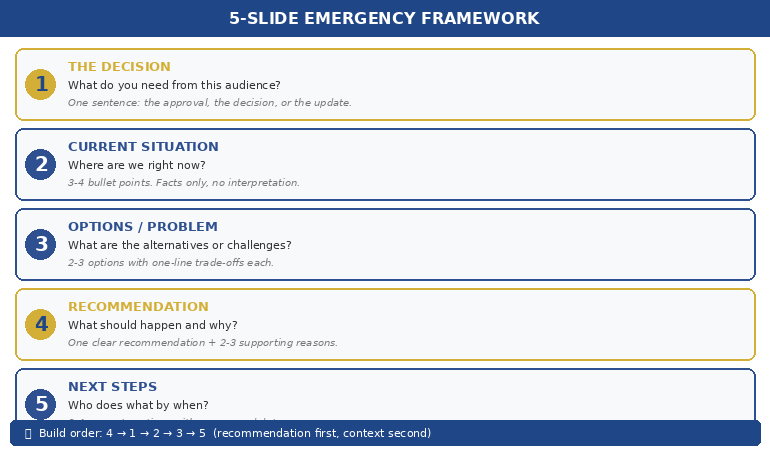
A first 48-hour data breach presentation should be short, structured, and honest about its own incompleteness. Four slides — used well — is the right length for this briefing. Here is what each slide should contain.

Slide 1: Situation Summary

One headline sentence describing the incident. Date and time of discovery. Systems or data categories believed to be affected. Current status of the incident (contained, partially contained, ongoing). This slide should take under two minutes to present. It is the anchor for everything that follows.

Slide 2: Known / Not Yet Known

A simple two-column layout. On the left: what is confirmed. On the right: what is under investigation, with the expected timeline for clarity. This is the most important slide in the deck. It demonstrates intellectual honesty, shows that the investigation is structured and progressing, and prevents the board from drawing conclusions based on incomplete information. Do not pad the “known” column. Boards are experienced enough to spot it.

Slide 3: Immediate Response Actions

A chronological list of the steps taken since discovery — systems isolated, external forensic firm engaged, legal counsel notified, ICO notification window tracked, customer communications team on standby. Each action should have an owner and, where relevant, a timestamp. This is your evidence that the organisation is not in panic mode. It shows structure and accountability.

Slide 4: Next Steps and Communication Plan

Who will be notified, in what order, and by when. The date and format of the next board update. Any decisions the board needs to make today — and only decisions the board genuinely needs to make today. This slide should close with a single clear statement of what you are asking the board to do or approve. If you need nothing from them at this stage other than awareness, say that explicitly.

For guidance on how to structure executive-level communication more broadly, the framework in this guide to executive presentation structure applies directly to crisis briefings — particularly the principle of leading with the decision or action required rather than the background narrative.

Presenting With Incomplete Information

The hardest part of any crisis presentation is not knowing what to say. It is knowing how to say what you do not know in a way that preserves credibility and maintains the trust of the room.

Most senior executives are trained — formally or culturally — to have answers. Walking into a board meeting without full information feels like a failure, even when it is simply the reality of an ongoing incident investigation. The instinct to compensate by over-qualifying, hedging every sentence, or filling gaps with speculation is understandable. It is also counterproductive.

There is a significant difference between “We don’t know” (which sounds like confusion) and “We don’t yet know, and here is how and when we will find out” (which sounds like control). The second formulation is almost always available, and almost always more effective. Every gap in your knowledge should be accompanied by a timeline and an owner. This is not spin — it is accurate representation of how incident investigations actually work.

Your physical presence matters in this room, particularly given the emotional atmosphere that typically surrounds a breach disclosure. The board will be watching closely — not just for what you say but for whether you appear in command of the situation. How you use eye contact during a high-pressure presentation can significantly affect how your message lands: deliberate, calm eye contact signals authority, while rapid or avoidant eye movement can read as evasiveness even when you are being entirely transparent.

Handling questions you cannot answer is a distinct skill. A direct, simple response is always better than a lengthy deflection. “I don’t have that figure yet — I expect to have it by Thursday morning, and I’ll update you immediately when I do” is a complete answer. It respects the question, is honest about the limitation, and commits to a specific action. It does not require you to apologise for the gap.

Be careful with language that inadvertently implies certainty you do not have. “It appears that no financial data was accessed” means something very different from “We have confirmed that no financial data was accessed.” The former is appropriate early in an investigation. The latter should only be used when it is true. Boards — and regulators — will notice the distinction.

One further practical note: keep a record of what you said in each board session during a live incident. As information develops and your briefings evolve, you need to be able to demonstrate that your communications were consistent and that any changes to your position were driven by new evidence, not by a desire to manage perception.

The Executive Slide System includes frameworks and AI prompt cards specifically designed to help you build a clear, structured presentation quickly — useful when you have very little time and very high stakes.

The Regulatory Notification Presentation

Where a breach is notifiable to the ICO — or, in a cross-border incident, to multiple data protection authorities — there is often a secondary presentation requirement: briefing the board on the regulatory notification before it is submitted, and in some cases briefing regulators directly.

The board briefing prior to regulatory notification is structurally similar to the initial crisis briefing but with an additional dimension: the board needs to understand and, in most organisations, formally note or approve the decision to notify. This meeting should not be the first time the board hears the details of the breach. It should be the meeting at which they receive the full picture and confirm the regulatory approach.

Your presentation at this stage should include a summary of the forensic findings to date; the legal basis for the notification decision; the proposed content of the notification (or the notification itself, if complete); any customer communication that will accompany or follow the regulatory notification; and the proposed timeline for all of the above.

Where regulators themselves request a direct briefing — which is more common in sectors such as financial services and healthcare — the communication principles are similar but the audience is different. Regulators are interested in the facts, your assessment of harm to data subjects, the steps taken to contain and remediate the breach, and the measures being put in place to prevent recurrence. Tone matters: calm, factual, and forward-looking is almost always more effective than defensive or apologetic.

The structure of the data breach presentation you give to regulators should follow the same logical flow as your board presentations: situation, response, forward plan. Regulators are experienced with breaches and will assess your organisation’s competence in part by how well you understand and can articulate your own incident. A disorganised, inconsistent, or clearly improvised presentation will raise concerns that go beyond the incident itself.

Finally, consider the sequencing carefully. In most cases the correct order is: board first, then regulator, then affected individuals (if required under UK GDPR Article 34), then broader disclosure if applicable. Deviations from this sequence — particularly if the board learns about a regulatory notification from the ICO rather than from their own leadership team — can cause lasting damage to the relationship between board and management that outlasts the incident itself.


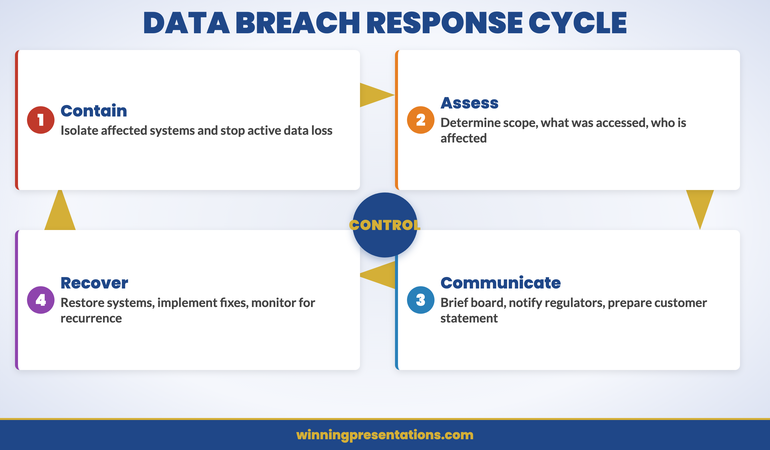
Cycle infographic showing the data breach response cycle with four phases: Contain, Assess, Communicate, and Recover

When the Stakes Are Highest, Structure Is Everything

Clarity under pressure is a skill — and like any skill, it is built in advance. The Executive Slide System gives you the tools to structure a compelling, credible executive presentation quickly, whether you have two weeks to prepare or two hours.

Get the Executive Slide System → £39

Frequently Asked Questions

How long should a board data breach presentation be in the first 48 hours?

At this stage, shorter is almost always better. A four-slide deck covering the situation summary, the known and not-yet-known, the immediate response actions, and the next steps and communication plan is the right length for a first 48-hour briefing. The goal is clarity and control, not comprehensiveness. The board will have questions — leave time for those. A presentation that runs for 40 minutes before questions are allowed creates frustration in an already pressured room.

What should I say when the board asks a question I cannot yet answer?

Answer directly, without hedging or over-qualifying. A simple format works well: “I don’t have that information yet. We expect to have it by [specific date/time], and [named person] is responsible for that part of the investigation. I’ll update the board as soon as we do.” Resist the temptation to speculate or to soften the uncertainty with language that implies more knowledge than you have. Boards respond well to honest precision and poorly to evasion, even well-intentioned evasion.

Do I need slides for a crisis presentation, or can I present verbally?

Slides are strongly advisable, even in a crisis — particularly for a board audience. They give the board a visual anchor, ensure consistency of information across multiple attendees, and create a record of what was presented and when. A brief, well-structured deck signals preparation and control. If slides genuinely cannot be produced in time, a one-page written summary distributed before the meeting achieves some of the same benefit. Presenting entirely verbally in a high-stakes crisis briefing places significant demands on your delivery and makes it harder for the board to retain and act on the information.

Get practical executive communication advice, weekly

The Winning Edge is a short, practical newsletter for senior leaders who want to communicate with more clarity and confidence — in the boardroom, in crisis moments, and in every high-stakes conversation in between. No fluff. No filler. Just ideas you can use.

Subscribe to The Winning Edge →

Not ready for the full system? Start here instead: download the free Executive Presentation Checklist — a one-page framework for structuring any high-stakes board presentation.

About the author: Mary Beth Hazeldine is a presentation coach and the founder of Winning Presentations. She works with senior leaders and executives on how to communicate with clarity and authority in high-stakes environments — including board briefings, regulatory meetings, and crisis situations. She is the creator of the Executive Slide System and writes The Winning Edge newsletter.

04 Apr 2026
Executive presenting a vendor selection pitch to a procurement committee in a modern glass boardroom, professional corporate photography

Vendor Selection Presentation: How to Win the Final Shortlist Meeting

A vendor selection presentation is not a product demonstration. It is a risk-reduction exercise for the buying committee. The team that wins the final shortlist meeting is rarely the one with the most features or the lowest price—it is the one that makes the decision feel safe. Here is how to structure your slides so the room chooses you with confidence.

Chiara had been through six months of relationship building, two discovery workshops, and a pilot programme that generated measurable results. Her company was one of three vendors on the final shortlist for a £2.8 million enterprise contract. She walked into the selection meeting with a forty-slide deck that recapped every feature, every integration point, every case study. The procurement lead stopped her at slide twelve. “We’ve seen the capabilities. What we need to understand is what happens in month three when our legacy system migration stalls and your implementation team is stretched across four other clients.” Chiara didn’t have a slide for that. She improvised an answer—competent but generic. The contract went to a competitor whose entire presentation had been built around three questions: what could go wrong, what would they do about it, and who specifically would be responsible. Chiara’s deck had been a capability showcase. The winner’s deck had been a risk mitigation plan. She never made the same mistake again.

Preparing for a vendor selection meeting? The Executive Slide System includes decision-focused templates and frameworks designed for high-stakes client presentations.

Why Buying Committees Choose Safety Over Capability

Every vendor on the final shortlist can do the job. That is why they are on the shortlist. By the time the selection committee sits down for the final vendor selection presentation, capability differentiation has already been assessed through RFP responses, reference calls, and pilot results. The committee is no longer asking “can they do it?” They are asking “what happens if it goes wrong?”

This shift matters because it changes the purpose of your presentation entirely. A capability presentation says: “Here is what we can do for you.” A risk-reduction presentation says: “Here is what we will do when things don’t go to plan.” The first invites comparison. The second invites trust. And trust is the currency that decides final shortlist meetings.

Buying committees are composed of people who will be held accountable for the decision. The IT director who champions a vendor that fails will carry that failure for years. The procurement lead who approves a contract that overruns will face scrutiny at every quarterly review. These individuals are not optimising for the best possible outcome. They are optimising for the least painful failure. Your presentation must speak to that psychology.

The structural implication is straightforward: lead with risk, not with capability. Show the committee that you have anticipated what could go wrong, that you have specific plans for each scenario, and that named individuals on your team are accountable for delivery. This reframes your vendor selection presentation from a sales pitch into a governance conversation—and governance conversations are where procurement committees feel most comfortable making decisions.

Structure Your Vendor Pitch for Decision-Ready Clarity

The Executive Slide System gives you presentation templates and decision frameworks—so your shortlist meeting earns approval by addressing risk before the committee raises it.

  • ✓ Presentation templates for executive and client scenarios
  • ✓ AI prompt cards to build structured decks fast
  • ✓ Framework guides for high-stakes decision presentations

Get the Executive Slide System → £39

Designed for executives preparing high-stakes presentations

The Three-Slide Framework That Wins Final Shortlists

The most effective vendor selection presentations can be distilled to three core slides that address the committee’s actual decision criteria. Everything else—features, architecture, pricing detail—is supporting material for Q&A.

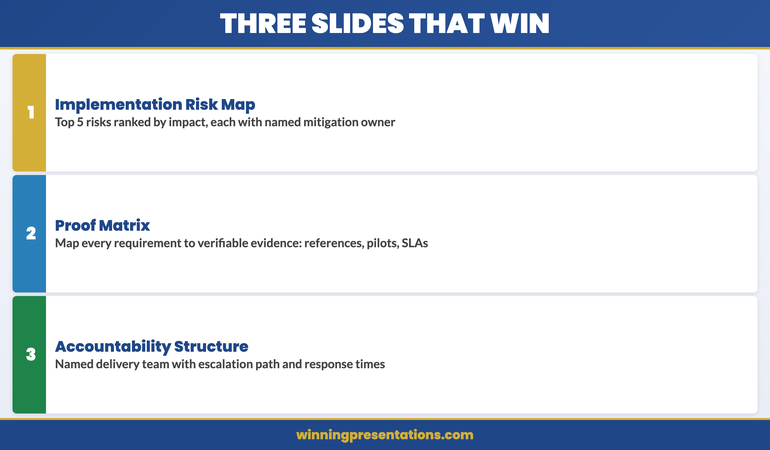
Slide 1: The Implementation Risk Map. List the five most likely risks to successful delivery, ranked by probability and impact. For each risk, provide a specific mitigation with a named owner from your team. This slide does more than demonstrate preparedness. It tells the committee you have done this before—because only experienced teams know which risks actually materialise. Generic risk statements like “timeline overrun” signal inexperience. Specific risks like “data migration from legacy ERP systems typically encounters schema mismatches in the first two weeks” signal expertise.

Slide 2: The Proof Matrix. Map each of the committee’s stated requirements to a specific piece of evidence: a reference client, a pilot result, a benchmark metric, or a contractual commitment. The key word is “specific.” Claiming you have “extensive experience in financial services” is a feature. Stating that “Zurich Financial completed their implementation in fourteen weeks against a sixteen-week target, with the project lead available as a reference” is proof. The proof matrix converts assertions into verifiable claims.

Slide 3: The Accountability Structure. Show who will be responsible for delivery. Not a generic organisational chart—a specific team structure with named individuals, their relevant experience, and their availability commitment. Include the escalation path: who the client calls when something goes wrong, and the guaranteed response time. This slide answers the committee’s most important unspoken question: “When this gets difficult, who will actually fix it?” For more on structuring your pipeline review presentations, that guide covers how sales leaders can track and present deal progress systematically.

Three-slide framework for winning vendor selection presentations showing risk map, proof matrix, and accountability structure

Building a Proof Architecture That Survives Scrutiny

Claims without evidence are noise in a vendor selection meeting. Procurement committees are trained to discount assertions and weigh verifiable proof. Your presentation needs a deliberate proof architecture—a systematic approach to backing every significant claim with evidence the committee can independently verify.

The hierarchy of proof in procurement is consistent across industries. Contractual commitments carry the most weight—service level agreements, penalty clauses, and performance guarantees that create financial accountability. Reference calls rank second—direct conversations with comparable clients who can describe their actual experience. Pilot results rank third—measurable outcomes from work you have already done for this specific client. Case studies and credentials rank lowest—useful for context but insufficient for decision-making.

Structure your evidence accordingly. For every critical requirement, present the highest-ranking proof available. If you can offer a contractual guarantee, lead with it. If your strongest evidence is a reference client, prepare that client for a follow-up call and state this explicitly in the presentation: “Our reference contact at [company] is available this week for a direct conversation.” Offering the committee immediate access to verification demonstrates confidence. Promising to “arrange references after the meeting” signals that you are still preparing your case.

The proof architecture also protects you from the most common selection meeting trap: the hypothetical scenario. Committees will test vendors with questions like “What would you do if our data migration took three times longer than planned?” A proof-based response references a specific instance where you managed a similar challenge: “When we implemented at [comparable client], the initial data migration estimate was twelve weeks. Actual migration took nineteen weeks due to legacy schema complexity. Here’s how we managed the overrun without impacting the go-live date.” Hypothetical answers lose to historical proof every time.

Presenting Through the Procurement Lens

The procurement representative in a vendor selection meeting has different priorities from the business sponsor. The sponsor cares about capability and outcomes. Procurement cares about contract risk, total cost of ownership, and vendor stability. Your vendor selection presentation must satisfy both audiences simultaneously, and the structure must make it obvious that you understand what procurement values.

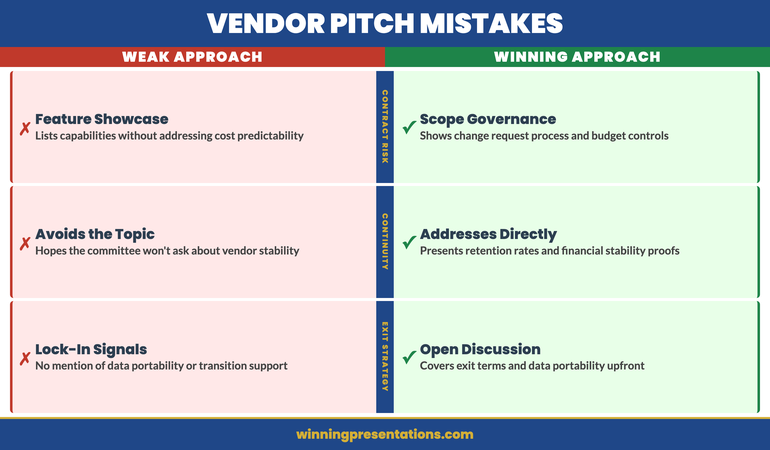
Three procurement priorities shape every shortlist decision. First, contract predictability: will the total cost match the proposal? Procurement teams are evaluated on budget adherence, not on the quality of the vendor they select. Address this by including a slide on scope governance—how you manage change requests, how you price out-of-scope work, and how you prevent the “scope creep to budget overrun” pattern that procurement has seen repeatedly from other vendors.

Second, vendor continuity: will your organisation still exist and still care about this client in three years? For established companies, this is straightforward—reference your tenure and client retention rates. For smaller firms, address it directly: explain your financial stability, your growth trajectory, and the contractual protections you offer for business continuity. Avoiding this topic does not make it disappear. It simply means the committee will discuss it after you leave the room, without your input.

Third, exit strategy: what happens if the relationship needs to end? Procurement professionals always want to know the exit terms before they sign. Include a brief slide on data portability, transition support, and contract termination terms. This may feel counterintuitive—discussing the end of the relationship before it begins—but it signals maturity and reduces the committee’s perception of lock-in risk. The vendor who openly discusses exit terms appears confident. The vendor who avoids the topic appears dependent. For more on handling client escalation presentations, that guide covers the communication approach when existing relationships face pressure.

If you’re structuring a vendor deck for the first time, the Executive Slide System provides the structural templates that ensure every slide addresses a decision criterion, not just a feature.

Procurement priorities in vendor selection presentations showing contract predictability, vendor continuity, and exit strategy

Closing the Decision Without Closing the Sale

The final minutes of a vendor selection presentation determine whether the committee leaves the room ready to decide or ready to deliberate further. Deliberation is not your friend. Every additional week of deliberation introduces new variables—budget freezes, stakeholder changes, competitor counter-offers—that reduce your probability of winning. Your closing must create the conditions for an immediate decision.

Do not ask for the business. The committee knows you want the contract. A closing that says “We’d love to work with you” adds no information and sounds like every other vendor. Instead, close with a decision architecture. Present the committee with a clear next step that is easy to say yes to: “We propose a two-week contract review period, with our legal team available for mark-up sessions starting Monday. If the committee is aligned on vendor selection today, we can have a signed agreement within three weeks.”

This framing works because it removes the committee’s biggest friction point: the gap between “we’ve decided” and “we’ve signed.” By presenting a specific, time-bounded implementation pathway, you convert the decision from abstract to concrete. The committee is no longer voting on whether they like your company. They are agreeing to a specific next step with a defined timeline.

End with a single summary slide that restates three things only: the business outcome you will deliver, the named person who will be accountable, and the proposed timeline to value. No feature recaps, no benefit lists, no “why us” statements. The summary exists to give the committee a clear, simple framework for their deliberation. When the chair turns to the room after you leave and asks “What do we think?”—your summary slide should be the frame through which they discuss their decision. If it is clear enough, they’ll use your language. And when a committee uses your language to discuss the decision, you have already won. For guidance on structuring the contract renewal presentation that follows a successful vendor selection, that guide covers the annual review framework that retains long-term clients.

Win the Shortlist Meeting With a Decision-Ready Deck

Stop presenting features. Start presenting risk mitigation. The Executive Slide System gives you the templates and frameworks to build vendor presentations that close—for £39.

Get the System Now → £39

Frequently Asked Questions

How long should a vendor selection presentation be?

The core presentation should be fifteen to twenty minutes, leaving forty to fifty minutes for committee questions. Most selection meetings are scheduled for sixty to ninety minutes. The committee has already reviewed your written proposal—they do not need a comprehensive recap. A shorter presentation signals confidence and leaves more time for the governance-style Q&A where decisions actually form. Aim for ten to twelve slides: three core slides (risk map, proof matrix, accountability structure), supported by a brief context opener, a financial summary, and a decision-close slide.

Should I address competitor weaknesses in a vendor presentation?

Never directly. Committees view negative selling as a sign of insecurity. Instead, address competitor weaknesses indirectly by strengthening your own proof in the areas where competitors are weak. If you know a competitor lacks implementation capacity, emphasise your named delivery team and their availability. If a competitor has no comparable reference clients, lead with your proof matrix showing specific, verifiable references. The committee will draw the comparison themselves—and a conclusion they reach independently is far more persuasive than one you hand them.

What is the biggest mistake vendors make in final shortlist presentations?

Presenting the same deck they used for the initial pitch. The audience, the context, and the decision criteria have all evolved since the first meeting. The initial pitch was about establishing capability and generating interest. The final shortlist meeting is about reducing risk and facilitating a decision. Vendors who recycle their pitch deck force the committee to do the translation work—mapping features to risks, promises to proof, and enthusiasm to accountability. The vendor who builds a presentation specifically for the selection committee’s decision framework demonstrates that they understand the buying process, not just the product.

The Winning Edge

Weekly insights on executive presentations, slide strategy, and boardroom communication.

Subscribe Free

Building a vendor pitch deck? Download the Executive Slide System checklist for a quick framework to structure your next shortlist presentation.

If your vendor relationship also requires managing internal cost pressures, our guide to cost reduction presentations covers the slide architecture that frames budget cuts as strategic investment.

About the author

Mary Beth Hazeldine, Owner & Managing Director, Winning Presentations. With 24 years of corporate banking experience at JPMorgan Chase, PwC, Royal Bank of Scotland, and Commerzbank, she advises executives across financial services, healthcare, technology, and government on structuring presentations for high-stakes funding rounds and approvals.

04 Apr 2026
Finance executive presenting a strategic cost reduction plan to the executive committee in a corporate setting, professional editorial photography

Cost Reduction Presentation: How to Frame Budget Cuts as Strategic Investment

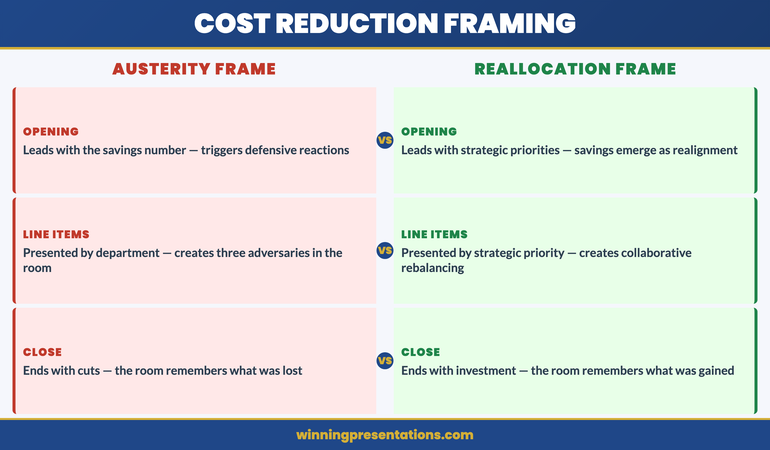
A cost reduction presentation fails the moment the audience hears it as bad news. The executive who frames budget cuts as strategic reallocation—redirecting resources from diminishing returns to higher-yield investments—earns approval. The one who frames them as austerity earns resistance. Here is how to structure the slides that make savings feel like strategy.

Kwadwo had been asked to present a £3.2 million reduction to the operations budget at the quarterly executive committee meeting. His first draft opened with a waterfall chart showing where every pound would be removed—headcount, travel, external consultants, software licences. He rehearsed it on a Tuesday evening, and his wife—a former operations director herself—listened from the kitchen doorway. “You’ve just told twelve senior people that everything they built last year was wasteful. They’ll spend the entire meeting defending their budgets instead of approving yours.” He rewrote the presentation overnight. The new version opened with a single slide showing the three strategic priorities the CEO had announced in January, followed by a comparison: current spend allocation versus the allocation required to fund those priorities. The £3.2 million wasn’t a cut—it was a reallocation from activities that no longer served the stated strategy to investments that would accelerate it. The executive committee approved the plan in forty minutes. The original version would have triggered forty minutes of arguments.

Building a cost reduction deck for the executive committee? The Executive Slide System includes strategic reframing templates and decision frameworks for high-stakes finance presentations.

The Reallocation Frame: Why Language Determines Approval

The difference between a cost reduction presentation that earns swift approval and one that triggers prolonged debate is almost entirely a matter of framing. When you present cuts, every line item has a defender in the room. When you present reallocations, every line item has a strategic justification that the audience has already endorsed.

The reallocation frame works because it borrows authority from decisions the executive team has already made. If the CEO announced three strategic priorities at the start of the year, your savings plan should map directly to those priorities. The question shifts from “Why are you cutting my budget?” to “How does our current spend support the strategy we all agreed to?” The first question is personal and adversarial. The second is structural and collaborative.

Build your opening slide around a simple visual: two columns. The left column shows current spend by category. The right column shows the spend allocation required to fund the stated strategic priorities. The gap between the two is your savings target. This single slide does more persuasive work than any waterfall chart because it makes the cuts feel inevitable rather than arbitrary. The audience sees the misalignment and reaches the conclusion before you state it.

Avoid the trap of opening with the savings number. Leading with “We need to find £3.2 million in savings” puts the audience on the defensive immediately. Leading with “The board approved three strategic priorities in January—here’s what it costs to fund them, and here’s where we’re currently spending that money on activities that predate the strategy” creates alignment before the number appears. The savings figure should arrive as a logical consequence of strategic alignment, not as an opening demand.

Frame Your Cost Reduction as Strategic Reallocation

The Executive Slide System gives you reframing templates and decision frameworks—so your savings presentation earns approval instead of resistance.

  • ✓ Presentation templates for executive finance scenarios
  • ✓ AI prompt cards to build structured decks fast
  • ✓ Framework guides for high-stakes decision presentations

Get the Executive Slide System → £39

Designed for executives preparing high-stakes presentations

Connecting Every Saving to a Strategic Priority

The most common failure in cost reduction presentations is presenting savings by department or cost category. When you show a slide that reads “Marketing: -£400K / IT: -£600K / Operations: -£1.2M,” you’ve created three adversaries in the room. The marketing director, the CTO, and the COO are now calculating what they’ll lose, not what the organisation will gain.

The structural fix is to present savings by strategic priority, not by cost centre. Instead of “IT reduction: £600K,” present it as “Digital transformation acceleration: £600K redirected from legacy infrastructure maintenance to cloud migration.” The number is identical. The emotional response is entirely different. The CTO is no longer defending a cut—they’re participating in an investment.

For each savings line, build a three-column structure: the current spend being redirected, the strategic priority it now funds, and the expected return. This converts every line from a loss into an investment thesis. The executive committee is no longer approving cuts. They’re approving a portfolio rebalance. And portfolio rebalancing is the language of strategy, not austerity.

This approach also provides natural defence against the inevitable question: “Why this line item and not another?” When every saving is connected to a strategic priority, the answer is structural rather than political: “We redirected this spend because it was the clearest misalignment with the priorities the board approved in January.” This is a far stronger answer than “We chose this because it had the least operational impact,” which implies the decision was arbitrary and could have been made differently. For more on structuring restructuring presentations that maintain team trust, that guide covers the communication architecture for organisational change.

Strategic reallocation framework for cost reduction presentations showing current spend versus strategic priority alignment

Addressing the People Impact Without Losing the Room

If your cost reduction includes headcount changes, the room will be thinking about it from the moment you start speaking—regardless of which slide you put it on. Acknowledging the people impact early, directly, and with a clear plan is essential. Burying it in the appendix or saving it for Q&A signals avoidance, and avoidance destroys credibility in executive meetings.

The approach that works is to dedicate one slide—not more—to the people impact framework. State three things: the scope (how many roles are affected), the support plan (redeployment, retraining, enhanced severance), and the timeline (when affected individuals will be informed, by whom, and through what process). This slide should be factual, respectful, and brief. It is not the place for emotional language or corporate euphemisms. “We are reducing thirty-two roles across three departments” is direct and honest. “We are right-sizing our organisation to unlock strategic agility” is evasive and will irritate everyone in the room.

Position this slide after the strategic alignment section and before the implementation timeline. This placement matters. By the time the audience reaches the people impact slide, they’ve already accepted the strategic logic for the reallocation. The question is no longer “should we do this?” but “how do we do this responsibly?” That’s a much more constructive conversation.

If the cost reduction does not involve headcount changes, say so explicitly. A single line—“This reallocation programme does not affect any current roles”—removes the concern that has been lurking in every audience member’s mind since the meeting invitation landed. For guidance on the specific communication challenges when reductions do involve job losses, our guide to redundancy announcement presentations covers the full communication sequence from board approval to individual notifications.

The Implementation Timeline That Builds Confidence

Executive committees approve cost reductions more readily when they can see exactly how and when the savings will materialise. An implementation timeline that shows quarterly milestones—with specific savings targets at each stage—converts an abstract number into a credible delivery plan.

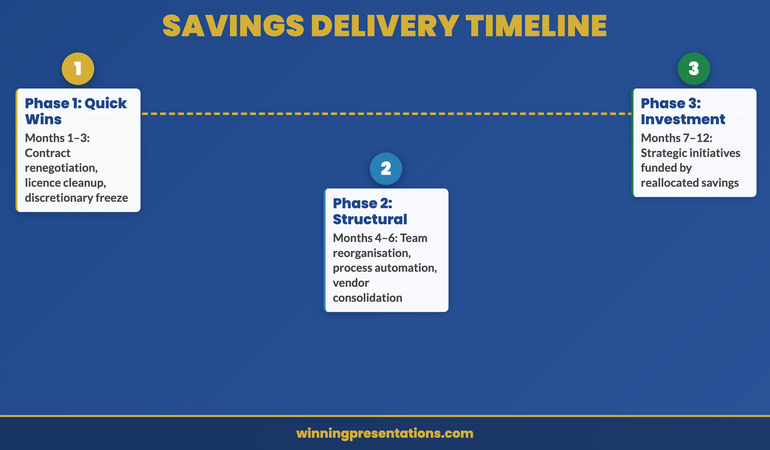
Structure the timeline in three phases. Phase one (months one to three): quick wins that demonstrate momentum. These are savings that require no structural change—contract renegotiations, discretionary spend freezes, duplicate licence elimination. Showing early results builds organisational confidence that the plan is achievable. Phase two (months four to six): structural changes that require planning and coordination—team reorganisations, process automation, vendor consolidation. Phase three (months seven to twelve): strategic investments that the savings fund—the initiatives that connect the cost reduction to the organisation’s growth agenda.

The three-phase structure is important because it tells a story of progression: from discipline to transformation to growth. The committee sees not just where money is being saved, but where it is going. This is the final piece of the reallocation frame. The cost reduction presentation doesn’t end with savings—it ends with investment. And investment is the language of leadership.

If you’re preparing a finance presentation that requires this kind of strategic reframing, the Executive Slide System includes the structural templates that ensure every slide advances the decision, not just the data.

Three-phase implementation timeline for cost reduction presentations showing quick wins, structural changes, and strategic investments

The Governance Slide: Tracking Savings Delivery

The final slide before Q&A should address the question every executive committee member is silently asking: “How will we know this is working?” Present a governance framework that specifies four elements: what will be measured, how often it will be reported, who owns the delivery, and what triggers escalation.

A simple tracking structure works best. Monthly reporting on savings realisation versus target, with a RAG status for each savings line. Quarterly reviews at the executive committee to assess whether the reallocation is achieving its strategic objectives—not just whether the number has been met. An escalation protocol that defines the threshold at which a shortfall triggers a revised plan rather than a request for more time.

This governance slide achieves two things. First, it demonstrates that you’ve thought beyond the approval—you’ve planned the delivery. Second, it gives the committee a reason to approve today rather than requesting further analysis. The governance framework provides the safety net that allows the committee to say yes without feeling they’ve relinquished oversight. In crisis communication contexts where the financial situation demands urgent board-level transparency, our guide to presenting a data breach to the board demonstrates similar governance framing under pressure.

Build a Cost Reduction Deck the Committee Approves Fast

Stop presenting cuts. Start presenting strategic reallocation. The Executive Slide System gives you the templates and frameworks to build savings presentations that earn approval—for £39.

Get the System Now → £39

Frequently Asked Questions

Should I present the total savings number on the first slide?

No. Leading with the savings number triggers defensive responses before you’ve established the strategic logic. Open instead with the strategic priorities the organisation has already approved, then show the misalignment between current spend and those priorities. The savings number should arrive as a natural consequence of strategic realignment—typically on the third or fourth slide. By that point, the audience has already accepted the rationale, and the number feels like a logical outcome rather than an arbitrary target.

How do I handle pushback from department heads whose budgets are being cut?

Anticipate it by engaging department heads individually before the presentation. Share the strategic framing privately and ask for their input on implementation—not on whether the cuts should happen. This converts potential adversaries into collaborators. In the meeting itself, if pushback occurs, redirect to the strategic alignment frame: “The question isn’t whether marketing should keep this budget. The question is whether this spend serves the priorities we all committed to in January.” This makes the challenge about strategy, not territory.

What if the cost reduction was mandated from above with no strategic framing?

Create the strategic frame yourself. Even a top-down directive to “reduce costs by fifteen percent” can be connected to organisational priorities. The CEO didn’t mandate the cut in a vacuum—there’s a revenue shortfall, a margin pressure, or a board directive driving it. Find that connection and build your presentation around it. If you can’t identify a strategic link, frame the savings as funding a specific initiative: “This reallocation creates the capacity to invest in [initiative] without requesting additional budget.” The committee will respond better to “we’re funding growth” than “we’re following orders.”

The Winning Edge

Weekly insights on executive presentations, slide strategy, and boardroom communication.

Subscribe Free

Preparing a savings proposal for the board? Download the Executive Slide System checklist for a quick framework to structure your cost reduction presentation.

If your cost reduction programme also involves presenting to external stakeholders or pitching for new vendor contracts, our guide to vendor selection presentations covers the deck architecture that wins final shortlist meetings.

About the author

Mary Beth Hazeldine, Owner & Managing Director, Winning Presentations. With 24 years of corporate banking experience at JPMorgan Chase, PwC, Royal Bank of Scotland, and Commerzbank, she advises executives across financial services, healthcare, technology, and government on structuring presentations for high-stakes funding rounds and approvals.
03 Apr 2026
Senior executive presenting M&A deal rationale to corporate board members in a modern glass boardroom with presentation screen showing financial charts

The M&A Presentation Structure That Earns Board Approval in One Meeting

A mergers and acquisitions presentation succeeds or fails before the first slide appears. The board’s decision hinges not on the financial model—they’ve seen that in the papers—but on how clearly you frame the strategic rationale, the integration risks you’ve anticipated, and the governance questions you’ve already answered. Here’s how to structure the deck that moves the room to approval.

Elara had spent four months leading the corporate development team through due diligence on a mid-market logistics acquisition. The numbers were compelling—a 22% margin uplift, geographic expansion into three underserved markets, and a management team willing to stay through integration. She’d built a seventy-slide deck that documented every financial assumption. Walking into the boardroom, she placed her laptop on the table and opened the presentation. The chair stopped her before slide three. “Elara, we’ve read the papers. Tell us what keeps you awake about this deal.” She paused. Then she closed the laptop and spoke for twelve minutes about three integration risks the data couldn’t fully resolve: cultural alignment between the two organisations’ sales teams, a key client contract with a change-of-control clause, and the target’s dependency on a single technology vendor. The board approved the acquisition that afternoon—not because the slides were persuasive, but because Elara demonstrated she understood where the real governance risk sat.

Preparing an M&A presentation for the board? The Executive Slide System includes board-ready templates and decision frameworks designed for high-stakes deal presentations.

The Strategic Rationale Slide: Why This Deal, Why Now

Every mergers and acquisitions presentation must open with a single slide that answers two questions: why this target, and why now. Not why the target is available, not why the price is attractive, not why the advisory team recommends proceeding. The board needs to understand how this acquisition connects to the strategic plan they’ve already approved. If the deal doesn’t advance a priority the board has already endorsed, you’re asking them to approve a new strategy and a new acquisition simultaneously. That’s two governance decisions in one meeting, and boards resist it instinctively.

The strategic rationale slide should contain no more than four elements: the specific strategic objective this deal accelerates, the capability or market gap it fills, the competitive window that makes timing critical, and the alternative if the board declines. That last element—the cost of inaction—is what separates a compelling rationale from a descriptive one. Boards are not persuaded by opportunity alone. They are moved by the consequence of missing it.

Frame the rationale in terms the board already uses. If the strategic plan references “geographic diversification,” your slide should use that exact phrase—not a paraphrase. If the annual risk assessment identified “single-market dependency,” connect the acquisition to that risk directly. You are not introducing a new argument. You are showing the board that this deal is the logical next step in a strategy they’ve already endorsed.

Where presenters frequently go wrong is leading with the target’s financial attractiveness. Revenue multiples, EBITDA margins, and synergy projections belong later in the deck. The first slide is about governance alignment: does this deal fit our stated direction? If the answer is clearly yes, the rest of the presentation is about execution. If the answer is ambiguous, no amount of financial modelling will compensate.

⭐ Maven Flagship — Executive Buy-In

Build the case your stakeholders can’t dismiss

The Executive Buy-In Presentation System is a self-paced framework — 7 modules walking you through the structure, psychology, and delivery that get senior approval. Monthly cohort enrolment, optional recorded Q&A calls.

£499, lifetime access.

Enrol in the Executive Buy-In System →

Framing Integration Risk Without Undermining the Deal

The integration risk section is where most M&A presentations either build or destroy credibility. Present too many risks and the board questions your conviction. Present too few and the board questions your judgement. The calibration is precise: you need to show that you’ve identified and categorised every material risk, then demonstrate that the mitigation plan for each one is specific, costed, and owned by a named individual.

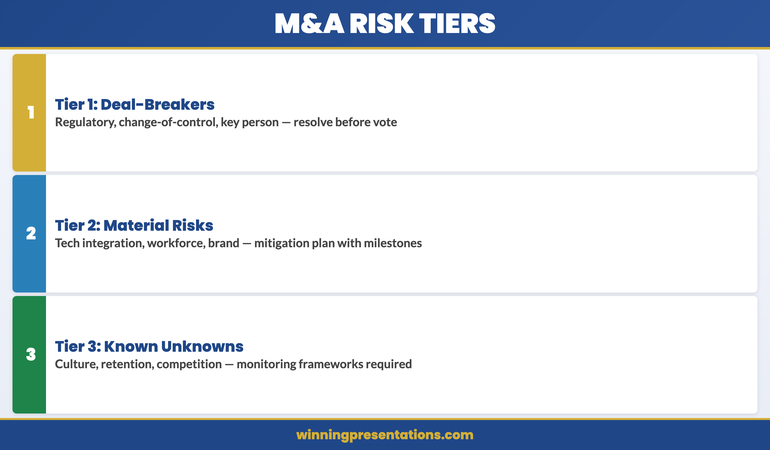
Structure integration risks in three tiers. Tier one risks are deal-breakers if unresolved—regulatory clearance, change-of-control clauses on critical contracts, key person dependencies. These must be addressed before the board votes. Tier two risks are material but manageable—technology integration timelines, workforce harmonisation, brand migration. These require a mitigation plan with milestones. Tier three risks are known unknowns—cultural friction, customer retention during transition, competitor response. These require monitoring frameworks, not mitigation plans.

The slide discipline here is critical. One slide per tier. Each risk on the slide should have three columns: the risk, the mitigation, and the owner. Not a paragraph of explanation—a single line per risk. Boards process risk visually, not narratively. A wall of text about integration challenges reads as uncertainty. A structured table reads as preparedness.

What Elara understood instinctively—and what many corporate development leaders miss—is that discussing integration risk openly is not a sign of weakness. It’s a signal that you’ve stress-tested the deal. Boards approve acquisitions when they believe the presenting team has anticipated what could go wrong and has a plan. They reject acquisitions when they suspect the presenting team is too enthusiastic to see the risks clearly.

Three-tier integration risk framework for M&A board presentations showing deal-breaker, material, and known-unknown risk categories

The Financial Summary Board Members Actually Read

Your due diligence team has built a financial model with dozens of scenarios, sensitivity analyses, and synergy waterfall charts. The board will not read it in the meeting. They may have glanced at it in the board papers. What they will focus on during your mergers and acquisitions presentation is one slide: the deal economics summary.

This slide needs six numbers and nothing else: the enterprise value, the equity consideration, the implied multiple (and the comparable range), the expected synergy value (net of integration costs), the payback period, and the accretion or dilution impact in year one. These six numbers allow every board member—regardless of their financial fluency—to assess whether the deal makes economic sense relative to the strategic rationale you’ve already presented.

Resist the temptation to include the full synergy bridge, the DCF assumptions, or the sensitivity matrix on this slide. Those belong in the appendix for board members who want to interrogate the model during Q&A. The summary slide exists to establish economic credibility in under sixty seconds. If a board member needs more detail, they’ll ask. If they don’t ask, the summary was sufficient.

A useful benchmark: if you can’t explain the financial case in three sentences that match the six numbers on the slide, the model is too complex for governance-level decision-making. Simplify until the strategic logic and the financial logic align in a single narrative. For a deeper look at how to structure due diligence presentation slides, that guide covers the full deck architecture from term sheet to board vote.

Pre-Empting the Three Governance Questions Every Board Asks

Regardless of the target, the sector, or the deal size, three governance questions appear in virtually every board discussion of an acquisition. If your presentation addresses these proactively, the Q&A session shifts from interrogation to confirmation. If you leave them for the board to raise, you’re playing defence.

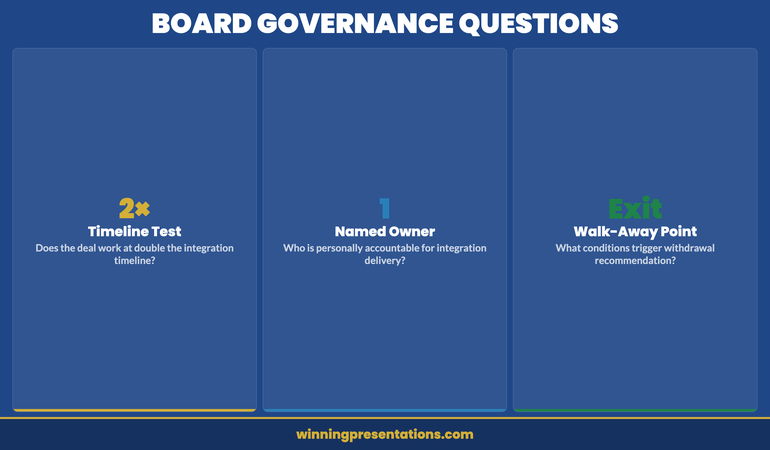
Question 1: “What happens if integration takes twice as long as planned?” This is a question about resilience, not pessimism. Build one slide that shows the financial impact of a 24-month integration timeline versus your base case 12-month scenario. Show what changes in terms of synergy realisation, cash flow, and the point at which the deal becomes value-neutral. If the deal still makes strategic sense at double the integration timeline, your governance case is robust. If it doesn’t, you need a different mitigation argument.

Question 2: “Who is accountable for integration delivery?” Boards want a name, not a committee. Your presentation should include a single slide with the integration governance structure: the named integration lead, the reporting line to the board, the milestone framework, and the escalation triggers. Abstract governance charts with dotted lines and matrix structures do not satisfy this question. A board member who asks “who is accountable?” wants to hear a first name and a surname, and they want to know that person has the authority and the bandwidth to deliver.

Question 3: “What’s our walk-away point?” Every acquisition has a price at which the deal no longer makes strategic sense. Your presentation must include a clear statement of the walk-away threshold—the valuation, the regulatory condition, or the due diligence finding that would cause you to recommend withdrawal. Boards respect this discipline. It demonstrates that you’re advising the board, not advocating for a deal you want to close. The investor relations presentation format guide covers similar governance framing for shareholder-facing communications.

Addressing these three questions proactively does more than save time. It signals to the board that you understand governance is about protecting downside, not celebrating upside. That distinction is what separates M&A presentations that earn approval from those that earn further diligence requests.

If you’re building an acquisition deck for the first time, the Executive Slide System provides the structural templates that ensure governance alignment is built into every slide, not bolted on afterwards.

Three governance questions every board asks in M&A presentations covering integration timeline, accountability, and walk-away point

Structuring the Deal Timeline and Decision Architecture

The deal timeline slide is not a Gantt chart. It is a decision map. Each milestone on the timeline should correspond to a board decision point—not a workstream activity. The board doesn’t need to know when the data room closes or when HR harmonisation workshops begin. They need to know when they’ll be asked to make a binding commitment, when regulatory filing occurs, when the shareholder vote is scheduled, and when completion is expected.

Structure the timeline as a horizontal flow with four to six decision gates. At each gate, state the board action required: conditional approval, regulatory filing authorisation, final binding approval, or post-completion review. Between each gate, note the key dependency that must be resolved before the next decision. This gives the board a clear picture of their governance obligations over the deal lifecycle.

A common mistake is presenting the timeline as a fait accompli—as though the deal will inevitably proceed to completion. Boards resist this framing because it removes their governance role. Instead, frame each decision gate as a genuine checkpoint where the board has the authority and the information to proceed, pause, or withdraw. Even if you expect straightforward approval at each gate, the framing matters. It reassures the board that they’re governing the process, not rubber-stamping it.

Include a final slide that specifies the board action requested today. Not “approve the acquisition”—that’s the outcome, not the action. Instead: “Authorise management to proceed to binding due diligence and regulatory pre-filing, with final approval subject to [specific conditions].” This precision gives the board a clear governance mandate and protects them from the perception of having approved a deal prematurely.

Why Most M&A Presentations Lose the Board Before Slide Ten

The pattern is remarkably consistent across sectors. The corporate development team builds a comprehensive deck—thirty to fifty slides covering market analysis, competitive positioning, target financials, synergy detail, integration planning, and risk assessment. They present it sequentially, starting with market context. By slide eight, the chair interrupts. The conversation shifts to the three or four questions the board actually cares about. The remaining forty slides sit untouched.

This happens because most M&A presentations are structured as arguments—building a logical case from context to conclusion. Board presentations should be structured as decisions—starting with the conclusion and supporting it with targeted evidence. The board paper has already provided the argument. The presentation exists to address governance concerns, demonstrate preparedness, and request a specific action.

The structural fix is straightforward. Lead with the recommendation slide: “We recommend the board authorises [specific action].” Follow immediately with the strategic rationale slide. Then the deal economics summary. Then the integration risk framework. Then the governance questions you’ve pre-empted. Then the deal timeline with decision gates. Then the requested board action. That’s seven slides. Everything else is appendix material for Q&A.

If your mergers and acquisitions presentation cannot be delivered in seven slides and fifteen minutes, you’re presenting information, not facilitating a decision. Boards don’t reject deals because the presentation was too short. They reject deals because the presenter couldn’t distinguish between what the board needed to know and what the corporate development team wanted to share. The difference between these two is the difference between a board paper and a board presentation—and understanding when each is appropriate.

The seven-slide structure forces discipline. Every slide earns its place by answering a governance question. Every number connects to a strategic rationale. Every risk has a mitigation and an owner. If you can’t fit the case into seven slides, the deal logic isn’t clear enough yet—and that’s a signal worth heeding before you enter the boardroom.

Build an M&A Deck the Board Approves in One Meeting

Stop building fifty-slide decks the board won’t read. The Executive Slide System gives you the seven-slide governance framework, decision templates, and scenario guides that accelerate board approval—for £39.

Get the System Now → £39

FAQ: Mergers and Acquisitions Presentations

How many slides should an M&A board presentation have?

Seven core slides is the benchmark for governance-level M&A presentations: recommendation, strategic rationale, deal economics, integration risk framework, pre-empted governance questions, deal timeline with decision gates, and requested board action. Supporting detail—financial models, sensitivity analyses, market comparables—belongs in an appendix that board members can reference during Q&A. The core presentation should be deliverable in fifteen minutes, leaving the majority of the meeting for board discussion and governance scrutiny.

Should I present synergy projections in the main deck or the appendix?

The net synergy number belongs on the deal economics summary slide in the main deck—the board needs this to assess whether the acquisition price is justified. The detailed synergy waterfall, individual synergy line items, and the assumptions behind each projection belong in the appendix. Presenting synergy detail in the main deck invites line-by-line scrutiny that derails the governance conversation. Presenting only the net figure keeps the discussion at strategic level whilst giving financially oriented board members the option to probe deeper during Q&A.

What’s the biggest mistake in M&A presentations to the board?

Presenting the deal as though approval is a foregone conclusion. Boards govern by exercising independent judgement, and a presentation that reads as advocacy rather than governance advice triggers resistance. The fix is structural: include a clear walk-away threshold, present genuine alternative options (including “do nothing”), and frame every recommendation as “we advise the board to consider” rather than “we recommend the board approves.” This may sound like a semantic distinction, but it signals respect for the board’s governance role—and boards reward that respect with trust.

The Winning Edge

Weekly insights on executive presentations, slide strategy, and boardroom communication.

Subscribe Free

Building your first M&A deck? Download the Executive Slide System checklist for a quick framework to structure your acquisition presentation.

If your acquisition also involves managing stakeholder anxiety during organisational change, our guide to stakeholder change presentations covers the communication architecture that maintains trust through transition.

About the author

Mary Beth Hazeldine, Owner & Managing Director, Winning Presentations. With 24 years of corporate banking experience at JPMorgan Chase, PwC, Royal Bank of Scotland, and Commerzbank, she advises executives across financial services, healthcare, technology, and government on structuring presentations for high-stakes funding rounds and approvals.

02 Apr 2026
Non-executive director preparing for first board meeting in a modern corporate boardroom

Non-Executive Director Board Presentation: What to Prepare for Your First Meeting

Your first board meeting as a non-executive director is not a presentation you deliver—it’s a performance you shape. The difference between earning credibility and appearing out of your depth comes down to preparation strategy, not slide polish. Here’s what actually matters.

Annika arrived at her first board meeting as a newly appointed NED at a mid-cap technology firm feeling confident. She’d spent the previous week refining a ten-slide deck on her area of expertise—cybersecurity governance. She’d colour-coded the risk matrix, added trend analysis charts, even included a benchmarking comparison. Within two minutes of the chair opening the meeting, she realised her error. The board wasn’t waiting for a lecture. They were watching to see whether she understood the rhythm of governance, whether she listened before speaking, and whether her questions raised the calibre of discussion. Her perfect slides sat unopened whilst the chair moved straight to strategic priorities. Annika spent the first meeting listening, asking two precisely angled questions, and learning the board’s decision-making patterns. By month three, her contribution was so trusted that the board sought her perspective first on governance matters.

Already preparing for your first board? The Executive Slide System includes board-ready templates and scenario guides built for exactly this situation.

Why Most Non-Executive Directors Over-Prepare the Wrong Material

The instinct is understandable but misplaced. New NEDs often treat their first meeting like an audition. They prepare comprehensive presentations, position papers, or detailed briefings—everything they’d present in an executive role. But a non-executive director board preparation process is fundamentally different. The board chair and executive team have already synthesised the data. What the board needs from you is not information but perspective—independent assessment shaped by governance duty, not operational pressure.

Most first-meeting mistakes stem from confusing two separate preparation tracks: operational mastery and governance readiness. Operational mastery is deep subject knowledge. Governance readiness is understanding the board’s decision-making context, the strategic tensions in the room, and the questions that matter at board level. New NEDs frequently invest 80% of preparation energy in operational detail and 20% in governance positioning. This ratio is exactly backwards.

Consider what the chair is actually assessing during your first meeting. Are you asking questions that probe strategy rather than restate operational status? Can you spot the unspoken tensions between board members? Do you listen before you speak, or do you compete for airtime? Will you respect confidentiality and fiduciary duty? Can you challenge constructively without creating conflict? None of these signals come from a polished slide deck.

Master Your First Board Meeting as a Non-Executive Director

The Executive Slide System gives you board-ready templates, scenario guides, and decision-making frameworks—so your first contribution raises the quality of governance dialogue, not just fills airtime.

  • ✓ Board-ready presentation templates for governance updates
  • ✓ AI prompt cards to structure your governance perspective fast
  • ✓ Executive scenario guides for high-stakes board decisions

Get the Executive Slide System → £39

Designed for executives preparing high-stakes presentations

The Three Documents Every NED Must Read Before the Meeting

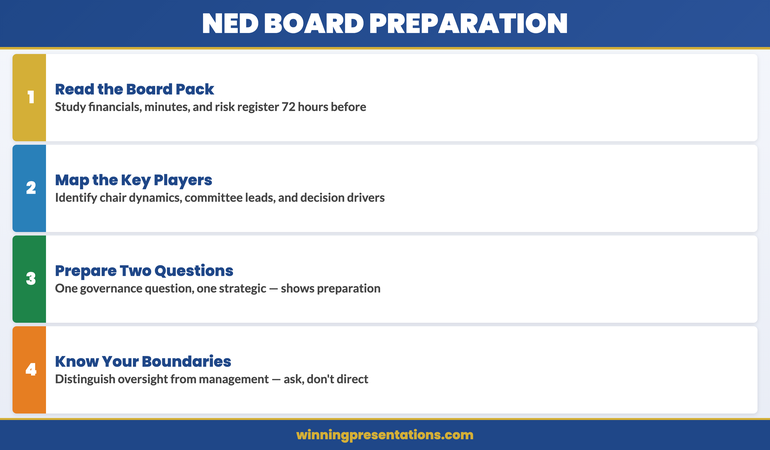
Board papers arrive in abundance. Most NEDs skim them. Smart ones prioritise ruthlessly. You need three documents, read thoroughly, before your first meeting. Everything else is supplementary.

Document 1: The Board Charter and Governance Framework. This defines your statutory and fiduciary responsibilities. Read it. Know it. Many NEDs skip this because it feels like compliance tedium. It’s not. The charter defines what “governance” actually means in your organisation—what decisions the board retains, which it delegates, where your scrutiny must be sharpest. You cannot ask intelligent governance questions without understanding these boundaries.

Document 2: The Last Three Board Minutes. Not to learn the detail, but to understand the rhythm and priorities. What topics consumed 80% of discussion time? What decisions took four meetings versus one? Where was there tension or disagreement? Where did the executives defer to the board for a decision? These patterns reveal where the real governance pressure sits. Your questions should align with these priorities, not drift into tangential areas.

Document 3: The Strategic Plan and Board Scorecard. The five-year strategy and the single-page metrics that the chair and executives track obsessively. You need to understand: What outcomes matter most? What are the three to four strategic risks the board is actively monitoring? What metrics would trigger a governance intervention? This becomes the lens through which you assess every board paper. A question about expense management that doesn’t connect to strategic risk is wasted airtime. A question that probes whether an initiative still aligns with strategy is governance.

These three documents take perhaps six to eight hours to read properly. That is your preparation. Not creating slides. Not drafting position papers. Reading, absorbing, and internalising the governance context.

Your First Board Contribution: When to Speak and When to Listen

The psychology of first impressions in the boardroom is unforgiving. Speak too much and you appear to lack confidence in your judgment—filling silence with noise. Speak too little and you appear uncertain of your role or value. Speak on the wrong topic and you reveal that you haven’t yet grasped what the board actually cares about.

Your first substantive contribution should come only after you’ve heard the full board discussion on a topic. Listen to how the chair frames the issue. Notice which executives are defensive and which are transparent. Observe which board members ask probing questions and which accept what they’re told. Then, when you speak, you’re adding to a conversation you understand, not inserting yourself into unfamiliar territory.

The first NED contribution that earns respect typically fits one of three patterns. First: you ask a clarifying question that surfaces an assumption the board hadn’t named. Not a challenge, not a directive—a genuine question that sharpens thinking. Second: you note a governance gap—something the board has discussed but not yet connected to fiduciary duty or risk policy. Third: you offer a perspective from your specific expertise that the internal team cannot, framed as context for the board’s decision rather than a recommendation.

Avoid at all costs: repeating what’s already been said, asking for information the board papers already provided, and offering opinions on operational detail. These signals tell the board that you’re not yet calibrated to governance level.

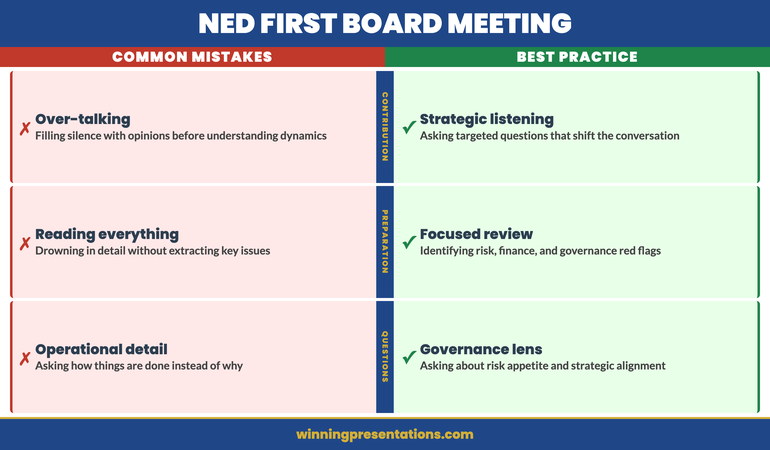
Comparison of common NED first board meeting mistakes versus best practice approaches across contribution,

Building a Board-Ready Slide for Your First Substantive Update

Eventually, you will have a governance topic to present—perhaps in month two or three, once you’ve established credibility. The slide discipline at board level is not what most executives expect. The mistake new NEDs make is assuming board presentations follow the same visual intensity as operational presentations. They don’t.

A board-ready slide is sparse by design. It contains a clear headline—usually a decision or governance question, not a topic name. It contains two to four data points that directly support that headline. It contains no decorative charts, gradients, or visual flourish. The entire purpose of the slide is to communicate one governance-level insight in under ninety seconds. Executives often treat slides as a prop for their narrative. Board members treat slides as a decision tool. The difference is vast.

Your first substantive update as a NED should follow this structure: one slide stating the governance issue, one slide showing the three strategic options with their board-level trade-offs, one slide naming your governance assessment and recommended board action. That’s it. No background. No process explanation. No “how we got here” narrative. The board already knows the operational history. They need your governance lens on what matters.

You can find detailed board-ready slide templates in the board presentation best practices guide, which walks through the specific templates that senior NEDs and chairs use routinely.

The Governance Lens: What Sets Non-Executive Questions Apart

One question reveals whether you’re operating at governance level or operational level: the questions you ask. An operational question asks “how?” A governance question asks “why should the board approve this, and what are we collectively risking if we don’t?” These sound different because they are different.

During the first meeting, you’ll hear executives present an update or a decision. Your peers will ask follow-up questions. Many of those questions are perfectly competent and miss the point entirely. They probe implementation detail, timeline nuance, or tactical adjustment. None of those move governance forward. A governance question at board level connects the proposal to four things: strategic alignment, risk appetite, fiduciary duty, and stakeholder impact. You don’t need to mention all four in one question. You need to ensure that every question you ask probes at least one of them.

For example: An executive proposes expanding into a new geographic market. An operational question is “What’s the timeline?” A governance question is “How does this expansion align with our strategic priority for profitability versus growth, and what’s our risk tolerance if the market adoption rate is half what we’ve forecast?” The governance question assumes knowledge of the board’s strategic priorities and risk framework. It surfaces the trade-off the board must own. It invites a discussion of governance, not implementation.

Questions framed this way—particularly in your first meeting—signal that you’ve done the homework, you understand the board’s strategic context, and you’re not here to micro-manage operations. You’re here to strengthen governance. That distinction, communicated in your first three questions, determines how the board perceives your value for the next three years.

Four-step NED board preparation framework showing reading the board pack, mapping key players, preparing questions, and knowing governance boundaries

Common Mistakes That Undermine a Non-Executive Director’s First Board Impression

Mistake 1: Speaking Confidently About Things You Don’t Yet Understand. The boardroom rewards intellectual honesty. If you don’t understand the context of a decision, say so. Ask the question. Take the note. Don’t bluff. New NEDs who attempt to mask uncertainty by talking more actually reduce their credibility. A simple “I want to understand the risk assumption here before we move forward” signals competence and governance discipline.

Mistake 2: Treating Board Papers as Reference Material Rather Than Strategy Documents. Skim reading board papers is a common shortcut. Then you arrive at the meeting, and mid-discussion realise you’ve missed the thread. Someone refers back to a decision from three months ago. You don’t remember the context. You’re now operating blind. Read board papers with a notebook and a highlighter. Mark the three strategic tensions in each paper. Mark the sentences where the executive is asking for a board decision versus informing the board of a decision already made. These annotations take ten minutes and determine whether you’re engaged or adrift in the conversation.

Mistake 3: Assuming Your Expertise Automatically Translates to Board-Level Authority. Many new NEDs have deep expertise in their specialist domain—technology, finance, operations, healthcare. They assume this expertise gives them licence to direct or override in meetings. Wrong. Expertise is context. Governance is authority. The board values your expertise as perspective on governance matters, not as permission to make decisions or direct the executive team. The distinction matters intensely. Confuse them and you’ll be seen as boundary-crossing rather than governance-focused.

Mistake 4: Preparing to Present Rather Than Preparing to Govern. This is the Annika mistake at the start of this article. You spend weeks creating a beautiful presentation on your subject area. But your job as a NED is not to educate the board on your expertise. It’s to govern the organisation on behalf of shareholders or stakeholders. If your preparation is centred on “what can I teach this board,” you’ve misunderstood the role. Preparation should centre on “what governance questions does this organisation face, and how can I add clarity to the board’s decision-making?”

Mistake 5: Talking About Your Appointment or Your Perspective Without Being Asked. Some new NEDs spend their first meeting explaining their background or positioning their independent perspective. The board doesn’t care. They care about governance. Your independence and expertise will be evident through the questions you ask and the judgement you demonstrate. Talking about these things directly reads as insecurity.

If you want to dig deeper into the structure of board presentations and the difference between board papers and board presentations, this resource breaks down each format and when each one is appropriate.

Your First Board Needs Governance Clarity, Not Perfect Slides

Prepare strategically, ask questions that matter, and establish yourself as governance-focused from day one. The Executive Slide System includes everything you need—templates, scenario guides, and decision frameworks—for £39.

Get the System Now → £39

FAQ: Your First Board Meeting as a Non-Executive Director

What should I do if I disagree with a board decision in my first meeting?

Disagreement is governance. The mistake is how you express it. In your first meeting, if you have a genuine governance concern (not just a different opinion), state it clearly but briefly, then respect the board’s decision. Document your dissent in the minutes if you believe it’s a material risk. Do not debate at length or attempt to persuade. You’re establishing that you’ll contribute independent judgment, not that you’ll fight for your position. Over time, your judgment earns weight. In month one, respect the chair and the decision-making process, even if you’d choose differently.

How much should I prepare beyond reading the board papers?

Read the three core documents thoroughly (charter, recent minutes, strategic plan). Read the current month’s board papers carefully. Beyond that, do not prepare a presentation or briefing document. Do not draft remarks or position statements. Preparation beyond reading signals anxiety and misunderstanding of the role. Your preparation is intellectual, not creative. You’re building governance context, not a narrative.

What’s the difference between a good governance question and a bad one in the first meeting?

A good governance question surfaces a strategic trade-off, probes risk assumptions, or connects a proposal to the board’s fiduciary duty and strategic priorities. It assumes you’ve done the homework and understand context. A bad governance question asks for information that’s already in the papers, probes operational detail rather than governance, or attempts to demonstrate expertise rather than strengthen the board’s decision. The best first-meeting questions are short, assume knowledge, and invite the board to address a governance gap that’s real but unnamed.

The Winning Edge

Weekly insights on executive presentations, slide strategy, and boardroom communication.

Subscribe Free

New to governance presentations? Download the Executive Slide System checklist for a quick NED board preparation framework.

Once you’ve navigated your first board, the next challenge is embedding yourself in the governance rhythm. Many new NEDs ask how to transition from observation to meaningful contribution within the first ninety days. Our guide to presentations in your first ninety days covers the communication milestones that build your board credibility beyond the first meeting.

About the author

Mary Beth Hazeldine, Owner & Managing Director, Winning Presentations. With 24 years of corporate banking experience at JPMorgan Chase, PwC, Royal Bank of Scotland, and Commerzbank, she advises executives across financial services, healthcare, technology, and government on structuring presentations for high-stakes funding rounds and approvals.
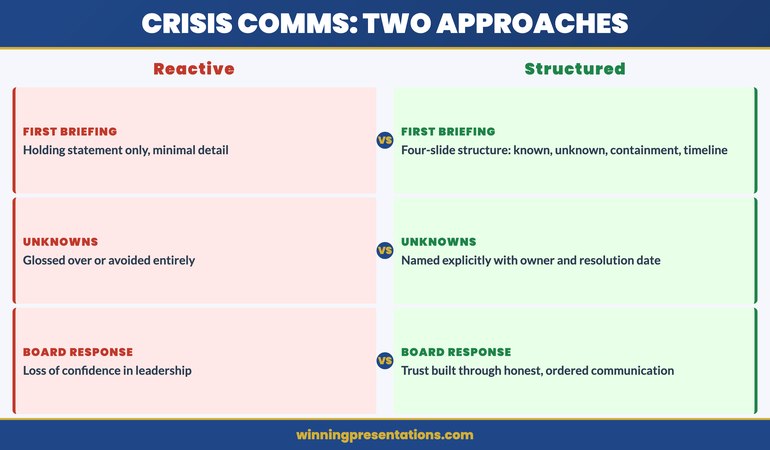
20 Feb 2026
Senior executive presenting slides with data charts to a steering committee of professionals seated around a long boardroom table

Why Your Steering Committee Keeps Deferring (The Slide Order Problem Nobody Fixes)

Quick answer: Most steering committee presentations open with progress updates, move to challenges, and save the decision request for the end. By the time you reach your ask, the committee is already in risk-avoidance mode. The fix is structural: lead with the decision you need, then provide just enough context to support it. This Decision-First slide order consistently gets approvals in the first 10 minutes — using the same data you already have.

Same Data. Different Order. Three-Month Delay Resolved in 15 Minutes.

A client brought me a 47-slide deck for a steering committee. The data was solid. The analysis was thorough. The recommendation was sound.

The committee had deferred it twice already.

I didn’t add anything to the deck. I didn’t change the analysis. I didn’t improve the charts. I changed the slide order.

We moved the recommendation from slide 38 to slide 2. We moved the risk mitigation from the appendix to slide 4. We cut 35 slides of background context that the committee had already seen in previous meetings.

Twelve slides. Same information, restructured. The committee approved it in 15 minutes — a decision that had been stalled for three months.

After 24 years in corporate banking, I’ve watched this pattern play out in large, matrixed organisations across every sector. The steering committee doesn’t defer because they don’t trust your analysis. They defer because your slide order puts them in the wrong mental state to make a decision. By the time you reach the ask, they’ve spent 20 minutes absorbing problems — and the safest response to problems is “let’s revisit.”

The slide order is the fix. And once you see the pattern, you can’t unsee it.

Stop Getting ‘Let’s Revisit Next Month’

The Executive Slide System gives you the exact slide order and decision architecture for steering committees, board meetings, and senior leadership updates — built to get approvals, not applause.

Get the Executive Slide System → £39

Built from 24 years of corporate experience. Used in steering committees, board meetings, and programme governance.

Why Progress-First Slide Order Triggers Deferrals

Here’s the slide order most people use for steering committees:

Slide 1: Title and agenda. Slide 2-5: Progress update (what happened since last meeting). Slide 6-8: Challenges and risks. Slide 9-10: Options analysis. Slide 11: Recommendation. Slide 12: Next steps.

This feels logical. It follows a narrative arc: here’s where we are, here are the problems, here’s what we suggest.

But it’s structurally designed to produce deferrals. Here’s why.

By the time the committee reaches your recommendation on slide 11, they’ve spent 15-20 minutes absorbing two things: incremental progress (nothing dramatic) and active risks (things that could go wrong). Their mental state at slide 11 is cautious. They’re thinking about what could fail, not about what to approve.

The safest decision from a cautious mental state is no decision. “Let’s revisit when we have more data” is the steering committee equivalent of “let me think about it.” It feels responsible. It avoids risk. And it delays your project by another month.

❌ Wrong: Progress-First Order (produces deferrals)

Slides 1-5: What happened → Slides 6-8: What’s at risk → Slides 9-10: Options → Slide 11: The actual ask

By slide 11, the committee is in risk-avoidance mode. The ask arrives when they’re least ready to approve.

✅ Right: Decision-First Order (produces approvals)

Slide 1: What you need decided today → Slide 2: Why it matters now → Slides 3-4: Evidence + risk mitigation → Slides 5-7: Context they need (not everything you have)

The ask arrives when attention is highest. Evidence serves the decision instead of preceding it.

Decision-First slide order showing seven slides from decision statement through forward look with green decision zone highlighting slides one through five

The Decision-First Slide Order for Steering Committees (7 Slides)

This is the structure that turned my client’s three-month deferral into a 15-minute approval. It works because it matches how senior decision-makers actually process information — not how project teams think they should.

Slide 1: The Decision Statement. One sentence. What you need the committee to approve, fund, or unblock — right now, today. Not “for discussion.” Not “for information.” A specific decision with a specific outcome.

❌ Wrong slide 1: “Programme Update — February 2026 Steering Committee”

✅ Right slide 1: “Approve £180K Phase 2 Budget (Delays Beyond March Cost £40K/Month)”

The wrong version tells the committee they’re about to sit through an update. The right version tells them what’s at stake and what you need. Every executive in the room knows why they’re there within five seconds.

Slide 2: Why This Decision Can’t Wait. The cost of delay. Not the general project timeline — the specific consequence of deferring this decision by one more meeting cycle. “Every month we delay costs £40K in contractor extensions” is more compelling than “the timeline is at risk.”

❌ Wrong slide 2: “Project Timeline Overview — Milestones and Dependencies”

✅ Right slide 2: “Cost of Delay: £40K/Month in Extended Contracts + Q3 Launch at Risk”

Slide 3: The Evidence Slide. Three data points that support your recommendation. Not ten. Not the full analysis. Three metrics that directly connect to the decision on slide 1. If you’re building effective executive summary slides, this is where that skill matters most.

❌ Wrong slide 3: Twelve KPIs across four workstreams with a traffic-light dashboard

✅ Right slide 3: Three metrics: “Phase 1 delivered 2 weeks early. User adoption at 84% (target: 70%). Cost per unit 12% below estimate.”

This slide-by-slide decision architecture is exactly what the Executive Slide System gives you — for steering committees, boards, and any meeting where you need a yes.

Get the Executive Slide System → £39

Slide 4: The Risk Mitigation Slide. Not your risk register. Not a 15-row risk matrix. The one or two risks the committee will raise — and what you’ve already done about them. This is the slide that prevents “let’s revisit”: you’ve anticipated their concern and addressed it before they had to ask.

❌ Wrong slide 4: Full risk register with 14 items rated red/amber/green

✅ Right slide 4: “Primary risk: vendor capacity. Mitigation: backup vendor contracted, 2-week overlap built in. Secondary risk: data migration. Mitigation: parallel run complete, rollback tested.”

Slide 5: What You Need From Them. The specific action. “Approve the £180K Phase 2 budget” or “Authorise the vendor contract extension” or “Endorse the revised timeline for stakeholder communication.” One sentence. One action. If you can’t state it in one sentence, you’re asking for too many things — split it across meetings.

Slide 6: Progress Context (Compressed). This is where your status update goes — after the decision framework, not before it. One slide showing the three most significant things that happened since the last meeting. Not everything. Not the detailed workstream breakdown. The three things that matter to this committee.

Slide 7: Forward Look. What happens in the next cycle if they approve today. This gives the committee confidence that approval leads somewhere specific — not into ambiguity. One slide, three milestones, clear dates.

That’s the complete structure. Seven slides. The same data you already have, in a different order. If you want the full steering committee template with worked examples, that article walks through each slide in detail.

The Full Slide Order — Wrong vs. Right, Side by Side

Here’s what most steering committee decks look like compared to the Decision-First structure, using the same project data:

❌ Wrong order (produces “let’s revisit”):

1. Title/agenda → 2. Progress summary → 3. Workstream A update → 4. Workstream B update → 5. Workstream C update → 6. Budget tracker → 7. Risk register → 8. Challenges → 9. Options → 10. Recommendation → 11. Next steps → 12. Appendix

✅ Right order (produces decisions):

1. Decision statement → 2. Cost of delay → 3. Three evidence points → 4. Risk mitigation → 5. What you need from them → 6. Progress context (one slide) → 7. Forward look

Same data. Half the slides. Decision by slide 5 instead of slide 10.

The difference isn’t effort — it’s architecture. You’re not doing more work. You’re putting the decision where the committee’s attention is highest and their caution is lowest.

Side by side comparison of wrong 12-slide progress-first order that produces deferrals versus right 7-slide Decision-First order that produces approvals in 15 minutes

Your Next Steering Committee Is in Two Weeks. Be Ready.

The Executive Slide System includes the Decision-First framework for steering committees, boards, and senior leadership updates — with slide-by-slide structures you can apply tonight.

Get the Executive Slide System → £39

Built from 24 years of corporate experience and 15 years training executives for committee-level presentations.

When the Committee Says ‘We Need More Information’

“We need more information” almost never means they need more information. It means one of three things:

1. They don’t understand what you’re asking them to decide. This is the most common cause. Your decision statement was vague (“discuss Phase 2 approach”) instead of specific (“approve £180K Phase 2 budget”). The fix is slide 1 — make the decision crystal clear.

2. They’re worried about a risk you haven’t addressed. If a committee member has a concern that isn’t on your risk mitigation slide, they’ll defer rather than approve something that feels unresolved. The fix is slide 4 — anticipate the top two concerns before they’re raised. The approach to getting executive decisions fast applies directly here.

3. There’s a political dynamic you’re not seeing. Sometimes the deferral has nothing to do with your presentation. Two committee members disagree about the broader programme direction, and your decision is caught in the crossfire. No slide order fixes politics — but the Decision-First structure at least prevents you from giving the committee an easy excuse to defer on content grounds.

The Executive Slide System includes decision frameworks, slide-order templates, and worked examples for every recurring executive meeting format.

Get the Executive Slide System → £39

If Q&A after your steering committee presentation is what derails the decision, that’s a separate skill worth building. Read about why executives ask questions they already know the answer to — the Trust-Test Framework applies directly to committee dynamics.

Common Questions About Steering Committee Slide Order

Why does the steering committee keep deferring decisions on my project?

The most common structural cause is slide order. When you open with progress updates and save your recommendation for the end, the committee spends most of the meeting absorbing challenges and risks. By the time they reach your ask, their default response is caution — which manifests as “let’s revisit when we have more data.” Moving your decision request to slide 1 or 2 changes the committee’s mental frame from passive review to active decision-making, and consistently reduces deferrals.

What is the best slide order for a steering committee presentation?

The Decision-First order: (1) Decision statement — what you need approved today, (2) Cost of delay — why it can’t wait, (3) Three evidence points supporting the decision, (4) Risk mitigation for the top two concerns, (5) The specific action you need from them, (6) Compressed progress context, (7) Forward look. This puts the decision where attention is highest and gives the committee a clear framework for saying yes rather than deferring.

How do you get a decision from a steering committee instead of a deferral?

Three structural changes: First, state the decision you need on your first slide — not as a discussion topic, but as a specific approval request with a clear outcome. Second, include the cost of delay on slide 2 — make deferral feel expensive rather than safe. Third, pre-answer the top two risks before anyone asks. Committees defer when they have unanswered concerns. If you’ve already addressed the risks, the path of least resistance becomes approval rather than delay.

Your Steering Committee Meets Every Month. Make Every One Count.

The Executive Slide System gives you the Decision-First framework — plus slide structures for boards, budget approvals, and senior leadership updates. Build your next steering committee deck in under an hour.

Get the Executive Slide System → £39

Used in steering committees, programme boards, and governance meetings across corporate teams.

Frequently Asked Questions

What if my organisation has a mandated steering committee template?

Most mandated templates specify what content to include, not the order. You can usually restructure within the template by moving your recommendation to the front and compressing progress updates. If the template genuinely requires progress-first ordering, add a “Decision Required” cover slide before slide 1 that states what you need approved — this primes the committee for decision-making even if the subsequent slides follow the standard format. I’ve seen this work in highly regulated environments where template compliance is audited.

What if the deferral is political, not structural?

The Decision-First structure won’t resolve political dynamics between committee members, but it removes the structural excuse for deferral. When your slides are clearly structured for a decision, the committee has to either approve, reject, or explicitly acknowledge they’re deferring for non-content reasons. That transparency alone often moves things forward, because nobody wants to be seen as the person blocking a well-structured recommendation without a clear reason.

Does this work for virtual steering committee meetings?

It works better for virtual meetings. Attention spans are shorter on video calls, so the Decision-First structure is even more critical — you have roughly 3-5 minutes of peak attention instead of 10. Leading with the decision statement on slide 1 ensures the committee engages with the most important content while they’re still focused. The compressed 7-slide format also means you finish in 15-20 minutes instead of 40, which virtual committees appreciate.

How many decisions should I ask for in one steering committee session?

One. If you have multiple decisions, prioritise the most important one and structure the full 7-slide framework around it. Secondary decisions can be raised as “additional items” after the primary decision is made, but they should each take no more than one slide. Trying to get three decisions in one meeting usually results in zero decisions — the committee runs out of cognitive energy and defers everything.

Get Weekly Presentation Intelligence

Slide structures, decision frameworks, and the executive communication strategies that work in real committee rooms — delivered every week.

Join the Newsletter

Related: If the Q&A after your steering committee presentation is where decisions fall apart, read Why Executives Ask Questions They Already Know the Answer To — the Trust-Test Framework for handling tough questions from senior decision-makers.

Your next step: Open your last steering committee deck. Move your recommendation to slide 2. Cut everything the committee already knows from previous meetings. You’ll be presenting half the slides and getting twice the decisions.

Want the complete Decision-First framework with worked examples for every committee format?

Get the Executive Slide System → £39

About the Author

Mary Beth Hazeldine is the Owner & Managing Director of Winning Presentations. With 24 years of corporate banking experience at JPMorgan Chase, PwC, Royal Bank of Scotland, and Commerzbank, she specialises in executive-level presentation skills and committee-ready slide structures.

A qualified clinical hypnotherapist and NLP practitioner, Mary Beth combines executive communication expertise with evidence-based techniques for managing presentation anxiety. She has spent 15 years training executives and supporting high-stakes steering committee presentations, board updates, and programme governance meetings.

Read more articles at winningpresentations.com

16 Feb 2026
Executive focused at laptop building a presentation under time pressure, navy blazer, warm office lighting, coffee on desk

The Last Minute Presentation Framework That Saved My Career (Twice)

Forty minutes. That’s how long I had between “Mary Beth, the CFO needs an update on the integration programme — you’re presenting at 3pm” and walking into the boardroom.

Quick answer: A last minute presentation doesn’t fail because you had no time. It fails because you tried to build a full deck in a fraction of the time. The emergency framework is five slides, built in a specific order: decision needed, current situation, options, recommendation, next steps. You write the headlines first, add one supporting point per slide, and rehearse the transitions once. This takes 25–30 minutes and produces a clearer deck than most people create in three days.

The first time it happened, I was at Royal Bank of Scotland. A VP had called in sick twenty minutes before a steering committee meeting. My manager appeared at my desk: “You know the project. You’re presenting.” I had no slides, no notes, and no choice.

I spent the first ten minutes panicking. Then I wrote five headlines on a notepad, opened PowerPoint, typed them as slide titles, and added one sentence under each. I walked in with a five-slide deck that looked intentional.

The steering committee approved the budget. Afterwards, a director I barely knew said: “That was the clearest update we’ve had on this project.” He didn’t know it was built in thirty minutes. And that’s when I realised: the emergency framework wasn’t a compromise. It was better than most planned decks.

Why Last Minute Presentations Fail (It’s Not the Time)

The natural response to a last minute presentation is compression: take everything you’d normally include and cram it into whatever time you have. This is the single biggest mistake you can make under time pressure.

Compression produces a bloated deck delivered at speed. Your audience gets more information than they can process, delivered by a presenter who hasn’t rehearsed, with slides that don’t connect because they were assembled rather than structured. The result feels frantic — and frantic signals incompetence, even when the content is sound.

The executives I’ve trained across JPMorgan Chase, PwC, Royal Bank of Scotland, and Commerzbank over 24 years all share the same discovery: the best last minute presentations aren’t compressed versions of full presentations. They’re structured differently from the start. Five slides with clear headlines will outperform twenty rushed slides every single time — because clarity signals competence more than volume does.

The real problem isn’t time. It’s the instinct to build the deck you wish you had time for, instead of the deck your audience actually needs. If you understand how executives evaluate presentations — and what executives actually read on your slides — you’ll realise that five slides is often the right number even when you have three weeks to prepare.

PAA: How do you prepare a presentation with very little time?
Start with the decision, not the background. Write five slide headlines before opening PowerPoint: what decision is needed, what the current situation is, what the options are, what you recommend, and what the next steps are. Type those headlines as slide titles, add one supporting sentence or data point per slide, and rehearse the transitions between slides once out loud. This takes 25–30 minutes and produces a more focused deck than starting with a blank canvas.

The Emergency Framework Lives Inside This System

The Executive Slide System gives you a pre-built structure, slide sequencing framework, and executive messaging templates — so you never start from a blank screen again. When you have 30 minutes, you need a system, not inspiration.

Get the Executive Slide System → £39

Built from 24 years in corporate banking. Used in boardrooms, steering committees, and approval meetings across every industry.

The 5-Slide Emergency Framework (30 Minutes)

This is the framework I’ve used personally and taught to executives for fifteen years. Five slides, each with a single job. Build them in the order below — not in presentation order — and you’ll have a structured, focused deck in under thirty minutes.

Slide 1: The Decision (or The Ask). What do you need from this audience? Start here because everything else flows from it. “We need approval to extend the pilot by 60 days” or “I’m recommending we proceed with Option B” or “The committee needs to decide between three vendor options.” If there’s no decision, the frame is: “Here’s what you need to know and what it means.” One sentence headline. One supporting line. Done.

Slide 2: Current Situation. Where are we right now? Three to four bullet points maximum — facts only, no interpretation. Revenue, timeline status, key metrics, blockers. This slide answers: “What’s actually happening?” Your audience needs context before they can evaluate your recommendation. Keep it to data they can verify, not opinions they’ll debate.

Slide 3: The Options (or The Problem). If it’s a decision meeting: lay out 2–3 options with one-line trade-offs for each. If it’s an update: describe the core challenge or what’s changed since the last meeting. This slide creates the frame for your recommendation. Without it, your recommendation feels like an assertion. With it, your recommendation feels like the logical conclusion of the evidence.

Slide 4: Your Recommendation. What do you think should happen, and why? One recommendation, supported by 2–3 reasons. Don’t hedge. The biggest mistake in last minute presentations is presenting options without a recommendation because you “didn’t have time to think it through.” You did. You just need to trust your judgement. If you genuinely don’t have a recommendation, say so — and explain what you’d need to form one.

Slide 5: Next Steps. Who does what by when? Three to four concrete actions with owners and dates. This slide does two things: it signals that you’ve thought beyond the meeting, and it gives the audience something to approve rather than something to debate. “Approve Option B and I’ll have the implementation plan by Friday” moves faster than “Let me know what you think.”


Five-slide emergency presentation framework showing Decision, Situation, Options, Recommendation, and Next Steps cards

The reason this works under pressure is that each slide has exactly one job. You’re not deciding what to include — the framework decides for you. Your only task is filling in the specifics. That’s the difference between building a deck and filling in a structure.

📊 Want this framework pre-built in a reusable template?

The Executive Slide System includes the emergency 5-slide structure, sequencing rules, and messaging templates for every executive scenario.

Get the Executive Slide System → £39

The Order You Build It (Not the Order You Present It)

Here’s a counter-intuitive rule: don’t build the deck in the order you present it. Build it in the order that’s fastest to think through.

Build first: Slide 4 (Recommendation). You probably already know what you think should happen. Write it down. One sentence. This anchors everything else — because once you know what you’re recommending, you know what context and evidence to include (and what to leave out).

Build second: Slide 1 (The Decision). Now frame the ask. “I’m recommending X. The committee needs to approve / reject / modify.” This takes thirty seconds because you’ve already written the recommendation.

Build third: Slide 2 (Current Situation). What facts support your recommendation? Don’t include everything you know — include only the 3–4 data points that make your recommendation feel inevitable. This is where most people go wrong under pressure: they include everything because they’re afraid of getting caught without an answer. But including everything actually weakens your recommendation by burying the signal in noise.

Build fourth: Slide 3 (Options/Problem). If there are alternatives, list them briefly. If not, describe what’s changed. This slide exists to show you’ve considered the landscape — not to present a balanced analysis.

Build last: Slide 5 (Next Steps). By now, the next steps are obvious because they flow directly from your recommendation. Write three actions with names and dates.

This sequence — recommendation first, context second, evidence third — is the same principle behind the preparation order that doubles approval rates. It works under pressure because it eliminates the hardest part of building a deck: deciding what to include. When you know your recommendation, the filter is automatic.


Counter-intuitive build order for emergency presentations showing Recommendation first then Decision, Situation, Options, Next Steps

PAA: What is the best structure for a quick presentation?
The 5-slide structure: Decision/Ask, Current Situation, Options/Problem, Recommendation, Next Steps. Each slide has a single clear headline and one supporting point. This structure works because it mirrors how executives process information — they want to know the ask, the context, the options, your view, and what happens next. Anything else is optional. Build the recommendation slide first, then work backwards to the supporting slides.

30 Minutes Is Enough — If You Have the Right Structure

The Executive Slide System eliminates the blank-screen problem permanently. Pre-built frameworks for emergency presentations, steering committees, board updates, and approval decks. Open the template. Fill in the structure. Present with confidence.

Get the Executive Slide System → £39

Used in high-stakes approvals and funding pitches. Built from 24 years in corporate banking + 15 years training executives.

What to Cut When You Have 15 Minutes (Not 30)

Sometimes you don’t have thirty minutes. You have fifteen. Or ten. Here’s what to cut — in order.

Cut first: Slide 3 (Options). If time is critical, go straight from situation to recommendation. Your audience can ask about alternatives in Q&A. The options slide is the most expendable because its job — showing you’ve considered the landscape — can be done verbally.

Cut second: Slide 2 detail. Reduce the current situation from 3–4 bullets to 1–2. Keep only the data points that directly support your recommendation. “Revenue is at 87% of target with two months remaining” is enough if your recommendation is about closing the gap.

Never cut: Slides 1, 4, and 5. The ask, the recommendation, and the next steps are non-negotiable. Even if you’re presenting verbally with zero slides, these three elements must be present. “Here’s what I need from you. Here’s what I recommend. Here’s what happens next.” That’s a complete presentation in three sentences.

The extreme version: 3 slides in 10 minutes. Decision + Recommendation + Next Steps. This works when your audience already has context (they’ve been in the meetings, they’ve read the reports, they know the situation). Don’t repeat what they already know. Just cut to the decision.

📊 Need a system you can deploy in minutes, not hours?

Pre-built frameworks for 5-slide emergency, 8-slide steering committee, and 12-slide board update — all ready to fill.

Get the Executive Slide System → £39

When You Have Zero Minutes: Presenting Without Slides

Sometimes there’s no time for slides at all. Your boss pulls you into a meeting already in progress: “Can you update us on the project?” Here’s how to structure a verbal-only last minute presentation.

The 60-Second Structure:

“Let me give you three things.” (This signals structure — your audience relaxes because they know it’s bounded.)

“First, where we are: [one sentence on current status].”
“Second, the main issue we’re navigating: [one sentence on the challenge].”
“Third, what I need from this group: [one sentence on the ask or decision].”

Then stop talking. Let them ask questions. The questions will tell you what they actually need to know — which is almost never the twenty points you would have included in a full deck.

This verbal structure works because it follows the same logic as the 5-slide framework: situation, problem, ask. It just strips out the options and recommendation slides because in a verbal context, those emerge naturally through discussion.


Three time tiers for last minute presentations showing 30-minute, 15-minute, and zero-minute frameworks

The principles behind this approach are the same ones that define effective executive presentation structure — lead with what matters, cut everything that doesn’t, and trust your audience to ask for what they need.

PAA: How do you present without preparation or slides?
Use the “three things” verbal framework: state where you are, what the main issue is, and what you need from the audience. Signal structure at the start (“Let me give you three things”) so your audience knows it’s bounded. Then stop and let questions guide the rest. Verbal presentations without slides are often more effective than rushed slide decks because they feel confident and conversational rather than frantic and over-packed.

Stop Starting From Scratch. Start From Structure.

The Executive Slide System is the presentation framework executives use when the stakes are high and the time is short. Pre-built structures for emergency presentations, board updates, steering committees, and approval decks — so you never face a blank screen again.

Get the Executive Slide System → £39

Used in board updates, steering committees, and approval meetings across every industry. Built from 24 years in corporate banking + 15 years training executives.

Frequently Asked Questions

Should I apologise for having a short deck?

Never. The moment you say “Sorry, I only had thirty minutes to prepare this,” you’ve given your audience permission to lower their expectations. Present the five slides as if they’re exactly what you intended. Executives respect brevity — a focused five-slide deck signals confidence and prioritisation, not lack of preparation. The most senior people in the room will assume you’re concise by design.

What if I’m asked about something not in my five slides?

Say: “That’s a great question — I don’t have the data in front of me, but I’ll follow up by end of day.” This is a perfectly acceptable response at every level of corporate life. It’s far better than guessing or including unverified information in rushed slides. The follow-up email after the meeting is often where the real decision gets finalised anyway.

How do I handle last minute presentations when I’m not the subject expert?

Focus on the structure, not the depth. The 5-slide framework works even with surface-level knowledge because it’s asking: what’s the situation, what are the options, what do you recommend? You don’t need to be the deepest expert — you need to be the clearest communicator. If there are technical questions you can’t answer, name the person who can: “James has the detail on the migration timeline — I’ll connect you directly.”

Is the 5-slide framework only for emergency presentations?

No. Most of the executives I work with use it as their default structure for every presentation, then add slides only when the context demands it. The emergency version is the minimum viable deck. The planned version adds depth to each section. But the bones — Decision, Situation, Options, Recommendation, Next Steps — work whether you have thirty minutes or three weeks.

📬 The Winning Edge Newsletter

Weekly strategies for executive presentations, leadership communication, and career-critical stakeholder conversations. No fluff.

Subscribe free →

🎯 Free: Executive Presentation Checklist

The pre-presentation checklist I give every executive before a high-stakes meeting — including the emergency 5-slide framework, slide headline formulas, and the three questions every executive audience silently asks.

Download free →

Related: Last minute presentations don’t just test your slide skills — they trigger imposter syndrome. If the panic is less about the slides and more about the voice in your head saying “they’re going to find out I’m not ready,” read the imposter syndrome pre-presentation reset — it’s a 4-minute protocol designed for exactly this moment.

A last minute presentation isn’t a crisis. It’s a clarity test. Five slides. Build the recommendation first. Add only the context that supports it. Rehearse the transitions once. And walk in like you planned the whole thing.

🎯 Next time you get the tap on the shoulder, be ready in minutes — not hours.

Get the Executive Slide System → £39 — the pre-built framework for every executive presentation, including the emergency 5-slide structure.

About the Author

Mary Beth Hazeldine is the Owner & Managing Director of Winning Presentations. With 24 years of corporate banking experience at JPMorgan Chase, PwC, Royal Bank of Scotland, and Commerzbank, she has trained executives through high-stakes approvals and funding pitches — including more last minute presentations than she can count.

A qualified clinical hypnotherapist and NLP practitioner, Mary Beth combines executive communication expertise with the psychology of performance under pressure. She helps leaders communicate with clarity and confidence — especially when there’s no time to prepare.

Book a discovery call | View services

12 Feb 2026
Executive presenting headcount request to leadership team with approval indicators

The Headcount Request That Got Yes When Everyone Said No

“We’re in a hiring freeze. The answer is no.”

That’s what my client heard when she mentioned her headcount request to her CFO in the corridor. The company had just announced a 15% budget reduction. Every department was being told to do more with less. And Sarah needed 12 new engineers to deliver a project the CEO had personally championed.

Two weeks later, she got all 12 approved.

Not because she had special connections. Not because the freeze was lifted. But because her presentation made it impossible to say no — by making the cost of “no” crystal clear.

I’m sharing this now because headcount requests in 2026 face unprecedented scrutiny. AI is reshaping workforce planning, budgets are tight, and executives are asking harder questions about every hire. The old approach — “we need more people because we’re busy” — doesn’t work anymore. What works is a business case so compelling that approval becomes the obvious choice.

Quick answer: Successful headcount requests don’t ask for people — they present a business case for outcomes. The structure that works: lead with the business problem (not the resource gap), quantify the cost of inaction, present headcount as the solution to a problem leadership already cares about, and pre-answer the objections before they’re raised. This approach gets approval even during hiring freezes because it reframes the request from “cost” to “investment with measurable return.”

I’ve helped executives request headcount in every economic condition — boom times when money flowed freely, and downturns when every hire required CEO approval. The pattern is consistent: the requests that get approved aren’t the ones with the best justification. They’re the ones with the best presentation.

Sarah’s situation was typical. She had a genuine need — her team was working 60-hour weeks, attrition was climbing, and the CEO’s pet project was at risk. But her first draft presentation was also typical: a list of reasons why she needed more people, supported by workload data and burnout statistics.

It would have failed. Here’s why — and what we changed.

Why Most Headcount Requests Fail

The fundamental mistake in headcount presentations is starting with the resource gap. “We need 12 more engineers because…” immediately puts leadership in defence mode. They hear “cost” before they hear “value.”

The Psychology of No

When executives hear a headcount request, three mental processes activate simultaneously:

Budget protection: “Where will this money come from? What else won’t get funded?”

Precedent fear: “If I approve this, what other requests will follow?”

Accountability anxiety: “If this hire doesn’t work out, it’s my signature on the approval.”

Your presentation has to address all three — before they become objections.

The “Busy” Trap

The most common headcount justification is also the weakest: “We’re too busy.” Every department is busy. Every manager feels understaffed. “Busy” doesn’t differentiate your request — it makes you sound like everyone else who’s asking.

What executives actually need to hear: not that you’re busy, but that specific business outcomes are at risk without additional resources. That’s a completely different conversation.

🎯 Executive Slide System — Headcount Request Templates Included

Stop building headcount presentations from scratch. The Executive Slide System includes ready-to-use templates for resource requests, budget approvals, and business cases — all structured to get executive buy-in.

  • Business case structure that leads with outcomes
  • ROI calculation frameworks executives trust
  • Objection pre-answer templates
  • Decision slide formats that drive approval

Get the Executive Slide System → £39

Instant download. Used in headcount requests that have secured hundreds of new hires across banking and consulting environments.

The 5-Slide Structure That Gets Yes

Here’s the exact structure Sarah used to get 12 engineers approved during a hiring freeze:

Slide 1: The Business Problem (Not the Resource Gap)

Don’t open with “We need more people.” Open with the business problem that leadership already cares about.

Sarah’s opening: “Project Phoenix — the CEO’s priority initiative — is at risk of missing its Q3 deadline. Current trajectory shows a 67% probability of 8-week delay, which would push launch past the competitor window.”

Notice what’s not mentioned: headcount, engineers, workload, burnout. The first slide is entirely about business impact. Leadership is now thinking about Project Phoenix, not about budget.

Slide 2: The Cost of Inaction

Before you present your solution, make the cost of doing nothing undeniable.

Sarah’s slide: “An 8-week delay costs £2.4M in delayed revenue, puts the Series B timeline at risk, and allows CompetitorX to establish market position. Additionally, current team attrition trajectory suggests we lose 3 senior engineers in the next 90 days — each representing £180K in replacement and ramp-up costs.”

This slide does the heavy lifting. When the cost of inaction is £2.4M+, the cost of 12 engineers looks like a bargain.

Slide 3: The Solution (Now You Can Mention Headcount)

Only after establishing the problem and the cost of inaction do you present headcount as the solution.

Sarah’s framing: “To deliver Phoenix on schedule and protect the £2.4M revenue, we need to add 12 engineers over the next 6 weeks. This represents a £840K annual investment that protects £2.4M in near-term revenue and establishes the team capacity for the 2027 roadmap.”

The headcount request is now positioned as a solution to a problem leadership wants solved — not as a cost to be minimised.

Slide 4: The Risk Mitigation

Address the “what if it doesn’t work” fear before it’s voiced.

Sarah included:

  • Hiring timeline: Specific milestones with contingency plans
  • Ramp-up plan: How new hires become productive (with timeline)
  • Success metrics: How leadership will know the investment is working
  • Exit ramp: What happens if business conditions change

This slide removes the “what if” anxiety that kills approvals.

Slide 5: The Decision

End with a clear, specific ask — not a vague request for “support.”

Sarah’s close: “I’m requesting approval to open 12 engineering requisitions immediately, with a £840K annual budget allocation. This protects £2.4M in Phoenix revenue and positions us for the 2027 roadmap. I need your decision by Friday to maintain the hiring timeline.”

Clear ask. Clear timeline. Clear next step.


5-slide headcount request structure showing business case framework for approval

Want this structure as a ready-to-use template? The Executive Slide System includes the complete headcount request framework — plus decision slides, ROI calculators, and objection pre-answers.

Get the Templates → £39

Making the Numbers Undeniable

The difference between headcount requests that get approved and those that get “let’s revisit next quarter” often comes down to how the numbers are presented.

The ROI Frame

Never present headcount as a cost. Always present it as an investment with measurable return.

Weak: “12 engineers will cost £840K annually.”

Strong: “A £840K investment protects £2.4M in revenue and enables £4.2M in 2027 roadmap delivery. ROI: 7.9x in year one.”

The numbers are the same. The frame is completely different.

The Comparison Anchor

Give leadership a reference point that makes your request seem reasonable.

Sarah’s anchor: “The cost of 12 engineers (£840K) is less than the cost of the 8-week delay (£2.4M), less than the cost of losing 3 senior engineers to attrition (£540K in replacement costs), and less than the consulting alternative (£1.2M for equivalent capacity).”

When you anchor against worse alternatives, your request becomes the sensible middle ground.

The Staged Approach

If your full request feels too large, offer a staged alternative that gets you started.

Sarah’s backup: “If 12 immediate hires isn’t possible, a phased approach of 6 now and 6 in Q2 still protects the Phoenix timeline, though with reduced margin for error.”

This shows flexibility while maintaining the business case. Leadership often approves the full request when they see you’ve thought through alternatives.

📊 Build Business Cases That Get Approved

The Executive Slide System gives you the frameworks for any approval presentation — headcount, budget, project investment, or strategic initiative. Stop guessing what executives want to see.

  • Cost-of-inaction calculation templates
  • ROI presentation frameworks
  • Risk mitigation slide structures
  • Decision slide formats that drive action

Get the Executive Slide System → £39

Instant download. Developed from 24 years of corporate banking presentations where every resource request faced intense scrutiny.

Pre-Answering the Objections

The best headcount presentations answer objections before they’re raised. Here are the five you’ll face — and how to address them in your slides:

Objection 1: “Can’t you do more with AI/automation?”

Pre-answer: Include a slide on what you’ve already automated and why the remaining work requires human judgment. “We’ve automated 40% of routine tasks. The remaining work — architecture decisions, client relationships, complex problem-solving — requires experienced engineers.”

Objection 2: “What about contractors instead of FTEs?”

Pre-answer: Show the total cost comparison including ramp-up time, knowledge retention, and long-term flexibility. Contractors often cost more when you factor in everything.

Objection 3: “Can you reprioritise instead?”

Pre-answer: Show what gets cut if you don’t add headcount — and the business impact of those cuts. Make leadership choose between options, not between “yes” and “no.”

Objection 4: “What if the project gets cancelled?”

Pre-answer: Show how the roles support multiple initiatives, not just one project. “These 12 engineers support Phoenix, but also provide capacity for the 2027 roadmap and reduce our single-point-of-failure risk on critical systems.”

Objection 5: “Why now? Can’t it wait?”

Pre-answer: Show the cost of delay. “Every month we wait adds £300K to the eventual cost (higher salaries in a tighter market, extended project timeline, continued attrition of current team).”

Handling the Tough Q&A

Even with perfect slides, headcount requests face intense questioning. Here’s how to handle the moments that determine approval:

When They Challenge Your Numbers

Don’t get defensive. Show your work.

“The £2.4M delay cost comes from three factors: £1.8M in delayed subscription revenue based on current pipeline, £400K in additional contractor costs to extend the bridge period, and £200K in opportunity cost from the sales team’s reduced confidence in our delivery timeline. I can walk through each calculation.”

When They Ask for Less

Don’t immediately agree. Show the trade-offs.

“I can work with 8 instead of 12, but I want to be transparent about what that means: we move from 95% confidence on the Q3 deadline to about 70%, and we lose the buffer for the inevitable surprises. If 8 is the decision, I’ll make it work — but I want leadership to understand the risk we’re accepting.”

When They Want to Delay the Decision

Make the cost of delay concrete.

“I understand the desire for more time. But every week we delay the hiring process adds roughly 2 weeks to the project timeline, because good candidates don’t stay on the market. If we decide Friday, we can still hit Q3. If we wait until end of month, Q3 becomes unlikely.”

Facing tough Q&A on your headcount request? The Executive Q&A Handling System gives you frameworks for handling challenges, pushback, and curveball questions with confidence.

Get the Q&A System → £39

What Happened to Sarah

Sarah presented to the CFO, COO, and CEO on a Thursday morning. The same CFO who had said “the answer is no” in the corridor.

The presentation took 12 minutes. The Q&A took 20. Most of the questions were about implementation details — a sign that approval was likely.

By Friday afternoon, she had written approval for all 12 positions.

The CFO told her afterwards: “I’ve seen a hundred headcount requests this year. Yours was the only one that made me feel like saying no would cost us money.”

That’s the reframe that changes everything. Not “please give me resources” but “here’s what you lose if you don’t.”

🎯 Get Your Headcount Approved

The Executive Slide System includes everything you need to build a headcount presentation that gets yes:

  • Business case templates: Lead with outcomes, not resource gaps
  • Cost-of-inaction frameworks: Make “no” more expensive than “yes”
  • ROI calculators: Present investment, not cost
  • Objection pre-answers: Address concerns before they’re raised
  • Decision slides: Clear asks that drive approval

Get the Executive Slide System → £39

Instant download. The same frameworks used in headcount requests that have secured hundreds of new hires — even during hiring freezes.

📬 PS: Weekly strategies for executive presentations and getting buy-in. Subscribe to The Winning Edge — practical techniques from 24 years in corporate boardrooms.

Frequently Asked Questions

What if my company has a strict hiring freeze with no exceptions?

Even “no exceptions” freezes have exceptions — they just require CEO-level approval and an exceptional business case. Use the cost-of-inaction framework to show that the freeze is costing more than the hire. If the numbers are compelling enough, freezes get unfrozen. If they’re not, at least you’ve positioned yourself for first approval when the freeze lifts.

How do I request headcount when I can’t quantify the revenue impact?

Focus on risk and cost avoidance instead of revenue. “Without this hire, we have single-point-of-failure risk on a critical system” or “Current overtime costs are £X per month and climbing” or “Attrition risk in the current team represents £Y in replacement costs.” Not everything ties to revenue, but everything ties to something leadership cares about.

Should I ask for more than I need, expecting to be negotiated down?

No. Ask for exactly what you need with clear justification. Padding your request damages credibility and invites the “let’s cut this by 30%” response. If you need 12, ask for 12 and show why 12 is the right number. You can offer a phased alternative, but don’t inflate the initial ask.

How long should a headcount presentation be?

Five to seven slides maximum for the core presentation. You can have backup slides for detailed questions, but the main narrative should be completable in 10-15 minutes. Executives make headcount decisions quickly when the business case is clear — long presentations signal unclear thinking.

Related: If past presentation failures are affecting your confidence in high-stakes requests like headcount approvals, read Presentation PTSD Is Real: Signs You’re Still Carrying an Old Failure for techniques to break the pattern.

Sarah’s CFO was right about one thing: during a hiring freeze, the default answer is no.

But defaults can be overridden — when the cost of “no” is higher than the cost of “yes.”

Your headcount request isn’t about getting resources. It’s about presenting a business case so compelling that approval becomes the obvious choice.

Lead with the problem. Quantify the cost of inaction. Position headcount as the solution. Pre-answer the objections. Ask for a clear decision.

That’s how you get yes when everyone else is hearing no.

About the Author

Mary Beth Hazeldine is the Owner & Managing Director of Winning Presentations. With 24 years in corporate banking at JPMorgan Chase, PwC, Royal Bank of Scotland, and Commerzbank, she has supported hundreds of resource requests, budget approvals, and headcount presentations in high-scrutiny environments.

A certified hypnotherapist and NLP practitioner, Mary Beth combines executive communication expertise with an understanding of the psychology behind approval decisions. She helps professionals build business cases that get yes — even when the default answer is no.

Book a discovery call | View services

04 Feb 2026
Executive looking frustrated after presentation with green checkmark on screen behind him — vague praise instead of actionable feedback

Why ‘Great Presentation’ Is the Worst Feedback You Can Get

“Great presentation, really liked it.” The CFO shook my client’s hand, smiled, and walked out. Three weeks later, the £1.8 million budget request was quietly shelved.

The quick answer: When executives tell you “great presentation,” it almost always means your deck failed to force a decision. Actionable presentation feedback sounds uncomfortable — “slide 3 needs the ROI number,” “cut sections 4 through 7,” “lead with the ask next time.” Vague praise is a polite exit. If you’re consistently hearing “good job” but not getting approvals, the problem isn’t your delivery. It’s your slide structure.

⚡ Presenting tomorrow and need actionable feedback fast?

Before you walk into the room, ask one person — your manager, a peer, a trusted stakeholder — these three slide-specific questions:

  1. “Which slide would you cut first if I had to lose three?”
  2. “Is my recommendation on the first substantive slide, or buried at the end?”
  3. “What’s the one question the CFO will ask that I haven’t answered?”

Those three answers will give you more useful feedback in ten minutes than a dozen “great job” responses after the meeting. If you want the slide structure that forces this kind of feedback automatically, the Executive Slide System (£39) builds decision points into every section.

The Night I Realised Praise Was a Warning Sign

Early in my banking career at JPMorgan Chase, I presented a credit restructuring proposal to a room of seven senior directors. Twelve slides. Thirty-five minutes. When I finished, the most senior director nodded and said, “Really well put together. Thanks for that.”

I walked out feeling brilliant. Told my manager it went well. Two days later, she pulled me aside: “They’ve gone with another approach. Apparently, the deck didn’t address the regulatory risk.”

Nobody in that room told me what was missing. They told me it was “well put together.” That phrase now sets off alarm bells whenever I hear a client use it. Because in 24 years of corporate banking — across JPMorgan, PwC, Royal Bank of Scotland, and Commerzbank — I’ve learned that the executives who give you a compliment and nothing else are the ones who’ve already mentally moved on.

The executives who interrogate your slides? They’re the ones about to approve something.

Vague vs Actionable: What Real Presentation Feedback Sounds Like

After 24 years of coaching executives through high-stakes presentations — from board-level budget approvals to investor pitches — I’ve noticed a pattern that separates the presenters who get promoted from those who plateau. It has nothing to do with charisma or slide design. It’s about the type of feedback they receive — and what they do with it.

Vague feedback sounds warm. “Great presentation.” “Really interesting.” “Good job, thanks.” It feels good in the moment, but it gives you nothing to improve. You walk out not knowing what worked, what didn’t, or what to change for next time.

Comparison chart showing vague presentation feedback versus actionable feedback with specific examples

Actionable presentation feedback sounds different — and often less comfortable. “Slide 3 needs a clearer decision point.” “The finance section is twice as long as it needs to be.” “Your recommendation should be on the first slide, not the last.” These responses tell you exactly what to change. They mean the listener engaged deeply enough with your content to form a specific opinion.

Here’s the uncomfortable truth: if every stakeholder tells you “great job” and nobody challenges a single slide, your deck didn’t provoke enough thought to drive a decision. You entertained the room. You didn’t move it.

What does ‘actionable feedback’ mean for a presentation? Actionable presentation feedback identifies a specific element — a slide, a data point, a structural choice, an argument — and tells you what to change, add, or remove. It’s feedback you can act on before your next presentation without guessing what the person meant.

Your Slides Should Force Decisions — Not Compliments

The Executive Slide System gives you the exact 12-slide structure that makes executive audiences engage, challenge, and approve — instead of politely nodding and moving on. Built from frameworks I’ve used across JPMorgan Chase, PwC, and RBS.

Get the Executive Slide System → £39

Includes 12-slide executive structure, decision slide templates, and the recommendation-first framework refined across 24 years of high-stakes corporate presentations.

Why Executives Default to ‘Great Presentation’ (It’s Not About You)

Before you blame yourself for getting vague praise, understand why it happens. Senior leaders default to “great presentation” for three reasons — and none of them mean your content was actually great.

Reason 1: Your deck didn’t demand a response. Most presentation structures end with a summary slide or a “thank you.” Neither forces a decision. When you don’t build a decision point into your slides, the only polite response is a compliment. Executives aren’t going to volunteer constructive criticism you didn’t ask for.

Reason 2: They’re being politically careful. In senior leadership, vague praise is often code for “I don’t want to commit to a position in this room.” If your presentation doesn’t make it easy for them to say yes or no, they’ll say “great job” because it’s the safest non-answer. I saw this constantly at Commerzbank — the more political the room, the vaguer the feedback.

Reason 3: They’ve already decided — and it’s not in your favour. This is the hardest one to accept. When a senior leader has already made up their mind against your recommendation, “great presentation” is a kindness. It lets them reject your proposal without rejecting you personally. My client with the £1.8 million budget request? The CFO had already allocated those funds elsewhere. The compliment was a consolation prize.

In every case, the problem isn’t the executive. It’s the structure of the presentation itself. A well-structured executive deck makes it nearly impossible for a room to respond with vague praise — because it forces specific questions, specific objections, and specific decisions.

📊 This is exactly why the Executive Slide System builds a decision slide into position 3 — before the supporting evidence — so executives engage with your ask immediately instead of passively consuming your content. Get the Executive Slide System → £39

How do you ask for feedback after an executive presentation? Never ask “how was it?” or “any feedback?” — these invite vague praise. Instead, ask a specific, slide-level question: “Was the risk section on slide 7 strong enough to address your concerns?” or “Would you restructure the recommendation on slide 3?” Specificity invites specificity.

The Feedback Extraction Framework (Stop Hoping — Start Structuring)

After watching hundreds of executives present at board level, I developed a four-step framework that consistently turns vague “nice job” responses into genuinely useful, actionable presentation feedback. The key insight: you have to build feedback extraction into the presentation itself — not bolt it on afterwards.

Four-step feedback extraction framework showing before, during, after, and apply stages for improving executive presentations

Step 1 — Before: Build a feedback scaffolding slide. Add a penultimate slide that asks the room a specific question. Not “any questions?” but “Which of these three options would you recommend, and why?” This forces the room to respond with substance. One of my clients at RBS started using a “decision criteria” slide that listed three options with trade-offs. The room couldn’t leave without picking one — and their feedback immediately became specific, because they had to justify a choice.

Step 2 — During: Watch for the lean-in moment. Every presentation has a moment where the audience shifts posture — they lean forward, pick up a pen, or furrow their brow. That’s the slide that landed. Note which slide triggered it. That’s your strongest content, and everything else should be restructured to match its impact. I teach executives to build their executive summary slide using the same approach that triggered that lean-in.

Step 3 — After: Ask slide-specific questions. Immediately after presenting (or within 24 hours), ask one targeted question: “If you could change one thing about slide 5, what would it be?” Not “how was the presentation?” — that invites “great job.” Make your question so specific that the only possible answer is actionable. If they respond with “it was fine,” that slide didn’t register. Move your attention to the slides that provoked an actual reaction.

Step 4 — Apply: One change per cycle. Don’t overhaul your entire deck based on one round of feedback. Change one thing — the opening, one data visualisation, the recommendation placement — and present again. Measure whether the feedback changes. This creates a compounding improvement loop that, over time, transforms a deck that gets polite nods into one that gets challenged, questioned, and approved.

Stop Getting Compliments. Start Getting Approvals.

The Executive Slide System includes the exact decision slide format, feedback-forcing structure, and recommendation-first framework I’ve refined across hundreds of executive presentations. Your deck shouldn’t generate praise — it should generate action.

Get the Executive Slide System → £39

Built from frameworks refined across JPMorgan Chase, PwC, Royal Bank of Scotland, and Commerzbank — where vague praise meant lost deals.

Why is vague feedback harmful for presentations? Vague feedback creates a dangerous illusion of success. When you’re told “great job” repeatedly, you stop improving. You keep using the same structure, the same slides, the same approach — and you can’t understand why budgets get delayed, projects stall, and decisions don’t happen. Vague praise doesn’t just fail to help you. It actively holds you back by convincing you nothing needs to change.

Why Your Slide Structure Determines Your Feedback Quality

This is the part most presentation advice gets backwards. They tell you to “ask better questions” or “request feedback proactively.” That helps — but it treats the symptom, not the cause.

The cause is your slide structure.

A deck that follows a narrative arc — context, evidence, analysis, recommendation — naturally builds to a decision point. When the last substantive slide presents a clear recommendation with trade-offs, the room has no choice but to respond with specific feedback. They have to say “I agree with option A because…” or “I disagree because slide 7 doesn’t address…” Either response gives you something concrete to work with.

Compare that to a deck that ends with a summary slide restating what you already said. The room has nothing to decide. No recommendation to accept or reject. No trade-offs to weigh. So they default to the only available response: “nice job.”

Every presentation I’ve restructured for clients — whether it was a £4 million budget proposal at JPMorgan or a quarterly business review at PwC — the single biggest change was moving the recommendation to the front and building decision points into every section. The result? Feedback went from “looks good” to “I need you to strengthen the compliance section before I can approve this.” That’s a completely different conversation. That’s a conversation that leads somewhere.

📊 The Executive Slide System builds this recommendation-first, decision-forcing structure into every slide — so your deck naturally generates the kind of actionable feedback that drives approvals. Get the Executive Slide System → £39

Related: If the feedback you’re receiving is “great job” but you feel physically ill before every presentation, the problem might be deeper than slide structure. Read: The Medication Question: What Executives Actually Do Before Big Presentations

Common Questions About Presentation Feedback

How do you give actionable feedback on a presentation? Reference specific slides by number, identify what’s missing rather than what’s wrong, and suggest a concrete change. “Slide 4 needs the ROI calculation” is actionable. “The middle section felt slow” is not. If you’re the one giving feedback, the most useful gift you can offer is a specific slide number paired with a specific recommendation.

What should I do if I only get positive feedback on my presentations? Positive-only feedback is a red flag, not a green light. It usually means your deck didn’t create enough tension to provoke a real response. Try adding a decision slide that forces the room to choose between options. Ask one person before you leave: “If you could only keep three slides from this deck, which three?” Their answer will tell you which slides actually mattered — and which were filler.

How do you improve a presentation when nobody gives you specific feedback? Stop waiting for others to tell you what’s wrong. Instead, audit your own deck using one metric: which slides generated questions or comments, and which generated silence? The silent slides are the ones to cut or restructure first. Build a decision point into every presentation — even a simple “do you agree with this recommendation?” — and the room will be forced to respond with specifics.

The Structure That Turns ‘Great Job’ Into ‘Approved’

I built the Executive Slide System after 24 years of watching presentations succeed and fail at the highest levels of corporate banking. It contains the exact slide order, decision frameworks, and recommendation-first structure that forces executive audiences to engage — not just applaud. If your presentations keep generating compliments but not commitments, your structure is the problem. This fixes it.

Get the Executive Slide System → £39

Includes 12-slide executive structure, decision slide templates, and the recommendation-first framework used in high-stakes approvals and funding rounds.

Frequently Asked Questions

Is ‘great presentation’ always negative feedback?

Not always — but it should trigger scrutiny. If “great presentation” comes with a specific follow-up action (approval, next meeting scheduled, budget allocated), the praise is genuine. If it comes with nothing else — no questions, no next steps, no decision — it’s a polite way of ending the conversation without committing. The tell is what happens in the 48 hours after: silence means it wasn’t great.

How do I get my boss to give me more specific feedback on my presentations?

Ask before you present, not after. Send your boss the deck in advance with one question: “Can you flag the slide that’s weakest before I present to the group?” This gives them permission to be critical in private (where it’s safe) rather than in public (where they’ll default to “looks good”). After the presentation, ask about a specific slide: “Did slide 6 make the case strongly enough?” The more specific your question, the more specific their answer.

What’s the fastest way to tell if my presentation actually worked?

Count the questions. A presentation that generated zero questions either answered everything perfectly (rare) or failed to engage the room (common). A deck that triggered three to five specific, content-level questions — “How did you calculate the ROI?” or “What’s the timeline risk?” — drove genuine engagement. The type of question matters too: questions about your data mean they’re evaluating your proposal. Questions about your background mean they’re evaluating you. One leads to approval. The other leads to “great presentation.”

📬 The Winning Edge Newsletter

Weekly insights on executive presentations, slide structure, and the psychology of getting buy-in — from 24 years inside corporate boardrooms. No fluff. No generic tips. Just the frameworks that actually work.

Subscribe to The Winning Edge → Free

🆓 Free Download: Executive Presentation Checklist

The pre-presentation checklist I give every client before high-stakes meetings. Covers slide structure, decision points, and the three things to verify before you present to senior leadership.

Download the Executive Presentation Checklist → Free

Your Next Step

If you walked out of your last presentation hearing “great job” and nothing else, your structure needs work. Not your delivery. Not your confidence. Your structure. A recommendation-first slide order with built-in decision points makes it nearly impossible for a room to respond with vague praise — because your deck demands a specific response.

Restructure one deck. Present it. Notice the difference: fewer compliments, more questions, better decisions. Get the Executive Slide System → £39

About the Author

Mary Beth Hazeldine is the Owner & Managing Director of Winning Presentations. With 24 years of corporate banking experience at JPMorgan Chase, PwC, Royal Bank of Scotland, and Commerzbank, she has delivered high-stakes presentations in boardrooms across three continents.

A qualified clinical hypnotherapist and NLP practitioner, Mary Beth combines executive communication expertise with evidence-based techniques for managing presentation anxiety. She works with executives preparing for high-stakes funding rounds and approvals across banking, consulting, and corporate leadership.

Book a discovery call | View services