

Quick Answer
Most executive PowerPoint training focuses on design — cleaner layouts, better fonts, animation effects. For senior professionals presenting to boards and committees, design is rarely the problem. The real gap is structural: how to sequence an argument so the decision feels inevitable, how to frame the ask so it is clear before slide three, and how to build a deck that works as a standalone document when it is forwarded without you in the room. Effective training addresses the architecture of executive slides, not their appearance.
Jump to section:
Henrik had been managing director at a mid-sized private equity firm for four years when he realised his slide decks were costing him deals. Not because they looked bad — they were immaculate. Consistent branding, clean typography, professional charts. His associate spent six to eight hours on every investment committee deck. The problem surfaced during a portfolio review when the senior partner interrupted him on slide four: “Henrik, what are you actually asking us to approve?” The recommendation was on slide nineteen. He had built the deck the way he always had — context, analysis, options, recommendation — and by the time the logic arrived at the ask, the committee had already formed their own conclusions based on incomplete information. He tried restructuring the next deck himself: leading with the ask, building the evidence underneath it, pre-empting the two objections he knew would come. The deck took forty minutes to build instead of six hours. The committee approved it without requesting a second session. The difference was not design skill or software knowledge. It was structural logic — the one capability that none of his PowerPoint training had ever addressed.
Building slide decks for board meetings or executive approvals? The Executive Slide System includes scenario-specific templates and AI prompts for structuring executive presentations. Explore the System →
Why Generic PowerPoint Training Fails Executives
The majority of PowerPoint training available online is built for a general business audience. It covers slide design principles, formatting shortcuts, animation timing, and chart creation. This content is useful for marketing teams, HR departments, and project coordinators who need their slides to look professional. It is largely irrelevant for executives who present to boards, investment committees, and senior leadership teams.
The gap is not knowledge of the software. Most senior professionals have used PowerPoint for fifteen or twenty years. They know how to create a slide, insert a chart, and apply a template. What they have never been taught — and what generic training does not cover — is how to structure an argument across slides so that a sceptical, time-pressured audience reaches the right conclusion before the presenter has finished speaking.
Executive audiences evaluate presentations differently from general business audiences. A board director reviewing a capital expenditure proposal is not assessing whether the slides are visually clean. They are assessing whether the logic is sound, whether the ask is clear, whether the risks have been addressed honestly, and whether the implementation plan is credible. These are structural judgements — and they are made in the first three to five slides. If the structure fails early, no amount of visual polish recovers it.
Generic training also fails executives because it treats all presentations as the same format. A board update is structurally different from a budget proposal. A project pitch requires a different evidence sequence from an executive approval request. Training that teaches one framework for all types produces decks adequate for none of them.
Understanding how to construct an executive summary slide that carries the full weight of your recommendation in a single view is one of the foundational structural skills that generic training never addresses.
Build Board-Ready Decks in 30 Minutes Instead of 3 Hours
The Executive Slide System gives you the structural starting point for every high-stakes scenario — so you spend time on the argument, not on rebuilding slide architecture. £39, instant access.
- ✓ 22 scenario-specific slide templates for executive presentations
- ✓ 51 AI prompts for building decision-ready decks
- ✓ 15 scenario playbooks covering board updates, budget proposals, and approvals
- ✓ Instant download — apply to your next presentation today
Get the Executive Slide System →
Designed for executives preparing board-level and committee presentations
What Executive-Level Slide Structure Looks Like
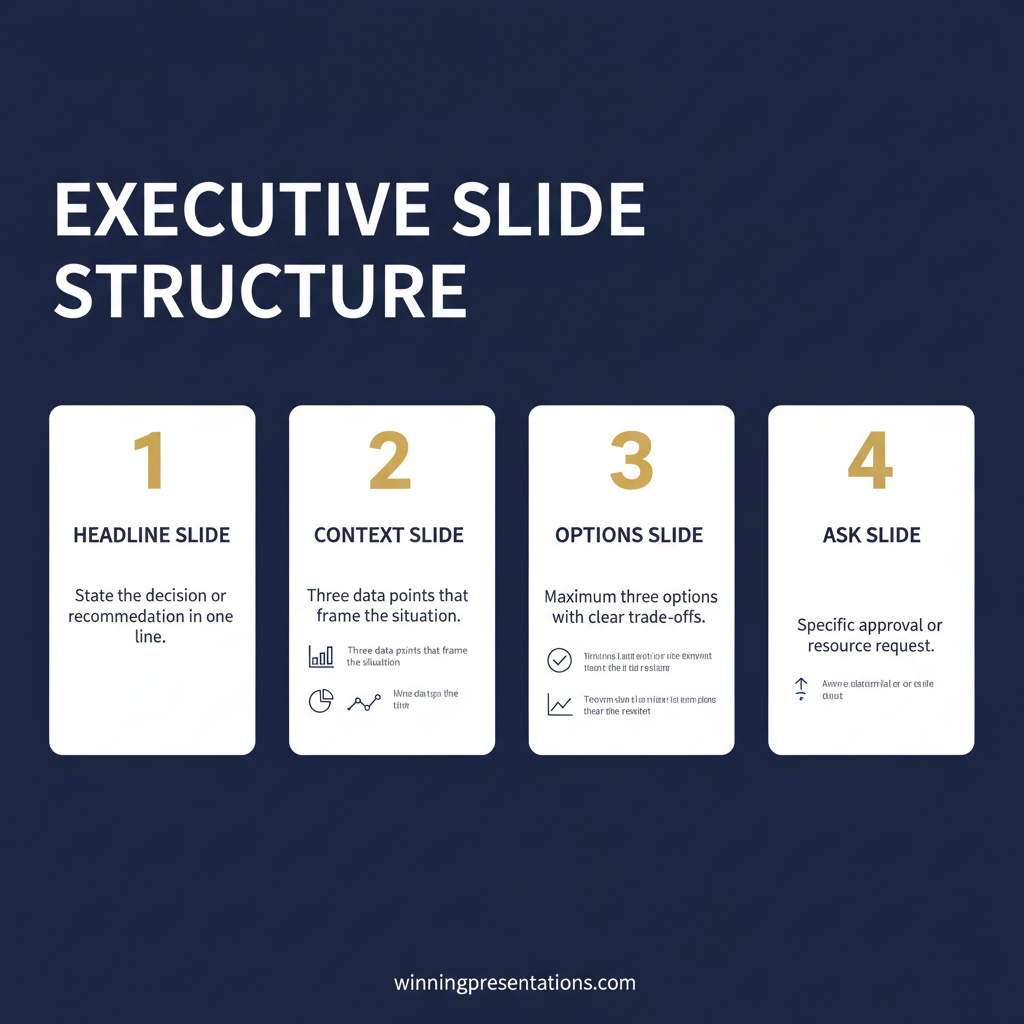
Executive-level slide structure is built around one principle: the audience should understand the recommendation before they encounter the evidence. This is the opposite of how most professionals are trained to present. The instinct is to build context, present analysis, explore options, and arrive at a recommendation. For general audiences, that sequence works. For senior decision-makers, it fails — because they form judgements early, and if they do not know what they are evaluating, they evaluate the wrong things.
The structural standard for executive presentations follows a specific architecture. The first slide states the recommendation and the ask. The second slide establishes why this decision matters now — the cost of delay, the competitive pressure, the regulatory deadline. The third slide presents the strongest evidence supporting the recommendation. The fourth addresses the primary risk and its mitigation. Everything after that is supporting detail, structured so the committee can stop reading when they have enough to decide.
This architecture works because board members and investment committee chairs read ahead. They skip slides. They look for the ask, the number, and the risk before engaging with the narrative. A deck that buries the recommendation on slide twelve forces them to construct their own interpretation — and that interpretation is almost always more cautious than the one the presenter intended.
The “so what” test applies at slide level. Every slide should carry a headline that states the implication, not the topic. “Q3 Revenue Performance” is a topic headline. “Q3 revenue exceeded forecast by 8%, driven by enterprise contract renewals” is an implication headline. The first requires the audience to study the chart and draw their own conclusion. The second tells them what the data means. Senior audiences consistently prefer the second.
For a practical framework on structuring dashboard presentations for executive audiences, the principles are the same: lead with the insight, not the data.
Templates Versus Building From Scratch
Many senior professionals assume that building presentations from scratch demonstrates rigour. The reality is that starting from a blank slide is one of the most common sources of structural error. Without a structural template, presenters default to the sequence that feels natural — context first, recommendation last — and reproduce the same architectural mistakes in every deck.
Templates are not shortcuts. A well-designed executive slide template embeds the structural logic for a specific scenario — the slide sequence, the headline framing, the evidence architecture — so the presenter can focus on the content rather than reconstructing the framework. A budget proposal template that begins with the investment rationale and positions the cost after the value has been established is not limiting the presenter. It is preventing the most common sequencing error that causes budget proposals to fail in committee.
The distinction between design templates and structural templates matters. Design templates — the ones built into PowerPoint and available through Microsoft’s gallery — standardise fonts, colours, and layouts. They do nothing for the logic of the argument. Structural templates address the order of information, the framing of each headline, and the relationship between evidence and recommendation. These are the templates that change outcomes.
The efficiency gain is substantial. A presentation that takes three to four hours to build from scratch can be completed in thirty to forty minutes when the structural architecture is already in place. The time saved is not on formatting — it is on decision-making: which slide comes first, what the headline should say, how to sequence the evidence. A structural template makes those decisions in advance.
For executives who want to see what scenario-specific structural templates look like in practice, the executive slide templates page provides a detailed overview of the approach — templates built around the decision logic of each presentation type, not around visual formatting.
AI-Assisted Deck Building: What It Gets Right and Wrong
AI tools — Copilot, ChatGPT, Gemini — have changed the speed at which slide content can be generated. They have not changed the structural quality. An AI tool prompted with “create a board presentation on our Q3 performance” will produce a fluent deck following a generic structure: context, data, analysis, summary, next steps. That structure is precisely the one that fails in boardroom settings, because it buries the recommendation and forces the audience to extract the ask from surrounding content.
The limitation is not the AI — it is the prompt. Most professionals ask for a “presentation” without specifying the structural architecture that executive audiences require. The result is a deck that reads well but argues poorly, because the underlying logic was never specified.
Effective AI-assisted deck building requires the presenter to know what structural framework to request. Prompting Copilot with “lead with the recommendation, follow with the three strongest evidence points, address the primary risk on slide four, close with the specific ask and timeline” produces a fundamentally different output. But writing that prompt requires the same structural knowledge that effective slide training for executives should provide.
This is where AI prompts built for executive scenarios become particularly valuable. Rather than constructing the structural prompt from scratch each time, scenario-specific AI prompts embed the correct architecture for each presentation type. The Executive Slide System includes 51 AI prompts designed for exactly this purpose — directing Copilot or ChatGPT to produce structurally sound executive decks rather than generic business presentations.
Common Mistakes in Boardroom Slides
Certain structural errors appear repeatedly in boardroom presentations. Recognising them is faster than learning a complete structural framework — and avoiding them immediately improves deck quality.
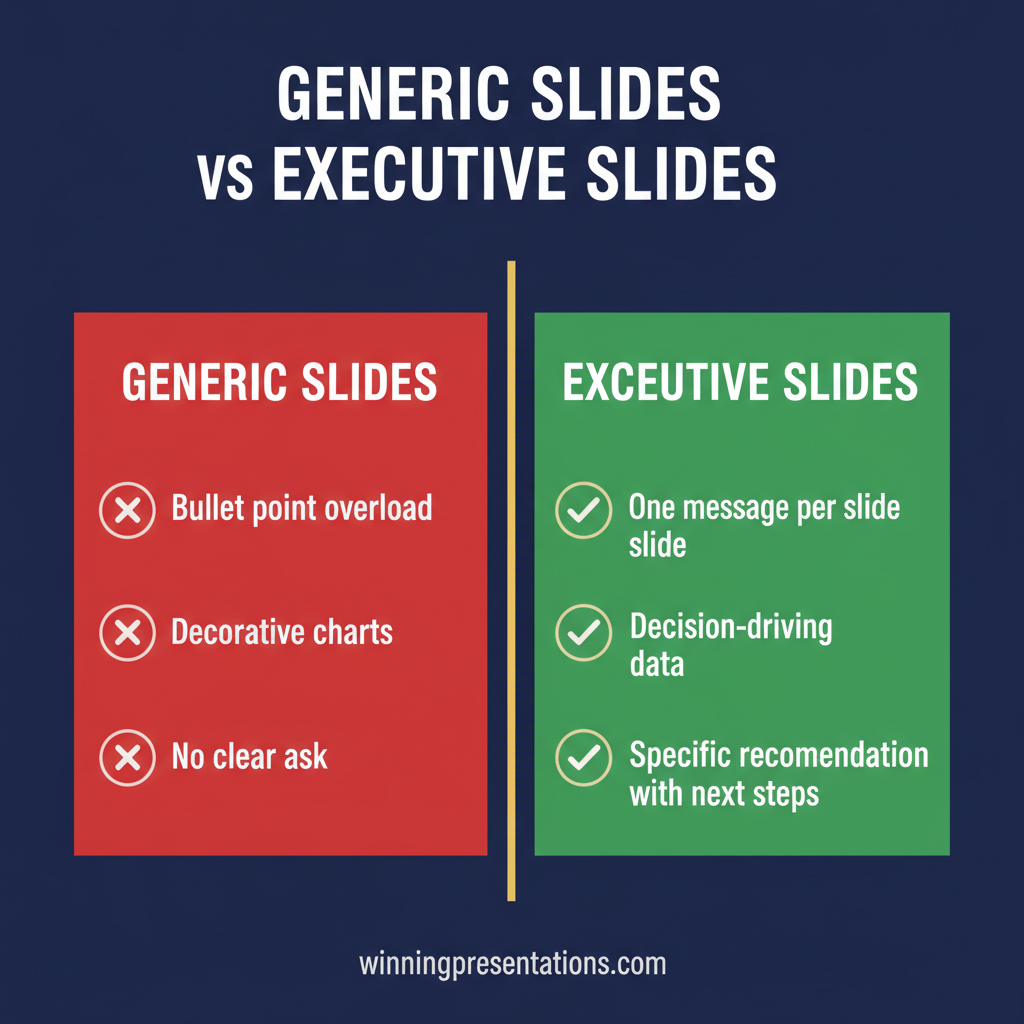
Burying the ask. The single most common structural failure. The recommendation appears on slide fifteen of a twenty-slide deck, after extensive context-setting and analysis. By that point, the committee has already formed preliminary conclusions based on incomplete information. Fix: state the recommendation on slide one or two. The rest of the deck is evidence, not narrative.
Topic headlines instead of implication headlines. “Market Analysis” describes what the slide contains. “European market share grew 3.2% following pricing adjustment” states what the slide means. Topic headlines force the audience to study every data point. Implication headlines tell them what matters.
Presenting risks last. Many presenters save risks for the penultimate slide, treating them as obligatory disclosure. Senior audiences are trained to look for risks — and if they do not find them early, they spend the middle of the presentation wondering what has been omitted. Fix: address the primary risk immediately after the recommendation. This allows the rest of the deck to build confidence rather than defend against emerging scepticism.
Including too many slides. A board that has allocated fifteen minutes for a topic does not want thirty slides of analysis. They want five to eight slides that present the logic clearly and an appendix they can review afterwards. The discipline of reducing a complex topic to eight slides forces the presenter to distinguish between what the committee needs to decide and what it might find interesting.
If you are preparing for a high-stakes presentation and want to ensure your morning preparation is as structured as your slides, the guide on morning protocol for presentation day covers the practical steps that experienced presenters follow before they walk into the room. And for presentations involving sensitive or high-risk disclosures, the framework for structuring a data breach board presentation applies these same structural principles to one of the most challenging executive scenarios.
Stop Rebuilding Slide Architecture From Scratch
The Executive Slide System gives you 22 templates, 51 AI prompts, and 15 scenario playbooks — the structural foundation for board updates, budget proposals, project pitches, and executive approvals. £39, instant access.
Get the Executive Slide System →
Designed for senior professionals who present to boards and executive committees
Frequently Asked Questions
Is online PowerPoint training worth it for senior executives?
For senior executives, the value of online PowerPoint training depends entirely on what it teaches. Design-focused courses — animation, layout, colour theory — rarely address the structural challenges that determine whether a boardroom presentation succeeds or fails. Training that focuses on slide architecture, decision framing, and scenario-specific structure is worth the investment because it directly reduces the time spent building decks and increases the likelihood that a committee approves the recommendation. The best online training is structured around the specific presentation types executives actually deliver, not generic slide design principles.
How quickly can I apply executive PowerPoint training?
The most practical training for executive-level PowerPoint skills is designed for immediate application. If the training provides scenario-specific templates and structural frameworks — rather than abstract theory — you should be able to apply it to your next presentation the same day. The Executive Slide System, for example, includes ready-to-use templates for board updates, budget proposals, and executive approvals that can be adapted to a specific meeting within thirty minutes, because the structural logic is already embedded in the template.
What is included in the Executive Slide System?
The Executive Slide System includes 22 scenario-specific slide templates for executive presentations, 51 AI prompts for building decision-ready decks, and 15 scenario playbooks that cover the structural logic for different high-stakes presentation types. It is priced at £39 with instant access. The system is designed for senior professionals who present to boards, investment committees, and executive teams — providing the structural starting point so you spend your time on the argument, not on reconstructing the slide architecture from scratch.
Do I need PowerPoint training if I already use Copilot?
Copilot and other AI tools accelerate slide production but do not replace structural knowledge. AI generates content based on prompts — and if the prompt does not specify the correct slide architecture for a board update versus a budget proposal versus an executive approval, the output will be fluent but structurally generic. Executive PowerPoint training gives you the structural frameworks that make AI tools genuinely useful, because you know what to ask for. Without that structural knowledge, AI produces more slides faster — but they are still the wrong slides for senior audiences.
The Winning Edge
Weekly insights on executive presentations, slide structure, and boardroom communication — for professionals who present at the highest stakes.
Preparing for a high-stakes presentation? Download the Executive Presentation Checklist — a structured self-review framework for senior professionals building board-level and executive committee decks.
About the author
Mary Beth Hazeldine, Owner & Managing Director, Winning Presentations. With 25 years of corporate banking experience at JPMorgan Chase, PwC, Royal Bank of Scotland, and Commerzbank, she works with executives across financial services, healthcare, technology, and government on structuring presentations for high-stakes approvals, board reviews, and senior stakeholder communication.