

The Failing Project Presentation Nobody Teaches You to Give
Quick Answer: When your project is off track, most people present excuses disguised as context. Executives don’t want to know why it failed — they want to know what happens next, what it costs, and what decision you need from them. The failing project presentation that saves careers follows a specific structure: own the status in one sentence, quantify the impact, present a recovery plan with options, and make a specific ask. Six slides. No defensive preamble.
In this article:
- Why most failing project presentations make things worse
- What executives actually need to hear (it’s not what you think)
- The Recovery Architecture: 6 slides that turn red into a plan
- How to own the status without destroying your credibility
- Building the recovery plan slide that gets resources, not blame
- What to do in the 48 hours after the meeting
- Frequently asked questions
The project was £1.2M over budget, four months behind, and the steering committee wanted answers in fifteen minutes.
My client — a programme director at a financial services firm — had prepared 34 slides. Thirty-four. Timeline comparisons, resource allocation charts, dependency maps, vendor performance scorecards, risk registers, and a RACI matrix that nobody had asked for.
I looked at the deck and said: “You’ve built the defence case. Where’s the recovery case?”
She paused. “What do you mean?”
“You’ve spent 30 slides explaining why this happened. You’ve spent 4 slides on what happens next. The steering committee doesn’t need a forensic investigation — they need to know three things: how bad is it, what’s the plan, and what do you need from us.”
We rebuilt the entire presentation in two hours. Six slides. The first one said: “Project is off track. Here’s the recovery plan and what I need from this committee to execute it.”
She walked into that steering committee and walked out with the resources she’d asked for. Not because the news was good — it wasn’t. Because the structure told the room she was in control of the problem, not drowning in it.
🚨 Project gone red and presenting to leadership this week? Quick check: Does your first slide state the status and the plan — or does it start with context and background? If it’s background, you’re building a defence case. They want a recovery case. → Need the exact off-track project structure? Get the Executive Slide System → £39
Why Most Failing Project Presentations Make Things Worse
Here’s the pattern I’ve seen in every failing project presentation that ends badly: the presenter leads with explanation.
“The vendor deliverables were delayed.” “We lost two key team members in Q2.” “The requirements changed mid-stream.” “The timeline was ambitious from the start.”
Every one of these statements might be true. And every one of them sounds like an excuse.
This isn’t fair. But it’s how executive brains work. When leadership hears explanation before solution, they categorise you as someone who understands the problem but can’t fix it. And once you’re in that category, every subsequent slide — no matter how good — gets filtered through that lens.
The worst version of this is what I call the “archaeology presentation”: a slide-by-slide excavation of everything that went wrong, presented in chronological order, building toward a conclusion the room figured out in slide one. By the time you reach your recovery plan on slide 28, three people have left and the remaining decision-makers have already decided you’re not the person to lead the fix.
Related: If you need to deliver bad news more broadly (not just project updates), see the complete structure for presenting bad news without destroying credibility.
How do you present a project that is behind schedule?
Lead with the status and the plan, not the reasons. State the current position in one sentence (“Project is four months behind and £1.2M over budget”). Then immediately pivot to recovery: what the plan is, what it costs, and what decision you need. The reasons belong in an appendix — available if asked, never volunteered upfront. Executives respect ownership and forward motion. They lose confidence in explanations.
What Executives Actually Need to Hear
I’ve sat in hundreds of steering committees across JPMorgan, PwC, and Commerzbank. When a project goes red, every executive in the room is silently asking four questions — and they need them answered in this order:
1. “How bad is it — in numbers?” Not narrative. Numbers. How much over budget? How many months delayed? What’s the cost of the delay per week or month? If you can’t quantify the impact, you don’t understand it well enough to present it.
2. “Does the project lead know they’re in trouble?” This is the ownership test. If you present the red status without explicitly owning it — if you drift into passive voice (“milestones were missed”) or distribute blame (“dependencies weren’t met”) — you’ve failed this test. The room needs to hear you say: “This project is off track. I own that.”
3. “Is there a credible plan to recover?” Not a vague commitment. A specific plan with options, timelines, resource requirements, and trade-offs. “We’re working on solutions” is the single worst sentence in project management. It tells the room you don’t have a plan yet.
4. “What do you need from us?” Every executive meeting exists to make decisions. If you present a problem without asking for something specific — budget, resources, timeline extension, scope reduction — you’ve wasted their time. And they’ll remember that.
⭐ Turn a Red Status Into a Recovery Plan That Gets Resources
The Executive Slide System includes Scenario 07: “Project Is Off Track” — a step-by-step playbook that tells you exactly which template to open, which AI prompt to run, and which checklist to verify before you walk into the steering committee.
Your off-track project toolkit:
- Project Status Update template (Card 03) — RAG-status structure with business-impact language
- Risk Assessment template (Card 09) — pre-emptive objection handling for the questions you’ll get
- 3 AI prompts per template — Draft → Refine → Executive Polish (stress-test it as a skeptical CEO)
- The 15-minute version for when the steering committee is tomorrow
Get the Executive Slide System → £39
Built from steering committees at JPMorgan, RBS, PwC, and Commerzbank. Includes 15 scenario playbooks — find your exact situation, follow it like a recipe.
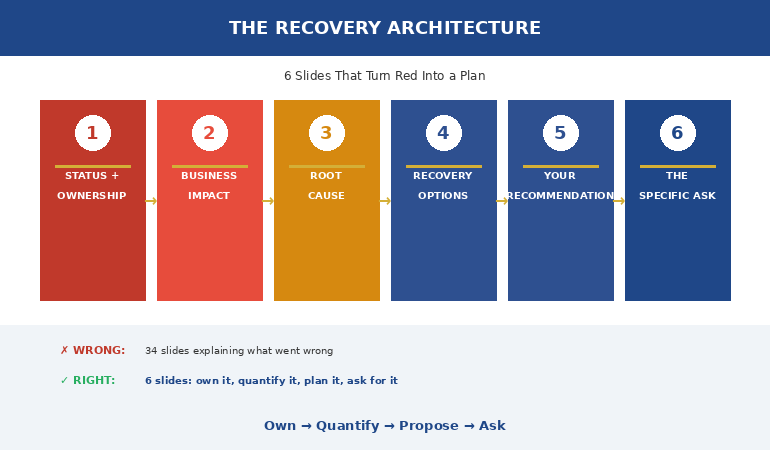
The Recovery Architecture: 6 Slides That Turn Red Into a Plan
After working with dozens of project leads facing this exact situation, I developed what I call the Recovery Architecture. It’s the opposite of the instinctive “explain then propose” approach — and it’s the structure that consistently gets resources instead of blame.
Slide 1: Status + Ownership (one sentence each). “Project Horizon is off track: 4 months delayed, £1.2M over budget. I own this update and the recovery plan that follows.” That’s it. One slide. Two sentences. The room now knows three things: the facts, that you know the facts, and that you have a plan. Most presenters take 10 slides to get here.
Slide 2: Business Impact (quantified). Not project impact — business impact. “Each month of delay costs £180K in manual workarounds and risks missing the Q3 regulatory deadline. Total exposure if unresolved: £2.1M.” Executives think in business outcomes. Translate your project metrics into their language.
Slide 3: Root Cause (one slide, no narrative). Three bullet points maximum. Each bullet: what happened, why, and whether it’s resolved or ongoing. This is the only backward-looking slide in your deck. Keep it surgical.
Slide 4: Recovery Options (not one plan — two or three). This is the slide that separates career-preserving presentations from career-ending ones. Don’t present one plan. Present options with trade-offs. “Option A: Accelerated timeline, £400K additional budget, delivered Q3. Option B: Reduced scope, current budget, delivered Q2 with Phase 2 in Q4. Option C: Pause and reassess, £80K sunk cost, decision in 30 days.” Now the steering committee is choosing between options — not judging your competence.
Slide 5: Your Recommendation. Pick one option and explain why. “I recommend Option A because the regulatory deadline isn’t movable and the cost of non-compliance exceeds the additional budget.” You’ve earned the right to recommend because you’ve shown you understand the full picture. Use the decision slide structure here — recommendation first, reasoning second.
Slide 6: The Specific Ask. “I need this committee to approve £400K additional budget and extend the timeline to Q3. I need that decision today because the vendor contract expires Friday.” Specific. Time-bound. Actionable. This is where steering committees make decisions — if you give them something specific to decide.
How to Own the Status Without Destroying Your Credibility
The ownership moment is the most psychologically difficult part of the failing project presentation. Your instinct screams: if I admit this is my responsibility, they’ll fire me. But the data says the opposite.
In 24 years of banking, I never saw a project lead get fired for owning a problem with a plan. I saw plenty get sidelined for hiding one.
What should you say when a project is failing?
There’s a specific formula that works: Status + Ownership + Pivot. “This project is off track [status]. I’m responsible for this update and the recovery plan [ownership]. Here’s what I’m proposing [pivot].” The pivot is critical — it moves the room’s attention from the problem to the solution in the same breath. Without the pivot, ownership sounds like confession. With it, ownership sounds like leadership.
What you never say: “We” when you mean “I.” “Challenges were encountered.” “The timeline proved ambitious.” Passive voice in a crisis presentation is a credibility killer. It tells the room you’re distancing yourself from the problem — which tells them you can’t be trusted to fix it.
If the physical stress of presenting bad news is a concern — and it is for most people, even experienced presenters — the structural approach helps here too. When you know your first slide establishes ownership and your second quantifies impact, the uncertainty drops. And uncertainty is what drives most presentation anxiety.
The difference between “we’ve noted your concerns” and “approved — proceed with Option A” is slide structure, not content quality. The Executive Slide System gives you the exact Project Status + Risk Assessment templates used in Scenario 07: Project Is Off Track — with matched AI prompts that stress-test your recovery plan before the room does.
Building the Recovery Plan Slide That Gets Resources, Not Blame
The recovery plan slide is where most people make their second big mistake: presenting one plan with absolute confidence.
“Here’s what we’re going to do.”
This feels strong. It’s actually weak. Because if any executive in the room disagrees with any element of your plan, they have only two options: accept it entirely or reject it entirely. Most will defer — “let’s think about this” — which means you leave without a decision.
Options change the dynamic. When you present two or three recovery paths with clear trade-offs, you shift the room from judge to decision-maker. They’re no longer evaluating whether your plan is good enough. They’re choosing which path forward they prefer. That’s a fundamentally different conversation — and it’s one that ends with a decision.
Each option needs four elements: what changes (scope, timeline, resource), what it costs, what the trade-off is, and when it delivers. No narrative. A comparison table works perfectly here — executives can scan three columns in ten seconds and immediately see the trade-offs.
Your recommendation goes on the next slide, not embedded in the options. This separation matters. It shows you’ve considered the alternatives honestly before recommending one — which builds more trust than presenting your preferred option as the only credible path.
⭐ Stop Getting ‘Let’s Revisit This’ When Your Project Needs a Decision Now
The Executive Slide System is built for exactly this moment. Scenario 07 walks you through the off-track project presentation step by step — which template to open, which prompt to run, what to verify before you walk in, and the 15-minute version for when the meeting is tomorrow.
Your off-track project deliverables:
- Red-status opener slide — status + ownership + decision ask in one sentence
- Recovery plan options template — next 14 days / next 90 days with costed trade-offs
- Risk + mitigation slide format that pre-empts the objections you’ll get from the steering committee
- AI prompt: “Stress-test this recovery plan as a skeptical CEO” — before the room does it for you
Get the Executive Slide System → £39
Built from steering committees where projects went red — at JPMorgan, RBS, PwC, and Commerzbank. Scenario 07 walks you through the recovery presentation step by step.
Your routine project status updates should already be using a decision-first structure — so when the project goes red, the format feels familiar to leadership. The Executive Slide System includes both the routine and the crisis versions of the project status template.
What to Do in the 48 Hours After the Meeting
The presentation isn’t the end — it’s the beginning of the recovery. What you do in the 48 hours after a failing project presentation determines whether the room’s confidence holds or collapses.
Within 2 hours: Send a one-page summary of the decision made, the option approved, the specific next steps with owners and dates. Don’t wait for the minutes. Own the follow-up. This signals that the same person who presented the recovery plan is already executing it.
Within 24 hours: Have individual conversations with the two or three most important stakeholders. Ask: “Was there anything in the presentation that concerned you that you didn’t raise in the meeting?” This catches objections that went unsaid — and demonstrates you’re managing the politics, not just the project.
Within 48 hours: Send the first micro-update. Even if nothing has materially changed, show movement. “Vendor contract extended (confirmed). New resource starts Monday. First milestone under revised plan: March 14.” This establishes the cadence that the recovery plan is real, not just a presentation.
The project leads who survive red-status moments are never the ones with the best excuses. They’re the ones who demonstrate — through structure, ownership, and immediate action — that the project is in competent hands despite the setback.
How do you tell executives a project is off track?
Directly, with numbers, in one sentence. “Project Horizon is four months behind schedule and £1.2M over budget.” Then immediately follow with your recovery plan. The biggest mistake is building up to the bad news with context — executives read the room and know bad news is coming, so every slide of context feels like stalling. Say it, own it, and pivot to the plan. That’s the structure that earns continued trust.
Is This Right For You?
✓ This is for you if:
- Your project has gone red or amber and you have a steering committee or leadership update coming
- You’ve been building a “what went wrong” deck and know it’s not landing
- You need a structure that gets a decision — not a deferral
✗ This is NOT for you if:
- Your project is on track and you need a routine status update format (see project status update framework)
- You’re looking for a post-mortem or lessons-learned template (different format)
⭐ Your Steering Committee Isn’t Waiting. Get the Structure That Gets Decisions.
The Executive Slide System was built in the steering committees of global banks and consulting firms — the rooms where red-status projects get decided. Scenario 07 gives you the exact template, prompt card, checklist, and 15-minute emergency version for presenting a project that’s off track.
Inside:
- 22 executive slide templates including Project Status Update and Risk Assessment
- 51 AI prompts — including “stress-test this as a skeptical CEO” for your recovery plan
- 15 scenario playbooks — Scenario 07 (off-track project) + Scenario 04 (presenting bad news) both apply
- 6 checklists covering structure, decision readiness, and objection handling
Get the Executive Slide System → £39
Instant download. 30-day money-back guarantee. Used by project leads, programme directors, and consultants presenting to steering committees.
Frequently Asked Questions
Should I present the bad news first or build context?
Bad news first. Always. When you build context before delivering the status, every slide feels like stalling — and the room knows it. State the status and your ownership in one sentence on slide one, then move immediately to impact and recovery. Context belongs in an appendix, available if someone asks. In 24 years of steering committees, I never saw an executive thank someone for building up to bad news gradually. They thanked the people who said it clearly and followed it with a plan.
What if the project failure isn’t my fault?
It doesn’t matter. This sounds harsh, but it’s the reality of executive presentations. The room doesn’t care about fault allocation — they care about who’s going to fix it. If you present the causes (even legitimate ones like vendor delays or requirements changes), you signal that you’re focused on attribution rather than recovery. Own the situation, present the plan, and save the root cause analysis for the retrospective. The person who fixes the problem always has more credibility than the person who correctly identifies who caused it.
How do I present a recovery plan when I’m not sure it will work?
Present options with confidence levels. “Option A has an 80% probability of delivering by Q3 if we get the additional budget approved this week. Option B is lower risk but extends the timeline to Q4.” Executives are comfortable with uncertainty — they make decisions under uncertainty every day. What they can’t work with is vagueness. “We’re exploring several approaches” gives them nothing to decide on. Specific options with honest probabilities give them everything they need.
How many slides should a failing project update have?
Six. Status + Ownership (1 slide), Business Impact (1 slide), Root Cause (1 slide), Recovery Options (1 slide), Your Recommendation (1 slide), The Specific Ask (1 slide). Plus an appendix with supporting data available if asked. Anything more than this means you’re explaining instead of leading. If your steering committee typically runs longer, use the six slides as your core and put everything else in the appendix. The decision gets made in six slides or it doesn’t get made at all.
📬 The Winning Edge — Weekly Newsletter
One executive presentation insight per week. Real steering committee scenarios, real structures, no filler. Written for project leads and programme directors who present to people who make decisions.
Related: If the project has already failed and you’re presenting the aftermath, read Presenting After Failure: The 3 Words That Saved a VP’s Career — the recovery structure for when the damage is done and your career depends on what you say next.
Your steering committee isn’t waiting for you to find the perfect words. They’re waiting for a plan. Get the structure that delivers one — before the meeting delivers a verdict.
About the Author
Mary Beth Hazeldine is the Owner & Managing Director of Winning Presentations. With 24 years of corporate banking experience at JPMorgan Chase, PwC, Royal Bank of Scotland, and Commerzbank, she has delivered high-stakes presentations in boardrooms across three continents.
A qualified clinical hypnotherapist and NLP practitioner, Mary Beth combines executive communication expertise with evidence-based techniques for managing presentation anxiety. She has trained thousands of executives and supported presentations for high-stakes funding rounds and approvals.