Category: Presentation Skills

26 Dec 2025
Data storytelling - how to make numbers compelling and drive decisions

Data Storytelling: How to Make Numbers Compelling (Not Boring)

Turn spreadsheets into stories that drive decisions β€” techniques from 24 years of presenting to boards, credit committees, and investors

I once watched a colleague present 47 slides of flawless analysis to a credit committee. Every number was accurate. Every chart was properly labelled. The recommendation was sound.

They said no.

The problem wasn’t the data. It was the delivery. He presented numbers. He should have told a story with numbers. That’s the difference between data presentation and data storytelling β€” and it’s the difference between getting polite nods and getting decisions.

After 24 years in banking β€” presenting to boards at JPMorgan, credit committees at RBS, investors at Commerzbank β€” I’ve learned that the analysts who get promoted aren’t the ones with the best spreadsheets. They’re the ones who make data mean something.

🎁 Free Download: Executive Presentation Checklist β€” includes the data slide framework from this article. Print-ready PDF.

What Is Data Storytelling (And Why It Matters)

Data storytelling is the practice of building a narrative around data to help your audience understand and act on insights. It combines three elements: the data itself, the visualisation, and the narrative that connects them.

Here’s why it matters:

Data alone doesn’t persuade. Stanford research found that statistics presented with stories are 22 times more memorable than statistics alone. Numbers tell people what. Stories tell people why it matters.

Decisions are made emotionally. Neuroscientist Antonio Damasio’s research shows that people with damage to emotional brain centres can’t make decisions β€” even with perfect logic. Your CFO may think they’re purely analytical, but they’re not. Nobody is.

Attention is limited. The average executive spends 2-4 minutes reviewing a slide before moving on. If your data doesn’t land immediately, it doesn’t land at all.

Data storytelling isn’t about dumbing down your analysis. It’s about making your analysis accessible to people who don’t have time to interpret it themselves.

Related: How to Present to a CFO: The Finance-First Framework

The Data Storytelling Framework: Lead With Insight

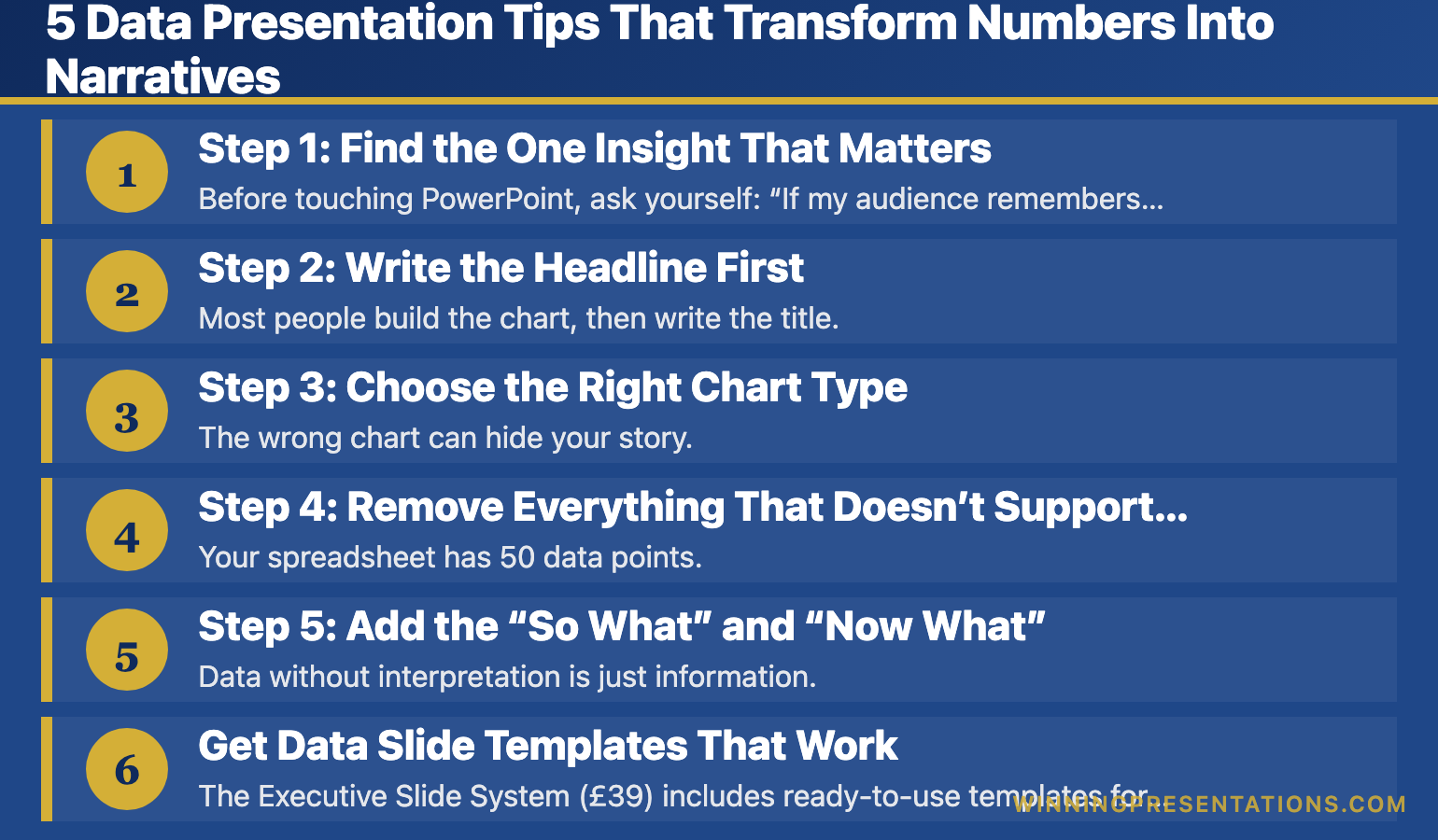
Most presenters structure data slides like this:

Here’s the data β†’ Here’s what it shows β†’ Here’s what we should do

That’s backwards. By the time you reach your point, you’ve lost them.

Effective data storytelling reverses the order:

Here’s the insight β†’ Here’s the data that proves it β†’ Here’s what we should do

This is the “lead with the headline” approach. Your audience knows immediately what they’re looking at and why it matters. The data becomes evidence, not a puzzle to solve.

Example: Before and After

Before (Data-First):

“Q3 revenue was Β£4.2M. Q2 was Β£3.8M. Q1 was Β£3.5M. Year-over-year we’re up 12%. The EMEA region grew 18% while Americas grew 6%…”

The audience is doing mental maths, trying to figure out the point.

After (Insight-First):

“EMEA is now our growth engine β€” up 18% while Americas stalls at 6%. If we shift Q4 marketing budget accordingly, we can capture another Β£400K.”

Same data. Completely different impact.

Related: The Executive Summary Slide: How to Write the Only Slide That Matters

Data storytelling framework - lead with insight, support with data, end with action

5 Data Storytelling Techniques That Work in Business

These are the techniques I use with clients β€” from biotech fundraising decks to banking board presentations.

1. The Comparison Anchor

Numbers mean nothing without context. “Β£2.3 million” is abstract. “Β£2.3 million β€” that’s 3x what we spent last year for half the results” creates meaning.

Always anchor your data to something your audience already understands:

  • Compare to last year / last quarter
  • Compare to competitors or industry benchmarks
  • Compare to targets or forecasts
  • Compare to a familiar reference point

Example: “Our customer acquisition cost is Β£47. The industry average is Β£62. We’re 24% more efficient β€” and here’s why that matters for our Q1 targets…”

2. The Single Number Focus

When everything is important, nothing is important. Pick the one number that matters most and build your slide around it.

I learned this the hard way. Early in my career, I’d cram every relevant metric onto a slide. The result? Decision-makers couldn’t see the forest for the trees.

Now I ask: “If they remember only one number from this slide, what should it be?” That number gets visual prominence. Everything else supports it.

3. The Trend Line Story

A single data point is a fact. Multiple data points are a trend. Trends tell stories.

Weak: “Churn rate is 4.2%”

Strong: “Churn has dropped from 6.1% to 4.2% over eight months β€” the interventions are working”

When presenting trends, always explain the inflection points. What happened in March that changed the trajectory? That’s where the story lives.

4. The “So What” Test

For every data point, ask yourself: “So what?”

“Revenue grew 12%” β€” So what?
“Revenue grew 12%, which means we’ve hit our trigger for the expansion budget” β€” Now I understand why this matters.

If you can’t answer “so what” for a piece of data, it probably doesn’t belong in your presentation.

5. The Contrast Frame

Show what the data could have been β€” or what it will be if nothing changes.

Example: “At current trajectory, we’ll miss target by Β£800K. With this intervention, we close the gap entirely.”

Contrast creates stakes. Stakes create attention.

Related: Team Dashboards That Tell a Story (Not Just Show Numbers)

Turn Your Data Into Stories That Drive Decisions

The Executive Slide System (Β£39) includes templates specifically designed for data-heavy presentations.

What’s included:

  • The “Insight-First” data slide template
  • Before/after examples from real executive presentations
  • The single-number-focus framework
  • Dashboard templates that tell stories

Get the Executive Slide System β†’

Common Data Storytelling Mistakes (And How to Avoid Them)

After reviewing hundreds of data presentations, I see the same mistakes repeatedly.

Mistake 1: Showing all the data. Your analysis might require 50 data points. Your presentation needs 5. The rest belongs in the appendix. Include only what’s necessary to support your narrative.

Mistake 2: Letting the chart speak for itself. No chart is self-explanatory to a busy executive. Always add a headline that states the insight, not just a label that states the topic. “Q3 Revenue by Region” is a label. “EMEA Drives 70% of Q3 Growth” is an insight.

Mistake 3: Choosing the wrong chart type. Pie charts for trends. Bar charts for composition. Line charts for 15 data points. Match the visualisation to the story you’re telling:

  • Trends over time β†’ Line chart
  • Comparison between categories β†’ Bar chart
  • Part-to-whole relationships β†’ Pie or stacked bar (with few segments)
  • Correlation β†’ Scatter plot

Mistake 4: Burying the lead. The most important insight should be visible within 3 seconds. If your audience has to hunt for the point, they won’t.

Mistake 5: No clear action. Data without a recommendation is just information. Always end data slides with what you want the audience to do with this information.

Data Storytelling in Practice: A Real Example

A biotech client came to me with a fundraising deck. Their data slide looked like this:

Title: “Clinical Trial Results”
Content: A table with 12 rows of efficacy data, p-values, confidence intervals, and patient subgroup breakdowns.

Scientifically rigorous. Completely ineffective for investors who see 20 decks a week.

We restructured it:

Title: “87% Response Rate β€” 2x the Standard of Care”
Content: One large number (87%), one comparison bar showing vs. standard of care (43%), and a single line of supporting text about statistical significance.

The detailed data moved to the appendix. The story stayed on the slide.

They raised Β£18 million.

Related: Storytelling in Presentations: The NLP Techniques That Captivate Any Audience

πŸ“¬ Get Weekly Presentation Tips

Every week, I share one actionable tip for presenting data, handling tough audiences, and getting decisions. No fluff, no spam β€” just techniques that work.

Subscribe to The Winning Edge β†’

Frequently Asked Questions About Data Storytelling

How do I tell a story with data without oversimplifying?

Simplifying isn’t dumbing down β€” it’s respecting your audience’s time. Keep the full analysis available (in appendix or backup slides) but lead with the insight. If someone wants to drill into methodology, they’ll ask. Most won’t.

What if my audience wants to see all the numbers?

Some audiences do β€” especially technical or financial reviewers. In these cases, structure your presentation in layers: executive summary with key insights first, then supporting detail, then full data appendix. Let them choose their depth.

How do I present data that tells a negative story?

Lead with the insight anyway β€” but frame it constructively. “We’re 15% behind target” is a problem. “We’re 15% behind target, and here’s the recovery plan that closes the gap by Q4” is a story with a path forward. Never hide bad data; contextualise it.

How many data points should one slide have?

As few as possible to make your point. For most business presentations, that’s 1-3 key metrics per slide. If you need more, ask yourself if you’re actually making multiple points that deserve multiple slides.

Should I use AI tools for data visualisation?

AI can help generate initial visualisations, but always review and refine. Tools like Copilot are good at creating charts quickly but often miss the storytelling elements β€” the headlines, the annotations, the “so what.” Use AI for speed, then add the human insight layer.


Master Data Storytelling + Persuasion + AI Tools

AI-Enhanced Presentation Mastery includes a dedicated module on data storytelling β€” how to structure data slides, choose visualisations, and build narratives that drive decisions.

8 self-paced modules (January–April 2026):

  • Module 4: Data Storytelling β€” turn numbers into narratives
  • The S.E.E. Formula for persuasive messaging
  • The 132 Rule for executive presentations
  • AI workflows for faster deck creation
  • Handling tough Q&A and hostile audiences

Plus: 2 live coaching sessions (April 2026) with personalised feedback.

Presale price: Β£249 (increases to Β£299, then Β£499)

60 seats total. Lifetime access.

See the full curriculum β†’

Your Next Step: Apply the Insight-First Framework

Data storytelling isn’t a talent β€” it’s a technique. Start with one change: on your next data slide, write the insight as your headline, not the topic.

Instead of “Q3 Sales Performance,” write “Q3 Sales Exceeded Target by 12% β€” Here’s What Drove It.”

That single shift transforms how your audience receives the information.

🎁 START FREE: Download the Executive Presentation Checklist β€” includes the data slide framework from this article.

πŸ“˜ GET THE TEMPLATES (Β£39): The Executive Slide System gives you ready-to-use data slide templates with the insight-first structure built in.

πŸŽ“ MASTER IT ALL (Β£249): AI-Enhanced Presentation Mastery β€” includes a full data storytelling module plus 7 more modules on structure, persuasion, and delivery. January–April 2026.


Mary Beth Hazeldine spent 24 years in corporate banking at JPMorgan, PwC, Royal Bank of Scotland, and Commerzbank β€” where she learned that the analysts who get promoted aren’t the ones with the best spreadsheets, but the ones who make data mean something.

25 Dec 2025
Free presentation resources - checklists, templates, and frameworks for executives and professionals

Free Presentation Resources: Everything I Give Away (And Why)

10 free downloads, zero catch β€” checklists, templates, and frameworks from 35 years of presentation work

People sometimes ask why I give so much away for free.

The honest answer: because free presentation resources changed my career.

Early in my banking days, I was drowning in presentations β€” building decks from scratch, guessing at structure, hoping my slides wouldn’t embarrass me in front of senior leadership. Then I found a simple checklist from someone who’d been doing this for decades. It saved me hours. It made me look competent. It gave me confidence I hadn’t earned yet.

I’ve never forgotten that feeling.

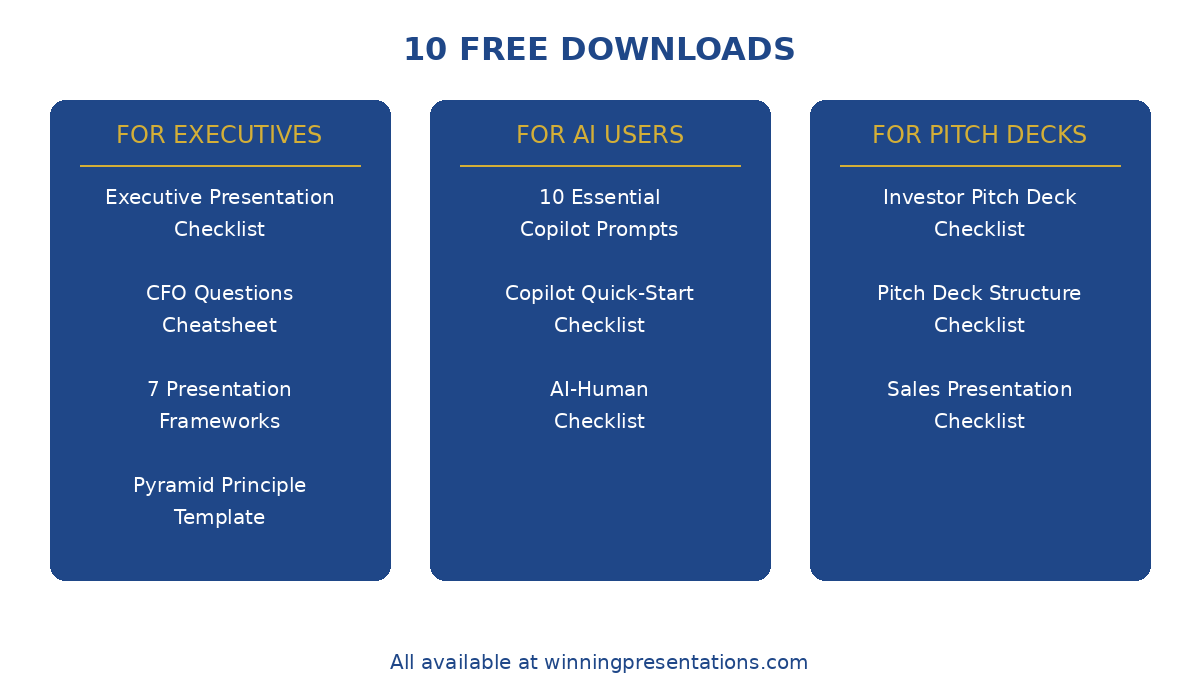
So here’s everything I give away β€” 10 free presentation resources covering executive presentations, AI tools, pitch decks, and public speaking. No email required for some, just a signup for others. Take what you need.

🎯 Not Sure Where to Start?

The most popular download is the 7 Presentation Frameworks β€” it gives you reliable structures for any presentation type, so you never start from a blank slide again.

Updated 27 March 2026 β€” Revised for the latest Microsoft Copilot and ChatGPT capabilities.

Download 7 Presentation Frameworks (Free) β†’

Free Presentation Resources for Executives

These are designed for anyone presenting to senior leadership, boards, or C-suite audiences.

1. Executive Presentation Checklist

What it is: A pre-presentation checklist covering structure, messaging, and delivery. The same framework I use before any high-stakes presentation.

Best for: Anyone presenting recommendations, budgets, or strategic updates to executives.

What’s inside:

  • The 5-point structure check (does your deck pass the “so what” test?)
  • Messaging clarity questions
  • Delivery preparation reminders
  • The 60-second executive summary framework

πŸ‘‰ Download the Executive Presentation Checklist (Free)

Related reading: How to Create Executive Presentations That Get Results


2. CFO Questions Cheatsheet

What it is: The 10 questions finance leaders almost always ask β€” and how to prepare for them before they’re asked.

Best for: Anyone presenting budget requests, business cases, or investment proposals to finance teams.

What’s inside:

  • The ROI question (and how to frame your answer)
  • The “what if it fails” question
  • The timeline and resource questions
  • How to handle “can we do this cheaper?”

πŸ‘‰ Download the CFO Questions Cheatsheet (Free)

Related reading: How to Present to a CFO: The Finance-First Framework


3. 7 Presentation Frameworks

What it is: Seven proven structures for different presentation types β€” from executive updates to persuasive pitches to storytelling formats.

Best for: Anyone who wants a reliable starting structure instead of staring at a blank slide.

What’s inside:

  • The Pyramid Principle structure (McKinsey’s favourite)
  • The S.E.E. Formula (Story-Evidence-Emotion)
  • The Problem-Solution-Proof framework
  • The 132 Rule for executive presentations
  • Four more structures with fill-in templates

πŸ‘‰ Download 7 Presentation Frameworks (Free)

Related reading: Presentation Structure: 7 Frameworks That Actually Work


4. Pyramid Principle Template

What it is: A fill-in template for structuring any presentation using Barbara Minto’s Pyramid Principle β€” the framework used by McKinsey, BCG, and top consulting firms.

Best for: Complex recommendations, strategic proposals, and any presentation where you need to lead with the conclusion.

What’s inside:

  • The SCQA framework (Situation-Complication-Question-Answer)
  • How to structure supporting arguments
  • Fill-in boxes for your content
  • Before/after examples

πŸ‘‰ Download the Pyramid Principle Template (Free)

Related reading: The Pyramid Principle for Presentations: McKinsey’s Secret Weapon

πŸ’Œ Want weekly tips? The Winning Edge newsletter delivers one actionable presentation tip every week β€” free, no spam.

Free presentation templates and checklists - executive, pitch deck, and AI resources

Free AI & Copilot Presentation Resources

These help you use AI tools effectively β€” without getting generic, robotic output.

5. 10 Essential Copilot Prompts

What it is: The 10 PowerPoint Copilot prompts I use most often β€” tested across hundreds of presentations.

Best for: Anyone using Microsoft Copilot for PowerPoint who wants better results than “Create a presentation about…”

What’s inside:

  • Prompts for slide generation, refinement, and formatting
  • The “context sandwich” technique for better output
  • Prompts for executive summaries and data slides
  • What to say instead of “make this better”

πŸ‘‰ Download 10 Essential Copilot Prompts (Free)

Related reading: Best PowerPoint Copilot Prompts That Actually Work


6. PowerPoint Copilot Quick-Start Checklist

What it is: A step-by-step checklist for getting started with Copilot in PowerPoint β€” from setup to your first AI-assisted deck.

Best for: Copilot beginners who want to avoid the common mistakes that waste the first few weeks.

What’s inside:

  • Setup and licensing checklist
  • Your first prompt sequence
  • What Copilot does well (and what it doesn’t)
  • The 5-minute workflow to test it

πŸ‘‰ Download the Copilot Quick-Start Checklist (Free)

Related reading: How to Use Copilot in PowerPoint: Complete Tutorial


7. AI-Human Checklist

What it is: A quality control checklist for AI-generated presentations β€” ensuring your deck doesn’t look (or sound) like a robot made it.

Best for: Anyone using ChatGPT, Copilot, or other AI tools who wants output that feels human and credible.

What’s inside:

  • The “AI smell test” β€” 7 signs your deck looks AI-generated
  • Human touch points to add
  • Language patterns to fix
  • The final polish checklist

πŸ‘‰ Download the AI-Human Checklist (Free)

Related reading: Why AI Presentations Fail (And How to Fix Them)

Stop Guessing What to Type. Start Building in 25 Minutes.

The Executive Prompt Pack gives you 71 tested prompts for ChatGPT and Copilot β€” structured by scenario so you know exactly what to type:

  • Build from scratch β€” scenario prompts for board reviews, budget requests, and investor decks
  • Rescue and rewrite β€” audit an existing deck, condense it, or fix one slide at a time
  • Industry-specific prompts for financial services, banking, consulting, and executive audiences
  • Power modifiers that transform any prompt into board-ready output
  • The 25-minute deck workflow that replaces 3–4 hours of manual building

Works with ChatGPT, Microsoft Copilot, and Edit with Copilot (formerly Agent Mode). Updated March 2026.

Get the Executive Prompt Pack β†’ Β£19.99

Free Pitch Deck & Fundraising Resources

For founders, salespeople, and anyone building decks to raise money or close deals.

8. Investor Pitch Deck Checklist

What it is: A slide-by-slide checklist based on what actually gets investor meetings β€” not theory, but patterns from decks that raised funding.

Best for: Founders preparing seed, Series A, or growth-stage pitch decks.

What’s inside:

  • The 12 slides investors expect (and the 3 they skip)
  • What to include on each slide
  • Red flags that kill decks early
  • The “first 3 slides” test

πŸ‘‰ Download the Investor Pitch Deck Checklist (Free)

Related reading: Investor Pitch Deck Template: The Sequoia Format That Raised Billions


9. Pitch Deck Structure Checklist

What it is: A structural checklist for any pitch deck β€” ensuring your narrative flows and your ask is clear.

Best for: Anyone building a pitch deck for investors, partners, or internal stakeholders.

What’s inside:

  • The narrative arc checklist
  • Slide order logic
  • The “ask” positioning framework
  • Common structural mistakes to avoid

πŸ‘‰ Download the Pitch Deck Structure Checklist (Free)

Related reading: Pitch Deck Examples: 7 Real Decks That Raised Millions


10. Sales Presentation Checklist

What it is: A checklist for sales presentations and demos β€” focused on conversion, not just information delivery.

Best for: Sales teams, account executives, and anyone presenting to close deals.

What’s inside:

  • The discovery-to-demo flow
  • Objection handling preparation
  • The “next steps” close
  • Follow-up deck essentials

πŸ‘‰ Download the Sales Presentation Checklist (Free)

Related reading: Sales Presentation Template: The Structure Top Performers Use


For 71 tested prompts covering every scenario β€” build from scratch, rescue an existing deck, or fix individual slides β€” the Executive Prompt Pack gives you exactly what to type, updated for the latest Copilot and ChatGPT capabilities.

Why I Give Free Presentation Resources Away

Two reasons:

1. They work better when more people use them. Every checklist and framework here has been refined by feedback from people who actually used them. The more people download them, the more I learn about what needs improving.

2. Because I remember what it was like to need help and not have budget. I spent years early in my career guessing at things that should have been obvious. If a free checklist saves you from one embarrassing presentation, that’s worth more to me than the email address.

Take what you need. Share them with colleagues if they help.


Free Presentation Tips: The Winning Edge Newsletter

Every week, I share one actionable presentation tip β€” no fluff, no pitches, just something you can use in your next deck.

It’s the newsletter I wish existed when I was building presentations at 11pm wondering why nothing looked right.

πŸ‘‰ Subscribe to The Winning Edge (Free)


Beyond Free: Presentation Resources That Go Deeper

The free resources above will get you far. But if you want structured training with feedback, here’s what else I offer:

But honestly? Start with the free stuff. See if my approach resonates with how you think about presentations. If it does, the paid options are there when you’re ready.


71 Prompts. Every Scenario Covered.

Build from scratch, rescue an existing deck, or perfect individual slides β€” the Executive Prompt Pack covers every scenario. Works with ChatGPT, Copilot, and Edit with Copilot. Updated March 2026.

Get the Prompts β†’ Β£19.99

Frequently Asked Questions About These Free Presentation Resources

Do I need to give my email for all of these?

Most require an email signup through Gumroad β€” it’s how I deliver the PDF and (occasionally) let you know about updates. I don’t spam. You can unsubscribe anytime.

Can I share these with my team?

Yes. Share the links freely. If your whole company wants copies, just have each person download their own β€” it helps me understand what’s most useful.

Are these really free? What’s the catch?

No catch. Some people who find value in the free resources later buy a guide or course. Most don’t, and that’s fine. The free stuff stands on its own.

Which one should I start with?

If you’re presenting to executives: Executive Presentation Checklist.
If you’re using AI tools: 10 Essential Copilot Prompts.
If you’re building pitch decks: Investor Pitch Deck Checklist.
If you want structure: 7 Presentation Frameworks.

Will you add more free resources?

Yes. Subscribe to The Winning Edge newsletter to hear about new releases.


Mary Beth Hazeldine spent 24 years in corporate banking at JPMorgan, PwC, Royal Bank of Scotland, and Commerzbank before founding Winning Presentations. She now helps executives and professionals communicate with clarity and confidence β€” one presentation at a time.

24 Dec 2025
Persuasive presentation techniques - 7 methods backed by psychology

Persuasive Presentation Techniques: 7 Methods Backed by Psychology

The science behind why some presentations get instant agreement

The most persuasive presentation techniques aren’t tricks. They’re applications of how the human brain actually makes decisions.

Psychologist Robert Cialdini spent decades studying influence. His research β€” plus work from behavioural economics β€” reveals why some presentations get instant buy-in while others stall in “let me think about it.”

Here are seven psychology-backed methods you can use ethically in any business presentation.

🎁 Free Download: Executive Presentation Checklist β€” includes a persuasion framework you can apply immediately.

7 Persuasive Presentation Techniques That Actually Work

1. Social Proof

The psychology: People look to others’ behaviour to determine their own. We assume if others are doing something, it must be right.

In presentations: “Three of our five regional teams have already adopted this approach. Here’s what they’re seeing…”

Social proof is especially powerful when the “others” are similar to your audience β€” same industry, same role, same challenges.

2. Scarcity

The psychology: We value things more when they’re limited. Loss aversion means we’re more motivated to avoid losing something than to gain something equivalent.

In presentations: “This pricing is only available through Q1” or “We have a 6-week window before the competitor launches.”

Scarcity works best when it’s genuine. Manufactured urgency backfires.

3. Authority

The psychology: We defer to experts. Credentials, experience, and endorsements create trust before you’ve said anything substantive.

In presentations: Lead with relevant credentials. “In 15 years of working with biotech fundraising…” establishes why you’re worth listening to.

Authority can also be borrowed: “McKinsey’s research shows…” or “The CFO at [respected company] told me…”

4. Reciprocity

The psychology: When someone gives us something, we feel obligated to give back. This is deeply wired β€” across every culture studied.

In presentations: Give value before asking. Share an insight, a framework, or useful data early in your presentation. The audience feels subtly obligated to hear you out.

This is why the best sales presentations teach something valuable, even if the prospect doesn’t buy.

5. Consistency

The psychology: Once we commit to something β€” even a small thing β€” we want to stay consistent with that commitment. This is the “yes ladder” principle.

In presentations: Get small agreements before your big ask. “Would you agree that customer retention is our priority right now?” (Yes) “And that our current approach isn’t working?” (Yes) “So we need to try something different?” (Yes) “Here’s what I’m proposing…”

Each yes makes the next one more likely.

Related: Persuasive Presentations: How to Change Minds Without Manipulation

6. Liking

The psychology: We say yes to people we like. Similarity, compliments, and cooperation all increase liking.

In presentations: Find common ground early. Reference shared experiences, mutual connections, or common challenges. “Like many of you, I’ve sat through budget reviews wondering if anyone was actually listening…”

Liking isn’t about being charming β€” it’s about being relatable.

7. Contrast

The psychology: We judge things relative to what we’ve just seen. A Β£10,000 expense seems small after discussing a Β£500,000 problem.

In presentations: Present the cost of inaction before the cost of action. “We’re losing Β£200,000 annually to this problem. The solution costs Β£30,000.”

Contrast reframes your ask from “expensive” to “obviously worth it.”

Related: How to Create Executive Presentations That Get Results

Structure Persuasive Presentations Faster

The Executive Slide System (Β£39) gives you templates that build these psychology principles into your slide structure.

What’s included:

  • The 3-slide decision framework
  • Before/after examples from real presentations
  • Templates for budget requests and strategic recommendations

Get the Executive Slide System β†’

Using Persuasive Presentation Techniques Ethically

These techniques are powerful β€” which means they can be misused. The ethical line is simple:

Ethical: Using psychology to help people make decisions that serve their interests.

Unethical: Using psychology to manipulate people into decisions that harm them.

If your recommendation genuinely helps your audience, advocating for it persuasively isn’t manipulation. It’s service.

Related: Storytelling in Presentations: The NLP Techniques That Captivate Any Audience


Your Next Step

Pick one technique from this list and apply it to your next presentation. Start with social proof or contrast β€” they’re the easiest to implement immediately.

πŸ“– Go deeper: Persuasive Presentations: How to Change Minds Without Manipulation β€” the complete guide with NLP frameworks and specific techniques.

🎁 Get the checklist: Executive Presentation Checklist β€” free, includes persuasion framework.

πŸ“˜ Get the system: Executive Slide System β€” Β£39, templates with persuasion principles built in.


Mary Beth Hazeldine spent 24 years in corporate banking where she learned which persuasion techniques actually work in high-stakes business environments.

24 Dec 2025
Persuasive presentations - how to change minds without manipulation using ethical influence

Persuasive Presentations: How to Change Minds Without Manipulation

NLP-based influence techniques that get decisions β€” without tricks or pressure tactics

Early in my banking career, I watched a senior director get a Β£12 million budget approved in under 15 minutes. No hard sell. No pressure. No clever tricks. The room simply… agreed.

I’d spent weeks on a similar request and been rejected twice. What was he doing differently?

It took me years to understand: persuasive presentations aren’t about convincing people you’re right. They’re about helping people convince themselves. The difference is everything.

As a qualified NLP practitioner and clinical hypnotherapist, I’ve spent decades studying ethical influence β€” how to change minds without manipulation. Here’s what actually works in business contexts.

🎁 Free Download: Executive Presentation Checklist β€” includes the persuasion framework from this article. Print-ready PDF.

What Makes a Presentation Persuasive (It’s Not What You Think)

Most people think persuasion means stronger arguments. Better data. More compelling logic.

It doesn’t.

Neuroscientist Antonio Damasio studied patients with damage to emotional brain centres. They could analyse options perfectly β€” but couldn’t make decisions. His conclusion: emotion isn’t the enemy of reason. It’s the engine.

A persuasive presentation doesn’t overwhelm with logic. It creates the emotional conditions for agreement. The logic provides justification after the decision is already made.

This is why:

  • A CFO approves a budget wrapped in a client story but rejects the same numbers in a spreadsheet
  • A board says yes to a recommendation framed as risk mitigation but no to the same recommendation framed as opportunity
  • An investor funds a founder who tells a compelling origin story over one with better metrics

The information is identical. The emotional frame is different.

Related: Storytelling in Presentations: The NLP Techniques That Captivate Any Audience

Persuasive Presentation Techniques: The Ethical Approach

There’s a line between influence and manipulation. Manipulation exploits. Influence aligns.

Ethical persuasion helps people see how your recommendation serves their interests. It removes friction, addresses concerns, and makes the right decision feel obvious. It never tricks, pressures, or exploits cognitive biases against someone’s own interests.

Here are the techniques that work:

1. Lead With Their Problem, Not Your Solution

Most presenters start with what they want: “I’m recommending we invest Β£2 million in…”

Persuasive presenters start with what the audience wants to solve: “We’re losing 15% of deals in the final stage. Here’s why β€” and how to fix it.”

When you articulate someone’s problem better than they can, you earn the right to propose solutions. They lean in because you understand them.

2. Use the “Yes Ladder”

Before your main ask, get a series of small agreements. Each “yes” makes the next one more likely β€” this is called “commitment consistency” in psychology.

Example:

  • “Would you agree that customer retention is our biggest growth lever right now?” (Yes)
  • “And that our current churn rate is higher than the industry benchmark?” (Yes)
  • “So addressing this should be a priority for Q1?” (Yes)
  • “Here’s the investment that would make that happen…”

By the time you reach your recommendation, they’ve already agreed with the logic that leads there.

3. Name the Objection Before They Do

If you know people will worry about cost, timeline, or risk β€” say it first.

“You’re probably thinking this sounds expensive. Let me show you the numbers…”

This does two things: it builds trust (you’re not hiding concerns) and it lets you frame the objection on your terms. An objection you raise is half-answered. An objection they raise feels like a discovery.

4. Give Them the “Out”

Counterintuitively, acknowledging alternatives strengthens your position.

“We could do nothing and accept the current results. We could try a smaller pilot first. Or we could commit fully and capture the market window. Here’s why I’m recommending option three…”

When you present options fairly, people trust your judgment more. You’re not selling β€” you’re advising.

5. End With the Decision, Not the Data

Weak closings: “So that’s the analysis. Any questions?”

Strong closings: “Based on what we’ve seen, I’m recommending we proceed with Option A, starting in Q1. Can I get your approval to move forward?”

A persuasive presentation always ends with a clear ask. If you don’t ask, you don’t get.

Related: How to Create Executive Presentations That Get Results

Persuasive presentation techniques - 5 ethical influence methods: lead with problem, yes ladder, name objections, give the out, end with decision

The NLP Framework for Persuasive Presentations

In NLP, we talk about “pacing and leading.” Pacing means matching someone’s current state β€” their concerns, their language, their worldview. Leading means guiding them toward a new perspective.

You can’t lead someone you haven’t paced first. This is why jumping straight to your recommendation fails.

The sequence:

1. Pace their current reality. Show that you understand where they are. Use their language. Acknowledge their constraints. Reference their priorities.

“I know Q4 budget is already stretched. I know we’ve had implementation challenges before. And I know the board is focused on profitability over growth right now.”

2. Bridge with shared goals. Connect their current concerns to the outcome you’re proposing.

“Which is exactly why this matters. This isn’t about spending more β€” it’s about spending smarter. It directly addresses the profitability mandate.”

3. Lead to your recommendation. Now that you’re aligned, introduce your solution as the logical next step.

“Here’s what I’m proposing, and how it gets us to the outcome we both want…”

This isn’t manipulation. It’s communication that works with human psychology instead of against it.

Related: How to Present to Your CFO: The Financial Language That Gets Buy-In

Structure Your Persuasive Presentations

The Executive Slide System (Β£39) gives you the frameworks to structure presentations that get decisions.

What’s included:

  • The 3-slide decision framework
  • Before/after examples from real client work
  • Templates for budget requests, strategic recommendations, and board presentations
  • The “yes ladder” structure built into slide flow

Get the Executive Slide System β†’

What Persuasive Presentations Avoid

Knowing what not to do matters as much as knowing what works.

Don’t overwhelm with options. Three choices maximum. More than that creates decision paralysis, not persuasion.

Don’t hide weaknesses. If your recommendation has risks or limitations, acknowledge them. Audiences aren’t stupid β€” they’ll find the holes anyway. Better to address them on your terms.

Don’t mistake length for thoroughness. A 60-slide deck isn’t more persuasive than 15 slides. It’s less persuasive. Every slide that doesn’t advance your argument dilutes it.

Don’t end with Q&A. Q&A should happen, but it shouldn’t be your closing. After Q&A, return to your recommendation and ask for the decision. The last thing they hear should be your ask, not their own objections.

Don’t confuse agreement with action. “That makes sense” isn’t a yes. “Let me think about it” isn’t a yes. Push gently for a concrete next step: “Can I schedule the kickoff meeting for next week?”

Related: The Board Presentation Structure Nobody Teaches You

Frequently Asked Questions About Persuasive Presentations

How do I make a presentation persuasive without being pushy?

Focus on their interests, not yours. A persuasive presentation shows how your recommendation solves their problem. If you’ve done that clearly, you don’t need to push β€” the logic carries itself. The “pushy” feeling comes from asking for something without establishing why it matters to them.

What’s the most important element of a persuasive presentation?

Starting with their problem, not your solution. When you articulate someone’s challenge better than they can, you earn credibility. Everything else builds on that foundation. If you skip this step, no technique will save you.

How do I handle a hostile or sceptical audience?

Name it directly: “I know there’s scepticism about this approach β€” and I understand why. Let me address that head-on.” Then acknowledge the valid concerns before making your case. Fighting resistance amplifies it. Acknowledging resistance dissolves it.

Can I be persuasive with data-heavy content?

Absolutely β€” but lead with the insight, not the data. “We’re leaving Β£2 million on the table annually. Here’s the analysis that shows why.” The number creates interest. The analysis provides proof. Most presenters reverse this and lose the audience before they reach the point.

What’s the difference between persuasion and manipulation?

Intent and alignment. Persuasion helps people make decisions that serve their interests. Manipulation exploits cognitive biases against their interests. If your recommendation genuinely helps them, advocating for it strongly isn’t manipulation β€” it’s service.


Master Persuasive Presentations + AI + Structure

AI-Enhanced Presentation Mastery teaches the complete persuasion system β€” from frameworks to delivery to handling resistance.

8 self-paced modules (January–April 2026):

  • The S.E.E. Formula: Story-Evidence-Emotion for persuasive messaging
  • The AVP Framework: Action-Value-Proof structure for recommendations
  • The 132 Rule: Structure that executives prefer
  • Handling tough Q&A and hostile audiences
  • NLP delivery techniques for influence
  • AI prompts that build persuasive narratives

Plus: 2 live coaching sessions (April 2026) with personalised feedback.

Presale price: Β£249 (increases to Β£299, then Β£499)

60 seats total. Lifetime access.

See the full curriculum β†’

Your Next Step: Build Your Persuasion Toolkit

Persuasive presentations aren’t about being slick or clever. They’re about understanding how decisions actually get made β€” and structuring your communication to work with that process.

The techniques here are ethical, effective, and learnable. Start with one: lead with their problem, not your solution. Master that, and the rest follows.

🎁 START FREE: Download the Executive Presentation Checklist β€” includes the persuasion framework from this article.

πŸ“˜ GET THE STRUCTURE (Β£39): The Executive Slide System gives you templates and frameworks for presentations that get decisions.

πŸŽ“ MASTER IT ALL (Β£249): AI-Enhanced Presentation Mastery β€” 8 modules covering persuasion, structure, AI tools, and delivery. January–April 2026, 60 seats.


Mary Beth Hazeldine is a qualified NLP practitioner and clinical hypnotherapist who spent 24 years in corporate banking at JPMorgan, PwC, Royal Bank of Scotland, and Commerzbank. She now trains executives in the ethical influence techniques that drive decisions β€” combining boardroom experience with the psychology of persuasion.

23 Dec 2025
Storytelling for business presentations - why facts don't persuade and stories do

Why Facts Don’t Persuade (And Stories Do): The Neuroscience of Business Storytelling

The science behind why your data-heavy presentations aren’t landing β€” and what to do instead

I once watched a brilliant analyst present flawless data to a credit committee. Every number was right. Every chart was clear. The recommendation was sound.

They said no.

The next week, a colleague presented the same recommendation with weaker data β€” but wrapped it in a story about a client relationship at risk. Same ask, different frame.

They said yes.

For years, I thought storytelling for business presentations was a “nice to have.” Something for TED talks and keynotes, not boardrooms. Then I learned the neuroscience β€” and realised I’d been handicapping myself for a decade.

Why Facts Fail: The Neuroscience of Storytelling for Business Presentations

When you present facts, you activate two brain regions: Broca’s area (language processing) and Wernicke’s area (comprehension). That’s it. The analytical brain processes your data β€” and immediately starts looking for holes.

When you tell a story, something different happens.

The listener’s brain activates the motor cortex (if you describe action), the sensory cortex (if you describe sights, sounds, smells), and the frontal cortex (if you trigger emotion). Their brain literally synchronises with yours β€” a phenomenon researchers call “neural coupling.”

Here’s why that matters for business:

  • Stories bypass the critical filter. When someone is absorbed in a narrative, they’re less likely to mentally object. This is called “narrative transport.”
  • Stories are 22x more memorable. Stanford research found that statistics embedded in stories are retained far longer than statistics alone.
  • Decisions are made emotionally. Neuroscientist Antonio Damasio’s research shows that people with damage to emotional brain centres can’t make decisions β€” even with perfect logic. Emotion isn’t the enemy of reason; it’s the engine.

This explains why your CFO approves budgets wrapped in client stories but rejects the same numbers in a spreadsheet. The information hasn’t changed. The delivery has.

Related: Storytelling in Presentations: The NLP Techniques That Captivate Any Audience

The Business Storytelling Gap

Most professionals know they should tell more stories. So why don’t they?

1. They don’t have a system. Knowing “tell stories” doesn’t help when you’re staring at a blank slide. Without frameworks, stories feel like something you either have or you don’t.

2. They haven’t mined their experience. Everyone has stories β€” they just haven’t learned to recognise them. The moment a project almost failed. The client who taught you something. The mistake that changed your approach.

3. They confuse data and persuasion. Data informs. Stories persuade. You need both, but most presentations are 90% data and 10% narrative. The ratio should be closer to 50/50.

I spent five years in banking presenting data-heavy slides before I learned this. Once I started wrapping my numbers in stories β€” client situations, competitive threats, past lessons β€” my approval rates changed dramatically.

Related: Business Presentation Skills: What Actually Matters in Corporate Environments

Start With the Storytelling System

The Business Storytelling Mini-Course (Β£29) gives you the frameworks and exercises to find, structure, and deliver stories that persuade.

What’s included:

  • 5 story structures designed for business contexts
  • The S.E.E. Formula (Story-Evidence-Emotion)
  • Story-mining exercises to uncover your best material
  • NLP delivery techniques

Get the Storytelling Mini-Course β†’

What Effective Business Storytelling Looks Like

Storytelling for business presentations isn’t about long anecdotes or personal confessions. It’s about strategic narrative β€” using story structures to make your data land.

The S.E.E. Formula: Story β†’ Evidence β†’ Emotion

Start with a specific example (one client, one project, one moment). Back it with data that proves this isn’t an outlier. Then land the emotional implication β€” what this means for the listener.

Example:

“Last quarter, a biotech client came to us with a 60-slide investor deck. Three months of work, zero meetings booked. [STORY] When we analysed 50 successful biotech raises, we found that decks over 20 slides had a 40% lower response rate. [EVIDENCE] If your deck is sitting in inboxes unopened, the problem might not be your science β€” it might be your slide count. [EMOTION]”

That’s 45 seconds. It does more persuasive work than 10 slides of analysis.

Related: How to Create Executive Presentations That Get Results

Master Business Storytelling + AI + Persuasion

The Business Storytelling Mini-Course gives you the foundations. If you want the complete system β€” storytelling, structure, AI tools, and delivery β€” AI-Enhanced Presentation Mastery covers it all.

8 self-paced modules (January–April 2026):

  • Module 1: The S.E.E. Formula β€” Story-Evidence-Emotion for persuasive messaging
  • Module 2: The AVP Framework β€” Action-Value-Proof structure for any presentation
  • Module 3: AI prompts that help you mine stories from your experience
  • Module 4: Data storytelling β€” turn numbers into narratives
  • Module 5: The 132 Rule β€” structure that executives prefer
  • Module 6: Delivery techniques from NLP and hypnotherapy
  • Module 7: Q&A handling β€” frameworks for tough questions
  • Module 8: AI workflow β€” build presentations in 90 minutes

Plus: 2 live coaching sessions (April 2026) with personalised feedback on your presentations.

Presale price: Β£249 (increases to Β£299 early bird, then Β£499 full price)

60 seats total. Lifetime access to all materials.

See the full curriculum and reserve your seat β†’

The Shift That Changes Everything

Most presentations fail not because the data is wrong, but because the frame is wrong.

Data answers “what.” Stories answer “so what.”

When you learn to wrap your numbers in narrative β€” client situations, competitive context, lessons from experience β€” you stop presenting information and start creating momentum.

The neuroscience is clear: if you want decisions, you need emotion. And the most reliable way to create emotion in a business context is through story.


Your Next Step

πŸ“– Read the complete guide: Storytelling in Presentations: The NLP Techniques That Captivate Any Audience β€” 5 structures, delivery techniques, and how to find your stories.

πŸ“˜ Get the system (Β£29): Business Storytelling Mini-Course β€” templates, exercises, and NLP techniques for stories that persuade.

πŸŽ“ Master it all (Β£249): AI-Enhanced Presentation Mastery β€” 8 modules covering storytelling, structure, AI tools, and delivery. January–April 2026, 60 seats.


Mary Beth Hazeldine is a qualified NLP practitioner and clinical hypnotherapist who spent 24 years in corporate banking at JPMorgan, PwC, Royal Bank of Scotland, and Commerzbank. She now trains executives in the storytelling and persuasion techniques that drive decisions.

23 Dec 2025
How to tell a story in a presentation - the 60-second delivery framework

How to Tell a Story in a Presentation: The 60-Second Delivery Framework

Structure is only half the equation β€” here’s how to deliver stories that actually land

You know the story structures. You’ve found a good anecdote. But when you tell it, something falls flat.

The problem usually isn’t the story. It’s the delivery. Knowing how to tell a story in a presentation means mastering timing, transitions, and the small techniques that separate rambling from riveting.

Here’s the framework I use β€” and teach to executives who need stories that persuade.

🎁 Free Download: 7 Presentation Frameworks β€” includes story structure templates to use with this delivery framework.

How to Tell a Story in a Presentation: The 60-Second Rule

Business stories should be 60-90 seconds. Longer, and you lose the room. Shorter, and you haven’t created enough emotional investment.

Here’s how to hit that window:

10 seconds: Setup. Who, where, and what’s at stake. No backstory. No scene-setting. Start as close to the tension as possible.

30 seconds: Tension. The problem, challenge, or moment of uncertainty. This is where the audience leans in.

15 seconds: Resolution. What happened? Keep it tight.

5 seconds: The lesson. Why you told this story. Make it explicit β€” don’t make the audience guess.

If your story runs longer than 90 seconds, you’re including details that don’t serve the point. Cut them.

Related: Storytelling in Presentations: The NLP Techniques That Captivate Any Audience

How to Tell a Story in a Presentation: Delivery Techniques

Slow down at emotional moments. Speed signals unimportance. When you hit the tension or the insight, drop your pace by 30%. The contrast signals “this matters.”

Use present tense for the climax. “And then he says to me…” pulls the audience into the scene. Past tense creates distance; present tense creates immersion.

Pause before the lesson. Two full seconds of silence before your key insight. The pause creates anticipation and signals that what comes next is important.

Make eye contact during the lesson. Tell the story to the room generally, but deliver the insight to specific individuals. This creates personal connection with your conclusion.

Related: Presentation Structure: 7 Frameworks That Actually Work

Want the Complete System?

The Business Storytelling Mini-Course (Β£29) covers structures, delivery techniques, and exercises for finding your best stories.

What’s included:

  • All 5 story structures with fill-in templates
  • The 60-second delivery framework
  • NLP techniques for emotional impact

Get the Storytelling Mini-Course β†’

How to Transition Into and Out of Stories

Clunky transitions kill momentum. Here’s what works:

Into a story:

  • “Let me give you an example…” (simple, direct)
  • “This reminds me of…” (conversational)
  • “I saw this play out last quarter…” (establishes relevance)

Out of a story:

  • “That’s why [lesson]. And it’s the reason I’m recommending [next point].”
  • “The lesson? [Lesson]. Which brings us to [next slide].”

The story should feel like setup for what comes next, not a detour.

Related: Business Presentation Skills: What Actually Matters in Corporate Environments


Your Next Step

Knowing how to tell a story in a presentation is a skill that improves with practice. Start with the 60-second framework, then refine your delivery.

πŸ“– Go deeper: Storytelling in Presentations: The NLP Techniques That Captivate Any Audience β€” the complete guide with 5 story structures, neuroscience, and finding stories.

🎁 Get the frameworks: 7 Presentation Frameworks β€” free, includes story structure templates.

πŸ“˜ Master it: Business Storytelling Mini-Course β€” Β£29, complete system with NLP delivery techniques.


Mary Beth Hazeldine is a qualified NLP practitioner who spent 24 years in corporate banking. She now trains executives in the storytelling techniques that drive decisions.

23 Dec 2025
Storytelling in presentations - NLP techniques that captivate any audience

Storytelling in Presentations: The NLP Techniques That Captivate Any Audience

Why some presenters hold attention effortlessly β€” and how to use the same neurological triggers

I’ve watched hundreds of presentations where the data was solid, the slides were clean, and the recommendation made sense. And still, the audience checked out within three minutes.

Then I’ve watched presenters with weaker data and simpler slides hold a room captive for 45 minutes. The difference wasn’t charisma. It was storytelling in presentations β€” specifically, story structures that work at a neurological level.

As a qualified NLP practitioner and clinical hypnotherapist, I’ve spent years studying why certain narratives bypass resistance and embed in memory. This isn’t presentation theory. It’s applied neuroscience β€” and it’s the reason my clients have raised over Β£250 million using these techniques.

Here’s what actually works.

🎁 Free Download: 7 Presentation Frameworks β€” including the story structures in this article. Print-ready PDF.

Why Storytelling in Presentations Works (The Neuroscience)

When you present facts, you activate two areas of the brain: Broca’s area (language processing) and Wernicke’s area (language comprehension). That’s it.

When you tell a story, you activate those areas plus the motor cortex, sensory cortex, and frontal cortex. The listener’s brain literally synchronises with yours β€” a phenomenon called “neural coupling.”

This matters because:

  • Stories are 22x more memorable than facts alone (Stanford research)
  • Narrative transport reduces counter-arguing β€” when someone is absorbed in a story, they’re less likely to mentally object
  • Emotional engagement drives action β€” decisions are made emotionally and justified rationally, not the other way around

In NLP terms, stories access the unconscious mind directly. Facts hit the conscious filter first β€” where objections live. Stories slip past.

This is why a CFO who would reject a data-heavy slide deck will approve the same budget request when it’s wrapped in narrative. The information hasn’t changed. The delivery has.

Related: How to Create Executive Presentations That Get Results

The 5 Storytelling Structures That Work in Business Presentations

Not all stories work in professional settings. The hero’s journey is great for Hollywood, but it’ll get you laughed out of a board meeting.

These five structures are specifically designed for business storytelling in presentations:

1. The S.E.E. Formula (Story-Evidence-Emotion)

This is my go-to structure for persuasive presentations. It works because it hits all three levels of processing:

  • Story: A specific, concrete example that illustrates your point
  • Evidence: Data that validates the story isn’t an outlier
  • Emotion: The implication β€” what this means for the listener

Example:

“Last quarter, a biotech client came to us with a 60-slide investor deck. Three months of work, zero meetings booked. [STORY] When we analysed 50 successful biotech raises, we found that decks over 20 slides had a 40% lower response rate. [EVIDENCE] If your deck is sitting in inboxes unopened, the problem might not be your science β€” it might be your slide count. [EMOTION]”

2. The Before-After-Bridge

Paint the current painful state, show the future desired state, then bridge the gap with your solution.

Example:

“Right now, your team spends 6-8 hours building each presentation. [BEFORE] Imagine cutting that to 90 minutes β€” same quality, less burnout. [AFTER] The bridge is a systematic AI workflow that handles the 80% that doesn’t require human judgment. [BRIDGE]”

This works because the brain is wired to resolve tension. You create the gap, then fill it.

3. The Contrast Story

Two characters, two approaches, two outcomes. Let the audience draw their own conclusion.

Example:

“Two analysts at RBS, similar experience, similar technical skills. One led with data every time β€” comprehensive, thorough, exhausting. The other wrapped her data in client stories. Same information, different frame. Guess who made Director first.”

The power of contrast stories is that you never explicitly state the lesson. The audience internalises it themselves, which makes it stickier.

4. The “What I Learned” Frame

Personal vulnerability + insight = credibility + connection.

Example:

“Early in my banking career, I presented quarterly results to a credit committee. I had 47 slides of analysis. I was thorough. I was comprehensive. I was also completely ignored. The senior partner stopped me on slide 12 and asked, ‘What’s the recommendation?’ I learned that day: executives don’t want your journey. They want your conclusion.”

This structure works because it positions you as someone who’s made mistakes and grown β€” not an untouchable expert.

5. The Nested Loop

Start a story, pause it, tell another story that illuminates the first, then close both. This is an advanced NLP technique that creates cognitive tension β€” the audience stays engaged because they need closure.

Example:

“I was about to present to the biggest client of my career… [PAUSE β€” don’t resolve] Let me tell you about something my mentor told me years earlier. She said, ‘Mary Beth, the room decides in the first 30 seconds whether they’ll listen to you.’ [SECOND STORY] So there I was, about to walk into that meeting, and I remembered her words. I threw out my opening slide and started with a question instead. [CLOSE BOTH]”

Nested loops are what make TED talks feel magnetic. The audience is holding multiple open threads, which keeps attention locked.

Related: Presentation Structure: 7 Frameworks That Actually Work

5 storytelling structures for business presentations: S.E.E. Formula, Before-After-Bridge, Contrast Story, What I Learned, Nested Loop

How to Find Stories for Your Presentations (The NLP Approach)

The biggest objection I hear: “I don’t have any good stories.”

Yes, you do. You just haven’t learned to recognise them.

In NLP, we use a technique called “anchoring” β€” attaching emotional states to specific memories. You can reverse-engineer this to find stories:

Step 1: Identify the emotion you want your audience to feel.

Do you want them to feel urgency? Relief? Curiosity? Confidence? Name it specifically.

Step 2: Recall a moment when YOU felt that emotion.

Not a concept. A moment. Where were you? Who was there? What happened immediately before?

Step 3: Extract the universal principle.

Your story is specific, but the lesson applies broadly. That bridge is what makes the story relevant to your audience.

Example:

I want my audience to feel confident that they can handle tough Q&A. So I recall a moment when I felt that confidence β€” specifically, a board meeting where I answered a hostile question calmly and the room’s energy shifted. The universal principle: preparation plus a framework equals composure under pressure.

Now I have a story that creates the emotion I want my audience to feel.

Related: Business Presentation Skills: What Actually Matters in Corporate Environments

Master Business Storytelling in 2 Hours

The Business Storytelling Mini-Course gives you the complete system for finding, structuring, and delivering stories that persuade.

What’s included:

  • All 5 story structures with fill-in templates
  • The “Story Mining” exercise to uncover your best material
  • NLP techniques for emotional delivery
  • Before/after examples from real client presentations
  • The S.E.E. Formula worksheet

Β£29 β€” Get the Storytelling Mini-Course β†’

Storytelling Mistakes That Kill Business Presentations

Stories can backfire. Here’s what to avoid:

1. Stories that make you the hero.

If every story ends with you saving the day, you’ll come across as arrogant. Better: stories where you learned something, or where your client/colleague succeeded.

2. Stories without a point.

“And then we had lunch” endings kill momentum. Every story needs a clear “so what” β€” the reason you’re telling it.

3. Stories that are too long.

Business stories should be 60-90 seconds maximum. If you’re going longer, you’re including unnecessary detail. Cut the scene-setting and get to the tension faster.

4. Stories that feel rehearsed.

A story told the same way every time loses its energy. Know your beats, not your script. Let the words vary while the structure stays consistent.

5. Stories without specificity.

“A client once came to us with a problem” is weak. “Last March, a biotech CEO called me at 7am, panicking because their Series B pitch was in 48 hours and nothing was working” is strong. Specific details create believability.

Related: How to Present Like a CEO: Executive Presentation Skills for Leadership

How to Deliver Stories in Presentations (NLP Techniques)

The structure is only half the equation. Delivery determines whether your story lands or falls flat.

Pace changes: Slow down at emotional moments. Speed up during action. The contrast signals importance to the brain.

Sensory language: “I walked into the boardroom” is weak. “I walked into a boardroom that smelled like stale coffee and anxiety” engages more brain regions.

Present tense for climax: Shift from past to present tense at the critical moment. “And then he says to me…” This pulls the audience into the scene.

The pause: Before your key insight, pause. Two full seconds. The silence creates anticipation and signals that what comes next matters.

Eye contact during the lesson: Tell the story to the room generally, but deliver the insight to specific individuals. This creates personal connection with your conclusion.

These techniques come from hypnotherapy β€” they’re designed to create trance states, which is essentially deep engagement. You don’t need to hypnotise your audience, but you can use the same tools to hold attention.

Go Deeper: Master Storytelling + AI + Persuasion

AI-Enhanced Presentation Mastery includes a complete module on the S.E.E. Formula and business storytelling β€” plus AI prompts that help you find and structure stories faster.

8 self-paced modules (January–April 2026):

  • The S.E.E. Formula: Story-Evidence-Emotion for persuasive messaging
  • The AVP Framework: Action-Value-Proof structure for any presentation
  • AI prompts that help you mine stories from your experience
  • Data storytelling: turn numbers into narratives
  • 2 live coaching sessions with personalised feedback

Presale price: Β£249 (increases to Β£299, then Β£499)

60 seats total.

See the full curriculum β†’

Frequently Asked Questions About Storytelling in Presentations

How long should a story be in a business presentation?

60-90 seconds for most business contexts. You can go longer (2-3 minutes) if the story is central to your argument, but never longer than that. If your story takes 5 minutes, it’s a monologue, not a story.

Can I use the same story in multiple presentations?

Absolutely. Your best stories should become part of your repertoire. Adjust the framing to match the audience and context, but the core narrative can stay the same. Great speakers have 5-10 signature stories they deploy strategically.

What if my work isn’t “interesting” enough for stories?

Every field has stories β€” you just need to recognise them. The moment a project almost failed. The client who taught you something unexpected. The mistake that changed how you work. Interest comes from tension and transformation, not from the subject matter itself.

How do I transition from a story back to my slides?

End your story with the lesson explicitly stated, then link it to your next point: “That’s why [lesson from story]. And it’s the reason I’m recommending [next slide content].” The story should feel like setup for what comes next, not a detour.

Is storytelling appropriate for technical presentations?

More appropriate than you think. Technical audiences are still human β€” they respond to narrative just like everyone else. The difference is that your stories should feature technical challenges, elegant solutions, and lessons learned. The structure stays the same.


Your Next Step: Build Your Story Repertoire

Storytelling in presentations isn’t a talent. It’s a skill β€” and like any skill, it improves with structure and practice.

🎁 START FREE: Download 7 Presentation Frameworks β€” including story structures you can use immediately.

πŸ“˜ GET THE SYSTEM (Β£29): The Business Storytelling Mini-Course gives you templates, exercises, and NLP techniques for finding and delivering stories that persuade.

πŸŽ“ MASTER IT ALL (Β£249): AI-Enhanced Presentation Mastery β€” 8 modules covering storytelling, structure, AI tools, and delivery. January–April 2026, 60 seats.

The presenters who captivate aren’t born. They’ve learned to structure their experiences into narratives that stick. You can learn it too.


Mary Beth Hazeldine is a qualified NLP practitioner and clinical hypnotherapist who spent 24 years in corporate banking at JPMorgan, PwC, Royal Bank of Scotland, and Commerzbank. She now trains executives in the storytelling and persuasion techniques that drive decisions β€” combining boardroom experience with the psychology of influence.

22 Dec 2025
The presentation skills gap - why most professionals plateau and how AI-enhanced systems close it

The Presentation Skills Gap: Why Most Professionals Plateau (And What Actually Closes It)

Here’s something I’ve noticed after training 5,000+ executives: most professionals hit a presentation skills gap around year 3-5 of their career. It’s not about practice. It’s about systems.

They’re competent. They can get through a deck without disaster. They’re not embarrassing themselves.

But they’re not improving. And they can’t figure out why.

The advice they get β€” “practice more,” “get feedback,” “study great speakers” β€” isn’t wrong. It’s just incomplete. If you want to genuinely improve presentation skills, you need more than repetition. Because the real gap isn’t about delivery or confidence or slide design.

The real gap is systems.

🎁 Free Download: The Executive Presentation Checklist β€” a systematic pre-presentation checklist for high-stakes presentations.

Why Presentation Skills Plateau

The professionals who plateau share three patterns:

1. They spend 80% of their time on the wrong 20%.

Most preparation time goes to slides β€” formatting, tweaking layouts, finding images. Meanwhile, the things that actually determine success (structure, the ask, Q&A prep) get squeezed into the final hour.

2. They rebuild from scratch every time.

No frameworks. No templates that actually work. Every presentation is a blank page, which means every presentation takes too long and produces inconsistent results.

3. They improve through repetition, not reflection.

Doing the same thing 100 times doesn’t make you better if the approach is flawed. It just makes you faster at a mediocre process.

I watched this happen to a senior manager at RBS. Brilliant analyst, solid presenter β€” but stuck. She’d been “good enough” for five years. Every presentation was a struggle: 8 hours of prep, decent delivery, polite applause, nothing changed. When I asked about her process, she described rebuilding every deck from scratch, spending most of her time on formatting, and never quite knowing if her structure was right until she was in the room.

Six months later, after learning the AVP framework and building an AI-assisted workflow, she was preparing board presentations in 90 minutes. Not because she’d practiced more β€” because she finally had systems.

Related: Business Presentation Skills: What Actually Matters in Corporate Environments

What Actually Closes the Presentation Skills Gap

The professionals who keep improving β€” who go from “competent” to “the person everyone wants presenting to the board” β€” do something different.

They build systems.

Structure systems: Frameworks like AVP (Action-Value-Proof) they can apply to any presentation type, so they’re not inventing from scratch every time.

Messaging systems: Formulas like S.E.E. (Story-Evidence-Emotion) that transform jargon-heavy content into executive-ready messaging.

AI systems: Customised prompts that handle the 80% that doesn’t require human judgment, so they can focus on the 20% that does.

This is the shift that changed how I work β€” and what I now teach.

Related: AI Presentation Workflow: How I Cut Creation Time from 6 Hours to 90 Minutes

How AI Helps You Improve Presentation Skills Faster

Most people use AI for presentations wrong. They ask ChatGPT to “create a presentation about X” and get generic garbage.

That’s not how AI closes the skills gap.

Here’s what actually works:

  • AI for structure: Use AVP prompts to build compelling outlines in minutes, not hours
  • AI for messaging: Transform jargon-heavy content into executive-ready language that sounds like you
  • AI for data storytelling: Turn KPIs and analytics into narratives that guide decisions
  • AI for quality control: Run a 10-minute deck audit that catches what you’d miss

The result: first drafts in 30 minutes using your personal AI playbook. Presentations that used to take 6-8 hours now take 90 minutes β€” and the quality is better, because you’re spending time on strategy instead of formatting.

Related: Best Copilot Prompts for PowerPoint

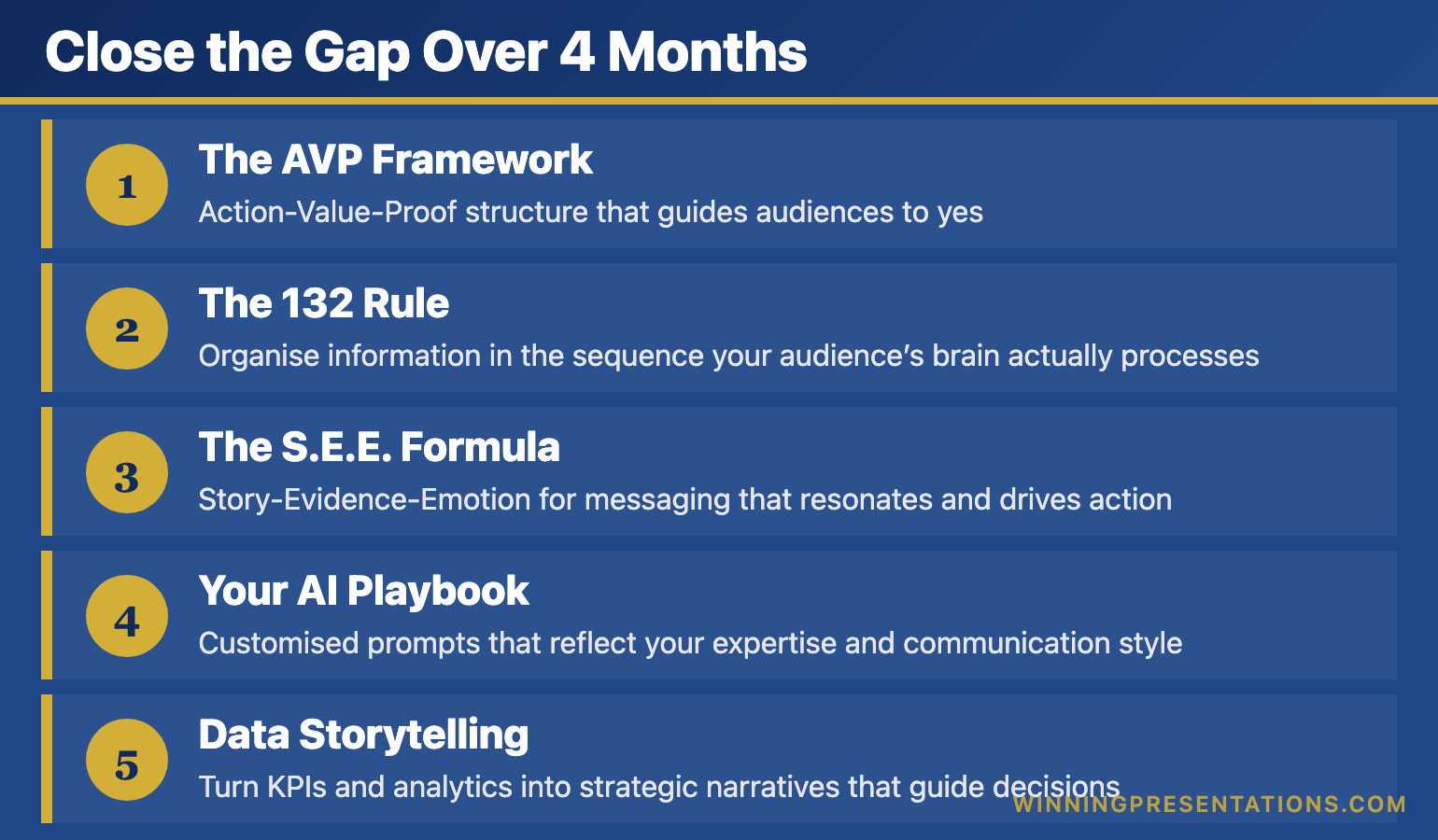
Close the Gap Over 4 Months

AI-Enhanced Presentation Mastery gives you the systems that separate professionals who plateau from professionals who keep improving β€” 8 self-paced modules delivered January through April 2026:

Infographic for: presentation skills gap (image 1)

  • The AVP Framework: Action-Value-Proof structure that guides audiences to yes
  • The 132 Rule: Organise information in the sequence your audience’s brain actually processes
  • The S.E.E. Formula: Story-Evidence-Emotion for messaging that resonates and drives action
  • Your AI Playbook: Customised prompts that reflect your expertise and communication style
  • Data Storytelling: Turn KPIs and analytics into strategic narratives that guide decisions

Plus: 2 live coaching sessions in April, Master Prompt Pack, templates, before/after examples, and lifetime access to everything.

Presale price: Β£249 (increases to Β£299 when modules release, then Β£499)

60 seats total.

See the full curriculum and join β†’

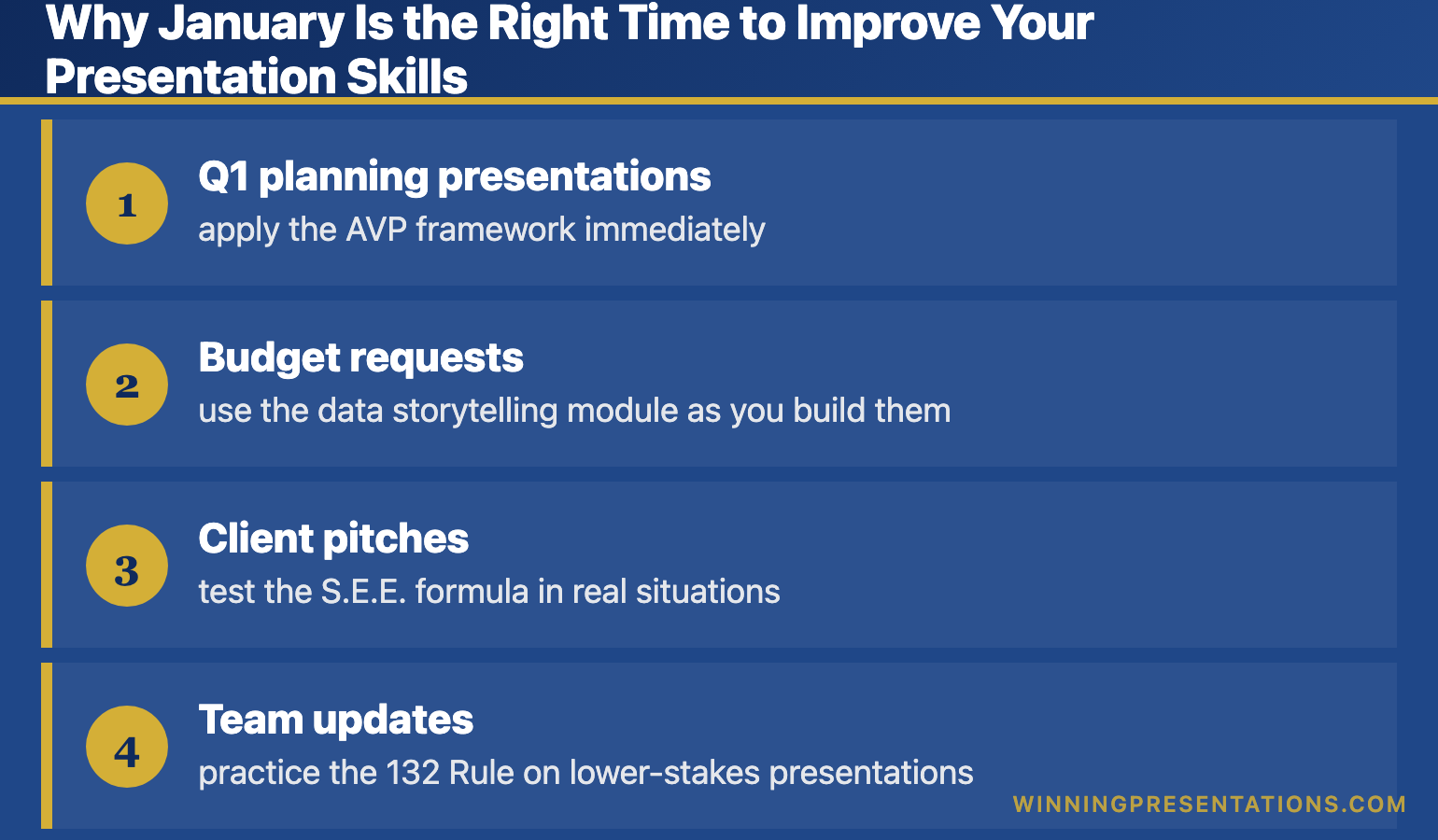
Why January Is the Right Time to Improve Your Presentation Skills

The course delivers 8 modules from January through April β€” one new module every couple of weeks. This pacing is intentional.

It means you’re building these skills while you’re actually presenting:

Infographic for: presentation skills gap (image 2)

  • Q1 planning presentations β€” apply the AVP framework immediately
  • Budget requests β€” use the data storytelling module as you build them
  • Client pitches β€” test the S.E.E. formula in real situations
  • Team updates β€” practice the 132 Rule on lower-stakes presentations

By April, when the live coaching sessions happen, you’ll have four months of practice and real questions to bring.

Build the systems now. Apply them to every presentation this year. Compound the improvement.

Related: Presentation Structure: 7 Frameworks That Actually Work

FAQ: How to Improve Presentation Skills

I’m already decent at presentations. Is this for me?

Yes β€” “decent” is exactly the plateau this course addresses. If you’re getting through presentations but not getting promoted off the back of them, the systems in this course close that gap.

Do I need to be technical with AI?

No. This is not a software tutorial. You’ll learn to use AI as a thinking partner. The prompts are copy-paste ready. If you can use ChatGPT at a basic level, you can use everything in this course.

What if I can’t attend the live sessions in April?

All sessions are recorded. You’ll receive lifetime access to recordings, and you can join the next cohort at no additional cost if you want live participation later.


Your Next Step

The gap between “competent presenter” and “presenter who advances” isn’t about talent. It’s about systems.

πŸ“– Go deeper: Business Presentation Skills: What Actually Matters β€” today’s comprehensive guide.

πŸŽ“ Build the systems: AI-Enhanced Presentation Mastery β€” 8 modules from January–April 2026, presale price Β£249 (60 seats).


Mary Beth Hazeldine spent 24 years in corporate banking before founding Winning Presentations. She now trains executives in AI-enhanced presentation systems β€” the frameworks and tools that close the gap between competent and compelling.

22 Dec 2025
Presentation skills for meetings - how to speak up with confidence without rambling or freezing

Presentation Skills for Meetings: How to Speak Up Without Rambling, Freezing, or Being Ignored

The practical techniques that help you contribute confidently in meetings β€” from someone who spent 24 years in corporate banking

Most presentation skills advice assumes you’re standing at the front of a room with slides. But that’s not where most professionals struggle.

The real challenge is presentation skills for meetings β€” speaking up without rambling, contributing when all eyes turn to you unexpectedly, making your point when you haven’t prepared a deck.

I watched this play out hundreds of times during 24 years in banking. Smart people with good ideas who couldn’t land them in meetings. They’d either freeze, ramble, or get talked over β€” and wonder why they weren’t getting promoted.

The good news: these skills are learnable. Here’s what actually works.

🎁 Free Download: The Executive Presentation Checklist β€” works for formal presentations and high-stakes meetings.

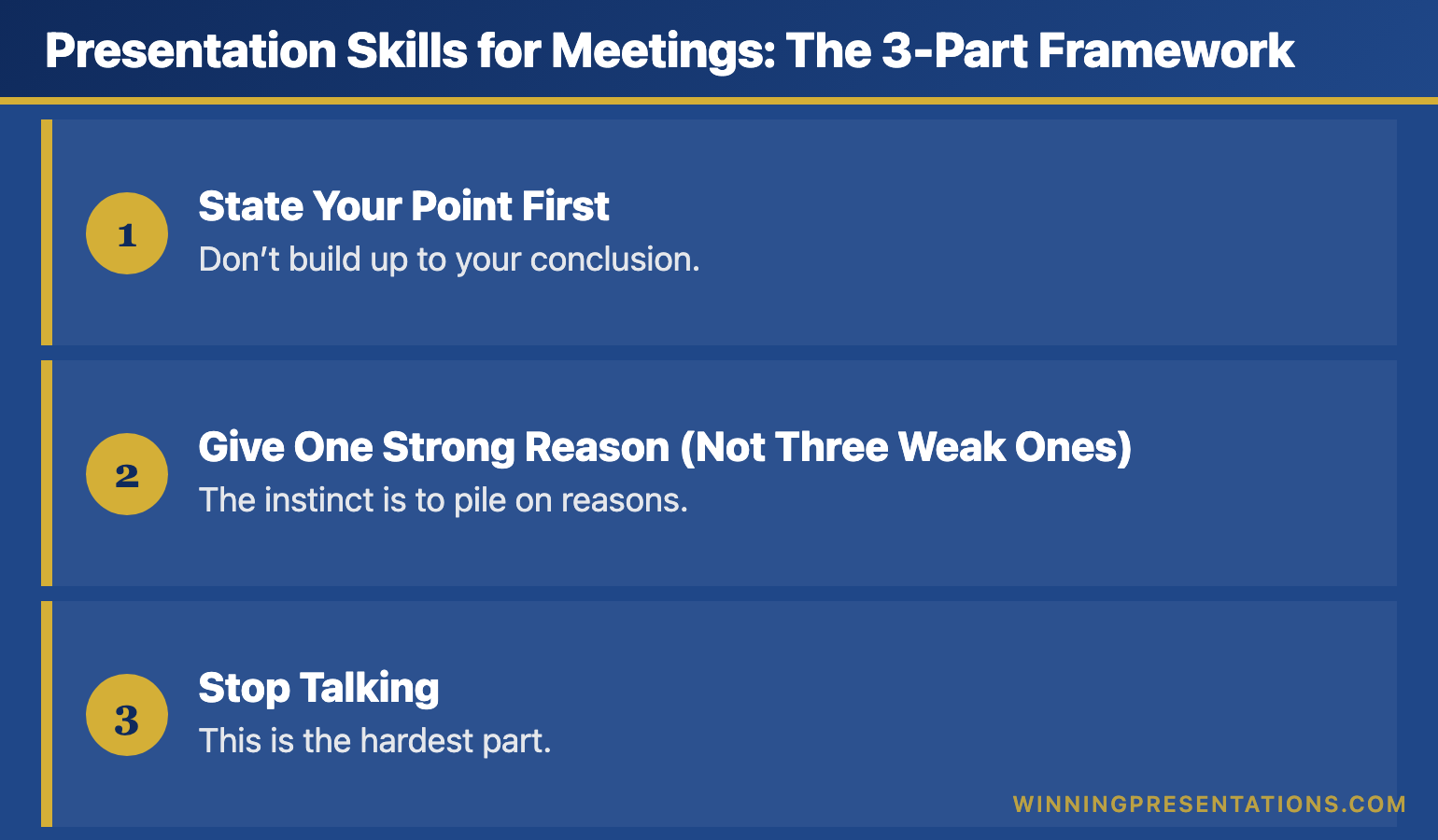
Presentation Skills for Meetings: The 3-Part Framework

When you’re asked to contribute β€” or when you want to jump in β€” most people fail because they start talking without knowing where they’re going.

Use this structure instead:

Infographic for: presentation skills for meetings (image 1)

1. State Your Point First

Don’t build up to your conclusion. Start with it.

Instead of: “Well, I’ve been thinking about this, and there are a few factors to consider, and when you look at the data from last quarter…”

Say: “I think we should delay the launch by two weeks. Here’s why.”

This immediately tells everyone what you’re arguing for. They can listen to your reasoning with context instead of wondering where you’re heading.

2. Give One Strong Reason (Not Three Weak Ones)

The instinct is to pile on reasons. Resist it. More reasons often dilute your point rather than strengthen it.

Pick your single strongest reason and state it clearly. If someone asks for more, you can add. But lead with your best shot.

3. Stop Talking

This is the hardest part. When you’ve made your point, stop. Don’t backfill with “but I could be wrong” or “just a thought” or additional caveats that undermine what you just said.

Silence after your point isn’t awkward β€” it’s confident.

Related: Business Presentation Skills: What Actually Matters in Corporate Environments

Meeting Presentation Skills: Handling Being Put on the Spot

Someone asks you a question you weren’t expecting. All eyes turn to you. Your mind goes blank.

Here’s the recovery:

Step 1: Buy 3 seconds. “That’s a good question β€” let me think for a moment.” This is completely acceptable and looks thoughtful, not unprepared.

Step 2: Repeat the question back. “So you’re asking whether we should prioritise the US market first?” This confirms you understood and gives you more processing time.

Step 3: Give a partial answer if needed. “I don’t have the full picture, but my initial view is X. I can confirm the details by end of day.”

Saying “I don’t know, but I’ll find out” is infinitely better than rambling through a non-answer.

Related: How to Calm Nerves Before a Presentation

Want to Build These Skills Systematically?

AI-Enhanced Presentation Mastery covers meeting contributions, formal presentations, and handling tough Q&A β€” with live coaching and feedback.

Presale: Β£249Β (60 seats) β€” 8 modules Jan–April 2026.Β See the curriculum β†’

Three Meeting Presentation Mistakes That Kill Your Credibility

1. Thinking out loud. Processing your thoughts verbally might work with friends. In meetings, it sounds like you don’t know what you think. Do your thinking before you speak, even if it’s just 5 seconds of mental organisation.

2. Over-qualifying everything. “This might be wrong, but…” or “I’m not sure if this is relevant…” These phrases tell people to discount what comes next. If you’re not confident in your point, don’t make it. If you are, don’t undermine it.

3. Repeating what someone else said. Adding “I agree with Sarah” and then restating Sarah’s point adds nothing. Either add a new angle or stay quiet. Agreement without addition is just noise.

Related: How to Present Like a CEO

How to Prepare Your Presentation Skills Before Important Meetings

Most people prepare content. Better approach: prepare contributions.

Before any meeting where you might need to speak:

Infographic for: presentation skills for meetings (image 2)

  • Identify 1-2 points you could make β€” even if you don’t use them
  • Anticipate 2-3 questions you might be asked β€” and sketch answers
  • Know your numbers β€” the specific data points relevant to your area

Five minutes of this preparation transforms your confidence. You’re not scripting β€” you’re priming your brain so you’re not starting from zero when called upon.

Related: Presentation Structure: 7 Frameworks That Actually Work

Frequently Asked Questions About Presentation Skills for Meetings

How do I interrupt without being rude?

Wait for a breath, then say the person’s name: “Sarahβ€”” and pause. They’ll stop. Then make your point quickly. Don’t apologise for interrupting; just add value.

What if I’m too junior to speak up?

You’re not. The question is whether you have something worth saying. If you have data, a question, or a perspective that hasn’t been raised, your seniority doesn’t matter. Just be concise and factual rather than opinionated.

How do I sound more confident than I feel?

Slow down, lower your pitch slightly, and eliminate filler words (um, like, kind of). These three changes have more impact than any mindset trick. Confidence is performed before it’s felt.


Your Next Step

Presentation skills for meetings improve fastest with a framework and practice. Start here:

πŸ“– Go deeper: Business Presentation Skills: What Actually Matters in Corporate Environments β€” the complete guide to the skills that get you promoted.

🎁 Get the checklist: Executive Presentation Checklist β€” free, works for meetings and formal presentations.

πŸŽ“ Build the skills: AI-Enhanced Presentation Mastery β€” 8 modules Jan–April 2026, presale Β£249, 60 seats.


Mary Beth Hazeldine spent 24 years in corporate banking at JPMorgan, PwC, Royal Bank of Scotland, and Commerzbank. She now trains professionals in the presentation skills that matter for career growth β€” including the ones you need in meetings, not just on stage.

22 Dec 2025
Business presentation skills guide - what actually matters in corporate environments from 24 years in banking

Business Presentation Skills: What Actually Matters in Corporate Environments (From 24 Years in Banking)

The presentation skills that get you noticed, promoted, and trusted β€” and the ones that don’t matter nearly as much as you think

[IMAGE: business-presentation-skills-corporate-guide.png]

Alt text: Business presentation skills guide – what actually matters in corporate environments from 24 years in banking

Most business presentation skills advice is written by people who’ve never sat through a 7am credit committee meeting where careers hang in the balance.

I have. For 24 years.

At JPMorgan, PwC, Royal Bank of Scotland, and Commerzbank, I watched hundreds of professionals present. Some got promoted. Some got ignored. Some got shown the door. The difference wasn’t charisma or confidence or “executive presence” β€” at least not in the way most training programs define it.

The difference was a specific set of business presentation skills that nobody explicitly teaches. Skills that matter when the CFO is checking her phone, when the board has 47 slides to get through before lunch, when your recommendation needs sign-off from people who’ve heard a hundred pitches this quarter.

This guide covers what I learned β€” and what I now teach to executives who need results, not applause.

🎁 Free Download: The Executive Presentation Checklist β€” the pre-presentation checklist I use with C-suite clients. 2 pages, printable.

Why Most Business Presentation Skills Training Misses the Point

Here’s what most presentation training focuses on:

  • Eye contact and body language
  • Voice projection and pacing
  • Slide design principles
  • How to “engage” your audience
  • Managing nervousness

These aren’t wrong. But they’re about 20% of what determines whether your presentation actually works in a corporate environment.

The other 80%? Nobody talks about it.

The skills that actually matter in business:

  • Knowing what to leave out
  • Reading the room before you’ve said a word
  • Structuring for decision-makers who won’t read your slides
  • Handling questions that are really objections
  • Recovering when things go sideways
  • Making the ask without apologising for it

I learned these the hard way. Five years as a terrified junior banker, presenting to credit committees and client meetings, watching what worked and what didn’t. Then 19 more years refining them. Now I train executives who don’t have five years to figure it out themselves.

Related: How to Create Executive Presentations That Get Results

The Business Presentation Skills That Actually Get You Promoted

Let me be specific. These are the skills I’ve seen separate people who advance from people who stall.

1. Structuring for Skimmers (Not Readers)

Here’s a truth nobody tells you: executives don’t read your slides. They skim. They jump to the recommendation. They flip to the financials. They look for the one number that matters.

Most presenters structure for narrative flow β€” “let me take you on a journey.” Corporate decision-makers don’t want journeys. They want answers.

What works instead:

  • Lead with your recommendation (not your process)
  • Put the “so what” in slide titles, not buried in bullets
  • Design every slide to be understood in 5 seconds if someone jumps to it
  • Include an executive summary that actually summarises

I once watched a brilliant analyst lose a promotion because his presentations required too much work to understand. His analysis was better than anyone else’s. But the partners couldn’t figure out what he was recommending without reading 40 slides. His colleague, with simpler analysis but clearer structure, got the nod.

Related: Presentation Structure: 7 Frameworks That Actually Work

2. Reading the Room Before You Start

The first 30 seconds of any business presentation should be spent reading, not speaking.

Who’s checking their phone? Who’s leaning back? Who asked to be here versus who was told to attend? Who’s the actual decision-maker versus the most senior person in the room? (Not always the same.)

I learned this at RBS during a client pitch. I’d prepared for the CFO, who was technically the decision-maker. But within 30 seconds, I could see the Head of Operations was the one everyone looked at before responding. I pivoted my entire presentation to address her concerns. We won the work.

If I’d stuck to my script, we’d have lost.

What to look for:

  • Who do people glance at before speaking?
  • Who’s taking notes versus who’s waiting for it to end?
  • What’s the energy in the room β€” rushed, sceptical, engaged, distracted?
  • Did something happen before you walked in that changed the dynamic?

This isn’t mystical. It’s pattern recognition. And it’s trainable.

3. Answering the Question Behind the Question

In business presentations, questions are rarely just questions. They’re concerns wearing a question’s clothing.

“How did you arrive at that number?” often means “I don’t trust that number.”

“What’s the timeline?” often means “This sounds like it’ll take forever.”

“Who else has done this?” often means “I’m nervous about being first.”

The skill isn’t answering the literal question. It’s identifying the concern underneath and addressing that.

Example from my banking days:

A board member asked, “What’s the competitive landscape?” The literal answer would have been a market overview. But I could tell from his tone he was really asking, “Are we too late?” So I answered that question: “We’re not first, but here’s why being second actually works in our favour…”

He nodded and moved on. If I’d given the literal answer, he’d have asked three more questions trying to get to what he actually wanted to know.

Related: How to Present Like a CEO: Executive Presentation Skills for Leadership

Business presentation skills that matter: structure for skimmers, read the room, answer the real question, know what to cut, make the ask

4. Knowing What to Cut

Every presentation is too long. Every single one.

The skill isn’t adding more content. It’s having the judgment to remove content that doesn’t serve your goal β€” even if it took you hours to create.

I’ve seen presentations fail because someone included every piece of analysis they did, rather than just the analysis that mattered. I’ve seen pitches lose momentum because the presenter couldn’t bear to cut their favourite slide.

The rule I use: If a slide doesn’t directly support your recommendation or answer a question someone will definitely ask, cut it. Move it to the appendix. Better yet, delete it entirely.

One of my clients β€” a biotech executive β€” had a 60-slide investor pitch. We cut it to 12. He was terrified. Then he raised Β£4.2 million. The investors told him it was the clearest pitch they’d seen all quarter.

Cutting isn’t about dumbing down. It’s about respecting your audience’s time and attention.

5. Making the Ask Without Apologising

This is where most business presentations fall apart.

You’ve done the analysis. You’ve built the case. You’ve handled the questions. And then, when it’s time to ask for what you want β€” the budget, the approval, the decision β€” you soften it.

“So maybe we could consider…”

“If you think it makes sense…”

“I was hoping we might…”

This kills more presentations than bad slides ever will.

The business presentation skill that separates senior people from junior people is the ability to make a clear ask without hedging, apologising, or leaving room for ambiguity.

What works:

“I’m recommending we approve the Β£2.3 million budget for Q2 implementation. I need your sign-off today to hit the timeline.”

What doesn’t:

“So that’s the proposal. Let me know what you think, and maybe we can discuss next steps when you have time?”

The first one might get a no. But at least you’ll know where you stand. The second one gets a “let’s circle back” β€” which is a no that wastes another three weeks.

Want Slides That Match These Skills?

The Executive Slide System gives you templates and frameworks for the business presentations that matter β€” board updates, budget requests, strategic recommendations.

What’s included:

  • 12 executive slide templates (PowerPoint/Google Slides)
  • The CFO-approved budget request format
  • Board presentation structure guide
  • Before/after examples from real clients

Β£39 β€” Get the Executive Slide System β†’

The Business Presentation Skills That Don’t Matter as Much as You Think

Controversial opinion: some “essential” presentation skills are overrated in corporate settings.

Perfect Delivery

I’ve seen people with mediocre delivery get promoted because their thinking was sound. I’ve seen polished presenters get ignored because their content was empty.

In business, clarity beats charisma. Every time.

That doesn’t mean delivery doesn’t matter. But if you’re spending 80% of your prep time on how you’ll say things and 20% on what you’ll say, you’ve got it backwards.

“Engaging” Your Audience

Most advice about audience engagement assumes you’re giving a keynote or a TED talk. In a corporate setting, your audience doesn’t want to be engaged. They want to make a decision and get on with their day.

Don’t ask rhetorical questions. Don’t pause for dramatic effect. Don’t try to make them laugh. Just be clear, be direct, and be done.

The most “engaging” thing you can do in a business presentation is respect their time by finishing early.

Memorising Your Script

Memorised presentations sound memorised. And in business settings, they fall apart the moment someone asks a question that takes you off script.

What works better: knowing your material so well that you could present it in any order, answer any question, and still hit your key points. That’s different from memorisation. It’s internalisation.

How to Develop Business Presentation Skills (A Realistic Framework)

Most people try to improve their business presentation skills by:

  1. Reading a book
  2. Maybe attending a workshop
  3. Going back to presenting exactly the same way

That doesn’t work. Here’s what does.

Step 1: Get Honest Feedback on One Specific Thing

Not “how was my presentation?” β€” that gets you vague reassurance.

Ask: “Did you know what I was recommending within the first two minutes?” or “Was there a point where you got lost?” or “What would you cut?”

Specific questions get useful answers.

Step 2: Watch People Who Are Good at This

Not TED talks. Not keynote speakers. Watch people in your organisation who consistently get buy-in. Notice what they do:

  • How do they structure?
  • How do they handle pushback?
  • How do they make the ask?
  • What don’t they do that you expected them to?

The patterns will emerge.

Step 3: Practice the Hard Parts, Not the Easy Parts

Most people practice their opening (easy) and ignore their Q&A (hard). They rehearse their slides (easy) and wing their recommendation (hard).

Flip it. Spend your practice time on:

  • Answering the three toughest questions you might get
  • Making your ask clearly and without hedging
  • Explaining your recommendation without slides

If you can do those three things well, the rest takes care of itself.

Related: Why Most Presentation Skills Training Fails (And What Actually Works)

The Business Presentation Skills Gap Nobody Talks About

Here’s something I’ve observed across 24 years and thousands of presentations: there’s a specific gap between “competent presenter” and “presenter who gets results.”

Competent presenters can:

  • Create reasonable slides
  • Speak clearly
  • Answer basic questions
  • Get through their material

Presenters who get results can do all that, plus:

  • Adapt in real-time based on room dynamics
  • Make complex recommendations feel simple
  • Handle hostile questions without getting defensive
  • Close with a clear ask that gets a clear answer

That gap is where careers accelerate or plateau. And most presentation training never addresses it.

Close the Gap Over 4 Months

AI-Enhanced Presentation Mastery is my course for professionals who want to level up their business presentation skills β€” with proven frameworks, AI tools to cut prep time, and live coaching.

8 self-paced modules (January–April 2026):

  • The AVP Framework: Structure that guides audiences to yes
  • The S.E.E. Formula: Messaging that resonates and drives action
  • Your AI Playbook: Customised prompts that save 10+ hours weekly
  • Data Storytelling: Turn numbers into narratives that guide decisions
  • 2 live coaching sessions in April with personalised feedback
  • Master Prompt Pack, templates, and lifetime access

Presale price: Β£249 (increases to Β£299, then Β£499)

60 seats total.

See the full curriculum β†’

Frequently Asked Questions About Business Presentation Skills

What’s the most important business presentation skill?

Clarity. The ability to make your point understandable in 30 seconds, even if your supporting material takes 30 minutes. If someone asks “what’s the bottom line?” and you can’t answer in one sentence, you’re not ready to present.

How do I improve my business presentation skills quickly?

Focus on structure first. Most presentation problems are structure problems in disguise. Use a proven framework (Situation-Complication-Resolution, Problem-Solution-Benefit, or the Pyramid Principle), lead with your recommendation, and cut anything that doesn’t directly support your ask. You’ll see improvement immediately.

How do I handle nervousness in business presentations?

Preparation beats breathing exercises. When you know your material cold β€” especially your recommendation, your key numbers, and your answers to likely questions β€” nervousness drops naturally. The remaining nervousness actually helps; it keeps you sharp. Don’t try to eliminate it entirely.

What’s the difference between presenting to executives vs. regular meetings?

Executives have less time, more context, and higher expectations for directness. Lead with the ask, not the background. Assume they’ve read nothing. Be ready to present your entire recommendation in 60 seconds if they cut you off. And don’t fill silence β€” if they’re thinking, let them think.

How long should a business presentation be?

Shorter than you think. In my experience, the right length is about 60% of the time slot you’ve been given. If you have 30 minutes, prepare for 18-20 minutes of presenting and 10-12 minutes for questions. If you finish early, everyone’s happy. If you run over, you’ve failed before you’ve even made your ask.


Your Next Step: Build Business Presentation Skills That Get Results

You’ve just read what most presentation training won’t tell you. But knowing isn’t the same as doing.

Choose your path:

🎁 START FREE: Download the Executive Presentation Checklist β€” a pre-presentation checklist for high-stakes business presentations.

πŸ“˜ GET THE TEMPLATES (Β£39): The Executive Slide System gives you the slide structures that work in corporate environments β€” board presentations, budget requests, strategic recommendations.

πŸŽ“ BUILD THE SKILLS (Β£249): Join AI-Enhanced Presentation Mastery β€” 8 modules over 4 months with frameworks, AI tools, and live coaching to close the gap between competent and compelling. January cohort, 60 seats, early bird ends December 31st.

Business presentation skills compound. Every presentation you give is practice for the next one. The question is whether you’re practising the right things.


Mary Beth Hazeldine spent 24 years in corporate banking at JPMorgan, PwC, Royal Bank of Scotland, and Commerzbank before founding Winning Presentations. She’s trained over 5,000 executives in the presentation skills that actually matter in corporate environments β€” the ones that get budgets approved, deals closed, and careers advanced.