Category: Presentation Skills

02 Jan 2026
Older man with glasses and a gray beard typing on a laptop at a glass-topped desk in a bright office with a sunset cityscape outside the window.

How to Make a Presentation With AI: The Complete 90-Minute Method [2026]

Want to make a presentation with AI in under 90 minutes? Last Tuesday, a client called me in a panic — board presentation in 4 hours, zero slides ready.By the time she walked into that boardroom, she had 12 polished slides, a clear narrative, and the confidence that comes from knowing exactly what to say.

The presentation landed. The board approved her proposal.

Total time to make a presentation with AI from scratch? 87 minutes.

I’ve spent 24 years creating presentations at JPMorgan Chase, PwC, Royal Bank of Scotland, and Commerzbank. For most of that time, a decent presentation took a full day. Sometimes two.

Not anymore.

If you want to learn how to make a presentation with AI that actually works — without spending your entire weekend on it — you need a system. Not random prompts. Not AI gimmicks. A repeatable process that combines human thinking with AI speed.

Here’s the exact method I use with clients.

For the fundamentals of presentation creation without AI tools, see my complete guide: How to Make a Presentation: The Complete Guide.

🎁 Want the prompts? Download my 10 Essential Copilot Prompts (free) — the exact prompts I use in the workflow below.

Why AI Changes How You Make a Presentation

The average professional spends 4-8 hours creating a single presentation. Some spend entire weekends.

Here’s why learning to make a presentation with AI is a game-changer:

Infographic for: how to make a presentation with ai (image 1)

  • First drafts in minutes — AI generates starting content instantly
  • Structure suggestions — AI can propose logical flows
  • Content expansion — AI fills in bullet points and speaker notes
  • Editing assistance — AI helps simplify and clarify

But here’s what most people get wrong: AI can’t replace thinking.

If you don’t know your purpose and audience, AI will just help you make a presentation faster — but it won’t be a good presentation. Garbage in, garbage out.

The 90-minute method works because it combines human strategy with AI execution.

How to Make a Presentation With AI: The 90-Minute Method

This workflow uses AI tools (Copilot, ChatGPT, or Claude) to accelerate each phase. Set a timer. Each phase has a strict time limit.

Phase 1: The Decision Frame (10 Minutes) — Human Only

Before you touch any AI tool, answer four questions in writing:

  1. What decision do I need from this presentation?
    Not “inform about Q3 results” but “approve the Q4 budget increase”
  2. Who makes that decision?
    Name them. Understand what they care about.
  3. What would make them say yes?
    What evidence, logic, or reassurance do they need?
  4. What would make them say no?
    What objections will they have? Plan to address them.

Write your answers in 2-3 sentences each. This is your presentation’s foundation.

If you skip this step, the next 80 minutes will be wasted. AI will help you make a presentation faster — but it’ll be the wrong presentation.

Phase 2: The Narrative Spine (15 Minutes) — AI-Assisted

Now use AI to help create your presentation’s structure.

Use this prompt:

I need to create a presentation to [YOUR DECISION FROM PHASE 1].My audience is [WHO DECIDES]. They care about [WHAT THEY VALUE].Their likely objections are [YOUR PHASE 1 ANSWERS].

Give me a 5-7 slide structure using the Problem → Solution → Action framework. For each slide, give me the headline (what the slide says) and the purpose (why this slide exists).

Review the AI output. Adjust the order if needed. You now have your narrative spine.

The test: Can you explain your presentation in 30 seconds using only these headlines? If not, ask AI to simplify the structure.

Phase 3: Content Generation (25 Minutes) — AI-Powered

Now — and only now — do you open PowerPoint or Google Slides. This is where AI dramatically accelerates how you make a presentation.

If you have Copilot in PowerPoint:

Create a slide about [YOUR HEADLINE]. Include [SPECIFIC DATA OR POINTS]. Keep text minimal — maximum 4 bullet points of 6 words each.

If you’re using ChatGPT or Claude:

I’m creating a slide with this headline: [HEADLINE]The purpose of this slide is: [PURPOSE]Give me 3-4 bullet points (maximum 6 words each) that support this headline. Make them specific and actionable.

For each slide in your structure:

  1. Use AI to generate initial content
  2. Review and edit (remove anything generic)
  3. Move to the next slide

At the end of Phase 3, you should have a complete first draft.

⚡ Get 25 Tested AI Prompts

The Copilot Quick-Start Prompt Pack (£9.99) includes prompts for every phase — structure, content, refinement, and speaker notes. Stop guessing what to ask AI.

Phase 4: Visual Refinement (20 Minutes) — Human-Led

AI can help you make a presentation quickly, but human judgment is still needed for refinement.

Go through each slide and apply these rules:

The One-Point Rule: Each slide makes ONE point. If you have two points, you need two slides.

The 6-Word Rule: No bullet point longer than 6 words. If it’s longer, ask AI to shorten it:

Shorten this bullet point to 6 words maximum while keeping the meaning: “[YOUR LONG BULLET POINT]”

The Squint Test: Squint at your slide. Can you still tell what it’s about? If not, simplify.

Phase 5: The Polish Pass (15 Minutes) — AI-Assisted

Final refinements that separate good from great:

Opening check (3 minutes): Does your first slide create curiosity? Ask AI:

My presentation is about [TOPIC]. My opening slide says “[CURRENT TITLE]”. Give me 3 alternative opening headlines that create curiosity and hint at the value the audience will get.

Flow check (5 minutes): Click through in slideshow mode. Mark any transitions that feel abrupt.

Closing check (3 minutes): Does your final slide tell the audience exactly what to do?

Spelling/grammar check (4 minutes): Run spell-check. Read titles aloud.

Phase 6: Speaker Notes (5 Minutes) — AI-Powered

Use AI to generate speaker notes for each slide:

Write brief speaker notes for this slide. Include: one conversational opening sentence, key talking points (not reading the slide), and a transition to the next topic which is [NEXT SLIDE HEADLINE].

You’re done. Total time: 90 minutes.

The Best AI Tools to Make a Presentation

Here’s what works best for different situations:

Tool Best For Limitations
Microsoft Copilot PowerPoint users, enterprise Requires Microsoft 365 subscription
ChatGPT Content generation, any platform Can’t edit slides directly
Claude Long content, detailed structures Can’t edit slides directly
Canva AI Visual-first presentations Less control over structure
Gamma Quick drafts from prompts Limited customisation

My recommendation: Use ChatGPT or Claude for Phases 1-2, then Copilot (if available) for Phases 3-6.

Common Mistakes When Using AI to Make a Presentation

Mistake 1: Skipping the Decision Frame. AI can’t read your boss’s mind. You need to define purpose and audience first.

Mistake 2: Using generic prompts. “Make a presentation about sales” gives generic results. Include your specific context, audience, and goals.

Mistake 3: Accepting AI output without editing. AI gives you a starting point, not a finished product. Always review and refine.

Mistake 4: Over-relying on AI for structure. AI suggests common structures. For high-stakes presentations, human judgment about what your specific audience needs is irreplaceable.

Mistake 5: Forgetting to fact-check. AI can make things up. Verify any statistics or claims before presenting.

The 90-Minute AI Presentation Checklist

Print this and use it every time you make a presentation with AI:

Phase Time AI Role Done?
Decision Frame 10 min Human only
Narrative Spine 15 min AI-assisted
Content Generation 25 min AI-powered
Visual Refinement 20 min Human-led
Polish Pass 15 min AI-assisted
Speaker Notes 5 min AI-powered

FAQs: Making Presentations With AI

Can AI make a complete presentation for me?

AI can generate slides, but it can’t replace thinking. You still need to define your purpose, know your audience, and review the output. Think of AI as a fast assistant, not a replacement for strategy.

Which AI tool is best for PowerPoint?

Microsoft Copilot is best if you have it — it works directly in PowerPoint. Otherwise, use ChatGPT or Claude to generate content, then paste into PowerPoint manually.

How do I make AI output less generic?

Include specific context in your prompts: your industry, audience, their concerns, your company’s situation. The more specific your input, the more useful the output.

Is 90 minutes realistic for a good presentation?

Yes — for most business presentations. The method works because it eliminates time wasted on blank-page syndrome, template hunting, and rewriting. You focus only on what matters.

Your AI Presentation Toolkit

Here’s everything you need to make a presentation with AI efficiently:

🎁 FREE: 10 Essential Copilot Prompts
The exact prompts from this article — ready to copy and paste.


⚡ QUICK WIN (£9.99): Copilot Quick-Start Prompt Pack
25 tested prompts for every phase of AI-powered presentation creation.


📚 COMPLETE AI TOOLKIT (£29): PowerPoint Copilot Master Guide
201-page guide with prompts, workflows, and advanced techniques for AI presentations.


🎯 COMPLETE SYSTEM (£39): The Executive Slide System
17 templates + 51 AI prompts + video training. For high-stakes presentations to executives.

🎓 Master AI-Enhanced Presentations

Ready to go beyond prompts? The Executive Buy-In Presentation System teaches you how to combine AI tools with proven frameworks to create presentations that win executive approval.

  • 7 modules of video training
  • AI prompt sequences that build on each other
  • The Decision Definition Canvas
  • Executive-ready templates
  • Live Q&A sessions

Learn More About the Course →


Related Articles:

Infographic for: how to make a presentation with ai (image 2)

📧 Get The Winning Edge

Weekly AI presentation tips, new prompts, and insights from 24 years in corporate boardrooms. No fluff. No spam.

Subscribe Free →


Mary Beth Hazeldine spent 24 years in corporate banking at JPMorgan Chase, PwC, Royal Bank of Scotland, and Commerzbank. As a qualified clinical hypnotherapist and founder of Winning Presentations, she now trains executives on high-stakes presentations — combining proven frameworks with AI tools that actually work.

02 Jan 2026
Businessman in a navy suit speaks to colleagues around a conference table, gesturing with his hands.

How to Make a Presentation: The Complete Guide to Creating Slides That Work [2026]

Learning how to make a presentation doesn’t have to take hours. Whether you’re creating your first PowerPoint for school, preparing a business pitch, or building slides for a conference talk — the fundamentals are the same.I’ve spent 24 years making presentations at JPMorgan Chase, PwC, Royal Bank of Scotland, and Commerzbank. I’ve created hundreds of decks — from quick team updates to £50 million investment pitches. And I’ve watched talented people fail because they didn’t understand one thing:

A presentation isn’t about slides. It’s about moving people from where they are to where you need them to be.

The slides are just the vehicle.

In this guide, I’ll show you exactly how to make a presentation that works — step by step. You’ll learn the process I use for every presentation, whether it takes 30 minutes or 3 hours to create.

By the end, you’ll know how to make a presentation for any situation: work, school, conferences, or pitches.

How to make a presentation - 5-step process from purpose to delivery

The 5-step process for making presentations that work — regardless of which software you use

🎁 Free Download: Grab my 7 Presentation Frameworks Cheat Sheet — the structures I use for every presentation I create. Works with any software.

How to Make a Presentation: The 5-Step Process

Every great presentation follows the same basic process — regardless of whether you’re using PowerPoint, Google Slides, Canva, Keynote, or AI tools.

Here’s the framework for how to make a presentation that actually lands:

  1. Define your purpose — What do you want your audience to do?
  2. Know your audience — Who are they and what do they care about?
  3. Build your structure — What’s the logical flow?
  4. Create your slides — What visuals support your message?
  5. Refine and practise — What needs polishing?

Most people jump straight to step 4 — opening PowerPoint and staring at a blank slide. That’s why they struggle.

Let me walk you through each step.

Step 1: Define Your Purpose (Before You Touch Any Software)

Before you learn how to make a presentation in any tool, you need to answer one question:

“What do I want my audience to think, feel, or do after this presentation?”

This isn’t your topic. It’s your destination.

Weak purpose: “I’m presenting our Q3 results.”

Strong purpose: “I need the board to approve increased marketing spend for Q4.”

The weak version describes what you’ll talk about. The strong version describes what you need to achieve.

Write your purpose in one sentence. Everything else flows from this.

Examples of strong presentation purposes:

  • “Convince my professor I understand the key themes of this novel”
  • “Get my team excited about the new project direction”
  • “Persuade investors to schedule a follow-up meeting”
  • “Help new hires understand our company culture”
  • “Get my manager to approve this budget request”

If you can’t state your purpose clearly, you’re not ready to make a presentation yet.

Step 2: Know Your Audience

The second step in how to make a presentation is understanding who you’re presenting to.

A presentation to your CEO looks different from a presentation to new graduates. Not just in content — in structure, depth, and tone.

Ask yourself these five questions before you start building slides:

Answer these 5 questions BEFORE you open PowerPoint or Google Slides

A common mistake when learning how to make a presentation: creating the same slides for every audience. Don’t do this. A technical audience wants data. Executives want recommendations. Students want relatable examples.

Adapt your presentation to your audience — every single time.

Step 3: Build Your Structure

Now you’re ready to plan your presentation’s structure — still without opening any software.

This step separates people who know how to make a presentation from people who just make slides.

Your structure is the logical flow that takes your audience from where they are now to your desired outcome (your purpose from Step 1).

Three Structures That Work for 90% of Presentations

Choose ONE of these structures before you start building slides

Structure 1: Problem → Solution → Action

Best for: Pitches, proposals, requesting approval

  1. Here’s the problem we’re facing
  2. Here’s the solution I recommend
  3. Here’s what I need you to do/approve

Structure 2: What → So What → Now What

Best for: Updates, reports, presenting data

  1. Here’s what happened / what the data shows
  2. Here’s why it matters / what it means
  3. Here’s what we should do next

Structure 3: Context → Options → Recommendation

Best for: Complex decisions, strategy presentations

  1. Here’s the situation and constraints
  2. Here are the options we considered
  3. Here’s what I recommend (and why)

Choose a structure. Write out your main points as bullet points — one per slide. This is your presentation skeleton.

For a typical 15-minute presentation, you need 5-8 main points. For 30 minutes, 10-15.

Don’t write full sentences yet. Just capture the flow:

  • Opening: The problem with our current process
  • Point 1: What’s causing the delays
  • Point 2: The cost of doing nothing
  • Point 3: My proposed solution
  • Point 4: How it works in practice
  • Point 5: Investment required
  • Point 6: Expected results
  • Closing: What I need from you today

That’s a complete presentation structure — before you’ve created a single slide.

📋 Need Help With Structure?

The Presentation Openers & Closers Swipe File (£9.99) includes 50+ tested scripts for starting strong and ending memorably — plus templates for each structure above.

Step 4: How to Make a Presentation — Creating Your Slides

Now you’re ready to open your presentation software and start making slides.

Here’s how to make a presentation that looks professional — regardless of which tool you use.

Choosing Your Presentation Software

The best tool depends on your situation:

Choose your presentation software based on your situation — not trends

If you’re making a business presentation, PowerPoint or Google Slides are usually your best options. Most organisations expect these formats.

If you’re learning how to make a presentation for the first time, start with Google Slides — it’s free and simpler than PowerPoint.

The One-Slide-One-Point Rule

The most important principle when making slides: each slide should make exactly one point.

If you have two points, make two slides. Slides are free.

This rule alone will make your presentations clearer than 80% of what your audience usually sees.

How to Design Slides That Don’t Overwhelm

When you’re learning how to make a presentation, less is always more.

Apply these 4 rules to every slide you create

Text:

  • Maximum 6 bullet points per slide
  • Maximum 6 words per bullet point
  • Never write full sentences (that’s what you say, not what they read)

Fonts:

  • Stick to one or two fonts
  • Minimum 24pt for body text, 32pt+ for titles
  • Sans-serif fonts (Arial, Calibri, Helvetica) are easier to read on screen

Colours:

  • Use 2-3 colours maximum
  • Ensure high contrast between text and background
  • If in doubt, dark text on light background works best

Images:

  • Use high-quality images (no pixelated photos)
  • One image per slide maximum
  • Images should support your point, not decorate

The Squint Test

After making each slide, squint at it from arm’s length.

Can you tell what the slide is about?

If not, simplify. Remove elements until the main point is unmistakable.

Step 5: Refine and Practise

The final step in how to make a presentation: polish your work and prepare to deliver it.

The Refinement Checklist

Go through your presentation and check each section:

Complete this checklist before you present — catches 90% of common issues

Opening (Slide 1-2):

  • Does it grab attention?
  • Is your purpose clear within the first 30 seconds?

Flow (All slides):

  • Does each slide lead naturally to the next?
  • Are there any jumps that might confuse people?

Closing (Final slide):

  • Is there a clear call to action?
  • Will your audience know exactly what to do next?

Technical:

  • Have you spell-checked everything?
  • Do all images display correctly?
  • Is the file saved in the right format?

Practise Out Loud

Knowing how to make a presentation is only half the battle. You also need to deliver it well.

Practise your presentation out loud at least twice before you deliver it for real. This helps you:

  • Find awkward transitions
  • Check your timing
  • Build confidence
  • Discover slides that don’t work

If possible, practise in front of someone else and ask for honest feedback.

How to Make a Presentation Quickly (When You’re Short on Time)

Sometimes you don’t have hours to prepare. Here’s how to make a presentation when time is tight:

60 minutes available:

  • 10 minutes on purpose and structure
  • 40 minutes creating slides
  • 10 minutes refining

30 minutes available:

  • 5 minutes on purpose and structure
  • 20 minutes creating slides
  • 5 minutes quick review

15 minutes available:

  • Write 5 headlines on paper
  • Create 5 simple slides with just headlines
  • Let your speaking do the work

The key insight: never skip the purpose and structure steps, even when rushed. A clear 5-slide presentation beats a confusing 20-slide one.

For a detailed breakdown of making presentations quickly using AI, see my guide: How to Make a Presentation With AI: The 90-Minute Method.

How to Make a Presentation Using AI Tools

AI tools like Microsoft Copilot, ChatGPT, and Canva AI can dramatically speed up how you make a presentation.

Here’s when they’re useful:

  • Generating first drafts — AI can create a starting structure
  • Writing content — AI can help with bullet points and speaker notes
  • Design suggestions — AI can recommend layouts and formats
  • Editing — AI can help simplify and clarify your text

But AI tools have limitations. They don’t know your specific audience, your company context, or the politics in your boardroom. You still need to apply Steps 1-3 yourself.

Think of AI as a fast assistant, not a replacement for thinking.

For a complete guide to using AI effectively, see: How to Make a Presentation With AI: The Complete Guide.

Common Mistakes When Learning How to Make a Presentation

After reviewing thousands of presentations, these are the most common mistakes I see:

Mistake 1: Starting with slides instead of structure. Plan first, design second. Always.

Mistake 2: Too much text on slides. Your slides are prompts, not scripts. Say more, show less.

Mistake 3: No clear purpose. If you don’t know what you want from your audience, neither will they.

Mistake 4: No call to action. Every presentation should end with “Here’s what I need from you.”

Mistake 5: Reading slides aloud. If you’re just reading what’s on screen, why does your audience need you?

Mistake 6: Too many slides. A 30-minute presentation needs 10-15 slides, not 40. Quality over quantity.

How to Make a Presentation: Frequently Asked Questions

How many slides should a presentation have?

A useful rule: one slide per 2-3 minutes of speaking. For a 15-minute presentation, aim for 5-8 slides. For 30 minutes, 10-15 slides. For an hour, 20-30 slides maximum. But quality matters more than quantity — 5 clear slides beat 20 cluttered ones.

What’s the best presentation software for beginners?

Google Slides is free, simple, and works in any browser. It’s the easiest way to learn how to make a presentation. Once you’re comfortable, you can move to PowerPoint for more advanced features.

How long does it take to make a presentation?

A simple 10-slide presentation takes most people 2-4 hours. With practice and templates, you can reduce this to 1-2 hours. Experienced presenters using AI tools can create solid presentations in under an hour.

Should I use animations in my presentation?

Use animations sparingly. Simple fade-ins can help reveal information gradually. But flying text and bouncing graphics distract from your message. When in doubt, skip the animations.

How do I make a presentation for school vs work?

The process is the same. The difference is audience expectations. School presentations often require more explanation of methodology. Work presentations focus more on outcomes and recommendations. Always adapt your depth and language to your audience.

What if I don’t have design skills?

Use templates. Every presentation tool includes professional templates that handle the design for you. Canva has particularly good free options. You don’t need design skills to make a presentation that looks professional.

Your Complete Presentation Toolkit

Now you know how to make a presentation from scratch. But having the right resources makes it faster and easier.

Here’s what I recommend based on where you are:

🎁 FREE: 7 Presentation Frameworks Download
The same structures I use for every presentation — works with any software.


📋 QUICK WINS:


🎯 BEST VALUE — The Presentation Confidence Bundle (£29.99)

Get all three resources together and save 33%:

  • Public Speaking Cheat Sheets (£14.99 value)
  • Presentation Openers & Closers (£9.99 value)
  • Calm Under Pressure Guide (£19.99 value)

Total value: £44.97 → Bundle price: £29.99


🏆 COMPLETE SYSTEM: The Executive Slide System (£39)
17 templates + 51 AI prompts + video training. The framework clients have used to secure approvals totalling over £250 million.

🎓 Want to Master High-Stakes Presentations?

If you present to executives, boards, or investors, knowing how to make a presentation is just the start. The Executive Buy-In Presentation System teaches you how to structure for approval, handle tough questions, and deliver with confidence.

  • 7 modules of video training
  • The Decision Definition Canvas
  • Executive-ready templates
  • AI prompt sequences that work
  • Live Q&A sessions

Learn More About the Course →


Related Articles:

📧 Get The Winning Edge

Weekly presentation tips, templates, and insights from 24 years in corporate boardrooms. No fluff. No spam.

Subscribe Free →


Mary Beth Hazeldine spent 24 years in corporate banking at JPMorgan Chase, PwC, Royal Bank of Scotland, and Commerzbank. She now trains professionals on high-stakes presentations through Winning Presentations. Her clients have raised over £250 million using her frameworks.

01 Jan 2026
Professional woman in a navy blazer speaks to a meeting, gesturing with hands in a conference room.

How to Give a Presentation at Work: A First-Timer’s Complete Guide [2026]

📅 Updated: January 2026 | The method that’s helped 5,000+ professionals present with confidence

Quick Answer

How to give a presentation successfully comes down to three things: preparation (know your material and your audience), structure (open strong, deliver clearly, close with impact), and managing your nerves (which is a skill, not a personality trait). Most presentation anxiety comes from uncertainty — and uncertainty is fixable with the right approach.

I used to be terrified of presentations.

For five years, I’d feel sick for days before any speaking engagement. My voice would shake. My hands would tremble. I’d forget everything I’d prepared the moment I stood up.

This wasn’t some minor anxiety — I’m talking about full-body panic. At JPMorgan, I once excused myself mid-presentation to be sick in the bathroom. I seriously considered leaving banking entirely just to avoid presenting.

Today, I train executives at Fortune 500 companies on high-stakes presentations. I’ve helped clients present to boards, investors, and thousands-strong audiences. The transformation wasn’t magic — it was method.

After 24 years in corporate banking and qualifying as a clinical hypnotherapist specifically to understand presentation anxiety, I’ve developed a system that works for anyone. Whether you’re giving your first presentation at work or your hundredth, this guide will show you exactly how to do it well.

⭐ Finally Present Without the Anxiety Taking Over

The presentation skills are useless if fear stops you from using them. Address the root cause first.

Conquer Speaking Fear includes:

  • The 5-step method that rewired my own presentation anxiety
  • Audio exercises for the night before and morning of
  • Emergency techniques for when panic hits mid-presentation

Get the Complete System — £39 →

Created by a clinical hypnotherapist who overcame 5 years of presentation terror. Instant download.

The 7 Steps to Giving a Great Presentation

Whether it’s a team meeting, a client pitch, or a conference keynote, the process is the same. Here’s the complete method.

Step 1: Know Your Audience Before You Know Your Content

The biggest mistake presenters make is starting with “what do I want to say?” The right question is “what does my audience need to hear?”

Before you create a single slide, answer these questions:

  • Who’s in the room? Their roles, knowledge level, and what they care about
  • What do they want? Information, a decision, reassurance, inspiration?
  • What’s their current state? Skeptical, supportive, neutral, rushed?
  • What do you want them to do after? Approve something, change behaviour, remember key points?

A presentation to senior executives requires a different approach than one to your team. A pitch to skeptical investors is different from an update to supportive colleagues.

Know your audience, then build your content around what they need.

Step 2: Structure Your Content for Clarity

Every effective presentation follows this structure:

Opening (10% of your time): Hook their attention, establish why this matters, preview what’s coming.

Body (80% of your time): Your main content, organised into 3-5 clear sections. Each section should have one main point.

Closing (10% of your time): Summarise key points, call to action, memorable final statement.

The rule of three is powerful: three main points are memorable. Five is pushing it. Seven means no one will remember any of them.

Related: How to Structure a Presentation: The Step-by-Step Guide

Step 3: Craft an Opening That Commands Attention

You have about 30 seconds to capture attention. Don’t waste them on “Hi, my name is… and today I’ll be talking about…”

Effective opening techniques:

  • Start with a question: “What would you do if your biggest client called tomorrow and said they’re leaving?”
  • Share a surprising statistic: “73% of people fear public speaking more than death. Today, I’ll show you why that fear is optional.”
  • Tell a brief story: “Last Tuesday, I watched a junior analyst get a standing ovation from the board. Here’s what she did differently.”
  • Make a bold statement: “Everything you’ve been taught about presentations is wrong.”

The goal is to make them think: “I need to pay attention to this.”

Step 4: Design Slides That Support (Not Replace) You

Your slides are visual aids — not a script and not the presentation itself.

Slide design principles:

  • One idea per slide: If you have two points, use two slides
  • Minimal text: 6 words per bullet, 6 bullets maximum (and even that’s pushing it)
  • Visual over verbal: A chart beats a table, an image beats a bullet list
  • Readable fonts: 28pt minimum for body text, 36pt+ for titles

If your audience is reading your slides, they’re not listening to you. And if they can get everything from the slides, why are you there?

Your slides should make your audience curious about what you’ll say — not tell them everything before you say it.

The 7 steps to giving a great presentation: know audience, structure content, craft opening, design slides, rehearse effectively, manage nerves, deliver with presence

The best presentation skills in the world won’t help if anxiety hijacks your brain. Conquer Speaking Fear gives you the techniques to stay calm and present — developed by a clinical hypnotherapist who’s been exactly where you are.

Step 5: Rehearse Effectively (Not Obsessively)

There’s a right way and a wrong way to practice.

Wrong way: Reading through your slides silently, memorising word-for-word, practicing 20 times until you’re robotic.

Right way: Speaking out loud, practicing transitions between sections, rehearsing your opening and closing until they’re natural.

The rehearsal method that works:

  1. First run: Talk through the whole presentation out loud, no slides. Just you and your ideas.
  2. Second run: Add slides. Practice transitions: “Now that we’ve covered X, let’s look at Y.”
  3. Third run: Time yourself. Cut if you’re over. You probably are.
  4. Fourth run: Practice your opening and closing 3x each. These are the moments that matter most.

Four focused rehearsals beats twenty anxious run-throughs.

And never, ever memorise word-for-word. Memorise your structure, your opening line, and your closing line. Everything else should be natural.

Step 6: Manage Your Nerves (This Is the Real Skill)

Here’s what nobody tells you: nervousness before a presentation is normal and useful. It means you care. The problem isn’t the nerves — it’s when they overwhelm you.

Physical techniques that work:

  • Box breathing: Inhale 4 counts, hold 4 counts, exhale 4 counts, hold 4 counts. Repeat 4x before you present.
  • Power posing: 2 minutes of expansive posture before presenting reduces cortisol and increases confidence.
  • Grounding: Feel your feet on the floor. Notice the temperature of the room. This pulls you out of anxious thoughts.

Mental techniques that work:

  • Reframe the fear: “I’m not nervous, I’m excited” — research shows this simple reframe improves performance.
  • Focus outward: Anxiety is self-focused. Shift attention to your audience and what they need.
  • Visualise success: Spend 2 minutes imagining the presentation going well. Your brain doesn’t distinguish vividly imagined success from real success.

Related: How to Calm Nerves Before a Presentation: The 5-Minute Reset

⭐ What If the Nerves Just… Stopped Running the Show?

I spent 5 years with presentation anxiety so bad I considered leaving my career. Then I found what actually works.

Conquer Speaking Fear gives you:

  • The nervous system reset that stops panic before it starts
  • What to do when your mind goes blank mid-presentation
  • The pre-presentation routine that builds unshakeable calm

Get the Complete System — £39 →

From a clinical hypnotherapist and former presentation-phobic banker. Used by 5,000+ professionals.

Step 7: Deliver With Presence

You’ve prepared. You’ve rehearsed. Now it’s time to deliver.

Body language:

  • Stand grounded: Feet shoulder-width apart, weight evenly distributed. No swaying, pacing, or fidgeting.
  • Use gestures purposefully: Hands should reinforce points, not distract from them.
  • Make eye contact: Not with the screen, not with the floor — with actual people. Hold each person’s gaze for 3-5 seconds before moving on.

Voice:

  • Slow down: Nervousness makes us rush. Consciously speak slower than feels natural.
  • Pause: After key points, pause. Let them land. Silence is powerful.
  • Vary your tone: Monotone kills engagement. Let your natural enthusiasm come through.

Handling the unexpected:

  • Technology fails: Have a backup plan. Can you present without slides? Know your material well enough to continue.
  • Tough questions: “That’s a great question. Let me address that.” Then answer directly. If you don’t know, say so.
  • Mind goes blank: Pause, take a breath, glance at your notes. It feels like forever to you; it looks like a thoughtful pause to them.

Related: Presentation Confidence: How to Build It (And Why “Fake It Till You Make It” Doesn’t Work)

If you’ve ever had your mind go blank, your voice shake, or your heart race so loud you’re sure others can hear it — you know that tips alone don’t fix the problem. Conquer Speaking Fear addresses the root cause, not just the symptoms.

Common Presentation Mistakes (And How to Avoid Them)

Mistake #1: Starting With an Apology

“Sorry, I’m a bit nervous” or “I’m not really a presenter” undermines you before you begin. Your audience wants you to succeed. Don’t give them reasons to doubt you.

Mistake #2: Reading From Slides

If you’re reading, you’re not connecting. Know your material well enough to talk about it, not read it.

Mistake #3: Cramming Too Much Content

A 20-minute presentation should have 15 minutes of content. Leave room for pauses, interaction, and running slightly over on engaging sections.

Mistake #4: Ignoring the Audience

Presenting isn’t broadcasting — it’s a conversation. Watch their reactions. Adjust if they look confused. Speed up if they look bored. Slow down if they’re taking notes.

Mistake #5: Ending With “Any Questions?”

Weak endings kill strong presentations. End with your key message, a call to action, or a memorable statement. Then invite questions.

How to Handle Presentation Anxiety

Let’s address the elephant in the room: for many people, “how to give a presentation” really means “how to give a presentation without dying of fear.”

I understand. I lived it for five years.

Here’s what I’ve learned, both from my own experience and from training as a clinical hypnotherapist:

Presentation anxiety is not a character flaw. It’s a nervous system response that can be retrained.

The fear is usually about uncertainty: What if I forget? What if they judge me? What if I fail? Preparation reduces uncertainty.

Physical symptoms can be managed: The racing heart, sweaty palms, and shaky voice respond to specific techniques.

Avoidance makes it worse: Every presentation you avoid reinforces the fear. Every presentation you complete — even imperfectly — weakens it.

If anxiety is seriously affecting your career, it’s worth investing in proper support. Whether that’s coaching, therapy, or a structured programme, addressing the root cause changes everything.

⭐ Ready to Present Without Fear Running the Show?

I created this system after 5 years of presentation terror — and a career change to understand why fear hijacks us.

Conquer Speaking Fear includes:

  • The 5-step method that rewires your response to speaking situations
  • Audio exercises you can use the night before and morning of
  • Emergency techniques for when panic hits unexpectedly
  • The pre-presentation routine that builds lasting confidence

Get the Complete System — £39 →

Created by a clinical hypnotherapist. Used by 5,000+ professionals. 30-day money-back guarantee.

Frequently Asked Questions

How do I calm down before a presentation?

Box breathing works fastest: inhale for 4 counts, hold for 4, exhale for 4, hold for 4. Repeat 4 times. This activates your parasympathetic nervous system and physically calms your body within 2 minutes. Also helpful: arrive early to familiarise yourself with the space, do a brief walk to burn off adrenaline, and run through your opening out loud.

What should I do if my mind goes blank during a presentation?

First, pause. It feels like an eternity to you but looks like a thoughtful pause to your audience. Take a breath. Glance at your notes or your current slide for a prompt. If needed, briefly summarise what you just covered: “So we’ve established that X…” — this often triggers what comes next. The audience is more forgiving than you expect.

How long should a presentation be?

Shorter than you think. A good rule: take however long you’ve been given and prepare 20% less content. If you have 30 minutes, prepare 24 minutes of material. This leaves room for pauses, questions, and breathing space. Nobody complains about a presentation that finishes early.

How do I handle difficult questions?

Listen fully before responding. Acknowledge the question: “That’s an important point.” If you know the answer, give it directly. If you don’t, say so honestly: “I don’t have that specific data, but I’ll follow up by end of day.” Never bluff — audiences can tell, and it destroys credibility.

What if I’m presenting virtually?

All the same principles apply, plus: look at your camera (not the screen) to create eye contact, ensure good lighting on your face, minimise on-screen distractions, and check in with your audience more frequently since you can’t read the room as easily. Consider standing if possible — it improves your energy and voice projection.

How do I get better at presenting?

Present more. There’s no substitute for practice. Volunteer for opportunities. Record yourself and watch it back (uncomfortable but invaluable). Get feedback from trusted colleagues. And address any underlying anxiety that might be holding you back — because confidence compounds with every successful presentation.

📧 The Winning Edge Newsletter

Weekly insights on presentation skills, speaking confidence, and what’s actually working for professionals like you.

Subscribe Free →

Related Resources

🎁 Free: Public Speaking Cheat Sheets

Quick-reference guides for openings, closings, handling nerves, and recovering from mistakes. Print them and keep them in your notebook.

Download Free Cheat Sheets →

No email required. Instant download.

About the Author

Mary Beth Hazeldine spent 24 years in corporate banking at JPMorgan Chase, PwC, Royal Bank of Scotland, and Commerzbank — and spent five of those years terrified of presentations. After qualifying as a clinical hypnotherapist to understand and overcome her own fear, she now trains executives to present with confidence. She’s helped over 5,000 professionals transform their relationship with public speaking. She runs Winning Presentations.

01 Jan 2026
Older man in a navy suit speaks and gestures to a meeting group around a conference table.

How to Give a Presentation: The Complete Step-by-Step Guide [2026]

I once watched a senior analyst give the worst presentation of his career. The data was perfect. His slides were beautiful. And nobody cared.

Fourteen slides. Forty-five minutes. A recommendation that could have transformed the company’s European strategy.

When he finished, the Managing Director nodded politely and said: “Interesting. Let’s revisit this next quarter.”

That was 2008. I was sitting in a JPMorgan conference room in London, watching someone with brilliant ideas fail to land them — not because of what he said, but because of how he said it.

I’ve sat through thousands of presentations over 24 years at JPMorgan Chase, PwC, Royal Bank of Scotland, and Commerzbank. The pattern is painfully consistent: smart people, good ideas, and audiences who walk away unsure what they just heard or what they’re supposed to do about it.

If you want to learn how to give a presentation that actually lands, you need more than tips. You need a framework.

A presentation isn’t a data transfer. It’s a performance that moves people from where they are to where you need them to be. The best presenters don’t just share information — they shape decisions.

Here’s the complete guide to giving presentations that get results.

How to give a presentation - 7-step framework showing preparation to delivery

Why Most People Don’t Know How to Give a Presentation That Works

The typical presentation is built backwards.

Most people start with: “What do I want to say?”

The result? Slide after slide of information the presenter finds interesting — but the audience didn’t ask for.

The best presentations start with: “What does my audience need to understand, believe, or do by the end?”

That single shift — from presenter-centric to audience-centric — changes everything about how to give a presentation. Your structure becomes clearer. Your slides become simpler. Your delivery becomes more confident.

An effective presentation answers three questions before it begins:

  1. What does my audience already know? (So you don’t waste time on basics)
  2. What do they need to know? (So you don’t overwhelm with irrelevant detail)
  3. What do I need them to do? (So you end with clear direction)

If you can’t answer these questions, you’re not ready to build slides.

How to Give a Presentation: The 7-Step Framework

Every effective presentation follows a structure. Not rigidly — but as a foundation that ensures your message lands. Here’s the framework I’ve refined over 35 years of training executives:

Step 1: Start With the Destination

Before you open PowerPoint, write one sentence: “By the end of this presentation, my audience will _______________.”

Examples:

  • “…approve the Q2 budget request”
  • “…understand why we’re recommending the new vendor”
  • “…know exactly what to do in their first 30 days”

This isn’t your opening line. It’s your compass. Every slide you build should move your audience closer to that destination.

Weak destination: “I’ll present the project status.”

Strong destination: “By the end, leadership will understand why we’re two weeks behind and approve the resource request to get back on track.”

See the difference? The first is about you sharing information. The second is about what your audience will do with it.

Step 2: Know Your Audience (Specifically)

“Know your audience” is advice everyone gives and nobody explains.

Here’s what it actually means when learning how to give a presentation:

Question Why It Matters
Who are the decision-makers? Focus your content on their concerns
What do they already know? Avoid explaining the obvious
What are their objections likely to be? Address them before they raise them
What format do they prefer? Some want detail; some want headlines
How much time do they really have? Plan for half of what you’re given

A presentation to your CEO should look different from a presentation to your team. Not just in content — in structure, depth, and delivery.

Pro tip: If you’re presenting to someone senior, ask their assistant: “What makes a presentation land well with [name]?” You’ll get gold.

Step 3: Structure for Clarity

The best structure depends on your purpose. Here are three frameworks that cover 90% of business presentations:

Framework 1: Problem → Solution → Action
Use when: Proposing something new or requesting approval

  1. Here’s the problem we’re facing
  2. Here’s the solution I recommend
  3. Here’s what I need you to approve/do

Framework 2: What → So What → Now What
Use when: Presenting data, updates, or findings

  1. Here’s what happened / what the data shows
  2. Here’s what it means / why it matters
  3. Here’s what we should do about it

Framework 3: Context → Options → Recommendation
Use when: Complex decisions with multiple paths

  1. Here’s the situation and constraints
  2. Here are the options we considered
  3. Here’s what I recommend (and why)

Don’t reinvent the structure for every presentation. Pick a framework and let it do the heavy lifting.

Related: Presentation Structure: 7 Frameworks That Actually Work

📖 FREE DOWNLOAD: 7 Presentation Frameworks

The same structures I teach executives — ready to use for your next presentation.

Download Free →

Step 4: Build Slides That Support (Not Compete)

Your slides should be visual evidence for what you’re saying — not a script you read aloud.

The biggest mistake? Putting everything on the slide.

When slides are dense with text, your audience faces a choice: read the slide or listen to you. They can’t do both. Most will read — and you become background noise to your own presentation.

Rules for cleaner slides:

  • One idea per slide. If you have two points, use two slides.
  • Headlines, not titles. “Revenue Increased 23% YoY” beats “Q3 Revenue Data”
  • Less text, more white space. If it doesn’t add meaning, delete it.
  • Visuals with purpose. Charts should make a point obvious, not require interpretation.

How to give a presentation - before and after slide comparison showing busy and clean design

The same information: one confuses, one converts

Your slide should take 3 seconds to understand. If it takes longer, simplify.

Step 5: Open Strong

You have 30 seconds to capture attention. Waste them on “Thank you for having me” and “Today I’ll be covering…” and you’ve already lost momentum.

Openings that work:

  • Start with a story: “Last Tuesday, a client called me in a panic…”
  • Start with a question: “What if I told you we could cut costs by 40%?”
  • Start with a bold statement: “The strategy we approved six months ago isn’t working.”
  • Start with a statistic: “73% of executive presentations fail to get a decision.”

What all these have in common: they create curiosity. They make your audience lean in rather than check their phones.

Openings to avoid:

  • “Let me introduce myself…” (they know who you are — or they can read it)
  • “I’ll be covering three topics today…” (a preview isn’t a hook)
  • “Sorry, I know this is a lot of slides…” (never apologise for your deck)

Related: How to Start a Presentation: 15 Opening Lines That Capture Attention

🎯 Presenting This Week?

The Presentation Openers & Closers Swipe File (£9.99) gives you 50+ tested scripts for starting strong and ending memorably. Skip the blank-page panic.

Get the Swipe File → £9.99

Step 6: Deliver With Confidence

Delivery is where good presentations become great ones — or where great content dies.

The truth: your audience will remember how you made them feel more than what you said.

The fundamentals of how to give a presentation with confidence:

  • Eye contact: Pick three spots in the room and rotate between them. Don’t stare at your slides or notes.
  • Pace: Slow down. Nervous presenters rush. Pauses feel awkward to you but confident to your audience.
  • Voice: Vary your tone. Monotone = boring. Emphasis = engagement.
  • Posture: Stand balanced, shoulders back. Grounded posture projects confidence.
  • Hands: Use gestures naturally. If you don’t know what to do, rest them at your sides.

What to do when nerves hit:

Nervousness is physical — so the solution is physical too.

Before your presentation:

  • Take 5 slow breaths (4 counts in, 6 counts out)
  • Stand in a power pose for 2 minutes (sounds ridiculous, works)
  • Clench and release your fists to release tension

During your presentation:

  • Plant your feet (stops pacing)
  • Slow your first sentence (fights the urge to rush)
  • Find a friendly face and deliver your first point to them

Related: How to Calm Nerves Before a Presentation: The 5-Minute Reset

😰 Struggling With Presentation Nerves?

Calm Under Pressure (£19.99) combines proven NLP techniques with practical exercises to build lasting confidence — not just cope with symptoms. Created by a clinical hypnotherapist who spent 5 years terrified of presenting.

Build Real Confidence → £19.99

Step 7: End With a Clear Ask

The end of your presentation is the most important moment — and the most often wasted.

Most presenters end with: “Any questions?” or “That’s it from me.”

Both are weak. The first invites silence. The second fades to nothing.

Strong endings:

  • Summarise and ask: “To summarise: we’re recommending Option B because of X, Y, Z. I’m asking for your approval to proceed.”
  • Call back to your opening: “Remember the story I started with? This is how we fix it.”
  • Leave them with one thought: “If you take one thing from today, let it be this: [key message].”

Your final words should make clear what happens next. Does the audience need to make a decision? Take an action? Simply remember something?

Tell them explicitly. “Any questions?” is not a call to action.

Related: How to End a Presentation: 7 Closings That Drive Action

5 Presentation Mistakes That Kill Your Credibility

Now that you know how to give a presentation properly, here are the mistakes that undo all your preparation:

How to give a presentation 5 mistakes

Mistake 1: Reading your slides word-for-word.
Nothing signals “I’m not prepared” like reading aloud what everyone can see. Your slides are signposts, not scripts. Know your content well enough to speak to it — not from it.

Mistake 2: Starting with an apology.
“Sorry, this is a lot of data…” or “I know you’re all busy…” undermines your message before you deliver it. If something isn’t worth presenting without apology, it isn’t worth presenting.

Mistake 3: Burying the lead.
Don’t make your audience wait 15 slides to understand why this matters. Lead with your recommendation or main point — then support it with evidence.

Mistake 4: No clear structure.
A presentation without structure forces your audience to do the organisation work. They won’t. They’ll zone out. Use a framework. Make the logic obvious.

Mistake 5: Weak ending.
“That’s all I have” or trailing off into “…so yeah” kills all the momentum you built. Plan your closing words. Make them count.

The One-Page Checklist: How to Give a Presentation

Before any presentation, run through this:

Element Check
Destination I can state my goal in one sentence
Audience I know who decides and what they care about
Structure My logic flow is clear (Problem → Solution → Action or equivalent)
Slides Each slide makes one point clearly
Opening My first 30 seconds create curiosity
Closing I end with a clear ask or action
Delivery I’ve practiced aloud at least twice

If any of these are weak, fix them before you present.

How to Give a Presentation: Frequently Asked Questions

How long should my presentation be?

Shorter than you think. Audiences have limited attention. Plan for 50% of the time you’re given — then you have room for questions and won’t feel rushed. A 30-minute slot means a 15-minute presentation.

Should I memorise my presentation?

Never memorise word-for-word. Memorise your structure — the flow from one point to the next. Know your opening and closing by heart. Let the middle be conversational.

What if I’m presenting someone else’s slides?

Request them early. Understand the story they’re trying to tell. Prepare your own notes. If you can, suggest edits — most slide owners welcome improvements.

How do I handle tough questions?

Don’t panic. Repeat the question (buys time). Acknowledge it (“Good question”). If you know the answer, give it concisely. If you don’t, say “I don’t have that figure, but I’ll follow up by end of day.” Never bluff.

What if I blank in the middle of my presentation?

Pause. Take a breath. Look at your slide — it should remind you of the point. If truly stuck, say “Let me come back to that” and move on. Your audience won’t notice as much as you think.

Your Next Step: From Knowledge to Mastery

Knowing how to give a presentation is one thing. Mastering it — so you can walk into any room and secure buy-in — takes structured practice.

If you’re serious about transforming your presentation skills in 2026, I’ve created something specifically for professionals who need to win executive decisions.

🎓 The Executive Buy-In Presentation System

A complete system for professionals who present to decision-makers. Learn how to structure for buy-in, deliver with confidence, and turn presentations into approved decisions.

  • 7 modules of video training
  • The Decision Definition Canvas
  • Executive-ready templates
  • AI prompt sequences that actually work
  • Live Q&A sessions

Learn More About the Course →

Get the Tools That Make It Easier

Whether you’re presenting tomorrow or building skills for the long term, these resources will help:

📖 FREE: 7 Presentation Frameworks Download
The same structures I teach executives — ready to use.


📋 QUICK WIN (£9.99): Presentation Openers & Closers Swipe File
50+ tested scripts for starting strong and ending memorably.


🎯 COMPLETE SYSTEM (£39): The Executive Slide System
17 templates + 51 AI prompts + video training. The same frameworks clients have used to secure approvals totalling over £250 million.


Related Articles:

📧 Get The Winning Edge

Weekly presentation tips, AI prompts that actually work, and insights from 24 years in corporate boardrooms. No fluff. No spam.

Subscribe Free →


Mary Beth Hazeldine spent 24 years in corporate banking at JPMorgan Chase, PwC, Royal Bank of Scotland, and Commerzbank. As a qualified clinical hypnotherapist and NLP practitioner, she now trains executives on high-stakes presentations through Winning Presentations.

31 Dec 2025
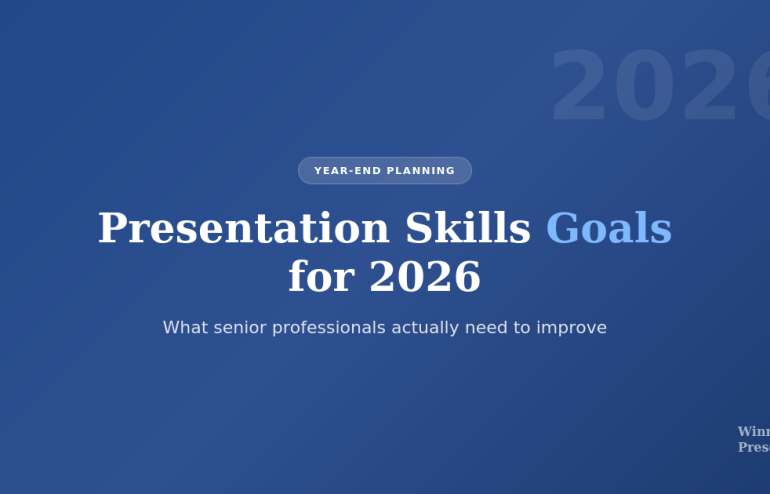
Presentation skills goals for 2026 - what senior professionals need to improve

Presentation Skills Goals for 2026: What Senior Professionals Actually Need to Improve

Last updated: December 31, 2025 · 9 minute read

Most presentation skills goals fail before February.

Not because professionals lack discipline. Not because they’re too busy. But because they’re setting the wrong goals entirely.

“Present more confidently” isn’t a goal — it’s a wish. “Get better at slides” isn’t measurable. “Stop being nervous” isn’t achievable through willpower alone.

After 24 years in corporate banking and training over 5,000 executives at Winning Presentations, I’ve watched hundreds of professionals set presentation skills goals every January. The ones who actually improve share something specific: they treat presentation skills like a system, not an event.

Senior professionals who improve fastest invest in a working executive presentation toolkit rather than hoping a single course or book will fix the structural issues.

Here’s what actually works for setting presentation skills goals in 2026 — and why most advice gets it completely wrong.

⚡ Key Takeaways

  • Most presentation skills goals fail because they lack feedback loops, structure, and measurement
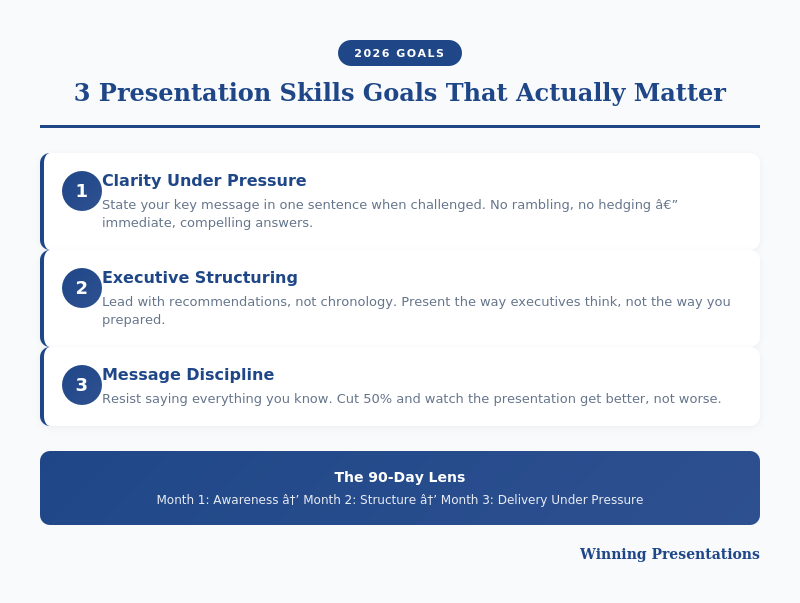
  • The 3 goals that matter: Clarity under pressure, executive structuring, and message discipline
  • 90-day improvement lens — Month 1: Awareness, Month 2: Structure, Month 3: Delivery under pressure
  • Systems beat motivation — deliberate practice compounds; random repetition doesn’t
  • Senior professionals think differently — they focus on skill systems, not presentation events

📥 FREE DOWNLOAD: Executive Presentation Checklist

The pre-presentation routine I use before every high-stakes talk.

Download Free →

Why Most Presentation Skills Goals Fail

Every January, millions of professionals make some version of the same resolution: “This year, I’ll get better at presenting.”

By March, nothing has changed.

The problem isn’t motivation. Research on professional development consistently shows that intention alone doesn’t drive skill improvement. What does? Systems.

Here’s why most presentation skills goals fail:

No Feedback Loop

You present. It goes “okay.” You present again. It goes “okay.” Without specific, structured feedback, you’re just reinforcing existing habits — good and bad.

Most professionals never get real feedback on their presentations. Colleagues say “that was great” because they’re being polite. Your manager focuses on content, not delivery. You have no idea what’s actually working or failing.

No Structure

“Get better at presenting” isn’t a goal — it’s a direction. Better how? Better at what specifically? Better measured by whom?

Vague presentation skills goals produce vague results. Without structure, you’ll drift toward whatever feels comfortable rather than what actually needs improvement.

No Measurement

How do you know if you’ve improved? Most professionals can’t answer this question. They rely on feelings: “I think I’m better.” “That one went well.”

Feelings aren’t measurement. Without clear metrics — even simple ones — you can’t track progress or identify what’s working.

No Pressure Simulation

Practising presentations alone in your office isn’t the same as presenting to a sceptical board. The skills that matter most — composure under pressure, handling tough questions, reading the room — only develop under realistic conditions.

This is why many professionals “know” what to do but can’t execute when it matters. They’ve practised the easy part and avoided the hard part.

For more on building genuine confidence, see my guide on how to speak confidently in public.

The 3 Presentation Skills Goals That Actually Matter

3 presentation skills goals that actually matter for professionals

After training thousands of executives, I’ve identified the three presentation skills goals that actually differentiate senior professionals from everyone else.

These aren’t “soft skills.” They’re specific, measurable capabilities that directly impact whether you get the outcome you want from a presentation.

Goal 1: Clarity Under Pressure

Can you articulate your key message in one sentence when someone interrupts you mid-presentation and asks “what’s the bottom line?”

Most professionals can’t. They’ve prepared 20 slides but haven’t distilled their core message. When pressure hits — an unexpected question, a time cut, a sceptical executive — they ramble, hedge, or lose the thread entirely.

What this looks like in practice:

  • You can state your recommendation in under 15 seconds
  • You can explain your “why” without slides
  • You stay coherent when challenged or interrupted
  • Your answer to “so what?” is immediate and compelling

How to develop it: Practise the “elevator pitch” for every presentation. Before you open PowerPoint, write your one-sentence message. Then test yourself: can you deliver it under pressure?

Goal 2: Executive Structuring

Do you structure presentations the way senior leaders think — or the way you think?

Most professionals present chronologically: “Here’s what I did, here’s what I found, here’s what I recommend.” Executives want the opposite: “Here’s my recommendation, here’s why, here’s what I need from you.”

What this looks like in practice:

  • You lead with the decision or recommendation
  • You provide supporting evidence, not comprehensive data
  • You anticipate the three questions they’ll ask
  • You can present the same content in 5 minutes or 30 minutes

How to develop it: Study how your most effective executives present. Notice the structure. Then apply it to your own content — starting with the “so what” instead of building toward it.

For detailed frameworks, see my guide on executive presentations.

Goal 3: Message Discipline

Can you resist the urge to say everything you know?

The curse of expertise is wanting to share all of it. But senior leaders don’t want comprehensive — they want relevant. They don’t want thorough — they want clear.

What this looks like in practice:

  • You cut 50% of your slides and the presentation gets better
  • You answer questions directly without over-explaining
  • You let silence exist instead of filling it with caveats
  • Your backup slides contain more content than your main deck

How to develop it: After preparing any presentation, force yourself to cut it by half. Not by rushing — by prioritising. What’s essential? What’s “nice to have”? Kill the nice-to-haves.

💡 Ready to Structure Like a Senior Leader?

The Executive Slide System includes 7 frameworks for structuring presentations the way executives think — recommendation-first, evidence-based, action-oriented.

Stop building toward your point. Start with it.

Get the Executive Slide System — £39 →

The 90-Day Improvement Lens for Presentation Skills Goals

Annual presentation skills goals are too distant. They let you procrastinate. “I have all year” becomes “I’ll start next month” becomes “maybe next year.”

Think in 90-day cycles instead. Three months is long enough to create real change, short enough to maintain urgency.

Month 1: Awareness

Before you can improve, you need to know what needs improving. Most professionals have blind spots — habits they don’t notice, weaknesses they’ve never identified.

Actions for Month 1:

  • Record yourself presenting (video, not just audio)
  • Ask 3 colleagues for specific, honest feedback
  • Identify your top 3 weaknesses — the specific things hurting your impact
  • Watch executives you admire — what do they do differently?

This month isn’t about changing anything. It’s about seeing clearly.

Month 2: Structure

Now that you know what to work on, build the systems that will drive improvement.

Actions for Month 2:

  • Create a pre-presentation routine you use every time
  • Develop 2-3 frameworks you apply to every presentation
  • Build a feedback system — how will you get input after each presentation?
  • Schedule deliberate practice, not just presentations

Structure turns intentions into habits. Without it, you’ll default to old patterns under pressure.

Month 3: Delivery Under Pressure

This is where most professionals skip. They practice alone, in comfortable settings, without stakes.

Actions for Month 3:

  • Present to colleagues who will challenge you — not support you
  • Practice with time constraints (you have 5 minutes, not 20)
  • Rehearse handling interruptions and tough questions
  • If possible, get coaching or join a structured programme

Skills that collapse under pressure weren’t really skills — they were comfort-zone performances.

For advanced techniques on handling pressure, see my guide on advanced presentation skills.

🎓 Want Structured Development?

If 2026 is the year you want to master presentation skills properly, structured development matters more than random practice.

Framework-based programmes with psychology techniques and expert feedback create lasting change — not just temporary motivation. If you’d like to discuss what structured development might look like for you, get in touch →

How Senior Professionals Think About Presentation Skills Goals

There’s a mental shift that separates professionals who continuously improve from those who plateau.

Skills vs Events

Plateau thinking: “I have a big presentation next month. I need to prepare for it.”

Growth thinking: “Presenting is a skill I’m developing. Each presentation is a data point.”

When you treat presentations as isolated events, you prepare, perform, and forget. When you treat presenting as an ongoing skill development, each presentation becomes an opportunity to test, learn, and refine.

Systems vs Motivation

Plateau thinking: “I need to feel confident before I can present well.”

Growth thinking: “I need systems that work even when I don’t feel confident.”

Motivation is unreliable. Systems are consistent. The executives who present brilliantly under pressure don’t rely on feeling good — they rely on preparation routines, structural frameworks, and recovery techniques that work regardless of how they feel.

Deliberate Practice vs Repetition

Plateau thinking: “The more I present, the better I’ll get.”

Growth thinking: “Purposeful practice on specific weaknesses improves skill. Random repetition just reinforces habits.”

Twenty years of presenting doesn’t automatically make you good. It makes you experienced. If you’ve been reinforcing bad habits for twenty years, you’re just an experienced bad presenter.

Deliberate practice means identifying specific weaknesses, designing exercises to address them, getting feedback, and adjusting. It’s uncomfortable. That’s why it works.

Making 2026 the Year You Actually Improve Your Presentation Skills Goals

Here’s the honest truth: most people reading this won’t do anything different in 2026.

Not because they lack ability or desire. But because they’ll set vague goals, rely on motivation, and treat presentation skills as an afterthought when they’re not actively presenting.

The professionals who actually improve will:

  • Set specific, measurable presentation skills goals (not wishes)
  • Build systems that don’t depend on motivation
  • Create accountability through feedback loops or structured programmes
  • Practice under realistic pressure, not comfortable conditions
  • Treat presenting as a skill to develop, not an event to survive

If that sounds like work, it is. Skill development always is. But the compound returns are substantial — in promotions, influence, credibility, and career opportunities.

The question isn’t whether presentation skills matter for your career in 2026. They obviously do.

The question is whether you’ll treat them like the strategic asset they are — or continue hoping that “more practice” will somehow produce different results.

Your Next Step

📖 FREE: Executive Presentation Checklist
The pre-presentation routine I use before every high-stakes talk.
Download Free →

💡 QUICK WIN: Executive Slide System — £39
7 frameworks for structuring presentations the way senior leaders think.
Get Instant Access →

🎓 COMPLETE SYSTEM: Structured Development
If you’re ready for comprehensive training with expert guidance, let’s discuss what that looks like for you →

FAQs: Presentation Skills Goals

What are the most important presentation skills goals to set for 2026?

The three presentation skills goals that matter most are: clarity under pressure (being able to state your key message when challenged), executive structuring (leading with recommendations instead of building toward them), and message discipline (resisting the urge to say everything you know). These directly impact whether you achieve your presentation outcomes.

How long does it take to improve presentation skills?

With deliberate practice and structured feedback, most professionals see meaningful improvement within 90 days. The key is focusing on specific weaknesses rather than general “practice.” Random repetition reinforces habits; deliberate practice changes them. Think in 90-day improvement cycles rather than annual goals.

Why do most presentation skills goals fail?

Most presentation skills goals fail because they lack four things: feedback loops (you don’t know what’s working or failing), structure (vague goals produce vague results), measurement (feelings aren’t data), and pressure simulation (practicing alone doesn’t prepare you for real stakes). Systems address all four.

How can I measure improvement in my presentation skills?

Measure presentation skills improvement through specific outcomes: Did you get the decision you wanted? Did stakeholders engage or disengage? How many clarifying questions did you get (fewer often means clearer communication)? Did you stay within your time limit? Recording yourself and comparing over time also provides objective measurement.

What’s the difference between deliberate practice and just presenting more?

Presenting more reinforces existing habits — good and bad. Deliberate practice involves identifying specific weaknesses, designing exercises to address them, getting feedback, and adjusting your approach. Twenty years of presentations doesn’t automatically make you skilled; it makes you experienced. The distinction determines whether you improve or plateau.


Mary Beth Hazeldine is the Owner & Managing Director of Winning Presentations. She spent 24 years in corporate banking at JPMorgan Chase, PwC, Royal Bank of Scotland, and Commerzbank, and has trained over 5,000 executives to present with impact. Her clients have raised over £250 million using her frameworks.

Get Weekly Presentation Insights

Join 2,000+ professionals getting practical presentation tips every Tuesday.

Subscribe to The Winning Edge →

30 Dec 2025
Advanced presentation skills - what senior leaders do differently

Advanced Presentation Skills: What Senior Leaders Do Differently

Last updated: December 30, 2025 · 10 minute read

Most presentation advice teaches you how to be competent. This article teaches you how to be exceptional.

After 24 years in corporate environments — at JPMorgan Chase, PwC, Royal Bank of Scotland, and Commerzbank — I’ve watched hundreds of senior leaders present. Managing Directors. C-suite executives. Board members.

What I noticed: the techniques that make someone a “good” presenter are completely different from the advanced presentation skills that make someone commanding, memorable, and persuasive at the senior level.

The basics matter. But if you’ve mastered the basics and want to present like a senior leader, you need to develop these advanced presentation skills. At Winning Presentations, these are the techniques I teach to executives who want to move from competent to compelling.

⚡ Key Takeaways

  • Senior leaders speak in headlines — they lead with conclusions, not build-ups
  • They use strategic silence — pauses signal confidence and create emphasis
  • They make one point, not many — clarity beats comprehensiveness
  • They read the room constantly — and adapt in real-time
  • They own the space physically — presence comes from stillness and intention

📥 FREE DOWNLOAD: 7 Presentation Frameworks

The structures senior leaders use for every presentation type — from team updates to board meetings.

Download Free →

The Gap Between Basic and Advanced Presentation Skills

Basic presentation skills get you through. Advanced presentation skills get you promoted.

Here’s what I mean:

Basic skills: Clear slides. Steady voice. Eye contact. Logical structure. Not reading from notes. Finishing on time.

These are table stakes. They’re necessary but not sufficient. Every competent professional eventually develops these.

Advanced presentation skills: Commanding attention without demanding it. Making complex ideas feel simple. Reading and adapting to room dynamics. Creating moments that people remember days later. Influencing decisions through presence, not just content.

Harvard Business Review research shows that executive presence — the way senior leaders carry themselves — accounts for a significant portion of leadership advancement. Presentation skills are the most visible expression of that presence.

For the foundational techniques, see my guide on professional presentation skills. What follows are the advanced techniques that build on that foundation.

7 Advanced Presentation Skills Senior Leaders Use

These are the patterns I’ve observed in the most effective senior presenters — and the techniques I now teach to executives at Winning Presentations.

Advanced presentation skills framework - 7 techniques senior leaders use

1. They Speak in Headlines First

Average presenters build up to their conclusion. Senior leaders start with it.

Average approach: “We analysed the market, reviewed three options, considered the risks, and concluded that…”

Senior leader approach: “We should acquire Company X. Here’s why.”

This isn’t just more efficient — it’s a completely different communication philosophy. Senior leaders assume their audience is intelligent and time-pressed. They give the conclusion first, then provide supporting evidence for those who need it.

I call this “newspaper structure” — headline first, details second. Practice leading with your recommendation or key message, then backing it up.

For a complete framework on structuring executive-level presentations, see my guide on creating executive presentations.

2. They Use Strategic Silence

Most presenters fill every moment with words. Senior leaders use silence as a tool.

Strategic silence works in three ways:

  • Before key points: A 2-3 second pause signals “what comes next is important” — audiences lean in
  • After questions: Pausing before answering shows you’re thinking, not reacting — it signals confidence
  • After your conclusion: Ending with silence rather than filler (“so, yeah…”) makes your ending land

Watch any effective CEO speak. They’re comfortable with silence in ways that junior presenters aren’t. This is a learnable advanced presentation skill.

At PwC, I noticed that partners who commanded the most respect in client meetings were also the ones who spoke least — but when they spoke, everyone listened. The silence between their statements created weight.

3. They Make One Point, Not Many

Average presenters try to be comprehensive. Senior leaders try to be memorable.

If you make ten points, your audience remembers zero. If you make one point with three supporting arguments, your audience remembers one.

The discipline: Before any presentation, ask yourself: “What is the ONE thing I need this audience to remember?” Then structure everything around that single point.

This is harder than it sounds. It requires killing your darlings — cutting good content that doesn’t serve your core message. But it’s what separates forgettable presentations from influential ones.

💡 Want Executive-Level Frameworks?

The Executive Slide System gives you 7 proven structures used by senior leaders for any business presentation — from team updates to board meetings.

  • The “Headline First” framework
  • Board recommendation structure
  • Strategic update template
  • Video walkthroughs for each

Get the Executive Slide System — £39 →

4. They Read the Room and Adapt

Average presenters deliver their prepared content regardless of audience response. Senior leaders treat presentations as dynamic conversations.

What they’re watching for:

  • Body language shifts (leaning in = interest, arms crossed = resistance, checking phones = lost attention)
  • The senior person’s reaction (often the decision-maker)
  • Confusion or skepticism on faces
  • Moments of strong agreement (to emphasise) or disagreement (to address)

How they adapt:

  • If attention is waning: “Let me cut to what matters most for this decision…”
  • If someone looks skeptical: “I can see some concern — let me address that directly…”
  • If running long and losing the room: “I’ll move to the recommendation and we can discuss details as needed…”

This advanced presentation skill requires preparation — you need to know your content well enough to restructure it on the fly.

5. They Own the Physical Space

Senior leaders don’t just stand in a room — they own it.

What this looks like:

  • Stillness when speaking: No swaying, fidgeting, or pacing. Movement is intentional.
  • Expansive posture: Taking up space rather than shrinking into it
  • Deliberate movement: Walking to a different position to signal a transition, then planting again
  • Eye contact that lingers: Completing a thought while looking at one person, not darting around

At Royal Bank of Scotland, I watched executives command rooms of 50+ people simply through how they positioned themselves. They arrived early, stood where they intended to present, and “claimed” the space before anyone else arrived.

For more on developing this kind of presence, see my guide on how to speak confidently in public.

Executive presence model for advanced presentation skills

6. They Tell Stories With Purpose

Everyone knows stories are powerful. Senior leaders use them strategically, not decoratively.

The difference:

  • Decorative story: A relevant anecdote that entertains
  • Strategic story: A specific narrative that makes your key point unforgettable and emotionally resonant

The senior leader approach:

  1. Identify the ONE point you need to land
  2. Find a story that embodies that point (ideally from your own experience)
  3. Tell it briefly — 60-90 seconds maximum
  4. Connect it explicitly to your business message

I once watched a Managing Director turn a room’s opinion on a £10 million investment with a two-minute story about a similar decision made five years earlier. The data hadn’t changed. The story changed how they felt about the data.

7. They Project Certainty (Even When They’re Not)

Senior leaders rarely sound uncertain, even when discussing uncertain topics.

This isn’t about being arrogant or closed-minded. It’s about how you frame uncertainty.

Average presenter: “I’m not sure, but maybe we should consider…”

Senior leader: “Based on current evidence, my recommendation is X. There are risks, which I’ll address.”

Both might have the same level of internal confidence. The difference is in the framing. Senior leaders:

  • State positions clearly, then acknowledge limitations
  • Use “I recommend” rather than “I think maybe”
  • Address uncertainty as risk to be managed, not as lack of conviction

This advanced presentation skill requires practice — it’s a language pattern, not just a mindset.

🎓 Ready to Develop Advanced Presentation Skills?

AI-Enhanced Presentation Mastery is designed for senior professionals who want to move beyond competent to commanding. It includes modules specifically on executive presence, strategic storytelling, and reading room dynamics.

8 modules. 2 live coaching sessions. Direct feedback on your actual presentations.

Learn More — £249 →

How to Develop Advanced Presentation Skills

These skills don’t develop from reading about them. They develop from deliberate practice with feedback.

Step 1: Record Yourself

Video yourself presenting. Watch it with the sound off first — you’ll see habits you never knew you had. Then watch with sound. Most people do this once, cringe, and never do it again. Senior leaders do it repeatedly.

Step 2: Focus on One Advanced Presentation Skill at a Time

Don’t try to develop all seven skills simultaneously. Pick the one that would make the biggest difference for you:

  • If you’re too detailed → Practice “headline first”
  • If you’re too rushed → Practice strategic silence
  • If people forget your points → Practice the “one point” discipline
  • If you feel rigid → Practice reading the room
  • If you feel nervous → Practice owning the space

Work on one skill for 4-6 weeks before adding another.

Step 3: Get Feedback From Senior People

Peers can tell you if you were clear. Senior leaders can tell you if you were compelling. Seek feedback specifically from people above your level who present well.

For more on the CEO-level techniques, see my guide on how to present like a CEO.

The Real Difference Advanced Presentation Skills Make

Early in my banking career, I was technically competent but forgettable. I delivered information clearly. I finished on time. I answered questions adequately.

But I wasn’t advancing.

What changed wasn’t my content — it was how I delivered it. I learned to lead with conclusions, use silence, make single points land, and command physical space. Within two years, I was presenting to boards.

Advanced presentation skills aren’t about being flashy or charismatic. They’re about being strategic with every element of your communication — words, pauses, movement, and presence.

My clients have collectively raised over £250 million using these techniques. Not because they’re naturally gifted — but because they developed these advanced presentation skills deliberately.

For the executive summary techniques specifically, see my guide on how to write an executive summary slide.

Your Next Step

Pick one advanced presentation skill from this list. Practice it in your next three presentations. Notice what changes.

That’s how senior leaders got to where they are — one deliberate improvement at a time.

Resources for Advanced Presentation Skills

📖 FREE: 7 Presentation Frameworks
The structures senior leaders use for every presentation type.
Download Free →

💡 QUICK WIN: Executive Slide System — £39
7 board-ready frameworks + templates + video walkthroughs.
Get Instant Access →

🎓 COMPLETE SYSTEM: AI-Enhanced Presentation Mastery — £249
8-module course with live coaching. Develop advanced presentation skills with direct expert feedback.
Learn More →

FAQs About Advanced Presentation Skills

What’s the difference between basic and advanced presentation skills?

Basic presentation skills are about competence: clear slides, steady voice, logical structure, finishing on time. Advanced presentation skills are about influence: commanding attention, making ideas memorable, reading and adapting to room dynamics, and creating moments that drive decisions. Basic skills get you through. Advanced skills get you promoted.

How long does it take to develop advanced presentation skills?

Expect 6-12 months of deliberate practice to see significant advancement. The key is focusing on one skill at a time for 4-6 weeks, getting feedback, and presenting regularly. Most people try to improve everything at once and improve nothing. Senior leaders who present well have usually been refining these skills for years.

Can you develop advanced presentation skills without natural charisma?

Absolutely. Most senior leaders I’ve trained weren’t naturally charismatic — they were deliberate. The techniques in this guide are learnable skills, not personality traits. Strategic silence, headline-first structure, and physical presence are all patterns you can practice and develop regardless of your natural style.

What’s the most important advanced presentation skill to develop first?

Start with “headline first” — leading with your conclusion rather than building up to it. This single change shifts how audiences perceive you from “informer” to “leader.” It’s also the fastest to implement. You can start using it in your very next presentation.

How do senior leaders handle nerves differently?

Senior leaders still feel nervous — they’ve just learned to channel it differently. They use pre-presentation rituals, reframe anxiety as excitement, and focus on serving the audience rather than performing for them. The visible difference is that their nervous energy goes into preparation, not into visible fidgeting or rushed delivery.


Mary Beth Hazeldine is the Owner & Managing Director of Winning Presentations and a Microsoft Copilot PowerPoint specialist. A qualified clinical hypnotherapist, she has trained over 300 executives on advanced presentation skills, drawing on 24 years of corporate experience at JPMorgan Chase, PwC, Royal Bank of Scotland, and Commerzbank. Her clients have collectively raised over £250 million using her presentation techniques.

Get Weekly Presentation Insights

Join 2,000+ professionals getting practical presentation tips every Tuesday.

Subscribe to The Winning Edge →

27 Dec 2025
Presentation skills for promotion - what actually gets you ahead in corporate environments

Presentation Skills for Promotion: What Actually Gets You Ahead

What I learned from watching 24 years of promotions (and non-promotions) in corporate banking

Presentation skills for promotion matter more than most professionals realize. I’ve sat in hundreds of promotion discussions. Not as the candidate — as the observer. First as a junior banker watching who got tapped for senior roles, then as a trainer noticing which clients advanced and which plateaued.

The link between presentation skills and promotion became undeniable. The conversation is never “Who has the best technical skills?” It’s “Who can we put in front of the board? Who will represent us well?”

Those questions all have the same answer: the person with presentation skills that drive promotion.

Why Presentation Skills for Promotion Matter So Much

This isn’t about corporate politics or style over substance. It’s about what leadership roles actually require.

The higher you go, the less you do the work yourself. Your job shifts from execution to influence — getting others to act on your recommendations. That requires communication skills that most technical training never develops.

When a senior leader evaluates you for promotion, they’re running a mental simulation: “Can I picture this person presenting to the executive committee? Will they hold their own when challenged? Can they explain complex issues simply?”

Your spreadsheet skills don’t answer those questions. Your presentation skills do — and that’s why presentation skills drive promotion decisions.

Related: Professional Presentation Skills: What Sets Top Performers Apart

Infographic for: presentation skills for promotion (image 1)

The 3 Presentation Skills for Promotion That Matter Most

Not all presentation skills matter equally for advancement. These three consistently separate people who get promoted from people who don’t:

1. Leading With Conviction

Promoted professionals don’t just present information — they take positions. They tell the room what they think in the first 60 seconds, then defend it.

This signals ownership. It shows you’ve processed the information and formed a judgment. Executives don’t promote people who wait for others to interpret their data.

The difference:

  • Analyst: “Here’s the data. What do you think we should do?”
  • Leader: “I’m recommending Option B. Here’s why.”

2. Composure Under Challenge

Every promotion decision includes an unspoken evaluation: “How will this person handle pressure from the board? From difficult clients? From hostile stakeholders?”

The answer shows up in how you respond when challenged. If you get defensive, justify immediately, or repeat yourself more forcefully — that’s noticed. If you acknowledge the concern, stay calm, and respond substantively — that’s noticed too.

One graceful response under fire is worth ten smooth presentations. It’s the moment senior leaders remember when your name comes up for promotion.

3. Strategic Brevity

The ability to explain complex issues simply is rare — and highly valued. When you can communicate in 10 minutes what others take 40 minutes to say, you demonstrate two things executives prize: deep understanding and respect for their time.

Brevity isn’t about dumbing down. It’s about ruthless prioritisation — knowing what must be said versus what could be said. That judgment is a leadership skill in itself.

Related: How to Create Executive Presentations That Get Results

Quick Reference for Promotion-Ready Presentations

The Public Speaking Cheat Sheets (£14.99) give you pocket-sized reminders for all three skills — plus frameworks for openings, closings, and handling tough questions.

Get the Cheat Sheets →

Why Most Professionals Never Develop Presentation Skills for Promotion

If these presentation skills drive promotion so reliably, why don’t more people develop them?

No one teaches them explicitly. Business schools teach analysis, not communication. Corporate training focuses on slide design, not strategic presence. Most professionals are left to figure it out through trial and error — in high-stakes situations where errors are costly.

Practice happens under pressure. You don’t get 20 rehearsals before a board presentation. You get one shot, with your reputation on the line. That’s a terrible environment for skill development.

Feedback is vague or absent. “Good presentation” tells you nothing. “You got defensive when the CFO pushed back and it created doubt about your recommendation” — that’s actionable. But most professionals never receive feedback that specific.

This is why deliberate training matters. You need to develop these skills in low-stakes environments with specific feedback before deploying them when it counts.

Related: Business Presentation Skills: What Actually Matters in Corporate Environments

Develop Presentation Skills for Promotion Systematically

AI-Enhanced Presentation Mastery is designed specifically to build the presentation skills that drive promotion — with frameworks, practice, and personalised feedback.

8 self-paced modules (January–April 2026):

  • The AVP Framework: Action-Value-Proof structure that forces conviction upfront
  • The 132 Rule: How to cut ruthlessly without losing impact
  • Q&A Handling: Frameworks for staying composed under hostile questioning
  • The S.E.E. Formula: Story-Evidence-Emotion for persuasive messaging
  • NLP Delivery Techniques: Composure and presence under pressure
  • AI-Powered Preparation: Build presentations faster so you can rehearse more

Plus: 2 live coaching sessions (April 2026) with personalised feedback on your real presentations. This is where the skill becomes permanent — practicing under observation with specific, actionable feedback.

Presale price: £249 (increases to £299 early bird, then £499 full price)

60 seats total. Lifetime access to all materials.

See the full curriculum and reserve your seat →

Infographic for: presentation skills for promotion (image 2)

The Career ROI of Presentation Skills for Promotion

Let’s be direct about what’s at stake.

A promotion typically comes with a 15-25% salary increase. For a professional earning £80,000, that’s £12,000-£20,000 annually. Over a career, the compound effect of earlier promotions is measured in hundreds of thousands of pounds.

The professionals who develop these presentation skills don’t just get promoted once. They get promoted repeatedly — because the same skills that got them the first advancement continue working at each level.

The investment in developing presentation skills for promotion isn’t an expense. It’s a multiplier on your entire career trajectory.


Your Next Step: Build Presentation Skills for Promotion

You can continue developing presentation skills through trial and error in high-stakes situations. Most people do.

Or you can build them systematically — with frameworks, practice, and feedback — so they’re ready when the moment matters.

📖 Read the complete guide: Professional Presentation Skills: What Sets Top Performers Apart — all 7 skills that distinguish those who advance.

📋 Get the quick reference (£14.99): Public Speaking Cheat Sheets — pocket-sized reminders for high-stakes moments.

🎓 Build the skills systematically (£249): AI-Enhanced Presentation Mastery — 8 modules + 2 live coaching sessions. January–April 2026, 60 seats.


Mary Beth Hazeldine spent 24 years in corporate banking at JPMorgan, PwC, Royal Bank of Scotland, and Commerzbank — watching which professionals advanced and which plateaued. She now trains executives in the presentation skills that drive promotion and career growth.

27 Dec 2025
Presentation mistakes that stall careers - what to avoid and what to do instead

Presentation Mistakes That Stall Careers (And What to Do Instead)

The habits that keep talented professionals stuck — even when their work is excellent

Some of the most talented professionals I’ve worked with never got promoted. Not because they lacked skills. Because they made presentation mistakes that made leadership question their readiness.

These aren’t obvious errors like reading from slides or going over time. They’re subtle habits that create doubt — often without the presenter realising it.

Here are the career-stalling mistakes I’ve seen most often, and what to do instead.

🎁 Free Download: 7 Presentation Frameworks — structures that prevent these mistakes automatically.

5 Presentation Mistakes That Make Leadership Question Your Readiness

Infographic for: presentation mistakes career (image 1)

1. Building to Your Conclusion

The mistake: Walking through all your analysis before revealing your recommendation. “First, let me show you the data… then the methodology… and here’s what I think we should do.”

Why it stalls careers: Executives assume you’re not confident enough to lead with your position. It signals “analyst” not “leader.”

Do this instead: State your recommendation in the first 60 seconds. “I’m recommending Option B. Here’s why.” Then provide supporting evidence.

2. Answering Questions You Weren’t Asked

The mistake: Someone asks “What’s the risk?” and you explain your entire methodology. Someone asks “Can we afford this?” and you discuss technical requirements.

Why it stalls careers: Leaders conclude you can’t listen, can’t prioritise, or you’re avoiding the real question. None of those perceptions help you.

Do this instead: Answer the actual question directly — even if briefly — before adding context. “The main risk is timeline. Here’s why…”

3. Including Everything You Know

The mistake: 40 slides when 15 would do. Covering every angle because “they might ask.” Confusing thoroughness with effectiveness.

Why it stalls careers: It signals you can’t distinguish what matters from what doesn’t — a critical leadership skill. Executives don’t promote people who waste their time.

Do this instead: Cut ruthlessly. For each slide, ask: “If I remove this, does my recommendation change?” If no, cut it.

Related: Professional Presentation Skills: What Sets Top Performers Apart

4. Getting Defensive When Challenged

The mistake: A senior leader pushes back and you immediately justify, explain why they don’t understand, or repeat your point more forcefully.

Why it stalls careers: This is the biggest one. Defensiveness signals insecurity. Leadership roles require handling challenge gracefully — in board meetings, with clients, with stakeholders. If you can’t do it internally, why would they put you in front of external audiences?

Do this instead: Acknowledge first: “That’s a fair concern.” Clarify if needed: “Can I ask what’s driving that question?” Then respond substantively, not emotionally.

5. Ending With “Any Questions?”

The mistake: Trailing off at the end. “So, um, that’s the analysis. Any questions?” Then sitting down without a clear ask.

Why it stalls careers: You had the room’s attention and you gave it away. Leaders notice when you don’t close. It suggests you’re uncomfortable asking for what you want — not a trait they’re looking for in senior roles.

Do this instead: End with your recommendation, the specific ask, and a request for decision. “Based on this, I’m recommending Option B, starting Q1. I need approval today to begin. Can I get that?”

Related: Professional Presentation Skills: What Sets Top Performers Apart — the complete 7-skill framework.

Avoid These Mistakes Under Pressure

The Public Speaking Cheat Sheets (£14.99) give you pocket-sized reminders for high-stakes moments — openings, closings, handling tough questions, and recovering when things go wrong.

Get the Cheat Sheets →

Why These Mistakes Are So Damaging

The frustrating part: you can do excellent work and still make these mistakes. They’re not about competence — they’re about perception.

When leadership evaluates you for promotion, they’re not reviewing your spreadsheets. They’re recalling how you showed up in presentations. Did you seem ready for the next level? Could they picture you in front of the board?

These five mistakes all create the same doubt: “Not quite ready yet.”

The good news: they’re all fixable. They’re habits, not personality traits. With awareness and practice, you can replace them with behaviours that signal leadership readiness instead.

Related: Business Presentation Skills: What Actually Matters in Corporate Environments


Your Next Step

Pick the mistake you recognise most in yourself. Focus on fixing that one first — it will make the biggest difference fastest.

📖 Go deeper: Professional Presentation Skills: What Sets Top Performers Apart — the 7 skills that replace these mistakes.

🎁 Get the frameworks: 7 Presentation Frameworks — free, structures that prevent these errors automatically.

📋 Get the quick reference: Public Speaking Cheat Sheets (£14.99) — reminders for high-stakes moments.


Mary Beth Hazeldine spent 24 years in corporate banking watching talented professionals stall — and others accelerate past them. The difference was rarely about skill.

27 Dec 2025
Professional presentation skills - what sets top performers apart in corporate environments

Professional Presentation Skills: What Sets Top Performers Apart

After 24 years in corporate banking, here’s what actually separates those who get promoted from those who don’t

In 24 years at JPMorgan, PwC, Royal Bank of Scotland, and Commerzbank, I watched hundreds of talented professionals present. Most were competent. Some were forgettable. A handful were exceptional — and they’re the ones who got promoted.

The difference wasn’t intelligence or even presentation “talent.” It was a specific set of professional presentation skills that most people never develop because no one teaches them explicitly.

I’m going to teach them to you now.

🎁 Free Download: 7 Presentation Frameworks — the structures top performers use consistently. Print-ready PDF.

What Professional Presentation Skills Actually Look Like

First, let’s define what we’re talking about. Professional presentation skills aren’t about being charismatic or having a “stage presence” personality. They’re about:

  • Clarity under pressure — delivering complex information simply, even when stakes are high
  • Executive alignment — structuring content for how senior leaders actually think
  • Credibility without arrogance — demonstrating expertise while remaining approachable
  • Decisive recommendations — telling the room what you think, not just presenting options
  • Composure during challenge — handling tough questions without defensiveness

These skills are observable, teachable, and learnable. They’re not personality traits. They’re behaviours you can practise until they become automatic.

Related: Business Presentation Skills: What Actually Matters in Corporate Environments

The 7 Professional Presentation Skills That Get You Promoted

I’ve distilled 24 years of observation into seven specific skills. Master these, and you’ll stand out in any corporate environment.

1. Lead With the Recommendation

Junior presenters build to their conclusion. Senior presenters start with it.

The executives I watched get promoted fastest all did this: they told the room what they wanted in the first 60 seconds. “I’m recommending we proceed with Option B. Here’s why.”

This isn’t arrogance — it’s respect for the audience’s time. It also forces clarity in your own thinking. If you can’t state your recommendation in one sentence, you haven’t thought hard enough.

What this looks like:

  • “I’m recommending we invest £2M in customer retention. Let me show you why.”
  • “My conclusion: we should proceed with the acquisition. Here’s the analysis.”
  • “Bottom line: this project is at risk unless we add resources. Here’s the evidence.”

2. Answer the Question Actually Being Asked

I’ve watched brilliant analysts torpedo their careers by answering the wrong question. A board member asks “What’s the risk?” and they launch into methodology. A CFO asks “Can we afford this?” and they explain the technical requirements.

Top performers listen to the actual question, pause, and answer it directly — even if briefly — before providing context.

The pattern:

  1. Answer the question in one sentence
  2. Provide essential context
  3. Check if that’s sufficient: “Does that address your concern?”

This sounds simple. In practice, it’s remarkable how few people do it.

3. Cut Your Content in Half (Then Cut Again)

Every presenter thinks they need more slides. Every executive wishes they had fewer.

The people who got promoted in my observation consistently presented with fewer slides than their peers. A 30-page deck became 10 pages. A 60-minute presentation became 20 minutes with 40 minutes for discussion.

This requires ruthless prioritisation: what absolutely must be said, versus what would be nice to say?

The test: For each slide, ask “If I cut this, would the recommendation change?” If no, cut it.

Related: How to Create Executive Presentations That Get Results

4. Own the Room Physically

Professional presentation skills include how you use space. Top performers:

  • Stand (when possible) rather than sit — it commands more attention
  • Use purposeful movement, not nervous pacing
  • Make eye contact with decision-makers during key points
  • Pause before important statements, rather than rushing through
  • Keep hands visible and gestures controlled

None of this requires natural confidence. It requires practice until the behaviours feel automatic.

5. Handle Challenge Without Defensiveness

This is where careers are made or broken. When a senior leader challenges your recommendation, how do you respond?

Defensive presenters:

  • Justify immediately
  • Explain why the challenger doesn’t understand
  • Get visibly flustered
  • Repeat their original point, louder

Professional presenters:

  • Acknowledge the challenge: “That’s a fair concern.”
  • Clarify if needed: “Can I ask what’s driving that question?”
  • Respond substantively, not emotionally
  • Concede when appropriate: “You’re right — I hadn’t considered that angle.”

The ability to receive challenge gracefully signals confidence more than any power pose ever will.

Presentation mistakes that stall careers - what to avoid and what to do instead

6. Show Your Thinking, Not Just Your Conclusion

This seems to contradict “lead with the recommendation” — but it doesn’t. You state your conclusion first, then briefly show how you got there.

The key word is “briefly.” You’re not walking through every step of your analysis. You’re highlighting the 2-3 key considerations that shaped your thinking.

Example: “I’m recommending Option B. The three factors that drove this: cost efficiency, implementation timeline, and team capacity. Let me show you each briefly.”

This builds credibility. It shows you’ve done rigorous work without subjecting the audience to all of it.

7. Close With Clarity

The final professional presentation skill: ending decisively. Too many presenters trail off: “So, um, that’s the analysis. Any questions?”

Top performers end like this:

“Based on what we’ve discussed, I’m recommending we proceed with Option B, starting in Q1. I need your approval today to begin procurement. Can I get that?”

Note what this does: restates the recommendation, specifies timing, names the ask, requests a decision. No ambiguity.

Related: Public Speaking Tips That Actually Work in Corporate Settings

Quick Reference for Your Next Presentation

The Public Speaking Cheat Sheets (£14.99) give you pocket-sized reminders for all seven skills — plus 15 more techniques for handling nerves, structuring content, and commanding attention.

What’s included:

  • 7-skill checklist from this article
  • Opening and closing templates
  • Body language quick reference
  • Tough question response frameworks

Get the Cheat Sheets →

Why Most Professionals Don’t Develop These Skills

If these professional presentation skills are so valuable, why don’t more people have them?

1. No one teaches them explicitly. Business schools teach case analysis, not presentation skills. Most corporate training focuses on slide design, not strategic communication.

2. Practice happens in high-stakes moments. You don’t get to rehearse a board presentation 20 times. You get one shot, under pressure, with your reputation on the line. That’s a terrible learning environment.

3. Feedback is rare and vague. “Good presentation” tells you nothing. “You answered the CFO’s question indirectly and it created doubt” — that’s actionable. But most professionals never receive feedback that specific.

4. The wrong things get rewarded. In many organisations, comprehensive decks are praised over concise ones. Being “thorough” is valued over being decisive. The incentives work against developing professional presentation skills.

This is why deliberate training matters. You need to practise these skills in a low-stakes environment with specific feedback before you deploy them in high-stakes situations.

Professional Presentation Skills vs. Natural Talent

I’ve trained thousands of professionals. The ones who improve fastest aren’t the naturally confident ones — they’re the ones who practise systematically.

Professional presentation skills are like any other skill: they improve with deliberate practice and specific feedback. The “natural” presenters often plateau because they’ve never had to work at it. The “nervous” presenters often surpass them because they’ve built robust systems.

Some of the best presenters I know still get nervous. The difference is they have frameworks that work regardless of how they feel.

Related: How to Present Like a CEO: Executive Presentation Skills for Leadership

Develop Professional Presentation Skills Systematically

AI-Enhanced Presentation Mastery teaches all seven skills from this article — plus AI-powered workflows that help you prepare faster and practise more effectively.

8 self-paced modules (January–April 2026):

  • The AVP Framework: Action-Value-Proof for executive-level structure
  • The 132 Rule: How to cut content ruthlessly without losing impact
  • Q&A handling frameworks for hostile and challenging questions
  • NLP delivery techniques for composure under pressure
  • AI prompts that accelerate preparation and practice

Plus: 2 live coaching sessions with personalised feedback on your real presentations.

Presale price: £249 (increases to £299, then £499)

60 seats total. Lifetime access.

See the full curriculum →

Frequently Asked Questions About Professional Presentation Skills

How long does it take to develop professional presentation skills?

You can see noticeable improvement in 2-4 weeks with deliberate practice. Mastery takes longer — typically 6-12 months of consistent application. The key is getting specific feedback on real presentations, not just reading about techniques.

Can introverts develop strong presentation skills?

Absolutely. Some of the best presenters I’ve trained are introverts. Professional presentation skills are about clarity and structure, not extroversion. Introverts often excel because they prepare more thoroughly and listen more carefully to questions.

What’s the single most important skill to develop first?

Lead with your recommendation. It forces clarity in your thinking and immediately differentiates you from presenters who build to their conclusion. Practice stating your recommendation in one sentence before you do anything else.

How do I practise when I don’t have many presentation opportunities?

Create opportunities. Present in team meetings, even briefly. Record yourself presenting to your laptop. Join groups like Toastmasters. The skills transfer — a 5-minute team update uses the same fundamentals as a board presentation.

Are professional presentation skills different in virtual settings?

The core skills are identical: lead with recommendation, answer questions directly, cut ruthlessly. What changes is execution: eye contact means looking at the camera, energy must be 20% higher to read through the screen, and visuals matter more when you’re competing with distractions.


Your Next Step: Pick One Skill and Master It

Don’t try to develop all seven professional presentation skills simultaneously. Pick the one that would make the biggest difference for you right now, and focus on it for your next 3-5 presentations.

For most people, I recommend starting with “Lead with the recommendation.” It’s the highest-leverage change and it forces improvement in everything else.

🎁 START FREE: Download 7 Presentation Frameworks — including the structures top performers use consistently.

📋 GET THE QUICK REFERENCE (£14.99): Public Speaking Cheat Sheets — pocket-sized reminders for all seven skills plus body language, openings, closings, and Q&A handling.

🎓 MASTER IT ALL (£249): AI-Enhanced Presentation Mastery — 8 modules covering professional presentation skills, AI tools, and delivery. January–April 2026, 60 seats.

The professionals who get promoted aren’t more talented. They’ve developed skills that most people never bother to learn. You can be one of them.


Mary Beth Hazeldine spent 24 years in corporate banking at JPMorgan, PwC, Royal Bank of Scotland, and Commerzbank, observing which professionals advanced and which plateaued. She now trains executives in the professional presentation skills that drive career growth.

26 Dec 2025
Data presentation tips - turn spreadsheets into stories that drive decisions

Data Presentation Tips: Turn Spreadsheets Into Stories in 5 Steps

A quick framework for transforming raw data into slides that actually get decisions

You have a spreadsheet full of numbers. You need a presentation by tomorrow. How do you turn rows and columns into something that actually moves people to action?

Here are 5 data presentation tips that transform raw data into compelling slides — without losing the rigour your audience expects.

🎁 Free Download: Executive Presentation Checklist — includes the data slide framework.

5 Data Presentation Tips That Transform Numbers Into Narratives

Infographic for: data presentation tips (image 1)

Step 1: Find the One Insight That Matters

Before touching PowerPoint, ask yourself: “If my audience remembers only one thing from this data, what should it be?”

That’s your headline. Everything else supports it.

Look for:

  • The biggest change (up or down)
  • The surprising finding
  • The number that triggers a decision
  • The trend that demands action

Example: A spreadsheet shows 12 months of regional sales. The insight isn’t “here’s our sales data.” It’s “EMEA grew 34% while Americas flatlined — we need to shift Q1 focus.”

Step 2: Write the Headline First

Most people build the chart, then write the title. Flip it.

Write your insight as a headline before you create any visualisation. This forces clarity. If you can’t write a clear headline, you haven’t found your story yet.

Weak headline: “Q3 Revenue by Region”
Strong headline: “EMEA Drives 70% of Q3 Growth”

The weak version labels the data. The strong version tells the audience what to think.

Related: Data Storytelling: How to Make Numbers Compelling (Not Boring)

Step 3: Choose the Right Chart Type

The wrong chart can hide your story. Match the visualisation to what you’re showing:

  • Trends over time → Line chart
  • Comparing categories → Bar chart (horizontal for many items)
  • Part of a whole → Pie chart (max 5 segments) or stacked bar
  • Showing correlation → Scatter plot
  • Single important number → Big number with context

When in doubt, use a bar chart. They’re the easiest to read quickly.

Step 4: Remove Everything That Doesn’t Support the Insight

Your spreadsheet has 50 data points. Your slide needs 5.

Delete ruthlessly:

  • Gridlines (usually unnecessary)
  • Data labels on every point (highlight key ones only)
  • Legends that duplicate axis labels
  • 3D effects (they distort perception)
  • Decimal places beyond what matters

Every element on your slide should earn its place. If it doesn’t support the insight, it’s noise.

Related: The Executive Summary Slide: How to Write the Only Slide That Matters

Step 5: Add the “So What” and “Now What”

Data without interpretation is just information. Add two things:

The “So What”: Why does this data matter? What does it mean for the business?

The “Now What”: What action should the audience take based on this data?

These can be a single line of text below your chart, or your verbal narrative as you present. Either way, never leave your audience to interpret the implications themselves.

Related: Team Dashboards That Tell a Story (Not Just Show Numbers)

Get Data Slide Templates That Work

The Executive Slide System (£39) includes ready-to-use templates for data presentations — with the insight-first structure already built in.

What’s included:

  • Data slide templates with headline frameworks
  • Dashboard layouts that tell stories
  • Before/after examples

Get the Executive Slide System →

Quick Data Presentation Checklist

Before you present any data slide, run through this:

  • ☐ Is there ONE clear insight? (Not three competing points)
  • ☐ Does the headline state the insight? (Not just label the data)
  • ☐ Is the chart type appropriate for the story?
  • ☐ Have I removed unnecessary clutter?
  • ☐ Is the “so what” clear?
  • ☐ Do I know what action I want from the audience?

If you can check all six, your data slide is ready.


Your Next Step

Take your next data-heavy slide and apply step 2 first: write the headline as an insight, not a label. That single change transforms how your audience receives the information.

📖 Go deeper: Data Storytelling: How to Make Numbers Compelling — the complete guide with 5 techniques, common mistakes, and real examples.

🎁 Get the checklist: Executive Presentation Checklist — free, includes data slide framework.

📘 Get the templates: Executive Slide System (£39) — data slide templates with insight-first structure.


Mary Beth Hazeldine spent 24 years presenting data to boards and credit committees in corporate banking. She now helps professionals turn spreadsheets into stories that drive decisions.