Tag: virtual presentation skills

15 Jun 2026
Senior UK executive presenting confidently from a modern home office over a video call, laptop in foreground showing a structured executive slide layout, navy bookshelf and brass desk lamp behind, navy and gold editorial photography.

Virtual Presentation Training Course Online UK: A Self-Paced System

If you are evaluating a virtual presentation training course online in the UK, the most useful structured option for senior professionals is AI-Enhanced Presentation Mastery — a self-paced programme with 8 modules and 83 lessons that covers slide structure, narrative, and AI-assisted preparation, with two optional recorded coaching sessions with Mary Beth Hazeldine. £499, lifetime access to materials.

This page explains what virtual presentation training actually needs to cover at senior level, how the AI-Enhanced programme is structured, and how to decide whether it fits your situation before you enrol.


Senior executive presenting confidently on a video call from a modern UK home office, navy suit and gold accents, laptop screen showing a structured slide, editorial photography

Already evaluated the alternatives? If you would prefer to skip the comparison and see the programme directly, view AI-Enhanced Presentation Mastery on Maven — 8 self-paced modules, 83 lessons, monthly cohort enrolment, with two optional recorded coaching sessions. The remainder of this page is for readers who want context first.

Why Most Virtual Presentation Training Misses What Senior Professionals Actually Need

Search for a virtual presentation training course online in the UK and most results read identically: how to set up your camera, how to use lighting, how to engage a remote audience, how to manage Zoom fatigue. The advice is fine for a first-time virtual speaker, but it is not the gap most senior professionals are trying to close. By the time a director, partner, or head of function is searching for training, the camera and the lighting are settled. The challenge is what appears on the slides and how the case is structured for an audience watching through a 13-inch screen with their inbox open in another tab.

Virtual delivery compresses everything. The room cues that hold an in-person audience together — eye contact, the energy of a shared physical space, the visible reaction of the senior person at the head of the table — are all stripped out. What remains is the structure on the screen and the clarity of the narrative driving it. Generic virtual training does not address that structural shift; senior professionals need training that treats the virtual format as the primary design constraint, not an afterthought. Preparation has shifted too: AI tools have changed how a virtual deck gets built, but most courses either ignore them entirely or over-promise on what they can deliver.

A Self-Paced Course Built for Senior Virtual Presenters

AI-Enhanced Presentation Mastery is the self-paced programme built around how senior professionals now prepare for virtual presentations — with structure as the foundation and AI as the preparation accelerator. It is not a beginner course on virtual delivery; it is a practical system for people who already present at senior level and want their virtual decks to land with the same authority their in-person ones do.

The programme was built by Mary Beth Hazeldine, who spent 24 years in corporate banking at JPMorgan Chase, PwC, Royal Bank of Scotland, and Commerzbank before taking over Winning Presentations in 2023. The frameworks draw on the kind of presentations she designed and advised on across financial services, healthcare, technology, and government — many of them now delivered virtually, often to senior audiences split between London, New York, and Frankfurt. The virtual presentation overview on this site is a useful broader reference if you want a sense of the approach before enrolling.

The course runs entirely online and entirely on your schedule. There are 8 modules and 83 lessons covering slide structure, narrative architecture, data visualisation, stakeholder analysis, and AI-assisted preparation. Two optional live coaching sessions with Mary Beth are included with every enrolment, both fully recorded so you can watch back at any time — useful when a virtual presentation appears on the calendar at short notice and you want to refresh on the most relevant material. New cohorts open every month, which simply means a new group of professionals begins alongside you. You have access to the materials from the moment you enrol.

What the Programme Includes

  • 8 modules, 83 lessons — covering slide structure, narrative frameworks, data presentation, stakeholder analysis, virtual delivery considerations, and AI-assisted preparation
  • Self-paced access — no deadlines, no mandatory live attendance, no fixed schedule. Work through the material on your timetable
  • AI integration throughout — practical prompts and workflows for ChatGPT and Microsoft Copilot, mapped to specific stages of preparation
  • 2 optional live coaching sessions with Mary Beth Hazeldine — both fully recorded so you can watch back any time
  • Monthly cohort enrolment — new cohort opens every month; enrol whenever it suits
  • UK-designed, globally relevant — built on real senior scenarios in British corporate environments and applicable across industries and time zones

Price: £499, single payment, lifetime access to materials.

Build Virtual Presentations That Land at Senior Level

AI-Enhanced Presentation Mastery is a self-paced programme with 8 modules and 83 lessons covering slide structure, narrative, and AI-assisted preparation. Enrol with this month’s cohort, work through at your own pace — two optional live coaching sessions are fully recorded. £499, lifetime access to materials.

  • 8 modules, 83 lessons — slide structure, narrative, data, AI-assisted preparation, virtual delivery
  • Monthly cohort enrolment — new cohort opens every month, start when it suits you
  • 2 optional live coaching sessions with Mary Beth, fully recorded — watch back any time
  • Practical prompts and workflows for ChatGPT and Microsoft Copilot, mapped across modules
  • £499, single payment, lifetime access to all materials

Explore AI-Enhanced Presentation Mastery → £499

Designed for senior professionals presenting virtually to boards, executive committees, and investor panels

How AI Changes Preparation for Virtual Presentations

The reason virtual presentations now warrant their own training approach is not just the screen — it is the way preparation has shifted. A senior professional preparing a virtual board update in 2026 has tools available that were not part of the picture five years ago: ChatGPT and Microsoft Copilot can draft an opening, restructure a deck against a chosen narrative framework, and generate the most likely Q&A given a set of slides. Used well, those tools cut hours of preparation and improve the rigour of the final output. Used badly, they produce generic copy that any senior audience will recognise within thirty seconds.

The course teaches the editorial judgement that decides which of those outcomes you get. It works through prompt design for executive contexts, the workflow patterns that produce usable output rather than draft-of-a-draft, and the structural principles that AI cannot supply on its own. Whether you are presenting to a virtual audience that needs holding through forty minutes or fielding live Q&A on a complex case, the goal is the same: the structure carries the room.

Stop producing AI-assisted virtual decks that read like everyone else’s.

AI-Enhanced Presentation Mastery teaches the prompt and structure work that makes AI-assisted decks genuinely executive-ready — 8 self-paced modules, 83 lessons, with two optional recorded coaching sessions. Monthly cohort enrolment. £499, lifetime access to materials.

See AI-Enhanced Presentation Mastery → £499

Is This the Right Course for You?

This programme is designed for you if:

  • You present regularly to virtual audiences — boards, executive committees, investor calls, client meetings, internal senior reviews
  • You want to use AI tools like ChatGPT and Copilot to accelerate preparation without sacrificing rigour
  • You need structured frameworks, not generic delivery tips on lighting and camera angles
  • You prefer self-paced learning that fits around a demanding diary
  • You are UK-based or work in UK corporate environments — though the frameworks travel across markets

This programme is probably not the right fit if:

  • You are looking for a beginner-level virtual presentation course on the basics of camera, microphone, and screen sharing
  • You need in-person classroom training with group exercises and role-play
  • Your primary challenge is acute presentation anxiety on camera — the dedicated speaking-confidence programmes are a closer fit

If you are not certain, the articles on this site cover the underlying frameworks in summary form. Our virtual presentation Q&A guide and the executive presentation masterclass overview are useful before you enrol.

Lifetime access to 8 modules, 83 lessons, and two optional recorded coaching sessions.

No deadlines, no mandatory live attendance. Enrol with this month’s cohort, work through at your own pace, and keep the materials forever — pull the relevant module off the shelf each time a virtual presentation appears on the calendar. AI-Enhanced Presentation Mastery — £499, single payment.

Join AI-Enhanced Presentation Mastery → £499

Frequently Asked Questions

Is this virtual presentation training fully online and self-paced?

Yes. AI-Enhanced Presentation Mastery is delivered entirely online and entirely on your schedule. You access the 8 modules and 83 lessons from any device at any time. The two optional coaching sessions with Mary Beth are conducted online and fully recorded, so you can watch back whenever it suits. There are no fixed dates and no mandatory live attendance.

How long does it take to work through the course?

That depends on your pace and the time you can give it. Some senior professionals work through the core modules over two or three weeks alongside their day job, then return to specific lessons as virtual presentations come up. Others move more slowly. There are no deadlines and no expiry on your access — the materials are yours to revisit indefinitely.

Do I need experience with ChatGPT or Copilot before starting?

No prior AI experience is required. The course teaches you how to use these tools specifically for executive presentation preparation — from drafting slide content to stress-testing your case before going live. The prompts and workflow patterns are provided ready to apply, with the editorial judgement built into the lessons.

Is the course relevant outside the UK?

Yes. The frameworks were built from real senior scenarios in British corporate environments, but the principles of structuring an executive virtual presentation are not UK-specific. Participants come from financial services, technology, healthcare, government, and professional services in multiple countries. Virtual delivery, by definition, crosses time zones — the course assumes that.

What if I have a specific virtual presentation coming up — can I get direct feedback?

Yes. The two optional coaching sessions included with your enrolment are designed for exactly this. Bring your real virtual presentation, and Mary Beth will review the structure, slides, and approach. Both sessions are recorded, so you can refer back to the feedback whenever the next similar meeting appears on the calendar.

The Winning Edge — weekly newsletter for senior professionals

Short, practical essays on executive presentations, virtual delivery, and the structures that earn senior approval. One email a week.

Subscribe to The Winning Edge →

About the Author

Mary Beth Hazeldine is the Owner & Managing Director of Winning Presentations. With 24 years of corporate banking experience at JPMorgan Chase, PwC, Royal Bank of Scotland, and Commerzbank, she advises senior professionals across financial services, healthcare, technology, and government on structuring presentations — in-person and virtual — for boards, executive committees, and investor panels.

03 May 2026
Senior female executive presenting from a home office with eye-level laptop camera, front lighting, and the upper third of the frame filled by her face

Virtual Board Meeting Presentation: The Camera Angle That Builds Authority

Quick Answer: A virtual board meeting presentation succeeds or fails in the first thirty seconds, before the deck appears. Lift the camera to eye level, keep your face filling the upper third of the frame, light from the front, and open with the decision being asked for — not the agenda. Remote directors decide whether to lean in or check email by slide three.

Astrid joined the call from her home study seven minutes before her first virtual board meeting as the new chief operating officer. The lighting was a single overhead bulb behind her head. The laptop sat on a desk with the camera angled up at her chin. She knew what she wanted to say. She had rehearsed it twice. What she had not done was look at herself on screen first.

The chair opened the meeting and turned to her. She started speaking. Three of the seven non-executive directors were in their cars. Two had cameras off. The chair, who could see her, gave her a slight wince. She kept going. Eight minutes in, the chair interrupted gently and asked if she could “share the deck and walk us through the headlines.” She had been there for two minutes of meaningful airtime before the conversation moved past her presence entirely.

The decision she needed — approval to consolidate two regional warehouses — got deferred to a sub-committee. Not because the proposal was weak. Because the room could not anchor to her. Three days later we rebuilt how she shows up on a virtual board meeting presentation. The next attempt, six weeks later, she had the room from the first sentence.

If your next board call is on screen, not in the room

The Executive Slide System includes scenario playbooks for virtual board, investment committee and remote stakeholder presentations — the structural templates designed for audiences you cannot read in the room.

Explore the System →

Why a virtual board meeting is not just an in-person meeting on Zoom

Most executives who present well in the boardroom struggle on screen because they apply the wrong rulebook. In person, you have the room itself. Body language across a table. The pause where someone leans forward. Side conversations that signal which directors are converging. The implicit pressure to make a decision rather than carry it forward to the next agenda.

On a virtual board meeting presentation, those signals are gone. What you have instead is a flat grid of faces, some with cameras off, several multitasking, and a chair who is now responsible for both content management and engagement detection. The friction to disengage is one swipe to email. The friction to defer a decision is one sentence: “let’s take this offline and come back next month.”

The virtual format penalises certain habits ruthlessly. Long preamble before the ask. Reading bullet points off slides. A passive opening (“thanks for the time today, I’ll walk you through where we are with the warehouse review”). Each of these works in the room because physical presence holds attention. None of them work through a 15-inch screen.

The format also rewards habits that experienced in-person presenters underuse. Naming the decision in the first sentence. Speaking in 90-second segments rather than seven-minute blocks. Asking specific directors specific questions by name. Leaving deliberate silence for response. Treating the camera as an executive who is already deciding whether you have the seniority for the decision you are asking for.

The camera angle that signals authority

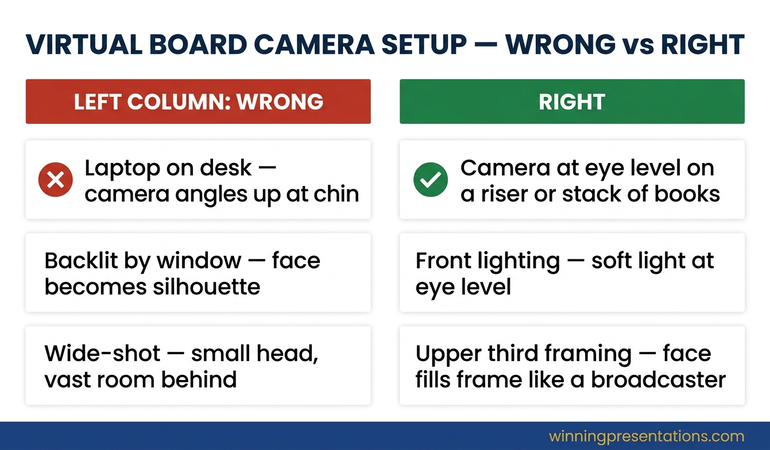
The single highest-leverage change is the camera angle. A laptop on a desk, with the camera looking up at your chin, makes you look smaller, less senior, and physically lower than the people you are presenting to. Even directors who consciously dismiss this read it unconsciously. You are speaking up at them. The room sees a junior posture before they hear the proposal.

The fix is mechanical. Raise the laptop until the camera lens is at eye level or fractionally above. Use a stack of books. Buy a £40 laptop riser. The investment is one evening and the change is permanent.

Three other framing rules carry almost as much weight:

  • Fill the upper third of the frame with your face. Not your whole body. Not a tiny head with a vast room behind. Close enough that your eyes are clearly visible, far enough that the top of your head is not cropped. This is the framing all senior broadcasters use.
  • Light from the front, not from behind. A window behind you turns your face into a silhouette. Move the desk so the window is in front of you, or place a single soft light at eye level pointing at your face.
  • Look at the camera lens, not the faces on screen. Counterintuitive but critical. Your audience reads eye contact through the lens. If you are looking at their faces in the grid, every director on the call experiences you looking somewhere over their shoulder.

Infographic comparing the wrong virtual board meeting setup with low laptop camera, backlit silhouette and full-room framing against the right setup with eye-level camera, front lighting and upper-third face framing

None of this is presentation theatre. It is the minimum bar for being treated as the senior person in a room you cannot physically enter. The directors making the decision should not be working hard to take you seriously.

THE EXECUTIVE SLIDE SYSTEM — £39

Stop building decks that work in the room and fail on the call

The Executive Slide System is 26 presentation templates, 93 AI prompts, 16 scenario playbooks, a master checklist and a framework reference. The virtual board scenario playbook is built for short attention spans, no body-language feedback and decision-stage audiences. £39, instant access.

Get the Executive Slide System →

Designed for executives presenting to remote boards, investment committees and distributed leadership teams.

The first thirty seconds: what to say before the deck loads

The deck is not the presentation. The first thirty seconds, before any slide is shared, decides whether the directors lean in or settle into half-attention. Most virtual board presentations waste this window on housekeeping: thanking people for joining, recapping where they are in the agenda, asking if everyone can see and hear them.

A structure that wins those thirty seconds:

  • Sentence one — the decision. “I’m bringing the consolidation of the Manchester and Birmingham warehouses for board approval today.”
  • Sentence two — the size. “It’s a £4.6m capital decision with an 18-month payback and a 3-year operational saving of £2.1m per year.”
  • Sentence three — what you need from this meeting. “I’m asking for either approval, or the specific information that would let me bring back a revised proposal next month.”
  • Sentence four — the structure. “I’ll spend twelve minutes on the case, three on risks and mitigations, and leave the remaining time for discussion.”

This sequence does the work the room used to do. It anchors the conversation, frames the decision, sets expectations for time, and signals that you are running the meeting rather than walking through your homework. Now the deck appears, and every slide is read against the question already in the directors’ minds.

For the closely related dynamic of when the chair invites you to speak before the deck loads at all, the camera-on, camera-off virtual presentation guide covers how to handle the asymmetry when half the directors have video off.

Deck structure for remote directors

An in-person board deck can run 25 slides. A virtual board meeting presentation should run 12 to 15. Each slide must work as a self-contained answer to a single question, because half the audience will only re-engage at the slide currently on screen.

The structural rules that hold up under remote conditions:

One question per slide, posed in the title. Title slides should be questions or decisions, not topics. “Why are we consolidating now?” beats “Consolidation timing rationale.” Titles do most of the work for the disengaged director who looks back at the screen halfway through your section.

The virtual presentation energy framework expands on how question-led titles maintain attention across longer remote sessions.

The minimum viable headline answer at the top. Below the title question, a single sentence answers it. The slide content underneath is supporting evidence. A director who only reads the top of each slide should still understand the decision.

No more than three numbers per financial slide. In person, you can talk a board through a complex P&L view. On screen, more than three numbers competes with the supporting commentary. Pick the three that anchor the decision and put the rest in an appendix the chair can navigate to if asked.

Decision slide before risks slide. Show what you are asking for first. Then show what you have done about the risks. Reverse this order in person if you want, but on screen the directors who tune out for a section need to land on the decision slide more often than the risks slide.

Appendix that the chair can use. Pre-load the appendix with the three or four likely questions and label them clearly in the navigation: “A1 — sensitivity analysis”, “A2 — alternative options considered”, “A3 — implementation timeline.” When a question comes, you jump straight there. No fumbling through fifty backup slides while the room watches you scroll.

Holding attention when you cannot read the room

The hardest skill in any virtual board meeting presentation is detecting when you are losing the room — and reacting before the chair has to. In person, body language carries this. On screen, you have to engineer the feedback into the structure.

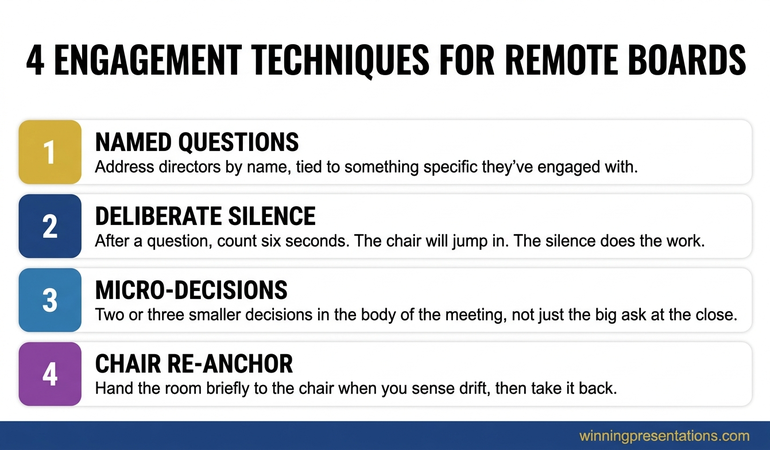
Three techniques that work:

Named questions, not open ones. “Any thoughts?” produces silence on a virtual call. “Henrik — does the consolidation timing work for the German market entry you mentioned last month?” produces an immediate response. Naming a director by name and tying the question to something they have specifically engaged with creates a small obligation to respond. Use this every four to five minutes.

Deliberate silence after a question. The instinct on a virtual call is to fill silence. Resist it. After a named question, count six seconds before saying anything else. The chair will jump in. A director will jump in. The silence does the work.

Stacked cards infographic showing four engagement techniques for remote board directors: named questions, deliberate silence, micro-decisions and the chair re-anchor

Micro-decisions throughout. Rather than presenting for twenty minutes and then asking for the big decision, structure two or three smaller decisions into the body of the presentation. “Before I move on, can I get a sense from the room — does the £4.6m envelope feel like the right scale, or do you want to see a phased option?” These micro-decisions keep the directors in the meeting rather than spectating from the side.

The chair re-anchor. If you sense the room drifting, hand the room briefly to the chair. “Charles, before I get into the risks section — anything you’d like to surface from the audit committee discussion last week?” This breaks your monologue, brings a different voice on screen, and gives directors permission to re-engage when you take the floor back.

If you also need to handle directors joining from different time zones with conflicting context, the cross-cultural virtual presentation guide covers how to adjust pacing and reference points for global boards.

Closing for a decision through a screen

The most common mistake on a virtual board meeting presentation is to finish the content and then leave the close to the chair. The chair will summarise, ask if there are further questions, and almost certainly say “let’s take a few days to consider this and come back at next month’s meeting.” That is not the chair being cautious. That is the natural outcome when no-one in the room actively shapes the close.

Your close should propose a specific decision path. Three versions, in order of strength:

The direct ask. “I’d like to ask the board for approval today, on the conditions we’ve discussed.” Use this when the room has clearly converged through the discussion. Watch the screen for nods and the chair’s body language. If you see them, ask.

The conditional ask. “Subject to the audit committee confirming the integration risk profile within two weeks, I’d like to ask for approval today contingent on that confirmation.” This is the workhorse close for cautious boards. It gets a substantive yes today rather than a vague maybe next month.

For the related dynamic of when the conditional close needs to handle a finance committee specifically, the partner article on remote pitch deck delivery covers how to structure the remote close in front of investors.

The structured deferral. “If the board wants to defer, can we agree the two specific questions I should answer in writing within the next ten days, and target a decision at the next meeting rather than carrying this for two cycles?” This is what you ask for when the discussion has surfaced legitimate gaps. Never leave the meeting without a date and the specific deliverables.

Astrid used the conditional ask at her second attempt. Approval contingent on the audit committee signing off on the integration timeline. The audit committee signed off six days later. The decision was confirmed before the next board meeting, not at it.

FOR THE NEXT VIRTUAL BOARD MEETING ON YOUR CALENDAR

The complete scenario library for remote executive audiences

The Executive Slide System gives you 26 templates, 93 AI prompts and 16 scenario playbooks — including the virtual board playbook with question-led title structure, decision-first slide order and the appendix navigation pattern referenced above. £39, instant access, no subscription.

Get the System →

Frequently Asked Questions

How long should a virtual board meeting presentation be?

Half the length of an in-person equivalent. If your in-person version is forty minutes, the virtual version is twenty. Use the saved time for structured discussion, not more content. Remote attention does not stretch to forty minutes of one voice.

What if half the directors keep their cameras off?

Treat them as present and engaged. Address questions to them by name as if you can see them. The chair sets the cultural norm on cameras — that is not your fight to pick. What you can control is whether camera-off directors feel addressed, which keeps them mentally in the room.

Should I send the deck before the meeting?

Yes — with the cover note framing the decision being asked for, the meeting structure and the time you are requesting. Many virtual boards now expect to read the deck in advance so the meeting itself is discussion. Plan for that pattern. Do not present the deck slide-by-slide if directors have already read it. Walk to the headlines and the decision.

How do I handle technical issues mid-presentation?

Acknowledge briefly, do not apologise excessively, and have a backup plan. If your screen share fails, talk to the deck verbally for sixty seconds while you reconnect — the directors have it in front of them. If your audio fails, drop into the chat with one sentence: “Audio dropped, reconnecting in 30 seconds.” Composure under technical failure is itself a credibility signal.

Presentation playbooks, delivered Thursdays

The Winning Edge newsletter covers the structures real executives use for high-stakes meetings — remote, hybrid and in person. One issue per week, typically read in four minutes.

Subscribe to The Winning Edge →

Not ready for the full system? Start here instead: download the free Executive Presentation Checklist — a one-page structural review to run over any deck before a board call.

Partner post: Once you have the camera and structure right, the close on a remote investor pitch follows different rules. The remote pitch deck delivery guide covers that scenario.

Your next step: Before your next virtual board meeting presentation, sit at your desk in the same setup the directors will see. Open your camera. Look at yourself for thirty seconds. If anything in that frame is below the bar — angle, framing, light, background — fix it before you fix the deck.

About the Author

Mary Beth Hazeldine is Owner & Managing Director of Winning Presentations Ltd. With 24 years of corporate banking experience at JPMorgan Chase, PwC, Royal Bank of Scotland, and Commerzbank, she advises executives across financial services, healthcare, technology, and government on structuring presentations for high-stakes funding rounds and approvals.