

Forty minutes. That’s how long I had between “Mary Beth, the CFO needs an update on the integration programme — you’re presenting at 3pm” and walking into the boardroom.
Quick answer: A last minute presentation doesn’t fail because you had no time. It fails because you tried to build a full deck in a fraction of the time. The emergency framework is five slides, built in a specific order: decision needed, current situation, options, recommendation, next steps. You write the headlines first, add one supporting point per slide, and rehearse the transitions once. This takes 25–30 minutes and produces a clearer deck than most people create in three days.
Jump to:
The first time it happened, I was at Royal Bank of Scotland. A VP had called in sick twenty minutes before a steering committee meeting. My manager appeared at my desk: “You know the project. You’re presenting.” I had no slides, no notes, and no choice.
I spent the first ten minutes panicking. Then I wrote five headlines on a notepad, opened PowerPoint, typed them as slide titles, and added one sentence under each. I walked in with a five-slide deck that looked intentional.
The steering committee approved the budget. Afterwards, a director I barely knew said: “That was the clearest update we’ve had on this project.” He didn’t know it was built in thirty minutes. And that’s when I realised: the emergency framework wasn’t a compromise. It was better than most planned decks.
Why Last Minute Presentations Fail (It’s Not the Time)
The natural response to a last minute presentation is compression: take everything you’d normally include and cram it into whatever time you have. This is the single biggest mistake you can make under time pressure.
Compression produces a bloated deck delivered at speed. Your audience gets more information than they can process, delivered by a presenter who hasn’t rehearsed, with slides that don’t connect because they were assembled rather than structured. The result feels frantic — and frantic signals incompetence, even when the content is sound.
The executives I’ve trained across JPMorgan Chase, PwC, Royal Bank of Scotland, and Commerzbank over 24 years all share the same discovery: the best last minute presentations aren’t compressed versions of full presentations. They’re structured differently from the start. Five slides with clear headlines will outperform twenty rushed slides every single time — because clarity signals competence more than volume does.
The real problem isn’t time. It’s the instinct to build the deck you wish you had time for, instead of the deck your audience actually needs. If you understand how executives evaluate presentations — and what executives actually read on your slides — you’ll realise that five slides is often the right number even when you have three weeks to prepare.
PAA: How do you prepare a presentation with very little time?
Start with the decision, not the background. Write five slide headlines before opening PowerPoint: what decision is needed, what the current situation is, what the options are, what you recommend, and what the next steps are. Type those headlines as slide titles, add one supporting sentence or data point per slide, and rehearse the transitions between slides once out loud. This takes 25–30 minutes and produces a more focused deck than starting with a blank canvas.
The Emergency Framework Lives Inside This System
The Executive Slide System gives you a pre-built structure, slide sequencing framework, and executive messaging templates — so you never start from a blank screen again. When you have 30 minutes, you need a system, not inspiration.
Get the Executive Slide System → £39
Built from 24 years in corporate banking. Used in boardrooms, steering committees, and approval meetings across every industry.
The 5-Slide Emergency Framework (30 Minutes)
This is the framework I’ve used personally and taught to executives for fifteen years. Five slides, each with a single job. Build them in the order below — not in presentation order — and you’ll have a structured, focused deck in under thirty minutes.
Slide 1: The Decision (or The Ask). What do you need from this audience? Start here because everything else flows from it. “We need approval to extend the pilot by 60 days” or “I’m recommending we proceed with Option B” or “The committee needs to decide between three vendor options.” If there’s no decision, the frame is: “Here’s what you need to know and what it means.” One sentence headline. One supporting line. Done.
Slide 2: Current Situation. Where are we right now? Three to four bullet points maximum — facts only, no interpretation. Revenue, timeline status, key metrics, blockers. This slide answers: “What’s actually happening?” Your audience needs context before they can evaluate your recommendation. Keep it to data they can verify, not opinions they’ll debate.
Slide 3: The Options (or The Problem). If it’s a decision meeting: lay out 2–3 options with one-line trade-offs for each. If it’s an update: describe the core challenge or what’s changed since the last meeting. This slide creates the frame for your recommendation. Without it, your recommendation feels like an assertion. With it, your recommendation feels like the logical conclusion of the evidence.
Slide 4: Your Recommendation. What do you think should happen, and why? One recommendation, supported by 2–3 reasons. Don’t hedge. The biggest mistake in last minute presentations is presenting options without a recommendation because you “didn’t have time to think it through.” You did. You just need to trust your judgement. If you genuinely don’t have a recommendation, say so — and explain what you’d need to form one.
Slide 5: Next Steps. Who does what by when? Three to four concrete actions with owners and dates. This slide does two things: it signals that you’ve thought beyond the meeting, and it gives the audience something to approve rather than something to debate. “Approve Option B and I’ll have the implementation plan by Friday” moves faster than “Let me know what you think.”
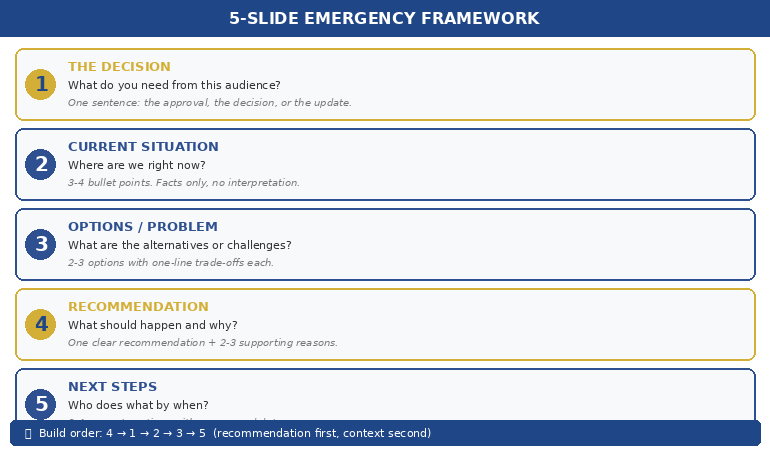
The reason this works under pressure is that each slide has exactly one job. You’re not deciding what to include — the framework decides for you. Your only task is filling in the specifics. That’s the difference between building a deck and filling in a structure.
📊 Want this framework pre-built in a reusable template?
The Executive Slide System includes the emergency 5-slide structure, sequencing rules, and messaging templates for every executive scenario.
The Order You Build It (Not the Order You Present It)
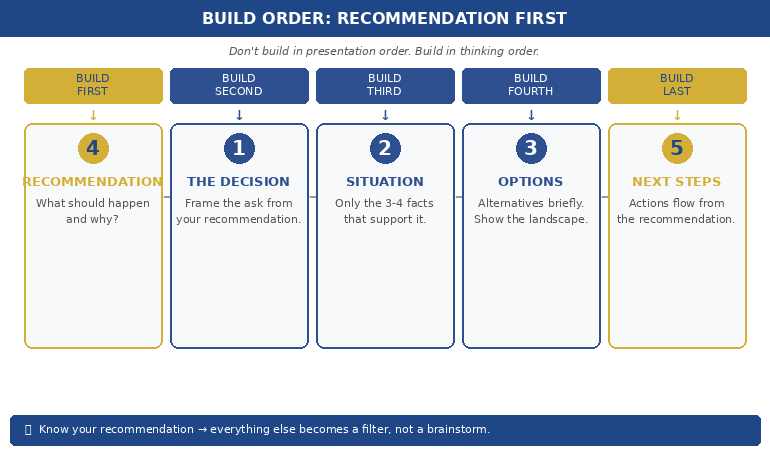
Here’s a counter-intuitive rule: don’t build the deck in the order you present it. Build it in the order that’s fastest to think through.
Build first: Slide 4 (Recommendation). You probably already know what you think should happen. Write it down. One sentence. This anchors everything else — because once you know what you’re recommending, you know what context and evidence to include (and what to leave out).
Build second: Slide 1 (The Decision). Now frame the ask. “I’m recommending X. The committee needs to approve / reject / modify.” This takes thirty seconds because you’ve already written the recommendation.
Build third: Slide 2 (Current Situation). What facts support your recommendation? Don’t include everything you know — include only the 3–4 data points that make your recommendation feel inevitable. This is where most people go wrong under pressure: they include everything because they’re afraid of getting caught without an answer. But including everything actually weakens your recommendation by burying the signal in noise.
Build fourth: Slide 3 (Options/Problem). If there are alternatives, list them briefly. If not, describe what’s changed. This slide exists to show you’ve considered the landscape — not to present a balanced analysis.
Build last: Slide 5 (Next Steps). By now, the next steps are obvious because they flow directly from your recommendation. Write three actions with names and dates.
This sequence — recommendation first, context second, evidence third — is the same principle behind the preparation order that doubles approval rates. It works under pressure because it eliminates the hardest part of building a deck: deciding what to include. When you know your recommendation, the filter is automatic.
PAA: What is the best structure for a quick presentation?
The 5-slide structure: Decision/Ask, Current Situation, Options/Problem, Recommendation, Next Steps. Each slide has a single clear headline and one supporting point. This structure works because it mirrors how executives process information — they want to know the ask, the context, the options, your view, and what happens next. Anything else is optional. Build the recommendation slide first, then work backwards to the supporting slides.
30 Minutes Is Enough — If You Have the Right Structure
The Executive Slide System eliminates the blank-screen problem permanently. Pre-built frameworks for emergency presentations, steering committees, board updates, and approval decks. Open the template. Fill in the structure. Present with confidence.
Get the Executive Slide System → £39
Used in high-stakes approvals and funding pitches. Built from 24 years in corporate banking + 15 years training executives.
What to Cut When You Have 15 Minutes (Not 30)
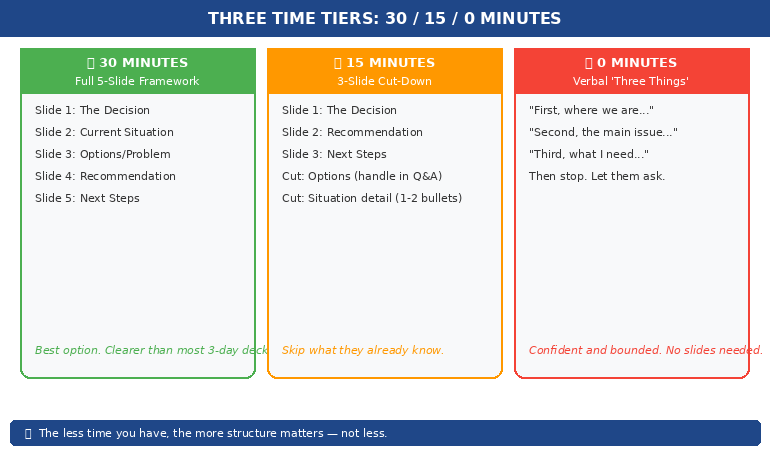
Sometimes you don’t have thirty minutes. You have fifteen. Or ten. Here’s what to cut — in order.
Cut first: Slide 3 (Options). If time is critical, go straight from situation to recommendation. Your audience can ask about alternatives in Q&A. The options slide is the most expendable because its job — showing you’ve considered the landscape — can be done verbally.
Cut second: Slide 2 detail. Reduce the current situation from 3–4 bullets to 1–2. Keep only the data points that directly support your recommendation. “Revenue is at 87% of target with two months remaining” is enough if your recommendation is about closing the gap.
Never cut: Slides 1, 4, and 5. The ask, the recommendation, and the next steps are non-negotiable. Even if you’re presenting verbally with zero slides, these three elements must be present. “Here’s what I need from you. Here’s what I recommend. Here’s what happens next.” That’s a complete presentation in three sentences.
The extreme version: 3 slides in 10 minutes. Decision + Recommendation + Next Steps. This works when your audience already has context (they’ve been in the meetings, they’ve read the reports, they know the situation). Don’t repeat what they already know. Just cut to the decision.
📊 Need a system you can deploy in minutes, not hours?
Pre-built frameworks for 5-slide emergency, 8-slide steering committee, and 12-slide board update — all ready to fill.
When You Have Zero Minutes: Presenting Without Slides
Sometimes there’s no time for slides at all. Your boss pulls you into a meeting already in progress: “Can you update us on the project?” Here’s how to structure a verbal-only last minute presentation.
The 60-Second Structure:
“Let me give you three things.” (This signals structure — your audience relaxes because they know it’s bounded.)
“First, where we are: [one sentence on current status].”
“Second, the main issue we’re navigating: [one sentence on the challenge].”
“Third, what I need from this group: [one sentence on the ask or decision].”
Then stop talking. Let them ask questions. The questions will tell you what they actually need to know — which is almost never the twenty points you would have included in a full deck.
This verbal structure works because it follows the same logic as the 5-slide framework: situation, problem, ask. It just strips out the options and recommendation slides because in a verbal context, those emerge naturally through discussion.
The principles behind this approach are the same ones that define effective executive presentation structure — lead with what matters, cut everything that doesn’t, and trust your audience to ask for what they need.
PAA: How do you present without preparation or slides?
Use the “three things” verbal framework: state where you are, what the main issue is, and what you need from the audience. Signal structure at the start (“Let me give you three things”) so your audience knows it’s bounded. Then stop and let questions guide the rest. Verbal presentations without slides are often more effective than rushed slide decks because they feel confident and conversational rather than frantic and over-packed.
Stop Starting From Scratch. Start From Structure.
The Executive Slide System is the presentation framework executives use when the stakes are high and the time is short. Pre-built structures for emergency presentations, board updates, steering committees, and approval decks — so you never face a blank screen again.
Get the Executive Slide System → £39
Used in board updates, steering committees, and approval meetings across every industry. Built from 24 years in corporate banking + 15 years training executives.
Frequently Asked Questions
Should I apologise for having a short deck?
Never. The moment you say “Sorry, I only had thirty minutes to prepare this,” you’ve given your audience permission to lower their expectations. Present the five slides as if they’re exactly what you intended. Executives respect brevity — a focused five-slide deck signals confidence and prioritisation, not lack of preparation. The most senior people in the room will assume you’re concise by design.
What if I’m asked about something not in my five slides?
Say: “That’s a great question — I don’t have the data in front of me, but I’ll follow up by end of day.” This is a perfectly acceptable response at every level of corporate life. It’s far better than guessing or including unverified information in rushed slides. The follow-up email after the meeting is often where the real decision gets finalised anyway.
How do I handle last minute presentations when I’m not the subject expert?
Focus on the structure, not the depth. The 5-slide framework works even with surface-level knowledge because it’s asking: what’s the situation, what are the options, what do you recommend? You don’t need to be the deepest expert — you need to be the clearest communicator. If there are technical questions you can’t answer, name the person who can: “James has the detail on the migration timeline — I’ll connect you directly.”
Is the 5-slide framework only for emergency presentations?
No. Most of the executives I work with use it as their default structure for every presentation, then add slides only when the context demands it. The emergency version is the minimum viable deck. The planned version adds depth to each section. But the bones — Decision, Situation, Options, Recommendation, Next Steps — work whether you have thirty minutes or three weeks.
📬 The Winning Edge Newsletter
Weekly strategies for executive presentations, leadership communication, and career-critical stakeholder conversations. No fluff.
🎯 Free: Executive Presentation Checklist
The pre-presentation checklist I give every executive before a high-stakes meeting — including the emergency 5-slide framework, slide headline formulas, and the three questions every executive audience silently asks.
Related: Last minute presentations don’t just test your slide skills — they trigger imposter syndrome. If the panic is less about the slides and more about the voice in your head saying “they’re going to find out I’m not ready,” read the imposter syndrome pre-presentation reset — it’s a 4-minute protocol designed for exactly this moment.
A last minute presentation isn’t a crisis. It’s a clarity test. Five slides. Build the recommendation first. Add only the context that supports it. Rehearse the transitions once. And walk in like you planned the whole thing.
🎯 Next time you get the tap on the shoulder, be ready in minutes — not hours.
Get the Executive Slide System → £39 — the pre-built framework for every executive presentation, including the emergency 5-slide structure.
About the Author
Mary Beth Hazeldine is the Owner & Managing Director of Winning Presentations. With 24 years of corporate banking experience at JPMorgan Chase, PwC, Royal Bank of Scotland, and Commerzbank, she has trained executives through high-stakes approvals and funding pitches — including more last minute presentations than she can count.
A qualified clinical hypnotherapist and NLP practitioner, Mary Beth combines executive communication expertise with the psychology of performance under pressure. She helps leaders communicate with clarity and confidence — especially when there’s no time to prepare.