
Tag: ROI presentation

27 Mar 2026
Executive presenting a capital expenditure request with financial charts visible on a boardroom screen

The CapEx Request That Got Approved Before the Meeting Ended

Finance committees reject CapEx requests that lack clear financial justification. The difference between approval and rejection is rarely the investment itself—it’s how you structure the business case and frame return on investment. A capital expenditure presentation must answer three questions immediately: Why now? How much? What’s the measurable return?

Vikram, Operations Director at a £85m logistics firm, had requested £2.3m for warehouse automation. Finance rejected it in fifteen minutes. The CFO said “weak business case.” Six months later, Vikram resubmitted with a restructured presentation: operational efficiency gains mapped to quarterly profit targets, risk mitigation quantified, ROI shown against three scenarios (conservative, expected, optimistic). This time, approval came in the first meeting. The difference wasn’t the investment. It was how he framed the capital expenditure presentation to speak to what the committee actually wanted to hear: risk-adjusted returns and strategic alignment.

Structure matters. Clarity builds confidence.

The Executive Slide System includes frameworks and templates designed for capital expenditure presentations. Explore the System →

Structure Your Business Case From First Slide

A capital expenditure presentation needs architecture, not a narrative dump. Finance committees evaluate requests using five core dimensions: strategic fit, financial return, timeline, risk, and alternatives. Every slide must address at least one. Open with an executive summary that names the investment, its purpose, and the expected return in a single sentence. Then move to the four-part structure:

Context. What’s driving the need? Market pressure, competitor action, operational bottleneck, or compliance requirement? Show the cost of not investing—cost of delay matters as much as investment size.

Solution. What will you acquire or build? Be specific: don’t say “technology platform.” Name the system, its core capability, and why this particular solution. Include implementation partners if relevant.

Financial Case. Three-year projection showing capital cost, implementation costs, operating cost changes, and revenue or savings impact. Include working capital requirements if material.

Risk and Mitigation. What could go wrong? Scope creep, delivery delays, adoption resistance, technology obsolescence. Show how you’ll manage each one. This is where governance and oversight shine.
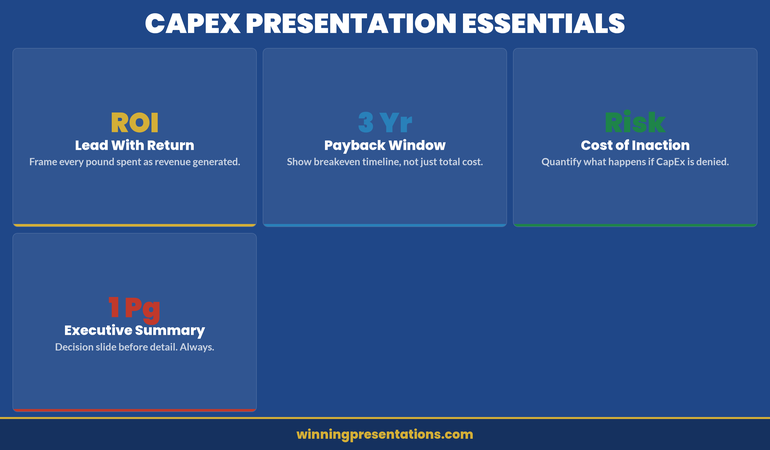
CapEx Presentation Essentials dashboard infographic showing four metric cards: ROI (Lead With Return), 3 Yr (Payback Window), Risk (Cost of Inaction), and 1 Pg (Executive Summary) — each with concise guidance for structuring the business case

Executive Slide System

Jump past DIY slide building. The Executive Slide System includes:

  • ✓ Slide templates for finance requests and capital justifications
  • ✓ AI prompt cards for ROI narratives and financial scenarios
  • ✓ Framework guides for business case structure and risk communication
  • ✓ Appendix templates for assumptions and sensitivity analysis
  • ✓ Colour schemes and fonts pre-aligned to corporate governance standards

Get the Executive Slide System → £39

Designed for capital expenditure presentations and financial justifications

ROI Framing That Persuades Finance Committees

The phrase “return on investment” means nothing without context. A 15% ROI sounds weak if it’s compared to equity markets (historically 10%+ annually). But if the alternative is outsourcing at 8% cost of revenue, it’s compelling. Frame your capital expenditure presentation’s ROI against the actual comparator the committee uses internally: cost of capital, hurdle rate, or competitor benchmarks.

Use three scenarios: conservative (downside case, lower adoption or delayed benefits), expected (realistic case with minor headwinds), and optimistic (everything lands on schedule). Show payback period for each. Most CFOs want 18–36 months; if yours is longer, lead with the strategic rationale, not the ROI.

Separate cash flow from profit impact. Automation might improve EBITDA but consume cash in year two. Working capital swings matter. Show both. If your business is capital-constrained, leading with cash payback beats EBITDA gains.

Quantify non-financial benefits only if they translate to numbers eventually. “Improved customer satisfaction” without a link to retention or pricing power is noise. But “reduced churn by 2% → £1.4m incremental revenue” is material. Stay precise. Executive teams make £50m decisions on £200k annual benefit assumptions; rigour builds confidence.

Financial Justification Framework: What Committees Actually Want

Finance committees receive dozens of CapEx requests annually. Yours competes not just on absolute return, but on clarity and governance maturity. Present your justification in four layers:

Strategic layer: How does this capital deployment advance the published strategy? Name the strategic pillar explicitly. If your strategy says “operational excellence” and this is a supply chain investment, lead with that link. Ambiguous connections trigger scepticism.

Financial layer: What’s the direct return? Show calculation assumptions explicitly. CFOs will challenge your gross margin assumptions, implementation timelines, and adoption curves. Write them down. Transparency here prevents later accusations of “sandbagging” or hiding risks.

Risk layer: What’s the downside? A £3m investment with a 2% delivery-delay risk isn’t dangerous; a £50m bet with single-vendor lock-in is. Quantify risks you can, qualify risks you cannot. Show how governance (steering committees, go/no-go gates) will manage slippage.

Governance layer: Who’s accountable? Name the project sponsor, the finance owner, the steering committee chair. Define success metrics before you start spending. Show how monthly reviews will track actuals versus budget and benefits versus plan. Committees approve investment and oversight together; weak governance sinks strong financials.

A related internal link worth reviewing: if you’re presenting CapEx alongside compliance requirements, see our guide on compliance presentations to regulatory boards—the financial justification format translates directly.

Slide templates save hours. Framework guides save meetings.

Pre-built financial justification slides, ROI scenario templates, and risk communication frameworks for capital expenditure requests. £39 → Start now

Handling Pushback on Large Capital Requests

Finance committees will challenge every material assumption. Expect it. Prepare for it. The best capital expenditure presentations include an objection appendix—slides that live in reserve, supporting your core claims with deeper data.

Objection: “Payback is too long.” If your project has a 42-month payback, don’t defend it as acceptable. Instead, decompose it. Show what payback looks like in year three versus year one. Show how phasing implementation reduces upfront cost and accelerates early returns. Offer a staged investment: “£1.2m in phase one, £1.8m in phase two (gate-gated on phase one results).” Staged approaches reduce perceived risk and buy time for outcomes to prove themselves.

Objection: “We could outsource instead.” Have the outsourcing financials ready. Show why build beats buy (or admit it doesn’t and reframe around control, IP, or capability). If outsourcing is genuinely cheaper, your capital request is dead—unless you layer in strategic or risk factors outsourcing can’t solve. Be honest. Committees respect rigour more than optimism.

Objection: “Adoption risk is real.” Show your change management plan. Name the sponsor who’ll champion adoption. Quantify training investment and timeline. Tie adoption to incentive structures where possible. Finance wants to see that you’ve thought through the human side, not just the technology.

Objection: “What if benefits don’t materialise?” Build in benefit verification gates. Show when you’ll measure actuals against plan. Commit to a post-implementation review at 6 months and 12 months. Show corrective actions if tracking is off. This transforms pushback into partnership—you and finance are jointly invested in outcomes, not just spend.

You’ll find similar dynamics when presenting risk appetite presentations to boards—the governance framework is identical.

If you’re building a capital request presentation from scratch, the Executive Slide System includes templates for all five core sections so you’re not starting blank.

Delivery Timeline and Impact Roadmap

The final element of a compelling capital expenditure presentation is a delivery roadmap that feels achievable. Don’t present an 18-month project with no interim milestones. Break it into quarters and show when key outputs (system live, first tranche of benefits realised, full adoption) hit the target.

Use a simple Gantt or staged diagram. Show dependencies clearly—if benefit realisation depends on vendor delivery or organisational change, make that visible. If you’re ahead of plan, say so. If you’ve absorbed early delays through schedule margin, say so. Committees want to see that you’re tracking, not gambling.

Attach a benefits tracking schedule to your presentation. Define what “success” looks like quantitatively in month 1, month 6, month 12, month 24. Name the person who owns measurement. Commit to monthly variance reporting in the first year. This transforms capital investment from a one-time decision into a managed programme. Governance rigour sells.
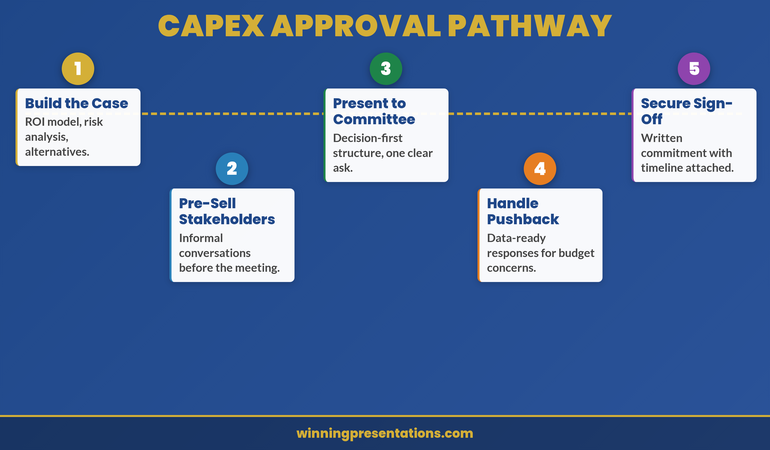
CapEx Approval Pathway roadmap infographic showing five milestones on a winding path: Build the Case, Pre-Sell Stakeholders, Present to Committee, Handle Pushback, and Secure Sign-Off

Frequently Asked Questions

How detailed should my financial model be in the presentation itself?

Show the summary (investment, payback, IRR, strategic fit) in slides. Build the detailed model (quarterly assumptions, sensitivity tables, build-versus-buy analysis) as appendices. Committee members may download the full pack before the meeting. Two-layer approach: headline numbers in the room, detailed justification on demand.

What if my CFO says the ROI isn’t strong enough?

This is valuable early feedback. Don’t defend weak ROI publicly; go back to the sponsoring business unit and ask if benefits assumptions are realistic or if the investment case should be rethought. Sometimes the answer is “reframe around strategic fit” rather than financial return. Other times it’s “this investment isn’t ready yet.” Better to learn that in a pre-meeting conversation than in the full committee room.

Should I present one scenario or three?

Three scenarios (conservative, expected, optimistic) show sophistication. But pick one as your “ask”—usually the expected case. Name it clearly. Show the others as upside and downside bounds. This prevents committees from anchoring to the optimistic case and then disappointing them when reality lands in the middle.

Stay ahead on executive communication.

Join The Winning Edge for weekly insights on presenting to boards, finance committees, and investor audiences. Practical frameworks. Real examples. No fluff.

Subscribe to The Winning Edge

Free resource: Download the Executive Presentation Checklist — a one-page review guide for testing your capital expenditure presentation before it reaches the committee room.

If you’re new to presenting at this level, you might also find value in our guide on structuring your first board presentation in a new role—many of the financial governance principles overlap with capital expenditure requests.

A strong capital expenditure presentation is built on three pillars: crystal-clear business case structure, ROI framing that connects to your committee’s actual hurdle rate, and governance transparency that builds confidence in execution. Get those right, and finance committees move from scepticism to partnership. The Executive Slide System gives you templates to structure all three.

About Mary Beth Hazeldine

Mary Beth Hazeldine is Owner & Managing Director of Winning Presentations. With 24 years of corporate banking experience at JPMorgan Chase, PwC, Royal Bank of Scotland, and Commerzbank, she advises executives across financial services, healthcare, technology, and government on structuring presentations for high-stakes funding rounds and approvals.

Book a discovery call | View services

11 Dec 2025
Budget request slides - the CFO-approved 6-slide format that gets yes

Budget Request Slides: The CFO-Approved Format That Gets Yes [2026]

📅 Updated: December 2025 — Includes AI prompts to build your slides in 20 minutes

Updated 27 March 2026 — Revised for the latest Microsoft Copilot and ChatGPT capabilities.

Quick Answer: What Should Budget Request Slides Include?

Effective budget request slides follow a 6-slide format: (1) The Ask — your specific request and expected ROI upfront, (2) The Problem — cost of inaction, (3) The Solution, (4) ROI calculation with visible assumptions, (5) Implementation timeline, (6) Risk mitigation. The key is leading with your number, not burying it after 20 slides of background research.

⭐ GET BUDGET REQUEST TEMPLATES

Executive Slide System

Pre-built budget slides + ROI calculator + AI prompts to customise

Download Templates — £39

Includes budget, board, QBR, and strategy templates


Stop Guessing What to Type. Start Building in 25 Minutes.

The Executive Prompt Pack gives you 71 tested prompts for ChatGPT and Copilot — structured by scenario so you know exactly what to type:

  • Build from scratch — scenario prompts for board reviews, budget requests, and investor decks
  • Rescue and rewrite — audit an existing deck, condense it, or fix one slide at a time
  • Industry-specific prompts for financial services, banking, consulting, and executive audiences
  • Power modifiers that transform any prompt into board-ready output
  • The 25-minute deck workflow that replaces 3–4 hours of manual building

Works with ChatGPT, Microsoft Copilot, and Edit with Copilot (formerly Agent Mode). Updated March 2026.

Get the Executive Prompt Pack → £19.99

Why Most Budget Slides Get Rejected

I’ve reviewed hundreds of budget presentations. The pattern is always the same: 20 slides of research, analysis, and justification — then finally, buried on slide 18, the actual request.

By then, the CFO has mentally checked out.

Here’s what CFOs are actually thinking during your presentation: “What do you want, how much, and why should I prioritise this over everything else competing for budget?”

If you don’t answer that in the first 30 seconds, you’re fighting uphill.

Related: Budget Presentation Template: Complete Guide

The 6-Slide Budget Format That Works

This format has helped my clients secure over £250 million in funding. It works because it mirrors how CFOs actually evaluate requests.

Budget request slides - the CFO-approved 6-slide format that gets yes

Slide 1: The Ask

State your request in the first 30 seconds. Example: “Requesting £400K for marketing automation. Expected return: £1.2M in 12 months. 3x ROI. Decision needed by January 15.”

Slide 2: The Problem

Quantify the cost of doing nothing. CFOs respond to loss more than gain. What is the current situation costing in money, time, or missed opportunity?

Slide 3: The Solution

What you’re proposing and why this option versus alternatives. Keep it tight — you’re not selling the product, you’re selling the outcome.

Slide 4: The ROI

This is the slide CFOs actually care about. Show investment, expected return, payback period, and — critically — your assumptions. CFOs don’t trust black-box numbers.

Slide 5: The Timeline

Key milestones with dates. Include a checkpoint where you’ll evaluate results. This reduces perceived risk.

Slide 6: The Risk

Address what could go wrong before they ask. Show your mitigation plan. CFOs trust presenters who acknowledge uncertainty.

📧
Get Weekly Presentation Tips

Join executives getting my best frameworks and AI prompts every Thursday.

Subscribe to The Winning Edge →

For 71 tested prompts covering every scenario — build from scratch, rescue an existing deck, or fix individual slides — the Executive Prompt Pack gives you exactly what to type, updated for the latest Copilot and ChatGPT capabilities.

The ROI Slide: Get This Right

Your ROI slide should be scannable in 5 seconds. Use this format:

Metric Amount
Total Investment £400,000
Expected Return (Year 1) £1,200,000
ROI 200%
Payback Period 4 months

Always show your assumptions. A footnote saying “Based on 15% conversion improvement (industry benchmark: 12-18%)” builds credibility instantly.

71 Prompts. Every Scenario Covered.

Build from scratch, rescue an existing deck, or perfect individual slides — the Executive Prompt Pack covers every scenario. Works with ChatGPT, Copilot, and Edit with Copilot. Updated March 2026.

Get the Prompts → £19.99

Use AI to Build Your Budget Slides

With Copilot, you can generate the first draft in 20 minutes.

Try this prompt:

"Create a 6-slide budget request presentation. Slide 1: Executive ask with amount, expected ROI, and deadline. Slide 2: Cost of current problem. Slide 3: Proposed solution. Slide 4: ROI table with assumptions. Slide 5: Implementation timeline. Slide 6: Risk mitigation. Context: [your details]. Professional tone for CFO audience."

Related: 50 Best Copilot Prompts for PowerPoint

Related Resources

About the Author

Mary Beth Hazeldine spent 24 years in corporate banking at JPMorgan Chase, PwC, Royal Bank of Scotland, and Commerzbank, helping clients secure over £250 million in funding. She now trains executives at Winning Presentations.

11 Dec 2025
Budget presentation template - the 6-slide structure that gets CFOs to say yes - free template and AI prompts from Winning Presentations

Budget Presentation Template: How to Get Your Budget Approved First Time [2026]

Quick Answer: What Makes a Budget Presentation Get Approved?

The most effective budget presentation template follows a 6-slide structure: (1) The Ask — lead with your specific request and expected ROI, (2) The Problem — cost of inaction, (3) The Solution, (4) ROI calculation with assumptions, (5) Timeline with milestones, (6) Risk mitigation. CFOs approve budgets that make the ROI obvious and the decision easy. Put your ask on slide 1, not slide 15.

📥
Want the Complete Budget Template Pack?

Stop building budget decks from scratch. Get ready-to-use templates with the exact 6-slide structure CFOs expect — plus AI prompts to customise them for your specific request.

Updated 27 March 2026 — Revised for the latest Microsoft Copilot and ChatGPT capabilities.

✓ 6-slide budget template
✓ ROI calculator slides
✓ CFO-ready formatting
✓ AI customisation prompts

Get the Executive Slide System — £39

Includes budget, board, QBR, and strategy templates • Instant download


Why Most Budget Presentations Get “Let’s Revisit Next Quarter”

In 2019, a marketing director asked me to review her budget presentation before a critical board meeting. She wanted £400K for a new platform. Her slides were thorough — market research, vendor comparisons, implementation timeline.

She didn’t get the budget. The CFO said it was “interesting” and suggested they “revisit it next quarter.”

Three months later, she came back with the same request — but a completely different presentation. Six slides instead of twenty-two. Numbers framed differently. One critical addition.

She got £500K. More than she’d originally asked for.

The difference wasn’t better data. It was better structure.

After 24 years in corporate banking at JPMorgan Chase, PwC, Royal Bank of Scotland, and Commerzbank — where I helped clients secure over £250 million in funding — I’ve learned that budget approvals follow predictable patterns. CFOs and boards don’t reject good ideas. They reject presentations that don’t speak their language.

This is the budget presentation template that gets approvals — the same structure I teach executives who need to secure resources without endless back-and-forth.

What You’ll Learn in This Guide

  • The 6-slide budget template that gets CFOs to say yes
  • Why most budget requests get “let’s revisit next quarter” (and how to avoid it)
  • The ROI framework that makes your numbers impossible to ignore
  • How to use AI tools like Copilot to build your budget deck in 20 minutes
  • The one question you must answer before slide 1

📧 Get Weekly Presentation Tips

Join 500+ executives getting my best insights on AI-powered presentations every Thursday.
Subscribe to The Winning Edge →


Stop Guessing What to Type. Start Building in 25 Minutes.

The Executive Prompt Pack gives you 71 tested prompts for ChatGPT and Copilot — structured by scenario so you know exactly what to type:

  • Build from scratch — scenario prompts for board reviews, budget requests, and investor decks
  • Rescue and rewrite — audit an existing deck, condense it, or fix one slide at a time
  • Industry-specific prompts for financial services, banking, consulting, and executive audiences
  • Power modifiers that transform any prompt into board-ready output
  • The 25-minute deck workflow that replaces 3–4 hours of manual building

Works with ChatGPT, Microsoft Copilot, and Edit with Copilot (formerly Agent Mode). Updated March 2026.

Get the Executive Prompt Pack → £19.99

Why Most Budget Presentations Fail

I’ve reviewed hundreds of budget presentations. The pattern is painfully consistent:

Twenty slides of justification. Charts showing market trends. Competitive analysis. Implementation timelines. Risk assessments. All the “homework” that proves you’ve done your research.

And then the CFO says: “This is thorough. Let’s discuss it offline.”

Translation: No.

Here’s what most people miss: CFOs don’t approve budgets because of research. They approve budgets because of ROI.

Every budget request is competing against every other budget request in the company. The marketing platform competes against the sales tool competes against the engineering hire competes against the office expansion. CFOs are playing portfolio allocation.

Your job isn’t to prove your idea is good. Your job is to prove it’s the best use of the company’s next pound.

That requires a completely different presentation structure.Budget presentation ROI framework showing investment, return, timeline, and risk

The Budget Presentation Template: 6 Slides That Get Approved

This template is designed around how CFOs actually think. Instead of building up to your request, you lead with it. Instead of hoping they see the ROI, you calculate it for them.

Slide 1: The Ask (Yes, First)

Most budget presentations bury the request on slide 15. By then, you’ve lost them.

Start with what you want. Be specific. Be bold.

What to include:

  • The exact amount you’re requesting
  • What it will fund (one sentence)
  • The expected return (quantified)
  • When you need the decision

Example: “Requesting £400K for marketing automation platform. Expected return: £1.2M additional revenue in 12 months (3x ROI). Decision needed by January 15 for Q1 implementation.”

That’s 32 words. A CFO can read it in 8 seconds and know exactly what’s at stake.

Why this works: CFOs are busy. They’re context-switching between meetings. If they don’t know what you want in the first 30 seconds, they spend the rest of your presentation wondering “where is this going?” instead of evaluating your case.

Slide 2: The Problem (Cost of Inaction)

This is the slide most people skip — and it’s often the most important one.

Before a CFO will spend money on your solution, they need to feel the pain of the current state. What is the problem costing the company right now?

What to include:

  • The current state (quantified pain)
  • What it’s costing in money, time, or opportunity
  • What happens if we do nothing

Example: “Current state: Manual lead processing takes 12 hours/week (£31K annual labour cost). We’re losing 23% of leads due to slow response time (£180K lost revenue). Competitors using automation are winning deals we should be closing.”

Pro tip: “Cost of inaction” is more powerful than “benefit of action.” Loss aversion is real. A CFO will work harder to avoid losing £180K than to gain £180K.

Slide 3: The Solution (What You’ll Do)

Now — and only now — explain what you want to buy and why.

What to include:

  • What you’re proposing (specific solution)
  • Why this solution vs. alternatives
  • What success looks like

Keep this slide tight. You’re not selling the product — you’re selling the outcome.

Example: “Solution: HubSpot Marketing Hub (Enterprise). Why HubSpot: Integrates with existing Salesforce CRM, 4.5/5 G2 rating, 3 competitors in our space already using it. Success metric: Lead response time under 5 minutes, 15% conversion rate improvement.”

Related: The Executive Summary Slide: How to Write the Only Slide That Matters

Slide 4: The ROI (The Only Slide CFOs Actually Care About)

This is your make-or-break slide. Get this right, and everything else is supporting detail.

What to include:

  • Investment: Total cost (including implementation, training, ongoing)
  • Return: Expected revenue or savings (be specific)
  • Timeline: When returns begin, when you break even
  • Confidence level: How certain are these numbers?

Format this as a simple table:

Metric Amount
Total Investment (Year 1) £400,000
Expected Return (Year 1) £1,200,000
Net Benefit £800,000
ROI 200%
Payback Period 4 months

Critical: Show your assumptions. CFOs don’t trust black-box numbers. A footnote saying “Based on 15% conversion improvement (industry benchmark: 12-18%)” builds credibility. Hiding your assumptions destroys it.

💡
Building Your Budget Deck Now?

The Executive Slide System includes a pre-built ROI calculator slide with the exact table format above — just plug in your numbers. Plus AI prompts to generate your cost-of-inaction analysis.

Get the Templates — £39
or keep reading for the full framework ↓

Slide 5: The Timeline (How You’ll Execute)

CFOs have seen too many approved budgets go nowhere. Show them you’ve thought through implementation.

What to include:

  • Key milestones with dates
  • Who’s responsible for each phase
  • When they’ll see first results
  • Decision points and checkpoints

Example timeline:

  • January: Vendor contract signed, kickoff meeting
  • February: Implementation and CRM integration
  • March: Team training, pilot with 2 campaigns
  • April: Full rollout, first performance review
  • July: 6-month ROI checkpoint

Pro tip: Include a “kill switch” — a checkpoint where you’ll evaluate whether to continue. This reduces perceived risk. “If we’re not seeing 10% improvement by Month 4, we’ll pause and reassess.”

Slide 6: The Risk Mitigation (Why This Won’t Fail)

Every CFO is thinking about what could go wrong. Address it before they ask.

What to include:

  • Top 2-3 risks to success
  • How you’ll mitigate each one
  • What you’ve already done to de-risk

Example:

  • Risk: Team adoption is slow → Mitigation: Vendor provides dedicated onboarding specialist, we’ve identified 3 internal champions
  • Risk: Integration issues with CRM → Mitigation: IT has reviewed architecture, vendor has certified Salesforce integration
  • Risk: ROI takes longer than projected → Mitigation: Month 4 checkpoint, conservative projections (used 12% not 18% benchmark)

Why this works: By raising risks yourself, you show maturity and thoroughness. CFOs trust presenters who acknowledge uncertainty more than those who pretend everything is guaranteed.

The 6-Slide Budget Presentation Template - 1. The Ask 2. The Problem 3. The Solution 4. The ROI T. The Timeline 5. The Risk

The One Question You Must Answer

Before you build a single slide, answer this question:

“Why should the company invest this money in my project instead of any other project?”

This is what CFOs are really evaluating. Your budget request isn’t judged in isolation — it’s judged against every other request on their desk.

If you can’t articulate why your project deserves priority, neither can they. And when CFOs can’t articulate priority, they default to “let’s revisit next quarter.”

The marketing director I mentioned at the start? The difference in her second presentation wasn’t more data. It was one slide showing that her £400K request had higher projected ROI than two other approved projects. She made the CFO’s decision easy by framing her budget in portfolio terms.

She got more than she asked for because she made her project impossible to deprioritise.

For 71 tested prompts covering every scenario — build from scratch, rescue an existing deck, or fix individual slides — the Executive Prompt Pack gives you exactly what to type, updated for the latest Copilot and ChatGPT capabilities.

How to Build Your Budget Presentation with AI

With Copilot’s new Agent Mode, you can build a solid first draft of your budget presentation in about 20 minutes.

Prompt for Slide 1 (The Ask):

"Create an executive summary slide for a budget request. Amount: [£X]. Purpose: [one sentence]. Expected ROI: [X%]. Decision deadline: [date]. Format as 4 bullet points, each under 15 words."

Prompt for Slide 2 (Cost of Inaction):

"Create a 'cost of inaction' slide showing the business impact of not investing. Current problem: [describe]. Quantify: labour costs, lost revenue, competitive disadvantage. Make CFOs feel the pain of the status quo."

Prompt for Slide 4 (ROI):

"Create an ROI summary table for a budget request. Investment: [£X]. Expected return: [£X]. Include: total cost, expected return, net benefit, ROI percentage, payback period. Add a row for key assumptions."

Related: 50 Best Copilot PowerPoint Prompts That Actually Work

Budget Presentation Mistakes to Avoid

After reviewing hundreds of budget decks, these are the patterns that get requests rejected:

Mistake 1: Burying the ask

If your budget amount doesn’t appear until slide 10, you’ve already lost. CFOs spend the first 9 slides wondering “where is this going?” instead of evaluating your case. Lead with the number.

Mistake 2: Focusing on features, not outcomes

“This platform has AI-powered analytics, automated workflows, and real-time dashboards” tells a CFO nothing. “This platform will reduce lead response time from 12 hours to 5 minutes, increasing conversion by 15%” tells them everything.

Mistake 3: Presenting one option

Sophisticated budget presenters offer choices: “Option A: £400K for full implementation. Option B: £200K for pilot phase with expansion in Q3.” This gives CFOs control and shows you’ve thought through alternatives.

Mistake 4: No clear ROI

If you can’t quantify the return, CFOs can’t justify the spend. “This will improve efficiency” isn’t ROI. “This will save 500 hours annually (£25K in labour costs)” is ROI.

Mistake 5: Ignoring risk

Every CFO is thinking “what if this fails?” If you don’t address it, they assume you haven’t thought about it. Acknowledge risks, then explain your mitigation plan.

Budget Season Timing: When to Present

Timing matters more than most people realise:

  • Best time: 4-6 weeks before budget finalisation. CFOs are actively allocating funds and open to new requests.
  • Good time: Mid-quarter, when there’s flexibility for “found money” from underspent budgets.
  • Worst time: Right after budget lock. You’ll hear “great idea, let’s put it in next year’s planning.”

If you’re reading this in December 2025, January budget requests are still in play at most companies. Move fast.

Free Guide vs. Executive Slide System — What’s the Difference?

What You Get This Article Executive Slide System (£39)
6-slide structure explanation
Ready-to-use PowerPoint templates ✓ 4 template types
Pre-built ROI calculator slide ✓ Plug in your numbers
AI prompts for customisation 3 basic prompts 25+ industry-specific
QBR, board, and strategy templates ✓ Full executive suite
Best for Learning the framework Getting approvals fast

“Got my £180K budget approved in the first meeting. The ROI slide template made the CFO’s decision easy.”

— James T., Head of Operations, Manchester

71 Prompts. Every Scenario Covered.

Build from scratch, rescue an existing deck, or perfect individual slides — the Executive Prompt Pack covers every scenario. Works with ChatGPT, Copilot, and Edit with Copilot. Updated March 2026.

Get the Prompts → £19.99

Frequently Asked Questions

How do you present a budget request to executives?

Lead with your ask, not your research. State the exact amount, expected ROI, and decision deadline in your first slide. Then walk through the problem (cost of inaction), solution, ROI calculation, timeline, and risk mitigation. Keep it to 6 slides maximum. Executives have seen enough 30-slide budget decks — they’ll appreciate the focus.

What should a budget presentation include?

An effective budget presentation needs six elements: (1) The specific ask with expected return, (2) The problem or cost of doing nothing, (3) Your proposed solution, (4) ROI calculation with clear assumptions, (5) Implementation timeline with milestones, (6) Risk mitigation plan. Everything else is appendix material.

How do you justify a budget increase?

Focus on ROI, not need. “We need more resources” gets rejected. “£50K investment will generate £200K in returns (4x ROI) within 12 months” gets approved. Quantify everything: time saved, revenue gained, costs avoided, risks reduced. Make the CFO’s decision mathematically obvious.

How long should a budget presentation be?

Six slides for the core presentation. Everything beyond that goes in the appendix for reference. CFOs don’t have time for 30-slide budget reviews, and long presentations signal fuzzy thinking. If you can’t make your case in 6 slides, you haven’t clarified your thinking yet.

Related Budget and Executive Presentation Resources

About the Author

Mary Beth Hazeldine spent 24 years in corporate banking at JPMorgan Chase, PwC, Royal Bank of Scotland, and Commerzbank, helping clients raise over £250 million in funding. She now trains executives to communicate with impact at Winning Presentations.