Tag: presenting to executives

29 Jan 2026
what-executives-want-presentations-featured-wordpress.png (1200×675) Alt text: Professional woman presenting confidently to executive audience in boardroom meeting

I Prepared 47 Slides. The CFO Stopped Me on Slide 3.

“I don’t need to see the rest,” she said. “You’ve already told me what I need to know.”

I’d prepared 47 slides. Market analysis. Competitive benchmarks. Financial projections with three scenarios. The kind of presentation that takes 40 hours to build and covers every possible question.

She approved the £2.3 million budget request in under four minutes.

That moment taught me something that changed how I approach every executive presentation: what executives actually want from your presentation has almost nothing to do with the amount of data you show them.

Quick Answer: Executives don’t want more data—they want clarity on the decision you need them to make, the risk of inaction, and your specific recommendation. After 24 years presenting to C-suite leaders in banking, I’ve learned that the presentations that get approved are the ones that respect executive time and cognitive load. Lead with the decision, not the data.

📋 Presenting to Executives This Week? 48-Hour Deck Rescue

Before you present, check these five things:

  1. Slide 1 headline — Does it state the decision you need? (Not the topic)
  2. Stakes slide — Have you quantified the cost of inaction?
  3. Recommendation — Is it ONE clear ask, not “three options”?
  4. Every title — Is it a complete thought, not a label?
  5. Your close — Do you ask for a specific decision by a specific date?

If any answer is “no,” fix it before you present. Need the full structure? ↓

I Learned This the Hard Way at JPMorgan

Early in my banking career, I believed preparation meant coverage. More data. More slides. More contingencies.

I once spent three weeks preparing a technology investment proposal. Eighty-two slides. Every objection pre-answered. Every data point sourced.

The Managing Director interrupted me ninety seconds in. “What do you want me to do?”

I stumbled. The data was there—buried on slide 41.

“Come back when you know,” he said. Meeting over.

That failure cost me six months. The project stalled while competitors moved. By the time I got another meeting, the window had closed.

Over the next 24 years—at PwC, Royal Bank of Scotland, Commerzbank—I studied what actually worked. What I discovered contradicted everything I’d been taught about “thorough” presentations.

Executives don’t want thorough. They want clear.

What Executives Actually Want (The 3-Part Framework)

After presenting to hundreds of C-suite leaders and training over 5,000 executives, I’ve identified a pattern so consistent it’s almost formulaic.

What executives want from presentations comes down to three things:

1. The Decision (Not the Journey)

Executives don’t need to understand your analysis process. They need to know: What decision do you need from me, and why should I make it today?

Every executive I’ve worked with—from FTSE 100 CEOs to startup founders—operates under the same constraint: cognitive overload. They’re making dozens of decisions daily. Yours is one of many.

The presentations that win start with the decision. Not the background. Not the methodology. The decision.

2. The Risk of Inaction (Not Just the Opportunity)

Opportunity motivates. But risk mobilises.

When presenting to executives, framing matters enormously. “This investment will generate £2M in revenue” is less compelling than “Every month we delay costs us £167K in market share we won’t recover.”

The best executive presenters I’ve trained understand this instinctively. They don’t just sell the upside—they quantify the cost of doing nothing.

3. Your Recommendation (Not Options)

Junior presenters offer options. Senior presenters make recommendations.

Executives want to know what YOU think they should do. They can override you—that’s their prerogative. But presenting “three options for your consideration” signals you haven’t done the hard thinking yourself.

One clear recommendation. One backup if they push back. That’s it.

What executives want from presentations visual framework showing decision focus vs data focus

The Data Trap: Why More Information Kills Decisions

Here’s the paradox most presenters miss: the more data you present, the less likely you are to get a decision.

This isn’t opinion. It’s cognitive science.

Research on decision fatigue shows that information overload doesn’t create confidence—it creates paralysis. When executives face too much data, their default response is “Let me think about it.” Which means: no decision today.

I’ve seen this pattern destroy projects worth millions:

A biotech client prepared a 60-slide investor presentation. Detailed market analysis. Competitive landscape. Regulatory pathway. Clinical trial data. Financial projections with sensitivity analysis.

The investors’ feedback: “Impressive work. We need to digest this.”

Translation: They couldn’t find the signal in the noise. No investment.

When we restructured the same content into 12 slides—leading with the decision, the market gap, and one clear ask—they closed £4.2M in their next meeting.

Same company. Same opportunity. Different structure.

The data wasn’t the problem. The data volume was the problem.

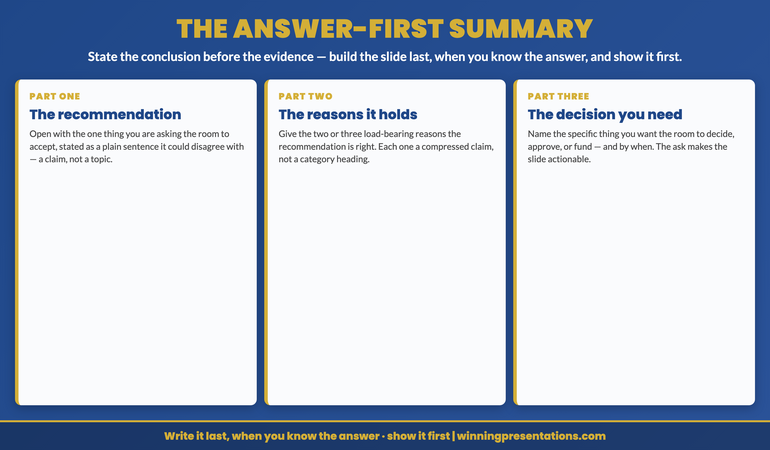
If you’re preparing for a high-stakes executive presentation, understanding how to write an executive summary slide is the single most valuable skill you can develop.

⭐ Stop Building Slides Executives Skip

Get the exact slide structure that gets executive attention—not polite nods while they check their phones.

The Executive Slide System includes:

  • The 12-slide executive structure (used to secure £4.2M+ in approvals)
  • Decision-first slide templates that respect executive time
  • Before/after examples from real board presentations

Get the Executive Slide System → £39

Built from 24 years presenting to C-suite leaders in investment banking. The same structure behind £4M+ approvals.

The Slide Structure That Gets Executive Attention

If data volume kills decisions, what replaces it?

Structure.

After analysing hundreds of successful executive presentations, I’ve identified the exact sequence that works consistently:

Slide 1: The Decision Headline

Not “Q3 Marketing Review.” That’s a topic, not a headline.

Try: “Recommendation: Shift £400K from Brand to Performance Marketing in Q4.”

The executive knows immediately what you want. They can start forming their response while you present—which is exactly what you want them doing.

Slide 2: The Stakes

Why this decision matters. Why now. What happens if we don’t act.

Quantify where possible. “Current trajectory: 12% market share loss by Q2” is more compelling than “We’re losing ground to competitors.”

Slide 3: The Recommendation (Expanded)

Your specific ask. Timeline. Resources needed. Expected outcome.

One slide. No options. Just your best thinking.

Slides 4-8: Supporting Logic

Notice this comes AFTER the recommendation. Not before.

Only include data that directly supports the decision. Everything else goes in an appendix they’ll never read—and that’s fine.

Slides 9-10: Risks and Mitigation

Executives respect presenters who acknowledge what could go wrong. It builds credibility and pre-empts their concerns.

Slides 11-12: Next Steps and Ask

What you need from them. When. How they should signal approval.

Never end with “Questions?” End with a specific request for action.

This structure works because it matches how executives actually process information. They need the conclusion first, then decide how deep to go into the supporting data.

For a complete breakdown of this approach, see my guide to the 3-slide system that gets executive decisions fast—it’s the foundation of everything I teach about structuring executive presentations.

What do executives look for in a presentation?

Executives look for three things: a clear decision or recommendation, the business impact of action vs. inaction, and evidence you’ve done the hard thinking so they don’t have to. They don’t want data dumps—they want clarity that respects their time and cognitive load.

How do you present to C-level executives?

Present to C-level executives by leading with your recommendation, not your methodology. State the decision you need in the first 60 seconds. Quantify the cost of inaction. Limit supporting data to what directly drives the decision. End with a specific ask, not “any questions.”

What is the biggest mistake when presenting to executives?

The biggest mistake is burying your recommendation behind background and data. Executives make dozens of decisions daily—if they can’t identify your point within the first two slides, you’ve lost them. Start with the decision, then provide supporting evidence.

Real Example: From 47 Slides to 12 (And a £4M Approval)

Let me show you what this looks like in practice.

A client came to me with a technology platform proposal. 47 slides. Beautiful design. Comprehensive data.

The steering committee had rejected it twice with “needs more analysis.”

Here’s what we changed:

Original Slide 1: “Cloud Migration Strategy: Executive Overview”

New Slide 1: “Recommendation: Approve £4M Migration to Reduce Operating Costs by £2.1M Annually”

Original Slide 2: “Agenda” (listing 12 sections)

New Slide 2: “The Cost of Waiting: Every Month Delay = £175K in Avoidable Infrastructure Spend”

Original Slides 3-15: Current state analysis, market research, vendor comparison

New Slides 3-4: Three-year cost projection (one slide) and vendor recommendation with rationale (one slide)

We moved 35 slides to the appendix. The committee never looked at them.

The presentation went from 45 minutes to 12. The decision went from “rejected” to “approved” in one meeting.

What changed? Not the content. The emphasis.

The executives didn’t need more information. They needed the right information in the right order.

⭐ Get Executive Decisions in One Meeting

Stop hearing “let me think about it.” Start hearing “approved.”

What you’ll get:

  • Slide-by-slide structure that matches executive thinking
  • Headline formulas that signal decisions (not topics)
  • Real examples from £4M+ approvals

Get the Executive Slide System → £39

Developed from 24 years of presenting to C-suite leaders at JPMorgan, PwC, and Royal Bank of Scotland.

The 4 Mistakes That Lose Executives in the First 60 Seconds

Understanding what executives want from presentations means understanding what makes them disengage.

Here are the four patterns I see most often:

Mistake #1: Starting With Background

“To provide context, let me walk you through how we got here…”

Executives don’t need context. They need conclusions. If the context matters, they’ll ask.

Mistake #2: Using Topic Titles Instead of Headlines

“Financial Overview” tells an executive nothing. “Revenue Up 23% But Margin Pressure Requires Action” tells them everything.

Every slide title should be a complete thought. If an executive only reads your headlines, they should understand your entire argument.

Mistake #3: Presenting Options Without a Recommendation

“We’ve identified three approaches…” signals you’re not ready to commit. Executives want to hear what YOU think, then decide whether to override you.

Present one recommendation. Have one backup if they push back. That’s sufficient.

Mistake #4: Ending With “Any Questions?”

This passive close puts the executive in charge of next steps. Instead, end with a specific ask: “I’d like your approval to proceed with Phase 1 by March 15. Can we confirm that today?”

The executives I’ve worked with consistently prefer presenters who know what they want and ask for it directly.

If presentation anxiety is affecting your ability to present confidently to senior leaders, read about how to overcome the fear of being judged when speaking—the psychological techniques apply directly to executive presentations.

Your Action Framework: Presenting to Executives This Week

If you have an executive presentation coming up, here’s how to apply what you’ve learned:

Step 1: Find Your Headline

What do you want the executive to DO after your presentation? Write that as a complete sentence. That’s your Slide 1 headline.

Step 2: Quantify the Stakes

What happens if they don’t decide? Put a number on it—money, time, market position. If you can’t quantify it, the decision probably isn’t urgent enough for executive attention.

Step 3: Audit Your Slides

For every slide after Slide 3, ask: “Does this directly support the decision, or is it background?” Move background to the appendix. Be ruthless.

Step 4: Rewrite Your Titles

Turn every topic title into a headline. “Competitive Analysis” becomes “Competitors Have 18-Month Lead—Here’s How We Close the Gap.”

Step 5: Prepare Your Close

Script the exact words you’ll use to ask for the decision. “I’d like your approval to proceed with [specific action] by [date]. Can we confirm that now?”

Practice this close until it feels natural. The ask is where most presenters lose their nerve—and lose the decision.

For more on building lasting confidence for these moments, see my guide on getting executive buy-in—it covers the stakeholder dynamics most presenters miss.

⭐ Transform How Executives Respond to Your Presentations

The difference between “let me think about it” and “approved” is structure—not data. Get the exact framework that’s secured £4M+ in executive approvals.

The Executive Slide System gives you:

  • Decision-first structure executives actually respond to
  • Headline formulas that cut through cognitive overload
  • Complete before/after transformation examples

Get the Executive Slide System → £39

Built from 24 years presenting to C-suite leaders at JPMorgan, PwC, and Royal Bank of Scotland.

Frequently Asked Questions

How many slides should an executive presentation have?

Most effective executive presentations have 10-15 slides for the main deck, with detailed analysis moved to an appendix. The goal isn’t a specific number—it’s ensuring every slide directly supports the decision you’re asking for. I’ve seen £4M approvals from 12-slide decks and rejections from 80-slide decks.

Should I send the presentation before the meeting?

For senior executives, yes—but send a one-page executive summary, not the full deck. Let them come prepared with questions rather than processing new information in real-time. The presentation meeting should confirm the decision, not introduce the concept.

What if the executive interrupts with questions early?

This is actually a good sign—it means they’re engaged. Answer directly, then ask: “Would you like me to continue with the recommendation, or explore this question further?” Let them guide the depth. Having your recommendation early means interruptions don’t derail your main point.

How do I handle executives who want more data?

The appendix is your friend. When an executive asks for more detail, say: “I have that analysis in the appendix—slide 34 covers the full breakdown. Shall I walk through it now or send it after for review?” This shows preparation without cluttering your main deck.

Get Weekly Executive Presentation Insights

Actionable advice on presenting to senior leaders—no fluff, just techniques that work.

Subscribe to The Winning Edge →

📋 Not Ready to Invest? Start With This Free Checklist

Get the Executive Presentation Checklist—a one-page audit you can use before your next presentation to ensure you’re hitting what executives actually want.

Download Free Checklist →

Related: If the thought of presenting to executives triggers anxiety, you’re not alone. Read Fear of Being Judged When Speaking: How to Break the Loop for the psychological techniques that help senior professionals present with confidence.

The Bottom Line

What executives want from your presentation isn’t complexity—it’s clarity.

Lead with the decision. Quantify the stakes. Make a recommendation. Ask for what you need.

Do this, and you’ll stand out from the 90% of presenters who bury their point under data executives don’t have time to process.

Your next step: Take your current executive presentation and rewrite Slide 1. Turn it from a topic (“Q4 Review”) into a decision headline (“Recommendation: Increase Q4 Investment by £200K to Capture Market Window”). That single change will transform how executives engage with everything that follows.

Mary Beth Hazeldine is the Owner & Managing Director of Winning Presentations, with 24 years of experience presenting to C-suite leaders at JPMorgan Chase, PwC, Royal Bank of Scotland, and Commerzbank. She has trained over 5,000 executives on high-stakes presentation skills.

25 Jan 2026
Professional woman presenting confidently to senior leadership in a boardroom, projecting calm authority

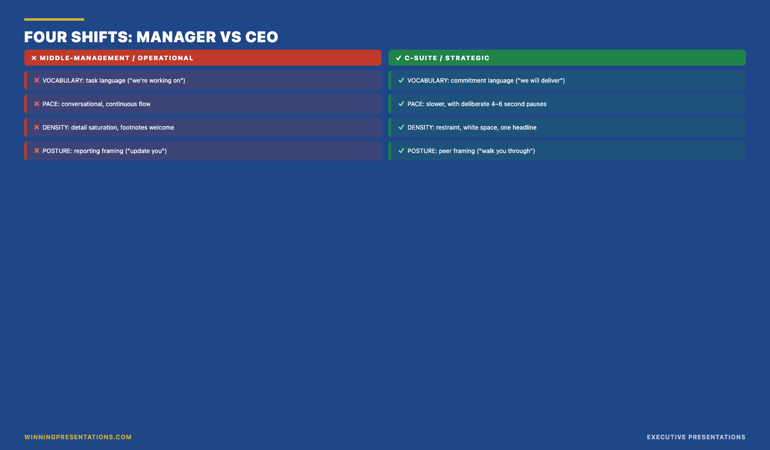
Presenting to Senior Leadership: How to Sound Calm and Credible

The CEO leaned back in his chair. I was three sentences into my presentation, and I could already feel my voice starting to shake.

I knew my material. I’d rehearsed for hours. But none of that mattered—because the moment I saw seven senior executives staring at me, my body decided this was a survival situation.

Quick answer: Presenting to senior leadership triggers a specific kind of anxiety—not just fear of public speaking, but fear of being judged by people who control your career. The solution isn’t more preparation or “power poses.” It’s rewiring the automatic responses that make you sound nervous even when you know your content cold. This article shows you the exact techniques that create calm authority under executive scrutiny.

When you can present calmly to senior leadership:

  • Your recommendations get taken seriously (not dismissed as “nervous energy”)
  • You’re trusted with higher-stakes opportunities
  • You stop dreading the meetings that could advance your career

Written by Mary Beth Hazeldine — Owner & Managing Director of Winning Presentations, qualified clinical hypnotherapist, and someone who spent 5 years terrified of presenting before discovering what actually works. Last updated: January 2026.

🚨 Presenting to LEADERSHIP this week? Use this 60-second reset:

  1. Before you enter: 3 slow breaths (4 counts in, 7 counts out)
  2. First sentence: Speak 30% slower than feels natural
  3. Eye contact: Pick ONE friendly face for your first 10 seconds

This won’t eliminate nerves—but it will prevent them from showing.

These techniques have been used by senior professionals presenting to CFOs, MDs, and Executive Committees in high-stakes approval meetings—the same situations where careers are made or stalled.

→ Want the complete system for calm executive presence? Get Conquer Speaking Fear (£39) — includes the pre-meeting protocol and in-the-moment techniques.

📅 Have a leadership presentation in the next 7 days?

The techniques in this article take one focused practice session to internalise. Most professionals report feeling noticeably calmer in their very next executive presentation.

That presentation to the CEO? I got through it. But I could hear how shaky I sounded. I watched my credibility drain away with every rushed sentence and nervous hedge.

Afterward, a colleague took me aside. “You knew your stuff,” she said. “But you didn’t sound like you believed it.”

She was right. And that’s when I realised: presenting to senior leadership isn’t about knowing more. It’s about appearing calm enough for them to trust what you know.

Over the next five years, I studied everything—from nervous system regulation to clinical hypnotherapy—to understand why some people project calm authority while others (like me) fell apart under executive scrutiny. What I discovered changed not just my presentations, but my entire career.

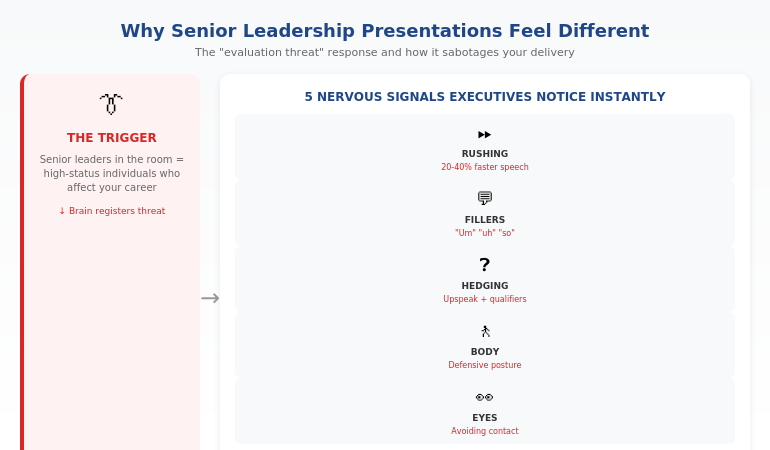
Why Senior Leadership Presentations Feel Different

You might present confidently to your team, your peers, even large audiences. But the moment you’re in front of the C-suite, something shifts.

This isn’t weakness. It’s biology.

The “Evaluation Threat” Response

Research on social stress shows that being evaluated by high-status individuals triggers a stronger threat response than almost any other social situation. Your brain registers senior leaders not just as an audience, but as people who can affect your livelihood.

This activates the sympathetic nervous system—the same fight-or-flight response you’d have if facing physical danger. Blood flows away from your prefrontal cortex (where clear thinking happens) and toward your muscles (preparing you to run).

The result: you know your material, but you can’t access it smoothly. Words come out wrong. You rush. You hedge. You sound exactly as nervous as you feel.

📚 Research note: The “social evaluative threat” response is well-documented in stress research. The Trier Social Stress Test—which simulates evaluation by high-status observers—consistently produces stronger cortisol spikes than other stressors. Studies on anxiety and working memory show that threat-state arousal specifically impairs verbal fluency and recall, explaining why you can “know” your material but struggle to access it under scrutiny.

The Stakes Amplifier

When presenting to senior leadership, the stakes feel magnified because they often are:

  • Career advancement decisions get made based on these impressions
  • Budget approvals depend on your perceived competence
  • Your reputation with decision-makers is being established

Your nervous system isn’t overreacting. It’s responding accurately to a high-stakes situation. The problem is that the response—rushing, hedging, avoiding eye contact—undermines the very outcome you’re trying to achieve.

For more on managing nerves, see the 5-minute reset that actually works.

Diagram showing the evaluation threat response when presenting to senior leadership and how it affects your voice, body language, and thinking

The 5 Nervous Signals Executives Notice Instantly

Senior leaders have sat through thousands of presentations. They’ve developed an unconscious radar for nervousness—and when they detect it, they discount what you’re saying.

Here’s what they notice before you’ve finished your first sentence:

Signal 1: Speech Speed

Nervous presenters rush. They speak 20-40% faster than their normal conversational pace, cramming words together as if trying to finish before something bad happens.

Executives interpret this as: “They’re not confident in what they’re saying” or “They’re trying to get through this before I can ask questions.”

The tell: If you finish your opening faster than you did in rehearsal, you’re rushing.

Signal 2: Filler Words

“Um,” “uh,” “so,” “like,” “you know”—these multiply under pressure. One or two are human. A pattern of them signals that you’re searching for words because anxiety is blocking access to your prepared content.

The tell: Filler words cluster at the beginning of sentences and during transitions.

Signal 3: Upspeak and Hedging

Ending statements as questions (“We should invest in this initiative?”) or adding hedges (“I think maybe we could potentially consider…”) signals uncertainty.

Senior leaders want confident recommendations. When you hedge, they hear: “I’m not sure about this, and neither should you be.”

The tell: Your voice rises at the end of declarative statements.

Signal 4: Defensive Body Language

Crossed arms, hands in pockets, weight shifting from foot to foot, avoiding the centre of the room—all signal discomfort.

Executives read this as: “They don’t want to be here” or “They’re hiding something.”

The tell: You’re standing differently than you would in a casual conversation with friends.

Signal 5: Eye Contact Avoidance

Looking at your slides, at the floor, at the back wall—anywhere but at the people you’re presenting to.

This is the most damaging signal because it breaks connection. When you avoid eye contact, it makes trust harder to establish—executives instinctively wonder what you’re uncertain about.

The tell: You’re not sure what colour eyes the most senior person in the room has.

⭐ Stop the Nervous Signals Before They Start

Conquer Speaking Fear gives you the techniques to rewire these automatic responses—so you project calm authority even when your nervous system is screaming.

What’s inside:

  • The pre-presentation protocol that calms your nervous system in 5 minutes
  • In-the-moment techniques for each of the 5 nervous signals
  • The “recovery moves” when nerves spike mid-presentation

Get Conquer Speaking Fear → £39

Developed from clinical hypnotherapy training and 5 years of personal research into presentation anxiety.

How to Project Calm Authority (Even When You’re Not Calm)

The goal isn’t to eliminate nervousness—that’s unrealistic for high-stakes situations. The goal is to prevent nervousness from showing.

The key insight: calm is a behaviour, not a feeling. You can act calm while feeling anxious—and when you act calm, executives perceive you as calm.

Here’s how:

Technique 1: The Deliberate Pause

When you feel the urge to rush, do the opposite: pause.

Before your first sentence, take a breath. Between major points, pause for a full second. When asked a question, pause before answering.

Pauses feel eternal to you but appear confident to your audience. Senior leaders interpret pauses as: “This person is thoughtful and in control.”

Practice: Rehearse with intentional 2-second pauses after every third sentence. It will feel awkward. It will look authoritative.

Technique 2: Lower Your Vocal Register

Anxiety raises your pitch. A higher voice signals stress to listeners at a subconscious level.

Before you speak, hum quietly at the lowest comfortable note in your range. This primes your voice to start lower.

When presenting, imagine you’re speaking from your chest rather than your throat. The difference is subtle but powerful.

Practice: Record yourself presenting. If your pitch rises during key moments, consciously drop it in your next rehearsal.

Technique 3: Strategic Eye Contact

Don’t try to make eye contact with everyone—that’s overwhelming. Instead, use the “triangle technique.”

Identify three people in the room: one friendly face, one neutral, one who seems skeptical. Rotate your eye contact among these three, spending 5-7 seconds with each.

This creates the impression of confident engagement without the cognitive load of tracking everyone.

Practice: In your next meeting (even a low-stakes one), practice the triangle. Notice how it changes your sense of connection.

Technique 4: The “Grounded Stance”

Plant your feet shoulder-width apart. Feel your weight distributed evenly. Keep your hands visible—either at your sides or gesturing naturally.

This physical stability creates psychological stability. When your body feels grounded, your mind follows.

Practice: Stand in the grounded stance for 60 seconds before your presentation. Notice how it changes your breathing.

Technique 5: The First Sentence Anchor

Memorise your first sentence word-for-word. Not your whole opening—just the first sentence.

When anxiety is highest (the first 30 seconds), you need something you can deliver automatically. A memorised first sentence gives you that anchor.

Practice: Say your first sentence 20 times until it requires zero thought. Then trust it in the room.

For more on building lasting confidence, see why “fake it till you make it” doesn’t work.

Want all 5 techniques plus the complete pre-presentation protocol? Conquer Speaking Fear (£39) includes step-by-step implementation guides for each one.

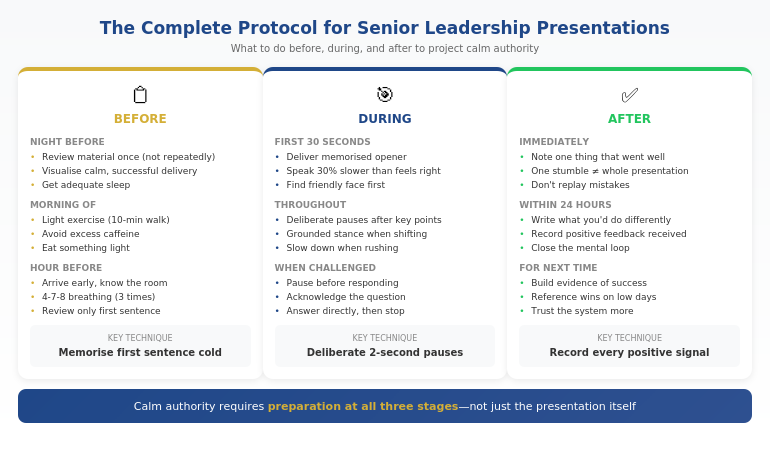
Before, During, and After: The Complete Protocol

Calm authority when presenting to senior leadership requires preparation at three stages:

Before: The 24-Hour Protocol

The night before:

  • Review your material once (not repeatedly—that creates anxiety)
  • Visualise a successful presentation: see yourself calm, hear yourself clear
  • Get adequate sleep—anxiety spikes when you’re tired

The morning of:

  • Light exercise (even a 10-minute walk) burns off stress hormones
  • Avoid excessive caffeine—it amplifies anxiety symptoms
  • Eat something light so your blood sugar is stable

The hour before:

  • Arrive early and familiarise yourself with the room
  • Do the 4-7-8 breathing technique (4 counts in, 7 hold, 8 out) three times
  • Review only your first sentence and your key recommendation—nothing else

During: The In-the-Moment Techniques

Remember: the first 30 seconds set the tone for everything that follows.

First 30 seconds:

  • Deliver your memorised first sentence
  • Speak 30% slower than feels natural
  • Find your friendly face and make initial eye contact there

Throughout:

  • Use deliberate pauses after key points
  • Keep returning to the grounded stance when you feel yourself shifting
  • If you feel yourself speeding up, consciously slow down

When challenged:

  • Pause before responding (this looks thoughtful, not slow)
  • Acknowledge the question: “That’s an important point”
  • Answer directly, then stop talking—don’t over-explain

After: The Recovery Protocol

What you do after the presentation affects your confidence in the next one.

Immediately after:

  • Note one thing that went well (your brain will naturally focus on flaws—counteract this)
  • If you stumbled, remind yourself: one moment doesn’t define the presentation

Within 24 hours:

  • Write down what you’d do differently (then close that loop mentally)
  • If you received positive feedback, record it—you’ll need this evidence on low-confidence days

The complete before, during, and after protocol for presenting to senior leadership with calm authority

🎯 If you’re presenting to senior leadership this week, do this in the next 30 minutes:

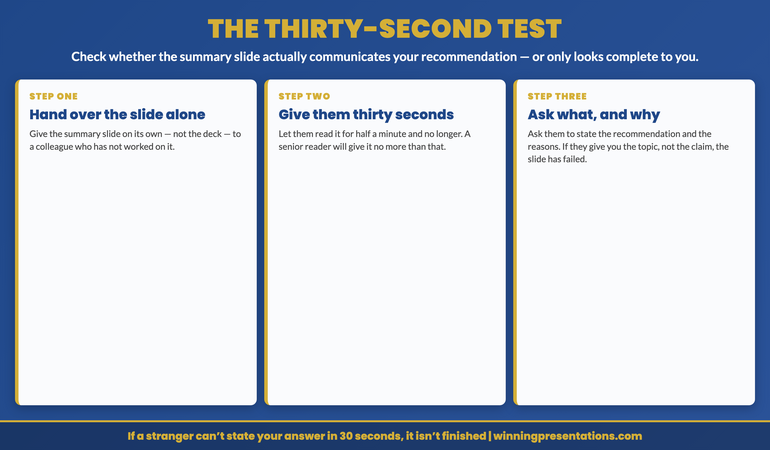
  1. Write your recommendation in one sentence (if you can’t, you’re not ready)
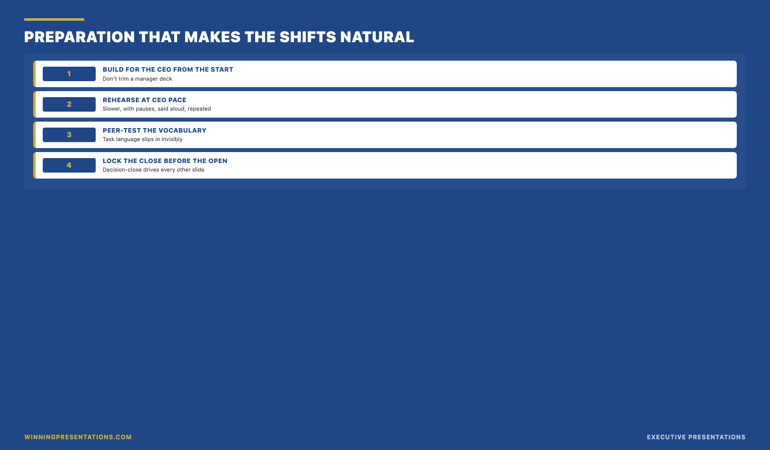
  2. Memorise your first sentence word-for-word (this is your anchor)
  3. Practice deliberate 2-second pauses after every third sentence (it will feel awkward—that’s the point)
  4. Set a reminder to do the 4-7-8 breathing technique one hour before

This takes 30 minutes. It changes how you show up. The full system in Conquer Speaking Fear builds on these foundations.

⭐ The Complete Protocol — Ready to Implement

Conquer Speaking Fear includes the full before/during/after system, plus the specific techniques for each nervous signal. It’s everything I learned in 5 years of overcoming my own presentation terror—packaged so you can implement it before your next leadership presentation.

You’ll get:

  • The 24-hour preparation protocol
  • In-the-moment recovery techniques
  • The post-presentation confidence builder

Get Conquer Speaking Fear → £39

Developed from clinical hypnotherapy training and tested with hundreds of anxious presenters.

What to Say When Your Mind Goes Blank

It happens to everyone: you’re mid-sentence, and suddenly you have no idea what comes next. In front of senior leadership, this feels catastrophic.

Here’s how to recover:

Recovery Move 1: The Summary Bridge

When you lose your place, summarise what you just said:

“So to summarise that point: [restate the last thing you remember]. Now, moving to [look at your slide or notes for the next topic]…”

This buys you time while appearing organised. Senior leaders appreciate summaries—they’re processing a lot of information.

Recovery Move 2: The Strategic Question

If you’ve made a point and lost your thread, turn to your audience:

“Before I continue—are there questions on this section?”

This pause gives you time to recover while appearing collaborative. If they ask a question, answering it will often reconnect you to your material.

Recovery Move 3: The Honest Reset

If the blank is severe, acknowledge it simply:

“Let me pause and make sure I’m covering this clearly…”

Then glance at your notes, find your place, and continue. Senior leaders respect honesty more than struggling through a confused ramble.

Recovery Move 4: The Transition to Visuals

If you have slides, use them as your anchor:

“Let me walk you through what’s on this slide…”

Reading your slide isn’t ideal, but it’s far better than standing in silence. It keeps the presentation moving while you regain your footing.

For more recovery techniques, see what senior leaders actually do when nerves hit.

Ready to stop dreading leadership presentations? Conquer Speaking Fear (£39) gives you the complete system for calm authority under executive scrutiny.

Frequently Asked Questions

Why do I present fine to my team but fall apart with senior leadership?

It’s the “evaluation threat” response. Your brain perceives senior leaders as high-status individuals who can affect your career—triggering a stronger anxiety response than peer-level presentations. This is normal and biological, not a character flaw.

How much should I rehearse for a leadership presentation?

Rehearse until you know your material, then stop. Over-rehearsing creates a different kind of anxiety—the fear of forgetting your “perfect” version. Know your first sentence cold, know your key points, and trust yourself to fill in the details conversationally.

What if the CEO interrupts me with a tough question?

Pause before responding (this looks thoughtful). Acknowledge the question. Answer directly and concisely. If you don’t know the answer, say “I’ll need to verify that and follow up”—executives respect honesty over fumbled guesses.

Should I use notes when presenting to senior leadership?

Brief notes are fine—better than losing your place. Use a single page with key points only, not a script. Glance at it when needed; don’t read from it. Senior leaders care about your command of the material, not whether you reference notes.

How do I handle a hostile or skeptical executive?

Don’t take it personally—skepticism is their job. Stay calm, stick to facts, and don’t become defensive. If they push back, acknowledge their concern (“I understand that concern—here’s how we’ve addressed it…”) rather than arguing. Calm persistence wins.

What if I visibly blush, sweat, or shake during the presentation?

Physical symptoms are more noticeable to you than to your audience. If they do notice, projecting calm through your voice and posture matters more than controlling the symptom. The techniques in this article help prevent symptoms from escalating.

How long does it take to get comfortable presenting to senior leadership?

Most people see significant improvement within 3-5 presentations when using these techniques deliberately. You may never be “comfortable,” but you can become confident that you can manage your nerves effectively.

Does this work if you’re naturally anxious?

Yes—in fact, it works better for naturally anxious people than the standard advice (“just relax,” “be confident”). These techniques don’t require you to change your personality or pretend you’re not nervous. They work by giving your anxious energy somewhere productive to go: into deliberate pauses, into grounded posture, into that memorised first sentence. The anxiety is still there—but it’s channelled rather than displayed. Many of the professionals who’ve used these techniques describe themselves as “anxious people who’ve learned to present calmly.” That’s the goal.

Is This Right For You?

✓ This is for you if:

  • You present well to peers but struggle with senior leadership
  • Your nerves undermine your credibility in high-stakes meetings
  • You want techniques that work in the moment, not just theory
  • You’re tired of dreading presentations that could advance your career

✗ This is NOT for you if:

  • You already feel calm presenting to executives
  • Your main issue is slide design, not delivery anxiety
  • You’re looking for medication or therapy referrals
  • You’re not willing to practice techniques before presentations

⭐ I Spent 5 Years Terrified. Then I Found What Works.

That CEO presentation where my voice shook? It was rock bottom. But it started a 5-year journey into nervous system regulation, clinical hypnotherapy, and what actually creates calm authority. Everything I learned is in Conquer Speaking Fear—so you don’t have to spend years figuring it out yourself.

What you’ll get:

  • The complete pre/during/after protocol
  • Techniques for each of the 5 nervous signals
  • Recovery moves when things go wrong

Get Conquer Speaking Fear → £39

Developed from clinical hypnotherapy training and tested with hundreds of professionals who struggled with executive presentations.

📧 Optional: Get weekly confidence strategies in The Winning Edge newsletter (free).

Your Next Step

Your next leadership presentation is the easiest moment to reset how you’re perceived.

Before you present, run through the 60-second reset: three slow breaths, commit to speaking 30% slower, and identify your friendly face for initial eye contact.

These three techniques won’t eliminate nerves—but they’ll prevent nerves from showing. And when you appear calm, executives take you seriously.

The gap between “knowing your material” and “being trusted with bigger opportunities” is often just perceived composure. Close that gap before your next presentation.

For the complete system—including the 24-hour protocol, all 5 signal-blocking techniques, and recovery moves when things go wrong—get Conquer Speaking Fear (£39).

P.S. If your slides aren’t structured for executive decision-making, see how to build decision slides that get “yes” in 60 seconds.

About the Author

Mary Beth Hazeldine is the Owner & Managing Director of Winning Presentations and a qualified clinical hypnotherapist. The CEO presentation that opens this article is real—and the 5 years of terror that followed led to the techniques now in Conquer Speaking Fear.

After 24 years in corporate banking at JPMorgan Chase, PwC, Royal Bank of Scotland, and Commerzbank—where presenting to senior leadership was unavoidable—she’s helped hundreds of professionals transform their relationship with high-stakes presentations.

Book a discovery call | View services

21 Jan 2026
Board presentation best practices learned from watching 100 board meetings - the 5 patterns that separate approval from rejection

Board Presentation Best Practices: What I Learned Watching 100 Board Meetings

Quick answer: The board presentation best practices that actually matter aren’t about slide design or speaking technique. After watching more than 100 board presentations across banking, tech, and professional services, I found five patterns that separated the presentations that got approved from the ones that got “let’s table this.” Lead with your recommendation in the first 60 seconds. Pre-wire key stakeholders before you enter the room. Answer the question they’re actually asking, not the one you prepared for.

⚡ Board presentation in the next 48 hours? Do these 5 things:

1. Put your recommendation on slide 1—not slide 12

2. Call your toughest stakeholder today and ask: “What would make you say no?”

3. Cut your deck to 6-8 slides maximum (you have 15 minutes, not 45)

4. Prepare for “What’s the risk?” and “What happens if we don’t?”

5. Rehearse your opening sentence until you can say it without slides

These five steps have saved more board presentations than any template.

If your board meeting is in the next 7 days, use this article as your run-of-show.

What I Learned in the Room

In my 24 years in corporate banking—at JPMorgan Chase, PwC, Royal Bank of Scotland, and Commerzbank—I sat through more than 100 board presentations. Sometimes I was presenting. More often, I was watching.

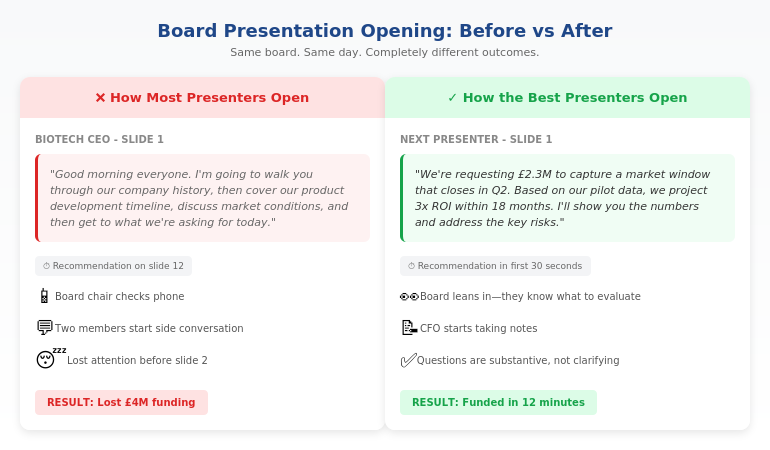
I watched a biotech CEO lose a £4M funding round in 11 words. His opening line was: “I’m going to walk you through our company history and then get to the ask.”

The board chair looked at her phone. Two members started side-conversations. He’d lost them before slide 2.

The next presenter—same board, same day—opened differently: “We’re requesting £2.3M to capture a market window that closes in Q2. Here’s why the math works.”

She got her funding in 12 minutes.

Same board. Same room. Completely different outcomes.

The difference wasn’t charisma. It wasn’t slide design. It was a set of patterns I started to notice again and again—board presentation best practices that nobody teaches but every successful presenter follows instinctively.

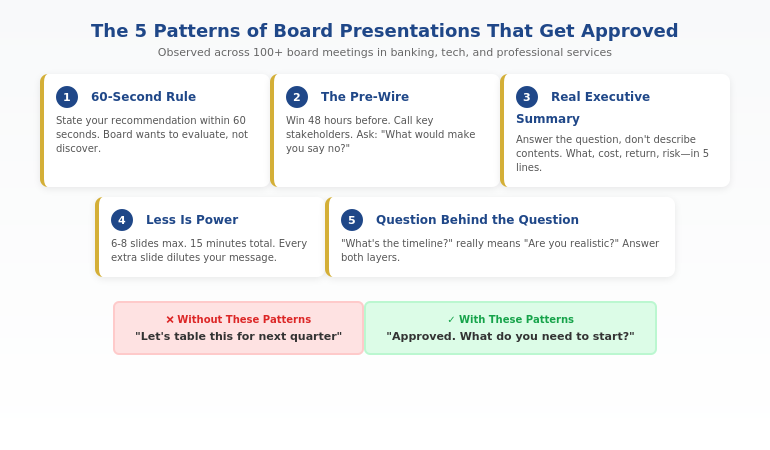
Here are the five that matter most.

⭐ Get Board-Ready Slides in 30 Minutes

Stop building presentations that get “let’s table this.” Use the slide structures built from patterns observed across 100+ board meetings in corporate banking, tech, and professional services.

The Executive Slide System includes:

  • 12 decision-first slide templates for board presentations
  • The “recommendation-first” opening structure
  • CFO-ready financial summary layouts
  • Risk/mitigation frameworks that pre-empt objections

Get the Executive Slide System → £39

Built from 24 years in corporate banking. Used by executives preparing for board meetings, investor pitches, and budget approvals.

Pattern 1: The 60-Second Rule

The best board presenters I watched all did the same thing: they stated their recommendation within the first 60 seconds.

Not context. Not background. Not “let me walk you through how we got here.”

Recommendation first.

What most presenters do:

“Good morning. I’m going to take you through our Q3 performance, then discuss market conditions, and then share our proposed direction for Q4.”

What the best presenters do:

“We’re requesting approval for a £500K expansion into the German market. Based on our Q3 pilot, we project 3x ROI within 18 months. I’ll show you the numbers and address the key risks.”

The board doesn’t want to discover your recommendation. They want to evaluate it. Give them the answer, then give them the evidence to test it.

This is the single most important of all board presentation best practices—and the one most people get backwards.

Learn more about board presentation structure and why decision-first ordering works.

The 5 patterns that the best board presentations share - decision-first opening, executive summary that answers the real question, pre-wired stakeholders, 60-second rule, and prepared for the question behind the question


Pattern 2: The Pre-Wire

Here’s what surprised me most: the best board presentations weren’t won in the boardroom. They were won in the 48 hours before.

Every presenter who consistently got approvals did the same thing—they pre-wired their key stakeholders.

That means:

  • Calling the CFO before the meeting to understand their specific concerns
  • Sending the CEO a 2-minute preview: “Here’s what I’m recommending and why”
  • Asking the toughest critic: “What would make you say no?”

By the time they walked into the boardroom, the decision was 80% made. The presentation was confirmation, not persuasion.

The presenters who relied entirely on the meeting itself? They were always fighting uphill.

Pre-wire script that works:

“I’m presenting to the board on Tuesday about [X]. I’d value 5 minutes of your perspective beforehand—specifically, what concerns would you want me to address? I’d rather know now than be surprised in the room.”

Nobody ever says no to this request. And the intelligence you gather transforms your presentation.

Presenting to a board soon? The Executive Slide System includes pre-wire email templates alongside the slide structures—everything you need to win before you walk in the room. Get the templates →

Pattern 3: The Real Executive Summary

Almost every board presentation has an “executive summary” slide. Almost none of them are actually useful.

Most executive summaries are really “executive overviews”—they describe what the presentation contains rather than answering the question the board is asking.

Typical executive summary:

“This presentation covers our Q3 performance, market analysis, competitive landscape, and strategic recommendations.”

Effective executive summary:

“Q3 exceeded target by 12%. We recommend accelerating the Germany expansion by 6 months. Cost: £500K. Projected return: £1.5M by Q4 2027. Key risk: talent acquisition timeline.”

The second version answers what the board actually wants to know: What happened? What do you want? What does it cost? What do we get? What could go wrong?

For a deeper dive, see how to write an executive summary slide that actually drives decisions.


Before and after board presentation comparison showing how the best presenters structure their opening versus how most presenters start

⭐ Executive Summary Templates That Actually Work

Stop writing “overview” slides that waste board members’ time. Get the decision-first executive summary structure used by presenters who consistently get approval.

Inside the Executive Slide System:

  • The 5-line executive summary formula
  • Board-ready recommendation slides
  • Risk/mitigation layouts that build confidence
  • Financial summary templates CFOs trust

Get Board-Ready Templates → £39

Instant download. Works with PowerPoint, Google Slides, and Keynote.

This pays for itself the first time you get “approved” instead of “let’s revisit this next quarter.”

Pattern 4: Less Is Power

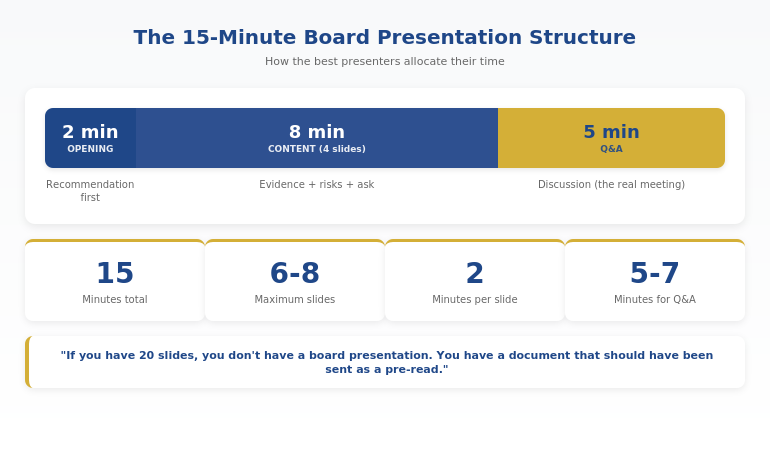
The worst board presentations I watched had 30+ slides. The best had 6-8.

This isn’t about attention spans. It’s about signal-to-noise ratio.

Every slide you add dilutes your core message. Every “nice to have” data point competes with your “need to know” evidence. Every background slide steals time from the discussion that actually matters.

The presenters who got approvals were ruthless editors. They asked: “Does this slide move my recommendation forward or just make me feel thorough?”

The board presentation math:

  • You have 15-20 minutes (including Q&A)
  • Plan for 2 minutes per slide maximum
  • Reserve 5-7 minutes for questions
  • That leaves room for 6-8 slides

If you have 20 slides, you don’t have a board presentation. You have a document that should have been sent as a pre-read.

Board presentation timing breakdown showing optimal structure for a 15-minute board slot

Pattern 5: The Question Behind the Question

The best board presenters I watched never answered the literal question. They answered the question behind the question.

When a board member asks “What’s the timeline?”, they’re often really asking “Are you being realistic or optimistic?”

When they ask “Who’s leading this?”, they’re often really asking “Do you have the right talent to execute?”

When they ask “What are the risks?”, they’re often really asking “Have you thought this through or are you just excited?”

The presenters who got approvals had prepared for both layers. They answered the surface question quickly, then addressed the underlying concern.

Example:

Board member: “What happens if the German market doesn’t respond as expected?”

Effective answer: “If we miss adoption targets by more than 20% in Q1, we pause Phase 2 and reallocate budget to UK expansion. We’ve built explicit exit criteria into the plan.”

The surface question was about Germany. The real question was “Do you have a Plan B?” Answering both builds the confidence that gets approvals.

For more on handling board questions, see how to present to a board of directors.

Related: If board presentations feel high-stakes and the pressure triggers physical symptoms or anxiety, see how to manage fear of public speaking at work—especially the day-before protocol that helps you arrive composed.

Ready to build slides that follow these patterns? The Executive Slide System gives you the exact templates—recommendation-first structures, executive summaries that work, and risk layouts CFOs trust. Get the templates →

Common Questions About Board Presentations

What makes a good board presentation?

A good board presentation leads with a clear recommendation, provides evidence that addresses board members’ specific concerns, and respects their time. The best board presentation best practices focus on decision clarity rather than comprehensive information. Board members want to evaluate a recommendation, not discover it. Structure your presentation so they know your position within 60 seconds.

How long should a board presentation be?

Most board presentations should be 6-8 slides maximum, designed to fill 10-15 minutes including Q&A. You typically have 15-20 minutes total, and the discussion matters more than the presentation. Plan for 2 minutes per slide and reserve at least 5 minutes for questions. If your deck is longer, it’s a document—send it as a pre-read instead.

What do board members want to see?

Board members want to see: (1) your recommendation stated clearly upfront, (2) the financial impact and investment required, (3) the key risks and how you’ll mitigate them, and (4) the timeline and success metrics. They don’t want background context, market education, or comprehensive data. They want decision-ready information that lets them evaluate your recommendation.

⭐ Turn These Patterns Into Your Next Board Deck

You’ve seen what the best presenters do. Now build slides that follow the same patterns—recommendation-first structure, real executive summaries, and layouts that earn trust.

The Executive Slide System gives you:

  • 12 board-ready slide templates
  • Decision-first opening structures
  • Executive summary frameworks that work
  • Risk and financial layouts CFOs trust

Get the Executive Slide System → £39

Built from patterns observed across 100+ board presentations. Instant download, works immediately.

FAQ

How do I present to a board for the first time?

For your first board presentation: (1) Pre-wire at least one board member or your sponsor beforehand—ask what concerns to address. (2) Lead with your recommendation, not background. (3) Keep slides to 6-8 maximum. (4) Rehearse your opening sentence until you can deliver it confidently without notes. (5) Prepare for “What’s the risk?” and “What happens if we wait?”—these questions come up in almost every board meeting.

Should I use slides or speak without them?

Use slides, but use them as decision tools, not speaker notes. Each slide should answer one question the board needs resolved. Avoid reading from slides or using them as a script. The best board presenters can deliver their core message with or without the deck—slides support the argument, they don’t carry it.

How do I handle tough questions from board members?

Answer the question behind the question. When a board member challenges you, they’re usually testing whether you’ve thought through the risks, not attacking your recommendation. Acknowledge the concern, give a direct answer, then explain your mitigation plan. If you don’t know the answer, say so and commit to following up—credibility matters more than appearing to have all answers.

What’s the biggest mistake in board presentations?

Building up to your recommendation instead of leading with it. Most presenters spend 10 minutes providing context before revealing what they want—by which point they’ve lost the board’s attention. State your recommendation within 60 seconds, then use the rest of your time providing evidence and addressing concerns. Let them evaluate your position, not discover it.

📧 The Winning Edge Newsletter

Weekly board presentation strategies, executive communication insights, and practical frameworks from 24 years in corporate banking. No fluff—just what actually works in boardrooms.

Subscribe Free →

📋 Free: Executive Presentation Checklist

A one-page checklist to run before any board presentation. Covers the 5 patterns above plus 10 additional “go/no-go” criteria. Download it, print it, use it before your next presentation.

Download Free Checklist →

Your Next Step

The five patterns above—the 60-second rule, the pre-wire, the real executive summary, the power of less, and answering the question behind the question—separate board presentations that get approved from ones that get “let’s table this.”

If you have a board presentation coming up, use the 48-hour rescue checklist at the top of this article. Then build slides that match these patterns using the Executive Slide System.

Your board wants to say yes. Make it easy for them.

About the Author

Mary Beth Hazeldine is the Owner & Managing Director of Winning Presentations and a former corporate banker with 24 years of experience at JPMorgan Chase, PwC, Royal Bank of Scotland, and Commerzbank. She has sat in more than 100 board meetings and helped executives secure approvals for budgets, expansions, and strategic initiatives totalling more than £250 million.

Mary Beth is also a qualified clinical hypnotherapist and NLP practitioner who helps executives manage presentation anxiety and build authentic confidence in high-stakes settings.

Book a discovery call | View services

12 Dec 2025
How to present to a CFO - the finance-first framework for getting budget approval

How to Present to a CFO: The Finance-First Framework [2026]

📅 Updated: December 2025 — Includes CFO presentation templates and AI prompts

Quick Answer: How Do You Present to a CFO?

To present to a CFO successfully, lead with the financial ask and expected ROI in your first 30 seconds. CFOs don’t want context first — they want to know: what do you need, how much, and what’s the return? Structure your presentation as: (1) The Ask, (2) The ROI, (3) The Risk, (4) The Timeline, then supporting detail. This “finance-first” approach respects their time and speaks their language.

🎁 FREE DOWNLOAD

CFO Presentation Cheat Sheet

The 10 questions every CFO asks — with scripts for how to answer each one.

Download Free Cheat Sheet →

No spam. Unsubscribe anytime.


I’ll never forget the silence in that JPMorgan conference room.

I was three years into my banking career, presenting a £2 million technology investment to our divisional CFO. I’d spent two weeks preparing. Every slide polished. Every data point triple-checked. I walked in confident.

Twelve minutes in, he held up his hand.

“Mary Beth, I’m sure this is all very interesting. But what do you actually want, and what’s the return?”

I’d buried my ask on slide 14. He’d stopped listening by slide 6.

That moment changed how I present forever. Over the next 21 years — through JPMorgan, PwC, Royal Bank of Scotland, and Commerzbank — I watched hundreds of brilliant people make the same mistake I’d made. Smart proposals. Strong business cases. No approval.

The problem was never the idea. It was the presentation.

They were presenting like marketers. CFOs think like investors.

Since then, I’ve helped clients secure over £250 million in funding by fixing this one fundamental shift. This guide shows you exactly how to present to a CFO in a way that gets decisions, not deferrals.

How to present to a CFO - the finance-first framework for getting budget approval

Why Most CFO Presentations Fail

CFOs reject good ideas every day. Not because the ideas are bad — because the presentations don’t answer the questions CFOs actually care about.

Here’s what’s frustrating: the advice you’ve probably heard is making things worse.

The 3 Fatal Mistakes (That “Best Practice” Taught You)

Mistake 1: “Set the context first”

Every presentation course tells you to establish context before making your ask. Build the narrative. Take them on a journey. Create understanding.

CFOs hate this.

They’re thinking about 47 other budget requests, a board meeting on Thursday, and why IT costs are up 12%. They don’t have mental bandwidth for your journey. They want to know: what do you need, and what do I get?

When you bury your ask on slide 18, you’ve lost them by slide 6.

Mistake 2: “Focus on benefits”

Marketing taught us to sell benefits, not features. “This will improve efficiency.” “This will enhance collaboration.” “This will drive innovation.”

CFOs don’t buy benefits. They buy returns.

“Improve efficiency” is meaningless. “Reduce processing costs by £180,000 annually against a £50,000 investment” is a decision. CFOs think in payback periods, IRR, and opportunity costs. If you can’t quantify it, they can’t justify it.

Mistake 3: “Keep it positive”

You’ve been told to project confidence. Don’t dwell on risks — it makes you look uncertain. Sell the upside.

This destroys your credibility.

CFOs have seen projects fail. They’ve inherited budget disasters from optimistic predecessors. They’re paid to be skeptical. When you downplay risks, they assume either you haven’t thought them through — or there are risks you don’t even know about.

The CFO who approved my first major proposal told me why: “You were the first person all week who told me what could go wrong. Everyone else was selling. You were thinking.”

Related: Budget Presentation Template: How to Get Your Budget Approved First Time

The Finance-First Framework

This framework flips the traditional presentation structure. Instead of building to your ask, you lead with it — then provide the supporting evidence CFOs need to say yes.

The Finance-First Framework: Ask, ROI, Risk, Timeline, Detail

Step 1: The Ask (First 30 Seconds)

State your request immediately. In your first sentence if possible.

“I’m requesting £400,000 for marketing automation. Expected return is £1.2 million over 24 months. That’s 3x ROI with a 6-month payback. I need a decision by January 15th to hit our Q1 implementation window.”

That’s 42 words. The CFO now knows exactly what’s at stake before you’ve shown a single slide.

Compare that to: “Thank you for making time today. I wanted to walk you through some exciting developments in our marketing technology landscape and share some research we’ve been doing on automation platforms…”

The first version respects the CFO’s time. The second wastes it.

Step 2: The ROI (Make It Scannable)

After your opening ask, show the financial case in a format CFOs can evaluate in seconds:

Metric Value
Investment Required £400,000
Expected Return (24 months) £1,200,000
ROI 200%
Payback Period 6 months
Break-Even Point Month 8

Critical: Show your assumptions.

CFOs don’t trust black-box numbers. Add a line under your ROI table: “Based on 15% conversion improvement (industry benchmark: 12-18%) and current lead volume of 2,400/month.”

This shows you’ve done the work. It also gives them something to test — if they disagree with an assumption, you can discuss it rather than having the whole proposal dismissed.

Step 3: The Risk (Address It Before They Ask)

Every CFO is thinking: “What happens if this fails?”

Answer that question proactively:

Key risks and mitigation:

Implementation delay: Vendor has guaranteed 90-day deployment with penalty clause

Adoption risk: Phased rollout with 3 pilot teams before full deployment

ROI underperformance: Kill switch at Month 4 if we’re not seeing 10% improvement

That last point — the kill switch — is powerful. It tells the CFO: “I’ve thought about failure, and I have a plan to limit downside.”

Suddenly your £400,000 request feels much less risky. It’s not “give me £400,000 and hope for the best.” It’s “give me £400,000 with built-in checkpoints.”

Step 4: The Timeline (Show You’re Ready)

CFOs want to know you can execute. A clear timeline demonstrates operational readiness:

  • January: Vendor selection finalised, contracts signed
  • February-March: Implementation and integration
  • April: Pilot with 3 teams (50 users)
  • May: Checkpoint — evaluate results, go/no-go decision
  • June: Full rollout (200 users)
  • July: First ROI measurement

Note the checkpoint in May. This reinforces the kill switch and shows you’re not asking for blind faith.

Step 5: Supporting Detail (Only If Asked)

Everything else — market research, competitive analysis, vendor comparisons, implementation details — goes in an appendix or backup slides.

Don’t present it unless the CFO asks. If they want to dive deeper, you’re prepared. If they don’t, you haven’t wasted their time.

📄
Get the CFO Question Scripts

Download the 10 questions every CFO asks — with word-for-word scripts for how to answer each one confidently.

Download Free Cheat Sheet →

The 10 Questions Every CFO Asks

After hundreds of CFO presentations, I’ve found they ask variations of the same 10 questions. Prepare for these, and you’ll handle 90% of what comes your way.

Questions About the Ask

1. “What exactly are you asking for?”

Be specific: amount, timing, and what it funds. “£400,000 in Q1, split between £280,000 for software licensing and £120,000 for implementation services.”

2. “Why this amount? How did you arrive at it?”

Show your work. Break down the components. CFOs respect rigorous cost estimation.

3. “Why now? What happens if we wait?”

Quantify the cost of delay. “Each month we delay costs £45,000 in manual processing. Q1 pricing expires March 31st.”

Questions About the Return

4. “What’s the ROI, and how confident are you in these numbers?”

State your ROI and your confidence level honestly. “200% ROI based on conservative assumptions. Even at 50% of projected benefit, we break even in 14 months.”

5. “What assumptions are you making?”

List them explicitly. Better they challenge an assumption than dismiss the whole proposal.

6. “How does this compare to other uses of this money?”

This is the opportunity cost question. Know what else is competing for budget and why your proposal ranks higher.

Questions About the Risk

7. “What could go wrong?”

Have 3-4 risks ready with mitigation plans for each. Don’t minimize — demonstrate you’ve thought it through.

8. “What’s our exit strategy if this doesn’t work?”

The kill switch. Define checkpoints, success criteria, and what happens if you don’t hit them.

9. “Who else has done this? What were their results?”

Benchmarks and case studies. CFOs trust external validation over internal optimism.

Questions About Execution

10. “Can you actually deliver this?”

Show operational readiness: team, timeline, dependencies, and what you need from other departments.

Related: How to Create Executive Presentations That Get Results

What I Learned Sitting Next to a CFO for Six Months

At RBS, I spent six months on a project that put me in every CFO review meeting for our division. I wasn’t presenting — I was supporting the presenters with financial analysis. But I had a front-row seat to what happened after they left the room.

Three things I never forgot:

First, CFOs talk to each other. After one presenter left, the CFO turned to the Finance Director and said, “That’s the third request this month where nobody could tell me the payback period.” They keep mental scorecards of who wastes their time.

Second, they decide faster than you think. Most CFOs told me they knew within 90 seconds whether they’d approve something. The rest of the meeting was either confirming that instinct or looking for reasons to say no. If you haven’t landed your ask by then, you’re playing defence.

Third, they want to say yes. This surprised me most. CFOs aren’t trying to block good investments. They’re trying to make good capital allocation decisions. When someone brings a clear ask, solid ROI, and honest risk assessment, the CFO relaxes. You’ve done the work. They can trust the numbers.

The presenters who got approved weren’t better speakers. They were better prepared.

Real Example: How One Request Went from “No” to “Yes”

A marketing director I worked with had her £400,000 automation request rejected twice. Same CFO, same request, same underlying business case.

The third time, we restructured everything using the Finance-First Framework.

Original approach (rejected):

  • 22 slides building up to the ask
  • 10 minutes of market context before any numbers
  • ROI buried on slide 18
  • Risks mentioned briefly, no mitigation
  • “We need this” energy instead of “Here’s the return” evidence

Revised approach (approved):

  • 6 slides total
  • Ask and ROI in first 30 seconds
  • Clear assumptions, visible for challenge
  • 3 risks with specific mitigation plans
  • Kill switch at Month 4
  • Backup slides ready but not presented

The result? Not only approved — she got £500,000. The CFO added budget for training because he trusted she’d thought it through.

“The kill switch is what did it,” she told me later. “He said it was the first time someone had shown him they were prepared to fail fast.”

CFO Presentation Slide Structure

If you’re presenting to a CFO, use this 6-slide structure:

6-slide CFO presentation structure: Ask, ROI, Problem, Solution, Timeline, Risk

Slide 1: The Ask
Amount, expected return, payback period, decision deadline. All in the first 30 seconds.

Slide 2: The ROI
Investment table with assumptions visible. Make it scannable in 5 seconds.

Slide 3: The Problem (Cost of Inaction)
What is the current situation costing? Quantify the pain.

Slide 4: The Solution
What you’re proposing and why this option. Keep it tight.

Slide 5: The Timeline
Key milestones with checkpoints. Show operational readiness.

Slide 6: The Risk
Top 3 risks, mitigation for each, kill switch criteria.

Everything else? Appendix. Don’t present unless asked.

Related: Budget Presentation Template: The Complete 6-Slide Structure

How to Use AI to Prepare Your CFO Presentation

Tools like PowerPoint Copilot can help you build CFO presentations faster — but only with the right prompts.

Try this prompt:

"Create a 6-slide CFO presentation requesting [amount] for [project]. 

Slide 1: Executive ask with specific amount, expected ROI, payback period, and decision deadline.
Slide 2: ROI table showing investment, return, and key assumptions.
Slide 3: Cost of current problem (quantified).
Slide 4: Proposed solution (one slide, focused).
Slide 5: Implementation timeline with checkpoints.
Slide 6: Top 3 risks with mitigation and kill switch criteria.

Audience: CFO who values brevity, data, and risk awareness.
Tone: Confident but realistic. Show you've done the work."

This gives Copilot the structure and audience context to generate something useful — not generic corporate slides.

Related: Best Copilot PowerPoint Prompts That Actually Work

Why This Framework Gets Approvals

The Finance-First Framework works because it aligns with how CFOs actually think:

CFOs are portfolio managers. They’re constantly comparing your request against every other demand on capital. You need to make the comparison easy — ROI, payback, risk-adjusted return.

CFOs are skeptics by training. They’ve seen optimistic projections fail. They’ve inherited messes from approved projects that went sideways. When you acknowledge risks upfront, you build credibility.

CFOs are time-poor. They have dozens of decisions to make. Respecting their time by leading with the ask — instead of burying it — signals that you understand their world.

CFOs want to say yes. Contrary to popular belief, CFOs don’t enjoy rejecting good ideas. They reject presentations that don’t give them what they need to justify the spend. Give them the ammunition, and they’ll often become your advocate.

Why a Framework Isn’t Enough

The Finance-First Framework will help you structure better CFO presentations. But if you’re presenting to executives regularly, you’ve probably noticed:

Every presentation type needs a different structure.

A CFO presentation is different from a board update. A budget request is different from a QBR. A strategy presentation is different from a project status update.

You could spend hours adapting frameworks for each situation. Or you could use templates that have already done the work — with the right structure, the right prompts, and the right flow built in.

That’s why I created the Executive Slide System.

⭐ RECOMMENDED FOR CFO PRESENTATIONS

The Executive Slide System (£39)

Ready-to-use templates for every executive presentation type — including CFO-ready budget requests with ROI calculators built in.

What’s inside:

  • Budget request template with pre-built ROI calculator slide
  • CFO presentation structure matching the Finance-First Framework
  • Board update, QBR, and strategy templates — 10 templates total
  • 30 AI prompts mapped to each template for quick customisation
  • Executive slide checklists to verify your deck before presenting

Get the Executive Slide System — £39 →

Used by professionals at investment banks, consultancies, and Fortune 500 companies.

Free Framework vs. Executive Slide System

What You Get This Article Executive Slide System (£39)
Finance-First Framework
Ready-to-use CFO presentation template ✓ Pre-built structure
ROI calculator slide ✓ Plug in your numbers
AI prompts for customisation 1 example 30 mapped prompts
Board, QBR, and strategy templates ✓ 10 template types
Best for Learning the approach Getting CFO approval fast

“Got my £180K budget approved in the first meeting. The ROI calculator slide made the CFO’s decision easy.”

— James T., Head of Operations, Manchester

Before Your Next CFO Meeting

Download the 10 Questions Every CFO Asks — with scripts for how to answer each one.

Download Free Cheat Sheet →

FAQ: How to Present to a CFO

How long should a CFO presentation be?

6 slides maximum for the core presentation. Have backup slides ready, but don’t present them unless asked. CFOs value brevity — 15 minutes is usually plenty.

Should I send materials in advance?

Yes. Send a 1-page executive summary 24-48 hours before. This lets the CFO come prepared with questions, which actually speeds up approval.

What if the CFO challenges my assumptions?

Good — that means they’re engaged. Have sensitivity analysis ready: “If we only achieve 50% of projected benefit, we still break even in 14 months.” Show you’ve stress-tested the numbers.

How do I handle “Let’s revisit next quarter”?

Ask directly: “What would you need to see to make a decision today?” Often there’s a specific concern you can address on the spot. If they genuinely need time, ask for a specific follow-up date.

What’s the biggest mistake people make?

Burying the ask. CFOs spend the first 5 minutes wondering “What do they want?” Instead of listening to your brilliant context. Lead with the number.

📧
Get Weekly Executive Presentation Tips

Join executives getting my best frameworks, templates, and presentation strategies every Thursday.

Subscribe to The Winning Edge →

Related Resources

About the Author

Mary Beth Hazeldine spent 24 years in corporate banking at JPMorgan Chase, PwC, Royal Bank of Scotland, and Commerzbank — presenting to CFOs, boards, and investors on deals worth billions. Her clients have raised over £250 million in funding using her proprietary “3Ps” methodology. She now trains executives at Winning Presentations.