Tag: presentation questions

28 Feb 2026
Executive preparing for presentation Q&A at desk with laptop and data tablet in corporate office

Most Executives Don’t Prep for Q&A. Here’s the AI Workflow That Changes That in 10 Minutes.

She’d spent 14 hours on the deck. Every slide was polished. The data was bulletproof. The recommendation was clear. Then the CFO asked one question — “What happens to the margin if we delay by a quarter?” — and she froze. Not because she didn’t know the answer. Because she’d never thought about it. Fourteen hours on slides. Zero minutes on Q&A preparation.

Quick Answer: Most executives prepare extensively for their presentation and not at all for the Q&A that follows it. Yet Q&A is where decisions actually get made or killed. AI changes this equation dramatically: in 10 minutes, you can feed your presentation to ChatGPT or Claude, ask it to role-play as your toughest stakeholder, and generate 15-20 likely challenge questions with concise answers. The executives who do this have a structural advantage over everyone else in the room — because almost nobody does.

🚨 Presenting this week? Quick check: Can you name the three hardest questions your audience might ask? Can you answer each in under 15 seconds? If not, you’ve found your preparation gap — and AI can close it in 10 minutes.

📌 If you’d rather see the structured frameworks than build them from scratch:

The AI prompts and answer structures in this article pair directly with the Executive Q&A Handling System — designed for senior professionals facing high-stakes boardroom, investor, and panel Q&A.

In 25 years of corporate banking — at JPMorgan, PwC, RBS, and Commerzbank — I never once saw a presentation succeed or fail because of the slides. The slides got people to the table. The Q&A determined whether they left with a yes or a “let’s revisit.”

But here’s what I also noticed: even the most senior executives spent almost all their preparation time on the deck and almost none on the questions that would follow it. It wasn’t laziness. It was that Q&A prep felt impossible — how do you prepare for questions you can’t predict?

That changed when AI became genuinely useful. I started asking clients to feed their presentations to ChatGPT or Claude before presenting, with a simple instruction: “You are a sceptical CFO reviewing this proposal. What are your top 10 concerns?” The quality of the questions was startling. Not perfect — but 70-80% overlap with what actually got asked.

Now I recommend this to every executive I work with. It takes 10 minutes. It costs nothing. And it gives you the one advantage that almost nobody in the room has: you’ve already rehearsed the hard questions.

The Q&A Preparation Gap: Why Smart Executives Get Caught Off Guard

How do executives prepare for tough questions? The honest answer, from two decades of watching them: most don’t. They prepare the presentation. They rehearse the delivery. They might anticipate one or two obvious questions. But systematic Q&A preparation — the kind where you map every likely question, draft concise answers, and stress-test for follow-ups — almost never happens.

There’s a structural reason for this. Slide preparation feels productive. You can see the deck taking shape. You can measure progress. Q&A preparation feels abstract and unbounded — there are infinite possible questions, so where do you even start?

This is exactly where AI changes the equation. AI can’t predict every question. But it can do something humans struggle with: it can systematically assume different perspectives and generate questions from each one. A sceptical CFO asks different questions than a supportive COO. A technical architect challenges different assumptions than a commercial director. AI can role-play all of them in minutes.

The result isn’t perfect prediction. It’s coverage. Instead of walking in having thought about 2-3 obvious questions, you walk in having considered 15-20 questions across multiple stakeholder perspectives. That’s the difference between hoping you won’t be caught off guard and knowing you’re prepared for most of what’s coming.

If you’re new to predicting questions systematically, the Question Map method gives you the manual framework. What this article adds is the AI acceleration layer that makes it practical even when you’re short on time.

The 10-Minute AI Q&A Preparation Workflow

This workflow works with ChatGPT, Claude, Copilot, or any capable AI assistant. The principle is the same across tools — you’re using AI as a sceptical audience simulator.

Step 1: Feed it your context (2 minutes). You don’t need to upload your entire deck. Give the AI a brief: “I’m presenting a proposal to [audience] requesting [decision]. The key points are [3-4 bullet points]. The budget is [amount]. The timeline is [duration].” The more specific you are about the audience and the ask, the better the questions will be.

Step 2: Assign a stakeholder role (1 minute). This is the step most people skip, and it’s the one that transforms the output. Don’t just ask “What questions might they ask?” Instead: “You are a sceptical CFO who has seen three similar proposals fail. What are your top concerns about this proposal?” The role-play instruction generates questions that sound like the people in your actual room.

Step 3: Generate questions by role (3 minutes). Run the prompt for 2-3 different stakeholder types. The CFO asks about cost and ROI. The COO asks about implementation and resources. The CTO asks about technical feasibility. Each role generates 5-7 unique questions, giving you 15-20 total.

Step 4: Draft 15-second answers (3 minutes). For each question, ask the AI to help you draft a concise answer using your actual data. “Draft a 2-sentence answer to this CFO question using these facts: [your data].” The 15-second constraint is critical — long answers in Q&A signal uncertainty. Short, structured answers signal confidence.

Step 5: Stress-test with follow-ups (1 minute). Pick the 3 hardest questions and ask the AI: “If I gave this answer, what would the follow-up question be?” This catches the second-level challenges that most people are completely unprepared for.

The AI Q&A preparation workflow showing five steps: feed AI your deck, assign stakeholder roles, generate challenge questions, draft 15-second answers, and stress-test with follow-ups

Walk Into Q&A Having Already Rehearsed the Hard Questions

AI generates the questions. The Executive Q&A Handling System gives you the frameworks for answering them — so every response sounds confident, concise, and credible:

  • The structured response frameworks that turn any question into a 15-second confident answer — including the PREP, Bridge, and Redirect techniques
  • Stakeholder-specific question banks — the actual questions CFOs, COOs, and board members ask, mapped by scenario
  • The follow-up question defence — how to handle “but what about…” without losing composure
  • Recovery scripts for the questions you genuinely didn’t anticipate

Get the Executive Q&A Handling System → £39

Built from thousands of executive Q&A sessions across global banking and consulting — including the questions that derail proposals and the answers that save them.

The Role-Play Prompts That Generate Real Questions (Not Generic Ones)

The quality of AI-generated questions depends entirely on how you prompt. “What questions might be asked about this proposal?” gives you generic questions. Role-play prompting gives you questions that sound like they’re coming from the actual person who’ll be in the room.

Here are the prompt structures that consistently produce the most realistic questions:

The Sceptical Finance Prompt: “You are the CFO of a £500M company. You’ve seen proposals like this before and most have underdelivered on ROI. You are friendly but rigorous. Review this proposal and give me your top 7 concerns, phrased as questions you would ask in the meeting.”

The Political Challenger Prompt: “You are a senior VP whose own project competes for the same budget as this proposal. You need to look supportive in public but you want this proposal deferred. What questions would you ask that sound reasonable but are designed to create doubt?”

The Technically Sceptical Prompt: “You are the CTO. You’ve been burned by projects with unrealistic technical timelines. You want to support innovation but you won’t approve anything that your team can’t actually deliver. What are your concerns?”

Can ChatGPT help with presentation questions? Absolutely — and it’s most useful when you give it a specific persona rather than asking for generic questions. The persona instruction forces the AI to generate questions from a particular perspective, which is far more realistic than a neutral “what might they ask?” approach.

The political challenger prompt is the one most executives never think to use — but it generates the most dangerous questions. The ones that sound supportive on the surface but are designed to stall your proposal. If you understand why executives ask questions they already know the answer to, you’ll recognise these patterns immediately.

AI generates the questions, but you need frameworks for answering them under pressure. The Executive Q&A Handling System gives you the response structures that work when you’re standing in front of the room and need to sound confident in 15 seconds.

Drafting 15-Second Answers: The Structure That Sounds Confident

Here’s a pattern I’ve observed across thousands of executive Q&A sessions: the length of your answer is inversely correlated with how confident you sound. Short, structured answers signal “I’ve thought about this.” Long, wandering answers signal “I’m figuring this out as I speak.”

The 15-second answer structure is: Position → Evidence → Implication.

Position: A one-sentence direct answer. “Yes, the margin impact is approximately 3% in Q1, recovering to baseline by Q3.”

Evidence: One supporting fact. “That’s based on the ramp-up cost curve we modelled using last year’s implementation data.”

Implication: One sentence connecting back to the decision. “The 12-month ROI is still 2.4x, which is above our threshold.”

That’s a complete answer in three sentences. Under 15 seconds. The questioner feels heard, the room feels informed, and you sound like someone who has done the work.

Where AI helps: after generating your list of likely questions, ask the AI to draft a Position-Evidence-Implication answer for each one using your actual data. Then review and adjust for accuracy. You’re not reading these answers verbatim in the meeting — you’re rehearsing the structure so it comes naturally when you’re under pressure.

For more on what happens when Q&A goes wrong and how to recover, see the 4-part executive system for handling difficult questions.

The Stress-Test: Follow-Up Questions That Break Weak Answers

The first question rarely kills a proposal. It’s the follow-up that does. The CFO asks about margin impact — you answer well. Then she asks: “And what happens to that margin if adoption is 30% below your projection?” That’s where unprepared presenters crumble.

AI is exceptionally good at generating follow-up questions because you can give it your answer and ask: “What would a sceptical questioner say next?”

Here’s the stress-test workflow:

Pick your 3-5 hardest questions from the role-play exercise. These are the ones where your answer feels weakest or where the data is softest.

Give the AI your draft answer and ask: “I gave this answer to a sceptical CFO. What is her next question?” The AI will typically probe the weakest assumption in your answer.

Prepare a second-level answer for each follow-up. If you can survive two rounds of questioning on your hardest topics, you can survive the actual Q&A. Most challenges don’t go deeper than two levels.

How do you use AI to prepare for presentation Q&A? Use it as a role-playing partner. Feed it your presentation context, assign it stakeholder roles, generate questions, draft structured answers, then stress-test the weakest ones with follow-up prompts. The entire process takes 10-15 minutes and covers more ground than hours of solo preparation.

The AI generates the questions and helps draft answers. The Executive Q&A Handling System gives you the proven frameworks for when you’re in the room and need to respond with confidence — including recovery techniques for the questions AI didn’t predict.

Stop Dreading the Questions More Than the Presentation

The presentation is the easy part — you control the content. Q&A is where proposals live or die. The Executive Q&A Handling System gives you control of Q&A too:

  • Structured response frameworks — PREP, Bridge, and Redirect techniques that make any answer sound confident and concise
  • The follow-up defence system — how to handle persistent questioning without losing composure or credibility
  • Stakeholder question banks — the actual patterns CFOs, board members, and sceptical executives use when they challenge proposals
  • Recovery scripts for genuinely unexpected questions — so you never freeze, even when caught off guard

Get the Executive Q&A Handling System → £39

Created by a presentation specialist who has coached senior professionals through the Q&A moments that decide careers and budgets.

Why Q&A Prep Is the Fastest Competitive Advantage in Any Room

Think about the last meeting where someone got asked a hard question and answered it immediately, calmly, with specific data. How did that person look? Prepared. Credible. In command of the material. Now think about the last time someone stumbled — paused too long, gave a vague answer, or said “I’ll get back to you on that.” How did that land?

The difference between those two outcomes is almost never intelligence or expertise. It’s preparation. And what makes Q&A prep such a powerful advantage is that hardly anyone does it. Your colleagues are spending hours perfecting slides that everyone will forget. You’re spending 10 minutes preparing for the questions that will determine the outcome.

In banking, I watched this dynamic play out hundreds of times. Two equally qualified directors presenting to the same committee. One had anticipated the CFO’s margin question. One hadn’t. The one who had prepared didn’t just answer the question — she revealed that she’d modelled three scenarios. That single moment of preparation changed the committee’s confidence in her entire proposal.

AI makes this preparation accessible to everyone. You don’t need a coach or a colleague willing to role-play as a hostile questioner. You need 10 minutes and a prompt. The question is whether you’ll use those 10 minutes — because most of your competitors won’t.

Is the Executive Q&A Handling System Right for You?

This is for you if:

  • You prepare thoroughly for presentations but rarely prepare for Q&A — and you know it’s a gap
  • You’ve been caught off guard by a question that derailed your proposal or killed your confidence
  • You present to senior executives, board members, or finance leaders who ask challenging questions
  • You want structured frameworks for answering ANY question confidently, not just the ones AI predicts

This is NOT for you if:

  • You’re looking for AI prompt templates (this article covers that — the product covers the answering frameworks)
  • You never face Q&A in your presentations
  • You already have a systematic Q&A preparation process you’re happy with

From 25 Years of Executive Q&A at JPMorgan, PwC, RBS, and Commerzbank. Now a System You Can Use Before Every Presentation.

I’ve watched Q&A sessions save proposals and destroy them. The Executive Q&A Handling System is built from the patterns that separate the executives who command the room from the ones who lose it:

  • Every response framework, stakeholder question bank, and recovery technique — refined from senior-level presentations across financial services, consulting, and technology
  • The answer structures that consistently sound confident under pressure
  • Works alongside the AI preparation workflow in this article — AI predicts the questions, the system gives you the frameworks for answering them

Get the Executive Q&A Handling System → £39

Instant download. Prepare for your next Q&A today.

Frequently Asked Questions

Which AI tool is best for Q&A preparation?

ChatGPT (GPT-4), Claude, and Copilot all work well for this. The key isn’t the tool — it’s the prompting technique. Role-play prompts with specific stakeholder personas produce significantly better questions than generic “what might they ask?” prompts. Use whichever AI tool you’re most comfortable with and focus on the quality of your instructions.

What if the AI generates questions nobody actually asks?

Expect about 70-80% relevance from well-prompted AI. The remaining 20-30% might be unlikely questions, but they’re rarely useless — they often reveal assumptions in your proposal you hadn’t examined. The point isn’t perfect prediction. It’s coverage. Even if 5 of your 20 generated questions never get asked, you’ve still prepared for 15 more questions than you would have otherwise.

How do I prepare for truly unexpected questions?

You can’t predict every question, but you can prepare a universal response structure. The Position-Evidence-Implication framework works for ANY question, even unexpected ones. If you’ve practised structured responses to 15 predicted questions, the muscle memory carries over to the unpredicted ones. You won’t have the perfect answer, but you’ll have the right structure — and that’s what sounds confident.

Does this work for technical Q&A or only executive-level questions?

The AI role-play approach works for any audience type. For technical Q&A, assign the AI a technical role: “You are a senior architect who has implemented three similar systems and two of them failed. What are your concerns about this technical approach?” The principle is identical — persona-based prompting generates more realistic questions than generic prompting, regardless of the domain.

The Winning Edge Newsletter

Weekly strategies for executive presentations that get decisions, approvals, and buy-in. Practical, tested techniques for senior professionals.

Subscribe free →

Optional free resource: CFO Questions Cheatsheet — the 10 questions finance leaders always ask, with structured response templates.

Also today: If your company is going through a restructure and you’re preparing to present your team’s case, read the reorg presentation structure that protects your department — then use the AI Q&A workflow above to prepare for leadership’s follow-up questions.

Your next presentation has a Q&A at the end. Your colleagues won’t prepare for it. You can — in 10 minutes. Use the AI workflow above to predict the questions, then use the frameworks to answer them with confidence.

→ Get the Executive Q&A Handling System (£39) and walk into your next Q&A fully prepared.

About the Author

Mary Beth Hazeldine is the Owner & Managing Director of Winning Presentations. With 25 years of corporate banking experience at JPMorgan Chase, PwC, Royal Bank of Scotland, and Commerzbank, she has delivered high-stakes presentations in boardrooms across three continents.

A qualified clinical hypnotherapist and NLP practitioner, Mary Beth combines executive communication expertise with evidence-based techniques for managing presentation anxiety. She has coached senior professionals and supported presentations for high-stakes funding rounds and approvals.

Book a discovery call | View services

27 Feb 2026
A professional woman standing alone at the end of an empty corporate boardroom after her presentation, surrounded by vacant leather chairs, capturing the silence and isolation when no one asks questions

No Questions After Your Presentation? That Silence Isn’t Approval

When nobody asks questions after your presentation, it rarely means unanimous agreement. It almost always means your audience disengaged before you finished. The silence feels comfortable in the moment — but the decision that follows is usually “deferred,” “let’s revisit,” or a quiet no. This article gives you three techniques to prevent post-presentation silence and one recovery protocol for when it’s already happened.

Eight executives. Forty-five minutes. Zero questions.

I was 18 months into my role at JPMorgan Chase, presenting a credit facility to the investment committee. I’d prepared for weeks. The analysis was tight. The recommendation was clear. When I finished and said “any questions?” — silence. Complete, polite, devastating silence.

I walked out thinking it went well. No pushback meant agreement, right?

The decision came back “deferred” — which in investment banking means nobody cared enough to engage. My presentation hadn’t failed on content. It had failed on engagement. The committee hadn’t disagreed with me. They’d stopped listening to me somewhere around slide 11.

The second time I presented to that committee, I planted three decision hooks throughout the deck — specific moments designed to make them lean in. Five questions in Q&A. Approved same meeting.

That was the day I learned: silence after a presentation isn’t the absence of objections. It’s the absence of interest. And interest is something you have to engineer deliberately.

Committee or leadership presentation this week?

Quick diagnostic: count the moments in your deck where you deliberately invite the audience to react — not at the end, but during the presentation. If the answer is zero, silence in Q&A is almost guaranteed. A structured engagement protocol fixes this before you walk in. See the Executive Q&A Handling System →

Why Silence Is Worse Than Tough Questions

Most professionals fear hostile questions. They shouldn’t. The most dangerous Q&A outcome isn’t a difficult question — it’s no questions at all.

Here’s why. When someone asks a tough question, they’re telling you three things: they listened, they care about the outcome, and they’re mentally engaged with your recommendation. Even a hostile question is a form of investment. That person is spending cognitive energy on your proposal.

Silence means none of those things happened.

In 25 years of corporate banking — across JPMorgan Chase, PwC, Royal Bank of Scotland, and Commerzbank — I’ve sat in hundreds of committee meetings. The presentations that got approved almost always generated questions. The ones that got deferred or quietly rejected? Silence.

Why does nobody ask questions after my presentation?

There are three common reasons: your content was too dense for the audience to process in real time, your structure didn’t create natural engagement points, or your conclusion didn’t require a decision. In all three cases, the fix is structural — not about your delivery or confidence. You need to build question-generating moments into your deck, not hope they emerge after it.

The pattern across executive presentations is consistent: silence is almost never about content quality. It’s about structural engagement. A brilliant 35-slide analysis that doesn’t create tension, choice points, or moments of surprise will get silence every time — regardless of how good the data is.

This is exactly what kills engagement in most corporate presentations — the assumption that good content automatically produces good discussion.

The Silence Protocol: 3 Prevention Techniques

After that JPMorgan experience, I spent years studying what separated presentations that generated rich Q&A from those that got polite silence. The difference was never the presenter’s confidence or charisma. It was always structural.

The presentations that generated questions had something built into them — deliberate engagement architecture. I call these the three prevention techniques.

Each one works by creating what psychologists call “knowledge gaps” — moments where the audience’s brain recognises it needs more information. When you create enough of these gaps during your presentation, questions become inevitable. The audience isn’t choosing to engage. They can’t help it.


Diagram showing The Silence Protocol with three prevention techniques: decision hooks, open loops, and planted controversy, plus one recovery method for post-presentation silence

Technique 1: Decision Hooks

A decision hook is a moment in your presentation where you explicitly frame a choice — and then move on without resolving it completely.

Here’s what this looks like in practice. Instead of presenting your recommendation as a conclusion, you present it as one of two possible paths: “There are two ways we could approach this implementation — a phased rollout over 12 months, or a full deployment in Q3. I’m recommending the phased approach, and I’ll show you why in the next three slides.”

The audience now has something to evaluate. They’re not passively receiving information. They’re mentally testing your recommendation against the alternative you just planted. By the time you reach Q&A, at least one person will ask about the path you didn’t recommend.

Where to place decision hooks: Slide 3 (after your executive summary), at the midpoint of your presentation, and one slide before your recommendation. Three hooks is the minimum. I plant them at the same points where I’d forecast likely questions using a question map — because the same structural moments that generate questions are the ones where hooks land hardest.

The formula: “There are [two/three] ways to approach [specific decision]. I’m recommending [option] because [one-sentence reason]. Let me show you the evidence.”

Diagram showing where to place decision hooks in a presentation: after the executive summary at slide 3, at the midpoint, and before the recommendation, with the decision hook formula and three reasons why it works

Turn Post-Presentation Silence Into Engaged, Productive Questions

The Executive Q&A Handling System (£39, instant access) gives you the complete framework for engineering audience engagement — including the question forecasting method, decision hook templates, and the Headline → Reason → Proof → Close structure that creates natural question points throughout any presentation.

  • The Question Forecasting method — predict and plant the exact questions your audience will ask
  • Engagement trigger templates that create knowledge gaps your audience can’t ignore
  • Recovery scripts for when silence has already happened (the “redirect and re-engage” protocol)
  • The 4-part answer structure that turns every question into a credibility-building moment

Get the Executive Q&A Handling System → £39

Built from 25 years of investment committee presentations. £39, instant access — no subscription.

Technique 2: Open Loops

An open loop is a piece of information you introduce but don’t complete. Your audience’s brain will hold that loop open until it gets resolved — and if you don’t resolve it fully during the presentation, they’ll ask about it in Q&A.

This isn’t manipulation. It’s how the brain processes incomplete information. Psychologists call it the Zeigarnik effect: unfinished tasks create cognitive tension that demands resolution.

Here’s an example from a real client presentation. A director was presenting a restructuring plan to the board. Instead of laying out every detail sequentially, she opened with: “This restructuring will affect three departments — but the impact on each is very different. I’ll walk you through engineering and operations today. The third department is where the real decision sits, and I’ve saved it for the end.”

The board was leaning forward by slide 4. By the time she reached the third department, two members had already prepared questions. The Q&A ran 20 minutes — exactly what she wanted.

How to create open loops:

  • The preview loop: “I’ll share the data that changed our recommendation — but first, let me show you what we originally assumed.”
  • The exception loop: “This approach works in every scenario except one. I’ll get to that exception in a moment.”
  • The contrast loop: “Our competitor took the opposite approach. The results are striking — and I’ll show you why our path is different.”

Each of these creates a gap your audience needs filled. And if you leave even one loop partially open, someone will ask about it. That’s not a risk — that’s the entire point.

Don’t want to write engagement triggers from scratch?

The Executive Q&A Handling System gives you the engagement trigger templates, decision hooks, and open-loop frameworks ready to use in any high-stakes presentation. £39, instant download — lifetime access.

Get the Q&A Handling System →

Is silence after a presentation good or bad?

In almost every corporate context, silence after a presentation is a negative signal. It typically indicates one of three things: the audience didn’t understand enough to form questions, the content didn’t create enough engagement to provoke curiosity, or the decision-makers have already mentally checked out. The rare exception is when the recommendation is so clear and well-supported that immediate approval follows — but in 25 years, I’ve seen that happen perhaps five times. If silence is followed by “we’ll come back to you” rather than an immediate decision, it wasn’t agreement. It was disengagement.

Technique 3: Planted Controversy

This is the technique most executives resist — and the one that works most reliably.

A planted controversy is a moment where you deliberately present a counterargument to your own recommendation. Not to undermine yourself — to create intellectual tension that demands discussion.

Here’s why it works. When you present a recommendation with no counterpoint, the audience has nothing to push against. Agreement is passive. But when you say “The strongest argument against this approach is X — and here’s why I still recommend it,” you’ve given the audience something to evaluate. You’ve shown intellectual honesty. And you’ve created a natural question point.

At Commerzbank, I watched a risk director use this brilliantly. He was recommending a credit line extension that the committee was likely to reject. Instead of pretending the risk didn’t exist, he opened his recommendation slide with: “The obvious concern with this extension is the sector’s volatility over the past two quarters. If I were sitting where you are, I’d ask why we’re recommending increased exposure.”

He then answered his own planted question with three data points. The committee didn’t need to voice the objection — he’d already addressed it. But the technique had a secondary effect: it opened the door for more nuanced questions. Instead of “isn’t this too risky?” they asked “what’s the exit strategy if volatility continues?” — a far more productive conversation.

How to plant controversy effectively:

  • Identify the strongest objection to your recommendation before you present
  • State it directly: “The biggest risk with this approach is…”
  • Answer it with evidence — but leave 10% of ambiguity
  • That 10% becomes a Q&A question you’ve already prepared for

This technique connects directly to question forecasting — if you can predict what the audience will object to, you can plant that controversy deliberately and control the conversation.

Stop Hearing Silence After Every Presentation You Give

The silence problem isn’t about your delivery or your data. It’s about structure — and structure is fixable. The Executive Q&A Handling System (£39, instant access) gives you the complete engagement architecture so you never face dead silence again.

  • Decision hook templates you can drop into any presentation in 10 minutes
  • The open loop formula that makes your audience need to ask questions
  • Planted controversy scripts for high-stakes committee presentations
  • The complete recovery protocol for when silence has already happened

Get the Executive Q&A Handling System → £39

Designed for executives presenting to investment committees, boards, and senior leadership — where silence means a deferred decision. £39, instant access.

The Recovery: When Silence Has Already Happened

Prevention is ideal. But sometimes you’re standing at the front of a room and it’s already happened. You’ve said “any questions?” and you’re staring at eight faces that aren’t going to speak.

First: do not fill the silence yourself. The instinct is to keep talking — to summarise, to add caveats, to ramble into your own recommendation. Every word you say in that moment reduces the pressure on the audience to engage. The silence is uncomfortable for them too. Let it work.

Wait a full five seconds. It will feel like thirty. Then use one of these recovery lines:

he Silence Recovery Protocol showing Step 0 wait 5 seconds followed by three recovery options: The Redirect, The Specific Question, and The Stakeholder Call, each with the exact script to use and why it works

The redirect: “Let me ask this a different way — if you were going to push back on one part of this recommendation, which part would it be?”

This works because it reframes the question from “do you have anything to say?” (which allows passivity) to “which specific thing would you challenge?” (which assumes engagement).

The specific question: “The implementation timeline is where I expect the most debate. What’s your reaction to the Q3 target?”

This works because it removes the paradox of choice. Instead of asking the audience to generate a question from nothing, you’re giving them a specific anchor to respond to.

The stakeholder call: “[Name], I know this affects your division directly — what’s your initial reaction?”

This works because it shifts from an open-room question (where diffusion of responsibility means nobody speaks) to a direct, personal invitation. One person speaking breaks the silence for everyone.

How do you encourage questions after a presentation?

The most effective way to encourage questions isn’t to ask for them differently at the end — it’s to build question-generating moments throughout the presentation itself. Decision hooks, open loops, and planted controversies all create cognitive gaps that the audience needs resolved. By the time you reach Q&A, the questions already exist in their minds. You don’t need to encourage them. You just need to create the space for them to emerge. If you’re already at the “any questions?” moment and facing silence, redirect with a specific prompt: “If you were going to challenge one part of this, which part would it be?” This reframes from passive to active and almost always breaks the silence.

Is This Right For You?

The Executive Q&A Handling System is built for you if:

  • You present to committees, boards, or senior leadership where Q&A determines the outcome
  • You’ve experienced post-presentation silence and the “deferred” decisions that follow
  • You want to engineer engagement into your presentation structure rather than hope it happens
  • You need recovery scripts for when silence has already occurred

It’s probably not right if you already get strong audience engagement and your Q&A sessions run long. In that case, you might benefit more from handling the difficult questions that do come up.

🎓 25 Years of Boardroom Q&A. One System.

The Executive Q&A Handling System is built from 25 years of corporate banking and 16 years coaching senior professionals across financial services, healthcare, technology, and government. Every framework — the engagement triggers, the silence prevention protocol, the recovery scripts — comes from real boardroom situations where the room’s response decided whether the proposal moved forward.

Designed for senior professionals who present to boards, investment committees, and executive sponsors where engagement signals decisions.

Get the Executive Q&A Handling System → £39

Instant download — lifetime access to every framework and template.

Frequently Asked Questions

What if the silence genuinely means they agree?

It’s possible but rare. In my experience, genuine agreement after a presentation is followed by an immediate decision — “approved,” “let’s proceed,” or a direct next-step conversation. If the silence is followed by “we’ll come back to you,” “let’s take this offline,” or “deferred for further review,” it wasn’t agreement. It was disengagement. The safest approach is to build engagement architecture into every presentation. If they genuinely agree, the techniques in this article won’t harm your outcome. If they don’t agree, the techniques will surface the real objections before the meeting ends.

Won’t planting controversy make me look uncertain about my own recommendation?

The opposite. Addressing the strongest counterargument to your own recommendation demonstrates intellectual honesty and thoroughness. Investment committees and senior leadership teams respect presenters who acknowledge risk rather than pretend it doesn’t exist. The key is in the execution: state the counterargument clearly, then answer it with evidence. You’re not expressing doubt — you’re showing you’ve already considered and resolved the most likely objection.

How many decision hooks is too many?

Three is the sweet spot for a 20–30 minute presentation. One after your executive summary, one at the midpoint, and one before your final recommendation. More than five and the audience feels manipulated — each hook creates cognitive work, and too many will exhaust rather than engage. Fewer than two and you’re relying on the content alone to generate questions, which rarely works in committee settings.

📬 The Winning Edge — Weekly Newsletter

One executive presentation insight per week. Real scenarios, real scripts, zero filler. Written for professionals who present to decision-makers.

Subscribe Free →

📊 Presenting a budget defence this quarter? When finance wants to cut your team’s funding, the wrong slide structure guarantees you lose. Read: The Budget Defence Presentation: When Finance Wants to Cut Your Team’s Funding

Your next step: Before your next committee or leadership presentation, count the engagement moments in your deck. If you have fewer than three decision hooks, open loops, or planted controversies, add them now. The difference between silence and five productive questions isn’t talent or confidence — it’s structure.

About the Author

Mary Beth Hazeldine is the Owner & Managing Director of Winning Presentations. With 25 years in corporate banking — including roles at JPMorgan Chase, PwC, Royal Bank of Scotland, and Commerzbank — she advises executives across financial services, healthcare, technology, and government on high-stakes presentations and committee-level Q&A. A qualified clinical hypnotherapist and NLP practitioner, Mary Beth combines boardroom experience with evidence-based psychology to help professionals present with authority and close with confidence.

25 Feb 2026
Executive pausing with raised finger during boardroom Q&A, composing a structured response to a question he wasn't expecting, presentation screen visible behind him

When You Don’t Know the Answer: The 3 Responses That Save You in Executive Q&A

Quick Answer: When you don’t know the answer in a presentation, the worst response is a rambling attempt to fill the silence. The best response is one of three scripts: the Honest Redirect (“I don’t have that number — I’ll confirm by end of day”), the Bridge (“That’s an important question — here’s what the data does show”), or the Scope Shift (“That falls outside what we analysed, but here’s what’s relevant to today’s decision”). Each takes under 15 seconds and preserves your credibility completely.

If you’ve ever hit the “don’t know the answer” presentation moment in executive Q&A, these three scripts solve it fast.

⏰ Presenting in the Next 24 Hours?

☐ Memorise the 3 response scripts below — pick one as your default

☐ Pre-write one follow-up sentence you can paste after the meeting (“Following up from today — [data point] is…”)

☐ Write “I will send by ___” on your notes so you never miss a commitment made in Q&A

At JPMorgan, I was presenting a risk assessment to the credit committee — twelve senior people, two managing directors, one question that changed how I handle Q&A forever.

“What’s the correlation between the counterparty’s default probability and the sector exposure in our current portfolio?”

I didn’t know. I had the counterparty analysis. I had the sector exposure data. But I hadn’t calculated the correlation between the two. It wasn’t in my model.

My mind went blank. Twelve faces waiting. The silence felt like it lasted a minute — it was probably four seconds.

What I wanted to say: “I don’t know.” What I almost said: a rambling attempt to sound knowledgeable that would have made everything worse.

What I actually said: “I don’t have that specific correlation calculated. I’ll run it and have it to you by end of day. What I can tell you is the sector exposure is concentrated in three counterparties representing 68% of the book — which is the more immediate risk.”

The managing director nodded. “That’s the number I actually need. Send me the correlation when you have it.”

I’d admitted I didn’t know — and answered the question they actually cared about. My credibility went up, not down.

Why Going Blank in Q&A Destroys More Credibility Than a Wrong Answer

Here’s the counterintuitive truth about Q&A: a wrong answer delivered confidently is recoverable. Going blank is not.

When you give a wrong answer, you can correct it later — “I misspoke on the margin figure; it’s 23%, not 28%.” The room accepts this. You’re human. You corrected it. Trust maintained.

When you go blank — the visible freeze, the “um,” the rambling non-answer that everyone in the room recognises as a stall — something different happens. The room doesn’t just question your knowledge of that specific topic. They question your competence. “If they didn’t know this, what else don’t they know?”

This is why the stakes of not knowing the answer in a presentation feel so disproportionate. It’s not about one question. It’s about the credibility cascade — the room’s trust in everything you’ve already said starts to erode.

But here’s the thing: it’s not the not-knowing that causes the damage. It’s the response to not knowing. The right response actually builds credibility. The wrong response destroys it.

What should you say when you don’t know the answer in a presentation?

Use one of three scripts depending on the situation: the Honest Redirect (admit + commit + bridge), the Bridge (acknowledge + pivot to what you do know), or the Scope Shift (reframe the question within your presentation’s scope). Each takes under 15 seconds, each preserves credibility, and each gives the room a substantive response instead of silence. The key is having the script ready before Q&A begins — so you’re choosing a response, not searching for one.

The 3 Responses That Preserve Credibility

In 25 years of presenting in banking — and 16+ years training executives since — I’ve found that every “don’t know” moment falls into one of three categories. Each has a specific response that works. The scripts are short, specific, and designed to be memorised before you walk into the room.

For handling difficult questions in presentation Q&A, the 4-part response system (Headline → Reason → Proof → Close) works. But “don’t know” moments are a specific subset — and they need specific scripts.

Response 1: The Honest Redirect

When to use it: You genuinely don’t have the data, but you can get it.

The script: “I don’t have [specific data point] in front of me. I’ll [specific action] and have it to you by [specific time]. What I can tell you is [the related data point that IS relevant to their decision].”

Why it works: Three things happen in this response. First, you demonstrate honesty (which builds trust). Second, you commit to a specific follow-up (which demonstrates reliability). Third, you bridge to something you DO know that’s relevant (which demonstrates competence). The room gets honesty, a commitment, and a useful answer — all in under 15 seconds.

Example: “I don’t have the year-on-year comparison for Q3 specifically. I’ll pull it from the dashboard and send it to you by 3pm. What I can tell you is the Q3 absolute figure was £2.1M, which is above the threshold we set in the business case.”

Critical rule: The follow-up must happen. If you say “by end of day,” it arrives by end of day. If you say “by 3pm,” it arrives by 3pm. One missed follow-up after an “I don’t know” moment erases the credibility you preserved in the room.

⭐ Walk Into Q&A With Response Scripts Ready — Not Just Slides

The Executive Q&A Handling System gives you the complete framework for handling every type of question — including the ones you can’t answer. Pre-built response scripts, bridging phrases, and the Headline → Reason → Proof → Close structure that keeps you in control for 20-45 seconds per answer.

Your Q&A toolkit:

  • “I Don’t Know” response frameworks — three scripts for three situations, ready to memorise
  • Bridging phrases — exact language for pivoting from unknown to known
  • Question forecasting framework — predict 80% of questions before you walk in
  • 7 question type handlers — ROI, Risk, Trade-off, Timing, Capability, Evidence, Political

Get the Executive Q&A Handling System → £39

Built from 25 years of high-stakes executive Q&A. £39, instant access.

Response 2: The Bridge

When to use it: You don’t have the specific answer they asked for, but you have related information that addresses their underlying concern.

The script: “That’s an important question. The specific [metric/data/detail] isn’t in this analysis, but what the data does show is [the related finding that addresses the concern behind their question].”

Why it works: Most questions aren’t about the literal data point. They’re about the concern the data point represents. When the CFO asks “What’s the ROI timeline?” they’re really asking “Is this a safe investment?” If you don’t have the exact ROI timeline but you have the payback period, the cost savings, or the comparable benchmark — that answers the real question.

Example: “The specific ROI timeline isn’t calculated in this model. What the data does show is a payback period of 14 months at current volumes, which compares to an 18-month average for similar implementations in the sector.”

When NOT to use it: Don’t bridge when the specific data point is clearly what they need and nothing else will do. If the CFO asks “What’s the exact spend to date?” and you don’t know, that’s an Honest Redirect, not a Bridge. Bridging away from a number they genuinely need reads as evasion.

Response 3: The Scope Shift

When to use it: The question falls outside the scope of your presentation — they’re asking about something you weren’t tasked with analysing.

The script: “That falls outside the scope of this analysis — we focused specifically on [your scope]. But the relevant finding for today’s decision is [the data point that connects their question to the decision at hand].”

Why it works: It sets a boundary without sounding defensive, and it redirects to the decision the room is there to make. Not every question needs an answer — some need a scope clarification.

Example: “The competitive analysis falls outside this review — we focused on internal process efficiency. But the relevant finding is that the current process costs £380K more than our internal benchmark, regardless of what competitors are doing.”

When NOT to use it: If the question IS relevant to the decision and you simply didn’t include it. In that case, use the Honest Redirect. Scope Shifting a legitimate question reads as deflection.


Don’t want to write the recovery scripts from scratch?

The Executive Q&A Handling System includes all three response scripts — Honest Redirect, Bridge, Scope Shift — plus the bridging phrases that connect them. £39, instant download — lifetime access.

Get the Q&A Handling System →

The 4 Responses That Make It Worse

“Great question.” This is a stall tactic that every executive recognises. The moment you say “great question,” the room knows you’re buying time. It adds nothing and signals that you’re struggling.

The ramble. Talking without direction in the hope that something relevant emerges. This is the most common response to not knowing — and the most damaging. Every second of unfocused talking erodes the structured credibility your presentation built.

“I think…” followed by a guess. If you’re guessing, the room is guessing too — about whether everything else in your presentation was also a guess. A confident “I don’t have that number” is worth ten uncertain “I think it’s roughly…”

The deflection. “That’s really more of a question for the finance team.” Unless it genuinely is outside your scope, redirecting to another team reads as finger-pointing. If you presented the data, you own the Q&A on that data.

For a comprehensive view of the common Q&A mistakes that destroy deals, see the full breakdown of executive Q&A errors.

Three response scripts for when you don't know the answer in a presentation showing Honest Redirect, Bridge, and Scope Shift with exact language

⭐ Stop Dreading the Question You Can’t Answer

The Executive Q&A Handling System was built for the 4-second moment when your mind goes blank and twelve faces are waiting. Pre-loaded response scripts, bridging language, and the Forecast → Build → Control → Protect framework that handles every question type.

Your “I don’t know” recovery toolkit:

  • Three “don’t know” response scripts — Honest Redirect, Bridge, and Scope Shift with exact language
  • Bridging phrase library — pivoting from unknown to known without sounding evasive
  • Executive response structure — Headline → Reason → Proof → Close for every answer type
  • Decision capture sheet — tracking commitments you make during Q&A so follow-ups happen

Get the Executive Q&A Handling System → £39

Built from 25 years of high-stakes executive Q&A. £39, instant access — no subscription.

How to Reduce “Don’t Know” Moments by 80%

The three response scripts handle the moment. But the best strategy is reducing how often that moment happens.

Most “don’t know” moments are predictable — because most executive questions fall into predictable patterns. In my experience, 80% of Q&A questions fall into four categories: challenge questions (questioning your data or assumptions), clarification questions (wanting more detail), scope creep questions (asking about things beyond your presentation), and political questions (testing your alignment with someone in the room).

Before any presentation, take 20 minutes and map the four question types against each major section of your deck. For each section, ask: “What would a sceptic challenge? What would need clarification? What adjacent topic might someone raise? What political angle could this trigger?”

Write two-sentence answers for the top five predicted questions. The ones you can’t answer in two sentences — those are your “don’t know” candidates. Now you can prepare for them specifically: either get the data, or pre-load the appropriate response script (Honest Redirect, Bridge, or Scope Shift).

Is This Right For You?

✓ This is for you if:

  • You’ve experienced the “blank mind” moment in Q&A and want it never to happen again
  • You want specific language to use when you don’t know the answer — not just “be honest”
  • You present to senior leadership and the stakes of fumbling a question are career-level

✗ This is NOT for you if:

  • Your presentations don’t include Q&A (rare in executive settings, but possible)
  • You’re looking for slide templates rather than Q&A frameworks (see the Executive Slide System)

🎓 25 Years of Boardroom Q&A. One System.

The Executive Q&A Handling System is built from 25 years of corporate banking and 16 years coaching senior professionals across financial services, healthcare, technology, and government. Every framework — the three response scripts, the bridging phrases, the prediction techniques — comes from real boardroom situations where the wrong answer (or no answer) cost the deal.

Designed for senior professionals who present to boards, investment committees, and executive sponsors where every answer carries weight.

Get the Executive Q&A Handling System → £39

Instant download — lifetime access to every framework and template.

Frequently Asked Questions

Is it ever okay to say “I don’t know” in a presentation?

Yes — but never as a standalone answer. “I don’t know” followed by silence is a credibility killer. “I don’t have that specific figure — I’ll confirm by 3pm, and here’s what the data does show” is a credibility builder. The admission of not knowing isn’t the problem. The absence of a follow-up, a bridge, or a next step IS the problem. Executives respect honesty. They don’t respect uncertainty that offers nothing in return.

What if the question is deliberately hostile?

Hostile questions and “don’t know” moments require different responses. If someone is testing you or trying to expose a weakness publicly, the Bridge response works best — acknowledge the question, then pivot to the strongest data point you have. For hostile questions specifically, the Executive Q&A Handling System includes a full section on managing politically motivated questions. For a broader overview, see the guide to handling difficult questions in presentations.

How do I follow up after admitting I don’t know?

Same day, without exception. If you committed to “by end of day,” it arrives before close of business. The follow-up should be brief: “Following up from today’s presentation — the Q3 year-on-year comparison is 12.4%, in line with the trend I described. Let me know if you need any additional detail.” Short, specific, and it demonstrates that you were listening, that you committed, and that you delivered. This single follow-up repairs any credibility gap from the moment itself.

What if I genuinely have no related information to bridge to?

Use the Honest Redirect without the bridge. “I don’t have that data. I’ll get it to you by [specific time].” Then move to the next question. A clean, confident admission with a specific follow-up commitment is always better than a forced bridge to something irrelevant. The room can tell when you’re bridging to unrelated data, and it looks worse than a simple “I’ll get back to you.”

📬 The Winning Edge — Weekly Newsletter

One executive presentation insight per week. Real Q&A scenarios, real response scripts, no filler. Written for professionals who present to people who ask hard questions.

Subscribe Free →

Read next: Q&A is only half the battle. If the slides themselves need work, read The Sandwich Feedback Trap: Why It Fails When You Critique Up (And the Mirror Structure That Works).

Read next: If AI is helping you build slides but the structure isn’t landing, read AI Can Write Your Slides. It Can’t Structure Your Argument.

Your next Q&A is coming. The question you can’t answer is coming too. Get the response scripts that turn “I don’t know” from a career risk into a credibility moment.

About the Author

Mary Beth Hazeldine is the Owner & Managing Director of Winning Presentations. With 25 years of corporate banking experience at JPMorgan Chase, PwC, Royal Bank of Scotland, and Commerzbank, she has delivered high-stakes presentations in boardrooms across three continents.

A qualified clinical hypnotherapist and NLP practitioner, Mary Beth combines executive communication expertise with evidence-based techniques for managing presentation anxiety. She advises executives across financial services, healthcare, technology, and government on high-stakes Q&A and presentation structure.

Read more articles at winningpresentations.com

13 Feb 2026
Executive facing boardroom questions after presentation with confident composed posture

The Presentation Was Perfect. The Q&A Lost the Deal.

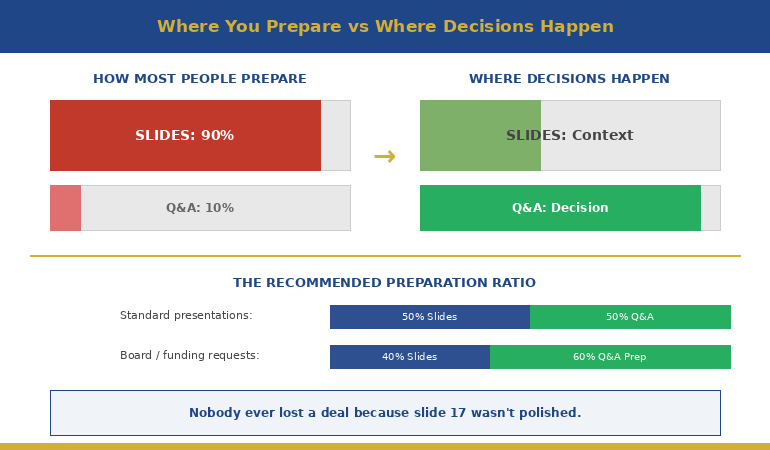
Quick answer: Senior executives rarely make decisions during your slides. They use the presentation to gather context, then use Q&A to test your thinking, probe your assumptions, and decide whether they trust your judgement. Most presenters spend 90% of preparation on slides and 10% on Q&A. The ratio should be closer to 50/50. Below: the strategic Q&A preparation system that turns the most dangerous part of your presentation into the most persuasive.

47 Slides. Standing Ovation. Zero Approval.

A client of mine — a senior director at a financial services firm — spent three weeks building what he called the best presentation of his career. A £3.2M technology investment. Beautiful slides. Compelling narrative. Clear ROI. The kind of deck that makes you think, “This is going to be easy.”

He delivered it flawlessly. Twenty-two minutes, no stumbles, perfect pacing. The CFO nodded throughout. The CTO leaned forward twice. When he finished, there was a pause — the good kind, the kind that feels like the room is absorbing what you’ve said.

Then the CFO asked one question: “What happens to the existing vendor contract if we approve this in Q2 instead of Q1?”

He didn’t know. Not because the answer was complicated — it was a straightforward penalty clause he hadn’t reviewed. He said, “I’ll need to come back to you on that.” The CTO followed with, “And what’s the migration risk if we run both systems in parallel?” He wasn’t sure about that either.

Two questions. Two “I’ll come back to you” answers. The CFO said, “Let’s reconvene when you have the full picture.” The project was delayed four months. By the time he got back in the room, the budget had been reallocated.

His slides were perfect. His Q&A preparation was almost zero. And that’s where the deal died.

In 25 years of banking across JPMorgan Chase, PwC, RBS, and Commerzbank, I’ve watched this pattern repeat in boardroom after boardroom. The presentation goes well. The Q&A collapses. And the presenter walks away confused because they thought the hard part was the slides.

Looking for a structured way to prepare? The Executive Q&A Handling System walks through the question mapping, response architecture, and recovery scripts covered in this article — useful if you’d rather work from a system than build one from scratch.

🎯 Stop Losing Deals in Q&A

The Executive Q&A Handling System gives you the complete preparation framework for the part of your presentation that actually decides outcomes. Question mapping templates, the 3-part executive response structure, “I don’t know” recovery scripts, and hostile question deflection techniques — built from real boardroom situations across banking and consulting.

Designed for senior professionals preparing for board reviews, funding requests, and major proposals where Q&A decides the outcome.

Get the Executive Q&A Handling System → £39

Instant download — use it for your next Q&A this week.

Why Executives Actually Decide During Q&A (Not During Your Slides)

Here’s something most presenters don’t understand about senior audiences: they don’t use your presentation to make a decision. They use it to build a mental model of your proposal. The decision-making happens during Q&A.

There’s a reason for this. Senior executives sit through presentations all day. They’ve learned that slides represent the presenter’s best case — the version where everything works, the risks are manageable, and the ROI is compelling. Of course it looks good. You built it to look good.

What they can’t see in your slides is how you think under pressure. Whether you’ve considered the second-order consequences. Whether you understand the risks you didn’t put on the slide. Whether your confidence comes from deep understanding or surface preparation.

Q&A reveals all of this in minutes.

When a CFO asks “what happens if the timeline slips by six months?” she’s not looking for a perfect answer. She’s looking at how you respond. Do you have the number? Do you have a framework for thinking about it? Do you panic, deflect, or engage? That response tells her more about the viability of your proposal than your entire slide deck.

This is why the same presentation can succeed or fail depending entirely on what happens after “Any questions?” The slides get you to the table. The Q&A decides whether you leave with approval.

The 90/10 Preparation Mistake (And What the Ratio Should Be)

Most presenters spend roughly 90% of their preparation time on slides — designing, refining, rehearsing the narrative — and leave maybe 10% for thinking about questions. Often that 10% happens the night before, when you lie in bed imagining worst-case scenarios without actually preparing responses.

The problem isn’t that slides don’t matter. They do. A poor executive presentation structure will lose your audience before you reach Q&A. But once your slides are solid — clear structure, clear recommendation, clear ask — additional slide refinement produces diminishing returns. The marginal value of your twentieth revision of slide 14 is close to zero.

The marginal value of preparing for the CFO’s top three questions? Enormous.


Diagram showing presentation preparation ratio versus where executive decisions actually happen during Q&A

Here’s the preparation ratio I recommend to my clients: once your slides are structurally sound, split your remaining preparation time 50/50 between rehearsing the presentation and preparing for Q&A. For a high-stakes presentation — a board approval, a funding request, a major proposal — I’d go further: 40% slides, 60% Q&A preparation.

That feels counterintuitive. It felt counterintuitive to the senior director who lost the £3.2M deal too. But after working with hundreds of executives through high-stakes presentations, I can tell you: nobody ever lost a deal because slide 17 wasn’t polished enough. Plenty have lost deals because they couldn’t answer question two.

Don’t want to build the question map from scratch?

The Executive Q&A Handling System gives you the question mapping templates, response structures, and recovery scripts ready to run before any high-stakes presentation. £39, instant download — keep them for every future Q&A.

Get the Q&A Handling System →

The Question Map: Predicting What They’ll Ask

The biggest myth about Q&A is that questions are unpredictable. They’re not. In my experience, you can predict the majority of the questions you’ll receive — if you prepare systematically rather than hoping for the best.

I teach my clients a technique called Question Mapping. Before any high-stakes presentation, you build a map of likely questions organised by stakeholder and by category. Here’s how it works:

Step 1: List every person in the room and their primary concern.

The CFO cares about cost, risk, and return. The CTO cares about technical feasibility and integration. The COO cares about operational disruption. The CEO cares about strategic alignment and timing. Each person will ask questions through their lens. Knowing the lens tells you the question before it’s asked.

Step 2: For each person, write the three questions they’re most likely to ask.

Not the questions you’d like them to ask — the questions they’ll actually ask based on their role, their concerns, and any history you have with them. If the CFO challenged your timeline last time, she’ll challenge your timeline again. Prepare for that specific challenge.

Step 3: For each question, prepare your answer AND your evidence.

The answer is what you’ll say. The evidence is what you’ll show — a backup slide, a data point, a reference to a comparable situation. This is where appendix slides become essential. They’re not afterthoughts; they’re your Q&A arsenal.

Step 4: Identify the two or three questions you can’t answer yet — and prepare honest responses for those too.

Knowing what you don’t know is just as important as knowing what you do. We’ll cover how to handle these in a moment.

When my client lost the £3.2M deal, I asked him afterwards: “Did you do a question map?” He looked at me blankly. He’d spent three weeks on slides and zero minutes mapping the questions his audience was guaranteed to ask. The CFO’s question about the vendor contract penalty wasn’t obscure — it was the most obvious financial question in the room. Ten minutes of question mapping would have caught it.

Answer Architecture: The 3-Part Executive Response

Knowing what they’ll ask is half the battle. The other half is structuring your answer so it lands with a senior audience. Most people answer executive questions the way they’d answer in conversation — they think out loud, circle around the point, add context, and eventually arrive at the answer. For a peer, this is fine. For a CFO with six more meetings after yours, it’s fatal.

I teach a three-part response structure that works for virtually any executive question:

Part 1: Direct Answer (first sentence)

Start with the answer. Not the context, not the caveat, not the background. The answer. “The migration risk is moderate — we estimate two weeks of parallel running with a 15% contingency built in.” The executive now has what they need. Everything after this is supporting detail.

Part 2: One Supporting Point (second sentence)

Give one piece of evidence or reasoning that strengthens your answer. “We’ve based that on the migration timeline from the Singapore rollout last year, which had similar complexity.” One point. Not three. Not a data dump. One credible reference that shows your answer isn’t a guess.

Part 3: The Bridge (optional third sentence)

If it’s useful, connect back to a point from your presentation or redirect to a related strength. “That’s actually why we’ve built the phased approach I showed on slide 8 — it gives us an exit ramp at each stage.” This turns a defensive moment (answering a question) into an offensive one (reinforcing your proposal).

Three sentences. Sometimes two. Never seven. The discipline of brevity in Q&A communicates the same thing it communicates in your slides: you know what matters and you’re not afraid to be direct about it.

📊 Question Maps + Response Frameworks + Recovery Scripts

The Executive Q&A Handling System gives you the complete toolkit: question mapping templates for every stakeholder type, the 3-part response structure with worked examples, “I don’t know” recovery scripts, hostile question techniques, and preparation checklists you can run before any high-stakes presentation.

Get the Executive Q&A Handling System → £39

Instant download. Built from 25 years of real boardroom Q&A across JPMorgan Chase, PwC, RBS, and Commerzbank.

The Most Powerful Answer: “I Don’t Know, But…”

Here’s something that surprises most of my clients: the executives I’ve worked with over 25 years don’t expect you to know everything. What they can’t tolerate is pretending you do when you don’t.

When you bluff in Q&A, senior people can tell. They’ve sat through thousands of presentations. They know the difference between someone who’s genuinely confident in their answer and someone who’s constructing one in real time. Bluffing doesn’t just fail to convince them — it actively undermines every other answer you’ve given, including the ones you were right about.

“I don’t know” — when it’s honest — is a trust-building statement. But it needs a second half.

The formula: “I don’t have that figure yet. Here’s what I do know: [related fact]. I’ll have the specific answer to you by [date].”

Three elements: honest admission, related context that shows you understand the territory, and a specific commitment to follow up. The admission shows integrity. The related context shows competence. The commitment shows accountability. Together, they communicate something more valuable than the actual answer: that you’re someone who can be trusted with a £3.2M decision.

My client who lost the deal said “I’ll need to come back to you on that” — which is close but missing the middle element. He didn’t demonstrate that he understood the territory around the question. Compare that with: “I don’t have the exact penalty clause figure, but I know the contract has a 90-day notice period and we’d be within that window for a Q2 start. I’ll confirm the specific financial impact by Friday.”

Same honesty. Completely different impression. The first version says “I didn’t prepare for this.” The second says “I understand the landscape even though I’m missing one data point.”

For a deeper dive into handling the really difficult questions — the hostile ones, the ambush questions, the ones designed to put you on the spot — this guide covers specific techniques for those situations.

How do you prepare for Q&A after an executive presentation?

Use a Question Map: list every person in the room and their primary concern, write the three most likely questions each will ask, prepare direct answers with supporting evidence, and identify the questions you can’t answer yet. Aim to spend at least 50% of your remaining preparation time on Q&A once your slides are structurally sound.

Why do good presentations still fail to get approval?

Because executives don’t decide during slides — they decide during Q&A. Your slides present your best case. Q&A reveals how deeply you’ve thought about risks, alternatives, and second-order consequences. Two unanswered questions can undo twenty-two minutes of perfect delivery.

What’s the best way to answer questions from senior executives?

Use the 3-part structure: direct answer first (one sentence), one supporting point (evidence or reasoning), then an optional bridge back to your presentation. Keep responses under three sentences. Brevity in Q&A signals confidence and clarity — rambling signals uncertainty.

🎓 25 Years of Boardroom Q&A. One System.

The Executive Q&A Handling System is built from 25 years of corporate banking and 16 years coaching senior professionals across financial services, healthcare, technology, and government. Every framework — the question map, the 3-part response, the “I don’t know” recovery script — comes from real boardroom situations where Q&A decided whether the room said yes.

Designed for senior professionals who present to boards, investment committees, and executive sponsors where Q&A is the deciding moment.

Get the Executive Q&A Handling System → £39

Instant download — lifetime access to every framework and template.

Frequently Asked Questions

How long should I spend preparing for Q&A versus preparing slides?

Once your slide structure is solid, split remaining preparation time at least 50/50 between presentation rehearsal and Q&A preparation. For board-level or funding presentations, consider 40/60 in favour of Q&A. No executive ever rejected a proposal because slide 17 wasn’t polished — but many have rejected proposals because the presenter couldn’t answer question two.

What if I’m asked a question I genuinely haven’t thought of?

Use the “I don’t know, but…” formula: honest admission, one related fact that shows you understand the territory, and a specific commitment to follow up with the answer by a named date. This builds more trust than a bluffed answer that unravels under follow-up questioning.

Should I invite questions during the presentation or only at the end?

For senior audiences, invite questions throughout. Executives don’t wait well — if they have a question on slide 4, they won’t be listening to slides 5 through 20. Saying “I welcome questions at any point” also signals confidence. If the question is answered on a later slide, say so: “Great question — I cover that in two slides. Shall I jump ahead or continue?”

How do I handle it when the Q&A goes completely off-topic?

Acknowledge the question’s value, then redirect: “That’s an important point, and it deserves proper attention. Can I take that offline with you after this meeting so we can give it the time it needs? I want to make sure we cover [the decision you need] in the time we have left.” This respects the questioner while protecting your agenda.

📬 The Winning Edge Newsletter

Weekly executive presentation strategies — Q&A preparation, slide structures, and boardroom techniques that actually work. No filler.

Subscribe Free →

Related reading: The breathing technique that stopped my pre-presentation vomiting — managing the physical side of high-stakes presentations, including Q&A anxiety.

Your next step: Before your next presentation, take fifteen minutes and build a Question Map. List every person in the room, their primary concern, and the three questions they’re most likely to ask. Prepare a direct answer for each one. That fifteen minutes will do more for your outcome than another three hours of slide refinement. And if you want the complete Q&A preparation system — question maps, response frameworks, recovery scripts, and hostile question techniques — the Executive Q&A Handling System (£39) gives you everything you need to turn the most dangerous part of your presentation into the most persuasive.

About the Author

Mary Beth Hazeldine is the Owner & Managing Director of Winning Presentations. With 25 years of corporate banking experience at JPMorgan Chase, PwC, Royal Bank of Scotland, and Commerzbank, she has delivered high-stakes presentations in boardrooms across three continents.

A qualified clinical hypnotherapist and NLP practitioner, Mary Beth combines executive communication expertise with evidence-based techniques for managing presentation anxiety. She has trained senior professionals and executive audiences over many years and supported high-stakes funding and approval presentations throughout her career.

Book a discovery call | View services

03 Jan 2026
Businesswoman in a navy blazer speaks and gestures at a meeting around a conference table.

How to Handle Difficult Questions in a Presentation: The Executive’s Playbook [2026]

The presentation went perfectly. Then someone asked that question — and everything fell apart.I’ve seen it happen to brilliant executives. Flawless slides. Compelling narrative. Complete command of the room. Then a board member asks something unexpected, and suddenly they’re fumbling, defensive, or worse — completely stuck.Learning to handle difficult questions in presentations isn’t optional at senior levels. It’s often where decisions are actually made. Your slides build the case; your answers close it.

After 25 years in banking and training executives on high-stakes presentations, I’ve developed a systematic approach to handling difficult questions. Not tricks to deflect or delay — genuine techniques that demonstrate competence and build trust, even when you don’t have a perfect answer. If the anxiety behind difficult questions is your primary challenge, our guide to overcoming Q&A anxiety addresses the psychological side.

Here’s the playbook. For a broader look at Q&A preparation, see our guide to mastering presentation Q&A.

Heading into Q&A under pressure?

If you have a high-stakes presentation in the next few weeks where difficult questions are likely, the Executive Q&A Handling System gives you the complete preparation framework — structured, step-by-step, and ready to use before you walk in.

Explore the System →

Why Difficult Questions Derail Presenters (And How to Stay in Control)

When someone asks a challenging question, your brain perceives it as a threat. The amygdala activates. Cortisol spikes. Your prefrontal cortex — the part responsible for clear thinking — goes partially offline.

This is why intelligent, prepared people suddenly forget everything they know when asked a tough question. It’s not incompetence; it’s neuroscience.

The key to handling difficult questions is having a system that works even when your brain is under stress. A framework so practiced that it becomes automatic — allowing you to respond thoughtfully while your nervous system settles.

That’s what I’m going to give you.

The PAUSE framework for handling difficult presentation questions - Pause, Acknowledge, Understand, Structure, Engage with example phrases for each step

The 4-Step Framework to Handle Difficult Questions

Before we get to specific techniques, here’s the master framework for handling any difficult question:

Step 1: Pause (2-3 seconds)

Don’t rush to answer. A brief pause signals thoughtfulness, gives you time to process, and prevents reactive responses you’ll regret. Say “That’s a good question” if you need more time — but only once per presentation.

Step 2: Clarify (if needed)

Make sure you understand what’s actually being asked. “Just to make sure I understand — are you asking about [X] or [Y]?” This buys time and ensures you answer the right question.

Step 3: Respond (using one of the 7 techniques below)

Give a structured, confident response. Even “I don’t know” can be delivered with authority when framed correctly.

Step 4: Bridge back (when appropriate)

Connect your answer to your core message or next steps. “And that’s exactly why we’re proposing [your recommendation].”

7 Techniques to Handle Difficult Questions in Any Presentation

Here are seven techniques for the seven types of difficult questions you’ll face.

Technique 1: The Honest Unknown — When You Don’t Know the Answer

The worst thing you can do is fake it. Executives have finely tuned BS detectors. They’d rather hear “I don’t know” than watch you make something up.

The formula:

  • Acknowledge what you don’t know
  • Explain what you do know
  • Commit to a follow-up

Example responses:

“I don’t have that specific number with me, but I can tell you [related information you do know]. I’ll get you the exact figure by end of day.”

“That’s outside my area of expertise, but [colleague name] would know. Let me connect you after this meeting.”

“Honestly, I haven’t analysed that scenario. What I can tell you is [what you have analysed]. Would it be helpful if I ran those numbers and came back to you?”

What makes this work: You maintain credibility by being honest, demonstrate competence by sharing related knowledge, and show professionalism by committing to follow-up.

Technique 2: The Reframe — When the Question Misses the Point

Sometimes people ask the wrong question. They’re focused on a detail when the bigger picture matters more, or they’re operating from an outdated assumption.

The formula:

  • Acknowledge their concern
  • Redirect to the more important issue
  • Answer the reframed question

Example responses:

“That’s a fair question, and let me address it by zooming out a bit. The real issue isn’t [their focus] — it’s [bigger issue]. Here’s what the data shows…”

“I understand why you’d ask that. What I’ve found is that [their question] is actually a symptom of [underlying cause]. Let me explain…”

“That’s interesting — we initially focused there too. But when we dug deeper, we realised [reframe]. Here’s what we learned…”

What makes this work: You’re not dismissing their question — you’re demonstrating deeper understanding by addressing the real issue.

Technique 3: The Acknowledge and Pivot — When You’re Asked About Weaknesses

Every proposal has weaknesses. Skilled questioners will find them. Trying to deny weaknesses destroys credibility; the key is how you acknowledge and contextualise them. For a deeper look at hostile questioning in governance settings, see our guide to risk committee Q&A preparation.

The formula:

  • Acknowledge the weakness directly
  • Provide context or mitigation
  • Pivot to strengths or next steps

Example responses:

“You’re right — that is a risk. We’ve identified it too. Here’s how we’re mitigating it: [mitigation]. And here’s why we believe the opportunity still outweighs the risk: [context].”

“Fair point. The Q2 numbers are soft. What’s encouraging is [positive context], and our plan to address Q2 is [action]. We expect to see improvement by [timeline].”

“Yes, the timeline is aggressive. We’ve built in [contingency], and if we hit [milestone], we’ll know we’re on track. If not, we’ll adjust at [checkpoint].”

What makes this work: You show self-awareness and preparedness. Trying to spin weaknesses as strengths is transparent and damages trust; acknowledging them directly builds it.

Handle Every Hostile Question With Structured Confidence

The Executive Q&A Handling System (£39, instant access) gives you the complete framework for handling Q&A in board presentations, investor pitches, and executive updates — plus 51 AI prompts to prepare for tough questions before they’re asked.

For a complete framework covering all seven Q&A techniques with scripts and AI prompts, the Executive Q&A Handling System (£39) compresses weeks of Q&A practice into one focused session.

Technique 4: The Evidence Response — When You’re Challenged on Facts

When someone challenges your data or conclusions, you need to defend without being defensive.

The formula:

  • Cite your source or methodology
  • Acknowledge limitations if relevant
  • Offer to share details

Example responses:

“That’s based on [source] — the same methodology we used in [previous project]. I can share the full dataset after this meeting if that would be helpful.”

“You’re right to question that. The number comes from [source]. It has some limitations — specifically [limitation] — but it’s the best available data, and directionally we’re confident in the conclusion.”

“That’s a different figure than what I’ve seen. Can I ask where yours comes from? [Listen] Interesting — we may be measuring slightly different things. Let me reconcile these and get back to you.”

What makes this work: You demonstrate rigour without being defensive. Offering to share data shows confidence; being open to reconciliation shows intellectual honesty.

Technique 5: The Boundary — When the Question Is Out of Scope

Sometimes questions are legitimate but not appropriate for this meeting — too detailed, off-topic, or beyond your authority to answer.

The formula:

  • Acknowledge the question’s validity
  • Explain why now isn’t the right time/place
  • Offer an alternative path

Example responses:

“That’s an important question, and it deserves more time than we have here. Can we schedule a follow-up specifically to dig into that?”

“I want to give that the attention it deserves. It’s a bit outside the scope of today’s decision, but let me take it offline and come back to you with a thorough answer.”

“That’s really a question for [appropriate person/team]. I can connect you, or we can include them in a follow-up conversation.”

What makes this work: You’re not dodging — you’re managing scope appropriately. The key is always offering a path forward.

Technique 6: The Bridge — When You’re Asked About Confidential Information

Sometimes you know the answer but can’t share it — ongoing negotiations, personnel matters, unreleased information.

The formula:

  • Acknowledge the question without confirming/denying
  • Explain your constraint
  • Share what you can

Example responses:

“I’m not able to discuss specifics on that right now — there are some sensitivities involved. What I can tell you is [related information you can share].”

“That touches on some ongoing discussions I can’t comment on. Once we have something to announce, you’ll be among the first to know. In the meantime, [redirect to what you can discuss].”

“I appreciate you asking. I need to be careful here because [reason]. What I can say is [safe information].”

What makes this work: You’re being honest about your constraints rather than pretending the question doesn’t exist. Transparency about your limitations builds trust.

Technique 7: The Hostile Deflection — When the Question Is an Attack

Occasionally, questions aren’t really questions — they’re attacks. Someone’s trying to make you look bad, derail the meeting, or advance their own agenda.

The formula:

  • Stay calm (visibly)
  • Acknowledge any legitimate core to the question
  • Redirect to productive ground

Example responses:

“I hear your concern. [Pause] Let me address the substantive point there: [address any legitimate element]. What I’d suggest we focus on is [productive direction].”

“That’s one perspective. Here’s how I see it: [your perspective]. But rather than debate that, let me ask — what would you need to see to feel comfortable with this proposal?”

“I notice some strong feelings there. [Pause] Can you help me understand specifically what your concern is? I want to make sure I’m addressing the right thing.”

What makes this work: You refuse to escalate while maintaining your authority. The visible calm is crucial — everyone in the room notices who keeps their composure.

How to Prepare for Difficult Questions Before They’re Asked

The best way to handle difficult questions is to anticipate them. Here’s my preparation process:

Step 1: List every possible objection to your proposal. Be honest — what are the weaknesses? What will sceptics focus on?

Step 2: Identify who will ask what. Think about each stakeholder’s priorities. The CFO will ask about cost. The COO will ask about implementation. What’s each person’s likely question?

Step 3: Prepare specific responses. For each anticipated question, script a response using one of the seven techniques above.

Step 4: Practice out loud. Have a colleague ask you the tough questions. Get comfortable delivering your responses under mild pressure.

Step 5: Prepare your “I don’t know” response. Even with perfect preparation, someone will ask something unexpected. Know exactly how you’ll handle it with grace.

Handle Difficult Questions: Body Language That Builds Confidence

Your non-verbal response matters as much as your words. When asked a difficult question:

Maintain eye contact with the questioner while they ask. This signals that you’re taking them seriously.

Don’t rush. Pause after they finish. Take a breath. This demonstrates composure and prevents reactive answers.

Keep your posture open. Don’t cross your arms, step back, or look at the floor. These signals undermine whatever words you say.

Speak at normal pace. When stressed, people speed up. Consciously slow down. A measured response sounds more confident than a rushed one.

End with eye contact. After answering, check back with the questioner. “Does that address your concern?” This shows confidence and invites dialogue rather than shutting it down.

Handle Difficult Questions: Common Mistakes to Avoid

Mistake 1: Getting defensive. Defensiveness signals that you feel attacked — which suggests vulnerability. Stay neutral and curious instead.

Mistake 2: Over-explaining. When nervous, people talk too much. Answer the question, then stop. Silence after your answer is fine.

Mistake 3: Interrupting the question. Let them finish, even if you think you know where they’re going. Interrupting is rude and sometimes leads you to answer the wrong question.

Mistake 4: Saying “That’s a great question” repeatedly. Once is fine. More than that sounds like a stalling tactic.

Mistake 5: Promising what you can’t deliver. In the pressure of the moment, don’t commit to timelines, numbers, or actions you can’t actually deliver. It’s better to say “I’ll look into that” than to over-promise.

Difficult questions do's and don'ts - 7 best practices like pause before answering and stay calm versus 7 mistakes to avoid like rushing to fill silence and getting defensive

Handle Difficult Questions: Common Scenarios

How do you handle questions you weren’t expecting at all?

Use the Honest Unknown technique. Pause, acknowledge that it’s a good question, share what you do know that’s relevant, and commit to following up. Never bluff.

What if someone keeps asking hostile questions?

After two hostile questions, it’s appropriate to say: “I sense some concerns here. Would it be helpful to pause and discuss what’s driving these questions? I want to make sure we’re addressing the real issue.”

How do you handle questions that expose a genuine mistake?

Own it directly. “You’re right — that was an error on our part. Here’s what happened, here’s what we’ve learned, and here’s what we’re doing to prevent it happening again.” Attempting to minimise genuine mistakes destroys credibility.

What if you’re asked the same difficult question by multiple people?

This signals you haven’t adequately addressed it. After the second time, say: “I’m noticing this is coming up repeatedly. Let me try to address it more fully…” Then expand your answer or ask what specifically isn’t being addressed.

Stop Losing Q&A Credibility You Worked Hard to Build

The Executive Q&A Handling System (£39, instant access): seven tested Q&A techniques that signal leadership under pressure, scripts for hostile and loaded questions, the Parking Lot method and four other frameworks for managing questions that derail discussions, and 51 AI prompts to stress-test your answers before the room does.

Designed for executives who can’t afford to fumble the questions that follow a strong presentation.

Get the Executive Q&A Handling System →

Designed for directors and senior managers preparing for board-level, investor, and governance presentations.

Get The Winning Edge

Weekly techniques for high-stakes presentations from 25 years in corporate boardrooms.

Subscribe Free →


Mary Beth Hazeldine spent 25 years in corporate banking at JPMorgan Chase, PwC, Royal Bank of Scotland, and Commerzbank. As Owner & Managing Director of Winning Presentations. A qualified clinical hypnotherapist and NLP practitioner, she advises executives across financial services, healthcare, technology, and government on presenting with confidence and credibility.