Tag: executive presentation

21 Jan 2026
Board presentation best practices learned from watching 100 board meetings - the 5 patterns that separate approval from rejection

Board Presentation Best Practices: What I Learned Watching 100 Board Meetings

Quick answer: The board presentation best practices that actually matter aren’t about slide design or speaking technique. After watching more than 100 board presentations across banking, tech, and professional services, I found five patterns that separated the presentations that got approved from the ones that got “let’s table this.” Lead with your recommendation in the first 60 seconds. Pre-wire key stakeholders before you enter the room. Answer the question they’re actually asking, not the one you prepared for.

⚡ Board presentation in the next 48 hours? Do these 5 things:

These five patterns sit at the heart of any serious executive presentation training — slides matter, but the structural choices below are what actually move the room.

1. Put your recommendation on slide 1—not slide 12

2. Call your toughest stakeholder today and ask: “What would make you say no?”

3. Cut your deck to 6-8 slides maximum (you have 15 minutes, not 45)

4. Prepare for “What’s the risk?” and “What happens if we don’t?”

5. Rehearse your opening sentence until you can say it without slides

These five steps have saved more board presentations than any template.

If your board meeting is in the next 7 days, use this article as your run-of-show.

What I Learned in the Room

In my 24 years in corporate banking—at JPMorgan Chase, PwC, Royal Bank of Scotland, and Commerzbank—I sat through more than 100 board presentations. Sometimes I was presenting. More often, I was watching.

I watched a biotech CEO lose a £4M funding round in 11 words. His opening line was: “I’m going to walk you through our company history and then get to the ask.”

The board chair looked at her phone. Two members started side-conversations. He’d lost them before slide 2.

The next presenter—same board, same day—opened differently: “We’re requesting £2.3M to capture a market window that closes in Q2. Here’s why the math works.”

She got her funding in 12 minutes.

Same board. Same room. Completely different outcomes.

The difference wasn’t charisma. It wasn’t slide design. It was a set of patterns I started to notice again and again—board presentation best practices that nobody teaches but every successful presenter follows instinctively.

Here are the five that matter most.

⭐ Get Board-Ready Slides in 30 Minutes

Stop building presentations that get “let’s table this.” Use the slide structures built from patterns observed across 100+ board meetings in corporate banking, tech, and professional services.

The Executive Slide System includes:

  • 12 decision-first slide templates for board presentations
  • The “recommendation-first” opening structure
  • CFO-ready financial summary layouts
  • Risk/mitigation frameworks that pre-empt objections

Get the Executive Slide System → £39

Built from 24 years in corporate banking. Used by executives preparing for board meetings, investor pitches, and budget approvals.

Pattern 1: The 60-Second Rule

The best board presenters I watched all did the same thing: they stated their recommendation within the first 60 seconds.

Not context. Not background. Not “let me walk you through how we got here.”

Recommendation first.

What most presenters do:

“Good morning. I’m going to take you through our Q3 performance, then discuss market conditions, and then share our proposed direction for Q4.”

What the best presenters do:

“We’re requesting approval for a £500K expansion into the German market. Based on our Q3 pilot, we project 3x ROI within 18 months. I’ll show you the numbers and address the key risks.”

The board doesn’t want to discover your recommendation. They want to evaluate it. Give them the answer, then give them the evidence to test it.

This is the single most important of all board presentation best practices—and the one most people get backwards.

Learn more about board presentation structure and why decision-first ordering works.

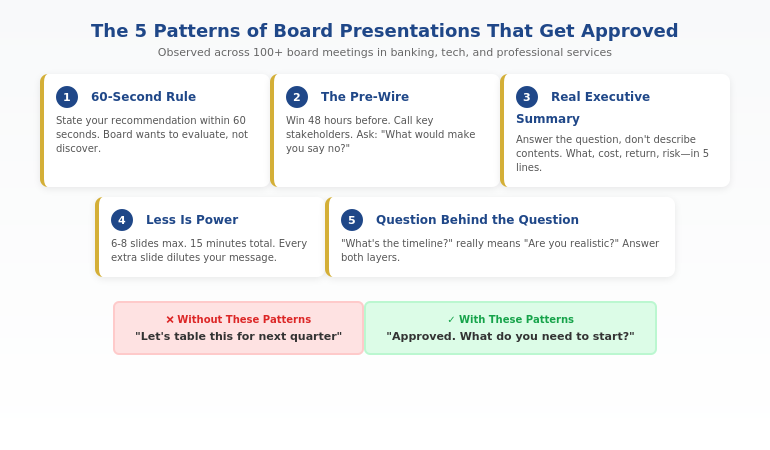
The 5 patterns that the best board presentations share - decision-first opening, executive summary that answers the real question, pre-wired stakeholders, 60-second rule, and prepared for the question behind the question


Pattern 2: The Pre-Wire

Here’s what surprised me most: the best board presentations weren’t won in the boardroom. They were won in the 48 hours before.

Every presenter who consistently got approvals did the same thing—they pre-wired their key stakeholders.

That means:

  • Calling the CFO before the meeting to understand their specific concerns
  • Sending the CEO a 2-minute preview: “Here’s what I’m recommending and why”
  • Asking the toughest critic: “What would make you say no?”

By the time they walked into the boardroom, the decision was 80% made. The presentation was confirmation, not persuasion.

The presenters who relied entirely on the meeting itself? They were always fighting uphill.

Pre-wire script that works:

“I’m presenting to the board on Tuesday about [X]. I’d value 5 minutes of your perspective beforehand—specifically, what concerns would you want me to address? I’d rather know now than be surprised in the room.”

Nobody ever says no to this request. And the intelligence you gather transforms your presentation.

Presenting to a board soon? The Executive Slide System includes pre-wire email templates alongside the slide structures—everything you need to win before you walk in the room. Get the templates →

Pattern 3: The Real Executive Summary

Almost every board presentation has an “executive summary” slide. Almost none of them are actually useful.

Most executive summaries are really “executive overviews”—they describe what the presentation contains rather than answering the question the board is asking.

Typical executive summary:

“This presentation covers our Q3 performance, market analysis, competitive landscape, and strategic recommendations.”

Effective executive summary:

“Q3 exceeded target by 12%. We recommend accelerating the Germany expansion by 6 months. Cost: £500K. Projected return: £1.5M by Q4 2027. Key risk: talent acquisition timeline.”

The second version answers what the board actually wants to know: What happened? What do you want? What does it cost? What do we get? What could go wrong?

For a deeper dive, see how to write an executive summary slide that actually drives decisions.


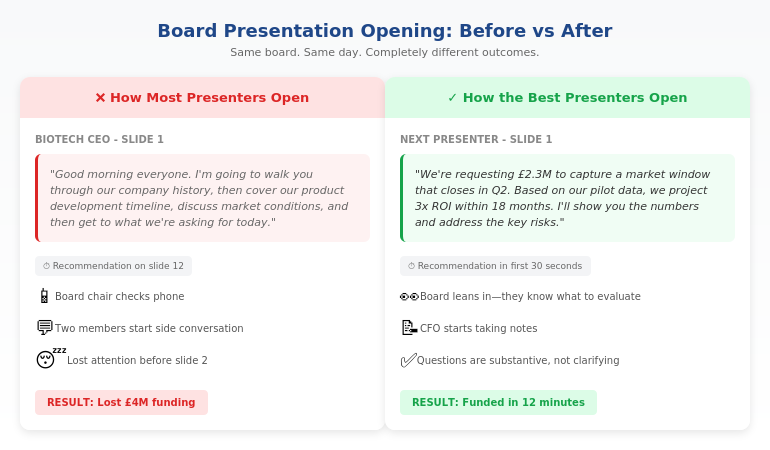
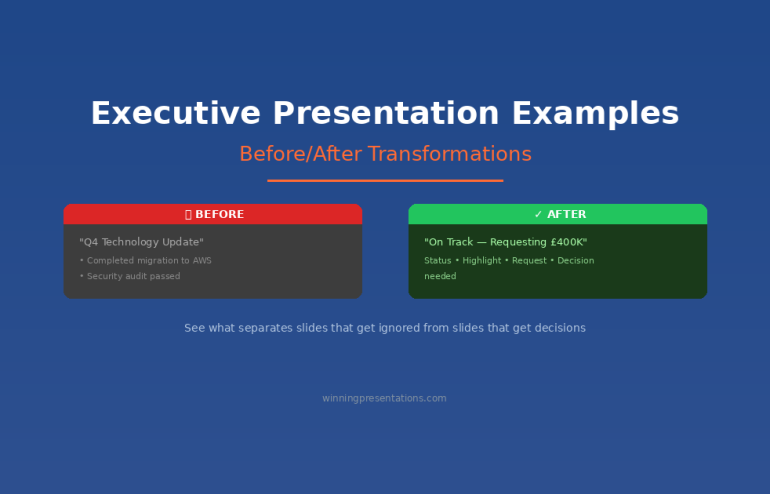
Before and after board presentation comparison showing how the best presenters structure their opening versus how most presenters start

⭐ Executive Summary Templates That Actually Work

Stop writing “overview” slides that waste board members’ time. Get the decision-first executive summary structure used by presenters who consistently get approval.

Inside the Executive Slide System:

  • The 5-line executive summary formula
  • Board-ready recommendation slides
  • Risk/mitigation layouts that build confidence
  • Financial summary templates CFOs trust

Get Board-Ready Templates → £39

Instant download. Works with PowerPoint, Google Slides, and Keynote.

This pays for itself the first time you get “approved” instead of “let’s revisit this next quarter.”

Pattern 4: Less Is Power

The worst board presentations I watched had 30+ slides. The best had 6-8.

This isn’t about attention spans. It’s about signal-to-noise ratio.

Every slide you add dilutes your core message. Every “nice to have” data point competes with your “need to know” evidence. Every background slide steals time from the discussion that actually matters.

The presenters who got approvals were ruthless editors. They asked: “Does this slide move my recommendation forward or just make me feel thorough?”

The board presentation math:

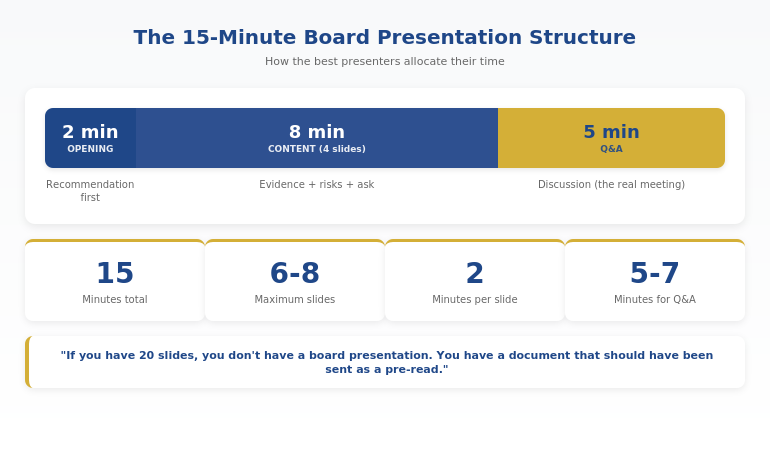
  • You have 15-20 minutes (including Q&A)
  • Plan for 2 minutes per slide maximum
  • Reserve 5-7 minutes for questions
  • That leaves room for 6-8 slides

If you have 20 slides, you don’t have a board presentation. You have a document that should have been sent as a pre-read.

Board presentation timing breakdown showing optimal structure for a 15-minute board slot

Pattern 5: The Question Behind the Question

The best board presenters I watched never answered the literal question. They answered the question behind the question.

When a board member asks “What’s the timeline?”, they’re often really asking “Are you being realistic or optimistic?”

When they ask “Who’s leading this?”, they’re often really asking “Do you have the right talent to execute?”

When they ask “What are the risks?”, they’re often really asking “Have you thought this through or are you just excited?”

The presenters who got approvals had prepared for both layers. They answered the surface question quickly, then addressed the underlying concern.

Example:

Board member: “What happens if the German market doesn’t respond as expected?”

Effective answer: “If we miss adoption targets by more than 20% in Q1, we pause Phase 2 and reallocate budget to UK expansion. We’ve built explicit exit criteria into the plan.”

The surface question was about Germany. The real question was “Do you have a Plan B?” Answering both builds the confidence that gets approvals.

For more on handling board questions, see how to present to a board of directors.

Related: If board presentations feel high-stakes and the pressure triggers physical symptoms or anxiety, see how to manage fear of public speaking at work—especially the day-before protocol that helps you arrive composed.

Ready to build slides that follow these patterns? The Executive Slide System gives you the exact templates—recommendation-first structures, executive summaries that work, and risk layouts CFOs trust. Get the templates →

Common Questions About Board Presentations

What makes a good board presentation?

A good board presentation leads with a clear recommendation, provides evidence that addresses board members’ specific concerns, and respects their time. The best board presentation best practices focus on decision clarity rather than comprehensive information. Board members want to evaluate a recommendation, not discover it. Structure your presentation so they know your position within 60 seconds.

How long should a board presentation be?

Most board presentations should be 6-8 slides maximum, designed to fill 10-15 minutes including Q&A. You typically have 15-20 minutes total, and the discussion matters more than the presentation. Plan for 2 minutes per slide and reserve at least 5 minutes for questions. If your deck is longer, it’s a document—send it as a pre-read instead.

What do board members want to see?

Board members want to see: (1) your recommendation stated clearly upfront, (2) the financial impact and investment required, (3) the key risks and how you’ll mitigate them, and (4) the timeline and success metrics. They don’t want background context, market education, or comprehensive data. They want decision-ready information that lets them evaluate your recommendation.

⭐ Turn These Patterns Into Your Next Board Deck

You’ve seen what the best presenters do. Now build slides that follow the same patterns—recommendation-first structure, real executive summaries, and layouts that earn trust.

The Executive Slide System gives you:

  • 12 board-ready slide templates
  • Decision-first opening structures
  • Executive summary frameworks that work
  • Risk and financial layouts CFOs trust

Get the Executive Slide System → £39

Built from patterns observed across 100+ board presentations. Instant download, works immediately.

FAQ

How do I present to a board for the first time?

For your first board presentation: (1) Pre-wire at least one board member or your sponsor beforehand—ask what concerns to address. (2) Lead with your recommendation, not background. (3) Keep slides to 6-8 maximum. (4) Rehearse your opening sentence until you can deliver it confidently without notes. (5) Prepare for “What’s the risk?” and “What happens if we wait?”—these questions come up in almost every board meeting.

Should I use slides or speak without them?

Use slides, but use them as decision tools, not speaker notes. Each slide should answer one question the board needs resolved. Avoid reading from slides or using them as a script. The best board presenters can deliver their core message with or without the deck—slides support the argument, they don’t carry it.

How do I handle tough questions from board members?

Answer the question behind the question. When a board member challenges you, they’re usually testing whether you’ve thought through the risks, not attacking your recommendation. Acknowledge the concern, give a direct answer, then explain your mitigation plan. If you don’t know the answer, say so and commit to following up—credibility matters more than appearing to have all answers.

What’s the biggest mistake in board presentations?

Building up to your recommendation instead of leading with it. Most presenters spend 10 minutes providing context before revealing what they want—by which point they’ve lost the board’s attention. State your recommendation within 60 seconds, then use the rest of your time providing evidence and addressing concerns. Let them evaluate your position, not discover it.

📧 The Winning Edge Newsletter

Weekly board presentation strategies, executive communication insights, and practical frameworks from 24 years in corporate banking. No fluff—just what actually works in boardrooms.

Subscribe Free →

📋 Free: Executive Presentation Checklist

A one-page checklist to run before any board presentation. Covers the 5 patterns above plus 10 additional “go/no-go” criteria. Download it, print it, use it before your next presentation.

Download Free Checklist →

Your Next Step

The five patterns above—the 60-second rule, the pre-wire, the real executive summary, the power of less, and answering the question behind the question—separate board presentations that get approved from ones that get “let’s table this.”

If you have a board presentation coming up, use the 48-hour rescue checklist at the top of this article. Then build slides that match these patterns using the Executive Slide System.

Your board wants to say yes. Make it easy for them.

About the Author

Mary Beth Hazeldine is the Owner & Managing Director of Winning Presentations and a former corporate banker with 24 years of experience at JPMorgan Chase, PwC, Royal Bank of Scotland, and Commerzbank. She has sat in more than 100 board meetings and helped executives secure approvals for budgets, expansions, and strategic initiatives totalling more than £250 million.

Mary Beth is also a qualified clinical hypnotherapist and NLP practitioner who helps executives manage presentation anxiety and build authentic confidence in high-stakes settings.

Book a discovery call | View services

03 Jan 2026
Businesswoman in a navy blazer speaks and gestures at a meeting around a conference table.

How to Handle Difficult Questions in a Presentation: The Executive’s Playbook [2026]

The presentation went perfectly. Then someone asked that question — and everything fell apart.I’ve seen it happen to brilliant executives. Flawless slides. Compelling narrative. Complete command of the room. Then a board member asks something unexpected, and suddenly they’re fumbling, defensive, or worse — completely stuck.Learning to handle difficult questions in presentations isn’t optional at senior levels. It’s often where decisions are actually made. Your slides build the case; your answers close it.

After 25 years in banking and training executives on high-stakes presentations, I’ve developed a systematic approach to handling difficult questions. Not tricks to deflect or delay — genuine techniques that demonstrate competence and build trust, even when you don’t have a perfect answer. If the anxiety behind difficult questions is your primary challenge, our guide to overcoming Q&A anxiety addresses the psychological side.

Here’s the playbook. For a broader look at Q&A preparation, see our guide to mastering presentation Q&A.

Heading into Q&A under pressure?

If you have a high-stakes presentation in the next few weeks where difficult questions are likely, the Executive Q&A Handling System gives you the complete preparation framework — structured, step-by-step, and ready to use before you walk in.

Explore the System →

Why Difficult Questions Derail Presenters (And How to Stay in Control)

When someone asks a challenging question, your brain perceives it as a threat. The amygdala activates. Cortisol spikes. Your prefrontal cortex — the part responsible for clear thinking — goes partially offline.

This is why intelligent, prepared people suddenly forget everything they know when asked a tough question. It’s not incompetence; it’s neuroscience.

The key to handling difficult questions is having a system that works even when your brain is under stress. A framework so practiced that it becomes automatic — allowing you to respond thoughtfully while your nervous system settles.

That’s what I’m going to give you.

The PAUSE framework for handling difficult presentation questions - Pause, Acknowledge, Understand, Structure, Engage with example phrases for each step

The 4-Step Framework to Handle Difficult Questions

Before we get to specific techniques, here’s the master framework for handling any difficult question:

Step 1: Pause (2-3 seconds)

Don’t rush to answer. A brief pause signals thoughtfulness, gives you time to process, and prevents reactive responses you’ll regret. Say “That’s a good question” if you need more time — but only once per presentation.

Step 2: Clarify (if needed)

Make sure you understand what’s actually being asked. “Just to make sure I understand — are you asking about [X] or [Y]?” This buys time and ensures you answer the right question.

Step 3: Respond (using one of the 7 techniques below)

Give a structured, confident response. Even “I don’t know” can be delivered with authority when framed correctly.

Step 4: Bridge back (when appropriate)

Connect your answer to your core message or next steps. “And that’s exactly why we’re proposing [your recommendation].”

7 Techniques to Handle Difficult Questions in Any Presentation

Here are seven techniques for the seven types of difficult questions you’ll face.

Technique 1: The Honest Unknown — When You Don’t Know the Answer

The worst thing you can do is fake it. Executives have finely tuned BS detectors. They’d rather hear “I don’t know” than watch you make something up.

The formula:

  • Acknowledge what you don’t know
  • Explain what you do know
  • Commit to a follow-up

Example responses:

“I don’t have that specific number with me, but I can tell you [related information you do know]. I’ll get you the exact figure by end of day.”

“That’s outside my area of expertise, but [colleague name] would know. Let me connect you after this meeting.”

“Honestly, I haven’t analysed that scenario. What I can tell you is [what you have analysed]. Would it be helpful if I ran those numbers and came back to you?”

What makes this work: You maintain credibility by being honest, demonstrate competence by sharing related knowledge, and show professionalism by committing to follow-up.

Technique 2: The Reframe — When the Question Misses the Point

Sometimes people ask the wrong question. They’re focused on a detail when the bigger picture matters more, or they’re operating from an outdated assumption.

The formula:

  • Acknowledge their concern
  • Redirect to the more important issue
  • Answer the reframed question

Example responses:

“That’s a fair question, and let me address it by zooming out a bit. The real issue isn’t [their focus] — it’s [bigger issue]. Here’s what the data shows…”

“I understand why you’d ask that. What I’ve found is that [their question] is actually a symptom of [underlying cause]. Let me explain…”

“That’s interesting — we initially focused there too. But when we dug deeper, we realised [reframe]. Here’s what we learned…”

What makes this work: You’re not dismissing their question — you’re demonstrating deeper understanding by addressing the real issue.

Technique 3: The Acknowledge and Pivot — When You’re Asked About Weaknesses

Every proposal has weaknesses. Skilled questioners will find them. Trying to deny weaknesses destroys credibility; the key is how you acknowledge and contextualise them. For a deeper look at hostile questioning in governance settings, see our guide to risk committee Q&A preparation.

The formula:

  • Acknowledge the weakness directly
  • Provide context or mitigation
  • Pivot to strengths or next steps

Example responses:

“You’re right — that is a risk. We’ve identified it too. Here’s how we’re mitigating it: [mitigation]. And here’s why we believe the opportunity still outweighs the risk: [context].”

“Fair point. The Q2 numbers are soft. What’s encouraging is [positive context], and our plan to address Q2 is [action]. We expect to see improvement by [timeline].”

“Yes, the timeline is aggressive. We’ve built in [contingency], and if we hit [milestone], we’ll know we’re on track. If not, we’ll adjust at [checkpoint].”

What makes this work: You show self-awareness and preparedness. Trying to spin weaknesses as strengths is transparent and damages trust; acknowledging them directly builds it.

Handle Every Hostile Question With Structured Confidence

The Executive Q&A Handling System (£39, instant access) gives you the complete framework for handling Q&A in board presentations, investor pitches, and executive updates — plus 51 AI prompts to prepare for tough questions before they’re asked.

For a complete framework covering all seven Q&A techniques with scripts and AI prompts, the Executive Q&A Handling System (£39) compresses weeks of Q&A practice into one focused session.

Technique 4: The Evidence Response — When You’re Challenged on Facts

When someone challenges your data or conclusions, you need to defend without being defensive.

The formula:

  • Cite your source or methodology
  • Acknowledge limitations if relevant
  • Offer to share details

Example responses:

“That’s based on [source] — the same methodology we used in [previous project]. I can share the full dataset after this meeting if that would be helpful.”

“You’re right to question that. The number comes from [source]. It has some limitations — specifically [limitation] — but it’s the best available data, and directionally we’re confident in the conclusion.”

“That’s a different figure than what I’ve seen. Can I ask where yours comes from? [Listen] Interesting — we may be measuring slightly different things. Let me reconcile these and get back to you.”

What makes this work: You demonstrate rigour without being defensive. Offering to share data shows confidence; being open to reconciliation shows intellectual honesty.

Technique 5: The Boundary — When the Question Is Out of Scope

Sometimes questions are legitimate but not appropriate for this meeting — too detailed, off-topic, or beyond your authority to answer.

The formula:

  • Acknowledge the question’s validity
  • Explain why now isn’t the right time/place
  • Offer an alternative path

Example responses:

“That’s an important question, and it deserves more time than we have here. Can we schedule a follow-up specifically to dig into that?”

“I want to give that the attention it deserves. It’s a bit outside the scope of today’s decision, but let me take it offline and come back to you with a thorough answer.”

“That’s really a question for [appropriate person/team]. I can connect you, or we can include them in a follow-up conversation.”

What makes this work: You’re not dodging — you’re managing scope appropriately. The key is always offering a path forward.

Technique 6: The Bridge — When You’re Asked About Confidential Information

Sometimes you know the answer but can’t share it — ongoing negotiations, personnel matters, unreleased information.

The formula:

  • Acknowledge the question without confirming/denying
  • Explain your constraint
  • Share what you can

Example responses:

“I’m not able to discuss specifics on that right now — there are some sensitivities involved. What I can tell you is [related information you can share].”

“That touches on some ongoing discussions I can’t comment on. Once we have something to announce, you’ll be among the first to know. In the meantime, [redirect to what you can discuss].”

“I appreciate you asking. I need to be careful here because [reason]. What I can say is [safe information].”

What makes this work: You’re being honest about your constraints rather than pretending the question doesn’t exist. Transparency about your limitations builds trust.

Technique 7: The Hostile Deflection — When the Question Is an Attack

Occasionally, questions aren’t really questions — they’re attacks. Someone’s trying to make you look bad, derail the meeting, or advance their own agenda.

The formula:

  • Stay calm (visibly)
  • Acknowledge any legitimate core to the question
  • Redirect to productive ground

Example responses:

“I hear your concern. [Pause] Let me address the substantive point there: [address any legitimate element]. What I’d suggest we focus on is [productive direction].”

“That’s one perspective. Here’s how I see it: [your perspective]. But rather than debate that, let me ask — what would you need to see to feel comfortable with this proposal?”

“I notice some strong feelings there. [Pause] Can you help me understand specifically what your concern is? I want to make sure I’m addressing the right thing.”

What makes this work: You refuse to escalate while maintaining your authority. The visible calm is crucial — everyone in the room notices who keeps their composure.

How to Prepare for Difficult Questions Before They’re Asked

The best way to handle difficult questions is to anticipate them. Here’s my preparation process:

Step 1: List every possible objection to your proposal. Be honest — what are the weaknesses? What will sceptics focus on?

Step 2: Identify who will ask what. Think about each stakeholder’s priorities. The CFO will ask about cost. The COO will ask about implementation. What’s each person’s likely question?

Step 3: Prepare specific responses. For each anticipated question, script a response using one of the seven techniques above.

Step 4: Practice out loud. Have a colleague ask you the tough questions. Get comfortable delivering your responses under mild pressure.

Step 5: Prepare your “I don’t know” response. Even with perfect preparation, someone will ask something unexpected. Know exactly how you’ll handle it with grace.

Handle Difficult Questions: Body Language That Builds Confidence

Your non-verbal response matters as much as your words. When asked a difficult question:

Maintain eye contact with the questioner while they ask. This signals that you’re taking them seriously.

Don’t rush. Pause after they finish. Take a breath. This demonstrates composure and prevents reactive answers.

Keep your posture open. Don’t cross your arms, step back, or look at the floor. These signals undermine whatever words you say.

Speak at normal pace. When stressed, people speed up. Consciously slow down. A measured response sounds more confident than a rushed one.

End with eye contact. After answering, check back with the questioner. “Does that address your concern?” This shows confidence and invites dialogue rather than shutting it down.

Handle Difficult Questions: Common Mistakes to Avoid

Mistake 1: Getting defensive. Defensiveness signals that you feel attacked — which suggests vulnerability. Stay neutral and curious instead.

Mistake 2: Over-explaining. When nervous, people talk too much. Answer the question, then stop. Silence after your answer is fine.

Mistake 3: Interrupting the question. Let them finish, even if you think you know where they’re going. Interrupting is rude and sometimes leads you to answer the wrong question.

Mistake 4: Saying “That’s a great question” repeatedly. Once is fine. More than that sounds like a stalling tactic.

Mistake 5: Promising what you can’t deliver. In the pressure of the moment, don’t commit to timelines, numbers, or actions you can’t actually deliver. It’s better to say “I’ll look into that” than to over-promise.

Difficult questions do's and don'ts - 7 best practices like pause before answering and stay calm versus 7 mistakes to avoid like rushing to fill silence and getting defensive

Handle Difficult Questions: Common Scenarios

How do you handle questions you weren’t expecting at all?

Use the Honest Unknown technique. Pause, acknowledge that it’s a good question, share what you do know that’s relevant, and commit to following up. Never bluff.

What if someone keeps asking hostile questions?

After two hostile questions, it’s appropriate to say: “I sense some concerns here. Would it be helpful to pause and discuss what’s driving these questions? I want to make sure we’re addressing the real issue.”

How do you handle questions that expose a genuine mistake?

Own it directly. “You’re right — that was an error on our part. Here’s what happened, here’s what we’ve learned, and here’s what we’re doing to prevent it happening again.” Attempting to minimise genuine mistakes destroys credibility.

What if you’re asked the same difficult question by multiple people?

This signals you haven’t adequately addressed it. After the second time, say: “I’m noticing this is coming up repeatedly. Let me try to address it more fully…” Then expand your answer or ask what specifically isn’t being addressed.

Stop Losing Q&A Credibility You Worked Hard to Build

The Executive Q&A Handling System (£39, instant access): seven tested Q&A techniques that signal leadership under pressure, scripts for hostile and loaded questions, the Parking Lot method and four other frameworks for managing questions that derail discussions, and 51 AI prompts to stress-test your answers before the room does.

Designed for executives who can’t afford to fumble the questions that follow a strong presentation.

Get the Executive Q&A Handling System →

Designed for directors and senior managers preparing for board-level, investor, and governance presentations.

Get The Winning Edge

Weekly techniques for high-stakes presentations from 25 years in corporate boardrooms.

Subscribe Free →


Mary Beth Hazeldine spent 25 years in corporate banking at JPMorgan Chase, PwC, Royal Bank of Scotland, and Commerzbank. As Owner & Managing Director of Winning Presentations. A qualified clinical hypnotherapist and NLP practitioner, she advises executives across financial services, healthcare, technology, and government on presenting with confidence and credibility.

30 Dec 2025
Advanced presentation skills - what senior leaders do differently

Advanced Presentation Skills: What Senior Leaders Do Differently

Last updated: December 30, 2025 · 10 minute read

Most presentation advice teaches you how to be competent. This article teaches you how to be exceptional.

After 24 years in corporate environments — at JPMorgan Chase, PwC, Royal Bank of Scotland, and Commerzbank — I’ve watched hundreds of senior leaders present. Managing Directors. C-suite executives. Board members.

What I noticed: the techniques that make someone a “good” presenter are completely different from the advanced presentation skills that make someone commanding, memorable, and persuasive at the senior level.

The basics matter. But if you’ve mastered the basics and want to present like a senior leader, you need to develop these advanced presentation skills. At Winning Presentations, these are the techniques I teach to executives who want to move from competent to compelling.

⚡ Key Takeaways

  • Senior leaders speak in headlines — they lead with conclusions, not build-ups
  • They use strategic silence — pauses signal confidence and create emphasis
  • They make one point, not many — clarity beats comprehensiveness
  • They read the room constantly — and adapt in real-time
  • They own the space physically — presence comes from stillness and intention

📥 FREE DOWNLOAD: 7 Presentation Frameworks

The structures senior leaders use for every presentation type — from team updates to board meetings.

Download Free →

The Gap Between Basic and Advanced Presentation Skills

Basic presentation skills get you through. Advanced presentation skills get you promoted.

Here’s what I mean:

Basic skills: Clear slides. Steady voice. Eye contact. Logical structure. Not reading from notes. Finishing on time.

These are table stakes. They’re necessary but not sufficient. Every competent professional eventually develops these.

Advanced presentation skills: Commanding attention without demanding it. Making complex ideas feel simple. Reading and adapting to room dynamics. Creating moments that people remember days later. Influencing decisions through presence, not just content.

Harvard Business Review research shows that executive presence — the way senior leaders carry themselves — accounts for a significant portion of leadership advancement. Presentation skills are the most visible expression of that presence.

For the foundational techniques, see my guide on professional presentation skills. What follows are the advanced techniques that build on that foundation.

7 Advanced Presentation Skills Senior Leaders Use

These are the patterns I’ve observed in the most effective senior presenters — and the techniques I now teach to executives at Winning Presentations.

Advanced presentation skills framework - 7 techniques senior leaders use

1. They Speak in Headlines First

Average presenters build up to their conclusion. Senior leaders start with it.

Average approach: “We analysed the market, reviewed three options, considered the risks, and concluded that…”

Senior leader approach: “We should acquire Company X. Here’s why.”

This isn’t just more efficient — it’s a completely different communication philosophy. Senior leaders assume their audience is intelligent and time-pressed. They give the conclusion first, then provide supporting evidence for those who need it.

I call this “newspaper structure” — headline first, details second. Practice leading with your recommendation or key message, then backing it up.

For a complete framework on structuring executive-level presentations, see my guide on creating executive presentations.

2. They Use Strategic Silence

Most presenters fill every moment with words. Senior leaders use silence as a tool.

Strategic silence works in three ways:

  • Before key points: A 2-3 second pause signals “what comes next is important” — audiences lean in
  • After questions: Pausing before answering shows you’re thinking, not reacting — it signals confidence
  • After your conclusion: Ending with silence rather than filler (“so, yeah…”) makes your ending land

Watch any effective CEO speak. They’re comfortable with silence in ways that junior presenters aren’t. This is a learnable advanced presentation skill.

At PwC, I noticed that partners who commanded the most respect in client meetings were also the ones who spoke least — but when they spoke, everyone listened. The silence between their statements created weight.

3. They Make One Point, Not Many

Average presenters try to be comprehensive. Senior leaders try to be memorable.

If you make ten points, your audience remembers zero. If you make one point with three supporting arguments, your audience remembers one.

The discipline: Before any presentation, ask yourself: “What is the ONE thing I need this audience to remember?” Then structure everything around that single point.

This is harder than it sounds. It requires killing your darlings — cutting good content that doesn’t serve your core message. But it’s what separates forgettable presentations from influential ones.

💡 Want Executive-Level Frameworks?

The Executive Slide System gives you 7 proven structures used by senior leaders for any business presentation — from team updates to board meetings.

  • The “Headline First” framework
  • Board recommendation structure
  • Strategic update template
  • Video walkthroughs for each

Get the Executive Slide System — £39 →

4. They Read the Room and Adapt

Average presenters deliver their prepared content regardless of audience response. Senior leaders treat presentations as dynamic conversations.

What they’re watching for:

  • Body language shifts (leaning in = interest, arms crossed = resistance, checking phones = lost attention)
  • The senior person’s reaction (often the decision-maker)
  • Confusion or skepticism on faces
  • Moments of strong agreement (to emphasise) or disagreement (to address)

How they adapt:

  • If attention is waning: “Let me cut to what matters most for this decision…”
  • If someone looks skeptical: “I can see some concern — let me address that directly…”
  • If running long and losing the room: “I’ll move to the recommendation and we can discuss details as needed…”

This advanced presentation skill requires preparation — you need to know your content well enough to restructure it on the fly.

5. They Own the Physical Space

Senior leaders don’t just stand in a room — they own it.

What this looks like:

  • Stillness when speaking: No swaying, fidgeting, or pacing. Movement is intentional.
  • Expansive posture: Taking up space rather than shrinking into it
  • Deliberate movement: Walking to a different position to signal a transition, then planting again
  • Eye contact that lingers: Completing a thought while looking at one person, not darting around

At Royal Bank of Scotland, I watched executives command rooms of 50+ people simply through how they positioned themselves. They arrived early, stood where they intended to present, and “claimed” the space before anyone else arrived.

For more on developing this kind of presence, see my guide on how to speak confidently in public.

Executive presence model for advanced presentation skills

6. They Tell Stories With Purpose

Everyone knows stories are powerful. Senior leaders use them strategically, not decoratively.

The difference:

  • Decorative story: A relevant anecdote that entertains
  • Strategic story: A specific narrative that makes your key point unforgettable and emotionally resonant

The senior leader approach:

  1. Identify the ONE point you need to land
  2. Find a story that embodies that point (ideally from your own experience)
  3. Tell it briefly — 60-90 seconds maximum
  4. Connect it explicitly to your business message

I once watched a Managing Director turn a room’s opinion on a £10 million investment with a two-minute story about a similar decision made five years earlier. The data hadn’t changed. The story changed how they felt about the data.

7. They Project Certainty (Even When They’re Not)

Senior leaders rarely sound uncertain, even when discussing uncertain topics.

This isn’t about being arrogant or closed-minded. It’s about how you frame uncertainty.

Average presenter: “I’m not sure, but maybe we should consider…”

Senior leader: “Based on current evidence, my recommendation is X. There are risks, which I’ll address.”

Both might have the same level of internal confidence. The difference is in the framing. Senior leaders:

  • State positions clearly, then acknowledge limitations
  • Use “I recommend” rather than “I think maybe”
  • Address uncertainty as risk to be managed, not as lack of conviction

This advanced presentation skill requires practice — it’s a language pattern, not just a mindset.

🎓 Ready to Develop Advanced Presentation Skills?

AI-Enhanced Presentation Mastery is designed for senior professionals who want to move beyond competent to commanding. It includes modules specifically on executive presence, strategic storytelling, and reading room dynamics.

8 modules. 2 live coaching sessions. Direct feedback on your actual presentations.

Learn More — £249 →

How to Develop Advanced Presentation Skills

These skills don’t develop from reading about them. They develop from deliberate practice with feedback.

Step 1: Record Yourself

Video yourself presenting. Watch it with the sound off first — you’ll see habits you never knew you had. Then watch with sound. Most people do this once, cringe, and never do it again. Senior leaders do it repeatedly.

Step 2: Focus on One Advanced Presentation Skill at a Time

Don’t try to develop all seven skills simultaneously. Pick the one that would make the biggest difference for you:

  • If you’re too detailed → Practice “headline first”
  • If you’re too rushed → Practice strategic silence
  • If people forget your points → Practice the “one point” discipline
  • If you feel rigid → Practice reading the room
  • If you feel nervous → Practice owning the space

Work on one skill for 4-6 weeks before adding another.

Step 3: Get Feedback From Senior People

Peers can tell you if you were clear. Senior leaders can tell you if you were compelling. Seek feedback specifically from people above your level who present well.

For more on the CEO-level techniques, see my guide on how to present like a CEO.

The Real Difference Advanced Presentation Skills Make

Early in my banking career, I was technically competent but forgettable. I delivered information clearly. I finished on time. I answered questions adequately.

But I wasn’t advancing.

What changed wasn’t my content — it was how I delivered it. I learned to lead with conclusions, use silence, make single points land, and command physical space. Within two years, I was presenting to boards.

Advanced presentation skills aren’t about being flashy or charismatic. They’re about being strategic with every element of your communication — words, pauses, movement, and presence.

My clients have collectively raised over £250 million using these techniques. Not because they’re naturally gifted — but because they developed these advanced presentation skills deliberately.

For the executive summary techniques specifically, see my guide on how to write an executive summary slide.

Your Next Step

Pick one advanced presentation skill from this list. Practice it in your next three presentations. Notice what changes.

That’s how senior leaders got to where they are — one deliberate improvement at a time.

Resources for Advanced Presentation Skills

📖 FREE: 7 Presentation Frameworks
The structures senior leaders use for every presentation type.
Download Free →

💡 QUICK WIN: Executive Slide System — £39
7 board-ready frameworks + templates + video walkthroughs.
Get Instant Access →

🎓 COMPLETE SYSTEM: AI-Enhanced Presentation Mastery — £249
8-module course with live coaching. Develop advanced presentation skills with direct expert feedback.
Learn More →

FAQs About Advanced Presentation Skills

What’s the difference between basic and advanced presentation skills?

Basic presentation skills are about competence: clear slides, steady voice, logical structure, finishing on time. Advanced presentation skills are about influence: commanding attention, making ideas memorable, reading and adapting to room dynamics, and creating moments that drive decisions. Basic skills get you through. Advanced skills get you promoted.

How long does it take to develop advanced presentation skills?

Expect 6-12 months of deliberate practice to see significant advancement. The key is focusing on one skill at a time for 4-6 weeks, getting feedback, and presenting regularly. Most people try to improve everything at once and improve nothing. Senior leaders who present well have usually been refining these skills for years.

Can you develop advanced presentation skills without natural charisma?

Absolutely. Most senior leaders I’ve trained weren’t naturally charismatic — they were deliberate. The techniques in this guide are learnable skills, not personality traits. Strategic silence, headline-first structure, and physical presence are all patterns you can practice and develop regardless of your natural style.

What’s the most important advanced presentation skill to develop first?

Start with “headline first” — leading with your conclusion rather than building up to it. This single change shifts how audiences perceive you from “informer” to “leader.” It’s also the fastest to implement. You can start using it in your very next presentation.

How do senior leaders handle nerves differently?

Senior leaders still feel nervous — they’ve just learned to channel it differently. They use pre-presentation rituals, reframe anxiety as excitement, and focus on serving the audience rather than performing for them. The visible difference is that their nervous energy goes into preparation, not into visible fidgeting or rushed delivery.


Mary Beth Hazeldine is the Owner & Managing Director of Winning Presentations and a Microsoft Copilot PowerPoint specialist. A qualified clinical hypnotherapist, she has trained over 300 executives on advanced presentation skills, drawing on 24 years of corporate experience at JPMorgan Chase, PwC, Royal Bank of Scotland, and Commerzbank. Her clients have collectively raised over £250 million using her presentation techniques.

Get Weekly Presentation Insights

Join 2,000+ professionals getting practical presentation tips every Tuesday.

Subscribe to The Winning Edge →

29 Dec 2025
Board presentation structure - how to brief executives in 15 minutes or less

Board Presentation Structure: How to Brief Executives in 15 Minutes or Less

Last updated: December 29, 2025 · 9 minute read

The first time I presented to a board of directors, I made every mistake possible.

I prepared 45 slides. I started with background context. I buried my recommendation on slide 38. And when the CFO interrupted five minutes in to ask “What are you actually recommending?”, I fumbled through my deck trying to find the answer.

That was at Royal Bank of Scotland, early in my career. I learned more about board presentation structure in that painful 20 minutes than in years of regular presenting.

Here’s what I know now after 24 years of presenting to boards at JPMorgan Chase, PwC, Royal Bank of Scotland, and Commerzbank: boards don’t want information. They want decisions.

Your board presentation structure needs to deliver a clear recommendation, supported by evidence, with explicit asks — in 15 minutes or less. Everything else is noise.

At Winning Presentations, I’ve trained hundreds of executives on this exact framework. Here’s how it works.

⚡ Key Takeaways

  • Lead with your recommendation — boards want the answer first, then the evidence
  • Use the 4-part structure: Recommendation → Context → Evidence → Ask
  • 15 minutes maximum — plan for 10, leave 5 for questions
  • One slide per section maximum — 4-6 slides total, not 40
  • End with a clear, specific ask — what decision do you need from them?

📥 FREE DOWNLOAD: Executive Presentation Checklist

The pre-presentation checklist I use before every board meeting. Covers structure, timing, and common pitfalls.

Download Free →

Why Board Presentation Structure Is Different

Regular presentations can meander. You can build to a conclusion. You can use suspense.

Board presentations cannot.

Harvard Business Review research shows that board members have limited attention spans for individual agenda items — often as little as 10-15 minutes. They’re processing multiple complex topics in a single meeting. They need to make decisions, not absorb information.

This means your board presentation structure must be:

  • Conclusion-first: Lead with your recommendation, not your analysis
  • Decision-oriented: Everything supports a specific ask
  • Ruthlessly concise: If it doesn’t support the decision, cut it
  • Interrupt-proof: You should be able to state your recommendation in 30 seconds if asked

The structure I’m about to share has been tested in hundreds of board presentations. It works because it’s designed for how boards actually process information.

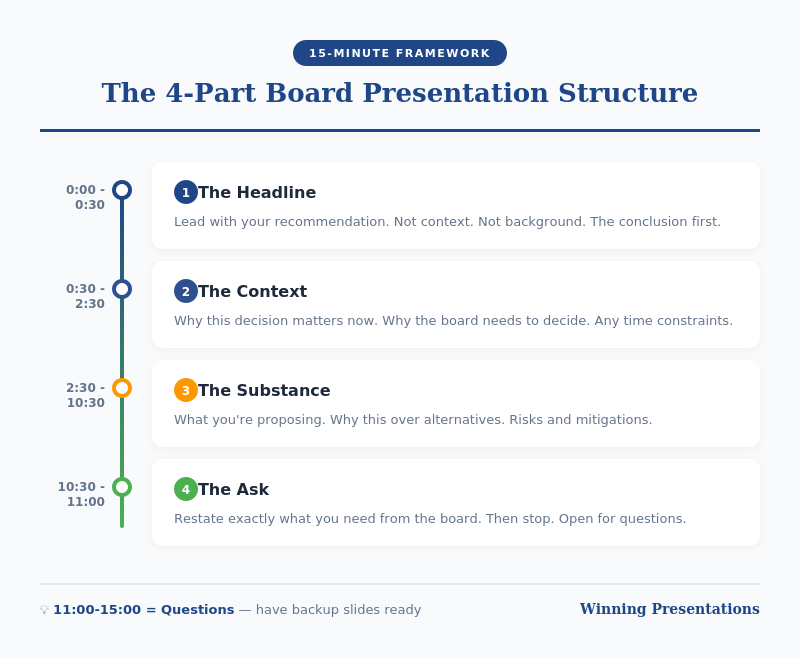
The 4-Part Board Presentation Structure

Board presentation structure framework - the 4-part structure for executive briefings

Part 1: Recommendation (2 minutes)

Start with your conclusion. Not background. Not context. Your recommendation.

“I’m recommending we approve a £2.4M investment in the CRM upgrade, to be implemented over Q2-Q3, with expected ROI of 340% over three years.”

This should take 30 seconds to say and one slide to show.

Why lead with this? Because boards are thinking “What do you want from us?” from the moment you start. If you make them wait, they’re mentally searching for your point instead of listening to your argument.

By stating your recommendation first, you frame everything that follows. The board knows what to listen for.

For techniques on delivering this opening with confidence, see my guide on how to speak confidently in public.

Part 2: Context (3 minutes)

Now — and only now — provide the minimum context needed to understand your recommendation.

The key question: What does the board need to know to evaluate my recommendation? Nothing more.

This typically includes:

  • The problem or opportunity you’re addressing
  • Why this is board-level (scale, risk, strategic importance)
  • Timeline constraints, if any

One slide maximum. Often this can be combined with your recommendation slide if you’re ruthless about brevity.

What NOT to include: history of how you got here, alternative approaches you considered, technical details, organisational politics. These belong in the appendix if anywhere.

💡 Want Ready-Made Executive Templates?

The Executive Slide System includes board presentation templates built on this exact structure — plus 6 other frameworks for different executive contexts.

  • Board recommendation template
  • Executive summary one-pager
  • Investment case structure
  • Video walkthroughs of each framework

Get the Executive Slide System — £39 →

Part 3: Evidence (5 minutes)

Now support your recommendation with evidence. This is the “why you should agree” section.

Structure your evidence around the board’s likely concerns:

  • Financial: What’s the cost, return, and payback period?
  • Risk: What could go wrong, and how will you mitigate it?
  • Execution: Who’s accountable, and what’s the timeline?
  • Strategic fit: How does this align with company priorities?

Two to three slides maximum. Use data, not opinions. Be specific: “23% cost reduction” not “significant savings.”

Anticipate questions and address them proactively. If the CFO always asks about cash flow impact, include it before she asks.

Part 4: The Ask (2 minutes)

End with a crystal-clear ask. What specific decision do you need from the board today?

Good asks:

  • “I’m requesting approval to proceed with the £2.4M investment.”
  • “I’m seeking authorisation to negotiate final terms with the vendor.”
  • “I need the board’s input on whether to prioritise Option A or Option B.”

Bad asks:

  • “Thoughts?” (Too vague)
  • “I wanted to update you on our progress.” (Not a decision)
  • “Let me know if you have questions.” (Passive, not action-oriented)

If you don’t have a clear ask, question whether this needs to be a board presentation at all. Informational updates can usually be handled in pre-read documents.

For techniques on delivering powerful closings, see my guide on how to start a presentation — which also covers endings.

Board Presentation Structure: Timing Guide

Board presentation timing guide - how to allocate 15 minutes across four sections

If you have 15 minutes on the agenda, plan for 10 minutes of presenting and 5 minutes of questions.

Section Time Slides
Recommendation 2 min 1
Context 3 min 1
Evidence 5 min 2-3
Ask 1-2 min 1
Questions 5 min Appendix

Notice this gives you 4-6 slides maximum for your main presentation. Everything else goes in the appendix — ready if asked, but not in your core flow.

Board Presentation Structure: Slide Template

Here’s a template you can adapt for any board presentation:

Slide 1: Recommendation + Context

  • Headline: Your recommendation in one sentence
  • 3-4 bullets: Key context points
  • Visual: Timeline or high-level financial summary

Slide 2: Financial Case

  • Investment required
  • Expected return (ROI, NPV, payback)
  • Comparison to alternatives if relevant

Slide 3: Risk and Mitigation

  • Top 3 risks
  • Mitigation plan for each
  • Contingency if needed

Slide 4: Execution Plan

  • Timeline (phases, milestones)
  • Accountability (who owns this)
  • Dependencies

Slide 5: The Ask

  • Specific decision requested
  • What happens next if approved
  • When you’ll report back

Appendix: Technical details, alternative analysis, historical context, org charts — anything that supports questions but doesn’t need to be in the main presentation.

🎓 Master Executive Presentations

AI-Enhanced Presentation Mastery includes a complete module on executive and board presentations — plus live coaching sessions where I review your actual presentations and give direct feedback.

8 modules. 2 live sessions. Learn the techniques that got me through hundreds of board presentations.

Learn More — £249 →

Common Board Presentation Structure Mistakes

After reviewing hundreds of board presentations, these are the mistakes I see most often:

Mistake 1: Burying the Recommendation

Starting with history, context, or analysis before stating what you want. By slide 10, the board has mentally checked out.

Mistake 2: Too Many Slides

40 slides for a 15-minute slot is not thorough — it’s unfocused. Ruthlessly cut anything that doesn’t directly support your recommendation.

Mistake 3: No Clear Ask

Ending with “Any questions?” instead of a specific decision request. Boards need to know what you’re asking them to do.

Mistake 4: Reading the Slides

Your slides are for reference, not scripts. Speak to the board, not the screen. They can read faster than you can talk.

Mistake 5: Not Preparing for Interruptions

Boards interrupt. It’s how they process. If you can’t state your recommendation in 30 seconds when interrupted, you’re not prepared.

Your Next Step

Before your next board presentation, restructure using the 4-part framework: Recommendation → Context → Evidence → Ask.

Time yourself. If you can’t deliver it in 10 minutes, you haven’t cut enough.

Resources for Executive Presentations

📖 FREE: Executive Presentation Checklist
Pre-presentation checklist for board meetings and executive briefings.
Download Free →

💡 QUICK WIN: Executive Slide System — £39
7 frameworks + templates for any executive presentation context.
Get Instant Access →

🎓 COMPLETE SYSTEM: AI-Enhanced Presentation Mastery — £249
8-module course including executive presentations module + live coaching.
Learn More →

FAQs About Board Presentation Structure

How long should a board presentation be?

Plan for 10 minutes of presenting, leaving 5 minutes for questions if you have a 15-minute slot. Most board presentations can — and should — be delivered in under 10 minutes. If you need more time, you probably haven’t focused your message enough.

How many slides should a board presentation have?

4-6 slides maximum for your core presentation. Everything else goes in the appendix, ready for questions but not in your main flow. More slides usually means less clarity, not more thoroughness.

Should I include an executive summary slide in my board presentation?

Your first slide essentially IS your executive summary — your recommendation plus key context. A separate “executive summary” slide before this often wastes time and delays your main point.

What if the board interrupts before I finish my board presentation structure?

Expect interruptions — they’re normal in board settings. Be prepared to state your recommendation in 30 seconds if asked. Answer the question directly, then ask: “Shall I continue with the evidence, or would you like to discuss this point further?”

How do I handle tough questions during a board presentation?

Prepare your appendix with supporting data for likely questions. If you don’t know an answer, say “I’ll get you that information by [specific date]” rather than guessing. Board members respect honesty more than waffling.

What’s the biggest mistake in board presentation structure?

Burying the recommendation. Starting with background, context, or analysis instead of stating what you want. Lead with your conclusion — the board can follow your logic backward, but they can’t extract your point from 40 slides of analysis.


Mary Beth Hazeldine is the Owner & Managing Director of Winning Presentations and a Microsoft Copilot PowerPoint specialist. She has delivered hundreds of board presentations during 24 years at JPMorgan Chase, PwC, Royal Bank of Scotland, and Commerzbank, and now trains executives on high-stakes presentation skills.

Get Weekly Presentation Insights

Join 2,000+ professionals getting practical presentation tips every Tuesday.

Subscribe to The Winning Edge →

18 Dec 2025
How to structure a presentation step by step guide

How to Structure a Presentation: The Step-by-Step Guide for Any Situation

The exact process I use to structure presentations that have helped clients raise £250M+

You have a presentation next week. Maybe it’s a board update, a sales pitch, or an investor meeting. You know your content — the problem is figuring out what order to put it in.

Most people start with a blank slide and begin typing. That’s backwards.

After 24 years in corporate banking at JPMorgan, PwC, Royal Bank of Scotland, and Commerzbank — and training thousands of executives since — I’ve developed a step-by-step process for structuring any presentation. It works whether you have 5 slides or 50, whether you’re presenting to your team or the board.

Here’s exactly how to structure a presentation that gets results.

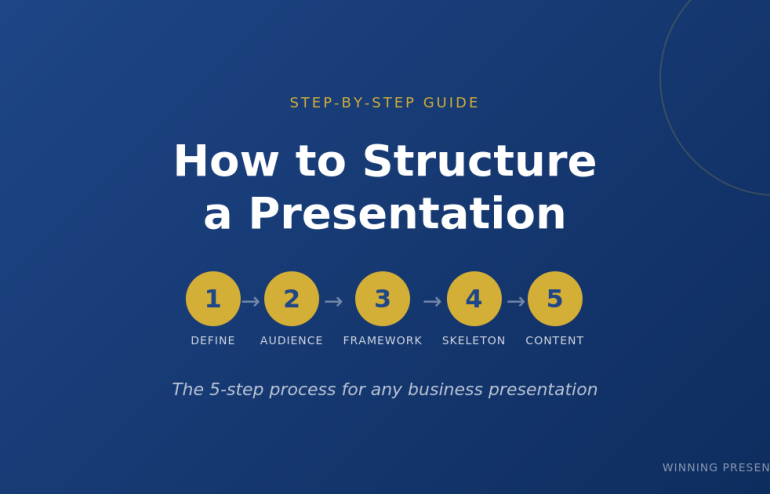
The 5-Step Process to Structure Any Presentation

Before you open PowerPoint, you need clarity on five things. Skip any of these and your presentation structure will fall apart.

Want ready-made structures instead of building from scratch?

The Executive Slide System includes 17 PowerPoint templates with proven structures for every business presentation — board meetings, budget requests, sales pitches, QBRs, and more. Plus 51 AI prompts to generate your content.

Get the templates (£39) →

Step 1: Define Your One Thing

Every presentation needs a single core message. Not three messages. Not “several key points.” One thing you want the audience to remember.

Ask yourself: If my audience forgets everything else, what’s the one thing they must remember?

Examples:

  • Budget presentation: “We need £500K to hit our Q3 targets”
  • Sales pitch: “Our solution cuts your processing time by 60%”
  • Board update: “We’re on track, but need a decision on the expansion”
  • Investor pitch: “We’re raising £2M to capture a £500M market”

Write this down before you do anything else. Every slide you create should support this one thing.

Presentation structure diagram showing one core message with supporting points

Step 2: Know Your Audience’s Starting Point

The biggest presentation structure mistake is assuming your audience knows what you know.

Before you structure anything, answer these questions:

  • What do they already know about this topic?
  • What do they care about most? (Hint: usually money, time, or risk)
  • What concerns or objections will they have?
  • What decision are they able to make?

A presentation to your team requires different structure than the same content presented to the board. Your team wants details. The board wants the decision and the headline numbers.

Related: How to Present to a CFO: The Finance-First Framework

Step 3: Choose Your Framework

Now you’re ready to pick a presentation structure. The right framework depends on your situation:

Situation Best Framework Why It Works
Sales pitch or proposal Problem-Solution-Benefit Creates urgency, then delivers relief
Executive briefing Pyramid Principle Answer first, details only if needed
Data presentation What-So What-Now What Turns numbers into decisions
Keynote or all-hands Hero’s Journey Inspires through narrative
Strategy recommendation SCQA Creates tension that demands resolution
Investor pitch 10-20-30 Rule Forces clarity and brevity
Client meeting (flexible) Modular Deck Adapts to conversation flow

Deep dive: Presentation Structure: 7 Frameworks That Actually Work

Don’t know which to choose? Default to Problem-Solution-Benefit for external audiences and Pyramid Principle for internal executives.

💡 Want to combine these frameworks with AI? My AI-Enhanced Presentation Mastery course teaches you how to use Copilot as a strategic partner — cut creation time from 6 hours to 90 minutes while doubling impact.

Step 4: Build Your Slide Skeleton

Now — and only now — open PowerPoint.

Don’t write content yet. Just create placeholder slides with titles only. This is your skeleton.

Example: Problem-Solution-Benefit structure for a sales pitch

  1. Title slide
  2. The Problem (what pain they’re experiencing)
  3. The Cost (what this problem costs them)
  4. The Cause (why the problem exists)
  5. The Solution (your answer — benefits, not features)
  6. How It Works (3 steps maximum)
  7. Proof (case study with specific numbers)
  8. Next Step (one clear action)

Eight slides. That’s it. If you need more, you probably haven’t synthesised enough.

Pro tip: Read your slide titles in sequence. They should tell a complete story without any content. If someone read only your titles, would they understand your message?

Step 5: Fill In the Content (Last)

Only after your skeleton is solid do you write the actual content.

For each slide, ask:

  • What’s the ONE point this slide makes?
  • What’s the minimum evidence needed to prove it?
  • What can I cut?

Most slides need 3-5 bullet points maximum. If you have more, you’re putting two slides’ worth of content on one slide.

Related: Stop Writing Slide Titles Like This (Before and After Examples)

Skip the Skeleton — Get Pre-Built Structures

The 5-step process works. But it takes time.

The Executive Slide System gives you 17 ready-made presentation structures — just fill in your content. Includes:

  • 17 PowerPoint templates (Board, QBR, Budget, Sales, Investor, and more)
  • 51 AI prompts to generate content for each slide
  • 7 proven frameworks (Pyramid Principle, Problem-Solution-Benefit, SCQA, etc.)
  • Before/after examples showing exactly what good looks like

Get instant access (£39) →

How to Structure Different Types of Presentations

The 5-step process applies universally. But each presentation type has nuances. Here’s how to structure the most common ones:

How to Structure a Sales Presentation

Use Problem-Solution-Benefit. The structure is:

  1. Problem — State their pain (be specific to their situation)
  2. Cost — Quantify what it’s costing them
  3. Cause — Explain why the problem exists
  4. Solution — Your answer (benefits first, features later)
  5. How It Works — 3 steps maximum
  6. Proof — Case study with specific numbers
  7. Next Step — One clear action

Spend 70% of your prep time on slides 1-3. If they don’t feel the problem, they won’t care about your solution.

Template: Sales Presentation Template: The Structure Top Performers Use

How to Structure an Executive Presentation

Use the Pyramid Principle. Lead with your answer:

  1. The Answer — Your recommendation in one sentence
  2. Supporting Point 1 — Strongest argument + evidence
  3. Supporting Point 2 — Second argument + evidence
  4. Supporting Point 3 — Third argument + evidence
  5. Implications — What this means for the business
  6. Next Steps — What you need from them

Never more than 3 supporting points. If you have more, group related points together.

Template: Executive Presentation Template: 12 Slides That Command the Room

How to Structure a Board Presentation

Boards have specific expectations. Your structure must include:

  1. The Ask — What decision you need (slide 1, not slide 12)
  2. Context — Brief background (what they need to know)
  3. Recommendation — Your proposed course of action
  4. Business Case — ROI, costs, timeline
  5. Risks — What could go wrong and your mitigation
  6. Decision — Restate the ask with clear options

Board presentations fail when the ask is buried. Put it on slide 1.

Template: Board Presentation Template: The Complete Guide

How to Structure a Data Presentation

Use What-So What-Now What for every data point:

  • What — The facts (specific numbers with context)
  • So What — Why it matters (interpretation)
  • Now What — What to do about it (action)

Every chart needs a “So What.” If you can’t explain why data matters in one sentence, don’t include it.

Related: Team Dashboards That Tell a Story (Not Just Show Numbers)

Data presentation structure using What So What Now What framework

Common Presentation Structure Mistakes

I’ve reviewed thousands of presentations. These mistakes appear in 80% of them:

Mistake 1: Starting with Background

“Let me give you some context…” is how most presentations start. It’s also where most audiences check out.

Fix: Start with why they should care. Context comes after you’ve earned their attention.

Mistake 2: Building to the Conclusion

Academic training teaches us to present evidence then reach a conclusion. Business presentations are the opposite.

Fix: Lead with your recommendation. Provide evidence for those who want it.

Mistake 3: Too Many Points

If you have 7 key messages, you have 0 key messages. The audience will remember none of them.

Fix: Three points maximum. If you need more, you haven’t synthesised enough.

Mistake 4: No Clear Ask

“Let me know what you think” is not an ask. “I need your approval by Friday” is an ask.

Fix: End every presentation with one specific action and a deadline.

Related: How to End a Presentation: 7 Closing Techniques I Teach C-Suite Executives

Using AI to Structure Your Presentation

Tools like ChatGPT and PowerPoint Copilot can accelerate your presentation structure — if you use them correctly.

Related: The AI Presentation Workflow That Cut My Creation Time in Half

Good prompt:

“Create a presentation structure using Problem-Solution-Benefit framework for [TOPIC]. Include slide titles only — no content yet. The audience is [AUDIENCE] and the goal is [DECISION NEEDED].”

Bad prompt:

“Create a presentation about [TOPIC].”

AI gives you speed. Your judgment gives you substance. Use AI for the skeleton, then refine with your expertise.

Related: Best Copilot PowerPoint Prompts That Actually Work

Want to Master AI-Enhanced Presentations?

The frameworks in this article become 10x more powerful when combined with AI. My new course teaches you exactly how to use Copilot as a strategic thinking partner — not just a slide generator.

What you’ll learn:

  • The AVP Framework — Strategic planning before you prompt AI
  • The 132 Rule — Structure any presentation in minutes
  • The S.E.E. Formula — Make every slide persuasive
  • 50+ tested prompts from my personal library
  • 2 live coaching sessions with deck reviews

AI-Enhanced Presentation Mastery

£249 £499 — Early bird until December 31st

January cohort • 60 seats maximum • Lifetime access

See the Full Curriculum →

Frequently Asked Questions

How many slides should a presentation have?

There’s no universal answer, but here are guidelines: 1 slide per minute of speaking time is a reasonable maximum. A 20-minute presentation should have 15-20 slides. More importantly, each slide should make ONE point. If you have 40 slides for a 20-minute presentation, you’re probably putting too little on each slide — or talking too fast.

What’s the best presentation structure for beginners?

Start with Problem-Solution-Benefit. It’s intuitive (problem → solution → why it matters), works for most situations, and forces you to focus on the audience’s needs rather than your content. Once you’re comfortable, expand to Pyramid Principle for executive audiences.

How do I structure a presentation with lots of data?

Use What-So What-Now What for every data point. Don’t show data without interpretation. Every chart should answer: What does this show? Why does it matter? What should we do about it? Cut any data that doesn’t directly support your one core message.

Should I structure differently for virtual presentations?

Yes. Attention spans are shorter online. Use more frequent transitions (every 2-3 minutes), bigger text, and more visuals. Keep slides simpler — viewers are on smaller screens. And build in interaction every 5 minutes to maintain engagement.


Get Presentation Structures That Work

The 5-step process will help you structure any presentation from scratch. But if you want to skip the blank-slide struggle, I’ve done the work for you.

The Executive Slide System includes:

  • 17 PowerPoint templates — Every structure covered in this article, ready to use
  • 51 AI prompts — Generate content for each slide in minutes
  • 7 presentation frameworks — Pyramid Principle, Problem-Solution-Benefit, SCQA, and more
  • Before/after examples — See exactly what transforms a weak presentation into a strong one

My clients have used these templates to raise over £250 million in funding and get budgets approved at Fortune 500 companies.

Get the Executive Slide System (£39) →

Instant download. Lifetime access. 30-day money-back guarantee.


Mary Beth Hazeldine is the Managing Director of Winning Presentations, where she trains executives at investment banks, biotech companies, and SaaS firms to present with impact. Her clients have raised over £250M using her presentation frameworks.

17 Dec 2025
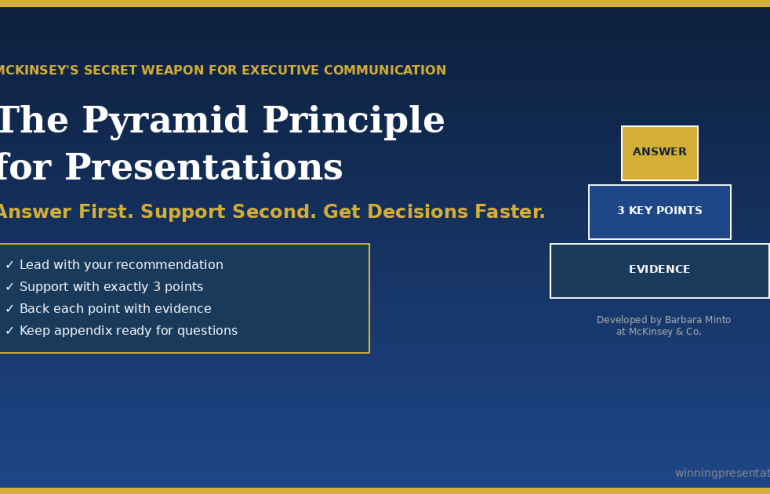
The Pyramid Principle for Presentations - McKinsey's secret weapon for executive communication

The Pyramid Principle for Presentations: McKinsey’s Secret Weapon (Used Wrong by Most)

📅 Updated: January 2026

Quick Answer

The Pyramid Principle is a communication framework developed by Barbara Minto at McKinsey that structures presentations top-down: lead with your answer first, then support it with 3 key points, each backed by evidence. It’s the opposite of how most people present (building to a conclusion) and dramatically more effective for executive audiences who want your recommendation, not your thought process.

Contents


“Win the room. Every time.” — weekly tactics on executive presentations, Copilot for PowerPoint, and the psychology of persuasion. Free, from Mary Beth Hazeldine.

Send me the free newsletter →

What Is the Pyramid Principle?

The Pyramid Principle was developed by Barbara Minto at McKinsey in the 1960s and has since become the standard for executive communication at consulting firms, investment banks, and Fortune 500 companies worldwide.

The core idea is simple: start with the answer.

Most people present bottom-up — they walk through their analysis, build the case piece by piece, and finally reveal their conclusion. This feels logical to the presenter. It mirrors how they did the work.

But it’s torture for the audience.

Executives don’t want to follow your journey. They want your destination. They want to know what you recommend, then decide whether they need the supporting detail.

The Pyramid Principle flips the structure:

  1. Start with the answer — your main recommendation or finding
  2. Group supporting arguments — 3 key points that prove your answer
  3. Order logically — each point supported by evidence

It’s called a “pyramid” because the structure looks like one: single point at the top, broader supporting base below.

Related: Presentation Structure: 7 Frameworks That Actually Work

Why It Works for Executive Presentations

I’ve trained executives at JPMorgan, PwC, and dozens of other firms. The Pyramid Principle works because it aligns with how senior leaders actually process information.

Executives are time-poor. A CEO might have 15 minutes between meetings. If your conclusion is on slide 12, they’ll never see it. If it’s on slide 1, they can engage immediately — and choose whether to dig deeper.

Executives are decision-makers. They don’t need to understand every detail of your analysis. They need to know: What do you recommend? Why? What do you need from me? The Pyramid answers all three in the first 2 minutes.

Executives will interrupt. If you’re building to a conclusion, every question derails you. If you’ve already stated your answer, questions become productive exploration of supporting points.

A client of mine — a director at a major consulting firm — used to get interrupted constantly in partner meetings. His presentations were thorough but bottom-up. We restructured using the Pyramid Principle. The interruptions didn’t stop, but they changed: instead of “get to the point,” partners started asking “tell me more about point 2.” He made partner 8 months later.

Got the framework — but your next deck is still bottom-up?

Executive Slide System has the Pyramid Principle built into 26 templates and 93 AI prompts, so you can apply Minto’s structure to a real deck without rebuilding from scratch. £39, instant download, 30-day refund.

Explore the System →

The Pyramid Structure (Slide by Slide)

Here’s how to apply the Pyramid Principle to a typical executive presentation:

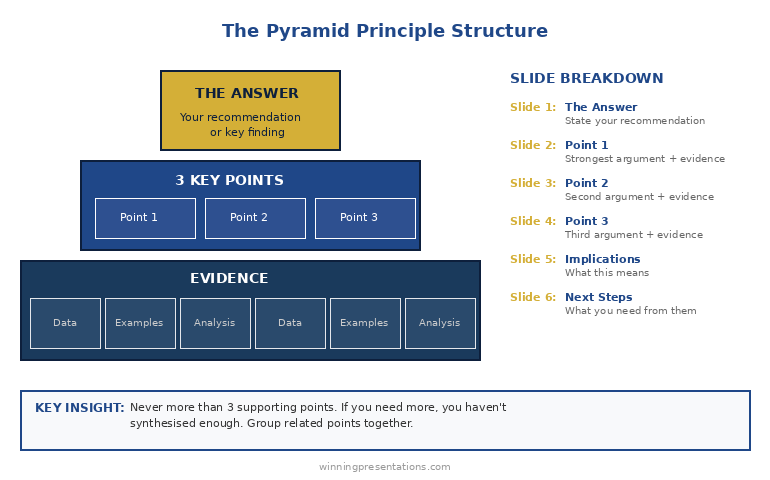
Slide 1: The Answer

State your recommendation or key finding in one sentence. Be direct. Be specific.

  • ❌ “We’ve been analysing the market opportunity…”
  • ✅ “We should acquire Company X for £15M — it will generate £4M annual savings within 18 months.”

Slide 2: Supporting Point 1

Your strongest argument. Lead with the point, then provide evidence.

  • Point: “The acquisition eliminates our largest cost centre”
  • Evidence: Current outsourcing costs, projected in-house costs, timeline to realise savings

Slide 3: Supporting Point 2

Second strongest argument, same structure.

  • Point: “Company X has technology we’d need 2 years to build”
  • Evidence: Capability comparison, build vs. buy analysis

Slide 4: Supporting Point 3

Third argument. Never more than 3 — if you need more, you haven’t synthesised enough.

  • Point: “The asking price is below market value”
  • Evidence: Comparable transactions, valuation methodology

Slide 5: Implications

What this means for the business. Risks, dependencies, timeline.

Slide 6: Next Steps

What you need from the audience. One clear ask.

Pyramid Principle structure diagram - answer at top, 3 supporting points below, evidence at base

The Rule of Three: Why exactly 3 supporting points? Because humans can hold 3-4 items in working memory. More than 3 points and your audience starts forgetting the first one. Fewer than 3 and your argument feels thin. Three is the magic number.

The consulting director I mentioned earlier? He’d known the Pyramid Principle for years — but still struggled to execute it. The Executive Slide System gave him ready-to-use templates that forced him to structure properly. Eight months later, he made partner.

The MECE Rule: Mutually Exclusive, Collectively Exhaustive

The Pyramid Principle has a companion concept: MECE (pronounced “me-see”). Your supporting points should be:

Mutually Exclusive: No overlap between points. Each argument is distinct.

  • ❌ “It saves money” and “It reduces costs” (these overlap)
  • ✅ “It saves money” and “It saves time” and “It reduces risk” (distinct)

Collectively Exhaustive: Together, they cover all the important ground. No major gaps.

MECE matters because overlap confuses your audience (“wait, didn’t you already say that?”) and gaps invite objections (“but what about…?”).

Before you finalise your 3 supporting points, ask:

  1. Is there any overlap between these points?
  2. If someone accepted all 3 points, would they accept my answer?
  3. What’s the strongest objection — and is it addressed?

Apply the Pyramid Principle in under 30 minutes

26 templates + 93 AI prompts that fill slides in pyramid order. £39, instant access.

Get the System →

Before and After: A Real Example

Here’s how the Pyramid Principle transforms an actual presentation:

BEFORE (Bottom-Up):

  1. Slide 1: Agenda
  2. Slide 2: Background on the project
  3. Slide 3: Methodology we used
  4. Slide 4: Data we collected
  5. Slide 5: Analysis of Option A
  6. Slide 6: Analysis of Option B
  7. Slide 7: Analysis of Option C
  8. Slide 8: Comparison matrix
  9. Slide 9: Risks and considerations
  10. Slide 10: Our recommendation

Problem: The CEO checked out by slide 4. The recommendation never landed.

AFTER (Pyramid Principle):

  1. Slide 1: “We recommend Option B — it delivers 40% higher ROI with acceptable risk”
  2. Slide 2: Point 1 — ROI comparison (Option B wins on financial returns)
  3. Slide 3: Point 2 — Implementation timeline (Option B is fastest)
  4. Slide 4: Point 3 — Risk profile (Option B risks are manageable)
  5. Slide 5: What we need to proceed
  6. Appendix: Methodology, detailed analysis, data (available if asked)

Result: CEO approved in the meeting. Total presentation time: 8 minutes.

Want ready-made before/after examples for your own presentations? The Executive Slide System includes real transformation examples you can use as models.

3 Common Mistakes (And How to Fix Them)

Mistake 1: Burying the answer in context

❌ “Given the market conditions and our strategic priorities and the competitive landscape… we recommend X.”

✅ “We recommend X.” Full stop. Context comes after, if needed.

Mistake 2: More than 3 supporting points

If you have 5 points, you haven’t synthesised. Group related points together. “Financial benefits” can cover cost savings, revenue increase, and working capital improvement — that’s one point, not three.

Mistake 3: Supporting points that don’t actually support

Every point must directly answer “why should I accept your recommendation?” If a point is interesting but doesn’t support your answer, cut it or move it to the appendix.

Related: Executive Presentation Template: 12 Slides That Command the Room

From Framework to Finished Presentation

The Pyramid Principle tells you how to structure your thinking. But there’s a gap between knowing the structure and having slides ready for Monday’s board meeting.

That’s where most people struggle. They understand “answer first, 3 supporting points” — but what exactly goes on each slide? How do you phrase the opening? What evidence is compelling vs. overwhelming?

I’ve spent 24 years closing that gap.

The Executive Slide System gives you the complete Pyramid Principle deck — not just a framework, but ready-to-use slides with placeholders you fill in. Plus AI prompts to generate content for each section and scripts for what to say when you present.

What’s Included: Free vs. Paid

What You Get Free Checklist Executive Slide System (£39)
Pyramid Principle overview
7 frameworks reference card
Ready-to-use PowerPoint templates ✓ 17 templates
Pyramid Principle slide deck ✓ 6-slide template
AI prompts for each slide ✓ 51 prompts
Before/after examples ✓ Real transformations
Result Understand the principle Present like McKinsey

Walk into the boardroom with slides that lead with the answer first

Executive Slide System — 26 templates including Strategic Recommendation, Board Meeting Opener, and Executive Summary. Built-in frameworks: Pyramid Principle, SCQA, AVP. £39.

Get the Slide System →

Want the complete toolkit?

The Pyramid Principle is one of seven frameworks senior presenters need. The Complete Presenter Bundle pulls all seven products together — slides, Q&A, anxiety, storytelling, delivery, openers, cheat sheets — for £99 (save £91.97 vs buying separately). Lifetime access.

Get the Complete Presenter Bundle — £99 →

Frequently Asked Questions

What is the Pyramid Principle in simple terms?

The Pyramid Principle means starting with your answer or recommendation first, then supporting it with 3 key points, each backed by evidence. It’s the opposite of building to a conclusion — you state the conclusion immediately and let your audience decide how much supporting detail they need.

Who invented the Pyramid Principle?

Barbara Minto developed the Pyramid Principle while working at McKinsey & Company in the 1960s. She later wrote “The Pyramid Principle: Logic in Writing and Thinking,” which became the standard text for business communication at consulting firms worldwide.

When should you NOT use the Pyramid Principle?

Avoid the Pyramid Principle when your audience needs to be emotionally engaged before hearing your conclusion (use the Hero’s Journey instead), when you’re delivering bad news that requires context first, or when you genuinely don’t have a recommendation yet. It’s designed for situations where you have a clear answer and a decision-making audience.

What is MECE and how does it relate to the Pyramid Principle?

MECE stands for Mutually Exclusive, Collectively Exhaustive. It’s a test for your supporting points: they should have no overlap (mutually exclusive) and together cover all the important ground (collectively exhaustive). MECE ensures your argument is logically airtight.

How many supporting points should I have?

Exactly 3. Human working memory can hold 3-4 items comfortably. More than 3 points and your audience starts forgetting earlier ones. If you have 5 points, you haven’t synthesised enough — group related points together.

📧 The Winning Edge Newsletter

Weekly insights on presentations that close deals, win budgets, and advance careers. Join 2,000+ executives.

Subscribe Free →

🎁 Not Ready to Buy? Start Here.

Get the free checklist with the Pyramid Principle template and 6 other frameworks. You can upgrade to full templates later.

Download Free Checklist →

Related Resources

Struggling with nerves when presenting to executives? The Pyramid Principle helps you sound confident because you lead with your answer. But if physical anxiety is holding you back, see: Stage Fright Before Presentations: The First 60 Seconds Protocol


About the Author

Mary Beth Hazeldine has trained executives on high-stakes presentations for over 15 years. With 24 years in corporate banking at JPMorgan Chase, PwC, Royal Bank of Scotland, and Commerzbank, she’s used the Pyramid Principle in hundreds of board presentations and client pitches. Her clients have closed over £250 million using her presentation frameworks.

17 Dec 2025
Presentation Structure: 7 Frameworks That Actually Work - proven structures from McKinsey, TED, and top executives

Presentation Structure: 7 Frameworks That Actually Work [2026]

📅 Updated: December 2025

Want the complete toolkit?

Structure is one piece of presenting at executive level. The Complete Presenter Bundle pulls all seven products together — slides, Q&A, anxiety, storytelling, delivery, openers, cheat sheets — for £99 (save £91.97 vs buying separately). Lifetime access.

Get the Complete Presenter Bundle — £99 →

Quick Answer

The best presentation structure depends on your goal: use the Problem-Solution-Benefit framework for sales, the Pyramid Principle for executive briefings, or the What-So What-Now What structure for data presentations. This guide covers 7 proven frameworks with slide-by-slide breakdowns, so you can choose the right structure for any situation.

📦 USED BY 250+ EXECUTIVES

Executive Slide System — £39

All 7 frameworks as ready-to-use PowerPoint templates. 51 AI prompts. Slide-by-slide scripts. Stop starting from blank slides.

Get the Templates — £39 →

Instant download. Lifetime access. 30-day money-back guarantee.

“Win the room. Every time.” — weekly tactics on executive presentations, Copilot for PowerPoint, and the psychology of persuasion. Free, from Mary Beth Hazeldine.

Send me the free newsletter →


Why Structure Matters More Than Content

I’ve watched brilliant people give terrible presentations. PhDs who can’t explain their research. CFOs who lose the board in slide three. Salespeople who know the product cold but can’t close.

The problem is never knowledge. It’s structure.

A client came to me last year with a 47-slide deck for a £2M deal. Every slide was accurate. Every data point was relevant. And the prospect said: “This is really comprehensive. We’ll get back to you.”

They didn’t.

We restructured the same content into 12 slides using Framework 1 below. Same information, different architecture. The next prospect signed in the room.

Structure is the difference between information and persuasion.

Here are 7 frameworks that work — each designed for a specific situation. Use the wrong one and you’ll confuse your audience. Use the right one and you’ll guide them exactly where you want them to go.

Framework 1: Problem-Solution-Benefit (Sales Presentations)

Best for: Sales pitches, proposals, any presentation where you’re asking for a decision

Why it works: Humans are wired to solve problems. When you start with a problem your audience recognises, they lean in. When you present the solution, they’re already primed to say yes.

The structure (7 slides):

  1. The Problem — State the pain your audience feels. Be specific. “Most sales teams spend 40% of their time on admin instead of selling.”
  2. The Cost — Quantify what the problem costs them. Time, money, opportunity. “That’s £180K per year in lost productivity for a team of 10.”
  3. The Cause — Explain why the problem exists. This positions you as someone who understands.
  4. The Solution — Introduce your answer. High-level, not features.
  5. How It Works — 3 steps maximum. Keep it simple.
  6. Proof — One case study with specific numbers. “Acme reduced admin time by 60% in 90 days.”
  7. Next Step — One clear action. Not “any questions?” but “I recommend we start a pilot next week.”

Pro tip: Spend 70% of your time on slides 1-3. If your audience doesn’t feel the problem, they won’t care about your solution.

Related: Sales Presentation Template: The Structure Top Performers Use

Framework 2: The Pyramid Principle (Executive Briefings)

Best for: Board presentations, executive updates, any audience with limited time and high authority

Why it works: Executives don’t want to follow your thinking process — they want your conclusion. The Pyramid Principle, developed at McKinsey, puts your answer first and lets the audience drill down only if needed.

The structure:

  1. The Answer — Lead with your recommendation or key finding. “We should acquire Company X for £15M.”
  2. Supporting Point 1 — First reason with evidence
  3. Supporting Point 2 — Second reason with evidence
  4. Supporting Point 3 — Third reason with evidence
  5. Implications — What this means for the business
  6. Next Steps — What you need from them

The rule of three: Never more than 3 supporting points. If you need more, you haven’t synthesised enough.

Pro tip: Prepare 10 slides of backup detail you may never show. Executives will ask questions — have the data ready, but don’t put it in the main flow.

Related: The Pyramid Principle for Presentations: McKinsey’s Secret Weapon


Stop Reinventing the Wheel

The Executive Slide System includes the Pyramid Principle, Problem-Solution-Benefit, and all 15 other frameworks as ready-to-use templates. Just fill in your content.

Get All 7 Templates — £39 →

Framework 3: What-So What-Now What (Data Presentations)

Best for: Quarterly reviews, analytics presentations, any data-heavy content

Why it works: Data alone is meaningless. Your audience needs to know what it means and what to do about it. This framework forces you to interpret, not just report.

The structure:

  1. What — The facts. “Revenue is up 12% but margin is down 3 points.”
  2. So What — The interpretation. “We’re winning more deals but at lower prices — likely due to competitor pressure in the mid-market.”
  3. Now What — The action. “I recommend we raise prices 5% on enterprise while holding mid-market rates.”

Apply it to every chart: Before you show any data visualisation, prepare your “So What” statement. If you can’t explain why the data matters, don’t include it.

Pro tip: Most data presentations fail because they’re all “What” and no “So What.” Force yourself to have one insight per slide.

Related: QBR Presentation Template: Quarterly Reviews That Retain Clients

Framework 4: The Hero’s Journey (Keynotes & Vision Presentations)

Best for: Conference talks, company all-hands, any presentation meant to inspire

Why it works: Stories are how humans make sense of the world. The Hero’s Journey — the structure behind every great film — works because it’s hardwired into how we process information.

The structure:

  1. The Ordinary World — Where we are today. Establish the status quo.
  2. The Challenge — The disruption that demands change.
  3. The Journey — The obstacles overcome, lessons learned.
  4. The Transformation — What changed. The new capability or insight.
  5. The New World — The better future now possible.
  6. The Call to Action — What the audience should do to join this journey.

Pro tip: The hero isn’t you — it’s your audience. Position them as the protagonist who can achieve the transformation.

Framework 5: SCQA (Consulting-Style Presentations)

Best for: Strategy presentations, recommendations, complex problem-solving

Why it works: SCQA (Situation-Complication-Question-Answer) creates narrative tension. By the time you reach the Answer, your audience is desperate to hear it.

The structure:

  1. Situation — The context everyone agrees on. “We’re the market leader in the UK with 34% share.”
  2. Complication — The problem or change that disrupts the situation. “But a new competitor entered last quarter and is winning on price.”
  3. Question — The strategic question that must be answered. “How do we defend our position without destroying margin?”
  4. Answer — Your recommendation, followed by supporting analysis.

Pro tip: The Complication is where you create urgency. Make it specific and quantified — “They’ve taken 8 points of share in 6 months” hits harder than “competition is increasing.”

Framework 6: The 10-20-30 Rule (Pitch Decks)

Best for: Investor pitches, startup presentations, any high-stakes pitch with time pressure

Why it works: Guy Kawasaki’s rule forces discipline: 10 slides, 20 minutes, 30-point minimum font. It prevents the most common pitch mistake — death by PowerPoint.

The 10 slides:

  1. Title — Company, name, contact
  2. Problem — The pain you solve
  3. Solution — Your unique approach
  4. Business Model — How you make money
  5. Secret Sauce — Why you win (technology, team, timing)
  6. Marketing Plan — How you reach customers
  7. Competition — Landscape and your differentiation
  8. Team — Why you’re the right people
  9. Financials — Projections and key metrics
  10. Ask — What you want and what you’ll do with it

Pro tip: 30-point font isn’t just about readability — it forces you to cut words and focus on what matters.

Related: Investor Pitch Deck Template: The Sequoia Format That Raised Billions

Framework 7: The Modular Deck (Flexible Meetings)

Best for: Client meetings, consultations, any presentation where the conversation might go in different directions

Why it works: Not every presentation is linear. The Modular Deck gives you building blocks you can rearrange in real-time based on audience interest.

The structure:

  1. Opening Module — 3-5 slides that always come first (context, agenda, key question)
  2. Core Modules — 4-6 self-contained sections of 3-5 slides each, any of which can be skipped or reordered
  3. Closing Module — 3-5 slides that always come last (summary, next steps, call to action)

Pro tip: Number your core modules clearly (Section 1, Section 2) so you can say “Let’s skip to Section 4” without fumbling. Use PowerPoint’s Zoom feature to navigate non-linearly.

Comparison chart showing which presentation framework to use for different situations - sales, executive, data, keynote, consulting, pitch, flexible

How to Choose the Right Framework

Use this decision tree:

Are you asking for money or a decision?

  • Investor pitch → 10-20-30 Rule
  • Sales presentation → Problem-Solution-Benefit

Are you presenting to executives?

  • Board or C-suite → Pyramid Principle
  • Strategy recommendation → SCQA

Are you presenting data?

  • Quarterly review → What-So What-Now What

Are you trying to inspire?

  • Keynote or all-hands → Hero’s Journey

Is the conversation unpredictable?

  • Client meeting → Modular Deck

Why Frameworks Alone Aren’t Enough

Here’s what I’ve learned training executives for 35 years: knowing the framework is 20% of the battle. Executing it is the other 80%.

I’ve seen people use the Pyramid Principle and still bury the lead. I’ve watched sales presentations with perfect Problem-Solution-Benefit structure fail because the proof wasn’t credible. I’ve reviewed decks that followed every rule but still felt flat.

The difference between good and great is in the details: how you phrase the opening line, which proof points you choose, how you handle the “so what,” what you put on each slide.

That’s why I built the Executive Slide System.

It’s not just frameworks — it’s ready-to-use templates with every slide designed for maximum impact. You get the exact structure, the placeholder text, the AI prompts to generate content, and the scripts for what to say.

My clients have used these templates to close over £250 million in deals. Not because the frameworks are secret — you just read them above. Because the execution is dialled in.

What’s Included: Free vs. Paid

What You Get Free Checklist Executive Slide System (£39)
7 framework summaries
One-page reference card
Ready-to-use PowerPoint templates ✓ 17 templates
Before/after examples ✓ Real transformations
AI prompts for each framework ✓ 51 prompts
Slide-by-slide scripts ✓ What to say per slide
Result Know the theory Present like a pro

🎯 MOST POPULAR

Executive Slide System

17 PowerPoint templates. 30 AI prompts. Slide-by-slide scripts.
Built from frameworks that have closed £250M+ in deals.

Get Instant Access — £39 →

✓ Instant download   ✓ Lifetime access   ✓ 30-day guarantee

Frequently Asked Questions

What is the best structure for a presentation?

The best presentation structure depends on your goal. For sales presentations, use Problem-Solution-Benefit. For executive briefings, use the Pyramid Principle (answer first, then supporting points). For data presentations, use What-So What-Now What. The key is matching structure to audience expectations — executives want conclusions upfront, while sales prospects need to feel the problem first.

How do you structure a 10-minute presentation?

For a 10-minute presentation, use 5-7 slides maximum: opening hook (1 slide, 1 minute), main point with 3 supporting arguments (3-4 slides, 7 minutes), and closing call to action (1 slide, 2 minutes). The most common mistake is trying to cover too much — focus on one core message and make it memorable.

What is the 5-5-5 rule in PowerPoint?

The 5-5-5 rule suggests no more than 5 words per line, 5 lines per slide, and 5 text-heavy slides in a row. It’s a useful guideline for preventing death by PowerPoint, but I prefer the “one idea per slide” principle — each slide should make exactly one point that your audience can grasp in 3 seconds.

How do you structure a presentation for executives?

Use the Pyramid Principle: lead with your recommendation or conclusion, then provide 3 supporting points with evidence, then implications and next steps. Executives have limited time and want your answer, not your thought process. Prepare backup slides for detailed questions but keep the main flow to 6-8 slides.

What is the SCQA framework?

SCQA stands for Situation-Complication-Question-Answer. It’s a consulting-style framework that creates narrative tension: start with agreed context (Situation), introduce the problem (Complication), frame the strategic question, then deliver your recommendation (Answer). It works because by the time you reach the Answer, your audience is primed to hear it.

Not Ready to Buy? Start Here.

Get the free checklist with all 7 frameworks as a one-page reference. You can upgrade to templates later.

Download Free Checklist →

📧
The Winning Edge Newsletter

Weekly insights on presentations that close deals, win budgets, and advance careers.

Subscribe Free →

Related Resources

About the Author

Mary Beth Hazeldine has trained executives on high-stakes presentations for 35 years. With 24 years in corporate banking at JPMorgan Chase, PwC, Royal Bank of Scotland, and Commerzbank, she’s seen what separates presentations that close from those that stall. Her clients have closed over £250 million using her presentation frameworks. She teaches at Winning Presentations.

13 Dec 2025
Executive presentation examples - before and after transformations that get decisions

Executive Presentation Examples: Before/After Transformations

📅 Updated: December 2025 | Real examples from client work

Executive presentation examples - before and after transformations that get decisions

Need a Faster Way to Build Executive Slides?

Most executives spend hours on slides that still miss the mark. The Executive Slide System gives you a structured framework for building slides that land with senior audiences — without starting from scratch every time.

Explore the System →

Quick Answer

The best executive presentation examples share three traits: they lead with the recommendation, quantify everything, and make the decision obvious. Below are five real before/after transformations showing how small changes to structure, titles, and content turn forgettable slides into decision-driving presentations.

🎁 FREE DOWNLOAD

Executive Presentation Checklist

12-point checklist to transform your slides before your next executive meeting.

Download Free Checklist →

No spam. Unsubscribe anytime.


I’ve reviewed thousands of executive presentations over more than 16 years of coaching. The difference between slides that get ignored and slides that get decisions usually comes down to a handful of fixable mistakes.

A Head of Product at a fintech company came to me last month with a “failed” board presentation. She’d requested £2M for a platform rebuild. The board said “not now.”

I looked at her deck. The content was solid. The analysis was thorough. But the structure was backwards — she’d buried her ask on slide 14 of 18.

We restructured it in an afternoon. Same content. Different order. She re-presented two weeks later and got full approval.

Here are five transformations that show what actually changes.

Building an executive presentation this week?

The Executive Slide System gives you 10 slide templates with these transformations already applied — decision-first titles, executive summaries that fit on one slide, and AI prompts to populate them in minutes.

Example 1: The Executive Summary Slide

❌ Before: Information Dump

Title: “Q4 Technology Update”

Content:

  • Completed migration to AWS (3 months ahead of schedule)
  • Security audit passed with zero critical findings
  • New CRM integration live across 4 regions
  • Mobile app downloads up 34% QoQ
  • Technical debt reduced by 40%
  • Team expanded to 47 FTEs
  • Budget tracking 3% under forecast

Problem: No recommendation. No ask. No clear “so what?” The executive has to work to figure out what matters.

✅ After: Decision-Ready

Title: “Q4 Technology: On Track — Requesting £400K for Q1 Security Enhancement”

Content:

  • Status: All major initiatives on track, 3% under budget
  • Highlight: AWS migration complete 3 months early, saving £180K annually
  • Request: £400K Q1 investment in security automation (ROI: 200% over 2 years)
  • Decision needed: Approve budget allocation by January 15

Why it works: The title tells you everything. Status, headline win, and the ask — all visible in 10 seconds.

Related: The Executive Summary Slide: How to Write the Only Slide That Matters

Built for High-Stakes Presentations

Move Beyond Examples — Build Your Own Executive Deck

The Executive Slide System (£39, instant access): 17 field-tested structures for executive presentations — board updates, budget requests, strategic recommendations. Each template comes with the exact narrative flow that keeps senior audiences engaged.

Designed for executives who need slides that work in high-stakes boardrooms, not just look good.

Get the Executive Slide System →

Before and after executive slide title transformation - from Q4 Technology Update to decision-ready title with specific ask

Example 2: The Budget Request

❌ Before: Buried Ask

Slide 1: “Marketing Technology Assessment”

Slides 2-8: Current state analysis, market research, competitor benchmarking

Slide 9: Vendor evaluation matrix

Slide 10: Implementation considerations

Slide 11: “Recommendation: Invest £350K in marketing automation platform”

Problem: The CFO stopped listening at slide 4. By the time you reached your ask, the room had mentally moved on.

✅ After: Ask First

Slide 1: “Requesting £350K for Marketing Automation — 280% ROI in 18 Months”

  • The ask: £350K one-time + £40K annual
  • The return: £980K revenue impact by Q4 2026
  • The risk: Vendor lock-in mitigated by 90-day exit clause
  • Decision needed today: Approve for Q1 implementation

Slides 2-4: Supporting evidence (for those who want it)

Appendix: Full analysis, vendor comparison, implementation plan

Why it works: Executives can say yes at slide 1. Everything else is backup.

Related: Budget Presentation Template: How to Get Your Budget Approved First Time

📄
Transform Your Next Presentation

Get the 12-point checklist to audit your slides before any executive meeting.

Download Free →

Example 3: The Slide Title

This is the single highest-impact change you can make. Most presenters use slide titles as labels. Executives want slide titles as headlines.

❌ Before: Label Titles

  • “Q3 Sales Results”
  • “Customer Satisfaction Data”
  • “Competitive Analysis”
  • “Risk Assessment”
  • “Next Steps”

✅ After: Headline Titles

  • “Q3 Sales Beat Target by 12% — Driven by Enterprise Segment”
  • “NPS Up 18 Points: Product Changes Working”
  • “We’re Losing on Price but Winning on Support”
  • “Three Risks to Monitor — All Have Mitigation Plans”
  • “Approve £200K Today to Capture Q4 Opportunity”

The test: Could an executive skip your presentation, read only the titles, and understand your message? If yes, you’ve done it right.

Related: Stop Writing Slide Titles Like This (Before and After Examples)

Example 4: The Risk Slide

❌ Before: Risk Register Dump

A 30-row table with columns for risk ID, category, description, likelihood, impact, owner, status, mitigation, and last updated. Unreadable. Ignored.

✅ After: Top 3 That Matter

Title: “Three Risks to Watch — All Have Mitigation Plans”

Risk Impact Mitigation
Vendor delivery slips 6-week delay Backup vendor on standby; penalty clause in contract
Key hire doesn’t close 3-month delay Two backup candidates in final stage
Regulatory change Scope increase Monitoring weekly; 15% contingency in budget

Why it works: Executives don’t want to see every risk. They want to know you’ve thought about what matters and have a plan.

Related: How to Present to a CFO: The Finance-First Framework

Example 5: The Recommendation Slide

❌ Before: Vague Direction

Title: “Recommendation”

Content: “We recommend investing in customer experience improvements to drive retention and growth.”

Problem: What investment? How much? What improvements? When? This isn’t a recommendation — it’s a direction.

✅ After: Specific and Actionable

Title: “Recommendation: Approve £180K for CX Platform by December 15”

Content:

  • Investment: £180K (£120K platform + £60K implementation)
  • Timeline: Go-live March 2026
  • Expected return: 8% improvement in retention = £420K annual revenue
  • Alternative: Do nothing — continue losing 2.3% customers monthly to competitors
  • Your decision: Approve budget allocation today

Why it works: Specific. Quantified. Clear consequence of inaction. Easy to say yes.

Related: Executive Presentation Template: 12 Slides That Command the Room

The Pattern Across All Examples

Every transformation follows the same principles:

  1. Lead with the conclusion — Put your recommendation in the title, not the body
  2. Quantify everything — “Significant improvement” means nothing; “12% increase” means something
  3. Make the decision obvious — Tell them exactly what you need and when
  4. Respect their time — If it can be in the appendix, put it in the appendix

Want Ready-to-Use Templates?

These examples show the principles. But building slides from scratch takes time.

The Executive Slide System gives you pre-built templates with these transformations already applied — so you can focus on your content, not your structure.

⭐ RECOMMENDED

If you present to senior leadership regularly, the Executive Slide System gives you a structured framework for building slides that land — without starting from scratch each time.

The Executive Slide System (£39)

Executive Slide System — £39, instant access.
10 ready-to-use templates with the structure that gets decisions — plus before/after examples for every slide type.

  • 10 executive templates — Board, budget, strategy, project update, and more
  • Before/after examples — See exactly how to transform each slide
  • 30 AI prompts — Customise templates in minutes with Copilot
  • Headline title formulas — Never write a weak title again

Get the Executive Slide System →

Instant download. Use for unlimited presentations.

Start With the Free Checklist

12 questions to audit any executive presentation. Print it before your next meeting.

Download Free Checklist →

The before examples in this article aren’t unusual — they’re the default for most executive decks.

The Executive Slide System gives you the “after” versions as ready-made templates — so your next presentation starts from the right structure, not a blank slide.

Executive Slide System — £39, instant access.

Designed for executives who present where decisions are made.

Structure That Commands Attention

From Example to Action in 30 Minutes

The Executive Slide System (£39) gives you the structure behind the best executive presentations — not just examples to admire, but frameworks you can apply to your next deck immediately.

Get the Executive Slide System →

Frequently Asked Questions

How long should an executive presentation be?

12 slides maximum for a major decision. 6 slides for an update. Put everything else in the appendix — most executives won’t look at it, but it shows you’ve done the work.

Should every slide have a headline title?

Yes. If you can’t summarise the slide’s message in the title, the slide probably doesn’t have a clear message. Fix the thinking, then fix the title.

What if my executive prefers detailed slides?

Ask them. Some executives genuinely want more detail. But most who say this actually want confidence that detail exists — which the appendix provides. Test with your specific audience.

📧
The Winning Edge Newsletter

Weekly before/after examples and executive presentation tips. No fluff.

Subscribe Free →

Related Resources

About the Author

Mary Beth Hazeldine has trained executives on high-stakes presentations for more than 16 years. These examples come from real client transformations across banking, biotech, SaaS, and consulting. She teaches at Winning Presentations.

13 Dec 2025
Executive presentation template - 12 slides that command the room

Executive Presentation Template: 12 Slides That Command the Room

📅 Updated: January 2026 | Based on 25 years presenting to C-suite leaders

Quick Answer

The best executive presentation template follows a 12-slide structure: Executive Summary, Situation Overview, Problem/Opportunity, Recommendation, Strategic Options, Implementation Plan, Resource Requirements, Risk Assessment, Timeline, Success Metrics, Governance, and Call to Action. Lead with your conclusion. Executives decide in the first 2 minutes — give them what they need upfront.

The first time I presented to JPMorgan’s Executive Committee, I made a classic mistake.

I built a 35-slide deck. Started with background context. Walked through the analysis methodically. Saved my recommendation for slide 28.

The Managing Director interrupted at slide 4: “What do you want us to do?”

I fumbled forward to my recommendation, completely thrown off. The meeting ended with “send us a summary” — the polite executive way of saying no.

That experience taught me something that changed every presentation I’ve given since: executives don’t want information. They want decisions.

After 25 years presenting to C-suite leaders at JPMorgan, PwC, RBS, and Commerzbank — and training executives on their own presentations — I’ve developed a 12-slide structure that works every time.

Why Most Executive Presentations Fail

Before I share the template, you need to understand why the typical approach doesn’t work.

Mistake #1: Building up to the conclusion

Academic training teaches us to present evidence, then reach a conclusion. Executive presentations are the opposite. Lead with your recommendation. Then provide supporting evidence for those who want it.

Mistake #2: Including everything

Your 40-slide deck shows how much work you’ve done. Executives don’t care about your effort. They care about the decision in front of them. The appendix exists for a reason — use it.

Mistake #3: Presenting information instead of decisions

“Here’s an update on Project X” is information. “Project X requires £200K additional funding to hit the Q2 deadline — I recommend we approve it” is a decision. Executives want the second one.

Related: The 3-Slide System That Gets Executive Decisions Fast

12-slide executive presentation structure from executive summary to call to action

Board presentation in two weeks — and slide one is still the title slide?

Executive Slide System has 16 Executive Templates including Executive Summary, Strategic Recommendation, and Board Meeting Opener — the exact slides this article teaches. £39, instant download, 30-day refund.

Get the Slide System →

The 12-Slide Executive Presentation Template

This structure works for board updates, strategic recommendations, budget requests, and major initiative proposals. Adjust the emphasis based on your specific context, but the flow remains consistent.

Slide 1: Executive Summary

Purpose: Give them everything they need in 60 seconds.

This single slide should answer: What’s the situation? What do you recommend? What do you need from them?

If an executive could only see one slide, this is it. Many will make their decision here and use the rest of your presentation to confirm it.

Include:

  • One-sentence situation statement
  • Your recommendation (specific and actionable)
  • Key supporting points (3 maximum)
  • What you need from them (decision, resources, approval)

Related: The Executive Summary Slide: How to Write the Only Slide That Matters

Slide 2: Situation Overview

Purpose: Establish shared understanding of current state.

Keep this factual and brief. You’re not building a case yet — you’re ensuring everyone starts from the same place.

Include:

  • Current state (quantified where possible)
  • Key context executives need
  • What triggered this presentation

Slide 3: Problem or Opportunity

Purpose: Make the case for action.

This is where you create urgency. Quantify the cost of the problem or the value of the opportunity. Make inaction feel expensive.

Include:

  • The problem/opportunity clearly stated
  • Financial impact (cost of inaction or value of action)
  • Why now — what happens if we wait?

Slide 4: Recommendation

Purpose: State exactly what you want them to do.

Be specific. “Approve £1.2M investment in customer platform upgrade with a go-live target of September 2026” is a recommendation. “Consider investing in technology improvements” is not.

Include:

  • Your specific recommendation
  • Why this approach over alternatives
  • Expected outcome if approved

From blank slide to board-ready in under 30 minutes

26 templates, 93 AI prompts, 16 scenario playbooks. £39, instant access, lifetime use.

Get the System →

Slide 5: Strategic Options

Purpose: Show you’ve considered alternatives.

Present 2-3 options including your recommendation. This demonstrates rigorous thinking and gives executives a sense of control. Make your recommended option clearly the best choice.

Include:

  • Option A (your recommendation) — with pros/cons
  • Option B (viable alternative) — with pros/cons
  • Option C (do nothing) — with consequences

Slide 6: Implementation Plan

Purpose: Prove you can execute.

Executives approve ideas they believe will actually happen. Show you’ve thought through how to make this real.

Include:

  • Key phases or workstreams
  • Major milestones
  • Who owns what
  • Dependencies and assumptions

Slide 7: Resource Requirements

Purpose: Be transparent about what you need.

This is where trust is built or broken. Understate requirements and you’ll lose credibility when reality hits. Overstate and you won’t get approval.

Include:

  • Financial investment (broken down by category)
  • People required (FTEs, contractors, skills)
  • Technology or infrastructure needs
  • Timeline for each investment

Related: Budget Presentation Template: How to Get Your Budget Approved First Time

Slide 8: Risk Assessment

Purpose: Show you’ve thought about what could go wrong.

This is where most presenters lose executives — by either ignoring risks or drowning them in a 50-row risk register.

At RBS, I watched a colleague present a £5M initiative with a single line: “Risks are manageable.” The CFO’s response: “Name three.” He couldn’t. Proposal rejected.

The next week, I presented a similar-sized initiative. I led with our top three risks and the mitigation plan for each. Same CFO said: “You’ve clearly thought this through. Let’s discuss the timeline.”

Include:

  • Top 3-5 risks (no more)
  • Likelihood and impact for each
  • Mitigation strategy
  • Kill switch — what would make you stop?

Related: How to Present to a CFO: The Finance-First Framework

Slide 9: Timeline

Purpose: Make progress visible and measurable.

Executives want to know when they’ll see results and how they’ll track progress. Give them clear milestones.

Include:

  • Key milestones with dates
  • Decision points and checkpoints
  • Quick wins (what will we see in 90 days?)
  • Full completion date

Slide 10: Success Metrics

Purpose: Define what winning looks like.

If you can’t measure it, executives can’t evaluate it. Be specific about how you’ll know this worked.

Include:

  • Primary KPIs (3 maximum)
  • Baseline and target for each
  • How and when you’ll measure
  • Leading indicators (early signs of success/failure)

Slide 11: Governance

Purpose: Show how you’ll stay accountable.

Who’s responsible? How will progress be reported? What authority does the team have? Executives want to approve and move on — show them they can trust the process.

Include:

  • Executive sponsor and project lead
  • Steering committee (if applicable)
  • Reporting cadence and format
  • Escalation process

Slide 12: Call to Action

Purpose: Make the decision easy.

Don’t end with “any questions?” End with exactly what you need them to do, right now.

Include:

  • Specific decision requested
  • What happens after approval
  • Next steps with owners and dates
  • Your contact for follow-up

The Presentation That Changed Everything

Six months after my JPMorgan disaster, I used this structure for a £4M technology investment proposal.

Same Executive Committee. Same intimidating room. Different approach.

I opened with my executive summary: “I’m requesting £4M to modernise our client onboarding platform. Return is strong. Main risk is vendor delivery — we’ve built in a kill switch at Phase 1 completion. I need your approval today to hit our Q3 deadline.”

The Managing Director who’d shut me down six months earlier nodded and said: “Walk us through the risks.”

Forty-five minutes later, I had full approval. Not because I was a better speaker. Because I’d given them what they needed in the format they expected.

The structure works. Trust it.

Before and after executive presentation comparison - from information dump to decision-ready structure

Adapting the Template for Different Contexts

The 12-slide structure is a framework, not a straitjacket. Here’s how to adjust for common scenarios:

Board presentations: Emphasise governance, risk, and strategic alignment. Boards think in quarters and years, not weeks. See: Board Presentation Template

Budget requests: Lead with ROI and resource requirements. CFOs want numbers upfront. See: Budget Presentation Template

Project updates: Simplify to 6 slides — summary, progress, risks, decisions needed, next steps, appendix. See: Project Status Updates That Don’t Waste Everyone’s Time

QBR presentations: Focus on metrics, insights, and forward-looking actions. See: QBR Presentation Template

Using AI to Build Your Executive Presentation

Tools like PowerPoint Copilot can accelerate your executive presentations — if you use them strategically.

What AI does well:

  • Generating first-draft structure from your notes
  • Creating consistent formatting across slides
  • Transforming bullet points into visual layouts

What AI can’t do:

  • Know your audience’s politics and priorities
  • Determine the right recommendation for your context
  • Anticipate the questions your specific executives will ask

Use AI for speed. Use your judgment for substance.

Related: Best Copilot PowerPoint Prompts That Actually Work

Why a Template Isn’t Enough

This structure will get you 80% of the way. But structure alone doesn’t command a room.

The executives who consistently get approvals have more than a good template. They have:

  • Pre-meeting relationships — They’ve socialised the recommendation before the meeting
  • Confident delivery — They present without reading slides
  • Q&A mastery — They handle tough questions without getting defensive
  • Executive presence — They project credibility before they say a word

The template is the foundation. The skills are what make it work.

Walk into the boardroom with a deck built on proven structure

Executive Slide System — 26 templates plus the Pyramid Principle, SCQA, and AVP frameworks built in. Designed for senior audiences who want the recommendation first, not the journey. £39.

Explore the System →

Frequently Asked Questions

How long should an executive presentation be?

12 slides for a major decision. 6 slides for an update. Rule of thumb: 2 minutes per slide maximum. If your meeting is 30 minutes, prepare 12 slides and expect to only get through 8 — the rest is Q&A.

Should I send the presentation before the meeting?

Yes — 24-48 hours in advance if possible. This gives executives time to form questions and means less time presenting, more time discussing. Pre-read culture is standard at most global organisations.

How do I handle pushback on my recommendation?

Don’t get defensive. Acknowledge the concern, ask a clarifying question, then address it directly. “That’s a fair point. Can you help me understand what specifically concerns you about the timeline? … I see. Here’s how we’ve built in contingency for that.”

What if I have more than 12 slides of content?

Put it in the appendix. The core 12 slides are your presentation. Everything else is backup for questions. Most executive meetings never get to the appendix — and that’s fine.

How do I present virtually vs. in-person?

Virtual requires tighter structure and more visual slides — executives are more likely to multitask. Keep slides less text-heavy, use more visuals, and check in more frequently: “Any questions before I move to risks?”

Ready for the deeper buy-in framework?

The Executive Buy-In Presentation System

A self-paced programme on Maven covering the structure, psychology, and stakeholder analysis behind senior approvals. 7 modules with optional recorded Q&A sessions — no deadlines, no mandatory attendance. £499, lifetime access to materials.

Explore the programme →

📧 The Winning Edge Newsletter

Weekly insights on executive presentations, AI-enhanced workflows, and what’s actually working in boardrooms right now.

Subscribe Free →

Related Resources

🎁 Free: Executive Presentation Checklist

The 12-point checklist I use before every executive presentation. One page. Covers structure, timing, and the mistakes that get decks rejected.

Download Free Checklist →

No email required. Instant download.

About the Author

Mary Beth Hazeldine is Owner & Managing Director of Winning Presentations. With 25 years in corporate banking at JPMorgan Chase, PwC, Royal Bank of Scotland, and Commerzbank, she advises senior professionals across financial services, consulting, and technology on structuring presentations for board approval and high-stakes funding decisions.

12 Dec 2025
CFO Presentation Checklist - 10 questions finance leaders always ask about the ask, the return, the risk, and execution

CFO Presentation Checklist: 10 Questions Finance Leaders Always Ask

📅 Updated: December 2025

Quick Answer

Before any CFO presentation, prepare for these 10 questions: What exactly are you asking for? Why this amount? Why now? What’s the ROI? What assumptions are you making? How does this compare to alternatives? What could go wrong? What’s the exit strategy? Who else has done this? Can you actually deliver? Answer these confidently, and you’ll handle 90% of what comes your way.

CFO Presentation Checklist: 10 Questions Finance Leaders Always Ask

🎁 FREE DOWNLOAD

CFO Questions Cheat Sheet

All 10 questions with word-for-word scripts. One page. Print it before your meeting.

Download Free Checklist →

No spam. Unsubscribe anytime.


I’ve sat in hundreds of CFO presentations — on both sides of the table. The pattern is remarkably consistent: CFOs ask variations of the same 10 questions.

I once watched a marketing director nail every slide. Beautiful deck. Solid data. Clear ROI. Then the CFO asked, “What’s our exit strategy if this fails?”

She froze. Hadn’t prepared for it. The proposal got delayed three months.

Meanwhile, a junior analyst I coached the following week got his £180K request approved in one meeting. The difference? He’d rehearsed answers to all 10 questions the night before. When the CFO pushed back on assumptions, he had sensitivity analysis ready. When she asked about risks, he had mitigation plans.

Miss one question, and you look unprepared. Nail them all, and you’ll often walk out with approval.

Here’s your pre-meeting checklist.

The 10-Question CFO Presentation Checklist

Questions About the Ask

☐ 1. “What exactly are you asking for?”

Be specific: amount, timing, and what it funds. Not “around £400K” — say “£412,000, split between £285,000 software and £127,000 implementation.”

☐ 2. “Why this amount?”

Show your working. Break down the components. Have vendor quotes ready. Round numbers signal you haven’t done the homework.

☐ 3. “Why now?”

Quantify the cost of delay. “Each month we wait costs £38,000 in manual processing” is better than “We need to move quickly.”

Questions About the Return

☐ 4. “What’s the ROI?”

State your return and your confidence level. “200% ROI on conservative assumptions. Even at 50% of projected benefit, we break even in 14 months.”

☐ 5. “What assumptions are you making?”

List them explicitly. Better they challenge an assumption than dismiss the whole proposal as “not thought through.”

☐ 6. “How does this compare to other uses of this money?”

Know what else is competing for budget. Position your proposal against alternatives.

Questions About Risk

☐ 7. “What could go wrong?”

Have 3-4 risks ready with mitigation plans for each. CFOs trust people who’ve thought about failure.

☐ 8. “What’s our exit strategy?”

Define your kill switch. “If we’re not seeing 10% improvement by Month 4, we stop. Maximum downside is £95,000.”

☐ 9. “Who else has done this?”

Benchmarks and case studies. CFOs trust external validation over internal optimism.

Questions About Execution

☐ 10. “Can you actually deliver this?”

Show operational readiness: who owns it, timeline, dependencies, and what you need from other teams.

For the complete framework on structuring your CFO presentation, see: How to Present to a CFO: The Finance-First Framework

📄
Print This Before Your Meeting

Get all 10 questions with word-for-word scripts for how to answer each one. One page PDF.

Download Free Cheat Sheet →

The Question That Saves Stalled Proposals

When a CFO says “Let’s revisit next quarter,” most people accept the delay.

Instead, ask: “What would you need to see to make a decision today?”

Often there’s a specific concern you can address on the spot. Maybe they want sensitivity analysis. Maybe they need sign-off from another stakeholder. Maybe they just want you to acknowledge a risk you glossed over.

Ask the question. You might save yourself three months of waiting.

How to Use This Checklist

Before your presentation: Review each question. Write out your answer. Practice saying it out loud — not reading it, saying it.

During your presentation: You probably won’t get all 10 questions. But being prepared for all 10 means you’ll handle whatever comes with confidence.

After your presentation: Note which questions came up. Update your answers for next time.

Related: Budget Presentation Template: How to Get Your Budget Approved First Time

Beyond the Checklist

This checklist prepares you for the Q&A. But what about the presentation itself?

The structure, the opening, the ROI slide, the risk section — getting these right is what earns you the chance to answer questions in the first place.

That’s where templates help.

⭐ RECOMMENDED

The Executive Slide System (£39)

Ready-to-use templates for CFO presentations, budget requests, and executive updates — with the Finance-First structure built in.

  • CFO presentation template with pre-built ROI calculator
  • Budget request structure matching what finance leaders expect
  • 10 executive templates for board meetings, QBRs, strategy presentations
  • 30 AI prompts to customise each template fast

Get the Executive Slide System — £39 →

Got a CFO Meeting This Week?

Download the checklist now. Print it. Review it before you walk in.

Download Free Cheat Sheet →

Related Resources

About the Author

Mary Beth Hazeldine spent 24 years in corporate banking at JPMorgan Chase, PwC, Royal Bank of Scotland, and Commerzbank — presenting to CFOs and finance leaders on deals worth billions. She now trains executives at Winning Presentations.