Tag: executive presentation

22 Feb 2026

How to Predict 80% of Presentation Questions Before You Walk Into the Room

Quick answer: You can predict presentation questions systematically using the Question Map — a 20-minute preparation framework that maps four question types against each slide in your deck. Roughly 80% of Q&A questions fall into four predictable patterns: challenge, clarification, scope creep, and politics. When you map these against your content before presenting, you walk into Q&A knowing what’s coming instead of hoping for the best.

⚡ Presenting tomorrow? Here’s your 20-minute system to predict presentation questions:

Step 1: List each slide’s core claim. Step 2: Map the four question types (challenge, clarification, scope creep, politics) against each one. Step 3: Write two-sentence answers for the top 5 predicted questions. Step 4: Pre-load the two most dangerous questions into your slides so they’re answered before Q&A begins. Full framework below.

Walk Into Q&A Knowing What They’ll Ask — Before They Ask It

The Executive Q&A Handling System gives you the Question Map framework, prepared response structures for all four question types, and the bridging techniques that turn predicted questions into opportunities to reinforce your recommendation.

Get the Executive Q&A Handling System → £39

Built from 24 years of corporate experience in boardrooms, steering committees, and budget approval meetings.

The £2M Budget Lost Because Nobody Predicted the Obvious Question

A programme director I worked with at a major UK bank had spent three weeks preparing a budget approval deck. Twelve slides. Clear structure. Strong recommendation. The CFO was nodding through the presentation.

Then came the first question: “What happens to the Phase 2 timeline if the vendor misses the April milestone?”

It was entirely predictable. Anyone who’d mapped the four question types against his timeline slide would have flagged it in two minutes. But he hadn’t mapped anything. He’d spent three weeks on slides and zero time trying to predict presentation questions.

He stumbled through a vague answer about contingency plans. The CFO’s expression changed. A follow-up about contract protections — another vague answer. Within four minutes, the committee deferred the £2M approval to the next quarter.

After 24 years in corporate environments, this is the pattern I see constantly. Professionals spend days on slides and zero time predicting the questions those slides will trigger. The fix isn’t better answers under pressure — it’s better prediction before you enter the room.

The Four Question Types That Predict 80% of Q&A

After years of sitting in boardrooms, steering committees, and budget approval meetings, I’ve identified four question types that account for roughly 80% of all Q&A questions. Every audience asks some version of these — the only thing that changes is the specific topic. Once you know these patterns, you can predict presentation questions with surprising accuracy.

1. The Challenge Question. “Have you considered…?” / “What about…?” / “What if this fails?” These test your judgement. The questioner isn’t asking for information — they’re testing whether you’ve thought beyond your recommendation. If you’ve predicted it and have a prepared answer, you look thorough. If you haven’t, you look naïve.

2. The Clarification Question. “Can you walk me through the numbers on slide 4?” / “What exactly do you mean by…?” These aren’t hostile — they signal genuine interest. But if you can’t explain your own data clearly and quickly, you lose credibility just as fast as with a challenge question.

3. The Scope Creep Question. “Could this also apply to…?” / “What about the impact on the other project?” / “Have you spoken to [other department]?” These try to expand the decision beyond what you’re asking for. Without prediction and preparation, you get pulled into territory you haven’t analysed and start guessing — which is where “I’ll get back to you” lives.

4. The Politics Question. “Does [senior person] support this?” / “How does this align with the strategy we agreed last quarter?” These aren’t about your content — they’re about organisational alignment. They require preparation that goes beyond your slides into stakeholder mapping and political context.

If you’ve ever been caught off guard in Q&A, it was almost certainly one of these four types. The techniques for handling difficult questions in the moment help — but predicting them in advance is what separates executives who get decisions from those who get deferrals. Executive questions follow predictable patterns — which means they’re predictable before you present.

Question Map framework showing four question types mapped against presentation slides: challenge, clarification, scope creep, and politics questions

The Executive Q&A Handling System includes the Question Map template, prepared response structures for all four question types, and bridging techniques that turn predicted questions into credibility.

Get the Executive Q&A Handling System → £39

How to Build a Question Map and Predict Presentation Questions in 20 Minutes

The Question Map is a preparation exercise, not a document you present. It takes 20 minutes and predicts the majority of questions your audience will ask.

Step 1: List your slides (5 minutes). Write down each slide’s core claim or recommendation. Not the title — the actual point. “Slide 3: I’m recommending Vendor B over Vendor A.” “Slide 5: Budget is £480K over 18 months.” “Slide 7: Go-live date is September.”

Step 2: Map the four question types against each claim (10 minutes). For each slide’s core claim, ask yourself:

Challenge: “What’s the weakest part of this claim? What would a sceptic attack?” Clarification: “Which number or term might someone ask me to explain?” Scope creep: “What adjacent topic could this pull me into?” Politics: “Who might feel threatened by this, or who should I have consulted?”

You won’t have answers for every cell. That’s fine. The map reveals your blind spots — the three or four questions you don’t have answers for yet.

Step 3: Prepare your top 5 answers (5 minutes). From the map, identify the five most likely questions. Write a two-sentence answer for each. Not a script — just the core response so you don’t have to think on your feet.

The common executive Q&A mistakes almost all come from lack of prediction, not lack of intelligence. The Question Map fixes the prediction gap.

The Executive Q&A Handling System (£39) includes the Question Map template, prepared response structures, and bridging techniques for all four question types.

Pre-Loading: Address Predicted Questions Inside Your Slides

The most effective Q&A technique isn’t a response framework — it’s addressing predicted questions inside your presentation before they’re asked.

Once you’ve built your Question Map, identify the two or three most likely challenge questions. Then add one sentence in your presentation that pre-answers them. Not a full slide — just a line that neutralises the question before it’s raised.

Example: Your Question Map predicts the committee will ask “What if the vendor misses the April deadline?” Instead of waiting for Q&A, add one line to your timeline slide: “If the vendor misses April, we invoke clause 7.2 — the fallback adds three weeks, not three months. I’ve already agreed this with procurement.”

When the committee reaches Q&A, that question is already answered. They either skip it or say “You mentioned the fallback plan — can you expand?” which is a completely different conversation from being blindsided by a question you could have predicted.

Pre-loading looks like confidence. It looks like you’ve anticipated their concerns. It looks like executive-level preparation. In reality, it’s 20 minutes with the Question Map.

Pre-loading technique showing a question predicted in the Question Map being addressed inside the presentation before Q&A begins

The Executive Q&A Handling System (£39) includes the pre-loading technique, the Question Map template, and response structures for challenge, clarification, scope creep, and politics questions.

Common Questions About Predicting Presentation Questions

How do you predict what questions an audience will ask?

Roughly 80% of Q&A questions fall into four types: challenges to your judgement, requests for clarification on your data, attempts to expand scope beyond your recommendation, and political alignment questions. By mapping these four types against each slide in your presentation, you can predict the majority of questions before you walk into the room. The Question Map framework takes 20 minutes and reveals your blind spots before the audience does.

How do you prepare for questions after a presentation?

Build a Question Map: list each slide’s core claim, then map the four question types against each one. This reveals the three to five questions your audience is most likely to ask. Prepare two-sentence answers for each, and pre-load the most critical answers inside your presentation itself so they’re addressed before Q&A begins.

What should you do when you don’t know the answer to a Q&A question?

If a question genuinely falls outside your predictions, say “I don’t have that specific data with me, but I’ll confirm by [specific date] and send it to the group.” Then immediately bridge back to something you do know: “What I can tell you is…” One “I’ll get back to you” is fine. Three in the same Q&A session signals you didn’t predict well enough — which is what the Question Map prevents.

Predict What They’ll Ask. Walk In Prepared. Get the Decision.

The Executive Q&A Handling System gives you the Question Map, pre-loading techniques, response structures for all four question types, and bridging frameworks — so nothing in Q&A catches you off guard again.

Get the Executive Q&A Handling System → £39

Built from 24 years of corporate experience in boardrooms, steering committees, and executive approval meetings.

Frequently Asked Questions

How long does the Question Map take?

Twenty minutes. Five to list your slides’ core claims, ten to map the four question types against each claim, and five to prepare two-sentence answers for the top five predicted questions. Most professionals spend days on slides and zero minutes trying to predict presentation questions — twenty minutes changes the entire dynamic.

What if my audience asks something completely unexpected?

The Question Map predicts roughly 80% of questions. For the remaining 20%, the key is having a response structure rather than a specific answer. Acknowledge the question, bridge to what you do know, and commit to a specific follow-up date. One unexpected question handled well is fine. It’s the pattern of repeatedly being caught off guard that damages credibility — and the Question Map eliminates that pattern.

Should I predict different questions for different audiences?

Yes. The four question types remain the same, but the specific predicted questions change based on who’s in the room. A CFO will challenge your numbers. A COO will challenge your timeline. An HR director will ask about people impact. The Question Map should be rebuilt for each new audience, even if you’re presenting the same content — because different audiences ask different versions of the same four question types.

Get Weekly Presentation Intelligence

Q&A prediction frameworks, slide structures, and the executive communication strategies that work in real boardrooms — delivered every week.

Join the Newsletter

Related: If your slides need the same level of preparation as your Q&A, read I Audited a Real Executive Deck: 15 Slides Became 7 (Here’s What I Cut) — a full before/after deck transformation.

Your next step: Before your next presentation, spend 20 minutes building a Question Map. List your slides’ core claims, map the four question types against each one, and prepare answers for the top five. You’ll walk into Q&A knowing what’s coming — and that changes everything.

Want the complete Question Map template, pre-loading techniques, and response structures for every question type?

Get the Executive Q&A Handling System → £39

About the Author

Mary Beth Hazeldine is the Owner & Managing Director of Winning Presentations. With 24 years of corporate banking experience at JPMorgan Chase, PwC, Royal Bank of Scotland, and Commerzbank, she specialises in executive-level presentation skills and high-stakes Q&A preparation.

A qualified clinical hypnotherapist and NLP practitioner, Mary Beth combines executive communication expertise with evidence-based techniques. She has spent 15 years training executives for board presentations, steering committee approvals, and the Q&A sessions that follow them.

Read more articles at winningpresentations.com

22 Feb 2026
Professional woman sitting alone at a conference table after a meeting writing notes in a notebook with empty chairs around her and the last presentation slide still visible on screen in golden late afternoon light

The Presentation Debrief Framework Nobody Uses (The 5-Minute Review That Makes Your Next One Better)

Quick answer: Most professionals present, feel relief, and move on — then repeat the same mistakes next time. A structured presentation debrief framework changes that. The 5-Minute Debrief captures what worked, what didn’t, and one specific change for next time. Done within 30 minutes of presenting while memory is fresh, it compounds into measurable improvement over weeks — without courses, coaches, or extra rehearsal time.

⚡ Try this after your next presentation (10 minutes):

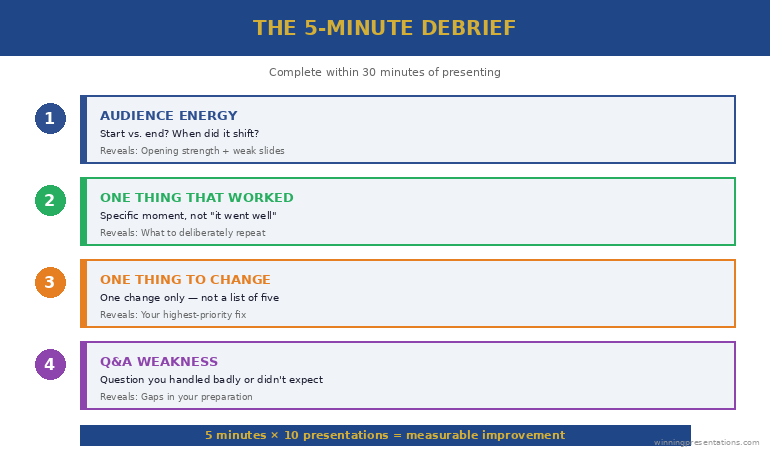
Within 30 minutes of finishing, answer four questions on your phone: (1) Where did audience energy shift? (2) What one moment worked best? (3) What one thing would I change? (4) What Q&A question did I handle badly? That’s the entire presentation debrief framework. Do it 10 times and you’ll be measurably better than everyone who skips this step. Full breakdown below.

Get the Structure Right So You Can Focus on Getting Better

The Executive Slide System gives you decision-first slide structures for every executive format — so your debrief focuses on delivery, Q&A, and audience engagement instead of “were my slides in the right order?”

Get the Executive Slide System → £39

Built from 24 years of corporate experience. Used in weekly updates, board presentations, and steering committee meetings.

She Wasn’t the Most Talented Presenter. After 6 Months, She Was the Best.

A director I coached at a financial services firm told me something honest in our first session: “I’m not terrible at presenting. But I’m not getting better. I’ve been presenting for eight years and I’m exactly where I started.”

She presented weekly to her leadership team, monthly to the steering committee, and quarterly to the board. That’s roughly 70 presentations a year. Eight years. Over 500 presentations — and she felt no better than when she started.

I didn’t change her slides. I didn’t teach her breathing techniques. I gave her one thing: a presentation debrief framework to complete within 30 minutes of every presentation.

Four questions. A phone note. Five minutes.

After three months, her leadership team noticed the change. After six months, her managing director described her as “the clearest presenter in the division.” She hadn’t taken a course. She hadn’t hired a coach beyond our initial session. She’d simply started learning from each presentation instead of moving on and forgetting.

After 24 years in corporate environments and 15 years training executives, this is the highest-leverage technique I know — and it’s the one nobody does.

Why Presentations Don’t Improve Without a Debrief

Think about how you treat presentations today. You prepare (sometimes for days), you deliver, you feel relieved, you move on to the next task. By the following morning, the specific details of what went well and what didn’t are already fading.

This means every presentation starts from scratch. You bring the same habits, the same structural patterns, the same nervous tics, the same Q&A weaknesses — because you never captured what to change.

Compare this to any other professional skill. Athletes review game footage. Surgeons debrief after procedures. Pilots complete post-flight checklists. In every high-performance field, the review phase is considered essential. In corporate presenting — a skill that directly impacts promotions, budget approvals, and career trajectory — the review phase simply doesn’t exist.

The result is predictable: professionals who present 70 times a year get 70 repetitions of the same mistakes instead of 70 iterations of improvement. Your executive presentation structure is the foundation — but the debrief is how you refine everything that sits on top of it.

The Presentation Debrief Framework: 4 Questions in 5 Minutes

Complete this within 30 minutes of presenting — in the car, at your desk, on your phone. The window matters: after 30 minutes, the specific details start fading and you’re left with general impressions, which aren’t useful.

Question 1: What was the audience’s energy at the start vs. the end?

Not “how did it go?” (too vague). Specifically: were they engaged at the start? Did energy increase or decrease? When did you notice a shift? This reveals whether your opening is strong and whether you’re losing people in the middle. If energy dropped at slide 4 every time, slide 4 is the problem.

Question 2: What’s the one thing that worked best?

Force yourself to identify one specific moment. Not “it went well” — that’s useless. “The CFO leaned forward when I showed the cost comparison on slide 3” or “The room laughed at the opening story about the vendor delay.” Specific moments you can deliberately repeat.

Question 3: What’s the one thing I’d change?

One thing only. Not a list of five improvements — that’s overwhelming and you won’t act on any of them. “I rushed the Q&A answer about timeline” or “Slide 7 had too much detail and I lost them.” One specific change you can implement next time. The approach to reading the room before you enter it gets better with each debrief because you start noticing patterns in how different audiences respond.

Question 4: What question did I handle badly (or not expect)?

This is the Q&A improvement question. Even if Q&A went well, identify the one question you hesitated on or answered weakly. Write down what you wish you’d said. Over ten debriefs, you’ll build a personal library of strong answers to recurring questions — and common Q&A mistakes stop recurring because you’ve consciously addressed them.

The 5-Minute Debrief showing four questions: audience energy, one thing that worked, one thing to change, and one Q&A improvement

When your slide structure is already right, your debrief focuses on delivery — not on fixing slides. The Executive Slide System solves the structure so you can focus on getting better.

Get the Executive Slide System → £39

Real Debrief Examples — What Useful Entries Look Like

Here are three actual debriefs (anonymised) from executives I’ve worked with. Notice how specific they are — that’s what makes them actionable.

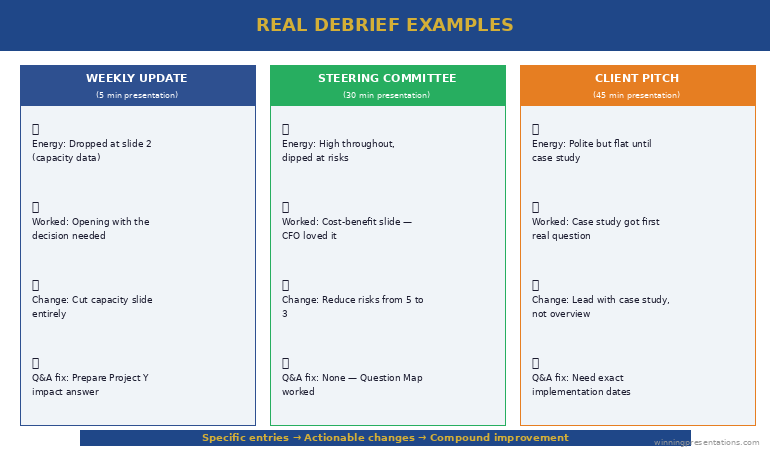
Debrief 1 — Weekly leadership update (5 minutes):

Energy: Started engaged, dropped at slide 2 (capacity data — nobody cared). Picked back up when I flagged the vendor risk. What worked: Opening with the decision I needed. Got an immediate response. What I’d change: Cut the capacity slide entirely. Move the risk flag to slide 1. Q&A: The COO asked about the impact on Project Y. I wasn’t prepared. Answer for next time: “No dependency — different vendor, different timeline. I checked this morning.”

Debrief 2 — Steering committee (30 minutes):

Energy: High throughout — the committee was genuinely engaged. Dropped slightly during the risk section (too many risks listed). What worked: The cost-benefit slide. The CFO said “that’s exactly what I needed to see.” What I’d change: Reduce risks from 5 to 3. The committee can only influence 3 anyway. Q&A: Strong overall. One question about contract flexibility — I gave a confident answer because I’d prepared it. The Question Map worked.

Debrief 3 — Client pitch (45 minutes):

Energy: Polite but flat. The prospect was nodding but not engaging. What worked: The case study slide got the first real question. That’s the slide that created genuine interest. What I’d change: Lead with the case study instead of our company overview. They don’t care about us until they see proof we’ve solved their problem. Q&A: They asked about implementation timeline — I was vague. Need exact dates for next pitch.

Three real debrief examples showing specific entries for weekly update, steering committee, and client pitch presentations

The Executive Slide System (£39) solves the structural problems so your debriefs focus on delivery, audience engagement, and Q&A — the skills that compound over time.

The Compound Effect: What Changes After 10 Debriefs

The presentation debrief framework doesn’t produce dramatic overnight change. It produces something more valuable: compound improvement.

After debrief 1-3: You start noticing patterns you didn’t see before. “I always rush the ending.” “The room always drops at slide 4.” “I never prepare for the timeline question.” Awareness is the first change.

After debrief 4-7: You start making deliberate changes before each presentation based on previous debriefs. “Last time I rushed the ending — this time I’ll pause before the closing slide.” “Slide 4 always loses them — I’ll cut it.” Your preparation becomes targeted instead of general.

After debrief 8-10: The changes become automatic. You naturally lead with decisions, cut weak slides, and prepare for the questions that used to catch you off guard. Your Q&A answers are stronger because you’ve built a library of prepared responses from previous debrief entries. Other people start noticing the improvement — because it’s visible and consistent.

Ten debriefs. Fifty minutes total. That’s the investment that separates someone who’s “presented for eight years” from someone who’s “improved through 500 presentations.”

The Executive Slide System (£39) eliminates the most common structural problems from the start — so your debriefs capture delivery insights instead of slide-order mistakes.

Common Questions About Presentation Debriefs

How do you review your own presentation?

Within 30 minutes of presenting, answer four specific questions: What was the audience’s energy at the start vs. end? What one thing worked best? What one thing would you change? What Q&A question did you handle badly or not expect? Specificity matters — “it went OK” is useless. “The CFO leaned forward at slide 3 but checked her phone at slide 6” is actionable.

How do you improve at presenting over time?

By capturing learning after each presentation instead of moving on and forgetting. A presentation debrief framework creates compound improvement — patterns emerge after 3-4 reviews, deliberate changes happen after 5-7, and automatic improvement is visible after 8-10. Without a structured review, you get repetition of the same habits rather than iteration toward better ones.

What’s the most common presentation mistake professionals repeat?

Burying the recommendation. In almost every debrief I review with executives, the audience’s energy drops mid-presentation because the presenter is building context instead of leading with the decision. Professionals repeat this mistake because they never capture the pattern. One debrief that notes “energy dropped at slide 4 — too much context before the recommendation” fixes it permanently.

Start Improving From Your Very Next Presentation

The Executive Slide System gives you the structure. The 5-Minute Debrief gives you the improvement loop. Together, every presentation you give is better than the last.

Get the Executive Slide System → £39

Used in weekly updates, board presentations, steering committees, and every executive format that benefits from continuous improvement.

Frequently Asked Questions

Do I really need to debrief every presentation?

Every one that matters. Weekly updates, steering committees, board meetings, client pitches — yes. A casual team huddle — probably not. The compound effect requires consistency, but 5 minutes per presentation is a low barrier. If you present 4 times a week and debrief each one, that’s 20 minutes a week for career-changing improvement.

What if I don’t have time within 30 minutes?

Type four bullet points on your phone while walking back to your desk. It doesn’t need to be a formal document — it needs to be specific and captured before the details fade. A 60-second phone note is infinitely more useful than a detailed review three days later when you’ve forgotten the specifics.

Should I ask my audience for feedback instead?

Self-debrief and audience feedback serve different purposes. Your debrief captures what you noticed in real time — audience energy, moments of connection, Q&A weaknesses. Audience feedback tells you what they valued. Both are useful, but the self-debrief is the one you control and can do consistently. Don’t wait for feedback that may never come — capture your own learning immediately.

Get Weekly Presentation Intelligence

Debrief frameworks, slide structures, and the executive communication strategies that compound over time — delivered every week.

Join the Newsletter

Related: If your debrief reveals Q&A as your biggest weakness, read Nobody Prepares for Q&A. That’s Why Q&A Kills the Presentation. — the Question Map for predicting every question before you present.

Your next step: After your next presentation, take 5 minutes to answer the four debrief questions. Be specific. One worked, one to change, one Q&A fix. Do this ten times and you’ll be measurably better than everyone who skips this step.

Want the slide structures that solve the most common debrief finding — so you can focus on delivery instead of fixing slides?

Get the Executive Slide System → £39

About the Author

Mary Beth Hazeldine is the Owner & Managing Director of Winning Presentations. With 24 years of corporate banking experience at JPMorgan Chase, PwC, Royal Bank of Scotland, and Commerzbank, she specialises in executive-level presentation skills and continuous improvement frameworks for professional communicators.

A qualified clinical hypnotherapist and NLP practitioner, Mary Beth combines executive communication expertise with evidence-based techniques. She has spent 15 years coaching executives to improve through structured debriefs, not just preparation.

Read more articles at winningpresentations.com

22 Feb 2026
Female professional in navy blazer using a red pen to mark and audit colourful sticky notes on a whiteboard while holding a tablet, actively restructuring a presentation deck in a bright modern office

I Audited a Real Executive Presentation: Before and After, 15 Slides Became 7

Quick answer: This is a real executive presentation before and after audit. A 15-slide budget approval deck was restructured to 7 slides — cutting context the audience didn’t need, merging duplicate data, and moving the recommendation from slide 14 to slide 2. Not a single decision-critical data point was lost. The board approved it in one meeting.

Build Executive Decks That Get Approved — Without the Bloat

The Executive Slide System gives you decision-first slide structures for board meetings, budget approvals, steering committees, and every executive format — so you never build a 15-slide deck when 7 will get the decision.

Get the Executive Slide System → £39

Built from 24 years of corporate experience. Used in budget approvals, board presentations, and executive governance meetings.

She’d Been “Almost Ready” for Three Weeks. The Problem Wasn’t the Content.

A senior programme manager came to me with a deck she’d been revising for three weeks. Budget approval presentation for a £1.8M technology programme. Every time she thought it was finished, she’d add another slide. One more context slide. One more risk. One more stakeholder update.

Fifteen slides. Forty-five minutes of material for a thirty-minute slot.

I told her: “You don’t have a content problem. You have a confidence problem. You’re adding slides because you’re afraid of being caught without an answer. But every extra slide dilutes your recommendation and gives the board more reasons to defer.”

We sat down for 90 minutes. I audited every slide against one question: “Does this slide help the board make a decision, or does it just make you feel prepared?” Eight slides failed that test. We cut them. The remaining seven were restructured with the recommendation first.

For a quick version of this audit you can apply to any deck, try the 60-second test every executive slide should pass before your next boardroom meeting.

She presented the next day. Approved in one meeting. The board chair told her it was the clearest budget presentation he’d seen that quarter. Same data. Same project. Eight fewer slides.

The Executive Presentation Before the Audit: All 15 Slides (and What’s Wrong With Each)

Here’s the original slide order, anonymised but structurally identical. I’ve tagged each slide with its function and the problem.

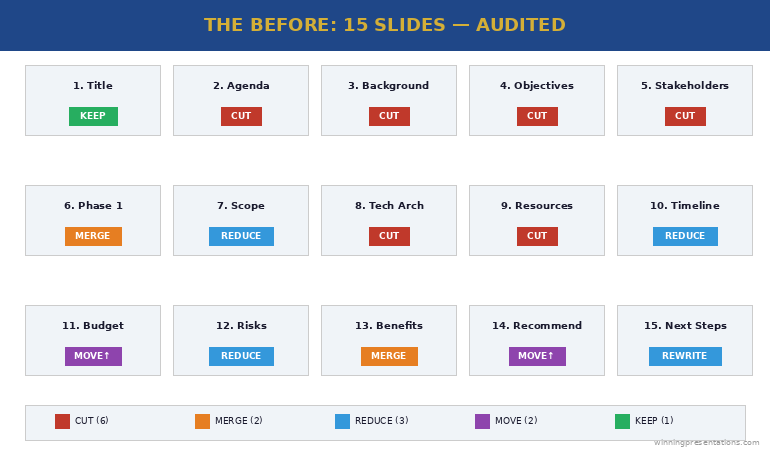
Slide 1: Title slide. “Programme Phoenix — Budget Approval Request.” Problem: None. Every deck needs a title. Keep.

Slide 2: Agenda. Listed all 15 sections. Problem: Agendas for executive presentations signal “this will be long.” Cut.

Slide 3: Programme background. Two paragraphs of context about why the programme exists. Problem: The board already approved Phase 1. They know why this exists. This slide is for the presenter’s comfort, not the audience’s decision. Cut.

Slide 4: Programme objectives. Five bullet points restating the business case. Problem: Duplicate of the original business case they already approved. Cut.

Slide 5: Stakeholder map. Org chart showing all stakeholders. Problem: The board doesn’t need to see who reports to whom. This is an internal working document, not a decision slide. Cut.

Slide 6: Phase 1 summary. What was delivered, milestones hit. Problem: Good content, wrong position. Merge with the recommendation slide as evidence, not a standalone. Merge.

Slide 7: Phase 2 scope. Detailed breakdown of Phase 2 deliverables. Problem: Too granular for a board audience. Reduce to three key deliverables and move detail to appendix. Reduce.

Slide 8: Technical architecture. System diagram. Problem: Nobody on this board is making a technical decision. This is an appendix slide. Cut.

Slide 9: Resource plan. Team structure and headcount. Problem: The board cares about cost, not headcount. Merge resource cost into the budget slide. Cut.

Slide 10: Timeline. Gantt chart with 20+ milestones. Problem: Too much detail. Reduce to 5 key milestones. Reduce.

Slide 11: Budget breakdown. Detailed cost table. Problem: Good slide, wrong position — should be slides 2-3, not slide 11. The board has been waiting 15 minutes for this. Reposition.

Slide 12: Risk register. 12 risks in a traffic light matrix. Problem: Twelve risks overwhelms. Reduce to the 3 risks the board can actually influence. Reduce.

Slide 13: Benefits realisation. Projected ROI and savings. Problem: Good content, but separated from the budget by two slides. Merge with budget to show cost AND return together. Merge.

Slide 14: Recommendation. “We recommend proceeding with Phase 2.” Problem: The recommendation is on slide 14 of 15. The board has been listening for 35 minutes before they know what you’re asking for. This should be slide 2. Reposition.

Slide 15: Next steps. Problem: Generic “pending approval” language. Replace with a specific ask: “Approve £1.8M. Authorise procurement. Target: contracts signed by March.” Rewrite.

Before audit showing 15 slides with tags indicating cut, merge, reduce, or reposition for each slide

The Executive Slide System gives you the decision-first structure so you build the right deck from the start — no 15-to-7 audit needed.

Get the Executive Slide System → £39

The 5 Cuts That Transformed the Deck

Every cut followed one of five principles. These work on any executive deck, not just this one.

Cut #1: Remove context the audience already has. The background and objectives slides (3 and 4) restated information the board approved months ago. If the audience was in the room when the decision was made, they don’t need a recap. That’s four minutes of presentation time that adds nothing. Slides removed: 3, 4.

Cut #2: Remove internal working documents. The stakeholder map (5), technical architecture (8), and resource plan (9) are useful for the programme team but irrelevant to a board decision. The test: “Would I send this slide to the board as a standalone?” If not, it doesn’t belong in the main deck. Slides removed: 5, 8, 9.

Cut #3: Merge data that answers the same question. The budget (11) and benefits (13) were separated by two slides, forcing the board to hold cost data in memory while listening to risks. Combined into one slide: “Investment: £1.8M. Return: £4.2M over 3 years. Payback: 11 months.” One slide. One decision. The Phase 1 summary (6) merged into the recommendation as evidence. Slides merged: 6→2, 11+13→one slide.

Cut #4: Reduce granularity to decision-level. The timeline (10) had 20+ milestones — reduced to 5 key dates the board needs to track. The risk register (12) had 12 risks — reduced to 3 the board can actually influence. Detail moved to appendix for anyone who wants it. Slides reduced: 10, 12.

Cut #5: Move the recommendation to slide 2. This is the structural change that transforms everything. The recommendation moved from slide 14 to slide 2. The board knows what you’re asking for within 60 seconds, and every subsequent slide becomes evidence supporting that recommendation. This is how steering committee presentations should be structured — decision first, evidence after.

The Executive Slide System (£39) gives you the decision-first slide structures for budget approvals, board meetings, and steering committees — build the 7-slide version from the start.

The Executive Presentation After the Audit: 7 Slides That Got Approved

Here’s the restructured deck:

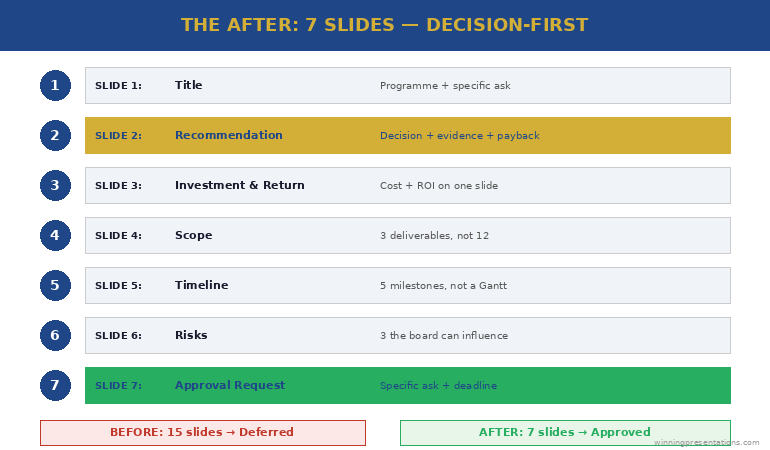
Slide 1: Title. “Programme Phoenix Phase 2 — Budget Approval (£1.8M)”

Slide 2: Recommendation. “Approve £1.8M for Phase 2. Phase 1 delivered on time and £40K under budget. Phase 2 delivers £4.2M return over 3 years with 11-month payback.”

Slide 3: Investment and return. Budget breakdown (3 categories, not 12 line items) plus projected return and payback period — on one slide. The board sees cost and value together.

Slide 4: Scope. Three key Phase 2 deliverables (not the full breakdown). Each linked to a specific business outcome. Detail in appendix.

Slide 5: Timeline. Five milestones: start, three checkpoints, go-live. Not a Gantt chart — a clean visual the board can track at a glance.

Slide 6: Risks. Three risks the board can influence, each with a mitigation already in place. Not a traffic light matrix — a clear “risk → mitigation → status” format.

Slide 7: Approval request. “Approve £1.8M. Authorise procurement to begin contract negotiation. Target: signed by 31 March.” One specific ask with a specific deadline.

Seven slides. Twenty minutes. Approved in one meeting. The approach to writing effective executive summary slides applies the same principle: say the essential thing first, then support it with evidence.

After audit showing 7-slide structure with recommendation on slide 2, investment and return combined, and specific approval request on slide 7

The 3 Rules for Auditing Any Executive Presentation Before and After

You can apply this audit to any deck in 30 minutes using three rules:

Rule 1: The decision test. For every slide, ask: “Does this help the audience make a decision, or does it just make me feel prepared?” If it’s for your comfort rather than their decision, cut it or move it to the appendix. This single question typically removes 30-40% of slides.

Rule 2: The position test. Your recommendation should appear by slide 2 or 3 — never at the end. If it’s later than slide 3, restructure. Everything after the recommendation becomes supporting evidence, not build-up. The same principle works for writing stronger slide titles — lead with the conclusion, not the context.

Rule 3: The merge test. If two slides answer the same question (e.g., “How much does it cost?” and “What’s the return?”), merge them. The board should never have to hold data from slide 11 in memory while listening to slides 12 and 13. If data points belong together, put them together.

The Executive Slide System (£39) applies all three rules by default — every template is decision-first, merged where appropriate, and stripped of context slides that don’t serve the audience.

Common Questions About Executive Deck Audits

How many slides should an executive presentation have?

There’s no universal number, but most executive decisions can be supported in 5-8 slides. The audit principle is more useful than a slide count: every slide must help the audience make a decision. If a slide exists for context the audience already has, internal detail they don’t need, or granularity beyond decision-level — cut it or move it to appendix.

How do you cut slides without losing important information?

You’re not losing information — you’re repositioning it. The appendix holds everything the main deck doesn’t. Detail-oriented audience members can review it. But the main presentation should contain only the slides that drive the decision. Most “important information” in bloated decks is important to the presenter, not to the decision-maker.

What’s the biggest mistake in executive presentations?

Burying the recommendation. In the audit above, the recommendation was on slide 14 of 15. The board spent 35 minutes waiting to find out what they were being asked to decide. Moving the recommendation to slide 2 changes the entire dynamic — every subsequent slide becomes evidence rather than build-up, and the audience listens with purpose because they know what decision you’re driving toward.

Stop Auditing Your Deck. Start Building It Right.

The Executive Slide System gives you decision-first templates for every executive format — board meetings, budget approvals, steering committees, and weekly leadership updates. Build the 7-slide version from the start.

Get the Executive Slide System → £39

Used in budget approvals, board presentations, and executive governance meetings across corporate and consulting teams.

Frequently Asked Questions

What should I put in the appendix?

Everything that supports your recommendation but isn’t needed for the decision itself: detailed cost breakdowns, technical architecture, full risk registers, resource plans, stakeholder maps, and granular timelines. The appendix exists for two purposes — answering detailed Q&A questions and providing an audit trail. If you never open the appendix, your main deck was perfectly structured.

What if my organisation requires a specific slide template with 15+ sections?

Many organisations have mandatory templates. Use them — but restructure the content within them. Move your recommendation to the earliest possible slide. Merge sections that answer the same question. Add “See appendix” to sections that don’t serve the decision. The template stays compliant. The content becomes decision-focused.

How do I know which slides to cut versus move to appendix?

Cut slides that contain information the audience already has (background, objectives they previously approved, restated business cases). Move to appendix slides that contain useful detail someone might ask about in Q&A (technical architecture, detailed costs, full risk registers). The distinction: cut = nobody needs this in this meeting. Appendix = someone might ask about this, but it shouldn’t be in the main flow.

Get Weekly Presentation Intelligence

Deck audits, slide structures, and the executive communication strategies that get decisions in one meeting — delivered every week.

Join the Newsletter

Related: Once your deck is tight, the next risk is Q&A. Read Nobody Prepares for Q&A. That’s Why Q&A Kills the Presentation. — the Question Map for predicting every question before you present.

Your next step: Open your current deck. For every slide, ask: “Does this help the board make a decision?” If the answer is no, move it to the appendix. Your 15 slides will become 7 — and your approval rate will change overnight.

Want the decision-first templates so you build the right deck from the start?

Get the Executive Slide System → £39

About the Author

Mary Beth Hazeldine is the Owner & Managing Director of Winning Presentations. With 24 years of corporate banking experience at JPMorgan Chase, PwC, Royal Bank of Scotland, and Commerzbank, she specialises in executive-level presentation skills and decision-focused slide architecture.

A qualified clinical hypnotherapist and NLP practitioner, Mary Beth combines executive communication expertise with evidence-based techniques. She has spent 15 years auditing and restructuring executive decks for board presentations, budget approvals, and governance meetings.

Read more articles at winningpresentations.com

21 Feb 2026
Professional woman in navy blazer standing and presenting a simple slide with bullet points to a small group of four seated colleagues in a bright glass-walled meeting room with morning light

The Weekly Leadership Update Nobody Teaches You (But Everyone Judges You On)

Quick answer: Your weekly leadership update shapes how senior people perceive your judgement, visibility, and promotion-readiness more than any board meeting or keynote. Most professionals waste it on status reporting. The Reputation Update structure replaces “here’s what happened” with three career-building slides: the decision you need, the risk you’ve managed, and the value you’ve created — in five minutes.

She Presented the Same Update for 18 Months. Then Someone New Got Her Promotion.

A director I worked with at a large UK bank had a weekly slot in the Monday leadership meeting. Five minutes. She used it the same way every week: progress against milestones, team capacity, upcoming deadlines.

Professional. Thorough. Completely forgettable.

When the VP role opened, leadership promoted someone from a different department — someone who presented less often but whose weekly updates consistently surfaced decisions, flagged risks early, and connected team output to business outcomes.

The director asked me what went wrong. I told her: nothing went wrong with your work. Everything went wrong with your weekly update. For 18 months, leadership heard “things are on track.” From the person who got promoted, they heard “here’s the decision I need, here’s the risk I’ve mitigated, here’s the revenue impact.” Same five minutes. Completely different perception.

After 24 years in corporate environments, I’ve watched this pattern repeat constantly. The weekly update is the most frequent presentation you give — 50 times a year — and the one that builds or erodes your professional reputation week by week. Yet nobody teaches it.

Why Your Weekly Update Is a Career Presentation (Not a Status Report)

Here’s what most people present in their weekly update:

❌ The Status Report (what most people do):

“Project X is on track. We completed the data migration. Next week we’ll start UAT. Team capacity is at 85%.”

This tells leadership one thing: you’re doing your job. That’s not a bad thing. But it doesn’t build your reputation, demonstrate your judgement, or create visibility for your decision-making ability. It’s information they could get from a dashboard.

✅ The Reputation Update (what gets you noticed):

“We completed data migration two days early, which means we can pull UAT forward and absorb the vendor delay without impacting the March deadline. I’ve already briefed the testing team. The one risk I want to flag: if we don’t get sign-off on the revised scope by Friday, we lose that buffer. I need 10 minutes with Sarah this week.”

Same work. Same facts. But now leadership sees judgement, initiative, and a specific ask. You’ve turned a status report into evidence that you think like a leader.

The weekly update is where your executive summary skills matter most — because you have the least time and the highest frequency.

Reputation Update structure showing three slides with decision needed in gold, risk managed in blue, and value created in green, each with wrong and right examples

The Reputation Update Structure (3 Slides, 5 Minutes)

This structure works for any recurring leadership meeting — weekly, fortnightly, or monthly. It replaces the standard progress-and-capacity format with three slides that build your professional reputation every single week.

Slide 1: The Decision or Escalation. Start with what you need from leadership — not what you’ve done. “I need sign-off on the revised vendor timeline by Friday” or “I’m flagging a budget risk that needs a decision before month-end.” If you genuinely have no decision needed, lead with the most significant judgement call you made this week and why.

❌ Wrong slide 1: “Weekly Update — Team Progress Summary”

✅ Right slide 1: “Vendor Timeline Decision Needed by Friday (Buffer at Risk)”

Slide 2: The Risk or Challenge You’ve Already Handled. This is the reputation-building slide. Don’t just report problems — show that you identified them early and acted. “Data migration flagged three compatibility issues. We’ve resolved two. The third needs a workaround I’ve already scoped — it adds one day, not five.” This demonstrates the judgement and initiative that leadership evaluates when making promotion decisions.

❌ Wrong slide 2: Traffic light dashboard — 4 green, 2 amber, 1 red

✅ Right slide 2: “3 Compatibility Issues Found → 2 Resolved → 1 Workaround Scoped (1-Day Impact, Not 5)”

Turn Every Weekly Update Into a Career-Building Moment

The Executive Slide System gives you the slide structures for weekly updates, steering committees, board meetings, and every recurring executive format — built to demonstrate judgement, not just report status.

Get the Executive Slide System → £39

Built from 24 years of corporate experience. Used in weekly leadership meetings, governance forums, and executive updates.

Slide 3: The Value Connection. Connect what your team delivered this week to a business outcome leadership cares about. Not “we completed the migration” but “migration complete — this unlocks the Q2 cost saving the CFO flagged in January.” One sentence that connects your work to their priorities. This is the slide most people skip, and it’s the one that makes leadership remember your name.

❌ Wrong slide 3: “Next Steps: Continue UAT, finalise documentation, prepare for go-live”

✅ Right slide 3: “Migration Complete → Q2 Cost Saving of £120K Now Unlocked (CFO Priority #2)”

That’s the complete structure. Three slides. Five minutes. The same information you already have, restructured to show decision-making, risk management, and business impact instead of task completion.

Your Reputation Update — Slide Headings (Copy These):

Slide 1: [Decision needed / Escalation / Judgement call this week]

Slide 2: [Risk identified → Action taken → Impact contained]

Slide 3: [Value created → Connected to [leadership priority]]

Replace the brackets with this week’s specifics. Three slides, five minutes, every Monday.

If you want the detailed structure for longer status presentations, the project status update framework covers the full format.

The Full Weekly Update — Wrong vs. Right, Side by Side

Here’s a real example using the same project data:

❌ Status Report version (what leadership forgets):

Slide 1: “Weekly Update — Project Phoenix.” Slide 2: Milestones completed (3 green, 1 amber). Slide 3: Team capacity at 85%. Slide 4: Upcoming deadlines. Slide 5: Risks (traffic light). Slide 6: Next steps.

Six slides. No decisions requested. No judgement demonstrated. Leadership’s takeaway: “Things seem fine.”

✅ Reputation Update version (what builds careers):

Slide 1: “Decision: Approve revised vendor timeline by Friday (protects March deadline).” Slide 2: “3 compatibility issues found → 2 resolved → workaround scoped for third (1-day impact).” Slide 3: “Migration complete → £120K Q2 saving now unlocked.”

Three slides. One clear decision. Judgement visible. Value connected to CFO priority. Leadership’s takeaway: “She’s thinking ahead. She’s ready.”

The Executive Slide System includes the Reputation Update structure for weekly meetings — plus frameworks for every recurring executive format.

Get the Executive Slide System → £39

Side by side comparison of six-slide status report that leadership forgets versus three-slide Reputation Update that builds careers showing different leadership takeaways

You present this update 50 times a year. The Executive Slide System (£39) gives you slide-by-slide structures for weekly updates, steering committees, boards, and budget approvals — so every presentation builds your reputation instead of just reporting your status.

What to Present When Nothing Significant Happened

This is the question everyone asks. “What if my week was just steady execution? Nothing broke, nothing changed, no decisions needed.”

Good weeks are still Reputation Update weeks. Here’s how to handle each slide when there’s “nothing to report”:

Slide 1 (Decision): If no decision is needed, lead with a forward-looking flag. “No decisions needed this week. I want to flag that next week’s vendor demo may surface a scope question — I’ll come back with a recommendation if it does.” This shows you’re thinking ahead, not just reacting.

Slide 2 (Risk managed): Even in quiet weeks, you’ve made judgement calls. “We identified a potential data quality issue in the testing environment. Investigated, confirmed it’s a non-issue — test data only, not production.” You caught something and dismissed it. That’s judgement. Report it.

Slide 3 (Value): Connect steady progress to the bigger picture. “On track to deliver two weeks early, which creates buffer for the Phase 2 timeline the programme board is tracking.” Steady isn’t boring when you connect it to outcomes they care about.

The worst thing you can do in a quiet week is skip your update or say “nothing to report.” That makes you invisible. The approach to getting executive decisions fast starts with maintaining consistent visibility — even in the quiet weeks.

The Executive Slide System (£39) includes quiet-week templates and frameworks for every recurring meeting format — weekly, monthly, and quarterly.

Common Questions About Weekly Leadership Updates

How do you present a weekly update to leadership?

Lead with the decision you need or the most significant judgement call you made that week — not with progress or milestones. Then show one risk you identified and how you’ve already addressed it. Finally, connect your work to a business outcome leadership is tracking. This three-slide Reputation Update structure takes five minutes and demonstrates the thinking leadership evaluates for promotions, not just the task completion they expect from everyone.

What should a weekly status update include?

A weekly update that builds your reputation includes three elements: one decision or escalation (what you need from leadership), one risk you’ve already managed (demonstrating judgement), and one value connection (linking your team’s output to a business priority). Skip the traffic light dashboards and capacity charts — those belong in written reports, not in your five minutes of face time with senior decision-makers.

How do you make weekly updates interesting to leadership?

Stop reporting and start demonstrating. Leadership doesn’t find status updates interesting because they contain no judgement, no decisions, and no connection to outcomes they care about. The Reputation Update structure is interesting by default because it surfaces decisions, shows risk management thinking, and connects work to business impact. You’re not entertaining them — you’re showing them how you think.

Your Monday Meeting Is in 48 Hours. Be Ready.

The Executive Slide System gives you the Reputation Update framework plus slide structures for every executive meeting format — steering committees, boards, budget approvals, and senior leadership updates. Build your next weekly update in 15 minutes.

Get the Executive Slide System → £39

Used in weekly leadership meetings, governance forums, and recurring executive updates across corporate teams.

Frequently Asked Questions

What if my weekly update is only 5 minutes?

Five minutes is plenty. The Reputation Update structure is designed for exactly this constraint. Three slides, three key messages: the decision you need, the risk you’ve managed, the value you’ve created. Most professionals waste five minutes on six slides of progress data that leadership forgets by the next meeting. Three focused slides are more memorable and more career-building than six generic ones.

What if my manager doesn’t seem to care about weekly updates?

If your manager seems disengaged during updates, it’s almost certainly because the updates contain nothing that requires their attention. A status report doesn’t need a response. A decision request does. When you start leading with “I need your input on X” or “I want to flag a risk on Y,” engagement changes immediately — because you’ve given them something to respond to, not just something to listen to.

What if I have nothing significant to report this week?

You always have something to report — you’re just framing it as task completion instead of judgement. Even in a quiet week, you made decisions (what to prioritise), managed risks (what you investigated and dismissed), and created value (how your steady progress connects to broader outcomes). The Reputation Update structure helps you surface the judgement you’re already exercising but not making visible.

Should I use slides for a 5-minute weekly update?

Yes, but only three. The slides aren’t for reading — they’re for anchoring the conversation. A single-line decision statement on screen while you talk for 90 seconds is far more effective than speaking without visual support. It also creates a record. After six months of Reputation Updates, you have 26 weeks of documented decisions, risks managed, and value delivered — which becomes powerful evidence in promotion conversations.

Get Weekly Presentation Intelligence

Slide structures, decision frameworks, and the executive communication strategies that work in real leadership meetings — delivered every week.

Join the Newsletter

Related: If your weekly update goes well but your cross-departmental presentations fall flat, read Presenting Cross-Functionally: Why Your Best Slides Fail Outside Your Department — the Audience Translation Method for different stakeholder groups.

Your next step: Open your last weekly update. Replace the progress summary with one decision, one risk managed, and one value connection. You’ll present three slides instead of six — and leadership will remember it on Tuesday.

Want the complete Reputation Update framework with worked examples for every weekly and recurring meeting format?

Get the Executive Slide System → £39

About the Author

Mary Beth Hazeldine is the Owner & Managing Director of Winning Presentations. With 24 years of corporate banking experience at JPMorgan Chase, PwC, Royal Bank of Scotland, and Commerzbank, she specialises in executive-level presentation skills and recurring leadership communication.

A qualified clinical hypnotherapist and NLP practitioner, Mary Beth combines executive communication expertise with evidence-based techniques. She has spent 15 years training executives for weekly updates, board presentations, and committee-level meetings.

Read more articles at winningpresentations.com

21 Feb 2026
Female executive in navy blazer standing and presenting vendor comparison data with bar charts and pie chart on screen to a committee of seated professionals in a modern boardroom

The Vendor Selection Presentation: How to Get a £500K Decision in One Meeting

Quick answer: Vendor comparison presentations get deferred because they’re structured as evaluations — showing three options equally and asking the committee to choose. This creates choice paralysis. The Decision Architecture leads with your recommendation on slide 1, then uses the comparison data to validate your judgement rather than create a decision for the committee to make. One meeting. One decision.

⚡ Committee meets in 48 hours? Here’s your 6-slide structure:

Slide 1: Your recommendation + two reasons why. Slide 2: Evidence on the criteria that matter. Slide 3: Why the others fall short. Slide 4: Risk mitigation (pre-answer their top concern). Slide 5: Cost + timeline for your pick only. Slide 6: The specific approval you need. Full breakdown below.

I Presented 3 Vendors to the Committee. They Picked None. The Problem Was Slide 1.

Early in my banking career, I spent three weeks evaluating CRM vendors. Thorough analysis. Detailed scoring. Fair comparison across twelve criteria. I presented all three options with equal weight and asked the steering committee to choose.

They chose nothing. “Let’s revisit when we have more information.”

My manager told me something I’ve never forgotten: “You gave them a quiz. Executives don’t do quizzes. They validate recommendations. Tell them which vendor to pick and why — then let them confirm your judgement or challenge it.”

The next week, I presented the same data. Same three vendors. But I restructured entirely: “I recommend Vendor B. Here’s why. Here’s the risk. Here’s what Vendors A and C can’t do. Here’s the cost. Here’s what I need you to approve.” The committee approved in 12 minutes.

Same data. Different architecture. In the years since, I’ve seen this pattern repeated in every vendor selection, technology evaluation, and procurement decision I’ve been involved in. Neutral comparison slides create choice paralysis. Recommendation-first slides create decisions.

Why Neutral Comparison Slides Guarantee Deferrals

Here’s the slide structure most people use for vendor presentations:

❌ The Evaluation Format (produces deferrals):

Slide 1: “Vendor Selection — Three Options for Review.” Slide 2-4: Vendor A profile, Vendor B profile, Vendor C profile. Slide 5: Side-by-side comparison matrix (12+ criteria). Slide 6: Scoring table. Slide 7: “Recommendation: Vendor B.” Slide 8: Next steps.

This feels thorough. It feels objective. It feels fair. And it almost always produces deferrals. Here’s why:

By the time leadership reaches your recommendation on slide 7, they’ve spent 20 minutes absorbing equal information about three different options. Their mental state is comparative — they’re looking for differences, weaknesses, and risks across all three. The safest response from this mental state is “we need more time to evaluate.” They don’t feel confident enough to choose because you’ve spent the entire presentation showing them how difficult the choice is.

The executive decision framework applies directly here: decisions come from confidence, and confidence comes from seeing a clear recommendation first — not from wading through comparison data.

✅ The Decision Architecture (produces approvals):

Slide 1: “I recommend Vendor B. Here’s why.” Slide 2: Why Vendor B wins on the two criteria that matter most. Slide 3: Why Vendors A and C fall short. Slide 4: Risk mitigation for Vendor B. Slide 5: Cost and timeline. Slide 6: What I need approved today.

Same data. But the committee’s mental state is completely different. They’re not evaluating three options — they’re evaluating your recommendation. That’s a faster, more confident decision. They can confirm your judgement or challenge it, but they have a clear starting position rather than a blank slate.

Evaluation format showing eight slides with recommendation last leading to deferral versus Decision Architecture showing six slides with recommendation first leading to approval in 12 minutes

Get Vendor Decisions Approved in One Meeting

The Executive Slide System gives you the Decision Architecture for vendor selections, budget approvals, steering committees, and every presentation where you need a yes — not “let’s revisit.”

Get the Executive Slide System → £39

Built from 24 years of corporate experience. Used in vendor evaluations, procurement decisions, and technology selections.

The Decision Architecture for Vendor Presentations (6 Slides)

Slide 1: Your Recommendation (One Sentence). “I recommend Vendor B for the CRM implementation. They’re the strongest on the two criteria that matter most for this project: integration speed and data migration capability.” No build-up. No context. Your recommendation and the two reasons — in one slide.

❌ Wrong slide 1: “CRM Vendor Selection — Overview of Options”

✅ Right slide 1: “Recommendation: Vendor B (Strongest on Integration Speed + Data Migration)”

Slide 2: Why Vendor B Wins on What Matters. Not a 12-criteria comparison. The two or three criteria that are most important for this specific project, with Vendor B’s evidence. “Integration: Vendor B completes in 6 weeks (A: 14 weeks, C: 10 weeks). Data migration: Vendor B has done this exact migration for three similar organisations.”

Slide 3: Why Vendors A and C Fall Short. This is the slide that prevents “but what about Vendor A?” objections. Show the specific weaknesses that eliminated them — not a comprehensive comparison, but the deal-breakers. “Vendor A: 14-week integration timeline puts the March deadline at risk. Vendor C: No UK data centre, creating GDPR compliance complexity.”

This Decision Architecture is exactly what the Executive Slide System gives you — for vendor selections, budget approvals, and any presentation where you need a decision.

Get the Executive Slide System → £39

Slide 4: Risk Mitigation for Your Recommendation. The committee will have concerns about your recommended vendor. Anticipate the top two and address them before they’re raised. “Risk: Vendor B is a mid-size company (stability concern). Mitigation: £22M revenue, 15-year track record, reference clients include three FTSE 250 companies.” This is the slide that prevents deferrals — you’ve already handled the objection. The same approach that works for steering committee decisions applies here.

Slide 5: Cost and Timeline. Total cost, payment schedule, and implementation timeline for your recommended vendor only. Don’t show all three vendors’ costs side-by-side — that reopens comparison mode. “Total: £480K over 18 months. Phase 1 live in 8 weeks. Full deployment by September.”

Slide 6: What You Need Approved. The specific action. “Approve Vendor B contract at £480K. Authorise procurement to begin contract negotiation. Target: signed by end of March.” One clear ask. If you need help structuring this slide, the executive summary slide framework gives you the format.

Evaluation format showing eight slides with recommendation last leading to deferral versus Decision Architecture showing six slides with recommendation first leading to approval in 12 minutes

The Full Vendor Presentation — Wrong vs. Right

❌ Evaluation Format (8 slides, produces deferrals):

1. Title/overview → 2. Evaluation criteria → 3. Vendor A profile → 4. Vendor B profile → 5. Vendor C profile → 6. Comparison matrix → 7. Scoring → 8. Recommendation

Recommendation arrives last, after 25 minutes of comparison. The committee is in evaluation mode, not decision mode.

✅ Decision Architecture (6 slides, produces approvals):

1. Recommendation + why → 2. Evidence for your choice → 3. Why others fall short → 4. Risk mitigation → 5. Cost + timeline → 6. What to approve

Recommendation arrives first. Evidence supports your judgement. The committee confirms rather than evaluates.

The Executive Slide System (£39) includes the Decision Architecture for vendor selections, budget approvals, and steering committee decisions — with slide-by-slide structures you can apply tonight.

Pre-Answering the Three Objections Committees Always Raise

Vendor selection committees have three predictable objections. Build answers into your deck rather than waiting for Q&A:

1. “Are we sure we’ve looked at enough options?” Address this in your opening: “We evaluated seven vendors. Three met our minimum requirements. I’m recommending the strongest of those three.” This shows thoroughness without creating seven-way comparison paralysis.

2. “What if the recommended vendor fails to deliver?” This is your risk mitigation slide. Include contract protections, exit clauses, and a fallback plan. “If Vendor B misses the Phase 1 milestone by more than two weeks, we invoke the performance clause. Vendor C remains on standby as a backup — their proposal is valid until June.”

3. “Can we see the full comparison?” Keep it in your appendix, not your main deck. “The full 12-criteria comparison is in the appendix if you’d like to review it. I’ve focused the main presentation on the three criteria that differentiate the vendors for this specific project.” This respects their time while showing you’ve done the work.

The Executive Slide System (£39) includes objection-handling frameworks and decision structures for vendor selections, budget approvals, and executive governance meetings.

Common Questions About Vendor Selection Presentations

How do you present a vendor recommendation to senior leadership?

Lead with your recommendation on slide 1 — the specific vendor and the two reasons they win. Then show evidence for your choice, explain why alternatives fall short, address the top two risks, present cost and timeline for your recommendation only, and end with the specific approval you need. This recommendation-first structure lets leadership validate your judgement rather than evaluate three options from scratch, which consistently produces faster decisions.

What should a vendor comparison presentation include?

A vendor comparison presentation that gets approved in one meeting includes six elements: your recommendation (slide 1), evidence for your choice on the two criteria that matter most (slide 2), specific reasons the other vendors were eliminated (slide 3), risk mitigation for your recommendation (slide 4), cost and timeline for the recommended vendor only (slide 5), and the specific approval you need (slide 6). Keep the full comparison matrix in the appendix.

How do you get a vendor decision approved without deferral?

Three structural changes prevent deferral: First, lead with your recommendation rather than a neutral comparison — this puts the committee in decision-confirmation mode instead of evaluation mode. Second, include a risk mitigation slide that pre-answers the top two concerns before they’re raised. Third, show cost and timeline for your recommended vendor only — showing all three vendors’ costs reopens comparison mode and invites “let me think about it.”

One Meeting. One Decision. No Deferrals.

The Executive Slide System gives you the Decision Architecture for vendor selections, plus slide structures for steering committees, board meetings, and every presentation where you need approval — not “let’s revisit.”

Get the Executive Slide System → £39

Used in vendor evaluations, procurement decisions, and technology selections across corporate and consulting teams.

Frequently Asked Questions

Won’t leading with my recommendation seem biased?

Leadership hired you to evaluate vendors and make a recommendation — not to create a multiple-choice test. Leading with your recommendation shows confidence and judgement. The comparison data is still there (in slide 3 and the appendix) for anyone who wants to validate your analysis. Every procurement professional and IT leader I’ve worked with who switched to recommendation-first saw faster approvals with no pushback about bias.

What if the committee disagrees with my recommendation?

Good. Disagreement is faster than deferral. If the committee says “we prefer Vendor A,” that’s a decision — and you can discuss why. If the committee says “let’s revisit,” that’s a delay that costs time and money. The Decision Architecture is designed to provoke a clear response (agree or disagree) rather than the ambiguous “we need more information” that neutral comparison slides produce.

Should I show pricing for all three vendors?

No. Show pricing only for your recommended vendor. Showing all three reopens comparison mode and invites line-by-line cost analysis that delays the decision. If the committee asks about other vendors’ pricing during Q&A, you’ll have it in your appendix. But your main deck should focus attention on the one vendor you’re recommending, not on three-way price shopping.

What if my organisation requires a neutral evaluation format?

Many procurement processes require documented evaluation of multiple vendors. This doesn’t mean your presentation has to be structured neutrally. Complete the formal evaluation documentation as required, but structure your presentation using the Decision Architecture. Open with your recommendation, use the evaluation data to support it, and include the full comparison matrix in the appendix for compliance. The presentation is for decision-making. The documentation is for the audit trail.

Get Weekly Presentation Intelligence

Slide structures, decision frameworks, and the executive communication strategies that get procurement and vendor decisions approved — delivered every week.

Join the Newsletter

Related: If your vendor presentation goes to a cross-functional committee, read Presenting Cross-Functionally: Why Your Best Slides Fail Outside Your Department — the Audience Translation Method for restructuring the same data for different stakeholder priorities.

Your next step: Open your vendor comparison deck. Move your recommendation to slide 1. Cut the neutral comparison matrix to the appendix. Present six slides instead of eight — and get the decision in one meeting.

Want the complete Decision Architecture for vendor selections, budget approvals, and steering committee presentations?

Get the Executive Slide System → £39

About the Author

Mary Beth Hazeldine is the Owner & Managing Director of Winning Presentations. With 24 years of corporate banking experience at JPMorgan Chase, PwC, Royal Bank of Scotland, and Commerzbank, she specialises in executive-level presentation skills and decision-focused slide architecture.

A qualified clinical hypnotherapist and NLP practitioner, Mary Beth combines executive communication expertise with evidence-based techniques. She has spent 15 years training executives for vendor selections, procurement decisions, and high-stakes approval presentations.

Read more articles at winningpresentations.com

21 Feb 2026
Senior professional man gesturing while explaining data on a presentation screen to colleagues from different departments in a modern glass-walled meeting room

Presenting Cross-Functionally: Why Your Best Slides Fail Outside Your Department

Quick answer: Your slides fail cross-functionally because they’re structured around your department’s priority filter, not the receiving audience’s. Finance listens for cost and risk. Marketing listens for growth and reach. Operations listens for efficiency and timeline. The Audience Translation Method restructures the same data through the priority filter of whoever you’re presenting to — without creating a new deck from scratch.

My Client’s Slides Got a Standing Ovation From IT. The Board Fell Asleep by Slide 4.

A programme director brought me the same deck he’d used to get IT leadership excited about a platform migration. Detailed architecture. Risk mitigation. Technical milestones. Clear delivery timeline.

He needed to present the same project to the main board — a mix of finance, commercial, and HR directors. Different people, same project, same facts.

I asked him: “What does the CFO care about in this project?” He said: “The technology benefits.” I said: “No. She cares about the £2.1M annual saving and whether you’ll go over budget getting there. That’s slide 1 for her. Your architecture diagram? That’s the appendix she’ll never open.”

We restructured the same data — not a single new fact — through the board’s priority filter. The CFO’s question (cost) became slide 1. The commercial director’s question (customer impact) became slide 2. The HR director’s question (change management) became slide 3. The technical architecture moved to backup slides.

Same project. Same facts. Completely different slide order. The board approved it in one meeting — a project that had been stuck in technical review for three months.

The 5 Priority Filters (Every Audience Uses Only One)

After 24 years working across departments in large organisations, I’ve identified five priority filters that cover virtually every cross-functional audience. Each department processes your information through one dominant filter — and largely ignores everything else until that filter is satisfied.

1. The Cost Filter (Finance, CFO, Budget holders). First question: “What does this cost and what’s the return?” They’re scanning for numbers, risk to budget, and payback timeline. If your first three slides don’t address cost, they mentally check out and wait for the financial summary.

2. The Growth Filter (Commercial, Marketing, Sales, CEO). First question: “How does this grow revenue, customers, or market position?” They want impact on the top line. Technical capability only matters if it connects to growth.

3. The Efficiency Filter (Operations, COO, Delivery teams). First question: “Does this make things faster, simpler, or more reliable?” They’re scanning for process improvement, capacity impact, and timeline risk. Everything else is noise until efficiency is addressed.

4. The Risk Filter (Legal, Compliance, Risk committees). First question: “What could go wrong and have we covered it?” They’re scanning for exposure, regulatory implications, and precedent. Benefits are secondary until risk is addressed.

5. The People Filter (HR, Change management, People leaders). First question: “What’s the impact on people — skills, roles, morale?” They want to know about change management, training needs, and employee experience. Technology and finance are background until the people impact is clear.

The mistake most professionals make isn’t having bad content. It’s leading with their own department’s filter when presenting to people who use a different one. Your executive presentation structure needs to flex based on who’s in the room.

Five audience priority filters showing cost filter for finance, growth filter for commercial, efficiency filter for operations, risk filter for legal, and people filter for HR with lead with this indicators

Present the Same Data to Any Audience — And Get Buy-In Every Time

The Executive Slide System gives you audience-adaptive slide structures for cross-functional presentations, boards, steering committees, and mixed-stakeholder meetings — so your slides work for finance, commercial, operations, and leadership.

Get the Executive Slide System → £39

Built from 24 years of corporate experience across banking, consulting, and financial services.

The Audience Translation Method (3 Steps)

You don’t need to build a new deck for every audience. You need to restructure the same deck in 15 minutes using three steps.

Step 1: Identify the dominant filter in the room. Before you present, answer one question: “What’s the first thing this audience will want to know?” If it’s a finance audience: cost. Commercial: growth impact. Operations: timeline and efficiency. If it’s a mixed audience (like a board), identify the most senior person’s filter — that’s your lead slide.

Step 2: Restructure your first three slides through that filter. Your slides already contain the information — it’s just in the wrong position. Move the data that answers the dominant filter’s question to slides 1-3. Everything else slides back. You’re not adding content. You’re changing the order.

❌ Wrong (presenting a tech project to Finance):

Slide 1: Platform architecture overview. Slide 2: Technical capabilities. Slide 3: Migration timeline. Slide 4: Cost and ROI.

✅ Right (same project, translated for Finance):

Slide 1: £2.1M annual saving + 14-month payback. Slide 2: Budget vs. actual (on track). Slide 3: Risk mitigation for the two financial risks. Slide 4: Technical summary (one slide).

Step 3: Translate your headlines into their language. Every department has vocabulary that signals “this person understands our world.” Finance responds to “ROI,” “payback period,” “cost per unit.” Marketing responds to “conversion,” “reach,” “customer acquisition.” Operations responds to “throughput,” “capacity,” “cycle time.” Replace your department’s jargon with theirs — same data, different labels.

Understanding stakeholder psychology is what makes this method work. You’re not dumbing down your content. You’re restructuring it through the lens of what your audience already cares about.

The Executive Slide System includes audience-adaptive frameworks for cross-functional meetings, boards, and mixed-stakeholder presentations.

Get the Executive Slide System → £39

Same Project, Three Different Audiences — Worked Example

Here’s a real restructure using a CRM implementation project. Same facts, three audiences:

To the CFO (Cost Filter):

Slide 1: “CRM investment: £340K. Projected revenue uplift: £1.2M in Year 1. Payback: 4 months.” Slide 2: “Budget status: £15K under forecast. No change requests pending.” Slide 3: “Financial risk: vendor pricing locked for 36 months. Overspend buffer: 8%.”

To the Sales Director (Growth Filter):

Slide 1: “Pipeline visibility increases from 60% to 95%. Lead response time drops from 4 hours to 12 minutes.” Slide 2: “Sales team adoption: 78% actively using (target: 70%). Top performers adopted first.” Slide 3: “Q3 forecast: 15% uplift in conversion rate based on early data.”

To the Operations Director (Efficiency Filter):

Slide 1: “Manual data entry eliminated. Team saves 12 hours/week.” Slide 2: “Integration with existing systems complete — no parallel running needed.” Slide 3: “Go-live timeline: on track. No dependency on other projects.”

Same CRM. Same week. Three completely different slide 1s. The information the audience needs first changes everything about how they receive the rest of your presentation.

Same CRM project data restructured for three audiences showing CFO sees cost and payback first, Sales Director sees pipeline and conversion first, and Operations Director sees efficiency and time savings first

The Executive Slide System (£39) gives you audience-adaptive slide structures and priority filter frameworks for every cross-functional scenario — restructure any deck in 15 minutes.

The 15-Minute Cross-Functional Slide Restructure

You have an existing deck and 15 minutes before presenting to a different audience. Here’s the rapid restructure process:

Minutes 1-3: Identify the filter. Who’s in the room? What’s their dominant priority? If mixed, who’s the most senior decision-maker?

Minutes 4-8: Restructure slides 1-3. Find the data in your existing deck that answers the dominant filter’s first question. Move those slides (or those data points) to positions 1-3. You’re not creating new slides — you’re reordering.

Minutes 9-12: Translate three headlines. Rename three slide titles using the receiving department’s vocabulary. “Technical architecture” becomes “System reliability” for ops. “User adoption metrics” becomes “Change management progress” for HR. “Revenue impact” stays “Revenue impact” for commercial.

Minutes 13-15: Cut or move two slides. Identify the two slides most rooted in your department’s filter and move them to backup. Your deck just got shorter and more relevant. The approach to reading the room before you enter it starts with this 15-minute preparation.

If your first slide doesn’t match their priority filter, you lose them before slide 3. The Executive Slide System (£39) includes audience-adaptive templates so you can restructure for any department in minutes — not hours.

Common Questions About Cross-Functional Presentations

Why do my presentations fail with other departments?

Your presentations fail cross-functionally because they’re structured around your department’s priority filter. Every department processes information through a different lens — finance hears cost, marketing hears growth, operations hears efficiency. When your first three slides don’t address their priority, they mentally disengage before you reach the content that matters to them. The fix isn’t better content. It’s restructuring the same content so their priority appears first.

How do you present the same data to different audiences?

Use the Audience Translation Method: identify the dominant priority filter of your audience (cost, growth, efficiency, risk, or people), restructure your first three slides to address that filter first, and translate your slide headlines into the receiving department’s vocabulary. You’re not building a new deck — you’re reordering and relabelling the same data. This takes 15 minutes and dramatically changes how different audiences receive the same information.

How do you present to a mixed audience with different priorities?

When presenting to a mixed audience, identify the most senior decision-maker’s priority filter and lead with that. If the CFO is the most senior person, lead with cost and return. After addressing the dominant filter in slides 1-3, briefly acknowledge other filters: “The operational efficiency gain is covered on slide 5” and “People impact and change management is on slide 6.” This signals that you’ve considered everyone’s perspective while still leading with the decision-maker’s priority.

Stop Rebuilding Your Deck for Every Audience. Restructure It in 15 Minutes.

The Executive Slide System gives you the Audience Translation Method plus slide structures for boards, steering committees, and every cross-functional scenario — so one deck works for any room.

Get the Executive Slide System → £39

Used in cross-functional meetings, programme boards, and multi-stakeholder presentations across corporate teams.

Frequently Asked Questions

Do I really need a different version for every department?

No. You need one deck with a flexible first three slides. The Audience Translation Method doesn’t require building separate decks — it requires knowing which data to lead with for each audience. Most cross-functional restructures take 15 minutes because the data is already in your deck. You’re moving slides, not creating them.

What if I’m presenting to a department I don’t understand well?

Ask one person in that department a single question before your presentation: “What’s the first thing your team will want to know about this project?” Their answer tells you the dominant priority filter. You can also look at what that department measures — their KPIs reveal their filter. Finance measures cost and return. Marketing measures reach and conversion. Operations measures throughput and reliability.

What about presenting to senior leadership who came from different departments?

People carry their departmental filter even after promotion. A CFO who came from commercial still thinks in growth terms as well as cost. A COO who came from engineering still values technical detail. When presenting to a leadership team, research the most senior decision-maker’s career background — it reveals which filter they’ll default to, even if their title suggests otherwise.

Get Weekly Presentation Intelligence

Slide structures, audience frameworks, and the executive communication strategies that work across departments — delivered every week.

Join the Newsletter

Related: If your cross-functional presentation involves recommending a vendor or product, read The Vendor Selection Presentation: How to Get a £500K Decision in One Meeting — the Decision Architecture for comparison presentations.

Your next step: Before your next cross-functional presentation, answer one question: “What’s the first thing this audience will want to know?” Move that answer to slide 1. You’ll present the same data and get a completely different response.

Want the complete Audience Translation Method with priority filters and worked examples for every department combination?

Get the Executive Slide System → £39

About the Author

Mary Beth Hazeldine is the Owner & Managing Director of Winning Presentations. With 24 years of corporate banking experience at JPMorgan Chase, PwC, Royal Bank of Scotland, and Commerzbank, she specialises in executive-level presentation skills and cross-functional stakeholder communication.

A qualified clinical hypnotherapist and NLP practitioner, Mary Beth combines executive communication expertise with evidence-based techniques. She has spent 15 years training executives for board presentations, cross-departmental meetings, and multi-stakeholder decision forums.

Read more articles at winningpresentations.com

20 Feb 2026
Senior executive presenting slides with data charts to a steering committee of professionals seated around a long boardroom table

Why Your Steering Committee Keeps Deferring (The Slide Order Problem Nobody Fixes)

Quick answer: Most steering committee presentations open with progress updates, move to challenges, and save the decision request for the end. By the time you reach your ask, the committee is already in risk-avoidance mode. The fix is structural: lead with the decision you need, then provide just enough context to support it. This Decision-First slide order consistently gets approvals in the first 10 minutes — using the same data you already have.

Same Data. Different Order. Three-Month Delay Resolved in 15 Minutes.

A client brought me a 47-slide deck for a steering committee. The data was solid. The analysis was thorough. The recommendation was sound.

The committee had deferred it twice already.

I didn’t add anything to the deck. I didn’t change the analysis. I didn’t improve the charts. I changed the slide order.

We moved the recommendation from slide 38 to slide 2. We moved the risk mitigation from the appendix to slide 4. We cut 35 slides of background context that the committee had already seen in previous meetings.

Twelve slides. Same information, restructured. The committee approved it in 15 minutes — a decision that had been stalled for three months.

After 24 years in corporate banking, I’ve watched this pattern play out in large, matrixed organisations across every sector. The steering committee doesn’t defer because they don’t trust your analysis. They defer because your slide order puts them in the wrong mental state to make a decision. By the time you reach the ask, they’ve spent 20 minutes absorbing problems — and the safest response to problems is “let’s revisit.”

The slide order is the fix. And once you see the pattern, you can’t unsee it.

Stop Getting ‘Let’s Revisit Next Month’

The Executive Slide System gives you the exact slide order and decision architecture for steering committees, board meetings, and senior leadership updates — built to get approvals, not applause.

Get the Executive Slide System → £39

Built from 24 years of corporate experience. Used in steering committees, board meetings, and programme governance.

Why Progress-First Slide Order Triggers Deferrals

Here’s the slide order most people use for steering committees:

Slide 1: Title and agenda. Slide 2-5: Progress update (what happened since last meeting). Slide 6-8: Challenges and risks. Slide 9-10: Options analysis. Slide 11: Recommendation. Slide 12: Next steps.

This feels logical. It follows a narrative arc: here’s where we are, here are the problems, here’s what we suggest.

But it’s structurally designed to produce deferrals. Here’s why.

By the time the committee reaches your recommendation on slide 11, they’ve spent 15-20 minutes absorbing two things: incremental progress (nothing dramatic) and active risks (things that could go wrong). Their mental state at slide 11 is cautious. They’re thinking about what could fail, not about what to approve.

The safest decision from a cautious mental state is no decision. “Let’s revisit when we have more data” is the steering committee equivalent of “let me think about it.” It feels responsible. It avoids risk. And it delays your project by another month.

❌ Wrong: Progress-First Order (produces deferrals)

Slides 1-5: What happened → Slides 6-8: What’s at risk → Slides 9-10: Options → Slide 11: The actual ask

By slide 11, the committee is in risk-avoidance mode. The ask arrives when they’re least ready to approve.

✅ Right: Decision-First Order (produces approvals)

Slide 1: What you need decided today → Slide 2: Why it matters now → Slides 3-4: Evidence + risk mitigation → Slides 5-7: Context they need (not everything you have)

The ask arrives when attention is highest. Evidence serves the decision instead of preceding it.

Decision-First slide order showing seven slides from decision statement through forward look with green decision zone highlighting slides one through five

The Decision-First Slide Order for Steering Committees (7 Slides)

This is the structure that turned my client’s three-month deferral into a 15-minute approval. It works because it matches how senior decision-makers actually process information — not how project teams think they should.

Slide 1: The Decision Statement. One sentence. What you need the committee to approve, fund, or unblock — right now, today. Not “for discussion.” Not “for information.” A specific decision with a specific outcome.

❌ Wrong slide 1: “Programme Update — February 2026 Steering Committee”

✅ Right slide 1: “Approve £180K Phase 2 Budget (Delays Beyond March Cost £40K/Month)”

The wrong version tells the committee they’re about to sit through an update. The right version tells them what’s at stake and what you need. Every executive in the room knows why they’re there within five seconds.

Slide 2: Why This Decision Can’t Wait. The cost of delay. Not the general project timeline — the specific consequence of deferring this decision by one more meeting cycle. “Every month we delay costs £40K in contractor extensions” is more compelling than “the timeline is at risk.”

❌ Wrong slide 2: “Project Timeline Overview — Milestones and Dependencies”

✅ Right slide 2: “Cost of Delay: £40K/Month in Extended Contracts + Q3 Launch at Risk”

Slide 3: The Evidence Slide. Three data points that support your recommendation. Not ten. Not the full analysis. Three metrics that directly connect to the decision on slide 1. If you’re building effective executive summary slides, this is where that skill matters most.

❌ Wrong slide 3: Twelve KPIs across four workstreams with a traffic-light dashboard

✅ Right slide 3: Three metrics: “Phase 1 delivered 2 weeks early. User adoption at 84% (target: 70%). Cost per unit 12% below estimate.”

This slide-by-slide decision architecture is exactly what the Executive Slide System gives you — for steering committees, boards, and any meeting where you need a yes.

Get the Executive Slide System → £39

Slide 4: The Risk Mitigation Slide. Not your risk register. Not a 15-row risk matrix. The one or two risks the committee will raise — and what you’ve already done about them. This is the slide that prevents “let’s revisit”: you’ve anticipated their concern and addressed it before they had to ask.

❌ Wrong slide 4: Full risk register with 14 items rated red/amber/green

✅ Right slide 4: “Primary risk: vendor capacity. Mitigation: backup vendor contracted, 2-week overlap built in. Secondary risk: data migration. Mitigation: parallel run complete, rollback tested.”

Slide 5: What You Need From Them. The specific action. “Approve the £180K Phase 2 budget” or “Authorise the vendor contract extension” or “Endorse the revised timeline for stakeholder communication.” One sentence. One action. If you can’t state it in one sentence, you’re asking for too many things — split it across meetings.

Slide 6: Progress Context (Compressed). This is where your status update goes — after the decision framework, not before it. One slide showing the three most significant things that happened since the last meeting. Not everything. Not the detailed workstream breakdown. The three things that matter to this committee.

Slide 7: Forward Look. What happens in the next cycle if they approve today. This gives the committee confidence that approval leads somewhere specific — not into ambiguity. One slide, three milestones, clear dates.

That’s the complete structure. Seven slides. The same data you already have, in a different order. If you want the full steering committee template with worked examples, that article walks through each slide in detail.

The Full Slide Order — Wrong vs. Right, Side by Side

Here’s what most steering committee decks look like compared to the Decision-First structure, using the same project data:

❌ Wrong order (produces “let’s revisit”):

1. Title/agenda → 2. Progress summary → 3. Workstream A update → 4. Workstream B update → 5. Workstream C update → 6. Budget tracker → 7. Risk register → 8. Challenges → 9. Options → 10. Recommendation → 11. Next steps → 12. Appendix

✅ Right order (produces decisions):

1. Decision statement → 2. Cost of delay → 3. Three evidence points → 4. Risk mitigation → 5. What you need from them → 6. Progress context (one slide) → 7. Forward look

Same data. Half the slides. Decision by slide 5 instead of slide 10.

The difference isn’t effort — it’s architecture. You’re not doing more work. You’re putting the decision where the committee’s attention is highest and their caution is lowest.

Side by side comparison of wrong 12-slide progress-first order that produces deferrals versus right 7-slide Decision-First order that produces approvals in 15 minutes

Your Next Steering Committee Is in Two Weeks. Be Ready.

The Executive Slide System includes the Decision-First framework for steering committees, boards, and senior leadership updates — with slide-by-slide structures you can apply tonight.

Get the Executive Slide System → £39

Built from 24 years of corporate experience and 15 years training executives for committee-level presentations.

When the Committee Says ‘We Need More Information’

“We need more information” almost never means they need more information. It means one of three things:

1. They don’t understand what you’re asking them to decide. This is the most common cause. Your decision statement was vague (“discuss Phase 2 approach”) instead of specific (“approve £180K Phase 2 budget”). The fix is slide 1 — make the decision crystal clear.

2. They’re worried about a risk you haven’t addressed. If a committee member has a concern that isn’t on your risk mitigation slide, they’ll defer rather than approve something that feels unresolved. The fix is slide 4 — anticipate the top two concerns before they’re raised. The approach to getting executive decisions fast applies directly here.

3. There’s a political dynamic you’re not seeing. Sometimes the deferral has nothing to do with your presentation. Two committee members disagree about the broader programme direction, and your decision is caught in the crossfire. No slide order fixes politics — but the Decision-First structure at least prevents you from giving the committee an easy excuse to defer on content grounds.

The Executive Slide System includes decision frameworks, slide-order templates, and worked examples for every recurring executive meeting format.

Get the Executive Slide System → £39

If Q&A after your steering committee presentation is what derails the decision, that’s a separate skill worth building. Read about why executives ask questions they already know the answer to — the Trust-Test Framework applies directly to committee dynamics.

Common Questions About Steering Committee Slide Order

Why does the steering committee keep deferring decisions on my project?

The most common structural cause is slide order. When you open with progress updates and save your recommendation for the end, the committee spends most of the meeting absorbing challenges and risks. By the time they reach your ask, their default response is caution — which manifests as “let’s revisit when we have more data.” Moving your decision request to slide 1 or 2 changes the committee’s mental frame from passive review to active decision-making, and consistently reduces deferrals.

What is the best slide order for a steering committee presentation?

The Decision-First order: (1) Decision statement — what you need approved today, (2) Cost of delay — why it can’t wait, (3) Three evidence points supporting the decision, (4) Risk mitigation for the top two concerns, (5) The specific action you need from them, (6) Compressed progress context, (7) Forward look. This puts the decision where attention is highest and gives the committee a clear framework for saying yes rather than deferring.

How do you get a decision from a steering committee instead of a deferral?

Three structural changes: First, state the decision you need on your first slide — not as a discussion topic, but as a specific approval request with a clear outcome. Second, include the cost of delay on slide 2 — make deferral feel expensive rather than safe. Third, pre-answer the top two risks before anyone asks. Committees defer when they have unanswered concerns. If you’ve already addressed the risks, the path of least resistance becomes approval rather than delay.

Your Steering Committee Meets Every Month. Make Every One Count.

The Executive Slide System gives you the Decision-First framework — plus slide structures for boards, budget approvals, and senior leadership updates. Build your next steering committee deck in under an hour.

Get the Executive Slide System → £39

Used in steering committees, programme boards, and governance meetings across corporate teams.

Frequently Asked Questions

What if my organisation has a mandated steering committee template?

Most mandated templates specify what content to include, not the order. You can usually restructure within the template by moving your recommendation to the front and compressing progress updates. If the template genuinely requires progress-first ordering, add a “Decision Required” cover slide before slide 1 that states what you need approved — this primes the committee for decision-making even if the subsequent slides follow the standard format. I’ve seen this work in highly regulated environments where template compliance is audited.

What if the deferral is political, not structural?

The Decision-First structure won’t resolve political dynamics between committee members, but it removes the structural excuse for deferral. When your slides are clearly structured for a decision, the committee has to either approve, reject, or explicitly acknowledge they’re deferring for non-content reasons. That transparency alone often moves things forward, because nobody wants to be seen as the person blocking a well-structured recommendation without a clear reason.

Does this work for virtual steering committee meetings?

It works better for virtual meetings. Attention spans are shorter on video calls, so the Decision-First structure is even more critical — you have roughly 3-5 minutes of peak attention instead of 10. Leading with the decision statement on slide 1 ensures the committee engages with the most important content while they’re still focused. The compressed 7-slide format also means you finish in 15-20 minutes instead of 40, which virtual committees appreciate.

How many decisions should I ask for in one steering committee session?

One. If you have multiple decisions, prioritise the most important one and structure the full 7-slide framework around it. Secondary decisions can be raised as “additional items” after the primary decision is made, but they should each take no more than one slide. Trying to get three decisions in one meeting usually results in zero decisions — the committee runs out of cognitive energy and defers everything.

Get Weekly Presentation Intelligence

Slide structures, decision frameworks, and the executive communication strategies that work in real committee rooms — delivered every week.

Join the Newsletter

Related: If the Q&A after your steering committee presentation is where decisions fall apart, read Why Executives Ask Questions They Already Know the Answer To — the Trust-Test Framework for handling tough questions from senior decision-makers.

Your next step: Open your last steering committee deck. Move your recommendation to slide 2. Cut everything the committee already knows from previous meetings. You’ll be presenting half the slides and getting twice the decisions.

Want the complete Decision-First framework with worked examples for every committee format?

Get the Executive Slide System → £39

About the Author

Mary Beth Hazeldine is the Owner & Managing Director of Winning Presentations. With 24 years of corporate banking experience at JPMorgan Chase, PwC, Royal Bank of Scotland, and Commerzbank, she specialises in executive-level presentation skills and committee-ready slide structures.

A qualified clinical hypnotherapist and NLP practitioner, Mary Beth combines executive communication expertise with evidence-based techniques for managing presentation anxiety. She has spent 15 years training executives and supporting high-stakes steering committee presentations, board updates, and programme governance meetings.

Read more articles at winningpresentations.com

19 Feb 2026
Close-up of an executive reviewing a two-page pre-read document with pen annotations on a dark wood desk, laptop and coffee cup in warm golden light

The Executive Presentation Pre-Read That Gets Decisions Before You Walk In

They approved my client’s £4M budget before she presented a single slide. The presentation was a fifteen-minute formality.

Quick answer: The executive presentation pre-read is the most strategically important document most professionals never learn to write. It’s not your slides emailed early. It’s not a summary of what you’ll say. It’s a separate, purpose-built document with three parts — the Decision Frame, the Evidence Stack, and the Ask — designed to get senior executives aligned on your recommendation before you enter the room. When done right, the meeting itself becomes a confirmation, not a persuasion exercise. Built from 24 years in banking and consulting environments, this is the structure I’ve taught to executives preparing for board meetings, steering committees, and investment approvals. The difference between presenting to an aligned room versus an uninformed room is the difference between getting a decision and getting a “let me think about it.”

The Budget That Got Approved Before She Opened Her Mouth

At Commerzbank, I watched a VP prepare for weeks on a £4M technology modernisation budget. Her slides were immaculate. Forty-two slides covering everything from vendor comparison to implementation timeline. She’d rehearsed the delivery. She’d prepared for questions.

But the week before, she did something most people skip entirely. She sent a two-page pre-read document to the five decision-makers who’d be in the room. Not her slides — a separate document. It laid out the business case in three sections: why now, what the evidence showed, and what she needed them to decide.

By the time she walked into that boardroom, three of the five had already emailed back with variations of “this looks solid.” The CFO had flagged one line item he wanted to discuss. The CTO had already circulated it to his team for technical validation. The meeting itself lasted fifteen minutes. Twelve of those were spent on the CFO’s one concern. The decision was unanimous.

That’s when I understood: the presentation isn’t where decisions get made. The pre-read is. The presentation is where decisions get confirmed.

📊 Your Pre-Read Needs a Deck That Matches

The Executive Slide System gives you the slide frameworks and sequencing templates that align with your pre-read structure — so when executives arrive having read your document, the deck confirms exactly what they expected. Built from real board presentations where the pre-read and the deck worked as a single system.

Get the Executive Slide System — £39

Built from 24 years of banking presentations and 15+ years training executives for board updates, steering committees, and investment approvals.

The Mistake 90% of Presenters Make With Pre-Reads

Most professionals do one of two things with pre-reads: they skip them entirely, or they email their slide deck the night before and call it a pre-read. Both are career-limiting mistakes.

Sending your slides as the pre-read creates two problems at once. First, executives try to read a document that was designed to be presented — and it either has too little text to make sense alone, or too much text because you tried to make it self-explanatory. Second, when you stand up to present those same slides, the room has already seen everything. You’re narrating a document they’ve already skimmed. The energy dies. The questions start on slide two instead of after your recommendation.

Skipping the pre-read is worse. You walk into a room where five executives are hearing your business case for the first time. They’re processing information, forming opinions, and identifying objections simultaneously. No human brain handles that well. The result is almost always “interesting — let me think about it,” which is executive language for “I’m not comfortable deciding without time to process.”

The pre-read solves both problems. It gives executives the thinking time they need so the meeting becomes the decision time you need.

PAA: Should you send your presentation slides before the meeting?
No. Your slides and your pre-read are two different documents serving two different purposes. Slides are visual support for a live presenter — they’re designed to be incomplete without your narration. A pre-read is a self-standing document designed to be complete without you in the room. Sending slides as a pre-read weakens both the document and the presentation. Create a separate two-to-three-page pre-read document using the Decision Frame, Evidence Stack, and Ask structure below.

The 3-Part Board Pre-Read Structure

In twenty-four years of banking, I’ve seen dozens of pre-read formats. The one that consistently produces pre-meeting alignment has three sections — never more. Each section answers a single question that’s running through every executive’s mind before they commit time to your meeting.

Executive pre-read structure showing three sections: Decision Frame half page, Evidence Stack one to two pages, and The Ask three sentences, with purpose and length for each section

The entire document should fit on two pages. Three at the absolute maximum. Anything longer and executives won’t read it — which defeats the entire purpose. I’ve written about the executive summary slide before. The pre-read follows the same principle: compression creates clarity.

Part 1: The Decision Frame (Half a Page)

The Decision Frame answers the question every executive asks before reading anything: “Why am I looking at this, and what do you need from me?”

It has four elements, each one sentence:

The Context: One sentence on why this is on the agenda now. Not the history of the project. Not the background. Just: why now? Example: “Q1 infrastructure costs exceeded forecast by 23%, driven by three unplanned outages in February.”

The Impact: One sentence on what happens if nothing changes. Example: “Without intervention, we project £1.2M in additional unplanned costs by year-end, plus reputational risk from client-facing service disruption.”

The Recommendation: One sentence on what you’re proposing. Lead with the answer, not the analysis. Example: “We recommend a £4M investment in platform modernisation, delivered in two phases over 18 months, with breakeven at month 14.”

The Decision Required: One sentence on exactly what you need from this group. Example: “We are seeking approval to proceed with Phase 1 (£1.8M) and authorisation to begin vendor negotiations by March 15.”

That’s it. Four sentences. Half a page. Every executive in the room now knows what this is about, what the stakes are, and what you’re asking for — before they read another word.

This kind of structural clarity — knowing exactly what goes where and in what order — is what the Executive Slide System was built for. The frameworks apply to both your pre-read and the deck that follows it.

Get the Executive Slide System — £39

Part 2: The Evidence Stack (1–2 Pages)

The Evidence Stack answers the second question: “Why should I believe this recommendation?”

This is where most people go wrong. They dump every data point they’ve gathered into the pre-read. Executives don’t want to see your working. They want to see the three to five strongest pieces of evidence that support your recommendation — and they want to see them in descending order of weight.

PAA: How long should a board pre-read be?
Two pages is ideal. Three is the maximum. Research on executive reading behaviour consistently shows that documents over three pages see completion rates drop below 40%. Your pre-read should take no more than five minutes to read. If an executive needs more detail, put it in appendices or reference it in your presentation deck — but the core pre-read must be scannable in under five minutes.

Structure the Evidence Stack as three to five numbered points, each with a headline and two to three sentences of support. Example:

1. Cost trajectory is accelerating. Infrastructure maintenance costs have grown 18% year-over-year for three consecutive years. The current platform requires 340 engineering hours per month in reactive maintenance alone.

2. Client impact is measurable. Three client-facing outages in Q1 resulted in two formal complaints and one at-risk account review. The NPS score for affected clients dropped 12 points.

3. Comparable investment shows 2.1x return. The Singapore office completed a similar modernisation in 2024, reducing maintenance costs by 62% and eliminating client-facing outages for 14 consecutive months.

Each point is verifiable. Each point supports the recommendation. Each point can be challenged in the meeting — and you should want that, because you’ll be prepared for exactly those challenges.

📋 Structure Your Deck to Mirror Your Pre-Read

The Executive Slide System includes slide sequencing frameworks that align with the Decision Frame → Evidence Stack → Ask flow. When your pre-read and your deck tell the same story in the same order, executives experience coherence — and coherence builds confidence in your recommendation.

Get the Executive Slide System — £39

Includes pre-read-to-deck alignment frameworks for board presentations, steering committees, and investment approvals.

Part 3: The Ask (3 Sentences)

The Ask closes the pre-read with surgical precision. Three sentences, no more.

Sentence 1 — The specific decision: “We are requesting approval for £1.8M Phase 1 investment.”

Sentence 2 — The timeline: “Vendor selection begins March 15 if approved; Phase 1 delivery completes by September 30.”

Sentence 3 — The meeting purpose: “Thursday’s session is scheduled for 30 minutes to address questions and confirm the go/no-go decision.”

That third sentence is the one most people miss — and it’s the most important. It tells every executive in advance that they’re expected to make a decision in the meeting. No “let me think about it.” No “circle back next quarter.” The pre-read has given them the thinking time. The meeting is for deciding.

I’ve written about pre-meeting executive alignment — the conversations that happen alongside the pre-read. The document and the conversations work together. The pre-read gives executives the substance. The pre-meeting conversations give you the intelligence on where resistance lives.

Building both a pre-read and a presentation deck for the same meeting? The Executive Slide System gives you the structural frameworks so both documents work as a single persuasion system — not two disconnected files.

Get the Executive Slide System — £39

When to Send It (And to Whom)

Timing matters more than most people realise. Send the pre-read too early and it gets buried. Send it too late and executives don’t read it.

The optimal window is five to seven business days before the meeting. This gives executives enough time to read it during one of their review blocks, form an initial position, and — critically — have informal conversations with other attendees about it before the meeting.

Those informal conversations are where alignment actually happens. When the CFO reads your pre-read on Monday and mentions it to the COO over coffee on Wednesday, they’ve already begun forming a collective view. By Thursday’s meeting, the room has a shared baseline. Your job in the presentation shifts from “convince five individuals” to “confirm what the group has already been discussing.”

Who receives the pre-read: Every decision-maker who’ll be in the room, plus their chiefs of staff or executive assistants (who control what gets read). Do not send it to observers, note-takers, or people attending for information only. The pre-read is for decision-makers. Everyone else gets context from the presentation itself.

Pre-read distribution timeline showing optimal schedule from seven days before meeting to meeting day, with key actions at each stage including send, read, informal conversations, and pre-meeting calls

PAA: What goes in an executive pre-read?
Three sections only: a Decision Frame (why this is on the agenda, what you recommend, and what decision you need), an Evidence Stack (three to five numbered pieces of evidence supporting the recommendation), and the Ask (the specific decision, timeline, and meeting purpose). The total document should be two pages maximum. Detailed data, appendices, and supporting analysis belong in the presentation deck or in supplementary documents — not in the pre-read.

Why Your Slides Are Not a Pre-Read

This is the hill I will die on. I watched a managing director at PwC send a 38-slide deck as a pre-read before a partner meeting. The partners received it on Monday. By Wednesday, two had emailed back with detailed objections to slides 14 and 27. By Thursday’s meeting, the first twenty minutes were spent relitigating points that should have been addressed in the pre-read’s Evidence Stack — not discovered by scrolling through presentation slides.

Slides are designed for visual support during live narration. They use headlines, not paragraphs. They show charts, not arguments. They make no sense without a presenter standing next to them. When you send slides as a pre-read, you’re asking executives to guess what you’re going to say about each slide — and their guesses will be wrong.

A pre-read is a narrative document. Full sentences. Complete arguments. No visual dependencies. An executive should be able to read it at their desk, understand your recommendation, evaluate your evidence, and know what you need from them — without ever seeing a slide.

The slides and the pre-read work together, but they are not the same document. The pre-read builds alignment. The slides confirm it visually. I’ve written about board presentation best practices — the pre-read is what makes those best practices actually work, because the room arrives aligned.

🎯 The Pre-Read Gets Alignment. The Deck Confirms It.

The Executive Slide System gives you the deck frameworks that work in tandem with a strong pre-read. Decision slides, evidence sequences, and recommendation structures — all built from real board presentations where the pre-read did the heavy lifting and the deck sealed the decision.

Get the Executive Slide System — £39

Trusted by executives who understand that the best presentations start with what happens before the meeting, not during it.

Frequently Asked Questions

What format should an executive pre-read be in?

A Word document or PDF — never a slide deck. The pre-read should be a narrative document with full sentences and complete arguments. Two pages is optimal, three is the maximum. Use the Decision Frame (half a page), Evidence Stack (one to two pages), and Ask (three sentences) structure. Number your evidence points for easy reference in the meeting. Include your name, date, and “PRE-READ: [Meeting Name]” in the header so it’s immediately identifiable in an executive’s inbox.

How far in advance should you send a board pre-read?

Five to seven business days before the meeting. This gives decision-makers time to read it, form an initial position, and have informal conversations with other attendees. Sending it less than three days before risks executives arriving without having read it. Sending it more than ten days before risks it getting buried under newer priorities. If your organisation uses a formal “board book” process, align your pre-read submission with that timeline.

What should you NOT include in an executive pre-read?

Do not include background information the audience already knows, detailed methodology or technical workings, more than five evidence points, caveats or hedge language that weakens your recommendation, or anything that requires visual explanation (charts, graphs, diagrams). Those belong in the presentation deck or supplementary appendices. The pre-read’s job is clarity and alignment — not comprehensiveness. If it takes more than five minutes to read, it’s too long.

Get weekly executive presentation strategies

Frameworks, structures, and real examples from corporate boardrooms — delivered every week.

Subscribe to the Newsletter

Related: If the thought of presenting to a senior audience triggers more anxiety the more experienced you become, that’s common — and it’s a different problem from structure. Read Why Your Presentation Anxiety Gets Worse With Experience for the psychological side of high-stakes presenting.

About the Author

Mary Beth Hazeldine is the Owner & Managing Director of Winning Presentations. With 24 years of corporate banking experience at JPMorgan Chase, PwC, Royal Bank of Scotland, and Commerzbank, she has delivered high-stakes presentations in boardrooms across three continents.

A qualified clinical hypnotherapist and NLP practitioner, Mary Beth combines executive communication expertise with evidence-based techniques for managing presentation anxiety. She has supported presentations for high-stakes funding rounds and approvals across 15+ years of executive training.

Book a discovery call | View services

Your next step: Before your next high-stakes presentation, open a blank document and write the four sentences of your Decision Frame. Context, Impact, Recommendation, Decision Required. Send that half-page to your key decision-maker five days before the meeting and ask: “Does this capture the right framing?” Their response will tell you exactly where the resistance lives — before you build a single slide.

10 Feb 2026
Executive reviewing stakeholder notes before entering boardroom meeting

Reading the Room Before You Enter It: The Intelligence-Gathering Phase

The decision was made before I opened my mouth.

I didn’t know it at the time. I walked into that boardroom at Chase Manhattan with 47 slides and absolute confidence in my analysis. The CFO stopped me on slide 3. “We’ve already discussed this with the CEO,” he said. “The answer is no.”

I’d spent three weeks on that presentation. The analysis was bulletproof. The recommendation was sound. None of it mattered — because I’d walked into a room where the political dynamics had already determined the outcome.

That was the day I learned: the presentation doesn’t start when you stand up. It starts weeks before, when you begin gathering intelligence on every person who will be in that room.

Quick answer: The intelligence-gathering phase is the pre-presentation work that determines whether your proposal succeeds or fails. Before you build a single slide, you need to know: who has decision authority, who influences the decision-maker, what each stakeholder’s hidden priorities are, where potential resistance will come from, and who might champion your proposal. Senior executives spend as much time on this phase as they do on the presentation itself — because they know the room’s dynamics matter more than the deck’s content.

I’m writing this because I’m seeing more senior teams make decisions before the meeting — and presentations are becoming confirmation, not persuasion. If you’re still building slides before mapping the room, you’re solving the wrong problem first.

After that Chase disaster, I started paying attention to something I’d previously ignored: how the senior executives who consistently got approval actually prepared.

What I noticed surprised me. They spent relatively little time on slides. But they spent enormous amounts of time in conversations — casual coffees, brief check-ins, “quick questions” that weren’t quick at all. They were gathering intelligence.

One executive I worked with at JPMorgan had an almost supernatural ability to get proposals approved. I finally asked him his secret. He laughed and said: “I never present anything the room hasn’t already agreed to. The presentation is just the formality.”

That’s when I understood: the best presenters aren’t better at presenting. They’re better at the work that happens before.

Why Intelligence Beats Content

Here’s an uncomfortable truth about executive decision-making: the quality of your analysis is rarely the deciding factor.

Executives make decisions based on:

  • Trust — Do they believe you understand their world?
  • Risk — What happens if this goes wrong, and who gets blamed?
  • Politics — How does this affect relationships and power dynamics?
  • Priorities — Does this align with what they’re measured on?

Your spreadsheet addresses none of these. Your stakeholder intelligence addresses all of them.

When you walk into a room understanding each person’s hidden concerns, unspoken priorities, and political position, you can shape your presentation to speak directly to what actually matters to them — not what you assume matters.

This is why two people can present identical recommendations and get opposite outcomes. One understood the room. The other understood only the content.

The Four Phases of Pre-Meeting Stakeholder Research

Intelligence gathering isn’t random networking. It’s a systematic process with four distinct phases.

Phase 1: Identify

Before you can gather intelligence, you need to know who matters. This isn’t just “who will be in the room.” It’s a complete map of the decision ecosystem.

The Decision-Maker: Who has final authority? This is often not the most senior person. A CFO might defer to a COO on operational matters. A CEO might defer to a board member on strategic investments.

The Influencers: Who does the decision-maker listen to? These people may not be in the room, but their opinion has been sought — or will be sought after your presentation.

The Gatekeepers: Who controls access to the decision-maker? Executive assistants, chiefs of staff, and “special advisors” often have more influence than their titles suggest.

The Blockers: Who might oppose your proposal? Sometimes this is obvious (the person whose budget you’re threatening). Sometimes it’s hidden (the person who proposed something similar last year and failed).

The Champions: Who might actively support you? These are the people who will speak up in your favour when you’re not in the room.

If you can’t name your blockers and champions in 60 seconds, your deck is the wrong place to start.

The stakeholder mapping template inside the Executive Buy-In System lets you map your room in 15 minutes.

🎯 Master the Intelligence Phase

The Executive Buy-In Presentation System includes complete stakeholder mapping templates, intelligence-gathering scripts, and a systematic process for identifying decision dynamics before any high-stakes presentation. Stop guessing who matters. Start knowing.

Get the Stakeholder Mapping Templates →

Executive Buy-In System, £199. Self-study modules + live Q&A calls. Join anytime.

Phase 2: Research

Once you know who matters, you need to understand what matters to them. This requires research across multiple dimensions.

Professional priorities: What are they measured on? What’s in their bonus criteria? What did they commit to in their last performance review or board presentation?

Current pressures: What challenges are they facing right now? What keeps them up at night? What are they being asked about by their boss?

Past positions: Have they taken public stances on related topics? Did they support or oppose similar proposals? What patterns exist in their decision-making?

Communication style: Do they prefer data or narrative? Do they want details or headlines? Do they decide quickly or need time to process?

This information comes from multiple sources: public statements, previous meeting notes, conversations with their team members, and — most valuably — direct conversation with them.

Phase 3: Map

Now you create a visual representation of the political landscape. This isn’t optional — it’s essential. Human memory can’t hold the complexity of stakeholder dynamics. You need it on paper.

A stakeholder map shows:

  • Each person’s position (supporter / neutral / opponent)
  • Each person’s influence level (high / medium / low)
  • Relationships between stakeholders (allies, rivals, reporting lines)
  • Key concerns and priorities for each person
  • What would move each person toward support

The map reveals patterns you can’t see otherwise. You might discover that your biggest opponent is close allies with someone who could become your champion — if you approached them first. You might see that two neutral parties share a concern you could address to shift both simultaneously.

The stakeholder mapping templates in the Executive Buy-In System include specific frameworks for visualising these dynamics and identifying the highest-leverage moves.


Stakeholder intelligence framework showing 4 phases: Identify, Research, Map, Prepare

Phase 4: Prepare

Intelligence is worthless unless it shapes action. The final phase is translating what you’ve learned into specific presentation decisions.

Opening: Whose concern will you address first? (Usually the decision-maker’s, unless a powerful blocker needs to be neutralised early.)

Framing: How will you position the proposal to align with stated priorities? What language will resonate with this specific group?

Evidence: What type of proof does this group find compelling? (Some want data. Some want case studies. Some want peer validation.)

Objection handling: What resistance will come from whom? How will you address it without making enemies?

Ask: What specific decision are you requesting, and is the room actually empowered to make it?

Uncovering Hidden Priorities

The most valuable intelligence is what stakeholders don’t say publicly. Everyone has hidden priorities — concerns they won’t voice in a meeting but that heavily influence their decisions.

Common Hidden Priorities

Career protection: “Will this make me look bad if it fails?” This is especially strong for people who’ve been burned before or who are approaching a promotion decision.

Relationship preservation: “Will supporting this damage my relationship with [person]?” Political alliances often matter more than logical analysis.

Legacy concerns: “Does this undo or overshadow something I built?” People are protective of their past work, even when circumstances have changed.

Resource competition: “Will this take budget/headcount/attention from my priorities?” Zero-sum thinking is pervasive in organisations.

Workload anxiety: “Will this create more work for my team?” Even good ideas get blocked because people are already overwhelmed.

How to Uncover Hidden Priorities

You can’t ask directly. “What’s your hidden agenda?” doesn’t work. Instead, use indirect approaches:

Ask about history: “What happened when [similar proposal] was discussed before?” Past reactions reveal ongoing concerns.

Ask about pressures: “What’s taking most of your attention right now?” Current stress points predict resistance areas.

Ask about success criteria: “What would make this a win from your perspective?” People reveal priorities when describing their ideal outcome.

Ask about concerns: “What would need to be true for you to feel comfortable with this?” This is permission to voice objections before the formal meeting.

Listen for qualifiers: When someone says “I like this, but…” the word after “but” is the hidden priority.

🔍 Scripts for Every Intelligence Conversation

The Executive Buy-In System includes word-for-word scripts for pre-meeting conversations — how to ask questions that reveal hidden priorities without seeming manipulative, how to test reactions without showing your full hand, and how to build alliances before the formal presentation.

Get the Pre-Meeting Conversation Scripts →

Executive Buy-In System, £199. Includes objection-handling frameworks and champion recruitment strategies.

Mapping the Political Landscape

Every organisation has a political landscape — relationships, rivalries, alliances, and histories that shape how decisions actually get made. Ignoring this doesn’t make you “above politics.” It makes you ineffective.

Key Political Dynamics to Identify

Alliance clusters: Who consistently supports whom? These groups often vote as a bloc, so winning one member can win several.

Rivalry pairs: Who has history with whom? If your proposal is associated with one side of a rivalry, the other side may oppose it automatically.

Rising and falling stars: Who is gaining influence? Who is losing it? Aligning with rising stars is strategic; relying on falling stars is risky.

Debt relationships: Who owes whom a favour? Political capital is real, and people cash it in on important decisions.

Information channels: How does information flow? Who talks to whom? A message that reaches the CEO through their trusted advisor lands differently than one that comes through formal channels.

Navigating Without Taking Sides

The goal isn’t to become a political player. It’s to understand the landscape well enough to navigate it without stepping on landmines.

This means:

  • Presenting your proposal as good for the organisation, not good for any faction
  • Acknowledging different perspectives without aligning with any camp
  • Giving potential opponents a way to support you without losing face
  • Never badmouthing anyone, even to people you think are allies

The political navigation module in the Executive Buy-In System covers these dynamics in depth, including case studies of how senior leaders navigate complex political environments.

Using Intelligence to Shape Your Presentation

Intelligence gathering isn’t an end in itself. Every insight should translate into a specific presentation decision.

Shaping Your Opening

Your opening should address the decision-maker’s primary concern within the first 60 seconds. If you’ve done your intelligence work, you know exactly what that concern is.

Example: If the CFO’s hidden priority is “don’t create more work for my already-stretched team,” your opening isn’t about ROI. It’s about: “This proposal requires no additional headcount and actually reduces manual work by 40%.”

Shaping Your Evidence

Different stakeholders find different types of evidence compelling:

  • Finance people want numbers, models, sensitivity analysis
  • Operations people want process flows, implementation plans, risk mitigation
  • Sales people want customer stories, competitive positioning, market validation
  • Technical people want architecture, scalability, integration details

Your intelligence tells you who will be in the room and what each person needs to see. Structure your evidence accordingly — leading with what matters most to the decision-maker, but including what others need to feel comfortable.

Shaping Your Ask

The biggest intelligence failure is asking for something the room can’t give. Before you present, confirm:

  • Does this group have authority to approve this?
  • Is this the right venue for this decision?
  • What’s the maximum they can approve without escalation?
  • What approval process follows a “yes” in this room?

Sometimes the right ask isn’t “approve this” but “recommend this to [higher authority]” or “approve Phase 1 so we can return with Phase 2.”

The Intelligence Timeline

How far in advance should you start? For high-stakes presentations:

  • 4-6 weeks before: Identify stakeholders and begin research
  • 3-4 weeks before: Initial conversations with key players
  • 2-3 weeks before: Create stakeholder map, identify gaps
  • 1-2 weeks before: Fill intelligence gaps, test key messages
  • Days before: Final check-ins with champion and potential blockers

This timeline assumes a major proposal. For routine presentations, compress accordingly — but never skip the intelligence phase entirely.

📊 The Complete Executive Buy-In System

Everything you need to master the intelligence phase and beyond:

  • Stakeholder mapping templates and frameworks
  • Intelligence-gathering conversation scripts
  • Political landscape analysis tools
  • Pre-meeting alignment strategies
  • Champion recruitment playbook
  • Objection prevention and handling

Map the Room Before You Present →

Executive Buy-In System, £199. Self-study modules releasing through April 2026. Join now for immediate access + live Q&A calls.

📬 PS: Want weekly strategies for stakeholder management and executive buy-in? Subscribe to The Winning Edge — free, practical, from 24 years in corporate boardrooms.

Frequently Asked Questions

How do I gather intelligence without seeming manipulative?

Frame conversations as seeking input, not gathering ammunition. “I’m working on a proposal and would value your perspective” is honest and opens dialogue. Most people appreciate being consulted before being presented to — it shows respect for their expertise and position.

What if I don’t have access to key stakeholders?

Work through intermediaries. Their direct reports, peers, or executive assistants often have valuable insights. You can also gather intelligence indirectly through public statements, previous meeting notes, and organisational knowledge. Something is always better than nothing.

How much time should I spend on intelligence vs. content?

For high-stakes presentations, I recommend at least equal time — and often more on intelligence. A perfectly crafted presentation that misreads the room fails. A rough presentation that addresses exactly what stakeholders need often succeeds. Prioritise understanding over polish.

What if my intelligence reveals the proposal will be rejected?

That’s valuable intelligence. You now have choices: modify the proposal to address concerns, build more support before presenting, choose a different venue or timing, or decide not to present at all. All of these are better than walking into certain rejection.

Related: Even with perfect intelligence, your nervous system can sabotage you in the room. Read The Fight or Flight Hack I Learned From Hypnotherapy for the 90-second reset that interrupts panic before high-stakes presentations.

That Chase presentation taught me a lesson I’ve never forgotten: the room’s dynamics matter more than the deck’s content.

The executives who consistently get approval aren’t better presenters. They’re better intelligence gatherers. They know what each stakeholder wants before they enter the room. They’ve addressed concerns before they’re raised. They’ve built support before they ask for it.

Start your next important presentation not with slides, but with questions: Who decides? Who influences? What do they care about? What would make them say yes?

Answer those questions first. Then build your deck.

About the Author

Mary Beth Hazeldine is the Owner & Managing Director of Winning Presentations. With 24 years in corporate banking at JPMorgan Chase, PwC, Royal Bank of Scotland, and Commerzbank, she has navigated complex stakeholder environments across three continents.

Mary Beth has supported high-stakes funding and approval presentations across global banking environments. She now teaches executives the stakeholder management and buy-in strategies that make the difference between proposals that get approved and proposals that get filed away.

01 Feb 2026
Professional woman confidently presenting salary review data to manager in modern office meeting

The Salary Review Presentation: How One Slide Got My Client a 35% Raise

She walked into her salary review with 47 bullet points of accomplishments. She walked out with a 3% cost-of-living adjustment.

Six months later, she tried again—with one slide. She got 35%.

The difference wasn’t confidence. It wasn’t timing. It wasn’t even her track record (which was excellent both times).

It was the structure of what she showed her manager in the first 60 seconds.

Quick answer: The most effective salary review presentation uses a single “Value Proposition” slide that leads with your financial impact—not your accomplishments. Structure it as: (1) business problem you solved, (2) measurable outcome, (3) market rate comparison, (4) specific ask. This framing shifts the conversation from “why you deserve more” to “why paying you more is a smart business decision.”

Why Leading With Accomplishments Backfires

In my 24 years of corporate banking at JPMorgan Chase, PwC, and Royal Bank of Scotland, I watched hundreds of salary conversations go sideways.

The pattern was always the same: talented professionals would prepare exhaustively. Lists of projects. Metrics. Testimonials from colleagues. Training completed. Extra hours worked.

And their managers would nod politely, thank them for their contributions, and explain that “the budget is tight this year.”

Here’s what those professionals didn’t understand: accomplishments are past-tense. Managers fund future value.

When you lead with what you’ve done, you’re essentially saying: “I already gave you this value. Now pay me for it.” That’s not how business decisions work.

When you lead with what you’re worth to them going forward, you’re saying: “Here’s the return on investment you’ll get by keeping me engaged.”

One framing gets you gratitude. The other gets you money.

How do you present a salary increase request?

Present your salary request as a business case, not a personal appeal. Lead with the financial impact you create (revenue generated, costs saved, risks mitigated), compare it to market rates for similar roles, and make a specific ask. Keep it to one slide that takes 60 seconds to present—then stop talking and let them respond.

Value Proposition slide template showing four-part salary review structure: Problem, Outcome, Market, Ask

The One-Slide Format That Works

After testing dozens of approaches with clients, I’ve found that salary conversations work best when you present a single slide with four components:

Component 1: The Business Problem (One Line)

Start with a problem the company faced that you solved. Not a task you completed—a problem with stakes.

Weak: “Led the Q3 product launch”

Strong: “Q3 launch was at risk of missing deadline by 6 weeks, threatening £2.1M in committed revenue”

Component 2: The Measurable Outcome (One Line)

What happened because of your involvement? Use numbers.

Weak: “Successfully delivered on time”

Strong: “Delivered 2 weeks early. £2.1M revenue secured. Team retention at 100% (vs. 67% company average)”

Component 3: Market Rate Comparison (One Line)

This is the part most people skip—and it’s the part that makes the business case.

Research comparable roles on Glassdoor, LinkedIn Salary Insights, and industry surveys. Present the range.

Example: “Market rate for this role with my experience: £85,000-£105,000. Current compensation: £72,000.”

Component 4: The Specific Ask (One Line)

Don’t say “I’d like to discuss my compensation.” Make a specific request.

Example: “Requesting adjustment to £92,000, reflecting mid-market rate and contribution to date.”

That’s it. Four lines. One slide. Sixty seconds.

The structure works because it mirrors how executives make every other business decision: problem → solution → market context → action.

You can learn more about this decision-focused approach in my guide to the executive summary slide—the same principles apply.

Your Salary Conversation Deserves Better Than a Bullet List

The Executive Slide System includes the exact “Value Proposition” slide template I used with Sarah—plus 12 other executive-ready formats for every high-stakes conversation.

Get the Executive Slide System → £39

Built from 24 years in corporate banking + executive presentation coaching. Used in salary reviews, promotion cases, and budget approvals.

From 47 Bullets to One Slide: Sarah’s Story

Sarah was a senior product manager at a fintech company. Brilliant at her job. Consistently rated “exceeds expectations.” And stuck at the same salary for three years.

Her first attempt at a salary conversation was textbook “what not to do”:

  • 47 bullet points of accomplishments across 6 slides
  • 15 minutes of presenting
  • Ended with “I feel I deserve to be compensated fairly”

Her manager agreed she was valuable. Thanked her for her contributions. Offered 3%—the standard cost-of-living adjustment.

When Sarah came to me, she was ready to start job hunting. I asked her one question:

“What’s the single biggest business problem you solved this year, and what was it worth?”

After some digging, we found it: she’d prevented a product launch disaster that would have cost £1.8M in customer refunds and damaged a key partnership.

We built one slide:

VALUE PROPOSITION

Problem: June product launch facing critical API failure, putting £1.8M customer commitments at risk

Outcome: Identified root cause in 72 hours. Zero customer impact. Partnership renewed for 3 years (£4.2M TCV)

Market: Senior PM roles at comparable fintechs: £95,000-£115,000. Current: £78,000

Ask: Adjustment to £105,000 reflecting contribution and market positioning

She presented it in 45 seconds. Then stopped talking.

Her manager was silent for a moment. Then: “I didn’t realise the June situation was that close to disaster. Let me talk to the CFO.”

Two weeks later: £105,000. A 35% increase.

Same accomplishments. Same manager. Same budget constraints. Different frame.

Want to use the same structure Sarah did?

Get the Executive Slide System → £39

What slides should I include in a salary review presentation?

One slide is usually enough—and often more effective than a full deck. Include: (1) a specific business problem you solved, (2) the measurable financial outcome, (3) market rate data for comparable roles, and (4) your specific salary request. This structure takes 60 seconds to present and frames your value in terms managers can act on.

Timing and Delivery Tips

The slide is only half the equation. Here’s how to deploy it:

When to Present

Best timing: 2-3 weeks before your formal review cycle. This gives your manager time to advocate internally before budgets are locked.

Worst timing: During the review meeting itself. By then, decisions are usually already made.

Request a separate 15-minute meeting. Frame it as: “I’d like to share some thoughts on my role and compensation before our formal review. Can we find 15 minutes this week?”

How to Present

  1. Share the slide in advance — Email it 24 hours before with: “Here’s what I’d like to discuss tomorrow.”
  2. Present in 60 seconds or less — Walk through all four components. Don’t elaborate.
  3. Stop talking — The most important part. After your ask, be silent. Let them respond.

Most people fill the silence with justifications, caveats, and softening language. Don’t. Your slide makes the case. Now let them process it.

This approach aligns with how I teach executives to present to CFOs and other senior leaders—lead with the decision you need, then support it. You can see more on this in my guide to presenting to a CFO.

Stop Hoping Your Accomplishments Speak for Themselves

Get the Templates → £39

What to Say When They Push Back

Even with the right structure, you’ll face objections. Here’s how to handle the common ones:

“There’s no budget this year”

Response: “I understand budget constraints. Can we discuss what would need to happen for this to be possible in Q2? I’d like to understand the path forward.”

This keeps the conversation open and creates accountability for a timeline.

“You’re already well-compensated for your level”

Response: “I appreciate that perspective. The market data I’ve found suggests the range for this impact level is [X-Y]. Can you help me understand how you’re defining the level for my role?”

This shifts the conversation to the job scope, which often reveals that you’re operating above your official level.

“Let me think about it”

Response: “Of course. When would be a good time to follow up? I want to be respectful of your process while also planning my next steps.”

“Planning my next steps” is intentionally ambiguous. It creates gentle urgency without making threats.

How do you justify a pay raise to your boss?

Justify a pay raise by framing it as a business decision, not a personal request. Present the financial impact you create (specific problems solved, revenue protected, costs avoided), compare your compensation to market rates for similar roles, and make a specific ask. The strongest justification connects your continued engagement to future business outcomes.

Get the full objection-handling playbook + follow-up email templates

Get the Complete System → £39

The Psychology Behind the One-Slide Approach

There’s a reason this works, and it’s not manipulation. It’s alignment.

When you present 47 accomplishments, you’re asking your manager to do the work of synthesising them into a business case. Most won’t. They’ll default to the standard adjustment.

When you present one slide with a clear value proposition, you’re doing that work for them. You’re making it easy to say yes.

More importantly, you’re speaking the language they use for every other business decision: problem, solution, market context, action.

Your salary isn’t a reward for past behaviour. It’s an investment in future value. Frame it that way, and you stop competing for limited “merit increase” budget—you start competing for strategic investment budget.

That’s a much bigger pool.

For more on structuring executive-level conversations, see my guide to the executive presentation template.

Your Next Salary Conversation Is Too Important to Wing

The Executive Slide System includes 13 ready-to-use templates for salary reviews, promotion requests, budget approvals, and board presentations. Each one designed for the executive conversations that shape careers.

Get the Executive Slide System → £39

Includes Value Proposition slide, Executive Summary format, and Decision Slide framework—ready to customise in minutes.

Frequently Asked Questions

What if my company has a standard salary review process?

Use the one-slide approach before the formal process—ideally 2-3 weeks ahead. This gives your manager ammunition to advocate for you internally. The formal review then becomes a confirmation of what’s already been decided, not a negotiation from scratch.

How far in advance should I prepare my salary presentation?

Start gathering impact data continuously—don’t wait for review season. When it’s time to present, you should be able to build your one slide in under an hour because you already know your biggest wins. The research on market rates takes another 1-2 hours. Total preparation: half a day, not half a week.

What if my manager says there’s genuinely no budget?

Ask two questions: “What would need to change for this to be possible?” and “Can we agree on a timeline and criteria for revisiting this?” If they can’t answer either, that tells you something important about your future at the company. Sometimes the most valuable outcome of a salary conversation is clarity about whether to stay.

Can I use this approach for a promotion conversation too?

Absolutely—with one modification. For promotions, add a fifth component: “Evidence I’m already operating at the next level.” Use specific examples of decisions you’ve made, scope you’ve managed, or impact you’ve created that matches the job description for the higher role. The frame shifts from “I want to be promoted” to “I’m already doing the job—let’s align the title and compensation.”

📬 Get Weekly Executive Presentation Insights

Join 2,500+ professionals who receive my weekly newsletter on high-stakes presentations, executive communication, and career-advancing slides.

Subscribe to The Winning Edge →

Nervous about presenting your salary case? If the thought of this conversation is already triggering Sunday-night dread, read my companion article: The Sunday Night Presentation Dread: Why It Hits 48 Hours Early (And How to Stop It)

📋 Free Resource: Executive Presentation Checklist

Not ready to invest yet? Download my free checklist covering the 10 elements every executive presentation needs—including salary conversations.

Get the Free Checklist →

Your Next Step

Your salary review is coming. You have two choices:

Option one: Walk in with a list of accomplishments and hope your manager connects the dots. Get the standard 3% adjustment. Wonder why your peers seem to advance faster.

Option two: Walk in with one slide that frames your value in terms your manager can act on. Make a specific ask. Create a conversation about investment, not reward.

Sarah chose option two. It took her 45 seconds to present—and changed her career trajectory.

The slide structure is above. The templates are in the Executive Slide System. The only thing left is your decision.

About the Author

Mary Beth Hazeldine is the Owner & Managing Director of Winning Presentations. With 24 years of corporate banking experience at JPMorgan Chase, PwC, Royal Bank of Scotland, and Commerzbank, she has delivered high-stakes presentations in boardrooms across three continents.

A qualified clinical hypnotherapist and NLP practitioner, Mary Beth combines executive communication expertise with evidence-based techniques for managing presentation anxiety. She has trained thousands of executives and supported presentations that have secured high-stakes funding rounds and approvals.

Book a discovery call | View services