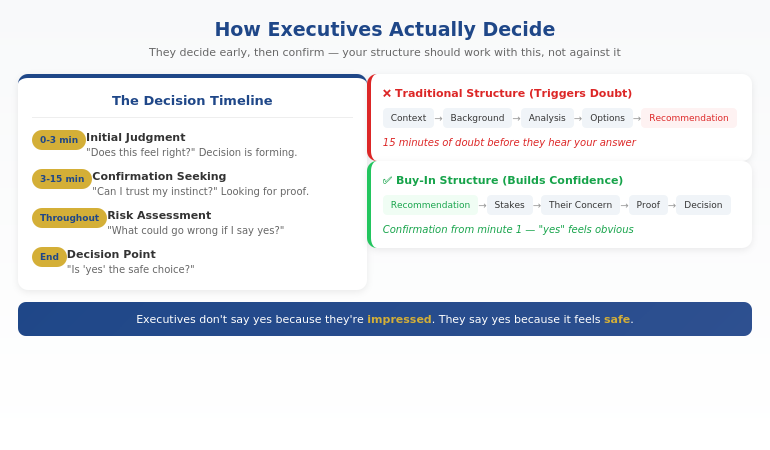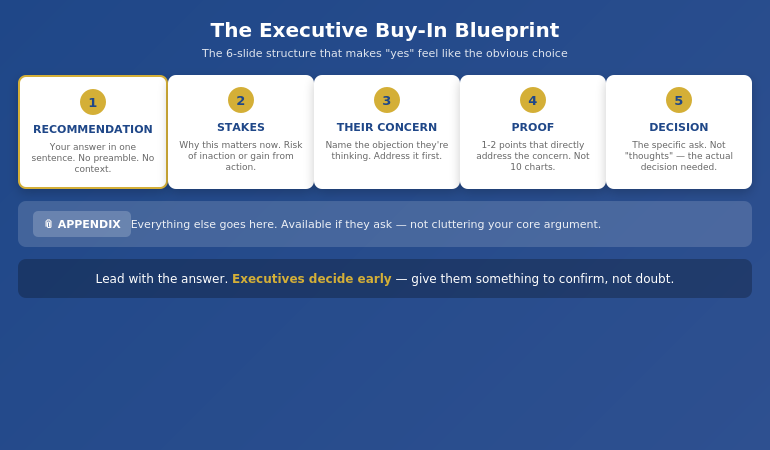
Quick answer: An executive decision-making presentation lands when it is built as a decision request, not a status update. Three slides do the load-bearing work: the decision being requested in one sentence, the trade-offs the room must weigh, and the recommendation paired with what changes at yes versus what changes at no. The slide that wrecks most decision decks is the one that recaps everything the committee already knows. Senior audiences buy compressed clarity. They do not buy context they have already read.
JUMP TO:
Renata, a finance director at a mid-sized European logistics group, walked into the executive committee with twenty-two slides and a request to approve a £14m platform investment. Slides 1–4 recapped the operating environment. Slides 5–9 walked through the analysis behind the proposal. Slides 10–14 set out the three options her team had evaluated. Slides 15–18 presented the recommended option in detail. The last four slides were financial sensitivities and risk register.
By slide 12 the COO was scrolling on his laptop. By slide 17 the CFO had asked two questions that had nothing to do with the slide on the screen. At slide 19 the CEO interrupted and said the words every decision presenter dreads: “this is helpful, let us take it offline and come back next month with a tighter view.” The committee had not said no. They had not said yes either. They had moved Renata’s request out of the room and into the comfortable middle distance of “next month”.
The proposal was sound. The analysis was rigorous. What failed was the structure. A decision-making presentation that opens with context, walks through analysis, then arrives at the request gives the committee twenty minutes of information before any moment of choice. By the time the choice lands, the room has decided to defer. A decision deck that opens with the decision and structures everything after as evidence for or against forces the room into a different posture. They are not listening to a story. They are weighing a request.
If you want a structured set of slide patterns for senior decision presentations:
The Executive Slide System is a slide template library designed for the moments when senior committees are being asked to choose, not just to listen. Templates and structured prompts for the classic decision scenarios — capital cases, strategic shifts, headcount changes, technology investments.
Why most decision decks stall the room
Most executive decision-making presentations are written by a team that has spent weeks inside the analysis. The presenter then carries that immersion into the room — and the deck shows it. Twenty slides describing how the team got to the proposed answer, three or four describing the answer itself. The structural balance is wrong. The committee does not need to retrace the team’s working. They need to weigh the request and either back it or push back.
The second failure pattern is more subtle. Many decision decks present three options as if the committee is being asked to choose between them. They are not. The team has done the work and arrived at a recommendation. Pretending otherwise — option A, option B, option C, with the team’s preferred option dressed as one of three — wastes the committee’s time and signals that the leader is not yet willing to own the recommendation. Senior audiences read the move accurately. They downgrade their confidence in the proposal.
The third failure pattern is the one Renata fell into. The deck has all the right material, but it is sequenced as a story rather than as a decision. Context first, analysis second, options third, recommendation fourth, financials fifth. By the time the room arrives at the recommendation, attention has already drifted, and the committee has unconsciously framed the conversation as “interesting analysis we should discuss further” rather than “request that needs a yes or a no today”. The deferral is half-baked into the structure before anyone speaks.
Slide 1: The decision being requested
Slide 1 of a decision-making presentation states the decision in one sentence. Not the project. Not the analysis. The decision the committee is being asked to take.
The structural test is brutal. Read the sentence aloud. If the room cannot answer “yes” or “no” to it, the slide is not yet a decision request. “We propose investing in a new logistics platform” is not a decision request — it is a proposal description. “We are requesting approval for a £14m, 18-month investment in a replacement logistics platform, with a phase-1 commitment of £3.4m by end of Q3” is a decision request. The committee can either back it or refuse it. The shape of the conversation has been set.
The rest of the slide carries three short anchors: the proposed financial commitment, the proposed time horizon, and the named owner accountable for delivery. Three lines. No bullets describing the work. No context about how the team arrived at the recommendation. The slide’s job is to define the choice the room is about to weigh, not to argue for it. The argument is what slide 2 is for.
For a related discipline on framing the request before the conversation starts, see the approval packet method, which builds the case in writing before the committee meets.
Build executive decision decks that force a yes or a no, not “let’s take it offline”.
The Executive Slide System is the slide template library designed for senior decision presentations. 26 executive templates, 93 AI prompts, 16 scenario playbooks for the moments where a committee is being asked to choose. Build board-ready decision decks in 30 minutes instead of three hours. £39, instant access, no subscription.
- 26 slide templates structured around senior decision moments — capital cases, strategic shifts, headcount changes, platform investments
- 93 AI prompts designed for executive-grade slide content, not generic business decks
- 16 scenario playbooks for the recurring decision presentations senior leaders face
- Designed for senior professionals presenting decisions to boards, committees, and executive sponsors
Slide 2: The trade-offs the room must weigh
Slide 2 is the slide most decision decks miss entirely. It is not the analysis slide. It is not the option-comparison slide. It is the slide that names the two or three trade-offs the committee actually has to weigh in order to make the decision in front of them.
Trade-offs are not options. An option is a path the team has considered. A trade-off is the thing the committee is choosing between when they back this path. “Approve a £14m investment now” trades against “preserve current-year operating margin”; “build a senior platform team in-house” trades against “extend the existing partnership through 2027”; “commit to an 18-month delivery window” trades against “deliver phase-1 in 9 months at a higher unit cost”. Each trade-off names a real cost of saying yes. Naming the costs out loud is what gives the committee permission to back the request — they have evaluated what they are giving up to get it.
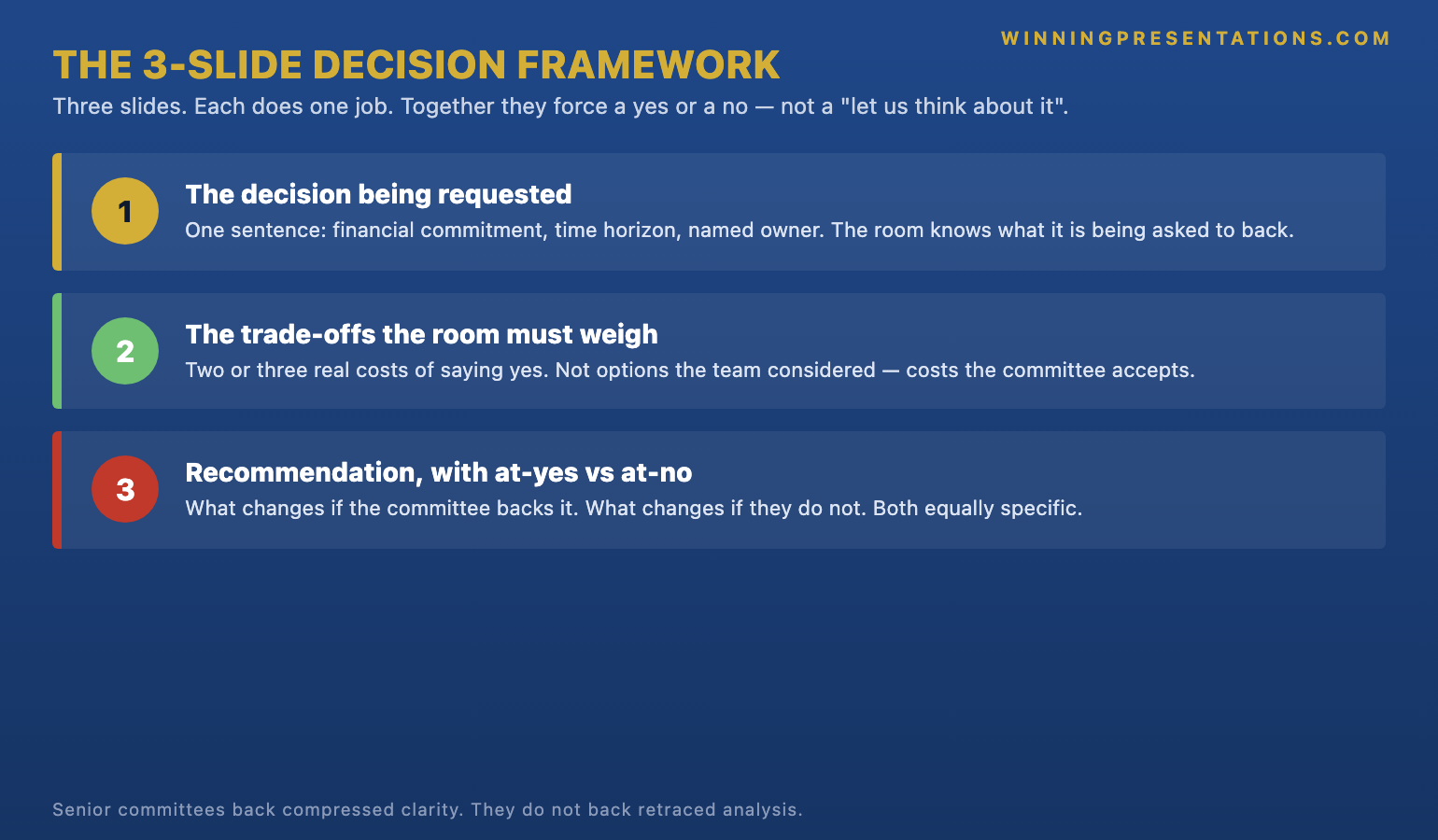
Two or three trade-offs is the right number. One trade-off feels like a sales pitch. Four or more makes the slide unreadable. The discipline is to identify the small number of genuine choices the committee is being asked to make alongside the headline decision, name each one in a single sentence, and stop. The detailed analysis behind each trade-off — sensitivity tables, capability assumptions, scenario modelling — belongs in the appendix, ready to surface in discussion if the committee asks.
For more on how senior committees actually evaluate decisions in the room, the 15-minute board presentation template covers the timing and structure that makes trade-offs feel weighable rather than overwhelming. The Executive Slide System (£39) includes pre-built trade-off slides for the recurring decision scenarios senior leaders face, which can save several hours of structuring time on a typical capital case.
Slide 3: The recommendation and what changes at yes vs no
Slide 3 closes the decision. It pairs the team’s recommendation with two short statements: what changes at yes, and what changes at no. Both statements are necessary. The “what changes at yes” line tells the committee what they are buying. The “what changes at no” line tells them what they are choosing instead.
The “at yes” statement is short and specific. Not “we accelerate the strategic transformation” — something closer to “we begin platform implementation in Q3, retire the current system in Q1 next year, and free up £4m of operational capacity by end of 2027”. Concrete. Owned. Time-bound. The committee can picture the months that follow. The “at no” statement is equally specific and equally honest. Not “we miss the opportunity” — something closer to “we extend the existing partnership through 2027, accept a 6 per cent unit cost increase, and re-evaluate the build option at the end of next year”. Senior audiences are not fooled by imbalanced “at no” statements that paint refusal as catastrophic. The honest pairing of yes against a credible no is what creates the conditions for a decision rather than a deferral.
The recommendation itself sits between the two statements. One sentence. Often something like: “we recommend approving the £14m platform investment as set out, with phase-1 commitment of £3.4m by end of Q3 and the named delivery owner accountable for the 18-month plan.” Slide 1 framed the choice. Slide 2 named the trade-offs. Slide 3 makes the recommendation and shows the committee both sides of their answer. The deck has done its work.
If the committee is reluctant rather than just busy, the structural fix is upstream of the slides:
The Executive Buy-In Presentation System is a self-paced Maven programme — 7 modules covering the structure, psychology, and stakeholder analysis behind decisions that get backed at senior levels. New cohort opens every month. Optional Q&A calls are fully recorded. £499, lifetime access to materials.
What stays off the decision deck
The harder discipline is what does not appear in the three slides. The decision deck is not the analysis archive, the project plan, or the change-management programme. Three slides hold the decision. Everything else lives in the appendix or in a pre-read document the committee has already received.
Off the deck: detailed financial models, full option comparison tables, technical architecture, vendor selection process, project plan, risk register, change-management programme, stakeholder analysis, capability gap analysis, the team’s six-week working memo. All of it useful. None of it load-bearing for the choice the committee is being asked to make in the meeting itself. The work the team has done is not lost — it is written down and accessible. It is just not in the room.
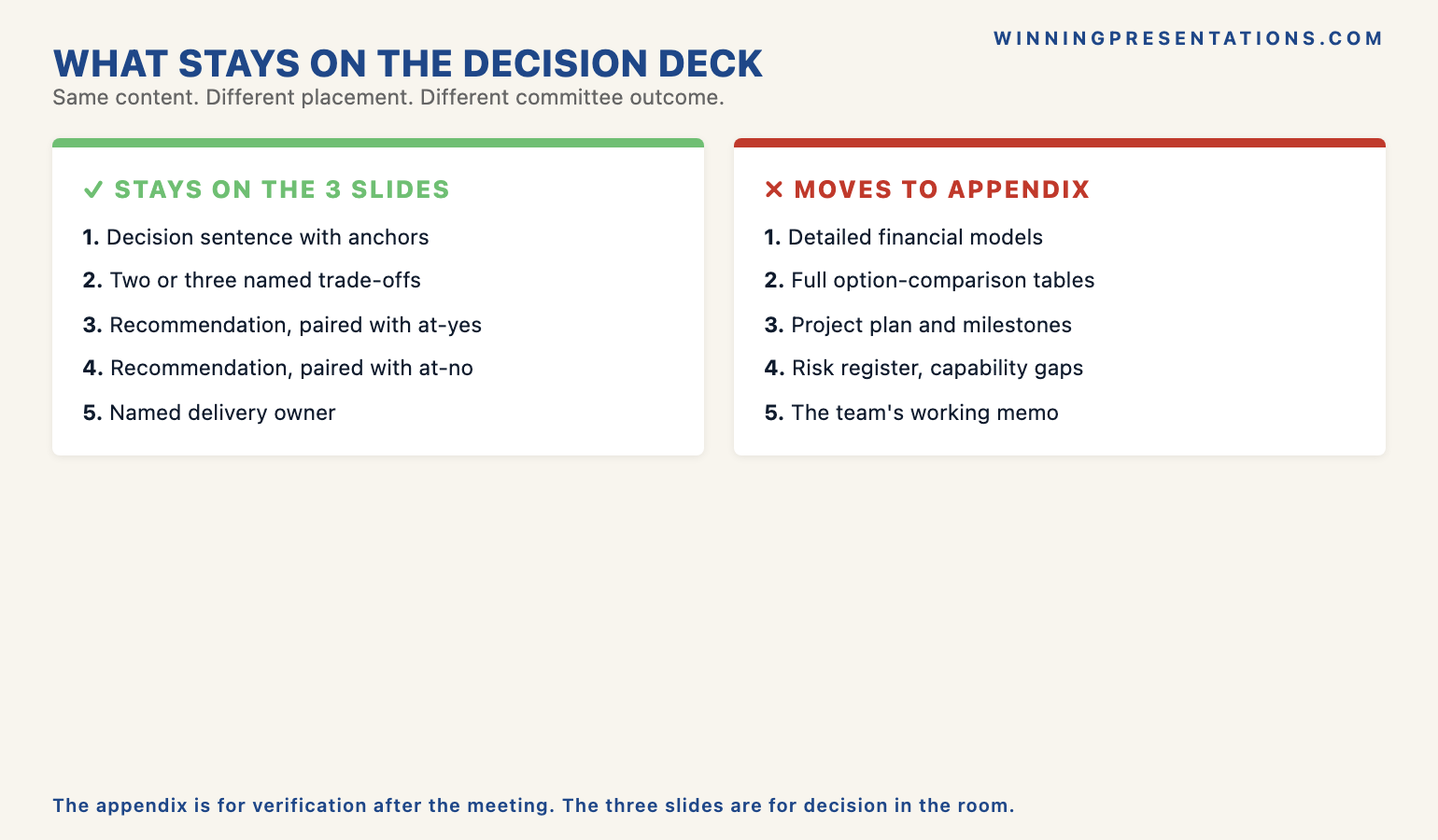
The other thing to leave off: anything that argues for the team rather than for the decision. Decision presentations get derailed when the deck slides into self-validation — “we have spent six weeks on this”, “our analysis is exhaustive”, “we have consulted with eleven stakeholders”. The committee is not deciding whether the team did good work. They are deciding whether to back the request. Time spent on the team’s process comes out of time spent on the choice. The strongest signal of seriousness is a three-slide deck that has the courage to leave the work behind it implicit.
For the closely related discipline of how senior committees behave after the decision moment, see the partner article on why boards delay decisions after presentations.
How to walk the room through three slides
Three slides is short. Senior audiences who are used to twenty-slide decks may visibly relax when slide 1 lands as a decision request rather than as a context-setter. That relaxation is useful. It signals that the room is paying attention, and it gives the leader space to walk through the trade-offs with care. The temptation is to fill the saved time with more talking. Resist it. The presentation should run for about ten minutes. The remaining twenty minutes of the slot is for the committee to ask questions, push back, and arrive at a decision.
Slide 1 takes about two minutes — read the decision sentence, name the financial commitment and timeline, name the owner. Slide 2 takes the longest, around five minutes, because the trade-offs are where the committee will engage. Slide 3 takes three minutes — the recommendation and the at-yes/at-no statements. Then stop. Senior audiences are used to leaders who keep talking past the close. A leader who delivers the recommendation and falls silent signals confidence in the request and respect for the committee’s time. That signal alone changes the conversation.
Rehearse the transitions. The hardest moment in a three-slide deck is the move from the trade-offs to the recommendation. The deck has just named what saying yes will cost. The recommendation must carry the weight of having heard those costs and still recommending the path forward. Practise that transition out loud — three or four times — before the meeting. The pause before the recommendation is what gives it credibility. Skip the pause and the recommendation reads as scripted; honour the pause and it reads as considered.
Frequently asked questions
Is three slides really enough for a major capital decision?
For the formal presentation in the room, yes. The three slides hold the load-bearing decision content — the request, the trade-offs, and the recommendation paired with what changes either way. Everything the team has built behind the proposal — financial models, option comparisons, project plans, risk register — lives in the appendix or pre-read, ready to be referenced if the committee asks. The three-slide discipline is what creates the conditions for a decision in the room rather than a deferral. Larger capital cases sometimes warrant a fourth slide for sensitivity analysis or phasing, but the core structure stays at three.
What if the committee insists on seeing the analysis before the decision?
Most senior committees do not, in practice, want to relive the analysis. They want to know the team has done it, that the recommendation rests on it, and that the appendix or pre-read covers the detail. If the committee genuinely insists on a walk-through of the analysis, that is a signal that the pre-read was not consumed — and the right response is to address the pre-read process for next time, not to bloat this presentation. Offer to take questions on specific analytical points after the recommendation, and let the room decide whether they want that depth or whether they are ready to engage with the trade-offs and the choice.
How do I handle a committee member who derails into a different topic?
Acknowledge the question, note that it is adjacent to the decision in front of the committee, and ask whether they would like to take it after the recommendation has been resolved or whether they want to fold it into the decision now. Most senior audiences will pick the former. The move is not defensive — it is a signal that the leader is in command of the agenda. A decision presentation that allows itself to be derailed in slide 2 rarely recovers in slide 3. The committee will still make a decision, but it will be a less-considered one.
Should I send the three-slide deck as a pre-read, or save it for the meeting?
Both. The pre-read version of the three slides — sent 48 hours before the meeting — primes the committee. It tells them what decision is being asked for and what trade-offs they will be weighing. The in-room version is the same three slides, walked through in person, with the recommendation delivered live. The pre-read does not replace the meeting; it makes the meeting more efficient. Committees who arrive having seen the slides have already done the early thinking on the trade-offs, which means the in-room time can be spent on the harder questions and on the actual decision.
The Winning Edge — weekly newsletter
The Winning Edge is a weekly newsletter for senior professionals who present at the executive level. One short email a week, focused on the structural moves that separate decks committees back from decks they defer. Subscribe to The Winning Edge →
Not ready for the full Slide System? Start here instead: download the free Executive Presentation Checklist — a one-page reference for the structural moves senior leaders run before every committee deck.
About the author
Mary Beth Hazeldine is Owner & Managing Director of Winning Presentations Ltd. With 24 years of corporate banking experience at JPMorgan Chase, PwC, Royal Bank of Scotland, and Commerzbank, she advises executives across financial services, healthcare, technology, and government on structuring presentations for high-stakes funding rounds, board approvals, and strategic decisions.