Tag: C-suite presentations

29 Jan 2026
what-executives-want-presentations-featured-wordpress.png (1200×675) Alt text: Professional woman presenting confidently to executive audience in boardroom meeting

I Prepared 47 Slides. The CFO Stopped Me on Slide 3.

“I don’t need to see the rest,” she said. “You’ve already told me what I need to know.”

I’d prepared 47 slides. Market analysis. Competitive benchmarks. Financial projections with three scenarios. The kind of presentation that takes 40 hours to build and covers every possible question.

She approved the £2.3 million budget request in under four minutes.

That moment taught me something that changed how I approach every executive presentation: what executives actually want from your presentation has almost nothing to do with the amount of data you show them.

Quick Answer: Executives don’t want more data—they want clarity on the decision you need them to make, the risk of inaction, and your specific recommendation. After 24 years presenting to C-suite leaders in banking, I’ve learned that the presentations that get approved are the ones that respect executive time and cognitive load. Lead with the decision, not the data.

📋 Presenting to Executives This Week? 48-Hour Deck Rescue

Before you present, check these five things:

  1. Slide 1 headline — Does it state the decision you need? (Not the topic)
  2. Stakes slide — Have you quantified the cost of inaction?
  3. Recommendation — Is it ONE clear ask, not “three options”?
  4. Every title — Is it a complete thought, not a label?
  5. Your close — Do you ask for a specific decision by a specific date?

If any answer is “no,” fix it before you present. Need the full structure? ↓

I Learned This the Hard Way at JPMorgan

Early in my banking career, I believed preparation meant coverage. More data. More slides. More contingencies.

I once spent three weeks preparing a technology investment proposal. Eighty-two slides. Every objection pre-answered. Every data point sourced.

The Managing Director interrupted me ninety seconds in. “What do you want me to do?”

I stumbled. The data was there—buried on slide 41.

“Come back when you know,” he said. Meeting over.

That failure cost me six months. The project stalled while competitors moved. By the time I got another meeting, the window had closed.

Over the next 24 years—at PwC, Royal Bank of Scotland, Commerzbank—I studied what actually worked. What I discovered contradicted everything I’d been taught about “thorough” presentations.

Executives don’t want thorough. They want clear.

What Executives Actually Want (The 3-Part Framework)

After presenting to hundreds of C-suite leaders and training over 5,000 executives, I’ve identified a pattern so consistent it’s almost formulaic.

What executives want from presentations comes down to three things:

1. The Decision (Not the Journey)

Executives don’t need to understand your analysis process. They need to know: What decision do you need from me, and why should I make it today?

Every executive I’ve worked with—from FTSE 100 CEOs to startup founders—operates under the same constraint: cognitive overload. They’re making dozens of decisions daily. Yours is one of many.

The presentations that win start with the decision. Not the background. Not the methodology. The decision.

2. The Risk of Inaction (Not Just the Opportunity)

Opportunity motivates. But risk mobilises.

When presenting to executives, framing matters enormously. “This investment will generate £2M in revenue” is less compelling than “Every month we delay costs us £167K in market share we won’t recover.”

The best executive presenters I’ve trained understand this instinctively. They don’t just sell the upside—they quantify the cost of doing nothing.

3. Your Recommendation (Not Options)

Junior presenters offer options. Senior presenters make recommendations.

Executives want to know what YOU think they should do. They can override you—that’s their prerogative. But presenting “three options for your consideration” signals you haven’t done the hard thinking yourself.

One clear recommendation. One backup if they push back. That’s it.

What executives want from presentations visual framework showing decision focus vs data focus

The Data Trap: Why More Information Kills Decisions

Here’s the paradox most presenters miss: the more data you present, the less likely you are to get a decision.

This isn’t opinion. It’s cognitive science.

Research on decision fatigue shows that information overload doesn’t create confidence—it creates paralysis. When executives face too much data, their default response is “Let me think about it.” Which means: no decision today.

I’ve seen this pattern destroy projects worth millions:

A biotech client prepared a 60-slide investor presentation. Detailed market analysis. Competitive landscape. Regulatory pathway. Clinical trial data. Financial projections with sensitivity analysis.

The investors’ feedback: “Impressive work. We need to digest this.”

Translation: They couldn’t find the signal in the noise. No investment.

When we restructured the same content into 12 slides—leading with the decision, the market gap, and one clear ask—they closed £4.2M in their next meeting.

Same company. Same opportunity. Different structure.

The data wasn’t the problem. The data volume was the problem.

If you’re preparing for a high-stakes executive presentation, understanding how to write an executive summary slide is the single most valuable skill you can develop.

⭐ Stop Building Slides Executives Skip

Get the exact slide structure that gets executive attention—not polite nods while they check their phones.

The Executive Slide System includes:

  • The 12-slide executive structure (used to secure £4.2M+ in approvals)
  • Decision-first slide templates that respect executive time
  • Before/after examples from real board presentations

Get the Executive Slide System → £39

Built from 24 years presenting to C-suite leaders in investment banking. The same structure behind £4M+ approvals.

The Slide Structure That Gets Executive Attention

If data volume kills decisions, what replaces it?

Structure.

After analysing hundreds of successful executive presentations, I’ve identified the exact sequence that works consistently:

Slide 1: The Decision Headline

Not “Q3 Marketing Review.” That’s a topic, not a headline.

Try: “Recommendation: Shift £400K from Brand to Performance Marketing in Q4.”

The executive knows immediately what you want. They can start forming their response while you present—which is exactly what you want them doing.

Slide 2: The Stakes

Why this decision matters. Why now. What happens if we don’t act.

Quantify where possible. “Current trajectory: 12% market share loss by Q2” is more compelling than “We’re losing ground to competitors.”

Slide 3: The Recommendation (Expanded)

Your specific ask. Timeline. Resources needed. Expected outcome.

One slide. No options. Just your best thinking.

Slides 4-8: Supporting Logic

Notice this comes AFTER the recommendation. Not before.

Only include data that directly supports the decision. Everything else goes in an appendix they’ll never read—and that’s fine.

Slides 9-10: Risks and Mitigation

Executives respect presenters who acknowledge what could go wrong. It builds credibility and pre-empts their concerns.

Slides 11-12: Next Steps and Ask

What you need from them. When. How they should signal approval.

Never end with “Questions?” End with a specific request for action.

This structure works because it matches how executives actually process information. They need the conclusion first, then decide how deep to go into the supporting data.

For a complete breakdown of this approach, see my guide to the 3-slide system that gets executive decisions fast—it’s the foundation of everything I teach about structuring executive presentations.

What do executives look for in a presentation?

Executives look for three things: a clear decision or recommendation, the business impact of action vs. inaction, and evidence you’ve done the hard thinking so they don’t have to. They don’t want data dumps—they want clarity that respects their time and cognitive load.

How do you present to C-level executives?

Present to C-level executives by leading with your recommendation, not your methodology. State the decision you need in the first 60 seconds. Quantify the cost of inaction. Limit supporting data to what directly drives the decision. End with a specific ask, not “any questions.”

What is the biggest mistake when presenting to executives?

The biggest mistake is burying your recommendation behind background and data. Executives make dozens of decisions daily—if they can’t identify your point within the first two slides, you’ve lost them. Start with the decision, then provide supporting evidence.

Real Example: From 47 Slides to 12 (And a £4M Approval)

Let me show you what this looks like in practice.

A client came to me with a technology platform proposal. 47 slides. Beautiful design. Comprehensive data.

The steering committee had rejected it twice with “needs more analysis.”

Here’s what we changed:

Original Slide 1: “Cloud Migration Strategy: Executive Overview”

New Slide 1: “Recommendation: Approve £4M Migration to Reduce Operating Costs by £2.1M Annually”

Original Slide 2: “Agenda” (listing 12 sections)

New Slide 2: “The Cost of Waiting: Every Month Delay = £175K in Avoidable Infrastructure Spend”

Original Slides 3-15: Current state analysis, market research, vendor comparison

New Slides 3-4: Three-year cost projection (one slide) and vendor recommendation with rationale (one slide)

We moved 35 slides to the appendix. The committee never looked at them.

The presentation went from 45 minutes to 12. The decision went from “rejected” to “approved” in one meeting.

What changed? Not the content. The emphasis.

The executives didn’t need more information. They needed the right information in the right order.

⭐ Get Executive Decisions in One Meeting

Stop hearing “let me think about it.” Start hearing “approved.”

What you’ll get:

  • Slide-by-slide structure that matches executive thinking
  • Headline formulas that signal decisions (not topics)
  • Real examples from £4M+ approvals

Get the Executive Slide System → £39

Developed from 24 years of presenting to C-suite leaders at JPMorgan, PwC, and Royal Bank of Scotland.

The 4 Mistakes That Lose Executives in the First 60 Seconds

Understanding what executives want from presentations means understanding what makes them disengage.

Here are the four patterns I see most often:

Mistake #1: Starting With Background

“To provide context, let me walk you through how we got here…”

Executives don’t need context. They need conclusions. If the context matters, they’ll ask.

Mistake #2: Using Topic Titles Instead of Headlines

“Financial Overview” tells an executive nothing. “Revenue Up 23% But Margin Pressure Requires Action” tells them everything.

Every slide title should be a complete thought. If an executive only reads your headlines, they should understand your entire argument.

Mistake #3: Presenting Options Without a Recommendation

“We’ve identified three approaches…” signals you’re not ready to commit. Executives want to hear what YOU think, then decide whether to override you.

Present one recommendation. Have one backup if they push back. That’s sufficient.

Mistake #4: Ending With “Any Questions?”

This passive close puts the executive in charge of next steps. Instead, end with a specific ask: “I’d like your approval to proceed with Phase 1 by March 15. Can we confirm that today?”

The executives I’ve worked with consistently prefer presenters who know what they want and ask for it directly.

If presentation anxiety is affecting your ability to present confidently to senior leaders, read about how to overcome the fear of being judged when speaking—the psychological techniques apply directly to executive presentations.

Your Action Framework: Presenting to Executives This Week

If you have an executive presentation coming up, here’s how to apply what you’ve learned:

Step 1: Find Your Headline

What do you want the executive to DO after your presentation? Write that as a complete sentence. That’s your Slide 1 headline.

Step 2: Quantify the Stakes

What happens if they don’t decide? Put a number on it—money, time, market position. If you can’t quantify it, the decision probably isn’t urgent enough for executive attention.

Step 3: Audit Your Slides

For every slide after Slide 3, ask: “Does this directly support the decision, or is it background?” Move background to the appendix. Be ruthless.

Step 4: Rewrite Your Titles

Turn every topic title into a headline. “Competitive Analysis” becomes “Competitors Have 18-Month Lead—Here’s How We Close the Gap.”

Step 5: Prepare Your Close

Script the exact words you’ll use to ask for the decision. “I’d like your approval to proceed with [specific action] by [date]. Can we confirm that now?”

Practice this close until it feels natural. The ask is where most presenters lose their nerve—and lose the decision.

For more on building lasting confidence for these moments, see my guide on getting executive buy-in—it covers the stakeholder dynamics most presenters miss.

⭐ Transform How Executives Respond to Your Presentations

The difference between “let me think about it” and “approved” is structure—not data. Get the exact framework that’s secured £4M+ in executive approvals.

The Executive Slide System gives you:

  • Decision-first structure executives actually respond to
  • Headline formulas that cut through cognitive overload
  • Complete before/after transformation examples

Get the Executive Slide System → £39

Built from 24 years presenting to C-suite leaders at JPMorgan, PwC, and Royal Bank of Scotland.

Frequently Asked Questions

How many slides should an executive presentation have?

Most effective executive presentations have 10-15 slides for the main deck, with detailed analysis moved to an appendix. The goal isn’t a specific number—it’s ensuring every slide directly supports the decision you’re asking for. I’ve seen £4M approvals from 12-slide decks and rejections from 80-slide decks.

Should I send the presentation before the meeting?

For senior executives, yes—but send a one-page executive summary, not the full deck. Let them come prepared with questions rather than processing new information in real-time. The presentation meeting should confirm the decision, not introduce the concept.

What if the executive interrupts with questions early?

This is actually a good sign—it means they’re engaged. Answer directly, then ask: “Would you like me to continue with the recommendation, or explore this question further?” Let them guide the depth. Having your recommendation early means interruptions don’t derail your main point.

How do I handle executives who want more data?

The appendix is your friend. When an executive asks for more detail, say: “I have that analysis in the appendix—slide 34 covers the full breakdown. Shall I walk through it now or send it after for review?” This shows preparation without cluttering your main deck.

Get Weekly Executive Presentation Insights

Actionable advice on presenting to senior leaders—no fluff, just techniques that work.

Subscribe to The Winning Edge →

📋 Not Ready to Invest? Start With This Free Checklist

Get the Executive Presentation Checklist—a one-page audit you can use before your next presentation to ensure you’re hitting what executives actually want.

Download Free Checklist →

Related: If the thought of presenting to executives triggers anxiety, you’re not alone. Read Fear of Being Judged When Speaking: How to Break the Loop for the psychological techniques that help senior professionals present with confidence.

The Bottom Line

What executives want from your presentation isn’t complexity—it’s clarity.

Lead with the decision. Quantify the stakes. Make a recommendation. Ask for what you need.

Do this, and you’ll stand out from the 90% of presenters who bury their point under data executives don’t have time to process.

Your next step: Take your current executive presentation and rewrite Slide 1. Turn it from a topic (“Q4 Review”) into a decision headline (“Recommendation: Increase Q4 Investment by £200K to Capture Market Window”). That single change will transform how executives engage with everything that follows.

Mary Beth Hazeldine is the Owner & Managing Director of Winning Presentations, with 24 years of experience presenting to C-suite leaders at JPMorgan Chase, PwC, Royal Bank of Scotland, and Commerzbank. She has trained over 5,000 executives on high-stakes presentation skills.
19 Jan 2026
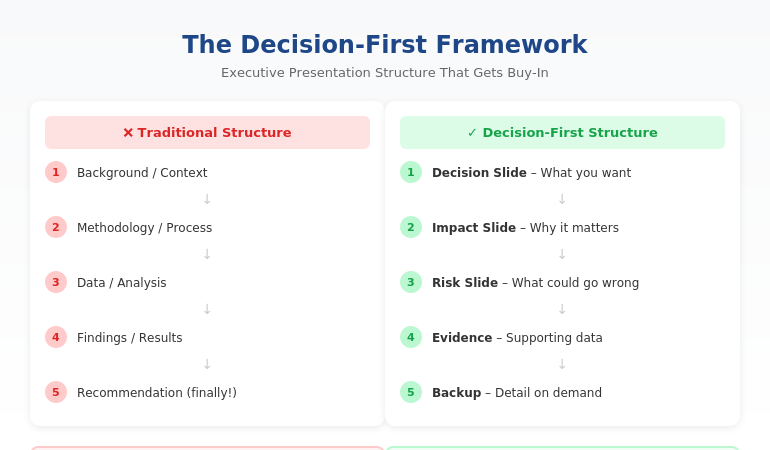
Executive presentation structure diagram showing the Decision-First Framework for C-suite buy-in

Executive Presentation Structure: The Format That Gets Instant Buy-In

Quick answer: The best executive presentation structure leads with the decision, not the data. Put your recommendation on slide one, follow with business impact and risk, then provide supporting detail only if asked. This “decision-first” structure matches how executives actually process information—and it’s why some presenters get instant buy-in while others get “let’s circle back.”

⚡ Presenting to executives in the next 48 hours? Here’s your structure:

Slide 1: Decision — what you want + expected outcome

Slide 2: Impact — why it matters (revenue, cost, risk)

Slide 3: Risk — what could go wrong + mitigation

Slides 4–6: Evidence — only data that supports your ask

Backup: Detail on demand (methodology, deep analysis)

The 11-Word Slide That Rescued a £4M Budget Request

The right executive presentation structure can change everything. I learned this watching a client named Sarah lose—then win—the same £4 million budget request.

The first time, Sarah presented 47 slides. Background, methodology, analysis, findings, recommendations. Textbook structure. The CFO flipped through seven slides, said “I don’t see what you’re asking for,” and moved to the next agenda item. Fourteen hours of preparation, dismissed in 60 seconds.

Six weeks later, Sarah presented again. Same request. Same CFO. But this time, her opening slide contained exactly 11 words: “Request: £4M to reduce customer churn by 23% within 18 months.”

The CFO leaned forward. “Now we’re talking. Walk me through the numbers.”

She got her budget approved in that meeting.

The data hadn’t changed. The structure had. After 24 years in corporate banking at JPMorgan Chase, PwC, and Commerzbank, I’ve seen this pattern hundreds of times. The executives who get buy-in aren’t better at analysis. They’re better at structure.

⭐ Maven Flagship — Executive Buy-In

Build the case your stakeholders can’t dismiss

The Executive Buy-In Presentation System is a self-paced framework — 7 modules walking you through the structure, psychology, and delivery that get senior approval. Monthly cohort enrolment, optional recorded Q&A calls.

£499, lifetime access.

Enrol in the Executive Buy-In System →

Why the Structure You Learned Is Wrong for Executives

Most professionals structure presentations the way they were taught: background → methodology → analysis → findings → recommendation. This is logical. It’s how you think through problems. And it’s exactly why executives stop listening by slide three.

Here’s the disconnect: you build presentations chronologically, but executives don’t consume them that way.

When a CFO opens your deck, they’re not thinking “I can’t wait to understand your methodology.” They’re thinking: “What do you need? Why should I care? Can I say yes and move on?”

If those questions aren’t answered immediately, you’ve lost them. Not because they’re impatient—because they’re triaging. A typical C-suite executive makes 35+ decisions per day. Every slide that doesn’t answer “so what?” gets mentally filed under “I’ll review later.” (They won’t.)

The executives who command attention flip the traditional structure entirely. They lead with the end. They put the decision first and the supporting detail last.

The Decision-First Structure Executives Actually Want

The most effective executive presentation structure follows what I call the Decision-First Framework. It’s the opposite of how most presentations are built—and that’s exactly why it works.

Traditional structure (what you learned):

Background → Process → Data → Analysis → Recommendation

Decision-first structure (what executives want):

Recommendation → Impact → Risk → Supporting Data (if needed)

This structure works because it matches how executives actually think. They don’t need to understand your journey to make a decision. They need to understand the decision itself, what happens if they say yes, and what could go wrong.

When you lead with your recommendation, something remarkable happens: executives engage differently. Instead of waiting to find out what you want, they’re immediately evaluating whether to approve it. You’ve shifted from “presenter explaining things” to “advisor proposing solutions.”

This is exactly how top-tier consulting firms structure client presentations. It’s how I structured every pitch at JPMorgan Chase. And it’s how my clients consistently get faster decisions than their peers.

Want the complete framework with templates for different scenarios? The Executive Slide System includes everything you need to restructure your next presentation. Get instant access →

The Exact Slide Order for Executive Presentations

Here’s the executive presentation structure I teach to banking professionals and FTSE 100 leaders. This works for budget requests, strategic recommendations, project updates, and board presentations:

Slide 1: The Decision Slide

State exactly what you’re asking for and the expected outcome. No background. No preamble. Example: “Recommendation: Approve £2.1M for CRM upgrade. Expected ROI: 340% over 3 years.”

Slide 2: The Impact Slide

Show what happens if they say yes. Revenue impact, cost savings, risk reduction—whatever matters most to this audience. Make the benefit concrete and quantified.

Slide 3: The Risk Slide

Address what could go wrong and how you’ll mitigate it. Executives always think about downside. If you don’t address it, they’ll ask—and you’ll look unprepared.

Slides 4-6: Supporting Evidence

Only include data that directly supports your recommendation. If a slide doesn’t help them say yes, cut it.

Backup Slides: Detail on Demand

Put methodology, detailed analysis, and additional data in backup. You’ll rarely need it—but when an executive asks, you look thorough, not disorganised.

This structure typically reduces a 30-slide presentation to 8-12 slides. More importantly, it reduces decision time from “let’s reconvene” to “approved.”


Decision slide, Impact slide, Risk slide, Supporting evidence, then Backup slides

⭐ Stop Building Slides That Get Ignored

Get the complete Decision-First Framework with plug-and-play templates for every executive scenario.

Includes:

  • The exact slide order for budget requests, board updates, and strategic recommendations
  • Action-title formulas that eliminate “Overview” and “Background” slides
  • Before/after transformations from real presentations

Transform Your Presentation Structure → £39

Instant download. Apply to your next presentation immediately.

How to Apply This Structure to Your Next Presentation

You don’t need to rebuild your entire deck. Start with these three changes:

1. Rewrite your first slide as a decision.

Take whatever’s on your current slide 1 and replace it with: “[Action verb]: [What you want] to [achieve outcome].” If your current first slide says “Q3 Project Update,” change it to “Recommendation: Extend Q3 timeline by 2 weeks to protect £400K deliverable.”

2. Move your recommendation forward.

Find wherever your current recommendation lives (usually slide 15 or later). Move it to slide 1. Yes, it feels uncomfortable. Do it anyway. The supporting detail still exists—it’s just in the right place now.

3. Apply the “so what?” test to every slide.

For each slide, ask: “Does this directly support my recommendation?” If the answer is no, move it to backup. Most presentations lose 30-40% of their slides this way—and become dramatically more effective.

This is exactly how successful CFO presentations are structured. The content isn’t simpler—it’s organised for how finance leaders actually make decisions.

Want a step-by-step system for restructuring your slides? The Executive Slide System walks you through the entire process with templates and real examples. See what’s included →

Related: Great structure is only half the equation. If nerves undermine your delivery, read How to Stop Saying “Um” (Without Sounding Robotic).

Common Questions About Executive Presentation Structure

What is the best structure for an executive presentation?

The best executive presentation structure leads with your recommendation, followed by business impact, risks, and supporting evidence. This “decision-first” approach matches how executives process information. They want to know what you’re asking for before they evaluate whether to approve it. Traditional structures that build to a conclusion waste executive attention.

How do you structure a presentation for senior leadership?

Structure presentations for senior leadership around decisions, not information. Open with your recommendation and expected outcome. Follow with the business case (why it matters), risk assessment (what could go wrong), and supporting data. Keep the main presentation to 8-12 slides and put additional detail in backup slides for reference.

How many slides should an executive presentation have?

Most effective executive presentations have 8-12 slides, plus backup. The goal isn’t a specific number—it’s ensuring every slide directly supports your recommendation. If a slide doesn’t help executives make a decision, it belongs in backup or should be cut entirely. Your executive summary slide alone should convey the core message.

⭐ Present Like Someone Who Understands Executives

Get the complete system for structuring presentations that get immediate buy-in—not polite nods and forgotten follow-ups.

What’s included:

  • The Decision-First Framework with exact slide order
  • 12 executive slide templates (budget, board, strategy, updates)
  • Before/after examples from real presentations
  • Action-title formulas that eliminate weak slide titles

Get Instant Access → £39

The same framework used in FTSE 100 boardrooms, investment banking pitches, and C-suite budget approvals.

FAQ

How long does it take to restructure my existing slides?

Most people can restructure a 20-slide presentation in 60-90 minutes once they understand the Decision-First Framework. The first time takes longest because you’re learning the approach. After that, you’ll naturally build presentations this way from the start—which actually saves time because you’re not second-guessing your structure.

What if my executive actually prefers detailed presentations?

Executives who “prefer detail” actually prefer having detail available when they want it. Lead with your recommendation and keep supporting detail in backup slides. When they ask for more information, you’ll look prepared. In my experience, once executives see a well-structured presentation, they rarely ask for the backup—but they appreciate knowing it exists.

Does this structure work for technical presentations?

Especially for technical presentations. Technical experts often bury their conclusions under methodology because that’s how they solve problems. But executives don’t need to understand your process—they need to understand your conclusion and its business implications. The Decision-First structure forces you to separate “what I did” from “what it means.”

Should I use the same structure for board meetings?

Yes, with one adjustment: boards have even less time and need even clearer decisions. For board presentations, I recommend putting your recommendation AND the expected vote on slide one. Example: “Recommendation: Approve acquisition of XYZ Corp for £12M. Board action requested: Approval vote.” This immediately frames the entire discussion.

📧 The Winning Edge Newsletter

Weekly insights on executive communication, presentation structure, and career-building skills. No fluff—just actionable frameworks from 24 years in corporate banking.

Subscribe Free →

Your Next Step

The right executive presentation structure isn’t about simplifying your message—it’s about sequencing it for how leaders actually make decisions. Lead with the decision. Follow with impact and risk. Put supporting detail where it belongs: available but not in the way.

Try this with your next presentation: write your recommendation as slide one before you create anything else. Build the rest of your deck to support that single slide. You’ll be surprised how much easier the whole process becomes—and how differently executives respond.

If you want the complete framework with templates, examples, and step-by-step guidance, get the Executive Slide System.

📋 Free Resource: Executive Presentation Checklist

Not ready for the full system? Start with this free checklist covering the 10 structural elements every executive presentation needs.

Download Free Checklist →

About the Author

Mary Beth Hazeldine is the Owner & Managing Director of Winning Presentations and a former corporate banker with 24 years of experience at JPMorgan Chase, PwC, Royal Bank of Scotland, and Commerzbank. She has trained over 5,000 executives on high-stakes presentation skills and helped clients secure more than £250 million in funding and budget approvals.

Mary Beth is also a qualified clinical hypnotherapist and NLP practitioner, specialising in helping professionals overcome presentation anxiety. After spending five years battling her own fear of presenting at JPMorgan, she developed the techniques she now teaches to executives worldwide.

Book a discovery call | View services

07 Jan 2026
Professional woman in a blazer touches a large touchscreen displaying data dashboards in a modern office lighting.

C-Suite Presentation Mistakes: 5 Credibility Killers That Make Executives Stop Listening

Quick Answer: The five c-suite presentation mistakes that destroy credibility are: (1) burying your recommendation under context, (2) using hedge words that signal uncertainty, (3) over-explaining before asked, (4) reading slides instead of commanding them, and (5) treating Q&A as an attack rather than an opportunity. Each mistake signals to executives that you’re not ready for senior-level conversations.

She had 14 slides. The CFO gave her 90 seconds.

I watched Sarah—a senior manager at RBS—prepare for weeks. Her analysis was flawless. Her c-suite presentation mistakes, however, were textbook. She opened with methodology. She built to her recommendation. She hedged every conclusion with “I think” and “maybe.”

The CFO interrupted on slide three: “What do you need from me?”

Sarah froze. Her recommendation was on slide 11. She stumbled through an explanation of why the background mattered first.

He was checking email by the time she reached her point.

The budget request was denied. Not because the idea was wrong—but because Sarah made every c-suite presentation mistake that signals “not ready for this room.”

Here are the five credibility killers I see executives make weekly—and how to avoid them.

🏆 FLAGSHIP PROGRAMME

The Executive Buy-In Presentation System

Stop making the mistakes that get you tuned out. This comprehensive system teaches you exactly how to structure, deliver, and close presentations that win C-suite approval—every time.

What transforms: How you open, how you handle pushback, and how you get decisions made in a single meeting.

Eliminate C-Suite Presentation Mistakes →

The 5 C-Suite Presentation Mistakes That Destroy Credibility

Mistake #1: Burying Your Recommendation

The instinct is natural: build context so the recommendation makes sense. But C-suite executives don’t process information like analysts. They don’t need to understand your journey—they need your destination.

When your recommendation appears on slide 11 of 14, you’re asking executives to hold attention through 10 slides of context they didn’t request. Most won’t.

The fix: State your recommendation in the first 30 seconds. “I’m requesting £2M for platform migration. Here’s why.” Then provide context only as requested.

Mistake #2: Hedge Word Epidemic

“I think we might want to consider possibly looking at…”

Every hedge word cuts your perceived conviction in half. Senior executives notice immediately. If you’re not confident in your recommendation, why should they be?

The fix: Delete “I think,” “maybe,” “might,” “possibly,” “perhaps,” “kind of.” State positions as positions: “I recommend Option B.”

Mistake #3: Over-Explaining Before Asked

Anticipating objections seems smart. But when you address concerns nobody raised, you create doubts that didn’t exist. You’re teaching the room what to worry about.

Worse, it signals anxiety. Confident presenters trust their recommendations to withstand scrutiny.

The fix: Present your case. Stop. Let questions emerge naturally. Address them when asked—not before.

Mistake #4: Reading Your Slides

The moment you turn to read your slides, you’ve lost the room. Executives can read faster than you can speak. If you’re adding nothing beyond what’s written, you’re wasting their time.

More importantly, reading signals that you don’t know your content well enough to present it naturally.

The fix: Slides are visual aids, not scripts. Know your content cold. Glance at slides for reference, but speak to the room, not the screen.

Mistake #5: Treating Q&A as an Attack

Defensive body language. Rushed answers. Over-justification. These signals tell executives you’re not comfortable with scrutiny—and therefore not ready for senior roles.

Questions aren’t attacks. They’re engagement. An executive asking tough questions is an executive taking you seriously.

The fix: Welcome questions. Pause before answering. Respond to exactly what was asked—then stop. Treat Q&A as the opportunity to demonstrate your thinking, not a test to survive.

C-suite presentation mistakes - 5 credibility killers with fixes for each

Why C-Suite Presentation Mistakes Matter More Than Content

Here’s the uncomfortable truth: executives often don’t remember your content. They remember how you made them feel.

If you projected confidence, clarity, and command, your recommendations carry weight—even if the details blur. If you projected uncertainty, over-preparation, and anxiety, even brilliant analysis gets discounted.

C-suite presentation mistakes signal something beyond the immediate meeting. They signal whether you’re ready for larger roles, bigger decisions, and higher stakes. Every presentation is an audition.

For more on building the communication skills that command executive rooms, see my complete guide: Leadership Communication Skills: Why Executives Talk Too Much (And Persuade Too Little).

FAQ: C-Suite Presentation Mistakes

What’s the most common c-suite presentation mistake?

Over-explaining context before reaching your recommendation. Executives form opinions within 30 seconds. If you spend the first five minutes on background, you’ve lost them before your point arrives. Lead with your recommendation, then provide only the context they request.

How do I recover from a c-suite presentation mistake mid-meeting?

Stop, acknowledge, and reset. Say: “Let me cut to what matters most—” then state your core recommendation in one sentence. Executives respect people who can self-correct. Continuing down a failing path is worse than admitting you need to change direction.

Do c-suite presentation mistakes differ by industry?

The five core mistakes are universal across industries. However, tolerance levels vary. Financial services executives typically have the least patience for lengthy context. Tech executives may tolerate more detail but still expect clear recommendations. Adjust brevity based on your audience’s culture.

📧 Join 2,000+ professionals getting weekly insights on executive communication. Subscribe to The Winning Edge →

📋 Free Download: Executive Presentation Checklist

Avoid these c-suite presentation mistakes before your next high-stakes meeting. This checklist covers the credibility signals that executives notice in the first 60 seconds.

Get Your Free Checklist →


About the Author

Mary Beth Hazeldine spent 24 years at JPMorgan, PwC, RBS, and Commerzbank. She’s a clinical hypnotherapist and MD of Winning Presentations.

This article was created with AI assistance; all stories and insights are based on 35 years of real client work.

17 Dec 2025
How to End a Presentation: 7 Closing Techniques I Teach C-Suite Executives

How to End a Presentation: 7 Closing Techniques I Teach C-Suite Executives

The difference between polite nods and signed approvals

I’ve trained executives at JPMorgan, PwC, and Royal Bank of Scotland. I’ve helped biotech founders raise £250M+ in funding. And after 24 years in corporate banking and thousands of presentations coached, I can tell you this:

Most presentations die in the last 60 seconds.

Everything else can be perfect — compelling data, clean slides, confident delivery — but a weak close kills the deal. The audience leaves nodding politely and then… nothing happens.

Here are 7 closing techniques I teach senior executives. I’m sharing 3 in full today. The other 4? Those are part of the deep-dive in my AI-Enhanced Presentation Mastery course launching in January.

Why Presentation Closings Fail

Before the techniques, let’s diagnose the problem.

Bad closings usually fall into three traps:

The Fizzle: “So… that’s it. Any questions?” You just handed control to the room and signalled uncertainty.

The Repeat: Summarising every slide again. Your audience isn’t stupid. They were there.

The Vague Ask: “Let me know what you think.” Think about what? Do what? By when?

Great presentation endings do the opposite. They create momentum, clarity, and commitment.

Technique 1: The Single Ask

This is the most important closing technique, and the one executives resist most.

The rule: End with ONE specific request. Not three options. Not “a few things to consider.” One thing.

Here’s why it works: Decision fatigue is real. When you give people multiple options at the end of a presentation, you’re asking them to do more cognitive work. Most will default to “I’ll think about it” — which means nothing happens.

Weak close: “So we could either proceed with the pilot, or do more research, or schedule a follow-up discussion to align stakeholders.”

Strong close: “I’m asking for approval to start the pilot on January 15th. That requires your sign-off today.”

One ask. Specific. Time-bound.

When I coach executives on investor pitches, this is often where we spend the most time. They want to hedge, offer alternatives, seem flexible. But flexibility at the close reads as uncertainty.

Your call to action should answer: What do you want them to do, and by when?

Technique 2: The Forward Story

This technique works brilliantly for strategic presentations, board meetings, and any situation where you’re proposing change.

Instead of ending with what you’ve covered, end with what happens next — told as a story.

Structure:

  • “Imagine it’s [specific future date]…”
  • Describe the outcome as if it’s already happened
  • Make the audience the hero of that story

Example:

“Imagine it’s July 2026. We’ve completed the integration, and your team is running both systems from a single dashboard. The CFO just told you the efficiency savings hit £2.3 million — £800K more than we projected. That’s the future we’re building. The first step is approving the Phase 1 budget today.”

This works because it:

  • Creates emotional connection to the outcome
  • Makes the decision feel smaller (it’s just “the first step”)
  • Positions the audience as the one who made it happen

I use this technique constantly with biotech founders pitching investors. Investors aren’t buying your science — they’re buying a future where your science changed something. Show them that future.

Technique 3: The Silence Close

This one takes nerve. Most people can’t do it without practice.

After you make your ask, stop talking.

Don’t fill the silence. Don’t add qualifiers. Don’t say “so yeah” or “if that makes sense” or “let me know what you think.”

Just ask, then wait.

Example:

“I’m recommending we proceed with Vendor A. The cost is £340,000, and I need your approval today to meet the Q2 deadline.”

[Silence]

Here’s what happens in that silence: the other person has to respond. They can’t just let your words hang there. And whatever they say next tells you exactly where you stand.

If they object, you’ve surfaced the real issue. If they agree, you’ve closed. If they ask a question, you’ve identified what’s actually blocking the decision.

Most presenters panic in silence and start backpedaling: “Of course, we could also look at other options…” You just undermined your own recommendation.

The silence close requires confidence. It requires believing your recommendation is sound. That’s why we practice it extensively in my course — it’s a skill, not a personality trait.

→ Learn all 7 techniques in the January course (early bird: £249)

The Other 4 Techniques

I’ve shared three. Here’s what’s in the full system:

Technique 4: The Callback Close — Referencing your opening to create narrative closure

Technique 5: The Objection Preempt — Addressing the unspoken concern before they raise it

Technique 6: The Social Proof Stack — Using specific evidence at the close to overcome last-second doubt

Technique 7: The Next Yes — For situations where you can’t get the final decision today

Each of these has specific language patterns, practice exercises, and real examples from executive presentations I’ve coached.

Where to Learn the Full System

I’m running AI-Enhanced Presentation Mastery on Maven starting January 2026.

It’s not just closing techniques. It’s the complete system:

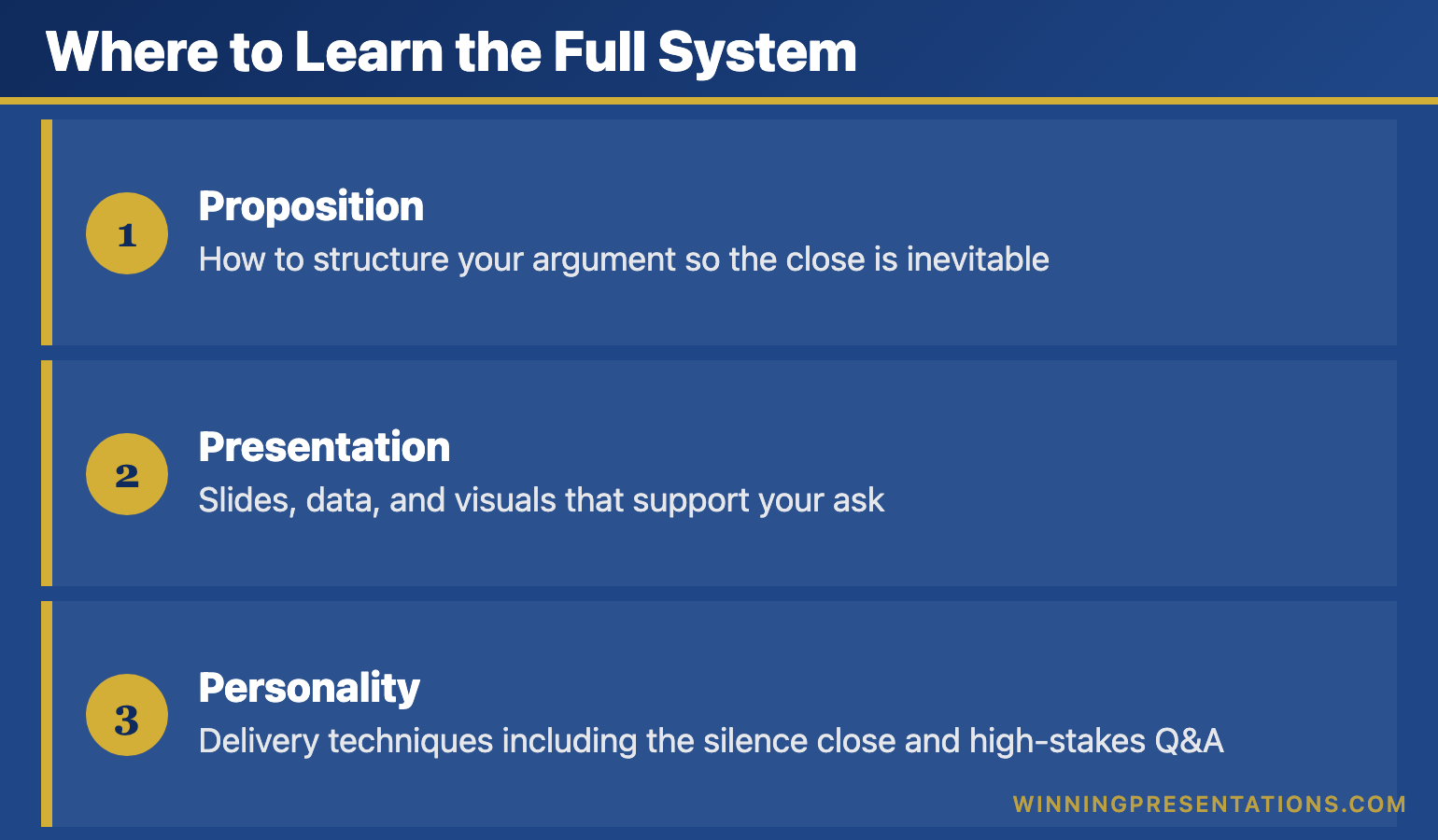
Infographic for: how to end a presentation (image 1)

  • Proposition: How to structure your argument so the close is inevitable
  • Presentation: Slides, data, and visuals that support your ask
  • Personality: Delivery techniques including the silence close and high-stakes Q&A

This is the same methodology that’s helped my clients raise over £250 million in funding and get budgets approved at Fortune 500 companies.

Early bird pricing closes December 31st.

→ Join the January cohort for £249 (save £50)

Try This Today

You probably have a presentation coming up. Before you finalise your final slide, ask yourself:

  1. What is my ONE ask?
  2. Can I paint a forward story of what success looks like?
  3. Am I prepared to stop talking after I make the ask?

If you can answer yes to all three, your presentation ending is already stronger than 90% of presenters.

Frequently Asked Questions

How long should a presentation closing be?

60-90 seconds maximum. Your close should be the most focused part of your presentation — not a second summary. State your ask, paint the forward story if appropriate, then stop.

What’s the best way to end a presentation to executives?

Lead with your recommendation, not your reasoning. Executives want the answer first, then the supporting evidence. Use the Single Ask technique: one specific request with a deadline.

How do I end a presentation without saying “any questions?”

Replace it with a specific call to action. Instead of “Any questions?” try “I’m asking for your approval on the pilot budget. What concerns would you need addressed before signing off today?”


Mary Beth Hazeldine is the Managing Director of Winning Presentations, where she trains executives at investment banks, biotech companies, and SaaS firms to present with impact. Her clients have raised over £250M using her methodology.

Her AI-Enhanced Presentation Mastery course launches January 2026. Early bird enrollment (£249) closes December 31st.

13 Dec 2025
What 24 years in banking taught me about high-stakes presentations

What 24 Years in Banking Taught Me About High-Stakes Presentations

📅 Updated: December 2025

What 25 years in banking taught me about high-stakes presentations

If you want a ready-made framework for executive presentations: Explore The Executive Slide System →

Templates, AI prompts, and scenario playbooks for building board-ready slides.

Quick Answer

Executive presentation training rarely teaches what actually matters. After 25 years $2 JPMorgan, PwC, RBS, and Commerzbank, I learned that high-stakes presentations aren’t won with better slides — they’re won with better preparation, political awareness, and the ability to read a room. The presenters who consistently got approvals weren’t the most polished speakers. They were the ones who’d done the work before they walked in.

🎁 FREE DOWNLOAD

Executive Presentation Checklist

12-point checklist I wish I’d had when I started. One page. Print it before your next big meeting.

Download Free Checklist →

No spam. Unsubscribe anytime.


I still remember my first presentation to JPMorgan’s Executive Committee.

I was 26. I’d spent three weeks building a 45-slide deck. I knew every number, every assumption, every footnote. I’d rehearsed my talking points until I could recite them in my sleep.

Seven minutes in, the Global Head of Operations held up his hand. “What’s the ask?”

I froze. My ask was on slide 38.

“I’ll… I’ll get to that,” I managed.

“I don’t have time for you to get to it. What do you want us to do?”

I fumbled forward, completely thrown off my script. The meeting ended with a polite “send us a one-pager” — which in banking means no.

That moment was the beginning of everything I know about high-stakes presentations.

Lesson 1: The Decision Happens Before the Meeting

Here’s what they don’t teach in executive presentation training: by the time you walk into that room, most decisions are already made.

At a UK hight street bank, I watched a colleague present a flawless recommendation for a £3M technology investment. Perfect slides. Clear ROI. Confident delivery.

The CFO said no in under two minutes.

What my colleague didn’t know: the CFO had already committed that budget to another initiative. The decision was made three weeks earlier in a conversation he wasn’t part of.

The best presenters I worked with at JPMorgan spent more time before the meeting than during it. They’d walk the halls, grab coffee with stakeholders, understand the politics. By the time they presented, they already knew who would support them, who would push back, and what objections they’d face.

The presentation wasn’t where they made their case. It was where they confirmed what they’d already built.

Lesson 2: Executives Buy Confidence, Not Content

In 2008, I was presenting a risk assessment to the bank’s board during the financial crisis. Markets were collapsing. Nobody knew what would happen next.

I had two options: present the uncertainty honestly, or project confidence I didn’t feel.

I chose honesty. I said: “I don’t know what’s going to happen. Nobody does. But here’s what we do know, here’s what we’re watching, and here’s how we’ll respond to each scenario.”

After the meeting, the Chief Risk Officer pulled me aside. “That was the most credible presentation I’ve seen all week. Everyone else is pretending they have answers. You gave us a framework for decisions we can actually make.”

Confidence isn’t about having all the answers. It’s about being clear on what you know, what you don’t know, and what you recommend despite the uncertainty.

Executives don’t expect you to predict the future. They expect you to help them make good decisions with incomplete information. That’s what they do every day.

If you want the slide frameworks distilled from decades of corporate presenting, The Executive Slide System gives you 22 ready-made templates to start from.

Seven lessons from 25 years of banking presentations

Lesson 3: Your Slides Are Not Your Presentation

At PwC, I worked with a partner who was legendary for client presentations. He’d walk in with three slides — sometimes two — and walk out with seven-figure engagements.

I once asked him how he did it.

“The slides are a prop,” he said. “They’re not the show. The show is what happens in the room. The conversation. The questions. The moment you see them lean forward because you’ve said something that matters to them.”

He was right. I’ve seen beautiful 50-slide decks put people to sleep. I’ve seen scribbled whiteboards close deals.

The difference isn’t the slides. It’s the presenter’s ability to:

  • Read the room and adjust in real-time
  • Answer questions they didn’t prepare for
  • Make the audience feel heard, not talked at
  • Create space for the decision to emerge naturally

Related: Executive Presentation Template: 12 Slides That Command the Room

📄
Want the Checklist?

12 things to do before every executive presentation. The prep work that actually matters.

Download Free →

Build Your Next High-Stakes Presentation in Under an Hour

The Executive Slide System gives you 10 board-ready slide templates and 30 AI prompt cards.

Executive Slide System — £39, instant access.

  • 10 executive presentation templates (QBR, board update, budget request, and more)
  • 30 AI prompts to build each slide type in minutes
  • Narrative structure built in — no blank-slide panic

Designed for directors and senior managers who present to boards, leadership teams, and investors.

Lesson 4: The Question You Don’t Expect Will Define You

At a US Investment Bank., I was presenting a £8M operations initiative to the regional CEO. Everything was going perfectly. Slides landing. Heads nodding. I was about to close with my ask.

Then the CEO asked: “What happens to the 47 people in Mumbai whose jobs this eliminates?”

I hadn’t prepared for that question. It wasn’t in my risk assessment. It wasn’t in my stakeholder analysis. I’d been so focused on ROI and efficiency that I’d completely missed the human element.

I stumbled through something about “redeployment opportunities” and “natural attrition.” It was vague and everyone knew it.

The CEO said: “Come back when you’ve thought about the people, not just the numbers.”

That presentation taught me something that’s shaped every executive conversation since: the question you don’t expect reveals what you haven’t thought through. And executives notice.

The best way to prepare for unexpected questions isn’t to anticipate every possible question. It’s to think more broadly about your recommendation in the first place. Who’s affected? What could go wrong? What would make you change your mind?

Related: How to Present to a CFO: The Finance-First Framework

Lesson 5: Vulnerability Builds More Trust Than Perfection

This one took me years to learn.

Early in my career, I thought executive presentations were performances. I needed to appear competent, polished, in control. Any sign of uncertainty was weakness.

Then I watched a Managing Director at RBS do something that changed my perspective.

She was presenting a strategy that had partially failed. Instead of burying the failure in positive spin, she opened with: “I want to tell you what went wrong, what I learned, and what I’d do differently.”

The room leaned in. For the next 20 minutes, she had complete attention. When she finished, the Chief Executive said: “That’s the most useful strategy review I’ve heard this year.”

She got more budget, not less.

Executives are surrounded by people telling them what they want to hear. Honesty — even uncomfortable honesty — is rare and valuable. The presenter who admits what didn’t work, explains why, and shows they’ve learned is more credible than the one with a perfect track record they can’t explain.

Lesson 6: Presence Trumps Content Every Time

At Commerzbank, I sat through hundreds of presentations. I started noticing a pattern.

The presenters who got approvals weren’t always the ones with the best analysis. They were the ones who:

  • Walked in like they belonged there
  • Made eye contact with decision-makers, not their slides
  • Spoke at a pace that commanded attention
  • Paused after making important points
  • Handled pushback without getting defensive

Executive presence is hard to define but easy to recognise. You know it when you see it. And it’s not about being the most charismatic person in the room — some of the most effective presenters I’ve worked with were quiet, understated people who simply projected certainty.

It can be learned. I’ve seen people transform their presence in a matter of months. But it requires deliberate practice, feedback, and usually someone who can show you what you can’t see in yourself.

Lesson 7: AI Won’t Save You

I’ve been using AI tools for presentations since they became available. They’re remarkable for certain things — generating first drafts, formatting consistently, iterating quickly.

But here’s what 24 years taught me that no AI can replicate:

  • Knowing that the CFO and COO don’t speak to each other, so you need separate pre-meetings
  • Sensing that the room has turned and you need to skip ahead
  • Hearing the question behind the question
  • Building relationships that mean your call gets answered

AI makes the mechanical parts of presentations faster. That’s valuable. But the mechanical parts were never the hard part.

The hard part is everything that happens between humans — the trust, the politics, the unspoken dynamics. That’s where presentations are won or lost. And that hasn’t changed in 24 years.

Related: Why AI Won’t Replace Presentation Skills (But Will Amplify Them)

The best presenters spent more time before the meeting than during it

The presentation is the opening act. The Q&A is where trust is built or lost.

The Executive Slide System gives you the frameworks to structure both.

Executive Slide System — £39, instant access.

Designed for executives who present where decisions are made.

What I’d Tell My 26-Year-Old Self

If I could go back to that first JPMorgan Chase presentation, here’s what I’d say:

Stop building slides. Start building relationships. The people in that room are more important than anything on your screen. Know what they care about before you walk in.

Lead with the ask. Respect their time. Tell them what you want, then justify it. Not the other way around.

Prepare for the conversation, not the presentation. Your slides will take 15 minutes. The Q&A will take 45. Prepare accordingly.

Get comfortable being uncomfortable. The moment that terrifies you — the hard question, the pushback, the silence — is where trust is built. Don’t run from it.

Find people who’ll tell you the truth. You can’t see your own blind spots. Get feedback from people who’ll be honest, not kind.

Why I Started Teaching This

After 25 years in banking, I’d collected a lot of lessons. Most of them learned the hard way.

When I moved into training, I discovered that most executive presentation training focused on the wrong things. Slide design. Speaking techniques. Body language tips.

All useful. But none of it addressed what actually determines outcomes: the strategic preparation, the stakeholder management, the ability to read a room and adapt in real-time.

So I built a programme that teaches what I wish I’d known at 26. Not theory — the actual skills and frameworks that worked in real boardrooms with real money on the line.

Reading vs. Doing

What You Get Free Articles AI-Enhanced Mastery (£249)
Awareness of what matters
structured frameworks (AVP, 132, S.E.E.) Mentioned ✓ Deep training
8 structured learning modules ✓ Self-paced
Live coaching sessions ✓ 2 sessions
Templates & prompt packs Examples ✓ Full library
Before/after transformations ✓ Real examples
Outcome Know what to do Actually do it

Frequently Asked Questions

How is executive presentation training different from regular presentation skills?

Regular presentation training focuses on delivery — how to stand, how to speak, how to use slides. Executive presentation training focuses on outcomes — how to get decisions, how to manage stakeholders, how to handle high-stakes situations. The audience, the stakes, and the dynamics are fundamentally different.

Can presentation skills really be taught?

Yes, but not through lectures. The skills that matter — reading a room, handling pushback, projecting confidence — require practice with feedback. That’s why the Maven course includes live coaching sessions, not just video content.

What if I don’t work in banking?

The principles apply across industries. I’ve trained executives in biotech, SaaS, consulting, and manufacturing. The dynamics of high-stakes presentations — managing stakeholders, leading with conclusions, handling tough questions — are universal.

How long does it take to see improvement?

Most people see significant improvement within their first 2-3 presentations after training. The frameworks give you structure immediately. The confidence builds with practice.

📧
The Winning Edge Newsletter

Weekly insights on executive presentations from 16 years of training executives leaders. No fluff. No theory. Just what works.

Subscribe Free →

Related Reading

About the Author

Mary Beth Hazeldine spent 25 years in corporate banking at JPMorgan Chase, PwC, Royal Bank of Scotland, and Commerzbank before moving into executive training. She teaches at Winning Presentations and is launching the AI-Enhanced Presentation Mastery course in January 2026.