

Quick answer: Executive vocabulary signals are the small word-level choices that tell senior listeners whether a presenter thinks like a peer or like a subordinate. Words that frame decisions, trade-offs, and ownership read as promotable. Words that frame activity, effort, and caution read as replaceable. The same facts, spoken with different words, produce very different assessments of the speaker.
A director at a specialty insurer — I’ll call him Henrik — was passed over for a second time in 2023. His numbers were strong, his technical judgement was respected, and his two executive sponsors were advocating for him in the promotion discussions. He lost to a peer with weaker numbers but, as Henrik’s manager later put it, “who sounds more senior when you put him in front of the group chief actuary.”
What Henrik’s manager was describing was not confidence, charisma, or executive presence in the abstract. It was the specific words Henrik used in executive presentations — words like “I’ve been working on”, “hopefully we can”, “we tried to”, and “what I was trying to do was”. Words that accurately described his effort but positioned him as a doer rather than a decision-maker.
Six months later, after rebuilding the vocabulary he used in senior forums, Henrik was promoted. The technical content of his presentations did not change. The framing did. Executive listeners started describing him differently — “clear thinker”, “decisive”, “commercially sharp” — words that had never attached to him before.
Want the structured system for executive-level presentations?
The Executive Slide System covers 16 senior scenarios, 26 slide templates, and 93 AI prompts — the structural complement to the vocabulary changes below. When structure and language reinforce each other, senior listeners register the presenter differently.
Why the words matter more than the content
Senior listeners process presentations at two levels simultaneously. The first is the content — what you are recommending, what the numbers are, what the risks are. The second is the calibration — is this person thinking like a senior executive, or thinking like a mid-level specialist explaining a decision to an audience above them? The second layer is mostly carried by vocabulary.
The calibration happens fast, often in the first two minutes. Once a senior listener has decided that a presenter “doesn’t quite sit at the level”, the rest of the presentation is heard through that filter. Strong analysis gets credited as detail orientation rather than strategic thinking. A good recommendation gets received as information rather than judgement. This is not a fair process — but it is the one operating in most boardrooms, investment committees, and promotion panels.
Vocabulary signals are not about sounding smart. Senior presenters often use shorter words and simpler sentences than mid-career specialists. The signal is in which words do the work — which verbs, which framings, which pronouns — not in how complicated the language is.
A useful frame: words that position the speaker as someone who makes decisions with consequences read as promotable. Words that position the speaker as someone who carries out work under direction read as replaceable. Both can be accurate descriptions of the same role. The difference is in how the presenter chooses to describe what they do.
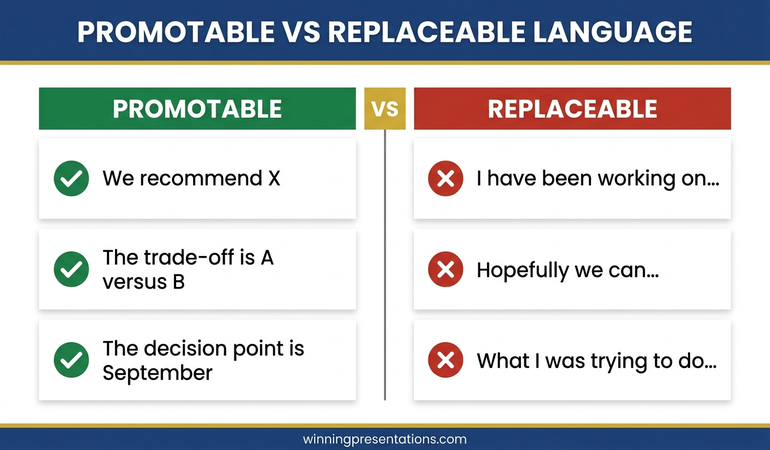
The vocabulary of promotable presenters
Senior-sounding language has a recurring texture. Four patterns do most of the heavy lifting.
Decision language. Promotable presenters name decisions clearly. “The choice is between A and B.” “We recommend X.” “The decision point is September.” This framing positions the speaker as someone who understands what is being decided and by whom. It also makes the room more comfortable, because the presenter has done the cognitive work of isolating the decision.
Trade-off language. Senior listeners think in trade-offs. Presenters who name the trade-off rather than pretending the answer is obvious read as commercially sophisticated. “The trade-off is speed against risk exposure.” “We are accepting higher capex in exchange for shorter payback.” Naming the trade-off also pre-empts the question a skeptical committee member was about to ask.
Ownership language. Promotable presenters take clear ownership of recommendations. “I recommend.” “My view is.” “We are asking for your approval to.” Ownership language does not mean arrogance; it means the presenter is willing to be accountable for the position. Senior listeners read this as confidence; its absence reads as fence-sitting.
Consequence language. Senior presenters consistently frame actions in terms of consequences, not activity. Not “we have been working on a new routing algorithm” but “the new routing algorithm cuts claims handling time by two days”. The consequence is what matters to the executive audience; the activity is what matters inside the team.
The cumulative effect of these four patterns is a presenter who sounds like they have already thought through what senior listeners are about to ask. That perception — of being one step ahead of the room — is the hallmark of executive-level communication.
The vocabulary that reads as replaceable
The vocabulary that reads as replaceable is rarely wrong. It is usually accurate. It describes the work as it was actually done, with appropriate modesty and caution. The problem is not truth; the problem is positioning. Four patterns do most of the damage.
Effort language. “I’ve been working on.” “We have spent the last six weeks.” “The team has been digging into.” These framings emphasise input rather than output. A senior listener does not want to know how much effort was spent; they want to know what was decided or discovered. Effort language is appropriate in a one-to-one with your line manager, where input is part of the conversation. In an executive forum, it reads as a request for credit.
Hedge language. “Hopefully we can.” “We are trying to.” “Possibly this will.” “It could be the case that.” Hedge language protects the speaker from being wrong, but it also makes the recommendation feel provisional. Senior listeners interpret heavy hedging as either uncertainty about the analysis or unwillingness to commit. Either reading caps the presenter’s authority.
This is closely related to the over-explaining pattern that destroys credibility — both are attempts to bullet-proof a statement, and both produce the opposite effect.
Passive-voice attribution. “It was decided that.” “The analysis was conducted.” “Requirements were gathered.” Passive voice removes the speaker from the action. In some technical contexts this is correct; in executive communication it reads as avoidance of ownership. “We decided to” is not the same as “it was decided” — the first carries authority, the second carries distance.
Apology framing. “Sorry, just one more slide.” “I know I’m running over.” “Sorry, let me just go back.” Apologies signal that the speaker believes they are intruding on the audience’s time. Senior presenters rarely apologise for the presentation itself; they apologise only for specific things that actually warrant one, such as a delayed start. Chronic apology framing makes the presenter feel like a guest in their own material.
Stop sounding like the smartest person in the room without the seniority to match
The Executive Slide System gives you the structural scaffolding that makes promotable vocabulary easier to use. When a slide is structured around a decision point, the language that fits the slide is decision language by default. Structure carries the vocabulary.
- 26 slide templates for board, investment committee, and senior leadership scenarios
- 93 AI prompt cards with Instant Draft, Refine, and Executive Polish workflow
- 16 scenario playbooks — real-world situations from budget rejections to quarterly reviews
- Master Checklist covering Clarity, Executive Tone, Decision Readiness, and Persuasion Logic
Designed for senior professionals in financial services, healthcare, technology, and government.
Get the Executive Slide System →
£39, instant access. 3 files. Complete system.
Ten substitutions that change how you sound
The fastest way to shift executive vocabulary is substitution — learning to spot a replaceable-sounding phrase as it leaves your mouth and replacing it with a promotable equivalent. Ten substitutions cover most of the repeated ground.
- “I’ve been working on” → “We’ve resolved” / “We’ve built” / “We’ve identified”. Name the output, not the effort.
- “Hopefully” → [delete]. Hope is not a strategy senior listeners want to hear. If the outcome is conditional, state the condition: “subject to the January volumes holding” is better than “hopefully January will hold”.
- “We tried to” → “We chose to” or “We decided to”. Tried implies failure; chose implies judgement.
- “What I was trying to do was” → “Our objective was”. Trying reads as uncertain; objective reads as intentional.
- “It might be worth considering” → “I recommend”. The former is fence-sitting; the latter is a position.
- “Sorry, one more thing” → “One final point”. No apology needed. The audience knows they signed up for the presentation.
- “A number of” → “Three” / “Four” / the exact number. Vague quantities signal lack of precision. Specific numbers signal command of the material.
- “Stuff” / “Things” → name the thing. “Stuff we need to think about” is the language of internal conversation. Executive forums need specificity: “the three risks we need to resolve before November”.
- “I think” → “My view is” / “Based on the data”. Both alternatives land harder. “I think” is a verbal tic that dilutes every statement that follows it.
- “We should probably” → “We should” or “We need to”. Probably removes the force from the recommendation. Say it or do not say it.
Practising these substitutions in rehearsal trains the substitution reflex. Once the reflex is installed, the swaps happen mid-sentence without conscious effort.
How to install the vocabulary in one week
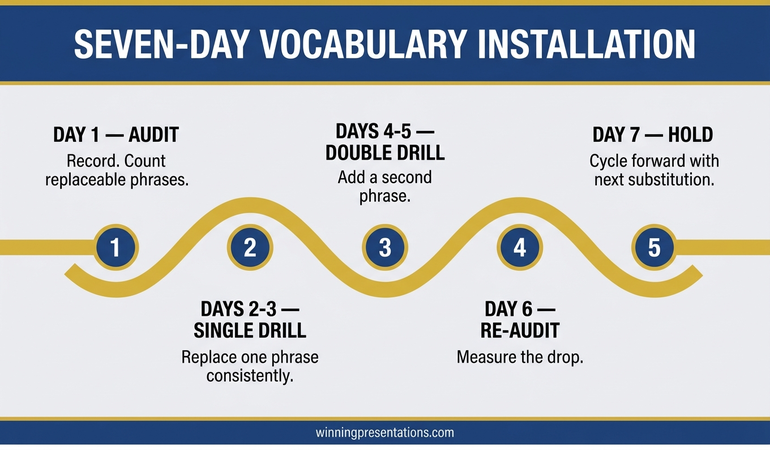
You do not need a month of coaching to change executive vocabulary. A focused seven-day protocol produces measurable change, provided you are willing to listen to yourself during the change.
Day 1: Audit. Record the next internal meeting where you present something to peers. Listen back with a pen. Note every instance of the eight most common replaceable phrases from the substitution list. Most mid-career presenters find between fifteen and thirty in a thirty-minute recording. The count is the benchmark.
Days 2–3: Single-substitution drill. Pick the single most frequent phrase from your audit and replace only that one for two days. If the phrase is “hopefully”, you simply stop saying “hopefully”. The constraint is narrow and specific, which makes it easier to catch yourself in the moment.
Days 4–5: Two-substitution drill. Add the second most frequent phrase. Continue to monitor the first. This is the stretch phase; expect to miss some, catch yourself mid-sentence, and correct in the next phrase. Self-correction in the moment is part of the installation.
Day 6: Re-audit. Record another internal meeting. Count the occurrences of the two target phrases. The count typically drops by 70–80%. Note what replaced them — in most cases, the alternative vocabulary has started appearing naturally.
Day 7: Add the third substitution and hold. From here, cycle through the remaining substitutions two per week. The full set can be installed in four to six weeks of honest practice.
Related reading worth bookmarking: the executive summary slide structure, which gives vocabulary a framework to sit inside, and the broader pattern of presenting to senior leadership.
Partner post: the boardroom pause is the silence-based equivalent of the vocabulary changes above — what you do not say matters as much as the words you replace.
For the narrative side of executive communication
The Business Storytelling System (£29) covers the structural choices that carry decision language — how to sequence a narrative so the recommendation is earned by the time you land it. A natural companion to vocabulary work.
The quiet reason vocabulary work accelerates careers
Most mid-career professionals who plateau at senior-manager level are not plateauing on capability. They are plateauing on how they are read. Executive listeners make a judgement about whether someone “sounds right” for the next level, and that judgement is carried by vocabulary far more than by technical knowledge.
The uncomfortable implication is that the vocabulary itself is a ceiling mechanism. Two specialists with the same underlying skill can be rated very differently depending only on how they describe what they do. The ceiling is removable, but it does not remove itself — it comes down when the presenter starts consciously installing the language of the level above.
That installation work is one of the highest-leverage investments a senior professional can make. It costs no time beyond what you are already spending in meetings. It uses no additional slides or frameworks. It simply changes which words you use when you are already presenting.
Start with one substitution. Pick the phrase you used most often in your last senior presentation. Commit to not using it for one week. Replace it with the promotable alternative every time you catch yourself about to say the old one. Notice how senior listeners respond.
The complete system senior presenters use to structure decisions
26 templates, 93 AI prompts, 16 scenario playbooks. The slide structure that makes promotable vocabulary the default.
Get the Executive Slide System → £39
£39, instant access. 3 files, complete system.
Frequently asked questions
Isn’t “promotable vocabulary” just corporate jargon?
No. Promotable vocabulary is usually simpler and more direct than what it replaces. “We recommend” is plainer than “it might be worth considering”. The change is towards clarity and ownership, not towards jargon. Jargon often comes from the same instinct that produces hedges — the wish to sound safe rather than clear.
How do I use decision language when the decision isn’t mine to make?
Name whose decision it is. “The decision sits with the investment committee. My recommendation is to proceed with option B, subject to their approval of the risk profile.” This framing preserves the authority of the decision-maker while still making your position clear. Passive framing (“a decision will need to be made”) is what reads as junior, not the acknowledgement that the decision belongs to someone else.
Won’t I sound arrogant if I stop hedging?
Arrogance comes from over-claiming, not from clarity. “We’ve resolved the capacity constraint” is clear, not arrogant. “We’ve resolved every capacity issue the business will ever face” is arrogant. The distinction is between a defined claim and an unbounded one. Senior listeners respond well to clarity; they are wary of unbounded claims whether they are hedged or not.
Does vocabulary work differ by culture?
The specific words vary — British executive language is more understated than American executive language, for example — but the pattern is the same across cultures. Decision-framing, trade-off-framing, ownership-framing, and consequence-framing read as senior in every executive culture I’ve worked in, including UK, US, German, and Hong Kong. The tone calibrates to the culture; the underlying pattern does not.
Get The Winning Edge
One email each Thursday. Named techniques from real boardroom work — vocabulary, pauses, framing moves — that senior professionals can try in the next presentation.
Not ready for the full system? Start here instead: download the free Executive Presentation Checklist — the one-page reference senior presenters use to pressure-test a deck before a senior meeting.
Next step: audit one recording of yourself, pick one substitution, and hold it for a week.
About the author
Mary Beth Hazeldine is Owner & Managing Director of Winning Presentations Ltd. With 24 years of corporate banking experience at JPMorgan Chase, PwC, Royal Bank of Scotland, and Commerzbank, she advises executives across financial services, healthcare, technology, and government on structuring presentations for high-stakes funding rounds and approvals.


