Tag: board approval

06 Apr 2026
A senior executive at a polished boardroom table reviewing a concise follow-up slide deck, with a glass office background and navy blue document folders, editorial photography style

Follow-Up Deck: Why Approvals Die After the Meeting and How to Fix It

Most approvals do not die in the meeting. They die in the three days afterwards, when the decision-maker returns to a full inbox, the urgency fades, and your proposal becomes one of twelve things waiting for attention. A well-structured follow-up deck is the single most underused tool for keeping executive approvals alive — and most executives never build one.

Ngozi had presented her transformation programme to the executive committee on a Tuesday. The room had been engaged. The CFO asked detailed questions about the cost model. The CEO nodded through the implementation timeline. At the end, the chair said the words every presenter dreads: “Thank you, Ngozi — we’ll come back to you on this.” By Friday, she had heard nothing. By the following Wednesday, two committee members had left for conferences. A month later, her proposal was still listed as “under review.” She had done everything right in the meeting. What she had not done was send a follow-up deck. Instead, she had sent a two-paragraph email with a PDF attachment of her original slides. The email got a read receipt but no response. The proposal stalled not because the committee disagreed — they had signalled support — but because no one had given them a clear, decision-ready document to move forward with. When she finally sent a structured follow-up deck six weeks later, it was approved within forty-eight hours.

Preparing a post-meeting deck for a stalled approval? The Executive Slide System includes decision-focused templates designed for high-stakes executive approval presentations. Explore the System →

Why Approvals Stall After Successful Meetings

The moment an executive presentation ends, the executive committee disperses back into their own priorities. A positive meeting creates intent, but intent is not a decision. Without something concrete to act on, that intent degrades. The half-life of a “we’ll come back to you on this” is shorter than most presenters realise.

Three dynamics work against you in the post-meeting window. First, decision-making friction: even supportive executives need a trigger to commit formally. Your original slides were designed for a live presentation — they do not function as a standalone decision document. Second, stakeholder drift: committee members who were aligned on Tuesday may have heard a counterargument by Thursday. Without a written reference point, the alignment you built in the room has nowhere to anchor. Third, competing priorities: the urgency your proposal felt in the room evaporates when the committee chair’s diary fills with unrelated crises.

The follow-up deck solves all three. It provides a trigger — a concrete document that moves the process forward. It anchors alignment — a written record of the direction the meeting was heading. And it reintroduces urgency — not through pressure, but through a clear next step with a defined timeline.

Understanding the pre-decision conversation that precedes executive approval is equally important — the follow-up deck works best when the right groundwork has been laid before the meeting, not improvised afterwards.

Build the Deck That Closes the Approval Gap

The Executive Slide System gives you templates for every stage of the executive approval journey — from the initial presentation to the follow-up deck that turns a promising meeting into a signed decision.

  • ✓ Slide templates for executive and board approval scenarios
  • ✓ AI prompt cards to build decision-ready decks fast
  • ✓ Framework guides for high-stakes approval presentations

Get the Executive Slide System → £39

Designed for executives preparing high-stakes presentations

What a Follow-Up Deck Contains — and What It Isn’t

A follow-up deck is not a compressed version of your original presentation. It is a different document with a different purpose. Where the original presentation was designed to persuade, the follow-up deck is designed to decide. These are distinct tasks that require distinct structures.

An effective follow-up deck for executive approval contains five components. The first is a decision summary — a single slide or opening section that restates what the committee is being asked to approve, in plain language. Avoid the qualifying language you might have used in the live presentation. “We are proposing a phased investment in infrastructure modernisation” becomes “The committee is asked to approve a £1.2M infrastructure investment with implementation beginning May 2026.” Clarity is not aggression. It is respect for the committee’s time.

The second component is a concise rationale update — two to three slides maximum that distil the business case to its essential logic. These are not a replay of your full argument. They are a written anchor that reminds decision-makers why the proposal was compelling. Include any new information that emerged during the meeting — questions that were asked and answered, concerns that were addressed, or data points that were requested and can now be provided.

The third component is a risk and mitigation summary. Committee members often stall not because they disagree, but because they cannot articulate a response to objections they anticipate from colleagues. A clear risk table — three to five rows covering the most likely concerns with specific mitigations — gives your supporters the language they need to champion the proposal in conversations you are not part of.

The fourth component is the implementation overview. A single timeline slide showing the first ninety days — milestones, owners, decision points — converts abstract approval into concrete commitment. Executives who approve a vague proposal often feel exposed. Executives who approve a specific plan feel informed. The difference is consequential.

The fifth component is the next-step request. This is the most frequently omitted section, and its absence is why so many follow-up decks fail to accelerate a decision. State clearly what you are asking the committee to do, by when, and how they should signal their response. “Please confirm approval by email to [chair] by April 10 to allow the project team to begin procurement” is actionable. “We welcome any questions” is not.
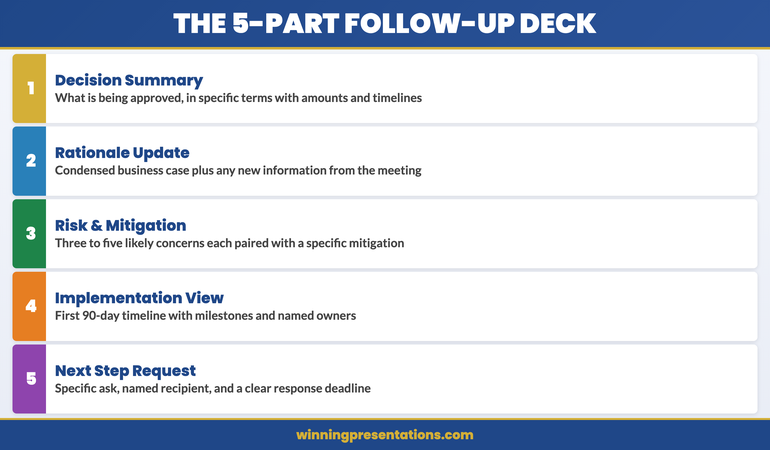
The five components of an effective executive follow-up deck: decision summary, rationale update, risk and mitigation, implementation overview, and next-step request

Timing and Delivery: When to Send It and How

The follow-up deck should be sent within twenty-four to forty-eight hours of the meeting. This is not a guideline — it is a strategic imperative. Within that window, the meeting is still recent, the committee’s impressions are still fresh, and you have the highest probability of capturing attention before competing priorities crowd your proposal out.

Waiting a week to prepare a polished document is a common mistake. A clean, clear five-slide deck sent the morning after a meeting outperforms a beautifully designed twelve-slide document sent five days later. The follow-up deck’s job is to maintain momentum, and momentum is time-sensitive.

Delivery should be direct, not through an assistant. Send it personally to the meeting chair with the committee members copied. The covering note should be one paragraph: acknowledge the meeting, state what is attached, and name the specific response you are requesting. Do not write a summary of your proposal in the email body — that is what the deck is for. Do not ask if there are any questions — that invites delay rather than decision.

The structure of high-stakes decision slides follows a specific logic that applies equally to live presentations and follow-up decks — the principles of decision architecture do not change because the medium has shifted from live to asynchronous.

If you are preparing multiple executive presentations for different stakeholders in parallel, the Executive Slide System provides the structural templates that allow you to build each deck — presentation and follow-up — from a consistent, decision-tested framework.

Structuring the Decision Summary Slide

The decision summary slide is the most important slide in your follow-up deck. It is the slide the committee chair will use to introduce the item in any subsequent discussion, and it is the slide that will be referenced when the approval is communicated to the wider organisation. Getting it right is not optional.

The decision summary should contain four elements only. The first is the ask: a single sentence naming what is being approved, in specific terms. Quantify wherever possible — amount, timeline, scope. The second is the rationale: one or two sentences giving the business case in plain language. This is not a condensed version of your full argument. It is the sentence a committee member would say if asked to explain the decision to a colleague who was not in the room.

The third element is the key condition: if there is a circumstance or assumption that makes the proposal viable, state it here. “Subject to legal review of the contract terms” or “Contingent on Q2 budget reforecast confirming £400K headroom.” This does not weaken the proposal — it demonstrates that you understand the constraints the committee is working within. Decision-makers who see their real-world constraints acknowledged are far more comfortable committing.

The fourth element is the decision date: the specific date by which you need a response for the implementation timeline to hold. This is not a deadline you are imposing. It is a project-management reality you are communicating. Frame it as information, not pressure: “Approval by April 14 allows the procurement process to begin within budget cycle.”
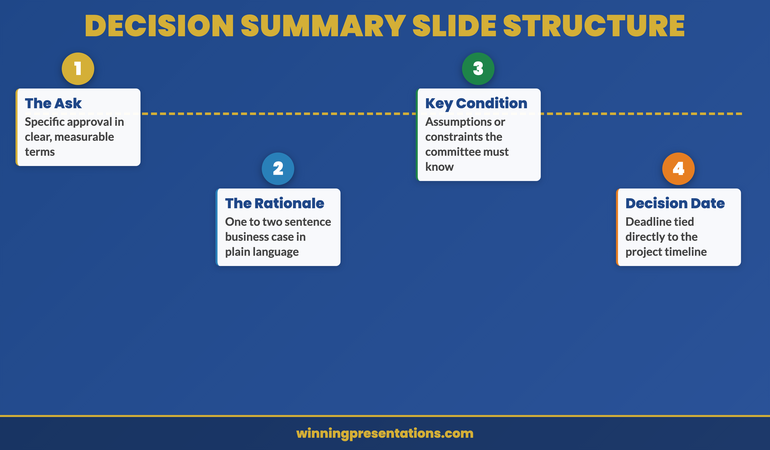
Decision summary slide structure for executive follow-up decks showing the four essential elements: ask, rationale, key condition, and decision date

Maintaining Momentum With Stakeholders After You Send It

Sending the follow-up deck is not the end of your approval management process. It is the beginning of a structured follow-up sequence that keeps the proposal visible without becoming intrusive. Most executives send the deck and then wait passively. This is where proposals stall.

If you have not received a response within forty-eight hours of sending the deck, a single follow-up is appropriate. This is not a chaser. It is a value-add: “I wanted to check whether any additional information would be useful before the committee considers the proposal.” This phrasing invites engagement without creating pressure. If there are open questions, this is when they surface — and surfacing them now is better than discovering them after the decision window has closed.

Identify the internal champions from your original meeting — the committee members who were visibly supportive — and maintain direct contact with them. These are the people who will advocate for the proposal in conversations you are not invited to. Giving them easy-to-use language — a clear one-paragraph summary they can share informally — is one of the most effective forms of approval management. It is also one of the least practised.

If your proposal contains a third-party dependency — a vendor quote that expires, a regulatory window that closes, a budget cycle that resets — communicate this proactively. Do not wait for the deadline to arrive and then rush to inform the committee. Flag it in your follow-up correspondence with enough lead time for the committee to act. This is not about creating artificial urgency. It is about ensuring that legitimate constraints are visible before they create problems.

For the complete board presentation follow-up protocol, including email templates and the twenty-four-hour action checklist, that guide covers every step of the post-presentation process. And if your proposal involves expanding an existing client relationship, our guide to upsell presentations covers how to make the expanded case when the client already knows and trusts you.

Structure Your Follow-Up Deck for Faster Approval

The Executive Slide System gives you the decision-focused templates and frameworks to build the follow-up deck that moves stalled proposals to approval — for £39.

Get the System Now → £39

Frequently Asked Questions

How long should a follow-up deck be after an executive presentation?

Five to seven slides is the right range for most executive follow-up decks. The purpose is not to re-present your full case — it is to make the decision easy to take. A decision summary, a condensed rationale, a risk overview, an implementation timeline, and a clear next-step request cover the essential ground without adding reading time the committee does not have. Longer decks signal that you are not sure what the decision-maker actually needs — and that uncertainty becomes their reason to delay.

Should the follow-up deck be different from the original presentation?

Yes — significantly. The original presentation was designed for live delivery, with slides that support spoken explanation. The follow-up deck must be self-explanatory, readable in isolation, and structured for a committee reading it asynchronously rather than listening in real time. Every slide must be able to stand alone without narration. This typically means more text on each slide than you would include in a live presentation, with section headers that tell the reader exactly what the slide is doing in the argument.

What if the committee has already asked for more information before deciding?

If the committee requested specific additional information during the meeting, your follow-up deck must address each request explicitly — with a slide that names the question that was asked, and provides the answer. Do not bury the responses in an appendix. Put them in the main body of the deck with a clear label: “Requested: Cost model breakdown for Phase 2.” This signals that you listened, you acted, and you are organised. More importantly, it removes the committee’s stated reason for deferring and creates a clear path to decision.

The Winning Edge

Weekly insights on executive presentations, slide strategy, and boardroom communication.

Subscribe Free

Preparing a high-stakes approval deck? Download the Executive Presentation Checklist — a structured framework for building decision-ready slides from first draft to final review.

If the approval you are chasing relates to a client account, our guide to the upsell presentation covers how to structure the expanded case for existing clients who are ready to grow.

About the author

Mary Beth Hazeldine, Owner & Managing Director, Winning Presentations. With 24 years of corporate banking experience at JPMorgan Chase, PwC, Royal Bank of Scotland, and Commerzbank, she advises executives across financial services, healthcare, technology, and government on structuring presentations for high-stakes funding rounds and approvals.

02 Mar 2026
Board directors asking questions in a corporate boardroom setting with presentation screen

Board Meeting Q&A: The 7 Questions Directors Always Ask (And What They’re Really Testing)

The CFO rejected it in 11 words. But it wasn’t the presentation that killed the deal. It was the answer to question three.

Quick Answer

Board directors ask the same seven categories of questions in every Q&A session—budget challenges, risk probes, timeline pressure, stakeholder alignment, alternatives analysis, cost-of-inaction testing, and governance compliance. The directors are not testing your slides; they’re testing your judgment under pressure. If you can predict these seven question types and prepare topic-matched answers in advance, you’ll walk into the boardroom with the clarity that wins approval.

🚨 Rescue: Are You Getting Blindsided in Board Q&A?

Directors ask questions you should have anticipated. You don’t have a framework for predicting them. You answer reactively instead of strategically. Three immediate actions:

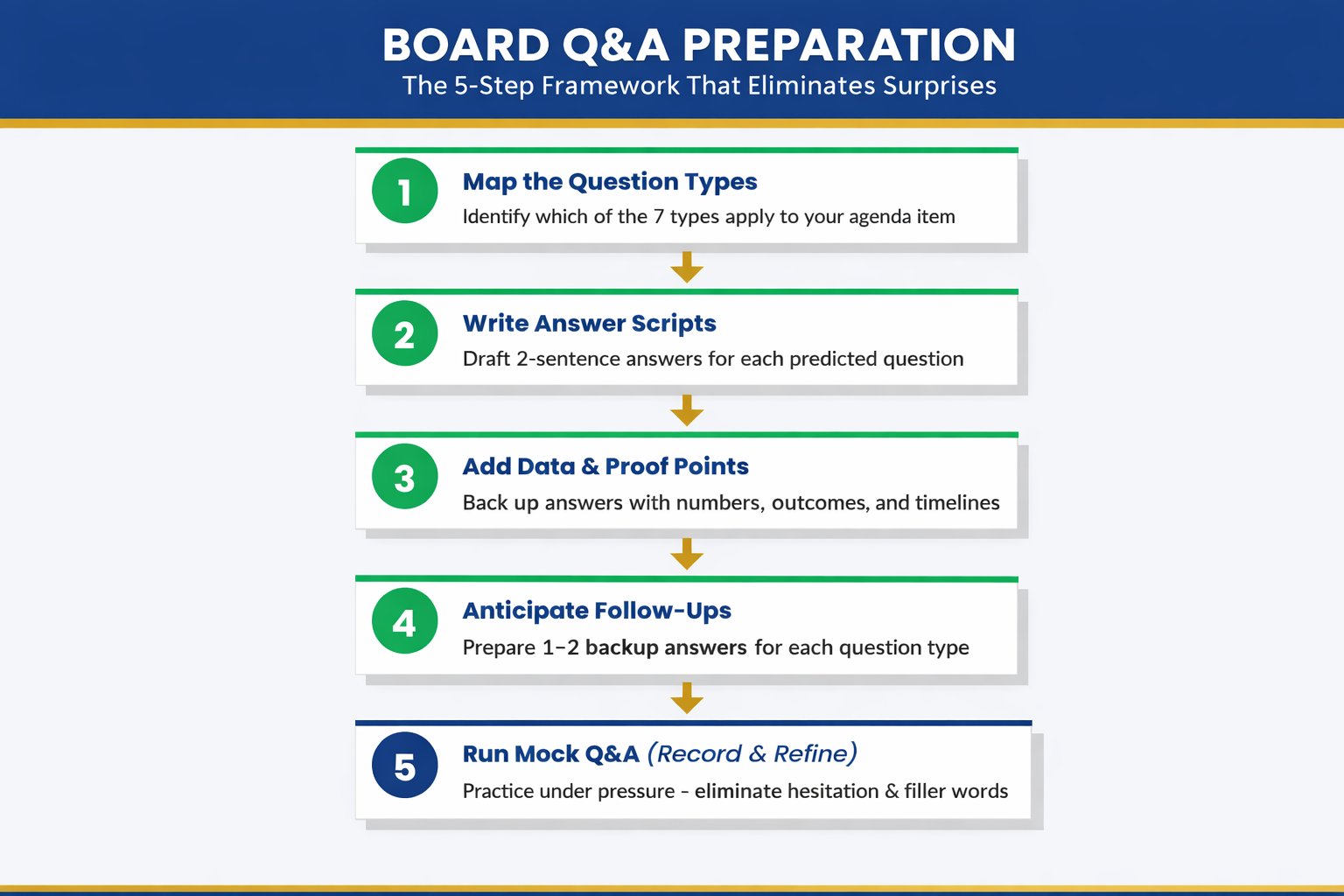
  1. Map the question types: Before your next board meeting, write down which of these seven categories will matter most to your specific director.
  2. Pre-write your answers: Don’t prepare talking points. Prepare exact answer scripts so you can deliver them under pressure without fumbling.
  3. Run mock Q&A: Have a colleague ask these seven question types back-to-back. Record yourself. Listen for hesitation, filler words, or pivoting—all signals the answer isn’t locked in.

Get the Executive Q&A Handling System → £39

Jump to Section

The £4M Question That Wasn’t About the Slides

A CFO from a biotech firm spent three weeks perfecting her board presentation. Forty-seven slides narrowed to twelve. Charts that sang. A narrative arc that built momentum. The deck was flawless.

She walked into the boardroom confident. The presentation went perfectly. Directors engaged, nodded, asked follow-up questions—all positive signals. Then the chair asked: “Walk us through your assumptions on customer acquisition cost if we hit 60% market penetration in year two.”

The CFO had numbers. Spreadsheets backed her up. But the way she answered—hedging, backtracking, diving into footnotes instead of speaking with conviction—signalled uncertainty. Not about the data. About her own judgment.

Three weeks of slide work collapsed in 40 seconds of Q&A. The board approved a smaller funding round. Later, the chair told her: “Your slides were excellent. But in Q&A, you sounded like you were presenting someone else’s work, not owning it as your own.”

She didn’t need better slides. She needed a framework to predict the question types directors ask, lock in answer scripts in advance, and deliver them with the authority that wins approval. The presentation didn’t kill the deal. The unpreparedness in Q&A did.


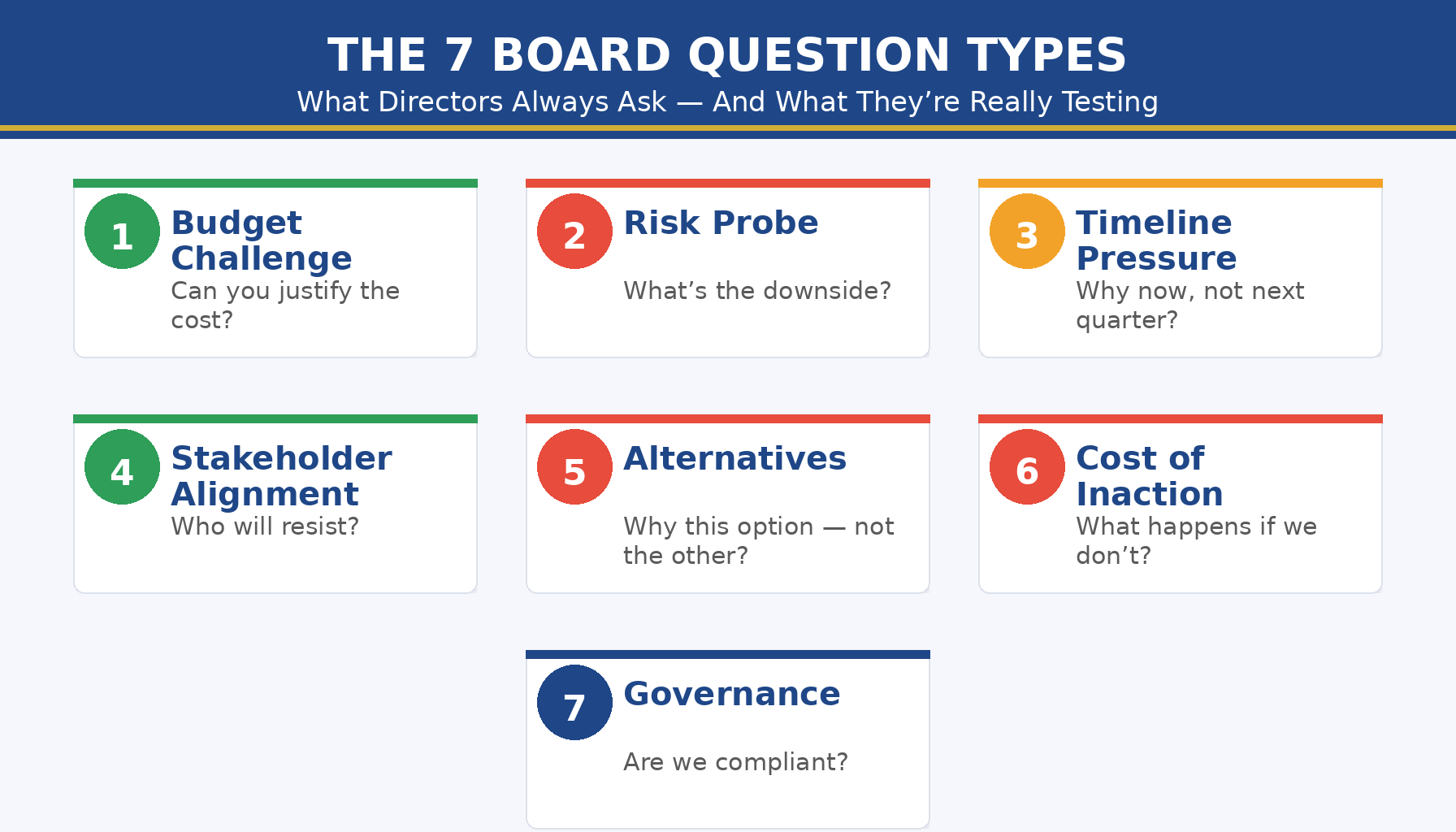
The 7 board question types directors always ask: budget challenges, risk probes, timeline pressure, stakeholder alignment, alternatives analysis, cost-of-inaction testing, governance compliance

The 7 Board Questions Directors Always Ask

Board directors operate from a playbook. Year after year, organisation after organisation, the same question categories appear. They shift in wording—sometimes sharper, sometimes softer depending on the chair’s style—but the underlying intent never changes.

Question Type 1: The Budget Challenge

The director looks sceptical. “How are you justifying this spend when we could allocate that budget elsewhere?” This question This question appears in most board Q&A sessions. Q&A sessions. Directors use it to test whether you understand the cost-benefit logic, not just the line items. They’re checking if you’ve competed against alternatives—even ones you didn’t present.

Question Type 2: The Risk Probe

“What happens if this assumption is wrong? What’s your downside scenario?” Directors live in risk. They ask this to see how you’ve stress-tested your thinking, whether you’ve prepared contingencies, and whether you’re overconfident about outcomes you can’t control.

Question Type 3: The Timeline Pressure

“Why this timeline? Could you accelerate it, or would delaying it be wiser?” This tests whether you’ve built slack into your schedule or whether you’re running on assumptions that evaporate under pressure. Directors know that execution delays cascade.

Question Type 4: The Stakeholder Alignment

“Have you confirmed buy-in from [HR / Finance / Sales]? What if they say no?” This uncovers whether you’ve done the pre-work or whether you’re asking the board to approve work that hasn’t been aligned below yet. Directors hate surprises downstream.

Question Type 5: The Alternatives Question

“Why this option and not the build/buy/partner approach instead?” Directors want evidence that you’ve evaluated other paths and chosen this one deliberately, not defaulted to it.

Question Type 6: The Cost-of-Inaction Test

“What happens if we don’t do this? What’s the cost of waiting?” This tests whether you understand the true business impact—not just what you’re proposing to build, but what’s at stake if you don’t.

Question Type 7: The Governance Compliance Question

“Does this align with our policy on [data / legal / regulatory / vendor management]? Have compliance and legal signed off?” Directors are gatekeepers. They ask this to confirm you haven’t built something that violates governance.

What Each Question Really Tests

Behind every question type is a hidden diagnostic. Directors aren’t listening for facts; they’re listening for the evidence of your judgment under pressure.

Budget Challenge tests: Your intellectual honesty. Can you say “This costs more, but here’s why it’s worth it” without sounding defensive? Can you acknowledge trade-offs?

Risk Probe tests: Your realism. Do you sound like you’ve war-gamed this, or are you presenting best-case assumptions as certainties?

Timeline Pressure tests: Your planning discipline. Have you built buffers and decision points, or are you hoping nothing goes wrong?

Stakeholder Alignment tests: Your organisational awareness. Do you understand who needs to move first, or are you presenting as if the board approval is the starting gun?

Alternatives Question tests: Your strategic thinking. Have you evaluated options, or did you arrive at this one by habit?

Cost-of-Inaction tests: Your business acumen. Can you quantify the risk of inaction, or are you asking the board to approve based on your assertion alone?

Governance Compliance tests: Your operational rigour. Do you move through the organisation systematically, or do you treat governance as an afterthought?

Notice what they’re not testing: the beauty of your slides. The eloquence of your storytelling. Your ability to read a room. Directors assume you’re competent at those things. They’re stress-testing your judgment.

Walk Into Board Q&A Knowing 80% of the Questions Before They’re Asked

Most executives enter board Q&A sessions unprepared for the actual questions that matter. They’ve rehearsed answers to what they think directors will ask, not what directors actually ask. The result: hesitation, backtracking, and the impression of judgment under fire.

The Executive Q&A Handling System flips this. You work through a proprietary question-mapping framework that identifies which of the seven question types matter most to your specific board composition. Then you build answer scripts—not talking points, but locked-in responses you can deliver under pressure without reaching for filler words or pivoting.

  • Predict the exact question categories your directors will ask, based on board composition and business context
  • Write answer scripts that acknowledge trade-offs and edge cases (the signals of strategic thinking)
  • Practise delivery until your answers sound conversational, not rehearsed—the hallmark of authentic authority

Get the Executive Q&A Handling System → £39

Used by executives preparing for high-stakes board Q&A in funding rounds, strategy approvals, and governance reviews.

If you’re presenting to a board for the first time, or you’ve noticed your Q&A answers lack the decisiveness directors expect, the Executive Q&A Handling System walks you through the exact process to map board questions and lock in your answers.

Stop Getting Blindsided by the Question You Should Have Predicted

Every director has a signature question type. Finance directors probe budget assumptions. Risk-focused directors stress-test downside scenarios. Operational directors test stakeholder alignment. When you walk into a board room unprepared for these predictable patterns, you’re already behind.

  • Know which question type matters most to each director on your board, before you sit down
  • Deliver answers that acknowledge complexity and edge cases—proof that you’ve genuinely thought this through

Get the Executive Q&A Handling System → £39

The framework includes a board profiling template and question-type checklists for finance, governance, risk, and operational directors.

Board Q&A often blends with hybrid presentation formats, where some directors are in the room and others are remote. Your Q&A framework needs to work across both delivery modes.


Board Q&A preparation checklist: question type identification, answer script writing, pressure delivery practice, stakeholder pre-alignment, downside scenario mapping, governance compliance review

How to Prepare Answers That Win Approval

Board approval doesn’t hinge on the quality of your slides. It hinges on your ability to answer the seven question types with authority and honesty. Here’s the preparation framework:

Step 1: Profile Your Board

Which directors are finance-focused? Which are risk-obsessed? Which care most about operations and execution? Map the board composition and predict which question types will dominate your Q&A. A board with strong finance and risk representation? Expect aggressive budget and risk probes. A board with operational executives? Expect timeline pressure and stakeholder alignment questions.

Step 2: Build Your Question Map

For each of the seven question types, write down the specific version that will appear in your board Q&A. Don’t write generic versions. Write the actual questions your board will ask, based on your business context. “Walk us through your CAC assumptions if we shift from direct sales to channel partnerships” is more useful than “How have you stress-tested your assumptions?”

Step 3: Write Answer Scripts (Not Talking Points)

Talking points are vague. “We’ve thought about budget and here’s why we’re confident” is a talking point. Answer scripts are specific and locked in. “Our budget assumes £2.8M in year-one implementation costs. That’s 2.4% of annual revenue—higher than our industry baseline, but necessary because we’re building custom integrations rather than using COTS software. If we used COTS, we’d cut implementation costs by 40%, but we’d lose the operational advantage we’ve modelled.”

That’s an answer script. It acknowledges the trade-off. It signals that you’ve weighed alternatives. It doesn’t overstate certainty.

Step 4: Pressure Test Your Delivery

Have a colleague sit across from you and ask these questions in rapid succession, the way a board does. Record yourself. Listen for:

  • Filler words (“um,” “uh,” “like,” “you know”)
  • Hedging language (“I think,” “probably,” “we hope”)
  • Pivoting instead of answering (starting to answer the question they asked, then pivoting to something you’d rather talk about)
  • Hesitation before you speak

These are all signals that your answer scripts aren’t locked in yet. Practise until you can deliver them conversationally, with the calm authority that comes from genuine preparation.

Step 5: Pre-Align Stakeholders

The stakeholder alignment question often catches executives off guard because they haven’t done pre-alignment work. Before your board Q&A, confirm that HR, Finance, Legal, and any other department affected by your proposal has actually signed off. Don’t let the board be the first place you hear “Wait, Finance didn’t agree to this timeline.”

3 Questions Board Executives Ask Us

Q: How far in advance should I prepare board Q&A answers?
A: At least two weeks before your board meeting. That gives you time to build scripts, run mock Q&A, refine your language, and pre-align with stakeholders. Preparing the morning of creates stress and shows in your delivery.

Q: What if a director asks a question that isn’t one of the seven types?
A: It rarely happens. But if it does, your response is the same: pause (don’t rush), acknowledge the question, and answer with specificity and intellectual honesty. Directors respect executives who take a moment to think before they answer.

Q: Should I memorise my answers or keep them conversational?
A: Memorise the core ideas and key numbers. Keep the delivery conversational. You want directors to hear someone who knows this subject deeply, not someone reciting a script. The script is your foundation, not your prison.

24 Years of Board Q&A. The 7 Questions Never Change. The Answers Do.

Over nearly a quarter-century, I’ve sat through hundreds of board Q&A sessions—as a CFO, as a founder, as an advisor, and as a director myself. The seven question types I’ve outlined in this article have never changed. Budget challenges, risk probes, timeline pressure, stakeholder alignment, alternatives analysis, cost-of-inaction testing, governance compliance. They’re constants.

What changes is the sophistication of the directors asking them, the complexity of the business context, and the stakes of the decision. Your board expects you to walk in with answers that reflect genuine strategic thinking—not hope, not assumption, but judgment that’s been pressure-tested and refined.

  • Learn the seven question types and how to map them to your specific board
  • Practise answer scripts until delivery is effortless and conversational
  • Walk into your next board meeting with the clarity that wins approval

Get the Executive Q&A Handling System → £39

Used by executives across finance, operations, strategy, and IT preparing for high-stakes board Q&A in funding rounds, governance approvals, and strategic reviews.

Is This Right For You?

The Executive Q&A Handling System is built for executives who:

  • Present to boards regularly and want to move from reactive to prepared
  • Know the questions are predictable but haven’t had a framework to map them
  • Have good slides but notice their Q&A answers lack the conviction directors expect
  • Want to understand what directors are actually testing, not just what they’re asking
  • Are preparing for high-stakes decisions (funding rounds, strategy approvals, governance reviews) where board confidence matters

Frequently Asked Questions

Do all directors ask the same seven question types?

The seven types are universal. But the emphasis varies. Finance directors will probe budget and risk aggressively. Risk-focused directors will stress-test downside scenarios. Operational directors will focus on timeline and execution risk. The framework helps you identify which types matter most to your specific board and prepare accordingly.

What if I don’t know the directors’ profiles in advance?

You can usually find their public profiles online—investor history, operational background, prior board roles. If not, use the generic board composition (assume you’ll face budget, risk, and stakeholder questions, because those appear in nearly every board Q&A). The Executive Q&A Handling System includes a profiling template that works for both prepared and unprepared situations.

Can I use this framework for investor pitches and presentations to other stakeholder groups?

Yes. Investors ask a variation of the same seven questions, with heavier emphasis on risk and alternatives. The framework is adaptable to investor Q&A, strategy review Q&A, and any high-stakes questioning scenario. The underlying logic—prediction, scripting, pressure testing—applies everywhere.

📬 Get weekly guidance on executive communication delivered to your inbox

Each week, I share frameworks for presenting to boards, handling difficult questions, and building your authority as a presenter.

Subscribe


Related articles from today:

Build on your foundation: If this is your first board presentation, read First Board Presentation: How New Directors Earn Authority in the Room. For deeper Q&A mastery, explore How to Handle Difficult Questions in Presentations and Predict Your Presentation Questions: The Question Map Framework.

About the Author

Mary Beth Hazeldine is Owner & Managing Director of Winning Presentations. Over nearly 25 years, She advises executives across financial services, healthcare, technology, and government on preparing for high-stakes board Q&A, funding rounds, and strategic approval presentations. She founded Winning Presentations to help executives move from hoping they’ll answer well under pressure to knowing they will.

Her frameworks—built on years of observation in real boardrooms—show executives how to structure their thinking, anticipate the questions that matter, and deliver answers with the authority that wins approval.

Book a discovery call | View services

Your next board Q&A will surface the same seven question types. The executives who win approval are the ones who walked in knowing this in advance. Map your board questions and lock in your answers today.

27 Jan 2026
Professional woman in navy blazer presenting confidently in executive boardroom, gesturing while making a point to colleagues

How to Get Executive Buy-In for Your Presentations: The Psychology Most Professionals Get Wrong

“Let’s take this offline.”

Four words. That’s all it took to kill a £4 million project I’d spent three months preparing.

The logic was solid. The data was compelling. The slides were polished. And yet the steering committee smiled politely, asked reasonable questions, and then… nothing. No decision. No approval. Just “let’s discuss further.”

It took me years — and hundreds more presentations — to understand why. The problem wasn’t my idea. It wasn’t my data. It wasn’t even my delivery. The problem was that I was structuring my message in a way that triggered doubt instead of confidence.

If you’ve ever struggled to get executive buy-in for your presentations — even when your recommendations are sound — you’re probably making the same mistake.

Quick Answer: Executives decide in the first 2-3 minutes of your presentation, then spend the rest looking for reasons to trust or doubt that initial instinct. When you lead with context, build to your recommendation, and back it up with extensive data, you’re accidentally signalling uncertainty. The unspoken question in their mind: “If they need this much explanation, is the recommendation actually solid?” Getting buy-in requires structuring your message to work with executive decision psychology, not against it.

Presenting for a decision this week? Check these first.

  1. Can you state your recommendation in one sentence? If not, you’re not ready.
  2. Is it on slide 1? Not slide 10. Not after “context.” Slide 1.
  3. Do you know the one concern they’ll have? Address it before they raise it.
  4. What’s the specific decision you need? Not “thoughts” — a decision.

If any answer is unclear, you’re at risk of “let’s discuss further.” For the structured framework, see the Executive Buy-In Presentation System.

Why Good Ideas Get Rejected

I spent 25 years in corporate banking — at JPMorgan Chase, PwC, Royal Bank of Scotland, and Commerzbank. I’ve sat on both sides of the table: the nervous presenter hoping for approval, and the senior stakeholder deciding whether to say yes.

Here’s what I learned from the decision-maker’s chair:

Most presentations that fail aren’t bad. They’re structured wrong.

The presenter builds carefully to their recommendation. Context first. Background. Analysis. Options considered. And finally — after 15 or 20 slides — the recommendation.

It feels logical. It feels thorough. It feels like you’re building a case.

But to the executive, it feels like something else entirely: uncertainty.

The unspoken question forming in their mind: “If this recommendation were solid, why would they need all this explanation?”

For more on why traditional structure fails with executives, see our guide to the Pyramid Principle.

How Executives Actually Decide

Research and experience confirm the same thing: senior people decide early.

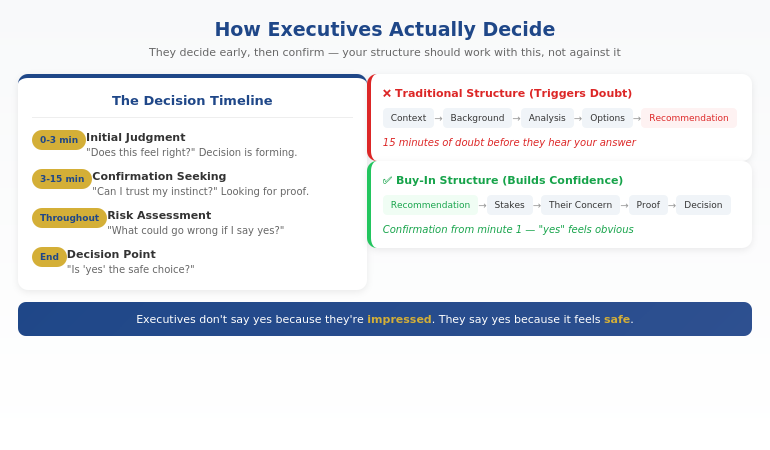
Within the first 2-3 minutes of your presentation, they’ve formed an initial judgment. The rest of the time, they’re looking for reasons to trust that instinct — or doubt it.

This changes everything about how you should structure your message.

If you lead with context and build to your recommendation, you’re giving them 15 minutes of reasons to doubt before they even hear what you’re proposing.

If you lead with your recommendation and immediately address their likely concern, you’re giving them reasons to trust from the start.

The executive’s internal process:

  1. Initial judgment (first 2-3 minutes): “Does this feel right?”
  2. Confirmation seeking (next 10-15 minutes): “Can I trust this instinct?”
  3. Risk assessment (throughout): “What could go wrong if I say yes?”
  4. Decision: “Is ‘yes’ the safe choice?”

Your job isn’t to impress them. It’s to make “yes” feel like the obvious, low-risk choice.

How do you get executive buy-in for a project?

Executive buy-in requires structuring your presentation around how senior people actually decide — not how you naturally want to explain. Lead with your recommendation (not context), address their likely concern before they raise it, provide 1-2 proof points that reduce perceived risk, and make the decision you need crystal clear. Executives say yes when “yes” feels safe, not when they’re impressed by your analysis.

Diagram showing how executives decide: initial judgment in first 3 minutes, then confirmation seeking, with traditional vs buy-in structure compared

⭐ Build the case your stakeholders can’t dismiss

The Executive Buy-In Presentation System is a self-paced framework — 7 modules walking you through the structure, psychology, and delivery that get senior approval. Monthly cohort enrolment, optional recorded Q&A calls. £499, lifetime access to materials.

What’s covered:

  • The slide structure that aligns with how executives actually decide
  • Stakeholder analysis and concern-mapping before the meeting
  • How to choose proof that reassures rather than defends
  • Frameworks for handling pushback without getting defensive

Explore the Buy-In System on Maven →

Self-paced with monthly cohort enrolment.

The 4 Things That Trigger Doubt

Through hundreds of presentations — both giving and receiving — I’ve identified four patterns that accidentally signal uncertainty to executives:

1. Too Much Context

When you spend the first 5-10 minutes on background, you’re signalling that the recommendation needs extensive justification. Executives read this as: “They’re not confident enough to lead with the answer.”

2. Too Much Proof

Counter-intuitive, but piling on data often increases doubt instead of reducing it. It feels defensive. The executive wonders: “If this were obviously right, why would they need 15 supporting charts?”

3. Building to the Recommendation

The classic “options analysis” approach — where you present Option A, Option B, Option C, then reveal your recommendation — gives executives 20 minutes of uncertainty before they know what you actually think. By then, doubt has taken root.

4. Over-Explaining Your Credibility

Spending time establishing why you’re qualified to make this recommendation actually undermines your credibility. Senior professionals let their work speak for itself. Over-explaining signals insecurity.

For more on the structural mistakes that kill executive presentations, see our guide to executive presentation structure.

Why do executives say no to good ideas?

Executives rarely reject ideas because the ideas are bad. They reject them because the presentation triggered doubt — too much context, too much defensive proof, building to the recommendation instead of leading with it. When executives feel uncertain, the safe choice is “not yet” or “let’s discuss further.” Good ideas get approved when they’re presented in a way that makes “yes” feel low-risk.

Work at your own pace. Keep the materials forever. Executive Buy-In Presentation System — 7 modules, £499, self-paced with monthly cohort enrolment.

Explore the Buy-In System →

The Buy-In Structure That Works

Once you understand how executives decide, the structure becomes clear:

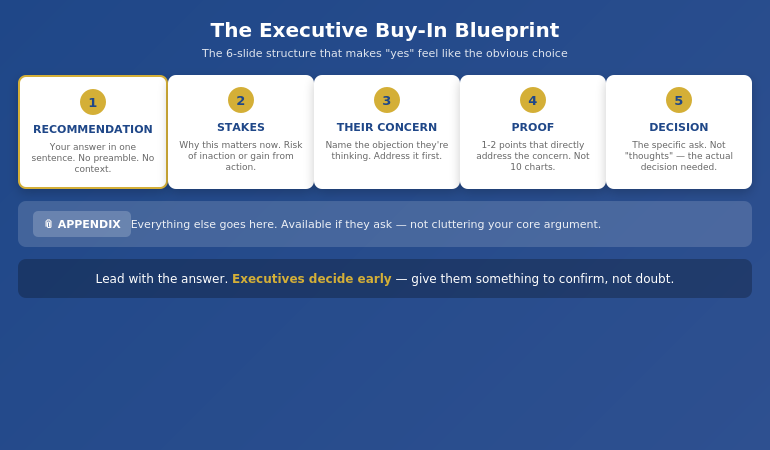
The Executive Buy-In Blueprint:

  1. Recommendation first (Slide 1). State what you’re proposing in one clear sentence. No preamble. No context. The answer.
  2. Stakes (Slide 2). Why this matters now. What’s at risk if we don’t act, or what we gain if we do.
  3. Their likely concern (Slide 3). Name the objection they’re probably already thinking. Address it before they raise it.
  4. 1-2 proof points (Slides 4-5). Not 10 charts. One or two pieces of evidence that directly address the concern you just named.
  5. The decision needed (Slide 6). Be specific. Not “your thoughts” — the actual decision. “I’m asking for approval to proceed with a £200K pilot in Q2.”
  6. Appendix. Everything else goes here. Available if they ask, not cluttering your core argument.

This structure works because it aligns with how executives actually process information. They know your answer immediately, which lets them spend the rest of the time confirming it’s sound — rather than wondering what you’re going to say.

For more on presenting to senior leadership, see our guide on how to present to a board of directors.

The Executive Buy-In Blueprint showing 6-slide structure: Recommendation, Stakes, Their Concern, Proof, Decision, Appendix

How do you present to senior leadership effectively?

Present to senior leadership by leading with your recommendation, not building to it. State your answer on slide 1, address their likely concern on slide 3, provide minimal proof that reduces perceived risk, and make your decision request specific and clear. Senior leaders decide early and spend the rest of the time confirming. Structure your presentation to support that confirmation, not create doubt.

⭐ Stop rewriting your proposal three times only to hear “we’ll think about it”

The Executive Buy-In Presentation System teaches the structure that gets decisions, not delays — 7 self-paced modules with optional recorded Q&A calls. £499, lifetime access.

Explore the Buy-In System on Maven →

Self-paced with monthly cohort enrolment.

Handling Pushback Without Getting Defensive

Even with perfect structure, you’ll face tough questions. Sceptical executives. Unexpected challenges.

How you respond determines whether you win the room or lose it.

Most professionals get defensive under pressure — justifying, over-explaining, or backing down too quickly. All of these destroy credibility.

The Pressure Response Framework:

When you face pushback, there are four types of pressure behind it:

  • Clarity pressure: “I don’t understand” → They need you to simplify, not elaborate
  • Risk pressure: “What if this fails?” → They need reassurance, not more data
  • Control pressure: “Why wasn’t I consulted?” → They need to feel included, not convinced
  • Status pressure: Challenging to look tough → They need acknowledgment, not argument

Recognising which type of pressure you’re facing changes how you respond. Most defensive reactions come from treating all pushback the same way.

And sometimes the right answer is: “I don’t know — I’ll find out and come back to you.” Said with calm confidence, this builds credibility. Said defensively, it destroys it.

Is This System Right For You?

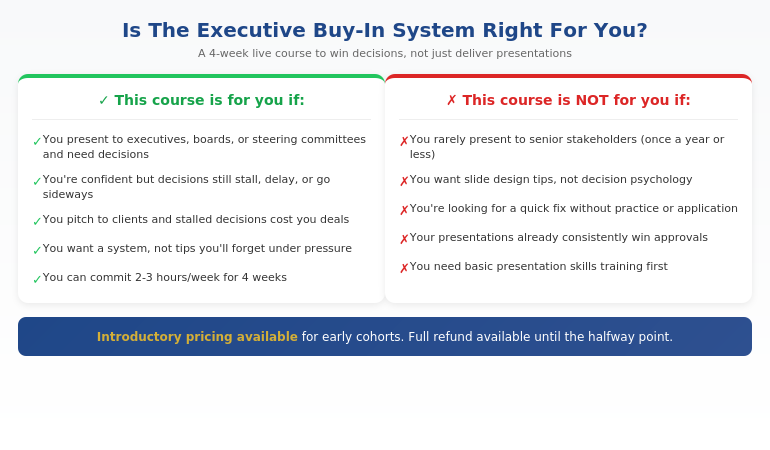
The Executive Buy-In Presentation System is designed for professionals who present when decisions matter:

Qualification chart showing who the Executive Buy-In Presentation System is designed for

If you recognised yourself in the left column, this system will change how your presentations land — and how often you hear “approved” instead of “let’s discuss further.”

⭐ Built on 25 years in corporate banking

The Executive Buy-In Presentation System is the structured framework developed across 25 years in corporate banking and 16 years coaching senior professionals across financial services, insurance, consulting, and technology. £499, lifetime access to materials.

What you get:

  • 7 self-paced modules covering psychology, structure, and delivery
  • Frameworks for stakeholder analysis and concern-mapping
  • Approaches for handling pushback with calm authority
  • Bonus Q&A calls (optional, fully recorded — watch back anytime)
  • Lifetime access to all materials

Explore the Buy-In System on Maven →

Self-paced with monthly cohort enrolment — new cohort opens every month.

Frequently Asked Questions

How is this different from presentation skills training?

This course doesn’t teach you how to present — it teaches you how to win decisions. Presentation skills courses focus on delivery, design, and communication. This course focuses on how executives actually decide, and how to structure your message so “yes” feels like the obvious choice. Presentation skills are the vehicle; winning decisions is the destination.

What if I’m already confident but decisions still stall?

This is exactly who the course is for. Confidence isn’t usually the problem — structure is. Many capable, confident presenters unknowingly trigger doubt through too much context, too much proof, or leading with the wrong information. If you’re confident but decisions still stall, get delayed, or don’t go your way, the issue is almost certainly structural, not personal.

How much time does the course require?

The Executive Buy-In Presentation System is self-paced — you set the pace. The video content totals around 4-5 hours, designed to be watched in focused 30-minute sessions between meetings. Most professionals complete the modules alongside their normal work. The frameworks are designed to save preparation time on every presentation thereafter.

Does this work across different industries?

Yes. The system applies across industries because it’s based on how senior people make decisions — not on specific content. Whether you’re in banking, consulting, tech, healthcare, or government, the psychology of executive decision-making is the same. If you present to people more senior than you, this system is relevant.

Get Weekly Executive Communication Insights

Frameworks and techniques for winning decisions — from 25 years in corporate banking.

Subscribe to The Winning Edge →

Your Next Step

The next time you present for a decision, try one thing differently: put your recommendation on slide 1.

Not after context. Not after options. Slide 1.

Then watch how the energy in the room changes. Executives lean in differently when they know what you’re proposing from the start.

That one shift won’t fix everything. But it will show you how much of the problem was structural all along.

P.S. If you’re making a presentation this week, check out the presentation habit that’s quietly killing careers — it’s related to the structural mistake we covered here.

P.P.S. If anxiety is part of your presentation challenge, I wrote about how to speak confidently in meetings — including the nervous system reset that helps even when stakes are high.

About Mary Beth Hazeldine
Owner & Managing Director of Winning Presentations. 25 years in corporate banking at JPMorgan Chase, PwC, RBS, and Commerzbank. Qualified clinical hypnotherapist. I’ve sat on both sides of the table — the nervous presenter and the senior decision-maker — and I teach what actually works to win the room.