Category: Executive Presentations

07 Jan 2026
Businesswoman in a dark blazer giving a presentation beside a screen displaying code to an audience in a modern office conference room

Your First Presentation to Senior Management: What Nobody Warns You About

Quick Answer: Presenting to senior management requires a complete mindset shift. Lead with your recommendation (not context), plan for half your allotted time, expect interruptions, and treat questions as engagement rather than attacks. The executives evaluating you care less about your analysis and more about your judgment. Your first senior presentation is an audition—and most people fail it by over-preparing the wrong things.

My first time presenting to senior management lasted four minutes.

I’d prepared for three weeks. Forty-two slides. Every objection anticipated. Every data point verified.

The Managing Director stopped me on slide two: “What do you recommend?”

My recommendation was on slide 38. I stammered through an explanation of why the context mattered first. He checked his watch. The other executives followed his lead.

I learned more about presenting to senior management in those four minutes than in my entire MBA.

Nobody had warned me that senior executives don’t want your journey—they want your destination. Nobody explained that my carefully constructed narrative would be seen as wasting their time.

Here’s what I wish someone had told me before that first presentation.

The Executive Slide System

Your first presentation to senior management deserves slides that match executive expectations. The Executive Slide System gives you the exact templates, frameworks, and structures that senior leaders expect—so you can focus on delivery, not formatting.

Includes: Executive summary templates, board-ready formats, and the one-page structures that get read.

Get the Executive Slide System →

The 5 Rules for Presenting to Senior Management Nobody Teaches

Rule 1: Lead With Your Recommendation

Everything you learned about building to a conclusion is wrong for senior audiences. Executives don’t have patience for narrative arcs. They want to know what you think—immediately.

Open with: “I recommend X because of Y. Here’s the supporting analysis.”

Not: “Let me walk you through the market conditions, competitive landscape, and historical context that led us to consider…”

When presenting to senior management, your first sentence should contain your recommendation. Everything else is supporting material they may or may not request.

Rule 2: Plan for Half Your Time

If you’re scheduled for 30 minutes, prepare 15 minutes of content. Senior meetings run over. Executives arrive late. Questions derail timelines. The presenter who plans for the full slot always runs out of time before reaching their point.

The presenter who plans for half the time looks polished when they finish early—and prepared when interruptions eat the rest.

Rule 3: Expect Interruptions (And Welcome Them)

Junior presenters interpret interruptions as rudeness. They’re not. When a senior executive interrupts, they’re telling you what matters to them. That’s valuable intelligence.

When interrupted, stop talking. Listen. Answer the question. Then ask: “Should I continue with the presentation, or would you prefer to discuss this further?”

Handing control to the room demonstrates confidence, not weakness.

Rule 4: Answer Questions Like an Executive

The question: “What’s the timeline?”
The junior answer: “Well, it depends on several factors. If we get approval by March, and assuming resources are allocated according to plan, and barring any unforeseen…”
The senior answer: “Six months from approval. I can break that down if helpful.”

When presenting to senior management, answer what was asked. Provide the minimum information needed. Stop talking. If they want more detail, they’ll ask.

Rule 5: Your Slides Are Not Your Presentation

Senior executives can read faster than you can speak. If you’re reading your slides, you’re wasting their time. If everything important is on the slides, why are you there?

Your slides should support your points, not contain them. Speak to the room. Glance at slides for reference. Never, ever read them aloud.

Presenting to senior management - 5 rules nobody teaches for executive presentations

What Senior Executives Are Actually Evaluating

Here’s what nobody tells you about presenting to senior management: they’re barely evaluating your content. They’re evaluating you.

Specifically, they’re asking themselves:

Does this person have judgment? Not just data, but the ability to synthesize information into clear recommendations.

Does this person respect my time? The ability to communicate efficiently signals respect—and readiness for senior roles.

Does this person stay composed under pressure? How you handle tough questions reveals how you’ll handle tough situations.

Would I trust this person in front of clients or the board? Every internal presentation is an audition for external ones.

Your analysis could be perfect, but if you fail these tests, the opportunity doesn’t come again.

For the complete framework on giving presentations that command any room, see my full guide: How to Give a Presentation: The Complete Step-by-Step Guide.

FAQ: Presenting to Senior Management

How is presenting to senior management different from regular presentations?

Senior managers process information differently. They don’t want your journey—they want your destination. Lead with recommendations, not context. Expect interruptions. Answer questions directly without over-explaining. And respect their time obsessively—if you’re scheduled for 30 minutes, plan for 15.

What’s the biggest mistake when presenting to senior management for the first time?

Building to your recommendation instead of leading with it. First-time presenters spend 10 minutes on background before reaching their point. By then, senior managers have already formed opinions—usually negative ones about your communication skills. State your recommendation in the first 60 seconds.

How do I handle tough questions when presenting to senior management?

Pause before answering. Answer only what was asked. Stop talking. Don’t interpret questions as attacks—they’re engagement. If you don’t know something, say “I’ll follow up by end of day” and move on. Executives respect honesty far more than fumbled guesses.

📧 Join 2,000+ professionals getting weekly insights on executive presentations. Subscribe to The Winning Edge →

📋 Free Download: Executive Presentation Checklist

Prepare for presenting to senior management with the same checklist I give clients before high-stakes meetings. Covers the signals executives notice in the first 60 seconds.

Get Your Free Checklist →


About the Author

Mary Beth Hazeldine spent 24 years at JPMorgan, PwC, RBS, and Commerzbank. She’s a clinical hypnotherapist and MD of Winning Presentations.

This article was created with AI assistance; all stories and insights are based on 35 years of real client work.

07 Jan 2026
Professional woman in a blazer touches a large touchscreen displaying data dashboards in a modern office lighting.

C-Suite Presentation Mistakes: 5 Credibility Killers That Make Executives Stop Listening

Quick Answer: The five c-suite presentation mistakes that destroy credibility are: (1) burying your recommendation under context, (2) using hedge words that signal uncertainty, (3) over-explaining before asked, (4) reading slides instead of commanding them, and (5) treating Q&A as an attack rather than an opportunity. Each mistake signals to executives that you’re not ready for senior-level conversations.

She had 14 slides. The CFO gave her 90 seconds.

I watched Sarah—a senior manager at RBS—prepare for weeks. Her analysis was flawless. Her c-suite presentation mistakes, however, were textbook. She opened with methodology. She built to her recommendation. She hedged every conclusion with “I think” and “maybe.”

The CFO interrupted on slide three: “What do you need from me?”

Sarah froze. Her recommendation was on slide 11. She stumbled through an explanation of why the background mattered first.

He was checking email by the time she reached her point.

The budget request was denied. Not because the idea was wrong—but because Sarah made every c-suite presentation mistake that signals “not ready for this room.”

Here are the five credibility killers I see executives make weekly—and how to avoid them.

🏆 FLAGSHIP PROGRAMME

The Executive Buy-In Presentation System

Stop making the mistakes that get you tuned out. This comprehensive system teaches you exactly how to structure, deliver, and close presentations that win C-suite approval—every time.

What transforms: How you open, how you handle pushback, and how you get decisions made in a single meeting.

Eliminate C-Suite Presentation Mistakes →

The 5 C-Suite Presentation Mistakes That Destroy Credibility

Mistake #1: Burying Your Recommendation

The instinct is natural: build context so the recommendation makes sense. But C-suite executives don’t process information like analysts. They don’t need to understand your journey—they need your destination.

When your recommendation appears on slide 11 of 14, you’re asking executives to hold attention through 10 slides of context they didn’t request. Most won’t.

The fix: State your recommendation in the first 30 seconds. “I’m requesting £2M for platform migration. Here’s why.” Then provide context only as requested.

Mistake #2: Hedge Word Epidemic

“I think we might want to consider possibly looking at…”

Every hedge word cuts your perceived conviction in half. Senior executives notice immediately. If you’re not confident in your recommendation, why should they be?

The fix: Delete “I think,” “maybe,” “might,” “possibly,” “perhaps,” “kind of.” State positions as positions: “I recommend Option B.”

Mistake #3: Over-Explaining Before Asked

Anticipating objections seems smart. But when you address concerns nobody raised, you create doubts that didn’t exist. You’re teaching the room what to worry about.

Worse, it signals anxiety. Confident presenters trust their recommendations to withstand scrutiny.

The fix: Present your case. Stop. Let questions emerge naturally. Address them when asked—not before.

Mistake #4: Reading Your Slides

The moment you turn to read your slides, you’ve lost the room. Executives can read faster than you can speak. If you’re adding nothing beyond what’s written, you’re wasting their time.

More importantly, reading signals that you don’t know your content well enough to present it naturally.

The fix: Slides are visual aids, not scripts. Know your content cold. Glance at slides for reference, but speak to the room, not the screen.

Mistake #5: Treating Q&A as an Attack

Defensive body language. Rushed answers. Over-justification. These signals tell executives you’re not comfortable with scrutiny—and therefore not ready for senior roles.

Questions aren’t attacks. They’re engagement. An executive asking tough questions is an executive taking you seriously.

The fix: Welcome questions. Pause before answering. Respond to exactly what was asked—then stop. Treat Q&A as the opportunity to demonstrate your thinking, not a test to survive.

C-suite presentation mistakes - 5 credibility killers with fixes for each

Why C-Suite Presentation Mistakes Matter More Than Content

Here’s the uncomfortable truth: executives often don’t remember your content. They remember how you made them feel.

If you projected confidence, clarity, and command, your recommendations carry weight—even if the details blur. If you projected uncertainty, over-preparation, and anxiety, even brilliant analysis gets discounted.

C-suite presentation mistakes signal something beyond the immediate meeting. They signal whether you’re ready for larger roles, bigger decisions, and higher stakes. Every presentation is an audition.

For more on building the communication skills that command executive rooms, see my complete guide: Leadership Communication Skills: Why Executives Talk Too Much (And Persuade Too Little).

FAQ: C-Suite Presentation Mistakes

What’s the most common c-suite presentation mistake?

Over-explaining context before reaching your recommendation. Executives form opinions within 30 seconds. If you spend the first five minutes on background, you’ve lost them before your point arrives. Lead with your recommendation, then provide only the context they request.

How do I recover from a c-suite presentation mistake mid-meeting?

Stop, acknowledge, and reset. Say: “Let me cut to what matters most—” then state your core recommendation in one sentence. Executives respect people who can self-correct. Continuing down a failing path is worse than admitting you need to change direction.

Do c-suite presentation mistakes differ by industry?

The five core mistakes are universal across industries. However, tolerance levels vary. Financial services executives typically have the least patience for lengthy context. Tech executives may tolerate more detail but still expect clear recommendations. Adjust brevity based on your audience’s culture.

📧 Join 2,000+ professionals getting weekly insights on executive communication. Subscribe to The Winning Edge →

📋 Free Download: Executive Presentation Checklist

Avoid these c-suite presentation mistakes before your next high-stakes meeting. This checklist covers the credibility signals that executives notice in the first 60 seconds.

Get Your Free Checklist →


About the Author

Mary Beth Hazeldine spent 24 years at JPMorgan, PwC, RBS, and Commerzbank. She’s a clinical hypnotherapist and MD of Winning Presentations.

This article was created with AI assistance; all stories and insights are based on 35 years of real client work.

06 Jan 2026
Side-profile of a professional woman in a dark blazer touching a large touchscreen filled with code and data in a modern office.

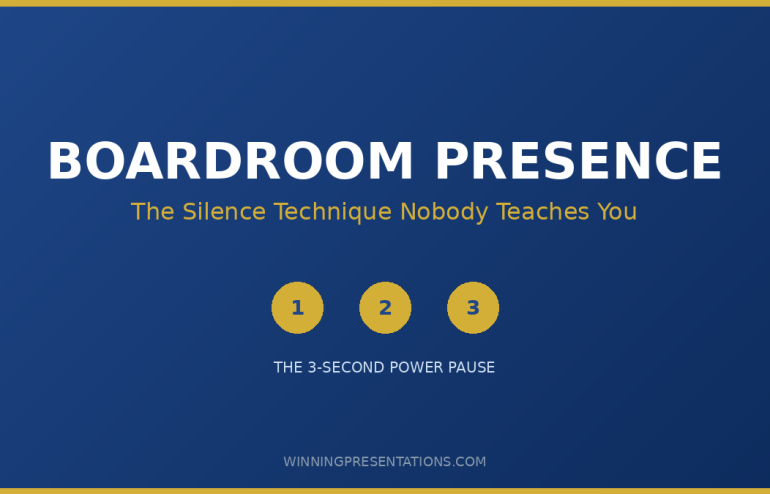
Boardroom Presence: The Silence Technique Nobody Teaches You

Quick Answer: Boardroom presence comes from strategic silence, not more talking. The technique: pause for 3 seconds before your key recommendation, hold eye contact with the decision-maker, then deliver your point. This “power pause” signals confidence and commands attention. Most professionals rush through their most important moments—the silence technique forces the room to lean in.

The VP had 47 metrics on 23 slides. She talked for 12 minutes straight.

Nobody remembered a single number.

I watched this unfold at JPMorgan Chase during a quarterly review. Her analysis was thorough. Her boardroom presence, however, was non-existent. She filled every silence with more words, more data, more justification—as if volume could substitute for authority.

The CFO interrupted: “What’s your recommendation?”

She hesitated. Then launched into another explanation.

He checked his phone. The room followed.

Three months later, I coached a different executive on the same presentation. Same data. Same audience. But this time, she paused for three full seconds before her recommendation. The room went quiet. Everyone leaned in.

She got unanimous approval in under eight minutes.

The difference? Boardroom presence through strategic silence.

The Executive Slide System

Your boardroom presence starts with slides that command attention. The Executive Slide System gives you the exact frameworks, templates, and structures that senior leaders expect—so your delivery can focus on presence, not fumbling with format.

Includes: Board-ready slide templates, executive summary frameworks, and the one-page formats that get read.

Get the Executive Slide System →

Why Boardroom Presence Comes From Silence, Not Speaking

Most professionals believe boardroom presence means commanding the room with words. More data. Stronger arguments. Louder delivery.

They’re wrong.

After 24 years coaching executives at JPMorgan, PwC, RBS, and Commerzbank, I’ve observed a consistent pattern: the leaders with the strongest boardroom presence speak less than everyone else. They use silence as a tool.

Here’s why it works: When you pause before a key point, you create anticipation. The room’s attention shifts from passive listening to active waiting. Your next words carry weight they wouldn’t otherwise have.

Neuroscience backs this up. The brain processes silence as a signal that something important is coming. It’s the verbal equivalent of a spotlight—everything that follows gets heightened attention.

The 3-Second Boardroom Presence Technique

The technique is simple. Executing it under pressure is hard. Here’s the framework:

Step 1: Identify your key moment. Every boardroom presentation has one critical point—the recommendation, the ask, the decision you need. Know exactly when it’s coming.

Step 2: Stop talking. When you reach that moment, close your mouth. Don’t fill the space with “so,” “um,” or “basically.” Just stop.

Step 3: Hold for three seconds. Count in your head: one-Mississippi, two-Mississippi, three-Mississippi. It will feel like an eternity. That discomfort is the point.

Step 4: Make eye contact. During the pause, find the primary decision-maker. Hold their gaze. This isn’t aggressive—it’s confident.

Step 5: Deliver with conviction. After the pause, state your point clearly. No hedging. No qualifiers. “I recommend we proceed with Option B.”

Boardroom presence 3-second silence technique - 5-step framework for commanding executive attention

What Boardroom Presence Mistakes Kill Your Credibility

The silence technique works because it counters the three most common boardroom presence killers:

Mistake 1: Rushing through recommendations. When you’re nervous, you speed up. Your most important point gets buried in a flood of words. The pause forces you to slow down precisely when it matters most.

Mistake 2: Over-explaining before asking. Executives don’t need 15 minutes of context before your recommendation. They need your recommendation, followed by supporting evidence if they ask. The pause separates setup from substance.

Mistake 3: Filling silence with justification. The moment you make a recommendation, the instinct is to keep talking—to defend before you’re attacked. Resist. Let your point land. If they have questions, they’ll ask.

How to Practice Boardroom Presence Before Your Next Meeting

You can’t learn this in the boardroom. You need to practice before the stakes are real.

Rehearsal method: Record yourself delivering your key recommendation. Watch the playback. Notice where you rush, where you fill silence, where you look away. Then do it again with deliberate pauses.

The mirror test: Practice holding your own gaze in a mirror during the 3-second pause. If you can’t maintain eye contact with yourself, you won’t maintain it with a skeptical CFO.

The conversation test: Use the technique in low-stakes conversations first. Pause before answering questions in team meetings. Get comfortable with silence when it doesn’t matter, so you can deploy it when it does.

For more on building executive presence that commands any room, read my complete guide: Executive Presence Presentations: Why Your Content Fails Without It.

FAQ: Boardroom Presence

How long does the boardroom presence silence technique take to master?

Most professionals can execute the basic 3-second pause within 1-2 practice sessions. However, doing it under pressure—when a CFO is staring at you—takes 2-3 weeks of deliberate practice. Start in low-stakes meetings and gradually work up to boardroom settings.

Won’t pausing make me look like I’ve forgotten what to say?

Only if you look panicked. Boardroom presence through silence works because of what you do during the pause: maintain eye contact, keep your posture grounded, and breathe normally. The difference between “forgot my words” and “commanding the room” is entirely in your body language.

Does boardroom presence differ for virtual board meetings?

Yes. In virtual settings, the pause needs to be slightly shorter (2 seconds instead of 3) because screen silence feels longer. More importantly, you must look directly at your camera during the pause—not at participants’ faces on screen. This creates the eye contact that signals boardroom presence virtually.

What if someone interrupts during my strategic pause?

Let them. If a board member speaks during your pause, they’ve just revealed what’s on their mind—valuable information. Address their point briefly, then reset: “To answer your question directly…” followed by another deliberate pause before your recommendation. Boardroom presence means staying composed regardless of interruptions.

Can I use the silence technique multiple times in one presentation?

Use it sparingly—once or twice maximum. If you pause dramatically before every point, it loses impact and starts feeling performative. Reserve your strategic silence for the one moment that matters most: your core recommendation or the decision you need from the room.

📧 Join 2,000+ professionals getting weekly presentation insights. Subscribe to The Winning Edge →

📋 Free Download: Executive Presentation Checklist

Get the same pre-boardroom checklist I give to clients before high-stakes presentations. Covers presence signals, slide structure, and room preparation.

Get Your Free Checklist →


About the Author

Mary Beth Hazeldine spent 24 years at JPMorgan, PwC, RBS, and Commerzbank. She’s a clinical hypnotherapist and MD of Winning Presentations.

03 Jan 2026
A middle-aged man in a dark suit and blue tie giving a presentation, gesturing with open hands in a conference room with blurred attendees in the foreground

Presentation Hook: How to Grab Your Audience in the First 10 Seconds [2026]

Your presentation hook is the difference between an audience that leans in and one that checks out. You have roughly 10 seconds to earn their attention — and most presenters waste it on introductions nobody asked for.I learned this lesson painfully.

Early in my banking career, I opened every presentation the same way: “Good morning, I’m Mary Beth from the credit team, and today I’ll be covering…” By the time I finished that sentence, half the room had mentally left.

It took me years — and hundreds of presentations at JPMorgan Chase, PwC, Royal Bank of Scotland, and Commerzbank — to understand what a real presentation hook looks like. Not a greeting. Not an agenda. A pattern interrupt that makes people want to hear what comes next.

In this guide, I’ll show you exactly how to craft a presentation hook that grabs attention — with 12 formulas you can use immediately.

This article expands on the hook techniques in my complete guide: How to Open a Presentation: The First 30 Seconds That Win Your Audience

⭐ Want Presentation Structures That Hook From Slide One?

The hook is the first decision in a working executive presentation method — get this wrong and the rest of the deck rarely recovers.

If you want ready-made frameworks that capture attention from your first slide and maintain it throughout — the Executive Slide System includes opening, middle, and closing structures for every executive scenario.

Explore the Executive Slide System →

What Is a Presentation Hook (And Why Most Presenters Get It Wrong)

A presentation hook is your opening statement — the first thing you say that captures attention and creates interest in what follows.

Most presenters confuse a hook with an introduction. They’re not the same thing:

Introduction (weak): “Hi everyone, my name is Sarah, I’m from the marketing team, and today I’ll be presenting our Q4 campaign results.”

Presentation hook (strong): “We spent £2 million on marketing last quarter. I’m about to show you which half was wasted — and how we fix it.”

See the difference? The introduction tells people who you are and what you’ll cover. The presentation hook tells people why they should care.

A strong presentation hook does three things:

  • Interrupts the pattern. Your audience expects a standard opening. A hook breaks that expectation and triggers attention.
  • Creates a knowledge gap. It raises a question the audience wants answered: “Which half was wasted?”
  • Signals value. It promises that paying attention will be worth their time.

The Presentation Hook Formula: 3 Elements in 10 Seconds

Every effective presentation hook contains three elements, delivered in roughly 10 seconds:

Element 1: The Pattern Interrupt (2-3 seconds)

Something unexpected that breaks through the noise. A number. A question. A bold claim. A moment of silence.

Element 2: The Relevance Anchor (3-4 seconds)

Connect the interrupt to something your audience cares about. Their problem. Their goal. Their fear. Their opportunity.

Element 3: The Forward Pull (3-4 seconds)

Create momentum toward the rest of your presentation. What will they learn? What question will be answered?

Example presentation hook using the formula:

“£4.2 million.” [Pattern Interrupt] “That’s how much delayed decisions cost this company last year.” [Relevance Anchor] “Today I’m going to show you how to cut that number in half.” [Forward Pull]

Total time: 8 seconds. Total impact: The room is paying attention.

Presentation hook formula - Pattern Interrupt (2-3 sec), Relevance Anchor (3-4 sec), Forward Pull (3-4 sec) with what and how for each element

12 Presentation Hook Formulas That Work

Here are 12 structured presentation hook formulas, each with examples you can adapt.

Presentation Hook #1: The Shocking Number

Lead with a statistic that surprises.

Formula: “[Surprising number]. That’s [what it means]. Today I’ll show you [promise].”

Examples:

  • “78%. That’s how many presentations fail to achieve their objective. Today I’ll show you how to be in the other 22%.”
  • “6 hours. That’s how long the average professional spends creating a single presentation. I’m going to show you how to do it in 90 minutes.”
  • “£150,000. That’s what this problem cost us last month. Here’s how we stop the bleeding.”

Presentation Hook #2: The Provocative Question

Ask something that makes people think.

Formula: “What would happen if [provocative scenario]? [Bridge to topic].”

Examples:

  • “What would happen if we lost our three biggest clients tomorrow? That’s not hypothetical — it’s what we’re risking right now.”
  • “How many hours did you spend in meetings last week that could have been emails? Let’s talk about getting that time back.”
  • “What if I told you everything you know about [topic] is holding you back?”

Presentation Hook #3: The Bold Claim

Make a statement that demands attention.

Formula: “[Bold claim]. [Why it matters]. [What you’ll show them].”

Examples:

  • “Your presentation skills are capping your career. Most people never realise it. Today I’ll show you exactly where the ceiling is — and how to break through it.”
  • “Everything you’ve been told about [topic] is wrong. The data proves it. Give me 15 minutes to change your mind.”
  • “This presentation will save you 200 hours this year. I’ll prove it before you leave this room.”

Presentation Hook #4: The Story Opening

Drop your audience into a scene.

Formula: “[Time/place marker]. [Specific detail]. [Why it matters].”

Examples:

  • “Last Tuesday, 4pm. A client called me in a panic. Board presentation in 3 hours, zero slides ready. What happened next is why we’re here today.”
  • “Three years ago, I sat in a boardroom and watched a £5 million deal die. Not because of the numbers. Because of one slide.”
  • “6:45am, Heathrow Terminal 5. I’m rehearsing a pitch that would change my career. What I didn’t know was that I was about to fail spectacularly.”

Your Hook Lands — Then What?

A strong opening earns you 10 seconds of attention. The Executive Slide System gives you the slide structures to keep it — 22 templates, 51 AI prompts, and 15 scenario playbooks that guide your entire presentation. £39, instant access.

Get the Executive Slide System →

Designed for executives who present in high-stakes settings.

Presentation Hook #5: The Contrast

Show the gap between current state and possible state.

Formula: “[Current reality]. [Better alternative]. [What you’ll cover].”

Examples:

  • “Most teams take 6 weeks to make this decision. The best take 6 days. Today I’ll show you what they do differently.”
  • “Your competitors close deals in 30 days. We take 60. That gap is costing us £3 million annually. Here’s how we close it.”
  • “You can spend your weekend preparing this presentation. Or you can use what I’m about to show you and finish by lunch.”

Presentation Hook #6: The Direct Address

Acknowledge what your audience is thinking.

Formula: “I know you’re [thinking/feeling X]. [Redirect]. [Promise].”

Examples:

  • “I know you’ve sat through a dozen presentations about [topic]. This one is different. Give me 10 minutes to prove it.”
  • “You’re probably wondering why we called another meeting. Fair question. The answer is £2 million — and I’ll explain in the next 5 minutes.”
  • “I can see some sceptical faces. Good. Scepticism means you’re paying attention. Let me earn your attention for the next 15 minutes.”

Presentation Hook #7: The “What If” Scenario

Paint a picture of a better future.

Formula: “What if [desirable outcome]? [Make it concrete]. [Your presentation delivers this].”

Examples:

  • “What if you could walk into any presentation with complete confidence? Not fake it — actually feel it. That’s what we’re building today.”
  • “What if every slide you created got the reaction you wanted? I’m going to show you exactly how to make that happen.”
  • “What if this time next year, you’re presenting to the board instead of presenting to your manager? Let me show you the path.”

Presentation Hook #8: The Callback

Reference shared context.

Formula: “In [previous context], [something happened]. Today I have [the answer/update/result].”

Examples:

  • “Last month, someone asked me a question I couldn’t answer. I’ve spent four weeks finding that answer. Here it is.”
  • “Remember the challenge we identified in Q3? We solved it. Here’s how.”
  • “In Monday’s all-hands, the CEO asked us to think differently about [topic]. This presentation is my answer.”

Presentation Hook #9: The Admission

Vulnerability creates connection.

Formula: “I [failure/struggle/mistake]. [What I learned]. [How it helps them].”

Examples:

  • “I spent five years terrified of presenting. Physically sick before every meeting. What I learned getting past that fear is what I’m sharing today.”
  • “Last year, I gave the worst presentation of my career. I’m going to show you exactly what went wrong — so you never make the same mistake.”
  • “I used to think presentation skills didn’t matter for technical people. I was wrong. Here’s what changed my mind.”

Presentation Hook #10: The Challenge

Directly challenge assumptions.

Formula: “[Common belief] is wrong. [Why]. [What you’ll show instead].”

Examples:

  • “You’ve been told to ‘practice more’ to get better at presenting. That advice is incomplete — and it’s why most people plateau. Let me show you what actually works.”
  • “The standard approach to [topic] is costing us money. I’m going to challenge it — and propose something better.”
  • “Most presentation advice is designed for TED talks, not boardrooms. Today I’ll give you what actually works in corporate environments.”

Presentation Hook #11: The Time Pressure

Create urgency.

Formula: “[Deadline/window]. [What’s at stake]. [What we need to decide].”

Examples:

  • “We have 30 days to make this decision. After that, the opportunity closes. Here’s what you need to know to decide.”
  • “Our competitors are moving now. Every week we wait costs us market share. Today I’ll show you how we catch up.”
  • “The budget cycle closes in two weeks. This presentation is your case for the resources you need. Let me show you how to make it.”

Presentation Hook #12: The Promise

Tell them exactly what they’ll get.

Formula: “By the end of this presentation, you’ll [specific outcome]. [Why it matters].”

Examples:

  • “By the end of this presentation, you’ll have a complete action plan for [goal]. Not theory — specific steps you can start today.”
  • “In 15 minutes, you’ll know exactly how to [skill]. I’ll give you a framework you can use in your next meeting.”
  • “When you leave this room, you’ll have everything you need to make this decision with confidence.”

If you want a structured approach to building presentations that hook from the first slide, the Executive Slide System gives you 22 templates with built-in narrative frameworks.

How to Choose the Right Presentation Hook

Match your presentation hook to your context:

For executive audiences: Use Shocking Number, Contrast, Direct Address, or Promise. Executives want efficiency — get to the point fast.

For sales presentations: Use Provocative Question, What If, or Bold Claim. Create desire for the outcome you’re offering.

For team meetings: Use Story Opening, Callback, or Admission. Build connection before content.

For conference talks: Use Bold Claim, Admission, or Challenge. Stand out from other speakers.

For difficult conversations: Use Direct Address or Admission. Acknowledge the tension, then move forward.

Which presentation hook for which situation - matching guide for executive audiences, sales presentations, team meetings, conference talks, and difficult news

Presentation Hook Mistakes to Avoid

Even good hooks can fail if you make these mistakes:

Mistake 1: The hook doesn’t connect to your content. If you open with a dramatic story but your presentation is about spreadsheet updates, you’ve created whiplash. Your hook must lead naturally into your topic.

Mistake 2: The hook is longer than 15 seconds. A hook should be punchy. If you’re still “hooking” after 15 seconds, you’re just giving a long introduction.

Mistake 3: The hook makes promises you don’t keep. If you say “I’m going to change how you think about X,” you’d better actually change how they think about X. Broken promises destroy trust.

Mistake 4: The hook is all style, no substance. Gimmicks wear thin. Your hook should signal real value, not just be clever for cleverness’s sake.

Presentation Hook: Common Questions

How long should a presentation hook be?

10-15 seconds maximum — roughly 25-40 words. Your hook should capture attention quickly, then let your content do the work.

Should I memorise my presentation hook?

Yes, word-for-word. Your hook is the one part of your presentation you should know cold. This ensures smooth delivery even when you’re nervous.

What if my topic is boring?

No topic is inherently boring — but the way it’s presented can be. Find the human element: What problem does it solve? What’s at stake? Who benefits? Your hook should surface that relevance.

Can I use the same presentation hook for different audiences?

Usually not. Different audiences care about different things. Adapt your hook to what matters most to the specific people in the room.

Your Presentation Hook Toolkit

You now have 12 formulas for crafting a presentation hook that grabs attention. Here’s how to go deeper:

Need the Full Presentation Framework — Not Just the Hook?

The hook opens the door. The Executive Slide System builds the room. 22 executive slide templates with built-in narrative flow — so your opening, middle, and close work as one coherent argument. £39, instant access.

Get the Executive Slide System →

Designed for board meetings, investor pitches, and leadership presentations.


Related Articles:

Frequently Asked Questions

How long should a presentation hook be?

A presentation hook should be 10–15 seconds at most. The most effective hooks are a single sentence — sometimes just a number or question — that creates immediate curiosity before you transition to your main content.

Can you use the same presentation hook for different audiences?

The structure can stay the same, but the content should change. A hook that works for a board meeting won’t work for a team update. Adapt the specifics — the number, the pain point, the surprise — to match what each audience cares about.

What if my presentation hook falls flat?

If the room doesn’t react, don’t pause and wait — move straight into your first point with confidence. Sometimes hooks land quietly; the audience is processing, not disengaged. Keep your energy steady and let the content build.

Should a presentation hook always be dramatic?

No. Quiet hooks work just as well — sometimes better. A calm, specific statement like “There are three decisions in this room today, and two of them are already made” can be more effective than theatrical delivery. Match the tone to your audience and setting.

📧 Get The Winning Edge

Weekly presentation techniques and frameworks from 25 years in corporate boardrooms.

Subscribe Free →


Mary Beth Hazeldine spent 25 years in corporate banking at JPMorgan Chase, PwC, Royal Bank of Scotland, and Commerzbank. She now advises professionals on high-stakes presentations through Winning Presentations.

31 Dec 2025
Professional presentation skills that cap your career

Professional Presentation Skills: The Career Cap You Don’t See Coming (2026 Fix)

Last updated: December 31, 2025 · 7 minute read

Your professional presentation skills might be quietly capping your career — and nobody’s telling you.

You’re good at your job. Your work is solid. You hit your targets. Yet promotions go to others. Opportunities seem to land elsewhere. And nobody tells you the real reason.

After 24 years in corporate banking at JPMorgan, PwC, Royal Bank of Scotland, and Commerzbank, I’ve watched this pattern hundreds of times. The professionals who plateau share something in common — and it’s rarely about their technical skills or work ethic.

It’s how they present.

Not whether they present. Not how often. But whether they present in a way that makes senior leaders trust them with more responsibility — or merely tolerate them in the role they have.

At Winning Presentations, I’ve trained thousands of executives to fix this specific gap. Here’s what most professionals don’t realise about professional presentation skills and career advancement — and how to fix it in 2026.

⚡ Key Takeaways

  • Professional presentation skills are promotion gatekeepers — you can’t lead what you can’t communicate
  • There’s a difference between “solid” and “trusted” — trusted presenters get bigger opportunities
  • Technical excellence doesn’t translate automatically — many experts fail to communicate at the executive level
  • The skill that caps careers: inability to present recommendations with conviction and clarity
  • This is fixable — professional presentation skills are learnable, not innate

📥 FREE DOWNLOAD: Executive Presentation Checklist

The pre-presentation routine used by executives who command respect.

Download Free →

Why Professional Presentation Skills Create an Invisible Career Cap

Here’s what nobody tells you in performance reviews: communication skills — particularly presentation skills — are promotion gatekeepers.

You can be technically excellent and still get passed over. Not because you lack capability, but because senior leaders can’t see you in a bigger role.

Why? Because bigger roles require influencing people you don’t manage, presenting to stakeholders who don’t report to you, and communicating ideas that span beyond your technical domain. If you can’t present effectively, you can’t do those things.

And so you stay where you are. Solid. Reliable. Capped.

I saw this constantly in banking. Brilliant analysts who couldn’t get promoted because they presented like analysts — drowning executives in data instead of driving decisions. Outstanding managers who couldn’t break into senior leadership because they couldn’t command a room of people who outranked them.

The work was excellent. The professional presentation skills weren’t. And the career stalled.

Trusted vs Tolerated: Professional Presentation Skills That Matter

Professional presentation skills comparison - trusted vs tolerated presenters

There’s a distinction that determines career trajectory: some professionals are trusted, others are merely tolerated.

Both deliver work. Both meet deadlines. Both show up for presentations. But watch what happens in the room, and you’ll see completely different dynamics.

Tolerated Presenters

  • Senior leaders check their phones during the presentation
  • Questions feel like challenges — defensive exchanges
  • The meeting runs long because the message isn’t landing
  • Decisions get deferred: “Let’s take this offline”
  • Feedback is polite but generic: “Good work, thanks”

Tolerated presenters are allowed to present. They’re not asked to present more.

Trusted Presenters

  • Senior leaders lean in, engaged from the first minute
  • Questions feel collaborative — building on ideas together
  • The meeting finishes early because the message was clear
  • Decisions happen: “I’m aligned. Let’s proceed.”
  • Feedback opens doors: “I want you to present this to the board”

Trusted presenters get invited to bigger rooms. They get asked to represent the team. They get promoted.

The difference isn’t charisma or natural talent. It’s specific professional presentation skills that can be learned.

The Professional Presentation Skills Gap That Caps Careers

After training thousands of executives, I’ve identified the single skill gap that most frequently caps careers:

The inability to present recommendations with conviction and clarity.

This sounds simple. It isn’t. Here’s what it actually involves:

Conviction Without Arrogance

Many professionals hedge. They say “I think we should consider…” instead of “I recommend…” They pepper their presentations with caveats that undermine their credibility.

This comes from a good place — intellectual honesty, awareness of complexity. But to senior leaders, it signals uncertainty. And uncertain people don’t get trusted with big decisions.

Professional presentation skills require stating your position clearly, defending it when challenged, and acknowledging uncertainty only where it genuinely exists — not as a protective habit.

For more on this pattern, see my article on why technical experts struggle with executive presentations.

Clarity Without Oversimplification

The opposite failure is oversimplifying to the point of uselessness. Executives don’t want dumbed-down content — they want complexity made accessible.

This requires understanding your material deeply enough to explain it simply, anticipating the questions that matter, and structuring information so the key insight lands immediately rather than emerging after 20 slides.

Executive Framing

Most professionals present the way they think: chronologically, comprehensively, building toward a conclusion.

Executives think differently: What’s the decision? What do you recommend? Why? What do you need from me?

Professional presentation skills require flipping your natural structure. Lead with the recommendation. Support it with evidence. End with the ask. This is learnable — but it requires deliberate practice.

For detailed frameworks, see my guide on executive presentations.

💡 Present Like an Executive

The Executive Slide System includes 7 frameworks for structuring presentations the way senior leaders think — recommendation-first, evidence-based, action-oriented.

Stop building toward your point. Start with it.

Get the Executive Slide System — £39 →

How to Fix Your Professional Presentation Skills in 2026

If you recognise yourself in this article — if you suspect your professional presentation skills might be quietly capping your career — here’s how to fix it.

Step 1: Get Honest Feedback

The reason this gap stays invisible is that people don’t tell you. “Good presentation” is the polite default, regardless of impact.

Ask someone you trust — preferably someone senior — for specific, honest feedback. Not “how did I do?” but “what would make you more likely to approve this?” or “where did you lose interest?”

The answer might be uncomfortable. That’s the point.

Step 2: Study How Executives Present

Watch presenters who consistently get results. Not TED speakers — internal executives who consistently get buy-in.

Notice their structure. How quickly do they get to the point? How do they handle questions? What do they include — and what do they leave out?

Professional presentation skills are observable. Study the patterns that work.

For advanced techniques, see my guide on advanced presentation skills.

Step 3: Restructure How You Present

Most career-capping presentation habits come from structure, not delivery. You’re building toward conclusions when you should be leading with them. You’re being comprehensive when you should be selective.

The executive structure:

  1. Here’s my recommendation
  2. Here’s why (3 supporting points maximum)
  3. Here’s what I need from you
  4. Here’s what happens next

Everything else goes in backup slides or appendices. Ruthlessly cut anything that doesn’t serve the decision.

Step 4: Practice Under Realistic Conditions

Practicing alone, in comfortable settings, doesn’t prepare you for real stakes. You need to practice with challenge: time pressure, interruptions, sceptical questions.

Find colleagues who will push back. Present in conditions that make you uncomfortable. The skills that matter only develop under pressure.

Step 5: Get Structured Development

Some professional presentation skills can be self-taught. Many can’t — at least not efficiently. Structured programmes, coaching, and feedback accelerate development dramatically.

If presentation skills are genuinely capping your career, investing in systematic development isn’t an expense. It’s a career investment with compound returns.

🎓 Ready to Remove the Cap?

If 2026 is the year you want to break through the invisible ceiling, structured development accelerates results — executive frameworks, psychology-based confidence techniques, and expert feedback that creates lasting change.

The complete system for professional presentation skills that get you promoted. Let’s discuss what that looks like for you →

Professional Presentation Skills: The Career Decision

Here’s the honest reality: professional presentation skills separate careers that advance from careers that plateau.

You can be excellent at your job and still get capped. Technical skills get you in the door. Presentation skills determine how far you go once you’re inside.

The good news: this is fixable. Professional presentation skills are learnable, not innate. The executives who command rooms weren’t born that way — they developed specific skills through deliberate practice and often structured training.

If you’re setting presentation skills goals for 2026, make this the year you address the invisible cap. The investment in your professional presentation skills compounds for the rest of your career.

The question isn’t whether presentation skills matter. They obviously do.

The question is whether you’ll continue being tolerated — or start being trusted.

Your Next Step

📖 FREE: Executive Presentation Checklist
The pre-presentation routine used by executives who command respect.
Download Free →

💡 QUICK WIN: Executive Slide System — £39
7 frameworks for structuring presentations the way senior leaders think.
Get Instant Access →

🎓 COMPLETE SYSTEM: Structured Development
Executive frameworks, psychology, and expert coaching.
Let’s discuss what that looks like for you →

FAQs: Professional Presentation Skills and Career Growth

How do professional presentation skills affect career advancement?

Professional presentation skills are promotion gatekeepers. Senior roles require influencing people you don’t manage, presenting to stakeholders who don’t report to you, and communicating ideas beyond your technical domain. If you can’t present effectively, you can’t do those things — and you stay capped in your current role regardless of technical excellence.

What’s the difference between being “trusted” and “tolerated” as a presenter?

Tolerated presenters are allowed to present; trusted presenters are invited to present more. The difference shows in how senior leaders engage: do they lean in or check phones? Do questions feel collaborative or challenging? Do decisions happen in the room or get deferred? Trusted presenters get promoted. Tolerated presenters plateau.

What’s the specific skill gap that caps most careers?

The inability to present recommendations with conviction and clarity. This includes stating positions without excessive hedging, making complexity accessible without oversimplifying, and structuring presentations the way executives think (recommendation-first) rather than the way you naturally think (building toward conclusions).

Can professional presentation skills actually be learned, or are some people just natural presenters?

Professional presentation skills are absolutely learnable. The executives who command rooms weren’t born that way — they developed specific skills through deliberate practice and often structured training. Structure, conviction, and executive framing are all trainable. Waiting for natural talent to emerge is how careers stay capped.

How long does it take to improve professional presentation skills significantly?

With focused effort and structured feedback, most professionals see meaningful improvement within 90 days. The key is deliberate practice on specific weaknesses, not just more presentations. Restructuring how you present (leading with recommendations, cutting comprehensiveness) can show results immediately. Building conviction and handling pressure takes longer but is equally learnable.


Mary Beth Hazeldine is the Owner & Managing Director of Winning Presentations. She spent 24 years in corporate banking at JPMorgan Chase, PwC, Royal Bank of Scotland, and Commerzbank, watching professional presentation skills make and break careers at every level. She now trains executives to present with the conviction and clarity that earns trust — not just tolerance. Her clients have raised over £250 million using her frameworks.

Get Weekly Presentation Insights

Join 2,000+ professionals getting practical presentation tips every Tuesday.

Subscribe to The Winning Edge →

30 Dec 2025
Presentation skills for new leaders - what changes when you get promoted

What Changes When You Get Promoted: Presentation Skills for New Leaders

Last updated: December 30, 2025 · 6 minute read

The presentation skills that got you promoted won’t work in your new role.

This catches most new leaders off guard. You’ve been presenting successfully for years. You got promoted partly because of those presentations. Why would you need to change anything?

Because everything about your context has changed — and presentation skills for new leaders require different approaches than presentation skills for individual contributors. At Winning Presentations, I’ve coached hundreds of professionals through this exact transition. Here’s what nobody tells you about presenting after promotion.

⚡ Key Takeaways

  • You’re no longer proving competence — you’re setting direction and building confidence in your team
  • Your former peers are watching — how you present establishes whether they’ll follow you
  • Less detail, more vision — leaders paint the destination, not the step-by-step journey
  • You now present other people’s work — a completely different skill than presenting your own
  • Silence and listening matter more — your words carry more weight, so use fewer of them

📥 FREE DOWNLOAD: 7 Presentation Frameworks

Leadership presentation structures for team updates, strategy sessions, and executive briefings.

Download Free →

What Actually Changes When You Get Promoted

Before your promotion, presentations were about demonstrating your expertise. You showed your analysis. You proved you’d done the work. You earned credibility through detail.

After promotion, everything inverts.

Harvard Business Review research on new leader credibility shows that newly promoted leaders face a unique challenge: they must establish authority while maintaining relationships with former peers who may feel passed over or resentful.

Presentation skills for new leaders must navigate this tension. Present too confidently, and you seem arrogant. Present too tentatively, and you seem unsure of your new role. The balance is learnable — but it doesn’t come naturally to most people.

At JPMorgan, I watched a brilliant analyst get promoted to VP and immediately lose his team. Same person, same intelligence, same content. But he kept presenting like an analyst when he needed to present like a leader. Within six months, two of his best people had transferred out.

The presentation skills that made him promotable became the obstacle to his success in the new role.

5 Presentation Skills for New Leaders: The Essential Shifts

5 presentation shifts for new leaders after promotion

Shift 1: From Proving to Directing

As an individual contributor, you proved your value through comprehensive analysis. As a leader, you direct attention toward decisions and outcomes.

Before promotion: “Here’s my analysis of the three options, with full methodology…”

After promotion: “We’re going with Option B. Here’s why it’s right for us, and here’s what I need from each of you.”

Presentation skills for new leaders require stating positions clearly and asking for action — not building elaborate cases to prove you’ve thought it through. Your team needs direction, not persuasion.

Shift 2: From Your Work to Their Work

One of the hardest transitions: you’ll increasingly present work you didn’t do yourself.

This requires a completely different skill. You need to understand material well enough to field questions, defend recommendations, and provide context — without having done the underlying analysis.

The key: meet with your team before presentations. Ask “what questions should I expect?” and “what’s the weakest part of this analysis?” Then own the material as if it were yours, while crediting your team publicly.

For frameworks on presenting at this level, see my guide on executive presentations.

Shift 3: From Detail to Vision

Leaders paint destinations. Individual contributors map the route.

Before promotion: Detailed slides explaining methodology, data sources, and analytical approach

After promotion: Clear picture of where we’re going, why it matters, and what success looks like

Presentation skills for new leaders emphasise the “why” over the “how.” Your team will figure out the how — they need you to make the why compelling and clear.

💡 Need Leadership Presentation Frameworks?

The Executive Slide System includes 7 frameworks specifically designed for leaders — team updates, strategic direction, board briefings, and change communication.

Stop presenting like an analyst. Start presenting like a leader.

Get the Executive Slide System — £39 →

Shift 4: From Speaking to Listening

Counterintuitive but critical: as a leader, your presentations should include more listening, not more talking.

Your words now carry more weight. A casual comment from you can send your team in the wrong direction for weeks. Presentation skills for new leaders include knowing when to stop talking and start asking.

Practical techniques:

  • End sections with genuine questions, not rhetorical ones
  • Build in structured discussion time — “I want to hear your concerns before we proceed”
  • Pause after making key points to let people respond
  • Ask your quietest team members directly for their perspective

For more on presence and delivery, see my guide on how to speak confidently in public.

Shift 5: From Peer to Authority (Without Becoming a Stranger)

Yesterday they were your peers. Today you’re their boss. How you present in your first few months establishes the relationship forever.

What works:

  • Acknowledge the transition directly: “I know this is an adjustment for all of us”
  • Credit their expertise publicly: “Sarah knows this area better than I do”
  • Ask for input before announcing decisions when possible
  • Be confident in your role without being dismissive of your history together

What doesn’t work:

  • Pretending nothing has changed
  • Over-asserting authority to establish dominance
  • Apologising for being promoted
  • Trying to remain “one of the gang”

For more advanced techniques, see my guide on advanced presentation skills.

The Mistakes New Leaders Make with Presentation Skills

I’ve watched these patterns play out hundreds of times across my career in banking and consulting:

Mistake 1: Over-proving. New leaders often feel imposter syndrome and compensate by overwhelming people with detail. This backfires — it signals insecurity, not competence.

Mistake 2: Under-deciding. Afraid to seem authoritarian, new leaders present options without clear recommendations. Teams find this frustrating and destabilising.

Mistake 3: Ignoring the elephant. Everyone knows you just got promoted. Pretending it didn’t happen creates awkwardness. Address it briefly and move forward.

Mistake 4: Changing everything immediately. New leaders sometimes use presentations to announce sweeping changes — proving they’re “doing something.” This alienates teams and creates unnecessary resistance.

For board-level presentation structure, see my guide on board presentation structure.

🎓 Preparing for Your Next Level?

AI-Enhanced Presentation Mastery is designed for professionals stepping into leadership roles. You’ll develop the executive presence and presentation skills that make promotion successful — not just achieved.

8 modules. 2 live coaching sessions. Direct feedback on your actual presentations.

Learn More — £249 →

Your First 90 Days: Presentation Skills for New Leaders

The presentations you give in your first 90 days as a new leader set the tone for years. Here’s what to prioritise:

Week 1-2: Listen more than you speak. Your first presentations should be short and include genuine requests for input.

Week 3-4: Share your early observations and emerging priorities. Frame them as “what I’m seeing” not “what we’re doing.”

Month 2: Present a clear vision with specific asks. By now you should have enough context to provide direction.

Month 3: Establish your rhythm. Regular team updates, consistent format, predictable cadence. Teams thrive on knowing what to expect from their leader.

Presentation skills for new leaders develop through deliberate practice in these early months. Get feedback. Adjust. The patterns you establish now become your leadership style.

Resources for New Leaders

📖 FREE: 7 Presentation Frameworks
Leadership structures for team updates, strategy, and executive briefings.
Download Free →

💡 QUICK WIN: Executive Slide System — £39
7 frameworks + templates designed for leaders presenting to teams and boards.
Get Instant Access →

🎓 COMPLETE SYSTEM: AI-Enhanced Presentation Mastery — £249
8-module course with live coaching. Develop leadership presence that sticks.
Learn More →

FAQs: Presentation Skills for New Leaders

What presentation skills do new leaders need most?

New leaders need to shift from proving competence to directing action. This means stating positions clearly, presenting other people’s work effectively, emphasising vision over detail, building in listening time, and navigating the transition from peer to authority. The skills that got you promoted won’t automatically work in your new role.

How do I present to my former peers after getting promoted?

Acknowledge the transition directly but briefly. Credit their expertise publicly. Ask for input before announcing decisions when possible. Be confident in your role without being dismissive of your shared history. Don’t pretend nothing has changed, but don’t over-assert authority either.

Should I change my presentation style after a promotion?

Yes — but strategically. Shift from detailed analysis to clear direction. Speak less and listen more. Focus on the “why” rather than the “how.” Your team needs vision and decision-making, not comprehensive proof of your competence. The transition should feel natural, not abrupt.

How do I establish authority in presentations without seeming arrogant?

State positions clearly while remaining open to input. Credit your team publicly. Ask genuine questions and incorporate feedback visibly. Confidence comes from clarity and decisiveness, not from dominance or dismissiveness. The best new leaders present with conviction while demonstrating respect.

What’s the biggest presentation mistake new leaders make?

Over-proving. New leaders often feel imposter syndrome and compensate by overwhelming their audience with detail to demonstrate they’ve earned the promotion. This backfires — it signals insecurity rather than competence. Confident simplification and clear direction establish authority far more effectively.


Mary Beth Hazeldine is the Owner & Managing Director of Winning Presentations. She spent 24 years in corporate banking at JPMorgan Chase, PwC, Royal Bank of Scotland, and Commerzbank — coaching hundreds of professionals through leadership transitions. She now helps new leaders develop the presentation skills that make promotion successful, not just achieved.

Get Weekly Presentation Insights

Join 2,000+ professionals getting practical presentation tips every Tuesday.

Subscribe to The Winning Edge →

30 Dec 2025
Expert

Why Technical Experts Struggle with Executive Presentations (And How to Fix It)

Last updated: December 30, 2025 · 6 minute read

You spent three weeks on the analysis. You know this material better than anyone. And yet, five minutes into your board presentation, you can see their eyes glazing over.

This is the paradox I watched play out hundreds of times during my 24 years in corporate banking: the people who knew the most often presented the worst.

Technical experts struggle with executive presentations not because they lack intelligence or preparation — but because their expertise works against them. At Winning Presentations, I’ve helped hundreds of analysts, engineers, and specialists break through this barrier. Here’s what’s actually going on — and how to fix it.

⚡ Key Takeaways

  • The curse of knowledge — you can’t un-know what you know, so you assume too much
  • Expertise creates over-explanation — you share the journey when executives only want the destination
  • Technical credibility ≠ executive credibility — different audiences need different proof
  • The fix is mindset, not technique — you must learn to think like a decision-maker, not an analyst

📥 FREE DOWNLOAD: Executive Presentation Checklist

The pre-presentation checklist I give to technical experts before boardroom presentations.

Download Free →

The Curse of Knowledge: Why Technical Experts Struggle with Executive Presentations

Harvard Business Review calls it “the curse of knowledge” — once you know something, you can’t imagine not knowing it. And this is exactly why technical experts struggle with executive presentations.

When you’ve spent weeks deep in analysis, every detail feels essential. Every caveat feels necessary. Every methodology step feels important to explain.

But executives haven’t been on that journey with you. They’re coming in cold, with seven other agenda items competing for their attention. They don’t need to understand your process — they need to understand your conclusion.

At Royal Bank of Scotland, I watched a brilliant credit analyst lose the room in under three minutes. His analysis was impeccable. His recommendation was sound. But he started with methodology, built through data, and buried his conclusion on slide 22. The MD interrupted: “What do you actually want us to do?”

He knew the material too well. And that knowledge became his biggest obstacle.

The 4 Traps That Cause Technical Experts to Struggle with Executive Presentations

4 traps that cause technical experts to struggle with executive presentations

Trap 1: Showing Your Working

In school, you got marks for showing your working. In boardrooms, you lose the room.

Technical experts instinctively present chronologically: “First we gathered data, then we analysed it, then we found these patterns, and therefore we recommend…”

Executives want the reverse: “We recommend X. Here’s why. Any questions on methodology are in the appendix.”

For more on this structure, see my guide on board presentation structure.

Trap 2: Mistaking Thoroughness for Credibility

Technical experts often believe that comprehensiveness proves competence. “If I show them everything I considered, they’ll trust my conclusion.”

The opposite is true. Executives see thoroughness as inability to prioritise. They think: “If this person can’t distinguish what matters from what doesn’t, can I trust their judgment?”

Real credibility at the executive level comes from confident simplification — showing you understand what matters most.

Trap 3: Defending Against Imaginary Objections

Because you know every weakness in your analysis, you preemptively address them all. “Now, you might be wondering about sample size…” “Some might argue that…”

This makes you look uncertain. Executives read it as lack of conviction. They’re thinking: “If you’re not sure, why should I be?”

Address limitations when asked. Don’t volunteer every caveat upfront.

💡 Struggling to Structure Executive Presentations?

The Executive Slide System gives technical experts 7 board-ready frameworks — including the “recommendation first” structure that executives expect.

Stop presenting like an analyst. Start presenting like a decision-maker.

Get the Executive Slide System — £39 →

Trap 4: Answering Questions Like a Witness

When executives ask questions, technical experts often give complete, technically accurate answers. Every fact. Every nuance. Every consideration.

This exhausts executives and makes simple questions feel complicated.

Senior leaders answer differently. They give the headline, then stop. If more detail is needed, the questioner will ask. This is how technical experts struggle with executive presentations even in Q&A — they over-answer.

For more on handling executive questions, see my guide on how to present to a CFO.

4 Mindset Shifts That Fix Why Technical Experts Struggle with Executive Presentations

These aren’t techniques — they’re ways of thinking that change everything.

Shift 1: You’re Not Teaching — You’re Enabling a Decision

Technical experts default to “education mode.” They want the audience to understand their analysis.

Executives don’t need to understand your analysis. They need to make a decision. Your job isn’t to transfer knowledge — it’s to make their decision easy.

Before every presentation, ask yourself: “What decision am I helping them make?” Then cut everything that doesn’t serve that decision.

Shift 2: Your Credibility Comes From Confidence, Not Comprehensiveness

Stop trying to prove you’re smart by showing all your work. Prove it by being clear, decisive, and unflappable.

The executive thought process: “This person has clearly thought it through. They’re giving me what I need. They’re not wasting my time. I trust their judgment.”

That trust comes from confident simplification — not from comprehensive coverage.

Shift 3: Silence Is Better Than Caveats

When you feel the urge to add “however” or “although” or “it should be noted that” — stop. Most caveats can wait until Q&A.

Your recommendation should land cleanly. Qualifications muddy the water. Save nuance for when someone specifically asks for it.

Shift 4: Think About What They Do Next, Not What They Learn

Technical experts think: “What do I need to explain?”

Executive presenters think: “What do I need them to do after this meeting?”

If you want budget approval, everything serves that. If you want a decision on a vendor, everything serves that. Ruthlessly cut anything that doesn’t move them toward the action you need.

For more on advanced techniques senior leaders use, see my complete guide on advanced presentation skills.

🎓 Ready to Present Like a Senior Leader?

AI-Enhanced Presentation Mastery is designed for technical experts who need to present at the executive level. Module 3 specifically addresses “The Expert’s Curse” with exercises to restructure how you think about presentations.

8 modules. 2 live coaching sessions. Feedback on your actual presentations.

Learn More — £249 →

What Changes When Technical Experts Fix This

One finance director I worked with had been passed over for promotion twice. His analysis was always the best in the room. But his presentations were lectures.

We didn’t change his content. We changed his mindset. Recommendation first. Ruthless cuts. Confident delivery without defensive caveats.

Six months later, he was presenting directly to the board. Same intelligence. Same expertise. Different approach.

The reason technical experts struggle with executive presentations isn’t a skills gap — it’s a thinking gap. Close the thinking gap, and everything else follows.

Resources for Technical Experts

📖 FREE: Executive Presentation Checklist
Pre-presentation checklist for technical experts presenting to senior leaders.
Download Free →

💡 QUICK WIN: Executive Slide System — £39
7 board-ready frameworks + templates. Stop presenting like an analyst.
Get Instant Access →

🎓 COMPLETE SYSTEM: AI-Enhanced Presentation Mastery — £249
8-module course with live coaching. Break through the expert’s curse for good.
Learn More →

FAQs: Why Technical Experts Struggle with Executive Presentations

Why do technical experts struggle with executive presentations?

Technical experts struggle with executive presentations because their expertise works against them. The “curse of knowledge” means they can’t imagine not knowing what they know, so they over-explain, show too much working, and bury conclusions in methodology. Executives want recommendations first — not the journey that led there.

How can technical experts improve their executive presentation skills?

The key is mindset, not technique. Shift from “teaching mode” to “decision-enabling mode.” Lead with your recommendation. Cut ruthlessly. Treat comprehensiveness as a weakness, not a strength. Save caveats for Q&A. Think about what you want them to do, not what you want them to learn.

What’s the biggest mistake technical experts make in boardroom presentations?

Showing their working. Technical experts present chronologically — data, analysis, findings, conclusion — when executives want the reverse. Start with your recommendation, provide key supporting evidence, and put methodology in the appendix. Don’t build to your conclusion; start with it.

How do I stop over-explaining in executive presentations?

Before each slide or section, ask: “Does this help them make the decision I’m asking for?” If not, cut it or move it to the appendix. Practice giving answers in one sentence. If they need more detail, they’ll ask. The urge to explain everything is the expert’s curse — resist it deliberately.

Can technical experts really learn to present like executives?

Absolutely. The skills are learnable — but they require unlearning habits that made you successful as an analyst. The technical experts who break through often become the most effective executive presenters because they combine deep knowledge with disciplined communication. It takes deliberate practice and often external feedback to shift ingrained patterns.


Mary Beth Hazeldine is the Owner & Managing Director of Winning Presentations. A qualified clinical hypnotherapist, she spent 24 years in corporate banking at JPMorgan Chase, PwC, Royal Bank of Scotland, and Commerzbank — watching brilliant technical experts struggle with executive presentations. She now helps them break through the expert’s curse and present with the confidence of senior leaders.

Get Weekly Presentation Insights

Join 2,000+ professionals getting practical presentation tips every Tuesday.

Subscribe to The Winning Edge →

29 Dec 2025
Board presentation structure - how to brief executives in 15 minutes or less

Board Presentation Structure: How to Brief Executives in 15 Minutes or Less

Last updated: December 29, 2025 · 9 minute read

The first time I presented to a board of directors, I made every mistake possible.

I prepared 45 slides. I started with background context. I buried my recommendation on slide 38. And when the CFO interrupted five minutes in to ask “What are you actually recommending?”, I fumbled through my deck trying to find the answer.

That was at Royal Bank of Scotland, early in my career. I learned more about board presentation structure in that painful 20 minutes than in years of regular presenting.

Here’s what I know now after 24 years of presenting to boards at JPMorgan Chase, PwC, Royal Bank of Scotland, and Commerzbank: boards don’t want information. They want decisions.

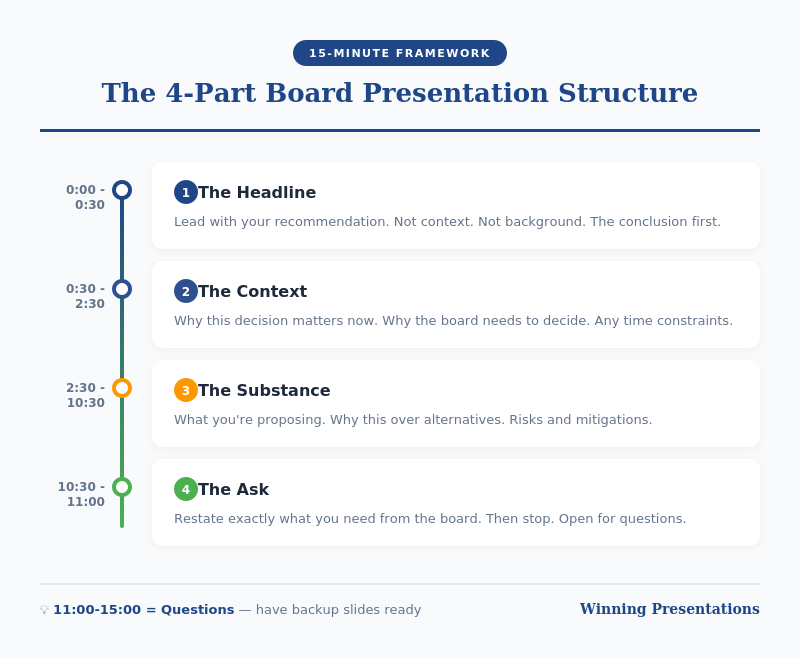
Your board presentation structure needs to deliver a clear recommendation, supported by evidence, with explicit asks — in 15 minutes or less. Everything else is noise.

At Winning Presentations, I’ve trained hundreds of executives on this exact framework. Here’s how it works.

⚡ Key Takeaways

  • Lead with your recommendation — boards want the answer first, then the evidence
  • Use the 4-part structure: Recommendation → Context → Evidence → Ask
  • 15 minutes maximum — plan for 10, leave 5 for questions
  • One slide per section maximum — 4-6 slides total, not 40
  • End with a clear, specific ask — what decision do you need from them?

📥 FREE DOWNLOAD: Executive Presentation Checklist

The pre-presentation checklist I use before every board meeting. Covers structure, timing, and common pitfalls.

Download Free →

Why Board Presentation Structure Is Different

Regular presentations can meander. You can build to a conclusion. You can use suspense.

Board presentations cannot.

Harvard Business Review research shows that board members have limited attention spans for individual agenda items — often as little as 10-15 minutes. They’re processing multiple complex topics in a single meeting. They need to make decisions, not absorb information.

This means your board presentation structure must be:

  • Conclusion-first: Lead with your recommendation, not your analysis
  • Decision-oriented: Everything supports a specific ask
  • Ruthlessly concise: If it doesn’t support the decision, cut it
  • Interrupt-proof: You should be able to state your recommendation in 30 seconds if asked

The structure I’m about to share has been tested in hundreds of board presentations. It works because it’s designed for how boards actually process information.

The 4-Part Board Presentation Structure

Board presentation structure framework - the 4-part structure for executive briefings

Part 1: Recommendation (2 minutes)

Start with your conclusion. Not background. Not context. Your recommendation.

“I’m recommending we approve a £2.4M investment in the CRM upgrade, to be implemented over Q2-Q3, with expected ROI of 340% over three years.”

This should take 30 seconds to say and one slide to show.

Why lead with this? Because boards are thinking “What do you want from us?” from the moment you start. If you make them wait, they’re mentally searching for your point instead of listening to your argument.

By stating your recommendation first, you frame everything that follows. The board knows what to listen for.

For techniques on delivering this opening with confidence, see my guide on how to speak confidently in public.

Part 2: Context (3 minutes)

Now — and only now — provide the minimum context needed to understand your recommendation.

The key question: What does the board need to know to evaluate my recommendation? Nothing more.

This typically includes:

  • The problem or opportunity you’re addressing
  • Why this is board-level (scale, risk, strategic importance)
  • Timeline constraints, if any

One slide maximum. Often this can be combined with your recommendation slide if you’re ruthless about brevity.

What NOT to include: history of how you got here, alternative approaches you considered, technical details, organisational politics. These belong in the appendix if anywhere.

💡 Want Ready-Made Executive Templates?

The Executive Slide System includes board presentation templates built on this exact structure — plus 6 other frameworks for different executive contexts.

  • Board recommendation template
  • Executive summary one-pager
  • Investment case structure
  • Video walkthroughs of each framework

Get the Executive Slide System — £39 →

Part 3: Evidence (5 minutes)

Now support your recommendation with evidence. This is the “why you should agree” section.

Structure your evidence around the board’s likely concerns:

  • Financial: What’s the cost, return, and payback period?
  • Risk: What could go wrong, and how will you mitigate it?
  • Execution: Who’s accountable, and what’s the timeline?
  • Strategic fit: How does this align with company priorities?

Two to three slides maximum. Use data, not opinions. Be specific: “23% cost reduction” not “significant savings.”

Anticipate questions and address them proactively. If the CFO always asks about cash flow impact, include it before she asks.

Part 4: The Ask (2 minutes)

End with a crystal-clear ask. What specific decision do you need from the board today?

Good asks:

  • “I’m requesting approval to proceed with the £2.4M investment.”
  • “I’m seeking authorisation to negotiate final terms with the vendor.”
  • “I need the board’s input on whether to prioritise Option A or Option B.”

Bad asks:

  • “Thoughts?” (Too vague)
  • “I wanted to update you on our progress.” (Not a decision)
  • “Let me know if you have questions.” (Passive, not action-oriented)

If you don’t have a clear ask, question whether this needs to be a board presentation at all. Informational updates can usually be handled in pre-read documents.

For techniques on delivering powerful closings, see my guide on how to start a presentation — which also covers endings.

Board Presentation Structure: Timing Guide

Board presentation timing guide - how to allocate 15 minutes across four sections

If you have 15 minutes on the agenda, plan for 10 minutes of presenting and 5 minutes of questions.

Section Time Slides
Recommendation 2 min 1
Context 3 min 1
Evidence 5 min 2-3
Ask 1-2 min 1
Questions 5 min Appendix

Notice this gives you 4-6 slides maximum for your main presentation. Everything else goes in the appendix — ready if asked, but not in your core flow.

Board Presentation Structure: Slide Template

Here’s a template you can adapt for any board presentation:

Slide 1: Recommendation + Context

  • Headline: Your recommendation in one sentence
  • 3-4 bullets: Key context points
  • Visual: Timeline or high-level financial summary

Slide 2: Financial Case

  • Investment required
  • Expected return (ROI, NPV, payback)
  • Comparison to alternatives if relevant

Slide 3: Risk and Mitigation

  • Top 3 risks
  • Mitigation plan for each
  • Contingency if needed

Slide 4: Execution Plan

  • Timeline (phases, milestones)
  • Accountability (who owns this)
  • Dependencies

Slide 5: The Ask

  • Specific decision requested
  • What happens next if approved
  • When you’ll report back

Appendix: Technical details, alternative analysis, historical context, org charts — anything that supports questions but doesn’t need to be in the main presentation.

🎓 Master Executive Presentations

AI-Enhanced Presentation Mastery includes a complete module on executive and board presentations — plus live coaching sessions where I review your actual presentations and give direct feedback.

8 modules. 2 live sessions. Learn the techniques that got me through hundreds of board presentations.

Learn More — £249 →

Common Board Presentation Structure Mistakes

After reviewing hundreds of board presentations, these are the mistakes I see most often:

Mistake 1: Burying the Recommendation

Starting with history, context, or analysis before stating what you want. By slide 10, the board has mentally checked out.

Mistake 2: Too Many Slides

40 slides for a 15-minute slot is not thorough — it’s unfocused. Ruthlessly cut anything that doesn’t directly support your recommendation.

Mistake 3: No Clear Ask

Ending with “Any questions?” instead of a specific decision request. Boards need to know what you’re asking them to do.

Mistake 4: Reading the Slides

Your slides are for reference, not scripts. Speak to the board, not the screen. They can read faster than you can talk.

Mistake 5: Not Preparing for Interruptions

Boards interrupt. It’s how they process. If you can’t state your recommendation in 30 seconds when interrupted, you’re not prepared.

Your Next Step

Before your next board presentation, restructure using the 4-part framework: Recommendation → Context → Evidence → Ask.

Time yourself. If you can’t deliver it in 10 minutes, you haven’t cut enough.

Resources for Executive Presentations

📖 FREE: Executive Presentation Checklist
Pre-presentation checklist for board meetings and executive briefings.
Download Free →

💡 QUICK WIN: Executive Slide System — £39
7 frameworks + templates for any executive presentation context.
Get Instant Access →

🎓 COMPLETE SYSTEM: AI-Enhanced Presentation Mastery — £249
8-module course including executive presentations module + live coaching.
Learn More →

FAQs About Board Presentation Structure

How long should a board presentation be?

Plan for 10 minutes of presenting, leaving 5 minutes for questions if you have a 15-minute slot. Most board presentations can — and should — be delivered in under 10 minutes. If you need more time, you probably haven’t focused your message enough.

How many slides should a board presentation have?

4-6 slides maximum for your core presentation. Everything else goes in the appendix, ready for questions but not in your main flow. More slides usually means less clarity, not more thoroughness.

Should I include an executive summary slide in my board presentation?

Your first slide essentially IS your executive summary — your recommendation plus key context. A separate “executive summary” slide before this often wastes time and delays your main point.

What if the board interrupts before I finish my board presentation structure?

Expect interruptions — they’re normal in board settings. Be prepared to state your recommendation in 30 seconds if asked. Answer the question directly, then ask: “Shall I continue with the evidence, or would you like to discuss this point further?”

How do I handle tough questions during a board presentation?

Prepare your appendix with supporting data for likely questions. If you don’t know an answer, say “I’ll get you that information by [specific date]” rather than guessing. Board members respect honesty more than waffling.

What’s the biggest mistake in board presentation structure?

Burying the recommendation. Starting with background, context, or analysis instead of stating what you want. Lead with your conclusion — the board can follow your logic backward, but they can’t extract your point from 40 slides of analysis.


Mary Beth Hazeldine is the Owner & Managing Director of Winning Presentations and a Microsoft Copilot PowerPoint specialist. She has delivered hundreds of board presentations during 24 years at JPMorgan Chase, PwC, Royal Bank of Scotland, and Commerzbank, and now trains executives on high-stakes presentation skills.

Get Weekly Presentation Insights

Join 2,000+ professionals getting practical presentation tips every Tuesday.

Subscribe to The Winning Edge →

22 Dec 2025
Business presentation skills guide - what actually matters in corporate environments from 24 years in banking

Business Presentation Skills: What Actually Matters in Corporate Environments (From 24 Years in Banking)

The presentation skills that get you noticed, promoted, and trusted — and the ones that don’t matter nearly as much as you think

[IMAGE: business-presentation-skills-corporate-guide.png]

Alt text: Business presentation skills guide – what actually matters in corporate environments from 24 years in banking

Most business presentation skills advice is written by people who’ve never sat through a 7am credit committee meeting where careers hang in the balance.

I have. For 24 years.

At JPMorgan, PwC, Royal Bank of Scotland, and Commerzbank, I watched hundreds of professionals present. Some got promoted. Some got ignored. Some got shown the door. The difference wasn’t charisma or confidence or “executive presence” — at least not in the way most training programs define it.

The difference was a specific set of business presentation skills that nobody explicitly teaches. Skills that matter when the CFO is checking her phone, when the board has 47 slides to get through before lunch, when your recommendation needs sign-off from people who’ve heard a hundred pitches this quarter.

This guide covers what I learned — and what I now teach to executives who need results, not applause.

🎁 Free Download: The Executive Presentation Checklist — the pre-presentation checklist I use with C-suite clients. 2 pages, printable.

Why Most Business Presentation Skills Training Misses the Point

Here’s what most presentation training focuses on:

  • Eye contact and body language
  • Voice projection and pacing
  • Slide design principles
  • How to “engage” your audience
  • Managing nervousness

These aren’t wrong. But they’re about 20% of what determines whether your presentation actually works in a corporate environment.

The other 80%? Nobody talks about it.

The skills that actually matter in business:

  • Knowing what to leave out
  • Reading the room before you’ve said a word
  • Structuring for decision-makers who won’t read your slides
  • Handling questions that are really objections
  • Recovering when things go sideways
  • Making the ask without apologising for it

I learned these the hard way. Five years as a terrified junior banker, presenting to credit committees and client meetings, watching what worked and what didn’t. Then 19 more years refining them. Now I train executives who don’t have five years to figure it out themselves.

Related: How to Create Executive Presentations That Get Results

The Business Presentation Skills That Actually Get You Promoted

Let me be specific. These are the skills I’ve seen separate people who advance from people who stall.

1. Structuring for Skimmers (Not Readers)

Here’s a truth nobody tells you: executives don’t read your slides. They skim. They jump to the recommendation. They flip to the financials. They look for the one number that matters.

Most presenters structure for narrative flow — “let me take you on a journey.” Corporate decision-makers don’t want journeys. They want answers.

What works instead:

  • Lead with your recommendation (not your process)
  • Put the “so what” in slide titles, not buried in bullets
  • Design every slide to be understood in 5 seconds if someone jumps to it
  • Include an executive summary that actually summarises

I once watched a brilliant analyst lose a promotion because his presentations required too much work to understand. His analysis was better than anyone else’s. But the partners couldn’t figure out what he was recommending without reading 40 slides. His colleague, with simpler analysis but clearer structure, got the nod.

Related: Presentation Structure: 7 Frameworks That Actually Work

2. Reading the Room Before You Start

The first 30 seconds of any business presentation should be spent reading, not speaking.

Who’s checking their phone? Who’s leaning back? Who asked to be here versus who was told to attend? Who’s the actual decision-maker versus the most senior person in the room? (Not always the same.)

I learned this at RBS during a client pitch. I’d prepared for the CFO, who was technically the decision-maker. But within 30 seconds, I could see the Head of Operations was the one everyone looked at before responding. I pivoted my entire presentation to address her concerns. We won the work.

If I’d stuck to my script, we’d have lost.

What to look for:

  • Who do people glance at before speaking?
  • Who’s taking notes versus who’s waiting for it to end?
  • What’s the energy in the room — rushed, sceptical, engaged, distracted?
  • Did something happen before you walked in that changed the dynamic?

This isn’t mystical. It’s pattern recognition. And it’s trainable.

3. Answering the Question Behind the Question

In business presentations, questions are rarely just questions. They’re concerns wearing a question’s clothing.

“How did you arrive at that number?” often means “I don’t trust that number.”

“What’s the timeline?” often means “This sounds like it’ll take forever.”

“Who else has done this?” often means “I’m nervous about being first.”

The skill isn’t answering the literal question. It’s identifying the concern underneath and addressing that.

Example from my banking days:

A board member asked, “What’s the competitive landscape?” The literal answer would have been a market overview. But I could tell from his tone he was really asking, “Are we too late?” So I answered that question: “We’re not first, but here’s why being second actually works in our favour…”

He nodded and moved on. If I’d given the literal answer, he’d have asked three more questions trying to get to what he actually wanted to know.

Related: How to Present Like a CEO: Executive Presentation Skills for Leadership

Business presentation skills that matter: structure for skimmers, read the room, answer the real question, know what to cut, make the ask

4. Knowing What to Cut

Every presentation is too long. Every single one.

The skill isn’t adding more content. It’s having the judgment to remove content that doesn’t serve your goal — even if it took you hours to create.

I’ve seen presentations fail because someone included every piece of analysis they did, rather than just the analysis that mattered. I’ve seen pitches lose momentum because the presenter couldn’t bear to cut their favourite slide.

The rule I use: If a slide doesn’t directly support your recommendation or answer a question someone will definitely ask, cut it. Move it to the appendix. Better yet, delete it entirely.

One of my clients — a biotech executive — had a 60-slide investor pitch. We cut it to 12. He was terrified. Then he raised £4.2 million. The investors told him it was the clearest pitch they’d seen all quarter.

Cutting isn’t about dumbing down. It’s about respecting your audience’s time and attention.

5. Making the Ask Without Apologising

This is where most business presentations fall apart.

You’ve done the analysis. You’ve built the case. You’ve handled the questions. And then, when it’s time to ask for what you want — the budget, the approval, the decision — you soften it.

“So maybe we could consider…”

“If you think it makes sense…”

“I was hoping we might…”

This kills more presentations than bad slides ever will.

The business presentation skill that separates senior people from junior people is the ability to make a clear ask without hedging, apologising, or leaving room for ambiguity.

What works:

“I’m recommending we approve the £2.3 million budget for Q2 implementation. I need your sign-off today to hit the timeline.”

What doesn’t:

“So that’s the proposal. Let me know what you think, and maybe we can discuss next steps when you have time?”

The first one might get a no. But at least you’ll know where you stand. The second one gets a “let’s circle back” — which is a no that wastes another three weeks.

Want Slides That Match These Skills?

The Executive Slide System gives you templates and frameworks for the business presentations that matter — board updates, budget requests, strategic recommendations.

What’s included:

  • 12 executive slide templates (PowerPoint/Google Slides)
  • The CFO-approved budget request format
  • Board presentation structure guide
  • Before/after examples from real clients

£39Get the Executive Slide System →

The Business Presentation Skills That Don’t Matter as Much as You Think

Controversial opinion: some “essential” presentation skills are overrated in corporate settings.

Perfect Delivery

I’ve seen people with mediocre delivery get promoted because their thinking was sound. I’ve seen polished presenters get ignored because their content was empty.

In business, clarity beats charisma. Every time.

That doesn’t mean delivery doesn’t matter. But if you’re spending 80% of your prep time on how you’ll say things and 20% on what you’ll say, you’ve got it backwards.

“Engaging” Your Audience

Most advice about audience engagement assumes you’re giving a keynote or a TED talk. In a corporate setting, your audience doesn’t want to be engaged. They want to make a decision and get on with their day.

Don’t ask rhetorical questions. Don’t pause for dramatic effect. Don’t try to make them laugh. Just be clear, be direct, and be done.

The most “engaging” thing you can do in a business presentation is respect their time by finishing early.

Memorising Your Script

Memorised presentations sound memorised. And in business settings, they fall apart the moment someone asks a question that takes you off script.

What works better: knowing your material so well that you could present it in any order, answer any question, and still hit your key points. That’s different from memorisation. It’s internalisation.

How to Develop Business Presentation Skills (A Realistic Framework)

Most people try to improve their business presentation skills by:

  1. Reading a book
  2. Maybe attending a workshop
  3. Going back to presenting exactly the same way

That doesn’t work. Here’s what does.

Step 1: Get Honest Feedback on One Specific Thing

Not “how was my presentation?” — that gets you vague reassurance.

Ask: “Did you know what I was recommending within the first two minutes?” or “Was there a point where you got lost?” or “What would you cut?”

Specific questions get useful answers.

Step 2: Watch People Who Are Good at This

Not TED talks. Not keynote speakers. Watch people in your organisation who consistently get buy-in. Notice what they do:

  • How do they structure?
  • How do they handle pushback?
  • How do they make the ask?
  • What don’t they do that you expected them to?

The patterns will emerge.

Step 3: Practice the Hard Parts, Not the Easy Parts

Most people practice their opening (easy) and ignore their Q&A (hard). They rehearse their slides (easy) and wing their recommendation (hard).

Flip it. Spend your practice time on:

  • Answering the three toughest questions you might get
  • Making your ask clearly and without hedging
  • Explaining your recommendation without slides

If you can do those three things well, the rest takes care of itself.

Related: Why Most Presentation Skills Training Fails (And What Actually Works)

The Business Presentation Skills Gap Nobody Talks About

Here’s something I’ve observed across 24 years and thousands of presentations: there’s a specific gap between “competent presenter” and “presenter who gets results.”

Competent presenters can:

  • Create reasonable slides
  • Speak clearly
  • Answer basic questions
  • Get through their material

Presenters who get results can do all that, plus:

  • Adapt in real-time based on room dynamics
  • Make complex recommendations feel simple
  • Handle hostile questions without getting defensive
  • Close with a clear ask that gets a clear answer

That gap is where careers accelerate or plateau. And most presentation training never addresses it.

Close the Gap Over 4 Months

AI-Enhanced Presentation Mastery is my course for professionals who want to level up their business presentation skills — with proven frameworks, AI tools to cut prep time, and live coaching.

8 self-paced modules (January–April 2026):

  • The AVP Framework: Structure that guides audiences to yes
  • The S.E.E. Formula: Messaging that resonates and drives action
  • Your AI Playbook: Customised prompts that save 10+ hours weekly
  • Data Storytelling: Turn numbers into narratives that guide decisions
  • 2 live coaching sessions in April with personalised feedback
  • Master Prompt Pack, templates, and lifetime access

Presale price: £249 (increases to £299, then £499)

60 seats total.

See the full curriculum →

Frequently Asked Questions About Business Presentation Skills

What’s the most important business presentation skill?

Clarity. The ability to make your point understandable in 30 seconds, even if your supporting material takes 30 minutes. If someone asks “what’s the bottom line?” and you can’t answer in one sentence, you’re not ready to present.

How do I improve my business presentation skills quickly?

Focus on structure first. Most presentation problems are structure problems in disguise. Use a proven framework (Situation-Complication-Resolution, Problem-Solution-Benefit, or the Pyramid Principle), lead with your recommendation, and cut anything that doesn’t directly support your ask. You’ll see improvement immediately.

How do I handle nervousness in business presentations?

Preparation beats breathing exercises. When you know your material cold — especially your recommendation, your key numbers, and your answers to likely questions — nervousness drops naturally. The remaining nervousness actually helps; it keeps you sharp. Don’t try to eliminate it entirely.

What’s the difference between presenting to executives vs. regular meetings?

Executives have less time, more context, and higher expectations for directness. Lead with the ask, not the background. Assume they’ve read nothing. Be ready to present your entire recommendation in 60 seconds if they cut you off. And don’t fill silence — if they’re thinking, let them think.

How long should a business presentation be?

Shorter than you think. In my experience, the right length is about 60% of the time slot you’ve been given. If you have 30 minutes, prepare for 18-20 minutes of presenting and 10-12 minutes for questions. If you finish early, everyone’s happy. If you run over, you’ve failed before you’ve even made your ask.


Your Next Step: Build Business Presentation Skills That Get Results

You’ve just read what most presentation training won’t tell you. But knowing isn’t the same as doing.

Choose your path:

🎁 START FREE: Download the Executive Presentation Checklist — a pre-presentation checklist for high-stakes business presentations.

📘 GET THE TEMPLATES (£39): The Executive Slide System gives you the slide structures that work in corporate environments — board presentations, budget requests, strategic recommendations.

🎓 BUILD THE SKILLS (£249): Join AI-Enhanced Presentation Mastery — 8 modules over 4 months with frameworks, AI tools, and live coaching to close the gap between competent and compelling. January cohort, 60 seats, early bird ends December 31st.

Business presentation skills compound. Every presentation you give is practice for the next one. The question is whether you’re practising the right things.


Mary Beth Hazeldine spent 24 years in corporate banking at JPMorgan, PwC, Royal Bank of Scotland, and Commerzbank before founding Winning Presentations. She’s trained over 5,000 executives in the presentation skills that actually matter in corporate environments — the ones that get budgets approved, deals closed, and careers advanced.

13 Dec 2025
Executive presentation examples - before and after transformations that get decisions

Executive Presentation Examples: Before/After Transformations

📅 Updated: December 2025 | Real examples from client work

Executive presentation examples - before and after transformations that get decisions

Need a Faster Way to Build Executive Slides?

Most executives spend hours on slides that still miss the mark. The Executive Slide System gives you a structured framework for building slides that land with senior audiences — without starting from scratch every time.

Explore the System →

Quick Answer

The best executive presentation examples share three traits: they lead with the recommendation, quantify everything, and make the decision obvious. Below are five real before/after transformations showing how small changes to structure, titles, and content turn forgettable slides into decision-driving presentations.

🎁 FREE DOWNLOAD

Executive Presentation Checklist

12-point checklist to transform your slides before your next executive meeting.

Download Free Checklist →

No spam. Unsubscribe anytime.


I’ve reviewed thousands of executive presentations over more than 16 years of coaching. The difference between slides that get ignored and slides that get decisions usually comes down to a handful of fixable mistakes.

A Head of Product at a fintech company came to me last month with a “failed” board presentation. She’d requested £2M for a platform rebuild. The board said “not now.”

I looked at her deck. The content was solid. The analysis was thorough. But the structure was backwards — she’d buried her ask on slide 14 of 18.

We restructured it in an afternoon. Same content. Different order. She re-presented two weeks later and got full approval.

Here are five transformations that show what actually changes.

Building an executive presentation this week?

The Executive Slide System gives you 26 slide templates with these transformations already applied — decision-first titles, executive summaries that fit on one slide, and AI prompts to populate them in minutes.

Example 1: The Executive Summary Slide

❌ Before: Information Dump

Title: “Q4 Technology Update”

Content:

  • Completed migration to AWS (3 months ahead of schedule)
  • Security audit passed with zero critical findings
  • New CRM integration live across 4 regions
  • Mobile app downloads up 34% QoQ
  • Technical debt reduced by 40%
  • Team expanded to 47 FTEs
  • Budget tracking 3% under forecast

Problem: No recommendation. No ask. No clear “so what?” The executive has to work to figure out what matters.

✅ After: Decision-Ready

Title: “Q4 Technology: On Track — Requesting £400K for Q1 Security Enhancement”

Content:

  • Status: All major initiatives on track, 3% under budget
  • Highlight: AWS migration complete 3 months early, saving £180K annually
  • Request: £400K Q1 investment in security automation (ROI: 200% over 2 years)
  • Decision needed: Approve budget allocation by January 15

Why it works: The title tells you everything. Status, headline win, and the ask — all visible in 10 seconds.

Related: The Executive Summary Slide: How to Write the Only Slide That Matters

Built for High-Stakes Presentations

Move Beyond Examples — Build Your Own Executive Deck

The Executive Slide System (£39, instant access): 17 field-tested structures for executive presentations — board updates, budget requests, strategic recommendations. Each template comes with the exact narrative flow that keeps senior audiences engaged.

Designed for executives who need slides that work in high-stakes boardrooms, not just look good.

Get the Executive Slide System →

Before and after executive slide title transformation - from Q4 Technology Update to decision-ready title with specific ask

Example 2: The Budget Request

❌ Before: Buried Ask

Slide 1: “Marketing Technology Assessment”

Slides 2-8: Current state analysis, market research, competitor benchmarking

Slide 9: Vendor evaluation matrix

Slide 10: Implementation considerations

Slide 11: “Recommendation: Invest £350K in marketing automation platform”

Problem: The CFO stopped listening at slide 4. By the time you reached your ask, the room had mentally moved on.

✅ After: Ask First

Slide 1: “Requesting £350K for Marketing Automation — 280% ROI in 18 Months”

  • The ask: £350K one-time + £40K annual
  • The return: £980K revenue impact by Q4 2026
  • The risk: Vendor lock-in mitigated by 90-day exit clause
  • Decision needed today: Approve for Q1 implementation

Slides 2-4: Supporting evidence (for those who want it)

Appendix: Full analysis, vendor comparison, implementation plan

Why it works: Executives can say yes at slide 1. Everything else is backup.

Related: Budget Presentation Template: How to Get Your Budget Approved First Time

📄
Transform Your Next Presentation

Get the 12-point checklist to audit your slides before any executive meeting.

Download Free →

Example 3: The Slide Title

This is the single highest-impact change you can make. Most presenters use slide titles as labels. Executives want slide titles as headlines.

❌ Before: Label Titles

  • “Q3 Sales Results”
  • “Customer Satisfaction Data”
  • “Competitive Analysis”
  • “Risk Assessment”
  • “Next Steps”

✅ After: Headline Titles

  • “Q3 Sales Beat Target by 12% — Driven by Enterprise Segment”
  • “NPS Up 18 Points: Product Changes Working”
  • “We’re Losing on Price but Winning on Support”
  • “Three Risks to Monitor — All Have Mitigation Plans”
  • “Approve £200K Today to Capture Q4 Opportunity”

The test: Could an executive skip your presentation, read only the titles, and understand your message? If yes, you’ve done it right.

Related: Stop Writing Slide Titles Like This (Before and After Examples)

Example 4: The Risk Slide

❌ Before: Risk Register Dump

A 30-row table with columns for risk ID, category, description, likelihood, impact, owner, status, mitigation, and last updated. Unreadable. Ignored.

✅ After: Top 3 That Matter

Title: “Three Risks to Watch — All Have Mitigation Plans”

Risk Impact Mitigation
Vendor delivery slips 6-week delay Backup vendor on standby; penalty clause in contract
Key hire doesn’t close 3-month delay Two backup candidates in final stage
Regulatory change Scope increase Monitoring weekly; 15% contingency in budget

Why it works: Executives don’t want to see every risk. They want to know you’ve thought about what matters and have a plan.

Related: How to Present to a CFO: The Finance-First Framework

Example 5: The Recommendation Slide

❌ Before: Vague Direction

Title: “Recommendation”

Content: “We recommend investing in customer experience improvements to drive retention and growth.”

Problem: What investment? How much? What improvements? When? This isn’t a recommendation — it’s a direction.

✅ After: Specific and Actionable

Title: “Recommendation: Approve £180K for CX Platform by December 15”

Content:

  • Investment: £180K (£120K platform + £60K implementation)
  • Timeline: Go-live March 2026
  • Expected return: 8% improvement in retention = £420K annual revenue
  • Alternative: Do nothing — continue losing 2.3% customers monthly to competitors
  • Your decision: Approve budget allocation today

Why it works: Specific. Quantified. Clear consequence of inaction. Easy to say yes.

Related: Executive Presentation Template: 12 Slides That Command the Room

Example 6: The Crisis Briefing

❌ Before: Reassurance Without Substance

Title: “Service Outage Update”

Content: “We experienced a service disruption affecting some customers. The team is working hard to resolve it and we apologise for any inconvenience caused.”

Problem: No scope. No cause. No timeline. No decision. The executive reading this knows less than before — and can’t act, defend the company, or reassure anyone above them.

✅ After: Contained, Quantified, Decision-Ready

Title: “Payments Outage Contained — Approving £80K to Prevent Recurrence”

Content:

  • Impact: 3.5-hour outage, 12% of transactions, ~£140K delayed revenue (recoverable)
  • Cause: Single point of failure in payment gateway — now identified
  • Status: Service restored 14:20; root cause confirmed; no data loss
  • Request: £80K for redundant gateway to remove the single point of failure
  • Your decision: Approve mitigation budget today; full post-incident report Friday

Why it works: Leads with containment, not apology. Quantifies the damage so it can’t be exaggerated. Names the fix and the ask. Turns a crisis into a decision the executive can own.

Related: Presenting Bad News to Senior Leadership: The Structure That Maintains Credibility

The Pattern Across All Examples

Every transformation follows the same principles:

  1. Lead with the conclusion — Put your recommendation in the title, not the body
  2. Quantify everything — “Significant improvement” means nothing; “12% increase” means something
  3. Make the decision obvious — Tell them exactly what you need and when
  4. Respect their time — If it can be in the appendix, put it in the appendix

Want Ready-to-Use Templates?

These examples show the principles. But building slides from scratch takes time.

The Executive Slide System gives you pre-built templates with these transformations already applied — so you can focus on your content, not your structure.

⭐ RECOMMENDED

If you present to senior leadership regularly, the Executive Slide System gives you a structured framework for building slides that land — without starting from scratch each time.

The Executive Slide System (£39)

Executive Slide System — £39, instant access.
10 ready-to-use templates with the structure that gets decisions — plus before/after examples for every slide type.

  • 10 executive templates — Board, budget, strategy, project update, and more
  • Before/after examples — See exactly how to transform each slide
  • 30 AI prompts — Customise templates in minutes with Copilot
  • Headline title formulas — Never write a weak title again

Get the Executive Slide System →

Instant download. Use for unlimited presentations.

Start With the Free Checklist

12 questions to audit any executive presentation. Print it before your next meeting.

Download Free Checklist →

The before examples in this article aren’t unusual — they’re the default for most executive decks.

The Executive Slide System gives you the “after” versions as ready-made templates — so your next presentation starts from the right structure, not a blank slide.

Executive Slide System — £39, instant access.

Designed for executives who present where decisions are made.

Structure That Commands Attention

From Example to Action in 30 Minutes

The Executive Slide System (£39) gives you the structure behind the best executive presentations — not just examples to admire, but frameworks you can apply to your next deck immediately.

Get the Executive Slide System →

Want the complete toolkit?

Studying executive presentation examples is one of seven steps senior presenters take to refine their craft. The Complete Presenter Bundle pulls all seven products together — slides, Q&A, anxiety, storytelling, delivery, openers, cheat sheets — for £99 (save £91.97 vs buying separately). Lifetime access.

Get the Complete Presenter Bundle — £99 →

Frequently Asked Questions

How long should an executive presentation be?

12 slides maximum for a major decision. 6 slides for an update. Put everything else in the appendix — most executives won’t look at it, but it shows you’ve done the work.

Should every slide have a headline title?

Yes. If you can’t summarise the slide’s message in the title, the slide probably doesn’t have a clear message. Fix the thinking, then fix the title.

What if my executive prefers detailed slides?

Ask them. Some executives genuinely want more detail. But most who say this actually want confidence that detail exists — which the appendix provides. Test with your specific audience.

📧
The Winning Edge Newsletter

Weekly before/after examples and executive presentation tips. No fluff.

Subscribe Free →

Related Resources

About the Author

Mary Beth Hazeldine has trained executives on high-stakes presentations for more than 16 years. These examples come from real client transformations across banking, biotech, SaaS, and consulting. She teaches at Winning Presentations.