19 Feb 2026
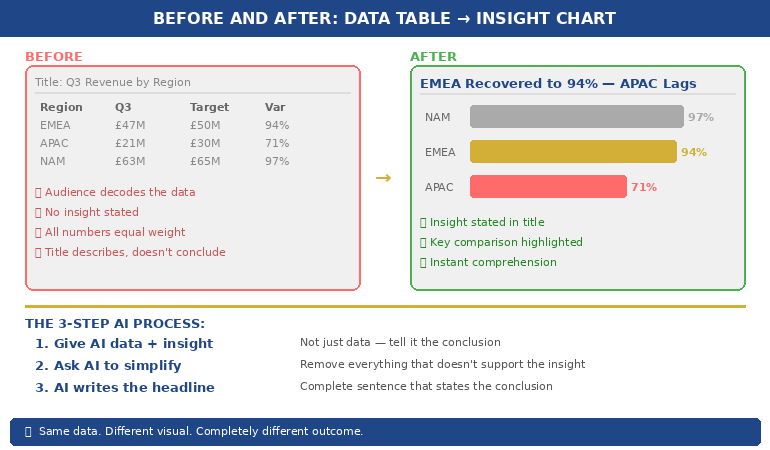
Presentation anxiety career impact infographic showing three steps to break the avoidance cycle: identity separation, controlled exposure, and nervous system reframe

Presentation Anxiety Is Ruining My Career — What Actually Fixes It (The 3-Step System)

She turned down a promotion because it required monthly board presentations. Eighteen months later, she turned down another. The third time, the promotion went to someone she’d trained.

Quick answer: If presentation anxiety is ruining your career, generic advice like “just practice more” or “imagine the audience naked” isn’t going to fix it — because the problem isn’t a skills gap. It’s a nervous system pattern that has become wired into your professional identity. You avoid. The avoidance costs you. The cost confirms the belief that presenting is dangerous. And the cycle tightens. Breaking it requires three things in this order: separating the fear from your identity, controlled exposure that doesn’t re-traumatise you, and reframing the physical symptoms your body produces. As a qualified clinical hypnotherapist who spent five years terrified of presenting in high-stakes corporate settings, I built the system that finally broke my own pattern — and I’ve since used it with executives at many career stages.

The Promotion She Let Someone Else Take

A client came to me after fifteen years in financial services. Technically brilliant — one of the strongest people on her team. But when a director role opened that required monthly board presentations, she said no. Told her manager she preferred “the analytical side.”

Eighteen months later, a similar role opened. Same structure — monthly presentations to a senior committee. She declined again. “Not the right time.” The third time, she watched a colleague she’d mentored take the role she wanted. Not more qualified. Just willing to stand up and speak.

When she told me that story, I felt it in my chest — because that could have been me. I spent five years terrified of presenting in high-stakes corporate settings. The only difference was that I got help before the avoidance pattern cemented itself into my career. She’d let it run for fifteen years. By the time she found me, the cost wasn’t discomfort. It was career trajectory. Years of it, compounding silently.

She didn’t need more presentation tips. She needed to dismantle the pattern.

🧠 Stop the Avoidance Cycle — For Good

Conquer Speaking Fear is the three-audio system I built after five years of presentation terror in corporate banking. The Client Session gives you the cognitive framework — attention redirection and evidence auditing. The Clinical Hypnotherapy Session rewires the subconscious pattern driving your avoidance. The Pre-Presentation Reset is a 90-second protocol for the morning of any high-stakes session.

Get Conquer Speaking Fear — £39

Three audio sessions + pocket card. Built from clinical hypnotherapy, NLP, and 24 years of real corporate experience. Instant download.

The Real Career Cost (It’s Not What You Think)

Most people think presentation anxiety costs them confidence. It doesn’t. It costs them compound visibility.

Every time you let someone else present your work, you transfer your credibility to them. Every time you decline a stretch assignment because it involves speaking, you remove yourself from the promotion pipeline. Every time you stay quiet in a meeting where you had the best idea, you teach senior leaders that you’re not ready for the next level.

None of this happens in one dramatic moment. It accumulates across dozens of small decisions over years. You don’t notice the pattern until someone with less experience, less knowledge, and fewer results gets the role you wanted — because they were visible and you weren’t.

PAA: Can presentation anxiety affect your career?
Yes — and it affects it in ways most people underestimate. Research on workplace visibility consistently shows that professionals who present regularly are promoted faster, receive higher performance ratings, and are more likely to be identified as “high potential” by senior leadership. Presentation anxiety doesn’t just create discomfort — it creates a systematic visibility deficit that compounds over time. The longer you avoid presenting, the wider the gap between your actual capability and your perceived capability becomes.

The cruelest part? The more experienced you become, the worse the gap gets. At five years into your career, nobody notices if you’re quiet. At fifteen years, everyone notices — and they draw conclusions about your readiness that have nothing to do with your actual skill.

Why “Tips” Don’t Work for Career-Level Anxiety

If you’re searching “presentation anxiety ruining my career,” you’ve almost certainly already tried the standard advice. Deep breathing. Power poses. Practice in front of a mirror. Arrive early to “own the room.”

These work for people with mild nerves. They don’t work for you because your anxiety isn’t situational — it’s structural. It’s woven into how you see yourself as a professional. You’ve built an entire career strategy around avoiding the thing that scares you, and that avoidance has become part of your identity.

I’ve written about why therapy alone often doesn’t fix presentation fear. The same principle applies to tips: they address the symptom (nerves before a specific presentation) but not the system (a deeply embedded pattern of avoidance that has been reinforced by years of successful escape).

PAA: Why can’t I overcome my fear of presenting?
Because most approaches treat presentation anxiety as a skills problem or a confidence problem. For career-level anxiety — the kind that changes your decisions about roles, projects, and visibility — the fear has become part of your professional identity. You don’t just feel afraid before presenting; you’ve organised your entire career around not having to present. Breaking that pattern requires working at the identity level, not the symptom level. That’s why tips, practice, and even some therapy approaches don’t create lasting change for people at this stage.

Diagram showing the presentation anxiety avoidance cycle: fear triggers avoidance, avoidance reduces visibility, reduced visibility limits career progression, and limited career reinforces the original fear

Step 1: Separate the Fear From Your Identity

The first step isn’t learning to manage your nerves. It’s recognising that “I’m not a presenter” is a story you’ve told yourself so many times it feels like a fact.

You are not your anxiety. You are a professional who developed a fear response that served you at one point — it protected you from perceived danger — but is now actively working against your career interests. The fear and the person are two separate things.

This sounds simple. It isn’t. When you’ve spent a decade making career decisions based on “I can’t present,” that belief has roots in every part of your professional identity. Pulling it out requires more than positive thinking. It requires structured work — the kind I do using NLP techniques that specifically target identity-level beliefs.

The practical exercise: Write down “I am someone who avoids presenting.” Now write down three decisions you’ve made in the last two years because of that belief. Seeing the career cost on paper — in your own handwriting — starts the separation between you and the pattern.

The Clinical Hypnotherapy Session inside Conquer Speaking Fear works at the subconscious level where avoidance patterns are stored — the same NLP and hypnotherapy techniques I used to break my own five-year pattern.

Get Conquer Speaking Fear — £39

Step 2: Controlled Exposure (Not Trial by Fire)

“Just do it more” is the worst advice for career-level presentation anxiety. Forcing yourself into a high-stakes presentation when your nervous system is in full threat mode doesn’t build confidence — it creates another traumatic data point that confirms the fear.

I’ve written about why your nervous system remembers bad presentations. The same memory system that’s trapping you in the avoidance cycle needs to be given new evidence — but gently, in controlled doses, with the right scaffolding around it.

Controlled exposure means starting with presentations where three conditions are true: the audience is small (three to five people), the stakes are low (no decisions riding on it), and the content is something you know cold. You’re not proving anything. You’re giving your nervous system one data point that says: “I presented, and nothing bad happened.”

Then you increase one variable at a time. Slightly larger audience. Slightly higher stakes. Slightly less familiar content. Each successful exposure doesn’t just build confidence — it physically rewires the neural pathway that currently connects “presenting” with “danger.”

The timeline most people need: Four to six controlled exposures over three to four weeks before the nervous system begins treating presenting as manageable rather than threatening. Not months. Not years. Weeks — if the exposure is structured correctly.

🔄 The Structured Programme That Breaks the Pattern

Conquer Speaking Fear is three audio sessions designed to be listened to in order. The Client Session gives you the cognitive reframe. The Hypnotherapy Session rewires the subconscious pattern. The Pre-Presentation Reset calms your nervous system on the day. Designed for professionals who’ve been avoiding presentations for years — not beginners with mild nerves.

Get Conquer Speaking Fear — £39

Three audios + pocket card. Instant download. Listen in order before your next presentation.

Step 3: Reframe What Your Body Is Doing

Your racing heart, sweating palms, and shallow breathing aren’t malfunctions. They’re your body’s preparation system doing exactly what it was designed to do: flooding you with adrenaline to perform under pressure.

The problem isn’t the physical response. It’s your interpretation of it. When an Olympic sprinter’s heart races before a race, they call it “being ready.” When you feel the same thing before a presentation, you call it “I’m going to fail.” Same physiology. Opposite meaning. Opposite outcome.

I’ve written about the fight-or-flight hack from hypnotherapy that teaches you to relabel these sensations in real time. The technique takes ninety seconds. But it only works after Steps 1 and 2 have loosened the identity-fear bond. Without that groundwork, relabelling is just another tip that doesn’t stick.

PAA: How do I stop anxiety from holding me back at work?
Start by recognising that the anxiety itself isn’t what’s holding you back — the avoidance is. The fear creates discomfort; the avoidance creates career consequences. Separate your identity from the fear (you are not “someone who can’t present”), begin controlled low-stakes exposure to give your nervous system new evidence, and learn to reinterpret your body’s stress response as preparation rather than danger. This three-step sequence — Identity, Exposure, Reframe — works because it addresses the pattern, not just the symptoms.

Conquer Speaking Fear is three audio sessions — cognitive framework, clinical hypnotherapy, and a 90-second pre-presentation reset. It’s what I wish existed during my five years of presentation terror in banking. Instant download, listen in order.

Get Conquer Speaking Fear — £39

🎯 Your Career Shouldn’t Be Capped by a Nervous System Pattern

Conquer Speaking Fear gives you three audio sessions to break the avoidance cycle that’s been silently limiting your career. The Client Session reframes the cognitive pattern. The Hypnotherapy Session rewires the subconscious loop. The Pre-Presentation Reset steadies your nervous system on the day. Built from clinical hypnotherapy, NLP, and 24 years of real corporate experience.

Get Conquer Speaking Fear — £39

Used by professionals who’ve stopped accepting “I’m just not a presenter” as the final answer.

Frequently Asked Questions

How severe does presentation anxiety need to be before it affects your career?

If you’ve turned down a role, declined a project, stayed quiet in a meeting, or let someone else present your work because of how presenting makes you feel — it’s already affecting your career. You don’t need a clinical diagnosis for the avoidance pattern to create real professional consequences. The impact is cumulative: each avoided opportunity slightly reduces your visibility, and that visibility gap compounds over years. Most people don’t recognise the full career cost until they see someone less qualified get the role they wanted.

How long does it take to fix presentation anxiety that’s been going on for years?

The identity-separation work typically takes one to two weeks of focused exercises. The controlled exposure phase takes three to four weeks (four to six low-stakes presentations with gradually increasing challenge). The reframing becomes automatic after six to eight uses. Most professionals see a noticeable shift within four to six weeks — not because the fear disappears entirely, but because the avoidance pattern breaks and they start making different career decisions. The fear reduces further with each successful presentation after that.

What if my presentation anxiety is clinical — should I see a therapist instead?

If your anxiety extends well beyond presenting — into social situations, daily worry, or panic attacks unrelated to work — yes, a therapist should be your first step. But if your anxiety is specifically triggered by presenting or speaking in professional settings and you function normally otherwise, a structured self-directed programme can be highly effective. Many of the techniques in Conquer Speaking Fear are drawn from the same clinical hypnotherapy and NLP approaches used in therapeutic settings, adapted for professionals who don’t need full therapy but do need more than tips.

Get weekly speaking confidence strategies

Evidence-based techniques for managing presentation anxiety — from a clinical hypnotherapist who lived it.

Subscribe to the Newsletter

Related: If the fear is about structure — not knowing what to put on your slides or how to organise your deck — that’s a different problem with a different fix. Read The Executive Pre-Read That Gets Decisions Before You Walk In for the structural side of high-stakes presenting.

About the Author

Mary Beth Hazeldine is the Owner & Managing Director of Winning Presentations. With 24 years across banking and consulting — including JPMorgan Chase, PwC, Royal Bank of Scotland, and Commerzbank — she has delivered high-stakes presentations in boardrooms across three continents.

A qualified clinical hypnotherapist and NLP practitioner, Mary Beth combines executive communication expertise with evidence-based techniques for managing presentation anxiety. She has supported presentations for high-stakes funding rounds and approvals across 15+ years of executive training.

Book a discovery call | View services

Your next step: Open a blank document right now and write down three professional opportunities you’ve declined, avoided, or handed to someone else because they involved presenting. Don’t judge them. Just look at them. That list is the real cost of your presentation anxiety — and it’s the reason generic tips will never be enough. The pattern needs a system, not a workaround.

19 Feb 2026
Close-up of an executive reviewing a two-page pre-read document with pen annotations on a dark wood desk, laptop and coffee cup in warm golden light

The Executive Presentation Pre-Read That Gets Decisions Before You Walk In

They approved my client’s £4M budget before she presented a single slide. The presentation was a fifteen-minute formality.

Quick answer: The executive presentation pre-read is the most strategically important document most professionals never learn to write. It’s not your slides emailed early. It’s not a summary of what you’ll say. It’s a separate, purpose-built document with three parts — the Decision Frame, the Evidence Stack, and the Ask — designed to get senior executives aligned on your recommendation before you enter the room. When done right, the meeting itself becomes a confirmation, not a persuasion exercise. Built from 24 years in banking and consulting environments, this is the structure I’ve taught to executives preparing for board meetings, steering committees, and investment approvals. The difference between presenting to an aligned room versus an uninformed room is the difference between getting a decision and getting a “let me think about it.”

The Budget That Got Approved Before She Opened Her Mouth

At Commerzbank, I watched a VP prepare for weeks on a £4M technology modernisation budget. Her slides were immaculate. Forty-two slides covering everything from vendor comparison to implementation timeline. She’d rehearsed the delivery. She’d prepared for questions.

But the week before, she did something most people skip entirely. She sent a two-page pre-read document to the five decision-makers who’d be in the room. Not her slides — a separate document. It laid out the business case in three sections: why now, what the evidence showed, and what she needed them to decide.

By the time she walked into that boardroom, three of the five had already emailed back with variations of “this looks solid.” The CFO had flagged one line item he wanted to discuss. The CTO had already circulated it to his team for technical validation. The meeting itself lasted fifteen minutes. Twelve of those were spent on the CFO’s one concern. The decision was unanimous.

That’s when I understood: the presentation isn’t where decisions get made. The pre-read is. The presentation is where decisions get confirmed.

📊 Your Pre-Read Needs a Deck That Matches

The Executive Slide System gives you the slide frameworks and sequencing templates that align with your pre-read structure — so when executives arrive having read your document, the deck confirms exactly what they expected. Built from real board presentations where the pre-read and the deck worked as a single system.

Get the Executive Slide System — £39

Built from 24 years of banking presentations and 15+ years training executives for board updates, steering committees, and investment approvals.

The Mistake 90% of Presenters Make With Pre-Reads

Most professionals do one of two things with pre-reads: they skip them entirely, or they email their slide deck the night before and call it a pre-read. Both are career-limiting mistakes.

Sending your slides as the pre-read creates two problems at once. First, executives try to read a document that was designed to be presented — and it either has too little text to make sense alone, or too much text because you tried to make it self-explanatory. Second, when you stand up to present those same slides, the room has already seen everything. You’re narrating a document they’ve already skimmed. The energy dies. The questions start on slide two instead of after your recommendation.

Skipping the pre-read is worse. You walk into a room where five executives are hearing your business case for the first time. They’re processing information, forming opinions, and identifying objections simultaneously. No human brain handles that well. The result is almost always “interesting — let me think about it,” which is executive language for “I’m not comfortable deciding without time to process.”

The pre-read solves both problems. It gives executives the thinking time they need so the meeting becomes the decision time you need.

PAA: Should you send your presentation slides before the meeting?
No. Your slides and your pre-read are two different documents serving two different purposes. Slides are visual support for a live presenter — they’re designed to be incomplete without your narration. A pre-read is a self-standing document designed to be complete without you in the room. Sending slides as a pre-read weakens both the document and the presentation. Create a separate two-to-three-page pre-read document using the Decision Frame, Evidence Stack, and Ask structure below.

The 3-Part Board Pre-Read Structure

In twenty-four years of banking, I’ve seen dozens of pre-read formats. The one that consistently produces pre-meeting alignment has three sections — never more. Each section answers a single question that’s running through every executive’s mind before they commit time to your meeting.

Executive pre-read structure showing three sections: Decision Frame half page, Evidence Stack one to two pages, and The Ask three sentences, with purpose and length for each section

The entire document should fit on two pages. Three at the absolute maximum. Anything longer and executives won’t read it — which defeats the entire purpose. I’ve written about the executive summary slide before. The pre-read follows the same principle: compression creates clarity.

Part 1: The Decision Frame (Half a Page)

The Decision Frame answers the question every executive asks before reading anything: “Why am I looking at this, and what do you need from me?”

It has four elements, each one sentence:

The Context: One sentence on why this is on the agenda now. Not the history of the project. Not the background. Just: why now? Example: “Q1 infrastructure costs exceeded forecast by 23%, driven by three unplanned outages in February.”

The Impact: One sentence on what happens if nothing changes. Example: “Without intervention, we project £1.2M in additional unplanned costs by year-end, plus reputational risk from client-facing service disruption.”

The Recommendation: One sentence on what you’re proposing. Lead with the answer, not the analysis. Example: “We recommend a £4M investment in platform modernisation, delivered in two phases over 18 months, with breakeven at month 14.”

The Decision Required: One sentence on exactly what you need from this group. Example: “We are seeking approval to proceed with Phase 1 (£1.8M) and authorisation to begin vendor negotiations by March 15.”

That’s it. Four sentences. Half a page. Every executive in the room now knows what this is about, what the stakes are, and what you’re asking for — before they read another word.

This kind of structural clarity — knowing exactly what goes where and in what order — is what the Executive Slide System was built for. The frameworks apply to both your pre-read and the deck that follows it.

Get the Executive Slide System — £39

Part 2: The Evidence Stack (1–2 Pages)

The Evidence Stack answers the second question: “Why should I believe this recommendation?”

This is where most people go wrong. They dump every data point they’ve gathered into the pre-read. Executives don’t want to see your working. They want to see the three to five strongest pieces of evidence that support your recommendation — and they want to see them in descending order of weight.

PAA: How long should a board pre-read be?
Two pages is ideal. Three is the maximum. Research on executive reading behaviour consistently shows that documents over three pages see completion rates drop below 40%. Your pre-read should take no more than five minutes to read. If an executive needs more detail, put it in appendices or reference it in your presentation deck — but the core pre-read must be scannable in under five minutes.

Structure the Evidence Stack as three to five numbered points, each with a headline and two to three sentences of support. Example:

1. Cost trajectory is accelerating. Infrastructure maintenance costs have grown 18% year-over-year for three consecutive years. The current platform requires 340 engineering hours per month in reactive maintenance alone.

2. Client impact is measurable. Three client-facing outages in Q1 resulted in two formal complaints and one at-risk account review. The NPS score for affected clients dropped 12 points.

3. Comparable investment shows 2.1x return. The Singapore office completed a similar modernisation in 2024, reducing maintenance costs by 62% and eliminating client-facing outages for 14 consecutive months.

Each point is verifiable. Each point supports the recommendation. Each point can be challenged in the meeting — and you should want that, because you’ll be prepared for exactly those challenges.

📋 Structure Your Deck to Mirror Your Pre-Read

The Executive Slide System includes slide sequencing frameworks that align with the Decision Frame → Evidence Stack → Ask flow. When your pre-read and your deck tell the same story in the same order, executives experience coherence — and coherence builds confidence in your recommendation.

Get the Executive Slide System — £39

Includes pre-read-to-deck alignment frameworks for board presentations, steering committees, and investment approvals.

Part 3: The Ask (3 Sentences)

The Ask closes the pre-read with surgical precision. Three sentences, no more.

Sentence 1 — The specific decision: “We are requesting approval for £1.8M Phase 1 investment.”

Sentence 2 — The timeline: “Vendor selection begins March 15 if approved; Phase 1 delivery completes by September 30.”

Sentence 3 — The meeting purpose: “Thursday’s session is scheduled for 30 minutes to address questions and confirm the go/no-go decision.”

That third sentence is the one most people miss — and it’s the most important. It tells every executive in advance that they’re expected to make a decision in the meeting. No “let me think about it.” No “circle back next quarter.” The pre-read has given them the thinking time. The meeting is for deciding.

I’ve written about pre-meeting executive alignment — the conversations that happen alongside the pre-read. The document and the conversations work together. The pre-read gives executives the substance. The pre-meeting conversations give you the intelligence on where resistance lives.

Building both a pre-read and a presentation deck for the same meeting? The Executive Slide System gives you the structural frameworks so both documents work as a single persuasion system — not two disconnected files.

Get the Executive Slide System — £39

When to Send It (And to Whom)

Timing matters more than most people realise. Send the pre-read too early and it gets buried. Send it too late and executives don’t read it.

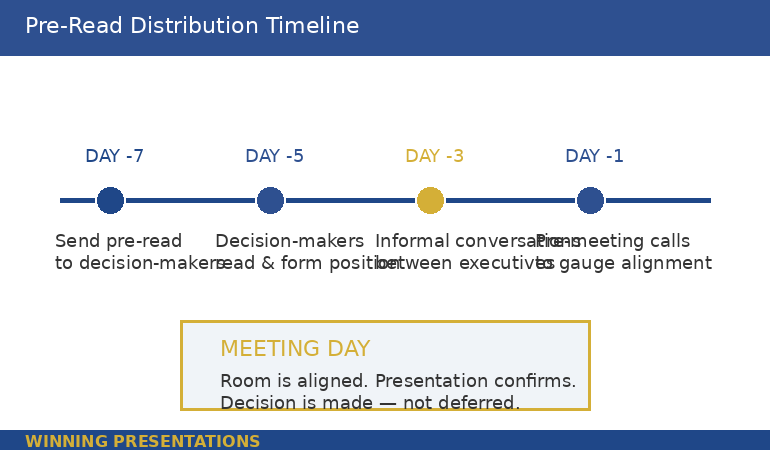
The optimal window is five to seven business days before the meeting. This gives executives enough time to read it during one of their review blocks, form an initial position, and — critically — have informal conversations with other attendees about it before the meeting.

Those informal conversations are where alignment actually happens. When the CFO reads your pre-read on Monday and mentions it to the COO over coffee on Wednesday, they’ve already begun forming a collective view. By Thursday’s meeting, the room has a shared baseline. Your job in the presentation shifts from “convince five individuals” to “confirm what the group has already been discussing.”

Who receives the pre-read: Every decision-maker who’ll be in the room, plus their chiefs of staff or executive assistants (who control what gets read). Do not send it to observers, note-takers, or people attending for information only. The pre-read is for decision-makers. Everyone else gets context from the presentation itself.

Pre-read distribution timeline showing optimal schedule from seven days before meeting to meeting day, with key actions at each stage including send, read, informal conversations, and pre-meeting calls

PAA: What goes in an executive pre-read?
Three sections only: a Decision Frame (why this is on the agenda, what you recommend, and what decision you need), an Evidence Stack (three to five numbered pieces of evidence supporting the recommendation), and the Ask (the specific decision, timeline, and meeting purpose). The total document should be two pages maximum. Detailed data, appendices, and supporting analysis belong in the presentation deck or in supplementary documents — not in the pre-read.

Why Your Slides Are Not a Pre-Read

This is the hill I will die on. I watched a managing director at PwC send a 38-slide deck as a pre-read before a partner meeting. The partners received it on Monday. By Wednesday, two had emailed back with detailed objections to slides 14 and 27. By Thursday’s meeting, the first twenty minutes were spent relitigating points that should have been addressed in the pre-read’s Evidence Stack — not discovered by scrolling through presentation slides.

Slides are designed for visual support during live narration. They use headlines, not paragraphs. They show charts, not arguments. They make no sense without a presenter standing next to them. When you send slides as a pre-read, you’re asking executives to guess what you’re going to say about each slide — and their guesses will be wrong.

A pre-read is a narrative document. Full sentences. Complete arguments. No visual dependencies. An executive should be able to read it at their desk, understand your recommendation, evaluate your evidence, and know what you need from them — without ever seeing a slide.

The slides and the pre-read work together, but they are not the same document. The pre-read builds alignment. The slides confirm it visually. I’ve written about board presentation best practices — the pre-read is what makes those best practices actually work, because the room arrives aligned.

🎯 The Pre-Read Gets Alignment. The Deck Confirms It.

The Executive Slide System gives you the deck frameworks that work in tandem with a strong pre-read. Decision slides, evidence sequences, and recommendation structures — all built from real board presentations where the pre-read did the heavy lifting and the deck sealed the decision.

Get the Executive Slide System — £39

Trusted by executives who understand that the best presentations start with what happens before the meeting, not during it.

Frequently Asked Questions

What format should an executive pre-read be in?

A Word document or PDF — never a slide deck. The pre-read should be a narrative document with full sentences and complete arguments. Two pages is optimal, three is the maximum. Use the Decision Frame (half a page), Evidence Stack (one to two pages), and Ask (three sentences) structure. Number your evidence points for easy reference in the meeting. Include your name, date, and “PRE-READ: [Meeting Name]” in the header so it’s immediately identifiable in an executive’s inbox.

How far in advance should you send a board pre-read?

Five to seven business days before the meeting. This gives decision-makers time to read it, form an initial position, and have informal conversations with other attendees. Sending it less than three days before risks executives arriving without having read it. Sending it more than ten days before risks it getting buried under newer priorities. If your organisation uses a formal “board book” process, align your pre-read submission with that timeline.

What should you NOT include in an executive pre-read?

Do not include background information the audience already knows, detailed methodology or technical workings, more than five evidence points, caveats or hedge language that weakens your recommendation, or anything that requires visual explanation (charts, graphs, diagrams). Those belong in the presentation deck or supplementary appendices. The pre-read’s job is clarity and alignment — not comprehensiveness. If it takes more than five minutes to read, it’s too long.

Get weekly executive presentation strategies

Frameworks, structures, and real examples from corporate boardrooms — delivered every week.

Subscribe to the Newsletter

Related: If the thought of presenting to a senior audience triggers more anxiety the more experienced you become, that’s common — and it’s a different problem from structure. Read Why Your Presentation Anxiety Gets Worse With Experience for the psychological side of high-stakes presenting.

About the Author

Mary Beth Hazeldine is the Owner & Managing Director of Winning Presentations. With 24 years of corporate banking experience at JPMorgan Chase, PwC, Royal Bank of Scotland, and Commerzbank, she has delivered high-stakes presentations in boardrooms across three continents.

A qualified clinical hypnotherapist and NLP practitioner, Mary Beth combines executive communication expertise with evidence-based techniques for managing presentation anxiety. She has supported presentations for high-stakes funding rounds and approvals across 15+ years of executive training.

Book a discovery call | View services

Your next step: Before your next high-stakes presentation, open a blank document and write the four sentences of your Decision Frame. Context, Impact, Recommendation, Decision Required. Send that half-page to your key decision-maker five days before the meeting and ask: “Does this capture the right framing?” Their response will tell you exactly where the resistance lives — before you build a single slide.

18 Feb 2026
Executive woman standing and gesturing confidently while answering questions from colleagues seated around a boardroom table, demonstrating composed Q&A handling during a high-stakes presentation

5 Executive Q&A Mistakes I See Every Week — With the 15-Second Fixes

The presentation was fine. The five minutes of Q&A afterwards undid all of it.

Quick answer: After 24 years in corporate banking and consulting — and now coaching executives who present for a living — I see the same five Q&A mistakes every single week. Not from junior staff. From directors, VPs, and partners who present beautifully and then lose the room the moment questions start. Each mistake has a specific fix, and every fix follows the same structure: answer in 15 seconds using Headline → Reason → Proof, then stop talking. Below are the five mistakes, the real scenarios where I see them, and the exact rewrites that work.

At Commerzbank, I once watched a managing director lose a syndication deal during Q&A. Not because he didn’t know his numbers — he knew them cold. Because the lead investor asked a straightforward question about covenant flexibility, and instead of giving a 15-second answer, he gave a four-minute masterclass on covenant structures across European credit markets. By the time he finished, the investor had mentally moved on. The deal went to a competitor who answered the same question in two sentences.

I’ve now seen some version of that moment hundreds of times. Different industries, different stakes, same five patterns. The executives who win in Q&A aren’t smarter or better prepared. They’ve learned to answer the question that was asked — in 15 seconds — and then stop.

Mistake #1: The Knowledge Dump

What it looks like: Someone asks a focused question. The presenter answers the question — and then keeps going. They add context. Then caveats. Then the methodology behind the number. Then the alternative they considered. What started as a clear answer becomes a four-minute monologue that buries the actual point under layers of unnecessary detail.

Where I see it: Budget reviews. Quarterly updates. Any situation where the presenter has spent days preparing and unconsciously wants to demonstrate the depth of their preparation. The more homework you’ve done, the more tempting the knowledge dump becomes — which is why it’s disproportionately a problem for the most diligent presenters.

The real scenario: A VP at a technology firm presented a platform migration proposal. The CTO asked: “What’s the downtime risk during cutover?” The VP answered the question correctly in his first sentence (two hours, with a rollback plan). Then he spent three more minutes explaining the technical architecture of the rollback, the testing protocol, the vendor SLA, and two edge cases they’d modelled. The CTO had his answer in the first ten seconds. The next three minutes made him wonder what the VP was overcompensating for.

The 15-second fix:

Headline: “Maximum two hours, with a full rollback plan.”
Reason: “We’ve tested the rollback three times in staging — average recovery is 40 minutes.”
Proof: “The vendor SLA guarantees four-hour resolution, but our internal testing hasn’t exceeded ninety minutes.”
Then stop.

If the CTO wants the technical architecture, the testing protocol, or the edge cases — he’ll ask. And that follow-up question is a buying signal, not a threat. The knowledge dump kills buying signals because it answers questions nobody asked.

Stop Losing the Room After Slide 12

The Executive Q&A Handling System includes the Headline → Reason → Proof response framework, question mapping templates by stakeholder type, and the preparation system that means you walk into Q&A knowing what they’ll ask and exactly how you’ll answer. Built from real boardroom situations where Q&A decided whether budgets got approved and deals got funded.

Get the Executive Q&A Handling System → £39

Instant download. Question mapping + response frameworks + recovery scripts. Built from 24 years in banking and consulting where Q&A decided most major budgets, deals, and approvals.

Mistake #2: The Defensive Deflection

What it looks like: Someone asks a question that implies a weakness in the proposal. Instead of addressing the weakness, the presenter pivots to a strength. “What about the implementation risk?” gets answered with “Well, the ROI projections are very strong.” The question was about risk. The answer was about return. The panel notices.

Where I see it: Investment committees. Client pitches. Promotion panels. Any situation where the presenter feels their competence is being questioned — which activates a defensive instinct to redirect toward what they’re confident about. I’ve written extensively about this dynamic in the context of handling difficult presentation questions.

The real scenario: A programme director presented a change management initiative to the executive committee. A board member asked: “What’s the fallback if adoption rates don’t hit 60% in the first quarter?” The director answered: “Our stakeholder engagement plan is comprehensive — we’ve mapped every business unit and we have champions in each region.” That’s not a fallback plan. That’s a prevention plan. The board member asked what happens if it fails. The director told him why it won’t. Those are different conversations.

The 15-second fix:

Headline: “If adoption is below 60% at the end of Q1, we move to targeted intervention.”
Reason: “That means intensive support for the three lowest-adoption business units rather than broad engagement.”
Proof: “We used this approach on the last programme — pulled two units from 35% to 70% in six weeks.”
Then stop.

The fix answers the question that was asked (what’s the fallback), names it specifically (targeted intervention), and provides evidence it works (last programme). The board member now knows the presenter has thought about failure — which, paradoxically, increases their confidence in the plan succeeding.

PAA: Why do experienced presenters deflect tough questions?
Because the brain processes tough questions as threats before it processes them as requests for information. The amygdala fires before the prefrontal cortex engages, which means the first instinct is defensive — redirect to safe ground. This happens faster and more intensely the higher the stakes and the more senior the audience. The fix isn’t willpower (you can’t override the amygdala with intention). The fix is preparation: if you’ve already written a 15-second answer for the tough questions, your brain retrieves a structure instead of improvising a defence.


Table showing five executive Q&A mistakes — Knowledge Dump, Defensive Deflection, Premature Concession, Good Question Stall, and Unfinished Answer — with what it sounds like and what the room hears for each

Mistake #3: The Premature Concession

What it looks like: Someone challenges the recommendation, and the presenter immediately folds. “Have you considered doing this in two phases instead of three?” gets answered with “Yes, we could definitely do that. We could also look at a four-phase model. We’re flexible on the approach.” The presenter thinks they’re being collaborative. The panel hears: “I’m not committed to my own recommendation.”

Where I see it: Everywhere. This is the most common mistake among presenters who’ve been told to “read the room” and “be flexible.” They’ve overcorrected from rigid to spineless. The result is that the panel doesn’t know what the presenter actually recommends — and a committee that doesn’t know what you recommend will always defer the decision.

The real scenario: A finance director presented a restructuring proposal to the CEO and COO. The COO asked: “Could we achieve the same cost savings with voluntary redundancies only?” The finance director said: “That’s something we could explore. There are definitely scenarios where voluntary approaches work well.” The correct answer was no — the modelling showed voluntary-only achieved 40% of the target savings. But the finance director didn’t want to disagree with the COO directly. The result: the decision was deferred six weeks while they “explored” an option the finance director already knew wouldn’t work.

The 15-second fix:

Headline: “Voluntary-only achieves roughly 40% of the target savings.”
Reason: “The gap is in the operational restructuring, which requires role changes that voluntary programmes can’t address.”
Proof: “We modelled both scenarios — I can share the comparison if that would be helpful.”
Then stop.

This doesn’t dismiss the COO’s suggestion. It respects it by giving a factual answer with evidence. “I can share the comparison” invites further discussion without surrendering the recommendation. The presenter maintains their professional position while remaining genuinely flexible on the method.

📋 The Q&A Handling System includes question mapping templates that help you predict these challenges before the meeting — so you’ve already written the 15-second answer before the question lands.

Get the Executive Q&A Handling System → £39

Walk Into Q&A Knowing What They’ll Ask

The Executive Q&A Handling System gives you the question mapping method (predict 80% of questions before the meeting), the Headline → Reason → Proof response structure, “I don’t know” recovery scripts, and hostile question deflection techniques. Stop improvising. Start preparing the part that actually decides outcomes.

Get the Executive Q&A Handling System → £39

Instant download. Built from real boardroom, investment committee, and client pitch situations across 24 years in banking and consulting.

Mistake #4: The “Good Question” Stall

What it looks like: “That’s a great question.” Pause. Visible thinking. Then an answer that starts slowly and gains momentum — because the presenter was buying time to formulate a response. Everyone in the room knows it. The “good question” opener is the most widely recognised stall tactic in corporate communication, and using it signals exactly one thing: you weren’t prepared for that question.

Where I see it: Panel interviews. Board Q&A. Client discovery sessions. The more senior the audience, the more they notice it — because they’ve all used it themselves, and they know what it means. It’s the executive equivalent of “um.”

The real scenario: A head of strategy presented the annual plan to the investment committee. The chair asked: “What’s the biggest risk you haven’t addressed in this plan?” The head of strategy said: “That’s a really good question. Let me think about that.” Pause. “I think the biggest unaddressed risk is probably market volatility in Q3.” The answer was fine. The delivery — the stall, the visible improvisation, the “probably” — told the room he hadn’t considered unaddressed risks before being asked. For a head of strategy. That’s a credibility problem.

The 15-second fix:

Headline: “The biggest unaddressed risk is regulatory change in the APAC region.”
Reason: “We’ve modelled market volatility — that’s on slide nine. But the regulatory environment in Southeast Asia is moving faster than our planning cycle.”
Proof: “I’ve flagged this with the risk committee and we’re building a scenario analysis for Q2 review.”
Then stop.

No stall. No “good question.” Straight into the headline. The answer is honest (yes, there’s a risk I haven’t fully addressed), specific (regulatory change in APAC), and shows action (flagged with risk committee, scenario analysis in progress). This is what the committee wanted to hear: not perfection, but awareness.

PAA: What should you say instead of “good question” during Q&A?
Nothing. Just answer. If you need a beat to think, use a silent pause — two seconds of silence is less damaging to your credibility than “good question” followed by visible improvisation. If you genuinely need more time, use a bridging phrase that adds value: “The short answer is [headline]. The longer answer involves [one specific factor] — let me walk you through it.” This buys time while already delivering content, rather than advertising that you’re thinking.

Mistake #5: The Unfinished Answer

What it looks like: The presenter gives 80% of an answer and then trails off, ends with “…so yeah,” or gets interrupted before landing the point. The question was answered in substance but not in structure — so the panel isn’t sure whether the answer is complete, whether there’s more coming, or whether the presenter ran out of things to say. The room fills the silence with their own interpretation, which is rarely favourable.

Where I see it: Town halls. All-hands meetings. Any situation with a large audience where the presenter feels the pressure of silence and either rushes the ending or leaves it hanging. It’s also common in executive Q&A sessions where follow-up questions come fast and the presenter abandons their current answer to address the next one.

The real scenario: A regional director presented expansion plans to the group CEO. The CEO asked: “What happens to margin if the exchange rate moves 5% against us?” The director started strong: “A 5% adverse move impacts margin by approximately 1.2 points. We’ve modelled this and the business case remains positive down to a 7% move…” Then someone’s phone buzzed. The director lost focus, said “…so we’ve got some buffer there,” and stopped. “Some buffer” is not a landing. “Remains positive down to 7%” is a landing — but he didn’t get there cleanly.

The 15-second fix:

Headline: “A 5% adverse move impacts margin by 1.2 points.”
Reason: “The business case stays positive down to a 7% move — so we’ve got meaningful buffer.”
Proof: “We’ve stress-tested three scenarios. The breakeven point is an 8.3% move, which hasn’t happened in this corridor in a decade.”
Landing: “The short version: the exchange rate risk is real but manageable.”

The landing matters. It tells the room: “My answer is complete. I’ve finished. You have what you need.” Without it, the panel is left constructing their own conclusion — and under uncertainty, human brains default to the negative interpretation. A clean landing controls the narrative. A trailing answer surrenders it.


The Headline Reason Proof framework for answering executive Q&A questions in 15 seconds showing three steps with timing and example response for each

📋 The Q&A Handling System includes the complete Headline → Reason → Proof framework with practice templates for every question type.

Plus hostile question deflection and “I don’t know” recovery scripts for the questions you can’t predict.

Get the Executive Q&A Handling System → £39

Why All 5 Mistakes Have the Same Root Cause

The knowledge dump, the defensive deflection, the premature concession, the “good question” stall, and the unfinished answer all come from the same place: the presenter is responding to their emotional state, not to the question.

The knowledge dump is driven by the need to prove competence. The deflection is driven by the instinct to avoid vulnerability. The concession is driven by the desire to avoid conflict. The stall is driven by the fear of looking unprepared. The unfinished answer is driven by the anxiety of silence.

All five emotions are normal. All five are present in every high-stakes Q&A. And all five produce answers that are worse than the answer you’d give if you simply followed a structure: Headline → Reason → Proof → Stop.

The structure doesn’t eliminate the emotion. It gives you something to do instead of following the emotion. When your brain wants to dump knowledge, the structure says: “Headline first.” When your brain wants to deflect, the structure says: “Answer the actual question.” When your brain wants to concede, the structure says: “State your position with evidence.” When your brain wants to stall, the structure says: “Skip the preamble.” When your brain wants to trail off, the structure says: “Land it.”

That’s why the best Q&A performers aren’t necessarily the smartest people in the room. They’re the ones who’ve practised a structure until it’s automatic. I’ve seen this dynamic in every high-stakes Q&A that went wrong — the content was there, the structure wasn’t.

If the anxiety component of Q&A is the bigger problem for you — if the emotional state is so strong that even a good structure gets overwhelmed — the cognitive and physiological techniques in breaking the audience judgment anxiety loop work alongside the structural approach here.

One Structure. Every Question. Every Time.

The Executive Q&A Handling System gives you question mapping by stakeholder type, the Headline → Reason → Proof framework with practice templates, “I don’t know” recovery scripts, defensive-to-directive answer rewrites, and hostile question deflection techniques. One system for every Q&A scenario — budget reviews, board presentations, client pitches, and the questions you didn’t see coming.

Get the Executive Q&A Handling System → £39

Instant download. Built from 24 years in banking and consulting where most major decisions were shaped during Q&A, not during the slides.

Frequently Asked Questions

How many questions should I prepare for before a high-stakes presentation?

Map 8-12 questions across four categories: cost/budget, risk/contingency, timeline/feasibility, and credibility/capability. For each one, write a 15-second answer using Headline → Reason → Proof. This covers roughly 80% of what you’ll actually be asked. The remaining 20% will be variations — and because you’ve practised the structure, you’ll handle variations more cleanly even without specific preparation. The goal isn’t to predict every question. It’s to build a response muscle that fires automatically under pressure.

What do you do when someone asks a question you genuinely don’t know the answer to?

Never bluff and never say just “I’ll get back to you.” The recovery structure is: acknowledge what you do know, name the specific thing you’d need to verify, and commit to a concrete deadline. For example: “The two-phase model is feasible — I know the dependency structure supports it. What I’d need to confirm is the risk impact on the migration timeline. I can have that analysis to you by Thursday.” This shows competence, honesty, and reliability — which is exactly what a senior audience evaluates during Q&A.

Is the Headline → Reason → Proof structure too formulaic for senior audiences?

Senior audiences don’t notice the structure — they notice the clarity. A formulaic-feeling answer is one where the presenter robotically recites a prepared script. A structured answer is one where the presenter gives a clear headline, supports it with a specific reason, and closes with evidence. The difference is delivery, not framework. Practise the structure until it becomes natural rather than mechanical. Most executives find that after 5-10 practice rounds, the structure disappears into their communication style and what remains is simply clearer, more confident Q&A performance.

📬 The Winning Edge Newsletter

Weekly strategies for executive presentations, Q&A preparation, and career-critical communication. No fluff.

Subscribe free →

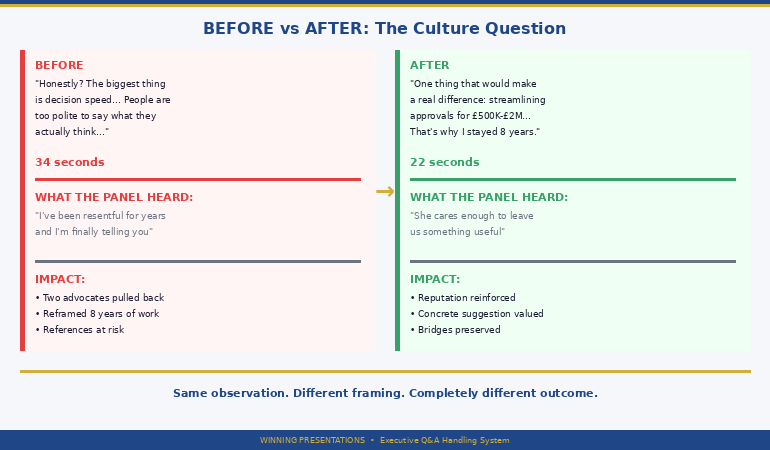
Related: These five mistakes become even more damaging in transition scenarios where there’s no follow-up meeting to correct the record — see the full before/after breakdown in how exit presentation Q&A damages careers. And if the anxiety itself is driving these patterns, the cognitive intervention in breaking the audience judgment thought loop works alongside the structural approach here.

Five mistakes. One root cause. One structure that fixes all of them. Headline → Reason → Proof → Stop. Practise it for your next five presentations and notice what changes. The questions won’t get easier. Your answers will get shorter, clearer, and more credible — which, in executive Q&A, is the same thing as getting better.

📋 Get the question mapping templates + response frameworks + recovery scripts.

Get the Executive Q&A Handling System → £39

About the Author

Mary Beth Hazeldine is the Owner & Managing Director of Winning Presentations. With a 24-year career in banking and consulting at JPMorgan Chase, PwC, Royal Bank of Scotland, and Commerzbank, she spent most of those years in rooms where Q&A decided outcomes — budget approvals, deal mandates, strategic pivots, career-defining moments.

She now helps executives prepare for the part of their presentation that actually determines results.

Book a discovery call | View services

Optional: Get Q&A, slides, confidence, storytelling, and delivery in one package — The Complete Presenter (£99). Save over 50%.

18 Feb 2026
Professional woman standing alone in boardroom with golden sunset light behind her, hands clasped, quiet composure after overcoming the audience judgment anxiety loop that held her back for years

The ‘Audience Is Judging You’ Thought Loop: How One Executive Broke 11 Years of It

She could run a £40M P&L. She couldn’t stand in front of twelve people without hearing the voice that said they know you’re faking it.

Quick answer: The audience judgment loop is the repeating thought cycle where you believe the audience is evaluating your competence, which triggers self-monitoring, which degrades your performance, which confirms the belief that they were judging you all along. It’s the most common anxiety pattern in experienced professionals because it gets worse with seniority — the higher the stakes, the louder the loop. This article follows one senior director’s eleven-year struggle with the loop and the three specific shifts that broke it. Not theory. Not affirmations. The actual cognitive and behavioural changes — in the order they happened.

I nearly didn’t take the call. The email said “senior director, financial services, eleven years of presentation anxiety.” I assumed it was someone who got nervous before big pitches — the standard pattern I see weekly.

It wasn’t. When we spoke, she told me she’d turned down three promotions because each one required more visibility. She’d declined two conference speaking invitations that her CEO had personally recommended her for. She’d built a career strategy around minimising the number of times she had to stand in front of a room — and it had worked, until it hadn’t. The new role she wanted required monthly board updates. She couldn’t avoid it anymore.

Her name was Claire. What she described wasn’t nervousness. It was an eleven-year-old thought loop that had quietly shaped every career decision she’d made.

Details changed to protect identity. The patterns and timeline are drawn from real coaching work.

Trapped: What 11 Years Inside the Loop Looks Like

Claire’s loop had four stages, and they fired in the same order every time:

Stage 1 — The trigger: Any situation where she’d be visible to more than five people. Team meetings were fine. Anything with senior stakeholders, clients, or cross-functional audiences activated it. The trigger wasn’t the audience size. It was the perceived consequence of being seen as less than competent by people who mattered.

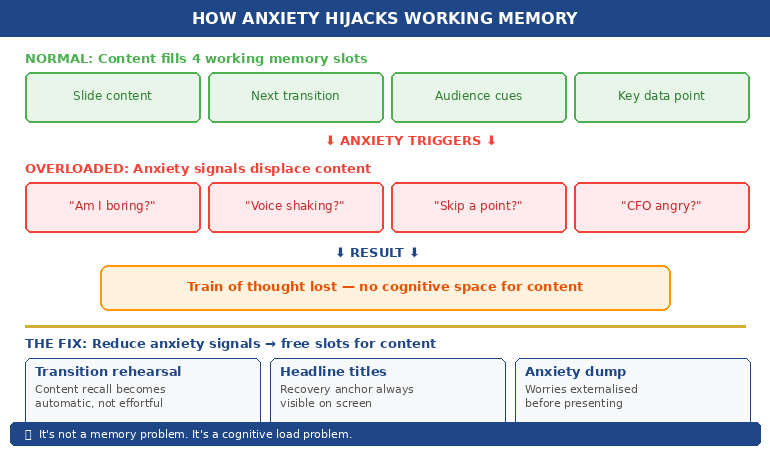
Stage 2 — The surveillance shift: The moment she stood up to present, her attention split. Half went to the content. Half went to monitoring the audience for signs of judgment. A furrowed brow. Someone checking their phone. A whispered conversation. Every ambiguous signal got interpreted as confirmation: they can see through you.

Stage 3 — The performance collapse: Because her attention was split, her delivery suffered. She’d lose her place. Over-explain things. Rush through sections. Add unnecessary caveats. The presentation she’d rehearsed as a confident, clear-headed professional came out as something noticeably less — because the cognitive load of self-monitoring left no bandwidth for actual presenting.

Stage 4 — The confirmation: After every presentation, Claire would replay every micro-expression she’d noticed, every pause that felt too long, every question that felt pointed. And the conclusion was always the same: See? They noticed. They could tell. This “evidence” fed Stage 1, making the next trigger stronger.

Eleven years of this. Not because Claire lacked skill — she was exceptionally good at her job. But because the loop was self-reinforcing. Each cycle made the next one more automatic. By the time she called me, the loop fired before she even opened her mouth. The anxiety before meetings had become the defining feature of her professional life.

The Loop Doesn’t Break With Willpower. It Breaks With Structure.

Conquer Speaking Fear is a three-audio programme built for experienced professionals whose anxiety has become automatic. The Client Session gives you the cognitive reframe. The Hypnotherapy Session rewires the subconscious pattern. The Pre-Presentation Reset gives you a 12-minute protocol for the morning of. This isn’t confidence advice — it’s a clinical intervention for the loop itself.

Get Conquer Speaking Fear → £39

Instant download. Three audio sessions built by a qualified clinical hypnotherapist who spent five years trapped in the same loop.

Shift #1: The Attention Redirection (Week 2)

The first thing I asked Claire to do had nothing to do with confidence, breathing, or positive thinking. I asked her to tell me what the CFO was wearing in her last board update.

She couldn’t. She’d been in a room with twelve people for forty minutes and she couldn’t tell me what a single one of them looked like. Because she hadn’t been looking at them. She’d been looking for signs from them. Those are fundamentally different modes of attention.

The judgment loop runs on surveillance — scanning for threat signals. The fix isn’t to stop scanning (you can’t suppress attention). The fix is to redirect it to something useful. We replaced “What are they thinking about me?” with a specific task: after each section of your presentation, identify one person who nodded and direct the next section to them.

This works for three reasons. First, it gives the brain a concrete job that competes with the surveillance habit. Second, it forces you to notice positive signals instead of ambiguous ones (you can’t find a nodder without looking for agreement). Third, it creates a feedback loop that reinforces connection rather than threat.

Claire tried it in a team meeting first — low stakes. Then a cross-functional update. Then a client review. The results weren’t dramatic at first. But by the third attempt, she noticed something she’d never experienced before: a moment during the presentation where she forgot to be afraid. Not the whole time. Just a moment. But after eleven years, a moment was a breakthrough.

PAA: Why does the audience judgment loop get worse with seniority?
Because the perceived cost of failure increases. A junior analyst who stumbles in a presentation faces mild embarrassment. A senior director who stumbles risks credibility with stakeholders who control budgets, promotions, and strategic decisions. The loop isn’t irrational — the stakes genuinely are higher. The problem is that the loop’s response to higher stakes (increased self-monitoring) is precisely the behaviour that degrades performance. The more you have to lose, the harder the loop runs, and the worse you present. This is why experienced professionals often describe their anxiety as getting worse, not better, with career progression.


Four-stage audience judgment anxiety loop diagram showing Trigger to Surveillance to Collapse to Confirmation Bias cycle with descriptions of what happens at each stage

Shift #2: The Evidence Audit (Week 4)

Two weeks into the attention redirection, Claire was presenting better — but the post-presentation replay was still running. She’d finish a meeting, feel reasonably good for about ten minutes, and then the voice would start: Did you see how Mark looked at his phone? Sarah’s question was probably testing whether you actually knew the numbers. The silence after section three was too long.

The loop wasn’t just running during presentations. It was running after them, rewriting the experience to match the anxiety narrative. This is the part that most presentation confidence advice misses entirely — you can deliver a perfectly competent presentation and still feel like it went badly because the post-event processing is distorted.

The Evidence Audit is a structured debrief that forces factual analysis instead of emotional replay. Within one hour of the presentation, Claire wrote down three things:

1. Three observable facts about how the audience responded. Not interpretations. Facts. “Sarah asked a follow-up question about the implementation timeline.” “David stayed for fifteen minutes after the meeting to discuss phase two.” “The CFO approved the budget increase I recommended.” These are things that happened, not things she felt.

2. One thing she did well (with evidence). Not “I felt more confident” — that’s a feeling, not evidence. “I answered the risk question in under fifteen seconds without notes.” “I maintained eye contact with three different stakeholders during the recommendation section.” Observable, verifiable.

3. One thing to adjust next time (with a specific plan). Not “be less nervous” — that’s a wish, not a plan. “Next time, pause for two seconds before answering questions instead of jumping in immediately.” Concrete, actionable.

The first time Claire did this, she was surprised. The evidence told a completely different story from her emotional replay. Mark hadn’t been checking his phone dismissively — he’d been looking up the reference she’d mentioned. Sarah’s question wasn’t testing her — it was genuine interest in the implementation. The silence after section three was six seconds, not the eternity it had felt like.

After four presentations with the Evidence Audit, Claire told me something that stopped me: “I’ve been lying to myself about how these go. For eleven years.”

This is what the imposter syndrome pattern does — it rewrites real events to match the internal narrative. The Evidence Audit doesn’t argue with the narrative. It just introduces facts that the narrative can’t absorb.

🎧 The Conquer Speaking Fear programme includes the Clinical Hypnotherapy Session that rewires the subconscious pattern driving the post-presentation replay.

Plus the Pre-Presentation Reset audio for the morning of any high-stakes session.

Get Conquer Speaking Fear → £39

Three Audios. Three Layers of the Loop.

The Client Session gives you the cognitive framework Claire used — attention redirection, evidence auditing, and the exposure reframe. The Hypnotherapy Session works at the subconscious level where the loop is stored. The Pre-Presentation Reset is your 12-minute protocol before any high-stakes situation. One programme, three layers, designed to break the pattern — not just manage it.

Get Conquer Speaking Fear → £39

Instant download. Built by a qualified clinical hypnotherapist and NLP practitioner who spent five years trapped in this exact loop before training to break it.

Shift #3: The Exposure Reframe (Week 7)

By week seven, Claire was presenting more competently and processing the aftermath more accurately. But she was still avoiding. She’d take the meetings she had to take. She wouldn’t volunteer for the ones she didn’t. The loop had weakened, but the avoidance pattern it had created over eleven years was still running.

This is where most anxiety interventions stop — at “managing the symptoms.” Claire didn’t need to manage symptoms. She needed to reverse eleven years of career-shaping avoidance. That required a reframe of what exposure meant.

The old frame: Every presentation is a test of my competence. Under this frame, exposure is risk. More presentations = more chances to fail publicly. No wonder she avoided them.

The new frame: Every presentation is data collection about how audiences actually respond to me. Under this frame, exposure is research. More presentations = more evidence. And the evidence, as she’d discovered through four weeks of auditing, overwhelmingly contradicted the loop’s narrative.

The shift isn’t semantic. It changes the neurological response. “Test” activates threat circuitry. “Data collection” activates curiosity circuitry. Same situation, different neural pathway, different physiological response.

Claire volunteered for a conference panel. Not a keynote — a panel, where she’d share the stage and the pressure. She prepared using the attention redirection. She did the Evidence Audit afterwards. And the data she collected was unambiguous: two people approached her after the panel to ask about her framework. The moderator emailed her the next day to say she’d been the strongest panellist. Her CEO mentioned it in their next one-to-one.

None of that data was available while she was avoiding. The loop had kept her in a closed system where the only evidence was the distorted replay in her own head. Exposure — reframed as data collection — opened the system.

PAA: Can you completely eliminate the audience judgment thought loop?
Not entirely, and you wouldn’t want to. A degree of awareness about how your audience is receiving your message is healthy and useful — it’s what makes you responsive rather than robotic. What you can eliminate is the surveillance version: the hypervigilant scanning for threat signals that splits your attention and degrades your delivery. The goal is to shift from threat-scanning to connection-seeking. You’ll still notice the room. You just won’t be terrified of what you notice.


Three-stage transformation timeline showing how to break the audience judgment anxiety loop — Attention Redirection at Week 2, Evidence Audit at Week 4, and Exposure Reframe at Week 7 with outcomes for each stage

After: What Changed — and What Didn’t

I followed up with Claire six months later. Here’s what had changed:

She’d taken the role requiring monthly board updates. She’d delivered seven of them. She’d accepted one of the conference invitations she’d previously declined. She’d stopped building her career strategy around avoiding visibility.

Here’s what hadn’t changed: she still felt a spike of anxiety before high-stakes presentations. She still noticed the voice — they’re watching, they’re evaluating — in the first thirty seconds. She still preferred small meetings to large audiences.

The difference is that the loop no longer controlled her decisions. The anxiety still showed up. It just didn’t run the show. She noticed it, let it pass through the first thirty seconds, and then her attention locked onto the task: find the nodder, deliver the section, move forward.

“The voice is still there,” she told me. “But now it talks and I present anyway. It used to talk and I’d cancel.”

That’s the realistic outcome. Not fearlessness. Not effortless confidence. A loop that used to be invisible and automatic becoming visible and optional. Eleven years of avoidance replaced by a new pattern: show up, present, collect the evidence, let the evidence speak louder than the voice.

PAA: How long does it take to break the audience judgment anxiety loop?
Claire’s timeline was seven weeks from first shift to the conference panel. Some people move faster; others take longer — particularly if the loop has been reinforced by a specific traumatic presentation experience. The three shifts (attention redirection, evidence audit, exposure reframe) need to happen in order because each one builds on the previous. Trying to jump straight to exposure without the cognitive tools tends to reinforce the loop rather than break it. If your anxiety is severe or has a strong physical component, consider working with a therapist who specialises in performance anxiety alongside any self-directed programme.

🎧 The three-audio programme follows the same sequence: cognitive reframe first, subconscious rewiring second, real-world protocol third.

Built by someone who spent five years in Claire’s exact position before training as a clinical hypnotherapist to break the pattern.

Get Conquer Speaking Fear → £39

I Spent Five Years Trapped in This Loop. Then I Trained to Break It.

I’m Mary Beth Hazeldine — clinical hypnotherapist, NLP practitioner, and former presentation-phobic executive. Conquer Speaking Fear contains the exact three-layer intervention I developed after my own recovery: the cognitive framework (Client Session), the subconscious rewiring (Hypnotherapy Session), and the real-world protocol (Pre-Presentation Reset). Three audios. Listen in order. Let the loop weaken.

Get Conquer Speaking Fear → £39

Instant download. Three audio sessions. Designed for experienced professionals whose anxiety has become automatic — not beginners who just need practice.

Frequently Asked Questions

Is the audience judgment loop the same as imposter syndrome?

Related but different. Imposter syndrome is the belief that you don’t deserve your position and will eventually be “found out.” The audience judgment loop is a real-time attentional process that runs during and after presentations. You can have one without the other — though they often co-occur. Someone with imposter syndrome might avoid presenting entirely; someone with the judgment loop might present regularly but experience intense self-monitoring and distorted post-event processing every time. The interventions overlap (evidence-based cognitive work helps both), but the judgment loop requires specific attention redirection techniques that imposter syndrome work doesn’t always address.

Will the audience judgment loop come back after I break it?

It can re-activate during periods of high stress, role transitions, or after a genuinely poor presentation experience. This is normal and doesn’t mean the work has failed. The difference is speed of recovery: before intervention, a re-activation can spiral for weeks or months. After intervention, you recognise the loop, apply the attention redirection and evidence audit, and it typically resolves within one or two presentation cycles. The tools become faster with practice. Claire reported a brief re-activation when she changed roles eighteen months later — it lasted two meetings before the pattern reasserted itself.

Should I tell my manager about my audience judgment anxiety?

That depends on your relationship with your manager and your organisation’s culture. In supportive environments, disclosing can lead to useful accommodations (presenting in smaller groups first, co-presenting to share the pressure). In less supportive environments, disclosure can reinforce the very judgment you’re afraid of. A middle path: ask for specific structural support without labelling it as anxiety. “I’d like to present this section to a smaller group first to test the messaging” achieves the same outcome as “I’m too anxious to present to the full board” without the career risk. If your anxiety is significantly impacting your work, consider speaking with a therapist who specialises in performance anxiety for confidential support.

📬 The Winning Edge Newsletter

Weekly strategies for executive presentations, speaking confidence, and career-critical communication. No fluff.

Subscribe free →

Related: The judgment loop doesn’t just affect delivery — it affects how you handle questions afterwards. If the Q&A is where your anxiety peaks, the structural approach in handling high-stakes presentation Q&A gives you a framework that works alongside the cognitive shifts in this article.

Eleven years. Three promotions declined. Two conferences avoided. A career strategy built around staying invisible. Claire’s loop wasn’t about skill — she had plenty. It was about a thought pattern that had become so automatic she didn’t recognise it as a pattern anymore. Attention redirection. Evidence audit. Exposure reframe. Three shifts, seven weeks, and a voice that still shows up but no longer runs the show. The loop breaks when you stop trying to silence it and start collecting evidence that contradicts it.

Optional add-on: Preparation reduces anxiety. The Executive Slide System (£39) includes confident-presenter templates designed to minimise preparation stress. Or get confidence, slides, Q&A, storytelling, and delivery in one package — The Complete Presenter (£99). Save over 50%.

About the Author

Mary Beth Hazeldine is the Owner & Managing Director of Winning Presentations. A qualified clinical hypnotherapist and NLP practitioner, she spent five years trapped in her own audience judgment loop during a 24-year career in banking and consulting at JPMorgan Chase, PwC, Royal Bank of Scotland, and Commerzbank. She trained as a hypnotherapist specifically to understand — and break — the patterns she’d experienced.

She now helps experienced professionals whose presentation anxiety has become automatic rather than situational.

Book a discovery call | View services

18 Feb 2026
Professional woman standing by glass wall in corporate office with reflection visible, warm golden lighting, representing the gap between how you see yourself and how the room perceives your exit presentation Q&A answers

Exit Interview Answers That Protect Your Reputation: I Audited 4 Real Ones

She’d built those relationships for eight years. Four exit interview answers destroyed them in twenty minutes.

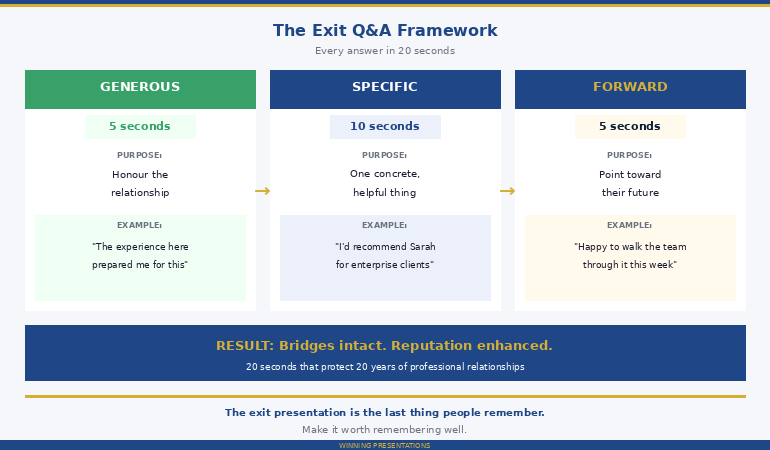
Quick answer: Your exit interview answers follow you for years — through reference calls, industry networks, and the colleagues who become future hiring managers. A former colleague sent me a recording of her transition handover to the leadership team after resigning from a large listed company. The slides were fine. Then the Q&A started. Four questions from the senior team. Four exit interview answers that left the room colder than when she’d walked in. I’ve broken down each answer below — the exact words used, what the panel actually heard, and the rewritten version that would have preserved eight years of professional capital. Each fix follows a 20-second framework called Generous-Specific-Forward. If you have an exit interview coming up, read these four answers before you walk in.

Early in my banking career, I sat in on the worst exit interview I’ve ever witnessed. Senior VP. Fourteen years at the firm. Respected by everyone in the division. She used her final leadership handover to settle scores — subtly, professionally, but unmistakably. By the time she finished, the room was silent. Not the respectful silence of a good ending. The silence of people recalibrating everything they’d ever thought about her.

She’d spent fourteen years building a reputation. She spent twenty minutes dismantling it. Two years later, when she needed a reference for a board position, three of the five people she asked said no. Not because of her work. Because of how she left.

The exit interview is the most dangerous Q&A session of your career — because the consequences don’t land until months or years after you’ve left the building.

The Setup: Why Exit Presentations Are the Hardest Q&A

Before I break down the four answers, here’s what makes exit Q&A uniquely treacherous. In every other presentation, you’re asking for something — budget, approval, alignment. In an exit interview, you have nothing left to ask for. Which means the instinct to “be honest” has no natural brake.

My former colleague — I’ll call her Susan — had resigned to take a bigger role at a competitor. She was well-liked. The handover was genuinely well-prepared. But she walked into that room carrying eight years of accumulated frustrations that she’d never voiced, and the Q&A gave her a stage to voice them.

Details have been changed to protect identities. The question types, answer structures, and panel dynamics are drawn from real situations I’ve coached through — the patterns are real.

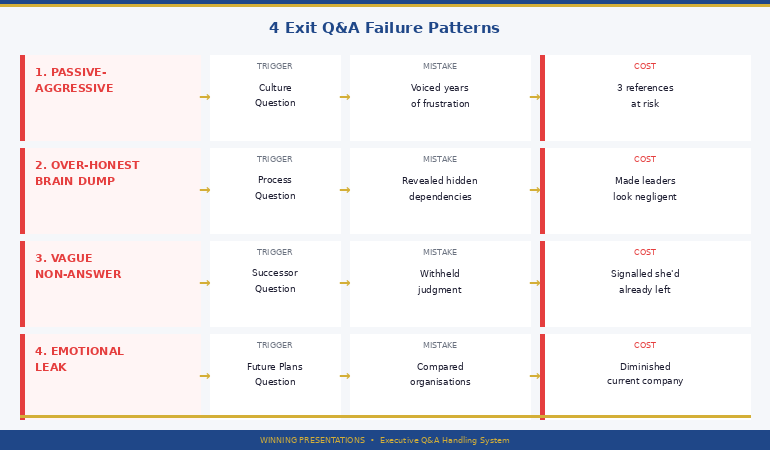
The leadership team asked four questions. Not hostile questions. Normal, reasonable questions that every departing senior professional gets asked. Susan answered all four from her emotional state rather than her professional judgment — and each answer cost her something she couldn’t get back. These are the same patterns I see in every executive presentation Q&A failure, amplified by the fact that there’s no follow-up meeting to fix the damage.

The Q&A That Decides Your Professional Legacy

The Executive Q&A Handling System gives you the response structures, question mapping templates, and recovery scripts for every high-stakes Q&A scenario — including transitions, handovers, and exit interviews where the wrong answer follows you for years. Built from real corporate situations where what you say after the slides decides everything.

Get the Executive Q&A Handling System → £39

Instant download. Built from 24 years in corporate banking where how you left a room mattered as much as how you entered it.

Answer #1: The Passive-Aggressive Goodbye (Culture Question)

The question:

“Susan, is there anything about how we work that you think we should change?”

What she said (before):

“Honestly? The biggest thing is decision speed. We talk about being agile but it takes three months to approve anything significant. I’ve raised this multiple times and it’s always ‘we’re working on it.’ The other thing is the way feedback works here — or doesn’t work, really. People are too polite to say what they actually think, so nothing changes. I think there’s a real gap between what leadership says they want and what actually happens on the ground.”

Duration: 34 seconds.

What the panel heard:

“I’ve been resentful for years and I’m finally telling you.” Every word Susan said was arguably true. Decision speed was slow. Feedback culture was poor. But the tone — the accumulated frustration bleeding through the word “honestly?” at the start, the “or doesn’t work, really” aside, the veiled accusation of leadership hypocrisy — turned valid observations into a personal indictment. The room shifted. Two directors who’d been her advocates for years visibly pulled back. She wasn’t leaving — she was departing. There’s a difference.

What she should have said (after):

“One thing I think would make a real difference is streamlining the approval process for mid-size initiatives — the £500K to £2M range. The scrutiny is right for larger programmes, but the same process applied to smaller ones slows down teams that are ready to execute. I’d suggest looking at a tiered approval structure. The talent and ambition are here — that’s why I stayed eight years. Removing some of the friction would let people move faster on the ideas that are already strong.”

Duration: 22 seconds.

Same core observation. Completely different impact. The rewrite does four things: names a specific, fixable problem (not a cultural indictment), suggests a concrete solution (tiered approvals), reaffirms her respect for the organisation (“that’s why I stayed eight years”), and frames the change as unlocking existing strengths rather than fixing brokenness. Nobody left that answer feeling attacked. And Susan’s reputation as someone with good judgment — even on the way out — would have been reinforced rather than damaged.


Before and after comparison of exit presentation culture question showing passive-aggressive answer versus constructive recommendation with panel impact

PAA: What should you say in an exit interview when asked about company culture?
Focus on one specific, fixable thing — not a list of grievances. The structure that works: name the issue without blame, suggest a concrete fix, and reaffirm something genuine about the organisation. The moment your answer sounds like a list of complaints, the room stops hearing the content and starts re-evaluating you. You’re not there to fix the company. You’re there to leave it well.

Answer #2: The Over-Honest Brain Dump (Process Question)

The question:

“Are there any process gaps the team should know about as they take over your workstreams?”

What she said (before):

“Quite a few, actually. The reporting process for the quarterly client reviews is basically held together with manual workarounds because the system migration was never finished properly. And the vendor management — I’ve been handling three supplier relationships that technically sit outside my role because nobody else picked them up when James left. Plus the risk framework for the new product line hasn’t been formally documented because we ran out of time before the launch. I’ve been managing it on spreadsheets.”

Duration: 38 seconds.

What the panel heard:

“I’ve been propping up a broken system single-handedly, and now you’ll see how much you needed me.” This is the most common exit interview mistake for high performers — the instinct to reveal everything that was secretly difficult. Susan thought she was being helpful. What the room heard was: (a) critical processes are undocumented, (b) vendor relationships are unassigned, and (c) the new product risk framework lives on one person’s spreadsheets. Each revelation made the leadership team look negligent for not knowing. Nobody thanks you for making them look bad in front of their peers.

I see this pattern constantly in difficult Q&A situations — the presenter confuses thoroughness with helpfulness.

What she should have said (after):

“I’ve documented the three priority handover items in the transition pack I shared on Monday — the quarterly client review process, the vendor relationships, and the new product risk tracking. Each one has a recommended owner and a timeline for transition. I’d suggest the team walks through the pack this week so we can use my remaining time to address any gaps. The foundations are solid — it’s mainly about making sure the institutional knowledge transfers cleanly.”

Duration: 20 seconds.

The rewrite takes the same information and frames it as prepared, documented, and solvable — rather than as a dramatic reveal of hidden fragility. “I’ve documented” signals competence. “Recommended owner and timeline” signals responsibility. “The foundations are solid” signals confidence in the team she’s leaving behind. Susan leaves looking like a professional who prepared properly, not a martyr who finally told the truth.

📋 The Q&A Handling System includes question mapping templates for exactly these scenarios — transitions, handovers, and exit interviews.

Plus the response frameworks that keep you generous rather than resentful when the pressure is on.

Get the Executive Q&A Handling System → £39

Prepare the Answers Before the Questions Land

Exit presentations have a unique Q&A dynamic: every answer becomes permanent. There’s no follow-up meeting to correct the record. The Executive Q&A Handling System gives you question mapping by situation type, the Generous-Specific-Forward response structure, and recovery scripts for the moments when emotion threatens to override judgment.

Get the Executive Q&A Handling System → £39

Instant download. Question mapping templates + response frameworks + recovery scripts. Built from 24 years in corporate banking where departures were remembered longer than arrivals.

Answer #3: The Vague Non-Answer (Successor Question)

The question:

“Do you have a view on who should take over the client portfolio?”

What she said (before):

“I think there are a few people who could do it. It depends on how the team wants to restructure. I don’t want to overstep by making recommendations about roles when I’m leaving.”

Duration: 10 seconds.

What the panel heard:

“I either don’t care enough to have an opinion, or I have an opinion I’m withholding.” This is the opposite mistake from Answer #2 — where Susan over-shared, here she under-shared. The panel asked a direct question seeking her institutional knowledge. She had eight years of working with these people. Her view on succession was genuinely valuable. By dodging with “I don’t want to overstep,” she sent two damaging signals: that she’d already mentally left, and that her loyalty to the team didn’t extend to helping them navigate the transition.

What she should have said (after):

“Based on eight years working with this team, I’d recommend Sarah for the enterprise clients — she already has strong relationships with three of the five accounts, and the clients trust her judgment. For the mid-market portfolio, David has the operational depth but would benefit from a month of shadowing on the strategic accounts first. I’ve written a one-page transition brief for each client that covers relationship dynamics, current priorities, and upcoming decision points. Happy to walk either of them through it this week.”

Duration: 24 seconds.

This answer is generous, specific, and forward-looking. It names the people, explains why, acknowledges development needs honestly, and offers a concrete resource (the transition briefs). Susan leaves looking like someone whose judgment the team will miss — which is exactly the legacy you want.


Four exit Q&A failure patterns showing passive-aggressive versus over-honest versus vague versus emotional with reputation impact for each

Answer #4: The Emotional Leak (Future Plans Question)

The question:

“Can you tell us about what you’ll be doing next?”

What she said (before):

“I’m going to be heading up the European portfolio at [Competitor]. It’s a bigger role with more autonomy, which is something I’ve been wanting for a while. I’m really excited about it — their approach to client development is much more progressive and they’re investing heavily in the areas I care about. It feels like the right time for a fresh start.”

Duration: 22 seconds.

What the panel heard:

“You weren’t enough for me, and the competitor is better.” Every phrase was a comparison that diminished the current organisation. “Bigger role with more autonomy” implies the current role was too small. “Something I’ve been wanting for a while” reveals long-standing dissatisfaction. “Much more progressive” directly compares — and the current company loses. “Fresh start” implies the existing environment was stale. Susan was answering honestly. She was also, unintentionally, telling a room of senior leaders that their company wasn’t good enough. These are people she’ll need references from. People who’ll be asked about her in industry conversations for the next decade.

What she should have said (after):

“I’ll be leading the European client portfolio at [Company]. I’m looking forward to it — though I’ll genuinely miss this team and the work we’ve done together. The experience I’ve had here over eight years is what prepared me for a role like this. I’m grateful for that, and I hope the relationships we’ve built continue beyond my time here.”

Duration: 16 seconds.

No comparisons. No implications. The answer states the fact (new role), expresses genuine warmth (miss the team), credits the current organisation (prepared me for this), and keeps the door open (relationships continue). Susan leaves with every bridge intact — and a room full of people who’ll speak well of her for years.

PAA: How do you answer “why are you leaving?” in a professional setting?
State the opportunity without comparing it to the current role. The structure: name the new role briefly, express genuine appreciation for the current team, credit the organisation for your development, and express a desire to maintain the relationship. What to avoid: any sentence that implies the current company is inferior, any phrase that reveals long-standing frustration, and any comparison — even a positive one — between the old and the new. The question is a social ritual, not a request for honest feedback.

📋 The Q&A Handling System includes question mapping for transition scenarios and the “emotional override” recovery scripts.

When emotion wants to hijack your answer, you need a structure that redirects it.

Get the Executive Q&A Handling System → £39

The Pattern: All 4 Answers Made the Same Mistake

When I watched Susan’s recording the second time, the pattern was unmistakable. Every answer treated the exit interview as a confessional instead of a professional performance.

The culture question? She used it to voice years of frustration. But the question was an invitation to be constructive — not cathartic.

The process question? She used it to reveal how much she’d been doing alone. But the question was asking for a clean handover — not a dramatic reveal of hidden dependencies.

The successor question? She dodged because she’d already mentally left. But the question was asking for her judgment — the most valuable thing she had left to give.

The future plans question? She used it to validate her decision to leave. But the question was a social grace — not a request for a comparative review.

This is the fundamental exit interview trap: every question feels like permission to finally be honest, but what the room needs is for you to be generous. Honesty serves you. Generosity serves the relationships you’ll need for the next twenty years. I’ve written about this dynamic in the context of how Q&A failures create lasting damage — the exit version is worse because there’s no second chance.

PAA: How do you prepare for exit interview answers?
Write down the five questions you’ll definitely be asked: why are you leaving, what should we change, what are the risks in the handover, who should take over, and what’s your advice for the team. For each one, write a 20-second answer using the Generous-Specific-Forward framework. Then read each answer out loud and ask: “If someone quoted this back to me in two years, would I be proud of it?” If the answer is no, rewrite it. Your exit interview is the last thing people remember. Make it worth remembering well.


The Generous Specific Forward exit Q&A framework showing three-step response structure with timing and examples for each step

The Exit Q&A Framework: Generous, Specific, Forward

Every exit Q&A answer should follow the same three-part structure:

Generous (5 seconds): Start with something that honours the relationship, the team, or the organisation. Not sycophantic — genuine. “The experience here prepared me for this.” “This team has exceptional people.” “Eight years taught me what good looks like.”

Specific (10 seconds): Answer the actual question with one concrete, helpful observation. Not a list. Not a speech. One useful thing. “I’d recommend Sarah for the enterprise accounts because she already has the client relationships.” “The approval process for mid-size initiatives could be streamlined with a tiered model.”

Forward (5 seconds): Point toward the future — theirs, not yours. “I’ve documented this in the transition pack.” “Happy to walk the team through it this week.” “The talent here is strong enough to handle this.”

Twenty seconds. Generous, Specific, Forward. Every answer preserves the relationship, provides genuine value, and leaves the room feeling good about you — not relieved that you’re leaving.

The biggest mistake professionals make in exit interviews isn’t saying something wrong. It’s confusing their last meeting with their last chance to be heard. Those are two very different things.

Every High-Stakes Q&A Has a Structure. Learn It Once.

The Executive Q&A Handling System covers transitions, exits, budget approvals, board presentations, and hostile question scenarios. Question mapping templates by stakeholder type, the 3-part executive response structure, “I don’t know” recovery scripts, and defensive-to-directive answer rewrites. One system for every Q&A situation in your career.

Get the Executive Q&A Handling System → £39

Instant download. Built from 24 years in corporate banking and consulting environments where how you left a role shaped how people talked about you for years afterwards.

Frequently Asked Questions

How long should exit interview answers be?

Keep the slides to 15-20 minutes maximum. The handover detail should live in a separate transition document that the team can reference after you’ve gone. Your presentation should cover three things only: current status of key workstreams, recommended priorities for the next 90 days, and specific successor recommendations. Everything else goes in the written pack. The shorter your slides, the more time for Q&A — and Q&A is where the real value (and the real danger) lives.

Should I be honest about why I’m leaving in the exit interview?

Be honest in your exit interview with HR — that’s what it’s for. In the handover meeting with the leadership team, be generous rather than honest. The distinction matters: honest feedback about systemic problems is genuinely useful in a confidential HR conversation. The same feedback in a group setting, delivered by someone on their way out, reads as bitterness regardless of how it’s phrased. Protect the relationships. Give the feedback where it can be heard without an audience.

What if someone directly asks me to criticise the organisation during my exit interview?

Redirect to specifics rather than generalities. “If I could change one thing, it would be [specific, fixable process issue] — and here’s how I’d suggest approaching it.” This gives them something actionable without becoming a grievance session. If pressed further, the professional response is: “I think the most useful thing I can do is leave a detailed transition document and make myself available for questions during the notice period. That’s where my honesty is most valuable.” This acknowledges the request without taking the bait.

📬 The Winning Edge Newsletter

Weekly strategies for executive presentations, Q&A preparation, and career-critical communication. No fluff.

Subscribe free →

Related: Exit presentations amplify the internal voice that says “everyone is judging me.” If that thought loop is familiar — in exits, board meetings, or any high-stakes setting — the strategies in breaking the audience judgment anxiety loop directly complement the structural framework in this article.

Four answers. Twenty minutes. Eight years of professional capital. Susan’s slides were fine. Her Q&A rewrote everything the room thought about her. Map your exit questions before the meeting. Write 20-second answers using Generous, Specific, Forward. Read them out loud. And when the question lands, answer from generosity — not from the eight years of frustration that finally has a stage.

📋 Get the question mapping templates + response frameworks + recovery scripts.

Get the Executive Q&A Handling System → £39

Optional bundle: If you present regularly and want slides, Q&A, confidence, storytelling, and delivery in one package — The Complete Presenter (£99) includes all seven Winning Presentations products. Save over 50%.

About the Author

Mary Beth Hazeldine is the Owner & Managing Director of Winning Presentations. With 24 years of corporate banking experience at JPMorgan Chase, PwC, Royal Bank of Scotland, and Commerzbank, she’s watched dozens of senior professionals destroy years of professional capital in a single exit interview — and coached many more to leave with their reputation not just intact, but enhanced.

She now helps executives prepare for every high-stakes Q&A scenario, from budget approvals to board presentations to the career-defining moments when how you answer matters more than what you present.

Book a discovery call | View services

17 Feb 2026
Split-screen of executive in boardroom — left side stressed with hand on forehead, right side composed and confident with glasses, warm golden lighting

I Audited a Real Q&A Disaster: 3 Answers That Killed a £2M Budget

The slides were good. The Q&A destroyed everything in four minutes.

Quick answer: A client sent me the recording of a budget approval meeting that went wrong. The presentation was solid — clear structure, clean slides, strong recommendation. Then three questions landed during Q&A, and all three answers made the same fundamental mistake: they defended instead of directing. I’ve broken down each answer below — the exact words used, what the panel heard, and the rewritten version that would have saved the decision. If you’ve ever walked out of a meeting thinking “the presentation went well but something went wrong at the end,” this audit will show you exactly what happened.

Last October, a senior programme manager I’d been coaching sent me a Teams recording with one message: “What happened?”

He’d presented a £2.1M infrastructure modernisation programme to the investment committee. Eight stakeholders. Forty-minute slot. He’d spent three weeks building the deck — and it was genuinely good. Clear problem statement, credible solution, phased implementation, realistic ROI projections. He delivered it with confidence. The room was engaged.

Then Q&A started. Three questions. Three answers. The committee chair said, “Let’s table this and reconvene when the team has had more time to think through the details.” The project was delayed five months. By the time he got back in the room, half the budget had been reallocated to a different initiative. I watched the recording three times. The problem wasn’t what he knew — it was how he answered.

The Setup: What Happened in the Room

Before I break down each answer, here’s what the panel was thinking. They’d just watched a competent 25-minute presentation. They understood the problem. They understood the proposed solution. They were leaning toward approval — I could see it in the body language. Nodding. Eye contact with each other. One member was already looking at the implementation timeline slide.

Then the committee chair asked the first question. And from that point, the energy in the room changed completely in under four minutes.

I’ve anonymised the details, but the question types, the answer structures, and the panel dynamics are exactly as they happened. These are the three most common Q&A failure patterns I see in executive presentation Q&A — and they’re all fixable.

Stop Losing Decisions in Q&A

The Executive Q&A Handling System gives you the preparation framework, response structures, and recovery scripts for the part of your presentation that actually decides outcomes. Question mapping templates, the 3-part executive response structure, and hostile question deflection techniques — built from real boardroom situations.

Get the Executive Q&A Handling System → £39

Instant download. Built from 24 years in corporate banking environments where Q&A was where every decision was actually made.

Answer #1: The Two-Minute Ramble (Cost Question)

The question:

“The implementation costs seem front-loaded. What’s driving that?”

What he said (before):

“Yeah, so the front-loading is because we need to procure the hardware in Q1 before the vendor pricing changes in April. And there’s also the licensing costs which are annual so they hit in year one. Plus we need to bring in two contractors for the migration phase because the internal team doesn’t have the capacity, and we looked at whether we could phase that differently but the dependencies mean the migration has to happen before we can start the optimisation workstream. We did model a scenario where we spread it over two years but the total cost actually increases by about 15% because of the vendor pricing changes and the contractor day rates going up. So it’s actually more cost-effective to front-load even though it looks like a bigger commitment upfront. I can share the detailed cost model if that would help.”

Duration: 1 minute 48 seconds.

What the panel heard:

Noise. They stopped listening after twenty seconds. The chair asked a simple “what’s driving the front-loading?” question — she wanted a headline, not a dissertation. By the time he got to the useful part (15% cheaper to front-load), the panel had already checked out. The “I can share the detailed cost model” at the end sounded like an admission that he hadn’t presented the full picture. It created doubt where none existed before.

What he should have said (after):

“Two things drive the front-loading: hardware procurement before April pricing changes, and annual licensing that hits in year one. We modelled a two-year spread — it costs 15% more. Front-loading is the cheaper option.”

Duration: 12 seconds.

Same information. One-tenth of the time. The panel gets the headline (it’s cheaper this way), the reason (two specific factors), and the proof (we modelled the alternative). No rambling. No defensive over-explaining. No invitation to question the completeness of his analysis.


Before and after comparison of cost question answer showing two-minute ramble versus twelve-second executive response with structure breakdown

PAA: Why do executives give long rambling answers in Q&A?
The instinct when challenged is to prove you know your material — so you give every detail, every caveat, every alternative you considered. This is the opposite of what senior decision-makers want. They asked a question to test whether you can identify what matters, not whether you can recite everything you know. Long answers signal that you can’t prioritise information under pressure — which is exactly the skill the panel is evaluating. The fix: answer the question in 15 seconds or fewer using the Headline → Reason → Proof structure, then stop talking.

Answer #2: The Defensive Pivot (Risk Question)

The question:

“What happens to the business if the migration takes longer than projected?”

What he said (before):

“I don’t think it will take longer than projected because we’ve built in a 20% buffer on each phase. And we’ve already done a proof of concept that validated the timeline. The vendor has also confirmed they can meet the delivery schedule. So I’m fairly confident in the projections we’ve presented.”

Duration: 28 seconds.

What the panel heard:

“I haven’t thought about what happens if I’m wrong.” The committee member asked what happens if — a contingency question. He answered why it won’t happen — a confidence statement. These are two completely different things. The question was testing his risk awareness. His answer demonstrated risk blindness. The panel exchanged a glance. I could see it on the recording. That glance said: “He doesn’t know what he doesn’t know.”

This is the most dangerous Q&A mistake I see in executive settings, and it’s the one I coach most frequently in the difficult questions framework. The question isn’t an attack — it’s an invitation to show you’ve thought about failure scenarios.

What he should have said (after):

“If the migration overruns, the main business impact is a 4-6 week delay to the optimisation phase. We mitigate that with a parallel workstream that keeps the existing system operational until cutover is complete. The 20% buffer on each phase is designed to absorb a typical overrun without triggering the contingency. But if we exceed the buffer, the fallback is to phase the migration by business unit rather than doing a full cutover — slower, but zero business disruption.”

Duration: 22 seconds.

This answer does four things the original didn’t: names the specific business impact (4-6 week delay), shows the primary mitigation (parallel workstream), acknowledges the buffer, and provides a concrete fallback plan. It says: “I’ve thought about what happens when things go wrong, and I have a plan.” That’s what the panel wanted to hear.

📋 The Q&A Handling System includes question mapping templates that help you predict exactly these questions before the meeting.

Plus the 3-part executive response structure so you never default to defensive rambling again.

Get the Executive Q&A Handling System → £39

Prepare the Answers Before the Questions Land

The Executive Q&A Handling System includes question mapping by stakeholder type, the Headline → Reason → Proof response framework, “I don’t know” recovery scripts, and hostile question deflection techniques. Stop improvising under pressure.

Get the Executive Q&A Handling System → £39

Instant download. Question mapping templates + response frameworks + recovery scripts. Built from 24 years in corporate banking environments.

Answer #3: The “I’ll Get Back to You” (Timeline Question)

The question:

“Can this be done in two phases instead of three?”

What he said (before):

“That’s a good question. I’d need to go back and look at the dependencies to see if we could compress the timeline. Let me come back to you on that.”

Duration: 8 seconds.

What the panel heard:

“I haven’t thought about alternative approaches to my own proposal.” This was the answer that killed the decision. Not because the question was hard — it was a perfectly reasonable question about phasing. But “I’ll get back to you” on a question about your own programme’s structure tells the committee you’re presenting a plan you haven’t stress-tested. If you can’t tell them whether your three phases could be compressed to two, you haven’t modelled the alternatives. And if you haven’t modelled the alternatives, how confident should they be in the plan you’re presenting?

The committee chair’s response — “Let’s table this and reconvene” — was the direct consequence. She needed to know the team had thought through the options. This answer told her they hadn’t. I’ve written about this pattern in the context of how Q&A failures lose deals — the “reconvene” is almost always permanent.

Before and after comparison of cost question answer showing two-minute ramble versus twelve-second executive response with structure breakdown

What he should have said (after):

“We looked at a two-phase model. It’s possible, but it compresses the migration and optimisation into a single phase, which increases the operational risk during cutover. Three phases keeps each phase focused on one objective: procure, migrate, optimise. My recommendation is three phases, but if the committee prefers a faster timeline, I can present the two-phase model with the risk trade-offs at our next session.”

Duration: 18 seconds.

This answer shows he considered the alternative, explains why he chose differently, names the specific trade-off (operational risk), maintains his recommendation, AND offers a concrete next step if the committee disagrees. It says: “I’ve thought about this. I have a view. And I’m flexible if you want to go a different direction.” That’s executive-level communication.

PAA: What do you do when you don’t know the answer in a presentation Q&A?
Never bluff, but never say just “I’ll get back to you” either. The recovery structure is: acknowledge what you do know, name the specific thing you need to verify, and commit to a concrete timeframe. For example: “The two-phase model is possible — I know the dependency structure supports it. What I’d need to confirm is the risk impact on the migration window. I can have that analysis to you by Thursday.” This shows competence (you know the landscape), honesty (you’re not guessing), and reliability (you’re committing to a deadline).

📋 The Q&A Handling System includes “I don’t know” recovery scripts for exactly these moments.

Plus hostile question deflection and the question mapping system that prevents most surprises from happening in the first place.

Get the Executive Q&A Handling System → £39

The Pattern: Why All 3 Answers Failed the Same Way

When I watched the recording the third time, the pattern was obvious. All three answers shared the same structural failure: he answered the question he was afraid of, not the question he was asked.

The cost question? He was afraid the panel thought the costs were too high. So he explained everything about costs. But the question was specifically about front-loading — not about the total amount.

The risk question? He was afraid the panel thought the timeline was unrealistic. So he defended the timeline. But the question was about contingency — not about whether the timeline was achievable.

The phasing question? He was afraid he’d look stupid if he didn’t have a perfect answer. So he said “I’ll get back to you.” But the question was about flexibility — not about perfection.

This is the single most common Q&A failure pattern in executive settings: the presenter hears the surface question, but responds to the emotional threat underneath it. And the answer to the emotional threat is always worse than the answer to the actual question — because it’s defensive, unfocused, and reveals anxiety rather than competence.

PAA: How do you prepare for tough questions in an executive presentation?
The most effective preparation method is Question Mapping: before the meeting, list the 5-10 most likely questions by stakeholder type and category (cost, risk, timeline, priorities, capability, credibility). For each question, write a 15-second answer using the Headline → Reason → Proof structure. Practise saying the answers out loud — not reading them, saying them. The goal is to build a mental index so that when the question lands, your brain retrieves a structured response rather than improvising under pressure.


The 15-second answer framework showing three steps: Headline in three seconds, Reason in five seconds, Proof in five seconds, then stop talking

The 15-Second Answer Framework

Every Q&A answer in an executive setting should follow the same structure:

Headline (3 seconds): State your answer in one sentence. “Front-loading is the cheaper option.” “The main business impact is a 4-6 week delay.” “We looked at two phases — three is lower risk.”

Reason (5 seconds): Give one or two specific reasons. Not five. Not a list. One or two concrete factors that support your headline.

Proof (5 seconds): One piece of evidence. A number, a comparison, a modelled scenario. Something concrete that closes the loop.

Then stop talking.

Fifteen seconds. If the panel wants more, they’ll ask a follow-up. If they don’t, you’ve answered cleanly and the meeting moves forward. The biggest mistake presenters make in Q&A isn’t giving wrong answers — it’s giving right answers that take too long to land.

Turn Q&A From Your Biggest Risk Into Your Strongest Asset

The Executive Q&A Handling System includes question mapping templates organised by stakeholder type, the Headline → Reason → Proof response framework, “I don’t know” recovery scripts, defensive-to-directive answer rewrites, and hostile question deflection techniques. Everything you need to walk into Q&A prepared.

Get the Executive Q&A Handling System → £39

Instant download. Built from 24 years in corporate banking and consulting environments where Q&A decided most major budgets, deals, and approvals.

Frequently Asked Questions

How much time should I spend preparing for Q&A versus preparing slides?

For high-stakes executive presentations, aim for a 50/50 split. If you spend three days on slides, spend three days on Q&A preparation. That means: mapping the likely questions by stakeholder, writing 15-second answers for each, and practising them out loud. Most presenters spend 90% on slides and 10% on Q&A — which is why Q&A is where most decisions fall apart. The slides are the easy part. You control the narrative. Q&A is where the panel tests whether your confidence comes from deep understanding or surface preparation.

What if the committee asks a question I genuinely haven’t thought about?

Use the recovery structure: acknowledge what you do know (“The two-phase model is possible — I know the dependency structure supports it”), name the specific gap (“What I’d need to confirm is the risk impact on the migration window”), and commit to a concrete deadline (“I can have that analysis to you by Thursday”). This shows competence, honesty, and reliability. What kills credibility is either bluffing (the panel can always tell) or a vague “I’ll get back to you” with no specifics and no timeframe.

Is it ever appropriate to push back on a question from a senior stakeholder?

Yes — if you do it by redirecting rather than resisting. “That’s an important consideration. The reason we chose three phases over two is [specific reason]. If the committee wants to explore the two-phase option, I can present the trade-offs at our next session.” This acknowledges their authority, restates your position with evidence, and offers a path forward. What doesn’t work: defending your position emotionally, dismissing the question, or capitulating immediately without explaining your reasoning.

📬 The Winning Edge Newsletter

Weekly strategies for executive presentations, Q&A preparation, and career-critical communication. No fluff.

Subscribe free →

Related: Q&A anxiety often has a physical dimension too. If your hands shake, your voice trembles, or your heart races before presenting, the preparation techniques in this article work alongside the physiological management strategies in severe hand shaking during presentations.

Three answers. Four minutes. A £2.1M budget that should have been approved. The slides were never the problem — the Q&A preparation was. Map your questions before the meeting. Write 15-second answers. Practise saying them out loud. And when the question lands, answer the question you were asked — not the one you’re afraid of.

📋 Get the question mapping templates + response frameworks + recovery scripts.

Get the Executive Q&A Handling System → £39

Optional bundle: If you present regularly and want slides, Q&A, confidence, storytelling, and delivery in one package — The Complete Presenter (£99) includes all seven Winning Presentations products plus three bundle-only bonuses.

About the Author

Mary Beth Hazeldine is the Owner & Managing Director of Winning Presentations. With 24 years of corporate banking experience at JPMorgan Chase, PwC, Royal Bank of Scotland, and Commerzbank, she spent most of those years in rooms where Q&A decided whether budgets got approved, deals got funded, and careers advanced.

She now helps executives prepare for the part of their presentation that actually determines outcomes — the questions that come after the slides.

Book a discovery call | View services

17 Feb 2026
(1200×675)Professional's hand gripping the edge of a podium during a presentation, knuckles visible, warm golden stage lighting in background

Severe Hand Shaking During Presentations: What’s Actually Happening (And What Works)

She was holding a single sheet of A4 paper. The entire room could see it vibrating.

Quick answer: Severe hand shaking during presentations — the kind where you can’t hold a clicker, turn a page, or point at a slide without the whole room noticing — is not ordinary nervousness. It’s a full sympathetic nervous system overload: your body has flooded with adrenaline and your fine motor control has been temporarily disabled. The standard advice to “just relax” or “breathe deeply” doesn’t work at this severity level because the shaking is happening below conscious control. What does work is a three-part protocol that targets the physiological chain: cool the hands (vasoconstriction reset), engage the large muscles (burn off the adrenaline), and switch to gross motor actions (eliminate tasks requiring fine motor control). This article covers each step.

I know what severe hand shaking feels like because I lived it for five years. Not a mild tremor that nobody notices. The kind where I couldn’t hold my notes without the paper rattling against the microphone. The kind where I pressed my hands flat on the table to hide it and prayed nobody asked me to point at anything on a slide.

At Commerzbank, I once had to present a credit risk analysis to a room of twenty senior bankers. By slide three my hands were shaking so visibly that I put the clicker down on the table and started advancing slides by reaching over and pressing the laptop keyboard. I told myself it was a “style choice.” Everyone in the room knew it wasn’t. That moment — the shame of it — is what eventually drove me to train as a clinical hypnotherapist and solve this problem properly.

Why Severe Shaking Is Different From Normal Nerves

Most people experience some level of nervous energy before presenting. Mild hand tremor, slightly elevated heart rate, a bit of restlessness. That’s your sympathetic nervous system preparing you for performance — it’s functional and it usually settles within the first thirty seconds of speaking.

Severe shaking is a different physiological event. When your body perceives the presentation as a genuine threat — not a performance opportunity but a survival situation — it triggers a full fight-or-flight response. Adrenaline floods your bloodstream. Blood is redirected from your extremities (hands, fingers) to your large muscles (legs, core). Your fine motor control shuts down because your body is preparing to run or fight, not to hold a clicker or turn a page.

This is why the shaking feels uncontrollable — because it is. You cannot consciously override a sympathetic nervous system response with willpower. Telling yourself to “stop shaking” is like telling yourself to stop sweating. The instruction goes to the wrong part of your brain. The shaking is being controlled by your autonomic nervous system, which doesn’t take orders from your conscious mind.

The key insight: you can’t stop severe shaking by thinking about it. You stop it by changing the physiological conditions that caused it. That’s what the protocol below does — it targets the body, not the mind. If you’re experiencing other nervous system responses to presentation trauma, the same principle applies: address the physiology first.

PAA: Why do my hands shake so badly when presenting?
Severe hand shaking during presentations is caused by a full sympathetic nervous system activation — a fight-or-flight response that floods your body with adrenaline and redirects blood away from your extremities. Your fine motor control shuts down because your body is preparing for physical action, not precise hand movements. This is different from mild nervousness and cannot be controlled through willpower alone. Effective management requires targeting the physiological chain: cooling the hands, engaging large muscles to burn off adrenaline, and eliminating tasks that require fine motor control during the presentation.

Get the Physical Symptoms Under Control — Before Your Next Presentation

Calm Under Pressure is a programme designed specifically for the physical symptoms of presentation anxiety — hand shaking, racing heart, shallow breathing, nausea. It works on the nervous system directly, not just the mindset. Created by a qualified clinical hypnotherapist who spent five years dealing with severe presentation shaking firsthand.

Get Calm Under Pressure → £19.99

Instant download. Techniques you can use the night before or morning of any presentation. Built from clinical hypnotherapy training + personal experience with severe presentation anxiety.

The 3-Step Protocol (Before You Present)

This protocol works best when applied 10–20 minutes before you’re due to present. It targets the three physiological mechanisms that cause severe shaking. (This is educational, not medical advice. If your hands shake outside of presentation situations — at rest, during meals, or in daily tasks — consult a clinician to rule out other causes.)

Step 1: Cool the hands (2 minutes). Run your wrists and the backs of your hands under cold water for 60–90 seconds. If no sink is available, hold a cold drink can or a bottle of cold water against your inner wrists. This triggers a vasoconstriction response — your blood vessels narrow slightly, reducing the tremor amplitude. It also activates your mammalian dive reflex, which nudges your nervous system toward parasympathetic (calming) mode. This is not a placebo effect — it’s a recognised physiological response that many professionals find effective.

Step 2: Engage the large muscles (3 minutes). Find somewhere private — a toilet cubicle, a stairwell, an empty corridor. Do wall push-ups (15–20), or press your palms together as hard as you can for 10-second holds (repeat 5 times), or squeeze your thighs by sitting and pressing your knees together hard. The goal is to burn off the excess adrenaline that’s causing the tremor. Adrenaline was designed to fuel large muscle action. When you give it large muscles to work with, the surplus gets metabolised and the fine motor tremor reduces. This is the single most effective intervention for severe shaking.

Step 3: Slow exhale breathing (2 minutes). Breathe in for 4 counts. Breathe out for 8 counts. Repeat 6 times. The extended exhale activates the vagus nerve, which is the main brake pedal on your sympathetic nervous system. Standard “deep breathing” advice (breathe in deeply!) actually makes anxiety worse because it over-oxygenates your blood. The key is the long exhale, not the deep inhale. Four in, eight out. Six rounds. That’s all.


Three-step pre-presentation protocol showing cool hands then engage large muscles then slow exhale breathing with time estimates

The order matters. Cool first (reduce blood flow to trembling extremities), muscle engagement second (burn off adrenaline), breathing third (activate the calming brake). If you skip to breathing without doing steps 1 and 2, the adrenaline is still circulating and the breathing alone won’t be enough for severe shaking.

For milder shaking, the 30-second nervous system reset may be sufficient. But if your shaking is severe enough that you can’t hold a clicker or turn a page, you need the full three-step protocol.

🎧 Want a guided version of this protocol you can use before any presentation?

Calm Under Pressure is an programme that walks you through the nervous system reset — designed for severe physical symptoms, not just general nerves.

Get Calm Under Pressure → £19.99

What to Do If You’re Already Shaking Mid-Presentation

Sometimes the shaking starts after you’ve begun presenting. You’re two slides in, you reach for your water glass, and you see your hand trembling. Panic compounds the problem — the awareness of shaking triggers more adrenaline, which triggers more shaking. Here’s how to interrupt the cycle:

Put everything down. Clicker on the table. Notes on the lectern. Water glass back down. Don’t try to hold anything while your hands are shaking — it makes the tremor more visible, not less. Resting your hands on the table or the sides of the lectern is completely natural and nobody will question it.

Press your fingertips together. Bring both hands together in front of you with fingertips touching (like a steeple). Press firmly for 5 seconds. This engages the small muscles in your hands isometrically, which temporarily reduces the visible tremor. It also looks deliberate and thoughtful — nobody reads steepled hands as nervousness.

Speak more slowly. When adrenaline surges, your speech speeds up, which speeds up your breathing, which increases the shaking. Deliberately slowing your speech by 20% creates a feedback loop in the opposite direction: slower speech → slower breathing → calming signal to the nervous system → reduced tremor. You will feel like you’re speaking absurdly slowly. You’re not. You’re speaking at normal pace for the first time.

Use anchor gestures. Instead of pointing at slides (which requires fine motor precision and makes tremor visible), use broad palm-up gestures or hold one hand steady on the table while gesturing with the other. Anchor one hand and free the other. This halves the visible tremor and gives your body a stable reference point.

PAA: How do I stop my hands shaking during a presentation?
If you’re already shaking mid-presentation, put everything down (clicker, notes, water), press your fingertips together in a steeple for 5 seconds (isometric engagement reduces visible tremor), slow your speech by 20% (creates a calming feedback loop), and use anchor gestures (one hand steady on the table, gesture with the other). The key is to stop trying to hide the shaking — which makes it worse — and instead switch to positions and movements that naturally reduce it.

The Night-Before Reset That Changes the Morning After

Calm Under Pressure is designed to be used the evening before or morning of a presentation. The technique works directly on the nervous system responses that cause severe shaking, racing heart, and shallow breathing — so you walk into the room with your physiology already calmer.

Get Calm Under Pressure → £19.99

Instant download.  Programme built from clinical hypnotherapy training. Designed specifically for physical presentation symptoms at the severe end.


Mid-presentation recovery techniques showing put everything down then steeple press then slow speech then anchor gestures

The Equipment Strategy (Eliminate the Evidence)

One of the smartest things you can do for severe hand shaking is eliminate every situation where the shaking becomes visible. This isn’t avoidance — it’s tactical presentation design:

Ditch the clicker. Use a wireless keyboard shortcut to advance slides (press the right arrow key on a laptop at the table), or ask a colleague to advance slides for you. Saying “next slide, please” is completely normal in corporate settings. Nobody questions it. And you’ve just eliminated the single biggest tremor-revealing object.

Never hold paper. If you need notes, put them flat on the table or the lectern. A vibrating sheet of paper amplifies hand tremor by a factor of ten — it’s the most visible possible evidence of shaking. Flat notes on a surface are completely invisible.

Use a heavy water glass. If you need water during the presentation, choose the heaviest glass available. A lightweight plastic cup trembles visibly. A heavy glass tumbler dampens the tremor. Better yet, take a sip before you start and don’t touch the glass during the presentation.

Stand behind something. A lectern, a table edge, a standing desk. Not to hide — but to give your hands a natural resting place. Hands resting on a surface don’t shake visibly. Hands hanging at your sides or holding objects do. Choose your position strategically.

🎧 Address the root cause — not just the tactics.

Calm Under Pressure works on the nervous system directly so the shaking is less severe before it starts. Equipment strategies help in the moment. The programme helps long-term.

Get Calm Under Pressure → £19.99

The Long-Term Fix (Rewiring the Response)

The protocol and equipment strategies manage the symptom. The long-term fix addresses the cause: your nervous system has learned to classify “presenting” as a threat, and it needs to be retrained to classify it as safe.

This is not about positive thinking or affirmations. It’s about systematic desensitisation — gradually exposing your nervous system to the presentation stimulus while keeping your body in a calm state, so your brain learns a new association: presenting = safe.

Graduated exposure. Start with the lowest-stakes presentation you can find. A team standup. A 2-minute update in a small meeting. Present something low-risk to people who don’t evaluate you. Then increase the stakes gradually — slightly larger group, slightly more important topic, slightly higher scrutiny. Each time your nervous system experiences “presenting” without a threat materialising, it recalibrates. This is the same principle used in clinical treatment of phobias.

Pre-presentation rehearsal. Stand in the actual room where you’ll present, if possible. Run through your opening sixty seconds — out loud, at full volume, standing in the position you’ll use. Your nervous system responds to environmental cues (the room, the standing position, the sound of your own voice). Rehearsing in the real environment teaches your body that this specific context is safe. Rehearsing at your desk with notes doesn’t achieve this.

Post-presentation processing. After each presentation, write down three things: (1) What was the worst moment? (2) Did the audience actually react negatively? (3) What would I do differently? This creates a feedback loop that corrects your nervous system’s threat assessment. Almost always, the worst moment was invisible to the audience, they didn’t react negatively, and the “evidence” of failure exists only in your own perception.

If you’ve experienced a full panic attack before presenting, the graduated exposure approach is especially important — start smaller than you think necessary, and build up more slowly than feels logical.


Long-term fix showing graduated exposure then rehearse in real environment then post-presentation processing feedback loop

PAA: Can you permanently fix hand shaking when presenting?
Yes, but it requires retraining your nervous system, not just managing the symptoms. The approach combines graduated exposure (starting with low-stakes presentations and building up), rehearsal in the actual presentation environment, and post-presentation processing to correct your brain’s threat assessment. Clinical techniques like hypnotherapy and systematic desensitisation can accelerate this process. Most people see significant improvement within 6–8 weeks of consistent practice — the shaking doesn’t disappear overnight, but it reduces progressively as your nervous system learns that presenting is safe.

Start Rewiring Your Nervous System Before Your Next Presentation

Calm Under Pressure combines clinical hypnotherapy techniques with practical nervous system management — designed specifically for the physical symptoms that standard presentation coaching doesn’t address. Use it the night before. Walk in calmer.

Get Calm Under Pressure → £19.99

Instant download. Built from clinical hypnotherapy training + five years of personal experience with severe presentation anxiety. Designed for the physical end of the spectrum.

Frequently Asked Questions

Should I tell the audience my hands are shaking?

Generally no. Drawing attention to the shaking amplifies your awareness of it (which triggers more adrenaline, which increases the shaking). Most audiences either don’t notice or don’t care — they’re focused on your content, not your hands. The exception: if the shaking is so severe that ignoring it feels absurd, a brief, confident acknowledgement can actually reduce the pressure. “I’ve got a bit of adrenaline going — let me set this down” is honest and human. Then move on immediately. Don’t dwell on it.

Could the shaking be a medical condition rather than anxiety?

If your hands shake in situations other than presenting — at rest, while eating, during normal daily tasks — it’s worth consulting a doctor to rule out essential tremor, thyroid issues, or other medical causes. Anxiety-related presentation shaking is situation-specific: it happens before and during presentations and stops afterwards. If the shaking persists outside of high-pressure situations, seek medical advice before assuming it’s anxiety-related.

Does beta-blocker medication help with presentation shaking?

Beta-blockers (such as propranolol) are sometimes prescribed for performance anxiety and can reduce the physical symptoms including hand tremor. They work by blocking the effects of adrenaline on your heart and muscles. However, they require a prescription, they affect everyone differently, and they address the symptom without changing the underlying nervous system response. If you’re considering medication, discuss it with your GP. The techniques in this article can be used alongside medication or as an alternative — they’re not mutually exclusive.

How long before a presentation should I start the protocol?

The three-step protocol (cool, muscle engagement, breathing) works best 10–20 minutes before you’re due to present. Starting too early means the effects wear off. Starting too late means you don’t have time for all three steps. If you only have 5 minutes, prioritise step 2 (muscle engagement) — it’s the single most effective intervention for burning off adrenaline. If you only have 2 minutes, do the extended exhale breathing (4 in, 8 out, 6 rounds).

📬 The Winning Edge Newsletter

Weekly strategies for presentation confidence, nervous system management, and career-critical communication. No fluff.

Subscribe free →

Optional next step: Start with Calm Under Pressure for the physical symptoms. If your presentation anxiety goes beyond the body — if you avoid presentations entirely, procrastinate on preparation, or experience dread days before presenting — Conquer Speaking Fear (£39) addresses the psychological root causes alongside the physical management.

Related: Physical symptoms are one side of the coin. If you’re also preparing for a high-stakes presentation like a job interview presentation, getting the structure right reduces anxiety — because when you know your material is well-organised, your nervous system has less reason to panic.

Severe hand shaking during presentations is a physiological event, not a character flaw. Cool the hands. Engage the large muscles. Breathe on the exhale. Design your equipment to eliminate evidence. And start the long-term work of teaching your nervous system that presenting is safe. The shaking will reduce. It did for me.

🎧 Start with the nervous system reset — use it before your next presentation.

Get Calm Under Pressure → £19.99

Optional bundle: Calm Under Pressure handles the physical symptoms. But if you also want the slide structure, Q&A preparation, and psychological confidence framework alongside it — The Complete Presenter (£99) includes all seven Winning Presentations products plus three bundle-only bonuses. Everything you need to walk in prepared and stay calm through to the last question.

About the Author

Mary Beth Hazeldine is the Owner & Managing Director of Winning Presentations. With 24 years of corporate banking experience at JPMorgan Chase, PwC, Royal Bank of Scotland, and Commerzbank, she spent five of those years dealing with severe presentation anxiety — including the hand shaking, racing heart, and avoidance that come with it.

She trained as a clinical hypnotherapist and NLP practitioner specifically to solve the problem, and now helps executives manage the physical and psychological dimensions of presentation anxiety so they can present with confidence when it matters most.

Book a discovery call | View services

17 Feb 2026
Professional woman standing at head of boardroom table presenting to interview panel, navy blazer, confident open hand gesture, warm golden lighting

Job Interview Presentation: What Hiring Managers Actually Score

I was on a hiring panel last year where the strongest candidate — better CV, more experience, sharper answers — lost the role because of a ten-minute presentation.

Quick answer: A job interview presentation is scored on four criteria that most candidates never prepare for: structure clarity (can you organise thinking logically?), decision relevance (do you address what the panel actually needs?), signal-to-noise ratio (do you say only what matters?), and presence under pressure (can you hold a room while being evaluated?). Content knowledge is assumed — every shortlisted candidate has it. The presentation task exists to test how you think, not what you know. Candidates who structure their slides around a clear recommendation with supporting evidence consistently outscore those who present a comprehensive information dump.

The candidate had been given a standard brief: “Present your 90-day plan for the role.” She arrived with twenty-two slides. Walked through her entire career philosophy. Covered every possible initiative she might pursue. Used phrases like “holistic approach” and “stakeholder ecosystem” without once saying what she would actually do in week one.

The candidate who got the role presented five slides. He opened with: “My recommendation is to focus the first 90 days on one thing: fixing the pipeline conversion problem you described in the first interview.” He’d listened. He’d structured. He’d made a decision. The panel scored him highest on every criterion — not because he knew more, but because he demonstrated how he thinks. That’s what the presentation task is designed to test.

What Hiring Managers Are Actually Scoring in Your Job Interview Presentation

Most candidates prepare for interview presentations by researching the company, building comprehensive slides, and rehearsing their delivery. That preparation is necessary — but it’s not what separates the person who gets the role from the person who doesn’t.

Hiring managers use presentation tasks to evaluate four things that a standard interview can’t test:

1. Structure clarity. Can you organise complex information into a logical sequence? This is a proxy for how you’ll communicate in the role — in meetings, in emails, in stakeholder updates. A candidate who presents information in a clear, structured sequence signals that they’ll communicate clearly once they’re hired. A candidate who meanders through unstructured slides signals the opposite.

2. Decision relevance. Did you address what the panel actually needs, or did you present what you wanted to talk about? The best candidates listen carefully to the brief, identify the real question behind the stated question, and build their presentation around that. This tests judgment — the ability to distinguish what matters from what’s merely interesting.

3. Signal-to-noise ratio. Can you say what matters without burying it in context, caveats, and unnecessary detail? Every extra slide, every tangential point, every “just to give you some background” dilutes your message. Hiring managers notice. They’re looking for people who can be clear and concise — because that’s what they need in every meeting for the next three years. This is exactly what executives want from presentations at every level.

4. Presence under pressure. Can you hold a room while being evaluated? This isn’t about charisma. It’s about composure — can you maintain eye contact, handle a challenging question, and stay on track when a panel member’s body language suggests disagreement? Every senior role involves presenting under scrutiny. The interview presentation is the audition.

PAA: What do hiring managers look for in an interview presentation?
Hiring managers score four things: structure clarity (logical organisation), decision relevance (addressing the real question), signal-to-noise ratio (conciseness), and presence under pressure (composure while being evaluated). Content knowledge is assumed for shortlisted candidates — the presentation task tests how you think and communicate, not what you know. Candidates who open with a clear recommendation and support it with evidence consistently outscore those who present comprehensive information without a clear point.

Build Interview Slides That Score on Every Criterion

The Executive Slide System gives you the exact 5-slide framework, slide-by-slide structure, and decision-first approach that hiring panels score highest. Stop guessing what they want to see — structure it the way they’re trained to evaluate it.

Get the Executive Slide System → £39

Instant download. Used by senior professionals preparing for high-stakes interviews and board-level presentations. Built from 24 years in corporate banking.

The Interview Presentation Framework (5 Slides)

Every interview presentation — regardless of industry, level, or brief — should follow this structure. It maps directly to the four scoring criteria above:

Slide 1: Your Recommendation (scores: decision relevance + structure). Open with your answer to the brief. Not your methodology. Not your background. Your recommendation. “Based on the brief, my recommendation is to [specific action] because [one reason].” This immediately tells the panel you can prioritise and make decisions. Most candidates save their recommendation for the end — which means the panel spends nine slides waiting for the point.

Slide 2: The Evidence (scores: signal-to-noise). Support your recommendation with 2–3 pieces of evidence. These should be specific: a data point, a relevant example from your experience, or an insight from your research into the company. Not five pieces of evidence. Not seven. Two or three. Enough to be credible, not so many that you’re padding.

Slide 3: The Risk (scores: judgment + credibility). Name one risk or challenge to your recommendation and explain how you’d mitigate it. This slide is the one most candidates skip — and it’s the one that impresses panels most. It signals self-awareness, critical thinking, and honesty. A candidate who acknowledges risk is more credible than one who presents a flawless plan.

Slide 4: The 90-Day Roadmap (scores: structure + relevance). Show what happens in weeks 1–4, weeks 5–8, and weeks 9–12. Keep it high-level — three bullets per phase maximum. This demonstrates that you can translate strategy into action without getting lost in operational detail. Hiring managers want to see that you can plan, not that you’ve pre-planned every meeting.

Slide 5: The Ask (scores: presence + confidence). End with one clear statement: “I’d welcome the opportunity to deliver this plan. What questions do you have?” This is not a summary slide. It’s not a “thank you” slide. It’s a transition into Q&A that signals confidence and invites dialogue. The ask turns a presentation into a conversation — which is what the panel actually wants.


(770×450)Five-slide interview presentation framework showing Recommendation then Evidence then Risk then Roadmap then Ask with scoring criteria mapped

Notice what’s missing from this framework: an “About Me” slide. An “Agenda” slide. A “Company Overview” slide. These are the three most common interview presentation slides — and they score zero on every criterion. The panel already has your CV. They already know their company. They don’t need an agenda for a ten-minute presentation. Every slide that isn’t advancing your recommendation is reducing your score.

This is the same principle behind why over-explaining kills credibility in any professional setting — interview or otherwise.

📊 Want the complete slide-by-slide framework with executive formatting?

The Executive Slide System includes the 5-slide structure, slide order logic, and the formatting rules that make your deck look senior before you say a word.

Get the Executive Slide System → £39

The Three Mistakes That Lose You the Role

I’ve sat on enough hiring panels to see the same three patterns destroy otherwise strong candidates:

Mistake 1: The comprehensive information dump. The candidate tries to demonstrate knowledge by covering everything. Twenty slides. Every possible angle. The panel’s internal response: “This person can’t prioritise.” In a role where you’ll need to distil complex information into clear recommendations for senior stakeholders, showing that you can’t do it in a ten-minute presentation is disqualifying. Five slides. One recommendation. That’s the standard.

Mistake 2: The safe, generic plan. The candidate presents a plan so carefully hedged that it could apply to any company in any industry. “I would conduct a comprehensive stakeholder mapping exercise, followed by a thorough analysis of current processes, leading to a phased implementation roadmap aligned with strategic priorities.” This sounds professional. It says nothing. The panel’s internal response: “This person is playing it safe.” What they want is a specific point of view — even if it’s wrong. Specificity signals confidence and thinking. Generality signals fear of being challenged.

Mistake 3: Ending with “any questions?” Weak endings kill strong presentations. When you trail off with a nervous “so, yeah, any questions?” you hand the energy to the panel at the worst possible moment. Instead, end with your ask: “I believe this plan would deliver [specific outcome] within the first 90 days. I’d welcome the chance to execute it. What would you like to explore further?” That’s a close. That’s what senior communicators do.


Three common interview presentation mistakes: information dump versus safe generic plan versus weak ending with panel scoring impact

PAA: How many slides should a job interview presentation have?
Five slides is the optimal number for a 10–15 minute interview presentation: Recommendation, Evidence, Risk, Roadmap, and Ask. This structure scores highest on all four criteria hiring managers evaluate (structure, relevance, signal-to-noise, presence). More than seven slides almost always indicates that the candidate is padding rather than prioritising. If your brief specifies a longer format, add depth to existing slides rather than adding more slides — the framework stays the same.

Stop Guessing What the Panel Wants to See

The Executive Slide System gives you the decision-first framework that hiring panels score highest. Includes the exact slide order, formatting standards, and the “one recommendation” structure that separates shortlisted candidates from successful ones.

Get the Executive Slide System → £39

Instant download. Designed for decision meetings: panels, boards, steering committees, and approvals. Built from 24 years in corporate banking + executive coaching.

Reading the Panel (What Body Language Tells You Mid-Presentation)

An interview presentation isn’t a monologue delivered to a wall. It’s a live conversation with real-time feedback — if you know how to read it.

Leaning forward + note-taking: They’re engaged. Your content is landing. Don’t change anything — maintain your pace and keep delivering substance.

Leaning back + arms crossed: They’re unconvinced or have heard enough on this point. Don’t panic. Accelerate to your next slide. They’re not hostile — they want you to move to something more interesting.

Looking at your slides instead of you: Your slides are too dense. They’re reading instead of listening. If this happens, stop talking about the slide and say: “The key takeaway on this slide is [one sentence].” Redirect their attention to you.

Panel members exchanging glances: They’ve reacted to something — positively or negatively. Note what you just said. If it was your recommendation, expect a Q&A question on it. If it was a data point, be ready to defend the source.

The quiet panel member: The person who says nothing during your presentation is often the decision-maker. They’re observing how you handle the room, not interrogating your content. Make eye contact with them at least once per slide. Acknowledge their presence without singling them out.

📊 The slide structure that handles panel scrutiny — built for high-stakes moments.

The Executive Slide System includes the formatting and sequencing that keeps panels focused on your message, not your slides.

Get the Executive Slide System → £39

The Q&A Is the Real Interview

Most candidates treat the Q&A as an afterthought — the awkward bit after the presentation ends. In reality, the Q&A is where the hiring decision is made. Your presentation gets you to the table. Your Q&A performance determines whether you leave with an offer.

The panel will test three things in Q&A:

Can you defend your recommendation without becoming defensive? “Why did you choose X over Y?” is not an attack. It’s a test of conviction and flexibility. The correct response structure: “I chose X because [reason]. If the data showed [different condition], I’d reconsider toward Y. But based on what I’ve seen, X is the stronger starting point.” This shows conviction with intellectual humility — exactly what they want in a senior hire.

Can you admit what you don’t know? “How would you handle [something you didn’t cover]?” The worst answer is making something up. The best answer: “I haven’t had the chance to assess that fully yet. My instinct would be [brief answer], but I’d want to understand [specific thing] before committing to an approach.” Honesty about gaps is more impressive than fake comprehensiveness.

Can you think on your feet? “What would you do if your 90-day plan failed?” This tests adaptability. Don’t panic. Say: “I’d want to understand why — whether it was an execution issue, a resource issue, or a wrong assumption. My approach would be [contingency]. But more importantly, I’d know by week four whether the plan was on track, because I’d be measuring [specific metric].” This shows structured thinking under pressure — which is what the role requires daily.


Q&A response framework showing three panel tests: defend recommendation, admit gaps, and think on feet with response structures

If you’ve recently landed a new role and want to nail your first presentation after promotion, the same framework applies — lead with the decision, structure for clarity, and prepare for Q&A as the main event.

PAA: How do you handle tough questions in an interview presentation?
Use a three-part response: state your position (“I chose X because…”), acknowledge the alternative (“If conditions were different, I’d consider Y”), and reaffirm your reasoning (“Based on what I’ve seen, X is the stronger starting point”). This shows conviction without rigidity. For questions about gaps in your knowledge, honesty outperforms fabrication — say what you’d need to learn and how you’d approach it. Panels score intellectual humility higher than false confidence.

Your Interview Presentation Should Score 10/10 on Every Criterion

The Executive Slide System gives you the decision-first structure, the exact slide order, and the formatting that makes your deck look senior-level before you open your mouth. One framework. Five slides. Every criterion covered.

Get the Executive Slide System → £39

Instant download. Built from 24 years in corporate finance environments + 15 years coaching executives through high-stakes presentations and interviews.

Frequently Asked Questions

What if the interview brief is vague or open-ended?

A vague brief is actually a gift — it tests whether you can create structure from ambiguity. Choose one specific angle, state it explicitly on slide 1 (“I’ve interpreted this brief as asking [X], and here’s my recommendation”), and build your presentation around that interpretation. Panels are evaluating your ability to make decisions with incomplete information. Asking for excessive clarification beforehand can signal indecisiveness. Make a choice, commit to it, and defend it in Q&A.

Should I use the company’s branding or my own slide template?

Use a clean, professional template in neutral colours — navy, white, grey. Don’t use the company’s logo or brand colours unless they explicitly provide a template. Using their branding can feel presumptuous (you don’t work there yet), and it distracts from your content. The panel isn’t scoring your design skills. They’re scoring your thinking. Clean, readable slides with one message per slide beat beautifully branded slides with cluttered content.

How do I handle a 20-minute or 30-minute presentation brief?

The five-slide framework still applies — you add depth, not slides. Expand the Evidence section from one slide to two or three. Add more detail to the 90-day roadmap. Include a deeper risk analysis. The structure (Recommendation → Evidence → Risk → Roadmap → Ask) stays identical regardless of length. Adding more slides usually means adding more noise. Adding more depth to existing slides shows the panel you can go deep on what matters without losing focus.

What if I’m presenting remotely via video call?

Remote interview presentations require three adjustments: (1) share your screen with slides visible, but keep your camera on and position it at eye level so the panel can see your face alongside the slides. (2) Pause for two seconds between slides to account for lag — if you rush, the panel will be looking at slide 2 while you’re talking about slide 3. (3) At the end, stop sharing your screen before the Q&A so the panel sees your face full-screen. Remote Q&A with your face visible builds more trust than Q&A with slides still shared.

📬 The Winning Edge Newsletter

Weekly strategies for executive presentations, career-critical communication, and stakeholder influence. No fluff.

Subscribe free →

🎯 Free: 10 Essential AI Prompts for Executive Presentations

Includes the recommendation-first outline prompt, the “one message per slide” rewriter, and the Q&A preparation framework.

Download free →

Related: Structure is half the battle. But if nerves are your bigger challenge — hands shaking, voice trembling — then the presentation framework won’t help until you’ve addressed the physical symptoms of presentation anxiety first.

Your interview presentation isn’t a knowledge test. It’s a thinking test. Lead with the recommendation. Support it with evidence. Acknowledge the risk. Show the roadmap. Make the ask. Five slides. One clear point. That’s what gets scored highest.

🎯 Build the interview deck that scores on every criterion.

Get the Executive Slide System → £39

Optional bundle: The Executive Slide System gives you the structure. But interview presentations test everything — slides, Q&A handling, nerves, and storytelling under pressure. The Complete Presenter (£99) includes all seven Winning Presentations products plus three bundle-only bonuses. One purchase covers every part of presenting at executive level.

About the Author

Mary Beth Hazeldine is the Owner & Managing Director of Winning Presentations. With 24 years of corporate banking experience at JPMorgan Chase, PwC, Royal Bank of Scotland, and Commerzbank, she has sat on hiring panels, coached executives through interview presentations, and watched the same three mistakes cost strong candidates the role — repeatedly.

A qualified clinical hypnotherapist and NLP practitioner, Mary Beth combines executive communication expertise with practical presentation frameworks that help professionals present with clarity and confidence when it matters most.

Book a discovery call | View services

16 Feb 2026
Your Data Slides Are Killing Your Presentation. Here's How AI Can Fix That.

Your Data Slides Are Killing Your Presentation. Here’s How AI Can Fix That.

The CFO had pasted an entire Excel tab — thirty-seven rows of quarterly figures — onto a single slide. Then he asked the board to “take a moment to absorb the numbers.”

Quick answer: AI data visualisation for presentations can transform unreadable spreadsheet dumps into clear, persuasive visual charts — but only when you tell it what the data means first. The process is not “paste my data and make it pretty.” It’s a three-step human-led workflow: decide the insight (what does this data prove?), choose the visual type (comparison, trend, composition, or distribution), then use AI to generate, label, and refine the chart. AI handles the visual execution. You handle the strategic thinking. The result is data slides that make a point rather than display a table.

At Commerzbank, I sat through a quarterly review where the Head of Risk presented a slide with a forty-two-cell table comparing capital adequacy ratios across eight business lines and four quarters. Every cell was filled. Every number was accurate. Nobody in the room knew what it meant.

After the meeting, the Group Treasurer said to me: “I have no idea whether we’re in trouble or not.” The data was perfect. The communication was useless.

I helped him rebuild that slide. We replaced the table with a single bar chart showing one thing: which business lines were above the threshold and which were below. Three were red. The rest were green. The next board meeting lasted half the time and produced twice the decisions. Same data. Different visual. Completely different outcome.

Why Data Tables Fail in Executive Presentations

Data tables work in reports. They fail in presentations. The reason is cognitive: a table asks the reader to perform analysis, while a chart provides the analysis already completed. When you paste a spreadsheet into a slide, you’re asking your audience to do the work you should have done before the meeting.

Senior executives are processing information from dozens of sources across dozens of meetings. They don’t have the cognitive bandwidth to scan forty-two cells, identify the relevant comparisons, and draw their own conclusions — all while you’re talking over the top of the slide. A data table in a presentation is not information. It’s a homework assignment.

The result is predictable. Executives either tune out (because the table is overwhelming), or they focus on the wrong number (because without visual hierarchy, every number looks equally important). Either way, your data fails to do its job, which is to support a specific point that drives a specific decision.

This is why data-heavy presentations often backfire with executives. The problem isn’t the data. It’s the format. And this is precisely where AI can help — not by thinking for you, but by transforming your thinking into a visual that communicates instantly.

PAA: Why do data-heavy slides fail in presentations?
Data tables require the audience to perform their own analysis — scanning cells, making comparisons, and drawing conclusions — while simultaneously listening to the presenter. Executive audiences don’t have the cognitive bandwidth for this. Charts solve the problem by pre-digesting the analysis: they show the conclusion visually so the audience can absorb the insight in seconds rather than minutes. The presenter’s job is to decide the insight first, then choose a visual format that makes that insight obvious.

Turn Data Into Decisions — Not Decoration

AI-Enhanced Presentation Mastery includes the complete data visualisation workflow: the Insight–Implication–Action framework, AI prompt sequences for chart creation, and the visual decision matrix that tells you which chart type to use for any dataset. Self-study programme — join anytime.

Join AI-Enhanced Presentation Mastery → £249

Self-study programme with live support. Join anytime — all released modules available immediately. Built from 24 years presenting financial data in corporate banking. Check course page for current pricing and session details.

The Insight-First Method (Before You Touch AI)

The biggest mistake people make with AI data visualisation is starting with the data. They paste a spreadsheet into an AI tool and ask it to “make a chart.” The result is a technically correct but strategically useless visualisation — because AI doesn’t know what point you’re trying to make.

Before you touch AI, answer one question: What does this data prove?

Not “what does this data show” — that’s a description. “What does this data prove” forces you to state a conclusion. Examples of the difference:

“This data shows Q3 revenue by region” → a description that leads to a table.
“This data proves that EMEA revenue recovered faster than expected” → an insight that leads to a chart with EMEA highlighted.

“This data shows customer satisfaction scores” → a description that leads to a grid.
“This data proves that satisfaction dropped in the two months after the platform migration” → an insight that leads to a trend line with the drop circled.

Once you have the insight, you can tell AI exactly what to visualise — and more importantly, what to emphasise. “Create a bar chart of Q3 revenue by region. Highlight EMEA in gold. Grey out all other regions. Add a horizontal line showing the forecast.” That prompt produces a useful chart because you’ve done the thinking. AI does the drawing.

This is the Insight–Implication–Action framework we teach in the course: every data slide should state the insight (what the data proves), the implication (what it means for the audience), and the action (what needs to happen next). AI can’t generate any of those three things. But once you’ve defined them, AI can create the visual that communicates them instantly.


(770×450)Insight-First Method showing three steps: decide the insight then choose the visual then use AI to create and refine

📊 Want the complete Insight–Implication–Action framework and AI prompt sequences?

AI-Enhanced Presentation Mastery includes the data storytelling module with before/after transformations and the visual decision matrix.

Join AI-Enhanced Presentation Mastery → £249

How AI Transforms Data Into Visual Clarity

Once you’ve identified the insight, AI becomes genuinely powerful. Here’s the workflow for transforming a data-heavy slide into a clear visual:

Step 1: Give AI the data AND the insight. Don’t just paste your spreadsheet. Tell AI what you want the audience to take away. “Here is our quarterly revenue data. The key insight is that EMEA recovered to 94% of target while APAC stayed at 71%. Create a horizontal bar chart that makes this comparison obvious. Use gold for EMEA and grey for APAC. Include a vertical line at the 100% target.” The more specific your instruction, the more useful the output.

Step 2: Ask AI to simplify, not add. AI’s instinct is to include everything. Your instinct should be to remove everything that doesn’t support the insight. “Remove the gridlines. Remove the exact values from bars under 50%. Make the chart title a complete sentence: ‘EMEA Revenue Recovered to 94% — APAC Still Lagging.'” The best data slides look almost empty. That’s the point — the insight should be impossible to miss.

Step 3: Use AI to generate the headline. Your slide title should state the conclusion, not describe the content. AI is excellent at rewriting “Q3 Revenue by Region” into “EMEA Recovery Outpaced Forecast — APAC Needs Intervention.” Give AI your insight and ask it to write a headline that a time-poor executive would understand without looking at the chart. If the headline alone tells the story, you’ve succeeded.

This three-step process — insight, simplify, headline — takes five minutes per slide and produces results that are dramatically more persuasive than any table, regardless of how much data that table contains.

If you want to go deeper on how to match your AI prompts to executive presentation needs, the key is always the same: tell AI what the data means before asking it to visualise the data.

PAA: How do I use AI to create charts for presentations?
Start by defining the insight your data proves — not just what it shows. Then give AI both the data and the insight in a single prompt, specifying the chart type, what to highlight, and what to remove. Ask AI to write the slide headline as a complete sentence that states the conclusion. The process takes about five minutes per slide and produces charts that communicate instantly rather than requiring the audience to decode a table.

From Spreadsheet Dump to Executive Clarity

Module 6 of AI-Enhanced Presentation Mastery covers data storytelling in depth — including the Insight–Implication–Action framework, the visual decision matrix, AI prompt sequences for chart transformation, and before/after examples from real executive presentations. Study at your own pace.

Join AI-Enhanced Presentation Mastery → £249

Self-study programme with live Q&A calls. Join anytime — all released modules available immediately. Check course page for current pricing and session details.


Before and after comparison showing spreadsheet table transformed into a clear highlighted bar chart with insight headline

The Four Chart Types That Cover 90% of Executive Data

You don’t need twenty chart types. You need four. Almost every data insight an executive needs to communicate falls into one of these categories:

1. Comparison: “How do these things stack up?” Use horizontal bar charts. Revenue by region, performance by team, budget vs actual. AI prompt: “Create a horizontal bar chart comparing [X]. Highlight the top performer in gold and the underperformer in red. Grey out the middle. Title should state who’s winning.”

2. Trend: “What’s changing over time?” Use line charts. Revenue trajectory, customer satisfaction over quarters, headcount growth. AI prompt: “Create a line chart showing [X] over [time period]. Highlight the inflection point where the trend changed. Add a brief annotation explaining what caused the change. Title should state whether the trend is positive or negative.”

3. Composition: “What’s the breakdown?” Use stacked bars or pie charts (but only for 3–5 segments — more than five and the pie becomes useless). Revenue mix, cost allocation, market share. AI prompt: “Create a stacked bar chart showing [X] breakdown. Highlight the largest segment. Title should state what dominates.”

4. Distribution: “Where does the data cluster?” Use scatter plots or histograms. Customer segments by value, project risk ratings, team performance distribution. AI prompt: “Create a scatter plot showing [X] vs [Y]. Circle the outliers. Title should state the pattern — whether it’s clustered, spread, or has notable outliers.”

When you’re unsure which chart type to use, ask yourself: “Am I comparing, tracking, breaking down, or distributing?” The answer picks the chart. Then tell AI which category and let it handle the execution. This is considerably more effective than the approach covered in data storytelling fundamentals, because AI handles the visual execution while you focus entirely on the strategic framing.

📊 The visual decision matrix and AI prompt templates for all four chart types are inside the course.

AI-Enhanced Presentation Mastery includes the complete data visualisation system — frameworks, prompts, and before/after examples.

Join AI-Enhanced Presentation Mastery → £249

What AI Cannot Do With Your Data (The Human Part)

AI is excellent at the mechanical parts of data visualisation — creating charts, formatting them, writing headlines, standardising colours. But there are four things AI cannot do, and they’re the four things that actually matter:

AI cannot decide what’s important. Your dataset might contain fifty data points. Only three of them matter to your audience. Which three? That depends on who’s in the room, what they care about, and what decision you’re asking them to make. This is strategic judgment, not data analysis. AI can’t do it.

AI cannot read the political room. Sometimes the data shows something uncomfortable — a team underperforming, a region in decline, a project over budget. How you visualise that data depends on whether you’re presenting to the team responsible (where diplomacy matters) or to the board (where directness matters). AI doesn’t know the politics. You do.

AI cannot tell you what’s missing. The most dangerous data slide is the one that’s technically accurate but strategically incomplete. If your chart shows revenue growth but doesn’t show margin erosion, it’s misleading. AI won’t flag what you’ve left out. Only someone who understands the full business context can do that.

AI cannot determine the “so what.” Every data slide needs to answer one question: “So what?” Revenue grew 12% — so what? Is that good? Compared to what? What should we do about it? The “so what” is the entire point of the slide, and it requires human judgment about context, expectations, and next steps.

The best data slides are 80% human thinking and 20% AI execution. AI makes the visual. You make the point.


Four things AI cannot do with your data: decide importance, read the room, spot what is missing, determine the so what

PAA: Can AI replace human thinking in data presentations?
No. AI is excellent at the visual execution — creating charts, formatting them, writing headlines — but it cannot determine what’s important, read political dynamics in the room, identify what data is missing, or decide the “so what” that makes a slide actionable. The most effective workflow uses AI for 20% of the work (visual execution) and human judgment for 80% (strategic framing, audience awareness, and insight selection). AI is the pen. You’re the author.

Learn the Complete System for Executive Data Slides That Drive Decisions

AI-Enhanced Presentation Mastery teaches you the human-led, AI-assisted approach to executive presentations — including the Insight–Implication–Action framework, the visual decision matrix, AI prompt sequences, and the data storytelling techniques built from 24 years presenting financial data in corporate banking and 15 years coaching executives through high-stakes decision meetings.

Join AI-Enhanced Presentation Mastery → £249

Self-study programme with live support. Join anytime — all released modules available immediately. Built from 24 years presenting financial data in corporate banking + 15 years coaching executives. Check course page for current pricing and session details.

Frequently Asked Questions

What if my audience expects to see the full data table?

Put the table in the appendix. Present the chart in the main deck. If someone asks “where are the detailed numbers?” you say “slide 22 in the appendix” and continue with your insight. This gives you the best of both worlds: visual clarity in the presentation and full data availability on request. In twenty-four years of corporate banking, I’ve found that the executives who request the detailed table almost never actually read it — they just want to know it’s there.

Which AI tools are best for data visualisation?

Any AI tool that can process text prompts and generate charts works — ChatGPT, Claude, Copilot in PowerPoint. The tool matters less than the prompt. A specific prompt (“Create a horizontal bar chart comparing Q3 revenue by region, highlight EMEA in gold”) produces dramatically better results than a vague prompt (“Make a chart from this data”) regardless of which tool you use. The Insight-First Method works with any AI platform.

How do I handle sensitive financial data with AI tools?

If your data is confidential, use anonymised or rounded figures for the AI-generated chart, then manually replace them with the real numbers in your final slide. AI needs the structure and proportions to create the right visual — it doesn’t need the exact numbers. Alternatively, use AI only for the chart template and formatting, then input your data directly. Many organisations have approved AI tools with enterprise-grade data protection for this purpose.

Does this work for non-financial data?

The Insight-First Method works for any data type: project timelines, customer satisfaction scores, employee engagement metrics, operational KPIs, marketing funnels. The principle is the same — decide the insight before you create the visual, tell AI what to emphasise, and write a headline that states the conclusion. The four chart types (comparison, trend, composition, distribution) cover 90% of any data you’ll present in a corporate setting.

📬 The Winning Edge Newsletter

Weekly strategies for executive presentations, AI-enhanced workflows, and career-critical stakeholder communication. No fluff.

Subscribe free →

🎯 Free: 10 Essential AI Prompts for Executive Presentations

Includes the data visualisation prompts for all four chart types, plus headline rewriters and the slide clarity check sequence.

Download free →

Related: Data slides are one piece of the puzzle. If you’ve been thrown into a last minute presentation and need to build a complete deck fast, the 5-slide emergency framework helps you decide which data to include and which to cut — before you start visualising anything.

Stop pasting spreadsheets into slides. Decide the insight first. Choose the right visual. Let AI handle the execution. Your audience will thank you — and your data will finally do its job.

🎯 Learn the human-led, AI-assisted approach to executive presentations.

Join AI-Enhanced Presentation Mastery → £249

About the Author

Mary Beth Hazeldine is the Owner & Managing Director of Winning Presentations. With 24 years of corporate banking experience at JPMorgan Chase, PwC, Royal Bank of Scotland, and Commerzbank, she spent two decades watching executives paste spreadsheets into slides — and helping them transform that data into visuals that actually drove decisions.

A qualified clinical hypnotherapist and NLP practitioner, Mary Beth combines executive communication expertise with modern AI-enhanced workflows to help leaders present data with clarity and conviction.

Book a discovery call | View services

16 Feb 2026
Professional pausing mid-presentation at glass whiteboard, finger on content, composed and thoughtful expression, colleagues visible in background

Why You Keep Losing Your Train of Thought Mid-Presentation (And the Fix)

Fourteen slides in, I forgot what country I was presenting about.

Quick answer: Losing your train of thought during a presentation isn’t a memory problem — it’s a cognitive overload problem. Your working memory can hold roughly four pieces of information at once, and presentation anxiety floods it with threat signals that push out your content. The fix isn’t memorising harder. It’s reducing the load on your working memory before you present, and having a 3-second recovery protocol for when it happens anyway. Both are learnable skills, not personality traits.

I was presenting a cross-border integration plan to forty people at Commerzbank. The London and Frankfurt teams. Senior management on both sides. I’d rehearsed. I knew the material cold. Then someone shifted in their chair during slide fourteen, and my brain decided that shift meant disapproval.

Mid-sentence, everything emptied. I couldn’t remember what I’d just said, what came next, or why I was standing there. The silence lasted maybe four seconds. It felt like a year.

I looked down at my slide title — “Regulatory Timeline: Phase 2” — and said: “So, the critical milestone here is the March deadline.” I was back. Nobody in that room knew I’d just experienced a total cognitive wipeout. That four-second gap taught me more about presentation recovery than five years of preparation ever had.

If you want a structured approach to managing presentation nerves: Explore Conquer Your Fear of Public Speaking →

A neuroscience-based programme for professionals who want to present with genuine confidence.

Why It Happens (It’s Not Your Memory)

The standard advice for losing your train of thought is “prepare better” or “practise more.” This is wrong — and understanding why it’s wrong is the first step to fixing it permanently.

Your working memory — the part of your brain that holds what you’re saying right now, what you’re about to say next, and how your audience is responding — has a capacity of roughly four items. In a normal conversation, that’s plenty. But during a presentation, your working memory is also processing: “Are they bored? Was that the right word? Is my voice shaking? Did I skip a section? Is the CFO checking his phone?”

Each of those threat-monitoring thoughts takes up a slot. When all four slots are occupied by anxiety signals, there’s literally no cognitive space left for your content. Your train of thought doesn’t derail because you forgot. It derails because your brain prioritised danger detection over information delivery.

This is why it happens more to experienced professionals, not less. As a qualified clinical hypnotherapist, I’ve seen this pattern repeatedly with senior executives: the more senior you become, the higher the stakes feel, and the more working memory gets hijacked by threat monitoring. The VP presenting a quarterly update to peers loses their place more often than the graduate presenting their first project summary — because the VP’s brain calculates the cost of failure as higher.

The fight-or-flight response is the mechanism behind this. When your amygdala detects threat (even social threat like judgement), it diverts resources away from your prefrontal cortex — the part of your brain responsible for sequential thinking, language production, and working memory. Your brain is literally choosing survival over eloquence.

PAA: Why do I keep losing my train of thought when presenting?
Presentation anxiety triggers your threat-detection system, which floods your working memory with danger signals. Since working memory can only hold about four items at once, anxiety pushes out your content. This is a neurological response, not a preparation failure. Reducing the cognitive load before you present — through slide-title anchoring, transition rehearsal, and pre-presentation anxiety protocols — prevents the overload before it starts.

The System That Stops the Cognitive Hijack

Conquer Speaking Fear gives you the neurological reset protocols, pre-presentation anxiety tools, and in-the-moment recovery techniques that keep your working memory clear — so your content stays accessible when the pressure is highest.

Get Conquer Speaking Fear → £39

Built from clinical hypnotherapy training + 24 years presenting in high-stakes corporate environments at JPMorgan Chase, PwC, RBS, and Commerzbank.

The 3-Second Mid-Sentence Recovery

You’re mid-sentence and the thread vanishes. Here’s the protocol — three seconds, three steps. Practise it once and it becomes automatic.

Second 1: Glance at your slide title. Not the content. Not the data. The title. Your slide title is your anchor — it tells you exactly what this section is about. If your title says “Q3 Revenue by Region,” you immediately know the topic. That single piece of information is enough to restart your working memory because it gives your brain a category to pull from, not a specific sentence to recall.

Second 2: Take one breath. Not a dramatic pause. Not a deep meditation breath. One normal inhale through your nose. This does two things: it interrupts the panic cascade (your amygdala responds to controlled breathing as a safety signal), and it gives your prefrontal cortex one second to re-engage. Your audience reads this as a thoughtful pause, not a breakdown.

Second 3: Say the next thing that’s true. Don’t try to find the exact sentence you lost. Say whatever is true about the topic on your slide. “The key number here is…” or “What this means for us is…” or “The critical point on this slide is…” You’re not going back to where you were. You’re going forward from where you are. Your audience doesn’t have your script. They don’t know what you skipped.


Three-second recovery protocol for losing train of thought showing glance at slide title, breathe, say the next true thing

This is fundamentally different from the advice in our article on what to do when your mind goes blank, which covers total blank-outs. Losing your train of thought is a partial failure — you know the topic, you’ve lost the thread. The recovery is faster because you have more to work with. You just need to restart the sequence, not rebuild it from nothing.

🧠 Want the full recovery toolkit — including the pre-presentation protocols that prevent this?

Conquer Speaking Fear includes the neurological reset, anxiety-reduction sequences, and in-the-moment recovery techniques used in high-stakes boardrooms.

Get Conquer Speaking Fear → £39

The Prevention System (Before You Present)

Recovery is essential. Prevention is better. Here are the three techniques that reduce the probability of losing your train of thought from “every presentation” to “rarely.”

1. Rehearse transitions, not content. Most people rehearse what they’ll say on each slide. This fills working memory with content recall — exactly the kind of load that gets displaced by anxiety. Instead, rehearse only the transitions: the single sentence that connects one slide to the next. “So that’s the revenue picture — now let’s look at what’s driving it.” When you know your transitions, you can lose the middle of any slide and still get to the next one. The transitions are the rails. The content fills itself in.

2. Write headline-complete slide titles. Generic titles like “Q3 Update” or “Market Analysis” give your brain nothing to work with during a blank. Headline titles like “Q3 Revenue Recovered to 94% of Target” or “Market Share Grew Despite Price Increase” tell you exactly what to say even if you’ve forgotten everything else. Your slide title becomes your recovery script. If you lose your thread, the title is sitting right there — and it contains the point you need to make.

3. Pre-presentation anxiety dump. Ten minutes before you present, write down every worry on a piece of paper. “They’ll think I’m underprepared.” “The CFO will ask about the variance.” “I’ll stumble on the technical section.” This isn’t journaling — it’s a cognitive offload. Research on expressive writing shows that externalising anxious thoughts frees working memory capacity. You’re literally clearing slots for your content by moving the worry out of your head and onto paper.

The professionals who over-explain during presentations are often doing so because they sense themselves losing the thread and compensate by adding more words. The prevention system stops the root cause — working memory overload — rather than treating the symptom.

PAA: How do I stop forgetting what to say during a presentation?
Rehearse your transitions between slides (not the content on each slide), write headline-complete slide titles that double as recovery scripts, and do a 10-minute anxiety dump before presenting. These three techniques reduce working memory load so your content stays accessible even when nerves are high. The goal isn’t perfect recall — it’s having a structure that keeps you moving forward regardless of what you forget.

The Prevention + Recovery System for High-Stakes Presenters

Conquer Speaking Fear gives you the complete anxiety management system — pre-presentation protocols that keep your working memory clear, in-the-moment recovery techniques, and the cognitive restructuring tools that break the anxiety cycle permanently.

Get Conquer Speaking Fear → £39

Used in board meetings, steering committees, and investor presentations. Built from clinical hypnotherapy training + 24 years in corporate banking.


Prevention system for losing train of thought showing three techniques: rehearse transitions, headline slide titles, pre-presentation anxiety dump

What to Do in the Worst Case (Total Blank)

Sometimes the 3-second recovery isn’t enough. You glance at the slide title and nothing comes. Your brain is fully offline. Here’s the escalation protocol.

Ask the room a question. “Before I continue — what’s your biggest concern about this timeline?” or “Quick check: does this match what you’re seeing in your region?” This does three things at once: it buys you 20–30 seconds while someone responds, it shifts the cognitive load to someone else temporarily, and it often triggers your own memory because hearing someone else’s perspective reactivates the neural pathway your content lives on.

Advance to the next slide. If you’re completely stuck on slide nine, move to slide ten. A new slide gives your brain a new anchor point — new title, new visual, new topic. The content on the previous slide can be addressed later (“Let me circle back to the implementation timeline”). Your audience doesn’t know you skipped forward. They assume you’re being efficient.

Narrate what you see. If everything has gone and you can’t move forward, describe what’s literally on the screen. “This chart shows our revenue trajectory over the past four quarters.” This is not insightful commentary — it’s a restart mechanism. The act of verbalising what you see re-engages your prefrontal cortex and typically breaks the freeze within 5–10 seconds. The first sentence is the hardest. Once you’re talking again, the thread comes back.

🧠 These recovery protocols are just one part of the system.

Conquer Speaking Fear includes the complete anxiety management toolkit — from pre-presentation reset to mid-presentation recovery to long-term confidence rewiring.

The Patterns That Make It Worse

Certain presentation habits dramatically increase the probability of losing your train of thought. Recognise any of these:

Scripting word-for-word. If you memorise a script, your brain is running a recall task — pulling exact words in exact order from long-term memory. This is an extraordinarily fragile process under stress. One missed word and the entire sequence collapses, because each word depends on the previous one. Professionals who present from structure (knowing their points, not their sentences) almost never lose their thread — because any sentence that makes the point is a correct sentence.

Avoiding eye contact. When you avoid eye contact, you lose the social feedback that keeps your brain anchored. Eye contact with one friendly face activates your social-engagement nervous system (the ventral vagal pathway), which actively suppresses the fight-or-flight response. One face, four seconds, per section. That’s enough to keep your threat-detection system quiet and your working memory clear.

Presenting too much information. Cognitive overload doesn’t start mid-presentation. It starts in the preparation phase. If you’re trying to cover twenty points in fifteen minutes, your brain is running a constant prioritisation algorithm that consumes working memory even before anxiety enters the picture. Fewer points means less cognitive load means more working memory available for delivery.

PAA: Can anxiety cause you to lose your train of thought?
Yes — this is the primary cause for most professionals. Anxiety activates your amygdala, which diverts cognitive resources away from your prefrontal cortex (responsible for working memory, sequential thinking, and language production). The result is that your content gets displaced by threat signals. This is a neurological mechanism, not a character flaw, and it’s more common in experienced professionals because higher seniority means higher perceived stakes.


Working memory diagram showing four cognitive slots normal versus overloaded with anxiety signals during presentations


Frequently Asked Questions

Is losing my train of thought a sign of poor preparation?

Almost never. The professionals who lose their thread most frequently are typically the best-prepared — because over-preparation creates rigidity, and rigidity collapses under anxiety. The fix is structural preparation (transitions + headline titles) rather than content memorisation. Structure bends under pressure; scripts break.

Should I use notes or a teleprompter to prevent this?

Notes as a safety net are fine. Notes as a script are dangerous. If you’re reading from notes, your brain is running two tasks simultaneously — reading and presenting — which doubles the cognitive load. A single card with your five transition sentences is more useful than three pages of scripted content. If you must use notes, write only your slide transitions and one key data point per section.

Does this get worse with age or seniority?

Yes, for most people — but not because of cognitive decline. It gets worse because seniority increases the perceived stakes. A director presenting to the board calculates higher personal consequences than an analyst presenting to their team, which triggers a stronger fight-or-flight response and greater working memory displacement. The techniques in this article work specifically because they address the anxiety mechanism, not the memory mechanism.

What if I lose my train of thought during a Q&A, not the presentation itself?

Q&A derailments are actually easier to recover from because the format is already conversational. Use the bridge technique: “That’s a good question — let me think about the best way to answer that.” This buys you 3–5 seconds and signals thoughtfulness, not confusion. Then answer whatever part of the question you do remember. If you’ve genuinely forgotten the question, ask them to repeat it — this is completely normal and nobody judges it.

📬 The Winning Edge Newsletter

Weekly strategies for speaking confidence, executive presence, and career-critical presentation moments. No fluff.

Subscribe free →

🎯 Free: Executive Presentation Checklist

The pre-presentation checklist that includes the working memory protection protocol, slide-title anchoring system, and transition rehearsal framework — everything in this article, condensed into a printable one-pager.

📊 Optional: Want the slides too?

Preparation reduces anxiety. The includes headline-complete slide templates designed to minimise working memory load — so you always have an anchor point to recover from.

Related: Losing your train of thought is magnified when you’re presenting under time pressure with no preparation. If you’ve been thrown into a last minute presentation, the 5-slide emergency framework gives you a structure that’s impossible to lose your place in — because each slide has exactly one job.

Losing your train of thought isn’t a preparation failure. It’s a working memory problem with a neurological solution. Glance at the title. Breathe. Say the next thing that’s true. And before you present, rehearse your transitions, write headline titles, and dump the anxiety on paper.

🎯 Present with the confidence that comes from knowing you can recover from anything.

Get Conquer Speaking Fear → £39

About the Author

Mary Beth Hazeldine is the Owner & Managing Director of Winning Presentations. A qualified clinical hypnotherapist and NLP practitioner who spent five years battling presentation terror before learning to overcome it, she now helps executives speak with confidence in high-stakes environments.

With 24 years of corporate banking experience at JPMorgan Chase, PwC, Royal Bank of Scotland, and Commerzbank, Mary Beth combines neurological understanding of presentation anxiety with practical frameworks tested in real boardrooms — not classrooms.

Book a discovery call | View services