

ChatGPT + Copilot Workflow: The 2-Tool Stack That Builds Boardroom Decks Faster Than Either Alone
Quick Answer
The two-tool stack works because each model does something the other does poorly. ChatGPT handles the structural and narrative drafting — situation analysis, recommendation framing, story arcs — without access to your private files. Copilot handles the document-grounded work — pulling specific numbers, integrating with your file system, building the slide layout in PowerPoint. The handoff between the two is what builds the deck faster than either alone.
On this page
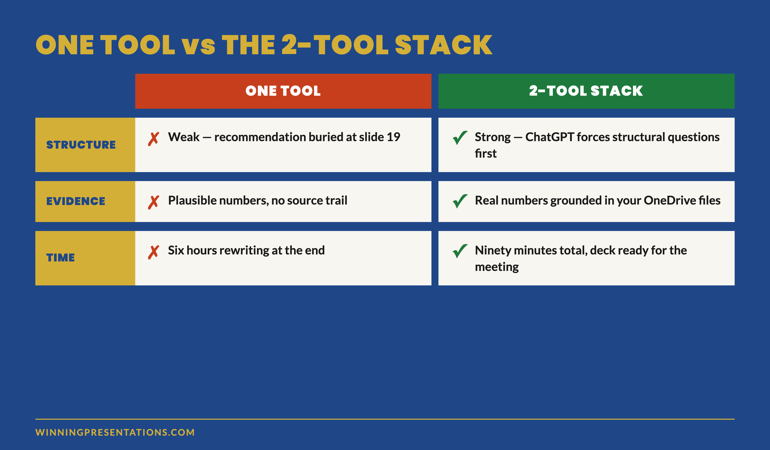
Idris had been a director of strategy at a UK bank for six years before he ran his first AI-assisted board pack. He used Copilot for everything — paste source data, ask for the deck, refine. The output was technically correct and structurally weak. Recommendations buried in slide 19. Three slides on market context the board did not need. A risk slide that read like an operational risk register. He rewrote it by hand the night before the meeting.
The next quarter he tried a different approach. He used ChatGPT to plan the structure first — recommendation, evidence required, the four data points that matter most. Then he moved to Copilot to extract the actual numbers from the bank’s source files and build the slide layout. The deck took 90 minutes instead of six hours. The chair tabled it inside the first 25 minutes of the meeting.
The second month was not a better deck. It was a different workflow. The same workflow now used across financial services, biotech, and consulting — wherever senior professionals are integrating AI into their presentation work without losing the audience.
If your AI-drafted decks are technically correct but structurally weak
Most AI-assisted decks fail because the structure was outsourced to the same tool that drafted the copy. Splitting the work across two tools — one for structure, one for evidence — produces decks senior audiences engage with.
Why a single tool produces weaker decks than the stack
ChatGPT and Copilot have overlapping capabilities and very different strengths. Treating them as interchangeable produces weaker output than using each for what it does best.
ChatGPT is stronger at structure. Without access to your files, it has to ask the right structural questions before it can produce useful output. The forced abstraction — “what is the recommendation, what evidence supports it, what are the counter-arguments” — pushes structural thinking that often gets skipped when the tool can just summarise the source. The output is narrative and opinionated. It produces decks that argue rather than describe.
Copilot is stronger at evidence. Inside Microsoft 365, it can pull from your OneDrive, SharePoint, and Outlook to ground the draft in your actual data — specific numbers, specific dates, specific source files. The output is document-grounded. It produces decks that reference real material rather than plausible material. It also drops the draft directly into PowerPoint, which removes a step.
Either tool used alone forces a compromise. ChatGPT alone produces narratively strong decks with weak evidence — the numbers feel right but cannot be sourced. Copilot alone produces evidence-strong decks with weak narrative — the numbers are real but the recommendation gets buried.
The two-tool stack uses ChatGPT for the part where structure matters more than evidence, then hands the structure to Copilot for the part where evidence matters more than structure. The handoff is the workflow.
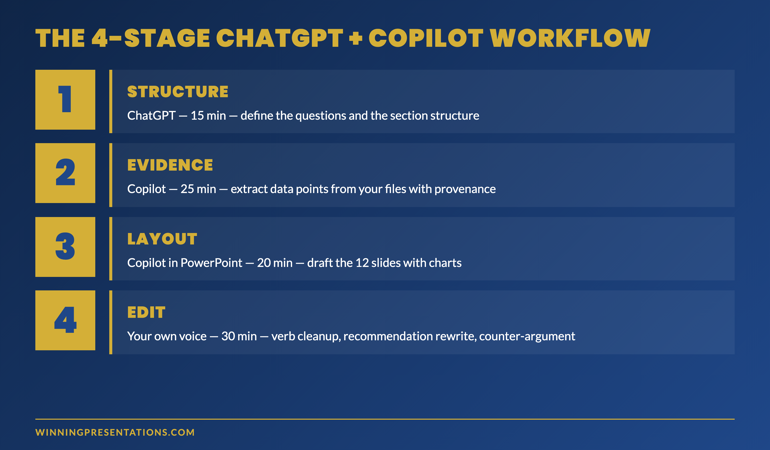
The 4-stage workflow: structure, evidence, layout, edit
The stack works in four sequential stages. Each stage uses the tool that does that work best. Skipping stages or running them in the wrong order undermines the workflow.
Stage 1 — Structure (ChatGPT, ~15 minutes)
Open ChatGPT. Do not paste the source material yet. Describe the situation in two paragraphs: who the audience is, what decision they need to make, what is at stake, what you already know about their position. Then ask: “What is the right structure for this deck — what are the 4–6 questions the audience needs answered to make this decision?”
Iterate on the questions until they feel like the right questions. Then ask: “Given those questions, what is the recommended structure — section headers, slide count per section, the order of sections?” The output is your skeleton. It is also the diagnostic that tells you whether you understand the audience well enough to present to them. If the questions feel weak, the deck will feel weak.
Stage 2 — Evidence (Copilot, ~25 minutes)
Move to Copilot in Microsoft 365. Open a new document or PowerPoint deck and prompt: “Using [filename] and [filename] in OneDrive, find the three to four most relevant data points that support [recommendation from Stage 1]. For each data point, give me the exact figure, the source document, the page or table reference, and the time period the figure covers.”
This is the stage where Copilot’s file integration earns its place in the stack. ChatGPT cannot do this work — it has no access to your files, and pasted-in figures lose their source provenance. Copilot returns evidence with breadcrumbs. That matters because senior audiences increasingly ask “where does that number come from” — and a deck whose author can answer in real time outranks a deck whose author cannot.
For each data point Copilot returns, accept it only if you can name the source file from memory. If you cannot, the number probably needs more interrogation before it lands in the deck.
Stage 3 — Layout (Copilot in PowerPoint, ~20 minutes)
Inside PowerPoint, open Copilot and prompt: “Build a 12-slide deck using the structure I am about to describe and the data points I am about to paste. Use my company template. Use the structure: [paste from Stage 1]. Use the evidence: [paste from Stage 2]. Each slide should have a 6-word headline, three supporting bullets of no more than 14 words each, and one chart or table referenced from the source files. Do not include market context slides. Do not include an executive summary slide. The recommendation appears on slide 3.”
Copilot will draft 12 slides with layout, evidence and headline copy. The output is rough. Some slides will be wrong; some will need restructuring; some will pull the wrong figure. That is expected. The stage’s job is to produce a draft deck in 20 minutes that is 70% finished — not a polished deck in 60 minutes that is 90% finished.
71 prompts for the workflow above
The Executive Prompt Pack — for ChatGPT, Copilot, and Claude
- 71 ready-to-use prompts covering each stage of the workflow above — structure, evidence, layout, edit
- Stage-1 question prompts for board, executive committee, investor, customer, and internal audiences
- Stage-3 layout prompts that match common slide structures — board pack, QBR, sales narrative, change communication
- Editorial-pass prompts for Stage 4 — the moves that remove the AI signature from the final draft
The Executive Prompt Pack — £19.99, instant access, lifetime use.
Get the Executive Prompt Pack →
For busy professionals who want to create sharper, more strategic PowerPoint presentations.
Stage 4 — Edit (your own voice, ~30 minutes)
The fourth stage is the one most often skipped — and it is the one that decides whether the deck reads as AI-drafted. The stage works in four short passes:
Pass 1 — recommendation slide. Close ChatGPT. Close Copilot. Open the recommendation slide and rewrite it from scratch in your own voice. The recommendation is the slide the audience remembers; AI’s default phrasing is the most over-trained part of the deck.
Pass 2 — verb cleanup. Search the deck for “leverage,” “drive,” “enable,” “optimise,” “transform.” Replace each with a verb the source documents use. The shift from generic AI verbs to specific source verbs lifts the credibility of every surrounding sentence.
Pass 3 — opening adjective cull. AI defaults to “robust framework,” “comprehensive review,” “strategic approach.” Senior audiences treat opening adjectives as filler. Cut them. The bullet reads sharper without them.
Pass 4 — counter-argument addition. AI rarely surfaces counter-arguments because the prompt did not ask for them. Add one slide late in the deck that names the strongest objection and the response. The added rigour is what most senior audiences register as senior judgement.
The four passes take 30 minutes on a 12-slide deck. They are the difference between a draft that reads as AI-assisted and one that reads as authored.
The two handoffs that decide whether the stack works
The workflow lives or dies in two specific handoffs — between Stage 1 and Stage 2, and between Stage 3 and Stage 4. The other transitions are mechanical. These two require deliberate work.
Handoff 1 — ChatGPT structure to Copilot evidence
The first handoff is where most AI workflows break. ChatGPT produces a structure with implied evidence; Copilot needs the evidence specified explicitly. The fix is a short structuring document that names, for each section: the question being answered, the data point or argument needed to answer it, and the source files Copilot should look in.
The structuring document is 12 lines for a 12-slide deck. It takes five minutes to write. Without it, Copilot wanders across files and produces evidence that does not align with the structure ChatGPT designed.
Handoff 2 — AI draft to your editorial voice
The second handoff is the one that decides whether the deck reads as AI-drafted. The temptation is to start editing inside the AI tool — refining the bullets, asking the model for variations, polishing in place. Resist it. Variations from the same model produce the same model’s voice in a different shape. The deck reads as more AI-drafted, not less.
Close the AI tool entirely. Open PowerPoint. Read the deck through once without editing. Then start the four-pass edit on the printed copy or in the slide deck directly. The clean break from the AI tool is what allows your voice back into the work.
When the stack is the wrong choice
Not every deck benefits from the two-tool workflow. Three situations where a single tool — or no AI at all — is the better choice:
Decks where the audience is one person you know well. A 1:1 update with a chair, a pitch to a single investor you have known for years, a coaching conversation with a board sponsor. The audience model is so specific that the AI’s structural suggestions add noise rather than signal. Write these by hand.
Decks where the source material is sensitive. Pre-merger discussions, litigation-related material, anything that should not pass through an external AI service. Use Copilot inside your enterprise environment for the evidence stage, skip ChatGPT entirely, and accept the structural compromise. The credibility risk of an external AI handling the material is larger than the structural gain from including ChatGPT.
Decks under 6 slides. The two-tool stack adds overhead. For a short deck — a single update slide, a 3-slide stand-up presentation, a one-page board paper — write it by hand. The workflow earns its time saving on decks of 8 slides and up; below that, the handoffs cost more time than they save.
If you want the structured framework behind this workflow
The AI-Enhanced Presentation Mastery course is a self-paced programme — 8 modules, 83 lessons, 2 optional recorded coaching sessions — covering the prompt and workflow framework that turns AI from a drafting tool into a presentation partner. £499, lifetime access. Monthly cohort enrolment.
Learn about AI-Enhanced Presentation Mastery →
Self-paced with monthly cohort enrolment — optional recorded coaching sessions available.
Frequently asked questions
Why not just use ChatGPT for everything if it has structural strength?
Because evidence provenance matters when senior audiences read the deck. ChatGPT cannot tell you which file a number came from; pasted-in figures lose their source trail. Senior audiences increasingly ask “where does that come from” mid-meeting. A deck whose author can name the source instantly outranks a deck whose author has to come back later. Copilot’s file grounding is what makes the evidence stage credible.
Does the stack still work if my organisation has not deployed Copilot?
Partially. Without Copilot, Stage 2 becomes a manual data-extraction task rather than a model-driven one — open the source files, find the four data points yourself, paste them into the structure document. The workflow still saves time on Stages 1, 3, and 4. The total time saving drops from ~70% to ~40%, which is still substantial. Many senior professionals operate this way until enterprise Copilot deployment catches up.
Can I substitute Claude for ChatGPT in this workflow?
Yes. Claude Sonnet 4.6 is comparable to ChatGPT-5 for the structural work in Stage 1, and slightly stronger on the editorial pass in Stage 4 because it handles longer source documents in a single context. The workflow itself does not change. The choice between ChatGPT and Claude is preference and access, not capability.
How do I prevent my organisation’s information ending up in ChatGPT’s training data?
Two paths. The first is to use ChatGPT Team or Enterprise, which contractually exclude your prompts from training. The second is to keep all proprietary numbers inside the Copilot stage — use ChatGPT only for structural and narrative work, where the prompts contain no source material. The workflow is designed to keep proprietary data inside the Microsoft 365 boundary; ChatGPT only sees the structural questions, not the underlying numbers.
The Winning Edge — weekly newsletter for senior presenters
One framework, one micro-story, one slide pattern — every Thursday morning, ten minutes’ read. For senior professionals who want my best material before it appears anywhere else.
Not ready for the prompt pack? Start with the free Executive Presentation Checklist — a one-page reference for the structural questions every executive deck must answer.
For the matched storytelling article, see the three generative AI prompts that turn dry data into a narrative.
Mary Beth Hazeldine — Owner & Managing Director, Winning Presentations Ltd. With 24 years of corporate banking experience at JPMorgan Chase, PwC, Royal Bank of Scotland, and Commerzbank, she advises senior professionals integrating AI into executive presentation workflows.