Tag: copilot for presentations

08 May 2026

Microsoft Copilot for Presentations Training: What Senior Professionals Should Look For

Quick answer: Most Microsoft Copilot presentations training teaches button clicks — what menu to use, where the prompt box is, how to generate slides from a Word document. Senior professionals do not need that. They need workflow training: how to structure source documents for compression, how to draft executive narratives, how to do the editorial pass that turns generic AI output into board-ready material. The right course teaches the workflows. The wrong course teaches the interface.

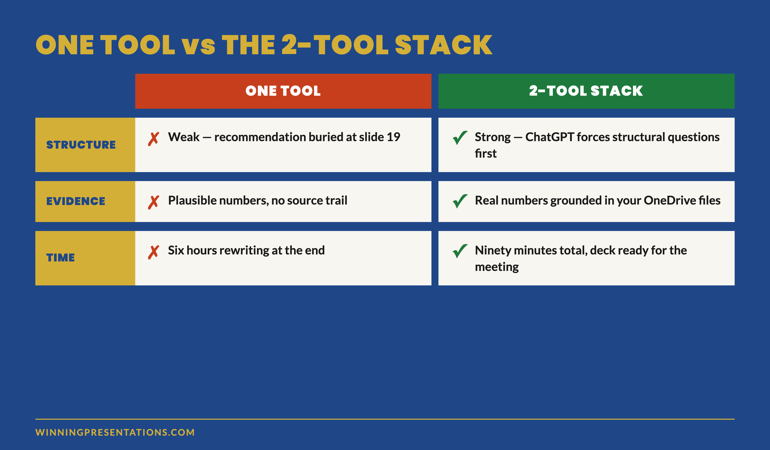
Tomás is a programme director at a global engineering consultancy. His company rolled out enterprise Copilot in January and ran the standard onboarding training — a two-hour live session covering the interface, the basic prompts, and the integration with Outlook, Word, and PowerPoint. Tomás finished the session, opened PowerPoint, generated his first AI-assisted deck for an upcoming client review, and produced thirty slides in eleven minutes. The slides looked polished. They were also generic in a way that would have been embarrassing to send to the client. He spent the next three hours fixing them by hand.

The fix took longer than building the deck from scratch would have. Not because Copilot was unhelpful, but because the training had taught him the buttons and not the workflow. He knew how to generate slides; he did not know how to direct Copilot toward executive-grade output, how to compress source documents into a structured input, how to instruct the model on headline syntax, or what the editorial pass on AI output should actually look like. The training had been useful for an administrative assistant doing meeting notes. It had been the wrong training for a senior professional building a client-facing deck.

This pattern is the most common reason senior professionals abandon Copilot after the initial novelty fades. The mainstream training market is built around what is easy to teach in a short live session — interface tours and basic prompts. The training that would make Copilot genuinely useful at executive level — workflow design, prompt engineering for narrative work, editorial discipline on AI output — requires more time, deeper material, and a different teaching shape than most enterprise training provides. Knowing what to look for, and what to avoid, makes the difference between a course that pays back its cost in the first week and one that wastes a quarter of your training budget.

Looking for a structured Copilot training programme designed for senior professionals?

The AI-Enhanced Presentation Mastery course is the self-paced programme for senior professionals using AI (including Copilot) to build executive-grade presentations. Eight modules, eighty-three lessons, monthly cohort enrolment.

Explore the Programme →

Why most Copilot presentations training fails senior professionals

The standard Copilot training market is shaped by who pays for it. Enterprise IT departments fund Copilot rollouts. The training that gets bought tends to optimise for “broad adoption across the workforce” rather than “deep capability for the senior cohort.” The two goals require different curricula, but the second one is harder to design and harder to sell, so the first one wins by default.

Broad-adoption training is appropriate for the eighty per cent of users who will use Copilot for routine tasks — drafting emails, summarising meetings, generating starter documents. For those tasks, knowing the interface and a handful of basic prompts is enough. The training pays back quickly because the use cases are simple.

Senior professionals are in the other twenty per cent. Their use cases are not routine. They need Copilot to participate in executive presentation work, board paper drafting, strategic briefing compression, complex Q&A preparation. None of those use cases are taught in a two-hour broad-adoption session. The interface knowledge transfers; the workflow knowledge does not. Senior professionals leave broad-adoption training with the false impression that they have been trained on Copilot, when what they have actually been trained on is the interface. The mismatch shows up the first time they try to use Copilot for senior-level work and find that their training does not equip them for the task.

Split comparison infographic showing button-click Copilot training versus workflow Copilot training across three dimensions: what gets taught, what the user can do afterwards, and what stays useful three months later

Workflow training versus button-click training

The clearest way to evaluate a Copilot presentations course is to look at the time allocation. Button-click training spends most of its time on the interface — where the prompt box is, how to invoke Copilot in PowerPoint, what each menu option does. Workflow training spends most of its time on the structures of work the tool enables — how to compress source documents for input, how to specify executive-grade output, how to verify and edit AI-generated material before it reaches a senior audience.

The two types of training produce different outcomes. After button-click training, the participant can generate AI output. After workflow training, the participant can produce work product that is genuinely better than what they would have produced without the tool. The first is a feature demonstration. The second is a capability shift. For senior professionals whose output is judged on quality and credibility rather than throughput, the second is the only one that matters.

Workflow training tends to be longer because the workflows themselves take time to teach properly. A single executive deck-building workflow — source compression, narrative drafting, editorial pass, Q&A pre-mortem — typically requires two to three hours of structured learning, with worked examples and practice. A two-hour session that promises to cover “Copilot for presentations” cannot, by arithmetic, teach more than the surface of one workflow. If the marketing copy implies otherwise, the course is selling the interface and calling it the workflow.

What to evaluate before enrolling

Five evaluation criteria separate workflow-focused Copilot training from button-click training dressed up as professional development. Apply them to any course you are considering, including the one your IT department is offering for free.

One: who is the explicit target audience? Look for courses that name “senior professionals”, “executive presenters”, or “board-level work” specifically. Avoid courses that target “everyone using Copilot” — they are by definition designed for the broadest audience, which means the depth required for senior work has been removed in favour of breadth.

Two: what is the time allocation? A serious workflow course spends at least eighty per cent of its time on workflow and editorial work. The interface should be covered in the first hour and not returned to. If the syllabus shows multiple sessions on “Getting started with Copilot in PowerPoint”, “Setting up your prompt library”, “Customising the Copilot pane” — that is the wrong training. The interface is not the work.

Three: does the curriculum cover the editorial pass? AI output requires editorial work before it reaches senior audiences. A course that does not teach the editorial pass is teaching you to produce drafts, not finished work. Look for explicit modules on “editing AI output”, “rewriting AI-generated headlines”, “verifying AI-generated claims”, or “the editorial pass on Copilot drafts”. The editorial pass is what separates board-approved decks from generic AI output.

Four: are worked examples at the right seniority level? A course that teaches Copilot for presentations using examples like “draft an internal team update” or “create a marketing pitch” is not teaching to your context. Look for worked examples involving board papers, investment committee briefings, executive summary documents, regulatory presentations, or strategic recommendations. The complexity of the worked examples is the most reliable signal of the course’s actual depth.

Five: who is the instructor? Copilot training instructors split into two types. Microsoft-certified trainers know the product features in detail; they often do not know what executive presentation work looks like. Senior practitioners with presentation experience know the workflows; they may have less depth on niche product features. For senior-level training, the second profile is materially more valuable. Product features change every quarter; presentation craft does not.

Stacked cards infographic showing the five evaluation criteria for Copilot presentations training: target audience, time allocation, editorial pass coverage, worked example seniority, and instructor profile

A workflow-first Copilot training programme for senior professionals

Move beyond basic AI usage. The AI-Enhanced Presentation Mastery course gives you eight self-paced modules and eighty-three lessons on using AI (including Copilot) to structure, draft, and refine presentations that work at senior levels. Two optional recorded coaching sessions. £499, lifetime access to materials.

  • 8 modules, 83 lessons of self-paced course content
  • 2 optional live coaching sessions, fully recorded — watch back anytime
  • No deadlines, no mandatory session attendance
  • New cohort opens every month — enrol whenever suits you
  • Lifetime access to all course materials

Explore the AI-Enhanced Programme →

Designed for senior professionals using AI to produce executive-grade output, not generic drafts.

The five workflows a senior-level course should cover

If a Copilot presentations course is going to be useful at executive level, it needs to cover at least these five workflows in depth. Most courses cover one or two and present them as the whole curriculum. The senior cohort needs all five.

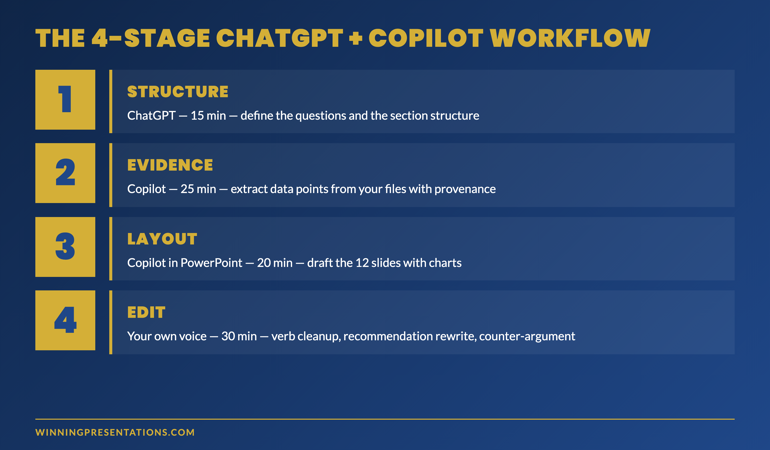
Source-document compression. How to feed the agent a pile of mixed-format inputs (memos, reports, models, briefings) and produce a structured executive narrative outline. This is the workflow most often skipped. Without it, every AI-assisted deck starts from a blank prompt rather than from synthesised source material — which is the same workflow you would use for a generic deck and produces the same generic output.

Strategic narrative drafting. How to specify the narrative arc, headline syntax, and slide format precisely enough that the AI draft is a usable starting point rather than a structurally generic placeholder. This workflow is where prompt engineering for executive work actually matters. The course should teach the prompt patterns, not just provide examples.

The editorial pass. The six-move pass — rewrite headlines as findings, anchor every claim to evidence, replace generic language with insider phrasing, cut completeness slides, install the decision sentence, read aloud against the audience’s likely reaction. This is the highest-value workflow because it is the one that reliably converts AI drafts into approved decks.

Q&A pre-mortem. How to use AI to model the audience’s likely objections to a draft deck, with named-stakeholder context that makes the modelling specific to your committee rather than generic. This workflow surfaces holes in the underlying argument before the room does.

Live-meeting recovery. How to use AI between meetings to debrief, refine, and prepare for the next iteration. This is the workflow most courses skip entirely because it does not produce a tangible output people can show. It is also the workflow that compounds the value of AI use across multiple presentations rather than treating each deck as a one-off. The structured prompts that anchor each of these workflows are what move Copilot from feature demonstration to capability shift.

Self-paced versus live programmes — which fits senior schedules

The format question matters as much as the content question. Senior professionals’ calendars do not support fixed weekly two-hour live sessions. The diary collisions are unavoidable, the make-up sessions are awkward, and the cognitive load of “live training I cannot miss” adds friction that compounds across the programme. Most senior cohorts who enrol in fixed-schedule live training drop out within three weeks not because the content is bad, but because the format is incompatible with their actual working life.

Self-paced programmes solve the format problem. The participant moves through the material on the cadence that fits their week, returns to specific lessons before specific upcoming presentations, and can use the structured material as an in-the-moment reference rather than a one-time training event. Self-paced does not mean unsupported — well-designed self-paced programmes include optional live elements (coaching calls, Q&A sessions) that are recorded so missing one is not a setback. The recording is what matters: a live element you cannot rewatch is a single-attempt resource; a recorded one becomes part of the permanent material.

Two structural features distinguish a well-designed self-paced programme from one that is just a video library. The first is module structure that maps to specific use cases — “preparing the next board paper”, “compressing source documents for an investment committee” — rather than abstract topic categories. Use-case structure makes the material findable when you need it. The second is the editorial discipline of the worked examples. A self-paced programme lives or dies on the quality of its examples; if the worked decks in the lessons are themselves generic, the participant has no model to edit toward. Look for worked examples that match your seniority and your industry context, and that demonstrate the editorial pass explicitly.

Need the prompt library to start the workflows tomorrow?

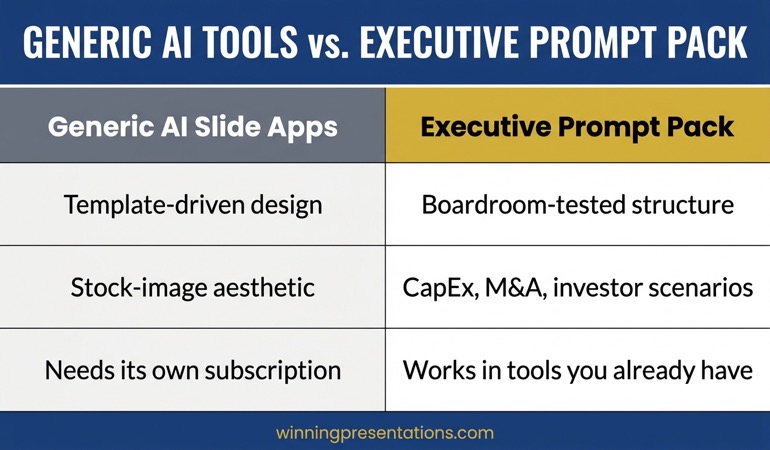
The Executive Prompt Pack — £19.99, instant access — gives you 71 ChatGPT and Copilot prompts designed for PowerPoint presentation work. Includes prompt patterns for source compression, slide drafting, and headline sharpening that work in both chat and Agent Mode.

Get the Executive Prompt Pack →

FAQ

Is Microsoft’s own Copilot training enough for senior presentation work?

Microsoft’s training is excellent for what it is — interface familiarisation and basic prompt patterns aimed at broad workforce adoption. It is not sufficient for senior presentation work because it does not cover the workflow design, prompt engineering, and editorial discipline that turn generic AI output into board-ready material. Treat Microsoft’s training as a prerequisite, not a complete programme. Add workflow-focused training on top.

How long does serious Copilot presentations training take?

For a senior professional who already uses PowerPoint daily, learning the workflows that genuinely change executive presentation output usually takes between fifteen and twenty-five hours of structured material spread over several weeks. Compressed into a single weekend, the material does not absorb properly because it requires application between lessons. Spread too thin, momentum is lost. The right pace is two to three hours per week for two to three months, with deliberate application to live work between sessions.

Can I get the same outcome from free YouTube tutorials?

Free tutorials cover the interface and basic prompts well. They do not cover the editorial pass, the prompt engineering for executive narrative work, or the workflow integration across multiple presentation tasks. The free material is a useful supplement; it is rarely sufficient as a standalone training plan for senior presentation work because it lacks the structured progression that builds capability rather than feature familiarity.

Should I do live or self-paced Copilot training?

For most senior professionals, self-paced programmes with optional recorded live elements fit the diary better than fixed-schedule live training. Live training has a higher completion rate when the schedule is genuinely respected, but most senior calendars cannot guarantee weekly attendance. Self-paced removes the diary collision problem and makes the material available as a reference long after the initial learning period. The optional live elements — when recorded — provide the discussion benefit without the attendance constraint. Self-paced programmes designed specifically for the senior cohort tend to handle this trade-off better than enterprise training built for broad audiences.

The Winning Edge — Thursday newsletter

Every Thursday, The Winning Edge delivers one structural insight for executives presenting to boards, investment committees, and senior stakeholders. No general tips. No motivational framing. One specific technique, one executive scenario, one action. Subscribe to The Winning Edge →

Not ready for a full programme? Start here instead: download the free Executive Presentation Checklist — a single-page review you can run on any AI-assisted draft to flag the editorial gaps before sending it to a senior audience.

Next step: open whichever Copilot training your organisation has provided and check it against the five evaluation criteria above. If it fails three or more, treat it as the prerequisite it actually is and add a workflow-focused programme on top.

Related reading: The Copilot Agent Mode workflow that produces editable executive drafts.

About the author. Mary Beth Hazeldine is Owner & Managing Director of Winning Presentations Ltd, founded in 1990. With 24 years of corporate banking experience at JPMorgan Chase, PwC, Royal Bank of Scotland, and Commerzbank, she advises executives across financial services, healthcare, technology, and government on structuring presentations for high-stakes funding rounds, approvals, and board-level decisions.

08 May 2026

Imposter Syndrome Using AI for Presentations: When You Feel You Are Cheating

Quick answer: The “I am cheating” feeling that surfaces when senior professionals use AI for presentations is a misread of the work. Imposter syndrome attaches to AI use because the AI does the visible drafting and the human does the invisible editorial judgement — so it looks, from inside, as if you contributed nothing. The reality is reversed. The judgement is the work. The drafting is the typing. Three reframes resolve the feeling without losing the productive caution underneath it.

Ines is a director of clinical operations in a mid-size pharmaceutical company. She had been using Copilot for three weeks before the feeling caught up with her. The feeling arrived during a steering committee meeting, mid-sentence, while she was presenting a deck she had drafted with AI assistance. She was making a strong point about supply chain resilience when an internal voice cut in: “You did not write this. You should not be presenting this. If they ask you something the deck does not cover, they will see you do not actually know it.”

The voice was loud enough that she lost her place for half a second. The committee did not notice. She recovered. The presentation went well. But the feeling stayed with her for the rest of the day and crystallised that evening into a question she put to a colleague over dinner: “Am I cheating? Should I just write the decks myself like I used to?” Her colleague, who had been using Copilot since launch, said something useful: “If you wrote the prompt and you read the output and you decided what to keep and what to change, you wrote the deck. The keyboard is not where the work happens.”

That sentence is technically correct, and it does not always land in the moment because imposter syndrome is not technically responsive. The cheating feeling has its own logic, and arguing with it head-on rarely works. What does work is understanding why the feeling shows up specifically with AI — and then applying three reframes that change the underlying perception, not just the surface argument.

Looking for a structured way to manage performance anxiety in high-stakes presentations?

Conquer Your Fear of Public Speaking is a self-paced programme designed for senior professionals who experience performance anxiety in high-stakes presentation work. Practical techniques for the in-the-moment recovery you can use in any meeting.

Explore the Programme →

Why the cheating feeling shows up

Imposter syndrome activates when there is a perceived gap between what others believe you contributed and what you privately know you contributed. AI use opens that gap by design. The audience sees a polished deck. You know that some of the structure came from a model. The two pictures do not match in your head, and the mismatch reads as deception.

The feeling intensifies if your professional identity is tied to “I produce my own work”. Many senior leaders built their careers on visible production — writing the strategy memo, building the financial model, drafting the board paper themselves. AI changes the labour mix. You still own the output, but the labour is distributed differently. The labour distribution change feels like an identity threat, even when the output quality is equal or higher.

It also intensifies in environments where AI use is technically allowed but socially ambiguous. If your employer has not explicitly endorsed AI for presentation work, but has not explicitly forbidden it either, you are operating in a grey zone. The grey zone amplifies imposter feelings because there is no external validation that what you are doing is acceptable. Your nervous system fills the validation vacuum with the worst-case interpretation: that you are doing something you would not want to admit to.

Cycle infographic showing the imposter syndrome loop in AI-assisted presentation work: AI produces visible draft, human applies invisible judgement, audience sees only the polished output, presenter feels the gap as cheating

Visible drafting versus invisible judgement

The cleanest way to understand what is actually happening is to separate the visible work from the invisible work. The visible work in a deck is the typing, the layout, the wording of bullets, the choice of charts. The invisible work is the prior thinking — what to include, what to leave out, what the argument should be, which evidence carries weight, how the audience will react, where the political risk lies, what the closing decision needs to be.

For a senior-level presentation, the invisible work is roughly eighty per cent of the value. Anyone with passable Copilot skills can produce a polished thirty-slide deck on any topic in twenty minutes. Almost no one can produce a deck that lands with a specific board on a specific decision in a specific organisational moment without the invisible work that comes from years of internal context.

When you use AI for the visible work, you are outsourcing the part that has the lowest unit value of your time. You retain the invisible work — the editorial judgement that decides which AI output to keep, which to rewrite, which to cut, which to anchor with internal evidence the model could not have known. This is the work the audience cannot see, and it is also the work that your imposter voice is failing to credit. The voice notices that you typed less. It does not notice that you decided more.

Reframe one: the typing is not the work

The first reframe is to separate effort from value. There is a deeply ingrained association between visible effort and earned credit, particularly in cultures where being seen to work hard is part of the professional identity. AI breaks that association by making the visible effort smaller while leaving the cognitive load roughly constant.

The reframe is simple to state and harder to internalise: the typing is not the work. The work is the judgement applied to what gets typed. A surgeon’s value is not in the physical incision — it is in knowing where, how deep, and when to stop. The incision is the visible part. The training and judgement underneath are the invisible part. AI makes the executive presentation analogous to the surgical analogy. The model does the incision. You do the judgement.

This reframe lands harder when you can name a specific decision you made on the most recent AI-assisted deck that the model could not have made. “I cut the section on European expansion because I knew the chair would push back on the timing — the model did not know that.” “I rewrote the headline on slide eleven because the original was technically correct but politically tone-deaf for our CFO — the model did not know that.” Naming the specific decisions that required your judgement is the most direct route to dissolving the cheating feeling. The decisions are real. They are the work.

Reframe two: AI is a tool, not a co-author

The second reframe targets the way the imposter voice tends to anthropomorphise AI. The voice often phrases the concern as “the AI wrote this, not me” — which assigns agency to the model. The model has no agency. It cannot decide what to write. It can only produce probabilistic next-tokens based on the prompt you supplied and the editorial decisions you made along the way.

The framing that helps is to compare AI to other tools you do not feel imposter syndrome about. You do not feel guilty using Excel to calculate a forecast you could have done by hand. You do not feel guilty using PowerPoint instead of drawing slides on acetate. You do not feel guilty using a spell-checker. The reason is that those tools are clearly tools — they execute under your direction, they have no agency, they do not “co-author” the output.

AI feels different because it produces something that looks like prose, and prose feels like authored content. But the AI is no more an author of your deck than Excel is the author of your forecast. It is a tool that executes your direction. The difference between a Copilot draft and an Excel formula is purely surface-level — both are deterministic outputs of inputs you supplied. The structured workflows that produce executive output reinforce this — the agent is following your instruction set, not writing the deck.

Contrast panels infographic showing the imposter syndrome perception versus the actual contribution split in AI-assisted presentation work: typing versus thinking, drafting versus editing, surface versus judgement

Practical techniques for performance anxiety in senior presentation work

Conquer Your Fear of Public Speaking is a self-paced programme for professionals who experience anxiety, imposter feelings, or in-the-moment nerves during high-stakes presentations. Designed for the executive audience — practical recovery techniques you can use mid-meeting, not generic advice. £39, instant access.

  • Self-paced lessons covering pre-meeting preparation
  • In-the-moment recovery techniques for live presentation moments
  • Frameworks for managing the imposter voice that surfaces under pressure
  • Designed for senior professionals in high-stakes scenarios

Get Conquer Your Fear of Public Speaking →

Designed for senior professionals managing performance anxiety in board, investor, and executive presentation contexts.

Reframe three: the question your imposter voice is really asking

The third reframe goes one layer deeper. The “am I cheating” question is rarely the actual question underneath. When senior professionals dig into what the imposter voice is genuinely worried about, the underlying question usually turns out to be one of three things, and each one has a different response.

The first underlying question is “if they ask me something off the slides, will I look foolish?” This is a competence question, not an authorship question. The answer is not to abandon AI — it is to do the depth work that prepares you to answer questions beyond the deck content. The deck is one slice of your knowledge. AI helped you produce the slice. Your years of context are what handle the questions. Use the time AI saves you to deepen your audience preparation, not to do less work overall.

The second underlying question is “if they find out I used AI, will they think less of my contribution?” This is a social-acceptance question. The honest answer is that some audiences will, particularly in environments that are still adjusting to AI norms. The right response is not concealment, which feeds the imposter voice. The right response is matter-of-fact disclosure when asked, framed around the editorial judgement that produced the final output: “Yes, I used Copilot to draft the structure; the analysis and the recommendation are mine. The AI saved me about three hours.”

The third underlying question is “if AI can do this, what am I actually contributing?” This is an identity question, and it deserves a serious answer rather than a deflection. AI cannot do the invisible work — the situational awareness, the political read, the executive context, the judgement that comes from having been in the room before. Those are your contribution. AI use highlights this contribution by stripping away the typing that used to obscure it. If you find your contribution unclear after AI strips the typing away, that is useful information about where to focus your professional development. The right response is to invest in the parts of your work AI cannot do, not to retreat from AI use to preserve the visible parts it can.

The productive caution worth keeping

None of these reframes are about silencing all hesitation around AI use. There is a productive caution underneath the imposter feeling that is worth preserving — the caution that prompts you to verify numbers the AI generated, to check the source of claims, to read the deck aloud against the audience’s likely reaction, to take responsibility for what reaches the room. That caution is the editorial judgement at work. Keep it. It is the difference between AI-assisted senior output and AI-flavoured generic output.

The reframes target the unproductive part of the feeling — the part that says you are not entitled to present material because you used a tool to draft it. That part is wrong, and feeding it makes you a worse presenter, not a more honest one. Concealing AI use because the imposter voice told you to leads to evasive answers when audiences ask direct questions, which damages credibility more than the AI use itself ever would.

The senior professionals who handle this transition cleanly tend to land on a stable framing: AI is a tool I use to do my work faster; the work itself — the judgement, the decisions, the editorial pass — is mine; if asked, I will say so plainly; if not asked, I will not perform a confession that is not required. The editorial pass is what makes the difference between AI output that lands and AI output that gets pushed back. That pass is yours. The cheating voice is misreading the labour. Do not reorganise your career around its mistake.

Want a structural framework that anchors your editorial judgement?

The Pyramid Principle Template is a free reference for structuring executive briefings — lead with the answer, then prove it. Useful as the structural target your editorial pass is editing toward. Free download.

Get the Pyramid Principle Template →

FAQ

Should I tell people I used AI to draft the deck?

If you are asked directly, yes. Honesty handles the question once and removes the imposter loop entirely. If you are not asked, you do not owe a proactive disclosure unless your organisation requires one. Performing a confession that was not requested often draws more attention to AI use than a matter-of-fact answer would. The framing that works in either case is “I used AI to draft the structure; the analysis and recommendation are mine” — which credits both the tool and the judgement honestly.

Why does the cheating feeling get worse the better the AI gets?

Because the gap between visible AI contribution and invisible human judgement gets larger as the model improves. Earlier AI tools produced obviously rough output that you visibly had to fix; the editorial work was visible because the gaps were visible. Better models produce smoother output that needs subtler editorial work; the gaps are no longer visible to you, even though they are still there. The judgement work has not disappeared — it has just stopped being noticeable. The reframe is to deliberately track the editorial decisions you are still making, even when they feel small.

Is imposter syndrome about AI different from regular imposter syndrome?

It has the same underlying mechanism — a perceived gap between contribution and credit — but a different trigger. Regular imposter syndrome is triggered by promotion, scope expansion, or visibility increases. AI-related imposter syndrome is triggered by the labour distribution change. The mechanism is the same; the trigger is new. The same techniques that help with regular imposter syndrome — naming specific contributions, reality-testing the worst-case interpretation, talking to peers — also help here. The first reframe in this article is the AI-specific addition.

What if my anxiety about using AI is severe enough to disrupt my presentation performance?

If the cheating feeling intensifies during the presentation itself rather than dissolving with the reframes, the underlying issue is performance anxiety more than imposter syndrome about AI specifically. The AI use is the trigger but not the cause. Practical techniques for in-the-moment anxiety — controlled breathing, the structured pause, the recovery sentence — work the same way regardless of whether AI was involved in producing the deck. The deck is yours to present once you are in the room. The earlier the anxiety pattern is addressed, the less it will surface in subsequent presentations.

The Winning Edge — Thursday newsletter

Every Thursday, The Winning Edge delivers one structural insight for executives presenting to boards, investment committees, and senior stakeholders. No general tips. No motivational framing. One specific technique, one executive scenario, one action. Subscribe to The Winning Edge →

Not ready for the full programme? Start here instead: download the free Pyramid Principle Template — the framework that gives your editorial judgement a structural target to edit toward.

Next step: name three specific editorial decisions you made on the last AI-assisted deck you produced. Write them down. Re-read them when the cheating voice next surfaces. The decisions are real. The voice is misreading them.

Related reading: The Copilot Agent Mode workflow that makes editorial judgement the senior contribution.

About the author. Mary Beth Hazeldine is Owner & Managing Director of Winning Presentations Ltd, founded in 1990. With 24 years of corporate banking experience at JPMorgan Chase, PwC, Royal Bank of Scotland, and Commerzbank, she advises executives across financial services, healthcare, technology, and government on structuring presentations for high-stakes funding rounds, approvals, and board-level decisions.