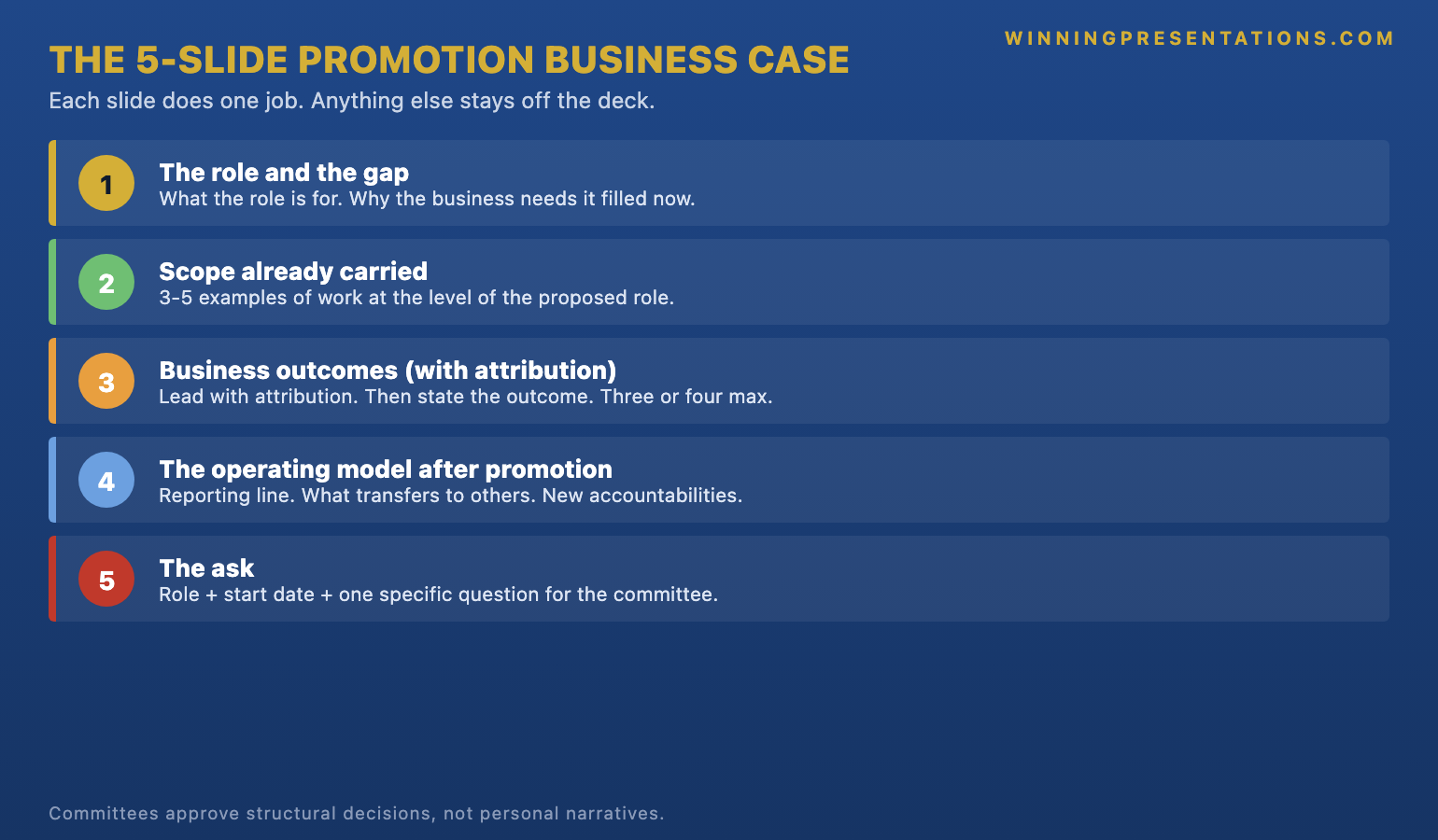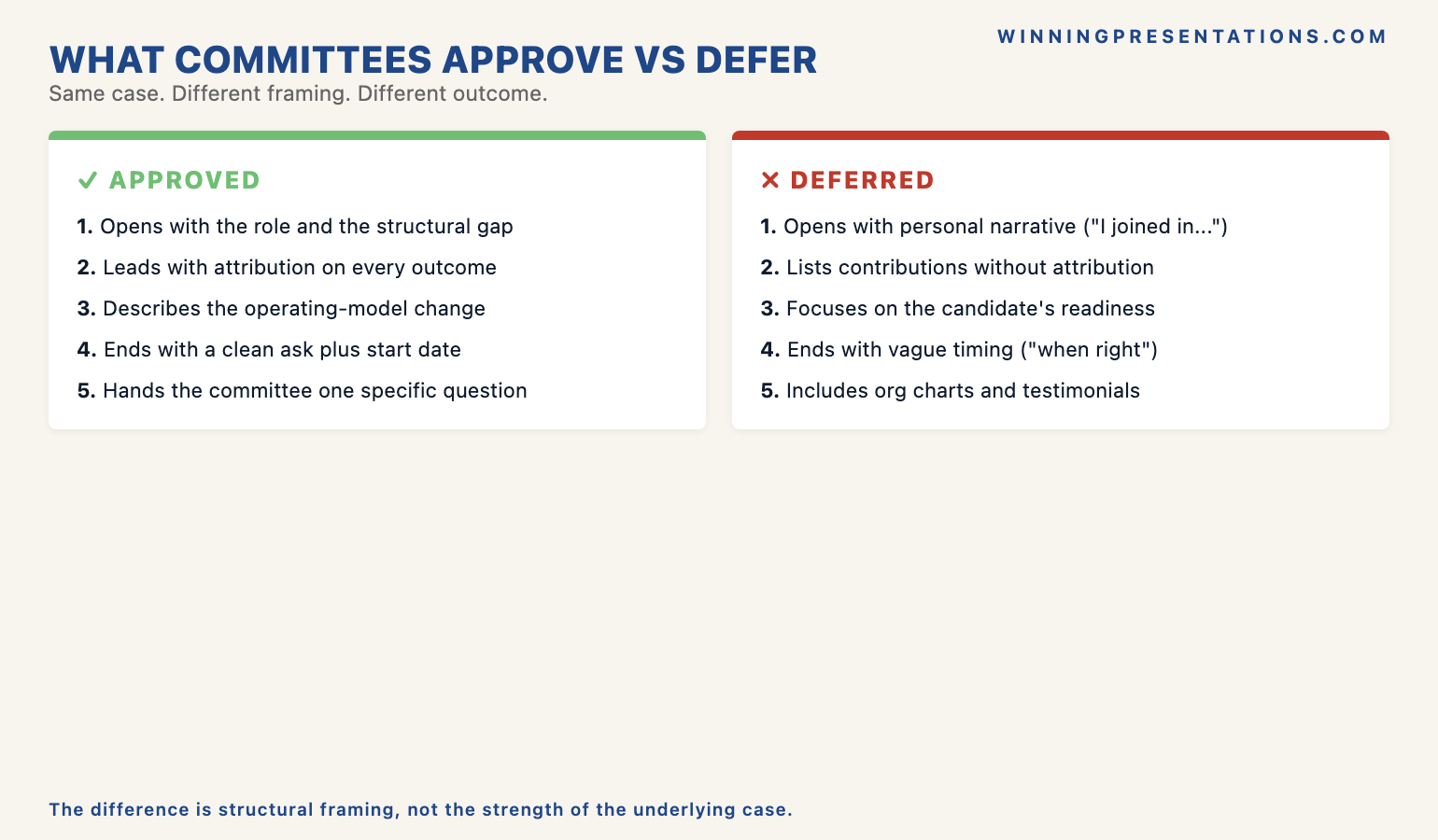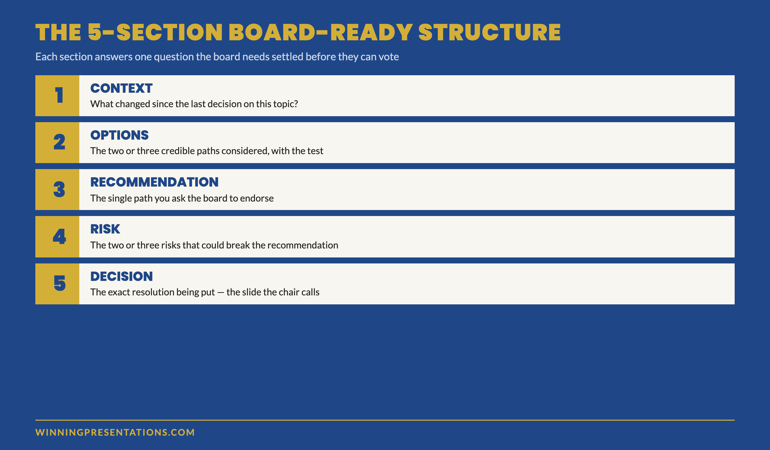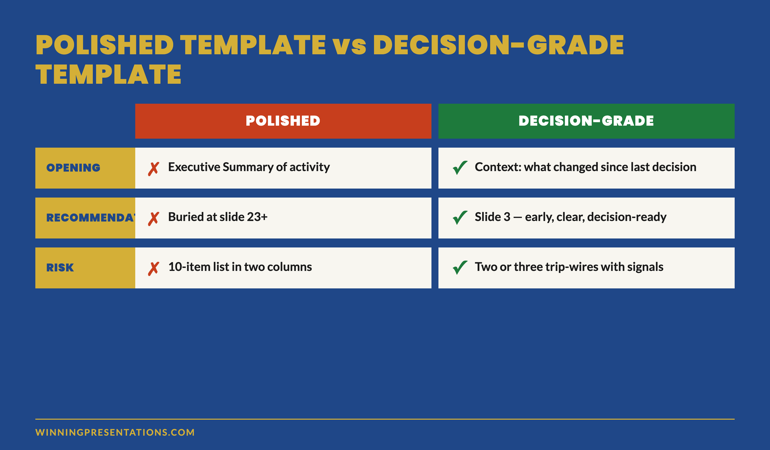
Tag: slide structure

05 Mar 2026
Confident executive woman presenting with structured slide deck visible on screen behind her in modern boardroom

Why a Proven Slide Structure Makes You 10x More Confident Than Practice Alone

The most confident executive presenter I’ve ever worked with rehearsed less than anyone else in her organisation. She simply had a better structure.

Most people try to fix presentation anxiety with more practice. More rehearsal. More hours in front of the mirror. And it helps, to a point. But if you’ve ever over-rehearsed a presentation and still felt shaky walking into the room, you already know: practice has a ceiling. After 24 years coaching executives, I can tell you what actually removes the nerves. It’s not confidence. It’s not charisma. It’s structure. A proven, tested system that tells you exactly what goes on each slide, in what order, and why.

Quick answer: Presentation confidence doesn’t come from rehearsal alone—it comes from structural certainty. When you know your slide architecture is proven, your opening is designed to land, your evidence sequence is tested, and your close drives a decision, your nervous system stops treating the presentation as a threat. Structure replaces uncertainty. And uncertainty is what your body reads as danger. Executives who use a proven presentation system report feeling fundamentally calmer—not because they’ve practised more, but because they’ve eliminated the guesswork.

Tired of rehearsing endlessly and still feeling underprepared?

The problem isn’t practice—it’s that you’re building every presentation from scratch. The Executive Slide System gives you a tested architecture for every slide, every transition, and every close. When the structure is proven, the confidence follows.

Explore the Executive Slide System → £39

The Two Directors Who Presented to the Same Board

Last year I coached two directors at the same FTSE-listed company. Both were presenting strategic proposals to the board on the same afternoon. Both had strong ideas. Both were intelligent, articulate leaders. One spent three weeks rehearsing. She practised in the car, at her desk, in the shower. She could recite her presentation by heart. The other spent two days building her deck using a structured system I’d given her—a tested slide architecture with a decision-first format, an evidence sequence, and a pre-built close.

The first director walked in looking polished but tense. You could see it in how she held her clicker, in the micro-pauses where she was searching for memorised phrasing. When a board member interrupted with a question, she lost her thread for ten seconds. That ten seconds cost her momentum. She recovered, but the room’s energy had shifted.

The second director walked in calm. Not rehearsed-calm. Actually calm. She knew what her first slide would accomplish. She knew the evidence sequence was proven. She knew the close would drive a decision because she’d seen it work before. When a board member interrupted, she handled it easily—because she wasn’t holding a memorised script in her head. She was following a structure she trusted.

Both proposals were approved. But the second director was asked to present the combined strategy at the annual investor meeting. The board didn’t choose her because she was more senior or more experienced. They chose her because she looked like someone who could handle a room. That composure came from structure, not talent.

After 24 years of coaching, I’ve watched this pattern repeat hundreds of times. The executives who look most confident aren’t the ones who practise most. They’re the ones who trust their structure.

Stop Building Presentations From Scratch

Every time you start with a blank slide deck, your nervous system registers one thing: uncertainty. The Executive Slide System eliminates that uncertainty entirely.

  • A decision-first slide architecture tested across 1,200+ executive presentations
  • Evidence sequence framework that answers “Why this?”, “Why now?”, and “Why us?” in the order boards actually process information
  • Stakeholder-specific templates: CFO version, Operations version, Board-level version
  • Objection-handling slides for the eight most common executive concerns—built in, not bolted on
  • Closing framework that drives decisions, not just applause

Get the Executive Slide System → £39

Used by 1,200+ executives. Average approval rate: 72% on first presentation.

Why Practice Has a Confidence Ceiling

Rehearsal does build familiarity. It smooths your delivery, tightens your timing, helps you internalise key points. Nobody is arguing against practice. The problem is that practice alone doesn’t eliminate the uncertainty that causes anxiety.

When you rehearse a presentation you’ve built from scratch, you’re practising delivery—but you’re still carrying a deeper question: Is this the right structure? Will the board engage with this opening? Will they follow my logic? Will the close land? Am I presenting the evidence in the right order?

Those structural doubts don’t disappear with rehearsal. You can practise a badly structured presentation a hundred times and still feel uneasy about it, because your subconscious knows the architecture is uncertain. You haven’t tested whether this sequence of ideas actually works on this type of audience. You’re hoping it does.

Hope is not confidence. Confidence comes from knowing.

When executives tell me they “just don’t feel confident presenting,” I almost always find the same root cause: they’ve been working without a tested structure. They’re assembling slides from instinct, convention, or whatever worked last time, and then trying to rehearse away the underlying uncertainty. That’s like memorising a route through an unfamiliar city instead of using a map. You might get there, but you’ll be anxious the entire way.

The Structure Effect: What Certainty Does to Your Nervous System

Your nervous system is constantly scanning for threat. In a presentation context, the primary threat it detects isn’t the audience—it’s unpredictability. Will this work? Will they follow? Am I going to lose the room?

When you use a proven structure—a slide architecture that’s been tested with hundreds of similar audiences—your nervous system registers something entirely different: certainty. You’re not wondering whether the opening will land, because you’ve seen this opening work. You’re not anxious about the evidence sequence, because it follows a tested logic. You’re not worried about the close, because the framework is designed to drive a decision.

This is why I say structure makes people 10x more confident. It’s not a motivational claim. It’s a nervous system observation. When your brain doesn’t have to solve the “will this work?” problem during the presentation, it frees up an enormous amount of cognitive resource. That resource becomes presence, composure, and the ability to respond to the room rather than cling to a memorised script.

Think about the difference between driving a familiar route and navigating somewhere new. On the familiar route, you can have a conversation, notice the scenery, react to other drivers easily. On an unfamiliar route, your attention narrows, your grip tightens, and you can barely hold a conversation. Same skill—driving. Completely different experience, because one involves structural certainty and the other doesn’t.

Presenting works exactly the same way. A proven structure is your familiar route. It frees you to be present instead of panicking about what comes next.


The Structure-Confidence Effect infographic comparing how presenting without a proven structure triggers nervous system threat response versus how a proven template activates confidence response

Five Ways a Proven System Eliminates Presentation Anxiety

1. It removes the blank-slide problem

The moment of highest anxiety in presentation preparation isn’t the rehearsal—it’s the blank first slide. That’s when your brain confronts the full weight of “I have to figure out what to say, in what order, with what evidence, for this specific audience.” A proven system eliminates this entirely. You open the template, and each slide already has a purpose, a position in the sequence, and a tested rationale. Preparation becomes assembly, not invention.

2. It answers the “will this work?” question in advance

When you’ve built a presentation from scratch, you carry a low-level doubt through every rehearsal and into the room itself. A tested system removes that doubt because the structure has already worked. You’re not the first person to use this evidence sequence or this decision-first opening. It’s been tested with boards, investors, executive committees, and sceptical audiences. Knowing that shifts your internal state from “I hope this works” to “I know this works.”

3. It handles interruptions for you

One of the biggest anxiety triggers in executive presentations is the fear of interruption. What if someone asks a question mid-slide? What if you lose your place? When your confidence depends on a memorised sequence, any interruption is a threat. But when your confidence comes from a proven structure, interruptions become manageable because you always know where you are in the architecture. You can address the question and return to your position without panic, because the structure holds whether or not you deliver it in perfect sequence.

4. It makes your preparation faster (and calmer)

Executives who work without a system often spend days or weeks building a presentation—and then need additional time to rehearse it. The preparation itself generates anxiety because it consumes so much time and mental energy. A proven system cuts preparation time dramatically. When the structure is settled, all you’re doing is populating it with your specific content. This means less time in preparation mode and more time feeling ready—which is itself a confidence multiplier.

5. It gives you permission to stop rehearsing

Over-rehearsal is a real problem. When you’ve practised too much, your delivery becomes wooden, your responses to questions feel scripted, and you start second-guessing phrasing mid-sentence. A proven structure gives you permission to stop rehearsing earlier because you trust the architecture. You don’t need to practise the presentation fifteen times when the system has already been tested by hundreds of other executives. You familiarise yourself with it, personalise the content, and walk in.

Still assembling presentations from scratch?

The Executive Slide System gives you the architecture so you can focus on the content. Templates for every slide type, a proven evidence sequence, and objection-handling built in. Stop building from blank—start building from proven.

Get the Executive Slide System → £39

What a Confidence-Building Structure Actually Looks Like

Not all structures are equal. A confidence-building presentation structure has specific characteristics that differentiate it from a basic template or outline.

It leads with the decision, not the background. Most presentations start with context, history, and data before arriving at the ask. This creates anxiety because you’re spending the first ten minutes wondering whether the audience is following your logic. A decision-first architecture puts your recommendation on the first slide. The audience knows immediately what you’re proposing, and every subsequent slide exists to support that decision. You’re not building toward a reveal—you’re providing evidence for a position you’ve already stated.

It sequences evidence in the order audiences process it. Executives process information in a specific sequence: What’s the risk? What’s the return? What’s the timeline? A proven structure mirrors that processing order. You’re not guessing which evidence to present first—you’re following the cognitive sequence that board members naturally use to evaluate proposals. This makes your presentation feel logical and inevitable, which in turn makes you feel confident delivering it.

It pre-builds objection responses. Half of presentation anxiety comes from fear of challenge. What if they push back on the budget? What if they question the timeline? A confidence-building structure includes objection-handling slides built directly into the flow. You don’t need to improvise under pressure because the most common objections are already addressed in your architecture.

It closes with a specific action, not a vague summary. “Any questions?” is the weakest ending in executive presentations—and it’s the one that generates the most post-presentation anxiety. A proven structure closes with a clear decision framework: what you’re asking for, by when, and what happens next. You walk out knowing exactly what you asked for and what the next step is. That eliminates the lingering anxiety of “Did I get through to them?”

Your Next Presentation, Without the Guesswork

  • Decision-first architecture: stop burying your ask on slide 15
  • Evidence framework that follows how executives actually process proposals
  • Pre-built objection-handling slides for the questions that keep you up at night
  • Closing framework that drives a decision instead of trailing off into “Any questions?”

Get the Executive Slide System → £39

The same system used by board presenters, strategy directors, and CEOs at FTSE companies


Structure vs More Practice comparison infographic showing six categories where a proven slide architecture outperforms rehearsal: starting point, core question, preparation time, interruptions, and confidence source

Structure vs. More Practice: Where Executives Get This Wrong

The instinct when presentations feel shaky is always the same: practise more. Run through it again. Rehearse in the car. Record yourself. This instinct is understandable and not entirely wrong—but it usually addresses the symptom rather than the cause.

Here’s what I’ve observed over two decades of coaching: when an executive feels underprepared, the issue is almost never delivery. They can speak clearly, they know their material, they’re intelligent professionals. The issue is structural uncertainty. They’re not sure the deck is in the right order. They’re not sure the opening will connect. They’re not sure the close will land. And no amount of rehearsal resolves structural uncertainty, because you can’t practise your way to a better architecture—you can only practise the architecture you have.

This is where the 10x confidence factor comes from. When the structure is settled, rehearsal becomes productive instead of anxious. You’re no longer practising to discover whether the presentation works. You’re practising to refine your delivery of a presentation you already know works. That is a completely different psychological experience.

Think of it as the difference between rehearsing a play with a finished script and rehearsing while the writer is still changing the plot. One is productive. The other just compounds anxiety.

The same principle applies to hybrid presentations, where structural certainty is even more important because you’re managing in-room and remote audiences simultaneously. Without a clear architecture, the cognitive load doubles and confidence drops.

Structure first, rehearsal second.

The Executive Slide System gives you the proven architecture. Once you’ve populated it with your content, you’ll find you need far less rehearsal—because the structural confidence is already there.

Get the Executive Slide System → £39

Is This the Right Approach for You?

A structure-based approach to presentation confidence works when the underlying issue is uncertainty about your material’s architecture—not a clinical anxiety condition. If you’re an executive who knows your subject, can speak competently, but still feels unsettled walking into the room, structural certainty is very likely the missing piece.

This applies to you if: you spend more time worrying about your slide order than your content. If you rearrange your deck three times before every presentation. If you feel confident about what you know but anxious about how you’re presenting it. If you’ve ever looked at another executive and thought “how are they so calm?”—the answer is usually that they have a system.

If your anxiety is more pervasive—if it extends well beyond presentations into other areas of professional life, or if it involves severe physical symptoms that don’t respond to preparation changes—then you may benefit from a more clinical approach. For the majority of executives, though, structural confidence is the transformation they didn’t know they needed.

24 Years of Boardroom Presentations, Distilled Into One System

  • Complete decision-first architecture with real-world examples from every major executive scenario
  • 10+ pitch templates: strategy, budget, operational change, technology adoption, innovation—all with proven slide sequences
  • Stakeholder-specific decks for CFOs, Operations directors, and board-level audiences
  • Objection-handling templates for the 8 most common executive concerns
  • Language guide with 50+ proven phrases and framings for executive contexts

Get the Executive Slide System → £39

Trusted by 1,200+ executives. Average approval rate: 72% on first presentation.

Frequently Asked Questions About Presentation Structure and Confidence

Does using a template make my presentations feel generic?

The opposite. A proven structure frees you to focus on your specific content, data, and storytelling—because you’re not spending cognitive energy on architecture. Templates provide the skeleton; your expertise provides the substance. Nobody in the boardroom thinks about your slide order. They think about whether your argument is compelling. Structure makes your argument more compelling, not less personal.

I’m already a strong speaker. Do I still need a system?

Strong speakers benefit the most from structure, because the system eliminates the one thing that still creates anxiety: uncertainty about the material’s architecture. You may be brilliant at delivery, but if your slide order isn’t optimised for how executives process information, you’re working harder than you need to. A system lets your speaking ability shine by removing the structural friction underneath it.

How is this different from just following a standard presentation format?

Standard formats (introduction, body, conclusion) tell you what to include but not how to sequence it for decision-making audiences. A decision-first architecture is fundamentally different from a conventional presentation flow. It leads with the recommendation, structures evidence in the order executives process it, and closes with a specific ask. Standard formats leave the most important decisions to you—a tested system has already made them.

How quickly will I notice a confidence difference?

Most executives report feeling different during preparation—not just during delivery. The moment you open a template and see a clear architecture waiting for your content, the “where do I start?” anxiety disappears. By the time you’ve populated the structure with your specific data and arguments, you’ll feel a level of preparedness that would normally take three times the preparation hours to achieve. The confidence shift is immediate because it’s based on structural certainty, not accumulated rehearsal.

Get executive presentation insights every week.

The Winning Edge newsletter delivers real strategies for the presentation moments that matter. Techniques, frameworks, psychology. Once a week, practical. No fluff.

Subscribe to The Winning Edge

🆓 Free resource: Executive Presentation Checklist — a free guide to strengthen your presentation preparation.

Explore related articles:

About the Author

Mary Beth Hazeldine has spent 24 years coaching executives, board members, and senior leaders through high-stakes presentations. She created the Executive Slide System after observing that the most confident presenters weren’t the most practised—they were the most structured. The system distils the architecture of successful executive presentations into a reusable framework that removes guesswork and builds genuine confidence from the first slide.

Next step: If you have a presentation coming up and you’re already dreading the preparation, try this: before you open PowerPoint, write down the decision you want from the audience. Then write the three strongest pieces of evidence for that decision. Then write your close. If you can do that in 15 minutes, you’ve already built a skeleton that’s more effective than most executive presentations. If you want the complete architecture—tested, templated, and ready to populate—the Executive Slide System gives you exactly that.


23 Feb 2026
Executive woman standing with composed expression in boardroom while male colleague sits behind her with arms crossed — corporate presentation sabotage dynamics

The Executive Who Tried to Sabotage My Client’s Presentation (And How the Slides Saved Her)

Quick answer: Presentation sabotage — colleagues feeding contradictory data to decision-makers, lobbying against your recommendation before the meeting, or positioning themselves to benefit from your failure — is a structural problem, not a political one. The defence isn’t better office politics. It’s a slide architecture that makes sabotage irrelevant: decision-first sequencing, self-contained logic, pre-emptive objection handling built into the slide order. When the structure is unchallengeable, the saboteur has nothing to attack.

She Found Out 20 Minutes Before the Meeting. The Room Had Already Been Briefed Against Her.

A colleague had emailed the entire steering committee contradictory data the night before.

Not overtly. Not as an attack. As a “just wanted to flag some concerns about the numbers in tomorrow’s presentation” — the kind of corporate sabotage that looks like diligence but is designed to destroy credibility before you’ve said a word.

My client — a programme director at a global bank — found the email at 8:40am. The meeting was at 9:00. Twenty minutes. No time to address each point individually. No time to rally allies. No time to confront the colleague.

She presented anyway. The committee approved her recommendation in the room. The saboteur’s email was never discussed.

Not because she was politically brilliant. Not because she out-manoeuvred the colleague. Because the slide structure she used made the contradictory data irrelevant. Her architecture led with the decision, surfaced the objections before anyone could raise them, and made the recommendation logically inevitable — regardless of what anyone had been told beforehand.

The sabotage failed because the structure was unchallengeable. That’s not luck. That’s architecture.

Here’s the framework, and why it works when everything else doesn’t.

🚨 Presenting this week in a politically charged environment? Quick check: Does your first slide state the decision you’re asking for — or does it start with background? If it starts with background, any pre-briefed sceptic has 5-10 minutes to build their counter-argument before you’ve even asked for anything. Decision-first sequencing eliminates that window. → Need the exact slide structure? The Executive Slide System (£39) includes the templates that make sabotage structurally irrelevant.

Why Slide Structure — Not Politics — Is Your Only Reliable Defence

When someone sabotages your presentation, the instinctive response is political: confront the saboteur, rally allies, escalate to your manager, or try to discredit their intervention.

Every one of those strategies is unreliable, and here’s why.

Confrontation tips off the saboteur that you know what they’ve done. They adjust. They escalate. A political skirmish becomes a political war, and now the decision-makers are watching two colleagues fight rather than evaluating your recommendation.

Rallying allies requires time you don’t have. In my client’s case, she had twenty minutes. In most cases, you discover the sabotage hours before the meeting — or you don’t discover it at all until you see the sceptical faces. You can’t build a coalition in a corridor conversation.

Escalation makes you look weak. Running to your manager because a colleague sent a challenging email positions you as someone who can’t handle scrutiny. Decision-makers notice. Even if your manager intervenes, you’ve signalled that your recommendation can’t stand on its own.

Structure does something none of these approaches can do: it makes the sabotage irrelevant without addressing it directly. When your decision slide leads with the recommendation, the room evaluates your logic — not the saboteur’s pre-briefing. When your objection handling is built into the slide order, the contradictory data has already been addressed before anyone can raise it. When the evidence follows a self-contained sequence, the committee has no gaps to exploit.

The saboteur needs gaps. A bulletproof structure has none.

Diagram showing why political responses to presentation sabotage fail while structural defences succeed — confrontation, allies, and escalation versus decision-first architecture

The Sabotage-Proof Framework: 4 Slides That Make Attacks Irrelevant

This is the framework my client used. It works because each slide eliminates a specific attack vector that saboteurs rely on.

Slide 1: The Decision Statement. Not background. Not context. Not “Today I’d like to update you on…” The first slide states, in one sentence, exactly what you’re asking the room to approve. “I’m requesting approval to proceed with Option B at a cost of £2.4M, with implementation beginning Q3.” This eliminates the saboteur’s most powerful weapon: the build-up period. In a traditional presentation, the first 5-10 slides are background — and that’s where pre-briefed sceptics build their counter-narrative. By the time you reach your recommendation on slide 15, the room has already decided against you. Decision-first removes the build-up entirely.

Slide 2: The Decision Criteria. Not your evidence yet. The criteria the committee should use to evaluate ANY recommendation — yours or the alternative. “This decision should be evaluated against three factors: implementation risk, 18-month ROI, and team capacity.” This is the architectural masterstroke against sabotage. When you define the decision criteria before presenting your evidence, the saboteur’s contradictory data has to survive YOUR framework. If their “concerns” don’t map to your stated criteria, they’re irrelevant — and the committee sees that without you saying it.

Slide 3: Evidence Against Your Own Criteria. Now — and only now — you present your evidence, mapped directly to the criteria on Slide 2. Each criterion gets a clear data point. No gaps. No hand-waving. No “we’ll come back to that.” The committee can evaluate your recommendation against the framework you’ve already established. The saboteur’s pre-briefing exists in a different framework — one you’ve just made obsolete.

Slide 4: The Ask + Pre-Emptive Objection. Restate the decision. Then address the single most likely objection — proactively, on the slide itself. “The primary risk is implementation timeline. Our mitigation: phased delivery with Stage 1 complete by Week 8.” This removes the saboteur’s final weapon: the “but what about…?” challenge after your presentation. You’ve already answered it. On screen. In front of everyone. The saboteur has to either agree with your mitigation or reveal their objection was personal, not professional.

Four slides. Each one closes an attack vector. Together, they create a structure where sabotage has nowhere to land.

This 4-slide framework is the core architecture inside the Executive Slide System — including the decision-first templates, the criteria slide formula, and the pre-emptive objection structure that makes political attacks structurally irrelevant.

Slide Structure That Survives Corporate Politics

The Executive Slide System gives you the sabotage-proof architecture that makes contradictory pre-briefings, hostile lobbying, and political undermining structurally irrelevant — because the logic is self-contained and unchallengeable.

  • ✓ Decision-first templates that eliminate the build-up window saboteurs exploit
  • ✓ The Criteria Slide formula — force the room to evaluate YOUR framework, not the saboteur’s
  • ✓ Pre-emptive objection slides that close attack vectors before anyone opens them

Get the Executive Slide System → £39

Built from 24 years of executive presentations at JPMorgan, PwC, RBS, and Commerzbank — including high-stakes approvals where the politics were as dangerous as the numbers.

How to Build Pre-Emptive Objection Handling Into Your Slide Order

The difference between a presentation that survives sabotage and one that collapses under it is where the objection handling sits.

Most executives handle objections after the presentation, in Q&A. This is the worst possible position when you’re being sabotaged, because the saboteur has had your entire presentation to refine their challenge. They’ll frame their pre-briefed data as a question — “I noticed some discrepancies in the numbers…” — and now you’re defending yourself instead of advancing your recommendation.

Pre-emptive objection handling reverses this dynamic entirely. Here’s how it works in practice:

Step 1: Map the three most likely challenges to your recommendation. Not your weaknesses — the challenges. What would a reasonable sceptic push back on? What would a saboteur use? In my client’s case: implementation timeline, cost relative to the alternative, and the data discrepancy her colleague had flagged.

Step 2: Address each challenge inside the evidence slides, not after them. When you present your ROI data, include the cost comparison — proactively. When you show the implementation plan, include the risk mitigation — proactively. The saboteur’s ammunition has already been detonated before they can use it.

Step 3: Use Slide 4’s explicit objection statement as the final seal. Name the biggest remaining objection out loud, on the slide, in front of the committee. “The primary concern is timeline risk. Here’s our mitigation.” This signals three things: you’re aware of the risk, you’ve addressed it, and you’re confident enough to name it publicly. A saboteur who raises it now looks like they’re repeating what you’ve already covered.

This is how structure gives you credibility in front of senior leadership — not by avoiding difficult topics, but by owning them before anyone else can weaponise them.

What to Do When Sabotage Happens During the Presentation

Sometimes the sabotage isn’t pre-meeting. Sometimes it’s live: an interruption, a challenge, a “just a quick question” designed to derail your flow at the worst possible moment.

The Sabotage-Proof Framework handles this too, because it changes the room’s expectations about how the presentation should unfold.

When your first slide states the decision, everyone in the room knows what they’re evaluating. A mid-presentation interruption that doesn’t relate to the decision criteria looks like what it is — a distraction. The room self-polices. “Can we let her finish the framework before we go into questions?” happens naturally when the structure is clear.

When your criteria are already established, an off-topic challenge has no anchor. “That’s an interesting point — does it map to one of the three criteria we’re evaluating against?” This isn’t confrontation. It’s a structural redirect. You’re not dismissing the saboteur. You’re applying the framework the room has already accepted.

When your objections are already addressed, a repeated challenge reveals the saboteur’s intent. “As I covered on slide 4, the timeline risk mitigation is phased delivery. Was there an additional concern beyond what’s shown?” The room sees the repetition. The saboteur’s credibility drops.

The framework creates a situation where continued sabotage exposes the saboteur. You don’t need to say a word about the politics. The structure says it for you.

Every template in the Executive Slide System is built with this defensive architecture — the decision-first sequence, criteria-based evaluation, and pre-emptive objection handling that makes political attacks structurally irrelevant, whether they happen before or during the meeting.

The 4-slide Sabotage-Proof Framework showing how each slide eliminates a specific attack vector that corporate saboteurs rely on

Stop Letting Office Politics Decide Whether Your Recommendation Gets Approved

You’ve watched good ideas die because someone lobbied against them before the meeting. You’ve seen colleagues with weaker proposals win because they played the politics better. The Executive Slide System makes the politics irrelevant — your structure does the defending.

  • ✓ Stop losing approvals to colleagues who brief against you — make pre-meeting lobbying irrelevant
  • ✓ Stop scrambling to counter sabotage you discover 20 minutes before the meeting
  • ✓ Stop relying on political alliances to get decisions — let your slide architecture carry the logic

Get the Executive Slide System → £39

The same framework used by my client who got approval 20 minutes after discovering a colleague had briefed the entire committee against her.

Common Questions About Presentation Sabotage

How do you present when someone is actively undermining you?

The counter-intuitive answer: you don’t address the undermining at all. You use a slide structure that makes it irrelevant. Decision-first sequencing eliminates the build-up window where pre-briefed sceptics formulate their challenges. A criteria slide forces the room to evaluate your framework rather than the saboteur’s narrative. Pre-emptive objection handling detonates the saboteur’s ammunition before they can use it. The structure does the defending — you focus on presenting the recommendation clearly and confidently. The executives I’ve worked with across JPMorgan, RBS, and Commerzbank consistently found that structural defence outperformed political manoeuvring, because it doesn’t require you to know what the saboteur has done in advance.

Can slide structure actually protect against corporate politics?

Yes, because corporate sabotage exploits structural weaknesses in traditional presentations. The build-up period (slides 1-10 as background) gives sceptics time to build counter-narratives. Objection handling in Q&A gives saboteurs the last word. Evidence without evaluation criteria lets challengers reframe the decision on their terms. The Sabotage-Proof Framework closes each of these gaps: decision first (no build-up), criteria defined (your framework), evidence mapped to criteria (no gaps), objections addressed proactively (no ammunition left). Politics thrive in ambiguity. Structure eliminates ambiguity.

What do you do when a colleague sabotages your presentation?

If you discover sabotage before the meeting: restructure your opening to lead with the decision and define the evaluation criteria — this makes the saboteur’s pre-briefing compete against your framework rather than your credibility. If sabotage happens during the meeting (interruptions, challenges, “just a quick question” designed to derail): redirect to your criteria slide. “That’s worth discussing — does it map to one of the three criteria we established?” This isn’t confrontation. It’s a structural redirect that the room accepts because the framework was established at the start. The executive presentation framework covers the full architectural approach.

Is the Executive Slide System Right For You?

✓ This is for you if:

  • You present in politically charged environments where colleagues compete for budget, headcount, or strategic priority
  • You’ve had recommendations rejected because someone lobbied against you before the meeting — and you need a structural defence
  • You want slide templates that make your logic unchallengeable regardless of what’s happening behind the scenes
  • You’re tired of winning on evidence and losing on politics

✗ This is NOT for you if:

  • Your presentations are informal team updates with no political stakes (this is built for decision meetings)
  • You’re looking for political strategy or relationship management advice (this is a structural framework)
  • Your presentations don’t involve a specific ask or recommendation (the framework is built around decision-first architecture)

24 Years of High-Stakes Approvals Where the Politics Were as Dangerous as the Numbers. Now Available as Templates.

Every template in the Executive Slide System was built in environments where sabotage, pre-meeting lobbying, and political manoeuvring were standard operating procedure — global banking, consulting, and corporate governance at JPMorgan, PwC, RBS, and Commerzbank.

  • ✓ Decision-first templates tested in steering committees, board meetings, and programme governance
  • ✓ AI prompts to build your sabotage-proof deck in 25 minutes
  • ✓ Before/after examples from real executive presentations where the politics were hostile

Get the Executive Slide System → £39

Used by programme directors, VPs, and department heads presenting in politically charged environments where the structure has to carry the argument — because the politics won’t.

Frequently Asked Questions

What if the saboteur is more senior than me?

Seniority makes the sabotage more dangerous — but the structural defence works identically. In fact, it works better against senior saboteurs, because the decision-first framework shifts the room’s attention from hierarchy to logic. When your first slide states the decision and your second slide defines the evaluation criteria, the committee is evaluating the framework — not the relative seniority of the people in the room. A senior colleague who challenges your data after you’ve already addressed it on Slide 4 looks like they haven’t been paying attention. You don’t need to confront seniority. The structure makes seniority irrelevant to the decision process.

Does this work if decision-makers have already been briefed against me?

Yes — this is the exact scenario the framework is designed for. Pre-briefing creates a counter-narrative in the decision-makers’ minds. Traditional presentations (background first, recommendation last) give that counter-narrative 10-15 minutes to solidify before you’ve even asked for anything. Decision-first sequencing bypasses the counter-narrative entirely. By slide 2, you’ve defined the evaluation criteria — and the pre-briefing has to survive YOUR framework. Most pre-briefed “concerns” don’t map to rigorous evaluation criteria. The committee sees the mismatch without you pointing it out.

What if sabotage happens DURING my presentation — live interruptions and challenges?

The framework handles live sabotage through structural authority. When your criteria are established on Slide 2, every interruption is filtered through that framework. “That’s worth discussing — how does it relate to the criteria we’ve established?” This redirect is powerful because the room has already accepted the criteria. The saboteur has to either map their challenge to your framework (where you’ve already addressed it) or reveal that their objection doesn’t fit the evaluation criteria at all. Continued off-topic challenges expose the saboteur’s intent to the room. You don’t need to call it out. The structure makes it visible.

Get Weekly Presentation Intelligence

Structural frameworks for politically charged environments, plus the slide architecture and communication strategies that make executive presentations unchallengeable — delivered every week.

Join the Newsletter

Related: If the political pressure triggers anxiety about the presentation itself — the fear of being publicly challenged, the dread of walking into a hostile room — that’s a separate problem with a separate fix. Read Glossophobia at the C-Suite: Why Successful Executives Still Struggle for the clinical techniques that break the executive anxiety cycle.

Also today: If the problem isn’t a specific saboteur but a room that has collectively decided against your recommendation before you’ve spoken, the structural approach is different. Read The Presentation You Give When the Room Has Already Decided Against You for the reversal framework.

Your next step: Open the deck for your next steering committee, programme board, or Monday exec meeting. Check: Does Slide 1 state the decision? Does Slide 2 define the evaluation criteria? If not, your structure has gaps — and gaps are where sabotage lands. Fix the architecture before the saboteur makes their next move.

Your next SteerCo, programme board, or leadership meeting has politics. Your slides need to handle it. Build the structure that makes sabotage irrelevant — before the saboteur makes their next move.

Get the Executive Slide System → £39

About the Author

Mary Beth Hazeldine is the Owner & Managing Director of Winning Presentations. With 24 years of corporate banking experience at JPMorgan Chase, PwC, Royal Bank of Scotland, and Commerzbank, she has delivered and supported high-stakes presentations in environments where the politics were as dangerous as the numbers — steering committees, programme boards, and executive governance meetings where sabotage, pre-briefing, and political manoeuvring were part of the operating landscape.

A qualified clinical hypnotherapist and NLP practitioner, Mary Beth has trained thousands of executives and supported high-stakes funding rounds and approvals across banking, consulting, and corporate environments.

Book a discovery call | View services

18 Dec 2025
How to structure a presentation step by step guide

How to Structure a Presentation: The Step-by-Step Guide for Any Situation

The exact process I use to structure presentations that have helped clients raise £250M+

You have a presentation next week. Maybe it’s a board update, a sales pitch, or an investor meeting. You know your content — the problem is figuring out what order to put it in.

Most people start with a blank slide and begin typing. That’s backwards.

After 24 years in corporate banking at JPMorgan, PwC, Royal Bank of Scotland, and Commerzbank — and training thousands of executives since — I’ve developed a step-by-step process for structuring any presentation. It works whether you have 5 slides or 50, whether you’re presenting to your team or the board.

Here’s exactly how to structure a presentation that gets results.

The 5-Step Process to Structure Any Presentation

Before you open PowerPoint, you need clarity on five things. Skip any of these and your presentation structure will fall apart.

Want ready-made structures instead of building from scratch?

The Executive Slide System includes 17 PowerPoint templates with proven structures for every business presentation — board meetings, budget requests, sales pitches, QBRs, and more. Plus 51 AI prompts to generate your content.

Get the templates (£39) →

Step 1: Define Your One Thing

Every presentation needs a single core message. Not three messages. Not “several key points.” One thing you want the audience to remember.

Ask yourself: If my audience forgets everything else, what’s the one thing they must remember?

Examples:

  • Budget presentation: “We need £500K to hit our Q3 targets”
  • Sales pitch: “Our solution cuts your processing time by 60%”
  • Board update: “We’re on track, but need a decision on the expansion”
  • Investor pitch: “We’re raising £2M to capture a £500M market”

Write this down before you do anything else. Every slide you create should support this one thing.

Presentation structure diagram showing one core message with supporting points

Step 2: Know Your Audience’s Starting Point

The biggest presentation structure mistake is assuming your audience knows what you know.

Before you structure anything, answer these questions:

  • What do they already know about this topic?
  • What do they care about most? (Hint: usually money, time, or risk)
  • What concerns or objections will they have?
  • What decision are they able to make?

A presentation to your team requires different structure than the same content presented to the board. Your team wants details. The board wants the decision and the headline numbers.

Related: How to Present to a CFO: The Finance-First Framework

Step 3: Choose Your Framework

Now you’re ready to pick a presentation structure. The right framework depends on your situation:

Situation Best Framework Why It Works
Sales pitch or proposal Problem-Solution-Benefit Creates urgency, then delivers relief
Executive briefing Pyramid Principle Answer first, details only if needed
Data presentation What-So What-Now What Turns numbers into decisions
Keynote or all-hands Hero’s Journey Inspires through narrative
Strategy recommendation SCQA Creates tension that demands resolution
Investor pitch 10-20-30 Rule Forces clarity and brevity
Client meeting (flexible) Modular Deck Adapts to conversation flow

Deep dive: Presentation Structure: 7 Frameworks That Actually Work

Don’t know which to choose? Default to Problem-Solution-Benefit for external audiences and Pyramid Principle for internal executives.

💡 Want to combine these frameworks with AI? My AI-Enhanced Presentation Mastery course teaches you how to use Copilot as a strategic partner — cut creation time from 6 hours to 90 minutes while doubling impact.

Step 4: Build Your Slide Skeleton

Now — and only now — open PowerPoint.

Don’t write content yet. Just create placeholder slides with titles only. This is your skeleton.

Example: Problem-Solution-Benefit structure for a sales pitch

  1. Title slide
  2. The Problem (what pain they’re experiencing)
  3. The Cost (what this problem costs them)
  4. The Cause (why the problem exists)
  5. The Solution (your answer — benefits, not features)
  6. How It Works (3 steps maximum)
  7. Proof (case study with specific numbers)
  8. Next Step (one clear action)

Eight slides. That’s it. If you need more, you probably haven’t synthesised enough.

Pro tip: Read your slide titles in sequence. They should tell a complete story without any content. If someone read only your titles, would they understand your message?

Step 5: Fill In the Content (Last)

Only after your skeleton is solid do you write the actual content.

For each slide, ask:

  • What’s the ONE point this slide makes?
  • What’s the minimum evidence needed to prove it?
  • What can I cut?

Most slides need 3-5 bullet points maximum. If you have more, you’re putting two slides’ worth of content on one slide.

Related: Stop Writing Slide Titles Like This (Before and After Examples)

Skip the Skeleton — Get Pre-Built Structures

The 5-step process works. But it takes time.

The Executive Slide System gives you 17 ready-made presentation structures — just fill in your content. Includes:

  • 17 PowerPoint templates (Board, QBR, Budget, Sales, Investor, and more)
  • 51 AI prompts to generate content for each slide
  • 7 proven frameworks (Pyramid Principle, Problem-Solution-Benefit, SCQA, etc.)
  • Before/after examples showing exactly what good looks like

Get instant access (£39) →

How to Structure Different Types of Presentations

The 5-step process applies universally. But each presentation type has nuances. Here’s how to structure the most common ones:

How to Structure a Sales Presentation

Use Problem-Solution-Benefit. The structure is:

  1. Problem — State their pain (be specific to their situation)
  2. Cost — Quantify what it’s costing them
  3. Cause — Explain why the problem exists
  4. Solution — Your answer (benefits first, features later)
  5. How It Works — 3 steps maximum
  6. Proof — Case study with specific numbers
  7. Next Step — One clear action

Spend 70% of your prep time on slides 1-3. If they don’t feel the problem, they won’t care about your solution.

Template: Sales Presentation Template: The Structure Top Performers Use

How to Structure an Executive Presentation

Use the Pyramid Principle. Lead with your answer:

  1. The Answer — Your recommendation in one sentence
  2. Supporting Point 1 — Strongest argument + evidence
  3. Supporting Point 2 — Second argument + evidence
  4. Supporting Point 3 — Third argument + evidence
  5. Implications — What this means for the business
  6. Next Steps — What you need from them

Never more than 3 supporting points. If you have more, group related points together.

Template: Executive Presentation Template: 12 Slides That Command the Room

How to Structure a Board Presentation

Boards have specific expectations. Your structure must include:

  1. The Ask — What decision you need (slide 1, not slide 12)
  2. Context — Brief background (what they need to know)
  3. Recommendation — Your proposed course of action
  4. Business Case — ROI, costs, timeline
  5. Risks — What could go wrong and your mitigation
  6. Decision — Restate the ask with clear options

Board presentations fail when the ask is buried. Put it on slide 1.

Template: Board Presentation Template: The Complete Guide

How to Structure a Data Presentation

Use What-So What-Now What for every data point:

  • What — The facts (specific numbers with context)
  • So What — Why it matters (interpretation)
  • Now What — What to do about it (action)

Every chart needs a “So What.” If you can’t explain why data matters in one sentence, don’t include it.

Related: Team Dashboards That Tell a Story (Not Just Show Numbers)

Data presentation structure using What So What Now What framework

Common Presentation Structure Mistakes

I’ve reviewed thousands of presentations. These mistakes appear in 80% of them:

Mistake 1: Starting with Background

“Let me give you some context…” is how most presentations start. It’s also where most audiences check out.

Fix: Start with why they should care. Context comes after you’ve earned their attention.

Mistake 2: Building to the Conclusion

Academic training teaches us to present evidence then reach a conclusion. Business presentations are the opposite.

Fix: Lead with your recommendation. Provide evidence for those who want it.

Mistake 3: Too Many Points

If you have 7 key messages, you have 0 key messages. The audience will remember none of them.

Fix: Three points maximum. If you need more, you haven’t synthesised enough.

Mistake 4: No Clear Ask

“Let me know what you think” is not an ask. “I need your approval by Friday” is an ask.

Fix: End every presentation with one specific action and a deadline.

Related: How to End a Presentation: 7 Closing Techniques I Teach C-Suite Executives

Using AI to Structure Your Presentation

Tools like ChatGPT and PowerPoint Copilot can accelerate your presentation structure — if you use them correctly.

Related: The AI Presentation Workflow That Cut My Creation Time in Half

Good prompt:

“Create a presentation structure using Problem-Solution-Benefit framework for [TOPIC]. Include slide titles only — no content yet. The audience is [AUDIENCE] and the goal is [DECISION NEEDED].”

Bad prompt:

“Create a presentation about [TOPIC].”

AI gives you speed. Your judgment gives you substance. Use AI for the skeleton, then refine with your expertise.

Related: Best Copilot PowerPoint Prompts That Actually Work

Want to Master AI-Enhanced Presentations?

The frameworks in this article become 10x more powerful when combined with AI. My new course teaches you exactly how to use Copilot as a strategic thinking partner — not just a slide generator.

What you’ll learn:

  • The AVP Framework — Strategic planning before you prompt AI
  • The 132 Rule — Structure any presentation in minutes
  • The S.E.E. Formula — Make every slide persuasive
  • 50+ tested prompts from my personal library
  • 2 live coaching sessions with deck reviews

AI-Enhanced Presentation Mastery

£249 £499 — Early bird until December 31st

January cohort • 60 seats maximum • Lifetime access

See the Full Curriculum →

Frequently Asked Questions

How many slides should a presentation have?

There’s no universal answer, but here are guidelines: 1 slide per minute of speaking time is a reasonable maximum. A 20-minute presentation should have 15-20 slides. More importantly, each slide should make ONE point. If you have 40 slides for a 20-minute presentation, you’re probably putting too little on each slide — or talking too fast.

What’s the best presentation structure for beginners?

Start with Problem-Solution-Benefit. It’s intuitive (problem → solution → why it matters), works for most situations, and forces you to focus on the audience’s needs rather than your content. Once you’re comfortable, expand to Pyramid Principle for executive audiences.

How do I structure a presentation with lots of data?

Use What-So What-Now What for every data point. Don’t show data without interpretation. Every chart should answer: What does this show? Why does it matter? What should we do about it? Cut any data that doesn’t directly support your one core message.

Should I structure differently for virtual presentations?

Yes. Attention spans are shorter online. Use more frequent transitions (every 2-3 minutes), bigger text, and more visuals. Keep slides simpler — viewers are on smaller screens. And build in interaction every 5 minutes to maintain engagement.


Get Presentation Structures That Work

The 5-step process will help you structure any presentation from scratch. But if you want to skip the blank-slide struggle, I’ve done the work for you.

The Executive Slide System includes:

  • 17 PowerPoint templates — Every structure covered in this article, ready to use
  • 51 AI prompts — Generate content for each slide in minutes
  • 7 presentation frameworks — Pyramid Principle, Problem-Solution-Benefit, SCQA, and more
  • Before/after examples — See exactly what transforms a weak presentation into a strong one

My clients have used these templates to raise over £250 million in funding and get budgets approved at Fortune 500 companies.

Get the Executive Slide System (£39) →

Instant download. Lifetime access. 30-day money-back guarantee.


Mary Beth Hazeldine is the Managing Director of Winning Presentations, where she trains executives at investment banks, biotech companies, and SaaS firms to present with impact. Her clients have raised over £250M using her presentation frameworks.