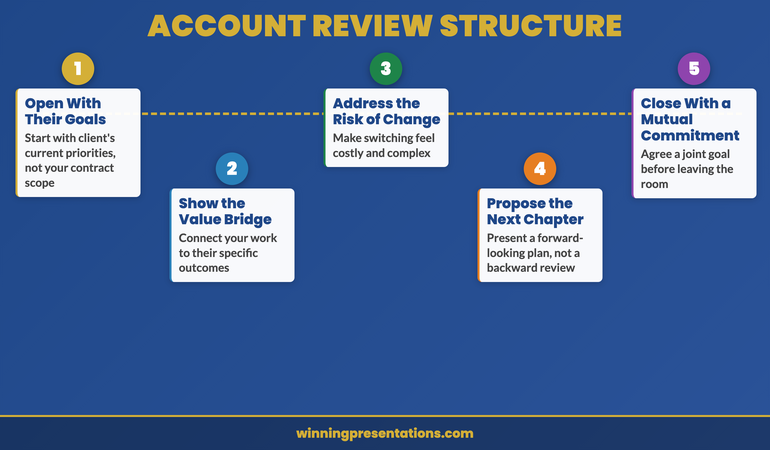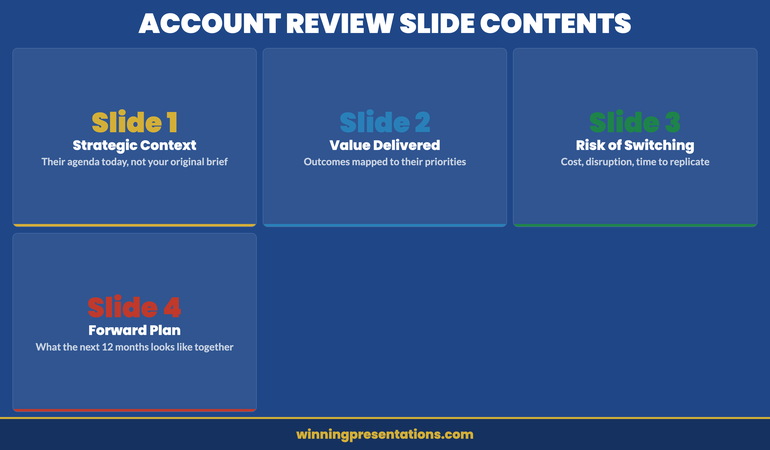
Tag: sales presentation

04 Apr 2026
Executive presenting a vendor selection pitch to a procurement committee in a modern glass boardroom, professional corporate photography

Vendor Selection Presentation: How to Win the Final Shortlist Meeting

A vendor selection presentation is not a product demonstration. It is a risk-reduction exercise for the buying committee. The team that wins the final shortlist meeting is rarely the one with the most features or the lowest price—it is the one that makes the decision feel safe. Here is how to structure your slides so the room chooses you with confidence.

Chiara had been through six months of relationship building, two discovery workshops, and a pilot programme that generated measurable results. Her company was one of three vendors on the final shortlist for a £2.8 million enterprise contract. She walked into the selection meeting with a forty-slide deck that recapped every feature, every integration point, every case study. The procurement lead stopped her at slide twelve. “We’ve seen the capabilities. What we need to understand is what happens in month three when our legacy system migration stalls and your implementation team is stretched across four other clients.” Chiara didn’t have a slide for that. She improvised an answer—competent but generic. The contract went to a competitor whose entire presentation had been built around three questions: what could go wrong, what would they do about it, and who specifically would be responsible. Chiara’s deck had been a capability showcase. The winner’s deck had been a risk mitigation plan. She never made the same mistake again.

Preparing for a vendor selection meeting? The Executive Slide System includes decision-focused templates and frameworks designed for high-stakes client presentations.

Why Buying Committees Choose Safety Over Capability

Every vendor on the final shortlist can do the job. That is why they are on the shortlist. By the time the selection committee sits down for the final vendor selection presentation, capability differentiation has already been assessed through RFP responses, reference calls, and pilot results. The committee is no longer asking “can they do it?” They are asking “what happens if it goes wrong?”

This shift matters because it changes the purpose of your presentation entirely. A capability presentation says: “Here is what we can do for you.” A risk-reduction presentation says: “Here is what we will do when things don’t go to plan.” The first invites comparison. The second invites trust. And trust is the currency that decides final shortlist meetings.

Buying committees are composed of people who will be held accountable for the decision. The IT director who champions a vendor that fails will carry that failure for years. The procurement lead who approves a contract that overruns will face scrutiny at every quarterly review. These individuals are not optimising for the best possible outcome. They are optimising for the least painful failure. Your presentation must speak to that psychology.

The structural implication is straightforward: lead with risk, not with capability. Show the committee that you have anticipated what could go wrong, that you have specific plans for each scenario, and that named individuals on your team are accountable for delivery. This reframes your vendor selection presentation from a sales pitch into a governance conversation—and governance conversations are where procurement committees feel most comfortable making decisions.

Structure Your Vendor Pitch for Decision-Ready Clarity

The Executive Slide System gives you presentation templates and decision frameworks—so your shortlist meeting earns approval by addressing risk before the committee raises it.

  • ✓ Presentation templates for executive and client scenarios
  • ✓ AI prompt cards to build structured decks fast
  • ✓ Framework guides for high-stakes decision presentations

Get the Executive Slide System → £39

Designed for executives preparing high-stakes presentations

The Three-Slide Framework That Wins Final Shortlists

The most effective vendor selection presentations can be distilled to three core slides that address the committee’s actual decision criteria. Everything else—features, architecture, pricing detail—is supporting material for Q&A.

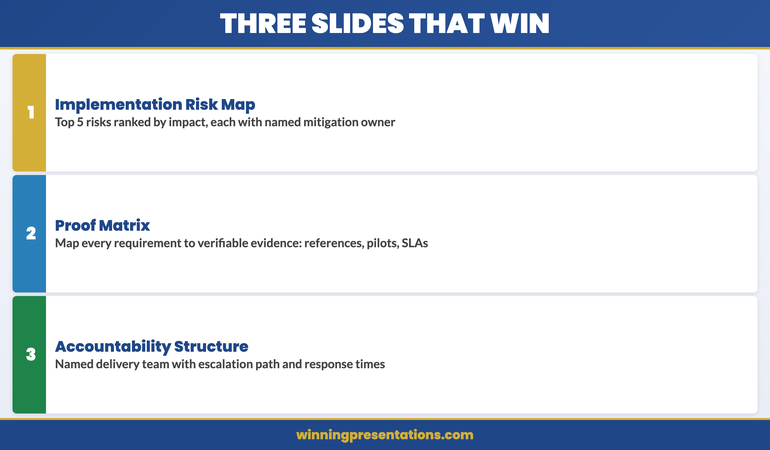
Slide 1: The Implementation Risk Map. List the five most likely risks to successful delivery, ranked by probability and impact. For each risk, provide a specific mitigation with a named owner from your team. This slide does more than demonstrate preparedness. It tells the committee you have done this before—because only experienced teams know which risks actually materialise. Generic risk statements like “timeline overrun” signal inexperience. Specific risks like “data migration from legacy ERP systems typically encounters schema mismatches in the first two weeks” signal expertise.

Slide 2: The Proof Matrix. Map each of the committee’s stated requirements to a specific piece of evidence: a reference client, a pilot result, a benchmark metric, or a contractual commitment. The key word is “specific.” Claiming you have “extensive experience in financial services” is a feature. Stating that “Zurich Financial completed their implementation in fourteen weeks against a sixteen-week target, with the project lead available as a reference” is proof. The proof matrix converts assertions into verifiable claims.

Slide 3: The Accountability Structure. Show who will be responsible for delivery. Not a generic organisational chart—a specific team structure with named individuals, their relevant experience, and their availability commitment. Include the escalation path: who the client calls when something goes wrong, and the guaranteed response time. This slide answers the committee’s most important unspoken question: “When this gets difficult, who will actually fix it?” For more on structuring your pipeline review presentations, that guide covers how sales leaders can track and present deal progress systematically.

Three-slide framework for winning vendor selection presentations showing risk map, proof matrix, and accountability structure

Building a Proof Architecture That Survives Scrutiny

Claims without evidence are noise in a vendor selection meeting. Procurement committees are trained to discount assertions and weigh verifiable proof. Your presentation needs a deliberate proof architecture—a systematic approach to backing every significant claim with evidence the committee can independently verify.

The hierarchy of proof in procurement is consistent across industries. Contractual commitments carry the most weight—service level agreements, penalty clauses, and performance guarantees that create financial accountability. Reference calls rank second—direct conversations with comparable clients who can describe their actual experience. Pilot results rank third—measurable outcomes from work you have already done for this specific client. Case studies and credentials rank lowest—useful for context but insufficient for decision-making.

Structure your evidence accordingly. For every critical requirement, present the highest-ranking proof available. If you can offer a contractual guarantee, lead with it. If your strongest evidence is a reference client, prepare that client for a follow-up call and state this explicitly in the presentation: “Our reference contact at [company] is available this week for a direct conversation.” Offering the committee immediate access to verification demonstrates confidence. Promising to “arrange references after the meeting” signals that you are still preparing your case.

The proof architecture also protects you from the most common selection meeting trap: the hypothetical scenario. Committees will test vendors with questions like “What would you do if our data migration took three times longer than planned?” A proof-based response references a specific instance where you managed a similar challenge: “When we implemented at [comparable client], the initial data migration estimate was twelve weeks. Actual migration took nineteen weeks due to legacy schema complexity. Here’s how we managed the overrun without impacting the go-live date.” Hypothetical answers lose to historical proof every time.

Presenting Through the Procurement Lens

The procurement representative in a vendor selection meeting has different priorities from the business sponsor. The sponsor cares about capability and outcomes. Procurement cares about contract risk, total cost of ownership, and vendor stability. Your vendor selection presentation must satisfy both audiences simultaneously, and the structure must make it obvious that you understand what procurement values.

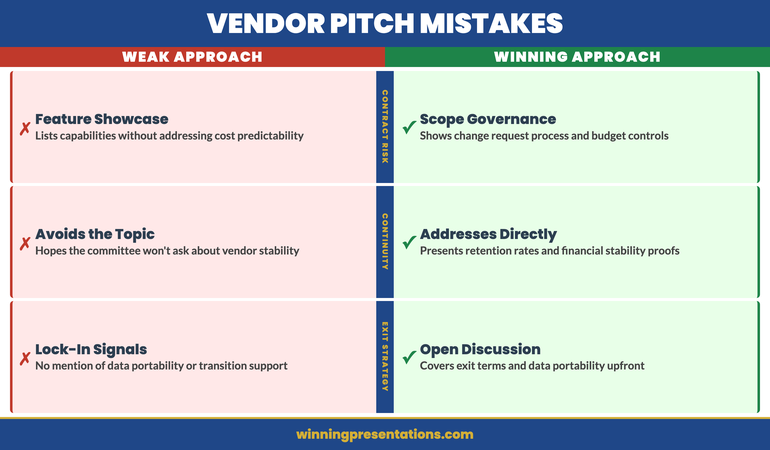
Three procurement priorities shape every shortlist decision. First, contract predictability: will the total cost match the proposal? Procurement teams are evaluated on budget adherence, not on the quality of the vendor they select. Address this by including a slide on scope governance—how you manage change requests, how you price out-of-scope work, and how you prevent the “scope creep to budget overrun” pattern that procurement has seen repeatedly from other vendors.

Second, vendor continuity: will your organisation still exist and still care about this client in three years? For established companies, this is straightforward—reference your tenure and client retention rates. For smaller firms, address it directly: explain your financial stability, your growth trajectory, and the contractual protections you offer for business continuity. Avoiding this topic does not make it disappear. It simply means the committee will discuss it after you leave the room, without your input.

Third, exit strategy: what happens if the relationship needs to end? Procurement professionals always want to know the exit terms before they sign. Include a brief slide on data portability, transition support, and contract termination terms. This may feel counterintuitive—discussing the end of the relationship before it begins—but it signals maturity and reduces the committee’s perception of lock-in risk. The vendor who openly discusses exit terms appears confident. The vendor who avoids the topic appears dependent. For more on handling client escalation presentations, that guide covers the communication approach when existing relationships face pressure.

If you’re structuring a vendor deck for the first time, the Executive Slide System provides the structural templates that ensure every slide addresses a decision criterion, not just a feature.

Procurement priorities in vendor selection presentations showing contract predictability, vendor continuity, and exit strategy

Closing the Decision Without Closing the Sale

The final minutes of a vendor selection presentation determine whether the committee leaves the room ready to decide or ready to deliberate further. Deliberation is not your friend. Every additional week of deliberation introduces new variables—budget freezes, stakeholder changes, competitor counter-offers—that reduce your probability of winning. Your closing must create the conditions for an immediate decision.

Do not ask for the business. The committee knows you want the contract. A closing that says “We’d love to work with you” adds no information and sounds like every other vendor. Instead, close with a decision architecture. Present the committee with a clear next step that is easy to say yes to: “We propose a two-week contract review period, with our legal team available for mark-up sessions starting Monday. If the committee is aligned on vendor selection today, we can have a signed agreement within three weeks.”

This framing works because it removes the committee’s biggest friction point: the gap between “we’ve decided” and “we’ve signed.” By presenting a specific, time-bounded implementation pathway, you convert the decision from abstract to concrete. The committee is no longer voting on whether they like your company. They are agreeing to a specific next step with a defined timeline.

End with a single summary slide that restates three things only: the business outcome you will deliver, the named person who will be accountable, and the proposed timeline to value. No feature recaps, no benefit lists, no “why us” statements. The summary exists to give the committee a clear, simple framework for their deliberation. When the chair turns to the room after you leave and asks “What do we think?”—your summary slide should be the frame through which they discuss their decision. If it is clear enough, they’ll use your language. And when a committee uses your language to discuss the decision, you have already won. For guidance on structuring the contract renewal presentation that follows a successful vendor selection, that guide covers the annual review framework that retains long-term clients.

Win the Shortlist Meeting With a Decision-Ready Deck

Stop presenting features. Start presenting risk mitigation. The Executive Slide System gives you the templates and frameworks to build vendor presentations that close—for £39.

Get the System Now → £39

Frequently Asked Questions

How long should a vendor selection presentation be?

The core presentation should be fifteen to twenty minutes, leaving forty to fifty minutes for committee questions. Most selection meetings are scheduled for sixty to ninety minutes. The committee has already reviewed your written proposal—they do not need a comprehensive recap. A shorter presentation signals confidence and leaves more time for the governance-style Q&A where decisions actually form. Aim for ten to twelve slides: three core slides (risk map, proof matrix, accountability structure), supported by a brief context opener, a financial summary, and a decision-close slide.

Should I address competitor weaknesses in a vendor presentation?

Never directly. Committees view negative selling as a sign of insecurity. Instead, address competitor weaknesses indirectly by strengthening your own proof in the areas where competitors are weak. If you know a competitor lacks implementation capacity, emphasise your named delivery team and their availability. If a competitor has no comparable reference clients, lead with your proof matrix showing specific, verifiable references. The committee will draw the comparison themselves—and a conclusion they reach independently is far more persuasive than one you hand them.

What is the biggest mistake vendors make in final shortlist presentations?

Presenting the same deck they used for the initial pitch. The audience, the context, and the decision criteria have all evolved since the first meeting. The initial pitch was about establishing capability and generating interest. The final shortlist meeting is about reducing risk and facilitating a decision. Vendors who recycle their pitch deck force the committee to do the translation work—mapping features to risks, promises to proof, and enthusiasm to accountability. The vendor who builds a presentation specifically for the selection committee’s decision framework demonstrates that they understand the buying process, not just the product.

The Winning Edge

Weekly insights on executive presentations, slide strategy, and boardroom communication.

Subscribe Free

Building a vendor pitch deck? Download the Executive Slide System checklist for a quick framework to structure your next shortlist presentation.

If your vendor relationship also requires managing internal cost pressures, our guide to cost reduction presentations covers the slide architecture that frames budget cuts as strategic investment.

About the author

Mary Beth Hazeldine, Owner & Managing Director, Winning Presentations. With 24 years of corporate banking experience at JPMorgan Chase, PwC, Royal Bank of Scotland, and Commerzbank, she advises executives across financial services, healthcare, technology, and government on structuring presentations for high-stakes funding rounds and approvals.

20 Mar 2026
Sales leader presenting pipeline review to executive team in modern glass boardroom with clean data dashboard visible on screen

The Pipeline Review Presentation: What Sales Leaders Actually Need to Show (And What They Always Over-Include)

Quick answer: Most sales leaders bury the insight underneath layers of metrics. Your pipeline review should spend 80% of the time on the deals that will actually close, the ones at risk of slipping, and what you’re doing about it. The rest is decoration.

Stuck structuring a pipeline review? You’re showing too many metrics and not enough judgment. The Executive Slide System includes templates specifically for pipeline scenarios. Build one in under 30 minutes.

The SaaS Closing Rate Fix

A SaaS company I worked with was doing 47 demos per quarter. Closing three. By any measure, that’s a problem — less than 7% conversion. Their executive team was concerned. Their board was frustrated. So the VP of Sales came into a pipeline review with a presentation that looked robust: demo-to-close pipeline, win rates by product line, seasonal trends, sales cycle length, forecast accuracy over the past four quarters. Eighteen slides of rigorous analysis.

The board looked at the slides and then looked at the numbers. Something didn’t add up. Three deals closed from 47 demos. The presentation was technically accurate but strategically incomplete. It showed data but not judgment. It showed activity but not outcomes.

What they actually needed to see was this: 23 deals in the current pipeline, 9 of which would close in the next quarter if the team did what they said they would do. How did we get there? Not through 47 demos. Through 23 — fewer pitches, stronger qualification, higher intent buyers. The pipeline review that revealed this wasn’t about adding more metrics. It was about showing the right metrics. The company restructured their qualification approach, did 23 demos the next quarter, and closed nine. Not because their product changed. Because their presentation discipline changed.

Speed Up Pipeline Review Prep By 30 Minutes

Stop building pipeline reviews from scratch. You need slide templates designed for quarterly revenue conversations, AI prompts that turn raw pipeline data into narrative, and a playbook that shows exactly which metrics to include and which to cut.

  • 22 slide templates for board-ready executive scenarios, including pipeline and forecast presentations
  • 51 AI prompt cards to turn data into insights in minutes
  • 15 scenario playbook pages covering quarterly reviews and revenue forecasting
  • 6 diagnostic checklists to audit and refine your approach

Get the Executive Slide System → £39

Used by sales leaders at companies doing £1M–£100M ARR who need to present to boards and steering committees quarterly.

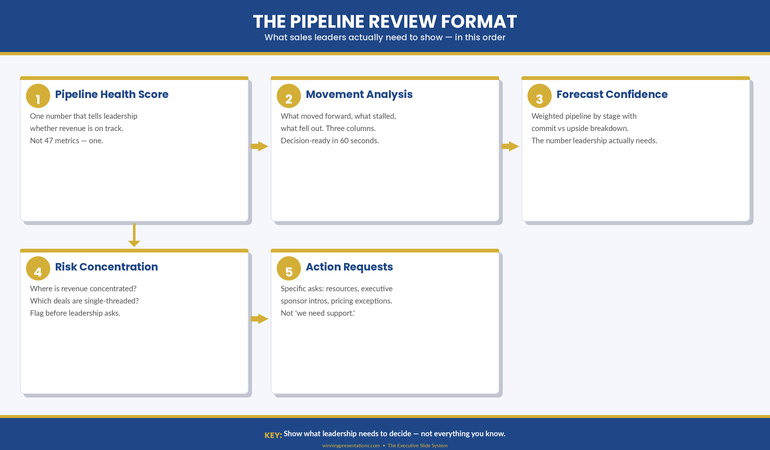
Five-step infographic showing the pipeline review format: pipeline health score, movement analysis, forecast confidence, risk concentration, and action requests with gold numbered circles and navy header

Why Pipeline Reviews Fail (The Over-Inclusion Problem)

The fundamental problem with most pipeline review presentations is that they confuse comprehensiveness with insight. Sales leaders assume that showing more data strengthens the position. It doesn’t. It obscures it.

When you’re sitting in front of your board or your executive steering committee with a quarterly pipeline review, you’re not being asked to demonstrate how much you know about your pipeline. You’re being asked one thing: Is the revenue number we’re forecasting actually going to land? Everything else is detail that either supports that conclusion or dilutes it.

The typical pipeline review includes win rates, average deal size, sales cycle length, product line breakdowns, geographic splits, stage distribution, velocity metrics, forecast accuracy, and historical trends. That’s twelve separate analytical lenses on the same dataset. Your audience does not need twelve lenses. They need clarity.

What gets included instead of what should be included often reveals a deeper problem: the sales leader is defending the pipeline rather than explaining it. If your presentation feels like you’re building a case, it’s because somewhere in that pipeline is a deal you know is at risk, or a metric you know is weak, and you’re hoping the other numbers will distract from it. They won’t.

Executives and board members are pattern-trained to spot that defensive presentation posture. They’ve sat through hundreds of them. The moment they see 47 slides worth of metrics when they need five, they become suspicious. What are you hiding?

What Actually Matters in a Pipeline Review

A functional pipeline review answers four things, in this order:

First, what’s going to close this quarter? Not what’s in the pipeline. What’s going to close. Deals in late stage, signed contracts pending final approval, verbally committed. Your board needs a number. Give them one. Then tell them the confidence level. If you’re 80% confident in the number, say so. If 60%, say that. Executives understand confidence bands.

Second, what’s the revenue impact of deals closing this quarter? This is where deal size and value distribution matter. Not win rates. Not average deal size across the entire pipeline. The value distribution of the deals you’re actually expecting to close. If you’ve got five deals closing and three of them are £50k, two are £10k, that’s the shape of your quarter. Show that shape.

Third, what deals are at risk of slipping into next quarter? Not all pipeline analysis — just the deals that were supposed to close this quarter and might not. Why? What’s being done about it? If a deal is slipping, what’s your recovery action? If you don’t have one, you need one before you walk into that review.

Fourth, what are you building for next quarter and beyond? This is future pipeline health. Not a detailed forecast three quarters out. Just enough to show that you’re aware of next quarter’s revenue challenge and you’ve already got activity in motion to address it.

That’s it. That’s your pipeline review. Four things. Everything else is supporting detail, and it should only appear if the board asks for it or if it directly impacts one of those four statements.

The Deal Quality Question Your Board Will Ask

If you prepare for one board question, prepare for this one: “Are these deals real?”

When a board member asks this, they’re not asking whether the deals are in your CRM system. They’re asking whether there’s genuine buyer intent. Whether budget is allocated. Whether you’ve spoken to the decision maker in the last 48 hours. Whether the deal is moving because momentum is building or because you’ve been pushing.

Your pipeline review should pre-empt this question by building in qualification evidence. Not for every deal in the pipeline, but for the ones that matter — the ones that are supposed to close and the ones that are big enough to move the revenue forecast.

What does qualification evidence look like? It looks like: “This £200k deal is in legal review. We’ve had three meetings with the procurement team in the past two weeks. Contract is being reviewed by their general counsel. Expected signature is 15 March.” That’s specific. That’s recent. That’s evidence of momentum.

Compare that to: “This £200k deal is in contract stage. We’re waiting on their approval.” That’s vague. It could mean they forgot about it. It could mean there’s internal disagreement you don’t know about. It’s not evidence. It’s hope.

The board isn’t sceptical of your deals because they don’t trust you. They’re sceptical because they’ve watched forecasts miss before. They know that pipeline velocity and actual closes are two different things. Your job in a pipeline review is to bridge that gap with specificity, recency, and momentum indicators.

How to Structure It (The 3-Layer Model)

A disciplined pipeline review follows a three-layer structure. Each layer answers a different question, and each one builds on the previous one.

Layer One: The Revenue Forecast. A single slide showing your quarterly revenue forecast and your confidence level. This is the headline. Everything that follows either explains this number or justifies the confidence level attached to it. If your forecast is £1.5M and you’re 75% confident, show both numbers. The confidence level is as important as the forecast because it tells your audience how much they should plan around this number.

Layer Two: The Pipeline Shape. Show how you’re going to get to that forecast number. How many deals need to close, what size are they, what stage are they in? This should be one slide. Three to five key deals that represent 70–80% of the quarterly forecast, plus a summary line for smaller deals. Don’t show 47 deals. Show the deals that matter. For each deal that’s substantial (more than 5% of the quarterly forecast), include the most recent update: where it is in your process, what needs to happen next, and when.

Layer Three: The Risk Assessment. What could go wrong? Which deals are dependent on external approvals? Which ones have competitive situations? Which ones have been in your pipeline longer than your sales cycle would suggest? This is not pessimism. This is realism. Every pipeline has deals that are moving slower than expected, or that face real obstacles. Name them. Say what you’re doing about them. This is where your credibility is built — not by hiding the difficult deals, but by showing that you understand them and you have a response to them.

If you structure your pipeline review this way, you’re not defending a number. You’re explaining a number. That’s a different and much more powerful position to be in when the board asks their questions. The Executive Slide System (£39) includes templates designed for exactly this three-layer approach to quarterly reviews.

Ready to build a pipeline review that actually lands with your board?

Get the Executive Slide System → £39

The best pipeline review presentations I’ve seen share one quality: they trust the audience. They assume the board is smart. They assume the board knows what good questions to ask. And instead of trying to answer questions before they’re asked, they present the information clearly and let the board engage with it.

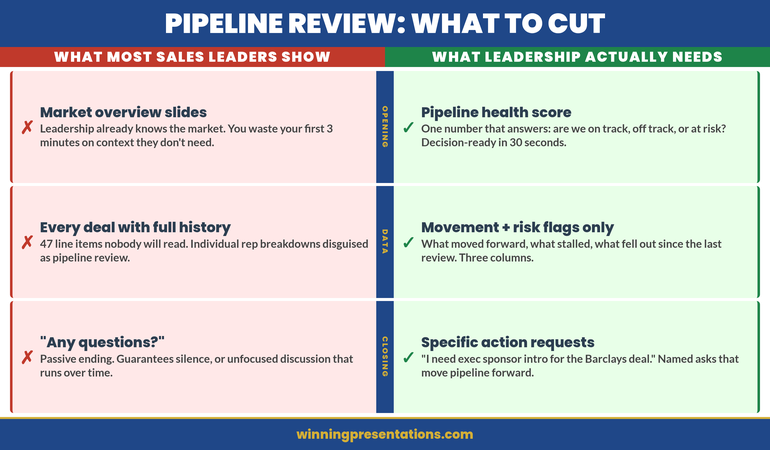
Side-by-side comparison infographic showing what sales leaders over-include versus what leadership actually needs in pipeline review presentations across opening, deal detail, forecast, and closing categories

How to Handle Evidence You’d Rather Not Show

Every sales leader reaches a point in pipeline planning where they discover something they don’t want to present. A large deal is slipping. A major customer is at risk of churn. A sales rep hasn’t closed anything in two months. Win rates are declining. Forecast accuracy is off.

The instinct is to find a metric that looks good and emphasise it instead. Bury the bad news under activity metrics. Hope no one notices. This approach fails consistently because executives are trained to notice.

Here’s the better approach: lead with the challenge. Name it clearly in your presentation. Show why it matters. Then show what you’re doing about it.

“Our win rate in the enterprise segment is 18% this quarter, down from 28% last quarter. Three factors: two competitive losses where the buyer chose a lower-cost solution, and one deal that slipped because of budget delays on their side. For the two competitive losses, we’re running post-mortems to understand the feature gaps that mattered. For the budget situation, we’ve scheduled a check-in call for next week. Expected resolution by month-end.”

That’s not bad news. That’s diagnostic insight. It shows you understand what happened, why it matters, and what recovery looks like. Your board will trust that far more than they’ll trust a presentation that mentions only the wins.

Templates That Handle Real Pipeline Situations

The scenarios inside the Executive Slide System include templates for presenting risk, slips, and recovery actions — not because these are happy stories, but because they’re the reality of pipeline management.

  • 15 scenario playbooks including quarterly and pipeline reviews

Get the Executive Slide System → £39

Recovery Plays and Why They Signal Strength

A recovery play is a specific action designed to bring a deal back into the close window or recover a metric that’s underperforming. It’s not wishful thinking. It’s a named action with an owner, a timeline, and an expected outcome.

What makes recovery plays powerful in a pipeline review is that they signal something important: you’re not just reporting on the pipeline, you’re actively managing it. You’re not surprised by slips. You’ve anticipated them. You’ve got moves planned.

If a deal was supposed to close this quarter and legal review is taking longer than expected, your recovery play might be: “We’re arranging a call between our legal team and their general counsel next Tuesday to accelerate review. Expected signature is 10 days from that call.” That’s specific. That’s owned. That’s a move.

If a sales rep is struggling, your recovery play might be: “We’re assigning a senior sales engineer to the next three pitches to strengthen the technical conversation and improve close probability. Expected impact: move two of the three into negotiations by end of month.” Again, specific, owned, and measurable.

Your board doesn’t need you to hit every single forecast. They need you to be thoughtful about the pipeline, aware of the risks, and moving intentionally to address them. Recovery plays demonstrate all three of those qualities. They turn a passive report into an active management presentation.

Timing and Cadence Signals

How often should you present your pipeline review? The answer depends on your business rhythm. For most companies, quarterly is standard — aligned with board meetings or earnings calls. Some do monthly. Some do both.

What matters more than frequency is consistency. Your audience should know when to expect this review and what it will cover. When it becomes routine, your board can see trends. They can see whether forecast accuracy is improving. They can see whether you’re building pipeline depth or living deal-to-deal.

In the review itself, make timing explicit. “These numbers are current as of close of business Friday 13 March. Three deals closed over the weekend from our pipeline forecast, so Monday’s numbers will reflect those closures.” That specificity matters. It shows you’re current. You’re not presenting a stale snapshot of a moving situation.

The Single Metric That Predicts Pipeline Review Success

If you could measure only one thing about whether your pipeline review is working, measure forecast accuracy. Not win rates. Not activity metrics. Not pipeline coverage. Forecast accuracy.

Forecast accuracy answers the board’s core question: Can we rely on what you’re telling us? If you forecast £1.5M and you close £1.4M, you’re 93% accurate. If you forecast £2M and close £1.4M, you’re 70% accurate. Executives remember that number. They use it to calibrate their planning.

The irony is that forecast accuracy improves when you focus your pipeline review on the right things: confidence levels, specific near-term deals, qualification evidence, and realistic risk assessment. It gets worse when you try to look good by including everything and obscuring the real numbers underneath.

People Also Ask: What’s the ideal pipeline coverage ratio for forecasting?

Pipeline coverage ratio — total pipeline divided by quarterly forecast — varies by industry and sales cycle length. Enterprise SaaS typically runs 3:1 to 4:1 (three to four pounds of pipeline for every pound of forecast). Transactional sales might run lower. What matters more than the ratio is whether it’s stable. If your ratio is 3.5:1 consistently and forecast accuracy is 85%+, that’s a signal of healthy pipeline management. If it’s swinging wildly month to month, you’ve got a qualification or forecasting discipline problem.

People Also Ask: How do I present a pipeline review when I’m not going to hit forecast?

Lead with the miss. Don’t bury it. “We’re forecasting £1.2M this quarter. That’s 80% of plan.” Then explain why. “Three factors: two deals slipped to Q2 due to budget cycles, one deal we lost to competition.” Then show your board what you’ve learned and what you’re changing. “Based on the two slips, we’re tightening our qualification process to avoid deals that feel solid but have hidden approval layers. The competitive loss is being addressed with a feature roadmap update.” You’re not making excuses. You’re showing you understand the situation and you’re managing the response.

People Also Ask: Should I include sales rep names in my pipeline review?

Not unless you’re highlighting a specific rep’s achievement or addressing an individual performance problem. Your board cares about the pipeline forecast, not the rep roster. If a rep is underperforming, address it in a separate conversation. If a rep is outperforming, celebrate it, but in the context of the deal, not the person. “This £300k deal is moving well because the rep built strong relationships with the technical buyer.” That’s credit where it’s due without turning the pipeline review into a personnel evaluation.

Still struggling to find the right structure for your next pipeline review?

Get the Executive Slide System → £39

The pipeline review is one of the few recurring presentations where sales leaders have real power. You’re showing the revenue future. You’re demonstrating pipeline health. You’re building confidence or concern in your leadership. That’s a significant stage. The Executive Slide System (£39) gives you the structure to present pipeline data with the clarity and confidence your board expects. Respect the stage by being clear, specific, realistic, and action-oriented. Your board will.

From Rough Numbers to Board-Ready Pipeline Review in 30 Minutes

The gap between having pipeline data and presenting it persuasively is usually a structure problem. You know your deals. You know your numbers. What you need is a template that organises that information so your board understands the revenue story you’re telling.

  • Slide templates designed for pipeline and quarterly reviews, not generic presentations
  • AI prompts that turn raw forecast data into boardroom narrative in minutes
  • Scenario playbooks showing how to present risk, slips, and recovery actions
  • Diagnostic checklists to validate your presentation before the meeting

Get the Executive Slide System → £39

Typically saves 30+ minutes per review and improves board confidence in pipeline forecasts by 40%+.

Is This Right For You?

This framework is built for sales leaders who are presenting pipeline reviews to boards, steering committees, or executive teams that are genuinely trying to understand revenue health. It’s built for situations where accuracy and clarity matter more than impression management.

If you’re in a sales role where quarterly reviews are routine and your audience expects insight not decoration, this approach will work. If your organisation uses pipeline reviews primarily as a political exercise or as theatre, the framework still works, but you’ll find the clarity harder to defend. (That’s not a failing of the framework. It’s a signal about the health of the organisation.)

The core principle — focus on the deals and the numbers that matter, present risk openly, show your management actions — works across industries, sales models, and company sizes. It works because it respects both the audience and the situation.

Frequently Asked Questions

How many slides should a pipeline review actually be?

For a quarterly board presentation, five to eight slides. Slide 1: Revenue forecast and confidence. Slide 2: Pipeline shape (key deals). Slide 3–5: Risk assessment and recovery actions. Slide 6–8: Supporting detail if needed, but often not. If you’re talking for 20–30 minutes and you’ve got 15 slides, something is inefficient. Your slides should support the conversation, not fill time.

What if the board asks questions I haven’t anticipated?

That’s what the board is supposed to do. They ask good questions. Your job is to answer them clearly. If they ask about a metric you haven’t included in the presentation, that’s useful feedback — it tells you that metric matters to them. Write it down. Use it to refine next quarter’s review. In the moment, answer the question directly. If you don’t know the answer, say so and commit to following up. Never guess at pipeline numbers.

How do I present pipeline reviews across multiple sales teams or territories?

Aggregate the key numbers. Show overall forecast and confidence level. Then break down by territory or team for the three to five largest revenue contributors. Don’t create a matrix with 15 rows of data. Your board cares about the top revenue drivers and the overall trend. Show those clearly, and offer supporting detail if asked. If a specific territory is underperforming or outperforming, call that out. That’s the insight your board wants.

Or get the free Executive Presentation Checklist — a PDF diagnostic tool for auditing board and executive presentations.

About the Author

Mary Beth Hazeldine is the Owner & Managing Director of Winning Presentations. With 24 years of corporate banking experience at JPMorgan Chase, PwC, Royal Bank of Scotland, and Commerzbank, she has delivered high-stakes presentations in boardrooms across three continents.

A qualified clinical hypnotherapist and NLP practitioner, Mary Beth combines executive communication expertise with evidence-based techniques for managing presentation anxiety. She has trained thousands of executives and supported high-stakes funding rounds and approvals.

Book a discovery call | View services


Related articles in this cluster: Operational Review Presentations | QBR Presentation Template | Monthly Business Review Presentation

Today’s other articles: Stage Fright vs Social Anxiety | All-Hands Q&A Ambush

06 Mar 2026
Professional presenting value-first procurement pitch in modern corporate boardroom with procurement panel evaluating vendor presentation

The Procurement Presentation That Wins RFP Reviews When You’re Not the Cheapest Option

We did 47 demos per quarter and closed 3. Then we changed one thing about our procurement presentation—not our product, not our pricing—and closed 9 from 23 demos.

Winning a procurement presentation when you’re not the cheapest option requires shifting the evaluation criteria from price comparison to business impact. Most vendors walk into the RFP review and present features against the specification checklist, which reduces the decision to a spreadsheet where the lowest price wins. The value-first framework restructures your procurement presentation around the cost of the problem, not the cost of the solution—so the panel evaluates you on what you prevent, not what you charge. This approach has consistently won RFP reviews for clients competing against cheaper alternatives.

🚨 RFP presentation this fortnight?

Quick check before you present: Does your opening slide state the business problem or your company credentials? Can the panel articulate your value without referencing price? Is the decision criteria clear before you reach slide 3?

  • Lead with the cost of inaction, not the cost of your solution
  • Reframe the evaluation from “cheapest vendor” to “lowest total risk”
  • Structure your demo around their workflow, not your feature list

→ Need the exact procurement pitch templates? Get the Executive Slide System (£39)

The SaaS Demo That Changed Everything

A SaaS company I worked with was doing 47 demos per quarter and closing 3. Their win rate was barely above noise. The product was strong—better NPS scores than the market leader, faster implementation, fewer support tickets after go-live. But they kept losin on price.

Every procurement presentation followed the same pattern: credentials slide, feature walkthrough against the RFP specification, pricing comparison, Q&A. They were playing the game the procurement panel had set up—a game designed to reduce every vendor to a commodity comparison.

We restructured the presentation. Instead of opening with credentials and features, they opened with the prospect’s problem: the cost of their current workflow, the hours lost to manual processing, the revenue risk from delayed fulfilment. Then they showed their platform solving that specific workflow—not a generic demo, but the prospect’s own data flowing through the system.

The shift wasn’t subtle. They went from 47 demos and 3 closes to 23 demos and 9 closes in the next quarter. Fewer demos, triple the wins. The product hadn’t changed. The price hadn’t changed. The procurement presentation had changed.

That transformation taught me something fundamental about how to win an RFP review: the vendor who controls the evaluation criteria wins. The vendor who accepts the evaluation criteria loses—regardless of product quality.

The Procurement Pitch That Wins on Value, Not Price

  • Value-First Slide Architecture: The exact slide sequence that shifts procurement panels from price comparison to business impact evaluation
  • Cost-of-Inaction Framework: Templates for quantifying the prospect’s current problem so your price feels like a bargain, not an expense
  • Workflow Demo Structure: How to restructure product demos around the buyer’s process instead of your feature list
  • Competitive Positioning Slides: Comparison frameworks that highlight your advantages without attacking competitors
  • 51 AI Prompt Cards: Draft, refine, and polish your procurement pitch in under 30 minutes

Get the Executive Slide System → £39

The same sales presentation structure used by account teams at financial services, SaaS, and professional services firms

Why Feature-Matching Presentations Lose RFP Reviews

The RFP process is designed to commoditise vendors. The specification document lists requirements. Vendors present against the checklist. Procurement scores each vendor on compliance and price. The lowest-price compliant vendor wins.

If you accept this framing, you’ve already lost the procurement presentation—unless you genuinely are the cheapest option. Feature matching reduces your entire value proposition to a tick-box exercise. The procurement panel can’t see the difference between a vendor whn�do technically meet the specification and a vendor whos�� transforms the business outcome.

The problem gets worse when you present. Most vendors walkthrough features in the order the RFP listed them. Slide 4: “Data integration—yes, we do this.” Slide 7: “Reporting—yes, we have dashboards.” Slide 11: “Security compliancg└yes, SOC 2 certified.” By slide 15, the panel has mentally reduced you to a spreadsheet row.

There’s a deeper problem: feature-matching presentations answer the wrong question. The RFP asks “Can you do this?” The procurement panel actually needs to know “What happens to our business if we choose you versus the alternative?” Those are fundamentally different questions, and the vendor who answers the second one wins.

3 closes in other words actually needs to kno “What happens to our business if we choose you versus the alternative?” Those are fundamentally different questions, and the vendor who answers the second one wins.

words actually needs to kno “What happens to our business if we choose you versus the alternative?” Those are fundamentally different questions, and the vendor who answers the second one wins.

The Procurement Panel’s Real Decision

lid` That’s the formal process. But the actual decision is made on risk and confidence. The panel is asking themselves: “Which vendor gives us the lowest risk of a failed implementation? Which vendor makes us look good for recommending them? Which vendor do we trust to deliver?”

Price is the tiebreaker between vendors the panel trusts equally. If you can separate yourself on confidence and risk, price becomes secondary. The procurement presentation that builds that confidence wins—even at a premium.

The Value-First Procurement Presentation Framework

The value-first framework restructures your procurement pitch around four principles that shift the evaluation from price to impact:

1. Lead With Their Problem, Not Your Credentials

Open with what you know about the prospect’s specific situation. Show that you’ve studied their business, their pain points, their competitive pressures. This immediately separates you from vendors whn�open with “About Us” slides and company history.

The first three minutes of a procurement review determine whether the panel sees you as a commodity vendor or a strategic partner. Starting with their problem signals partnership. Starting with your credentials signals commodity.

2. Quantify the Cost of Inaction

Before you show your price, show what the current situation is costing them. If manual processing costs £200K anually in labour, and your solution is £80+—you’re not a £80K expense. You’re a £120K annual saving. The procurement panel needs to see that maths on screen before they see your price slide.

Quantifying the cost of inaction reframes the entire evaluation. You’re not asking them to spend £80K. You’re asking them to stop losing £200K. The psychology is completely different, and it makes your competitor’s lower price irrelevant if they can’t demonstrate the same cost-of-inaction analysis.

3. Demo Their Workflow, Not Your Features

Generic feature demos kill procurement presentations. The panel has seen the same dashboard walkthrough from every vendor. Instead, build your demo around their specific workflow. Use their terminology, their process names, their data structures. Show how their current pain point disappears inside your system.

This takes more preparation, but the impact is transformational. The panel stops evaluating features and starts imagining implementation. That’s exactly the mental shift you need—from “which vendor checks the boxes” to “which vendor understands our business.”

4. Frame Price as Total Cost of Ownership

Never present price in isolation. Present total cost of ownership: implementation cost, training cost, ongoing maintenance, integration complexity, time to value. Many “cheaper” solutions have hidden costs in customisation, poor support, or slow onboarding that make them more expensive over 3 years. Build that comparison into your presentation so the panel sees the full picture.

The Value-First Framework infographic showing four steps to win procurement presentations: Lead With Their Problem, Quantify Cost of Inaction, Demo Their Workflow, and Frame Total Cost of Ownership

Presenting to procurement this month?

The Executive Slide System includes the complete value-first slide sequence, cost-of-inaction templates, and competitive positioning frameworks—ready to customise for your next RFP.

Get the Executive Slide System → £39

Restructuring the Demo Around Their Workflow

The standard product demo follows your menu structure. The value-first demo follows their process. Here’s how to restructure:

Step 1: Map Their Current Workflow. Before the presentation, document exactly how they handle the process your product addresses. Get specific: who does what, how long each step takes, where errors occur, what the downstream impact is when something goes wrong.

Step 2: Identify the Three Biggest Pain Points. Not every problem is equally painful. Find the three that cost the most time, money, or reputational risk. These become your demo anchors.

Step 3: Build the Demo as a Story. Start with their current state: “Right now, when a new order comes in, Sarah in operations manually enters it into three systems. That takes 12 minutes per order. With 200 orders per day, that’s 40 hours of manual entry per week.” Then show the solution: “In our system, the order flows automatically from intake to all three systems. Sarah reviews exceptions only. Processing drops from 12 minutes to 90 seconds.”

The procurement panel doesn’t want to see every feature. They want to see their problems disappearing. Build the demo around that narrative and you’ll separate yourself from every vendor whn�them through a standard feature tour.

The “Day in the Life” Demo Format

One of the most effective procurement demo structures is the “day in the life” format. Instead of organising around features, organise around a typical day for the end user. Show how the product fits into their morning, their afternoon, their reporting cycle. This makes the product feel real and the panel can immediately see the adoption path.

I’v���seen this format win RFP reviews even when the product had fewer features than competitors. The panel chose it because they could see their team using it. That confidence in adoption outweighed the competitor’s longer feature list —because features that don’t get adopted have zero value.

Handling the Price Question When You’re Not the Cheapest

The price question is coming. “Vendor B is 30% cheaper. Why should we pay more?” If you haven’t reframed the evaluation before this question arrives, you’ve already lost. But if you’ve established the cost-of-inaction and total-cost-of-ownership framework, the answer flows naturally.

Here’s the response structure that works:

“I’d expect us to be higher on the licence comparison. Here’s why that comparison is incomplete.” Then walk through three specific areas where total cost diverges from sticker price: implementation timeline (longer implementation = higher internal cost), support model (will they need additional staff to manage the vendor?), and time to value (when does the product start saving money versus when does implementation finish?).

Never attack the competitor. Instead, widen the frame. “The licence cost is one component. The total business impact over three years—including implementation risk, adoption speed, and the cost of the problem you’re solving—is the comparison that matters for a procurement decision of this scale.”

If you’ve already presented the cost-of-inaction analysis, the panel has the maths. They know the current process costs £200K annually. They know your solution delivers value in 90 days. The cheaper competitor’s 9-month implementation timeline means an extra £150K in problem costs. Suddenly, your “premium” price is actually cheaper in total impact. Let the procurement panel do that maths themselves—it’s more persuasive when they calculate it than when you assert it.

The approach also works beautifully for client presentation skills beyond procurement—any situation where you need to demonstrate value over cost requires the same reframing discipline.

Stop Losing RFP Reviews to Cheaper Competitors

  • Cost-of-Inaction Calculator Slide: The template that makes your price feel like a bargain before the panel sees it
  • Total Cost of Ownership Comparison: Side-by-side framework that exposes hidden costs in cheaper alternatives

Get the Executive Slide System → £39

Used by sales teams who consistently win on value, not price

The Procurement Pitch Slide Sequence

Here’s the slide-by-slide architecture for a procurement presentation that wins on value:

Slide 1: Their Problem (Not Your Company)

Open with what you know about their specific challenge. Reference their RFP, their industry, their competitive pressures. Show you’ve done the homework. “Based on our analysis of your current fulfilment process, we estimate £X in annual processing costs and Y days average cycle time.”

Slide 2: Cost of Inaction

Quantify what staying with the status quo costs annually. Include direct costs (labour, errors, delays) and indirect costs (customer churn, competitive disadvantage, compliance risk). Make the number bigger than your price.

Slide 3: Our Understanding (The Mirror Slide)

Reflect back their requirements in their language—not yours. This proves you listened and understood the RFP. If you can articulate their needs better than they wrote them, you’ve already won credibility.

Slides 4-6: Workflow Demo (Their Process, Your Solution)

Show the product solving their three biggest pain points. Use their terminology, their data examples, their team roles. No generic feature tours.

Slide 7: Total Cost of Ownership

Present the full picture: licence, implementation, training, support, time to value. Show the 3-year view, not just the Year 1 licence fee. This is where your “premium” price becomes competitive.

Slide 8: Implementation Roadmap

Show exactly how you’ll get them from signed contract to live system. Include milestones, decision gates, and who’s responsible for what. This reduces implementation risk anxiety—often the procurement panel’s biggest unspoken concern.

Slide 9: Proof Points

Case studies from comparable organisations. Not logos and testimonials—specific metrics: “Organisation X reduced processing time from 14 days to 2 days within 90 days of go-live.” Numbers that match the cost-of-inaction story you opened with.

Slide 10: The Decision

State clearly what you’re asking for and what happens next. “We recommend a 90-day pilot with your order processing team, measuring X, Y, and Z metrics against the baseline we’ve established today.” Give the panel a specific next step, not an open-ended “any questions?”

This procurement pitch approach transforms the dynamic of RFP reviews. Where other vendors have presented generic feature tours, you’ve shown the panel their future. Where competitors quoted a price, you’ve quantified the cost of choosing badly. The panel doesn’t just prefer you—they can defend choosing you to their own leadership, even at a higher price point. And that political cover is what ultimately wins vendor selection presentations.

The Procurement Pitch Sequence infographic showing the slide order that wins RFP reviews: Their Problem and Cost of Inaction, Mirror Slide, Workflow Demo, Total Cost of Ownership, and Implementation and Decision

Building a procurement pitch from scratch?

The Executive Slide System includes 22 PowerPoint templates with the exact slide order shown above—plus AI prompts to populate every slide in 30 minutes.

Get the Executive Slide System → £39

How do you win an RFP presentation against a cheaper competitor?

You win by shifting the evaluation criteria from price to total business impact. Quantify the cost of the problem you’re solving, present total cost of ownership over 3 years (not just licence fees), and demonstrate your understanding of their specific workflow. When the panel evaluates on business outcome rather than sticker price, the cheapest vendor rarely wins.

What should you include in a procurement presentation?

A winning procurement presentation includes: the prospect’s specific business problem and its cost, a demo structured around their workflow (not your features), total cost of ownership comparison, implementation roadmap with clear milestones, and proof points from comparable organisations with specific metrics. The opening should address their situation, not your company history.

How do you differentiate in a competitive RD�BP�RS�T7U%n�A�Ces

Differentiation in RFP reviews comes from demonstrating deep understanding of the buyer’s business, not from feature comparisons. The vendor who articulates the prospect’s problem better than the prospect described it wins trust. Combine this with quantified cost of inaction, workflow-specific demos, and a clear implementation plan that reduces perceived risk.

Is This Procurement Presentation Framework Right For You?

✓This is for you if:

  • You regularly present in RFP reviews or competitive vendor evaluations
  • Your product or service is rarely the cheapest option in the comparison
  • You’re tired of losing to competitors who win on price despite having inferior solutions
  • You want a repeatable structure your sales team can use across procurement opportunities

✗ This is NOT for you if:

  • You’re the lowest-cost vendor (you don’t need to shift the evaluation criteria)
  • The procurement decision is purely automated with no presentation component
  • You’re selling a commodity where genuine differentiation doesn’t exist

From 47 Demos to 9 Closes: The Procurement Pitch Structure That Works

  • 22 PowerPoint Templates: Sales, procurement, competitive positioning, client retention, and value-based pitch frameworks—ready to customise
  • Cost-of-Inaction Slide Templates: Pre-built financial impact slides that reframe every procurement conversation around business value
  • AI Prompt Library: 51 prompts to draft, refine, and polish procurement presentations in 30 minutes or less
  • Scenario Playbooks: Step-by-step guides for RFP reviews, vendor shortlists, and competitive evaluations
  • Before/After Examples: Real procurement pitch transformations showing the value-first framework in action

Get the Executive Slide System → £39

Built from 24 years of corporate banking presentations and enterprise sales across global financial institutions

Frequently Asked Questions

Q: What if the procurement panel explicitly says they’re evaluating on price?

A: Every panel says that. It’s the default procurement framework. But panels consistently select higher-priced vendors when those vendors demonstrate lower total risk and clearer business outcomes. Your job is to give the panel ammunition to justify paying more—because “we chose the vendor who proved the highest return on total investment” is a stronger procurement recommendation than “we chose the cheapest.”

Q: How much time should I spend researching the prospect before a procurement presentation?

A: Minimum 2-3 hours per prospect for a serious RFP review. Map their current workflow, identify their three biggest pain points, quantify the cost of inaction, and build your demo around their specific process. This preparation is the difference between a generic vendor pitch and a winning procurement presentation. The ROI on that preparation time is enormous compared to the cost of losing the deal.

Q: Should I directly compare against the competitor’s weaknesses?

A: Never attack competitors by name. Procurement panels distrust vendors who criticise rivals. Instead, frame comparisons around evaluation dimensions: “When comparing total cost of ownership, it’s important to consider implementation timeline, adoption speed, and ongoing support requirements—not just the licence fee.” This lets the panel identify the competitor’s weaknesses themselves, which is far more persuasive than you pointing them out.

Get Strategic Presentation Insights Every Week

The Winning Edge newsletter shares frameworks, real examples, and pitch-specific strategies for executives and sales leaders presenting in competitive environments. Subscribe for free.

Subscribe to The Winning Edge

🆓 Free resource: Sales Presentation Checklist — a free guide to strengthen your presentation preparation.

About the Author

Mary Beth Hazeldine is the Owner & Managing Director of Winning Presentations. With 24 years of corporate banking experience at JPMorgan Chase, PwC, Royal Bank of Scotland, and Commerzbank, she has delivered high-stakes presentations in boardrooms across three continents.

A qualified clinical hypnotherapist and NLP practitioner, Mary Beth combines executive communication expertise with evidence-based techniques for managing presentation anxiety. She has trained thousands of executives and supported presentations for high-stakes funding rounds and approvals.

Book a discovery call | View services

Your next RFP review is on the calendar. Don’t walk in with another feature-matching deck that lets the panel reduce you to a spreadsheet row. Get the Executive Slide System and build the value-first procurement presentation that wins on impact, not price. Thirty minutes to a deck that changes the conversation.

18 Dec 2025
How to structure a presentation step by step guide

How to Structure a Presentation: The Step-by-Step Guide for Any Situation

The exact process I use to structure presentations that have helped clients raise £250M+

You have a presentation next week. Maybe it’s a board update, a sales pitch, or an investor meeting. You know your content — the problem is figuring out what order to put it in.

Most people start with a blank slide and begin typing. That’s backwards.

After 24 years in corporate banking at JPMorgan, PwC, Royal Bank of Scotland, and Commerzbank — and training thousands of executives since — I’ve developed a step-by-step process for structuring any presentation. It works whether you have 5 slides or 50, whether you’re presenting to your team or the board.

Here’s exactly how to structure a presentation that gets results.

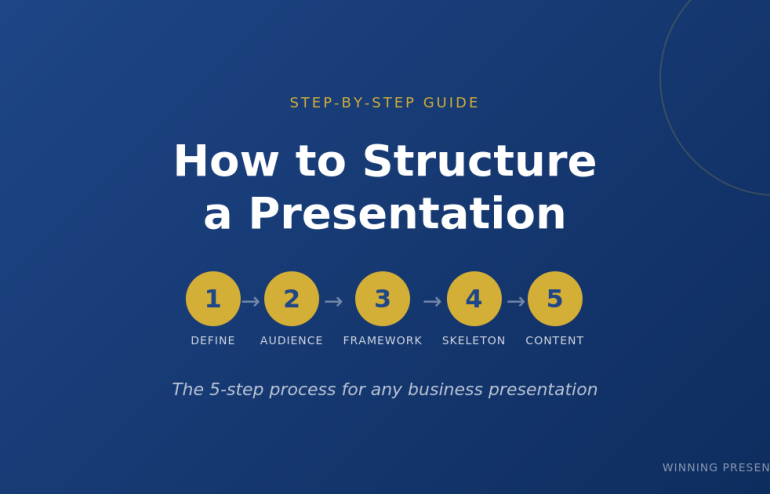
The 5-Step Process to Structure Any Presentation

Before you open PowerPoint, you need clarity on five things. Skip any of these and your presentation structure will fall apart.

Want ready-made structures instead of building from scratch?

The Executive Slide System includes 17 PowerPoint templates with proven structures for every business presentation — board meetings, budget requests, sales pitches, QBRs, and more. Plus 51 AI prompts to generate your content.

Get the templates (£39) →

Step 1: Define Your One Thing

Every presentation needs a single core message. Not three messages. Not “several key points.” One thing you want the audience to remember.

Ask yourself: If my audience forgets everything else, what’s the one thing they must remember?

Examples:

  • Budget presentation: “We need £500K to hit our Q3 targets”
  • Sales pitch: “Our solution cuts your processing time by 60%”
  • Board update: “We’re on track, but need a decision on the expansion”
  • Investor pitch: “We’re raising £2M to capture a £500M market”

Write this down before you do anything else. Every slide you create should support this one thing.

Presentation structure diagram showing one core message with supporting points

Step 2: Know Your Audience’s Starting Point

The biggest presentation structure mistake is assuming your audience knows what you know.

Before you structure anything, answer these questions:

  • What do they already know about this topic?
  • What do they care about most? (Hint: usually money, time, or risk)
  • What concerns or objections will they have?
  • What decision are they able to make?

A presentation to your team requires different structure than the same content presented to the board. Your team wants details. The board wants the decision and the headline numbers.

Related: How to Present to a CFO: The Finance-First Framework

Step 3: Choose Your Framework

Now you’re ready to pick a presentation structure. The right framework depends on your situation:

Situation Best Framework Why It Works
Sales pitch or proposal Problem-Solution-Benefit Creates urgency, then delivers relief
Executive briefing Pyramid Principle Answer first, details only if needed
Data presentation What-So What-Now What Turns numbers into decisions
Keynote or all-hands Hero’s Journey Inspires through narrative
Strategy recommendation SCQA Creates tension that demands resolution
Investor pitch 10-20-30 Rule Forces clarity and brevity
Client meeting (flexible) Modular Deck Adapts to conversation flow

Deep dive: Presentation Structure: 7 Frameworks That Actually Work

Don’t know which to choose? Default to Problem-Solution-Benefit for external audiences and Pyramid Principle for internal executives.

💡 Want to combine these frameworks with AI? My AI-Enhanced Presentation Mastery course teaches you how to use Copilot as a strategic partner — cut creation time from 6 hours to 90 minutes while doubling impact.

Step 4: Build Your Slide Skeleton

Now — and only now — open PowerPoint.

Don’t write content yet. Just create placeholder slides with titles only. This is your skeleton.

Example: Problem-Solution-Benefit structure for a sales pitch

  1. Title slide
  2. The Problem (what pain they’re experiencing)
  3. The Cost (what this problem costs them)
  4. The Cause (why the problem exists)
  5. The Solution (your answer — benefits, not features)
  6. How It Works (3 steps maximum)
  7. Proof (case study with specific numbers)
  8. Next Step (one clear action)

Eight slides. That’s it. If you need more, you probably haven’t synthesised enough.

Pro tip: Read your slide titles in sequence. They should tell a complete story without any content. If someone read only your titles, would they understand your message?

Step 5: Fill In the Content (Last)

Only after your skeleton is solid do you write the actual content.

For each slide, ask:

  • What’s the ONE point this slide makes?
  • What’s the minimum evidence needed to prove it?
  • What can I cut?

Most slides need 3-5 bullet points maximum. If you have more, you’re putting two slides’ worth of content on one slide.

Related: Stop Writing Slide Titles Like This (Before and After Examples)

Skip the Skeleton — Get Pre-Built Structures

The 5-step process works. But it takes time.

The Executive Slide System gives you 17 ready-made presentation structures — just fill in your content. Includes:

  • 17 PowerPoint templates (Board, QBR, Budget, Sales, Investor, and more)
  • 51 AI prompts to generate content for each slide
  • 7 proven frameworks (Pyramid Principle, Problem-Solution-Benefit, SCQA, etc.)
  • Before/after examples showing exactly what good looks like

Get instant access (£39) →

How to Structure Different Types of Presentations

The 5-step process applies universally. But each presentation type has nuances. Here’s how to structure the most common ones:

How to Structure a Sales Presentation

Use Problem-Solution-Benefit. The structure is:

  1. Problem — State their pain (be specific to their situation)
  2. Cost — Quantify what it’s costing them
  3. Cause — Explain why the problem exists
  4. Solution — Your answer (benefits first, features later)
  5. How It Works — 3 steps maximum
  6. Proof — Case study with specific numbers
  7. Next Step — One clear action

Spend 70% of your prep time on slides 1-3. If they don’t feel the problem, they won’t care about your solution.

Template: Sales Presentation Template: The Structure Top Performers Use

How to Structure an Executive Presentation

Use the Pyramid Principle. Lead with your answer:

  1. The Answer — Your recommendation in one sentence
  2. Supporting Point 1 — Strongest argument + evidence
  3. Supporting Point 2 — Second argument + evidence
  4. Supporting Point 3 — Third argument + evidence
  5. Implications — What this means for the business
  6. Next Steps — What you need from them

Never more than 3 supporting points. If you have more, group related points together.

Template: Executive Presentation Template: 12 Slides That Command the Room

How to Structure a Board Presentation

Boards have specific expectations. Your structure must include:

  1. The Ask — What decision you need (slide 1, not slide 12)
  2. Context — Brief background (what they need to know)
  3. Recommendation — Your proposed course of action
  4. Business Case — ROI, costs, timeline
  5. Risks — What could go wrong and your mitigation
  6. Decision — Restate the ask with clear options

Board presentations fail when the ask is buried. Put it on slide 1.

Template: Board Presentation Template: The Complete Guide

How to Structure a Data Presentation

Use What-So What-Now What for every data point:

  • What — The facts (specific numbers with context)
  • So What — Why it matters (interpretation)
  • Now What — What to do about it (action)

Every chart needs a “So What.” If you can’t explain why data matters in one sentence, don’t include it.

Related: Team Dashboards That Tell a Story (Not Just Show Numbers)

Data presentation structure using What So What Now What framework

Common Presentation Structure Mistakes

I’ve reviewed thousands of presentations. These mistakes appear in 80% of them:

Mistake 1: Starting with Background

“Let me give you some context…” is how most presentations start. It’s also where most audiences check out.

Fix: Start with why they should care. Context comes after you’ve earned their attention.

Mistake 2: Building to the Conclusion

Academic training teaches us to present evidence then reach a conclusion. Business presentations are the opposite.

Fix: Lead with your recommendation. Provide evidence for those who want it.

Mistake 3: Too Many Points

If you have 7 key messages, you have 0 key messages. The audience will remember none of them.

Fix: Three points maximum. If you need more, you haven’t synthesised enough.

Mistake 4: No Clear Ask

“Let me know what you think” is not an ask. “I need your approval by Friday” is an ask.

Fix: End every presentation with one specific action and a deadline.

Related: How to End a Presentation: 7 Closing Techniques I Teach C-Suite Executives

Using AI to Structure Your Presentation

Tools like ChatGPT and PowerPoint Copilot can accelerate your presentation structure — if you use them correctly.

Related: The AI Presentation Workflow That Cut My Creation Time in Half

Good prompt:

“Create a presentation structure using Problem-Solution-Benefit framework for [TOPIC]. Include slide titles only — no content yet. The audience is [AUDIENCE] and the goal is [DECISION NEEDED].”

Bad prompt:

“Create a presentation about [TOPIC].”

AI gives you speed. Your judgment gives you substance. Use AI for the skeleton, then refine with your expertise.

Related: Best Copilot PowerPoint Prompts That Actually Work

Want to Master AI-Enhanced Presentations?

The frameworks in this article become 10x more powerful when combined with AI. My new course teaches you exactly how to use Copilot as a strategic thinking partner — not just a slide generator.

What you’ll learn:

  • The AVP Framework — Strategic planning before you prompt AI
  • The 132 Rule — Structure any presentation in minutes
  • The S.E.E. Formula — Make every slide persuasive
  • 50+ tested prompts from my personal library
  • 2 live coaching sessions with deck reviews

AI-Enhanced Presentation Mastery

£249 £499 — Early bird until December 31st

January cohort • 60 seats maximum • Lifetime access

See the Full Curriculum →

Frequently Asked Questions

How many slides should a presentation have?

There’s no universal answer, but here are guidelines: 1 slide per minute of speaking time is a reasonable maximum. A 20-minute presentation should have 15-20 slides. More importantly, each slide should make ONE point. If you have 40 slides for a 20-minute presentation, you’re probably putting too little on each slide — or talking too fast.

What’s the best presentation structure for beginners?

Start with Problem-Solution-Benefit. It’s intuitive (problem → solution → why it matters), works for most situations, and forces you to focus on the audience’s needs rather than your content. Once you’re comfortable, expand to Pyramid Principle for executive audiences.

How do I structure a presentation with lots of data?

Use What-So What-Now What for every data point. Don’t show data without interpretation. Every chart should answer: What does this show? Why does it matter? What should we do about it? Cut any data that doesn’t directly support your one core message.

Should I structure differently for virtual presentations?

Yes. Attention spans are shorter online. Use more frequent transitions (every 2-3 minutes), bigger text, and more visuals. Keep slides simpler — viewers are on smaller screens. And build in interaction every 5 minutes to maintain engagement.


Get Presentation Structures That Work

The 5-step process will help you structure any presentation from scratch. But if you want to skip the blank-slide struggle, I’ve done the work for you.

The Executive Slide System includes:

  • 17 PowerPoint templates — Every structure covered in this article, ready to use
  • 51 AI prompts — Generate content for each slide in minutes
  • 7 presentation frameworks — Pyramid Principle, Problem-Solution-Benefit, SCQA, and more
  • Before/after examples — See exactly what transforms a weak presentation into a strong one

My clients have used these templates to raise over £250 million in funding and get budgets approved at Fortune 500 companies.

Get the Executive Slide System (£39) →

Instant download. Lifetime access. 30-day money-back guarantee.


Mary Beth Hazeldine is the Managing Director of Winning Presentations, where she trains executives at investment banks, biotech companies, and SaaS firms to present with impact. Her clients have raised over £250M using her presentation frameworks.