

Quick Answer: A non-decision — “let’s revisit this,” “we need more detail,” “interesting, let’s circle back” — is worse than a rejection. Rejections give you feedback. Non-decisions give you nothing. Re-presenting after a non-decision requires diagnosing why the room deferred (unclear ask, missing urgency, or political uncertainty), then restructuring specifically to close that gap. The key structural change: remove the comfortable middle ground where “defer” lives. Give the room a binary choice with a real-world deadline.
In this article:
- Why a non-decision is worse than ‘no’
- The 3 reasons presentations end without a decision
- The Non-Decision Diagnostic: what went wrong in your first attempt
- How to restructure for the re-presentation
- The Binary Close: removing the ‘defer’ option
- The pre-meeting that makes the re-presentation a formality
- Frequently asked questions
A colleague at Commerzbank presented a technology investment to the executive committee. The proposal was sound: £180K spend, September delivery, clear ROI. He’d prepared for weeks.
The room listened. Nobody objected. The CFO said “interesting approach.” The COO said “let’s make sure we’ve considered all the angles.” The meeting ended.
No decision. No follow-up. No calendar invite for a next discussion.
He presented the same proposal again six weeks later with minor cosmetic changes — updated timeline, refreshed data, slightly different formatting. Same result. “Good work. Let’s revisit when we have the Q3 numbers.”
The third time, I helped him restructure. We changed one fundamental thing: we removed the option to defer. Instead of “we recommend Option A,” we presented “Option A costs £180K and delivers in September. Option B is doing nothing, which costs £45K per month in manual processing and delays the regulatory deadline by four months.”
The room decided in five minutes.
The data hadn’t changed. The analysis was identical. What changed was the structure — specifically, the elimination of the comfortable middle ground where non-decisions live.
🚨 Re-presenting a deferred proposal this fortnight? Quick check: Does your deck include a slide quantifying the cost of NOT deciding? If the room can defer without consequence, they will. → Need the exact re-presentation structure? Get the Executive Slide System → £39
Why a Non-Decision Is Worse Than ‘No’
When someone says “no” to your proposal, you get three valuable things: a clear outcome, a reason (even if vague), and permission to either move on or address the objection.
When someone says “let’s revisit,” you get nothing. You don’t know what was wrong. You don’t know what would make it right. You don’t know whether the problem is your proposal, your structure, the timing, or the politics. And you can’t move on — because the proposal is technically still alive. It’s in a kind of organisational purgatory where it’s not approved, not rejected, just… suspended.
In 24 years of corporate banking, I watched non-decisions kill more careers than bad decisions. Because bad decisions are visible — you can learn from them, you can recover, you can point to what you’d do differently. Non-decisions are invisible. Your proposal sits in limbo. Your credibility slowly erodes as people associate you with the thing that never happened. And the opportunity cost compounds — every week of deferral is a week the problem you identified goes unsolved.
This is why re-presenting after a non-decision requires a fundamentally different approach than presenting the first time. You’re not starting from zero. You’re starting from worse than zero — because the room has already demonstrated they can defer your proposal without consequence.
The 3 Reasons Presentations End Without a Decision
What do you do when executives won’t make a decision?
Before you restructure anything, you need to diagnose why the first presentation was deferred. In my experience, non-decisions happen for exactly three reasons — and the fix is different for each.
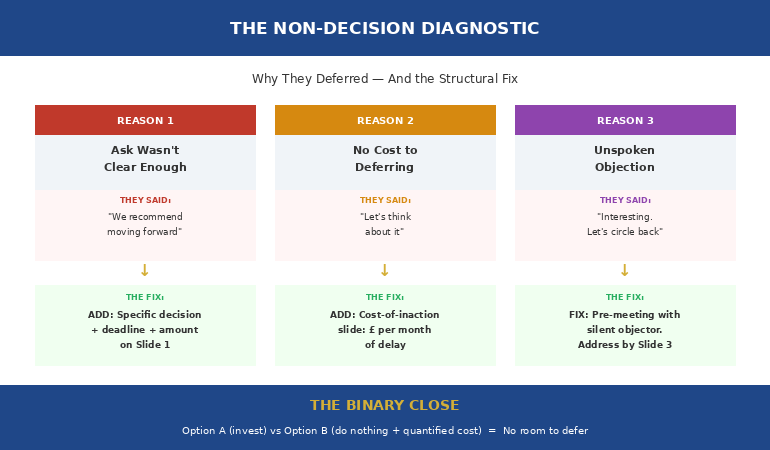
Reason 1: The ask wasn’t clear enough. This is the most common and the most fixable. If your final slide said something like “We recommend moving forward with the proposed solution,” you didn’t make an ask — you made a suggestion. Suggestions are easy to defer. Asks are harder. “I need this committee to approve £180K by March 7th” is an ask. The difference between the two is the difference between a decision and a deferral.
Reason 2: There was no cost to deferring. If the room can say “let’s think about it” without any consequence, they will — because deferral is the lowest-risk option for everyone in the room. Nobody gets blamed for a decision that was never made. Your re-presentation needs to make deferral expensive: “Every month we delay costs £45K in manual processing.” Now the room can’t defer without accepting that cost.
Reason 3: Someone in the room had an unspoken objection. This is the political one. The CFO who said “interesting approach” actually meant “I’m not sure about this but I’m not going to say so in a room of twelve people.” You need to find this person before the re-presentation and have a one-on-one conversation. Not to persuade them — to understand their objection so you can address it in the deck.
The best presenters — the ones who present like CEOs — diagnose the non-decision before they restructure anything. Because cosmetic changes to a structurally flawed presentation produce structurally identical results.
⭐ Re-Present and Get the Decision This Time — Not Another Deferral
The Executive Slide System includes Scenario 14: “Re-presenting After a Non-Decision” — a step-by-step playbook that diagnoses why your first attempt was deferred and gives you the exact structure to close the gap.
Your re-presentation toolkit:
- Strategic Recommendation template (Card 04) — decision architecture that forces yes-or-no outcomes
- Executive Summary template (Card 01) — restructured for re-presentation with “what changed” framing
- AI prompt: “I presented this and received no decision. The room said [exact words]. Restructure to force a yes-or-no outcome”
- The 15-minute version for when the re-presentation is tomorrow
Get the Executive Slide System → £39
Built from 24 years in corporate banking. The same structure that turned a 3-time deferral into a 5-minute decision at Commerzbank.
The Non-Decision Diagnostic: What Went Wrong in Your First Attempt
Before you change a single slide, answer these four questions. They’ll tell you exactly what to fix.
1. “What were the exact words used when the meeting ended?” Write them down. “Let’s revisit” is different from “we need more detail,” which is different from “interesting, let’s circle back.” Each phrase signals a different problem. “Need more detail” means your evidence was thin. “Let’s revisit” often means the timing or urgency wasn’t established. “Interesting” with no follow-up usually means an unspoken political objection.
2. “Was the specific decision clear on the final slide?” Pull up your original deck. Look at your last content slide. Does it say “Recommendation” (vague) or “Decision Required: Approve £180K by March 7” (specific)? If the decision wasn’t explicit, the room had nothing concrete to approve. This is the single most common cause of non-decisions.
3. “Was there a cost of deferral on any slide?” If not, you gave the room permission to wait. Every re-presentation needs a “cost of inaction” slide — quantified, specific, and time-bound. Not “we risk falling behind.” That’s a warning. “£45K per month in manual processing, starting immediately” — that’s a cost.
4. “Who in the room was silent?” Silence in an executive meeting almost never means agreement. It means someone has a concern they didn’t voice. Before you re-present, have a one-on-one with that person. Ask: “What would need to be different for you to support this?” Their answer is the single most important input for your restructure.
How to Restructure for the Re-Presentation
How do you re-present a proposal that was deferred?
Don’t present the same deck with updated data. That tells the room “nothing has changed” — which means their non-decision was the right call. Instead, restructure around the specific gap the diagnostic revealed.
If the ask wasn’t clear: Rebuild the decision slide from scratch. State the decision required in one sentence on your first slide. Include the date by which you need the decision and the reason for that date. “I’m requesting approval for £180K by March 7 because the vendor contract expires March 14.” The room can’t defer when there’s a hard deadline attached to a specific financial consequence.
If there was no cost to deferring: Add a “cost of inaction” slide immediately after your recommendation. This slide has one job: make deferral expensive. “Each month of delay costs £45K in manual workarounds. Since the first presentation 6 weeks ago, the cost of inaction has been £67.5K.” That number — the cost that accumulated while they deferred — is your most powerful slide.
If someone had an unspoken objection: Address their specific concern by slide 3 — before they raise it. If the CFO was worried about ROI assumptions, build a sensitivity analysis showing the proposal works even under pessimistic assumptions. If the COO had concerns about implementation risk, add a risk mitigation slide with specific contingencies. The goal is to resolve the objection in the presentation rather than in the room.
Important: don’t acknowledge the first presentation failed. Never open with “As you’ll recall, we discussed this previously and…” That frames the re-presentation as a retry. Instead, open with what’s changed since the last discussion — even if what’s changed is your structure, not your data. “Since our last discussion, I’ve quantified the cost of the current approach and identified the implementation risks. Here’s the updated recommendation.”
The Executive Slide System’s Scenario 14 walks you through this exact diagnosis-and-restructure process. It tells you which template to open, which AI prompt to run, and includes a specific prompt for non-decision recovery: “I presented this and received no decision. Restructure to force a yes-or-no outcome.” Get the Executive Slide System → £39.
The Binary Close: Removing the ‘Defer’ Option
This is the structural change that turned my Commerzbank colleague’s three-time deferral into a five-minute decision. I call it the Binary Close — and it’s the single most effective technique for re-presenting after a non-decision.
Most presentations end with a recommendation: “We recommend Option A.” This feels decisive. It isn’t. Because the room has three responses available: yes, no, or defer. And defer is always the easiest choice.
The Binary Close eliminates the middle option by presenting exactly two paths with fully quantified consequences:
Path A (your recommendation): “Invest £180K. Delivered September. Regulatory deadline met. Annual savings of £540K starting Year 2.”
Path B (doing nothing): “Zero investment. Current manual process continues at £45K/month. Regulatory deadline missed by 4 months. Estimated non-compliance cost: £320K.”
There’s no Path C. No “let’s think about it” option. No “defer for more information.” The room is choosing between two specific, quantified futures — and one of them is clearly worse than the other.
This works because it reframes the decision. Instead of “should we invest?” (which can always be deferred), it becomes “which cost do we accept?” — and accepting the cost of inaction feels increasingly irrational when it’s quantified on the slide in front of them.
Why do executives say ‘let’s revisit’ instead of deciding?
Because deferral is the safest option for every individual in the room. Nobody gets blamed for a decision that wasn’t made. The Binary Close makes deferral unsafe by quantifying its cost. When “let’s revisit” comes with a price tag — “every month we defer costs £45K” — the room’s calculus changes. Deciding becomes less risky than not deciding. That’s the structural shift you need.
⭐ Stop Getting ‘Let’s Revisit’ and Start Getting Decisions
Non-decisions are the silent killer of proposals, projects, and careers. The Executive Slide System gives you the decision architecture that eliminates the comfortable middle ground where deferrals live.
Your non-decision recovery deliverables:
- Non-decision recovery slide — “what changed since last time” framing that avoids looking like a retry
- Binary options slide template — costed consequences of approval vs delay, side by side
- Decision wording prompts that force a yes-or-no outcome (no room for “let’s revisit”)
- Cost-of-inaction slide — quantified per-month delay cost that makes deferral expensive
Get the Executive Slide System → £39
Built from executive committee meetings where proposals stalled — the same decision architecture that turned a 3-month deferral into a 5-minute approval at Commerzbank.
The Pre-Meeting That Makes the Re-Presentation a Formality
The most effective re-presentations are decided before the meeting starts.
After the diagnostic — once you know why the first presentation was deferred — have individual conversations with two people: the decision-maker and the silent objector (if you’ve identified one).
The decision-maker conversation: “I’m re-presenting the technology investment on Thursday. Since our last discussion, I’ve quantified the cost of the current approach — it’s £45K per month. I want to make sure I’m addressing your priorities. Is there anything specific you’d want to see before making a decision?”
This conversation does three things. It signals you’ve done additional work (not just re-presenting the same deck). It anchors the cost of inaction before the meeting. And it gives them a preview, which means they arrive at the meeting having already mentally processed the decision.
The silent objector conversation: “I noticed we didn’t hear from everyone last time. I’m planning to address implementation risk and the ROI assumptions in the updated proposal. Would you be willing to take a look beforehand?” This is harder but more important. You’re giving them a way to raise their objection privately — which means they don’t need to raise it publicly in the meeting.
If both conversations go well, the re-presentation becomes a formality. The decision-maker already knows the answer. The objector’s concern is already addressed. The meeting exists to formalise what’s been agreed, not to deliberate.
The Executive Slide System includes the Strategic Recommendation template (Card 04) — the same decision architecture that turned a 3-time deferral into a 5-minute approval. The matched AI prompt helps you restructure specifically for binary-choice framing.
If the anxiety of re-presenting — of walking back into a room that already deferred you once — is a concern, the structural approach helps. When you’ve diagnosed the gap, had the pre-meetings, and built the Binary Close, you walk in knowing the decision is largely made. Uncertainty drives most presentation anxiety. Structure eliminates uncertainty.
Is This Right For You?
✓ This is for you if:
- You presented a proposal and it was deferred — “let’s revisit,” “need more detail,” “interesting”
- You need to re-present and can’t afford another deferral
- You want a structure that forces a binary yes/no decision, not another discussion
✗ This is NOT for you if:
- Your proposal was explicitly rejected with clear feedback (see how to present after a rejection)
- You’re presenting a new proposal for the first time (the standard decision slide structure is sufficient)
⭐ The Same Structure That Ended 3 Months of Deferral in 5 Minutes
Non-decisions killed more proposals in my 24 years of banking than bad data ever did. The Executive Slide System is the structural fix — decision architecture, binary-close framing, and scenario-specific playbooks that eliminate the “defer” option from the room.
Inside:
- 22 executive slide templates — including Strategic Recommendation and Executive Summary
- 51 AI prompts — including the non-decision recovery prompt: “Restructure to force a yes-or-no outcome”
- 15 scenario playbooks — Scenario 14 covers re-presenting after a non-decision step by step
- 6 checklists covering structure, decision readiness, and the Binary Close
Get the Executive Slide System → £39
Instant download. 30-day money-back guarantee. Used by directors, programme leads, and consultants who can’t afford another deferral.
Frequently Asked Questions
How long should I wait before re-presenting?
As short as possible — but only after you’ve done the diagnostic and had the pre-meetings. Waiting weeks or months doesn’t improve your proposal. It increases the cost of inaction and lets momentum die. The ideal timeline: complete the Non-Decision Diagnostic within 48 hours, have pre-meeting conversations within a week, and re-present within two weeks of the original meeting. If you wait longer than a month, the proposal loses urgency and you’ll need to rebuild the business case from scratch.
Should I change the content or just the structure?
Structure first. In most non-decision cases, the data is fine — the room understood your analysis. What they didn’t have was a clear decision mechanism: a specific ask, a deadline, and a quantified cost of deferral. Start by restructuring around the Binary Close (two paths, fully quantified). Only change the content if the diagnostic reveals the evidence was genuinely thin or an objection needs new data to address.
What if the non-decision was political, not structural?
Then the fix is the pre-meeting, not the deck. If the deferral happened because someone in the room had an unspoken objection, no amount of slide restructuring will fix it. You need to identify that person, understand their concern, and address it before you re-present. The deck change is secondary: add their specific concern to your risk or trade-off analysis so it’s visibly addressed. But the real work happens in the corridor conversation, not in PowerPoint.
How do I prevent deferrals in future presentations?
Three structural habits. First, always include a specific decision with a deadline on your final slide — “I need this committee to approve X by Y date.” Second, always include a cost-of-inaction slide — quantify what happens if the room doesn’t decide. Third, always have a pre-meeting with the decision-maker before any high-stakes presentation. If they know the ask before the meeting, the meeting becomes a formality, not a debate. These three habits eliminate most non-decisions before they happen.
📬 The Winning Edge — Weekly Newsletter
One executive presentation insight per week. Real boardroom scenarios, structural fixes, and the decision-first frameworks that get approvals — not deferrals.
Related: The decision slide is where most non-decisions originate. Read The Decision Slide That Gets ‘Yes’ in 60 Seconds — the structure that prevents deferrals from happening in the first place.
Your deferred proposal is still sitting in someone’s inbox. The cost of inaction is compounding. Get the structure that makes “let’s revisit” impossible — and walk out with the decision this time.
About the Author
Mary Beth Hazeldine is the Owner & Managing Director of Winning Presentations. With 24 years of corporate banking experience at JPMorgan Chase, PwC, Royal Bank of Scotland, and Commerzbank, she has delivered high-stakes presentations in boardrooms across three continents.
A qualified clinical hypnotherapist and NLP practitioner, Mary Beth combines executive communication expertise with evidence-based techniques for managing presentation anxiety. She has trained thousands of executives and supported presentations for high-stakes funding rounds and approvals.