Tag: presentation techniques

27 Mar 2026
Professional laptop setup showing a virtual meeting screen with warm lighting and a calm workspace environment

I Was Fine in Boardrooms. Then Zoom Destroyed My Confidence.

Quick answer: Camera-based presenting triggers distinct anxiety because you can see yourself, lose real-time audience feedback, and face screen fatigue. Unlike in-person presenting—where you read the room—virtual meetings isolate you with your own image and a grid of faces you can’t fully process. The self-view effect can intensify anxiety. Three immediate fixes: disable self-view, position your camera at eye level, and use the “pause and breathe” technique between responses.

The Scene: Petra had delivered presentations to boardrooms across Europe with barely a tremor. But when her company moved to hybrid meetings, something shifted. During her first Zoom call with the leadership team, she felt her chest tighten the moment her camera went live. She could see herself in the small box—the tilt of her head, the occasional blink—and it was distracting her completely. The faces on screen seemed distant and unreadable. No nods, no engaged eye contact. Just flat tiles and occasional frozen frames. By the time she finished her slides, her shoulders were in her ears and she’d forgotten half of what she planned to say.

“It’s completely different from in-person,” she told her colleague afterwards. “I know how to work a room. But this? I can’t read anyone. And I’m stuck watching myself.”

Petra’s experience isn’t unusual. Virtual presentation anxiety is its own beast—distinct from stage fright or boardroom nerves. And understanding why is the first step to managing it.

Managing camera anxiety takes more than tips.

The Conquer Speaking Fear programme teaches nervous system techniques specifically designed for remote anxiety.

Explore Conquer Speaking Fear →

Why Self-View Breaks Your Confidence

The moment your camera goes live, you face a fundamental difference from in-person presenting: you can see yourself. In a boardroom, you never watch yourself present. You read the audience. You track energy. You adjust. But on Zoom? There you are, in a small box, present for your own performance.

This isn’t vanity. It’s neuroscience. Research shows that seeing your own face on screen can increase self-focused attention and affect stress responses. You’re essentially creating a second “observer” in your own mind, constantly monitoring and judging your appearance, your expressions, even the slight delay in video transmission.

That split attention—between what you’re saying and how you look saying it—hijacks working memory. You have fewer cognitive resources left for the actual content. Your delivery becomes smaller, more cautious. Your voice may tighten. And paradoxically, the more aware you become of this, the more anxious you feel.

Professional presenters often disable self-view entirely during live streams for exactly this reason. The moment they stop watching themselves, delivery improves dramatically.


Camera Anxiety Cycle infographic showing four stages in a continuous loop: See Yourself, Monitor Expression, Lose Flow, and Anxiety Builds — with a central Self-View hub indicating where to break the cycle

Loss of Real Audience Feedback

In a physical room, you read microexpressions. A furrowed brow tells you someone’s confused. A smile and a nod say you’ve landed a point. Leaning forward signals engagement. These cues are instantaneous and unconscious—your nervous system processes them automatically, and your brain adjusts your delivery in real time.

On a video call, that feedback loop breaks. Faces are small. The bandwidth of Zoom video is compressed, which flattens micro-expressions. Internet latency creates a slight delay, so even if someone nods, you might not see it immediately. And if someone’s camera is off, or they’re multitasking off-screen, you have absolutely no signal of whether your message is landing.

This uncertainty creates what neuroscientists call “communicative stress.” Your brain is wired to seek evidence that you’re being understood. Without it, anxiety builds. You may find yourself overexplaining, speaking faster, or becoming overly formal—all compensation behaviours that make you sound less confident.

Some presenters experience this as a unique form of isolation: you’re performing into a void. You can’t modulate your message based on real feedback. That loss of control triggers the ancient anxiety response—your nervous system interprets silence or ambiguous facial expressions as potential rejection or disapproval.

The Real Issue: Your Nervous System Isn’t Built for This

Camera anxiety isn’t a character flaw or a confidence issue. It’s your nervous system responding to genuine communicative ambiguity. When you’re unsure if you’re being understood, or aware that you’re being watched through a screen, your body triggers a mild threat response. Your sympathetic nervous system activates. Heart rate climbs. Breathing becomes shallow.

The Conquer Speaking Fear programme gives you three frameworks to reverse this:

  • Nervous System Reset Technique: A 90-second body-based practice that shifts your physiology from threat mode to task focus—proven to lower cortisol and stabilise heart rate before you go live.
  • Anxiety Reframe Method: Transform the physical sensations of anxiety (racing heart, butterflies) into signals of readiness, not danger. This rewires your stress response in real time.
  • Audience-Centred Grounding: A mental technique that shifts your focus from how you look to the value you’re delivering—dissolving self-consciousness and rebuilding confidence.

These aren’t willpower strategies. They’re neuroscience-backed tools that work with your biology, not against it.

Get Conquer Speaking Fear → £39

Screen Fatigue and Cognitive Overload

Virtual presenting demands more cognitive effort than in-person delivering. You’re processing multiple information streams simultaneously: your own image, the faces of attendees, your slides or notes, chat messages, and the slight technical delay that creates a cognitive friction with your speech.

This is called “Zoom fatigue” in the research literature, and it’s real. Studies from Microsoft and the University of Arizona found that video calls cause higher cognitive load than equivalent in-person meetings. Your brain has to work harder to extract meaning from compressed video, to compensate for the loss of body language, and to manage the slight asynchronisation between audio and video.

That effort is exhausting. After a 60-minute video presentation, many people report feeling drained in a way that a 90-minute in-person presentation doesn’t trigger. And when you’re cognitively fatigued, anxiety often spikes. Your emotional regulation becomes compromised. That wobble in your voice, the stumble over a word, the moment you lose your thread—these happen more often when you’re running on depleted resources.

Some presenters also experience what’s called “glass face syndrome”—the feeling that the camera is capturing every minute of emotion, every flicker of uncertainty. Combined with cognitive fatigue, this creates a perfect storm: you’re exhausted, watching yourself, and convinced that every slip is visible to everyone.

Practical Fixes You Can Use Today

1. Disable Self-View (Immediately)

This matters. In Zoom, click your video thumbnail and select “Hide Self View.” In Microsoft Teams, right-click your video and choose “Turn off my video preview.” In Google Meet, click your video icon and select “Settings” → “Hide self view.”

Removing self-view can reduce anxiety markers and improve natural delivery. You’re no longer operating with a self-consciousness observer in the room. Try it for one meeting and notice the difference in how you feel.

2. Position Your Camera at Eye Level

If your camera is below your eye line, you’re presenting looking down, which unconsciously conveys submission or low confidence. If it’s above, you’re looking up, which can read as uncertain or seeking approval. A camera positioned at your eye level creates psychological equilibrium and more confident body language.

Use a laptop stand, a stack of books, or a monitor arm. This single adjustment will improve how you feel and how you’re perceived.

3. Use the “Pause and Breathe” Technique

During your presentation, pause after each major point for 2-3 seconds. Use those seconds to take a deliberate breath through your nose. This serves multiple functions: it resets your nervous system, it gives your audience time to absorb your message (compensating for the feedback loss), and it creates a natural rhythm that reduces the sense of needing to fill silence.

The pause also breaks the illusion that you’re “on camera performing.” It grounds you in the present moment, which dissolves much of the self-consciousness.

4. Create a “Green Room” Ritual

Fifteen minutes before going live, step away from your desk. Do something physical: a short walk, five minutes of stretching, or even standing and shaking out your shoulders. This activates your parasympathetic nervous system (the “rest and digest” state) and prevents you from sitting in anxiety-rumination mode until the meeting starts.

If you’re presenting from your office, even a 60-second walk to the kitchen and back will interrupt the anxiety loop.

Feeling like you need more than tactics?

The nervous system techniques in Conquer Speaking Fear address the physiology of camera anxiety. You’ll learn structured methods to manage the physical sensations of anxiety and present with more ease, regardless of your delivery medium.

Learn more about Conquer Speaking Fear

Calm Your Nervous System Before Going Live

The 2-5 minutes immediately before your presentation are critical. Your nervous system is hypervigilant, scanning for threat. Here’s what works:

The 4-7-8 Breathing Pattern: Breathe in for 4 counts, hold for 7, exhale for 8. Do this three times. This is a practical nervous system technique that can help reduce heart rate and activate your parasympathetic system. Many find it helpful before presenting.

Grounding: Feel your feet on the floor. Notice the texture of your chair. Name five things you can see in your room. This pulls your attention out of anxious anticipation and into the present moment, where you’re actually safe.

A Simple Affirmation (Not Toxic Positivity): Rather than “I’m going to be amazing,” try “I’ve prepared for this, and I know my material.” This is grounded in fact and activates your competence nervous system rather than your performance anxiety system.

Combine these three elements in a 5-minute pre-presentation ritual, and you’ll notice your anxiety shifts from anticipatory dread to focused readiness.

From Anxiety to Presence

Virtual presenting anxiety is distinct from in-person stage fright because it activates different neural pathways. The self-view effect, the loss of real-time feedback, the cognitive load—these are specific problems with specific solutions.

But there’s a deeper shift that happens when you understand what’s actually triggering your anxiety. You move from “Something is wrong with me” to “This is a communication design problem, and it has solutions.” That’s where real confidence begins.

The executives and entrepreneurs we work with at Winning Presentations don’t become anxiety-free overnight. Instead, they develop the nervous system literacy to recognise when anxiety is rising, to intervene quickly, and to use that energy as fuel rather than fighting it. That’s what changes presentations from white-knuckle performances into genuine communication.

Your camera isn’t your enemy. Your nervous system isn’t broken. You just need to understand how this specific medium works and adjust accordingly.


Virtual Presenting split comparison infographic contrasting anxiety-increasing behaviours (watching yourself, looking at faces, staying still) against anxiety-reducing alternatives (hiding self-view, looking at lens, using controlled gesture)

Frequently Asked Questions

Is camera anxiety the same as regular stage fright?

No. Stage fright is triggered by physical presence in a room and the immediate risk of judgment. Camera anxiety is triggered by self-visibility, loss of audience feedback, and cognitive overload from the digital medium. The techniques that work for one don’t always transfer to the other. In-person presenting relies on reading the room and adjusting energy; virtual presenting requires managing self-consciousness and creating connection through a screen. If you’re comfortable in boardrooms but anxious on video calls, that’s a medium-specific issue, not a confidence issue.

If I disable self-view, won’t I stop caring about how I look?

The opposite. When you remove the self-monitoring, you typically become more natural and more present. You stop performing and start communicating. Your posture improves, your voice becomes steadier, and you actually deliver better content. The self-view doesn’t improve your appearance—it just increases anxiety and degrades your delivery. Most professional presenters and newsreaders disable self-view specifically to present more confidently.

How long before these techniques actually work?

The breathing and grounding techniques create an immediate shift—you should notice a difference in heart rate and focus within 5 minutes. The reframing tools and nervous system reset typically show benefits within 3-5 presentations as your body learns that the “threat” scenario isn’t actually dangerous. The deeper presence shift, where you stop thinking about anxiety altogether, often takes 2-3 weeks of consistent practice.

Want proven strategies delivered to your inbox?

Join The Winning Edge newsletter for executive-level presentation techniques, anxiety management frameworks, and the occasional uncomfortable truth about what actually builds speaking confidence.

Subscribe to The Winning Edge

Or grab our free Executive Presentation Checklist to ensure every detail is covered before you present.

Related: If camera anxiety often emerges during difficult questions, read how to use bridging techniques to reset your nervous system mid-conversation.

Camera anxiety isn’t a weakness. It’s your nervous system responding accurately to a genuinely different communicative context. The fix isn’t willpower or more practice delivering to a webcam—it’s understanding the mechanism and using tools designed specifically for this medium.

About the Author

Mary Beth Hazeldine is Owner & Managing Director of Winning Presentations. With 24 years of corporate banking experience at JPMorgan Chase, PwC, Royal Bank of Scotland, and Commerzbank, she advises executives across financial services, healthcare, technology, and government on structuring presentations for high-stakes funding rounds and approvals.

Book a discovery call | View services

14 Mar 2026
Executive pressing thumb and finger together as an NLP anchor before stepping onto a presentation stage

NLP Anchoring for Presenters: The Technique That Changed My Career (Step-by-Step)

Quick Answer: NLP anchoring is a psychological technique that associates a specific sensory cue (touch, sound, or gesture) with a desired mental state. By repeatedly pairing the cue with confidence, you train your nervous system to trigger that state on command—allowing you to access calm assurance moments before presenting, regardless of anxiety levels.

My Five Years of Terror—and the Discovery That Changed Everything

For five years, I was terrified. Not of the content I knew I’d present—I was confident in that. I was terrified of the presentation itself. My hands would shake. My throat would tighten. My mind would go blank the moment I stood up. I’d spend nights before presentations feeling sick, and I’d wake at 3 am in cold panic.

I was a corporate banker with 24 years of technical expertise. I could advise clients on complex financial structures, but I couldn’t stand in front of a room without my nervous system hijacking me.

Then I trained in neuro-linguistic programming and clinical hypnotherapy. I discovered anchoring—a technique that quite literally rewired my nervous system’s response to presenting. Not through willpower. Not through breathing exercises alone (though they help). But through direct neurological conditioning.

Within three months of using the anchor I’ll teach you in this article, I went from being the person who dreaded presenting to being the person people asked for advice on how to present with such calm confidence. That shift changed my career, my income, and my entire relationship with public speaking.

Quick Diagnostic: Is Anchoring Right for Your Anxiety?

Before we go further, let’s make sure we’re addressing the right problem. Anchoring is exceptionally effective for acute presentation anxiety—the kind where you know exactly what to say, but your nervous system misfires when you’re about to deliver it. Your chest tightens. Your hands shake. Your breathing becomes shallow. You might even feel nauseous.

Anchoring works because it gives your nervous system a physiological pathway to access calm confidence on demand. It’s not about thinking positively or reframing thoughts. It’s about conditioning a sensory-motor response that your body can reproduce instantly.

However, if you’re experiencing burnout, chronic exhaustion, or a deeper nervous system depletion from overwork, anchoring alone won’t be sufficient. You’d benefit from a more comprehensive programme that addresses both acute anxiety and system recovery.

The good news: most presenters dealing with stage fear fall into the acute anxiety category, and that’s exactly what anchoring solves. If that’s you—if you’re confident in your content but your nervous system sabotages you in the moment—this technique will be transformative.

Ready to learn how to create your first anchor? Let’s go. Or if you want the full system including other hypnotherapy techniques for presentation anxiety, Conquer Speaking Fear £39 walks you through the complete process.

What Is NLP Anchoring, Exactly?

NLP anchoring is a technique from neuro-linguistic programming that uses a deliberate sensory trigger—a gesture, sound, or physical touch—to evoke a specific mental or emotional state on command.

Here’s the mechanism: Your brain is fundamentally associative. Pavlov’s dogs learned to salivate at the sound of a bell because the bell became paired with food. You learned to feel hunger when you smell coffee in the morning because that smell has been paired with breakfast time. This is classical conditioning, and it’s one of the most reliable processes in neuroscience.

Anchoring harnesses that same principle deliberately. You choose a mental state you want to access (confidence, calm, focus). You experience that state intensely. Then you pair it with a specific, unique sensory trigger—perhaps pressing your thumb and forefinger together, or touching a specific point on your wrist. After multiple repetitions, that trigger becomes hardwired to that state. Eventually, you can activate the state simply by firing the trigger.

The anchor itself is neutral. A thumb-and-finger press is meaningless. But through repetition and intensity, your nervous system learns: This gesture means access confidence now.

Unlike positive self-talk or visualisation, anchoring doesn’t rely on conscious thought. Your nervous system doesn’t care what your logical brain believes. Once an anchor is properly installed, it works even if you’re anxious, doubtful, or disoriented—because the anchor operates at a neurological level, not an intellectual one.

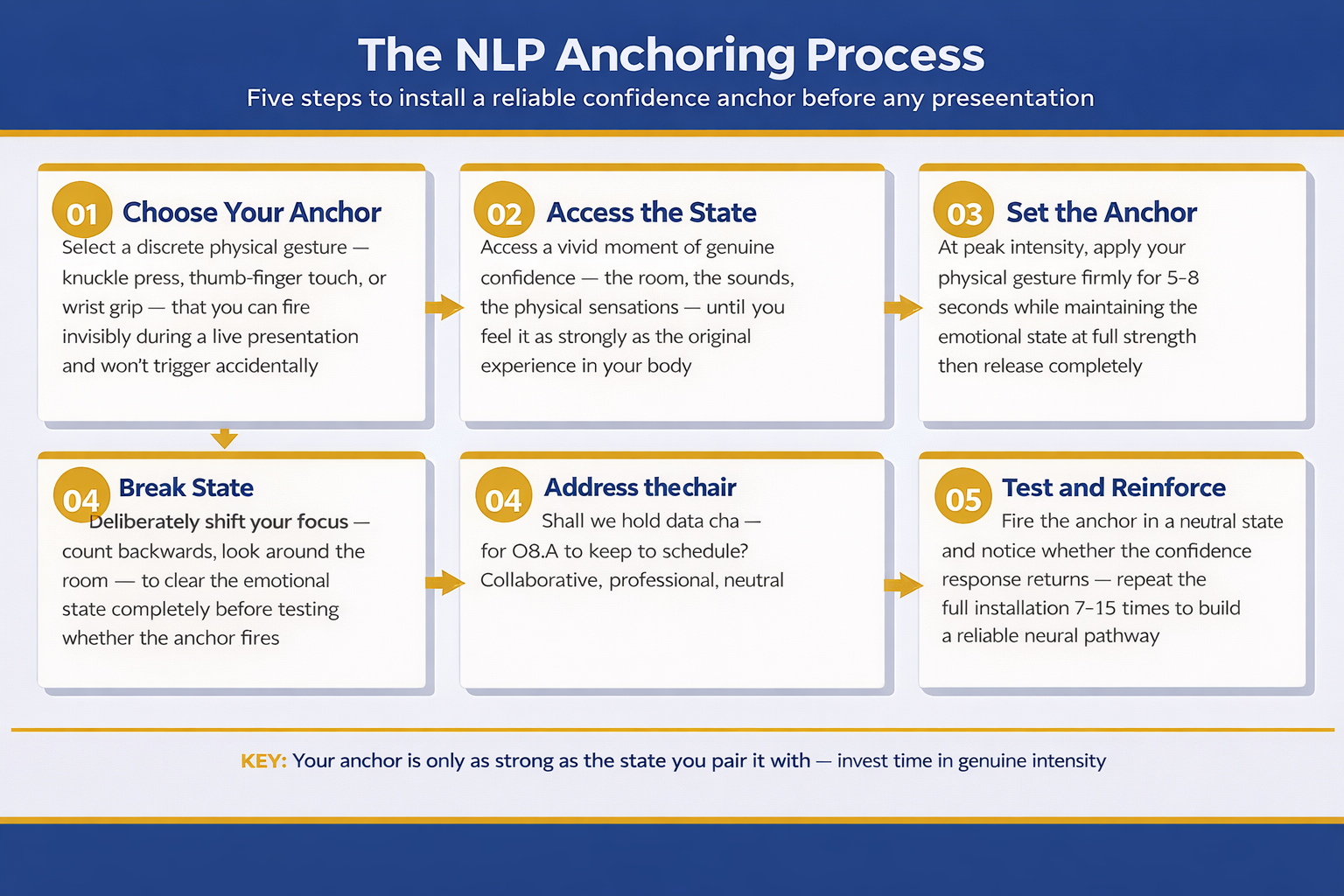
The NLP Anchoring Process for Presenters infographic showing five sequential steps: Choose Your Anchor (select a discrete physical gesture), Access the State (recall a vivid moment of genuine confidence), Set the Anchor (apply the gesture at peak intensity for 5-8 seconds), Break State (clear the emotional state completely before testing), and Test and Reinforce (fire the anchor and repeat 7-15 times to build a reliable neural pathway)

The Science: Why Anchoring Actually Works

When you experience a powerful emotion or mental state, your brain activates specific neural pathways. If you’re feeling confident, particular networks in your prefrontal cortex, amygdala, and anterior cingulate cortex light up. These aren’t abstract concepts—they’re actual electrical and chemical activity in your brain.

When you pair that brain state with a sensory cue repeatedly, something remarkable happens: the neural pathway becomes bidirectional. Normally, confidence leads to calm physiology. But through anchoring, the sensory cue activates the confidence pathway directly, bypassing the need for logical thought or conscious effort.

This is why anchoring is so effective for presentation anxiety. Anxiety lives in the amygdala and limbic system—the ancient, automatic parts of your brain. You can’t logic your way out of amygdala activation. But you can create a more powerful competing activation through anchoring. When you fire your anchor, you’re not fighting anxiety with your conscious mind. You’re recruiting the same ancient brain systems to create a stronger, competing state of calm.

The research supports this. Studies on neuro-linguistic programming show that anchoring produces measurable changes in cortisol levels (stress hormone), heart rate variability, and subjective anxiety ratings. It’s not placebo. It’s not wishful thinking. It’s applied neuroscience.

This is particularly important if you’ve read about how presentation anxiety lives in your nervous system—because anchoring is one of the most direct ways to communicate with that nervous system and shift its default response.

How quickly does an NLP anchor start to work?

Most people report feeling a shift within 2–3 uses of a properly installed anchor. You’ll notice the anchor firing (triggering the state) immediately, though the intensity builds over the first week or two of consistent use. For presentation anxiety specifically, you should feel measurably calmer within 3–5 presentations where you’ve used the anchor. That said, the stronger and more emotionally vivid your anchor installation, the faster it works.

How to Create Your Own Anchor (Step-by-Step)

Now for the practical bit. This is where anchoring stops being theory and becomes something you can actually use. Creating an anchor involves four key steps.

Step 1: Choose Your Trigger

Your trigger needs to be specific, unique, and easy to reproduce. Most people choose a physical gesture because it’s portable and invisible during a presentation. Common triggers include:

  • Pressing your thumb and forefinger together (the most popular choice)
  • Touching a specific point on your wrist or arm
  • Pressing your tongue against the roof of your mouth in a particular way
  • Squeezing a specific muscle in your leg

The trigger should be something you can do discreetly, even while presenting or on a video call. You also want it to be distinct enough that you don’t trigger it accidentally throughout your day. Choose something now and stick with it—consistency is crucial for anchoring.

Step 2: Activate a Powerful State of Confidence

This is the critical step that most people skip or rush through, which is why their anchors don’t work. You cannot create a strong anchor while feeling mildly confident. You need to activate a genuinely powerful state of confidence and calm.

The best way to do this is to recall a specific memory where you felt absolutely confident and assured. Not arrogant—genuinely calm and certain of your capabilities. It could be from presenting, from a moment in your career, or from any domain of life. Close your eyes. Step into that memory. Remember what you saw, what you felt in your body, your posture, your breathing. Make it vivid and visceral. Spend at least 2–3 minutes fully inhabiting that state.

If you don’t have a powerful confidence memory, you can create one through visualisation. Imagine yourself presenting brilliantly—calm, articulate, commanding the room. Watch yourself as if you’re watching a film. Then step into the image and feel it from the inside. Again, spend 2–3 minutes really living it, not just thinking about it.

Step 3: Pair the Trigger with the State (The Anchoring Moment)

At the peak moment of your confidence state—when you’re feeling it most strongly—perform your trigger gesture. If you’ve chosen the thumb-and-forefinger press, press them together firmly while taking a breath. Hold the trigger for 2–3 seconds whilst the state is at its strongest. Then release.

This is the moment of anchoring. You’re creating an association between the gesture and the state.

Step 4: Repeat the Installation (Minimum 7 Times)

A single pairing is not enough. Your nervous system learns through repetition. Repeat the full process—activate the state, pause, reach peak confidence, fire the trigger—a minimum of 7 times in one session. Ideally 10–15 times. Each time, make sure you’re reaching genuine confidence, not just half-heartedly going through the motions.

After your first installation session, repeat the anchor at least once daily for five days. This cements the neural pathway. After that, you can maintain it with occasional use (firing the anchor a few times per week).

If you want additional anchoring variations and how to layer multiple anchors together, Conquer Speaking Fear £39 includes a complete guided video walkthrough of this exact process.

Stop Anxiety Before It Hijacks Your Presentation

  • Create a neurological anchor that accesses calm on demand—no willpower required
  • Learn the exact 7-step installation process used by executives who present to boards and investors
  • Discover how to use your anchor in real presentations (even when presenting on video)
  • Understand why traditional anxiety management often fails—and what actually works
  • Install your anchor correctly the first time (mistakes will cost you weeks of progress)

Get Conquer Speaking Fear → £39

Trusted by 1000+ professionals in finance, tech, and consulting

How to Fire Your Anchor Before Presenting (The Deployment Strategy)

Installing an anchor is one thing. Using it effectively in the high-stress environment of a real presentation is another. Here’s how to actually deploy your anchor when it matters most.

The Pre-Presentation Window (15 Minutes Before)

Find a private space—the bathroom, a quiet hallway, your car, even a locked conference room. You need 2–3 minutes of solitude. Fire your anchor 3–5 times in succession. Each time, pause for a few seconds and let yourself feel the calm it generates. Don’t just mechanically perform the gesture; actually inhabit the confident state it triggers.

This is different from the installation process. You’re not trying to deepen the anchor further. You’re activating it to bring that confident state into your present moment, ready for your presentation.

The Waiting Moment

After you fire the anchor, you have roughly 10–15 minutes before the anchor naturally “decays”—meaning the neurological activation fades. Time your anchor-firing strategically so that you’re presenting within that window. If you’re waiting longer than 15 minutes, fire the anchor again closer to your presentation start.

During the Presentation Itself

Once you’re presenting, you can fire the anchor discreetly during the talk if you feel anxiety spiking. A thumb-and-finger press hidden at your side, or a tongue-press that no one will notice, can reset your nervous system mid-presentation. Some presenters do this during pauses, whilst taking a sip of water, or when moving between sections of their talk.

Most people find they don’t need to fire it during the presentation if they’ve installed it strongly and fired it beforehand. The initial activation is usually sufficient.

What if I forget to fire my anchor before presenting?

If you’ve already begun presenting, you can still fire it discreetly at any point. The anchor will activate a calm state within seconds. However, the better strategy is to build firing the anchor into your pre-presentation routine, so it becomes automatic. Some presenters fire their anchor whilst walking to the stage, or immediately before they’re introduced. Make it part of your ritual.

Advanced Techniques for Powerful Anchors

Once you’ve installed a basic anchor, you can enhance it with additional techniques that make it stronger and more reliable. Here are the most effective variations.

Stacking Anchors (Multiple States)

Instead of anchoring only to confidence, you can create separate anchors for different states: calm, focus, articulation, charisma. Then fire them all in sequence before presenting, creating a compounded effect. For instance, you might press your thumb-and-forefinger for calm, then touch your wrist for focus, then press a leg muscle for charisma. The neurological intensity multiplies.

Anchor Chaining

This involves firing one anchor to access a state, then immediately performing a second action (perhaps a power pose or a specific breathing pattern) whilst the first anchor is active. This creates an association between the anchor and the secondary behaviour, making both more powerful together.

Collapsing Anchors

If you have a lingering anxiety state that you want to eliminate, you can create an anchor for confidence, then deliberately activate the anxiety state, and fire the confidence anchor immediately whilst the anxiety is present. The confidence state “collapses” the anxiety state, and over repetitions, this weakens the anxiety response. This is advanced work and works best when paired with understanding your fight-or-flight response.

Resource Anchoring

Some people create an anchor not just for a mental state, but for accessing a specific resource or memory of a person they trust. For example, you might anchor to a memory of a mentor you admire, or a moment when a colleague praised your presentation skills. The anchor gives you neurological access to that resource precisely when you need it.

Never Walk Into a Presentation Unprepared Again

  • Master anchoring plus five additional NLP techniques specifically for presentation anxiety

Get Conquer Speaking Fear → £39

Includes video guides, workbook, and quick-reference deployment checklists

Can anchors fade or stop working?

An anchor can weaken if you don’t use it regularly. Think of it like a muscle—if you stop exercising, it atrophies. However, it’s remarkably easy to reactivate. Even if you haven’t used an anchor in months, firing it a few times usually restores its full power. Additionally, if you repeatedly fail at your anchor (for instance, trying to fire it whilst in a state of panic without having installed it properly first), you can inadvertently weaken it. This is why proper installation is non-negotiable.

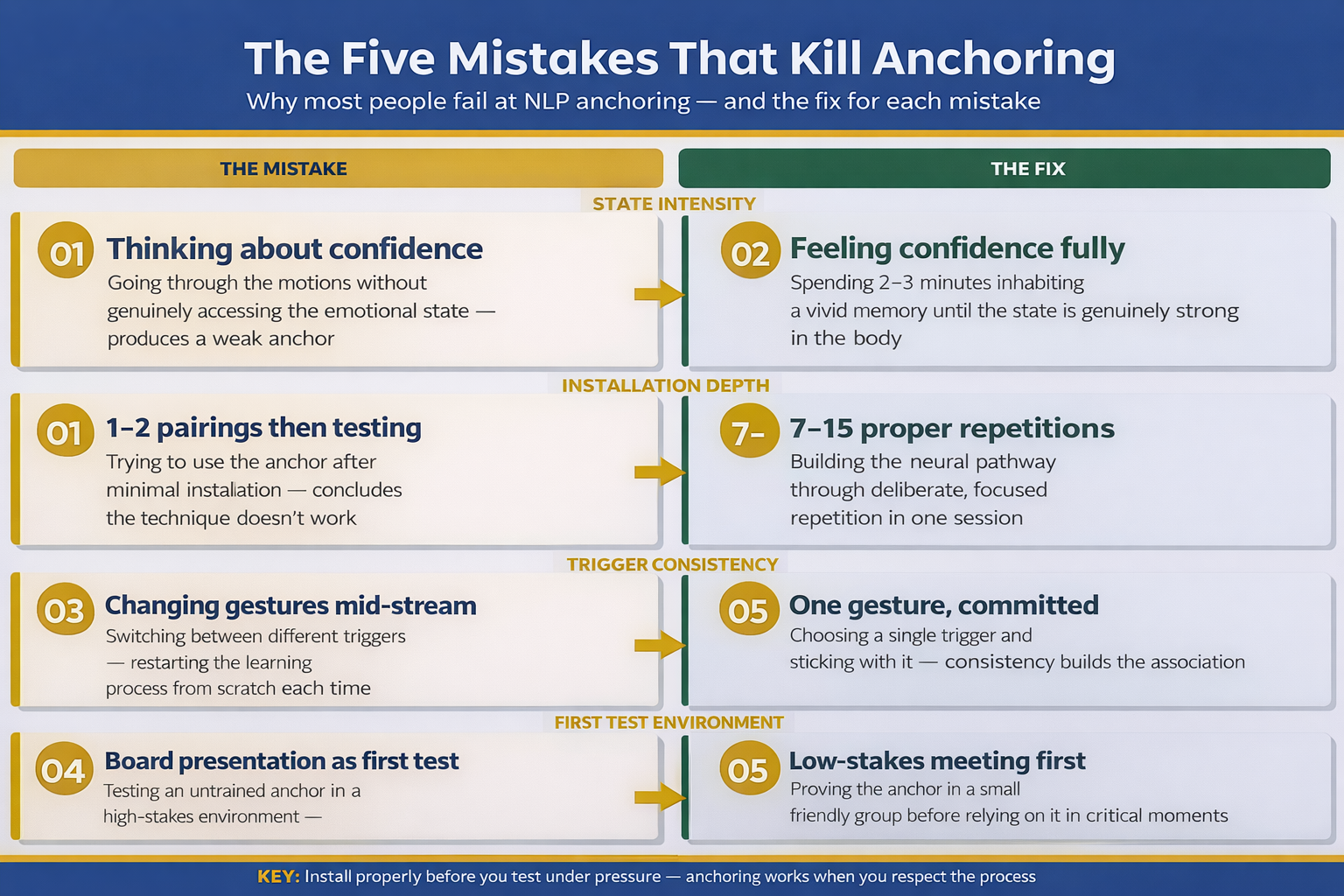
Side-by-side comparison of five common NLP anchoring mistakes and the correct approach for each, covering state intensity, installation depth, trigger consistency, and first test environment

The Mistakes That Kill Anchoring (And How to Avoid Them)

I’ve seen hundreds of people attempt anchoring and fail. Not because anchoring doesn’t work, but because they made preventable mistakes during installation or deployment. Here are the most common ones.

Mistake 1: Installing Without Reaching a Genuinely Powerful State

This is the number one reason anchors fail. People think about confidence rather than feeling it. They go through the motions without really accessing the state. Your anchor will be only as strong as the state you pair it with. If you’re 60% confident during installation, your anchor will trigger 60% confidence when you fire it. Invest the time to genuinely access a powerful, vivid state of confidence. Make it real. Make it felt.

Mistake 2: Firing the Anchor Without Installing It Properly First

Some people try to use an anchor after just one or two pairings, then conclude it doesn’t work. Anchors need a minimum of 7 proper installations to be neurologically reliable. You’re building a neural pathway, and pathways need repetition to become strong. If you try to use an untrained anchor under stress, it won’t work—and then you’ll question the whole technique.

Mistake 3: Changing Your Trigger Mid-Stream

Once you choose a trigger, commit to it. If you keep switching between different gestures, you never build a consistent pairing. Your brain is learning: This gesture means this state. If you’re constantly introducing new gestures, you’re starting the learning process from scratch each time.

Mistake 4: Relying on the Anchor Alone Without Context

Anchoring is extraordinarily powerful, but it’s not magic. If you’re presenting on zero sleep, or you’re in a genuinely dangerous situation (not presentation anxiety, but actual danger), no anchor will override your nervous system’s appropriate response. Anchoring works best when paired with proper preparation, adequate sleep, and other practical tools like breathing techniques.

Mistake 5: Firing the Anchor Under Extreme Distress Without Prior Installation

Your first test of an anchor should not be a high-stakes presentation in front of your board of directors. Install the anchor in low-stress situations first (perhaps presenting to a small friendly group, or in a low-pressure meeting). Let it prove itself in manageable contexts before you rely on it in the most critical moments.

Beyond these installation mistakes, there are also mistakes in how people think about what anchoring can do. Anchoring is brilliant for acute presentation anxiety. It’s less effective if you’re dealing with chronic burnout or deeper nervous system dysregulation. Know what problem you’re solving.

If you want to understand not just how to install an anchor, but also how to diagnose what type of presentation anxiety you’re dealing with and which techniques work for each type, Conquer Speaking Fear £39 walks through the complete diagnostic and treatment process.

Learn From Someone Who’s Used Anchoring With Thousands of Presenters

  • 24 years in corporate banking at JPMorgan Chase, PwC, Royal Bank of Scotland, and Commerzbank
  • Qualified clinical hypnotherapist and certified NLP practitioner with live case studies from clients
  • Video walkthroughs of the exact anchor installation process, plus six additional NLP techniques
  • Troubleshooting guide: what to do when your anchor isn’t working (and why)
  • Real-world deployment strategies for presentations, investor pitches, board meetings, and speaking engagements

Get Conquer Speaking Fear → £39

Trusted by professionals at FTSE 100 companies and Silicon Valley tech firms

Want the slides too?

If you’re installing anchors but struggling to deliver them with visual confidence, your slides might be working against you instead of amplifying your message. The Executive Slide System £39 teaches the slide design and delivery approach used by executives at FTSE 100 firms—so your visuals reinforce your nervous system work, not undermine it.

Is NLP Anchoring Right For You?

✅ Anchoring is right for you if:

  • You’re confident in your presentation content but anxious in the delivery
  • Your anxiety spikes only in presentation moments, not throughout your day
  • You want a practical tool you can use immediately, before your next presentation
  • You’re open to learning applied neuroscience rather than relying on willpower alone
  • You’ve tried breathing exercises and positive self-talk but need something stronger
  • You’re willing to spend 20 minutes installing an anchor properly before expecting results

❌ Anchoring might not be sufficient if:

  • You’re experiencing severe chronic anxiety unrelated to presentations
  • You’re burnt out or experiencing nervous system exhaustion from overwork
  • You lack confidence in your presentation content itself
  • You’re unwilling to spend time practising the anchor installation process
  • You’re expecting a magic solution without any personal effort or commitment
  • You’re in acute crisis and need immediate professional mental health support

Frequently Asked Questions

How long does it take to install an anchor properly?

The initial installation takes 20–30 minutes. This includes 10–15 repetitions of activating the state, reaching peak confidence, and firing the trigger. After installation, you’ll want to reinforce it daily for 5 days (5–10 minutes per day). Most people report measurable results within a week, though the anchor becomes more powerful over the first month of use.

Can anchoring work if I’m naturally anxious or introverted?

Yes, absolutely. Anchoring doesn’t depend on your personality type or baseline anxiety level. It depends on your nervous system’s ability to learn associations, and that’s universal. Whether you’re naturally anxious or calm, whether you’re introverted or extroverted, your nervous system can be trained to access confidence on command. Introversion and anxiety are different things—introversion is personality, anxiety is a nervous system state.

What if I’ve tried anchoring before and it didn’t work?

Most commonly, anchoring “failed” because the initial installation wasn’t done properly. Perhaps the state wasn’t genuinely powerful, or the anchor was fired only once or twice before being tested under stress, or the trigger was changed mid-stream. The technique itself is neurologically sound. If you’re willing to redo the installation with proper attention to each step, it will work. The second time around, most people see dramatic results.

Can I use anchoring alongside other anxiety-management techniques?

Yes, and in fact this is the ideal approach. Anchoring works brilliantly with breathing techniques, preparation, adequate sleep, and other NLP methods. Anchoring addresses the neurological pathway to confidence. Other techniques address preparation, physical state, and cognitive framing. Together, they’re more powerful than any single tool alone.

🆓 Free resource: Executive Presentation Checklist — a free guide to strengthen your presentation preparation.

Your Next Step

You now understand how anchoring works, why it’s neurologically powerful, and exactly how to install an anchor that will be reliable in your presentations. The technique is straightforward. The challenge most people face isn’t understanding—it’s execution. Most people read about anchoring and then don’t actually do it.

So here’s my challenge to you: within the next three days, choose your trigger gesture, find a quiet space for 20 minutes, activate a memory of genuine confidence, and install your anchor using the step-by-step process outlined above. Don’t overthink it. Don’t wait for the “perfect” moment. Just do it. By next week, you’ll have a neurological tool that will fundamentally change how your body responds to presentations. Your next presentation is your first real test. Use the anchor beforehand, and notice the difference.

If you want the full video walkthrough, additional NLP techniques, and troubleshooting support, Conquer Speaking Fear £39 is designed exactly for that.

About the Author

Mary Beth Hazeldine is the Owner & Managing Director of Winning Presentations. With 24 years of corporate banking experience at JPMorgan Chase, PwC, Royal Bank of Scotland, and Commerzbank, she has delivered high-stakes presentations in boardrooms across three continents.

A qualified clinical hypnotherapist and NLP practitioner, Mary Beth combines executive communication expertise with evidence-based techniques for managing presentation anxiety. She has trained thousands of executives and supported presentations that have secured high-stakes funding rounds and approvals.

Book a discovery call | View services

12 Jan 2026
Audience engagement presentation techniques - how to connect with and involve your audience throughout any presentation

Audience Engagement Presentation: Why ‘Any Questions?’ Kills Every Presentation

Quick Answer: “Any questions?” is the weakest possible way to engage your audience. It puts the burden on them to perform publicly, creates awkward silence, and signals you’ve run out of things to say. Real audience engagement happens throughout your presentation—not as an afterthought at the end. The best presenters create continuous connection through strategic interaction, directed questions, and reading the room in real-time.

The worst silence I’ve ever experienced in a presentation happened at Commerzbank in 2015.

I’d just delivered what I thought was a compelling 20-minute strategy update to the executive committee. I’d rehearsed thoroughly. My slides were polished. I’d hit every key point with precision.

Then I said the words that haunt every presenter: “Any questions?”

Silence. Twelve executives staring at their notepads. Someone coughed. The CFO checked his phone. After what felt like an eternity—probably eight seconds—the CEO said, “Thank you, let’s move on.”

I left that room convinced I’d failed. My content was wrong. My delivery was weak. I’d somehow lost them.

But when I reviewed the feedback later, I discovered something unexpected: they’d found the content excellent. The strategy was approved with minor modifications. The problem wasn’t my presentation—it was my ending.

“Any questions?” had killed the energy I’d built. It created an awkward moment that overshadowed everything before it. And it left everyone—including me—wanting to escape rather than engage.

That experience began a decade-long obsession with audience engagement. What I’ve learned from training over 5,000 executives since then has transformed how I think about presentations entirely. Engagement isn’t something you ask for at the end. It’s something you build from the first word—and maintain every moment until the last.

🎯 Quick-Reference Guides for Every Presentation Challenge

The Public Speaking Cheat Sheets include audience engagement techniques, body language cues to watch for, and recovery strategies when you’re losing the room—all in formats you can review minutes before presenting.

What’s inside:

  • Engagement techniques for every presentation length
  • Body language decoder: what audiences are really thinking
  • Recovery phrases when energy drops
  • Virtual vs. in-person engagement differences

Get the Cheat Sheets → £14.99

The ‘Any Questions?’ Trap

Here’s why “Any questions?” fails so consistently:

It puts the burden on your audience. You’re asking them to perform publicly—to raise their hand, formulate a coherent question, and speak in front of their colleagues. For most people, that feels risky. What if my question sounds stupid? What if I’ve misunderstood something obvious? The safest option is silence.

It signals you’ve finished. The moment you ask for questions, your audience’s brains shift from “receiving mode” to “escape mode.” They’re thinking about the next meeting, their inbox, their lunch. You’ve given them permission to mentally check out.

It creates awkward pressure. That silence after “any questions?” is excruciating for everyone. The longer it stretches, the more uncomfortable the room becomes. Your carefully built momentum collapses into mutual embarrassment.

It often comes too late. If someone had a question during your presentation, they’ve likely forgotten it by now. Or they’ve decided it wasn’t important enough to voice. The moment has passed.

The best presenters understand that ending a presentation well requires the same intentionality as starting it. “Any questions?” is the equivalent of ending a story with “and then some other stuff happened.” It’s not an ending—it’s an abdication.

Why 'any questions?' fails - diagram showing the psychological barriers that prevent audience participation

Why Audiences Disengage (It’s Not Your Content)

When audiences disengage, presenters almost always blame themselves: my content was boring, my delivery was flat, I should have been more dynamic.

Usually, they’re wrong.

After observing thousands of presentations across my banking career and coaching practice, I’ve identified the real reasons audiences check out—and content quality rarely makes the list.

Attention Cycles Are Biological

Research consistently shows that adult attention naturally dips every 10-15 minutes. This isn’t a choice your audience makes. It’s biology. Their brains need micro-breaks to consolidate information before they can absorb more.

If you’re presenting for 20 minutes without any pattern interrupt—a question, a story, a moment of interaction—you’re fighting neuroscience. And neuroscience will win.

Passive Listening Is Exhausting

Being talked at is tiring. It requires sustained focus without the relief of participation. Even the most fascinating content becomes draining when the audience has no role except to receive.

This is why great teachers don’t just lecture. They ask questions. They invite discussion. They create moments where students become participants rather than spectators.

Your presentations should work the same way. Presentation structure should include built-in moments where the audience shifts from passive to active.

They’re Distracted Before You Start

Your audience arrives with their own concerns: the meeting before yours, the deadline after, the email they didn’t finish. They’re not fully present when you begin, and it takes deliberate effort to pull them into your world.

A strong presentation opening creates that pull. But it’s not enough to hook them once—you need to keep reeling them back throughout.

The Room Itself Works Against You

Stuffy conference rooms, uncomfortable chairs, post-lunch timing, screens that are hard to see—environmental factors constantly pull attention away from you. You’re competing with physical discomfort, poor lighting, and the hypnotic lure of their phones.

Understanding these forces helps you fight them strategically rather than taking disengagement personally.

Four causes of audience disengagement - attention cycles, passive listening, prior distraction, and environmental factors

Reading the Room: The Signals You’re Missing

The best presenters I’ve worked with share one skill: they can read an audience in real-time and adjust accordingly. They notice disengagement early—and intervene before it spreads.

Here’s what to watch for:

Early Warning Signs (You Can Still Recover)

  • Shifting in seats: Physical discomfort is the first sign of mental restlessness
  • Eye contact dropping: They’re looking at slides, notes, or the table—anywhere but you
  • Micro-expressions of confusion: Furrowed brows, tilted heads, slight frowns
  • Pen tapping or fidgeting: Excess energy looking for an outlet

When you see these signals in one or two people, it’s normal. When you see them spreading across the room, you have 60-90 seconds before you’ve lost them completely.

Critical Warning Signs (Immediate Action Required)

  • Phone checking: They’ve decided your presentation is less interesting than their inbox
  • Crossed arms and leaning back: Physical withdrawal mirrors mental withdrawal
  • Side conversations: They’ve given up on you entirely
  • Glazed expressions: The lights are on but nobody’s home

Mastering presentation body language—both yours and theirs—is essential for real-time audience management.

Positive Engagement Signs (You’re Winning)

  • Leaning forward: Physical investment in what you’re saying
  • Nodding: Agreement and encouragement to continue
  • Note-taking: They want to remember this (strategic note-taking, not escape planning)
  • Direct eye contact: They’re with you, tracking your message
  • Subtle mirroring: Their body language matches yours—a sign of rapport

When you see these signals, you’re connecting. But don’t get complacent—engagement is easier to lose than to build.

7 Engagement Techniques That Actually Work

Forget the generic advice to “be more engaging.” Here are specific techniques I’ve refined across thousands of presentations:

1. The Directed Question

Instead of asking the room, ask an individual: “James, you’ve led similar projects—what’s been your experience with vendor resistance?”

This works because it removes the “who should answer?” ambiguity. James has been specifically invited to contribute. The rest of the room relaxes—and listens carefully, because any of them might be next.

Key rules: Only direct questions to people who can answer confidently. Never ambush someone with a question that might embarrass them. Read the room to identify who’s ready to contribute.

2. The Rhetorical Pause

Ask a question, then don’t wait for an answer: “What would happen if we launched six months late? [pause] We’d lose the entire holiday season. That’s £4 million in revenue.”

This creates mental engagement without requiring public participation. Your audience answers in their heads—and they’re primed to receive your answer.

3. The Show of Hands

Simple but effective: “How many of you have dealt with this exact problem in the last month? [wait for hands] That’s most of the room. Good—this is relevant to all of you.”

Physical participation creates investment. Once someone has raised their hand, they’ve committed—they’re more likely to stay engaged.

4. The Callback

Reference something from earlier in your presentation—or from a previous interaction: “Remember the statistic I mentioned about customer retention? Here’s where it becomes actionable.”

Callbacks reward people who’ve been paying attention and re-engage those who drifted. They also create coherence, showing that your presentation has intentional structure.

5. The Strategic Story

When you feel energy dropping, pivot to a story: “Let me tell you about a client who faced exactly this challenge…”

Stories engage different parts of the brain than data and analysis. They’re easier to follow, more memorable, and create emotional connection. Learn more about storytelling in presentations.

6. The Movement Reset

Physical movement creates visual interest: “Let me come over to this side of the room…” or simply moving to a different position while speaking.

This works because static presenters become invisible. Our eyes are drawn to movement. Strategic repositioning literally makes the audience look at you again.

7. The Genuine Check-In

Periodically pause and check: “Before I move on—is this making sense? Is there anything I should clarify?”

This is different from “any questions?” because it comes mid-presentation, not at the end. It shows you care about their understanding, and it catches confusion before it compounds.

Seven audience engagement techniques that actually work - directed questions, rhetorical pauses, show of hands, callbacks, stories, movement, check-ins

⭐ Slides That Support Engagement, Not Sabotage It

The Executive Slide System shows you how to design slides that create natural pause points for audience interaction. Stop letting your slides force you into monotonous delivery.

Includes engagement triggers built into every slide framework—so you never accidentally present for 15 minutes straight without a connection point.

Get the Executive Slide System → £39

Virtual Audience Engagement: Different Rules Apply

Everything I’ve said so far becomes harder in virtual settings—and some techniques simply don’t work at all.

In a Zoom or Teams presentation, you can’t read body language reliably. You can’t make eye contact. You can’t use movement to reset attention. And your audience is surrounded by distractions you can’t even see.

Here’s how to adapt:

Increase Interaction Frequency

Where you might engage every 5-7 minutes in person, go for every 3-4 minutes virtually. Attention drops faster when people are staring at screens. Combat this with more frequent pattern interrupts.

Use Technology as Your Ally

Polls, chat participation, raised hand features—these are virtual replacements for physical interaction. Use them aggressively: “Type in the chat: what’s your biggest challenge with stakeholder buy-in?”

Chat answers are lower-risk than speaking up. You’ll get more participation.

Call Out Names Early and Often

“Marcus, I know you’ve worked on something similar—can you share a quick thought?” Direct engagement is even more important virtually because anonymity makes it easy to mentally disappear.

Assume They’re Multitasking

Because they probably are. Design your presentation so someone who misses 30 seconds can still follow the thread. Use more recaps, more explicit transitions, more “here’s where we are” markers.

For more on this topic, see our complete guide to virtual presentation tips.

Case Study: From Silent Room to Standing Ovation

Two years ago, I worked with a director at a pharmaceutical company—let’s call her Amanda—who was struggling with a recurring problem: every time she presented to her global leadership team, she felt like she was talking into a void.

“They just stare at me,” she said. “Cameras off, nobody reacting. I finish and there’s just silence before someone says ‘thanks’ and moves to the next agenda item.”

When I observed her presentation, I saw the problem immediately. She was delivering 25 minutes of continuous content with zero interaction. Excellent slides. Clear message. But nothing that invited her audience into the conversation.

We rebuilt her approach:

Minute 2: “Before I dive in—quick poll. How many of you have had to delay a product launch because of regulatory issues in the past year? Use the reactions to give me a thumbs up if yes.”

Minute 8: “Dr. Patel, you’ve navigated FDA requirements longer than anyone on this call—what’s your read on the new guidance?”

Minute 15: “Let me pause here. I’m about to propose something that might seem counterintuitive. I want to give you 30 seconds to think about whether it would work in your region.”

Minute 22: “In the chat, give me one word: what’s your biggest concern about this timeline?”

Her next leadership presentation was transformed. Cameras started turning on. People contributed in chat. The silence after she finished was replaced by immediate discussion. The CEO, who typically said nothing, asked two follow-up questions.

“I felt like I was actually talking with them,” Amanda told me, “not just at them. For the first time in two years.”

That’s what real audience engagement feels like. Not a desperate “any questions?” at the end—but continuous connection throughout. It’s a skill that compounds with practice, and it’s essential for presentation confidence.

📧 Join 2,000+ professionals getting weekly presentation insights. Subscribe to The Winning Edge →

Frequently Asked Questions

Why does ‘Any questions?’ kill audience engagement?

It puts the burden on your audience to perform publicly, creates awkward silence, and signals you’ve run out of things to say. Most people won’t volunteer questions in group settings—it feels risky. Instead of open invitations, use specific prompts or directed questions throughout. Learn more about how to end a presentation effectively.

How do I keep my audience engaged during a presentation?

Use strategic audience interaction throughout—not just at the end. Ask direct questions to specific people, use polls, create moments of reflection, and read body language to adjust in real-time. Plan engagement points every 5-7 minutes minimum.

What are the signs of a disengaged audience?

Crossed arms, phone checking, avoiding eye contact, side conversations, glazed expressions, and excessive note-taking (they’re planning their escape). The earlier you catch these, the easier to recover. See our guide to reading body language in presentations.

How often should I interact with my audience during a presentation?

Every 5-7 minutes at minimum for in-person presentations. This aligns with natural attention cycles. Interaction doesn’t always mean asking questions—it can be a pause for reflection, a show of hands, or a directed look. For virtual presentations, increase to every 3-4 minutes.

What’s the best way to handle an unresponsive audience?

Don’t keep asking open questions into silence. Instead, use directed techniques: “Sarah, you’ve dealt with this—what’s your experience?” or rhetorical questions that don’t require answers but create mental engagement. Movement and story pivots also help reset energy.

How do I engage a virtual presentation audience differently?

Use chat features, polls, and direct name calls more frequently. Virtual audiences disengage faster because they’re surrounded by distractions. Increase interaction frequency to every 3-4 minutes. See our complete guide to virtual presentation tips for more strategies.

📥 Free Download: 7 Presentation Frameworks

Get proven structures with built-in engagement points—so you never accidentally talk for 15 minutes without connecting with your audience. Includes virtual and in-person adaptations.

Download Free →

Related Resources

Continue building your audience engagement skills:

The Engagement Imperative

Audience engagement isn’t a nice-to-have. It’s the difference between presentations that change minds and presentations that waste everyone’s time.

The best presenters don’t wait until the end to connect with their audience. They build engagement from the first word. They read the room constantly. They intervene at the first sign of disengagement. And they never—ever—finish with “any questions?”

Start treating your audience as participants, not spectators. Plan your interaction points as carefully as you plan your content. And remember that a silent room isn’t a sign of failure—it’s a sign that you haven’t yet given your audience permission to engage.

Give them that permission early. Give it often. And watch what happens to your impact.


Mary Beth Hazeldine is a qualified clinical hypnotherapist, NLP practitioner, and Managing Director of Winning Presentations. After 5 years terrified of presenting, she built a 24-year banking career at JPMorgan Chase, PwC, RBS, and Commerzbank. She has treated hundreds of anxiety clients and trained over 5,000 executives.

05 Jan 2026
How to deliver a presentation - the complete guide to voice, body language, and stage presence

How to Deliver a Presentation: The Complete Performance Guide [2026]

Last updated: January 2026

I once watched a brilliant strategy director present a plan that would save her company £3 million. Her analysis was flawless. Her slides were clear. Her recommendation was exactly right.

The board said no.

Not because the content was wrong — but because her delivery undermined everything. Monotone voice. Eyes fixed on her laptop. Shoulders hunched like she was apologising for existing. The board didn’t trust her recommendation because her delivery said “I’m not sure about this.”

Three weeks later, I coached her through the same presentation. Same slides. Same data. Same recommendation. This time she delivered it with vocal contrast, purposeful movement, and eye contact that said “I’ve done the work and I’m certain.” The board approved it unanimously.

Content gets you in the room. Delivery gets you the yes.

🎁 Free resource: Download my 7 Presentation Frameworks PDF — includes delivery cues and timing guidance for each framework.

This guide covers how to deliver a presentation with impact — the voice techniques, body language, and presence that transform competent presenters into compelling ones. Everything here comes from 24 years presenting in corporate boardrooms and 15 years coaching executives to command the room.

Why Delivery Matters More Than You Think

Research from UCLA suggests that when content and delivery conflict, audiences believe delivery. If your words say “this is urgent” but your voice says “I’m bored,” they hear bored.

This isn’t about being a performer. It’s about alignment — ensuring your voice, body, and presence support your message rather than undermine it.

The good news: delivery is a skill, not a personality trait. Every technique in this guide can be learned and improved with practice.

The Presentation Delivery Framework

Effective delivery has three components. Master all three, and you’ll command any room — physical or virtual.

The presentation delivery framework showing voice, body, and presence elements

1. Voice: Your Primary Instrument

Your voice does most of the delivery work. Even in a room where people can see you, vocal variety carries more impact than movement.

Pace: Most presenters speak too fast when nervous. Deliberately slow down, especially for important points. A pause before a key statement signals “this matters.”

Pitch: Vary your pitch to avoid monotone. Higher pitch conveys excitement; lower pitch conveys authority and seriousness.

Volume: Louder for emphasis, softer to draw people in. A whispered phrase after several loud ones creates dramatic contrast.

Pause: The most underused tool. Pause before important points (creates anticipation). Pause after important points (lets them land). Pause instead of “um” (sounds confident instead of uncertain).

For a deep dive on vocal techniques, see: Presentation Voice Tips

2. Body: Physical Communication

Your body either reinforces your words or contradicts them. The goal isn’t to perform — it’s to remove the physical habits that distract from your message.

Posture: Stand balanced, shoulders back, weight evenly distributed. This isn’t about looking powerful — it’s about breathing properly and projecting your voice.

Gestures: Use them purposefully to emphasise points, not as nervous energy release. When not gesturing, hands at sides or lightly clasped in front — not in pockets, not crossed.

Movement: Move with intention. Step toward the audience for important points. Move to different areas for different sections. Never pace or rock.

Eye contact: The single most important physical element. Look at individuals, not the crowd. Hold for a complete thought (3-5 seconds), then move to someone else. In virtual settings, this means looking at your camera lens.

For specific body language techniques, see: Presentation Body Language

3. Presence: The Intangible Quality

Presence is what remains when voice and body are working well. It’s the quality that makes people pay attention even before you speak.

Groundedness: Being fully in the room rather than in your head. Focus on your message and your audience, not on how you’re being perceived.

Conviction: Believing in what you’re saying. If you don’t believe it, neither will they — and it shows.

Calm authority: The quiet confidence that comes from preparation and experience. You’ve done the work. You know your material. You belong here.

Presence can’t be faked, but it can be developed through practice and preparation.

Ready to master delivery? My Public Speaking Cheat Sheets (£14.99) include a delivery quick-reference card — voice techniques, body language cues, and presence builders on one page.

How to Deliver a Presentation: Step-by-Step

Here’s the sequence I teach executives for any high-stakes presentation:

Before You Speak

Arrive early. Stand where you’ll present. Get comfortable in the space. If virtual, test your tech and settle into your environment.

Breathe. Three deep breaths before you start. This lowers your heart rate and grounds your voice.

Set your opening line. Know your first sentence cold. The opening is where nerves peak — having it memorised prevents stumbling.

The First 30 Seconds

Pause before speaking. Look at your audience. Let them settle. This brief silence signals confidence.

Deliver your hook. Your opening line should grab attention immediately. See How to Open a Presentation for specific techniques.

Establish eye contact. Connect with 2-3 individuals in your first 30 seconds. This grounds you and signals connection.

During the Presentation

Vary your delivery deliberately. Faster for excitement, slower for importance. Louder for emphasis, softer for intimacy. Movement for transitions, stillness for key points.

Use the power of contrast. A whisper after sustained volume. A pause after rapid delivery. Stillness after movement. Contrast creates attention.

Read the room. Watch for signs of engagement or disengagement. Adjust your pace, add interaction, or cut content as needed.

Return to your notes without apology. If you need to check your notes, do it cleanly. Pause, look down, find your place, look up, continue. No “sorry, I just need to check…” — it’s unnecessary and undermines confidence.

The Close

Signal the end. “Let me leave you with this…” or “In closing…” tells the audience to pay attention to what follows.

Deliver your key message. Your final statement should be memorable — the one thing you want them to remember if they forget everything else.

Pause, then thank. After your final line, pause for a beat. Let it land. Then a simple “Thank you” ends cleanly.

Common Presentation Delivery Mistakes

Common presentation delivery mistakes and how to fix them

After coaching thousands of presenters, these are the delivery mistakes I see constantly:

Mistake 1: Speaking Too Fast

Nerves accelerate speech. What feels normal to you sounds rushed to your audience.

The fix: Practice at 75% of your natural speed. It will feel awkwardly slow — but it will sound professional to listeners. Record yourself to calibrate.

Mistake 2: Monotone Voice

When nervous, vocal variety disappears. Everything comes out at the same pitch and pace.

The fix: Mark your script or notes with delivery cues. Underline words to emphasise. Add “PAUSE” where you need to breathe. Practice with deliberate exaggeration until variation feels natural.

Mistake 3: Reading Slides

Turning your back to read your own slides destroys connection and credibility.

The fix: Know your content well enough to speak without reading. Glance at slides briefly to orient yourself, then turn back to the audience. Use presenter view or notes if needed.

Mistake 4: Avoiding Eye Contact

Looking over heads, at the floor, or at the back wall signals discomfort and prevents connection.

The fix: Pick specific individuals and speak directly to them. Rotate through the room. One complete thought per person. In virtual settings, look at your camera lens, not the screen.

Mistake 5: Nervous Physical Habits

Pacing, rocking, fidgeting, touching your face, clicking a pen — all distract from your message.

The fix: Record yourself presenting and watch for habits. Most people are unaware of theirs. Once identified, consciously replace them — keep hands at sides, plant your feet, hold the pen still.

Mistake 6: No Pauses

Filling every moment with words signals nervousness and exhausts your audience.

The fix: Build in deliberate pauses. Before key points. After key points. Where you’d normally say “um.” Silence feels longer to you than to your audience — embrace it.

Presenting to executives? My Executive Slide System (£39) includes delivery guidance specifically for boardroom and C-suite presentations where the stakes are highest.

How to Deliver a Presentation Virtually

Virtual delivery requires adaptation, not abandonment, of these principles. The fundamentals remain — but execution changes.

Voice matters more. Without physical presence, your voice carries all the delivery weight. Increase vocal variety by 30% compared to in-person.

Camera is your audience. Eye contact means looking at your camera lens, not at faces on screen. This feels unnatural but reads as direct connection.

Energy must be amplified. Video flattens you. What feels slightly too energetic in person will land as normal on screen.

Gestures stay in frame. Hand movements that work in person may be invisible or distracting on camera. Keep gestures smaller and within the visible frame.

For the complete virtual delivery guide, see: Virtual Presentation Tips

Practice Methods That Actually Work

Reading advice won’t improve your delivery. Practice will. Here’s how to practice effectively:

Record Yourself

Video is brutal but essential. Record your practice runs and watch them. You’ll spot habits you never knew you had. Focus on one improvement at a time.

Practice Out Loud

Silent mental rehearsal doesn’t build delivery skills. You must practice speaking at full volume, with full delivery, as if presenting to a real audience.

Practice the Difficult Parts More

Run your opening 10 times. Practice your close until it’s automatic. Rehearse the transition where you always stumble. Targeted practice beats full run-throughs.

Practice With Distraction

Once you know your material, practice with the TV on, while walking, or with someone asking random questions. This builds the resilience to handle real-world interruptions.

Get Real Feedback

Practice with someone who will be honest. Not “that was good” — specific feedback on what works and what doesn’t. A coach, colleague, or friend who understands presentation skills.

Delivery for Different Situations

Delivery should adapt to context. Here’s how to adjust:

Small Meetings (5-10 people)

More conversational, less performative. Sit or stand depending on room setup. Make eye contact with everyone multiple times. Encourage interruptions and questions.

Large Presentations (50+ people)

Bigger gestures, more vocal projection, deliberate movement across the stage. Eye contact with sections of the room rather than individuals. Fewer interruptions, clear structure.

Executive Presentations

Get to the point fast. Confident but not arrogant. Ready to answer challenges. Delivery should say “I’ve done the work and I’m certain of this recommendation.”

Virtual Presentations

Higher energy, camera eye contact, attention resets every 10 minutes. See Virtual Presentation Tips for the complete guide.

Building Confidence in Delivery

Confident delivery comes from three sources:

Preparation: Know your content cold. When you trust your material, you’re free to focus on delivery.

Practice: Rehearse until delivery is automatic. Nervousness decreases as familiarity increases.

Experience: Every presentation teaches you something. Over time, you build a track record that supports confidence.

If presentation anxiety is a significant challenge, see my guide: Presentation Confidence, which draws on my training as a clinical hypnotherapist to address the psychological dimension.

Your Next Step

Pick one element from this guide and focus on it in your next presentation. Just one. Maybe it’s pausing more. Maybe it’s varying your volume. Maybe it’s making eye contact with individuals.

One improvement at a time, compounded over presentations, transforms delivery. Trying to fix everything at once overwhelms and changes nothing.

Want to master presentation delivery systematically? My Executive Buy-In Presentation System includes live practice sessions where you’ll deliver presentations and receive real-time feedback on voice, body language, and presence.

Get weekly delivery tips: Join 2,000+ professionals getting my Wednesday newsletter — real techniques from real presentations. Subscribe free here.


About the AuthorMary Beth Hazeldine is the Owner & Managing Director of Winning Presentations, where she’s helped thousands of professionals command the room for over 15 years. With 24 years in corporate banking at JPMorgan Chase, PwC, Royal Bank of Scotland, and Commerzbank, she brings real boardroom experience to every technique she teaches. Mary Beth is also a qualified clinical hypnotherapist, combining business expertise with the psychology of confidence and persuasion.

Frequently Asked Questions

What makes a good presentation delivery?

Good delivery combines vocal variety (pace, pitch, volume), purposeful body language, genuine eye contact, and confident presence. Content matters, but delivery determines whether anyone remembers it.

How can I improve my presentation delivery quickly?

Focus on three things: pause more than feels comfortable, make eye contact with individuals not the crowd, and vary your volume for emphasis. These create immediate impact with minimal practice.

Why do I sound monotone when presenting?

Nerves flatten vocal variety. The fix is deliberate contrast — whisper a phrase, then speak loudly. Your brain needs permission to vary, so exaggerate in practice until natural variation emerges.

Should I memorise my presentation?

Memorise your opening, key transitions, and closing. Know the rest well enough to speak naturally. Fully memorised presentations sound robotic and collapse if you lose your place.

How do I handle nerves during delivery?

Channel nervous energy into movement and vocal power rather than trying to eliminate it. Pause and breathe before starting. Focus on your message, not yourself. Nervousness usually peaks in the first 90 seconds then fades.

30 Dec 2025
Advanced presentation skills - what senior leaders do differently

Advanced Presentation Skills: What Senior Leaders Do Differently

Last updated: December 30, 2025 · 10 minute read

Most presentation advice teaches you how to be competent. This article teaches you how to be exceptional.

After 24 years in corporate environments — at JPMorgan Chase, PwC, Royal Bank of Scotland, and Commerzbank — I’ve watched hundreds of senior leaders present. Managing Directors. C-suite executives. Board members.

What I noticed: the techniques that make someone a “good” presenter are completely different from the advanced presentation skills that make someone commanding, memorable, and persuasive at the senior level.

The basics matter. But if you’ve mastered the basics and want to present like a senior leader, you need to develop these advanced presentation skills. At Winning Presentations, these are the techniques I teach to executives who want to move from competent to compelling.

⚡ Key Takeaways

  • Senior leaders speak in headlines — they lead with conclusions, not build-ups
  • They use strategic silence — pauses signal confidence and create emphasis
  • They make one point, not many — clarity beats comprehensiveness
  • They read the room constantly — and adapt in real-time
  • They own the space physically — presence comes from stillness and intention

📥 FREE DOWNLOAD: 7 Presentation Frameworks

The structures senior leaders use for every presentation type — from team updates to board meetings.

Download Free →

The Gap Between Basic and Advanced Presentation Skills

Basic presentation skills get you through. Advanced presentation skills get you promoted.

Here’s what I mean:

Basic skills: Clear slides. Steady voice. Eye contact. Logical structure. Not reading from notes. Finishing on time.

These are table stakes. They’re necessary but not sufficient. Every competent professional eventually develops these.

Advanced presentation skills: Commanding attention without demanding it. Making complex ideas feel simple. Reading and adapting to room dynamics. Creating moments that people remember days later. Influencing decisions through presence, not just content.

Harvard Business Review research shows that executive presence — the way senior leaders carry themselves — accounts for a significant portion of leadership advancement. Presentation skills are the most visible expression of that presence.

For the foundational techniques, see my guide on professional presentation skills. What follows are the advanced techniques that build on that foundation.

7 Advanced Presentation Skills Senior Leaders Use

These are the patterns I’ve observed in the most effective senior presenters — and the techniques I now teach to executives at Winning Presentations.

Advanced presentation skills framework - 7 techniques senior leaders use

1. They Speak in Headlines First

Average presenters build up to their conclusion. Senior leaders start with it.

Average approach: “We analysed the market, reviewed three options, considered the risks, and concluded that…”

Senior leader approach: “We should acquire Company X. Here’s why.”

This isn’t just more efficient — it’s a completely different communication philosophy. Senior leaders assume their audience is intelligent and time-pressed. They give the conclusion first, then provide supporting evidence for those who need it.

I call this “newspaper structure” — headline first, details second. Practice leading with your recommendation or key message, then backing it up.

For a complete framework on structuring executive-level presentations, see my guide on creating executive presentations.

2. They Use Strategic Silence

Most presenters fill every moment with words. Senior leaders use silence as a tool.

Strategic silence works in three ways:

  • Before key points: A 2-3 second pause signals “what comes next is important” — audiences lean in
  • After questions: Pausing before answering shows you’re thinking, not reacting — it signals confidence
  • After your conclusion: Ending with silence rather than filler (“so, yeah…”) makes your ending land

Watch any effective CEO speak. They’re comfortable with silence in ways that junior presenters aren’t. This is a learnable advanced presentation skill.

At PwC, I noticed that partners who commanded the most respect in client meetings were also the ones who spoke least — but when they spoke, everyone listened. The silence between their statements created weight.

3. They Make One Point, Not Many

Average presenters try to be comprehensive. Senior leaders try to be memorable.

If you make ten points, your audience remembers zero. If you make one point with three supporting arguments, your audience remembers one.

The discipline: Before any presentation, ask yourself: “What is the ONE thing I need this audience to remember?” Then structure everything around that single point.

This is harder than it sounds. It requires killing your darlings — cutting good content that doesn’t serve your core message. But it’s what separates forgettable presentations from influential ones.

💡 Want Executive-Level Frameworks?

The Executive Slide System gives you 7 proven structures used by senior leaders for any business presentation — from team updates to board meetings.

  • The “Headline First” framework
  • Board recommendation structure
  • Strategic update template
  • Video walkthroughs for each

Get the Executive Slide System — £39 →

4. They Read the Room and Adapt

Average presenters deliver their prepared content regardless of audience response. Senior leaders treat presentations as dynamic conversations.

What they’re watching for:

  • Body language shifts (leaning in = interest, arms crossed = resistance, checking phones = lost attention)
  • The senior person’s reaction (often the decision-maker)
  • Confusion or skepticism on faces
  • Moments of strong agreement (to emphasise) or disagreement (to address)

How they adapt:

  • If attention is waning: “Let me cut to what matters most for this decision…”
  • If someone looks skeptical: “I can see some concern — let me address that directly…”
  • If running long and losing the room: “I’ll move to the recommendation and we can discuss details as needed…”

This advanced presentation skill requires preparation — you need to know your content well enough to restructure it on the fly.

5. They Own the Physical Space

Senior leaders don’t just stand in a room — they own it.

What this looks like:

  • Stillness when speaking: No swaying, fidgeting, or pacing. Movement is intentional.
  • Expansive posture: Taking up space rather than shrinking into it
  • Deliberate movement: Walking to a different position to signal a transition, then planting again
  • Eye contact that lingers: Completing a thought while looking at one person, not darting around

At Royal Bank of Scotland, I watched executives command rooms of 50+ people simply through how they positioned themselves. They arrived early, stood where they intended to present, and “claimed” the space before anyone else arrived.

For more on developing this kind of presence, see my guide on how to speak confidently in public.

Executive presence model for advanced presentation skills

6. They Tell Stories With Purpose

Everyone knows stories are powerful. Senior leaders use them strategically, not decoratively.

The difference:

  • Decorative story: A relevant anecdote that entertains
  • Strategic story: A specific narrative that makes your key point unforgettable and emotionally resonant

The senior leader approach:

  1. Identify the ONE point you need to land
  2. Find a story that embodies that point (ideally from your own experience)
  3. Tell it briefly — 60-90 seconds maximum
  4. Connect it explicitly to your business message

I once watched a Managing Director turn a room’s opinion on a £10 million investment with a two-minute story about a similar decision made five years earlier. The data hadn’t changed. The story changed how they felt about the data.

7. They Project Certainty (Even When They’re Not)

Senior leaders rarely sound uncertain, even when discussing uncertain topics.

This isn’t about being arrogant or closed-minded. It’s about how you frame uncertainty.

Average presenter: “I’m not sure, but maybe we should consider…”

Senior leader: “Based on current evidence, my recommendation is X. There are risks, which I’ll address.”

Both might have the same level of internal confidence. The difference is in the framing. Senior leaders:

  • State positions clearly, then acknowledge limitations
  • Use “I recommend” rather than “I think maybe”
  • Address uncertainty as risk to be managed, not as lack of conviction

This advanced presentation skill requires practice — it’s a language pattern, not just a mindset.

🎓 Ready to Develop Advanced Presentation Skills?

AI-Enhanced Presentation Mastery is designed for senior professionals who want to move beyond competent to commanding. It includes modules specifically on executive presence, strategic storytelling, and reading room dynamics.

8 modules. 2 live coaching sessions. Direct feedback on your actual presentations.

Learn More — £249 →

How to Develop Advanced Presentation Skills

These skills don’t develop from reading about them. They develop from deliberate practice with feedback.

Step 1: Record Yourself

Video yourself presenting. Watch it with the sound off first — you’ll see habits you never knew you had. Then watch with sound. Most people do this once, cringe, and never do it again. Senior leaders do it repeatedly.

Step 2: Focus on One Advanced Presentation Skill at a Time

Don’t try to develop all seven skills simultaneously. Pick the one that would make the biggest difference for you:

  • If you’re too detailed → Practice “headline first”
  • If you’re too rushed → Practice strategic silence
  • If people forget your points → Practice the “one point” discipline
  • If you feel rigid → Practice reading the room
  • If you feel nervous → Practice owning the space

Work on one skill for 4-6 weeks before adding another.

Step 3: Get Feedback From Senior People

Peers can tell you if you were clear. Senior leaders can tell you if you were compelling. Seek feedback specifically from people above your level who present well.

For more on the CEO-level techniques, see my guide on how to present like a CEO.

The Real Difference Advanced Presentation Skills Make

Early in my banking career, I was technically competent but forgettable. I delivered information clearly. I finished on time. I answered questions adequately.

But I wasn’t advancing.

What changed wasn’t my content — it was how I delivered it. I learned to lead with conclusions, use silence, make single points land, and command physical space. Within two years, I was presenting to boards.

Advanced presentation skills aren’t about being flashy or charismatic. They’re about being strategic with every element of your communication — words, pauses, movement, and presence.

My clients have collectively raised over £250 million using these techniques. Not because they’re naturally gifted — but because they developed these advanced presentation skills deliberately.

For the executive summary techniques specifically, see my guide on how to write an executive summary slide.

Your Next Step

Pick one advanced presentation skill from this list. Practice it in your next three presentations. Notice what changes.

That’s how senior leaders got to where they are — one deliberate improvement at a time.

Resources for Advanced Presentation Skills

📖 FREE: 7 Presentation Frameworks
The structures senior leaders use for every presentation type.
Download Free →

💡 QUICK WIN: Executive Slide System — £39
7 board-ready frameworks + templates + video walkthroughs.
Get Instant Access →

🎓 COMPLETE SYSTEM: AI-Enhanced Presentation Mastery — £249
8-module course with live coaching. Develop advanced presentation skills with direct expert feedback.
Learn More →

FAQs About Advanced Presentation Skills

What’s the difference between basic and advanced presentation skills?

Basic presentation skills are about competence: clear slides, steady voice, logical structure, finishing on time. Advanced presentation skills are about influence: commanding attention, making ideas memorable, reading and adapting to room dynamics, and creating moments that drive decisions. Basic skills get you through. Advanced skills get you promoted.

How long does it take to develop advanced presentation skills?

Expect 6-12 months of deliberate practice to see significant advancement. The key is focusing on one skill at a time for 4-6 weeks, getting feedback, and presenting regularly. Most people try to improve everything at once and improve nothing. Senior leaders who present well have usually been refining these skills for years.

Can you develop advanced presentation skills without natural charisma?

Absolutely. Most senior leaders I’ve trained weren’t naturally charismatic — they were deliberate. The techniques in this guide are learnable skills, not personality traits. Strategic silence, headline-first structure, and physical presence are all patterns you can practice and develop regardless of your natural style.

What’s the most important advanced presentation skill to develop first?

Start with “headline first” — leading with your conclusion rather than building up to it. This single change shifts how audiences perceive you from “informer” to “leader.” It’s also the fastest to implement. You can start using it in your very next presentation.

How do senior leaders handle nerves differently?

Senior leaders still feel nervous — they’ve just learned to channel it differently. They use pre-presentation rituals, reframe anxiety as excitement, and focus on serving the audience rather than performing for them. The visible difference is that their nervous energy goes into preparation, not into visible fidgeting or rushed delivery.


Mary Beth Hazeldine is the Owner & Managing Director of Winning Presentations and a Microsoft Copilot PowerPoint specialist. A qualified clinical hypnotherapist, she has trained over 300 executives on advanced presentation skills, drawing on 24 years of corporate experience at JPMorgan Chase, PwC, Royal Bank of Scotland, and Commerzbank. Her clients have collectively raised over £250 million using her presentation techniques.

Get Weekly Presentation Insights

Join 2,000+ professionals getting practical presentation tips every Tuesday.

Subscribe to The Winning Edge →

16 Dec 2025
How to Start a Presentation: 15 Powerful Openers That Grab Attention

How to Start a Presentation: 15 Powerful Openers That Grab Attention

Quick Answer: The best way to start a presentation is to grab attention in the first 10 seconds with a surprising statistic, a bold statement, a relevant story, or a thought-provoking question. Avoid starting with “Today I’m going to talk about…” — you’ll lose your audience before you begin.

I’ve watched over 500 executive presentations in my career. Investment bankers pitching billion-pound deals. Biotech founders presenting to skeptical investors. Senior leaders defending budgets to hostile boards.

And I can tell you exactly when most of them lost their audience: the first 30 seconds.

The opening of your presentation isn’t just important — it’s everything. Get it wrong, and you’re fighting an uphill battle for the next 20 minutes. Get it right, and your audience leans in, ready to hear what you have to say.

After 25 years in investment banking at JPMorgan, PwC, RBS, and Commerzbank — plus 16 years coaching executives on high-stakes presentations — I’ve identified exactly what works. Here are 15 powerful openers that grab attention and set you up for success.

Want 50 ready-to-use opening lines?

My Presentation Openers & Closers Swipe File gives you structured opening lines for every situation — from board meetings to investor pitches.

Get 50 Opening Lines →

Why the First 10 Seconds Matter More Than Anything Else

Neuroscience tells us something uncomfortable: your audience decides whether to pay attention within the first 10 seconds. Not 10 minutes. Ten seconds.

This is called the “primacy effect” — we remember beginnings and endings far more than middles. And in those crucial first moments, your audience is asking one question:

“Is this going to be worth my time?”

If you start with “Good morning, my name is Sarah and today I’m going to talk about our Q3 results…” — you’ve already answered that question. And the answer is no.

Here’s what the best presenters do differently.

15 Powerful Ways to Start a Presentation

15 Powerful Presentation Openers Infographic

1. The Shocking Statistic

Numbers that surprise create instant engagement. The key is contrast — show them something that challenges their assumptions.

Example: “75% of venture-backed startups fail. But the companies that master investor presentations are 40% more likely to get funded. Today, I’m going to show you exactly what separates the funded from the forgotten.”

Why it works: You’ve created a gap between what they know and what they need to know. Now they have to keep listening.

2. The Bold Statement

Make a claim that’s unexpected or even slightly controversial. This triggers curiosity and positions you as someone with a point of view.

Example: “Everything you’ve been taught about presenting to boards is wrong. And it’s costing you promotions.”

Why it works: You’ve challenged the status quo. Even if they disagree, they want to hear your reasoning.

3. The Relevant Story

Stories activate different parts of the brain than data alone. A well-chosen story creates emotional connection and makes abstract concepts concrete.

Example: “Three years ago, I sat in a boardroom in Frankfurt and watched a CFO lose a £4 million budget approval in eleven words. He opened with ‘I know we’re over budget, but let me explain.’ The meeting was over before it started.”

Why it works: Stories create suspense. Your audience wants to know what happened next — and how to avoid the same fate.

4. The Thought-Provoking Question

Questions engage the brain differently than statements. They force your audience to think, which means they’re actively participating rather than passively listening.

Example: “When was the last time you sat through a presentation and thought, ‘I wish this was longer’?”

Why it works: You’ve made them smile and acknowledged a shared frustration. You’re on the same side now.

5. The “Imagine” Scenario

Invite your audience into a future state. This technique, borrowed from hypnotherapy, creates a vivid mental picture that makes your solution feel tangible.

Example: “Imagine walking into your next board presentation completely calm. You know exactly what to say. The executives are nodding. And when you finish, the CEO says, ‘That was exactly what we needed.’ What would that be worth to you?”

Why it works: You’ve made them feel the outcome before you’ve explained the process.

6. The Counterintuitive Truth

Share something that goes against conventional wisdom. This positions you as an expert with insider knowledge.

Example: “The best presentations I’ve ever seen had zero bullet points. None. And they won billion-pound deals.”

Why it works: You’ve challenged a default assumption. Now they need to understand why.

Stop Fumbling Your Presentation Openings

The Executive Slide System gives you structured opening frameworks that command attention immediately — so you walk into every presentation knowing exactly how to start.

Executive Slide System →

7. The Specific Promise

Tell them exactly what they’ll get from the next few minutes. Be specific and benefit-focused.

Example: “In the next 12 minutes, I’m going to give you the three-slide structure that’s helped my clients raise over £250 million in funding. You can implement it in your next presentation tomorrow.”

Why it works: You’ve set clear expectations and promised immediate value. They know what’s coming and why it matters.

8. The Shared Problem

Articulate the pain your audience is experiencing. When people feel understood, they trust you to provide the solution.

Example: “You’ve spent three weeks on this presentation. You’ve rehearsed it a dozen times. And you still can’t shake the feeling that when you stand up, your mind will go blank and everyone will see you’re not ready.”

Why it works: You’ve demonstrated that you understand their world. You’re not just another presenter — you’re someone who gets it.

Struggling with presentation anxiety?

My Calm Under Pressure Toolkit gives you breathing techniques, confidence frameworks, and mental preparation strategies used by professional speakers.

Get the Confidence Toolket →

9. The Behind-the-Scenes Insight

Give them access to information they wouldn’t normally have. This creates a sense of exclusivity and trust.

Example: “I’ve sat in due diligence meetings at four global banks. And I can tell you exactly what the investment committee says after you leave the room…”

Why it works: You’re offering insider knowledge. They’re getting something not everyone gets access to.

10. The Historical Parallel

Connect your topic to a famous moment in history. This adds weight and context to your message.

Example: “In 1984, Steve Jobs stood in front of shareholders and said three words that changed Apple forever. Those three words weren’t about technology — they were about belief. And they’re the same three words you need in your next pitch.”

Why it works: You’ve borrowed credibility from a known success story and created curiosity about the connection.

11. The Live Demonstration

Show rather than tell. A well-executed demo captures attention like nothing else.

Example: Start by silently walking to the front of the room, pausing for three full seconds, and making eye contact with five people before saying a word. Then say: “That silence made you pay attention. Today, I’m going to show you how to command a room before you even speak.”

Why it works: You’ve demonstrated your expertise in real-time. No one is checking their phone now.

12. The Personal Failure

Vulnerability creates connection. When you share a mistake, you become human — and your audience trusts you more.

Example: “The worst presentation of my career was in front of 200 people at a banking conference. I blanked on my own name. Literally forgot who I was. And what I learned in the next 30 seconds saved my career.”

Why it works: They want to know how you recovered. And they believe you’ll help them avoid the same fate.

13. The Unexpected Object

Bring a physical prop. Objects create visual interest and give you something to anchor your message.

Example: Hold up a single slide printout. “This is the only slide that mattered in a £50 million deal. One slide. The other 47 were background noise. Today, I’ll show you how to find your one slide.”

Why it works: Physical objects break the pattern of typical presentations. People pay attention to what’s different.

14. The Direct Challenge

Challenge your audience to think differently or take action. This creates engagement through a sense of urgency.

Example: “By the end of this presentation, you’ll either change how you open every meeting — or you’ll keep losing your audience in the first 30 seconds. The choice is yours.”

Why it works: You’ve raised the stakes. This isn’t just information — it’s a decision point.

15. The Silence

Sometimes the most powerful opening is no words at all. Strategic silence commands attention and demonstrates confidence.

Example: Walk to the front. Stand still. Look at your audience for 5 full seconds. Then, quietly: “Now that I have your attention… let’s talk about why most presentations lose it.”

Why it works: Silence is unexpected. In a world of noise, quiet commands the room.

The Openings That Kill Your Credibility

Now that you know what works, here’s what to avoid:

❌ “Can everyone hear me?” — Start as if you’re already in command.

❌ “I’m just going to quickly talk about…” — The word “just” diminishes your message before you’ve delivered it.

❌ “I know you’re all busy, so I’ll try to be quick…” — You’ve just signaled that what you’re about to say isn’t important.

❌ “Today I’m going to talk about…” — Boring. They know you’re going to talk. Show them why they should care.

❌ “Let me just share my screen…” — Technical fumbling kills momentum. Have everything ready before you speak.

❌ Apologizing for anything — Never open with an apology. It puts you on the back foot immediately.

A Powerful Opening Deserves an Equally Powerful Deck

The Executive Slide System pairs your strong opening with a decision-first slide structure that keeps executives engaged from your first word to your final ask.

Executive Slide System →

If you want opening slides that command attention from the first second, The Executive Slide System gives you 22 ready-made templates to start from.

How to Choose the Right Opening for Your Situation

Not every opener works for every context. Here’s how to match your opening to your audience:

Board presentations: Use the Bold Statement, Specific Promise, or Shocking Statistic. Executives want confidence and clarity.

Investor pitches: Use the Relevant Story, Specific Promise, or Behind-the-Scenes Insight. Investors need to trust you before they trust your numbers.

Team meetings: Use the Shared Problem, Thought-Provoking Question, or “Imagine” Scenario. Internal audiences need to feel included.

Sales presentations: Use the Counterintuitive Truth, Direct Challenge, or Personal Failure. Buyers are skeptical — surprise them.

Conference keynotes: Use the Live Demonstration, Silence, or Historical Parallel. Large audiences need theatrical moments to stay engaged.

Ready to Transform How You Present?

For immediate help:

For complete transformation:

My AI-Enhanced Presentation Mastery course covers everything — from opening to closing, from confidence to content. Live cohort starts January 2026.

Join the Maven Course →

The 30-Second Opening Framework

If you remember nothing else from this article, use this simple framework for your next presentation:

Second 1-5: Establish presence (pause, make eye contact, breathe)

Second 6-15: Hook them (statistic, story, question, or bold statement)

Second 16-25: Create relevance (why this matters to THEM)

Second 26-30: Preview the value (what they’ll get from the next X minutes)The 30-Second Opening Framework: Presence, Hook, Relevance, Preview

That’s it. Thirty seconds to change the trajectory of your entire presentation.

One More Thing — Before You Go

If you want a complete presentation system — not just a strong opening — the Executive Slide System gives you the full structure from first slide to final close.

Explore the System

What Happens After a Great Opening

A powerful opening does more than grab attention — it changes the dynamic of the entire presentation.

When you open strong, you feel more confident. Your audience is engaged. You have momentum. Everything that follows is easier.

When you open weak, you spend the rest of the presentation trying to recover. You can feel the room’s attention drifting. You rush. You doubt yourself.

The difference between a presentation that wins and one that’s forgotten often comes down to those first 30 seconds.

Choose your opening carefully. Practice it until it’s second nature. And walk into that room knowing that before you’ve even finished your first sentence, you’ve already won half the battle.


Mary Beth Hazeldine is an executive presentation coach with 25 years in investment banking (JPMorgan, PwC, RBS, Commerzbank) and 16 years training executives to present with confidence. She has trained over 10,000 executives through Winning Presentations.

Related Reading:

Frequently Asked Questions

How should I start a presentation to grab attention?

Open with a surprising statistic, a bold statement, a relevant story, or a thought-provoking question. The first 10 seconds determine whether your audience leans in or checks out. Avoid starting with your name, your agenda, or ‘Today I’m going to talk about…’ — these signal a routine presentation.

What is the best opening line for a business presentation?

The best opening lines create immediate relevance for the audience. Try a specific problem statement they recognise (‘Every quarter, we lose three days rebuilding the same slides’), a counterintuitive claim, or a brief client scenario. The key is making the audience feel the topic matters to them personally, not just to you.

How do you start a presentation without being nervous?

Prepare your opening line word-for-word and practise it until it feels natural. Arrive early, claim your space, and take one slow breath before speaking. Starting with a well-rehearsed line gives you momentum — nervousness typically drops after the first 30 seconds once you hear your own voice sounding confident.

Should I start a presentation with a joke?

Only if humour is natural to your style and the setting allows it. In executive and board settings, opening with a relevant observation or insight is more effective than a joke. A failed joke creates awkwardness that takes minutes to recover from, while a compelling question or story creates instant engagement with zero risk.

📧 The Winning Edge Newsletter

Weekly insights on executive presentations, QBR strategies, and what’s actually working in boardrooms right now.

Subscribe Free →