
Tag: presentation methodology

27 Jan 2026
Professional man smiling confidently at whiteboard while explaining a framework to colleagues in modern office

The 3-Part Presentation System Executives Trust: Structure → Story → Slides

I once spent 14 hours on a single board presentation. Fourteen hours. And it still wasn’t right.

After 24 years in corporate banking — at JPMorgan Chase, PwC, Royal Bank of Scotland, Commerzbank — I’d built hundreds of presentations. But I had no system. Every deck was a fresh struggle: staring at a blank screen, rearranging slides endlessly, second-guessing every choice.

Then I developed what I now call the 3-part presentation system executives actually trust. It cut my prep time by 75%. More importantly, it consistently delivered results — budget approvals, project sign-offs, client wins.

Here’s the system I wish someone had given me two decades ago.

Quick Answer: The presentation system executives trust follows three phases in strict order: (1) Structure — nail your recommendation and logic flow before touching slides, (2) Story — add the human element that makes data memorable, (3) Slides — build visuals that support your structure, not the other way around. This sequence prevents the #1 time-waster: building slides before you know what you’re actually saying.

📋 Creating a Presentation This Week? Start Here:

Before you open PowerPoint, answer these 3 questions:

  1. What’s your ONE recommendation? (If you can’t say it in one sentence, you’re not ready)
  2. What are the 3 proof points? (Data, example, or logic that supports it)
  3. What decision do you need? (Approval, funding, alignment, action)

Only after you can answer all three should you start building slides.

Why Most Presentation “Systems” Fail

Early in my banking career, I watched a colleague present to the executive committee. He had 47 beautifully designed slides. Animations. Charts. The works.

The CFO stopped him on slide 3. “What are you actually recommending?”

My colleague couldn’t answer clearly. He’d spent days on slides without first nailing his structure. The meeting ended early. The project stalled for months.

I’ve seen this pattern hundreds of times since. Professionals jump straight to PowerPoint, build slides that look impressive, then wonder why executives lose interest or decisions don’t happen.

The problem isn’t the slides. It’s the sequence.

Most presentation advice focuses on delivery tips or design tricks. But without a solid underlying system, you’re just decorating a house with no foundation.

Phase 1: Structure (The Foundation)

Structure is 70% of whether your presentation succeeds or fails. Yet most people spend 70% of their time on slides.

The structure phase happens entirely OFF the screen. Whiteboard, paper, or just thinking — but not in PowerPoint.

The Executive Structure Formula:

  1. Lead with your recommendation. Not background. Not context. The answer first.
  2. Identify 3 supporting points. Data, logic, or examples that prove your recommendation is sound.
  3. Define the decision needed. What exactly do you want them to approve, fund, or do?
  4. Anticipate 2-3 objections. What will they push back on? Have your responses ready.

This follows the Pyramid Principle that McKinsey made famous: conclusion first, then supporting evidence. It’s the opposite of how most people naturally think (building up to the conclusion), but it’s how executives prefer to receive information.

For a deeper dive into the exact format, see our guide to executive presentation structure.

What system do executives use for presentations?

Senior executives typically use a top-down structure: recommendation first, supporting evidence second, decision request third. This is often called the Pyramid Principle or BLUF (Bottom Line Up Front). The best executive presenters also have a consistent personal methodology — a repeatable process they follow for every presentation, regardless of topic or audience.
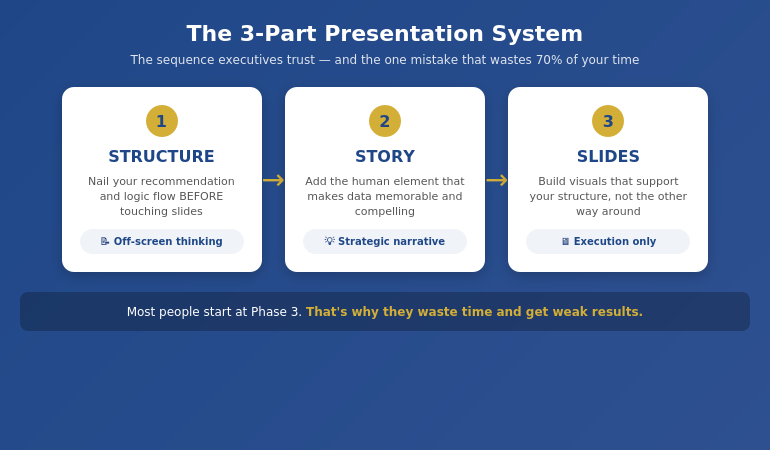
The 3-part presentation system: Structure leads to Story leads to Slides, shown as a sequential process"

⭐ Master the Complete System in 4 Weeks

AI-Enhanced Presentation Mastery is a live cohort course that teaches the full Structure → Story → Slides methodology — plus how to use AI tools to accelerate (not replace) each phase.

What you’ll learn:

  • The complete 3-part framework in depth
  • How to apply it to board decks, client pitches, and internal updates
  • AI prompts that enhance each phase (without making slides generic)
  • Live feedback on your real presentations

Learn More About the Course →

Live cohort format with direct instructor access. Built from 24 years of corporate banking experience.

Phase 2: Story (The Connection)

Once your structure is solid, you add the human element. Data convinces the rational mind. Story convinces the whole person.

This doesn’t mean turning your board presentation into a TED Talk. It means strategic use of narrative to make your points memorable and your recommendations compelling.

Three Story Techniques for Executive Presentations:

1. The Stakes Story (60 seconds)

Before presenting your recommendation, briefly establish what’s at risk. “If we don’t address this now, here’s what happens…” This creates urgency without being dramatic.

2. The Proof Story (90 seconds)

Instead of just citing data, briefly tell the story behind one data point. “When we piloted this with the Manchester team, here’s what happened…” Specific examples stick better than aggregate statistics.

3. The Future Story (60 seconds)

Paint a brief picture of what success looks like. “Six months from now, if we do this, here’s where we’ll be…” This helps executives visualise the outcome they’re approving.

Notice the time limits. Executive presentations aren’t the place for long narratives. These are strategic micro-stories embedded within a structured argument.

How do you structure an executive presentation?

The most effective structure for executive presentations is: (1) Recommendation/conclusion first, (2) Three supporting points with evidence, (3) Clear decision or action request, (4) Appendix for detail. This “top-down” approach respects executives’ time and mirrors how they make decisions. Avoid building up to your conclusion — executives want to know your answer immediately, then decide if they need the supporting detail.

Ready to master the complete system?

Explore AI-Enhanced Presentation Mastery →

Phase 3: Slides (The Delivery)

Only now — after structure and story are locked — do you open PowerPoint.

This is where most people START, which is why they waste so much time. When you build slides before your structure is solid, you end up rearranging endlessly, adding slides you don’t need, and second-guessing every design choice.

When structure comes first, slides become almost mechanical. You know exactly what each slide needs to say. You’re just visualising decisions you’ve already made.

The Slide Phase Checklist:

  • One message per slide. If a slide makes two points, split it.
  • Headlines that state conclusions. Not “Q3 Results” but “Q3 Revenue Exceeded Target by 12%”
  • Visuals that prove the headline. The chart or image should make the headline obvious.
  • Appendix for detail. Anything they might ask about but don’t need upfront.

For the detailed workflow I use, including how AI can accelerate this phase, see our guide to AI presentation workflow.
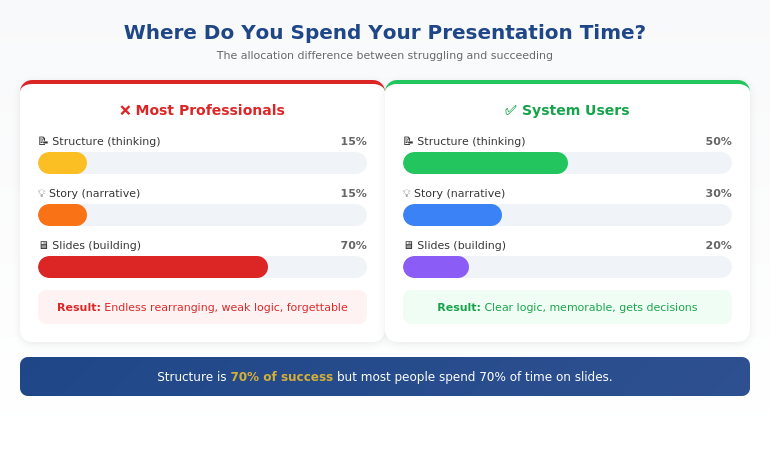
Time allocation comparison: amateur vs professional presenters showing where time should be spent

What makes a presentation system effective?

An effective presentation system is: (1) Repeatable — works for any presentation type, (2) Sequenced — forces you to do the right things in the right order, (3) Efficient — eliminates wasted time and rework, (4) Results-focused — optimised for getting decisions, not just delivering information. The best systems separate thinking (structure) from building (slides), ensuring you don’t waste time on visuals before your logic is sound.

⭐ Stop Reinventing Every Presentation

The AI-Enhanced Presentation Mastery course gives you a complete, repeatable system — so you never face a blank screen wondering where to start again.

Course includes:

  • 4 weeks of live instruction + Q&A
  • Templates for board, client, and internal presentations
  • AI prompt library for each phase of the system
  • Peer cohort for feedback and accountability

Learn More About the Course →

Framework-first, AI-enhanced. Next cohort starting soon.

Where AI Fits (And Where It Doesn’t)

AI tools like ChatGPT, Claude, and Copilot can dramatically accelerate presentation creation. But only if you use them at the right points in the system.

Where AI helps:

  • Phase 1 (Structure): Brainstorming counter-arguments, stress-testing your logic, identifying gaps
  • Phase 2 (Story): Drafting story options, finding analogies, refining language
  • Phase 3 (Slides): Generating first-draft slide content, reformatting data, creating visual options

Where AI fails:

  • Knowing your specific audience and what they care about
  • Understanding the political dynamics in your organisation
  • Making the judgment call on what to include vs. leave out
  • Replacing the strategic thinking that makes presentations persuasive

The professionals who get the most from AI use it as an accelerator within a proven framework — not as a replacement for having a system in the first place.

Want to learn how to combine framework + AI effectively?

Explore AI-Enhanced Presentation Mastery →

Is This System Right For You?

The 3-part system works for anyone who creates presentations for business audiences. But the full course is designed for a specific professional:
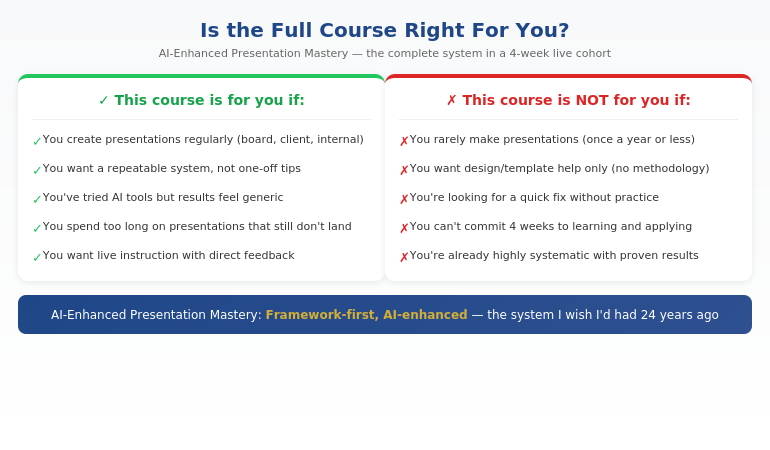
Qualification chart showing who the AI-Enhanced Presentation Mastery course is designed for

If you recognised yourself in the left column, the system will transform how you approach presentations — whether you learn it from this article or go deeper in the course.

⭐ The Complete System + Live Instruction

AI-Enhanced Presentation Mastery is a 4-week live cohort course that teaches the full Structure → Story → Slides methodology — plus the AI techniques that accelerate each phase without making your presentations generic.

What’s included:

  • 4 weeks of live sessions with Q&A
  • The complete 3-part framework with templates
  • AI prompt library for each phase
  • Feedback on your real presentations
  • Cohort of peers for ongoing accountability

Learn More About the Course →

Built from 24 years of corporate banking experience. Framework-first, AI-enhanced.

Frequently Asked Questions

How is this different from using AI tools alone?

AI tools are powerful but they don’t give you a system. They can generate content, but they can’t tell you what content you actually need. Without a framework, AI often produces generic slides that look impressive but don’t persuade. The 3-part system gives you the strategic foundation — AI then accelerates execution within that framework. It’s the difference between having a GPS (system) versus just having a fast car (AI).

Does this work for different presentation types (board, client, internal)?

Yes — that’s the point of having a system. The Structure → Story → Slides sequence works whether you’re presenting to a board, pitching a client, updating your team, or requesting budget. The specific content changes, but the methodology stays the same. In the course, we apply the system to multiple presentation types so you can see how it adapts.

How much time does the system actually save?

In my experience, the system cuts presentation prep time by 50-75% once you’ve internalised it. The savings come from eliminating the two biggest time-wasters: (1) building slides before your structure is clear, and (2) endless rearranging and second-guessing. When you know exactly what each slide needs to say before you open PowerPoint, the building phase becomes almost mechanical.

What if I’m already experienced at presentations?

Most experienced presenters are “unconsciously competent” — they do things that work but can’t articulate why. The system makes your process conscious and repeatable, which means you can improve it deliberately and teach it to others. It also fills gaps you might not know you have. Many experienced professionals find the Story phase (Phase 2) particularly eye-opening.

Get Weekly Presentation System Insights

Frameworks, templates, and techniques for executive presentations — from 24 years in corporate banking.

Subscribe to The Winning Edge →

Your Next Step

The 3-part presentation system — Structure → Story → Slides — isn’t complicated. But it does require discipline to follow the sequence, especially when you’re tempted to jump straight into PowerPoint.

Start with your next presentation. Before you open any software, answer the three questions from the rescue block above. Get your structure right first. Everything else becomes easier.

P.S. If you’re making a presentation this week, check out the presentation habit that’s quietly killing careers — it’s about the structural mistake most professionals make without realising it.

P.P.S. If nerves are part of your presentation challenge, I wrote about how to speak confidently in meetings — including the 30-second reset that helps even when anxiety hits.

About Mary Beth Hazeldine
Owner & Managing Director of Winning Presentations. 24 years in corporate banking at JPMorgan Chase, PwC, RBS, and Commerzbank. I’ve built hundreds of executive presentations and now teach the system I wish I’d had from the start.

20 Jan 2026
Executive presentation framework that AI can't replace - the human judgment layer that turns slides into decisions

Executive Presentation Framework: What AI Can’t Replace (And Never Will)

Quick answer: An executive presentation framework is the strategic thinking layer that determines what to say, in what order, to which audience, for what decision. AI tools can generate slides, but they cannot read the room, build your credibility, or structure content for your specific stakeholders’ decision-making style. The framework is what makes AI useful—not the other way around.

Master the framework, and AI becomes a powerful accelerator. Skip the framework, and AI produces polished slides that get polite nods and no action.

⚡ Before you open any AI tool, answer these 4 framework questions:

1. Decision: What specific decision or action do I need from this audience?

2. Objection: What’s their biggest concern or resistance?

3. Evidence: What proof will overcome that specific objection?

4. Structure: What order puts my strongest point where it matters most?

Now prompt AI with these answers. Watch the output transform.

The Presentation That AI Made Worse

A VP at a tech company came to me after a failed board presentation. She’d used every AI tool available—Copilot for the slides, ChatGPT for the script, Gamma for the visuals. The deck was beautiful.

The board said no.

“I don’t understand,” she told me. “The slides were better than anything I’ve made before.”

I reviewed the deck. She was right—the slides were polished. But the structure was wrong. She’d built up to her recommendation over 20 slides when the board wanted her position in the first 60 seconds. She’d included data that addressed her concerns, not theirs. She’d structured it for herself, not for how her CFO actually makes decisions.

AI had made her faster at building the wrong presentation.

That’s the trap nobody talks about.

⭐ Master the Framework That Makes AI Actually Useful

Stop producing polished slides that get polite nods. Learn the executive presentation methodology that turns AI from “fast but generic” into “fast and compelling.”

In this live cohort course:

  • The Decision-First Framework for executive audiences
  • How to read your stakeholders’ decision-making style
  • Structuring for your specific audience (not generic “best practices”)
  • Live feedback on your actual presentations

Includes a Decision-First briefing template you can reuse before every deck.

Join AI-Enhanced Presentation Mastery →

Live cohort with Mary Beth Hazeldine. 70% framework thinking, 30% AI execution. Works with any tool—Copilot, Gamma, ChatGPT, or whatever comes next.

If you have a board presentation or investor pitch in the next month, this will transform how it lands.

The 3 Things AI Cannot Do (And Never Will)

AI is extraordinarily good at certain tasks. It can generate slide layouts, suggest visual designs, produce draft content quickly, and format information cleanly.

But there are three capabilities at the heart of effective executive presentations that AI fundamentally cannot perform—and these aren’t limitations that will be solved with the next model update.

1. AI cannot read the room.

Executive presentations succeed or fail based on real-time audience response. The CFO who leans back when you mention the budget. The board member who checks their phone during your risk slide. The CEO who nods slightly at your third point.

These signals tell you what to emphasise, what to skip, and when to pivot. AI can’t see them. AI can’t adjust. AI doesn’t know that your COO makes decisions emotionally and justifies them rationally, while your CFO does the opposite.

You do. That’s the framework.

2. AI cannot build your credibility.

When you present to executives, they’re not just evaluating your slides. They’re evaluating you. Your command of the material. Your ability to answer unexpected questions. Your judgment about what matters.

AI can give you beautiful slides, but it can’t make you credible. When a board member asks “What happens if this fails?” and you give a thoughtful, unrehearsed answer that shows deep understanding—that’s what gets buy-in. That comes from framework thinking, not AI prompting.

3. AI cannot structure for your specific decision-maker.

Generic presentation advice says “lead with your conclusion” or “tell a story.” But your CFO might want numbers first and narrative second. Your CEO might want strategic context before tactical recommendations. Your board might want risk assessment before opportunity analysis.

AI produces average structures for average audiences. Your executive presentation framework must be tailored to how your specific stakeholders process information and make decisions. That’s human judgment. It always will be.


The three things AI cannot do in executive presentations: read the room, build credibility, and structure for specific decision-makersWhat an Executive Presentation Framework Actually Is

A framework isn’t a template. Templates are fill-in-the-blank structures that produce generic results. A framework is a decision-making methodology that produces tailored results.

The Decision-First Framework has four components:

Component 1: Decision clarity

Before anything else, define the specific decision you need. Not “inform them about the project” but “get approval for the £200K Phase 2 budget.” This clarity shapes everything that follows—what to include, what to cut, and how to structure the flow.

Component 2: Audience analysis

Who’s in the room? What are their concerns? How do they prefer to receive information? A framework helps you map each stakeholder’s decision-making style, objections, and priorities—then structure your content accordingly.

Component 3: Evidence selection

You have more data than you can present. A framework helps you select the evidence that specifically addresses your audience’s concerns—not the data that’s most impressive to you. This is where most AI-generated presentations fail: they include everything rather than selecting strategically.

Component 4: Structure optimization

The order of information matters enormously. A framework tells you whether to lead with recommendation or build to it, whether to address objections early or late, and where to place your strongest evidence for maximum impact. Learn more about executive presentation structure and how decision-first ordering works.

When you have this framework clear, AI becomes powerful. You’re not asking AI to think—you’re asking AI to execute your thinking faster. That’s the multiplier effect.

Want to master framework-first presentation thinking? AI-Enhanced Presentation Mastery teaches the complete Decision-First Framework with live practice on your actual presentations. See upcoming cohorts →

Framework as Multiplier: Why AI Needs You More Than You Need It

Here’s the uncomfortable truth about AI presentation tools: they multiply what you put in.

If you put in vague thinking, you get polished vagueness. If you put in generic structure, you get beautiful generic slides. If you put in framework-quality input—clear decision, specific audience analysis, selected evidence, optimized structure—you get executive-quality output at unprecedented speed.

Without framework:

“Create a presentation about our Q3 results for the board”

→ AI produces a generic quarterly review that looks like every other quarterly review the board has seen this month

With framework:

“Create a 6-slide presentation requesting £500K for market expansion. Board’s main concern is timeline risk. Lead with our mitigation plan, then show the opportunity cost of delay. CFO needs IRR and payback period on slide 3.”

→ AI produces a targeted, decision-ready deck tailored to your specific board’s priorities

Same AI. Same topic. Completely different output. The variable is the framework thinking you bring.

This is why I teach 70% framework, 30% AI tools. The framework is the skill. The AI is just the accelerator. If you have a solid AI presentation workflow, it’s because you have solid framework thinking underneath it.


Framework-first versus prompt-first approach showing how strategic thinking transforms AI output quality

⭐ The Framework That Makes Every AI Tool More Powerful

Learn the methodology that transforms AI from “fast at generic” to “fast at excellent.” Works with Copilot, Gamma, ChatGPT—or whatever tool comes next.

What you’ll master:

  • The 4-component Decision-First Framework
  • How to analyze any audience’s decision-making style
  • Evidence selection that addresses real objections
  • Structure optimization for executive buy-in

Join the Next Cohort →

Live sessions + direct feedback on your presentations. Framework skills that last a career.

This pays for itself the first time you get buy-in instead of polite nods.

Future-Proofing Your Presentation Skills

AI tools will keep improving. Copilot will get smarter. New competitors will launch. Models will advance.

But the executive presentation framework skills—reading your audience, building credibility, structuring for specific decision-makers—will remain human skills. They’re future-proof because they’re based on how humans make decisions, not on how technology generates content.

What becomes more valuable as AI improves:

  • Judgment about what to include — AI can generate anything; knowing what matters is human
  • Understanding of specific stakeholders — AI knows averages; you know your CFO
  • Ability to adapt in real-time — AI can’t see the room; you can read it
  • Credibility through deep knowledge — AI can script answers; you can think on your feet

What becomes less valuable:

  • Slide design skills (AI handles this well)
  • Content drafting speed (AI is faster)
  • Formatting consistency (AI is better)

The executives who thrive will be those who invest in the human judgment layer—the framework—and use AI to accelerate execution. Those who rely on AI for thinking will produce faster mediocrity.

The 3Ps Framework I’ve developed over 24 years in banking has helped clients raise more than £250M in funding. That wasn’t because of technology. It was because of strategic thinking applied to specific audiences.

Ready to build AI-proof presentation skills? AI-Enhanced Presentation Mastery teaches framework-first thinking that works with any tool and lasts a career. View course details →

Related: Framework thinking applies to every aspect of executive presentations. See how it shapes your executive presentation opening line and how it helps you manage high-stakes presentation nerves.

Common Questions About Executive Presentation Frameworks

What is an executive presentation framework?

An executive presentation framework is a decision-making methodology for structuring presentations to senior leaders. It includes four components: clarifying the specific decision you need, analyzing your audience’s concerns and decision-making style, selecting evidence that addresses their objections, and optimizing the structure for maximum impact. Unlike a template (fill-in-the-blank), a framework produces tailored results for each unique situation.

Can AI create executive presentations?

AI can create slides, but it cannot create effective executive presentations. The difference is judgment—knowing what to include, understanding your specific stakeholders, reading the room during delivery, and building credibility through deep knowledge. AI produces average content for average audiences. Executive presentations require tailored thinking that AI cannot perform. AI is best used to accelerate execution after you’ve done the framework thinking.

What makes executive presentations different?

Executive presentations are decision-focused, not information-focused. Senior leaders don’t want to learn about your topic—they want to make a decision and move on. This requires leading with recommendations, addressing specific objections, and structuring for their decision-making style rather than your preference. Generic presentation advice often fails with executives because it assumes audiences want information rather than clarity for action.

⭐ Build the Skill AI Can’t Replace

Framework thinking is the competitive advantage that makes AI useful. Learn the methodology that executives trust—and that technology can’t replicate.

Inside the course:

  • The complete Decision-First Framework
  • Audience analysis techniques for any stakeholder
  • How to brief AI for executive-quality output
  • Live practice with direct feedback

Enroll in AI-Enhanced Presentation Mastery →

Live cohort format with Mary Beth Hazeldine. Framework-first methodology developed from 24 years in corporate banking and executive coaching.

FAQ

Will AI replace presentation skills?

AI will replace some presentation tasks—slide design, content drafting, formatting—but not presentation skills. The human judgment layer (reading audiences, building credibility, structuring for specific decision-makers, adapting in real-time) remains irreplaceable because it depends on understanding specific people in specific contexts. Professionals who invest in framework thinking will use AI as an accelerator. Those who rely on AI for thinking will produce faster mediocrity.

What framework do consultants use for executive presentations?

Top consulting firms use variations of the Pyramid Principle—leading with the answer, then supporting with evidence. But the specific framework matters less than the underlying skill: analyzing your audience, clarifying the decision, selecting relevant evidence, and optimizing structure. Generic frameworks fail when applied without adaptation. The skill is knowing how to tailor any framework to your specific stakeholders.

How long does it take to learn a presentation framework?

The concepts can be learned in a few hours. Applying them fluently takes practice—typically 4-6 presentations with conscious framework application. Most professionals see improvement immediately (clearer structure, better audience response) and mastery within 2-3 months. The goal isn’t memorizing steps; it’s developing judgment that becomes automatic.

Does this work with Copilot/Gamma/ChatGPT?

Yes—the framework is tool-agnostic. Framework thinking improves your output from any AI tool because it improves your input. The specific prompting syntax varies slightly by tool, but the underlying methodology (decision clarity, audience analysis, evidence selection, structure optimization) applies universally. Learn the framework once, use it with whatever technology emerges.

📧 The Winning Edge Newsletter

Weekly insights on framework-first presentation thinking, AI-enhanced workflows, and executive communication. Practical methodology from 24 years in corporate banking—no AI hype, just what actually works with senior leaders.

Subscribe Free →

Your Next Step

AI generates slides. Frameworks generate buy-in.

Before your next executive presentation, spend 10 minutes on framework thinking: What decision do you need? What’s your audience’s main concern? What evidence addresses it? What structure puts your strongest point where it matters most?

Then use AI to execute your thinking. The output will transform—because you’ve transformed the input.

For the complete framework methodology with live practice and direct feedback, join AI-Enhanced Presentation Mastery.

About the Author

Mary Beth Hazeldine is the Owner & Managing Director of Winning Presentations and a former corporate banker with 24 years of experience at JPMorgan Chase, PwC, Royal Bank of Scotland, and Commerzbank. She has trained thousands of executives on high-stakes presentation skills and helped clients secure more than £250 million in funding and budget approvals.

Mary Beth is also a qualified clinical hypnotherapist and NLP practitioner. She developed the framework-first methodology after watching countless executives struggle with polished AI slides that failed to get buy-in—and discovering that the missing piece was always strategic thinking, never better technology.

Book a discovery call | View services