
Quick Answer: Presenting without slides works best when your argument is simple, your audience is senior, and your credibility is already established. The format that replaces decks: a verbal three-part structure (context–recommendation–evidence) that forces sharper thinking and stronger eye contact. Most executives who try it never go back for certain meeting types.
Diagnostic — Should You Skip Slides for This Meeting? If your audience is five people or fewer, your recommendation fits in one sentence, and the meeting is under 20 minutes, slides are likely slowing you down. But if you’re presenting data, comparisons, or anything that requires visual evidence, you still need structure. The question isn’t “slides or no slides” — it’s “what format serves this specific room?”
See the decision framework for slide-free vs structured decks →
Jump to Section
The Deck That Wasn’t There
A biotech company had a 47-slide investor deck. They’d spent three weeks refining it. Every data point was accurate. Every chart was clean. The lead scientist could walk through it backwards.
The investors gave them 12 minutes.
Twelve minutes for 47 slides. The team scrambled to cut content. They made it to slide 19 before the lead investor raised a hand and said: “Stop. What are you actually asking for, and why should we care?”
They came back the following week. No slides. The CEO stood up and said three sentences: “We’ve developed a diagnostic that catches pancreatic cancer 18 months earlier than current screening. We need £4.2 million to complete Phase II trials. If we succeed, the addressable market is £2.8 billion.” Silence. Then questions. Then a term sheet.
The slides hadn’t failed because they were badly designed. They’d failed because the room didn’t need visual evidence — it needed verbal clarity. That’s the distinction most executives miss when deciding on their presenting without slides format.
When Slides Actually Hurt Your Credibility
Slides create a psychological contract with your audience. The moment a deck appears on screen, the room shifts from “I’m listening to a person” to “I’m reading a document someone is narrating.” That shift is often exactly what you want — data needs visual support, comparisons need side-by-side displays, complex processes need diagrams.
But there are situations where that psychological shift works against you.
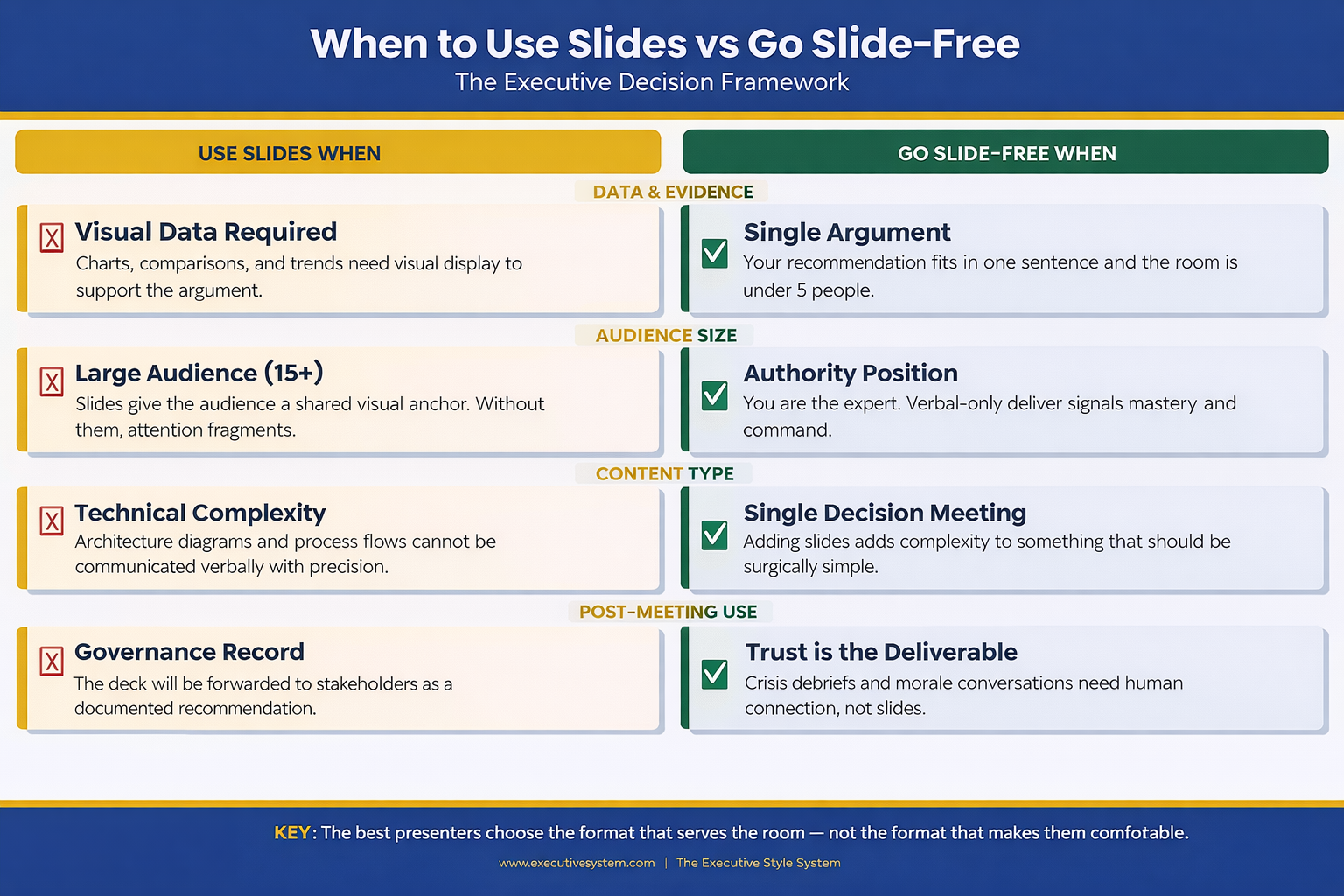
When you’re the authority in the room. If you’re the CFO updating the board on financial performance, a deck says “I’ve prepared evidence for your review.” Standing and speaking without one says “I know this material so well I don’t need a crutch.” The second posture communicates command. Senior executives intuitively respect the verbal-only approach because it signals mastery.
When the meeting is about a single decision. Slides encourage comprehensiveness. They make you want to show the full picture. But a decision meeting needs focus: here’s the recommendation, here’s why, here’s what happens if we don’t. Three verbal points. Done. Adding slides adds complexity to something that should be surgically simple.
When trust is the deliverable. Post-crisis updates, team morale conversations, stakeholder concerns — these are moments where human connection matters more than information density. Slides create distance. Your voice, your eye contact, your pauses create proximity.
The Verbal Structure That Replaces a Deck
Going slide-free doesn’t mean going structure-free. The executives who do this well use a verbal architecture that’s actually more disciplined than most decks.
It’s called the Context–Recommendation–Evidence framework, and it works like this:
Context (30 seconds): Name the situation. Not a history lesson. Not background. One sentence that frames why everyone is in this room right now. “We have three weeks until the regulatory deadline and we’re behind on two of the four compliance workstreams.”
Recommendation (15 seconds): State what you think should happen. Don’t build to it. Don’t warm up. Say it. “I recommend we pause the product launch by two weeks and redirect the dev team to compliance.”
Evidence (2–4 minutes): Now support it. This is where most people want to put slides. Instead, use verbal signposting: “Three reasons. First…” Give each reason a number. Give each reason a name. “First, the regulatory risk. If we miss the deadline, the fine is estimated at £1.2 million.” Numbers spoken aloud land harder than numbers on a slide because the audience has to process them actively, not passively read them.
Then stop. Ask for questions. The entire presentation takes under five minutes. Most executive decisions are made in the first 90 seconds of a presentation — the remaining time is evidence and challenge. This structure front-loads the decision and respects the room’s time.
This verbal structure also solves a problem many people don’t notice until it’s too late: when you present with slides, your audience reads ahead. They’re on slide 7 while you’re explaining slide 4. Without slides, you control the pace. Every word lands in sequence. Nothing gets skipped.
The Slide-Free Structure for Executive Meetings
The Executive Slide System includes the Context–Recommendation–Evidence framework as a verbal playbook — plus the decision tree for when to use slides and when to ditch them. You’ll know before you walk in whether this meeting needs a deck or a conversation.
- The verbal architecture template: Context–Recommendation–Evidence with timing for each section
- Decision matrix: slides vs no-slides for 12 common meeting types (board, QBR, budget, strategy, client pitch, all-hands)
- The one-slide hybrid format for meetings that need a visual anchor without a full deck
- Verbal signposting script — how to replace slide transitions with spoken structure
Get the Executive Slide System → £39
Built from 24 years of corporate banking presentations at JPMorgan Chase, PwC, Royal Bank of Scotland, and Commerzbank — where many of the highest-stakes decisions happened without a single slide.
Five Scenarios Where No Slides Wins
Not every meeting deserves a deck. Here are five where you’re better off without one — and the verbal approach that works for each.
1. The executive update (under 10 minutes). You’re updating the leadership team on project status, budget burn, or timeline. The room already has context. They don’t need slides — they need a concise verbal summary and your recommendation on any open decisions. Use the CRE framework. Three minutes, maximum.
2. The one-on-one with your manager. You’re asking for headcount, budget, or a project pivot. Slides make this feel like a pitch instead of a conversation. Sit across the table. Make your case verbally. Let the discussion flow. You’ll get better engagement and faster answers.
3. The crisis debrief. Something went wrong. The team needs to hear from leadership. Opening a laptop and displaying slides signals “I’ve prepared a narrative” when what the room wants is “I’m here, I understand what happened, and here’s what we’re doing about it.” Speak from notes if you must, but keep the screen dark.
Speaking of difficult moments — if you’ve ever walked out of a room feeling the weight of a presentation that didn’t land, the shame spiral after a bad presentation is a real phenomenon, and it has nothing to do with your slides.
4. The team alignment meeting. You’re aligning three departments on priorities for the quarter. This is a facilitation exercise, not a presentation. Slides turn it into a lecture. Instead, write three questions on a whiteboard (physical or virtual) and facilitate discussion. You’ll leave with genuine alignment instead of passive head-nodding.
5. The board check-in (informal). Not the formal board meeting — the informal check-in between meetings where the chair wants a candid update. Slides here feel over-prepared. The chair wants your judgement, not your formatting skills. Speak to three priorities. Answer questions. Leave.
Know exactly when to skip the deck and when to build one?
When You Still Need Slides (Don’t Kid Yourself)
The slide-free approach has real limits. Ignoring them will cost you credibility just as fast as overusing slides.
You need slides when data tells the story. Financial comparisons, trend lines, market analysis, competitive positioning — these are visual arguments. Describing a chart verbally is like describing a painting over the phone. The audience needs to see it. If your presentation relies on numbers, graphs, or comparisons, build the deck.
You need slides when the audience is large. More than 15 people in the room? Slides give the audience a shared visual anchor. Without them, attention fragments. People hear different things. The deck provides a single source of truth that everyone references.
You need slides when the content is technical. Architecture diagrams, process flows, system dependencies — these cannot be communicated verbally with the precision they require. If someone needs to reference what you said after the meeting, slides create that artefact.
You need slides when the decision requires sign-off. Formal approvals often require a documented recommendation. The deck becomes the record. It gets forwarded to stakeholders who weren’t in the room. It gets attached to the board minutes. In these cases, the slides aren’t a presentation aid — they’re a governance document.
The key distinction: slides serve the audience, not the presenter. If you’re using slides because they make you feel more prepared, that’s a confidence issue, not a communication strategy. If you’re using slides because the audience genuinely needs visual information to make a decision, that’s good judgement. Understanding how executive presentation structure works helps you make this call correctly every time.
People Also Ask: Can you present to a board without slides?
Yes — but only for informal check-ins, relationship updates, or verbal-only agenda items. Formal board presentations almost always require a documented deck because it serves as a governance record. The exception: if the board chair specifically requests a verbal update, honour that preference. The verbal CRE framework gives you structure without slides.
People Also Ask: How do you structure a presentation without visual aids?
Use the Context–Recommendation–Evidence framework. Open with one sentence of context. State your recommendation immediately. Then support it with three numbered evidence points. The verbal signposting (“three reasons — first, second, third”) replaces slide transitions and keeps the audience tracking your argument.
People Also Ask: Is it unprofessional to present without PowerPoint?
In many executive settings, it signals the opposite — confidence and mastery. Presenting without slides in the right context communicates that you know the material well enough to speak without support. The perception of unprofessionalism comes from being unstructured, not from being slide-free. Structure your verbal delivery and you’ll be perceived as more authoritative, not less.
Stop Building Decks That Don’t Serve the Room
The Executive Slide System teaches you when to build and when to walk in with nothing but your argument — and gives you the verbal structure to do both confidently.
- 12-scenario decision matrix (deck vs no-deck vs hybrid)
Get the Executive Slide System → £39
Designed for executives who present weekly and need to know — instantly — whether this meeting needs a full deck, one slide, or nothing at all.
The Hybrid Approach: One Slide, Maximum Impact
There’s a middle ground that most presenters never consider: the single-slide presentation.
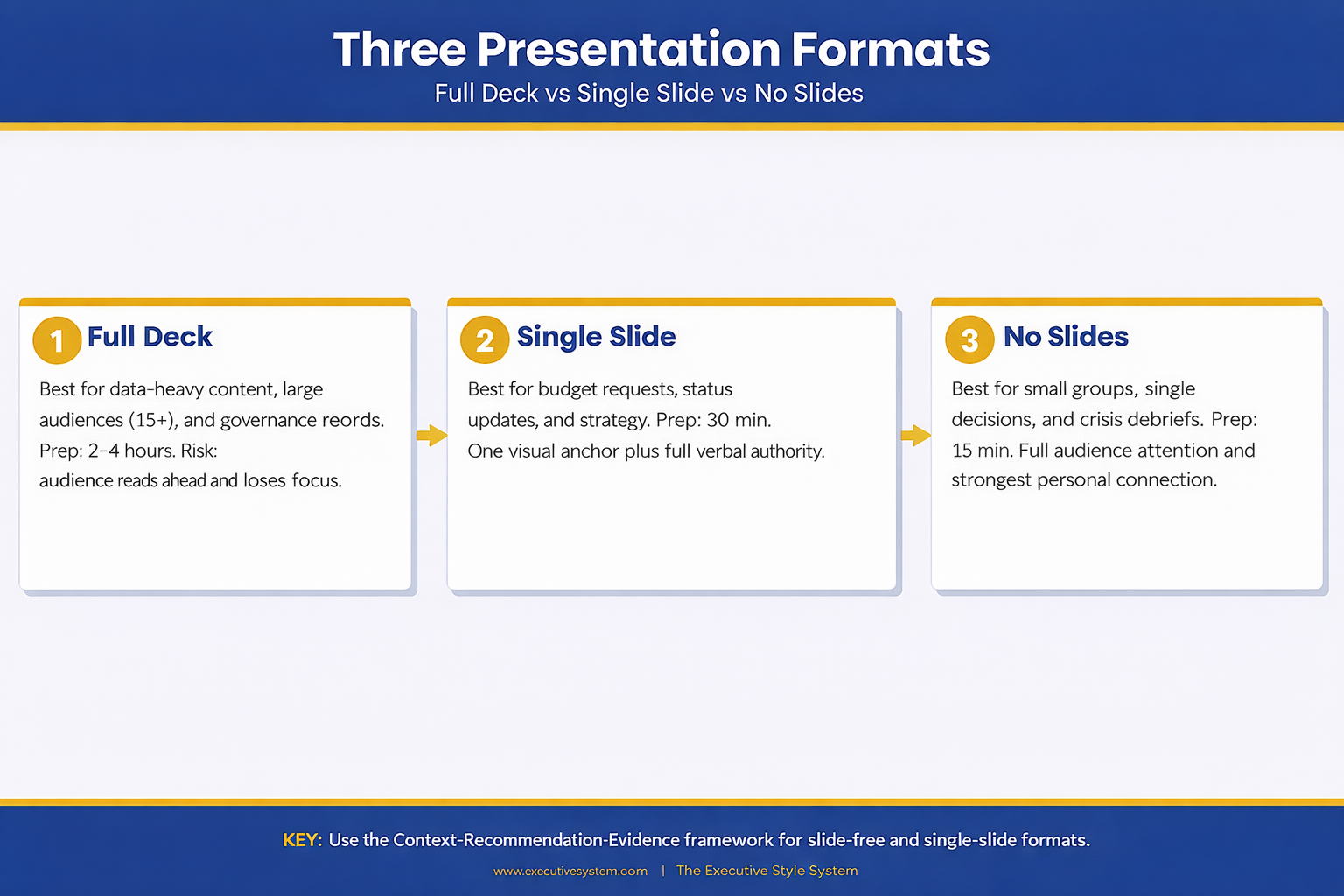
One slide. Not a title slide. Not an agenda. One visual that anchors your entire argument. It might be a single chart that proves your point. A timeline that shows the critical path. A comparison table with three rows. One visual, displayed for the entire meeting, while you speak around it.
This works brilliantly for budget requests, strategic recommendations, and project status updates. The slide provides the visual evidence while your voice provides the narrative. You get the best of both approaches: the authority of speaking without support and the clarity of a visual anchor.
The single-slide approach also solves the “read-ahead” problem. There’s nowhere for the audience to skip to. Their eyes are on one visual. Their ears are on you. Full attention, no fragmentation.
One executive I worked with took this approach to every leadership meeting for a year. Same format: one slide with three numbers (revenue, burn rate, runway), spoken narrative around them. Her leadership team started calling it “the truth slide.” It became the most efficient meeting format in the company because everyone knew exactly what to expect.
Understanding how pacing and rhythm keep executives engaged is critical here — the single-slide format only works if your verbal delivery carries the weight. The Executive Slide System (£39) includes the one-slide hybrid template with delivery notes for exactly this approach.
Want the one-slide hybrid template?
Making the Call Before Your Next Meeting
The decision to present with or without slides should happen before you open PowerPoint. Once you start building, momentum takes over. You add one more chart, one more backup slide, one more appendix — and suddenly you’ve spent four hours on a deck for a 10-minute conversation.
Before your next meeting, ask three questions: Does this audience need visual evidence to make a decision? Is the room larger than 15 people? Will this presentation be forwarded to people who weren’t there? If the answer to all three is no, consider leaving the laptop closed.
The best presenters aren’t the ones with the most polished slides. They’re the ones who know when slides serve the room and when they get in the way. That judgement — knowing the right format for the right moment — is what separates executives who communicate effectively from those who just create decks. And when you do need the right format for a strategy presentation, having a proven structure saves hours.
When the stakes are high and you need to answer questions on the fly, your format choice matters even more. Evidence-first answers build trust faster than any slide ever could — whether you’re presenting with a deck or without one.
Your next presentation might not need a single slide. The Executive Slide System (£39) gives you the framework to decide — and the structure for whichever format you choose.
Is This Right For You?
✓ This is for you if:
- You present to senior audiences weekly and suspect half your decks aren’t needed
- You spend hours building slides for meetings that end in 10 minutes of conversation
- You want a verbal framework that’s as structured as a deck but faster to prepare
- You’re presenting a single recommendation and want maximum impact without visual clutter
✗ Not for you if:
- Your presentation relies on data visualisation, comparisons, or technical diagrams — you need slides
- Your audience is larger than 15 people and needs a shared visual anchor
- The presentation will be forwarded as a governance record — you need a documented deck
Every Format. One System. 30 Minutes to Prepared.
The Executive Slide System covers every presentation format: full decks, single-slide hybrids, and verbal-only structures. You get the decision framework, the templates, and the delivery scripts — so you walk into every meeting knowing exactly which approach will land.
- 22 PowerPoint templates for when you do need slides — pre-built for executive scenarios
- The verbal CRE framework with timing, signposting scripts, and practice prompts
- The one-slide hybrid template (the “truth slide” format)
- 51 AI prompt cards to build any deck in under 30 minutes when a full presentation is required
Get the Executive Slide System → £39
Used by executives across banking, biotech, and professional services who present multiple times per week and need the right format every time — not just the same deck recycled.
Frequently Asked Questions
What if my manager expects slides and I show up without them?
Set expectations in advance. Send a brief message: “For Thursday’s update, I’ll walk through the three priorities verbally rather than a deck — wanted to make the most of our 15 minutes.” Most managers welcome this if the verbal delivery is structured. If your manager insists on slides, use the one-slide hybrid: one visual anchor with a verbal narrative around it.
How do I handle follow-up requests if there’s no deck to share?
Send a one-page written summary after the meeting. Three paragraphs: what was discussed, what was decided, what happens next. This takes five minutes to write and serves as a better record than a 20-slide deck that nobody will re-read. Some executives find the summary more useful than the original deck because it captures the actual conversation, not just the prepared content.
Won’t I forget my points without slides to guide me?
That’s the point. If you can’t remember your argument without visual prompts, the argument isn’t clear enough yet. The CRE framework forces clarity: one sentence of context, one recommendation, three evidence points. If you can’t hold that in your head, simplify the argument until you can. The discipline of going slide-free makes you a sharper thinker.
Does this work for virtual presentations on Zoom or Teams?
Yes, with one modification. In virtual meetings, your face replaces the slide as the visual anchor. Keep your camera on, maintain eye contact with the lens, and use verbal signposting even more deliberately (“I’m going to cover three things — first…”). Without slides to share, the screen shows your face, which is actually more engaging for audiences under 10 people.
Your Next Meeting Is the Test
You have a meeting this week where slides aren’t necessary. You already know which one it is. The question is whether you’ll trust your verbal delivery enough to walk in without a deck — and whether you have the structure to make it land.
Close the laptop. Open with context. State your recommendation. Support it with three evidence points. Stop. The room will follow you.
Stay Updated
New frameworks for high-stakes presentations land in The Winning Edge newsletter every Friday. Subscribe for frameworks you can use immediately.
🆓 Free resource: Free PDF — a free guide to strengthen your presentation preparation.
About the Author
Mary Beth Hazeldine is the Owner & Managing Director of Winning Presentations. With 24 years of corporate banking experience at JPMorgan Chase, PwC, Royal Bank of Scotland, and Commerzbank, she has delivered high-stakes presentations in boardrooms across three continents.
A qualified clinical hypnotherapist and NLP practitioner, Mary Beth combines executive communication expertise with evidence-based techniques for managing presentation anxiety. She has trained thousands of executives and supported high-stakes funding rounds and approvals.