

47 slides. 12 presenters. 90 minutes. Zero decisions. I sat through that monthly business review at RBS for three years before someone finally said what everyone was thinking: “Why are we all here?”
Quick Answer: Most mandatory update meetings fail because they present information that could have been read in advance. The fix isn’t better slides or more engaging delivery — it’s restructuring the meeting around decisions instead of updates. Every standing meeting should answer one question: “What do we need people in the room to decide?” If the answer is nothing, it genuinely should be an email. If there IS a decision, the entire presentation structure changes — and the meeting becomes the 15 minutes everyone wishes it was.
In this article:
- Why 80% of Update Meetings Are Genuinely Wasted Time
- The Decision-Meeting Conversion: How to Restructure Any Update
- The Pre-Read Strategy That Eliminates 70% of Your Slides
- The 3-Slide Update That Replaced a 20-Slide Deck
- When You’re One of Five Presenters (And Everyone Else Still Uses 20 Slides)
- How to Make the New Format Stick
- Frequently Asked Questions
🚨 Running a recurring update meeting this week? Quick check: How many of your slides present information that could be read in advance? If more than half your deck is context-setting, you’re running an email disguised as a meeting.
→ Need the exact decision-meeting templates? Get the Executive Slide System (£39)
The turning point came when a VP I was coaching at JPMorgan showed me her calendar. She had eleven recurring meetings per week. Seven of them were “updates.” She was spending 40% of her working week sitting in rooms watching people read slides that she could have absorbed in five minutes.
“The worst part,” she told me, “is that three of those meetings actually DO need a discussion. But by the time we get to the discussion item, everyone’s checked out because they’ve sat through 45 minutes of status reports.”
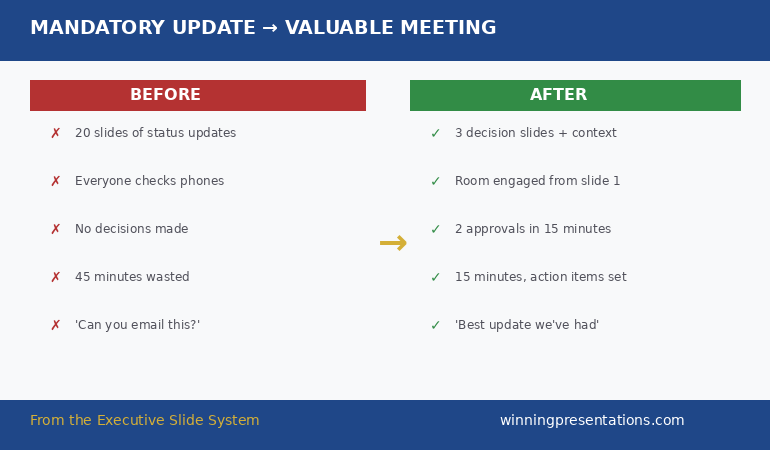
She asked me to help her restructure her own team’s monthly update. Not the content — the format. We stripped out everything that could be sent as a pre-read, restructured the remaining slides around the two decisions she needed that month, and cut the meeting from 60 minutes to 20.
Her boss’s feedback after the first one: “That was the best update I’ve had all quarter. What changed?”
What changed wasn’t her data. It wasn’t her delivery. It was that she stopped presenting information and started presenting decisions.
Why 80% of Update Meetings Are Genuinely Wasted Time
Let’s be honest about what happens in most recurring update meetings. Someone opens a deck. They walk through slides that show project status, metrics, and activity since the last meeting. The audience listens politely, asks one or two questions that could have been answered via email, and leaves having made no decisions and taken no actions they wouldn’t have taken anyway.
This isn’t a presentation problem. It’s a structural one.
How do you make mandatory meetings engaging? You make them necessary. The reason most update meetings feel like they should have been emails is because they should have been emails. They contain information, not decisions. And information delivery doesn’t require synchronous human presence.
The test is simple: at the end of your meeting, can you point to a decision that was made BECAUSE people were in the room? If the meeting would have produced the same outcome as an email thread, you’ve just consumed 10 person-hours (10 attendees × 1 hour) for the cost of a 5-minute read.
At RBS, I calculated that our monthly cross-functional update consumed roughly 2,400 person-hours per year across the business. When we finally restructured the format, we recovered about 1,800 of those hours. Not by cancelling meetings — by making the remaining meetings genuinely meeting-worthy.
The Decision-Meeting Conversion: How to Restructure Any Update
Every update meeting can be converted to a decision meeting. Even the ones that feel purely informational. The trick is finding the decision hiding inside the update.
Step 1: Ask “So what?” For every piece of information in your current deck, ask “So what? What does the audience need to DO with this information?” If the answer is “nothing — they just need to know,” that’s a pre-read item. Remove it from the live presentation.
Step 2: Find the hidden decisions. Almost every update contains an implicit decision that never gets surfaced. “Project X is two weeks behind schedule” contains a hidden decision: Do we add resources, adjust the deadline, or accept the delay? Most presenters share the status and move on. The audience absorbs the information, feels vaguely concerned, and does nothing. Surface the decision, and the meeting has a purpose.
Step 3: Restructure around decisions, not topics. Instead of organising your meeting by project or department (which encourages information dumps), organise it by decision required. “We need to decide on three things today: resource allocation for Project X, go/no-go on the Q2 pilot, and timeline approval for the client migration.” Now everyone in the room knows exactly why they’re there.
Why do update meetings waste time? Because they’re structured around topics (“here’s what happened”) instead of decisions (“here’s what we need to resolve”). Restructuring around decisions doesn’t just make meetings shorter — it makes them the thing that requires human presence: collaborative judgement calls that can’t happen asynchronously.
The Update Meeting Format That Gets Decisions in 15 Minutes
Your recurring meetings don’t need to be longer — they need to be structured around decisions instead of information. The Executive Slide System gives you:
- The project status update template — pre-built to lead with decisions required, not activity completed
- The executive summary template — the single-slide format that replaces 15 slides of background context
- 51 AI prompts to restructure any existing meeting deck — including prompts that extract the hidden decisions from your status updates
- The quarterly business review framework — the same structure that turned 90-minute reviews into 20-minute decision sessions
Get the Executive Slide System → £39
Restructured from monthly reviews at JPMorgan and RBS — where meeting time was too expensive to waste on information that should have been an email.
The Pre-Read Strategy That Eliminates 70% of Your Slides
The single biggest transformation you can make to any recurring meeting is implementing a pre-read. Not a “here’s the deck in advance” pre-read — that just means people skim the same slides they’d have seen live. A structured pre-read that contains all the information, so the meeting only contains the discussion.
What goes in the pre-read: Status updates. Metrics. Dashboards. Anything where the audience needs to absorb information before they can have a useful conversation. The pre-read should be a 1-2 page document (not a 20-slide deck) sent 24 hours before the meeting with a clear instruction: “Read this before we meet. The meeting will focus on the three decisions outlined at the top.”
What stays in the meeting: Decisions. Trade-offs. Disagreements that need resolution. Anything where human judgement, debate, or collaborative problem-solving adds value that an email thread cannot.
What’s the difference between an email update and a meeting update? An email update shares information. A meeting update requires human interaction to resolve something. If your audience can fully process and respond to your update asynchronously, it belongs in an email. If there’s a genuine question where the answer depends on multiple people’s input or requires real-time negotiation, that’s a meeting.
When I helped restructure the VP’s monthly update at JPMorgan, we moved 14 of her 18 slides into a pre-read document. The meeting deck became 4 slides: one executive summary, two decision slides, and one “next steps with owners.” The meeting went from 60 minutes to 20 minutes — and the decisions actually got made instead of deferred.
If your update meeting is due this week and you want to restructure it around decisions instead of slides, the Executive Slide System includes the project status and QBR templates already structured for decision-first presentations.
The 3-Slide Update That Replaced a 20-Slide Deck
This is the exact structure that turned the VP’s monthly update from a 60-minute information dump into a 20-minute decision session.
Slide 1: The Executive Summary. One slide that answers: What happened since last meeting? What’s on track? What’s not? What do we need to decide today? This replaces 10+ slides of status updates. If anyone wants the detail, it’s in the pre-read. This slide gives everyone the same starting point in 60 seconds.
Slide 2 (and 3 if needed): The Decision Slide(s). Each decision gets its own slide. The structure: What’s the issue? What are the options? What’s the recommendation? What’s the risk of each option? This format forces clarity. If you can’t fill in this structure, either the decision isn’t ready to be made or it isn’t really a decision.
Slide 3 (or 4): Next Steps with Owners and Dates. Every action item has a name and a date. Not “Team to follow up” but “Sarah to present revised timeline by March 7th.” This slide is also your meeting minutes — screenshot it and send it to attendees immediately after. No separate minutes document needed.
Three slides. Twenty minutes. Two decisions made. Compare that to twenty slides, sixty minutes, and “Let’s take this offline.” If you’re looking for the framework behind this structure, the project status update framework explains the full approach.
What a decision-first meeting agenda looks like:
1. Executive summary — what changed, what’s at risk, what we decide today (60 sec)
2. Decision #1 — options, recommendation, risk of each (5 min)
3. Decision #2 — options, recommendation, risk of each (5 min)
4. Next steps — owner + date for every action (2 min)
The Executive Slide System includes pre-built templates for each of these slides, with AI prompts to populate them from your existing data.
When You’re One of Five Presenters (And Everyone Else Still Uses 20 Slides)
This is the reality most people face. You don’t own the meeting format. You’re one presenter among several, and you can’t control what everyone else does. But you CAN control your section — and the contrast will be noticed.
When the four other presenters spend 15 minutes each walking through status slides, and you spend 4 minutes presenting one decision slide and asking for a specific resolution, you become the person leadership wants running more meetings.
I saw this happen repeatedly in banking. The director who cut her update from 12 slides to 3 didn’t just save time — she signalled that she respected the room’s time and had executive-level communication skills. Within six months, she was asked to restructure the entire divisional update format.
Start with your own section. Be the proof that it works. The format spreads because people in the room experience the difference and want it for their own updates.
Whether you own the whole meeting or just a 10-minute section, the decision-first templates in the Executive Slide System give you the structure that turns your slot into the part people actually pay attention to.
Stop Running the Meeting Everyone Dreads
Your team’s time is too valuable for 60-minute information dumps. The Executive Slide System gives you the decision-first format that transforms recurring updates:
- 22 executive templates (15 executive + 7 framework) — including the project status and QBR formats built for decisions, not status reports
- The pre-read + decision-slide structure that cut monthly reviews from 60 to 20 minutes at JPMorgan
- 51 AI prompts — including “restructure this status update around the hidden decisions” to transform any existing deck
Get the Executive Slide System → £39
The same structure that recovered 1,800 person-hours annually at a global bank — by making meetings worth attending.
How to Make the New Format Stick
The biggest risk with restructuring a meeting isn’t getting the format right — it’s regression. After two or three successful short meetings, someone will say “Can we add a quick update on X?” and within a month, you’re back to 45 minutes of status slides.
Here’s how to prevent that:
Set a time limit and enforce it. “This meeting is 20 minutes. We have two decisions to make.” State it at the start, every time. When someone tries to expand into information-sharing, redirect: “Great question — can you add that to the pre-read for next month so we can discuss it if needed?”
Send the pre-read consistently. The moment you stop sending the pre-read, people start bringing their information to the meeting instead. Make the pre-read non-negotiable. 24 hours before. Every time.
End with a decision count. Close every meeting with: “We made 2 decisions today. Actions are assigned.” This reinforces that the meeting’s purpose is decisions, and it gives leadership a metric they care about — meeting productivity.
If you’re also dealing with the broader challenge of all-hands meetings that destroy morale, the same decision-first principle applies at scale — but with additional considerations around messaging and tone.
Is the Executive Slide System Right for Your Update Meetings?
✓ This is for you if:
- You run or present in recurring update meetings that consistently overrun and produce few decisions
- You’ve heard “this could have been an email” (or thought it yourself) about your own meetings
- You want a decision-first meeting format you can implement this week
- You need templates that work for project status, QBRs, and leadership updates
✗ This is NOT for you if:
- Your meetings are already decision-focused and running under 20 minutes
- You’re looking for meeting facilitation skills (this is about presentation structure, not group dynamics)
- You don’t have any recurring meetings to restructure
From 90-Minute Status Reports to 20-Minute Decision Sessions. Built From 24 Years of Corporate Banking Meetings.
I’ve sat through thousands of update meetings across four global banks. The Executive Slide System is built from the formats that actually worked — the ones where decisions got made and people left feeling their time was respected:
- 22 templates covering every executive meeting scenario — from weekly team updates to quarterly board reviews
- The pre-read + decision-slide system that consistently cuts meeting time by 60-70%
- The weekly leadership update format already structured for decision-first delivery
Get the Executive Slide System → £39
Instant download. Restructure your next meeting before it happens.
Frequently Asked Questions
What if my manager requires the current meeting format?
Don’t ask permission to change the format — demonstrate the alternative. Run one meeting using the decision-first structure and let the results speak. When the meeting finishes in 20 minutes with clear outcomes, the format sells itself. If your manager is specifically attached to the current structure, propose a “pilot” for one month. Frame it as efficiency, not criticism.
How do I handle a meeting where I’m one of five presenters and I can’t control the overall format?
Control your own slot. When four colleagues spend 15 minutes each on status slides and you spend 4 minutes on one decision, leadership notices. Be the contrast. Over time, others will follow your lead — or leadership will ask you to restructure the whole meeting.
Can this decision-first format work for virtual meetings?
Virtual meetings actually benefit MORE from this approach because attention spans are shorter online. Send the pre-read 24 hours before. Open the call with “We have two decisions to make in the next 15 minutes” and you’ll have the most engaged virtual meeting your team has ever had. The structure is the same — it just matters even more when people are one click away from their inbox.
What if there genuinely are no decisions to make this month?
Then cancel the meeting and send an email update instead. This sounds radical, but it builds enormous credibility. “No decisions needed this month — here’s your update via email. See you next month.” Your team will respect you for it, and leadership will trust that when you DO call a meeting, it’s because there’s a genuine reason to be in the room.
The Winning Edge Newsletter
Weekly strategies for executive presentations that get decisions, approvals, and buy-in. Trusted by thousands of executives.
Optional free resource: 7 Presentation Frameworks guide — choose the right structure for any meeting type.
Also today: If your company is going through a restructure and you need to present your team’s case to leadership, read the reorg presentation structure that protects your department.
Your next recurring meeting is on the calendar. It doesn’t have to be the one people dread. Restructure it around decisions, and it becomes the 15 minutes everyone actually wants to attend.
→ Get the Executive Slide System (£39) and transform your next update meeting.
About the Author
Mary Beth Hazeldine is the Owner & Managing Director of Winning Presentations. With 24 years of corporate banking experience at JPMorgan Chase, PwC, Royal Bank of Scotland, and Commerzbank, she has delivered high-stakes presentations in boardrooms across three continents.
A qualified clinical hypnotherapist and NLP practitioner, Mary Beth combines executive communication expertise with evidence-based techniques for managing presentation anxiety. She has trained thousands of executives and supported presentations for high-stakes funding rounds and approvals.