Tag: presentation efficiency

07 Feb 2026
Professional man at desk with laptop focused on high-impact AI presentation tasks

AI Presentation 80/20 Rule: What Actually Moves the Needle

I spent three months mastering every AI presentation tool. Then I realized I was optimizing the wrong things.

Like most people who discover AI for presentations, I went deep. Prompt engineering courses. Every Copilot feature. Claude, ChatGPT, Gamma, Beautiful.ai — I tested them all. I built elaborate workflows with multiple tools chained together.

My presentations got faster to create. But they didn’t get better. And the executives I was presenting to couldn’t tell the difference between my AI-optimized decks and the ones I’d built the old way.

That’s when I started tracking where AI actually moved the needle — and where I was just playing with shiny tools.

The Pareto Principle applies to AI presentations just like everything else: roughly 20% of AI applications deliver 80% of the value. The rest is optimization theatre.

This guide shows you where to focus.

Quick answer: The highest-impact uses of AI in presentations are: (1) structuring your argument before you touch slides, (2) pressure-testing your logic against likely objections, and (3) transforming dense content into clear, scannable formats. The lowest-impact uses — where most people spend their time — are generating slides from scratch, finding “the perfect prompt,” and automating visual design. Focus on thinking assistance, not production assistance.

⚡ Need to use AI effectively right now?

If you only have 30 minutes to improve your presentation with AI, do these three things:

  1. Ask AI to find holes in your argument. Paste your key points and ask: “What would a skeptical CFO challenge here?”
  2. Ask AI to simplify your densest slide. Paste the content and ask: “Rewrite this so a busy executive can absorb it in 10 seconds.”
  3. Ask AI for your opening line. Describe your audience and goal, then ask: “Give me 5 opening sentences that would make this audience lean in.”

These three uses take 30 minutes total and improve your presentation more than hours of prompt engineering.

📋 Copy/Paste These 3 High-Impact Prompts:

PROMPT 1: Find holes

I need to convince [AUDIENCE] to [ACTION]. Here are my key points: [PASTE POINTS]. What would a skeptical executive challenge? What’s the weakest part of this argument?

PROMPT 2: Simplify

Here’s my densest slide: [PASTE CONTENT]. Rewrite this so a busy executive can absorb it in 10 seconds. Maximum 3 bullet points, 8 words each.

PROMPT 3: Opening options

I’m presenting to [AUDIENCE] about [TOPIC]. My goal is [OUTCOME]. Give me 5 opening sentences that would make this audience lean in. Range from conservative to bold.

The High-Impact 20% (Where AI Actually Helps)

After tracking my own AI usage — and observing how executives I train actually benefit from these tools — I’ve identified five high-impact applications. These are where AI genuinely improves outcomes, not just speeds up production.

1. Structuring your argument BEFORE slides

This is the single highest-value use of AI in presentations. Before you open PowerPoint, before you think about design, use AI to pressure-test your structure.

The prompt that works: “I need to convince [audience] to [action]. Here’s my current thinking: [your key points]. What’s the most persuasive order for these points? What’s missing? What would make a skeptic say no?”

Why it matters: Most weak presentations fail at the structure level, not the slide level. Getting your argument right first means everything downstream improves. AI is genuinely good at identifying logical gaps and suggesting better sequences.

2. Pressure-testing against objections

AI can simulate a hostile audience faster than you can anticipate objections yourself. This is where the technology excels — generating variations and edge cases.

The prompt that works: “You are a skeptical [CFO/board member/client]. Here’s the presentation I’m about to give you: [paste your structure or key points]. What questions would you ask? What would make you say no? What’s the weakest part of this argument?”

Why it matters: The questions that derail presentations are usually predictable. AI helps you find them before the room does.

3. Transforming dense content into clear formats

If you have a wall of text, a complex data set, or a technical explanation that needs to become executive-friendly, AI does this transformation well.

The prompt that works: “Here’s [technical content/data/dense text]. Transform this into [a 3-point executive summary / a comparison table / a timeline / a decision tree]. A busy executive should be able to absorb this in [10 seconds / one glance].”

Why it matters: This is genuine cognitive work that AI handles well — restructuring information for a different audience. It saves time AND improves clarity.

4. Generating opening and closing options

The first 30 seconds and last 30 seconds of a presentation carry disproportionate weight. AI can generate multiple options quickly, letting you pick and refine rather than starting from scratch.

The prompt that works: “I’m presenting to [audience] about [topic]. My goal is [specific outcome]. Give me 5 different opening lines that would make this audience want to keep listening. Range from conservative to bold.”

Why it matters: Most people default to their first idea for openings. Having options improves the final choice significantly.

5. Creating speaker notes and talking points

Once your slides are structured, AI can help you prepare what to actually say — creating natural talking points that expand on slide content without reading it verbatim.

The prompt that works: “Here’s my slide: [paste content]. Write speaker notes that: expand on the key point without repeating the slide text, include one concrete example, and transition naturally to [next topic].”

Why it matters: Good speaker notes are tedious to write. AI handles this well, and strong notes dramatically improve delivery.

For more on effective AI workflows, see my guide on AI presentation workflow.

Master the AI Techniques That Actually Matter

AI-Enhanced Presentation Mastery focuses on the high-impact 20% — the specific prompts, workflows, and techniques that improve presentation outcomes, not just production speed. Self-paced modules with live Q&A calls.

Join AI-Enhanced Presentation Mastery →

Join anytime — get instant access to all released modules.

The Low-Impact 80% (Where Most People Waste Time)

These are the AI applications that feel productive but don’t meaningfully improve your presentations. Most people spend most of their AI time here.

1. Generating slides from scratch

This is where everyone starts — and where AI consistently disappoints. “Create a presentation about Q3 results” produces generic slides that require so much editing you’d have been faster starting manually.

Why it’s low-impact: AI doesn’t know your audience, your politics, your specific situation. Generated slides are starting points at best, and often worse than templates you already have.

2. Obsessing over “the perfect prompt”

Prompt engineering has become its own hobby. People spend hours refining prompts to get slightly better outputs, when the real issue is what they’re asking AI to do in the first place.

Why it’s low-impact: A mediocre prompt for a high-value task beats a perfect prompt for a low-value task. Focus on WHAT you’re asking, not HOW you’re asking it.

3. Automating visual design

AI can suggest layouts, generate images, and format slides. But design that impresses other people rarely impresses executives. They care about clarity, not aesthetics.

Why it’s low-impact: Visual polish is the last 5% of presentation effectiveness. Getting it perfect while your argument is weak is optimization theatre.

4. Building elaborate multi-tool workflows

Using ChatGPT for structure, then Claude for refinement, then Copilot for formatting, then Midjourney for images… these workflows are intellectually satisfying but time-consuming.

Why it’s low-impact: The productivity gains from tool-chaining rarely exceed the time spent building and maintaining the workflow. Simple beats complex.

5. Generating content you should be thinking through

AI can write your executive summary, your recommendation, your conclusion. But if you’re outsourcing the thinking, you’re outsourcing the value.

Why it’s low-impact: The presentations that get approvals contain thinking that couldn’t have come from a generic AI. Your judgment, your context, your insight — that’s what matters.

For more on avoiding generic AI output, see my guide on why AI-generated slides look generic.

The AI Presentation Matrix

Here’s how to think about where AI fits in your presentation workflow:

The AI Presentation 80/20 Matrix showing high-impact versus low-impact AI use cases

High Impact + Low Time Investment (DO FIRST)

  • Structure pressure-testing
  • Objection anticipation
  • Opening/closing generation
  • Content simplification

High Impact + High Time Investment (DO SELECTIVELY)

  • Speaker notes for complex presentations
  • Data visualization suggestions
  • Audience-specific customization

Low Impact + Low Time Investment (SKIP OR AUTOMATE)

  • Basic formatting
  • Spell/grammar checking
  • Simple template application

Low Impact + High Time Investment (AVOID)

  • Full slide generation
  • Complex prompt optimization
  • Multi-tool workflows
  • AI-generated visuals for executive audiences

For a complete AI presentation approach, see my guide on how to make a presentation with AI.

The Focused Workflow

Here’s the AI workflow I now use — and teach — that focuses only on high-impact applications:

Step 1: Clarify before you create (15 minutes)

Before touching any tool, answer these questions (use AI to help if needed):

  • What decision am I asking for?
  • What does this audience already believe?
  • What would make them say no?
  • What’s the one thing they must remember?

Step 2: Structure with AI assistance (20 minutes)

Use AI to pressure-test your argument structure. Share your key points. Ask for logical gaps. Ask for better sequencing. Ask what a skeptic would challenge.

Output: A clear outline with your argument in the right order.

Step 3: Build slides manually (your normal process)

Yes, manually. Your existing process for creating slides is probably fine. The structure work you did in Step 2 is what matters. Don’t let AI slow you down with generated slides you’ll need to heavily edit anyway.

Step 4: AI refinement on specific elements (15 minutes)

Use AI surgically:

  • Simplify your densest slide
  • Generate 5 opening options
  • Create speaker notes for your 3 most complex slides
  • Anticipate questions for your Q&A

Step 5: Human review (always)

Every AI output gets human review. Check for: accuracy, tone match, context appropriateness, anything that sounds generic or could have come from anyone.

Total AI time: ~50 minutes, focused entirely on high-impact applications.

Learn the Focused AI Approach

AI-Enhanced Presentation Mastery teaches you exactly where AI helps and where it doesn’t — with specific prompts, real examples, and the workflow that senior professionals actually use. No fluff, no tool obsession, just results.

Join AI-Enhanced Presentation Mastery →

Self-paced learning with live Q&A calls. Join anytime.

Frequently Asked Questions

Isn’t using AI for slides the whole point?

It’s the obvious application, but not the valuable one. AI-generated slides require so much human editing that the time savings are minimal. The real value is using AI for thinking assistance — pressure-testing arguments, anticipating objections, simplifying complex content. These improve your presentation regardless of how you build the slides.

What about Copilot in PowerPoint — isn’t that high-impact?

Copilot is useful for specific tasks: reformatting existing content, suggesting layouts, generating speaker notes. It’s not useful for creating presentations from scratch. Think of it as an assistant for production tasks, not a replacement for thinking. Use it selectively, not comprehensively.

How do I know if I’m wasting time on low-impact AI use?

Ask yourself: “Is this helping me think more clearly, or just produce faster?” If you’re spending time refining prompts, chaining tools, or generating content you’ll heavily edit anyway, you’re in the low-impact zone. If AI is helping you see gaps in your logic or simplify your message, you’re in the high-impact zone.

Should I use multiple AI tools or just one?

One tool, used well, beats three tools used superficially. Pick the AI you’re most comfortable with (ChatGPT, Claude, Copilot) and learn to use it effectively for the high-impact applications. Tool-switching creates friction that usually exceeds any capability gains.

Your Next Step

The 80/20 rule works for AI presentations just like everything else. Most of the value comes from a small number of applications — and most of the time waste comes from chasing the wrong optimizations.

Focus on structure, objection-testing, and content transformation. Skip the elaborate workflows and slide generation. Use AI as a thinking partner, not a production tool.

That’s where the needle actually moves.

Ready to master AI presentations the right way?

Join AI-Enhanced Presentation Mastery →

📧 Get the Winning Edge Newsletter

Weekly insights on AI-enhanced presentations, executive communication, and high-stakes delivery — practical techniques you can use immediately.

Subscribe free →

Related reading: One of the highest-stakes presentations you might face is a restructuring announcement. Read Restructuring Announcement Presentation: What HR Won’t Tell You for the structure that preserves trust when delivering difficult news — an example where human judgment matters more than AI assistance.

About the Author

Mary Beth Hazeldine is the Owner & Managing Director of Winning Presentations. With 24 years of corporate banking experience at JPMorgan Chase, PwC, Royal Bank of Scotland, and Commerzbank, she has seen firsthand which presentation approaches actually influence executive decisions — and which are optimization theatre.

She now teaches senior professionals how to use AI tools strategically, focusing on the applications that improve outcomes rather than just production speed.

28 Jan 2026
Professional woman working efficiently on laptop with focused, calm expression in modern office

How to Build Presentations Faster: The System That Cut My Build Time by 75%

Six hours. That’s what a client presentation used to cost me.

Two hours researching and outlining. Two hours building slides. Two hours tweaking formatting, adjusting layouts, and second-guessing every design choice. By the end, I was exhausted — and the presentation still felt like it could be better.

Then I discovered something that changed everything: the problem wasn’t my speed. It was my process.

Today, I create presentations in 90 minutes that are better than what I used to produce in six hours. Not because I found a magic AI tool. Because I found a system for faster presentation creation that puts thinking first and production second.

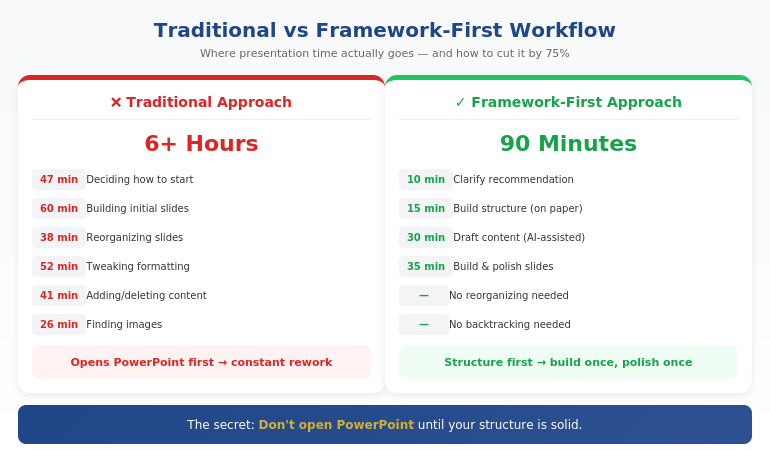
Quick Answer: Faster presentation creation comes from working framework-first, not slide-first. Most time waste happens when you open PowerPoint before you’ve decided your core message, structure, and key proof points. The fastest workflow is: clarify your recommendation (10 min) → build your structure (15 min) → draft content with AI assistance (30 min) → refine and design (35 min). Total: 90 minutes for a presentation that used to take 6 hours.

If you’re building for a steering committee, CFO, or board — speed isn’t the only goal. Decision clarity is. That’s why this workflow starts with Recommendation → Proof → Decision, not slides.

⚡ Need to Build a Presentation Today? The 90-Minute Framework:

  1. Minutes 1-10: Write your recommendation in one sentence. What do you want them to decide/do/believe?
  2. Minutes 11-25: Build your structure: Recommendation → Stakes → Their concern → Proof → Decision
  3. Minutes 26-55: Draft slide content (use AI to expand bullet points into full slides)
  4. Minutes 56-90: Refine language, add visuals, polish design

The key: Don’t open PowerPoint until step 3. Structure first, slides second.

Where Presentation Time Actually Goes

A few years ago, I tracked exactly how I spent time on a board presentation. The results were embarrassing:

  • 47 minutes deciding how to start
  • 38 minutes reorganizing slides I’d already built
  • 52 minutes adjusting fonts, colors, and alignments
  • 41 minutes adding content, then deleting it, then adding it back
  • 26 minutes looking for the “right” image

Less than an hour of that time was actual thinking — deciding what to say and how to structure it. The rest was production busywork and decision fatigue.

That’s when I realized: I wasn’t slow at building presentations. I was building them in the wrong order.

Opening PowerPoint first meant making design decisions before content decisions. Starting with slides meant restructuring constantly as my thinking evolved. Working without a framework meant reinventing my approach every single time.

The fix wasn’t working faster. It was working in a different sequence.

The Framework-First Approach

Here’s the principle that changed everything: structure before slides, thinking before production.

Most professionals open PowerPoint and start building. They think in slides, not in messages. They make dozens of micro-decisions about layout and formatting before they’ve made the one macro-decision that matters: what’s the point?

The framework-first approach flips this:

  1. Decide your recommendation before you touch any tool
  2. Build your logical structure on paper or in a simple doc
  3. Draft content in whatever format is fastest (often with AI help)
  4. Then — and only then — build slides

This sounds obvious, but almost nobody does it. The temptation to “just start building” is strong. And it’s exactly what makes presentations take 6 hours instead of 90 minutes.

For the executive-focused structure I use, see our guide to executive presentation structure.

How can I make presentations faster?

Make presentations faster by working framework-first: decide your core message and structure before opening PowerPoint. Most time waste comes from building slides before you’ve clarified your thinking — which leads to constant reorganizing and second-guessing. Use a repeatable structure (recommendation → stakes → proof → decision), then use AI to help draft content once your framework is solid.

Comparison of traditional vs framework-first presentation workflow showing time savings at each stage

⭐ Master the Framework-First System

AI-Enhanced Presentation Mastery teaches you the complete system: how to structure your thinking before you build, where AI accelerates production, and how to create executive-quality presentations in a fraction of the time.

What you’ll learn:

  • The framework-first workflow that cuts creation time by 50-75%
  • Where AI helps (drafting, iteration) and where it doesn’t (strategy, structure)
  • Prompt patterns that produce usable content, not generic filler
  • The quality checks that ensure AI-assisted work meets executive standards

Cut Your Build Time (See Maven) →

Live cohort-based course. 70% frameworks, 30% AI implementation. Check Maven for current dates and pricing.

The 90-Minute System Step by Step

Here’s exactly how I build presentations now:

Phase 1: Clarify (10 minutes)

Before anything else, I answer three questions in writing:

  1. What do I want them to decide, do, or believe after this presentation?
  2. What’s the ONE thing they need to understand for that to happen?
  3. What’s their biggest concern or objection likely to be?

This takes 10 minutes. It saves hours. Because every slide decision that follows becomes obvious when you know your destination.

Phase 2: Structure (15 minutes)

I use a consistent structure for executive presentations:

  • Slide 1: Recommendation (the answer, upfront)
  • Slide 2: Stakes (why this matters now)
  • Slide 3: Their concern (name the objection)
  • Slides 4-5: Proof (evidence that addresses the concern)
  • Slide 6: Decision (the specific ask)

I sketch this out in a simple document or even on paper. No PowerPoint yet. Just the logic flow.

Phase 3: Draft Content (30 minutes)

Now I draft the actual content — slide titles, key points, supporting data. This is where AI becomes genuinely useful.

I don’t ask AI to “create a presentation about X.” That produces generic garbage. Instead, I give it my structure and ask it to help me expand specific sections:

  • “Here’s my recommendation and three proof points. Help me articulate the stakes in language a CFO would respond to.”
  • “I need to address this objection: [objection]. Give me three ways to frame the response.”
  • “Turn these bullet points into a clear slide narrative: [bullets]”

AI drafts. I direct and edit. The quality stays high because I’m driving the strategy.

For more on AI-assisted presentation creation, see our detailed guide on how to make a presentation with AI.

Phase 4: Build and Polish (35 minutes)

Only now do I open PowerPoint. And because my content is already drafted, this phase is pure execution:

  • Paste content into slides
  • Apply consistent formatting
  • Add simple visuals where they help
  • Review flow and make final adjustments

No more agonizing over structure. No more rewriting slides three times. The thinking is done. I’m just packaging it.

How do you speed up PowerPoint creation?

Speed up PowerPoint by doing your thinking before you open it. Draft your structure and content in a simple document first, then use PowerPoint only for final assembly. Also: use a consistent template, master keyboard shortcuts, and resist the urge to perfect every slide before moving forward. Build rough, then polish once at the end.

Want the complete framework-first system?

See AI-Enhanced Presentation Mastery →

Where AI Helps (And Where It Doesn’t)

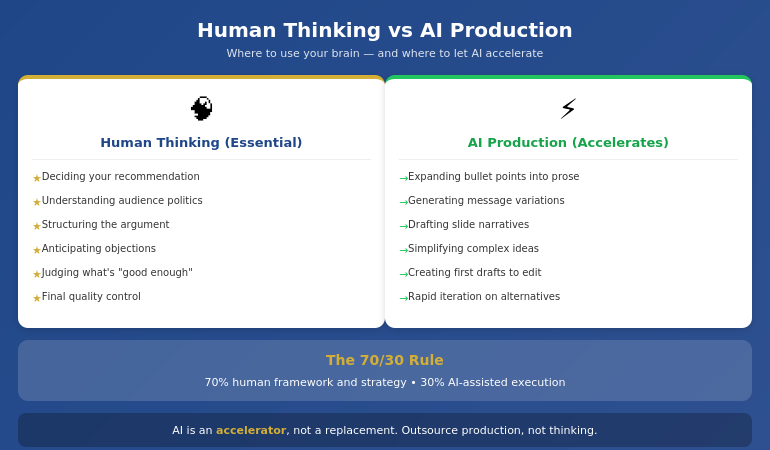
Let me be direct about AI’s role in this system: it’s an accelerator, not a replacement.

AI is excellent at:

  • Drafting content from your bullet points
  • Generating variations of your messaging
  • Suggesting ways to phrase complex ideas simply
  • Creating first drafts you can edit and improve
  • Iterating quickly when you need to try different approaches

AI is poor at:

  • Knowing what your audience cares about
  • Understanding the politics of your organization
  • Deciding what to recommend
  • Structuring an argument strategically
  • Judging what’s “good enough” for your specific context

The professionals who get burned by AI are the ones who outsource the thinking. They ask AI to “create a presentation” and get something that looks polished but says nothing. The slides are pretty. The logic is hollow.

The professionals who save hours are the ones who use AI for production while retaining control of strategy. They know what they want to say. AI helps them say it faster.

Diagram showing where human thinking is essential vs where AI accelerates production in presentation creation

⭐ Learn the Human + AI Balance

AI-Enhanced Presentation Mastery teaches you exactly where to use AI and where to trust your judgment — so you get speed without sacrificing quality or strategic thinking.

The course covers:

  • The 70/30 rule: 70% human framework, 30% AI execution
  • Prompt patterns that produce executive-quality content

See Course Details on Maven →

Live sessions with real feedback. Check Maven for current cohort dates.

Mistakes That Kill Your Speed

After coaching hundreds of professionals on presentation efficiency, I see the same speed-killers repeatedly:

Mistake #1: Opening PowerPoint first

The moment you open PowerPoint, you start thinking in slides instead of messages. You make formatting decisions before content decisions. You build, then restructure, then rebuild. This single habit can double your creation time.

Mistake #2: Perfecting slides as you go

Adjusting fonts while you’re still figuring out your argument is a form of productive procrastination. You feel busy, but you’re avoiding the hard thinking. Build rough first. Polish once at the end.

Mistake #3: Starting from scratch every time

If you don’t have a repeatable structure, you reinvent your approach with every presentation. That’s exhausting and slow. Develop a go-to framework. Adapt it for each situation. Don’t rebuild from zero.

Mistake #4: Using AI without a framework

Asking AI to “create a presentation about Q3 results” produces garbage. AI needs constraints to be useful. Give it your structure, your key points, your audience context. Then let it draft within those boundaries.

Mistake #5: Treating every presentation as equally important

A 15-minute team update doesn’t need the same polish as a board presentation. Calibrate your effort to the stakes. Some presentations deserve 90 minutes. Some deserve 30. Know the difference.

For more workflow optimization, see our complete guide to AI presentation workflow.

What is the fastest way to create a professional presentation?

The fastest way to create a professional presentation is: (1) clarify your recommendation in one sentence, (2) build your structure on paper first, (3) draft content with AI assistance using specific prompts, (4) only then open PowerPoint to assemble and polish. This framework-first approach can cut creation time by 50-75% compared to building slides from scratch.

Ready to cut your presentation time in half?

See AI-Enhanced Presentation Mastery →

The Compound Effect of a System

Here’s what most people miss: the real value of a system isn’t just time saved on one presentation. It’s the compound effect across your career.

If you create two presentations per week and save 4 hours each, that’s 8 hours per week. Over a year, that’s more than 400 hours — ten full work weeks returned to you.

But the benefit goes beyond hours. When presentations stop being a time drain, you:

  • Approach them with less dread
  • Have energy left to rehearse properly
  • Can take on more opportunities without burning out
  • Actually improve over time instead of just surviving

A system for building presentations faster isn’t about cutting corners. It’s about creating space for what actually matters: clear thinking, confident delivery, and results.

⭐ Build the System That Lasts

AI-Enhanced Presentation Mastery gives you the complete framework-first system — from initial thinking to final polish — so you can create executive-quality presentations in a fraction of the time, consistently.

What’s included:

  • The 90-minute presentation workflow
  • Framework templates for different presentation types
  • Prompt library for AI-assisted content creation
  • Quality checks that ensure AI work meets executive standards
  • Live sessions with direct feedback on your work

See Course Details on Maven →

Live cohort-based course on Maven. Check the page for current dates, pricing, and syllabus.

Frequently Asked Questions

Will AI-generated content look generic?

Only if you use AI wrong. Generic content comes from generic prompts like “create a presentation about X.” When you give AI your specific framework, key points, and audience context, it produces drafts you can actually use. The framework-first approach ensures AI is expanding your thinking, not replacing it with filler.

How much time can I realistically save?

Most professionals report saving 50-75% once they’ve internalized the system. A presentation that took 6 hours typically drops to 90 minutes to 2 hours. The biggest savings come in the first phase (no more agonizing over how to start) and the third phase (AI-assisted drafting instead of writing from scratch).

Does this work for highly technical or specialized presentations?

Yes — in some ways, better. Technical presentations often suffer from too much detail and unclear structure. The framework-first approach forces you to identify your core message and structure your argument logically before diving into technical content. AI is less useful for specialized terminology, but still helps with structuring explanations and drafting transitions.

What if I’m not technical with AI tools?

You don’t need to be technical. The AI-assisted portions use simple prompts in conversational language — you’re telling AI what you need the same way you’d brief a junior colleague. The course teaches exact prompts that work, so you don’t need to figure out “prompt engineering” on your own.

Get Weekly Presentation Efficiency Insights

Frameworks, workflows, and AI strategies for creating better presentations in less time — from 24 years of corporate experience.

Subscribe to The Winning Edge →

📋 Not ready for the course? Take the checklist.

A quick-reference guide showing which tasks benefit from AI assistance and which require human judgment. Use it to speed up your next presentation without sacrificing quality.

Download Free Checklist →

Your Next Step

The next time you need to create a presentation, try this:

  1. Don’t open PowerPoint
  2. Write your recommendation in one sentence
  3. Sketch your structure on paper
  4. Then start building

You’ll be surprised how much faster the whole process becomes when you know where you’re going before you start.

P.S. Speed matters, but so does getting the decision. If you’re presenting for approval, I wrote about pre-meeting alignment — the strategy that gets “yes” before you open your slides.

P.P.S. And if nerves are affecting your delivery, check out how to project your voice — it’s more about releasing tension than speaking louder.

About Mary Beth Hazeldine
Owner & Managing Director of Winning Presentations. After 24 years in corporate banking building hundreds of presentations under deadline pressure, I became obsessed with efficiency. The framework-first approach I teach now is the system I wish I’d had in year one.

18 Jan 2026
Presentation workflow efficiency - from 6 hours to 90 minutes using the framework-first approach

Presentation Workflow Efficiency: From 6 Hours to 90 Minutes — The Workflow That Changed Everything

The fastest path to presentation workflow efficiency isn’t better tools—it’s a framework-first approach. Most professionals spend 6+ hours on presentations because they start with slides instead of structure. The workflow that cuts creation time by 75% has four phases: Clarify the Decision, Build the Narrative Spine, Draft Content Blocks, then Polish and Refine. This is the system I’ve taught to senior leaders who don’t have 6 hours to spare.

⚡ Presentation due tomorrow? Here’s your 90-minute shortcut:

  1. Write the decision you need in one sentence (5 min)
  2. Draft 5-7 slide headlines as assertions, not topics (15 min)
  3. Add one proof point per slide — data, example, or visual (40 min)
  4. Polish formatting and flow (20 min)

Want the full system with templates, AI integration, and expert feedback? Enroll in AI-Enhanced Presentation Mastery →

If you want to master this workflow with guided practice and expert feedback, AI-Enhanced Presentation Mastery teaches the complete framework—plus how to use AI tools to accelerate each phase without sacrificing quality.

Early in my banking career, I spent an entire Sunday building a Monday presentation. Fourteen hours across the weekend. Forty-seven slides. The CFO flipped through it in 3 minutes and asked, “What’s the recommendation?”

I didn’t have a clear one. I’d spent so long on slides that I’d lost the thread of what I was actually trying to say.

That was the moment I realised my workflow was backwards. I was building presentations from the outside in—starting with slides, then trying to figure out the story. No wonder it took forever.

Over the next 24 years in corporate banking—at JPMorgan Chase, PwC, RBS, and Commerzbank—I rebuilt my approach from scratch. The workflow I developed now takes 90 minutes for presentations that used to take 6 hours. And the presentations are better, because the thinking happens first.

Here’s the system.

⭐ Master the Framework That Cuts Presentation Time by 75%

Stop spending weekends on Monday presentations. Learn the workflow senior leaders use to create executive-ready decks in 90 minutes.

AI-Enhanced Presentation Mastery includes:

  • The Decision Clarifier worksheet (Phase 1)
  • Narrative Spine builder template with worked examples
  • Headline-first slide writing method + before/after samples
  • AI prompt library for each phase (Clarify, Structure, Draft, Polish)

If you build 4 presentations/month, saving 4 hours each gives you 16 hours back — every month.

Enroll in AI-Enhanced Presentation Mastery →

A Maven course built from 24 years of executive presentations. 70% framework mastery, 30% AI enhancement.

Why Presentations Take So Long (The Real Problem)

Most professionals approach presentations like this:

  1. Open PowerPoint
  2. Create a title slide
  3. Start adding content to slides
  4. Reorganise slides repeatedly
  5. Realise the story doesn’t flow
  6. Rebuild large sections
  7. Run out of time and ship something mediocre

This is the outside-in approach, and it’s why presentations take 6+ hours. You’re making design decisions before you’ve made thinking decisions. You’re arranging slides before you know what story they need to tell.

The result: endless reorganisation, late-night edits, and presentations that look polished but don’t land.

The fix isn’t working faster. It’s working in the right order.

Framework-first means you complete the thinking before you touch the slides. By the time you open PowerPoint, you know exactly what goes where. There’s nothing to reorganise because the structure is already solid.

This is the same principle behind effective presentation structure—get the architecture right first, and everything else falls into place.

The Framework-First Approach: Why It Works

Framework-first presentation workflow efficiency comes from a simple insight: clarity before creation.

When you know these three things before you start building, presentations come together fast:

1. The Decision You Need

Every executive presentation should drive a decision. What do you need from the room? Approval? Resources? Awareness? Direction? If you can’t articulate this in one sentence, you’re not ready to build slides.

2. The Narrative Spine

What’s the logical flow that leads to your decision? For most executive presentations, this follows a pattern: Situation → Complication → Resolution → Ask. The spine is 4-7 points that, spoken aloud, tell a complete story without any slides.

3. The Evidence That Matters

What data, examples, or proof points does your audience need to reach the decision you want? Not everything you know—just what they need. Most presentations fail because they include too much evidence, not too little.

When these three elements are clear, building slides is almost mechanical. You’re not creating—you’re translating.

Whether you’re building a quarterly OKR update or a board-level strategic recommendation, the framework stays the same. Only the content changes.

Want to master framework-first thinking?

AI-Enhanced Presentation Mastery teaches you to clarify the decision, build the narrative spine, and identify evidence that matters—with guided practice on real presentations.

Learn the Complete Framework →


The 90-minute presentation workflow showing the four-phase framework-first approach

The 90-Minute Presentation Workflow

Here’s the exact workflow I use and teach. It assumes a standard executive presentation of 7-15 slides.

Phase 1: Clarify (15 minutes)

Before anything else, answer these questions in writing:

  • What decision do I need from this presentation?
  • Who is my audience, and what do they already know?
  • What’s the ONE thing they must remember?
  • What would make them say no, and how do I address it?

This phase feels slow but saves hours later. Most presentation problems trace back to unclear thinking at the start.

Phase 2: Structure (20 minutes)

Build your narrative spine—no slides yet, just an outline:

  • Opening: Hook + context + preview
  • Body: 3-5 main points in logical sequence
  • Close: Summary + specific ask + next steps

Write this as bullet points you could speak aloud. If the flow doesn’t make sense when spoken, it won’t make sense on slides.

Phase 3: Draft (40 minutes)

Now—and only now—open PowerPoint:

  • Create slides for each point in your structure
  • Focus on headlines first (the slide title should state the point, not describe the topic)
  • Add supporting content: one key visual or 3-4 bullets per slide
  • Don’t format yet—just get content in place

This phase is fast because you’re not thinking—you’re executing a plan that’s already clear.

Phase 4: Polish (15 minutes)

With content in place, refine:

  • Strengthen headlines (make them assertion-led, not topic-led)
  • Cut anything that doesn’t directly support the decision
  • Apply consistent formatting
  • Review the flow: does each slide lead naturally to the next?

Total: 90 minutes.

This workflow assumes you know the framework. The first few times, it takes longer as you build the habit. By the fifth or sixth presentation, 90 minutes becomes realistic for most executive decks.

⭐ Stop Trading Weekends for Monday Presentations

Learn the workflow that senior leaders use to create executive-ready presentations in a fraction of the time—without sacrificing quality.

AI-Enhanced Presentation Mastery includes:

  • The 4-phase workflow with timing guides for each phase
  • Framework templates for board updates, budget requests, and strategy decks
  • AI integration playbook: which tools, which prompts, which phases

Methodology + templates + AI techniques + expert feedback — all in one course.

Enroll Now →

For executives and senior professionals who are done spending 6 hours on presentations that should take 90 minutes.

Where AI Fits (And Where It Doesn’t)

AI tools like ChatGPT, Claude, and Copilot can dramatically accelerate presentation creation—but only if you use them correctly.

Where AI Helps

  • Phase 1 (Clarify): AI can help you articulate your decision and identify potential objections through structured questioning
  • Phase 2 (Structure): AI can suggest narrative frameworks and help sequence your points logically
  • Phase 3 (Draft): AI can generate first-draft content for each slide, which you then refine
  • Phase 4 (Polish): AI can strengthen headlines, cut filler, and check for consistency

Where AI Fails

  • Strategic judgment: AI doesn’t know what decision you actually need or what your audience cares about
  • Organisational context: AI can’t account for internal politics, history, or relationships
  • Original thinking: If you rely on AI to do the thinking, you get generic presentations that don’t land

The key insight: AI accelerates execution, but framework does the thinking.

This is why I teach 70% framework mastery, 30% AI enhancement. Without the framework, AI just helps you build bad presentations faster. With the framework, AI becomes a powerful accelerator.

For a deeper dive into AI presentation workflows, the principles are the same: framework first, AI second.

Ready to integrate AI the right way?

AI-Enhanced Presentation Mastery teaches you exactly where to use AI in each phase—and where human judgment is irreplaceable.

Learn the Framework + AI System →

People Also Ask

How long should it take to create a presentation?

A standard executive presentation (7-15 slides) should take 60-90 minutes using a framework-first workflow. If you’re regularly spending 4+ hours, the issue is usually workflow—starting with slides before the thinking is clear. Investing 15 minutes in clarifying your decision and structure saves hours of reorganisation later.

What’s the fastest way to create a presentation?

The fastest sustainable approach is framework-first: clarify the decision, build the narrative spine, then draft content. This feels slower at the start but eliminates the reorganisation cycles that consume most presentation time. Combined with AI tools for execution, this workflow can cut creation time by 75%.

How do executives create presentations so quickly?

Experienced executives use mental frameworks they’ve internalised over years—they automatically know the structure, evidence requirements, and decision points for different presentation types. They’re not faster at building slides; they’re faster at thinking. Framework-first training accelerates this process.

3 Workflow Mistakes That Double Your Time

Mistake 1: Starting in PowerPoint

Opening PowerPoint before your thinking is clear guarantees hours of reorganisation. The slide canvas encourages decoration before direction. Start in a blank document or even on paper. Move to slides only when you can articulate your narrative spine aloud.

Mistake 2: Perfecting as You Go

Formatting slides while you draft them creates constant context-switching that destroys efficiency. Draft all content first (ugly is fine), then polish everything in one pass. This single change can save 30+ minutes per presentation.

Mistake 3: Including Everything You Know

More content doesn’t mean better presentations—it means longer creation time and audiences who can’t find the point. Ruthlessly cut anything that doesn’t directly support the decision you need. If in doubt, leave it out. You can always add if asked.

These mistakes are why the executive presentations guide emphasises structure and clarity over comprehensiveness.

⭐ Reclaim Your Weekends. Master the Workflow.

Join senior leaders who’ve transformed how they create presentations—from dreaded time-sink to efficient, high-impact process.

What you get inside:

  • Decision Clarifier + Narrative Spine templates
  • Headline-first slide writing with before/after examples
  • Phase-by-phase AI prompts that enhance your thinking
  • Live practice sessions with expert feedback

4 presentations/month × 4 hours saved = 16 hours back. Every month. That’s 2 full working days.

Enroll in AI-Enhanced Presentation Mastery →

Built from 24 years of executive presentations in banking. For professionals who value their time and their impact.

Frequently Asked Questions

Does this workflow work for complex, data-heavy presentations?

Yes, and it’s especially valuable for complex presentations. The framework-first approach forces you to identify which data actually matters before you start building charts. Most data-heavy presentations fail because they include too much data, not too little. Clarifying the decision first helps you curate rather than dump.

What if I don’t know what decision I need?

That’s a signal you’re not ready to build a presentation. Spend more time in Phase 1. Ask: “If this presentation goes perfectly, what happens next?” If you can’t answer that, schedule a conversation with your stakeholder to clarify expectations before you start building.

Can I use this workflow with my existing templates?

Absolutely. The workflow is template-agnostic. Your corporate template handles the visual layer; the framework handles the thinking layer. In fact, having a consistent template makes Phase 3 (Draft) even faster because you’re not making design decisions.

How long does it take to get to 90 minutes consistently?

Most professionals see significant improvement within 3-5 presentations if they follow the phases strictly. The temptation is to skip Phase 1 (Clarify) because it feels unproductive. Resist that. The time investment in clarity pays back 3x in Phases 2-4.

Get Weekly Presentation Efficiency Insights

Join executives who receive one actionable technique every week for creating better presentations in less time.

Subscribe to The Winning Edge →

Your Next Step

Presentation workflow efficiency isn’t about working faster—it’s about working in the right order. Framework first, slides second.

The 90-minute workflow: Clarify (15 min) → Structure (20 min) → Draft (40 min) → Polish (15 min).

Try it on your next presentation. Resist the urge to open PowerPoint until Phase 3. Notice how much easier the build becomes when the thinking is already done.

And if you want to master this workflow with guided practice and expert feedback—to truly transform how you create presentations—AI-Enhanced Presentation Mastery gives you the complete system.

Your weekends are worth more than Monday presentations. It’s time to reclaim them.