Tag: presentation creation

15 Feb 2026
Professional at desk comparing presentation layouts on screen, actively building slides in a bright modern office with natural lighting

Teach AI Your Presentation Style (So It Stops Sounding Generic)

Quick answer: AI makes presentations faster but also makes them generic — because most people prompt AI with what they want to say, not how they say it. To teach AI your presentation style, you need three things: a style brief (your tone, sentence patterns, and vocabulary), a structure framework (your preferred message architecture), and a critique loop (prompts that make AI edit its own output against your standards). This turns AI from a content generator into a strategic co-creator that sounds like you, not like everyone else.

Presenting this week? Do this in 15 minutes:

1. Write a 200-word style brief (your tone + vocabulary + 2 sample paragraphs)
2. Pick one structure rule: AVP for persuasion slides, 132 Rule for overall flow
3. Paste both into your AI tool before your content brief
4. Generate your first draft
5. Run the critique loop: “Does this follow my structure? Remove any phrase I wouldn’t use.”

That’s the free version. The AI-Enhanced Presentation Mastery course (£249) gives you the complete system — style brief template, all four frameworks, 30+ critique prompts, and a reusable AI playbook.

A marketing director showed me two versions of the same quarterly business review.

Version A was the one she’d written herself: sharp, direct, slightly dry. Her signature move was opening every section with a one-line insight before the data. The CFO loved it because he could scan the headlines and get the story in sixty seconds.

Version B was the one she’d asked ChatGPT to create from the same data. It was technically correct. Every point was there. But it read like it had been written by a committee — smooth, cautious, with phrases like “leveraging synergies” and “driving alignment across stakeholders” that she would never use in real life.

She said: “It’s faster but it’s not mine. The CFO would read this and think someone else wrote it. Which defeats the entire purpose.”

That conversation crystallised something I’d been seeing across every executive I work with: AI doesn’t have a quality problem. It has a voice problem. And the voice problem exists because nobody teaches you how to train AI on your style — your frameworks, your vocabulary, your preferred message structure. They just teach you how to write prompts. Which is like teaching someone how to use a steering wheel without explaining where they’re driving.

Why Every AI Presentation Sounds the Same

AI language models are trained on billions of words of internet text. When you ask one to “write a slide about Q3 performance,” it draws on the average of everything it’s ever seen about quarterly performance slides. The result is competent, generic, and indistinguishable from what everyone else is getting.

This is the fundamental problem with how most people use AI for presentations. They prompt for content — “write me five bullet points about customer retention” — and get content that could have come from anyone in any company in any industry. The content is accurate. It’s also forgettable.

The professionals who actually benefit from AI do something different. They don’t ask AI to generate content. They ask AI to execute their thinking — using their frameworks, their vocabulary, their preferred structure. The AI does the heavy lifting, but the output carries their signature.

The difference shows up immediately. When you give AI a bare prompt, you get generic corporate language. When you give AI your style brief and your message framework, you get output that sounds like a faster, more productive version of you.

This is exactly the approach taught in AI-enhanced presentation creation — structure first, AI second. The structure is what makes the output yours. The AI is what makes it fast.

PAA: Why do AI-generated presentations sound so generic?
Because most people prompt AI with what to say, not how to say it. AI defaults to the statistical average of everything it’s been trained on — which means smooth, corporate, committee-style language. To get output that sounds like you, you need to provide your style brief (tone, vocabulary, sentence patterns), your preferred message architecture (frameworks like AVP or the 132 Rule), and a critique prompt that makes AI edit its own output against your standards.

Stop Getting Generic Output. Start Getting Output That Sounds Like You.

AI-Enhanced Presentation Mastery teaches you how to build AI workflows that preserve your voice, your frameworks, and your communication style. 8 modules covering structure, messaging, slide design, data storytelling, and a complete personal AI playbook you’ll reuse for every presentation.

Get AI-Enhanced Presentation Mastery → £249

Currently £249 — launch pricing ends March 1st (£399 self-study / £750 live cohort).

Self-paced modules + live support + lifetime access.

The Style Brief: Teaching AI Your Voice in 5 Minutes

A style brief is a short document — 200 words maximum — that tells AI how you communicate. Not what you want to say. How you say things.

Here’s what goes into an effective presentation style brief:

Tone descriptors. Three to five words that describe your communication style. Examples: “direct, evidence-led, slightly dry humour” or “warm, structured, practical” or “analytical, precise, minimal adjectives.” AI language models respond dramatically to tone descriptors — they shift the entire register of the output.

Vocabulary preferences. Words you use and words you don’t. If you say “stakeholders” but never say “key stakeholders,” that matters. If you write “clients” instead of “customers,” specify it. If you avoid phrases like “leverage,” “synergise,” or “circle back” — tell the AI. This alone eliminates 80% of the generic feel.

Sentence pattern. Short sentences? Long analytical sentences? A mix? Do you open sections with a question or a statement? Do you use first person or third person? AI copies these patterns surprisingly well when you provide examples.

Two sample paragraphs. The most effective style brief includes two paragraphs you’ve actually written — presentation notes, an email to your boss, a section from a report. Not “ideal” writing. Your actual writing. AI learns more from your real voice than from your aspirational voice.

Once you have your style brief, you include it at the start of every AI conversation about presentations. The difference is immediate and, frankly, startling. Output goes from “could be anyone’s” to “sounds like mine” in a single prompt.
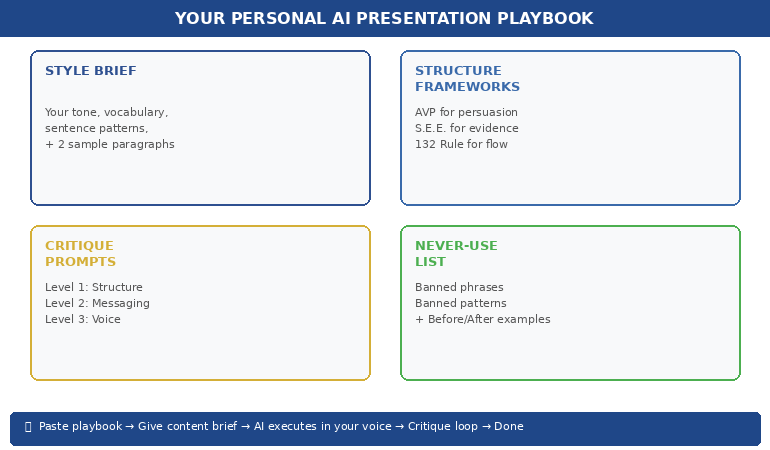

Personal AI presentation playbook showing four components: style brief, structure frameworks, critique prompts, and never-use list

📊 Want the complete style brief template? AI-Enhanced Presentation Mastery (£249) includes the full style brief builder, sample briefs for different professional styles, and the prompt architecture that makes AI output match your voice consistently.

Structure-First AI: Why Frameworks Beat Freeform Prompts

The second reason AI presentations sound generic: people ask AI to create structure and content simultaneously. This is like asking a builder to design the house and construct it at the same time — you get something functional but unremarkable.

The professionals who get the best results from AI use a structure-first approach: they define the message architecture before AI writes a single word.

In the AI-Enhanced Presentation Mastery course, we teach three frameworks that work exceptionally well as AI instructions:

AVP (Action-Value-Proof). Every slide follows a three-part structure: what you want the audience to do (Action), why it matters to them (Value), and the evidence that supports it (Proof). When you give AI the AVP framework as an instruction — “Structure every slide using Action-Value-Proof” — the output immediately becomes more persuasive and more structured than freeform prompting.

The S.E.E. Formula (Statement-Evidence-Example). For slides that need to present data or make a case: lead with the insight statement, follow with the evidence that supports it, then provide a concrete example that makes it real. This stops AI from producing the generic “here are five data points” output and forces it to tell a story with every slide.

The 132 Rule. For overall presentation flow: one opening message (the 1), three supporting sections (the 3), two closing elements — a summary and a call to action (the 2). This gives AI a macro-structure that prevents the wandering, unfocused presentations that AI tends to produce when given open-ended briefs.

When you combine your style brief with a structure framework, AI stops guessing and starts executing. The output isn’t generic because it was never given the chance to be — you’ve constrained it with your thinking, your architecture, and your standards.

If you’re currently using ChatGPT prompts for presentations, adding structure frameworks to those prompts will transform the quality of what you get back.

PAA: How do you get better results from AI for presentations?
Provide structure before content. Instead of asking AI to “create a presentation about X,” give it your message framework (like AVP or the 132 Rule), your style brief (tone, vocabulary, sentence patterns), and the specific decision you want the audience to make. AI excels at executing within constraints — the tighter the framework, the better the output. Freeform prompts produce freeform results.

Frameworks First. AI Second. Your Voice Always.

AI-Enhanced Presentation Mastery gives you the AVP formula, S.E.E. wording framework, 132 Rule, and Insight-Implication-Action structure — then shows you exactly how to feed them to AI so every presentation sounds like you wrote it. Includes prompt packs, before/after transformations, and the complete AI workflow.

Get AI-Enhanced Presentation Mastery → £249

£249 launch pricing — ends March 1st (£399 self-study / £750 live cohort). Self-paced modules + templates + prompt packs + live support + lifetime access.

The Critique Loop: Making AI Edit Against Your Standards

Here’s what most people miss entirely: the first output AI gives you should never be the final version. AI is a first-draft machine. The magic is in the critique loop — using AI to edit its own output against your specific standards.

A critique prompt works like this. After AI generates your presentation content, you say: “Now review this output against these criteria: (1) Does every slide follow AVP structure? (2) Are there any phrases I wouldn’t use? Remove ‘leverage,’ ‘synergise,’ and ‘key stakeholders.’ (3) Is any slide trying to make more than one point? Split it. (4) Does the opening grab attention in the first sentence?”

This is essentially turning AI into your personal presentation coach — one that knows your standards because you’ve defined them explicitly.

The most effective critique prompts we’ve developed in the course follow three levels:

Level 1: Structure critique. “Does this presentation follow the 132 Rule? Is the opening message clear? Do the three middle sections support different aspects of the argument? Does the closing include both a summary and a specific call to action?”

Level 2: Messaging critique. “Review each slide against the S.E.E. formula. Does every claim have evidence? Does every evidence point have a concrete example? Flag any slide where the message is vague or abstract.”

Level 3: Voice critique. “Compare this output against my style brief. Flag any sentences that use passive voice (I use active). Remove any corporate jargon that isn’t in my vocabulary list. Shorten any sentence longer than 25 words.”

Running all three levels takes about 5 minutes. The result is output that’s been through a more rigorous editorial process than most people apply manually — and it sounds like you, not like an AI.

If you’re already using PowerPoint Copilot, layering a critique loop on top of its output is the single fastest way to improve quality.

📊 Want all three critique prompt levels? AI-Enhanced Presentation Mastery (£249) includes the complete critique prompt pack — structure, messaging, and voice — plus the Master Prompt Pack with 30+ prompts for every stage of presentation creation.

Building Your Personal AI Presentation Playbook

The goal isn’t to use AI better for one presentation. It’s to build a reusable system that makes every future presentation faster and more consistently excellent.

Your personal AI playbook is a single document — we provide the template in the course — that contains everything AI needs to produce your-quality output every time:

Your style brief (200 words — tone, vocabulary, patterns, samples).

Your preferred frameworks (AVP for persuasion slides, S.E.E. for evidence slides, Insight-Implication-Action for data slides, 132 Rule for overall structure).

Your critique prompts (three levels — structure, messaging, voice).

Your “never use” list (phrases, words, and structural patterns that aren’t your style).

Your before/after examples (two or three examples showing generic AI output transformed into your-style output — so AI can learn from the patterns).

When you start a new presentation, you paste the playbook into your AI conversation first, then give your content brief. The AI has everything it needs to produce first-draft output that’s already 80% there. The critique loop handles the final 20%.

This is the difference between using AI as a random content generator and using AI as a strategic co-creator. One saves you time. The other saves you time and makes your work better.

PAA: Can AI really match your personal presentation style?
Yes — if you train it properly. AI is exceptionally good at mimicking communication patterns when given explicit examples. The key is providing a style brief (tone, vocabulary, sentence patterns, sample paragraphs), structure frameworks (so AI doesn’t default to generic architecture), and critique prompts (so AI self-corrects against your standards). The AI Playbook approach means you set this up once and reuse it for every presentation, with improving results over time.

Building presentations this month?

The AI-Enhanced Presentation Mastery course includes the complete playbook template, the style brief builder, all four structure frameworks (AVP, S.E.E., 132 Rule, Insight-Implication-Action), and the full critique prompt pack. Start building your personal AI system this week — and notice the difference in your next deck.

⏰ Launch pricing ends March 1st. Currently £249 — planned increase after launch period (£399 self-study / £750 live cohort). Lock in launch pricing before it changes →

AI Should Sound Like You — Not Like Everyone Else

AI-Enhanced Presentation Mastery is the course that treats AI as your execution engine — not your replacement. 8 modules covering structure frameworks, messaging formulas, data storytelling, slide design, critique prompts, and the personal AI playbook that makes every future presentation faster and unmistakably yours.

Get AI-Enhanced Presentation Mastery → £249

⏰ £249 launch pricing — ends March 1st (£399 self-study / £750 live cohort). Self-paced modules + live support + templates + prompt packs + lifetime access.

Frequently Asked Questions

Do I need to be technical or know how to code to teach AI my style?

No. Everything in this approach uses plain language — the same language you’d use to brief a colleague. You write your style brief in natural English. You describe your frameworks in normal sentences. The AI does the technical translation. If you can write an email explaining how you like things done, you can build an AI playbook.

Does this work with ChatGPT, Copilot, and other AI tools?

Yes. The style brief and structure framework approach works with any AI language model — ChatGPT, Claude, Copilot, Gemini, or whatever comes next. The principles are about how you communicate with AI, not which AI you use. The course provides prompts formatted for the most popular tools, and the playbook is tool-agnostic.

How long does it take to build a personal AI playbook?

The initial playbook takes about 45 minutes to build using the course template. The style brief takes 15 minutes, the framework selection takes 10 minutes, the critique prompts take 10 minutes, and assembling your before/after examples takes 10 minutes. After that, you reuse the playbook for every presentation — updating it only when your style evolves or you discover new patterns.

What if I’m not sure what my communication style actually is?

This is more common than you’d think — and it’s one of the most valuable outcomes of the playbook-building process. Module 2 of the course includes a “style discovery” exercise where you analyse three pieces of your own writing to identify your natural patterns. Most people are surprised by how consistent their style is once they look for it. The exercise takes 20 minutes and gives you the foundation for everything else.

📬 The Winning Edge Newsletter

Weekly strategies for executive presentations, AI workflows, and career-critical communication. No fluff.

Subscribe free →

Related: Once your AI workflow is producing personalised output, you need the right slide structure to put it in. If you’re presenting pilot results, the 8-slide pilot-to-rollout structure gives you the decision deck framework. And if presenting triggers nerves despite strong preparation, the imposter syndrome pre-presentation reset addresses the nervous system patterns that override your confidence.

AI doesn’t have a quality problem. It has a voice problem. And the voice problem is yours to solve — by teaching AI your frameworks, your vocabulary, your standards, and your style.

Build the playbook. Use the critique loop. Start with your next presentation.

🎯 Want the complete system — frameworks, prompts, templates, and live support?

Get AI-Enhanced Presentation Mastery → £249 (launch pricing)

About the Author

Mary Beth Hazeldine is the Owner & Managing Director of Winning Presentations. With 24 years of corporate banking experience at JPMorgan Chase, PwC, Royal Bank of Scotland, and Commerzbank, she combines presentation psychology with AI workflow design to help professionals create faster, clearer, and more persuasive presentations.

A qualified clinical hypnotherapist and NLP practitioner, Mary Beth has spent 15 years training executives in communication strategy. AI-Enhanced Presentation Mastery is her flagship course for professionals who want to use AI as a strategic co-creator — not a replacement for their thinking.

Book a discovery call | View services

28 Jan 2026
Professional woman working efficiently on laptop with focused, calm expression in modern office

How to Build Presentations Faster: The System That Cut My Build Time by 75%

Six hours. That’s what a client presentation used to cost me.

Two hours researching and outlining. Two hours building slides. Two hours tweaking formatting, adjusting layouts, and second-guessing every design choice. By the end, I was exhausted — and the presentation still felt like it could be better.

Then I discovered something that changed everything: the problem wasn’t my speed. It was my process.

Today, I create presentations in 90 minutes that are better than what I used to produce in six hours. Not because I found a magic AI tool. Because I found a system for faster presentation creation that puts thinking first and production second.

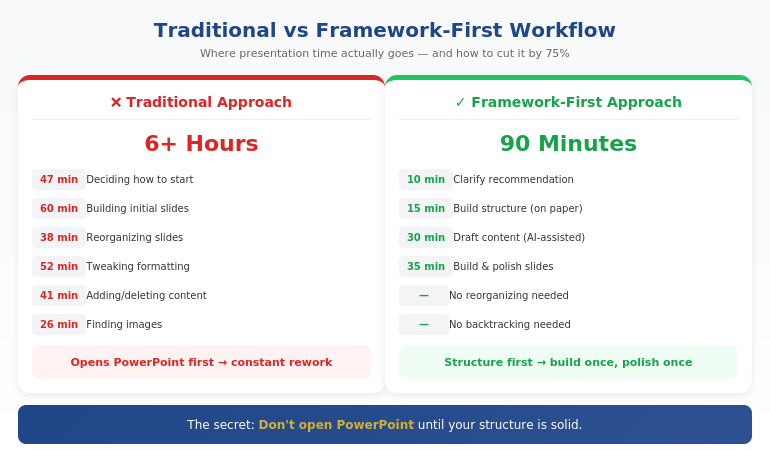
Quick Answer: Faster presentation creation comes from working framework-first, not slide-first. Most time waste happens when you open PowerPoint before you’ve decided your core message, structure, and key proof points. The fastest workflow is: clarify your recommendation (10 min) → build your structure (15 min) → draft content with AI assistance (30 min) → refine and design (35 min). Total: 90 minutes for a presentation that used to take 6 hours.

If you’re building for a steering committee, CFO, or board — speed isn’t the only goal. Decision clarity is. That’s why this workflow starts with Recommendation → Proof → Decision, not slides.

⚡ Need to Build a Presentation Today? The 90-Minute Framework:

  1. Minutes 1-10: Write your recommendation in one sentence. What do you want them to decide/do/believe?
  2. Minutes 11-25: Build your structure: Recommendation → Stakes → Their concern → Proof → Decision
  3. Minutes 26-55: Draft slide content (use AI to expand bullet points into full slides)
  4. Minutes 56-90: Refine language, add visuals, polish design

The key: Don’t open PowerPoint until step 3. Structure first, slides second.

Where Presentation Time Actually Goes

A few years ago, I tracked exactly how I spent time on a board presentation. The results were embarrassing:

  • 47 minutes deciding how to start
  • 38 minutes reorganizing slides I’d already built
  • 52 minutes adjusting fonts, colors, and alignments
  • 41 minutes adding content, then deleting it, then adding it back
  • 26 minutes looking for the “right” image

Less than an hour of that time was actual thinking — deciding what to say and how to structure it. The rest was production busywork and decision fatigue.

That’s when I realized: I wasn’t slow at building presentations. I was building them in the wrong order.

Opening PowerPoint first meant making design decisions before content decisions. Starting with slides meant restructuring constantly as my thinking evolved. Working without a framework meant reinventing my approach every single time.

The fix wasn’t working faster. It was working in a different sequence.

The Framework-First Approach

Here’s the principle that changed everything: structure before slides, thinking before production.

Most professionals open PowerPoint and start building. They think in slides, not in messages. They make dozens of micro-decisions about layout and formatting before they’ve made the one macro-decision that matters: what’s the point?

The framework-first approach flips this:

  1. Decide your recommendation before you touch any tool
  2. Build your logical structure on paper or in a simple doc
  3. Draft content in whatever format is fastest (often with AI help)
  4. Then — and only then — build slides

This sounds obvious, but almost nobody does it. The temptation to “just start building” is strong. And it’s exactly what makes presentations take 6 hours instead of 90 minutes.

For the executive-focused structure I use, see our guide to executive presentation structure.

How can I make presentations faster?

Make presentations faster by working framework-first: decide your core message and structure before opening PowerPoint. Most time waste comes from building slides before you’ve clarified your thinking — which leads to constant reorganizing and second-guessing. Use a repeatable structure (recommendation → stakes → proof → decision), then use AI to help draft content once your framework is solid.

Comparison of traditional vs framework-first presentation workflow showing time savings at each stage

⭐ Master the Framework-First System

AI-Enhanced Presentation Mastery teaches you the complete system: how to structure your thinking before you build, where AI accelerates production, and how to create executive-quality presentations in a fraction of the time.

What you’ll learn:

  • The framework-first workflow that cuts creation time by 50-75%
  • Where AI helps (drafting, iteration) and where it doesn’t (strategy, structure)
  • Prompt patterns that produce usable content, not generic filler
  • The quality checks that ensure AI-assisted work meets executive standards

Cut Your Build Time (See Maven) →

Live cohort-based course. 70% frameworks, 30% AI implementation. Check Maven for current dates and pricing.

The 90-Minute System Step by Step

Here’s exactly how I build presentations now:

Phase 1: Clarify (10 minutes)

Before anything else, I answer three questions in writing:

  1. What do I want them to decide, do, or believe after this presentation?
  2. What’s the ONE thing they need to understand for that to happen?
  3. What’s their biggest concern or objection likely to be?

This takes 10 minutes. It saves hours. Because every slide decision that follows becomes obvious when you know your destination.

Phase 2: Structure (15 minutes)

I use a consistent structure for executive presentations:

  • Slide 1: Recommendation (the answer, upfront)
  • Slide 2: Stakes (why this matters now)
  • Slide 3: Their concern (name the objection)
  • Slides 4-5: Proof (evidence that addresses the concern)
  • Slide 6: Decision (the specific ask)

I sketch this out in a simple document or even on paper. No PowerPoint yet. Just the logic flow.

Phase 3: Draft Content (30 minutes)

Now I draft the actual content — slide titles, key points, supporting data. This is where AI becomes genuinely useful.

I don’t ask AI to “create a presentation about X.” That produces generic garbage. Instead, I give it my structure and ask it to help me expand specific sections:

  • “Here’s my recommendation and three proof points. Help me articulate the stakes in language a CFO would respond to.”
  • “I need to address this objection: [objection]. Give me three ways to frame the response.”
  • “Turn these bullet points into a clear slide narrative: [bullets]”

AI drafts. I direct and edit. The quality stays high because I’m driving the strategy.

For more on AI-assisted presentation creation, see our detailed guide on how to make a presentation with AI.

Phase 4: Build and Polish (35 minutes)

Only now do I open PowerPoint. And because my content is already drafted, this phase is pure execution:

  • Paste content into slides
  • Apply consistent formatting
  • Add simple visuals where they help
  • Review flow and make final adjustments

No more agonizing over structure. No more rewriting slides three times. The thinking is done. I’m just packaging it.

How do you speed up PowerPoint creation?

Speed up PowerPoint by doing your thinking before you open it. Draft your structure and content in a simple document first, then use PowerPoint only for final assembly. Also: use a consistent template, master keyboard shortcuts, and resist the urge to perfect every slide before moving forward. Build rough, then polish once at the end.

Want the complete framework-first system?

See AI-Enhanced Presentation Mastery →

Where AI Helps (And Where It Doesn’t)

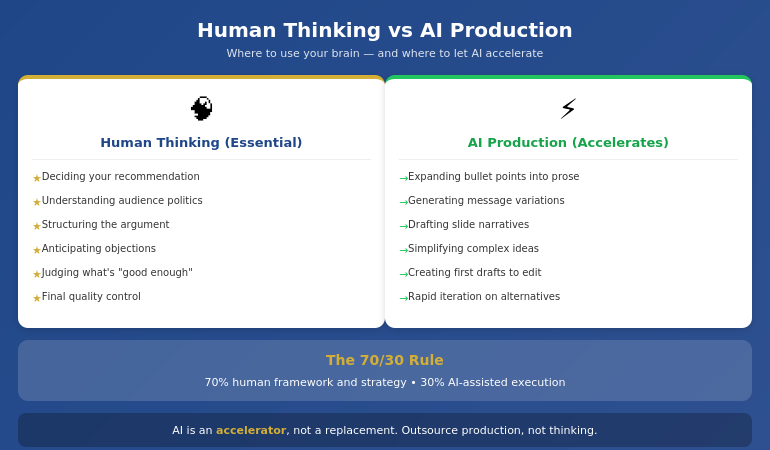
Let me be direct about AI’s role in this system: it’s an accelerator, not a replacement.

AI is excellent at:

  • Drafting content from your bullet points
  • Generating variations of your messaging
  • Suggesting ways to phrase complex ideas simply
  • Creating first drafts you can edit and improve
  • Iterating quickly when you need to try different approaches

AI is poor at:

  • Knowing what your audience cares about
  • Understanding the politics of your organization
  • Deciding what to recommend
  • Structuring an argument strategically
  • Judging what’s “good enough” for your specific context

The professionals who get burned by AI are the ones who outsource the thinking. They ask AI to “create a presentation” and get something that looks polished but says nothing. The slides are pretty. The logic is hollow.

The professionals who save hours are the ones who use AI for production while retaining control of strategy. They know what they want to say. AI helps them say it faster.

Diagram showing where human thinking is essential vs where AI accelerates production in presentation creation

⭐ Learn the Human + AI Balance

AI-Enhanced Presentation Mastery teaches you exactly where to use AI and where to trust your judgment — so you get speed without sacrificing quality or strategic thinking.

The course covers:

  • The 70/30 rule: 70% human framework, 30% AI execution
  • Prompt patterns that produce executive-quality content

See Course Details on Maven →

Live sessions with real feedback. Check Maven for current cohort dates.

Mistakes That Kill Your Speed

After coaching hundreds of professionals on presentation efficiency, I see the same speed-killers repeatedly:

Mistake #1: Opening PowerPoint first

The moment you open PowerPoint, you start thinking in slides instead of messages. You make formatting decisions before content decisions. You build, then restructure, then rebuild. This single habit can double your creation time.

Mistake #2: Perfecting slides as you go

Adjusting fonts while you’re still figuring out your argument is a form of productive procrastination. You feel busy, but you’re avoiding the hard thinking. Build rough first. Polish once at the end.

Mistake #3: Starting from scratch every time

If you don’t have a repeatable structure, you reinvent your approach with every presentation. That’s exhausting and slow. Develop a go-to framework. Adapt it for each situation. Don’t rebuild from zero.

Mistake #4: Using AI without a framework

Asking AI to “create a presentation about Q3 results” produces garbage. AI needs constraints to be useful. Give it your structure, your key points, your audience context. Then let it draft within those boundaries.

Mistake #5: Treating every presentation as equally important

A 15-minute team update doesn’t need the same polish as a board presentation. Calibrate your effort to the stakes. Some presentations deserve 90 minutes. Some deserve 30. Know the difference.

For more workflow optimization, see our complete guide to AI presentation workflow.

What is the fastest way to create a professional presentation?

The fastest way to create a professional presentation is: (1) clarify your recommendation in one sentence, (2) build your structure on paper first, (3) draft content with AI assistance using specific prompts, (4) only then open PowerPoint to assemble and polish. This framework-first approach can cut creation time by 50-75% compared to building slides from scratch.

Ready to cut your presentation time in half?

See AI-Enhanced Presentation Mastery →

The Compound Effect of a System

Here’s what most people miss: the real value of a system isn’t just time saved on one presentation. It’s the compound effect across your career.

If you create two presentations per week and save 4 hours each, that’s 8 hours per week. Over a year, that’s more than 400 hours — ten full work weeks returned to you.

But the benefit goes beyond hours. When presentations stop being a time drain, you:

  • Approach them with less dread
  • Have energy left to rehearse properly
  • Can take on more opportunities without burning out
  • Actually improve over time instead of just surviving

A system for building presentations faster isn’t about cutting corners. It’s about creating space for what actually matters: clear thinking, confident delivery, and results.

⭐ Build the System That Lasts

AI-Enhanced Presentation Mastery gives you the complete framework-first system — from initial thinking to final polish — so you can create executive-quality presentations in a fraction of the time, consistently.

What’s included:

  • The 90-minute presentation workflow
  • Framework templates for different presentation types
  • Prompt library for AI-assisted content creation
  • Quality checks that ensure AI work meets executive standards
  • Live sessions with direct feedback on your work

See Course Details on Maven →

Live cohort-based course on Maven. Check the page for current dates, pricing, and syllabus.

Frequently Asked Questions

Will AI-generated content look generic?

Only if you use AI wrong. Generic content comes from generic prompts like “create a presentation about X.” When you give AI your specific framework, key points, and audience context, it produces drafts you can actually use. The framework-first approach ensures AI is expanding your thinking, not replacing it with filler.

How much time can I realistically save?

Most professionals report saving 50-75% once they’ve internalized the system. A presentation that took 6 hours typically drops to 90 minutes to 2 hours. The biggest savings come in the first phase (no more agonizing over how to start) and the third phase (AI-assisted drafting instead of writing from scratch).

Does this work for highly technical or specialized presentations?

Yes — in some ways, better. Technical presentations often suffer from too much detail and unclear structure. The framework-first approach forces you to identify your core message and structure your argument logically before diving into technical content. AI is less useful for specialized terminology, but still helps with structuring explanations and drafting transitions.

What if I’m not technical with AI tools?

You don’t need to be technical. The AI-assisted portions use simple prompts in conversational language — you’re telling AI what you need the same way you’d brief a junior colleague. The course teaches exact prompts that work, so you don’t need to figure out “prompt engineering” on your own.

Get Weekly Presentation Efficiency Insights

Frameworks, workflows, and AI strategies for creating better presentations in less time — from 24 years of corporate experience.

Subscribe to The Winning Edge →

📋 Not ready for the course? Take the checklist.

A quick-reference guide showing which tasks benefit from AI assistance and which require human judgment. Use it to speed up your next presentation without sacrificing quality.

Download Free Checklist →

Your Next Step

The next time you need to create a presentation, try this:

  1. Don’t open PowerPoint
  2. Write your recommendation in one sentence
  3. Sketch your structure on paper
  4. Then start building

You’ll be surprised how much faster the whole process becomes when you know where you’re going before you start.

P.S. Speed matters, but so does getting the decision. If you’re presenting for approval, I wrote about pre-meeting alignment — the strategy that gets “yes” before you open your slides.

P.P.S. And if nerves are affecting your delivery, check out how to project your voice — it’s more about releasing tension than speaking louder.

About Mary Beth Hazeldine
Owner & Managing Director of Winning Presentations. After 24 years in corporate banking building hundreds of presentations under deadline pressure, I became obsessed with efficiency. The framework-first approach I teach now is the system I wish I’d had in year one.

18 Jan 2026
Presentation workflow efficiency - from 6 hours to 90 minutes using the framework-first approach

Presentation Workflow Efficiency: From 6 Hours to 90 Minutes — The Workflow That Changed Everything

The fastest path to presentation workflow efficiency isn’t better tools—it’s a framework-first approach. Most professionals spend 6+ hours on presentations because they start with slides instead of structure. The workflow that cuts creation time by 75% has four phases: Clarify the Decision, Build the Narrative Spine, Draft Content Blocks, then Polish and Refine. This is the system I’ve taught to senior leaders who don’t have 6 hours to spare.

⚡ Presentation due tomorrow? Here’s your 90-minute shortcut:

  1. Write the decision you need in one sentence (5 min)
  2. Draft 5-7 slide headlines as assertions, not topics (15 min)
  3. Add one proof point per slide — data, example, or visual (40 min)
  4. Polish formatting and flow (20 min)

Want the full system with templates, AI integration, and expert feedback? Enroll in AI-Enhanced Presentation Mastery →

If you want to master this workflow with guided practice and expert feedback, AI-Enhanced Presentation Mastery teaches the complete framework—plus how to use AI tools to accelerate each phase without sacrificing quality.

Early in my banking career, I spent an entire Sunday building a Monday presentation. Fourteen hours across the weekend. Forty-seven slides. The CFO flipped through it in 3 minutes and asked, “What’s the recommendation?”

I didn’t have a clear one. I’d spent so long on slides that I’d lost the thread of what I was actually trying to say.

That was the moment I realised my workflow was backwards. I was building presentations from the outside in—starting with slides, then trying to figure out the story. No wonder it took forever.

Over the next 24 years in corporate banking—at JPMorgan Chase, PwC, RBS, and Commerzbank—I rebuilt my approach from scratch. The workflow I developed now takes 90 minutes for presentations that used to take 6 hours. And the presentations are better, because the thinking happens first.

Here’s the system.

⭐ Master the Framework That Cuts Presentation Time by 75%

Stop spending weekends on Monday presentations. Learn the workflow senior leaders use to create executive-ready decks in 90 minutes.

AI-Enhanced Presentation Mastery includes:

  • The Decision Clarifier worksheet (Phase 1)
  • Narrative Spine builder template with worked examples
  • Headline-first slide writing method + before/after samples
  • AI prompt library for each phase (Clarify, Structure, Draft, Polish)

If you build 4 presentations/month, saving 4 hours each gives you 16 hours back — every month.

Enroll in AI-Enhanced Presentation Mastery →

A Maven course built from 24 years of executive presentations. 70% framework mastery, 30% AI enhancement.

Why Presentations Take So Long (The Real Problem)

Most professionals approach presentations like this:

  1. Open PowerPoint
  2. Create a title slide
  3. Start adding content to slides
  4. Reorganise slides repeatedly
  5. Realise the story doesn’t flow
  6. Rebuild large sections
  7. Run out of time and ship something mediocre

This is the outside-in approach, and it’s why presentations take 6+ hours. You’re making design decisions before you’ve made thinking decisions. You’re arranging slides before you know what story they need to tell.

The result: endless reorganisation, late-night edits, and presentations that look polished but don’t land.

The fix isn’t working faster. It’s working in the right order.

Framework-first means you complete the thinking before you touch the slides. By the time you open PowerPoint, you know exactly what goes where. There’s nothing to reorganise because the structure is already solid.

This is the same principle behind effective presentation structure—get the architecture right first, and everything else falls into place.

The Framework-First Approach: Why It Works

Framework-first presentation workflow efficiency comes from a simple insight: clarity before creation.

When you know these three things before you start building, presentations come together fast:

1. The Decision You Need

Every executive presentation should drive a decision. What do you need from the room? Approval? Resources? Awareness? Direction? If you can’t articulate this in one sentence, you’re not ready to build slides.

2. The Narrative Spine

What’s the logical flow that leads to your decision? For most executive presentations, this follows a pattern: Situation → Complication → Resolution → Ask. The spine is 4-7 points that, spoken aloud, tell a complete story without any slides.

3. The Evidence That Matters

What data, examples, or proof points does your audience need to reach the decision you want? Not everything you know—just what they need. Most presentations fail because they include too much evidence, not too little.

When these three elements are clear, building slides is almost mechanical. You’re not creating—you’re translating.

Whether you’re building a quarterly OKR update or a board-level strategic recommendation, the framework stays the same. Only the content changes.

Want to master framework-first thinking?

AI-Enhanced Presentation Mastery teaches you to clarify the decision, build the narrative spine, and identify evidence that matters—with guided practice on real presentations.

Learn the Complete Framework →


The 90-minute presentation workflow showing the four-phase framework-first approach

The 90-Minute Presentation Workflow

Here’s the exact workflow I use and teach. It assumes a standard executive presentation of 7-15 slides.

Phase 1: Clarify (15 minutes)

Before anything else, answer these questions in writing:

  • What decision do I need from this presentation?
  • Who is my audience, and what do they already know?
  • What’s the ONE thing they must remember?
  • What would make them say no, and how do I address it?

This phase feels slow but saves hours later. Most presentation problems trace back to unclear thinking at the start.

Phase 2: Structure (20 minutes)

Build your narrative spine—no slides yet, just an outline:

  • Opening: Hook + context + preview
  • Body: 3-5 main points in logical sequence
  • Close: Summary + specific ask + next steps

Write this as bullet points you could speak aloud. If the flow doesn’t make sense when spoken, it won’t make sense on slides.

Phase 3: Draft (40 minutes)

Now—and only now—open PowerPoint:

  • Create slides for each point in your structure
  • Focus on headlines first (the slide title should state the point, not describe the topic)
  • Add supporting content: one key visual or 3-4 bullets per slide
  • Don’t format yet—just get content in place

This phase is fast because you’re not thinking—you’re executing a plan that’s already clear.

Phase 4: Polish (15 minutes)

With content in place, refine:

  • Strengthen headlines (make them assertion-led, not topic-led)
  • Cut anything that doesn’t directly support the decision
  • Apply consistent formatting
  • Review the flow: does each slide lead naturally to the next?

Total: 90 minutes.

This workflow assumes you know the framework. The first few times, it takes longer as you build the habit. By the fifth or sixth presentation, 90 minutes becomes realistic for most executive decks.

⭐ Stop Trading Weekends for Monday Presentations

Learn the workflow that senior leaders use to create executive-ready presentations in a fraction of the time—without sacrificing quality.

AI-Enhanced Presentation Mastery includes:

  • The 4-phase workflow with timing guides for each phase
  • Framework templates for board updates, budget requests, and strategy decks
  • AI integration playbook: which tools, which prompts, which phases

Methodology + templates + AI techniques + expert feedback — all in one course.

Enroll Now →

For executives and senior professionals who are done spending 6 hours on presentations that should take 90 minutes.

Where AI Fits (And Where It Doesn’t)

AI tools like ChatGPT, Claude, and Copilot can dramatically accelerate presentation creation—but only if you use them correctly.

Where AI Helps

  • Phase 1 (Clarify): AI can help you articulate your decision and identify potential objections through structured questioning
  • Phase 2 (Structure): AI can suggest narrative frameworks and help sequence your points logically
  • Phase 3 (Draft): AI can generate first-draft content for each slide, which you then refine
  • Phase 4 (Polish): AI can strengthen headlines, cut filler, and check for consistency

Where AI Fails

  • Strategic judgment: AI doesn’t know what decision you actually need or what your audience cares about
  • Organisational context: AI can’t account for internal politics, history, or relationships
  • Original thinking: If you rely on AI to do the thinking, you get generic presentations that don’t land

The key insight: AI accelerates execution, but framework does the thinking.

This is why I teach 70% framework mastery, 30% AI enhancement. Without the framework, AI just helps you build bad presentations faster. With the framework, AI becomes a powerful accelerator.

For a deeper dive into AI presentation workflows, the principles are the same: framework first, AI second.

Ready to integrate AI the right way?

AI-Enhanced Presentation Mastery teaches you exactly where to use AI in each phase—and where human judgment is irreplaceable.

Learn the Framework + AI System →

People Also Ask

How long should it take to create a presentation?

A standard executive presentation (7-15 slides) should take 60-90 minutes using a framework-first workflow. If you’re regularly spending 4+ hours, the issue is usually workflow—starting with slides before the thinking is clear. Investing 15 minutes in clarifying your decision and structure saves hours of reorganisation later.

What’s the fastest way to create a presentation?

The fastest sustainable approach is framework-first: clarify the decision, build the narrative spine, then draft content. This feels slower at the start but eliminates the reorganisation cycles that consume most presentation time. Combined with AI tools for execution, this workflow can cut creation time by 75%.

How do executives create presentations so quickly?

Experienced executives use mental frameworks they’ve internalised over years—they automatically know the structure, evidence requirements, and decision points for different presentation types. They’re not faster at building slides; they’re faster at thinking. Framework-first training accelerates this process.

3 Workflow Mistakes That Double Your Time

Mistake 1: Starting in PowerPoint

Opening PowerPoint before your thinking is clear guarantees hours of reorganisation. The slide canvas encourages decoration before direction. Start in a blank document or even on paper. Move to slides only when you can articulate your narrative spine aloud.

Mistake 2: Perfecting as You Go

Formatting slides while you draft them creates constant context-switching that destroys efficiency. Draft all content first (ugly is fine), then polish everything in one pass. This single change can save 30+ minutes per presentation.

Mistake 3: Including Everything You Know

More content doesn’t mean better presentations—it means longer creation time and audiences who can’t find the point. Ruthlessly cut anything that doesn’t directly support the decision you need. If in doubt, leave it out. You can always add if asked.

These mistakes are why the executive presentations guide emphasises structure and clarity over comprehensiveness.

⭐ Reclaim Your Weekends. Master the Workflow.

Join senior leaders who’ve transformed how they create presentations—from dreaded time-sink to efficient, high-impact process.

What you get inside:

  • Decision Clarifier + Narrative Spine templates
  • Headline-first slide writing with before/after examples
  • Phase-by-phase AI prompts that enhance your thinking
  • Live practice sessions with expert feedback

4 presentations/month × 4 hours saved = 16 hours back. Every month. That’s 2 full working days.

Enroll in AI-Enhanced Presentation Mastery →

Built from 24 years of executive presentations in banking. For professionals who value their time and their impact.

Frequently Asked Questions

Does this workflow work for complex, data-heavy presentations?

Yes, and it’s especially valuable for complex presentations. The framework-first approach forces you to identify which data actually matters before you start building charts. Most data-heavy presentations fail because they include too much data, not too little. Clarifying the decision first helps you curate rather than dump.

What if I don’t know what decision I need?

That’s a signal you’re not ready to build a presentation. Spend more time in Phase 1. Ask: “If this presentation goes perfectly, what happens next?” If you can’t answer that, schedule a conversation with your stakeholder to clarify expectations before you start building.

Can I use this workflow with my existing templates?

Absolutely. The workflow is template-agnostic. Your corporate template handles the visual layer; the framework handles the thinking layer. In fact, having a consistent template makes Phase 3 (Draft) even faster because you’re not making design decisions.

How long does it take to get to 90 minutes consistently?

Most professionals see significant improvement within 3-5 presentations if they follow the phases strictly. The temptation is to skip Phase 1 (Clarify) because it feels unproductive. Resist that. The time investment in clarity pays back 3x in Phases 2-4.

Get Weekly Presentation Efficiency Insights

Join executives who receive one actionable technique every week for creating better presentations in less time.

Subscribe to The Winning Edge →

Your Next Step

Presentation workflow efficiency isn’t about working faster—it’s about working in the right order. Framework first, slides second.

The 90-minute workflow: Clarify (15 min) → Structure (20 min) → Draft (40 min) → Polish (15 min).

Try it on your next presentation. Resist the urge to open PowerPoint until Phase 3. Notice how much easier the build becomes when the thinking is already done.

And if you want to master this workflow with guided practice and expert feedback—to truly transform how you create presentations—AI-Enhanced Presentation Mastery gives you the complete system.

Your weekends are worth more than Monday presentations. It’s time to reclaim them.