
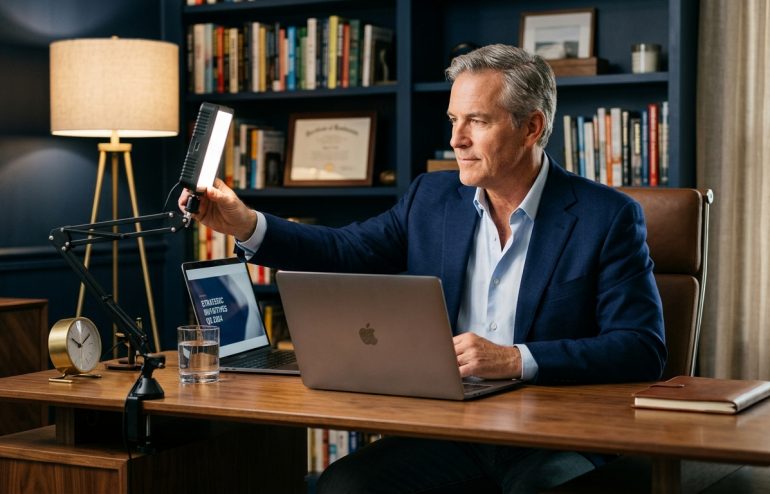
Quick answer: The lighting setup that reads as senior on camera is not a studio rig — it is a three-point structure that any executive can build from a window, a small LED panel, and a tall lamp behind the speaker. The key light sits at 45 degrees off the face at eye level or slightly above; the fill light sits at the opposite 45 degrees and is softer; the backlight, or rim, sits behind the speaker on one side and lifts them off the background. The single biggest mistake is reaching for a brighter ring light. Brightness is not what reads as senior. Depth is. The other recurring errors are overhead office lighting that produces raccoon shadows, mixed colour temperatures that shift skin tone mid-meeting, and a 5500K cool-blue tint that reads as clinical rather than authoritative. The fix is structural positioning at 4000 to 5000 Kelvin, not better equipment.
JUMP TO:
- Why lighting is the silent credibility signal on every senior video call
- The three-point structural framework — key, fill, backlight
- Colour temperature: why 4000 to 5000K reads as professional
- The overhead and ring-light mistakes most executives make
- Practical cheap setups that work — window, lamp, panel
- Long-meeting drift and the mid-meeting recovery check
- Frequently asked questions
Idris, a divisional finance director at a Midlands-based industrials group, joined a virtual capital-allocation review last quarter from his home study. The deck was strong and the £24m reinvestment recommendation was supported by every number on the page. The committee approved it, but the chair pulled him aside afterwards on a follow-up call. The feedback was not about the numbers. It was that Idris had looked, in the chair’s words, “a bit washed out, a bit tired” on the call, and that two committee members had remarked privately that he had seemed less assured than they remembered from in-person sessions. The cause was a single ring light angled straight at his face from below.
The diagnosis is not that Idris needed a studio. It is that the lighting setup most senior leaders are still running — a single front-facing ring light, an overhead office ceiling fitting, or a window directly behind the speaker — actively works against the impression they are trying to create. The camera does not see what the human eye sees. It compresses depth, flattens contour, and amplifies whatever colour cast is in the room. A face that looks fine across the kitchen table can look exhausted on the other end of a Zoom call. The audience does not articulate this as a lighting problem. They register it as “something is off about him today” and adjust their reading of the content accordingly.
This piece walks through why lighting is the silent credibility signal on every senior video call, the three-point structural framework that produces depth rather than flat brightness, the colour-temperature rule that separates professional from clinical, the overhead and ring-light mistakes still costing executives credibility, the practical cheap setups that work without a studio, and the mid-meeting recovery check for long calls. The aim is not to make every executive look like a broadcast anchor. It is to remove the lighting signals that quietly undercut authority and replace them with a setup that reads as deliberate and senior.
Before the next high-stakes virtual meeting, run the one-page setup check.
The Virtual Presentation Quick-Start Checklist is the free setup, delivery, and rescue checklist for high-stakes virtual presentations — the camera, lighting, audio, and backdrop checks to run before a senior meeting. Free download.
Why lighting is the silent credibility signal on every senior video call
The audience on a senior video call is making a reading of the speaker within the first three or four seconds of the camera turning on, and that reading is largely visual rather than verbal. Before a single sentence has been delivered, the committee is registering an impression: this person looks prepared, or this person looks rushed; this person looks senior, or this person looks like they joined from a spare room. Lighting is the largest single contributor to that first reading because lighting determines whether the face on the screen has depth, contour, and presence, or whether it looks flat and one-dimensional.
The technical reason is straightforward. The human eye operates with a dynamic range of roughly fourteen stops of light; a webcam operates with closer to seven. The camera compresses everything outside that narrow band into either pure shadow or blown-out highlight. A face that looks fully dimensional to the eye can read on camera as either an overexposed pancake — if the front light is too bright and frontal — or as a half-shadowed silhouette — if the dominant light is from behind or above. The viewer’s brain does not parse this consciously. It registers an unsettled impression, attributes it to the speaker rather than the equipment, and adjusts the credibility reading down.
The reading is more severe at senior levels because the audience is bringing higher expectations. A graduate analyst presenting from a bedroom with poor lighting is read as a graduate analyst presenting from a bedroom. A managing director presenting with the same setup is read as a managing director who has not bothered to prepare the room. The lighting signal at senior level is not “this person looks good on camera”. It is “this person took the meeting seriously enough to set up the room”. The opposite signal is read as a small but real failure of preparation, and on a high-stakes call, preparation signals matter disproportionately.
The three-point structural framework — key, fill, backlight
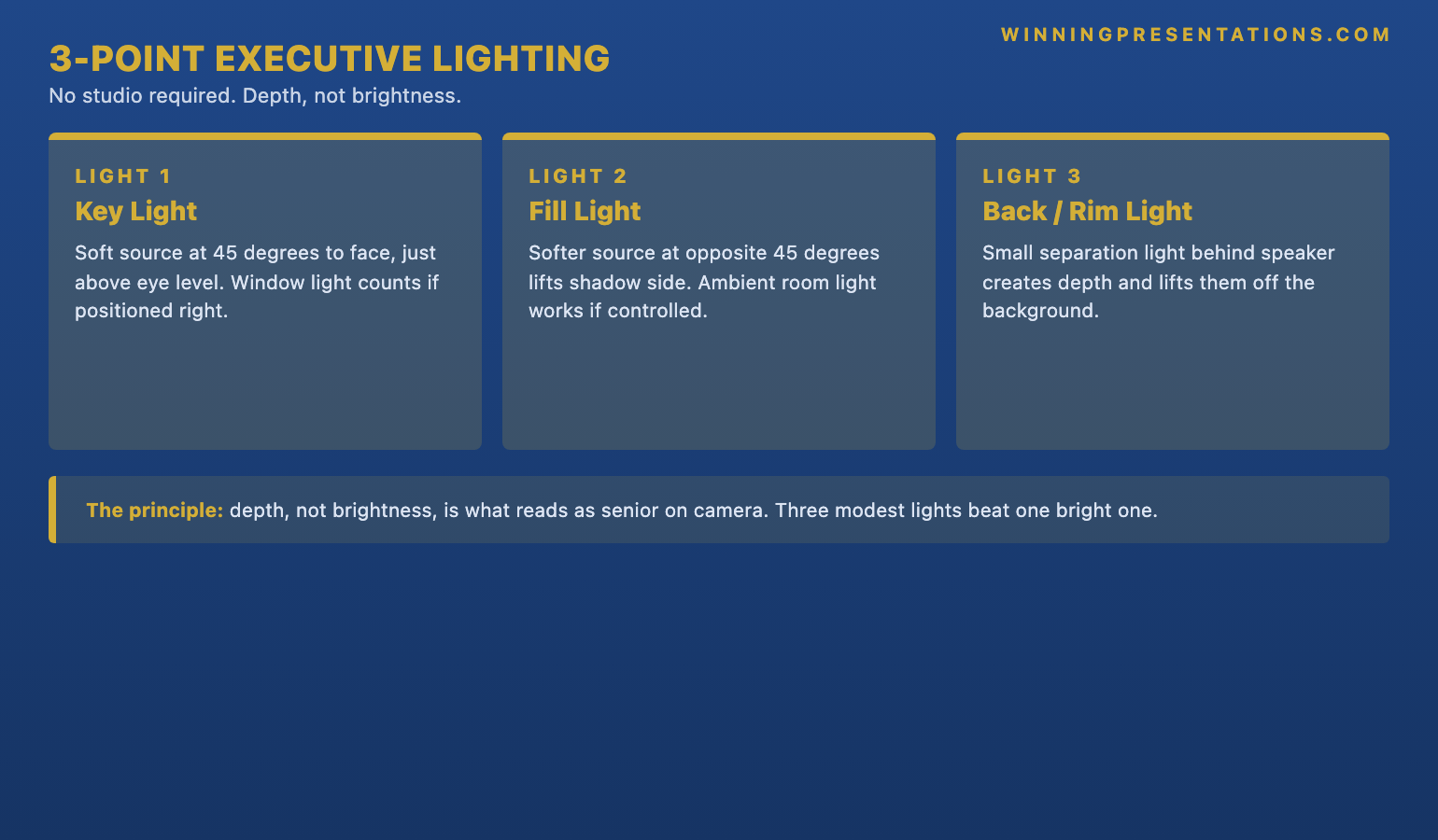
The framework that broadcast and film production has used for ninety years is called three-point lighting, and the reason it has not been replaced is that it does the single thing webcams need help with — it produces depth. The first point is the key light, the dominant source illuminating the speaker’s face. It sits at approximately 45 degrees off the centre line of the face, at eye level or slightly above, and it is the brightest of the three. Its job is to define the shape of the face — to put light on one side and let shadow fall naturally on the other so the camera reads contour rather than a flat plane. A window with a sheer curtain, an LED panel with a diffusion cover, or a desk lamp pointed through tracing paper all work as key lights. What does not work is a light placed directly in front of the face, which is what a ring light does and which is why ring lights flatten executives.
The second point is the fill light. The fill sits at the opposite 45 degrees from the key — so if the key is on the speaker’s left, the fill is on the right — and it is softer and less bright. Its job is to lift the shadow on the side of the face the key is not lighting, so the shadow becomes informative rather than aggressive. A fill light does not need to be a dedicated piece of equipment. In many home offices, the ambient light from a window opposite the key source, or the bounce from a pale wall, is enough. If the shadow side reads as a half-mask, the fill is too low and needs lifting, either by adding a small light or moving the speaker closer to a reflective surface. For the broader discipline behind structured virtual presentations to senior committees, see our piece on virtual board meeting presentations.
The third point is the backlight, sometimes called the rim or separation light. The backlight sits behind the speaker, off to one side and slightly above, and its job is to put a thin line of light along the speaker’s hair and shoulder on one side. The effect is subtle but transformative — it lifts the speaker visually away from the wall behind them, creating an impression of depth that webcams otherwise compress out of the frame. The most common cheap backlight is a tall floor lamp placed behind the desk on one side of the room; a small LED panel clipped to a bookshelf works equally well. The brightness of the backlight is low — well below the key, and slightly below the fill — but its structural contribution is large. Without it, the speaker looks pasted onto the background; with it, the speaker reads as in the room.
Colour temperature: why 4000 to 5000K reads as professional
Colour temperature is measured in Kelvin and describes whether a light source is warm — toward orange, like an incandescent bulb at around 2700K — or cool — toward blue, like an office fluorescent at around 6500K. The temperature that reads as professional on camera sits in a narrow band between 4000K and 5000K, described in the lighting industry as “neutral” or “cool white”. Below 4000K the warmth tips into a yellow-orange cast the audience reads as informal. Above 5000K the coolness tips into a clinical blue cast that strips warmth from the skin and reads as harsh or sterile.
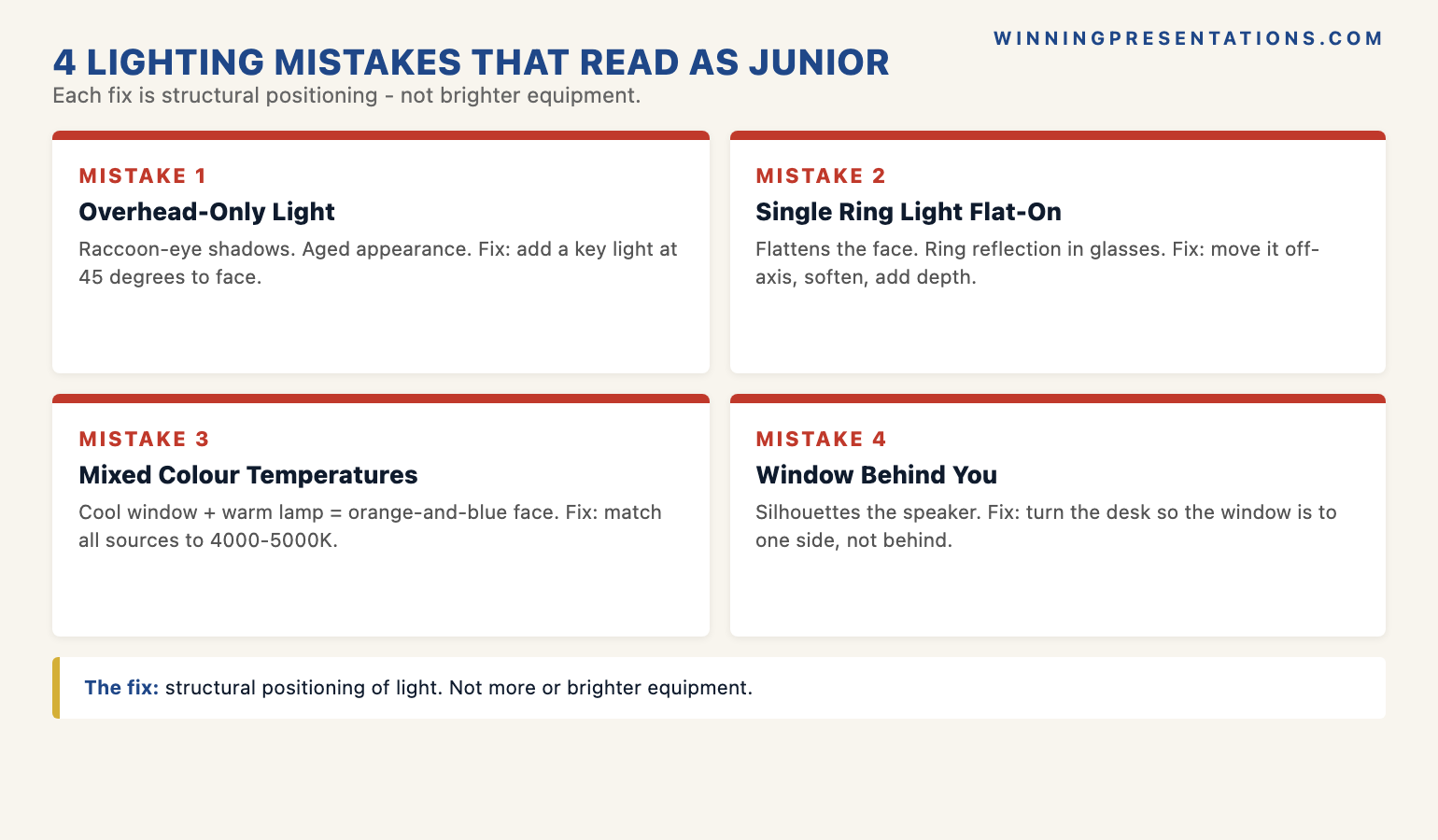
The mistake hardest to spot in advance is the mixed-temperature room. A speaker with a warm 2700K desk lamp on one side, a 5000K LED panel on the other, and an overhead fluorescent in the ceiling is being lit by three sources at three different temperatures simultaneously. The camera cannot white-balance to all three. It picks one as its reference and renders the others as colour casts on the face — typically a yellow cheek on one side and a blue forehead on the other. The audience does not consciously notice the cast; they register that the speaker looks “a bit off colour” and assume tiredness or illness. The fix is to ensure every light source in the camera’s view is at the same colour temperature. Bulbs can be replaced with matched daylight bulbs for under twenty pounds; LED panels typically have a temperature dial.
Mariusz, a regional managing director at a Warsaw-headquartered technology services firm, ran a board update last spring from his home office and was puzzled when a non-executive director emailed him afterwards asking, gently, whether everything was alright at home. The board had read him as drained. The cause turned out to be a 2700K table lamp on the desk lighting his face from below, while a 5500K LED panel sat behind the laptop confusing the white balance. The remedy took an afternoon: he removed the warm lamp, replaced it with a 4500K LED panel at the right 45 degrees, and moved the cool panel behind him as a rim light. The next board call drew no comment, which was the result he wanted. Lighting that works disappears; lighting that does not work is the only thing the audience remembers.
Lighting is the visible layer. The underlying preparation is what carries a senior virtual presentation.
The Executive Buy-In Presentation System is the self-paced programme behind senior virtual presentations that need approval — 7 modules covering stakeholder analysis, case construction, presentation structure, objection pre-emption, in-room delivery, post-meeting follow-up, and the political work that happens between meetings. The lighting on the call is what the audience sees; the structural preparation is what wins the room.
- 7 self-paced modules — stakeholder analysis, case construction, presentation structure, objection pre-emption, in-room delivery, post-meeting follow-up, calendar and political work
- Monthly cohort enrolment — enrol whenever suits you, work through at your own pace
- Optional Q&A calls — fully recorded so you can watch back anytime
- No deadlines, no mandatory session attendance
- Lifetime access to materials — £499
The overhead and ring-light mistakes most executives make
Overhead office lighting is the most common single source of bad executive video, and the reason is anatomical. A ceiling light directly above the speaker lights the top of the forehead, the bridge of the nose, and the upper cheekbones, and leaves the eye sockets, the underside of the nose, and the area beneath the lower lip in deep shadow. The result is the look broadcast lighting directors call “raccoon eyes”: two dark patches where the audience expects to see the speaker’s gaze. The audience reads raccoon eyes as fatigue, illness, or evasion. None of those readings are useful on a senior call. The fix is not a brighter overhead. It is to turn the overhead off and replace it with a key light at 45 degrees and eye level.
The ring light is the second most common mistake, and the hardest to surrender because it feels like the obvious answer. Ring lights produce flat, even, frontal illumination. They were designed originally for close-up beauty work where the goal was to erase contour and minimise shadow. That is the opposite of what an executive on a video call needs. A face lit by a ring light has no shadow side, which means it has no contour, which means the camera reads it as a flat plane. The flat plane reads as flat presence — low energy, low dimensionality, and on long calls, a slightly drained appearance. The ring light reflection in the speaker’s glasses, which most executives have not noticed, also reads as informal — a tell that the speaker is on a recreational setup rather than a considered one.
The selfie-from-below problem is the third recurring error. A laptop on a desk, with the speaker seated above the keyboard, means the webcam is below the speaker’s eye line. The light from the screen is therefore lighting the face from below, the angle broadcast directors call “monster lighting” because it is used in horror films to make characters look threatening. The audience does not consciously read the speaker as a horror character, but the angle registers as off — an inversion of the top-down lighting humans expect. The fix is to raise the laptop on a stand until the webcam is at eye level, and to ensure the dominant light source is above the camera rather than below it. Webcam positioning also influences the broader question of when to use camera on or off — for the decision logic, see our piece on camera on or off for virtual presentations.
A one-page setup audit for the night before the next virtual meeting:
The Virtual Presentation Quick-Start Checklist covers the camera, lighting, audio, and backdrop checks to run before a senior virtual meeting — the structural setup audit that catches the issues this article describes before the meeting starts rather than after. Free download.
Download the Virtual Presentation Quick-Start Checklist (free) →
Practical cheap setups that work — window, lamp, panel
The cheapest three-point setup uses three things most home offices already have: a window with a sheer curtain or blind, a small LED panel of the sort that costs around fifty to seventy pounds, and a tall floor lamp. The window acts as the key — north-facing windows are ideal because the light is diffuse and stable through the day; south-facing windows work but need the sheer curtain to soften the direct sun. The LED panel acts as the fill, positioned at the opposite 45 degrees and dialled down to around half the window’s brightness. The floor lamp acts as the backlight, positioned behind the desk on the side opposite the key, with a daylight-balanced bulb at 4500K. Total cost: under a hundred pounds if the lamp is already in the room; under a hundred and fifty if it is not.
The setup that works when the room has no usable window is two LED panels and a small clip-on light. The first panel is the key, positioned at 45 degrees at eye level, set to between 4000 and 5000K, and turned up to a comfortable working brightness. The second panel is the fill, positioned at the opposite 45 degrees, at the same colour temperature, and dialled down to roughly half the key’s brightness. The clip-on light is the backlight, attached to a bookshelf or the back of a chair behind the speaker. Total spend is typically between a hundred and twenty and two hundred pounds. It outperforms a thousand-pound studio rig that is positioned wrongly, because positioning is what matters and the equipment is doing comparatively little of the work.
Sebastien, a managing partner at a Brussels-based advisory firm, replaced a six-hundred-pound ring-and-softbox kit with a sixty-pound LED panel placed at the correct 45 degrees and a tall lamp behind him with a daylight bulb. The expensive kit had been producing a flat, slightly clinical frame in which Sebastien looked competent but generic. The cheap kit, positioned correctly, produced a frame with depth and warmth in which he looked like someone whose office one had been invited into. The clients on the next pitch did not comment on the lighting; they commented on the call. Lighting that works is invisible. Lighting that does not work is the only thing the meeting remembers.
Long-meeting drift and the mid-meeting recovery check
Long meetings introduce a problem short calls do not, which is that natural light shifts as the sun moves. A setup beautifully balanced at 9 a.m., with a north-facing window providing soft key light, can be wildly out of balance by 12 p.m., when the sun has moved round and either flooded the window with direct light or moved past it entirely and left the speaker under-lit. The audience on a three-hour board meeting does not realise the cause, but they do register that the speaker looks more washed-out at noon than they did at nine. The drift compounds with meeting-fatigue to produce a perception that the speaker is flagging when in fact only the lighting is.
The recovery check is straightforward and takes thirty seconds. Once an hour during a long call, look at the self-view and ask three questions. Are the shadow patterns on the face still informative, or has one side gone fully dark or fully bright? Has the colour cast shifted toward yellow or toward blue compared with the start of the meeting? Is the backlight still producing a rim of separation, or has the changing daylight overwhelmed it? If any of the three has drifted, the LED panels can be adjusted, the blind can be lowered, or the speaker can shift their seating position by a few inches to recover the geometry. The audience does not see the adjustment; they see only the recovered frame.
The deeper discipline on long virtual calls is that lighting is part of the energy budget the speaker is managing, not just a visual setup. A well-lit face registers as engaged; a poorly lit face registers as drained even when the speaker’s actual energy is unchanged. Managing the lighting through a long meeting is therefore part of managing the audience’s perception of the speaker’s presence — and an hourly lighting check is, in effect, an hourly check on the credibility signal the audience is receiving. For the broader discipline of sustaining presence and energy across long virtual sessions, see our companion piece on virtual presentation energy.
Frequently asked questions
Do I need expensive lighting equipment for executive video calls?
No. The single most reliable upgrade to a senior video call is not equipment; it is correct positioning of the lighting already in the room. A window at 45 degrees, a desk lamp with a daylight-balanced bulb on the opposite side, and a tall lamp behind the speaker as a rim light will outperform a thousand-pound studio rig positioned directly in front of or overhead the speaker. The total spend on a setup that reads as professionally lit is typically under a hundred and fifty pounds, and many home offices have most of the components already. The discipline is structural — the 45-degree placement, the matched colour temperatures, the deliberate backlight — rather than expensive.
What’s the right colour temperature for executive video lighting?
Between 4000 and 5000 Kelvin, which the lighting industry describes as “neutral” or “cool white”. Below 4000K the light tips warm — into the yellow-orange of an incandescent bulb — and reads on camera as informal, like the speaker is on a call from a hotel lounge. Above 5000K it tips cool — into the blue of an office fluorescent — and reads as clinical or sterile, stripping warmth from the skin tone. The other discipline is to match every light source in the frame to roughly the same temperature. Mixed temperatures produce a colour cast that shifts across the face and reads as the speaker looking tired or unwell, even when the cause is a white-balance problem the camera cannot resolve.
My only option is overhead office lighting — what should I do?
Turn the overhead off if possible, and use a desk lamp or LED panel positioned at 45 degrees from the face at eye level as the dominant light. Overhead lighting produces deep shadows in the eye sockets — the “raccoon eyes” effect — and the audience reads those shadows as fatigue, illness, or evasion. If the overhead cannot be turned off, place a brighter front-and-side light at the correct 45-degree angle so the overhead becomes a minor contributor rather than the dominant source. The camera will white-balance to the brighter source, and the overhead becomes ambient fill rather than the lead light. The signal cost falls substantially even if the overhead cannot be eliminated.
Does the lighting really matter if my content is strong?
The content carries the meeting; the lighting determines what reading the audience attaches to the speaker delivering it. Strong content delivered by a speaker who looks washed-out or unevenly lit is read as strong content from a speaker who seems off-form today. The audience does not separate the two cleanly. The lighting reading happens at the same moment as the content reading, and it colours the credibility the audience extends to the substance. The reverse is also true — well-lit delivery cannot rescue weak content. The relationship is multiplicative, not additive. Lighting is one of the smallest interventions an executive can make for the largest single shift in how the room reads them.
The Winning Edge — weekly newsletter
The Winning Edge is a weekly newsletter for senior professionals who present at the executive level. One short email a week, focused on the structural moves that separate decks committees back from decks they defer. Subscribe to The Winning Edge →
Not ready for the full programme? Start here instead: download the free Virtual Presentation Quick-Start Checklist — the one-page setup, delivery, and rescue checklist to run before any senior virtual meeting.
About the author
Mary Beth Hazeldine is Owner & Managing Director of Winning Presentations Ltd. With 25 years of corporate banking experience at JPMorgan Chase, PwC, Royal Bank of Scotland, and Commerzbank, she advises executives across financial services, healthcare, technology, and government on structuring presentations for high-stakes funding rounds, board approvals, and strategic decisions.