Tag: executive slide structure

24 Feb 2026
Professional woman in navy blazer standing outside glass-walled boardroom, composing herself before presenting to an unfamiliar executive team

Presenting When You’re the Outsider: Why Your Best Work Gets Ignored (And the Structure That Fixes It)

Quick Answer: Contractors, consultants, and new hires face a presenting as outsider credibility gap that has nothing to do with content quality. The room decides whether to trust you in the first 90 seconds — before your data lands. The fix isn’t more preparation or better slides. It’s a specific slide structure that establishes authority through insight, not introduction. Lead with what you see that insiders can’t. That’s your structural advantage.

I spent 24 years walking into boardrooms where nobody knew my name.

At JPMorgan, I was the London person presenting to the New York desk. At RBS, I was the new hire presenting to a team that had worked together for a decade. At Commerzbank, I was the external consultant brought in to restructure a process the existing team had built.

Every single time, I felt it. That moment before you speak where the room is scanning you — not your slides, not your data — you. Deciding whether you’re worth listening to before you’ve said a word.

The worst was Frankfurt, 2009. I’d been hired to present a risk framework to a steering committee of twelve. I had six weeks of analysis. I had perfect slides. I opened with “Thank you for having me. Let me introduce myself and walk you through my background.”

Three people checked their phones. One left for coffee. I’d lost the room in eleven words.

The next time I walked into that room, I opened differently. I opened with what I’d found — an insight they didn’t have. The same people who’d ignored me were asking questions by slide two.

The content hadn’t changed. The structure had.

🚨 Presenting to a team that doesn’t know you this week? Quick check: Does your first slide lead with insight (what you’ve found) or introduction (who you are)? If it’s introduction, you’re giving the room permission to tune out. → Need the exact outsider-ready slide structure? Get the Executive Slide System → £39

Why the Credibility Gap Exists (And Why Experience Doesn’t Close It)

Here’s what nobody tells you about presenting as outsider credibility: the problem isn’t competence. It’s category.

When you’re internal, you’ve already been sorted. The room knows your track record, your department, your relationship to the decision-maker. They’ve decided — at least partially — whether to take you seriously before you stand up.

When you’re external, you haven’t been sorted yet. You’re in a holding pattern. The room is running a parallel process during your presentation: half their brain is evaluating your content, half is evaluating you.

This is why the same analysis, presented by an insider and an outsider, lands completely differently. The insider gets the benefit of the doubt. The outsider has to earn it — and they have about 90 seconds to do it.

Experience doesn’t automatically close this gap. I’ve watched consultants with 20 years of expertise get ignored because they opened with credentials instead of insight. The room doesn’t care about your CV. They care about whether you understand their problem.

How do you build credibility in a presentation when you’re new?

Not with a “my background” slide. Not with name-dropping previous clients. Those are defensive credibility moves — they try to prove you belong. What works is offensive credibility: demonstrating insight the room doesn’t already have. When you lead with “Here’s what I’ve found,” you skip the credibility queue entirely. You become useful before you become trusted — and usefulness creates trust faster than any CV slide.

The 90-Second Window: What the Room Is Actually Deciding

Research on first impressions in professional settings shows a consistent pattern: people form judgements within seconds, then spend the rest of the interaction confirming those judgements.

In a presentation, the 90-second window isn’t about your content. It’s about three unconscious questions every person in the room is asking:

1. “Does this person understand our world?” Not your world. Not your methodology. Theirs. If your first slide talks about your process, your framework, your approach — you’ve answered “no.” If your first slide talks about their challenge, their deadline, their risk — you’ve answered “yes.”

2. “Are they going to waste my time?” Outsiders over-explain. It’s a defence mechanism — you feel like you need to justify your presence. But every minute of context-setting is a minute the room is deciding you don’t have anything new to say.

3. “Do they have something I don’t?” This is the golden question. If your opening signals you’ve seen something the room hasn’t, every executive in that room leans forward. Not because they trust you. Because they’re curious. And curiosity buys you the next ten minutes.

The executives who present like CEOs understand this instinctively. They lead with the insight, not the introduction. As an outsider, you need to do the same — but with even more precision.

The Credibility Architecture: 4 Slides That Close the Gap

After two decades of presenting as the outsider, I developed a structure I now teach to every contractor, consultant, and new hire I work with. I call it the Credibility Architecture — and it’s the opposite of how most outsiders present.

Most outsiders present like this: Introduction → Background → Methodology → Findings → Recommendation.

The Credibility Architecture: Insight → Implication → Evidence → Ask.

Here’s what each slide does:

Slide 1: The Insight — Open with what you’ve found that the room doesn’t know. Not your conclusion. Not your recommendation. The single most surprising or important thing your analysis revealed. “Your Q3 attrition is 40% higher in the first 90 days than industry benchmark — and it’s concentrated in one department.” That’s an insight. “We conducted a comprehensive analysis of your attrition data” is a process description. One creates curiosity. The other creates boredom.

Slide 2: The Implication — What does this insight mean for their business, their timeline, their risk? This is where you demonstrate judgement. Anyone can present data. Only someone who understands the business can explain what the data means. “At current rates, this costs you £2.3M annually in recruitment and lost productivity — and it accelerates in Q1 when your biggest client renewal is due.”

Slide 3: The Evidence — Now you earn the right to show your methodology. The room is curious. They want to know how you got here. This is where your analysis, your data, your process belongs — after they care, not before.

Slide 4: The Ask — What do you need from the room? A decision, a budget, a next step? The decision slide structure works regardless of whether you’re internal or external — because it focuses on the business outcome, not your authority to request it.

The Credibility Architecture four-slide structure showing Insight, Implication, Evidence, and Ask for outsiders presenting to unfamiliar executive audiences

⭐ Walk Into Any Room and Own It — Even When Nobody Knows You

The Executive Slide System gives you 22 proven slide structures that establish authority through structure, not reputation. Whether you’re a contractor, consultant, or new hire — the templates put your insight first and your credentials where they belong: implicit in the quality of your slides.

Includes:

  • Executive Summary template — the insight-first structure that earns trust in 90 seconds
  • Board Meeting Opener — designed for first-time presentations to unfamiliar audiences
  • 15 scenario playbooks including “First Presentation as New Leader” with exact template + prompt + checklist
  • 51 AI prompts that sharpen your outsider insight into executive-ready language

Get the Executive Slide System → £39

Built from 24 years of presenting as the outsider — at JPMorgan, RBS, PwC, and Commerzbank.

The Outsider’s Hidden Structural Advantage

Here’s something most outsiders don’t realise: you have an advantage that insiders don’t.

Insiders are trapped by context. They know the politics, the history, the unspoken rules — and that knowledge constrains what they’re willing to say. They self-censor. They hedge. They present what’s politically safe rather than what’s analytically true.

You don’t have that constraint. You can say the thing nobody in the room is willing to say — because you don’t have a promotion to protect or a relationship to preserve.

The best outsider presentations I’ve seen — and the ones that led to follow-on contracts, permanent roles, and reputation-building moments — all shared one quality: they said the uncomfortable thing with data behind it.

“Your top performer in sales is actually your biggest risk — their client relationships are personal, not institutional, and when they leave, you lose 60% of that revenue.” Nobody internal would say that. An outsider with the data can.

This is why the Credibility Architecture starts with insight, not credentials. Your unfamiliarity with the politics isn’t a weakness. It’s the reason they hired you. Use it.

The outsider advantage only works if your slide structure supports it. Generic templates signal “I grabbed this from Google.” Decision-first templates signal “I know how executive meetings work.” The Executive Slide System gives you the structure that makes your insight land — whether the room knows you or not.

The 3 Mistakes Outsiders Make (That Insiders Never Would)

What’s the biggest mistake outsiders make in executive presentations?

Mistake 1: The credentials dump. “Before I begin, let me share a bit about my background.” This is the outsider’s security blanket — and it’s a credibility killer. Every minute you spend justifying your presence is a minute the room isn’t learning from you. Insiders never do this because they don’t need to. You shouldn’t either — but for a different reason: your insight is a better credential than your CV.

Mistake 2: Over-qualifying every statement. “Based on our preliminary analysis, and bearing in mind the limitations of the data set, we believe there may be an opportunity to…” Outsiders hedge because they’re afraid of being wrong in a room where they have no political cover. But hedging signals uncertainty — and uncertainty from an outsider is fatal. If you’re not confident enough to state a clear recommendation, the room won’t be confident enough to act on it.

Mistake 3: Presenting your methodology before your findings. This is the biggest one. Outsiders lead with process because they think it builds credibility: “Here’s how thorough we were.” But the room doesn’t care about your process. They care about your conclusions. Lead with what you found. If they want to know how you got there, they’ll ask — and that question is a sign of engagement, not skepticism.

If you’re managing anxiety about presenting to a room that doesn’t know you, it’s worth understanding that much of that anxiety comes from structural uncertainty — not knowing whether the room will engage. When your slides demand engagement (because the insight is too interesting to ignore), the anxiety drops. For more on managing the physical stress of presenting under pressure, see the guide to presenting bad news without destroying credibility.

⭐ Stop Being the Outsider They Politely Ignore

The difference between “thank you for your input” and “when can you present to the board?” isn’t your analysis. It’s your slide structure. The Executive Slide System gives you the decision-first architecture that makes executives engage — regardless of whether they know you.

What’s inside for outsider presentations:

  • Insight-first Executive Summary template — opens with what you found, not who you are
  • Board Meeting Opener — designed for first-time presentations to unfamiliar audiences
  • Stakeholder credibility framing prompts for “new to the room” situations
  • Scenario 10 playbook: First Presentation as New Leader — exact template, prompt, and checklist

Get the Executive Slide System → £39

Built from 24 years of presenting as the outsider — to unfamiliar boardrooms at JPMorgan, RBS, PwC, and Commerzbank.

Every project status update you deliver as a contractor is a credibility opportunity — or a credibility leak. The Executive Slide System includes the exact structure that turns routine updates into reputation-building moments.

When Someone in the Room Doesn’t Want You There

Sometimes the credibility gap isn’t passive — it’s active. Someone in the room has been lobbying against the project you’re working on. Or they wanted a different consultant. Or they feel threatened by an external person doing work they think should be done internally.

I’ve been in this room more times than I can count. At PwC, I once presented a process redesign to a team whose manager had explicitly told the steering committee it wasn’t needed. He sat in the front row with his arms crossed for my entire presentation.

Here’s what works:

Don’t acknowledge the dynamic. The moment you say “I know some of you may be skeptical about bringing in outside help,” you’ve made the political tension the centrepiece of the room’s attention. Present as if every person in the room is there to learn from your findings.

Address their likely objection in your data — by slide 3. If someone thinks this project is unnecessary, your insight slide needs to include the evidence that makes it necessary. Don’t argue with them. Let the data do it. “The current process costs £340K annually in manual workarounds — that’s 4.2 FTEs” is harder to argue with than “we believe there’s an opportunity to streamline.”

Give them an on-ramp. The hostile person needs a way to engage without losing face. Frame your recommendations as building on what already exists: “The team has built a solid foundation. This proposal extends it.” Now they can support you without admitting they were wrong to oppose you.

How should a consultant present to a client’s leadership team?

The same way an insider would — but with more precision. Lead with what you’ve found (the insight), not what you’ve done (the process). State your recommendation clearly (no hedging). And give the room a specific decision to make. The format isn’t different. The margin for error is smaller.

Is This Right For You?

✓ This is for you if:

  • You’re a contractor, consultant, or new hire presenting to a team that doesn’t know you
  • Your analysis is strong but the room doesn’t engage the way you expect
  • You want a slide structure that earns trust through insight, not credentials

✗ This is NOT for you if:

  • You present exclusively to your own team and already have internal credibility
  • You’re looking for design templates (this is structure and logic, not visual design)

⭐ The Structure That Got Me Invited Back to Every Room I Walked Into

In 24 years of presenting as the outsider — across JPMorgan, PwC, RBS, and Commerzbank — I built the frameworks that turn first impressions into lasting authority. The Executive Slide System is that structure, now available as templates and AI prompts you can use before your next meeting.

Inside:

  • 22 executive slide templates — including Executive Summary, Board Opener, and Strategic Recommendation
  • 51 AI prompts — 3 per template (Draft → Refine → Executive Polish)
  • 15 scenario playbooks — find your exact situation, follow it like a recipe
  • 6 checklists covering structure, clarity, logic, and decision readiness

Get the Executive Slide System → £39

Instant download. 30-day money-back guarantee. Used by contractors, consultants, and new hires presenting to unfamiliar leadership teams.

Frequently Asked Questions

How do I present confidently when I don’t know the internal politics?

You don’t need to know the politics to present effectively. You need to know the business problem. Focus your preparation on understanding the specific challenge, the numbers behind it, and what a good outcome looks like for the decision-maker. The Credibility Architecture puts your analysis front and centre — which means the room engages with your findings rather than evaluating your political position. The politics become irrelevant when the insight is strong enough.

Should I acknowledge that I’m new or external?

No — or at least, not as a standalone moment. Saying “As some of you know, I was brought in three weeks ago to…” signals that you consider your outsider status a limitation. Instead, let your first slide do the work. When you open with a specific insight about their business, you implicitly signal that you’ve done the work. The room doesn’t need to know how long you’ve been there. They need to know whether you have something they don’t.

What if someone in the room is hostile to external presenters?

Address their likely objection in your data by slide 3 — before they raise it. If they think your project is unnecessary, include the cost or risk data that makes it necessary. If they feel threatened, frame your recommendations as extensions of existing work. The goal isn’t to win them over in the presentation. It’s to make opposition feel unjustified to everyone else in the room. For more on navigating political dynamics, see the scenario playbook for presenting when someone is undermining you.

📬 The Winning Edge — Weekly Newsletter

One executive presentation insight per week. Real scenarios, real structures, no filler. Written for contractors, consultants, and corporate presenters who present to people they need to impress.

Subscribe Free →

Related: If your first outsider presentation didn’t land the way you hoped, read Presenting After Failure: The 3 Words That Saved a VP’s Career — the recovery structure that rebuilds credibility fast.

Your next presentation to a room that doesn’t know you is on your calendar. You already have the analysis. Now get the structure that makes them listen.

About the Author

Mary Beth Hazeldine is the Owner & Managing Director of Winning Presentations. With 24 years of corporate banking experience at JPMorgan Chase, PwC, Royal Bank of Scotland, and Commerzbank, she has delivered high-stakes presentations in boardrooms across three continents.

A qualified clinical hypnotherapist and NLP practitioner, Mary Beth combines executive communication expertise with evidence-based techniques for managing presentation anxiety. She has trained thousands of executives and supported presentations for high-stakes funding rounds and approvals.

Read more articles at winningpresentations.com

23 Feb 2026
Professional woman standing alone presenting to a boardroom of seated sceptical executives — presenting when the room has already decided against you

The Presentation You Give When the Room Has Already Decided Against You

Quick answer: When the room has already decided against your recommendation, a traditional presentation — background first, evidence second, ask at the end — guarantees rejection. The audience spends every slide building their counter-argument. The reversal framework works differently: acknowledge the objection first (proves you understand their position), reframe the decision criteria (shifts what they’re evaluating), present evidence against the NEW criteria (makes your recommendation logical under their reframed perspective), and make the ask inevitable. The room doesn’t change their mind — you change what they’re deciding about.

47 Slides. A Competing Internal Team. A Room That Had Already Said No.

The biotech company had 47 slides. The board had already been briefed by a competing internal team pushing an alternative approach. Every decision-maker in the room had seen the counter-proposal first — and had been nodding along to it for two weeks.

My client walked in knowing the room had pre-decided. Not hostile in a confrontational way. Worse. Politely certain they’d already found the better option.

We cut the 47 slides to 12. Not by removing information — by restructuring the logic. The first slide didn’t present the recommendation. It acknowledged the competing proposal’s strongest argument. The second slide reframed the decision criteria — not “which approach is cheaper?” but “which approach reduces regulatory risk in the first 18 months?” By slide 4, the room was evaluating a different question than the one they’d walked in with.

They approved the recommendation. £4.2 million in funding. From a room that had walked in ready to say no.

Not because the presentation was persuasive. Because the structure changed what the room was deciding about. That’s the difference between presenting to a hostile room and reversing one.

🚨 Presenting to a resistant room this week? Quick 60-second check: Does your first slide acknowledge their current position — or does it launch straight into YOUR recommendation? If it launches into your pitch, you’ve lost them by slide 2. They’re not listening. They’re building their counter-argument. → Need the exact reversal templates? The Executive Slide System (£39) includes the decision-reframing structure that turns hostile rooms into approvals.

Why Traditional Presentations Guarantee Rejection in a Hostile Room

When an audience has already decided against your recommendation, every element of a traditional presentation works against you. Here’s the structural problem:

Background slides confirm their position. You open with context: market data, project history, the problem you’re solving. The hostile audience doesn’t hear “context.” They hear “here’s why I think you’re wrong” — and they start mentally rehearsing their objections. By the time you reach slide 5, they’ve already formulated three reasons to reject you. Your background became their preparation time.

Evidence slides trigger counter-evidence. You present your data, your ROI projections, your implementation plan. Each data point the audience disagrees with hardens their resistance. In a neutral room, evidence builds your case. In a hostile room, evidence triggers an adversarial response — they’re not evaluating your data, they’re looking for the flaw that justifies their pre-existing position.

The late ask gives them an easy exit. After 20 slides of background and evidence, you finally ask for the decision. By now, the hostile audience has had 20 slides to build their “no.” The ask becomes a formality — they deliver the rejection they’ve been preparing since slide 1. You never had a chance because the structure gave them 20 minutes to fortify their opposition.

This is why “just present the facts and let them decide” fails catastrophically in a hostile room. The facts aren’t evaluated neutrally. They’re filtered through a pre-existing conclusion. The decision-first slide approach addresses this by restructuring when the audience encounters the key question — but in a hostile room, you need to go further. You need to change the question itself.

Diagram showing how traditional presentation structure guarantees rejection in hostile rooms — background confirms opposition, evidence triggers counter-arguments, late ask enables prepared rejection

The 4-Slide Reversal Framework That Changes What the Room Is Deciding

The Reversal Framework doesn’t try to persuade a hostile room to agree with you. It changes what they’re deciding about — so your recommendation becomes the logical answer to a different question.

Here’s how the 12-slide biotech presentation worked, condensed to its 4-slide core logic:

Slide 1: The Acknowledgement. Not your recommendation. Not your evidence. An honest acknowledgement of the room’s current position and why it makes sense. “The Phase 2 approach has clear cost advantages and faster initial timelines. I understand why it’s the preferred option.” This does something no traditional opening does: it disarms the audience. They walked in expecting you to argue against their position. Instead, you validated it. The adversarial dynamic breaks. For 30 seconds, the room stops preparing their counter-argument — because you’re not arguing. You’re agreeing. That 30-second window is where the reversal begins.

Slide 2: The Reframe. This is the architectural pivot. You don’t challenge their conclusion — you challenge the criteria they used to reach it. “But the decision criteria should include regulatory risk in the first 18 months — not just cost and speed. Here’s why.” You’re not saying they’re wrong. You’re saying the question is incomplete. This is psychologically powerful because it doesn’t require the audience to admit they were wrong about anything. They weren’t wrong about cost. They weren’t wrong about speed. They just weren’t evaluating the full picture. Nobody’s ego is threatened. The decision criteria simply got bigger.

Slide 3: Evidence Against the NEW Criteria. Now — and only now — you present your evidence. But mapped to the reframed criteria, not the original ones. The competing proposal wins on cost. Your proposal wins on regulatory risk, which you’ve just established as the criterion that matters most. The room evaluates your evidence against the expanded criteria and sees that your recommendation is the logical answer — not because you argued better, but because the question changed. At board-level presentations, this reframing technique is particularly effective because boards are conditioned to evaluate decisions against multiple criteria.

Slide 4: The Inevitable Ask. Restate the reframed decision criteria. Show how your recommendation satisfies them. Make the ask. “Given the regulatory risk profile, I’m recommending we proceed with the Phase 3 approach at a cost of £4.2M.” By this point, the ask doesn’t feel like a pitch. It feels like the obvious conclusion to the framework the room has already accepted. They’re not “changing their mind” — they’re making a different decision because the decision criteria changed.

Four slides. Acknowledge → Reframe → Evidence → Ask. The room walks in ready to say no. They walk out having approved — because you didn’t fight their position. You expanded it.

The Reversal Framework — including the acknowledgement template, the criteria reframe formula, and the evidence-mapping structure — is built into the Executive Slide System, with templates designed for steering committees, boards, and senior leadership meetings where pre-decided resistance is the norm.

The Slide Structure That Reverses Pre-Decided Rooms

The Executive Slide System gives you the Reversal Framework — the slide architecture that turns hostile rooms into approvals by changing what the audience is deciding about, not by arguing harder.

  • ✓ The Acknowledgement Slide template — disarm resistant stakeholders in the first 30 seconds
  • ✓ The Criteria Reframe formula — shift the decision question so your recommendation becomes the logical answer
  • ✓ Evidence-mapping templates — present data against the reframed criteria, not the ones you’ll lose on

Get the Executive Slide System → £39

Built from 24 years of executive presentations at JPMorgan, PwC, RBS, and Commerzbank — including high-stakes approvals where the room walked in ready to say no.

How to Reframe Decision Criteria Without the Room Realising

The reframe is the most critical slide in the Reversal Framework — and the most misunderstood. It’s not manipulation. It’s not a trick. It’s adding a decision criterion the room hasn’t considered, making their evaluation more complete rather than less.

Here’s the technique, broken down into three steps:

Step 1: Identify the criteria the room is currently using. In the biotech case, the room was evaluating on cost and speed. Those were the two criteria the competing team had presented — because they won on both. Your first task is to name the criteria the room is using, even if nobody has stated them explicitly. “The current evaluation is focused on cost and implementation speed — and the Phase 2 approach wins on both.”

Step 2: Introduce the missing criterion with a consequence. Not “here’s another thing to consider.” That’s too weak. Instead: “But there’s a criterion missing from this evaluation that changes the calculus entirely: regulatory risk in the first 18 months.” The word “consequence” is important. You’re not adding a nice-to-have. You’re introducing something that materially changes the outcome. The room’s attention shifts because you’ve signalled danger — there’s something they haven’t evaluated that could hurt them.

Step 3: Make the missing criterion the decisive one. Show — with evidence — why the missing criterion outweighs the existing ones. “A regulatory delay costs £800K per month. The Phase 2 cost advantage is £1.2M total. One regulatory setback eliminates the entire cost saving and creates a £2.4M exposure.” The maths makes the reframe concrete. The room isn’t changing their mind — they’re responding to new information that makes the previous evaluation incomplete.

This works because you’re not saying “you were wrong.” You’re saying “you were right — but incomplete.” That’s a much easier psychological position for decision-makers to accept, especially at the steering committee level where nobody wants to appear to have been manipulated or to have missed something obvious.

The 4-Slide Reversal Framework showing Acknowledge, Reframe, Evidence against new criteria, and Inevitable Ask — turning hostile rooms into approvals

Reading the Room: How to Know If the Reversal Is Working

The Reversal Framework creates observable shifts in the room’s behaviour. Knowing what to watch for helps you calibrate your delivery in real time.

Signal 1: The uncrossing. Hostile audiences have closed body language — crossed arms, leaned back, minimal eye contact. When the Acknowledgement Slide lands, you’ll see a physical shift. Arms uncross. Posture shifts forward slightly. One or two people make eye contact. This happens because you’ve broken the adversarial expectation. They expected a fight. You gave them validation. The physiological response is an opening — literally.

Signal 2: The note-taking shift. In a hostile room, decision-makers take notes to build their counter-argument (“didn’t account for X,” “timeline unrealistic”). When the Reframe Slide lands, the note-taking changes character. Instead of writing objections, they start writing the new criterion. They’re no longer building a case against you. They’re processing the reframe. Watch for the moment someone writes down your reframed criterion — that’s the moment the reversal is working.

Signal 3: The internal glance. After the Reframe Slide, watch for decision-makers glancing at each other. Not the hostile “can you believe this?” glance. The “did we miss this?” glance. This is the most powerful signal because it means the room is collectively realising their previous evaluation was incomplete. They’re checking whether their colleagues had considered the missing criterion. If nobody had, your reframe has just created a shared gap that only your recommendation fills.

Signal 4: Questions shift from challenges to logistics. In a hostile room, questions sound like “Where did you get those numbers?” and “Isn’t the alternative cheaper?” After a successful reversal, questions shift to “What’s the implementation timeline?” and “How soon can we start?” When questions move from challenging your premise to planning the execution, the room has decided — even if they haven’t formally voted yet.

The Reversal Framework templates inside the Executive Slide System include the acknowledgement opener, the criteria reframe formula, and the evidence-mapping structure — plus AI prompts to build your reversal deck in 25 minutes so you’re prepared even when you discover the resistance the morning of the meeting.

Stop Losing Recommendations to Rooms That Decided Before You Spoke

You’ve walked into meetings where every face said no before you opened your mouth. You’ve watched good proposals die because the room had already committed to the alternative. The Executive Slide System gives you the reversal architecture that changes what they’re deciding about.

  • ✓ Stop presenting evidence to rooms that have already decided to ignore it
  • ✓ Stop losing budget approvals because a competing proposal was briefed first
  • ✓ Stop watching strong recommendations die because the room was pre-committed to “no”

Get the Executive Slide System → £39

The same reversal framework used by the biotech team that secured £4.2M from a board briefed against their proposal — 47 slides became 12, and the room that walked in ready to say no walked out having approved.

Common Questions About Presenting to Hostile Audiences

How do you present when the audience has already decided against you?

You don’t try to change their mind — you change what they’re deciding. The Reversal Framework uses four slides: Acknowledgement (validate their current position to disarm the adversarial dynamic), Reframe (introduce a decision criterion they haven’t considered that shifts the evaluation), Evidence (present your data against the reframed criteria where your recommendation wins), and Ask (make the recommendation inevitable under the expanded framework). The key psychological insight: people don’t resist changing their mind when they feel they’re making a better decision, not a different one. The reframe gives them new information that makes their previous evaluation incomplete — and your recommendation becomes the logical completion.

Can a presentation actually reverse a pre-decided room?

Yes, but not through better arguments or more data. Pre-decided rooms have already evaluated your type of evidence and reached a conclusion. Adding more of the same evidence reinforces their existing framework. The Reversal Framework works because it changes the evaluation framework itself — introducing a criterion the room hasn’t considered that shifts which option is logically superior. The biotech case study is typical: the room had decided on cost and speed grounds. The reframed criterion (regulatory risk) didn’t make them wrong about cost — it made cost insufficient as a decision factor. No ego threatened. No position reversed. Just a more complete evaluation that changed the answer.

What’s the best structure for presenting to resistant stakeholders?

The worst structure is the most common one: background → evidence → ask. In a resistant room, background gives stakeholders time to prepare their objections, evidence triggers counter-evidence, and the late ask enables the rejection they’ve been building toward. The best structure for resistant stakeholders is: acknowledge → reframe → evidence against new criteria → inevitable ask. This works because the acknowledgement breaks the adversarial dynamic (they expected a fight, you gave validation), the reframe expands the evaluation criteria (nobody’s wrong, the question just got bigger), and the evidence against the NEW criteria positions your recommendation as the logical answer to a question the room accepts as legitimate.

Is the Executive Slide System Right For You?

✓ This is for you if:

  • You regularly present to rooms where the audience has already formed an opinion — boards, steering committees, or leadership teams briefed by competing proposals
  • You’ve had good recommendations rejected because the room was pre-committed to an alternative
  • You want a structural framework for reversing resistant audiences — not motivational advice about “staying confident”
  • You need to build a reversal deck quickly, sometimes with hours of notice

✗ This is NOT for you if:

  • Your audience is neutral or supportive — the Reversal Framework is specifically for pre-decided resistance (neutral audiences need decision-first structure, not reversal architecture)
  • You’re looking for body language or delivery coaching (this is a slide structure framework)
  • Your presentations don’t involve a specific recommendation or ask (the framework is built around reversing a decision, which requires a decision to reverse)

47 Slides Became 12. A Hostile Room Became a £4.2M Approval. The Framework Is Now Available as Templates.

Every template in the Executive Slide System was built in boardrooms, steering committees, and programme governance meetings where the room walked in pre-decided — across 24 years at JPMorgan, PwC, RBS, and Commerzbank.

  • ✓ Reversal Framework templates — Acknowledge, Reframe, Evidence, Ask — built for pre-decided audiences
  • ✓ AI prompts to restructure your existing deck into reversal architecture in 25 minutes
  • ✓ Before/after examples from real executive presentations where the room started hostile and ended with approval

Get the Executive Slide System → £39

Used by programme directors, VPs, and department heads presenting in environments where the answer was “no” before they walked in — and “yes” before they walked out.

Frequently Asked Questions

What if the room won’t engage at all — stone-faced silence?

Stone-faced silence is actually better than active hostility — it means the room is waiting, not fighting. The Acknowledgement Slide is particularly powerful here because it breaks the expectation. The room expects you to pitch. When you validate their position instead, the silence shifts from resistant to curious. They’re listening to see where you’re going. The Reframe Slide then gives them something to evaluate — a new criterion they hadn’t considered. Stone-faced rooms often break into engagement at the reframe because you’ve introduced genuine new information. If the silence persists through the Evidence Slide, ask a direct question: “Does the regulatory risk factor change how you’d evaluate the two options?” This forces a response and makes the reframe explicit.

Does this work when my own manager is against the recommendation?

Yes, and it’s actually more important in this scenario. When your manager disagrees, a traditional “here’s why I’m right” presentation creates a direct conflict with someone who controls your career. The Reversal Framework avoids direct conflict entirely. You acknowledge your manager’s position (validating their thinking), introduce an additional criterion (not contradicting them — expanding the evaluation), and let the evidence speak to the expanded criteria. Your manager doesn’t have to admit they were wrong. They have to decide whether the new criterion changes the calculus — and if your evidence is strong, the answer is yes. The key: never frame it as “you missed this.” Frame it as “there’s new information that wasn’t available when the initial evaluation was done.”

What if I’ve already presented this recommendation and it was rejected — can I try the Reversal Framework on a second attempt?

Yes, but the Acknowledgement Slide becomes even more critical. You need to acknowledge the previous rejection explicitly: “Last quarter, I recommended the Phase 3 approach and the committee decided against it. The cost and speed evaluation was sound.” Then introduce what’s changed: “Since then, three things have shifted that change the risk profile…” The reframe works because you’re not saying the previous decision was wrong — you’re saying the conditions have changed. This gives decision-makers a psychologically safe way to reverse course: they made the right call with the information they had. Now the information is different. Second-attempt reversals have the highest success rate when you can name the specific change that makes the previous decision incomplete.

Get Weekly Presentation Intelligence

Reversal frameworks, decision-reframing techniques, and the slide architecture that turns resistant rooms into approvals — delivered every week for senior professionals who present in high-stakes environments.

Join the Newsletter

Related: If the hostile room triggers anxiety — the dread of walking into a meeting where every face says no, the fear of public failure — that’s a separate problem with a separate fix. Read Glossophobia at the C-Suite: Why Successful Executives Still Struggle for the clinical techniques that break the executive anxiety cycle.

Also today: If the problem isn’t collective resistance but a specific colleague actively sabotaging your presentation — feeding contradictory data to decision-makers or lobbying against you before the meeting — the structural defence is different. Read The Executive Who Tried to Sabotage My Client’s Presentation for the framework that makes sabotage structurally irrelevant.

Your next step: Think about your next meeting where the room might not be on your side. Check your deck: Does Slide 1 acknowledge their current position? Does Slide 2 introduce a criterion that changes the evaluation? If you’re leading with your recommendation instead, you’re presenting to a room that’s spending your entire deck building their “no.”

The room has already decided. Your structure needs to change what they’re deciding about. Build the reversal deck before the meeting — not after the rejection.

Get the Executive Slide System → £39

About the Author

Mary Beth Hazeldine is the Owner & Managing Director of Winning Presentations. With 24 years of corporate banking experience at JPMorgan Chase, PwC, Royal Bank of Scotland, and Commerzbank, she has delivered and supported high-stakes presentations in boardrooms where the room walked in pre-decided — steering committees, programme boards, and executive governance meetings where the default answer was “no” and the slide structure had to change it.

A qualified clinical hypnotherapist and NLP practitioner, Mary Beth has trained thousands of executives and supported high-stakes funding rounds and approvals across banking, consulting, and corporate environments.

Book a discovery call | View services

23 Feb 2026
Executive woman standing with composed expression in boardroom while male colleague sits behind her with arms crossed — corporate presentation sabotage dynamics

The Executive Who Tried to Sabotage My Client’s Presentation (And How the Slides Saved Her)

Quick answer: Presentation sabotage — colleagues feeding contradictory data to decision-makers, lobbying against your recommendation before the meeting, or positioning themselves to benefit from your failure — is a structural problem, not a political one. The defence isn’t better office politics. It’s a slide architecture that makes sabotage irrelevant: decision-first sequencing, self-contained logic, pre-emptive objection handling built into the slide order. When the structure is unchallengeable, the saboteur has nothing to attack.

She Found Out 20 Minutes Before the Meeting. The Room Had Already Been Briefed Against Her.

A colleague had emailed the entire steering committee contradictory data the night before.

Not overtly. Not as an attack. As a “just wanted to flag some concerns about the numbers in tomorrow’s presentation” — the kind of corporate sabotage that looks like diligence but is designed to destroy credibility before you’ve said a word.

My client — a programme director at a global bank — found the email at 8:40am. The meeting was at 9:00. Twenty minutes. No time to address each point individually. No time to rally allies. No time to confront the colleague.

She presented anyway. The committee approved her recommendation in the room. The saboteur’s email was never discussed.

Not because she was politically brilliant. Not because she out-manoeuvred the colleague. Because the slide structure she used made the contradictory data irrelevant. Her architecture led with the decision, surfaced the objections before anyone could raise them, and made the recommendation logically inevitable — regardless of what anyone had been told beforehand.

The sabotage failed because the structure was unchallengeable. That’s not luck. That’s architecture.

Here’s the framework, and why it works when everything else doesn’t.

🚨 Presenting this week in a politically charged environment? Quick check: Does your first slide state the decision you’re asking for — or does it start with background? If it starts with background, any pre-briefed sceptic has 5-10 minutes to build their counter-argument before you’ve even asked for anything. Decision-first sequencing eliminates that window. → Need the exact slide structure? The Executive Slide System (£39) includes the templates that make sabotage structurally irrelevant.

Why Slide Structure — Not Politics — Is Your Only Reliable Defence

When someone sabotages your presentation, the instinctive response is political: confront the saboteur, rally allies, escalate to your manager, or try to discredit their intervention.

Every one of those strategies is unreliable, and here’s why.

Confrontation tips off the saboteur that you know what they’ve done. They adjust. They escalate. A political skirmish becomes a political war, and now the decision-makers are watching two colleagues fight rather than evaluating your recommendation.

Rallying allies requires time you don’t have. In my client’s case, she had twenty minutes. In most cases, you discover the sabotage hours before the meeting — or you don’t discover it at all until you see the sceptical faces. You can’t build a coalition in a corridor conversation.

Escalation makes you look weak. Running to your manager because a colleague sent a challenging email positions you as someone who can’t handle scrutiny. Decision-makers notice. Even if your manager intervenes, you’ve signalled that your recommendation can’t stand on its own.

Structure does something none of these approaches can do: it makes the sabotage irrelevant without addressing it directly. When your decision slide leads with the recommendation, the room evaluates your logic — not the saboteur’s pre-briefing. When your objection handling is built into the slide order, the contradictory data has already been addressed before anyone can raise it. When the evidence follows a self-contained sequence, the committee has no gaps to exploit.

The saboteur needs gaps. A bulletproof structure has none.

Diagram showing why political responses to presentation sabotage fail while structural defences succeed — confrontation, allies, and escalation versus decision-first architecture

The Sabotage-Proof Framework: 4 Slides That Make Attacks Irrelevant

This is the framework my client used. It works because each slide eliminates a specific attack vector that saboteurs rely on.

Slide 1: The Decision Statement. Not background. Not context. Not “Today I’d like to update you on…” The first slide states, in one sentence, exactly what you’re asking the room to approve. “I’m requesting approval to proceed with Option B at a cost of £2.4M, with implementation beginning Q3.” This eliminates the saboteur’s most powerful weapon: the build-up period. In a traditional presentation, the first 5-10 slides are background — and that’s where pre-briefed sceptics build their counter-narrative. By the time you reach your recommendation on slide 15, the room has already decided against you. Decision-first removes the build-up entirely.

Slide 2: The Decision Criteria. Not your evidence yet. The criteria the committee should use to evaluate ANY recommendation — yours or the alternative. “This decision should be evaluated against three factors: implementation risk, 18-month ROI, and team capacity.” This is the architectural masterstroke against sabotage. When you define the decision criteria before presenting your evidence, the saboteur’s contradictory data has to survive YOUR framework. If their “concerns” don’t map to your stated criteria, they’re irrelevant — and the committee sees that without you saying it.

Slide 3: Evidence Against Your Own Criteria. Now — and only now — you present your evidence, mapped directly to the criteria on Slide 2. Each criterion gets a clear data point. No gaps. No hand-waving. No “we’ll come back to that.” The committee can evaluate your recommendation against the framework you’ve already established. The saboteur’s pre-briefing exists in a different framework — one you’ve just made obsolete.

Slide 4: The Ask + Pre-Emptive Objection. Restate the decision. Then address the single most likely objection — proactively, on the slide itself. “The primary risk is implementation timeline. Our mitigation: phased delivery with Stage 1 complete by Week 8.” This removes the saboteur’s final weapon: the “but what about…?” challenge after your presentation. You’ve already answered it. On screen. In front of everyone. The saboteur has to either agree with your mitigation or reveal their objection was personal, not professional.

Four slides. Each one closes an attack vector. Together, they create a structure where sabotage has nowhere to land.

This 4-slide framework is the core architecture inside the Executive Slide System — including the decision-first templates, the criteria slide formula, and the pre-emptive objection structure that makes political attacks structurally irrelevant.

Slide Structure That Survives Corporate Politics

The Executive Slide System gives you the sabotage-proof architecture that makes contradictory pre-briefings, hostile lobbying, and political undermining structurally irrelevant — because the logic is self-contained and unchallengeable.

  • ✓ Decision-first templates that eliminate the build-up window saboteurs exploit
  • ✓ The Criteria Slide formula — force the room to evaluate YOUR framework, not the saboteur’s
  • ✓ Pre-emptive objection slides that close attack vectors before anyone opens them

Get the Executive Slide System → £39

Built from 24 years of executive presentations at JPMorgan, PwC, RBS, and Commerzbank — including high-stakes approvals where the politics were as dangerous as the numbers.

How to Build Pre-Emptive Objection Handling Into Your Slide Order

The difference between a presentation that survives sabotage and one that collapses under it is where the objection handling sits.

Most executives handle objections after the presentation, in Q&A. This is the worst possible position when you’re being sabotaged, because the saboteur has had your entire presentation to refine their challenge. They’ll frame their pre-briefed data as a question — “I noticed some discrepancies in the numbers…” — and now you’re defending yourself instead of advancing your recommendation.

Pre-emptive objection handling reverses this dynamic entirely. Here’s how it works in practice:

Step 1: Map the three most likely challenges to your recommendation. Not your weaknesses — the challenges. What would a reasonable sceptic push back on? What would a saboteur use? In my client’s case: implementation timeline, cost relative to the alternative, and the data discrepancy her colleague had flagged.

Step 2: Address each challenge inside the evidence slides, not after them. When you present your ROI data, include the cost comparison — proactively. When you show the implementation plan, include the risk mitigation — proactively. The saboteur’s ammunition has already been detonated before they can use it.

Step 3: Use Slide 4’s explicit objection statement as the final seal. Name the biggest remaining objection out loud, on the slide, in front of the committee. “The primary concern is timeline risk. Here’s our mitigation.” This signals three things: you’re aware of the risk, you’ve addressed it, and you’re confident enough to name it publicly. A saboteur who raises it now looks like they’re repeating what you’ve already covered.

This is how structure gives you credibility in front of senior leadership — not by avoiding difficult topics, but by owning them before anyone else can weaponise them.

What to Do When Sabotage Happens During the Presentation

Sometimes the sabotage isn’t pre-meeting. Sometimes it’s live: an interruption, a challenge, a “just a quick question” designed to derail your flow at the worst possible moment.

The Sabotage-Proof Framework handles this too, because it changes the room’s expectations about how the presentation should unfold.

When your first slide states the decision, everyone in the room knows what they’re evaluating. A mid-presentation interruption that doesn’t relate to the decision criteria looks like what it is — a distraction. The room self-polices. “Can we let her finish the framework before we go into questions?” happens naturally when the structure is clear.

When your criteria are already established, an off-topic challenge has no anchor. “That’s an interesting point — does it map to one of the three criteria we’re evaluating against?” This isn’t confrontation. It’s a structural redirect. You’re not dismissing the saboteur. You’re applying the framework the room has already accepted.

When your objections are already addressed, a repeated challenge reveals the saboteur’s intent. “As I covered on slide 4, the timeline risk mitigation is phased delivery. Was there an additional concern beyond what’s shown?” The room sees the repetition. The saboteur’s credibility drops.

The framework creates a situation where continued sabotage exposes the saboteur. You don’t need to say a word about the politics. The structure says it for you.

Every template in the Executive Slide System is built with this defensive architecture — the decision-first sequence, criteria-based evaluation, and pre-emptive objection handling that makes political attacks structurally irrelevant, whether they happen before or during the meeting.

The 4-slide Sabotage-Proof Framework showing how each slide eliminates a specific attack vector that corporate saboteurs rely on

Stop Letting Office Politics Decide Whether Your Recommendation Gets Approved

You’ve watched good ideas die because someone lobbied against them before the meeting. You’ve seen colleagues with weaker proposals win because they played the politics better. The Executive Slide System makes the politics irrelevant — your structure does the defending.

  • ✓ Stop losing approvals to colleagues who brief against you — make pre-meeting lobbying irrelevant
  • ✓ Stop scrambling to counter sabotage you discover 20 minutes before the meeting
  • ✓ Stop relying on political alliances to get decisions — let your slide architecture carry the logic

Get the Executive Slide System → £39

The same framework used by my client who got approval 20 minutes after discovering a colleague had briefed the entire committee against her.

Common Questions About Presentation Sabotage

How do you present when someone is actively undermining you?

The counter-intuitive answer: you don’t address the undermining at all. You use a slide structure that makes it irrelevant. Decision-first sequencing eliminates the build-up window where pre-briefed sceptics formulate their challenges. A criteria slide forces the room to evaluate your framework rather than the saboteur’s narrative. Pre-emptive objection handling detonates the saboteur’s ammunition before they can use it. The structure does the defending — you focus on presenting the recommendation clearly and confidently. The executives I’ve worked with across JPMorgan, RBS, and Commerzbank consistently found that structural defence outperformed political manoeuvring, because it doesn’t require you to know what the saboteur has done in advance.

Can slide structure actually protect against corporate politics?

Yes, because corporate sabotage exploits structural weaknesses in traditional presentations. The build-up period (slides 1-10 as background) gives sceptics time to build counter-narratives. Objection handling in Q&A gives saboteurs the last word. Evidence without evaluation criteria lets challengers reframe the decision on their terms. The Sabotage-Proof Framework closes each of these gaps: decision first (no build-up), criteria defined (your framework), evidence mapped to criteria (no gaps), objections addressed proactively (no ammunition left). Politics thrive in ambiguity. Structure eliminates ambiguity.

What do you do when a colleague sabotages your presentation?

If you discover sabotage before the meeting: restructure your opening to lead with the decision and define the evaluation criteria — this makes the saboteur’s pre-briefing compete against your framework rather than your credibility. If sabotage happens during the meeting (interruptions, challenges, “just a quick question” designed to derail): redirect to your criteria slide. “That’s worth discussing — does it map to one of the three criteria we established?” This isn’t confrontation. It’s a structural redirect that the room accepts because the framework was established at the start. The executive presentation framework covers the full architectural approach.

Is the Executive Slide System Right For You?

✓ This is for you if:

  • You present in politically charged environments where colleagues compete for budget, headcount, or strategic priority
  • You’ve had recommendations rejected because someone lobbied against you before the meeting — and you need a structural defence
  • You want slide templates that make your logic unchallengeable regardless of what’s happening behind the scenes
  • You’re tired of winning on evidence and losing on politics

✗ This is NOT for you if:

  • Your presentations are informal team updates with no political stakes (this is built for decision meetings)
  • You’re looking for political strategy or relationship management advice (this is a structural framework)
  • Your presentations don’t involve a specific ask or recommendation (the framework is built around decision-first architecture)

24 Years of High-Stakes Approvals Where the Politics Were as Dangerous as the Numbers. Now Available as Templates.

Every template in the Executive Slide System was built in environments where sabotage, pre-meeting lobbying, and political manoeuvring were standard operating procedure — global banking, consulting, and corporate governance at JPMorgan, PwC, RBS, and Commerzbank.

  • ✓ Decision-first templates tested in steering committees, board meetings, and programme governance
  • ✓ AI prompts to build your sabotage-proof deck in 25 minutes
  • ✓ Before/after examples from real executive presentations where the politics were hostile

Get the Executive Slide System → £39

Used by programme directors, VPs, and department heads presenting in politically charged environments where the structure has to carry the argument — because the politics won’t.

Frequently Asked Questions

What if the saboteur is more senior than me?

Seniority makes the sabotage more dangerous — but the structural defence works identically. In fact, it works better against senior saboteurs, because the decision-first framework shifts the room’s attention from hierarchy to logic. When your first slide states the decision and your second slide defines the evaluation criteria, the committee is evaluating the framework — not the relative seniority of the people in the room. A senior colleague who challenges your data after you’ve already addressed it on Slide 4 looks like they haven’t been paying attention. You don’t need to confront seniority. The structure makes seniority irrelevant to the decision process.

Does this work if decision-makers have already been briefed against me?

Yes — this is the exact scenario the framework is designed for. Pre-briefing creates a counter-narrative in the decision-makers’ minds. Traditional presentations (background first, recommendation last) give that counter-narrative 10-15 minutes to solidify before you’ve even asked for anything. Decision-first sequencing bypasses the counter-narrative entirely. By slide 2, you’ve defined the evaluation criteria — and the pre-briefing has to survive YOUR framework. Most pre-briefed “concerns” don’t map to rigorous evaluation criteria. The committee sees the mismatch without you pointing it out.

What if sabotage happens DURING my presentation — live interruptions and challenges?

The framework handles live sabotage through structural authority. When your criteria are established on Slide 2, every interruption is filtered through that framework. “That’s worth discussing — how does it relate to the criteria we’ve established?” This redirect is powerful because the room has already accepted the criteria. The saboteur has to either map their challenge to your framework (where you’ve already addressed it) or reveal that their objection doesn’t fit the evaluation criteria at all. Continued off-topic challenges expose the saboteur’s intent to the room. You don’t need to call it out. The structure makes it visible.

Get Weekly Presentation Intelligence

Structural frameworks for politically charged environments, plus the slide architecture and communication strategies that make executive presentations unchallengeable — delivered every week.

Join the Newsletter

Related: If the political pressure triggers anxiety about the presentation itself — the fear of being publicly challenged, the dread of walking into a hostile room — that’s a separate problem with a separate fix. Read Glossophobia at the C-Suite: Why Successful Executives Still Struggle for the clinical techniques that break the executive anxiety cycle.

Also today: If the problem isn’t a specific saboteur but a room that has collectively decided against your recommendation before you’ve spoken, the structural approach is different. Read The Presentation You Give When the Room Has Already Decided Against You for the reversal framework.

Your next step: Open the deck for your next steering committee, programme board, or Monday exec meeting. Check: Does Slide 1 state the decision? Does Slide 2 define the evaluation criteria? If not, your structure has gaps — and gaps are where sabotage lands. Fix the architecture before the saboteur makes their next move.

Your next SteerCo, programme board, or leadership meeting has politics. Your slides need to handle it. Build the structure that makes sabotage irrelevant — before the saboteur makes their next move.

Get the Executive Slide System → £39

About the Author

Mary Beth Hazeldine is the Owner & Managing Director of Winning Presentations. With 24 years of corporate banking experience at JPMorgan Chase, PwC, Royal Bank of Scotland, and Commerzbank, she has delivered and supported high-stakes presentations in environments where the politics were as dangerous as the numbers — steering committees, programme boards, and executive governance meetings where sabotage, pre-briefing, and political manoeuvring were part of the operating landscape.

A qualified clinical hypnotherapist and NLP practitioner, Mary Beth has trained thousands of executives and supported high-stakes funding rounds and approvals across banking, consulting, and corporate environments.

Book a discovery call | View services

15 Feb 2026
Professional presenting pilot programme results at a whiteboard in a modern office, navy blazer, warm lighting, engaged and confident

The Pilot Worked. Now You Need the Slides to Prove It.

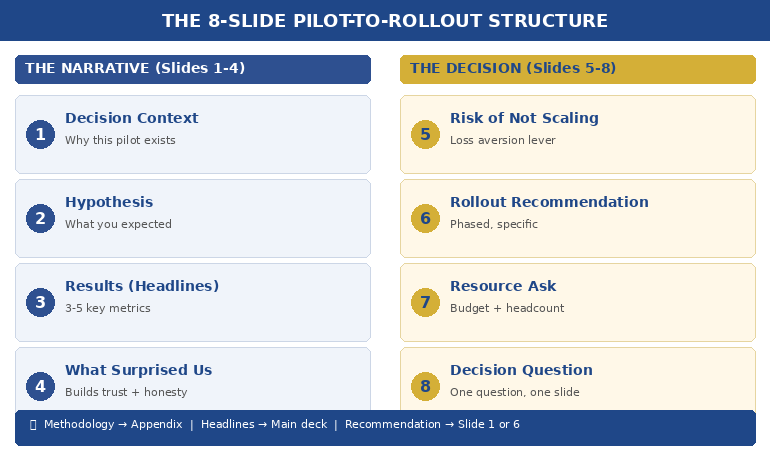
Quick answer: Most pilot programs that deliver strong results still fail to get full rollout approval — because the presentation focuses on what happened instead of what should happen next. The winning pilot results presentation follows an 8-slide structure: context, hypothesis, results, what surprised us, risk if we don’t scale, rollout recommendation, resource ask, and decision question. Lead with the recommendation. Prove it with the pilot. Make the decision easy.

My client’s pilot saved £1.2 million in twelve weeks.

The data was clean. The operations team loved it. The finance team had validated the numbers independently. By any rational measure, full rollout was the obvious next step.

She walked into the executive committee meeting with 34 slides. Fourteen of them were methodology. Eight were charts showing week-by-week performance. Four were appendix slides about the control group. She buried the recommendation on slide 29.

The CFO interrupted on slide 11. “What are you asking us to do?”

She stumbled. Started explaining the statistical model again. The CEO checked his phone. The meeting ran out of time before she reached the ask. They scheduled a follow-up — which took six weeks to land in diaries. By then, the pilot momentum was gone. A competitor launched a similar initiative. The rollout was approved eventually, but at half the budget she’d originally needed.

I’ve watched this pattern destroy pilot programs at JPMorgan Chase, Royal Bank of Scotland, and Commerzbank. The pilot works. The presentation doesn’t. Not because the data is weak — but because the structure treats executives like scientists instead of decision-makers.

Why Most Pilot Results Presentations Fail

The problem is structural, not intellectual. People who run successful pilots are usually rigorous thinkers. They’ve spent weeks or months collecting data, managing variables, documenting outcomes. When it’s time to present, they default to the format that feels most comfortable: the research report.

Executives don’t want a research report. They want three things answered in the first 90 seconds: What did you find? What do you recommend? What do you need from me?

The most common mistakes I see in pilot results presentations:

Leading with methodology. You spent months on the pilot design. Nobody in the room cares about your control group methodology unless they specifically ask. Start with what happened, not how you measured it.

Drowning in data. Every data point you collected feels important to you. Executives need three to five proof points, not thirty. The question isn’t “how much data do I have?” but “what’s the minimum evidence required for this decision?”

Burying the recommendation. If your recommendation appears after slide 15, you’ve already lost. The decision-maker is silently asking “where is this going?” from the moment you start speaking. Tell them immediately. Then prove it.

Ignoring the “what if we don’t” question. Every approval decision involves two risks: the risk of scaling and the risk of not scaling. Most presenters only address the first. The second is often more powerful — because executives are more motivated by what they might lose than what they might gain.

PAA: How do you present pilot results to executives?
Lead with your recommendation, not your data. Use the 8-slide structure: context (why we piloted), hypothesis (what we expected), results (what happened), surprises (what we didn’t expect), risk of inaction (what happens if we don’t scale), recommendation (what to do next), resource ask (what you need), and decision question (the specific yes/no). Keep methodology in the appendix for anyone who asks.

Your Pilot Delivered Results. Your Slides Need to Deliver a Decision.

The Executive Slide System gives you the exact slide structures, sequencing, and layouts that senior leaders expect — including decision decks, recommendation frameworks, and executive summary formats. Stop rebuilding from scratch every time you need approval.

Get the Executive Slide System → £39

Built from 24 years in corporate banking + 15 years training executives. Includes decision deck templates, slide-by-slide guidance, and the recommendation-first structure used in board updates, steering committees, and approval decks.

The 8-Slide Pilot-to-Rollout Structure

After helping executives present pilot results across banking, consulting, and corporate strategy for 24 years, this is the structure that consistently gets decisions — not just compliments.

Slide 1: The Decision Context. One sentence: why this pilot exists and what decision it was designed to inform. “We piloted [X] to determine whether [Y] should be rolled out across [Z].” This isn’t background. It’s a frame. You’re telling the room: you will make a decision today.

Slide 2: The Hypothesis. What you expected to happen. This matters because it shows intellectual honesty. If the results matched your hypothesis, it builds confidence. If they didn’t, it shows you’re presenting truth, not advocacy. Either way, it signals rigour without forcing anyone to sit through your methodology.

Slide 3: The Results (Headline Format). Three to five key metrics, each with a single headline: “Customer processing time: reduced 41% (target was 25%)”“Error rate: down 67%”“Team adoption: 94% within 3 weeks.” No charts yet. Headlines first. Let executives absorb the story before you prove it.

Slide 4: What Surprised Us. This is the slide that builds the most trust. Every pilot produces unexpected findings — things that went better than expected, things that were harder than anticipated, edge cases you hadn’t considered. Presenting them demonstrates that you’re not selling — you’re reporting honestly. Executives fund people they trust, not people who only share good news.

Slide 5: The Risk of Not Scaling. This is the slide most people forget — and it’s often the most persuasive. What happens if the pilot stays a pilot? Competitor implications, cost of delay, team morale impact, missed market window. Frame it as: “If we don’t move to full rollout, here’s what we’re accepting.”

Slide 6: The Rollout Recommendation. Clear, specific, actionable. Not “we recommend scaling” but “we recommend Phase 1 rollout to the Northern region by Q3, followed by full deployment by Q1 next year.” Include the phasing — executives are far more likely to approve a staged rollout than an all-at-once launch.

Slide 7: The Resource Ask. What you need: budget, headcount, timeline, executive sponsorship. Be specific. “£340K over 18 months, 4 additional FTE, and a named executive sponsor from Operations.” Vague asks get vague responses. Specific asks get decisions.

Slide 8: The Decision Question. One question, on one slide, in one sentence. “Do we approve Phase 1 rollout to the Northern region at a cost of £340K, with a go/no-go review at month 6?” This is the slide that forces the room to decide rather than discuss. Without it, you’ll get “let us think about it” — which, in most organisations, means “we’ll forget about this.”


8-slide pilot-to-rollout decision deck structure showing the framework from context through recommendation to decision question

📊 Need the decision deck structure? The Executive Slide System (£39) includes the recommendation-first sequencing and slide-by-slide templates you can adapt to any pilot, any industry.

The Data Executives Actually Need (Not What You Collected)

Here’s a rule I teach every executive I work with: the data that ran the pilot is not the data that sells the rollout.

During the pilot, you tracked everything — daily metrics, edge cases, process variations, team feedback, system performance. That’s operational data. It’s essential for running the pilot. It’s terrible for presenting the results.

Executives need decision data. Decision data answers one question: is the evidence strong enough to commit resources?

The translation works like this:

Operational data: “We processed 1,247 transactions across 14 business days with a 3.2% exception rate, down from 8.7% in the control period, representing a…”
Decision data: “Error rate dropped 63%. At full scale, that’s £2.1M in annual savings.”

Operational data: “User adoption followed a standard S-curve with early adopter engagement at day 3, majority adoption by day 11…”
Decision data: “94% team adoption in 3 weeks. No additional training budget required.”

The operational data goes in your appendix — available if anyone asks. The decision data goes on your slides. If you’re presenting data to non-technical executives, this translation is the single most important skill you can develop.

PAA: What data should you include in a pilot results presentation?
Focus on three to five headline metrics that directly support the scale/kill/pivot decision. Each metric should include: the result, the target (so executives can see if you exceeded or missed), and the business impact at full scale. Keep raw data, methodology, and detailed analysis in appendix slides — available on request but not cluttering the decision narrative.

Stop Translating Data Into Slides From Scratch

The Executive Slide System includes decision deck templates with pre-built layouts for results slides, recommendation slides, and resource ask slides — the exact formats that get pilot programs funded for full rollout.

Get the Executive Slide System → £39

Built from 24 years in corporate banking at JPMorgan Chase, PwC, RBS, and Commerzbank. The same frameworks used in board-level funding presentations and executive approval decks.

How to Present Scale, Kill, or Pivot Honestly

Not every pilot succeeds. And even successful pilots sometimes reveal that the original plan needs adjusting. The best pilot results presentations are honest about all three outcomes — scale, kill, or pivot — because intellectual honesty is what makes executives trust you with larger budgets.

If the recommendation is Scale: Lead with it. Don’t hedge. “The pilot exceeded targets on all three primary metrics. We recommend full rollout.” Then prove it with the data. Hedging a clear success makes executives question whether you’re confident in your own results.

If the recommendation is Kill: This is the presentation that builds the most career credibility, and most people avoid it. Saying “the pilot didn’t work, and here’s why, and here’s what we learned” demonstrates the kind of judgment that gets you trusted with bigger initiatives. Frame it as: “The pilot answered the question it was designed to answer. The answer is no — and here’s what that saves us.” Include the cost avoided by not scaling something that wouldn’t have worked.

If the recommendation is Pivot: This is the most common real-world outcome — and the hardest to present. The pilot partially worked, or it worked differently than expected, or it revealed a better opportunity than the original hypothesis. Structure it as: “The pilot validated [X] but revealed that [Y] is the higher-value opportunity. We recommend pivoting the rollout to focus on [Y], using the pilot learnings as the foundation.”

Whatever the recommendation, the 3-slide decision framework gives executives what they need: a clear recommendation, the evidence behind it, and a specific ask.

📊 Scale, kill, or pivot? The Executive Slide System (£39) includes the recommendation-first slide order for all three scenarios — so you never figure out the structure from scratch.

The Slide Nobody Includes: What Happens If We Don’t Scale

In 24 years of watching executive decisions, the single most persuasive slide I’ve seen in pilot results presentations is the one that answers: what do we lose by doing nothing?

Executives are loss-averse. Behavioural economics research consistently shows that the fear of losing something is approximately twice as motivating as the prospect of gaining something equivalent. This is why “we could save £2M” is less compelling than “we’re currently losing £2M per year by not scaling this.”

Your “risk of inaction” slide should include:

Competitive exposure. If you’ve piloted something that works, how long before competitors figure it out? “Three competitors are piloting similar approaches. First-mover advantage has a 6-month window.”

Cost of delay. Every month you don’t scale is a month of unrealised savings or revenue. Quantify it. “Each quarter of delay costs £520K in continued manual processing.”

Team momentum. Pilot teams lose energy when decisions stall. “The pilot team has been waiting 8 weeks for a decision. Two key team members have been approached by competitors.”

Sunk cost clarity. Not in the psychological fallacy sense — in the practical sense. “We’ve invested £180K in this pilot. Without rollout approval, that investment generates zero ongoing return.”

This isn’t manipulation. It’s giving executives the complete picture. They’re weighing two risks — the risk of acting and the risk of not acting. Most presenters only address the first. The complete picture, honestly presented, is what the approval packet method is designed to deliver.

PAA: How do you convince executives to scale a successful pilot?
Don’t try to convince — present the complete decision picture. Show the pilot results (headline metrics, not raw data), the risk of not scaling (competitor exposure, cost of delay, team attrition), the specific rollout recommendation (phased, with milestones), and the resource ask. Executives fund clarity, not enthusiasm. The strongest persuasion is a well-structured decision deck that makes saying yes easier than saying “let me think about it.”

The Pilot Worked. Don’t Let the Presentation Kill the Rollout.

The Executive Slide System gives you decision deck structures, recommendation-first sequencing, and executive summary formats — designed for the moments when your slides need to secure budget, headcount, and go-ahead. Built from real boardroom experience across banking, consulting, and corporate strategy.

Get the Executive Slide System → £39

Built from 24 years in corporate banking + 15 years training executives. Instant access to slide templates, sequencing guides, and the structures used in board updates, steering committees, and approval decks.

Frequently Asked Questions

How many slides should a pilot results presentation be?

Eight to twelve slides for the main deck, with appendix slides for methodology and detailed data. The 8-slide structure (context, hypothesis, results, surprises, risk of inaction, recommendation, resource ask, decision question) covers everything executives need. If someone wants the detail behind a number, that’s what appendix slides are for — available on request, not forced on everyone.

What if my pilot results are mixed — some metrics hit target and some didn’t?

Present honestly. Mixed results are the most common real-world outcome and executives respect transparency. Structure it as: “The pilot met or exceeded targets on [X, Y] and fell short on [Z]. Our recommendation accounts for this — we’re proposing a modified rollout that focuses on the validated elements while addressing [Z] through [specific adjustment].” Trying to spin mixed results as a clean win destroys credibility faster than the data itself.

Should I present pilot results differently to different audiences?

Yes — but the structure stays the same. For a CFO, lead with the financial metrics and ROI projection. For an operations executive, lead with efficiency and team impact. For a CEO, lead with strategic alignment and competitive positioning. The 8-slide structure accommodates this by adjusting which metrics you headline on Slide 3 and which risk you emphasise on Slide 5. The recommendation and ask stay identical regardless of audience.

How do I handle the “let’s extend the pilot” response?

“Let’s extend the pilot” is usually code for “I’m not confident enough to decide.” Address this directly: “I understand the instinct to gather more data. The risk is that extending the pilot for another quarter costs us [£X] in delayed savings and [competitive risk]. The data we have answers the question the pilot was designed to answer. If there’s a specific metric that would change the decision, I’d like to understand what that is so we can target it.” This reframes extension as a decision — not a default.

📬 The Winning Edge Newsletter

Weekly executive presentation strategies, decision deck frameworks, and career-critical communication insights. No fluff.

Subscribe free →

🎯 Free: Executive Presentation Checklist

The pre-presentation checklist I give every executive before a high-stakes meeting. Covers structure, messaging, audience preparation, and the decision deck essentials.

Download free →

Related: If presenting your pilot results triggers nerves — especially when the stakes are this high — read about why introverted executives often present better than extroverts. The calm, evidence-led delivery style that suits pilot presentations is exactly where introverts have the edge.

Your pilot did the hard work. The data exists. The results speak for themselves — if your slides let them. Use the 8-slide structure. Lead with the recommendation. Include the risk of not scaling. Make the decision question unavoidable.

And if you want the slide templates that make this structure effortless, the Executive Slide System (£39) has you covered.

About the Author

Mary Beth Hazeldine is the Owner & Managing Director of Winning Presentations. With 24 years of corporate banking experience at JPMorgan Chase, PwC, Royal Bank of Scotland, and Commerzbank, she has helped executives present pilot results, business cases, and funding requests in boardrooms across three continents.

A qualified clinical hypnotherapist and NLP practitioner, Mary Beth combines executive communication expertise with evidence-based techniques for managing high-stakes presentations. She has spent 15 years training executives in decision deck structure, stakeholder communication, and confident delivery.

Book a discovery call | View services

06 Feb 2026
Executive presenting monthly business review to engaged leadership team in boardroom

Monthly Business Reviews That Don’t Bore Everyone to Death

The CFO checked his phone 47 seconds into the MBR.

I was sitting three seats away, watching a senior manager present her monthly business review to the leadership team at RBS. She’d prepared for two days. Forty-three slides. Every metric covered.

By slide six, half the room had mentally checked out. The CEO was reading emails. The CFO was scrolling. Only the presenter’s direct manager was still making eye contact — and even she looked pained.

The presentation ran 58 minutes. The decision that needed to happen? Pushed to “next month.”

I’ve sat through hundreds of monthly business reviews across JPMorgan Chase, PwC, RBS, and Commerzbank. The pattern is almost universal: too many slides, too much data, too little clarity on what anyone is supposed to do with the information.

Here’s what I learned about the MBRs that actually work — the ones that finish in 20 minutes and leave with decisions, not deferrals.

Quick answer: The monthly business reviews that get decisions instead of glazed eyes follow a simple structure: one slide of “what happened,” one slide of “what it means,” and one slide of “what I need from you.” Everything else is backup. Total presentation time: 20 minutes or less. The rest of the hour is for discussion — which is where decisions actually happen.

Why Most Monthly Business Reviews Fail

The problem with most MBRs isn’t the data. It’s the assumption that leadership wants to review the data with you.

They don’t.

Your CFO has already seen the numbers. Your CEO gets a daily dashboard. The leadership team sitting in your MBR has access to the same systems you do.

What they don’t have is your interpretation. Your judgement. Your recommendation on what to do next.

When you spend 45 minutes walking through metrics they could read themselves, you’re not adding value — you’re wasting their time. And they know it. That’s why they check their phones.

The three mistakes that kill MBRs:

1. Data recitation instead of insight delivery. “Revenue was £4.2M against a target of £4.5M” tells them nothing they couldn’t read. “We missed target because two enterprise deals slipped to next month — here’s what we’re doing about it” tells them something useful.

2. Comprehensive coverage instead of selective focus. You don’t need to mention every metric. You need to mention the three that matter this month and the one that needs their attention.

3. No clear ask. If your MBR doesn’t end with a specific request — a decision, a resource, an approval — then it was a status update dressed as a meeting. Status updates belong in emails.

The 20-Minute MBR Format

The format that works takes exactly 20 minutes to present. Not 45. Not 60. Twenty.

Why 20 minutes? Because attention spans in executive meetings max out around 18-22 minutes before declining sharply. And because the discussion is where value gets created — not the presentation itself.

If you’re presenting for 45 minutes in a 60-minute meeting, you’ve left 15 minutes for discussion. That’s not enough time to make decisions. It’s barely enough time for clarifying questions.

Flip it. Present for 20. Discuss for 40. Decide before the hour ends.

The executives I’ve trained who’ve adopted this format report the same thing: their MBRs went from “endurance tests” to “the meeting people actually want to attend.”

The Executive Slide System includes the exact 20-minute MBR structure with slide-by-slide guidance — designed for executives who need to present monthly updates that drive decisions.

The Three Sections That Matter

Every effective MBR has three sections. Only three. Everything else is appendix material that stays hidden unless someone asks for it.

The MBR Clarity Framework showing the three-section structure for monthly business reviews

Section 1: What Happened (5 minutes, 2-3 slides)

This is your executive summary — not your data dump. Cover:

The headline: One sentence that captures the month. “We hit 94% of target with two major wins and one significant miss.”

The three metrics that matter: Not all metrics. The three that leadership cares about this month. These might change month to month based on strategic priorities.

The surprise: What happened that wasn’t expected? Good or bad, this is what they actually want to know. If nothing surprised you, say so — that’s useful information too.

Section 2: What It Means (5 minutes, 2-3 slides)

This is where you add value. Anyone can report numbers. You can interpret them.

The pattern: What does this month tell you when combined with the previous two or three months? Are you seeing a trend or an anomaly?

The implication: If this continues, what happens? If the trend holds, where are you in six months? This is the “so what” that turns data into insight.

The risk or opportunity: Based on what you’re seeing, what should leadership be aware of? What might need their attention before next month?

Section 3: What I Need (5 minutes, 1-2 slides)

This is the section most MBRs skip entirely — and it’s the only section that actually requires a meeting.

The decision: What specific decision do you need from this group? Be precise. “I need approval to reallocate £50K from Q2 marketing to Q1 sales enablement.”

The options: If there are choices, present them clearly. Two or three options maximum, with your recommendation highlighted.

The timeline: When do you need this decision by? What happens if it’s delayed?

Build MBRs That Get Decisions

The Executive Slide System includes the complete 20-minute MBR structure, plus templates for executive summaries, decision slides, and the backup appendix format that keeps detail available without cluttering your core presentation.

Get the Executive Slide System → £39

Built for MBRs, QBRs, and decision meetings where time is tight.

What to Cut (And Why Leadership Will Thank You)

If you’re currently presenting 40+ slides in your MBR, you’re probably including things that don’t belong in the room. Here’s what to move to the appendix — or cut entirely:

Detailed breakdowns by segment/region/product. Unless there’s a specific story in one segment, this is appendix material. Put it on slide 47 in case someone asks. They usually won’t.

Month-over-month comparisons for every metric. Choose the three metrics that matter. The rest is noise.

Process updates. “We implemented a new CRM” is not MBR content unless it affected the numbers. Save it for the team meeting.

Future plans without decision requirements. If you’re sharing plans that don’t need approval or input, send an email. Meetings are for decisions.

Anything that prompts “we’ll discuss offline.” If it consistently gets deferred, it doesn’t belong in the MBR. Find another forum.

I worked with a client at a fintech company whose MBRs had ballooned to 67 slides. We cut it to 12. The feedback from his CEO: “Finally, an MBR I can actually use.”

The Decision Slide That Changes Everything

The single most important slide in your MBR is the one most people don’t include: the decision slide.

This slide appears at the end of Section 3. It contains exactly four elements:

1. The decision statement. One sentence describing what you need decided. “Approve reallocation of £50K from Q2 marketing to Q1 sales enablement.”

2. The recommendation. Your professional opinion on what they should decide. “I recommend approval based on pipeline analysis showing 3:1 ROI potential.”

3. The options. If relevant, the alternatives they could choose instead. Keep it to two or three.

4. The impact of delay. What happens if this decision doesn’t get made today? “Each week of delay costs approximately £12K in missed pipeline conversion.”

When you put a decision slide in front of executives, something shifts. The meeting has a purpose. There’s something to do, not just something to hear.

For more on structuring slides that drive action, see my guide on writing executive summary slides that actually get read.

Stop Presenting. Start Deciding.

The Executive Slide System gives you the exact structure for MBRs, QBRs, and executive updates that finish with decisions instead of deferrals. Includes the decision slide template, the 20-minute format guide, and the appendix structure that keeps detail available without cluttering your presentation.

Get the Executive Slide System → £39

The Backup Appendix Strategy

Everything you cut doesn’t disappear. It goes to the appendix — slides 15-50 that you never present but always have ready.

The appendix serves two purposes:

Credibility insurance. When someone asks “what about the APAC breakdown?” you can jump to slide 34 and show them. This proves you’ve done the work without forcing everyone to sit through it.

Follow-up material. After the meeting, you can send specific appendix slides to people who want deeper detail. “As discussed, here’s the segment breakdown from slide 38.”

The key is keeping appendix slides out of your main flow. They exist. They’re available. But they’re not part of your 20-minute presentation unless someone explicitly requests them.

This structure — 12-15 presentation slides plus 30-40 appendix slides — gives you comprehensive coverage without comprehensive boredom.

Need a similar structure for quarterly reviews? The Executive Slide System includes templates for both MBRs and QBRs, designed to work together so your reporting cadence stays consistent.

Real Example: The 67-Slide MBR That Became 12

A director at a professional services firm came to me after his CEO told him — in front of the leadership team — that his MBRs were “impossible to follow.”

His current deck: 67 slides. Every metric. Every segment. Every variance explanation. Comprehensive, thorough, and completely ineffective.

We rebuilt it using the three-section structure:

Section 1 (What Happened): 3 slides. Revenue summary, the three KPIs his CEO actually tracked, and the one surprise from the month (a major client requesting expanded scope).

Section 2 (What It Means): 4 slides. The trend line showing three consecutive months of scope expansion requests, the margin implication of saying yes without rate adjustment, and the competitive intelligence suggesting this was an industry-wide shift.

Section 3 (What I Need): 3 slides. A decision on whether to implement a scope change protocol, two options for how to handle pricing, and a recommendation with supporting rationale.

Appendix: 45 slides of detailed breakdowns, available if requested.

The CEO’s feedback after the first 12-slide MBR: “That’s the first time I’ve understood what’s actually happening in your division.”

For more on project and status update structures, see my guide on project status updates that don’t waste everyone’s time.

Transform Your Monthly Business Reviews

The Executive Slide System gives you the complete structure for MBRs that get decisions instead of deferrals. Includes the 20-minute format, the three-section framework, decision slide templates, and the appendix strategy that keeps detail available without cluttering your core presentation.

Get the Executive Slide System → £39

Instant download. Start using it in your next MBR.

Frequently Asked Questions

What if my leadership team expects comprehensive MBRs?

They expect comprehensive coverage, not comprehensive presentation. The appendix strategy gives you both: a focused 20-minute presentation with 40+ slides of backup detail available on request. When you make this shift, frame it as “respecting their time” — which it is. Most leaders will thank you for cutting the presentation and leaving more time for discussion.

How do I handle it when someone asks about something I cut?

This is exactly what the appendix is for. When someone asks about APAC performance, you say “I have that detail — let me pull it up” and jump to the relevant appendix slide. You look prepared and responsive without having forced everyone to sit through slides they didn’t need. Over time, you’ll learn which appendix slides get requested and can consider promoting them to the main deck.

What if I genuinely have no decisions needed this month?

Then your MBR should be an email, not a meeting. If there’s nothing to decide, discuss, or escalate, send a written summary and give everyone an hour back. The exception is if your organisation requires MBRs regardless — in which case, use Section 3 to ask for input or feedback rather than a decision. “I’d like your perspective on whether this trend concerns you” still creates discussion value.

How do I transition from 60-minute MBRs to 20-minute ones?

Don’t announce it — just do it. Build your new 12-slide deck, present it in 20 minutes, and then say “I’ve left the remaining time for discussion and questions.” If anyone asks about missing content, show them the appendix. Within two or three months, no one will remember the old format — they’ll just appreciate that your meetings are now useful.

Your Next Step

Your next MBR is coming. You have a choice: deliver another 45-minute data recitation that ends with “we’ll discuss next month” — or build a 20-minute presentation that ends with a decision.

The structure isn’t complicated. Three sections. Twelve slides. One decision slide that changes everything.

If you want the templates and slide-by-slide guidance, the Executive Slide System gives you exactly that. But even without it, you can start tomorrow: cut your deck to 12 slides, add a decision slide, and watch what happens when you give leadership 40 minutes to discuss instead of 15.

They might actually make a decision.

📧 Get the Winning Edge Newsletter

Weekly insights on executive presentations, high-stakes communication, and the psychology of influence — from 24 years in banking boardrooms.

Subscribe free →

🎁 Free Resource: Executive Presentation Checklist

A quick-reference checklist for any executive presentation — MBRs, QBRs, board updates, or stakeholder meetings.

Download free →

Related reading: If presenting to senior leadership triggers anxiety that gets worse as you get more senior, you’re not alone. Read Performance Anxiety at 45: Why It Gets Worse With Seniority for the neuroscience behind this phenomenon and what actually helps.

About the Author

Mary Beth Hazeldine is the Owner & Managing Director of Winning Presentations. With 24 years of corporate banking experience at JPMorgan Chase, PwC, Royal Bank of Scotland, and Commerzbank, she has delivered high-stakes presentations in boardrooms across three continents.

A qualified clinical hypnotherapist and NLP practitioner, Mary Beth combines executive communication expertise with evidence-based techniques for managing presentation anxiety. She specialises in helping senior professionals transform complex information into clear, decision-focused presentations.

23 Jan 2026
Executive presenting with composed confidence after a project failure, demonstrating the ownership and forward-focus that rebuilds credibility

Presenting After Failure? The 3 Words That Saved a VP’s Career

The £2.1 million product launch had flopped. Now Marcus had to present to the same executives who’d approved the budget.

Quick answer: Presenting after failure requires a fundamentally different approach than normal presentations. The instinct is to defend, explain, or minimise—all of which destroy credibility further. The 3 words that work: “Here’s what’s next.” This reframe shifts the room from judgement mode to problem-solving mode, and it only works when paired with a specific slide structure that demonstrates you’ve already done the hard thinking.

In practice, presenting after failure means leading with accountability, pivoting quickly to forward action, and providing a concrete recovery framework—so executives see a leader taking ownership, not someone making excuses.

Last updated: January 2026 — Updated for 2026 with executive recovery slide examples + decision scripts that rebuild credibility fast.

📅 Presenting about a failure in the next 7 days? Do this now:

  1. Open with ownership (15 seconds max on what went wrong—no excuses)
  2. State “Here’s what’s next” before slide 2
  3. Present your recovery framework with specific actions and timelines
  4. Close with the decision you need—don’t leave it open-ended

This structure works because it demonstrates leadership, not defensiveness. Executives respect ownership + action far more than perfect outcomes.

I’ve coached executives through dozens of these moments—the failed product launches, the missed targets, the projects that went sideways. The ones who recovered their credibility all did something counterintuitive.

They stopped trying to explain what happened. And they started showing what happens next.

If you’re facing a presentation where you have to own a failure, this article gives you the exact structure that rebuilds trust instead of destroying it.

Why Your Instincts Are Wrong After a Failure

When a project fails, your brain goes into threat-response mode. You want to explain. Justify. Provide context. Show that it wasn’t entirely your fault.

Every one of these instincts will make things worse.

I see this pattern constantly: executives walk into failure presentations with 15 slides of explanation—market conditions, vendor issues, timeline pressures, resource constraints. They think they’re providing context. The room sees someone who can’t take ownership.

Marcus—the VP with the £2.1 million flop—made this mistake in his first attempt. His presentation opened with three slides explaining why the launch failed: competitor timing, supply chain issues, marketing budget cuts.

The CFO stopped him on slide four. “I don’t need a post-mortem. I need to know what you’re going to do about it.”

That’s when Marcus called me. And that’s when we rebuilt his presentation from scratch.

The problem wasn’t that his explanations were wrong. The problem was that presenting after failure requires a completely different psychological contract with your audience.

Executives don’t want to understand why something failed. They want to know you’ve already figured out the path forward.

The 3 Words That Change Everything

Here’s what we put on Marcus’s second slide, right after a single sentence acknowledging the failure:

“Here’s what’s next.”

Three words. That’s it.

These words work because they accomplish three things simultaneously:

  1. They signal ownership. You’re not asking permission to move forward. You’re already there.
  2. They shift the room’s mindset. Executives go from judgement mode to evaluation mode—assessing your plan rather than your past.
  3. They demonstrate leadership. Leaders don’t dwell. They act.

A product director named Jennifer used this exact phrase after a feature launch that alienated key customers. “The moment I said ‘here’s what’s next,’ I could feel the room relax,” she told me. “They weren’t there to punish me. They were there to solve a problem. I just had to show them I was already solving it.”

But these three words only work if what comes next is actually compelling. That’s where the slide structure matters.

Diagram showing why fighting the sweat response makes it worse - the sympathetic vs parasympathetic nervous system during presentations

⭐ The Slide Structure That Rebuilds Credibility

Executive Slide System includes the exact frameworks for high-stakes presentations—including recovery presentations after failures, setbacks, and missed targets.

What’s inside:

  • 5-slide recovery structure (ownership → action → decision)
  • Executive-tested slide templates
  • Before/after examples from real presentations

Get the Executive Slide System → £39

Built from 24 years in corporate banking + 15 years coaching executives through high-stakes boardroom moments.

Instant download • Use it today • Keep forever

📦 What You Get (Specifically):

  • 12 executive slide frameworks — including recovery presentations, bad news delivery, and credibility rebuilding
  • Before/after transformations — see exactly how to restructure failing presentations
  • The 60-second slide test — know instantly if your slides will land or bomb
  • Headline formulas — turn forgettable slide titles into executive attention-grabbers
  • Decision slide templates — get faster approvals with the right structure

The 5-Slide Structure for Recovery Presentations

After working with Marcus and dozens of other executives in similar situations, I’ve refined the structure that works for presenting after failure:

Slide 1: The Ownership Slide (30 seconds max)

One sentence stating what happened. No explanations. No context. No defensive qualifiers.

Marcus’s slide read: “The Q3 product launch missed revenue targets by 67%. I own that outcome.”

That’s it. Sixteen words. The instinct is to add more—but more words signal defensiveness, not leadership.

Slide 2: “Here’s What’s Next” (The Pivot)

Immediately pivot to forward action. This slide should contain your recovery thesis in one sentence, followed by the 3 words: “Here’s what’s next.”

Marcus wrote: “We’ve identified the three fixable issues and built a 90-day recovery plan. Here’s what’s next.”

Slide 3: The Recovery Framework

Show your thinking, not just your conclusions. Executives want to see that you’ve done the analysis. Use a simple framework—I recommend three columns: Issue, Root Cause, 30-Day Action.

This slide proves you’ve moved past blame and into solutions.

Slide 4: Timeline + Milestones

Specific dates. Specific metrics. Specific accountability.

Vague timelines (“over the coming months”) destroy credibility. Specific timelines (“Phase 1 complete by February 15, measured by X metric”) rebuild it.

Slide 5: The Decision Slide

End with what you need from them. Don’t leave it open. “I need approval to reallocate £400K from Q4 budget to fund the recovery plan. Can I have that today?”

This structure works because it demonstrates exactly what executives want to see: ownership, forward thinking, concrete planning, and decisive action.

For more on structuring executive-level presentations, see the executive presentation structure that gets buy-in.

Need the complete recovery presentation framework? Executive Slide System includes the full 5-slide structure plus templates for every high-stakes scenario. Get the Framework → £39

Instant download • Use it today • Keep forever

What NOT to Do (I’ve Seen Careers End This Way)

Before we go further, let me tell you about Sarah—a director who did everything wrong.

Her project had gone 40% over budget. Instead of the ownership + action structure, she opened with seven slides of explanation: scope creep, vendor delays, team turnover, unclear requirements from stakeholders.

Each slide was technically accurate. And each slide made things worse.

By slide five, the CEO interrupted: “Sarah, I’m hearing a lot of reasons why this isn’t your fault. What I’m not hearing is what you’re going to do about it.”

She didn’t have a good answer. She’d spent all her preparation time building the defence case instead of the recovery case.

She was moved to a different role within three months.

Here’s what to avoid when presenting after failure:

  • Don’t open with explanations. Even accurate ones signal defensiveness.
  • Don’t distribute blame. “The vendor failed to deliver” might be true—but it’s not leadership.
  • Don’t minimise. “It wasn’t as bad as it looks” insults your audience’s intelligence.
  • Don’t ask for sympathy. “It’s been a really difficult quarter” is irrelevant to executives.
  • Don’t leave the path forward vague. “We’re working on solutions” means you haven’t done the work yet.

The common thread: every one of these mistakes focuses on the past or on yourself. Recovery presentations must focus on the future and on the business.

Related: See the complete guide to presenting bad news without destroying your credibility.

The pre-presentation protocol timeline showing when to do each nervous system technique before presenting

⭐ Turn Your Next Difficult Presentation Into a Career Win

The executives who recover from failures aren’t luckier—they have better frameworks. Executive Slide System gives you the structures that transform difficult moments into leadership demonstrations.

Frameworks included:

  • Recovery presentation structure (5 slides)
  • Bad news delivery framework
  • Budget request structure (even after overruns)

Get the Executive Slide System → £39

Same frameworks I used with Marcus. His recovery presentation got the budget approved—and a promotion six months later.

Instant download • Use it today • Keep forever

How to Rebuild Credibility Over Time

The presentation is just the first step. Rebuilding credibility after a failure is a multi-month process that requires consistent follow-through.

Here’s what I coach executives to do in the 90 days after a recovery presentation:

Week 1-2: Over-communicate on Progress

Send brief weekly updates to the key stakeholders who were in that room. One paragraph, three bullet points: what you said you’d do, what you did, what’s next.

This seems excessive. It’s not. After a failure, silence breeds doubt. Proactive communication rebuilds trust.

Month 1: Hit Your First Milestone Publicly

Whatever you committed to in that recovery presentation, deliver the first milestone early if possible. Then make sure the right people know about it.

A VP of operations named James told me this was the turning point in his recovery: “I said I’d have the vendor situation resolved in 30 days. I got it done in 21 and sent a one-line email to the CEO. He replied with two words: ‘Well done.’ That was the moment I knew I was back.”

Month 2-3: Reference the Learning

In subsequent presentations, briefly reference what you learned from the failure. Not defensively—as a demonstration of growth.

“After Q3, we rebuilt our vendor assessment process. Here’s how that’s improved our Q4 planning…” shows you’ve extracted value from the setback.

If you’re nervous about these follow-up presentations, the physical symptoms are real. See how to stay composed when presenting under pressure—today’s partner article on managing the physical side of high-stakes moments.

Want every executive presentation framework in one place? Executive Slide System covers recovery presentations, board updates, budget requests, and more—all using the same psychology-backed structure. See All Frameworks → £39

Instant download • Use it today • Keep forever

Presenting After Failure: Common Questions

How do you present after a project failure?

Presenting after failure requires leading with brief ownership (one sentence, no excuses), pivoting immediately to “here’s what’s next,” presenting a concrete recovery framework with timelines and accountability, and closing with a specific decision request. The structure that works: Slide 1 (ownership), Slide 2 (pivot), Slide 3 (recovery framework), Slide 4 (timeline), Slide 5 (decision). Avoid explanations, blame distribution, and vague forward plans.

What do you say after a failed presentation or project?

The three words that work: “Here’s what’s next.” This phrase signals ownership, shifts the room from judgement to problem-solving, and demonstrates leadership. Follow immediately with your concrete recovery plan. Avoid phrases like “it wasn’t as bad as it looks,” “the circumstances were difficult,” or anything that distributes blame to others.

How do you rebuild credibility after a failure at work?

Rebuilding credibility after failure is a 90-day process: deliver your recovery presentation with the ownership + action structure, over-communicate progress weekly for the first month, hit your first milestone early and publicly, then reference the learning in future presentations. Consistency matters more than any single moment—executives watch whether you follow through on what you committed to.

Is This Framework Right For You?

✓ This is for you if:

  • You’re facing a presentation about a failed project, missed target, or setback
  • You need to rebuild credibility with executives or stakeholders
  • You want a proven structure (not generic advice)
  • You’re willing to lead with ownership, not explanations

✗ This is NOT for you if:

  • You want templates for routine presentations (this is for high-stakes moments)
  • You’re looking for ways to avoid accountability
  • You need legal or HR advice about a workplace situation
  • The failure involves ethical violations (different playbook required)

⭐ The Framework Marcus Used to Save His Career

After his £2.1M launch flopped, Marcus used the Executive Slide System to rebuild his recovery presentation. He got the budget approved—and was promoted six months later. The same frameworks are inside.

What you’ll use immediately:

  • 5-slide recovery structure
  • Ownership slide template
  • Recovery framework format

Get the Executive Slide System → £39

Built from 24 years in corporate banking. Tested across 200+ executive recovery presentations.

Instant download • Use it today • Keep forever

FAQ

Should I apologise when presenting after a failure?

Brief ownership is essential; extended apology is counterproductive. “I own that outcome” works. “I’m so sorry this happened and I want to apologise to everyone affected” takes too long and puts the focus on emotion rather than action. Executives want to see you’ve moved past the failure mentally—prolonged apology suggests you haven’t.

How long should I spend explaining what went wrong?

30 seconds maximum. One slide, one sentence stating what happened. The explanation instinct is strong, but every minute spent on the past is a minute not spent on the future. If executives want more context, they’ll ask—and then you can provide it. But most won’t. They care about the path forward.

What if the failure wasn’t entirely my fault?

It doesn’t matter for the presentation. Distributing blame—even accurately—makes you look weak. Take ownership of the outcome regardless of contributing factors. You can address process improvements (including vendor management or cross-functional coordination) in your recovery framework without pointing fingers. Leaders own outcomes; managers explain circumstances.

Can this structure work for team failures, not just individual ones?

Yes—and it’s even more important. When presenting on behalf of a team, you must own the outcome personally. “We failed” is weaker than “I led a team that didn’t deliver, and I’m accountable for that.” Then pivot to “here’s what’s next” and show the team’s recovery plan. Your willingness to take personal ownership for a team outcome is exactly what executives want to see from leaders.

📧 The Winning Edge Newsletter

Weekly frameworks for executive presentations, high-stakes communication, and the psychology of leadership presence. For senior professionals who present to boards, executives, and stakeholders.

Subscribe Free →

Your Next Step

If you’re presenting after failure, you’re facing one of the highest-stakes moments in your career. The good news: it’s also an opportunity.

The executives who handle these moments well—with ownership, forward focus, and concrete action plans—often emerge with more credibility than they had before. Failure handled well demonstrates leadership more clearly than success that came easily.

Remember: ownership (one slide), “here’s what’s next” (the pivot), recovery framework (show your thinking), timeline (specific dates), decision (what you need).

For the complete framework with templates and examples, get the Executive Slide System → £39.

About the Author

Mary Beth Hazeldine is the founder of Winning Presentations and creator of the Executive Slide System. She’s coached 200+ executives through recovery presentations after project failures, budget overruns, and missed targets—including Marcus, whose story opened this article.

With 24 years of corporate experience at JPMorgan Chase, PwC, Royal Bank of Scotland, and Commerzbank, she’s seen firsthand how the right presentation structure can rebuild—or destroy—executive credibility.

Book a discovery call | View services