Tag: executive slide design

28 May 2026
The £10M Decision Slide: What Must Be On It (And What Must Be Off)

The £10M Decision Slide: What Must Be On It (And What Must Be Off)

Quick answer: A high-stakes decision slide for a £10M-or-equivalent recommendation needs five elements: the recommendation in one sentence, the financial envelope, the option set considered, the principal risks named, and the explicit decision being requested. It needs to omit: build-up narrative, methodology paragraphs, multiple competing recommendations, and any chart that requires more than five seconds to read. The slide is the audience’s reference point throughout discussion — not a place to argue your case.

Astrid was presenting a £14m capital request to the executive committee of a UK insurance group. The deck was 23 slides. The recommendation slide — the one the committee would actually look at while voting — was slide 19. It had the recommendation, three options, four risk categories, two charts, a benefits summary, and a footnote about a regulatory deadline. Twelve distinct things competing for attention. The committee chair stopped her on slide 6 and asked: “Astrid, can you put up the recommendation slide?” She clicked through. The chair looked at it for eleven seconds, said “I cannot tell what you are asking us to approve from this slide”, and the meeting moved on without a decision.

This is the most expensive slide-design failure in senior-level presenting. Not because the underlying analysis was weak — Astrid’s was excellent. But because the slide that the committee was using to anchor the decision was unreadable in the time it had to be read. A board does not study slides. It glances. The recommendation slide either lands in five seconds or it does not land at all.

What follows is the structural template senior boards consistently respond to, drawn from decks that have earned approval at C-suite and board level across financial services, insurance, and consulting. It is deliberately spartan. The point is not aesthetic minimalism. The point is that the audience must be able to look at one slide and understand exactly what is being asked of them.

If you want a structured slide framework, not a checklist:

The Executive Slide System gives you 26 templates including the recommendation slide structure used at board level — the one designed to be readable in five seconds.

Explore the Executive Slide System →

Why the decision lives on one slide

Senior decision-makers do not read your deck the way you wrote it. They scan the appendix during pre-read, focus on three or four key slides during the meeting, and use one specific slide as their reference point when the discussion turns to the actual vote. That slide is the recommendation slide. It is the only slide they will look at twice. It is the slide they will photograph on their phone as they leave the room.

If the recommendation slide is busy, multi-layered, or requires explanation, three things happen. The discussion drifts to peripheral details because no one is sure what the central decision is. Senior members defer to whoever speaks loudest because they cannot anchor on the document. And the decision either stalls — “let us take this offline” — or gets approved with caveats that effectively rewrite your recommendation in the room.

The single-slide constraint is not a stylistic choice. It is a recognition that senior audiences have ten or twenty other decisions in the same meeting, that they have read the pre-read in the back of a car or between calls, and that the recommendation slide is the one piece of your work that has to stand alone. Treat it accordingly.

The five elements that must be on it

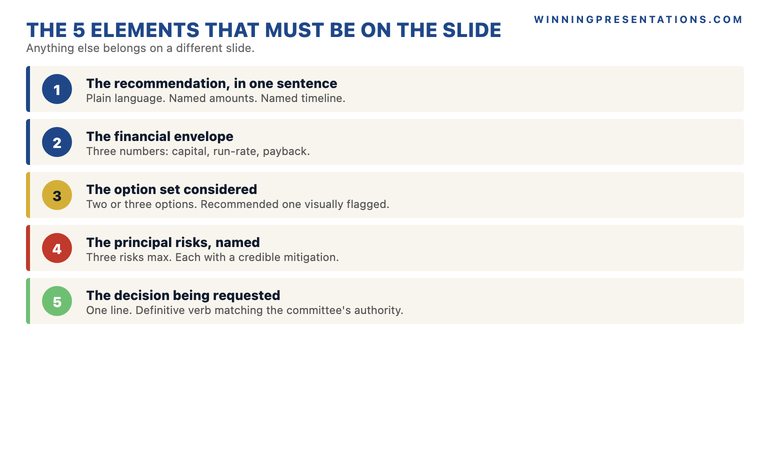
The five elements below are non-negotiable. They are also exhaustive — anything beyond them belongs on a different slide.

The Five Elements of a Decision Slide infographic showing: 1) The Recommendation in one sentence, 2) The Financial Envelope (capital, run-rate, payback), 3) The Option Set considered, 4) The Principal Risks named, 5) The Decision Requested — laid out as a 5-card vertical stack with numbered badges.

1. The recommendation, in one sentence. Not a paragraph, not bullets, one sentence. “We recommend the committee approves £14m of capital expenditure across two years to migrate platform X to cloud architecture Y, completing by Q3 2027.” Plain language, named amounts, named timeline. The sentence has to be readable as a sentence — not as a fragment that requires the slide title to make sense.

2. The financial envelope. Three numbers on a single line: total capital request, annual run-rate impact, payback or break-even point. If the recommendation is non-financial in nature, replace these with the equivalent magnitude metrics — headcount, customer impact, regulatory deadline. The point is to size the decision instantly.

3. The option set considered. Two or three options in a single horizontal row, with the recommended option visually flagged. Each option gets one line. “Option A: Build (rejected — 14-month build, regulatory risk). Option B: Buy (rejected — vendor dependency). Option C: Migrate (recommended — proven architecture, 9-month delivery).” The point is to show the committee that alternatives were considered seriously, not to argue the case for them again.

4. The principal risks, named. Three risks maximum, each in five to seven words, with the mitigation in five to seven more. Senior committees never approve recommendations that pretend there are no risks. They approve recommendations where the risks are named honestly and the mitigations are credible. Hiding the risks — or burying them in slide 22 — signals that the presenter is selling rather than recommending.

5. The explicit decision requested. One line at the bottom of the slide, in language matching the committee’s actual decision authority. “Approve £14m capital allocation as set out, conditional on Q4 2026 board review of vendor selection.” Not “consider”, not “discuss”, not “endorse”. The decision verb has to match the action you need them to take. Vague asks generate vague responses.

What must be off the slide

Equally important — and harder for most presenters to accept — is what does not belong on the recommendation slide. The instinct is to add. The discipline is to subtract.

Stop rebuilding decision slides from scratch every time.

The Executive Slide System gives you 26 templates, 93 AI prompts, and 16 scenario playbooks for board, investment committee, and executive decision presentations. Includes the recommendation slide template used in real C-suite decks. £39, instant access.

  • 26 executive slide templates including the recommendation, options, and risk slides
  • 93 AI prompts to draft slide content quickly without sounding generic
  • 16 scenario playbooks covering board, CFO, investor, and quarterly review formats
  • 7 checklists covering pre-presentation review, slide audit, and Q&A preparation
  • 8-slide QBR Deep Dive template with 8 dedicated AI prompts

Get the Executive Slide System — £39 →

Designed for senior professionals presenting decisions at board and committee level.

Build-up narrative. The story of how you arrived at the recommendation belongs on slides one through eighteen. The recommendation slide is not a recap. If your slide title is “In summary…” or “Bringing it together…” you have written a closing slide, not a decision slide. Replace it.

Methodology paragraphs. “Following extensive analysis across four workstreams, including consultation with…” — this is signal that the slide is performing rigour rather than enabling decision. The committee assumes you have done the work. They do not need to see the workings on the recommendation slide. Methodology lives in the appendix.

Multiple competing recommendations. If you offer the committee three different recommendations, you have not made a recommendation. You have asked them to do your job. Senior committees almost never split decisions like this — they will pick the one that looks most defensible, or they will defer the decision entirely. Pick one. Defend it. Acknowledge the alternatives in the option set.

Charts that require more than five seconds. If the recommendation slide contains a chart, the chart must communicate one specific point — not be a data visualisation that the audience studies. A waterfall showing the build-up of the £14m? Maybe, if it is large and clean. A scatter plot, a multi-axis line graph, or anything requiring a legend? No. Move it to a supporting slide.

The 8-slide CFO presentation template covers the broader question of how the recommendation slide fits into a tightly structured deck. The principle is the same: the recommendation slide carries the decision; the surrounding slides carry the evidence.

A layout that works

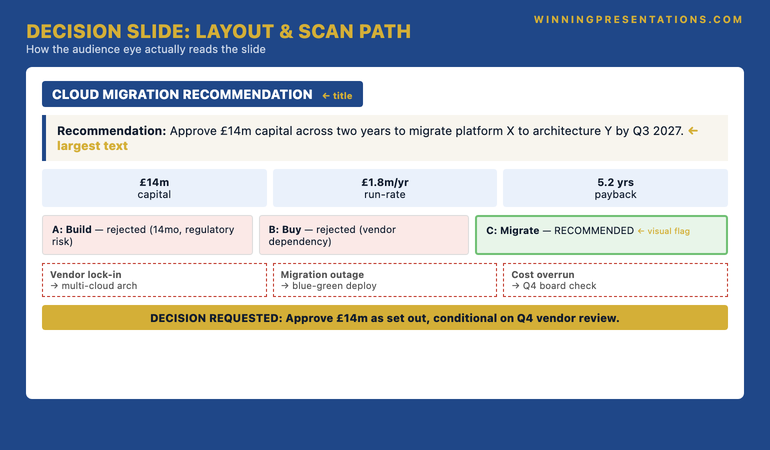
Layout matters because the eye reads in predictable patterns. Senior audiences scan slides in roughly this order: title, top-left, centre, bottom-right. The recommendation slide should be designed for that scan path.

Decision Slide Layout: scan path infographic showing the audience eye flow on a recommendation slide — Title block top, recommendation sentence centre-top, financial envelope strip below, options row mid-slide, risks row lower-mid, decision-requested line bottom — with directional arrows showing reading order at each position.

Title block: Use the slide title to name what is being decided, not to describe what the slide contains. “Cloud Migration Recommendation” works. “Capital Request Summary” does not.

The recommendation sentence: Position it directly under the title in the largest text on the slide — at least 24-28 point. This is the first thing the audience reads after the title. It has to be readable from the back of a board room.

The financial envelope: Three boxed numbers in a horizontal strip below the recommendation. Equal weight. Equal sizing. The eye should register all three in a single glance.

The option set: Three columns or three rows, with the recommended option visually distinguished — typically a thicker border, a colour fill, or a clear “RECOMMENDED” tag. Do not bury the recommendation by giving all three options equal visual weight.

The risks: Three rows directly below the options. Two columns: risk on the left, mitigation on the right. Same length per row. Same alignment. Visual rhythm matters here — a messy risk block reads as messy thinking.

The decision-requested line: A single line at the bottom of the slide, set off visually — boxed, or with a coloured background strip. This is what the committee chair will read aloud when calling for the vote. Make it readable as a complete sentence.

For the broader vocabulary that goes around all of this — the words senior leaders use to signal authority on slides and in the room — see the executive vocabulary that signals seniority.

Common failure patterns

Three patterns appear repeatedly in decision slides that fail to land at senior level.

The “comprehensive” slide. The presenter has tried to put everything on the slide so they “do not have to flip back and forth”. The result is a slide with twelve elements, no visual hierarchy, and no obvious place for the eye to land first. The committee cannot find the recommendation. They ask the presenter to summarise it verbally — which is the moment the slide has failed.

The hidden ask. The presenter has built towards the recommendation across the deck, but the recommendation slide itself uses soft language. “We propose to consider…” or “Subject to further discussion, the team’s view is…”. This is the language of someone hedging. Senior committees read it as such. They will either push back (“if you are not sure, why are we voting?”) or quietly defer the decision. Use definitive language. “We recommend” — not “we propose to consider”.

The single-option presentation. The presenter shows only the recommended option, having decided that alternatives are a distraction. This signals weak analysis. Senior decision-makers expect to see that the team considered other options seriously — not because they want to debate them, but because the existence of the option set demonstrates rigour. A recommendation slide with no options shown is a recommendation slide that looks like advocacy rather than analysis.

For more on the protocol that surrounds the deck itself — including how to compress and rehearse before a high-stakes meeting — see the partner article on the 72-hour protocol senior leaders use.

Frequently asked questions

Does the £10M figure matter, or does this apply to smaller decisions?

The figure is a marker for “high-stakes single-decision presentation” — the principle applies at any value where the audience needs to anchor a single approval on a single slide. Whether the request is £500k or £40m, a board or executive committee needs the same five elements presented the same way. The discipline becomes more important at higher values, not different.

What if the committee wants more detail than five elements allow?

The recommendation slide is not the only slide. Detailed analysis, sensitivity tables, build-up calculations, and risk deep-dives all live on supporting slides or in the appendix. The recommendation slide carries the decision; the other slides carry the evidence. If a committee member wants more, they will ask for the supporting slide — and you will navigate to it without it cluttering the recommendation slide itself.

Should the recommendation slide be the first slide or the last?

It usually appears twice — early in the deck (slide 2 or 3, after the title) as a preview, and again as the closing slide before Q&A. Senior audiences appreciate seeing the recommendation up front so they can read the rest of the deck through that lens. Closing on the same slide reinforces the ask before the discussion starts.

Can the recommendation slide use bullet points?

Yes — but sparingly. Bullets work for the option set and the risk row. They do not work for the recommendation sentence itself, which should read as a single, complete sentence — not a fragmented bullet list. The recommendation is the only sentence on the slide that has to read as written prose.

For the psychology behind senior approval, not just the slide:

The Executive Buy-In Presentation System covers the framework for securing approval at board level — 7 self-paced modules on stakeholder analysis, case construction, and the structures that hold up under scrutiny. £499, lifetime access.

Explore Executive Buy-In Presentation System →

Build the recommendation slide once. Reuse the structure forever.

The Executive Slide System — 26 templates designed for board, committee, and executive decision presentations. £39, instant access. Designed for senior professionals across financial services, healthcare, technology, and government.

Get the Executive Slide System — £39 →

Get The Winning Edge newsletter

A weekly note from Mary Beth on the structure, psychology, and preparation that earns senior approval. One idea, one application, one specific scenario — every Thursday morning.

Subscribe to The Winning Edge →

Not ready for the full system? Start here instead: download the free Executive Presentation Checklist — a single-page reference covering the structural elements every senior decision presentation needs.

Next step: Open your next high-stakes deck. Find your recommendation slide. Apply the five-element test. If anything is missing, add it. If anything else is on the slide, move it.

About the author

Mary Beth Hazeldine is Owner & Managing Director of Winning Presentations Ltd, founded in London in 1990. With 24 years of corporate banking experience at JPMorgan Chase, PwC, Royal Bank of Scotland, and Commerzbank, she advises executives across financial services, healthcare, technology, and government on structuring presentations for high-stakes funding rounds and board approvals.

12 May 2026
Featured image for Slide Template vs Blank Canvas: When Each Saves Your Board Presentation

Slide Template vs Blank Canvas: When Each Saves Your Board Presentation

Quick answer: A slide template saves your board presentation when the structural problem is well-understood and your time is finite — most quarterly updates, capital cases, and steering committee reports. A blank canvas saves your board presentation when the deck has to teach the board a new way of seeing the problem — strategic reframes, novel pitches, sensitive narratives. Choosing the wrong starting point quietly kills decks that should have succeeded.

Damian, a finance director at a mid-sized infrastructure group, walked into a board meeting on a Tuesday with a deck he had built from a downloaded template. Same template he had used for the previous four quarterly updates. Same structure. Same shape of slides. The board approved the recommendation in 22 minutes and moved on.

Two weeks later, he walked into the same room with a new strategic proposal — a fundamental rethink of the group’s allocation between three operating divisions. He had built it from the same template, lightly customised. The board spent 90 minutes pulling the deck apart, asking questions that the structure could not accommodate, and ultimately deferring the decision. Damian was furious with the board’s response. The next morning, sitting with a chair he trusted, he heard the diagnosis: “The template you used is built to update us on what we already know. You were trying to teach us something we did not know yet. The template fought you.”

This is the hidden decision before slide one — and senior presenters who get it right consistently outperform presenters who get it wrong, even when both are working with similar content quality.

If you keep choosing the wrong starting point

The Executive Slide System gives you 26 templates with explicit guidance on which board scenarios each one is designed for — so you stop using a quarterly update template for a strategic reframe deck. Designed for senior professionals presenting to boards, executive committees, and investment panels.

Explore the Executive Slide System →

The hidden decision before slide one

Most senior presenters treat the choice between a template and a blank canvas as a question of style — “I prefer to design my own” or “I do not have time for that, I will use a template.” Both framings miss the point. The choice is structural, not stylistic, and the structure determines what your audience can read from the deck.

A template is a pre-built path through a familiar argument. It assumes the audience already knows the kind of argument they are about to read and just needs the specifics filled in. A board update template assumes the board knows what a board update is. A capital case template assumes the audit committee knows how a capital case is structured. The template’s job is to make those familiar arguments efficient.

A blank canvas is the absence of a path. It forces you to design the path yourself, slide by slide, before you can begin filling it. That work is expensive — but for some decks it is the only way to lead the audience through an argument they have not seen before. When the structure is the work, a template’s pre-built path is not a shortcut; it is a wrong turn.

The hidden decision is: am I making a familiar argument or an unfamiliar one? Get that one diagnosis right and the rest follows. Get it wrong, and even excellent content suffers.

When a template saves the board presentation

A well-chosen template saves your board presentation in four scenarios.

Quarterly performance updates. The board has read dozens of these. They expect a familiar shape: performance against plan, variances explained, outlook, decisions required, risks. A template that follows this shape lets you spend your time on the substance — the variance commentary, the forward forecast, the risk update. Without a template, you waste design time on slides whose structure is solved, and you arrive at the meeting under-prepared on the content that actually matters. The template saves you because it removes work that does not need doing.

Capital approval cases. Investment committees read capital cases in a predictable order: ask, rationale, alternatives, financial case, risks, implementation. A template enforces this discipline and prevents the meandering that under-prepared cases tend toward. Strategy directors who consistently get capital approved are not necessarily better designers — they are better at sticking to the structure investment committees expect, and a template makes that automatic.

Recurring steering committee or working group updates. If you present to the same group every six weeks, a templated update format becomes a feature, not a limitation. The audience can read your deck faster because they know where each piece of information sits. Switching the format every time forces them to re-orient before they can absorb anything. The template saves you, and it saves your audience.

Standard pitch arcs. A typical investor or partnership pitch follows a recognisable arc — problem, solution, market, traction, team, ask. Investors read decks that follow this arc faster, and faster reading typically correlates with more attention spent on the substance. The template does not signal junior; it signals “I respect the time of the people reading this enough to put the information where they expect to find it.”

Template vs Blank Canvas Decision Framework: a side-by-side comparison showing four scenarios where templates save (quarterly updates, capital cases, recurring steerings, standard pitches) and four scenarios where blank canvas saves (strategic reframes, novel pitches, sensitive narratives, novel data structures) — colour-coded navy and gold.

When a template kills the board presentation

A template kills the board presentation when the deck’s job is to lead the audience through unfamiliar territory.

A new strategic reframe. If you are introducing a fundamentally different way of seeing the business — a new operating model, a market repositioning, a divestment thesis — the structure of your argument is the work. The board has not read this argument before; they need a custom path through it. A template will fight you because every template assumes a familiar argument shape. The slides will arrive in the wrong order, the executive summary will summarise the wrong thing, the appendix will not have a place for the evidence that actually matters. Damian’s mistake fits exactly here.

Sensitive narratives. A deck that has to deliver bad news, address a governance failure, or walk the board through a sensitive personnel matter has to be paced unusually. The conventional template — top-line summary, then evidence — sometimes lands wrong when the conclusion needs context to be received fairly. These decks often need a more careful walk-up than templates allow.

One-off bespoke pitches. When you know exactly who is in the room — one specific decision-maker whose objections you can predict — a custom-built deck structured around their specific pattern of resistance often beats a generic pitch arc. The template gives you the average. The custom build gives you the bespoke.

Decks that depend on novel data structures. If the heart of your argument is a single unique chart, a custom matrix, or a comparison that has not been done this way before, the surrounding slides need to be built around that one centrepiece. A template designed for standard finance charts will surround it badly.

When a blank canvas saves the board presentation

The blank canvas saves a board presentation when the structural decisions you need to make are themselves part of the argument.

Building from a blank slide is slow. There is no honest way to make it faster except to skip steps that should not be skipped. So the blank canvas pays off only when the structural work it forces is the work that needed to be done anyway. The strategic reframe is the clearest example. To present a new strategy properly, you have to decide which order the components arrive in, which assumptions are explicit and which are implicit, where the pivot from old framing to new framing happens, and what the board sees in the executive summary versus the body of the deck. None of those decisions can be borrowed from a template. They are the work.

The blank canvas also saves you when the deck has to be unusually short. A template imposes its own slide count — typically 12 to 18 slides for an executive deck. If your situation calls for six slides, a template will fight you toward more. The blank canvas lets you stop where the argument ends. Some of the most effective board decks ever delivered have been six slides long, ended with a single decision request, and would have been ruined by a template that wanted to add five more slides of context.

Match the template to the type of board argument

The Executive Slide System includes 16 scenario playbooks covering the variants — board update vs strategic reframe, capital case vs partnership pitch, hostile committee vs supportive committee. So the template you use matches what the deck has to do.

  • 26 templates covering board updates, capital cases, change proposals, strategy reviews, and pitch arcs
  • 93 AI prompts to customise each template for industry, audience, and argument
  • 16 scenario playbooks including the difficult variants — hostile boards, sceptical CFOs, regulatory pre-reads
  • £39, instant download, lifetime access

Get the Executive Slide System — £39 →

Designed for senior professionals presenting to boards, executive committees, and investment panels.

When a blank canvas kills the board presentation

The blank canvas kills your board presentation in three patterns, and they are easy to recognise once you know to look for them.

Pattern one: time runs out before the deck is finished. You start with the blank canvas because the deck “deserves to be designed properly,” and the structural work takes you twice as long as you planned. By the night before the meeting, you are still on slide 8 of 14 and the executive summary has not been written. You ship a deck that is structurally bespoke but content-thin. The board reads it, finds gaps, and your bespoke design now looks like overconfidence.

Pattern two: the design becomes the procrastination. Designing a slide is satisfying. It feels like progress. It postpones the harder problem of deciding what the slide is actually arguing. Senior presenters who spend three hours on a single slide layout when the recommendation is still ambiguous have used the design work as a hiding place. Templates protect against this because they remove the design choice and force you back to the substance.

Pattern three: the deck does not look senior enough. Designing executive slides from scratch is a craft. Done well, it produces decks that look unmistakeably senior. Done at speed by someone whose primary job is not slide design, it tends to produce decks that look slightly off — fonts at three sizes that are almost the same, alignment that is almost right, charts that are almost legible. A senior audience reads “almost” as “not quite.” A template that has been refined to look senior is a faster path to a deck that lands as senior.

The honest test: when you choose blank canvas, are you doing it because the structural work is genuinely the work this deck needs — or because you do not want to be seen using a template? The first reason justifies the time. The second reason almost never does.

How to diagnose which one this deck needs

Three diagnostic questions, asked before you open PowerPoint or any template, will tell you which starting point this specific deck deserves.

Question one: has my audience read a deck like this before? If yes (quarterly update, capital case, regular steering report), the structure is solved and a template is appropriate. If no (new strategic direction, novel pitch), some structural work is yours to do.

Question two: is the order of the slides obvious before I start, or do I need to design the order itself? If you can sketch the slide titles in correct order on the back of an envelope in two minutes, the structure is solved — use a template. If you are not yet sure which slide should come third versus fifth, the structural design is the work, and a blank canvas (or a customised template you cannibalise) is appropriate.

Question three: how much time do I have between now and the meeting? Be brutally honest. Blank-canvas decks take two to four times as long as templated decks. If you have less than three working days, the blank canvas is rarely a real option, regardless of how much the deck deserves it. Templated, well-edited decks beat half-finished bespoke decks every time. The board reads the finished deck; they do not read your design ambitions.

Three Diagnostic Questions Before Slide One: an editorial-style infographic listing the three questions (familiar argument? sketchable order? real time?) with branching paths leading to either Template (left, green) or Blank Canvas (right, gold) — designed as a decision tree for senior presenters.

Most senior presenters who have done this work for years end up using templates for roughly 70 to 80% of their board decks and blank canvases for the remaining 20 to 30%. The 20 to 30% is concentrated where it earns its time — strategic reframes, novel pitches, sensitive narratives. The 70 to 80% is everywhere the structure has been solved by everyone who came before. Senior judgement is recognising which deck this is.

For senior presenters whose decks need to win board approval, both the starting-point decision and the persuasive structure underneath it matter together. The structural foundations of executive buy-in apply whether you start from a template or a blank slide.

If you want a starting library that already understands which scenarios call for which template, the Executive Slide System (£39) includes 26 templates plus 16 scenario playbooks that map argument types to slide structures — so you stop reaching for the wrong template under deadline pressure.

For the partner discussion on the broader question — when to download a template at all versus build your own — see the related article on executive slide templates in 2026: download vs build from scratch.

A scenario library, not just templates

The Executive Slide System pairs 26 templates with 16 scenario playbooks — so you know which template fits a hostile board pre-read, a capital case for a sceptical CFO, or a regulatory committee update. £39, instant download.

Get the Executive Slide System →

Built for senior professionals across financial services, technology, and consulting.

FAQ

Can I tell from a finished deck whether it started as a template or a blank canvas?

Usually no. A well-customised template should be invisible to the audience, and a blank-canvas deck built well should look as polished as a templated one. The audience reads content, not provenance. The exception is when a template is under-customised (placeholder text left in, generic stock images, mismatched fonts) — those tells signal “templated” because they signal insufficient editing, not because templates are inherently visible.

If I am unsure which approach this deck needs, what is the safer default?

Template, almost always. The blank canvas penalty (running out of time) is more severe than the template penalty (slight constraint on structure). If the deck genuinely needs custom structural work, you can usually identify that within the first 20 minutes of editing the template — at which point you can switch. The reverse rarely works: starting blank and switching to a template halfway through a deadline tends to produce a Frankenstein deck.

Does the choice differ for a hostile board versus a supportive board?

Yes. Hostile or sceptical board audiences benefit from familiar structures because familiarity reduces the cognitive load of decoding the deck — they can focus their scrutiny on the content rather than the form. Templates are particularly valuable here. Supportive boards are more forgiving of unconventional structures, which is one reason novel reframes are sometimes timed for boards where the relationship is strongest.

What about the executive summary specifically — template or custom?

The executive summary should almost always be custom-written, even if the rest of the deck is templated. The executive summary is where your specific argument gets distilled, and a templated executive summary is the slide that most often gives the deck away as under-edited. Spend disproportionate time on this slide regardless of which starting point the rest of the deck uses.

Get The Winning Edge — weekly

One sharp, story-led idea every Thursday on executive presentation craft, slide design, and the small decisions that change how senior audiences receive you. Read by senior professionals across financial services, technology, and consulting.

Subscribe to The Winning Edge →

Not ready for the full system? Start here instead: download the free Executive Presentation Checklist — a one-page reference covering the structural moves that hold any executive deck together, templated or custom.

Look at the next deck on your calendar. Ask the three diagnostic questions before you open PowerPoint. Pick the starting point that matches what this deck has to do, not the starting point you prefer in principle. The boards you present to will read the difference.


About the author. Mary Beth Hazeldine is Owner & Managing Director of Winning Presentations Ltd, founded 1990. With 24 years of corporate banking experience at JPMorgan Chase, PwC, Royal Bank of Scotland, and Commerzbank, she advises executives across financial services, healthcare, technology, and government on structuring presentations for high-stakes funding rounds and approvals.

20 Apr 2026
Male executive reviewing structured executive presentation deck on large monitor, analytical expression, navy and gold corporate environment

PowerPoint Presentation Skills Training

Quick Answer

Most PowerPoint presentation skills training teaches design: cleaner slides, better fonts, smarter animations. For executives presenting to boards and senior committees, the gap is almost never visual. It is structural. A presentation that fails at the decision level fails because the logic is unclear, the ask is buried, or the argument does not sequence the evidence in a way that makes the conclusion feel inevitable. Effective training addresses structure first — design is the final step, not the foundation.

Marcus had been a programme director at a large infrastructure company for six years. He had built hundreds of slides. He was meticulous about formatting — consistent fonts, aligned boxes, colour-coded status indicators. When his company brought in a design consultancy to review internal presentations, his decks were rated the highest for visual quality. They were also rated the lowest for clarity of recommendation. The consultants’ feedback was specific: his slides told the story of what had happened and what was planned, but they never told the committee what it needed to do. The logic was all there — buried in the presenter notes and the narrative he delivered verbally. On the slides themselves, the decision was invisible. He had been spending his time on the wrong problem. The visual quality of his decks was a strength he had over-invested in. The structural clarity of his argument was the gap he had never noticed — because no one had ever told him that structure and design were separate skills.

Building slides for a board update, budget proposal, or executive approval? The Executive Slide System includes scenario-specific slide templates and framework guides for senior-level presentations. Explore the System →

Why Most PowerPoint Training Teaches the Wrong Thing

The PowerPoint training market is dominated by design-focused content. Search for “PowerPoint presentation skills training” and the majority of results will point you towards courses on slide layouts, colour theory, animation effects, and visual hierarchy. This content is useful if the limiting factor in your presentations is visual quality. For most senior professionals, it is not.

Design-focused training persists because it is easier to teach and easier to demonstrate. You can show a before-and-after slide in a course video and make the improvement immediately visible. You cannot do the same with argument structure — the quality of the logic is only apparent in the context of a specific recommendation, a specific audience, and a specific decision. That context requires more sophisticated instruction and more personalised feedback, which is harder to produce at scale.

The consequence is that a large number of senior professionals have received extensive training on how to make slides look better and almost no training on how to make slides argue better. They have learned to format a slide and not learned to structure one. The distinction matters because the senior audiences who evaluate their presentations are evaluating argument quality, not design quality.

A board director reviewing a capital investment proposal is asking: is the logic sound? Is the ask clear? Has this person considered the risks I will raise? Is the implementation credible? None of these questions are answered by font choices or alignment grids. They are answered by the structure of the argument — by which information appears in which sequence, by how the recommendation is framed, by whether the evidence builds to a conclusion or merely accumulates around a topic.

Effective PowerPoint presentation skills training starts with this distinction and builds from it. Design is the last step in a well-structured presentation, not the first. Understanding the structural framework for executive presentations is the prerequisite — before a single slide is formatted.

Executive Slide System — Scenario-Specific Templates for Senior Presentations

Stop starting from a blank slide. The Executive Slide System gives you decision-ready templates for the specific presentation scenarios senior professionals face — board updates, budget proposals, project pitches, and executive approvals. £39, instant download.

  • ✓ Scenario-specific slide templates for executive presentations
  • ✓ AI prompt cards for building decision-ready decks
  • ✓ Framework guides for structuring executive arguments
  • ✓ Instant download — apply directly to your next presentation

Get the Executive Slide System → £39

Instant access — designed for executives preparing high-stakes presentations

The Structure Gap: What Senior Audiences Actually Evaluate

Senior audiences — boards, executive committees, investment panels, audit committees — evaluate presentations along a specific set of dimensions that most presenters never receive training on. They are assessing: Is the ask clear? Is the evidence credible? Has the presenter considered the objections I am about to raise? Is the implementation realistic? Does this person understand the constraints I am working within?

These are structural questions. They are answered by how information is sequenced across slides, how the recommendation is positioned relative to the evidence, and whether the presentation anticipates the audience’s decision-making concerns rather than simply presenting information and waiting for the audience to draw their own conclusions. Most presentations fail at one or more of these structural tests — and most PowerPoint training does not address any of them.

The “so what” test is the most basic structural check, and it is the one most commonly failed. Every slide in an executive presentation should be able to answer the question: “So what does this mean for the decision we are being asked to take?” A slide that presents a chart without a headline that states the implication has failed this test. A slide that summarises activity without connecting it to a recommendation has failed this test. A slide that raises a risk without proposing a mitigation has failed this test. These are structural failures, not design failures.

The structure gap becomes particularly consequential in long or complex presentations. A board update covering six work streams over twelve months contains enough information to obscure the argument if it is not carefully structured. The skill — the one that advanced PowerPoint training for professionals rarely teaches — is knowing what to include, what to exclude, and how to order what remains so the committee follows the logic without effort.

For presentations that will be followed by a decision process spanning multiple meetings, the follow-up deck for approval meetings is an underused structural tool — a separate, decision-focused document sent within forty-eight hours of a positive meeting to maintain the approval momentum that the presentation created.

Slide Architecture for Executive Presentations

Slide architecture — the structural logic that determines what goes on each slide, in what sequence — is the skill that separates presentations that move committees from presentations that merely inform them. It has nothing to do with design and everything to do with decision logic.

The opening slide of an executive presentation carries the heaviest structural load. It needs to establish the context (why are we here?), state the recommendation (what are we being asked to approve?), and signal the structure (how will this be argued?). Many presenters spread this across three or four slides — a title slide, an agenda slide, a background slide, and then a “situation” slide. By the time they reach the recommendation, senior audiences have already formed an initial judgement based on what they have not yet been told. Leading with the ask, and then building the case, is structurally superior — and it is the standard that experienced board presenters learn to apply consistently.

The evidence sequence matters as much as the opening. A presentation that presents all the positive evidence before addressing risks is structurally weaker than one that acknowledges risks early and then demonstrates why the recommendation is sound despite them. Senior audiences are sceptical by training — they are looking for the problems, and if a presenter does not surface them, the audience will do so in Q&A, often more forcefully than the problem actually warrants. Pre-empting the objection is a structural technique, not a rhetorical one.

The closing slide — the ask — is where most presentations sacrifice structural clarity for polish. “Next steps” slides, “questions?” slides, and summary slides that relist all the main points are structural dead ends. The closing slide should do one thing: state what the committee is being asked to decide, when, and why the timing matters. Everything else is surplus.

If you are working on a major presentation and want to review the structural elements of your stakeholder preparation, the stakeholder alignment process that precedes board presentations covers the pre-meeting work that makes the structural case easier to land.

For the structural templates that apply this logic to specific presentation scenarios, the Executive Slide System gives you the decision-ready starting point for board updates, budget proposals, project pitches, and executive approvals — so the structural logic is built in before you begin customising for your specific situation.

Scenario-Specific Templates: Why Context Determines Structure

One of the most common errors in PowerPoint presentation skills training is treating all presentations as structurally equivalent. A board update, a budget proposal, a project pitch, and an executive approval request are four fundamentally different documents. They have different audiences, different decision contexts, different risk tolerances, and different structural requirements. Training that teaches a single “executive presentation framework” and applies it to all four will produce presentations that are adequate in most scenarios and excellent in none.

A board update is a monitoring document — its job is to give the board sufficient information to discharge their oversight function. The structure is: status, issues, decisions required. It should be short, specific, and clearly separated from the main presentation deck. Many programme directors conflate their update slides with their strategy slides and produce documents that serve neither purpose well.

A budget proposal is a persuasion document — its job is to make the case that a specific allocation of resource is the highest-value use of the available capital. The structure is: problem (the cost of not investing), proposal (the specific investment and its rationale), evidence (why this investment, why now, why at this level), and risk (what could go wrong and how it is managed). The most common structural failure in budget proposals is leading with the cost before establishing the value — a sequencing error that puts the committee in a defensive posture before the case has been made.

A project pitch is a credibility document — its job is to establish that the presenter has the capability, the plan, and the organisational support to deliver a defined outcome. Its structure prioritises the implementation over the vision, because senior audiences are generally more sceptical of execution than of ambition. A pitch that leads with the opportunity and buries the delivery plan will typically receive questions that the presenter experiences as hostile but that are simply the committee trying to find the execution logic that the structure has not made visible.

An executive approval request is a decision document — its job is to make the decision easy to take. Its structure is: here is exactly what you are approving, here is why it is the right decision, here are the conditions under which it is sound, and here is what you need to do to approve it. Anything that does not serve those four purposes belongs in the appendix.

Scenario-specific slide templates address this structural variety directly. Rather than starting from a blank slide and applying a generic framework, scenario-specific templates embed the structural logic for each presentation type — so the presenter’s energy goes into the content and the argument, not into reconstructing the architecture from scratch every time.

Is This Right for You?

The Executive Slide System is designed for senior professionals who build their own presentations for high-stakes executive audiences. It is most useful for directors, heads of function, senior managers, and project leads who present regularly to boards, investment committees, executive committees, or major clients — and who want a structural starting point that is calibrated for those audiences rather than generic corporate use.

It is not a design resource. If you are looking for aesthetic inspiration or visual templates for marketing or client-facing presentations, this is not the right tool. It is a structural resource — the logic of each template is built around the decision that the audience needs to take, not the visual impression the presenter wants to create.

The four scenario templates — board updates, budget proposals, project pitches, and executive approvals — cover the majority of high-stakes presentation contexts that senior professionals encounter regularly. The AI prompt cards within the system extend this into the specific challenge of directing AI tools to build structurally sound drafts, rather than producing fluent but logically weak content.

If you are also using AI tools like Copilot to build your slides, the Executive Prompt Pack (£19.99) includes 71 prompts built specifically for executive presentation scenarios — a complementary resource for professionals who want to go deeper on the AI-assisted drafting side of the process.

Structure Your Next Executive Presentation From the Right Starting Point

The Executive Slide System gives you scenario-specific templates and framework guides for board updates, budget proposals, project pitches, and executive approvals. £39, instant access — no more blank slides for high-stakes presentations.

Get the Executive Slide System → £39

Instant download — designed for executives presenting to boards and senior committees

Frequently Asked Questions

What should PowerPoint presentation skills training cover for executives?

For executives, PowerPoint presentation skills training should prioritise structure and narrative logic above design. The most common reason board and committee presentations fail is not visual quality — it is that the argument is unclear, the ask is buried, or the decision the audience needs to take is never explicitly stated. Effective training addresses slide architecture, decision framing, and how to sequence evidence so the conclusion is inevitable rather than optional.

How is executive PowerPoint training different from standard presentation training?

Standard PowerPoint training typically covers design principles, animation, and slide layout. Executive PowerPoint training focuses on how to structure slides so that a time-pressured senior audience can navigate the argument, understand the recommendation, and take a decision without needing the presenter to narrate every point. The distinction is between slides as a visual aid and slides as a standalone decision document.

How do I improve my PowerPoint presentations for an executive audience?

Start with the closing slide, not the opening. Write the specific ask — what the committee is being asked to decide, by when, and why the timing matters — before you build the preceding argument. This forces the entire deck to serve a single, clear purpose rather than accumulating information around a vague topic. Then work backwards: what evidence does the committee need to make this decision confidently? Structure those slides to build sequentially towards the conclusion you have already written. This approach consistently produces clearer, shorter, and more effective executive presentations than building forwards from context and background.

Why do executive presentations fail even when the slides look professional?

Professional-looking slides and structurally sound slides are not the same thing. A deck can be beautifully formatted and still fail to move a committee if the argument is not sequenced correctly, the ask is ambiguous, or the evidence does not build to an inevitable conclusion. Senior audiences evaluate presentations for the quality of the thinking, not the quality of the visual design. A slide that presents clear logic in a simple layout will outperform a designed slide that buries the point in visual complexity.

The Winning Edge

Weekly insights on executive presentations, slide structure, and boardroom communication — for professionals who present at the highest stakes.

Subscribe Free

Building a high-stakes presentation now? Download the Executive Presentation Checklist — a structured self-review framework for senior professionals preparing board-level and executive committee decks.

If you are developing a proof-of-concept presentation to secure the next stage of approval, the guide to structuring a proof-of-concept presentation covers the specific structural requirements of that high-stakes format.

About the author

Mary Beth Hazeldine, Owner & Managing Director, Winning Presentations. With 25 years of corporate banking experience at JPMorgan Chase, PwC, Royal Bank of Scotland, and Commerzbank, she works with executives across financial services, healthcare, technology, and government on structuring presentations for high-stakes approvals, board reviews, and senior stakeholder communication.

29 Jan 2026
what-executives-want-presentations-featured-wordpress.png (1200×675) Alt text: Professional woman presenting confidently to executive audience in boardroom meeting

I Prepared 47 Slides. The CFO Stopped Me on Slide 3.

“I don’t need to see the rest,” she said. “You’ve already told me what I need to know.”

I’d prepared 47 slides. Market analysis. Competitive benchmarks. Financial projections with three scenarios. The kind of presentation that takes 40 hours to build and covers every possible question.

She approved the £2.3 million budget request in under four minutes.

That moment taught me something that changed how I approach every executive presentation: what executives actually want from your presentation has almost nothing to do with the amount of data you show them.

Quick Answer: Executives don’t want more data—they want clarity on the decision you need them to make, the risk of inaction, and your specific recommendation. After 24 years presenting to C-suite leaders in banking, I’ve learned that the presentations that get approved are the ones that respect executive time and cognitive load. Lead with the decision, not the data.

📋 Presenting to Executives This Week? 48-Hour Deck Rescue

Before you present, check these five things:

  1. Slide 1 headline — Does it state the decision you need? (Not the topic)
  2. Stakes slide — Have you quantified the cost of inaction?
  3. Recommendation — Is it ONE clear ask, not “three options”?
  4. Every title — Is it a complete thought, not a label?
  5. Your close — Do you ask for a specific decision by a specific date?

If any answer is “no,” fix it before you present. Need the full structure? ↓

I Learned This the Hard Way at JPMorgan

Early in my banking career, I believed preparation meant coverage. More data. More slides. More contingencies.

I once spent three weeks preparing a technology investment proposal. Eighty-two slides. Every objection pre-answered. Every data point sourced.

The Managing Director interrupted me ninety seconds in. “What do you want me to do?”

I stumbled. The data was there—buried on slide 41.

“Come back when you know,” he said. Meeting over.

That failure cost me six months. The project stalled while competitors moved. By the time I got another meeting, the window had closed.

Over the next 24 years—at PwC, Royal Bank of Scotland, Commerzbank—I studied what actually worked. What I discovered contradicted everything I’d been taught about “thorough” presentations.

Executives don’t want thorough. They want clear.

What Executives Actually Want (The 3-Part Framework)

After presenting to hundreds of C-suite leaders and training over 5,000 executives, I’ve identified a pattern so consistent it’s almost formulaic.

What executives want from presentations comes down to three things:

1. The Decision (Not the Journey)

Executives don’t need to understand your analysis process. They need to know: What decision do you need from me, and why should I make it today?

Every executive I’ve worked with—from FTSE 100 CEOs to startup founders—operates under the same constraint: cognitive overload. They’re making dozens of decisions daily. Yours is one of many.

The presentations that win start with the decision. Not the background. Not the methodology. The decision.

2. The Risk of Inaction (Not Just the Opportunity)

Opportunity motivates. But risk mobilises.

When presenting to executives, framing matters enormously. “This investment will generate £2M in revenue” is less compelling than “Every month we delay costs us £167K in market share we won’t recover.”

The best executive presenters I’ve trained understand this instinctively. They don’t just sell the upside—they quantify the cost of doing nothing.

3. Your Recommendation (Not Options)

Junior presenters offer options. Senior presenters make recommendations.

Executives want to know what YOU think they should do. They can override you—that’s their prerogative. But presenting “three options for your consideration” signals you haven’t done the hard thinking yourself.

One clear recommendation. One backup if they push back. That’s it.

What executives want from presentations visual framework showing decision focus vs data focus

The Data Trap: Why More Information Kills Decisions

Here’s the paradox most presenters miss: the more data you present, the less likely you are to get a decision.

This isn’t opinion. It’s cognitive science.

Research on decision fatigue shows that information overload doesn’t create confidence—it creates paralysis. When executives face too much data, their default response is “Let me think about it.” Which means: no decision today.

I’ve seen this pattern destroy projects worth millions:

A biotech client prepared a 60-slide investor presentation. Detailed market analysis. Competitive landscape. Regulatory pathway. Clinical trial data. Financial projections with sensitivity analysis.

The investors’ feedback: “Impressive work. We need to digest this.”

Translation: They couldn’t find the signal in the noise. No investment.

When we restructured the same content into 12 slides—leading with the decision, the market gap, and one clear ask—they closed £4.2M in their next meeting.

Same company. Same opportunity. Different structure.

The data wasn’t the problem. The data volume was the problem.

If you’re preparing for a high-stakes executive presentation, understanding how to write an executive summary slide is the single most valuable skill you can develop.

⭐ Stop Building Slides Executives Skip

Get the exact slide structure that gets executive attention—not polite nods while they check their phones.

The Executive Slide System includes:

  • The 12-slide executive structure (used to secure £4.2M+ in approvals)
  • Decision-first slide templates that respect executive time
  • Before/after examples from real board presentations

Get the Executive Slide System → £39

Built from 24 years presenting to C-suite leaders in investment banking. The same structure behind £4M+ approvals.

The Slide Structure That Gets Executive Attention

If data volume kills decisions, what replaces it?

Structure.

After analysing hundreds of successful executive presentations, I’ve identified the exact sequence that works consistently:

Slide 1: The Decision Headline

Not “Q3 Marketing Review.” That’s a topic, not a headline.

Try: “Recommendation: Shift £400K from Brand to Performance Marketing in Q4.”

The executive knows immediately what you want. They can start forming their response while you present—which is exactly what you want them doing.

Slide 2: The Stakes

Why this decision matters. Why now. What happens if we don’t act.

Quantify where possible. “Current trajectory: 12% market share loss by Q2” is more compelling than “We’re losing ground to competitors.”

Slide 3: The Recommendation (Expanded)

Your specific ask. Timeline. Resources needed. Expected outcome.

One slide. No options. Just your best thinking.

Slides 4-8: Supporting Logic

Notice this comes AFTER the recommendation. Not before.

Only include data that directly supports the decision. Everything else goes in an appendix they’ll never read—and that’s fine.

Slides 9-10: Risks and Mitigation

Executives respect presenters who acknowledge what could go wrong. It builds credibility and pre-empts their concerns.

Slides 11-12: Next Steps and Ask

What you need from them. When. How they should signal approval.

Never end with “Questions?” End with a specific request for action.

This structure works because it matches how executives actually process information. They need the conclusion first, then decide how deep to go into the supporting data.

For a complete breakdown of this approach, see my guide to the 3-slide system that gets executive decisions fast—it’s the foundation of everything I teach about structuring executive presentations.

What do executives look for in a presentation?

Executives look for three things: a clear decision or recommendation, the business impact of action vs. inaction, and evidence you’ve done the hard thinking so they don’t have to. They don’t want data dumps—they want clarity that respects their time and cognitive load.

How do you present to C-level executives?

Present to C-level executives by leading with your recommendation, not your methodology. State the decision you need in the first 60 seconds. Quantify the cost of inaction. Limit supporting data to what directly drives the decision. End with a specific ask, not “any questions.”

What is the biggest mistake when presenting to executives?

The biggest mistake is burying your recommendation behind background and data. Executives make dozens of decisions daily—if they can’t identify your point within the first two slides, you’ve lost them. Start with the decision, then provide supporting evidence.

Real Example: From 47 Slides to 12 (And a £4M Approval)

Let me show you what this looks like in practice.

A client came to me with a technology platform proposal. 47 slides. Beautiful design. Comprehensive data.

The steering committee had rejected it twice with “needs more analysis.”

Here’s what we changed:

Original Slide 1: “Cloud Migration Strategy: Executive Overview”

New Slide 1: “Recommendation: Approve £4M Migration to Reduce Operating Costs by £2.1M Annually”

Original Slide 2: “Agenda” (listing 12 sections)

New Slide 2: “The Cost of Waiting: Every Month Delay = £175K in Avoidable Infrastructure Spend”

Original Slides 3-15: Current state analysis, market research, vendor comparison

New Slides 3-4: Three-year cost projection (one slide) and vendor recommendation with rationale (one slide)

We moved 35 slides to the appendix. The committee never looked at them.

The presentation went from 45 minutes to 12. The decision went from “rejected” to “approved” in one meeting.

What changed? Not the content. The emphasis.

The executives didn’t need more information. They needed the right information in the right order.

⭐ Get Executive Decisions in One Meeting

Stop hearing “let me think about it.” Start hearing “approved.”

What you’ll get:

  • Slide-by-slide structure that matches executive thinking
  • Headline formulas that signal decisions (not topics)
  • Real examples from £4M+ approvals

Get the Executive Slide System → £39

Developed from 24 years of presenting to C-suite leaders at JPMorgan, PwC, and Royal Bank of Scotland.

The 4 Mistakes That Lose Executives in the First 60 Seconds

Understanding what executives want from presentations means understanding what makes them disengage.

Here are the four patterns I see most often:

Mistake #1: Starting With Background

“To provide context, let me walk you through how we got here…”

Executives don’t need context. They need conclusions. If the context matters, they’ll ask.

Mistake #2: Using Topic Titles Instead of Headlines

“Financial Overview” tells an executive nothing. “Revenue Up 23% But Margin Pressure Requires Action” tells them everything.

Every slide title should be a complete thought. If an executive only reads your headlines, they should understand your entire argument.

Mistake #3: Presenting Options Without a Recommendation

“We’ve identified three approaches…” signals you’re not ready to commit. Executives want to hear what YOU think, then decide whether to override you.

Present one recommendation. Have one backup if they push back. That’s sufficient.

Mistake #4: Ending With “Any Questions?”

This passive close puts the executive in charge of next steps. Instead, end with a specific ask: “I’d like your approval to proceed with Phase 1 by March 15. Can we confirm that today?”

The executives I’ve worked with consistently prefer presenters who know what they want and ask for it directly.

If presentation anxiety is affecting your ability to present confidently to senior leaders, read about how to overcome the fear of being judged when speaking—the psychological techniques apply directly to executive presentations.

Your Action Framework: Presenting to Executives This Week

If you have an executive presentation coming up, here’s how to apply what you’ve learned:

Step 1: Find Your Headline

What do you want the executive to DO after your presentation? Write that as a complete sentence. That’s your Slide 1 headline.

Step 2: Quantify the Stakes

What happens if they don’t decide? Put a number on it—money, time, market position. If you can’t quantify it, the decision probably isn’t urgent enough for executive attention.

Step 3: Audit Your Slides

For every slide after Slide 3, ask: “Does this directly support the decision, or is it background?” Move background to the appendix. Be ruthless.

Step 4: Rewrite Your Titles

Turn every topic title into a headline. “Competitive Analysis” becomes “Competitors Have 18-Month Lead—Here’s How We Close the Gap.”

Step 5: Prepare Your Close

Script the exact words you’ll use to ask for the decision. “I’d like your approval to proceed with [specific action] by [date]. Can we confirm that now?”

Practice this close until it feels natural. The ask is where most presenters lose their nerve—and lose the decision.

For more on building lasting confidence for these moments, see my guide on getting executive buy-in—it covers the stakeholder dynamics most presenters miss.

⭐ Transform How Executives Respond to Your Presentations

The difference between “let me think about it” and “approved” is structure—not data. Get the exact framework that’s secured £4M+ in executive approvals.

The Executive Slide System gives you:

  • Decision-first structure executives actually respond to
  • Headline formulas that cut through cognitive overload
  • Complete before/after transformation examples

Get the Executive Slide System → £39

Built from 24 years presenting to C-suite leaders at JPMorgan, PwC, and Royal Bank of Scotland.

Frequently Asked Questions

How many slides should an executive presentation have?

Most effective executive presentations have 10-15 slides for the main deck, with detailed analysis moved to an appendix. The goal isn’t a specific number—it’s ensuring every slide directly supports the decision you’re asking for. I’ve seen £4M approvals from 12-slide decks and rejections from 80-slide decks.

Should I send the presentation before the meeting?

For senior executives, yes—but send a one-page executive summary, not the full deck. Let them come prepared with questions rather than processing new information in real-time. The presentation meeting should confirm the decision, not introduce the concept.

What if the executive interrupts with questions early?

This is actually a good sign—it means they’re engaged. Answer directly, then ask: “Would you like me to continue with the recommendation, or explore this question further?” Let them guide the depth. Having your recommendation early means interruptions don’t derail your main point.

How do I handle executives who want more data?

The appendix is your friend. When an executive asks for more detail, say: “I have that analysis in the appendix—slide 34 covers the full breakdown. Shall I walk through it now or send it after for review?” This shows preparation without cluttering your main deck.

Get Weekly Executive Presentation Insights

Actionable advice on presenting to senior leaders—no fluff, just techniques that work.

Subscribe to The Winning Edge →

📋 Not Ready to Invest? Start With This Free Checklist

Get the Executive Presentation Checklist—a one-page audit you can use before your next presentation to ensure you’re hitting what executives actually want.

Download Free Checklist →

Related: If the thought of presenting to executives triggers anxiety, you’re not alone. Read Fear of Being Judged When Speaking: How to Break the Loop for the psychological techniques that help senior professionals present with confidence.

The Bottom Line

What executives want from your presentation isn’t complexity—it’s clarity.

Lead with the decision. Quantify the stakes. Make a recommendation. Ask for what you need.

Do this, and you’ll stand out from the 90% of presenters who bury their point under data executives don’t have time to process.

Your next step: Take your current executive presentation and rewrite Slide 1. Turn it from a topic (“Q4 Review”) into a decision headline (“Recommendation: Increase Q4 Investment by £200K to Capture Market Window”). That single change will transform how executives engage with everything that follows.

Mary Beth Hazeldine is the Owner & Managing Director of Winning Presentations, with 24 years of experience presenting to C-suite leaders at JPMorgan Chase, PwC, Royal Bank of Scotland, and Commerzbank. She has trained over 5,000 executives on high-stakes presentation skills.