Tag: executive deck

05 Apr 2026
Executive at a boardroom table reviewing a follow-up slide deck after a board meeting, with printed action items and a laptop open to a presentation

Board Presentation Follow-Up: The 24-Hour Protocol That Keeps Decisions Moving

Quick Answer: An effective board presentation follow-up sends a concise recap email within 24 hours, attaches a short follow-up deck of four slides, and documents every commitment, outstanding question, and next action with a named owner and deadline. Acting inside this window keeps board momentum alive and reduces the risk of decisions drifting or stalling between meetings. The protocol below shows you exactly what to include and how to frame it.

Valentina had just delivered what felt like the best presentation of her career. Forty minutes in the boardroom, a capital investment proposal that had taken her team six weeks to build, and a room of non-executive directors who had asked all the right questions. She left feeling confident — and sent a three-line email that evening: “Thank you for your time today. Happy to answer any further questions. Best, Valentina.”

Three months later, the investment was still awaiting sign-off. Two board members had forgotten the key financial assumption that underpinned the whole case. A third had circulated a competing proposal. Valentina’s capital request eventually went through — but the delay cost her team an entire planning cycle, and the project launched six months behind the original schedule.

The presentation itself was not the problem. The follow-up was. And Valentina is far from alone in making that mistake.

If you want a structured approach to every stage of a board presentation — including the follow-up — in one place, the Executive Slide System gives you the slide frameworks, email templates, and meeting structures that keep governance presentations moving from room to resolution. Explore the System →

Why Board Decisions Rarely End in the Meeting Room

There is a persistent misconception that a well-received board presentation produces a decision on the day. In practice, formal governance processes rarely work like that. Board members vote, deliberate, or defer — but even a positive room requires a paper trail before approval becomes official. Understanding this dynamic is the first step to managing it.

Boards operate on cycles. Minutes need to be written and circulated. Approvals may require a quorum that was not present. Legal, finance, or risk sign-offs often run in parallel and are not complete on the meeting date. Presenters who treat the meeting as the finish line are almost always disappointed.

What actually moves a decision forward after the room empties is a clear record of where things stand: what was agreed, what remains open, who owns each outstanding item, and what the next formal trigger will be. Without that record, the natural entropy of a busy board agenda — three weeks of emails, two additional meetings, one director on annual leave — erodes whatever momentum you created in the room.

The other factor worth understanding is that board members form their final views over time, not at a single moment. They may leave your presentation broadly supportive but want to check a financial model, speak with a colleague, or review a comparable case before they commit. A well-structured board presentation follow-up gives them the information they need to do exactly that — on your terms, not through recalled fragments of memory.

This is also why the 24-hour window matters so much. Research into decision-making and memory recall consistently shows that detail fades quickly after a meeting. Acting within a day keeps your framing intact and your narrative in the driving seat. Leave it three days, and a competing narrative may already be forming.

For executives new to formal governance settings, it is also worth noting that boards distinguish between a presenter who is thorough and one who is needy. The goal of your follow-up is not to lobby or apply pressure. It is to serve the board’s decision-making process — providing clarity, removing obstacles, and making it easy for members to act. That framing will shape every element of the protocol that follows.

The 24-Hour Window: What to Send and Why Timing Matters

Your follow-up email is not a thank-you note. It is a governance document. It should go out within 24 hours of the meeting — ideally the same evening or early the following morning — and it should do three things clearly: confirm what was discussed and agreed, identify what remains open, and state the next step with a specific date.

Keep the email itself short. Two to three short paragraphs, plus a structured list, is the right length for a busy non-executive director. You are not re-presenting; you are leaving a clean record. Attach the follow-up deck (covered in the next section) and reference it explicitly so board members know the fuller picture is available without having to ask for it.

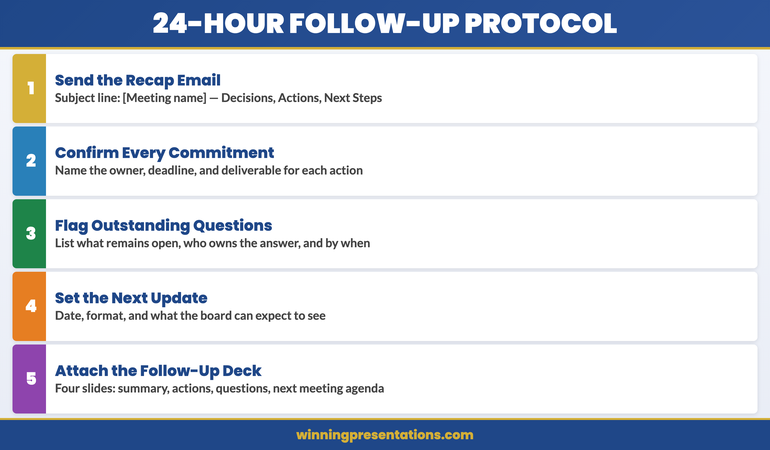
A strong follow-up email has five elements:

  • Opening line: A single sentence confirming the meeting date, the subject matter, and your thanks for the board’s time. Factual and brief.
  • Decisions and agreements: A numbered list of anything that was formally agreed, endorsed in principle, or noted for the record. Be precise — “the board approved the capital request subject to finance committee review” is useful; “the board was supportive” is not.
  • Outstanding items: A separate numbered list of questions raised that require further information, plus who is responsible for providing it and by when.
  • Next steps: One or two sentences naming the next formal action, who owns it, and when it will happen. If there is a follow-up meeting, confirm the proposed date.
  • Attached follow-up deck: A brief note that the attached slides summarise the key data and provide the supporting detail the board may wish to review before the next meeting.

Copy the company secretary or governance lead, as appropriate. This creates an audit trail that supports the formal minutes process and signals that you are operating within, rather than around, proper governance channels. If your organisation uses a board portal such as Diligent or BoardVantage, upload the follow-up deck there as well so that all members have easy access regardless of their email habits.

One thing to avoid is the instinct to over-explain or re-argue your case in the follow-up email. If the board asked a difficult question in the room, the place to address it properly is in the follow-up deck or a dedicated briefing note — not in a rambling paragraph that reads as defensive. Clarity and economy of language are the hallmarks of an executive who understands how boards work.

Stacked cards showing the five steps of a board presentation follow-up protocol: opening confirmation, decisions list, outstanding items, next steps, and attached deck

Turn Your Board Presentation Into a Decision — Not Just a Meeting

The Executive Slide System gives you a complete set of slide frameworks and communication templates for every stage of a board presentation — from your opening slide through to the follow-up deck that keeps decisions moving.

  • ✓ Slide-by-slide frameworks for board and governance presentations
  • ✓ Follow-up deck templates with pre-built slide structures
  • ✓ Prompt cards to structure your narrative and handle board questions

Get the Executive Slide System → £39

Designed for executives preparing high-stakes presentations

Building the Follow-Up Deck: Four Slides That Do the Work

The follow-up deck is not a repeat of your original presentation. It is a working document — designed to be read rather than presented, and built to serve the board’s decision-making process rather than to impress. Four slides is typically the right length. Longer than six slides and busy directors will not read it.

Here is what each of the four slides should contain:

Slide 1: Decision Status. A one-slide summary of where the decision stands. Include the motion or request as originally framed, the board’s response (approved, deferred, subject to conditions, or pending further information), and any formal conditions attached to an in-principle approval. This slide becomes part of the governance record and should be precise enough to stand alone as a reference document.

Slide 2: Actions and Owners. A table or structured list showing every action arising from the meeting. Each row should have: the action, the named owner (an individual, not a team or department), the delivery date, and a status column that you will update at the next meeting. Resist the temptation to be vague — “further analysis” is not an action; “finance team to provide revised three-year model incorporating 8% interest rate assumption by [date]” is.

Slide 3: Outstanding Questions. A dedicated slide for every question raised in the meeting that you were unable to answer fully in the room. For each item, note the question as asked, your proposed response or the additional work required to provide one, and the date by which you will provide it. This slide demonstrates competence rather than weakness — it shows the board that you have listened, recorded accurately, and are managing the process rigorously.

Slide 4: Proposed Next Step. A single slide stating clearly what needs to happen next for the decision to progress. This might be a follow-up meeting with a specific agenda, a paper to be tabled at the next scheduled board meeting, a finance committee review, or a bilateral conversation with the chair. Include a proposed date, a named facilitator, and a one-sentence summary of what the next step is designed to achieve. Make it easy for the board to say yes.

The deck should be formatted consistently with your original presentation — same fonts, same colour scheme, same level of visual polish. Sending a scrappy Word document after a polished board presentation creates an impression of inconsistency that can undermine the credibility you built in the room.

If your original presentation referenced data that has since been updated — a market figure, a cost estimate, a regulatory change — this is the right place to note the revision. Do not wait for the next full presentation to introduce material changes. A brief note on Slide 1 or Slide 3 keeps the record clean and demonstrates that you are actively managing the information, not just responding to prompts.

For a deeper look at how to structure what goes into the presentation before the follow-up, the board presentation 15-minute framework covers how to build a tight, decision-focused narrative that makes the follow-up process significantly simpler.

How to Frame Outstanding Questions Without Looking Unprepared

One of the most common anxieties executives have about the follow-up process is how to handle the questions they could not answer in the room. The instinct is to either over-explain why the information was not available, or to avoid referencing the gap altogether and hope it goes away. Neither approach serves you well.

The board is not expecting you to know everything. What it is expecting is that you know what you do not know, that you have a clear plan to address it, and that you will follow through. An executive who says “I don’t have that figure to hand but I will provide a detailed breakdown by Thursday” is demonstrating exactly the kind of rigour that builds board confidence. An executive who fumbles for an answer, gives an estimate with no acknowledgement of its limitations, or fails to follow up at all is the one who loses credibility.

When framing an outstanding question in your follow-up deck or email, use this structure: restate the question as it was asked, confirm the date by which you will provide the answer, and — where possible — give a brief indication of what type of answer to expect. For example: “Q: What is the projected impact on working capital in Year 2? We will provide a detailed working capital model incorporating the revised revenue assumptions by [date]. The preliminary estimate is within the range discussed at the meeting, pending confirmation from the finance team.”

That level of transparency does something important: it removes uncertainty from the board member’s perspective. They know the question has been heard, they know when they will have an answer, and they have a rough anchor for what to expect. That is a far more reassuring position than silence.

There is also a category of question that is better addressed through a bilateral conversation before the follow-up deck goes out. If a board member raised a concern that is sensitive — a governance issue, a conflict of interest question, or a concern about the competence of a named individual — it is usually more productive to speak with them directly before responding in writing to the full board. Use your judgement, but do not let that bilateral conversation become a substitute for the written record: once the conversation has happened, the key point and any agreed action should still appear in the follow-up documentation.

For a broader view of how seasoned executives manage their relationship with a board throughout the full presentation lifecycle, the guide on how to present to a board of directors covers the interpersonal and structural dimensions that the follow-up process sits within.

If you are preparing presentations that require both a strong initial structure and a robust follow-up process, the Executive Slide System includes ready-to-use frameworks for both stages.

The Follow-Up Meeting: Structure That Gets a Decision

Not every board presentation requires a dedicated follow-up meeting — some decisions are resolved through the paper trail alone, or picked up at the next scheduled board meeting. But when a follow-up meeting is needed, how you structure it determines whether you leave with a decision or another round of deferral.

The single most important principle for a follow-up meeting is to treat it as a working session, not a presentation. The board has already seen your slides. What they need now is a forum to ask the remaining questions, review the responses you have prepared, and reach a conclusion. Coming into the room with another 30-slide deck signals that you have not internalised that distinction — and it is one of the most common ways executives inadvertently reset the clock on a decision.

A well-structured follow-up meeting has three phases:

Phase 1: Orientation (5 minutes). Open with a brief verbal summary of where the decision stands, what has happened since the last meeting, and what you are asking the board to do today. Do not re-present the original case. One paragraph or three bullet points on a single slide is sufficient. The goal is to give board members who have reviewed your follow-up deck a rapid anchor, and to bring anyone who has not read it up to speed quickly.

Phase 2: Outstanding items (15-20 minutes). Work through the outstanding questions slide from your follow-up deck. For each item, briefly state the question, present your response, and then open the floor. Manage this section actively — you want dialogue, not a lecture. If a question generates significant discussion, note it explicitly and propose a way to resolve it: “This seems to be the key point of contention. Can we agree to [specific action] and come back to the board with a final recommendation by [date]?” Having a clear resolution mechanism for each item keeps the meeting from running indefinitely.

Phase 3: Decision and next step (5-10 minutes). Close by explicitly asking for a decision or a clearly defined next step. Too many follow-up meetings end with vague affirmation — “very helpful, we will consider” — rather than a concrete outcome. You can facilitate a cleaner close by framing a direct question: “Based on the responses provided today, is the board in a position to approve the capital investment? If not, what specific information or conditions would allow you to do so?” That framing forces a concrete answer and, if the answer is still a deferral, gives you precise guidance on what the final hurdle is.

Following the follow-up meeting, send a second, shorter version of the follow-up email within 24 hours. Update the decision status, close out any action items that have been resolved, and document the specific conditions or information required if a final decision is still outstanding. This layered documentation approach — original follow-up, then updated follow-up after subsequent meetings — creates a clean governance record that protects you if the decision later comes under scrutiny.

For executives who also manage ongoing client or stakeholder presentations alongside their board responsibilities, the approach to structuring a client account review presentation uses a similar decision-facilitation framework and may offer useful parallels.

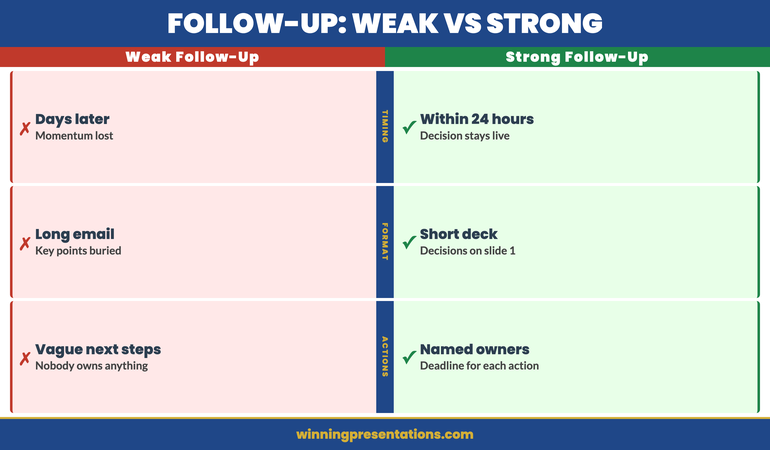
Split comparison showing weak board presentation follow-up on the left (vague email, no deck, no actions) versus a strong structured follow-up on the right (24-hour email, four-slide deck, named owners)

Already Have the Deck — But the Follow-Up Is Where Things Stall?

The Executive Slide System includes the follow-up slide structures and communication frameworks that most presentation tools leave out — so you can manage the full cycle from first slide to final approval.

Get the Executive Slide System → £39

Designed for executives preparing high-stakes presentations

Frequently Asked Questions

How long should a board presentation follow-up email be?

A follow-up email to the board should be concise — typically two to three short paragraphs plus a structured list of decisions and actions. The purpose of the email is to leave a clear record, not to re-present your case. Most of the substantive detail belongs in the attached follow-up deck, which board members can review at their own pace. A long email is unlikely to be read carefully by time-pressed directors and can come across as over-eager rather than thorough. Aim for something that can be read and understood in under two minutes. Reference the attached deck explicitly so members know where the fuller picture is.

What should you do if the board deferred a decision rather than approving it?

A deferral is not a rejection — but it does require active management. The first step is to understand precisely why the decision was deferred. If the chair or a board member gave explicit reasons, document them exactly as stated. If the deferral was less specific, it is appropriate to follow up directly with the chair or company secretary to understand what information or conditions would allow the board to reach a decision at the next meeting. Once you have that clarity, your follow-up deck should explicitly address each condition or information gap, and your proposed next step should map directly to removing each outstanding obstacle. Treat the deferral as a checklist, not a setback — and your follow-up process as the mechanism for working through that checklist systematically.

How many times should you follow up after a board presentation before it becomes counterproductive?

There is no fixed number, but the guiding principle is that each follow-up communication should add new information or move the process forward — it should never simply repeat what has already been said. A structured board presentation follow-up typically involves an initial 24-hour email with follow-up deck, a second update after any subsequent follow-up meeting, and then a brief status note at each scheduled board meeting until the decision is closed. Beyond that, if a decision has been in limbo for several board cycles, the right move is usually a direct conversation with the chair to understand whether the proposal needs to be restructured or whether there are governance or priority factors that are not visible to you. Persistent written follow-up without new substance quickly becomes noise — and erodes the credibility you are trying to protect.

Get The Winning Edge

Weekly insights on executive presentations, stakeholder strategy, and high-stakes communication — straight to your inbox.

Subscribe to The Winning Edge →

Not ready for the full system? Start here instead: download the free Executive Presentation Checklist — a one-page checklist covering the essentials before your next board meeting.

About Mary Beth Hazeldine

Mary Beth Hazeldine is Owner & Managing Director of Winning Presentations. With 24 years of corporate banking experience at JPMorgan Chase, PwC, Royal Bank of Scotland, and Commerzbank, she advises executives across financial services, healthcare, technology, and government on structuring presentations for high-stakes funding rounds and approvals.

Book a discovery call | View services

22 Feb 2026
Female professional in navy blazer using a red pen to mark and audit colourful sticky notes on a whiteboard while holding a tablet, actively restructuring a presentation deck in a bright modern office

I Audited a Real Executive Presentation: Before and After, 15 Slides Became 7

Quick answer: This is a real executive presentation before and after audit. A 15-slide budget approval deck was restructured to 7 slides — cutting context the audience didn’t need, merging duplicate data, and moving the recommendation from slide 14 to slide 2. Not a single decision-critical data point was lost. The board approved it in one meeting.

Build Executive Decks That Get Approved — Without the Bloat

The Executive Slide System gives you decision-first slide structures for board meetings, budget approvals, steering committees, and every executive format — so you never build a 15-slide deck when 7 will get the decision.

Get the Executive Slide System → £39

Built from 24 years of corporate experience. Used in budget approvals, board presentations, and executive governance meetings.

She’d Been “Almost Ready” for Three Weeks. The Problem Wasn’t the Content.

A senior programme manager came to me with a deck she’d been revising for three weeks. Budget approval presentation for a £1.8M technology programme. Every time she thought it was finished, she’d add another slide. One more context slide. One more risk. One more stakeholder update.

Fifteen slides. Forty-five minutes of material for a thirty-minute slot.

I told her: “You don’t have a content problem. You have a confidence problem. You’re adding slides because you’re afraid of being caught without an answer. But every extra slide dilutes your recommendation and gives the board more reasons to defer.”

We sat down for 90 minutes. I audited every slide against one question: “Does this slide help the board make a decision, or does it just make you feel prepared?” Eight slides failed that test. We cut them. The remaining seven were restructured with the recommendation first.

For a quick version of this audit you can apply to any deck, try the 60-second test every executive slide should pass before your next boardroom meeting.

She presented the next day. Approved in one meeting. The board chair told her it was the clearest budget presentation he’d seen that quarter. Same data. Same project. Eight fewer slides.

The Executive Presentation Before the Audit: All 15 Slides (and What’s Wrong With Each)

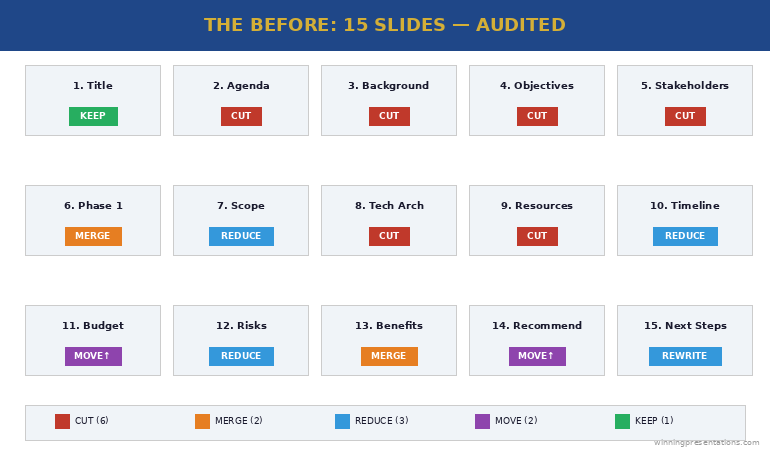
Here’s the original slide order, anonymised but structurally identical. I’ve tagged each slide with its function and the problem.

Slide 1: Title slide. “Programme Phoenix — Budget Approval Request.” Problem: None. Every deck needs a title. Keep.

Slide 2: Agenda. Listed all 15 sections. Problem: Agendas for executive presentations signal “this will be long.” Cut.

Slide 3: Programme background. Two paragraphs of context about why the programme exists. Problem: The board already approved Phase 1. They know why this exists. This slide is for the presenter’s comfort, not the audience’s decision. Cut.

Slide 4: Programme objectives. Five bullet points restating the business case. Problem: Duplicate of the original business case they already approved. Cut.

Slide 5: Stakeholder map. Org chart showing all stakeholders. Problem: The board doesn’t need to see who reports to whom. This is an internal working document, not a decision slide. Cut.

Slide 6: Phase 1 summary. What was delivered, milestones hit. Problem: Good content, wrong position. Merge with the recommendation slide as evidence, not a standalone. Merge.

Slide 7: Phase 2 scope. Detailed breakdown of Phase 2 deliverables. Problem: Too granular for a board audience. Reduce to three key deliverables and move detail to appendix. Reduce.

Slide 8: Technical architecture. System diagram. Problem: Nobody on this board is making a technical decision. This is an appendix slide. Cut.

Slide 9: Resource plan. Team structure and headcount. Problem: The board cares about cost, not headcount. Merge resource cost into the budget slide. Cut.

Slide 10: Timeline. Gantt chart with 20+ milestones. Problem: Too much detail. Reduce to 5 key milestones. Reduce.

Slide 11: Budget breakdown. Detailed cost table. Problem: Good slide, wrong position — should be slides 2-3, not slide 11. The board has been waiting 15 minutes for this. Reposition.

Slide 12: Risk register. 12 risks in a traffic light matrix. Problem: Twelve risks overwhelms. Reduce to the 3 risks the board can actually influence. Reduce.

Slide 13: Benefits realisation. Projected ROI and savings. Problem: Good content, but separated from the budget by two slides. Merge with budget to show cost AND return together. Merge.

Slide 14: Recommendation. “We recommend proceeding with Phase 2.” Problem: The recommendation is on slide 14 of 15. The board has been listening for 35 minutes before they know what you’re asking for. This should be slide 2. Reposition.

Slide 15: Next steps. Problem: Generic “pending approval” language. Replace with a specific ask: “Approve £1.8M. Authorise procurement. Target: contracts signed by March.” Rewrite.

Before audit showing 15 slides with tags indicating cut, merge, reduce, or reposition for each slide

The Executive Slide System gives you the decision-first structure so you build the right deck from the start — no 15-to-7 audit needed.

Get the Executive Slide System → £39

The 5 Cuts That Transformed the Deck

Every cut followed one of five principles. These work on any executive deck, not just this one.

Cut #1: Remove context the audience already has. The background and objectives slides (3 and 4) restated information the board approved months ago. If the audience was in the room when the decision was made, they don’t need a recap. That’s four minutes of presentation time that adds nothing. Slides removed: 3, 4.

Cut #2: Remove internal working documents. The stakeholder map (5), technical architecture (8), and resource plan (9) are useful for the programme team but irrelevant to a board decision. The test: “Would I send this slide to the board as a standalone?” If not, it doesn’t belong in the main deck. Slides removed: 5, 8, 9.

Cut #3: Merge data that answers the same question. The budget (11) and benefits (13) were separated by two slides, forcing the board to hold cost data in memory while listening to risks. Combined into one slide: “Investment: £1.8M. Return: £4.2M over 3 years. Payback: 11 months.” One slide. One decision. The Phase 1 summary (6) merged into the recommendation as evidence. Slides merged: 6→2, 11+13→one slide.

Cut #4: Reduce granularity to decision-level. The timeline (10) had 20+ milestones — reduced to 5 key dates the board needs to track. The risk register (12) had 12 risks — reduced to 3 the board can actually influence. Detail moved to appendix for anyone who wants it. Slides reduced: 10, 12.

Cut #5: Move the recommendation to slide 2. This is the structural change that transforms everything. The recommendation moved from slide 14 to slide 2. The board knows what you’re asking for within 60 seconds, and every subsequent slide becomes evidence supporting that recommendation. This is how steering committee presentations should be structured — decision first, evidence after.

The Executive Slide System (£39) gives you the decision-first slide structures for budget approvals, board meetings, and steering committees — build the 7-slide version from the start.

The Executive Presentation After the Audit: 7 Slides That Got Approved

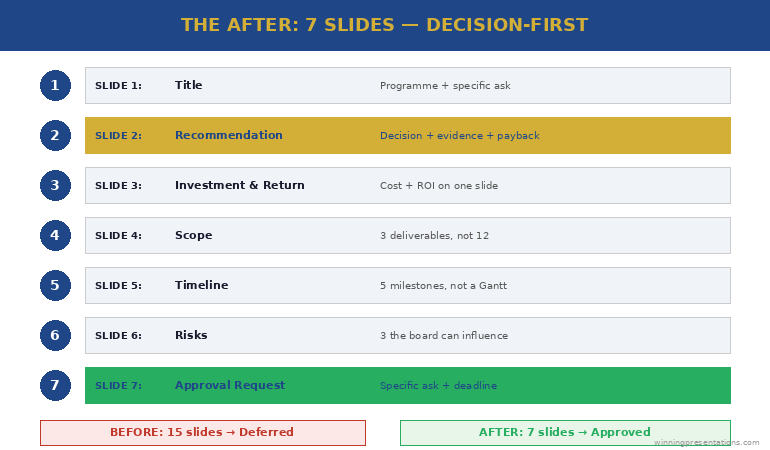
Here’s the restructured deck:

Slide 1: Title. “Programme Phoenix Phase 2 — Budget Approval (£1.8M)”

Slide 2: Recommendation. “Approve £1.8M for Phase 2. Phase 1 delivered on time and £40K under budget. Phase 2 delivers £4.2M return over 3 years with 11-month payback.”

Slide 3: Investment and return. Budget breakdown (3 categories, not 12 line items) plus projected return and payback period — on one slide. The board sees cost and value together.

Slide 4: Scope. Three key Phase 2 deliverables (not the full breakdown). Each linked to a specific business outcome. Detail in appendix.

Slide 5: Timeline. Five milestones: start, three checkpoints, go-live. Not a Gantt chart — a clean visual the board can track at a glance.

Slide 6: Risks. Three risks the board can influence, each with a mitigation already in place. Not a traffic light matrix — a clear “risk → mitigation → status” format.

Slide 7: Approval request. “Approve £1.8M. Authorise procurement to begin contract negotiation. Target: signed by 31 March.” One specific ask with a specific deadline.

Seven slides. Twenty minutes. Approved in one meeting. The approach to writing effective executive summary slides applies the same principle: say the essential thing first, then support it with evidence.

After audit showing 7-slide structure with recommendation on slide 2, investment and return combined, and specific approval request on slide 7

The 3 Rules for Auditing Any Executive Presentation Before and After

You can apply this audit to any deck in 30 minutes using three rules:

Rule 1: The decision test. For every slide, ask: “Does this help the audience make a decision, or does it just make me feel prepared?” If it’s for your comfort rather than their decision, cut it or move it to the appendix. This single question typically removes 30-40% of slides.

Rule 2: The position test. Your recommendation should appear by slide 2 or 3 — never at the end. If it’s later than slide 3, restructure. Everything after the recommendation becomes supporting evidence, not build-up. The same principle works for writing stronger slide titles — lead with the conclusion, not the context.

Rule 3: The merge test. If two slides answer the same question (e.g., “How much does it cost?” and “What’s the return?”), merge them. The board should never have to hold data from slide 11 in memory while listening to slides 12 and 13. If data points belong together, put them together.

The Executive Slide System (£39) applies all three rules by default — every template is decision-first, merged where appropriate, and stripped of context slides that don’t serve the audience.

Common Questions About Executive Deck Audits

How many slides should an executive presentation have?

There’s no universal number, but most executive decisions can be supported in 5-8 slides. The audit principle is more useful than a slide count: every slide must help the audience make a decision. If a slide exists for context the audience already has, internal detail they don’t need, or granularity beyond decision-level — cut it or move it to appendix.

How do you cut slides without losing important information?

You’re not losing information — you’re repositioning it. The appendix holds everything the main deck doesn’t. Detail-oriented audience members can review it. But the main presentation should contain only the slides that drive the decision. Most “important information” in bloated decks is important to the presenter, not to the decision-maker.

What’s the biggest mistake in executive presentations?

Burying the recommendation. In the audit above, the recommendation was on slide 14 of 15. The board spent 35 minutes waiting to find out what they were being asked to decide. Moving the recommendation to slide 2 changes the entire dynamic — every subsequent slide becomes evidence rather than build-up, and the audience listens with purpose because they know what decision you’re driving toward.

Stop Auditing Your Deck. Start Building It Right.

The Executive Slide System gives you decision-first templates for every executive format — board meetings, budget approvals, steering committees, and weekly leadership updates. Build the 7-slide version from the start.

Get the Executive Slide System → £39

Used in budget approvals, board presentations, and executive governance meetings across corporate and consulting teams.

Frequently Asked Questions

What should I put in the appendix?

Everything that supports your recommendation but isn’t needed for the decision itself: detailed cost breakdowns, technical architecture, full risk registers, resource plans, stakeholder maps, and granular timelines. The appendix exists for two purposes — answering detailed Q&A questions and providing an audit trail. If you never open the appendix, your main deck was perfectly structured.

What if my organisation requires a specific slide template with 15+ sections?

Many organisations have mandatory templates. Use them — but restructure the content within them. Move your recommendation to the earliest possible slide. Merge sections that answer the same question. Add “See appendix” to sections that don’t serve the decision. The template stays compliant. The content becomes decision-focused.

How do I know which slides to cut versus move to appendix?

Cut slides that contain information the audience already has (background, objectives they previously approved, restated business cases). Move to appendix slides that contain useful detail someone might ask about in Q&A (technical architecture, detailed costs, full risk registers). The distinction: cut = nobody needs this in this meeting. Appendix = someone might ask about this, but it shouldn’t be in the main flow.

Get Weekly Presentation Intelligence

Deck audits, slide structures, and the executive communication strategies that get decisions in one meeting — delivered every week.

Join the Newsletter

Related: Once your deck is tight, the next risk is Q&A. Read Nobody Prepares for Q&A. That’s Why Q&A Kills the Presentation. — the Question Map for predicting every question before you present.

Your next step: Open your current deck. For every slide, ask: “Does this help the board make a decision?” If the answer is no, move it to the appendix. Your 15 slides will become 7 — and your approval rate will change overnight.

Want the decision-first templates so you build the right deck from the start?

Get the Executive Slide System → £39

About the Author

Mary Beth Hazeldine is the Owner & Managing Director of Winning Presentations. With 24 years of corporate banking experience at JPMorgan Chase, PwC, Royal Bank of Scotland, and Commerzbank, she specialises in executive-level presentation skills and decision-focused slide architecture.

A qualified clinical hypnotherapist and NLP practitioner, Mary Beth combines executive communication expertise with evidence-based techniques. She has spent 15 years auditing and restructuring executive decks for board presentations, budget approvals, and governance meetings.

Read more articles at winningpresentations.com