Tag: decision-making

28 Mar 2026
Steering committee meeting setting with a decision-focused presentation displayed on a conference room screen

Steering Committee Presentation: How to Drive Decisions Instead of Status Updates

A steering committee meeting that ends with polite nods and no decisions isn’t a successful meeting. It’s a failure disguised as information sharing. You walked in hoping to move something forward — approval for a budget, consensus on a direction, commitment to a timeline — and you walked out with nothing but “We’ll take it under advisement.”

Tomás was a programme director at a mid-sized insurance company. His infrastructure modernisation project had been running for nine months. Every quarter, he presented to the steering committee — a mix of the CTO, CFO, two divisional heads, and an external adviser. Every quarter, he walked in with a 30-slide deck covering timelines, risks, resource allocation, vendor updates, and technical architecture changes.

Every quarter, the committee listened politely, asked a few clarifying questions, and deferred the decisions he needed. Budget reallocation? “Let’s revisit next time.” Vendor contract extension? “We need more data.” Timeline adjustment? “Send us a paper and we’ll discuss offline.”

After the third round of deferrals, Tomás asked the CTO directly: “What would it take to get a decision in the room?” The CTO’s answer was blunt: “Stop telling us what’s happening and start telling us what you need us to decide. We’re a committee, not an audience.”

Tomás rebuilt his next presentation from scratch. He opened with the decision: “I need approval today to extend the vendor contract by six months and reallocate £340,000 from the contingency budget.” He supported it with three slides of evidence and one slide of risk. The committee approved it in eleven minutes. Nine months of deferrals ended because the presentation changed from a status report to a decision request.

If you want a structured approach to steering committee presentations that moves from discussion to decision without requiring hours of debate prep, there’s a framework specifically designed for this governance scenario.

Explore the System →

Why Steering Committees Default to Inaction

Steering committees are designed for deliberation, not decisive action. They’re made up of people pulling in different directions — each with their own priorities, risk tolerances, and read on the situation. By design, they move slowly.

Most presentations to steering committees treat this as a limitation to work around. They load the presentation with data, hoping that overwhelming evidence will force consensus. Instead, they create decision paralysis. The more information in the room, the more angles to debate, the easier it is to defer.

The fix isn’t more information. It’s structural clarity. When a steering committee presentation is built to move from “Here’s the situation” to “Here’s the decision required” to “Here’s why we decide now,” the committee feels the momentum. They move with you.

The Decision-First Framework

Open your steering committee presentation with the decision, not the context. This is counterintuitive. You want to explain the background first, right? Wrong. Say it upfront: “We’re asking for approval to restructure the product roadmap to include three quarters focused on infrastructure modernisation before resuming feature velocity.”

That first statement does three things: it signals what you want, it anchors the conversation, and it gives committee members a framework for all the information that follows.

Then you provide the case — but the case is now in service of that decision, not the decision emerging from the case. Every data point, every risk statement, every timeline now answers the question “Why should we approve this now?” rather than wandering into general context.

Your structure becomes: Decision → Why (context and data) → Timeline (when we need approval) → Next Steps (what happens if approved). Done.

How to Build the Case (Without Overwhelming)

Once you’ve stated the decision, resist the urge to present every consideration. Steering committees often weaponise information. The more you offer, the more they pick through looking for a reason to say no.

Instead, present exactly three categories of evidence: What’s Changed (Why we can’t stay where we are), What We Learned (Why this is the right direction), and What We Risk (What happens if we don’t move).

What’s Changed: This is trend data. User sentiment shifted. Competitive pressure increased. Internal metrics show decline in a core area. Keep this factual and recent. “We’ve seen a 22% increase in support tickets related to infrastructure stability over the past two quarters.”

What We Learned: This is context from customer conversations, market signals, or team intelligence. “Three of our largest customers flagged that they’re considering alternatives because our platform doesn’t scale cleanly past 10,000 concurrent users.”

What We Risk: This is the consequence of inaction. “If we don’t address this in the next twelve months, we’ll lose market position in the enterprise segment where our highest-margin deals are concentrated.”

Three categories. No more. Committee members can hold that in their heads while they’re forming an opinion.

Then close with the resource request — the fourth element of the decision framework. Name the budget, people, and timeline you need. Not vaguely: “We’ll need additional resources.” Specifically: “We need £340,000 from the contingency budget, a six-month vendor contract extension, and two additional engineers starting in Q2.” When you state the resource request in concrete terms, you give the committee something tangible to approve. When you leave it abstract, you give them something to defer.

The resource request also functions as a credibility signal. A presenter who can quantify exactly what they need — the budget figure, the headcount, the timeline — demonstrates that they’ve done the planning work. A presenter who says “we’ll figure out the details later” signals that the project isn’t ready for approval. The committee will sense that gap instantly, and they’ll use it as the reason to defer.

Decision framework for steering committee presentations with four components: decision statement, evidence summary, risk assessment, and resource request

Need the Decision Framework for Steering Presentations?

The Executive Slide System includes governance-specific templates that open with the decision, structure the case in three evidence categories, and include contingency language for objections. You control the narrative momentum because your structure makes it clear when the decision point arrives.

Designed for executives managing steering committees, governance meetings, and high-stakes approval scenarios.

Get the System (£39)

The Risk Statement That Changes Minds

The most persuasive element of a steering committee presentation is not your opportunity case. It’s your risk statement.

Most presenters bury risk at the bottom or avoid it entirely, hoping the committee won’t think of it. Committee members always think of it. By not saying it first, you look like you’re hiding something.

Instead, surface the risk clearly: “If we restructure now, we’ll push feature releases back by two quarters. That affects bookings targets for Q3 and Q4. Here’s how we’ve modelled for that impact.” You’ve named the biggest concern and shown you’ve thought it through. The committee relaxes. You come across as realistic, not reckless.

The risk statement that moves a steering committee isn’t about minimising risk. It’s about demonstrating you’ve seen it clearly and have a plan to manage it.

Comparison of status update versus decision session approaches for steering committee presentations

The difference between a status update and a decision session is structural, not stylistic. In a status update, the presenter opens with a report: “Here’s what happened since last time.” In a decision session, the presenter opens with a decision ask: “I need approval for X by this date.” That single shift changes every dynamic in the room. Committee members stop listening passively and start evaluating actively.

The second structural difference is evidence density. Status updates present every metric on every dimension — comprehensive coverage that creates decision paralysis. Decision sessions present focused proof: the three data points that support the recommendation. Not everything the committee could know, but everything they need to know to decide. When you narrow the evidence, you narrow the debate. That’s how decisions happen.

The third difference is the close. Status updates end open-ended: “Any thoughts or questions from the group?” That’s an invitation to wander. Decision sessions close with a commitment ask: “Can I proceed with this plan by Friday?” You’re not asking for reactions. You’re asking for a vote. If the committee isn’t ready to vote, you’ll find out why — and that information is more valuable than another round of polite nods.

Handling Objections Before They Derail You

Steering committees are full of people who’ve been in business long enough to imagine everything that could go wrong. If you don’t anticipate their objections and address them preemptively, they will use them to stall.

Before you walk in, identify the three objections most likely to derail the decision. Not every possible objection — the three that would actually make a committee member vote no.

Then, buried in your supporting slides (not your main narrative), answer each one directly. “We know some will worry that pulling engineering off features breaks our competitive momentum. We’ve modelled this: we’ll slow feature velocity but maintain our infrastructure stability advantage, which actually strengthens our defensibility in the mid-market segment where we’ve been losing ground.”

When an objection lands in the discussion, you can calmly reference the slide you prepared. You look organised. You look like you’ve thought through the hard questions. That shifts the vote.

Securing Commitment in Real Time

Many steering committee presentations end with “We’ll circle back with a recommendation.” Translation: “This didn’t land, and now we’re all pretending we need more time.”

If you’re presenting a decision, ask for it. “Are we moving forward with this restructure? Or do we need more information?” Force the conversation to the decision line. You’ll find out in that moment whether you have the votes, or whether you need to negotiate.

If you don’t have the votes, it’s better to know now and adjust than to walk out thinking you have consensus and discovering later that you don’t. Steering committees are often more swayed by seeing consensus form in real time than by any data in your presentation.

The moment the first committee member says “I’m in,” others follow. They’re watching each other as much as they’re listening to you. Your job is to move the conversation to that first decision.

If you’re preparing for a steering committee presentation and want the decision-first structure, objection-handling slides, and commitment language already built in, the Executive Slide System includes governance-specific templates designed for exactly this scenario.

Ready to Move Steering Committees to Decision?

The Executive Slide System includes contingency slides for common steering committee objections, timing frameworks that show when a decision is urgent, and language patterns for moving from discussion to commitment. You’ll spend less time managing debate and more time executing once the decision is made.

Designed for executives, programme managers, and functional leaders who regularly present to governance bodies.

Explore the System (£39)

Questions About Steering Committee Presentations

What if a steering committee member raises a completely new concern mid-presentation?
Acknowledge it. Don’t dismiss it or get defensive. Say: “That’s a fair point. That’s not a concern we’ve modelled for in depth. If this committee sees that as critical to the decision, let’s table the approval until we’ve looked at it.” You’ve shown respect for their input and bought time to strengthen your case on that angle.

How do I handle a steering committee that’s split and won’t coalesce around a decision?
Identify which committee member is the opinion leader. Usually it’s the chair or the longest-tenured member. Address the core disagreement directly with that person: “I hear concern about [X] and support for [Y]. What would it take for us to move forward?” You’re not debating the full committee. You’re negotiating with the person who can move votes.

Should I bring detailed financial projections to a steering committee meeting?
Bring them as a backup, but don’t lead with them. Lead with the decision and the case. If a committee member asks about the financials, you have them. If they don’t ask, you’ve kept the conversation at the strategic level where it needs to be.

What’s the ideal length for a steering committee presentation?
Fifteen minutes maximum for your main presentation, plus thirty minutes for questions and discussion. If you need more than fifteen minutes to state your case, you’re overcomplicating it. The decision should be clear by minute ten.

More on Decision-Focused Presentations

See also: Investor Update Presentations: How to Structure for Confidence and Clarity for similar decision frameworks applied to investor relations scenarios.

Join The Winning Edge Newsletter

Get structure-first presentation insights delivered to your inbox. Real frameworks, no fluff.

Subscribe to The Winning Edge →

Not ready for templates yet? Start with the free checklist.

Download the Executive Presentation Checklist →
Free. Covers 16 structural elements every executive presentation needs.

Steering committees are built to deliberate. Your job is to structure the presentation so they deliberate toward a decision, not away from one.


Mary Beth Hazeldine is Owner & Managing Director of Winning Presentations. With 24 years of corporate banking experience at JPMorgan Chase, PwC, Royal Bank of Scotland, and Commerzbank, she advises executives across financial services, healthcare, technology, and government on structuring presentations for high-stakes funding rounds and approvals.

17 Mar 2026
Executive walking into a boardroom where committee members have already made their decision, subtle body language showing predetermined outcome, navy and gold corporate aesthetic

Your Presentation Didn’t Fail — The Decision Was Already Made Before You Walked In

Quick answer: Many boardroom presentations fail not because of weak slides or delivery, but because the decision was predetermined. Executives often use presentations to validate existing leanings rather than genuinely evaluate options. Understanding this pre-decision dynamic lets you reframe your approach and influence the outcome.

Stuck in a presentation where you sense the outcome is already locked? You’re not imagining it. Pre-decision dynamics operate in every boardroom, and most presenters never address them directly. The Executive Slide System teaches you how to diagnose these dynamics early and restructure your slides to shift them.

Discover how to reframe your slides for pre-decided audiences → £39

A senior VP sat in the boardroom watching her team present a three-year cost-reduction strategy. Forty-five minutes of analysis. Seventeen slides of data. Three different implementation scenarios. She nodded at the right moments, asked clarifying questions, then rejected every option—not because the logic was flawed, but because the CFO had already decided he wanted his own proposal on the table first.

The presentation didn’t fail because it was poorly constructed. It failed because the decision had already been made, and the presentation was being used as political theatre, not genuine evaluation.

This happens in corporate environments constantly. Your slides are competing not against the strength of your logic, but against existing stakeholder leanings, hidden agendas, and pre-aligned factions. Understanding this dynamic isn’t pessimistic—it’s liberating. Once you see the pattern, you can work with it instead of against it.

Pre-Decision Dynamics in Boardrooms

Executive audiences rarely enter a presentation with blank minds. By the time you’re presenting, stakeholders have already formed initial preferences based on a dozen inputs you may never have controlled: prior conversations, rumour, political loyalty, financial incentive, or simple familiarity with an option they’ve already discussed privately.

This is what researchers call confirmation bias in high-stakes environments. Decision-makers instinctively look for information that confirms what they already believe, and minimise information that contradicts it. In boardrooms, this tendency amplifies because:

  • Ego is involved. Reversing a position already stated publicly feels like a loss of credibility.
  • Politics are present. Siding with one faction over another has real consequences for internal influence and career trajectory.
  • Time pressure is constant. Executives prefer to move toward a “decided” state quickly rather than remain in genuine evaluation mode.
  • Social proof drives conformity. If the senior voice in the room has already leaned one way, others follow to maintain group cohesion.

None of this means your presentation is worthless. It means your presentation is operating in a context where the rules are different from what most presenters assume.

Why Your Slides Don’t Change Pre-Made Minds

Traditional presentation advice says: show the data, build the argument, land the recommendation. This works beautifully in classrooms and sales contexts where the audience genuinely wants to be persuaded.

But in executive environments with pre-decided audiences, this approach backfires. Your detailed analysis becomes ammunition for the already-decided stakeholder to construct counter-arguments. Your three options become a buffet of justifications for why the preferred option is best.

Why? Because pre-decided audiences use presentations differently. They don’t evaluate—they filter. They’re looking for:

  • Reasons to rule out competing options
  • Language they can repeat to justify their preference
  • Data points that look good in an email recap
  • Anything that makes them look decisive and informed

Your job isn’t to persuade them. Your job is to become the clearest path to the decision they’re already leaning toward—or to expose flaws in that decision so obviously that staying the course becomes riskier than changing course.

How to Diagnose Pre-Decision Early

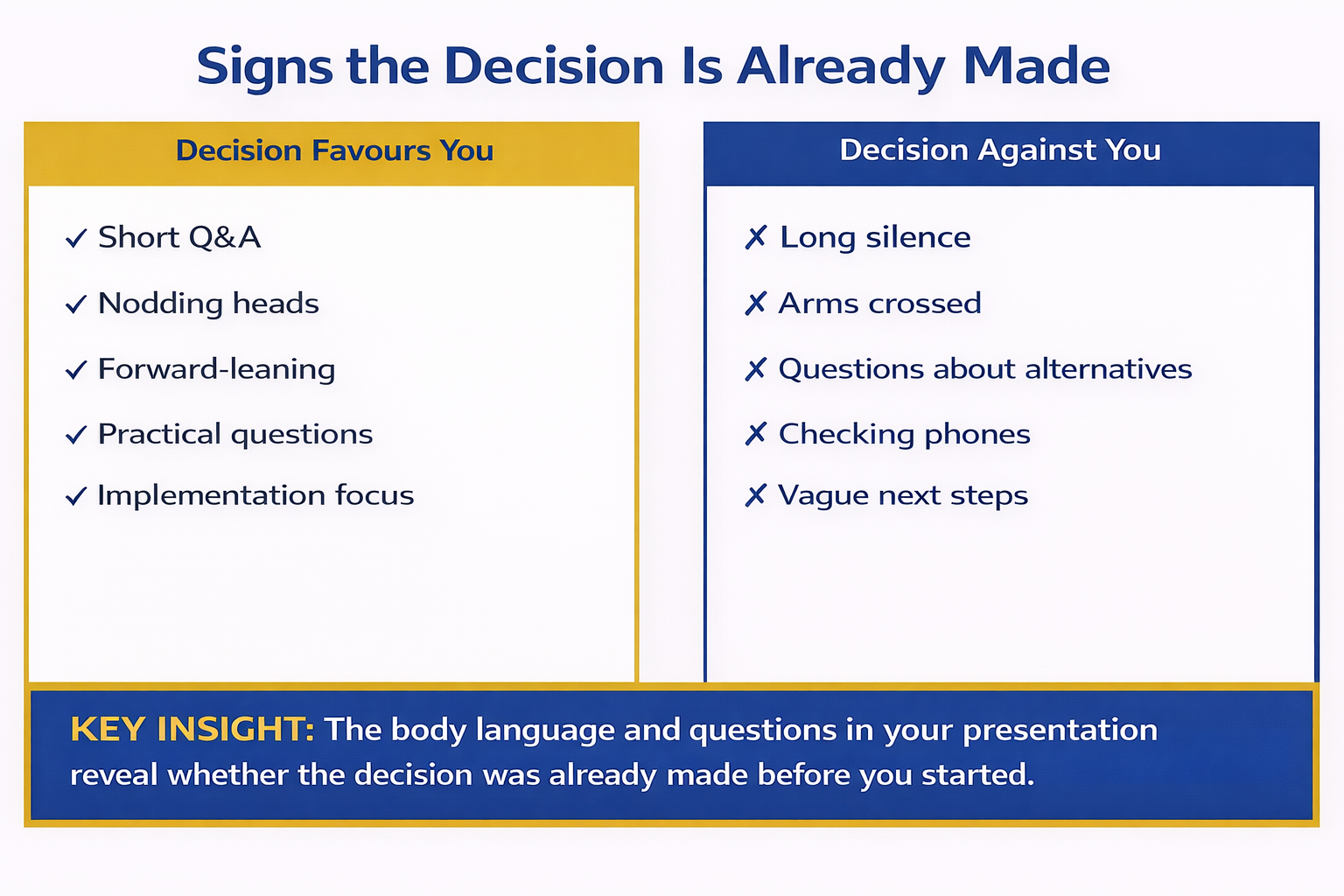
Before you present, you need to know whether you’re walking into a genuine evaluation or a pre-decided outcome. Real diagnostic signals appear weeks before the meeting:

Signal 1: Private alignment conversations have already happened. Stakeholders mention the decision casually in corridor chats before you’ve even presented the analysis. “I think we’re going with option B” signals that evaluation is over—you’re in validation mode.

Signal 2: The decision-maker defines “success” in oddly specific terms. Instead of “help us choose the best option,” they say “I need a clear business case for approach X.” You’re not evaluating X—you’re justifying it.

Signal 3: Certain voices are absent from decision meetings. If key stakeholders who should influence the choice are being excluded, a faction has already decided and is controlling the process.

Signal 4: The timeframe is artificially compressed. “We need this decided by Thursday” often means the decision is already made and they’re rushing to legitimacy. Real evaluation takes longer.

Signal 5: Your predecessors’ recommendations are being ignored or contradicted without new information. If prior analysis said one thing and the new brief says another without any material change in context, a decision has been made at a different level.

Recognising these signals early lets you adjust your strategy before you’re standing in front of the room.

Body language and verbal cue comparison infographic showing signs the decision favours you versus signs the decision is against you across multiple indicators

Restructuring Your Approach for Pre-Decided Audiences

Once you know you’re presenting to a pre-decided audience, your slide strategy changes fundamentally. Your aim shifts from persuasion to clarity and credibility.

First: Lead with the stakeholder’s preference, not your analysis. Name the option they’re leaning toward. Validate the reasoning. This removes defensiveness and positions you as someone who understands their thinking.

Second: Surface the hidden risks in their preferred option using neutral language. Don’t argue against it—illuminate gaps. “This approach works beautifully if assumption X holds true. Here’s what we’ve seen when that assumption breaks down.”

Third: Reframe competing options not as alternatives, but as complementary or sequential steps. Instead of “Option A or Option B,” use “Option B achieves X quickly, and Option A handles Y in the medium term.”

Fourth: Make it easy for them to change their mind without losing face. Give them new information that legitimises reversal. “We just learned this from the market research—it changes the risk profile of the original approach.”

Master Pre-Decision Dynamics With Structured Slide Architecture

The Executive Slide System teaches you a seven-slide foundation that works in pre-decided boardrooms. You’ll learn how to diagnose stakeholder leanings before you present, structure your recommendation to shift pre-aligned positions, and surface hidden risks that force genuine reconsideration.

  • Identify whether you’re in evaluation mode or validation mode (Signal check)
  • Restructure your recommendation to address unspoken stakeholder concerns
  • Create slides that surface risk without appearing to argue
  • Build a decision-shifting narrative that feels like new information, not contradiction
  • Deliver with confidence when you understand the real dynamics at play

Get the Executive Slide System → £39

Used by executives at FTSE 250 companies and funded startups to restructure high-stakes presentations in real time.

Need a framework to diagnose pre-decision dynamics before you walk in?

Get the ESS Framework → £39

The Pre-Presentation Alignment Conversation

The most powerful move you can make happens before you present. Conduct a pre-decision stakeholder conversation with the key decision-maker. Not to persuade them—to understand them.

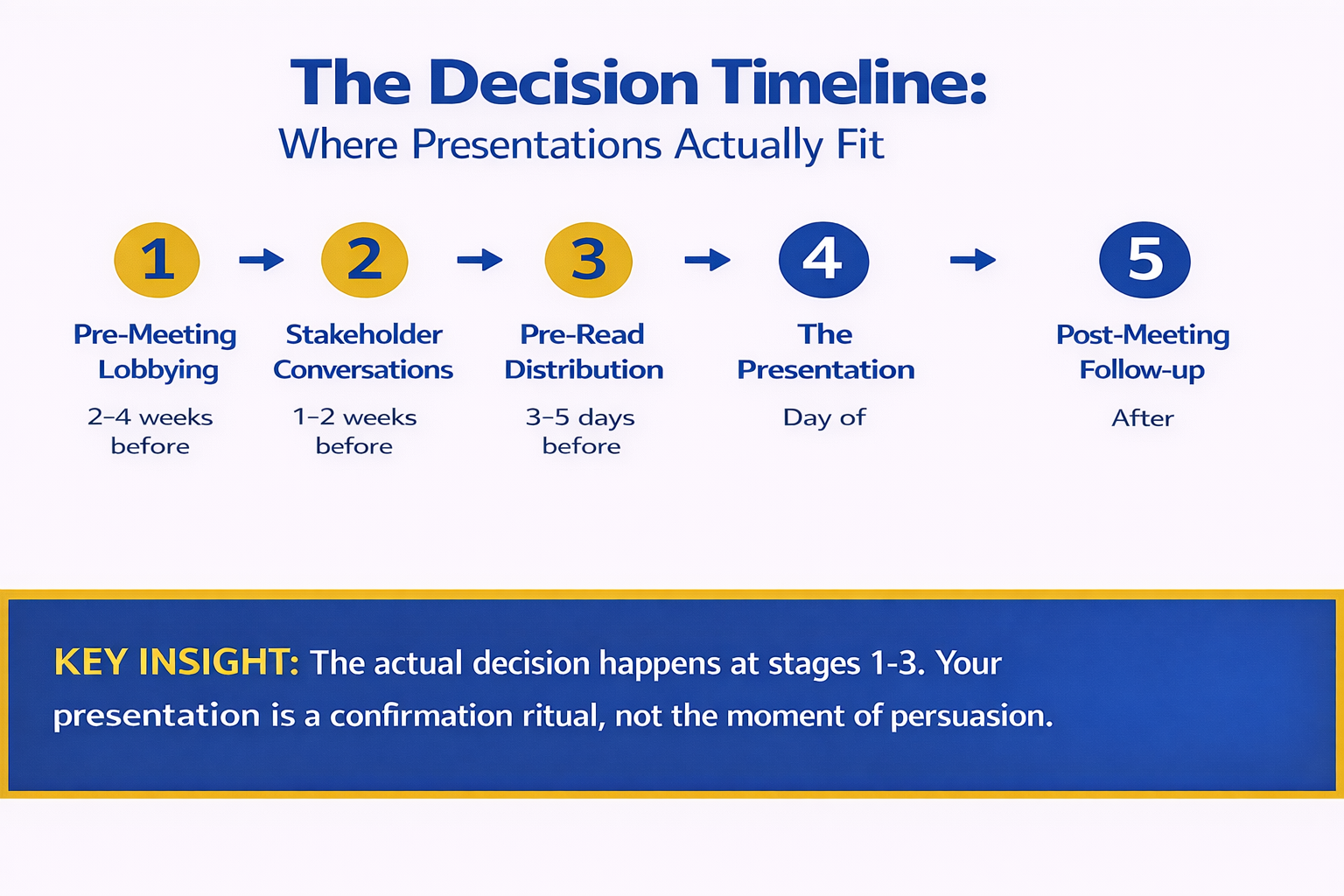
This conversation should happen 3–5 days before the presentation. Its purpose is diagnostic, not political:

“I want to make sure my slides land clearly. Walk me through your current thinking on this decision. What’s most important to you about the final choice?”

Listen for:

  • What they say first (usually the real priority)
  • What they return to multiple times (the worry underneath)
  • What they don’t mention (the blind spot)
  • Who they reference (“I’ve talked to the CFO about…”)—the informal power structure

This single conversation often reveals whether you’re in a pre-decided scenario. If they already have a clear leaning, you now know. If they’re genuinely undecided, you’ll hear it in the language they use—it’s more tentative, more exploratory, less prescriptive.

Armed with this clarity, restructure your slides to build genuine buy-in, not just validation. The slides should address the stakeholder’s actual priority, not the priority you guessed.

Decision timeline infographic showing five stages from pre-meeting lobbying to post-meeting follow-up highlighting that the actual decision happens at stages one to three not during the formal presentation

Winning Presentations Beyond Pre-Decision Scenarios

Not every presentation operates under pre-decision pressure. Some stakeholder groups genuinely want to evaluate options. But too many presenters assume they’re in the evaluation group when they’re actually in the validation group.

Understanding which context you’re in changes everything. A strong boardroom presentation structure works in both scenarios, but the emphasis shifts. In pre-decision environments, clarity and risk transparency become more important than volume of detail.

The stakes of getting this wrong are real. A misread pre-decision scenario can lead you to over-prepare, over-present, and over-argue, which only reinforces stakeholder defensiveness about their leaning. You come across as someone who doesn’t understand the political reality.

Diagnose and Restructure Before Your Next Boardroom Presentation

The Executive Slide System includes a pre-presentation diagnostic tool to identify whether you’re facing a pre-decided audience. Once you know, the system guides you through restructuring every slide to work with stakeholder leanings, not against them.

  • Pre-presentation diagnostic: Signals to spot pre-decided scenarios
  • Stakeholder alignment conversation template: Uncover hidden priorities
  • Slide restructuring framework: Adapt your narrative for pre-aligned audiences
  • Risk-surfacing techniques: Highlight flaws without appearing argumentative
  • Real-world boardroom examples: Presentations that succeeded despite pre-decision pressure

Get the Executive Slide System → £39

Included: Full stakeholder alignment conversation template (save 2 hours of preparation).

Ready to restructure your slides for the boardroom reality you’re actually facing?

Start With the ESS → £39

Key Takeaways

Pre-decision dynamics are normal in executive environments. Stakeholders often use presentations to validate existing leanings rather than genuinely evaluate options. Recognising this isn’t cynical—it’s realistic.

Your presentation isn’t failing because it’s weak. It’s failing because you’re treating a validation scenario as an evaluation scenario. The approach is different.

Diagnosis comes before restructuring. Ask yourself: has the decision already been made? If yes, shift from persuasion to clarity and credibility. If no, use a traditional persuasion structure.

A pre-presentation stakeholder conversation is your strongest diagnostic tool. It reveals whether you’re in a pre-decided scenario and, if you are, what the real priority is.

Is This Right For You?

✓ This is for you if:

You’re presenting to stakeholders who seem to have already decided, and your slides feel like they’re being used to justify rather than evaluate.
You suspect a stakeholder faction has aligned privately before your presentation, and you need to know how to work with that reality.
You want to diagnose pre-decision dynamics early so you can restructure your approach instead of walking into the boardroom blindly.

✗ Not for you if:

You’re presenting to an audience that genuinely hasn’t formed a preference yet and is asking you to help them decide. (In that case, use a traditional persuasion structure.)
You prefer to ignore the political reality of boardrooms and hope that strong analysis alone will win the day.

People Also Ask

What if I’m wrong about whether the decision is pre-made? You’re not really wrong—the stakes of being wrong are low. If you treat a genuine evaluation scenario like pre-decided, you’ll be clear and organised (which helps). If you treat a pre-decided scenario like genuine evaluation, you’ll be verbose and argumentative (which hurts). Defaulting to the pre-decided assumption is safer.

Is it unethical to adjust my slides based on a stakeholder’s existing leaning? No. Your job is to serve the decision-maker’s real needs, not your imagined idea of what’s neutral. If you understand what they actually care about, you present information in a way they can hear. That’s not manipulation—that’s communication.

How do I surface concerns about the preferred option without looking like I’m arguing against it? Use neutral, exploratory language: “Here’s what we’ve seen when this assumption holds” or “This approach works beautifully in scenario X. Here’s what happens in scenario Y.” You’re not saying the option is wrong—you’re surfacing contingencies they need to account for.

The Complete Framework for Pre-Decision Boardrooms

The Executive Slide System is built on one core truth: your slides must serve the stakeholder’s real decision-making process, not an imagined ideal one. That’s how you build credibility and influence.

  • Seven-slide architecture that works in pre-decided scenarios
  • Pre-presentation diagnostic checklist (identify the real situation)
  • Stakeholder alignment conversation template (uncover hidden priorities)
  • Slide restructuring toolkit (adapt your narrative in real time)
  • Risk-surfacing language (raise concerns without appearing argumentative)

Get the Executive Slide System → £39

Trusted by executives at FTSE-listed companies, family offices, and venture-backed startups.

FAQ

Can I still influence a pre-decided decision through my presentation?

Yes, but indirectly. You don’t change a pre-decided stakeholder’s mind through argument—you do it by surfacing information they didn’t have that makes the original decision riskier. “We just learned X from the market” or “Competitor Y has moved faster than we anticipated” gives them a legitimate reason to reconsider without admitting their original leaning was wrong.

What’s the difference between a pre-decided scenario and a bad presentation?

A bad presentation fails because the slides are confusing, the logic is weak, or the delivery is poor. A pre-decided scenario fails because the audience was never going to be persuaded by slides alone—they were there to validate. You can have excellent slides and still fail in a pre-decided scenario if you don’t address the real dynamic.

Should I confront a stakeholder if I think they’ve already decided?

No. Never accuse a stakeholder of having pre-decided. Instead, use the alignment conversation diagnostic to understand their thinking, acknowledge what you learn, and restructure your slides accordingly. They may not even realise they’ve already decided—and that’s fine.

How many pre-presentation alignment conversations should I have?

Ideally, one with the primary decision-maker and one with the most influential peer stakeholder. That’s usually enough to map the terrain. More than that and you risk looking like you’re lobbying rather than gathering information.

Related: The ‘One More Thing’ That Ruins Good Presentations: Why Anxiety Makes You Add Content — How nervous presenters often over-prepare in pre-decided scenarios, which backfires.

Related: Technical Questions From Non-Technical Executives: How to Translate Under Pressure — When the Q&A reveals a comprehension gap that you need to bridge instantly.

Get Clarity on Boardroom Politics Before Your Next Presentation

The executives who win boardrooms aren’t the ones with the most data. They’re the ones who understand the political reality—who has decided what, why, and what would actually shift their thinking.

The Executive Slide System gives you a diagnostic framework to map that reality in your next presentation. Once you see the dynamics clearly, restructuring your slides becomes straightforward.

You’re presenting on March 24? You have seven days to diagnose the stakeholder landscape and restructure your narrative. That window is shrinking—start your stakeholder alignment conversation this week.

Join the executives learning to read boardroom dynamics before they present. Subscribe to The Winning Edge newsletter for weekly frameworks on executive communication.

🆓 Free resource: Download now — a free guide to strengthen your presentation preparation.

About the Author

Mary Beth Hazeldine is the Owner & Managing Director of Winning Presentations. With 24 years of corporate banking experience at JPMorgan Chase, PwC, Royal Bank of Scotland, and Commerzbank, she has delivered high-stakes presentations in boardrooms across three continents.

A qualified clinical hypnotherapist and NLP practitioner, Mary Beth combines executive communication expertise with evidence-based techniques for managing presentation anxiety. She has trained thousands of executives and supported high-stakes funding rounds and approvals.

Book a discovery call | View services

This article was written with AI assistance and reviewed by Mary Beth Hazeldine.