
Tag: decision deck

19 Feb 2026
Close-up of an executive reviewing a two-page pre-read document with pen annotations on a dark wood desk, laptop and coffee cup in warm golden light

The Executive Presentation Pre-Read That Gets Decisions Before You Walk In

They approved my client’s £4M budget before she presented a single slide. The presentation was a fifteen-minute formality.

Quick answer: The executive presentation pre-read is the most strategically important document most professionals never learn to write. It’s not your slides emailed early. It’s not a summary of what you’ll say. It’s a separate, purpose-built document with three parts — the Decision Frame, the Evidence Stack, and the Ask — designed to get senior executives aligned on your recommendation before you enter the room. When done right, the meeting itself becomes a confirmation, not a persuasion exercise. Built from 24 years in banking and consulting environments, this is the structure I’ve taught to executives preparing for board meetings, steering committees, and investment approvals. The difference between presenting to an aligned room versus an uninformed room is the difference between getting a decision and getting a “let me think about it.”

The Budget That Got Approved Before She Opened Her Mouth

At Commerzbank, I watched a VP prepare for weeks on a £4M technology modernisation budget. Her slides were immaculate. Forty-two slides covering everything from vendor comparison to implementation timeline. She’d rehearsed the delivery. She’d prepared for questions.

But the week before, she did something most people skip entirely. She sent a two-page pre-read document to the five decision-makers who’d be in the room. Not her slides — a separate document. It laid out the business case in three sections: why now, what the evidence showed, and what she needed them to decide.

By the time she walked into that boardroom, three of the five had already emailed back with variations of “this looks solid.” The CFO had flagged one line item he wanted to discuss. The CTO had already circulated it to his team for technical validation. The meeting itself lasted fifteen minutes. Twelve of those were spent on the CFO’s one concern. The decision was unanimous.

That’s when I understood: the presentation isn’t where decisions get made. The pre-read is. The presentation is where decisions get confirmed.

📊 Your Pre-Read Needs a Deck That Matches

The Executive Slide System gives you the slide frameworks and sequencing templates that align with your pre-read structure — so when executives arrive having read your document, the deck confirms exactly what they expected. Built from real board presentations where the pre-read and the deck worked as a single system.

Get the Executive Slide System — £39

Built from 24 years of banking presentations and 15+ years training executives for board updates, steering committees, and investment approvals.

The Mistake 90% of Presenters Make With Pre-Reads

Most professionals do one of two things with pre-reads: they skip them entirely, or they email their slide deck the night before and call it a pre-read. Both are career-limiting mistakes.

Sending your slides as the pre-read creates two problems at once. First, executives try to read a document that was designed to be presented — and it either has too little text to make sense alone, or too much text because you tried to make it self-explanatory. Second, when you stand up to present those same slides, the room has already seen everything. You’re narrating a document they’ve already skimmed. The energy dies. The questions start on slide two instead of after your recommendation.

Skipping the pre-read is worse. You walk into a room where five executives are hearing your business case for the first time. They’re processing information, forming opinions, and identifying objections simultaneously. No human brain handles that well. The result is almost always “interesting — let me think about it,” which is executive language for “I’m not comfortable deciding without time to process.”

The pre-read solves both problems. It gives executives the thinking time they need so the meeting becomes the decision time you need.

PAA: Should you send your presentation slides before the meeting?
No. Your slides and your pre-read are two different documents serving two different purposes. Slides are visual support for a live presenter — they’re designed to be incomplete without your narration. A pre-read is a self-standing document designed to be complete without you in the room. Sending slides as a pre-read weakens both the document and the presentation. Create a separate two-to-three-page pre-read document using the Decision Frame, Evidence Stack, and Ask structure below.

The 3-Part Board Pre-Read Structure

In twenty-four years of banking, I’ve seen dozens of pre-read formats. The one that consistently produces pre-meeting alignment has three sections — never more. Each section answers a single question that’s running through every executive’s mind before they commit time to your meeting.

Executive pre-read structure showing three sections: Decision Frame half page, Evidence Stack one to two pages, and The Ask three sentences, with purpose and length for each section

The entire document should fit on two pages. Three at the absolute maximum. Anything longer and executives won’t read it — which defeats the entire purpose. I’ve written about the executive summary slide before. The pre-read follows the same principle: compression creates clarity.

Part 1: The Decision Frame (Half a Page)

The Decision Frame answers the question every executive asks before reading anything: “Why am I looking at this, and what do you need from me?”

It has four elements, each one sentence:

The Context: One sentence on why this is on the agenda now. Not the history of the project. Not the background. Just: why now? Example: “Q1 infrastructure costs exceeded forecast by 23%, driven by three unplanned outages in February.”

The Impact: One sentence on what happens if nothing changes. Example: “Without intervention, we project £1.2M in additional unplanned costs by year-end, plus reputational risk from client-facing service disruption.”

The Recommendation: One sentence on what you’re proposing. Lead with the answer, not the analysis. Example: “We recommend a £4M investment in platform modernisation, delivered in two phases over 18 months, with breakeven at month 14.”

The Decision Required: One sentence on exactly what you need from this group. Example: “We are seeking approval to proceed with Phase 1 (£1.8M) and authorisation to begin vendor negotiations by March 15.”

That’s it. Four sentences. Half a page. Every executive in the room now knows what this is about, what the stakes are, and what you’re asking for — before they read another word.

This kind of structural clarity — knowing exactly what goes where and in what order — is what the Executive Slide System was built for. The frameworks apply to both your pre-read and the deck that follows it.

Get the Executive Slide System — £39

Part 2: The Evidence Stack (1–2 Pages)

The Evidence Stack answers the second question: “Why should I believe this recommendation?”

This is where most people go wrong. They dump every data point they’ve gathered into the pre-read. Executives don’t want to see your working. They want to see the three to five strongest pieces of evidence that support your recommendation — and they want to see them in descending order of weight.

PAA: How long should a board pre-read be?
Two pages is ideal. Three is the maximum. Research on executive reading behaviour consistently shows that documents over three pages see completion rates drop below 40%. Your pre-read should take no more than five minutes to read. If an executive needs more detail, put it in appendices or reference it in your presentation deck — but the core pre-read must be scannable in under five minutes.

Structure the Evidence Stack as three to five numbered points, each with a headline and two to three sentences of support. Example:

1. Cost trajectory is accelerating. Infrastructure maintenance costs have grown 18% year-over-year for three consecutive years. The current platform requires 340 engineering hours per month in reactive maintenance alone.

2. Client impact is measurable. Three client-facing outages in Q1 resulted in two formal complaints and one at-risk account review. The NPS score for affected clients dropped 12 points.

3. Comparable investment shows 2.1x return. The Singapore office completed a similar modernisation in 2024, reducing maintenance costs by 62% and eliminating client-facing outages for 14 consecutive months.

Each point is verifiable. Each point supports the recommendation. Each point can be challenged in the meeting — and you should want that, because you’ll be prepared for exactly those challenges.

📋 Structure Your Deck to Mirror Your Pre-Read

The Executive Slide System includes slide sequencing frameworks that align with the Decision Frame → Evidence Stack → Ask flow. When your pre-read and your deck tell the same story in the same order, executives experience coherence — and coherence builds confidence in your recommendation.

Get the Executive Slide System — £39

Includes pre-read-to-deck alignment frameworks for board presentations, steering committees, and investment approvals.

Part 3: The Ask (3 Sentences)

The Ask closes the pre-read with surgical precision. Three sentences, no more.

Sentence 1 — The specific decision: “We are requesting approval for £1.8M Phase 1 investment.”

Sentence 2 — The timeline: “Vendor selection begins March 15 if approved; Phase 1 delivery completes by September 30.”

Sentence 3 — The meeting purpose: “Thursday’s session is scheduled for 30 minutes to address questions and confirm the go/no-go decision.”

That third sentence is the one most people miss — and it’s the most important. It tells every executive in advance that they’re expected to make a decision in the meeting. No “let me think about it.” No “circle back next quarter.” The pre-read has given them the thinking time. The meeting is for deciding.

I’ve written about pre-meeting executive alignment — the conversations that happen alongside the pre-read. The document and the conversations work together. The pre-read gives executives the substance. The pre-meeting conversations give you the intelligence on where resistance lives.

Building both a pre-read and a presentation deck for the same meeting? The Executive Slide System gives you the structural frameworks so both documents work as a single persuasion system — not two disconnected files.

Get the Executive Slide System — £39

When to Send It (And to Whom)

Timing matters more than most people realise. Send the pre-read too early and it gets buried. Send it too late and executives don’t read it.

The optimal window is five to seven business days before the meeting. This gives executives enough time to read it during one of their review blocks, form an initial position, and — critically — have informal conversations with other attendees about it before the meeting.

Those informal conversations are where alignment actually happens. When the CFO reads your pre-read on Monday and mentions it to the COO over coffee on Wednesday, they’ve already begun forming a collective view. By Thursday’s meeting, the room has a shared baseline. Your job in the presentation shifts from “convince five individuals” to “confirm what the group has already been discussing.”

Who receives the pre-read: Every decision-maker who’ll be in the room, plus their chiefs of staff or executive assistants (who control what gets read). Do not send it to observers, note-takers, or people attending for information only. The pre-read is for decision-makers. Everyone else gets context from the presentation itself.
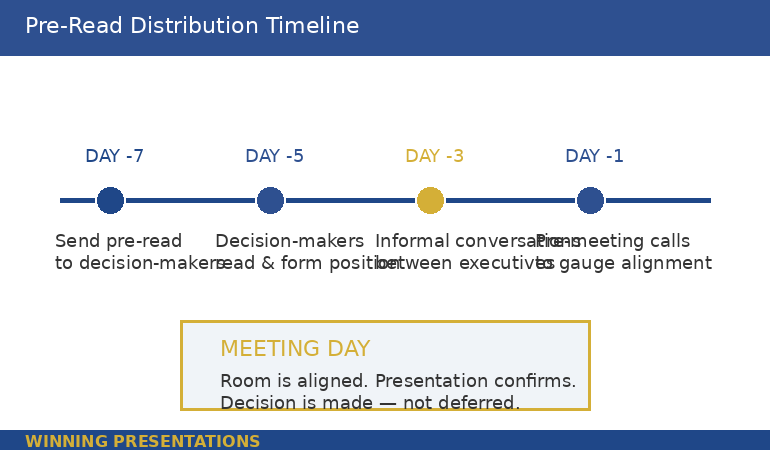
Pre-read distribution timeline showing optimal schedule from seven days before meeting to meeting day, with key actions at each stage including send, read, informal conversations, and pre-meeting calls

PAA: What goes in an executive pre-read?
Three sections only: a Decision Frame (why this is on the agenda, what you recommend, and what decision you need), an Evidence Stack (three to five numbered pieces of evidence supporting the recommendation), and the Ask (the specific decision, timeline, and meeting purpose). The total document should be two pages maximum. Detailed data, appendices, and supporting analysis belong in the presentation deck or in supplementary documents — not in the pre-read.

Why Your Slides Are Not a Pre-Read

This is the hill I will die on. I watched a managing director at PwC send a 38-slide deck as a pre-read before a partner meeting. The partners received it on Monday. By Wednesday, two had emailed back with detailed objections to slides 14 and 27. By Thursday’s meeting, the first twenty minutes were spent relitigating points that should have been addressed in the pre-read’s Evidence Stack — not discovered by scrolling through presentation slides.

Slides are designed for visual support during live narration. They use headlines, not paragraphs. They show charts, not arguments. They make no sense without a presenter standing next to them. When you send slides as a pre-read, you’re asking executives to guess what you’re going to say about each slide — and their guesses will be wrong.

A pre-read is a narrative document. Full sentences. Complete arguments. No visual dependencies. An executive should be able to read it at their desk, understand your recommendation, evaluate your evidence, and know what you need from them — without ever seeing a slide.

The slides and the pre-read work together, but they are not the same document. The pre-read builds alignment. The slides confirm it visually. I’ve written about board presentation best practices — the pre-read is what makes those best practices actually work, because the room arrives aligned.

🎯 The Pre-Read Gets Alignment. The Deck Confirms It.

The Executive Slide System gives you the deck frameworks that work in tandem with a strong pre-read. Decision slides, evidence sequences, and recommendation structures — all built from real board presentations where the pre-read did the heavy lifting and the deck sealed the decision.

Get the Executive Slide System — £39

Trusted by executives who understand that the best presentations start with what happens before the meeting, not during it.

Frequently Asked Questions

What format should an executive pre-read be in?

A Word document or PDF — never a slide deck. The pre-read should be a narrative document with full sentences and complete arguments. Two pages is optimal, three is the maximum. Use the Decision Frame (half a page), Evidence Stack (one to two pages), and Ask (three sentences) structure. Number your evidence points for easy reference in the meeting. Include your name, date, and “PRE-READ: [Meeting Name]” in the header so it’s immediately identifiable in an executive’s inbox.

How far in advance should you send a board pre-read?

Five to seven business days before the meeting. This gives decision-makers time to read it, form an initial position, and have informal conversations with other attendees. Sending it less than three days before risks executives arriving without having read it. Sending it more than ten days before risks it getting buried under newer priorities. If your organisation uses a formal “board book” process, align your pre-read submission with that timeline.

What should you NOT include in an executive pre-read?

Do not include background information the audience already knows, detailed methodology or technical workings, more than five evidence points, caveats or hedge language that weakens your recommendation, or anything that requires visual explanation (charts, graphs, diagrams). Those belong in the presentation deck or supplementary appendices. The pre-read’s job is clarity and alignment — not comprehensiveness. If it takes more than five minutes to read, it’s too long.

Get weekly executive presentation strategies

Frameworks, structures, and real examples from corporate boardrooms — delivered every week.

Subscribe to the Newsletter

Related: If the thought of presenting to a senior audience triggers more anxiety the more experienced you become, that’s common — and it’s a different problem from structure. Read Why Your Presentation Anxiety Gets Worse With Experience for the psychological side of high-stakes presenting.

About the Author

Mary Beth Hazeldine is the Owner & Managing Director of Winning Presentations. With 24 years of corporate banking experience at JPMorgan Chase, PwC, Royal Bank of Scotland, and Commerzbank, she has delivered high-stakes presentations in boardrooms across three continents.

A qualified clinical hypnotherapist and NLP practitioner, Mary Beth combines executive communication expertise with evidence-based techniques for managing presentation anxiety. She has supported presentations for high-stakes funding rounds and approvals across 15+ years of executive training.

Book a discovery call | View services

Your next step: Before your next high-stakes presentation, open a blank document and write the four sentences of your Decision Frame. Context, Impact, Recommendation, Decision Required. Send that half-page to your key decision-maker five days before the meeting and ask: “Does this capture the right framing?” Their response will tell you exactly where the resistance lives — before you build a single slide.

15 Feb 2026
Professional presenting pilot programme results at a whiteboard in a modern office, navy blazer, warm lighting, engaged and confident

The Pilot Worked. Now You Need the Slides to Prove It.

Quick answer: Most pilot programs that deliver strong results still fail to get full rollout approval — because the presentation focuses on what happened instead of what should happen next. The winning pilot results presentation follows an 8-slide structure: context, hypothesis, results, what surprised us, risk if we don’t scale, rollout recommendation, resource ask, and decision question. Lead with the recommendation. Prove it with the pilot. Make the decision easy.

My client’s pilot saved £1.2 million in twelve weeks.

The data was clean. The operations team loved it. The finance team had validated the numbers independently. By any rational measure, full rollout was the obvious next step.

She walked into the executive committee meeting with 34 slides. Fourteen of them were methodology. Eight were charts showing week-by-week performance. Four were appendix slides about the control group. She buried the recommendation on slide 29.

The CFO interrupted on slide 11. “What are you asking us to do?”

She stumbled. Started explaining the statistical model again. The CEO checked his phone. The meeting ran out of time before she reached the ask. They scheduled a follow-up — which took six weeks to land in diaries. By then, the pilot momentum was gone. A competitor launched a similar initiative. The rollout was approved eventually, but at half the budget she’d originally needed.

I’ve watched this pattern destroy pilot programs at JPMorgan Chase, Royal Bank of Scotland, and Commerzbank. The pilot works. The presentation doesn’t. Not because the data is weak — but because the structure treats executives like scientists instead of decision-makers.

Why Most Pilot Results Presentations Fail

The problem is structural, not intellectual. People who run successful pilots are usually rigorous thinkers. They’ve spent weeks or months collecting data, managing variables, documenting outcomes. When it’s time to present, they default to the format that feels most comfortable: the research report.

Executives don’t want a research report. They want three things answered in the first 90 seconds: What did you find? What do you recommend? What do you need from me?

The most common mistakes I see in pilot results presentations:

Leading with methodology. You spent months on the pilot design. Nobody in the room cares about your control group methodology unless they specifically ask. Start with what happened, not how you measured it.

Drowning in data. Every data point you collected feels important to you. Executives need three to five proof points, not thirty. The question isn’t “how much data do I have?” but “what’s the minimum evidence required for this decision?”

Burying the recommendation. If your recommendation appears after slide 15, you’ve already lost. The decision-maker is silently asking “where is this going?” from the moment you start speaking. Tell them immediately. Then prove it.

Ignoring the “what if we don’t” question. Every approval decision involves two risks: the risk of scaling and the risk of not scaling. Most presenters only address the first. The second is often more powerful — because executives are more motivated by what they might lose than what they might gain.

PAA: How do you present pilot results to executives?
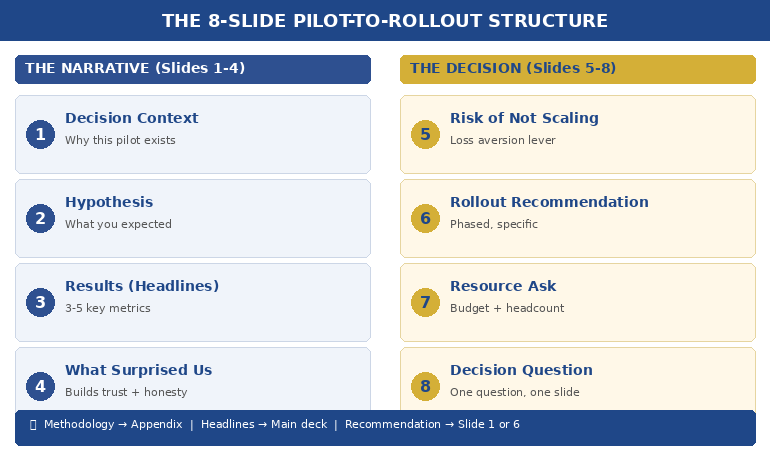
Lead with your recommendation, not your data. Use the 8-slide structure: context (why we piloted), hypothesis (what we expected), results (what happened), surprises (what we didn’t expect), risk of inaction (what happens if we don’t scale), recommendation (what to do next), resource ask (what you need), and decision question (the specific yes/no). Keep methodology in the appendix for anyone who asks.

Your Pilot Delivered Results. Your Slides Need to Deliver a Decision.

The Executive Slide System gives you the exact slide structures, sequencing, and layouts that senior leaders expect — including decision decks, recommendation frameworks, and executive summary formats. Stop rebuilding from scratch every time you need approval.

Get the Executive Slide System → £39

Built from 24 years in corporate banking + 15 years training executives. Includes decision deck templates, slide-by-slide guidance, and the recommendation-first structure used in board updates, steering committees, and approval decks.

The 8-Slide Pilot-to-Rollout Structure

After helping executives present pilot results across banking, consulting, and corporate strategy for 24 years, this is the structure that consistently gets decisions — not just compliments.

Slide 1: The Decision Context. One sentence: why this pilot exists and what decision it was designed to inform. “We piloted [X] to determine whether [Y] should be rolled out across [Z].” This isn’t background. It’s a frame. You’re telling the room: you will make a decision today.

Slide 2: The Hypothesis. What you expected to happen. This matters because it shows intellectual honesty. If the results matched your hypothesis, it builds confidence. If they didn’t, it shows you’re presenting truth, not advocacy. Either way, it signals rigour without forcing anyone to sit through your methodology.

Slide 3: The Results (Headline Format). Three to five key metrics, each with a single headline: “Customer processing time: reduced 41% (target was 25%)”“Error rate: down 67%”“Team adoption: 94% within 3 weeks.” No charts yet. Headlines first. Let executives absorb the story before you prove it.

Slide 4: What Surprised Us. This is the slide that builds the most trust. Every pilot produces unexpected findings — things that went better than expected, things that were harder than anticipated, edge cases you hadn’t considered. Presenting them demonstrates that you’re not selling — you’re reporting honestly. Executives fund people they trust, not people who only share good news.

Slide 5: The Risk of Not Scaling. This is the slide most people forget — and it’s often the most persuasive. What happens if the pilot stays a pilot? Competitor implications, cost of delay, team morale impact, missed market window. Frame it as: “If we don’t move to full rollout, here’s what we’re accepting.”

Slide 6: The Rollout Recommendation. Clear, specific, actionable. Not “we recommend scaling” but “we recommend Phase 1 rollout to the Northern region by Q3, followed by full deployment by Q1 next year.” Include the phasing — executives are far more likely to approve a staged rollout than an all-at-once launch.

Slide 7: The Resource Ask. What you need: budget, headcount, timeline, executive sponsorship. Be specific. “£340K over 18 months, 4 additional FTE, and a named executive sponsor from Operations.” Vague asks get vague responses. Specific asks get decisions.

Slide 8: The Decision Question. One question, on one slide, in one sentence. “Do we approve Phase 1 rollout to the Northern region at a cost of £340K, with a go/no-go review at month 6?” This is the slide that forces the room to decide rather than discuss. Without it, you’ll get “let us think about it” — which, in most organisations, means “we’ll forget about this.”


8-slide pilot-to-rollout decision deck structure showing the framework from context through recommendation to decision question

📊 Need the decision deck structure? The Executive Slide System (£39) includes the recommendation-first sequencing and slide-by-slide templates you can adapt to any pilot, any industry.

The Data Executives Actually Need (Not What You Collected)

Here’s a rule I teach every executive I work with: the data that ran the pilot is not the data that sells the rollout.

During the pilot, you tracked everything — daily metrics, edge cases, process variations, team feedback, system performance. That’s operational data. It’s essential for running the pilot. It’s terrible for presenting the results.

Executives need decision data. Decision data answers one question: is the evidence strong enough to commit resources?

The translation works like this:

Operational data: “We processed 1,247 transactions across 14 business days with a 3.2% exception rate, down from 8.7% in the control period, representing a…”
Decision data: “Error rate dropped 63%. At full scale, that’s £2.1M in annual savings.”

Operational data: “User adoption followed a standard S-curve with early adopter engagement at day 3, majority adoption by day 11…”
Decision data: “94% team adoption in 3 weeks. No additional training budget required.”

The operational data goes in your appendix — available if anyone asks. The decision data goes on your slides. If you’re presenting data to non-technical executives, this translation is the single most important skill you can develop.

PAA: What data should you include in a pilot results presentation?
Focus on three to five headline metrics that directly support the scale/kill/pivot decision. Each metric should include: the result, the target (so executives can see if you exceeded or missed), and the business impact at full scale. Keep raw data, methodology, and detailed analysis in appendix slides — available on request but not cluttering the decision narrative.

Stop Translating Data Into Slides From Scratch

The Executive Slide System includes decision deck templates with pre-built layouts for results slides, recommendation slides, and resource ask slides — the exact formats that get pilot programs funded for full rollout.

Get the Executive Slide System → £39

Built from 24 years in corporate banking at JPMorgan Chase, PwC, RBS, and Commerzbank. The same frameworks used in board-level funding presentations and executive approval decks.

How to Present Scale, Kill, or Pivot Honestly

Not every pilot succeeds. And even successful pilots sometimes reveal that the original plan needs adjusting. The best pilot results presentations are honest about all three outcomes — scale, kill, or pivot — because intellectual honesty is what makes executives trust you with larger budgets.

If the recommendation is Scale: Lead with it. Don’t hedge. “The pilot exceeded targets on all three primary metrics. We recommend full rollout.” Then prove it with the data. Hedging a clear success makes executives question whether you’re confident in your own results.

If the recommendation is Kill: This is the presentation that builds the most career credibility, and most people avoid it. Saying “the pilot didn’t work, and here’s why, and here’s what we learned” demonstrates the kind of judgment that gets you trusted with bigger initiatives. Frame it as: “The pilot answered the question it was designed to answer. The answer is no — and here’s what that saves us.” Include the cost avoided by not scaling something that wouldn’t have worked.

If the recommendation is Pivot: This is the most common real-world outcome — and the hardest to present. The pilot partially worked, or it worked differently than expected, or it revealed a better opportunity than the original hypothesis. Structure it as: “The pilot validated [X] but revealed that [Y] is the higher-value opportunity. We recommend pivoting the rollout to focus on [Y], using the pilot learnings as the foundation.”

Whatever the recommendation, the 3-slide decision framework gives executives what they need: a clear recommendation, the evidence behind it, and a specific ask.

📊 Scale, kill, or pivot? The Executive Slide System (£39) includes the recommendation-first slide order for all three scenarios — so you never figure out the structure from scratch.

The Slide Nobody Includes: What Happens If We Don’t Scale

In 24 years of watching executive decisions, the single most persuasive slide I’ve seen in pilot results presentations is the one that answers: what do we lose by doing nothing?

Executives are loss-averse. Behavioural economics research consistently shows that the fear of losing something is approximately twice as motivating as the prospect of gaining something equivalent. This is why “we could save £2M” is less compelling than “we’re currently losing £2M per year by not scaling this.”

Your “risk of inaction” slide should include:

Competitive exposure. If you’ve piloted something that works, how long before competitors figure it out? “Three competitors are piloting similar approaches. First-mover advantage has a 6-month window.”

Cost of delay. Every month you don’t scale is a month of unrealised savings or revenue. Quantify it. “Each quarter of delay costs £520K in continued manual processing.”

Team momentum. Pilot teams lose energy when decisions stall. “The pilot team has been waiting 8 weeks for a decision. Two key team members have been approached by competitors.”

Sunk cost clarity. Not in the psychological fallacy sense — in the practical sense. “We’ve invested £180K in this pilot. Without rollout approval, that investment generates zero ongoing return.”

This isn’t manipulation. It’s giving executives the complete picture. They’re weighing two risks — the risk of acting and the risk of not acting. Most presenters only address the first. The complete picture, honestly presented, is what the approval packet method is designed to deliver.

PAA: How do you convince executives to scale a successful pilot?
Don’t try to convince — present the complete decision picture. Show the pilot results (headline metrics, not raw data), the risk of not scaling (competitor exposure, cost of delay, team attrition), the specific rollout recommendation (phased, with milestones), and the resource ask. Executives fund clarity, not enthusiasm. The strongest persuasion is a well-structured decision deck that makes saying yes easier than saying “let me think about it.”

The Pilot Worked. Don’t Let the Presentation Kill the Rollout.

The Executive Slide System gives you decision deck structures, recommendation-first sequencing, and executive summary formats — designed for the moments when your slides need to secure budget, headcount, and go-ahead. Built from real boardroom experience across banking, consulting, and corporate strategy.

Get the Executive Slide System → £39

Built from 24 years in corporate banking + 15 years training executives. Instant access to slide templates, sequencing guides, and the structures used in board updates, steering committees, and approval decks.

Frequently Asked Questions

How many slides should a pilot results presentation be?

Eight to twelve slides for the main deck, with appendix slides for methodology and detailed data. The 8-slide structure (context, hypothesis, results, surprises, risk of inaction, recommendation, resource ask, decision question) covers everything executives need. If someone wants the detail behind a number, that’s what appendix slides are for — available on request, not forced on everyone.

What if my pilot results are mixed — some metrics hit target and some didn’t?

Present honestly. Mixed results are the most common real-world outcome and executives respect transparency. Structure it as: “The pilot met or exceeded targets on [X, Y] and fell short on [Z]. Our recommendation accounts for this — we’re proposing a modified rollout that focuses on the validated elements while addressing [Z] through [specific adjustment].” Trying to spin mixed results as a clean win destroys credibility faster than the data itself.

Should I present pilot results differently to different audiences?

Yes — but the structure stays the same. For a CFO, lead with the financial metrics and ROI projection. For an operations executive, lead with efficiency and team impact. For a CEO, lead with strategic alignment and competitive positioning. The 8-slide structure accommodates this by adjusting which metrics you headline on Slide 3 and which risk you emphasise on Slide 5. The recommendation and ask stay identical regardless of audience.

How do I handle the “let’s extend the pilot” response?

“Let’s extend the pilot” is usually code for “I’m not confident enough to decide.” Address this directly: “I understand the instinct to gather more data. The risk is that extending the pilot for another quarter costs us [£X] in delayed savings and [competitive risk]. The data we have answers the question the pilot was designed to answer. If there’s a specific metric that would change the decision, I’d like to understand what that is so we can target it.” This reframes extension as a decision — not a default.

📬 The Winning Edge Newsletter

Weekly executive presentation strategies, decision deck frameworks, and career-critical communication insights. No fluff.

Subscribe free →

🎯 Free: Executive Presentation Checklist

The pre-presentation checklist I give every executive before a high-stakes meeting. Covers structure, messaging, audience preparation, and the decision deck essentials.

Download free →

Related: If presenting your pilot results triggers nerves — especially when the stakes are this high — read about why introverted executives often present better than extroverts. The calm, evidence-led delivery style that suits pilot presentations is exactly where introverts have the edge.

Your pilot did the hard work. The data exists. The results speak for themselves — if your slides let them. Use the 8-slide structure. Lead with the recommendation. Include the risk of not scaling. Make the decision question unavoidable.

And if you want the slide templates that make this structure effortless, the Executive Slide System (£39) has you covered.

About the Author

Mary Beth Hazeldine is the Owner & Managing Director of Winning Presentations. With 24 years of corporate banking experience at JPMorgan Chase, PwC, Royal Bank of Scotland, and Commerzbank, she has helped executives present pilot results, business cases, and funding requests in boardrooms across three continents.

A qualified clinical hypnotherapist and NLP practitioner, Mary Beth combines executive communication expertise with evidence-based techniques for managing high-stakes presentations. She has spent 15 years training executives in decision deck structure, stakeholder communication, and confident delivery.

Book a discovery call | View services